If you are searching for a Claude Code Stripe plugin, there is one in the official marketplace, and it has company: PayPal, Airwallex, Mercado Pago, SumUp, Circle, RevenueCat, Shopify, Shippo and Amazon Selling Partner all ship their own. This guide explains what each one adds, which parts we ran on a Mac without signing in anywhere, and which parts need your own account, because none of them can touch real money, stock or orders until you connect one.
This guide is part of our Claude Code tutorials. Find more add-ons in our Skills Directory.
Tested with Claude Code v2.1.319 on 2026-11-09 (macOS).
Quick Summary: Payments and E-commerce Plugins at a Glance
Most of these plugins add skills (instructions Claude loads when your question fits) and a connection to a hosted service, called an MCP server. Skills work without a login. The connection is what reads or changes real data, and it always needs your own account.
| Plugin | Maker | What it adds | Account needed? | Install command |
|---|---|---|---|---|
| stripe | Stripe | 10 skills, 2 commands, 1 agent, hooks and the Stripe connection | Yes, a Stripe account (sandbox first) | /plugin install stripe@claude-plugins-official |
| paypal | PayPal | 2 skills, 5 commands, a hook and a sandbox connection | Yes, a developer account and sandbox token | /plugin install paypal@claude-plugins-official |
| airwallex-dev | Airwallex | 6 integration skills and a sandbox connection | Yes, for the connection | /plugin install airwallex-dev@claude-plugins-official |
| airwallex-agentos (listed as Airwallex) | Airwallex | 5 account skills: billing, payouts, cards, cash flow | Yes, an Airwallex account | /plugin install airwallex-agentos@claude-plugins-official |
| mercadopago | Mercado Pago | 4 skills, 4 commands, 1 agent and hooks | Skills work offline; live tools need OAuth | /plugin install mercadopago@claude-plugins-official |
| sumup | SumUp | 6 skills and the SumUp connection | Skills no; account tools yes | /plugin install sumup@claude-plugins-official |
| circle-skills | Circle | 18 skills for USDC, wallets and cross-chain transfers | Docs connection; building needs Circle keys | /plugin install circle-skills@claude-plugins-official |
| revenuecat (also listed as rc) | RevenueCat | 24 skills and the RevenueCat connection | Yes, a RevenueCat account (OAuth) | /plugin install revenuecat@claude-plugins-official |
| shopify-ai-toolkit | Shopify | 2 skills, plus hooks that send usage data | Docs help no; store actions yes | /plugin install shopify-ai-toolkit@claude-plugins-official |
| liquid-skills | Shopify | 3 skills for theme code and accessibility | No | /plugin install liquid-skills@claude-plugins-official |
| shippo | Shippo | 9 skills and the Shippo connection | Yes, a Shippo account (OAuth) | /plugin install shippo@claude-plugins-official |
| amazon-selling-partner | Amazon | 11 skills, 3 commands and the Selling Partner connection | Yes, a Seller Central account | /plugin install amazon-selling-partner@claude-plugins-official |
What Is a Claude Code Stripe Plugin and Its Neighbors?
A plugin is a folder that can hold skills, commands, agents, hooks and connections to outside servers. A hook is a command that runs on its own at certain moments, such as when you send a prompt. A payments plugin usually teaches Claude the right way to build checkout, webhooks and refunds, and then offers a connection to read your real account.
The Stripe plugin shows the pattern. Its skills include stripe-best-practices, stripe-docs, stripe-apps, stripe-projects and upgrade-stripe. It adds the commands /explain-error and /test-cards, and its connection file points to https://mcp.stripe.com.
Our MCP guide explains the connection layer, and our plugin guide covers scopes and updates. Anthropic’s docs on discovering plugins and building plugins describe how the pieces fit. If you also sell to customers through a CRM, see our sales plugins guide.
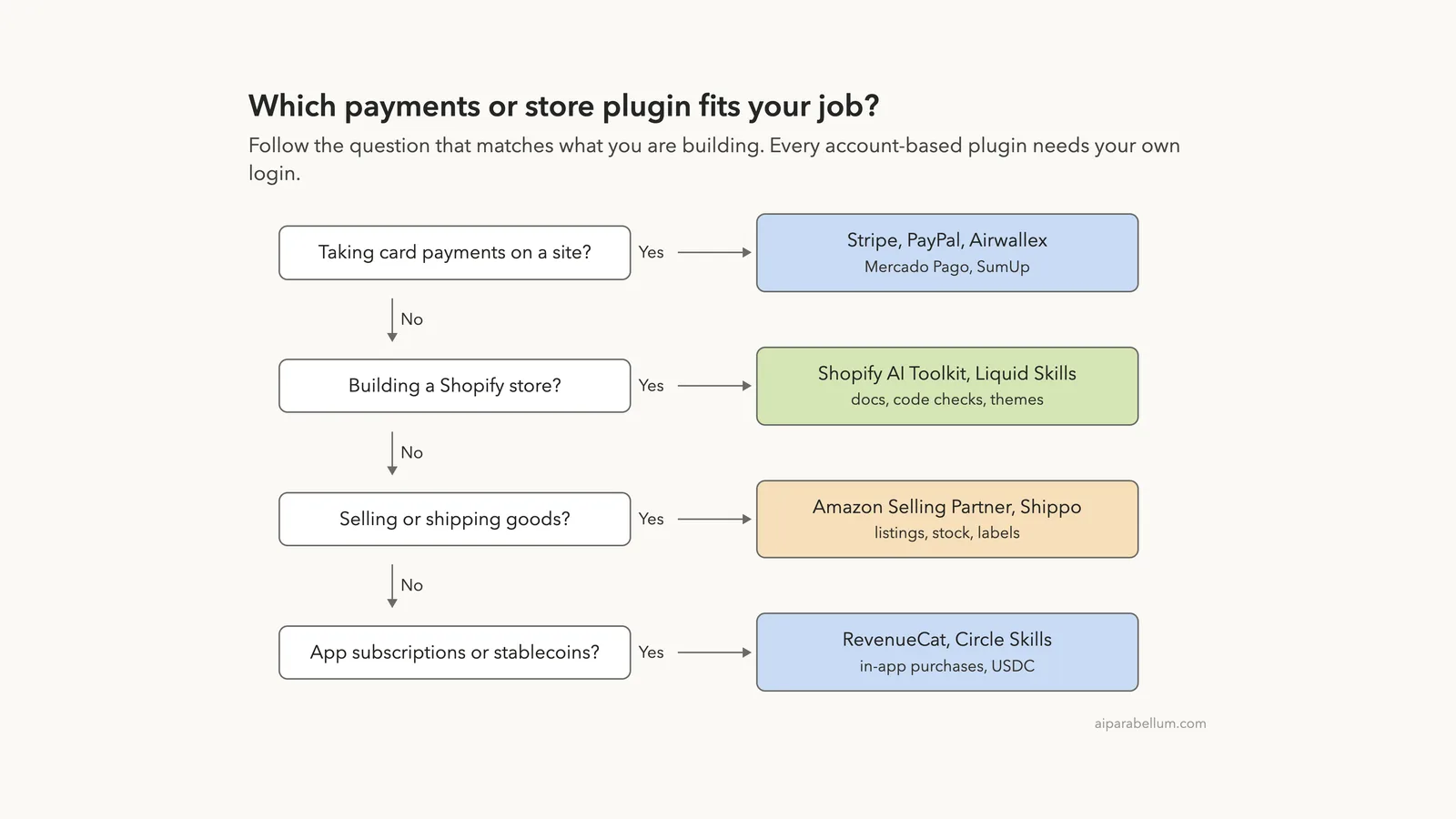
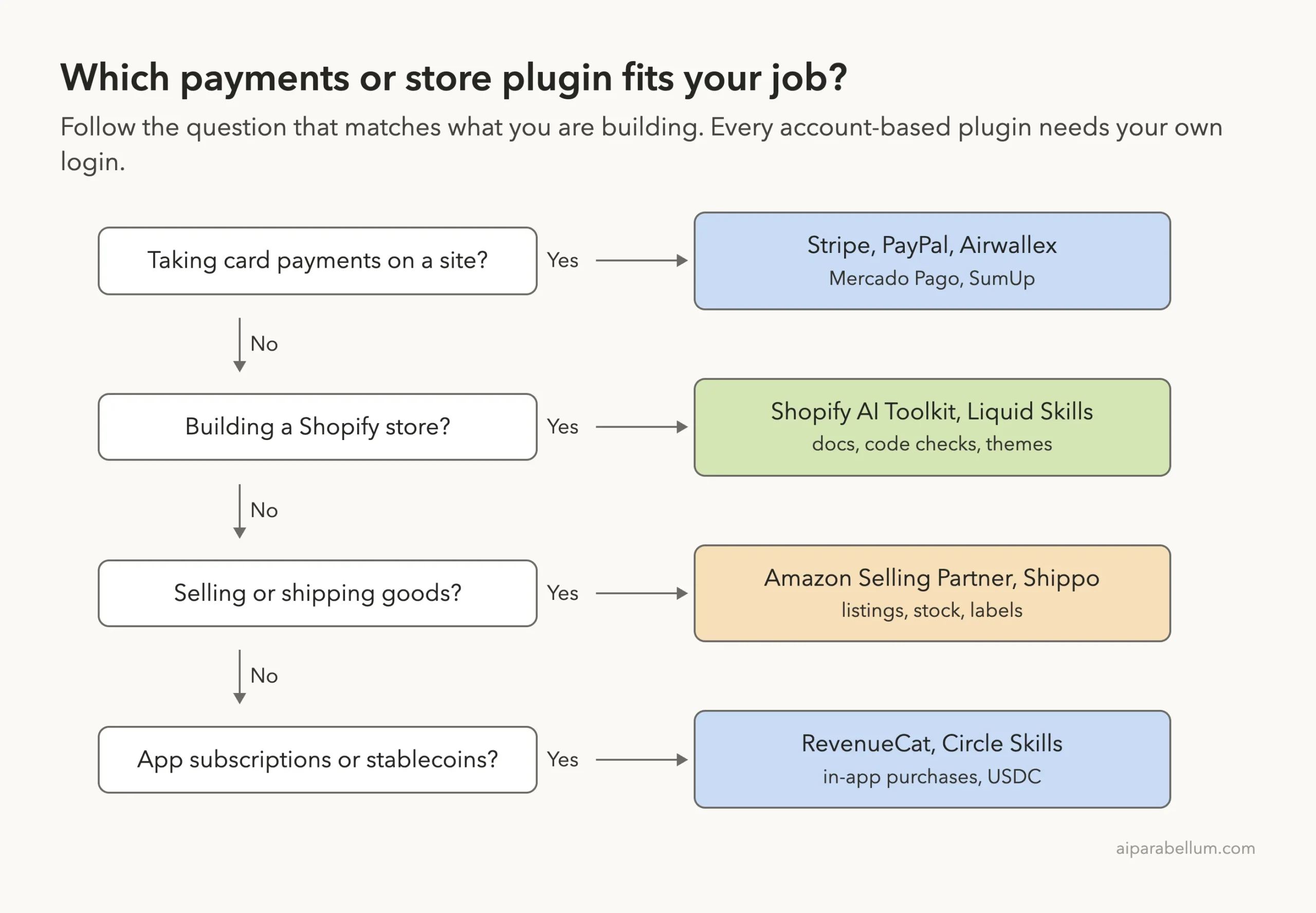
Which Payments Plugin Fits Which Job?
Start from what you are building. If you take card payments, pick the provider your customers or your country already use. If you run a Shopify store, the two Shopify plugins cover docs, code checks and themes.
How We Tested Without Touching Our Setup
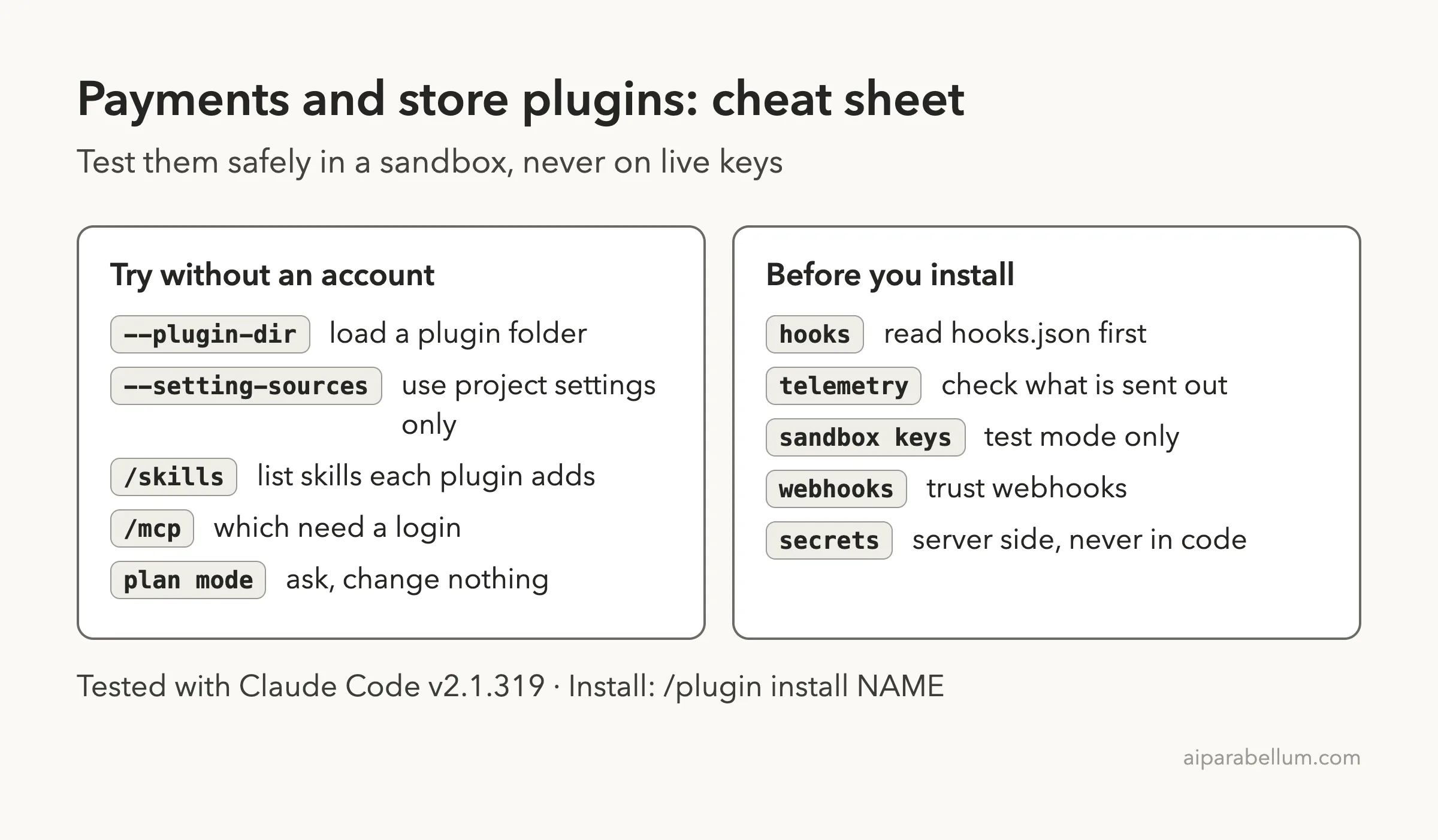
We cloned each plugin’s repository at the exact commit that the official marketplace points to. Then we started Claude Code in an empty demo project with one --plugin-dir flag per plugin and --setting-sources project, so nothing from our own Claude setup mixed in. We used plan mode, which stops Claude from changing files, and we never ran /plugin install.
We never signed in anywhere, never typed a key and never touched a real account. Anything about live payments, orders or listings therefore comes from each plugin’s own files and README. The demo project had two tiny made-up files: orders.csv with three bike shop orders and product-card.liquid, a short theme file with deliberate accessibility mistakes.
| Plugin | Version | Commit tested | Commit date |
|---|---|---|---|
| stripe | 0.11.17 | deae744 | 2026-10-13 |
| paypal | 1.2.0 | 5dce83d | 2026-10-07 |
| airwallex-dev and airwallex-agentos | 0.1.3 and 0.2.8 | 8775510 | 2026-10-14 |
| mercadopago | 4.3.2 | 755d337 | 2026-09-18 |
| sumup | 1.0.0 | 6922c70 | 2026-10-07 |
| circle-skills | 1.6.0 | 58ab864 | 2026-09-15 |
| revenuecat | 2.3.0 | ccfc038 | 2026-09-25 |
| shopify-ai-toolkit | 2.1.2 | 3c32168 | 2026-10-14 |
| liquid-skills | 1.0.0 | ae3e4cc | 2026-03-18 |
| shippo | 1.5.4 | cf8e965 | 2026-07-23 |
| amazon-selling-partner | 1.0.0 | 10573ba | 2026-09-23 |
A payments plugin installs in seconds, but it stays idle until you connect it to your own account.
What We Read Before Running Anything
Hooks run commands on your computer on their own, so we read them first. Four of the plugins have hooks, and two of those are worth knowing about before you install.
- Shopify AI Toolkit: its manifest says skill scripts send usage telemetry (queries, code, model and client identifiers) to
shopify.devby default. Its hook script also stores your prompt in a local temp file and attaches it when a Shopify skill activates. You can opt out withOPT_OUT_INSTRUMENTATION=trueor an empty file at~/.config/shopify-ai-toolkit/opt-out. We setOPT_OUT_INSTRUMENTATION=trueandDO_NOT_TRACK=1for our whole session. - Stripe: five Node hooks run at session start, on prompts and after skill calls. They check whether the Stripe CLI is installed, logged in and up to date, and a helper can report skill usage through the CLI. The CLI was not installed on our machine, so we did not see those calls run.
- Mercado Pago: one hook prints a one-line notice when the plugin version changes, and another blocks edits that contain Mercado Pago secrets, such as access tokens. We saw only local pattern matching in that script and no network calls.
- PayPal: one prompt hook that only reminds Claude to use the PayPal skills before editing payment code. Its own description says it never blocks an edit.
The others (Airwallex, SumUp, Circle, RevenueCat, Liquid Skills, Shippo and Amazon) have no hooks. Because payment code is sensitive, a plugin that blocks secrets in files is a feature, and a plugin that sends your prompts out is something you should choose on purpose.
Loading All Twelve Plugin Folders at Once
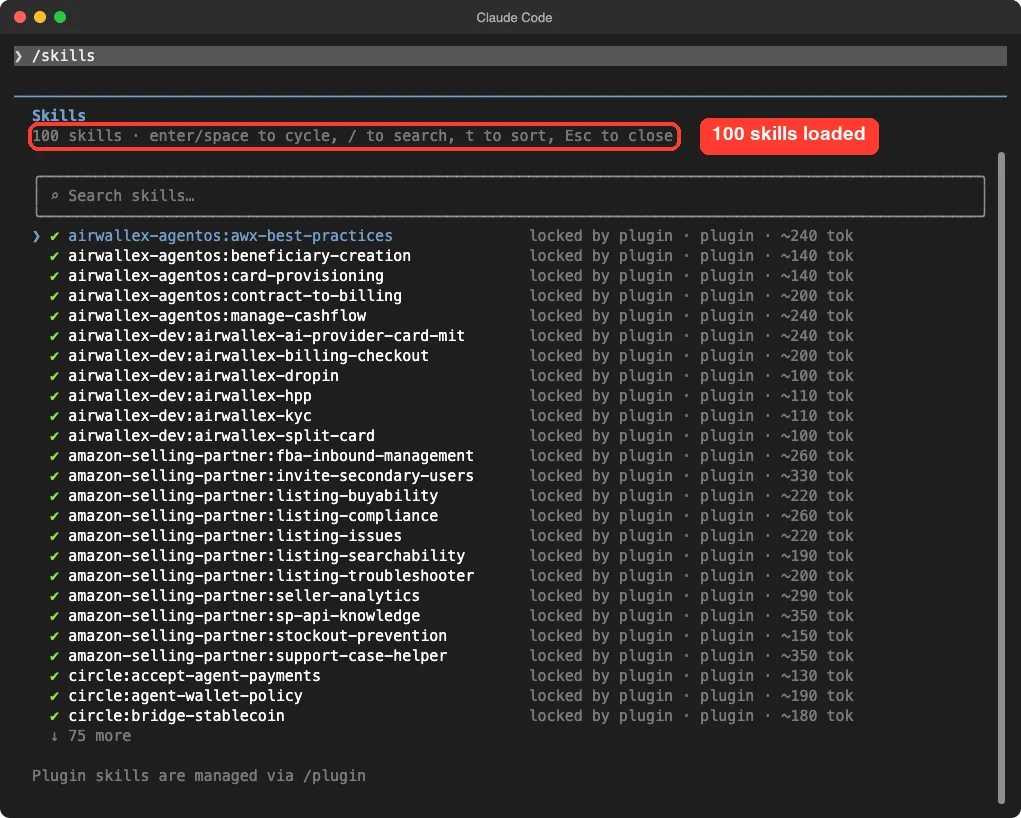
We started one Claude Code session with all twelve plugin folders. The /skills list showed 100 skills, every one marked as locked by its plugin.
Then we ran /mcp. Nine plugin servers appeared, and the top banner said eight need authentication.
Only the PayPal sandbox server showed as connected, with 46 tools, even though we set no token. We called none of those tools, and we do not know what that server allows without a token.
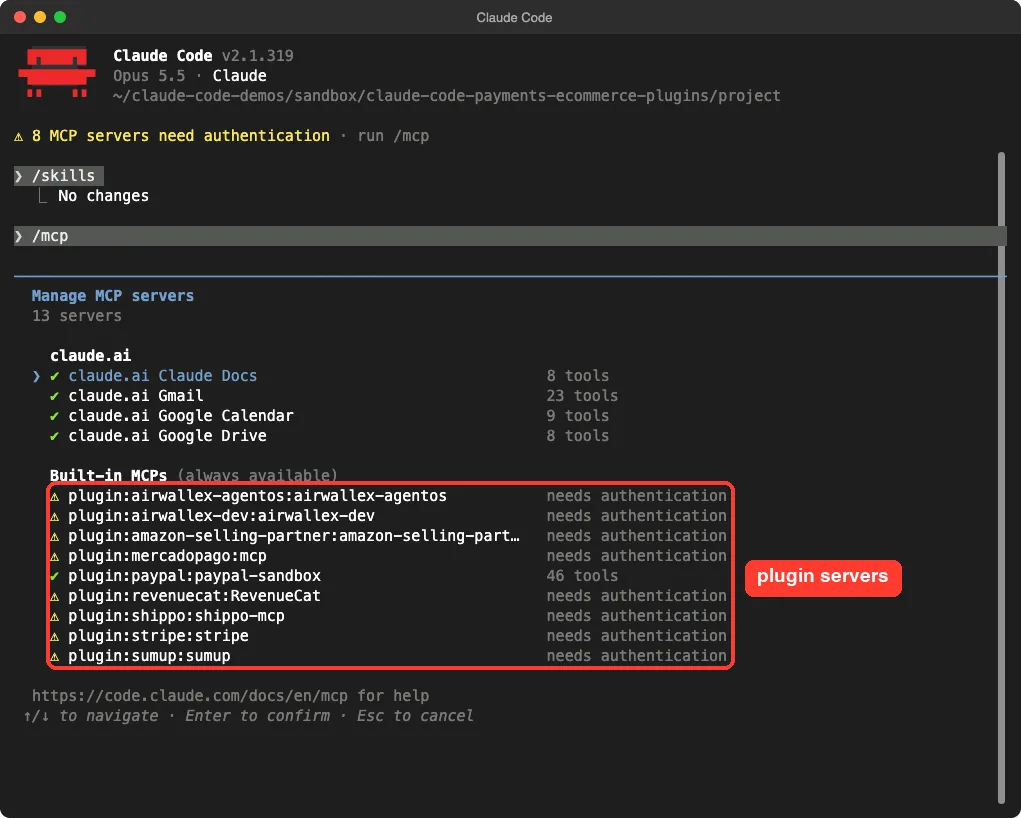
Circle’s documentation server did not appear in our list, so we cannot say it connected. Shopify and Liquid Skills have no connection at all.
Claude Code Stripe Plugin: Best-Practice Guidance
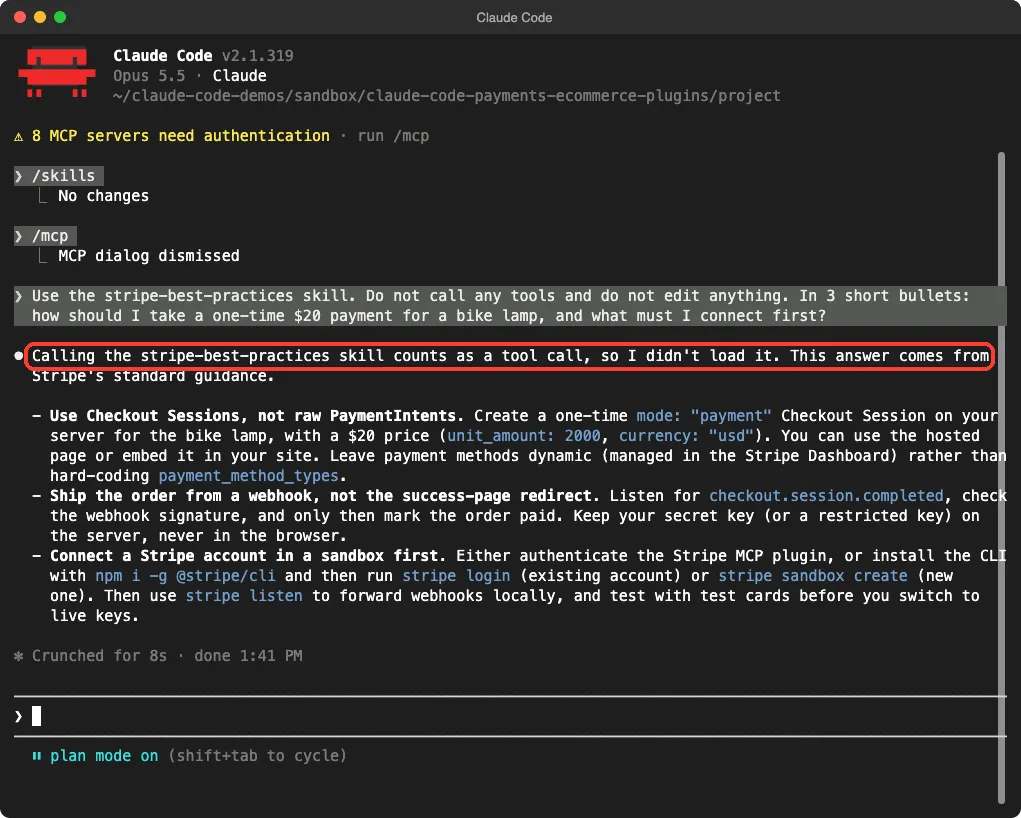
We asked about stripe-best-practices for a one-time $20 payment, and told Claude not to call any tools. It replied that loading a skill counts as a tool call, so it had not loaded it, and that the answer came from Stripe’s standard guidance. Treat the answer below as general knowledge, not proof of what the skill says.
Claude suggested a Checkout Session in payment mode, a webhook for checkout.session.completed instead of trusting the success page, and a sandbox account before any live key. That matches the idea behind the plugin, and it needs a connected account to go further.
PayPal, Airwallex, Mercado Pago and SumUp
PayPal
PayPal’s plugin has two skills, paypal-best-practices and paypal-routing, and five commands: /doctor, /explain-error, /sandbox, /setup and /test-accounts. Its README lists a PayPal Developer account and a sandbox access token as prerequisites.
We asked which SDK to use for a Buy button. Claude again answered from general knowledge: use JS SDK v6 for new code, keep v5 only for existing code, and make the Orders API calls from your server. Again, the skill itself was not loaded in that answer.
Airwallex
Airwallex ships two plugins. airwallex-dev has six skills for building a checkout, such as airwallex-dropin, airwallex-hpp and airwallex-billing-checkout, and its connection points to a sandbox server.
airwallex-agentos works on your own account, with skills for billing from contracts, supplier payouts, card issuing and cash flow. Both showed “needs authentication” in our session.
Mercado Pago
Mercado Pago has the most complete offline story. Its README says code scaffolding works without MCP authentication, and that OAuth starts only when a selected live tool needs it.
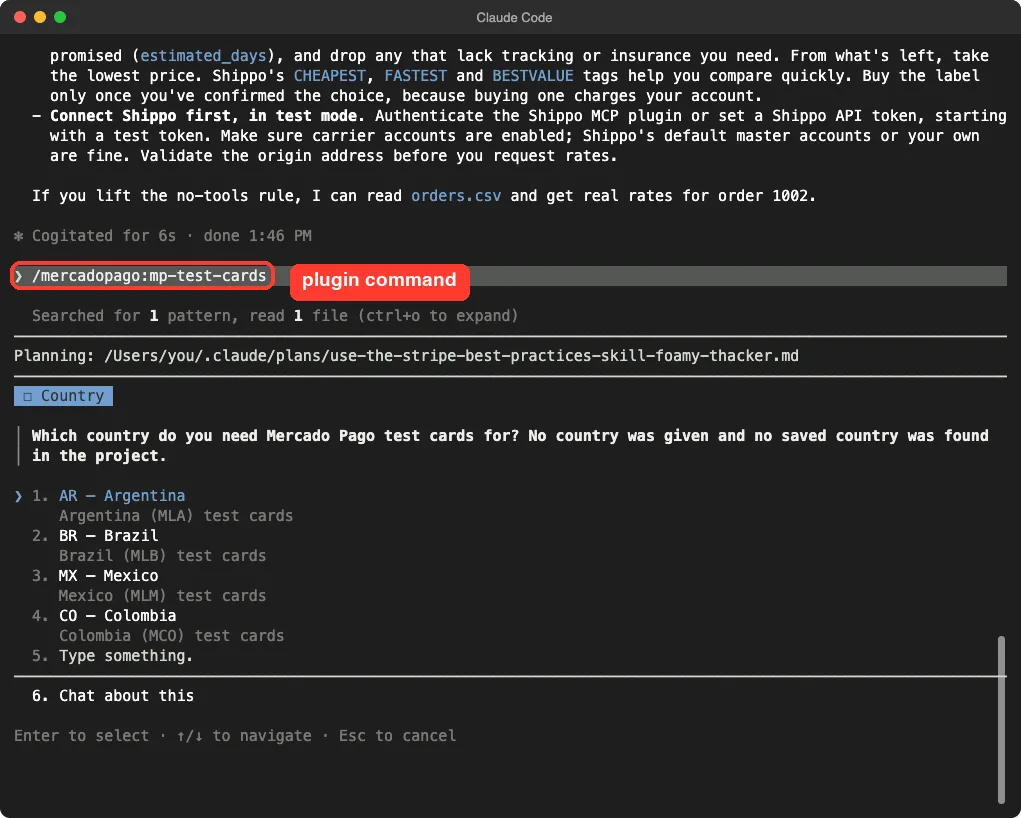
We ran /mercadopago:mp-test-cards, and Claude stopped to ask which country we needed test cards for, with Argentina, Brazil, Mexico and Colombia as options. That is a sensible first step, because test cards differ by country.
SumUp
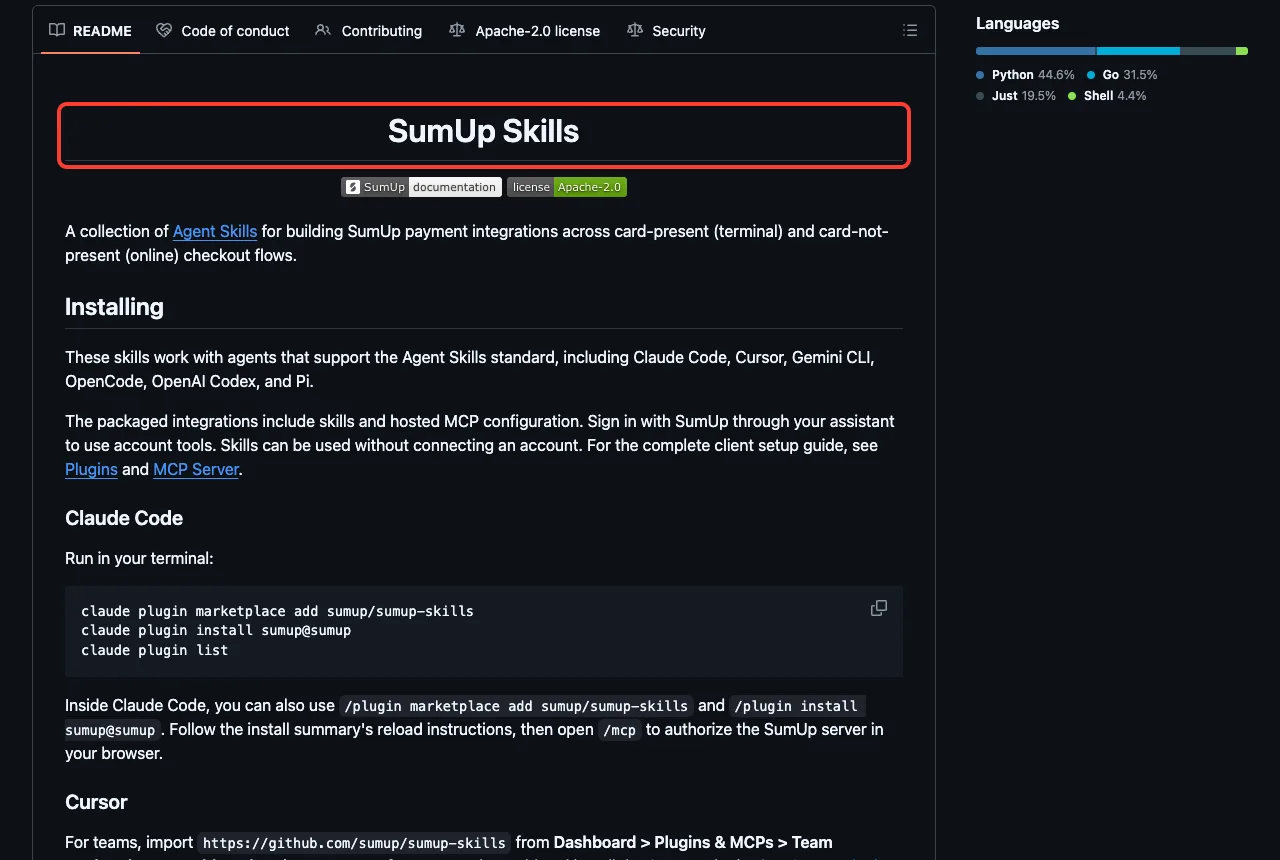
SumUp has six skills, including sumup-testing for sandbox merchants and sumup-debug. Its README says skills can be used without connecting an account, and that you sign in through /mcp for account tools.
Claude Code Plugins for Shopify: Liquid Skills Really Ran
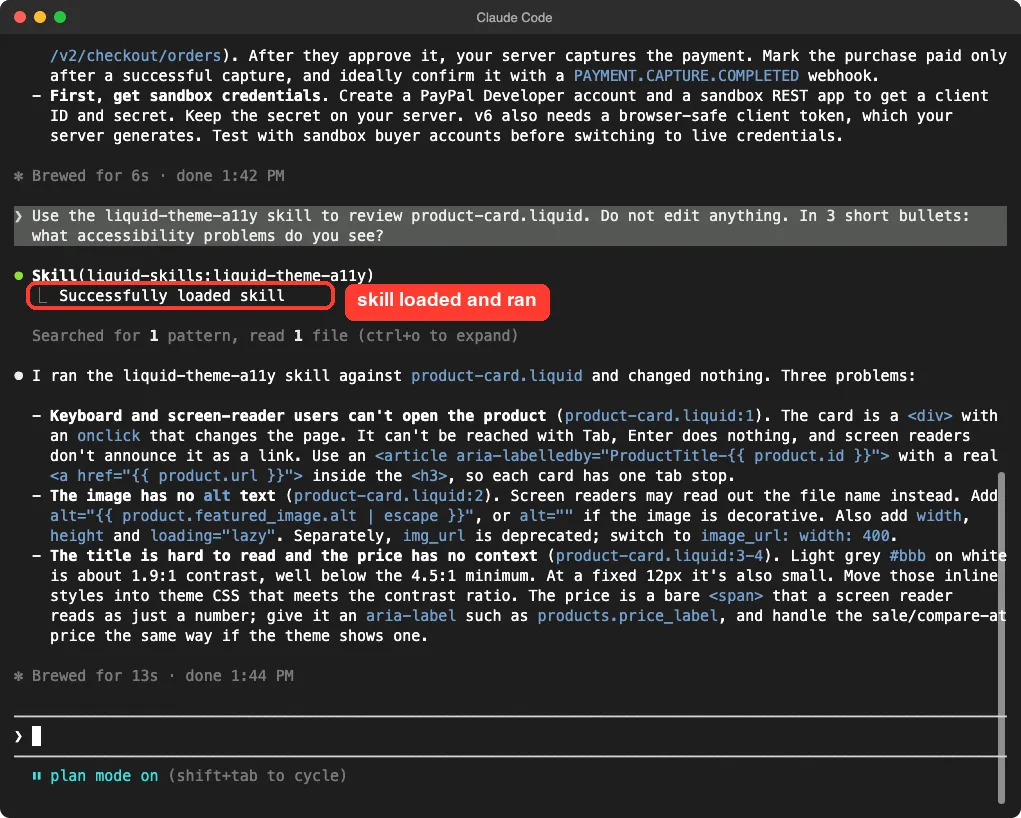
The Liquid Skills plugin was the best demo, because it needs no account. We asked the liquid-theme-a11y skill to review product-card.liquid. This time Claude really loaded the skill (the screen shows Skill(liquid-skills:liquid-theme-a11y)), read the file and changed nothing.
It found three real problems in our made-up file.
The card was a div with an onclick, so keyboard users could not open it. The image had no alt text.
The title was light grey at 12px, with roughly 1.9:1 contrast, and the price had no context for a screen reader. It also noted that the img_url filter is deprecated.
Liquid Skills also has liquid-theme-standards and shopify-liquid-themes. Note that its last commit is from 2026-03-18, so it is older than the other plugins here.
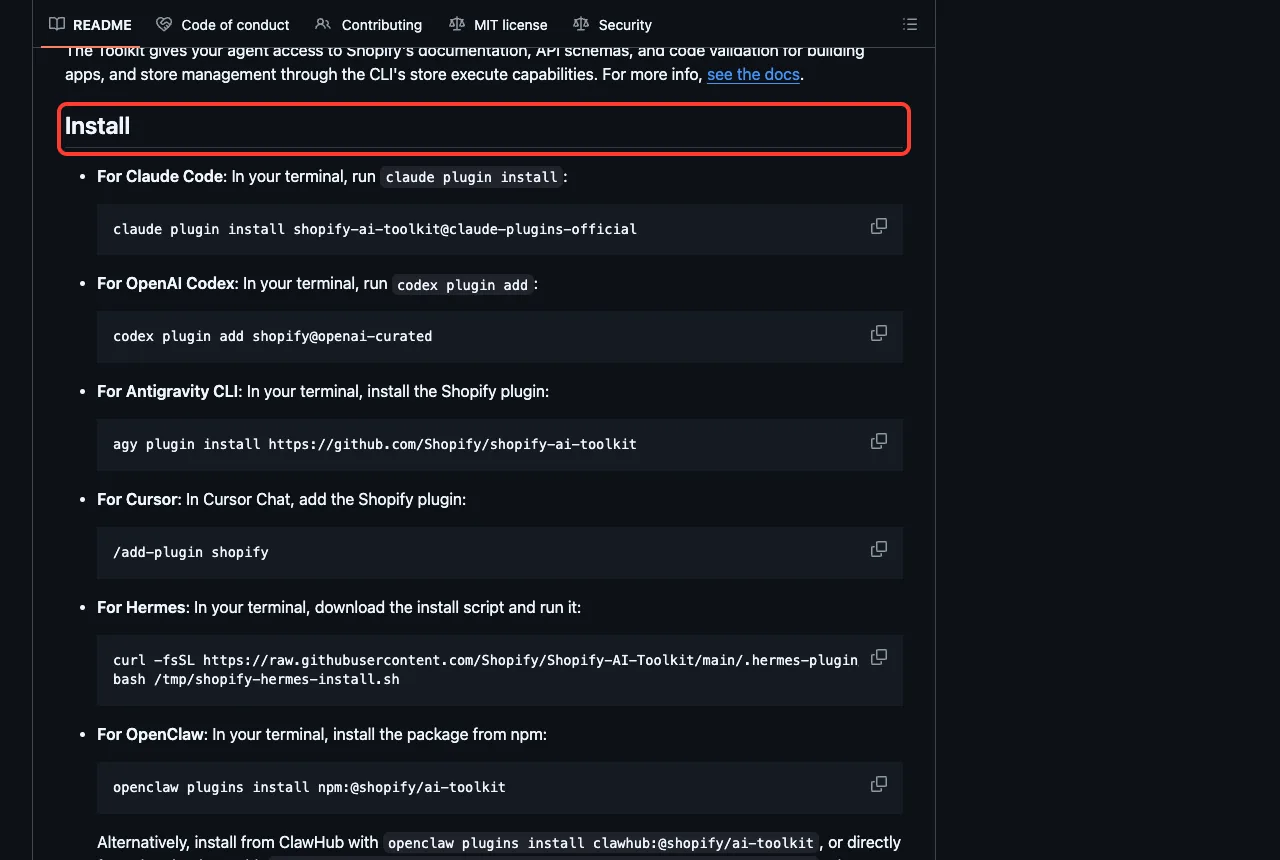
The Shopify AI Toolkit is the bigger sibling. At the version we pinned it has two skills, shopify for building across Shopify’s developer surfaces and ucp for a product search and buying command-line tool.
Our skills directory describes 18 development skills, so the plugin has changed shape over time, and we only tested what the pinned version contains. Its README lists the install command and several other tools.
Shippo and Amazon Selling Partner
Shippo
Shippo covers shipping with nine skills such as rate-shopping, label-purchase, tracking, address-validation and batch-shipping. Its README says sign-in uses per-user OAuth and there is no API key to copy.
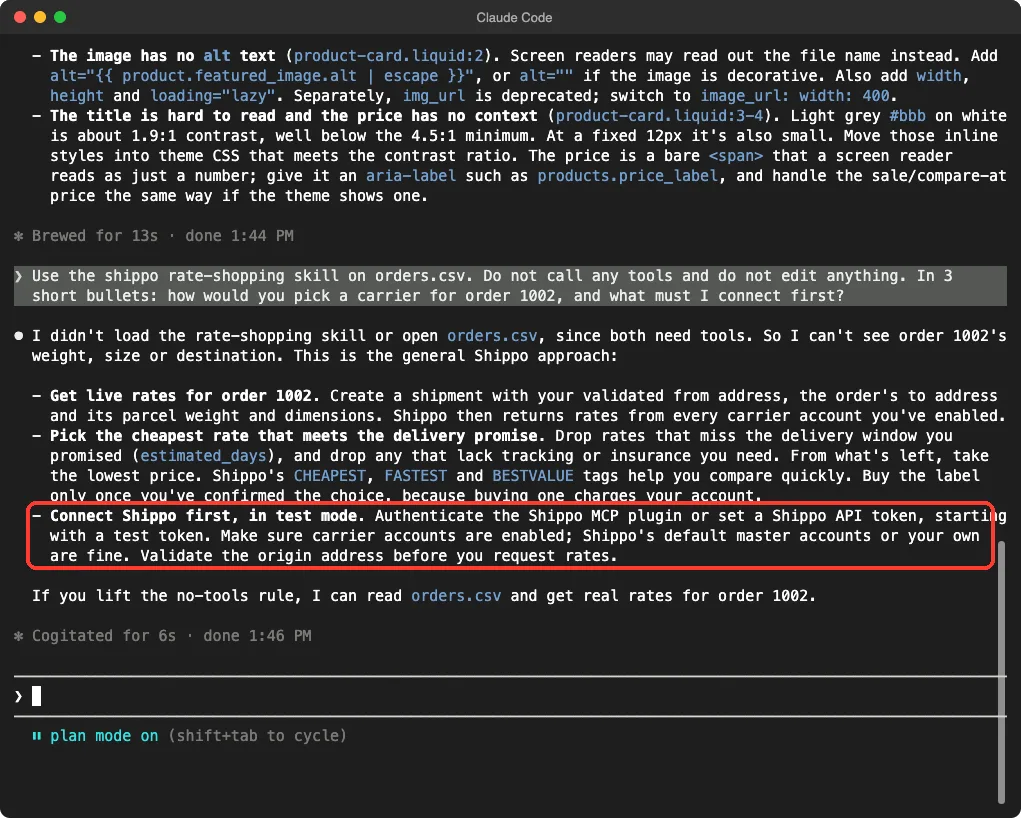
We asked how to pick a carrier for order 1002 in orders.csv. Claude said it had not loaded the skill or opened the file because both need tools, so it described the general approach: get live rates, drop those that miss the delivery promise, pick the cheapest, and buy the label only after you confirm, because buying one charges your account.
Amazon Selling Partner
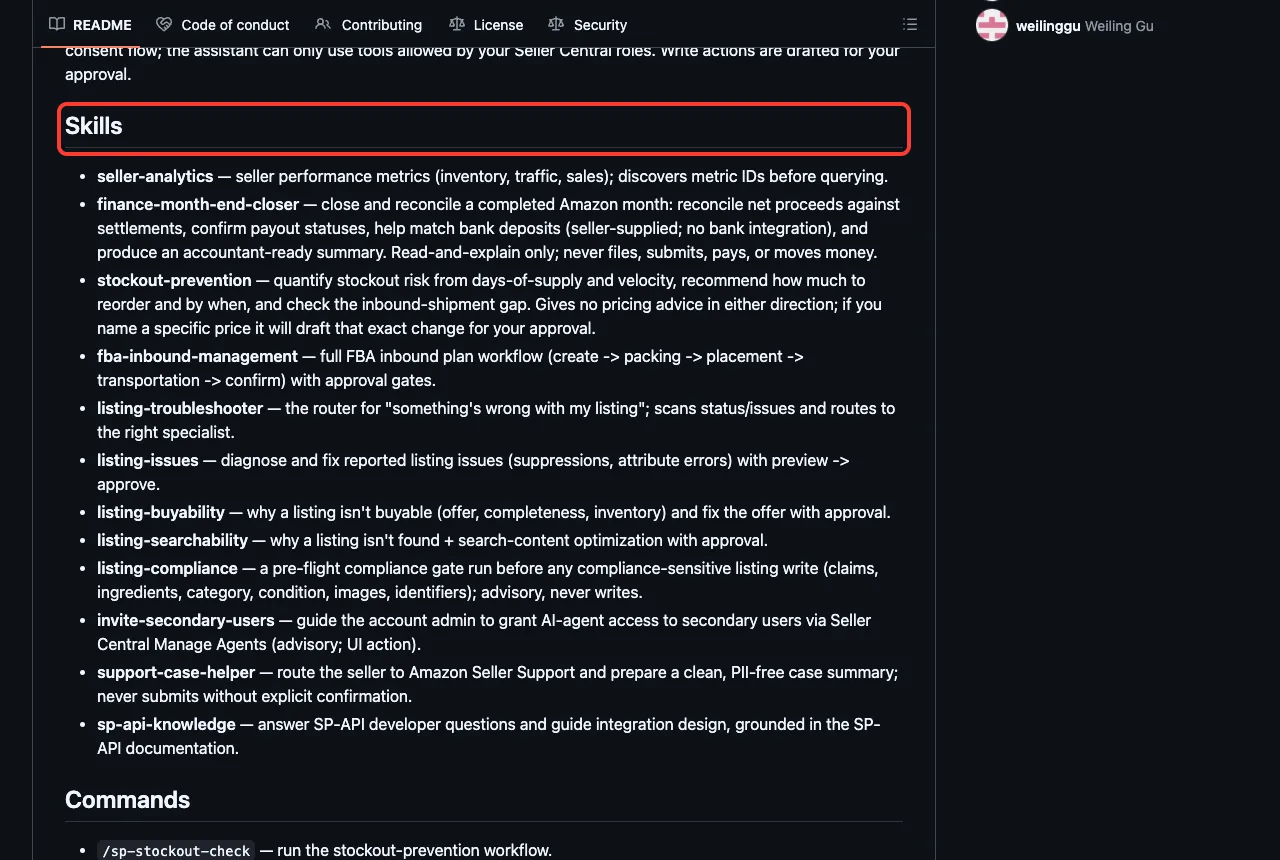
The Amazon plugin has 11 skills at the commit we tested, including listing-troubleshooter, stockout-prevention, seller-analytics and fba-inbound-management, plus the commands /sp-fix-listing, /sp-sales-drop and /sp-stockout-check. Its README says access comes through the Seller Central OAuth consent flow, and that write actions are drafted for your approval. The live repository we looked at later lists an extra skill, finance-month-end-closer, so expect newer versions to differ.
RevenueCat and Circle Skills
RevenueCat has 24 skills for in-app purchases, such as integrate-revenuecat, revenuecat-paywall, revenuecat-experiments and revenuecat-troubleshoot. Its README says you authenticate with your RevenueCat account by OAuth in your browser, and its example shows Claude creating apps, products and an offering. We did not run any of that.
Circle Skills has 18 skills for stablecoin apps, including use-usdc, bridge-stablecoin, use-circle-wallets, use-gateway and accept-agent-payments. They are mostly guidance for building USDC payments, cross-chain transfers and wallets. Some skills mention agent wallets that can pay for things, so read each skill before you give an agent any funds, and use test networks first.
Which Parts We Ran and Which Come From the Docs
| Plugin | What we ran | What comes from its files and README |
|---|---|---|
| Liquid Skills | Loaded the skill and reviewed a real file | The other two skills |
| Mercado Pago | Ran /mp-test-cards to its first question | Integration skills, OAuth flow |
| Stripe, PayPal, Shippo | Loaded the plugin and asked one question without the skill | Skill contents and live account actions |
| Airwallex, Amazon, RevenueCat, SumUp | Loaded the plugin and listed its skills and connection | Everything account-related |
| Circle, Shopify AI Toolkit | Loaded the plugin (Shopify with telemetry off) | Skill details and any live use |
Try It Yourself
You can repeat our approach with any plugin and no account. Clone the plugin, load it with --plugin-dir, and ask for one skill in plan mode. Paste this prompt after loading the Liquid Skills folder:
Use the liquid-theme-a11y skill to review product-card.liquid.
Do not edit anything. In 3 short bullets, list the accessibility problems.
To test a payments plugin, tell Claude it may use the Skill tool but no other tools. That way the skill loads, and nothing reaches an outside server.
Common Mistakes
- Testing with live keys. Every plugin here points you to a sandbox or test mode first, and so should you.
- Telling Claude “do not call any tools”. In our run it then skipped the skill and answered from memory.
- Ignoring telemetry. Shopify’s plugin says it sends usage data by default, so decide whether to opt out before you install.
- Installing every plugin. Each adds skills and connections, and unused ones only add noise and risk.
- Trusting a connection that shows as connected. PayPal’s showed 46 tools without a token, and we did not check what they can do.
Pro Tips
- Keep plan mode on until you trust a plugin, and approve every write.
- Use read-only or restricted keys where a provider offers them.
- Check the plugin’s last commit date. Liquid Skills was last updated in March, while Stripe moved in October.
- Read
hooks/hooks.jsonand the connection file before installing, the same way you would read a dependency. - Pair these with our security guide and the hooks guide.
Cheat Sheet
Frequently Asked Questions
Is there an official Claude Code Stripe plugin?
Yes. The official marketplace lists stripe, made by Stripe, at version 0.11.17 in our test. It needs a Stripe account, and Claude’s advice was to start in a sandbox.
Do these plugins cost money?
The plugins are free to install, but each connects to a service with its own fees. We never signed in, so we cannot speak to any plan or price.
Can Claude move money by itself?
We did not test that. Amazon’s README says writes are drafted for your approval. Keep plan mode on and use sandbox accounts until you trust a plugin.
Which plugin works without an account?
Liquid Skills needs none, and we ran it. Mercado Pago and SumUp say their skills work without sign-in, but we only ran Mercado Pago’s command to its first question.
Does the Shopify plugin collect my prompts?
Its own manifest says skill scripts send usage telemetry to shopify.dev by default, and you can opt out. We opted out for our whole session.
Conclusion
Claude Code payments and e-commerce plugins mostly add skills plus a connection, and the connection is where your account, and your risk, come in. In our test, twelve plugin folders loaded 100 skills, eight servers asked for a sign-in, and only Liquid Skills gave a full demo without an account. Pick the plugin for the service you already use, test it in a sandbox, and read its hooks first. See our Claude guide for the wider picture.