If you want Claude Code product manager skills, two free GitHub packs show up first: PM Skills by Paweł Huryn and Product Manager Skills by Dean Peters. Both ship a command called /write-prd, so they look like twins. We loaded each one in a throwaway sandbox, gave both the same one-page brief, and compared what came back.
This guide is part of our Claude Code tutorials. Find more add-ons in our Skills Directory.
Tested with Claude Code v2.1.319 on 2026-11-09 (macOS). We used phuryn/pm-skills at commit 2a12295 (version 2.2.0, dated 2026-10-29) and deanpeters/Product-Manager-Skills at commit cfcb697 (version 0.84, dated 2026-10-15).
Quick Summary: Two PM Skill Packs Compared
Both packs turn Claude Code into a product management helper. They are plain folders of instructions, so they need no account and no API key. The big difference is how much you get back from the same command.
| Item | PM Skills (phuryn) | Product Manager Skills (Dean Peters) |
|---|---|---|
| Size per its files | 9 plugins, 69 skills, 42 commands | 1 plugin, 77 skills, 6 commands |
| Install shape | Pick plugins one by one | One bundle, or single skills |
| Our PRD run | About 800 words, 8 sections | About 2,400 words, 10 sections |
| Time in our session | 16 seconds | 42 seconds |
| Hooks or MCP servers | None found | None found |
| Account needed | No | No |
What Are Claude Code Product Manager Skills?
A skill is a folder with a SKILL.md file that teaches Claude one job, such as writing a PRD or running a pre-mortem. A plugin bundles skills and slash commands so you can share them. If those words are new, our guide to the SKILL.md format explains the file, and the one on skills versus plugins explains how they differ.
Product manager skills simply apply that idea to PM work. Instead of asking Claude for “a PRD” and hoping, you load a template that tells it which sections to write, what to ask you and where to flag guesses.
Both packs also include chained commands. A command like /write-prd or /discover runs several skills in order, so one line from you starts a whole workflow.
PM Skills by Paweł Huryn: What You Get
The repository is a marketplace with nine plugins. They cover product discovery, strategy, execution, market research, data analytics, go-to-market, marketing and growth, a toolkit and AI shipping.
We tested the pm-execution plugin, which holds 16 skills and 11 commands. Its list includes create-prd, user-stories, pre-mortem, sprint-plan, retro and stakeholder-map.
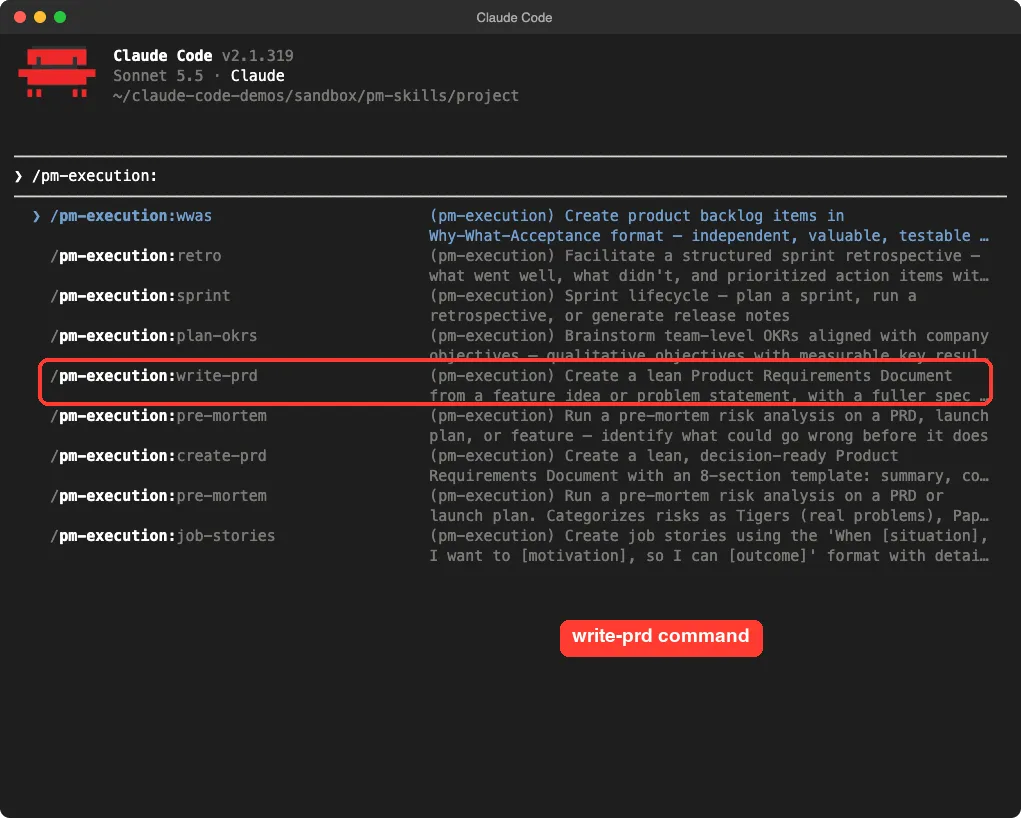
The README gives a short install path for the command line: add the marketplace with claude plugin marketplace add phuryn/pm-skills, then install the plugins you want, such as pm-execution@pm-skills.
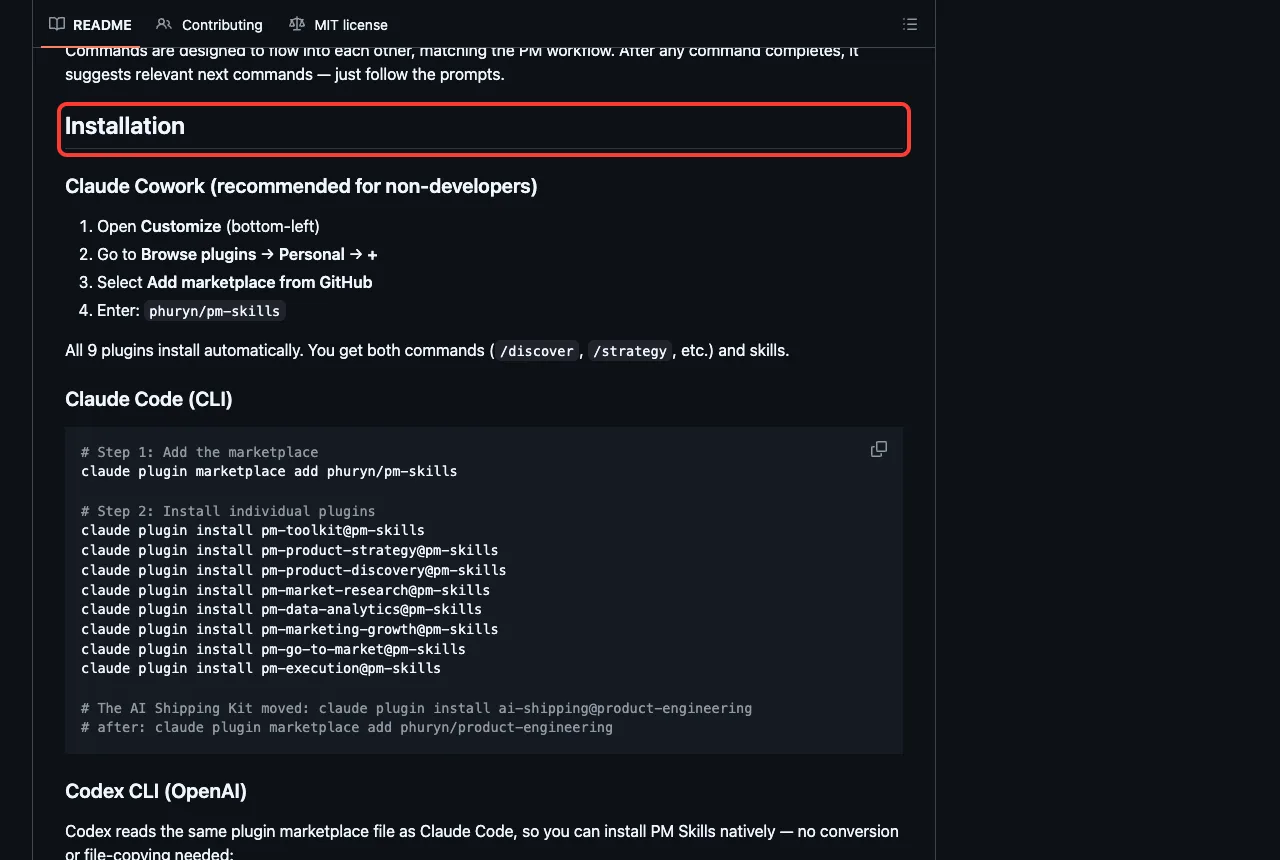
Product Manager Skills by Dean Peters: What You Get
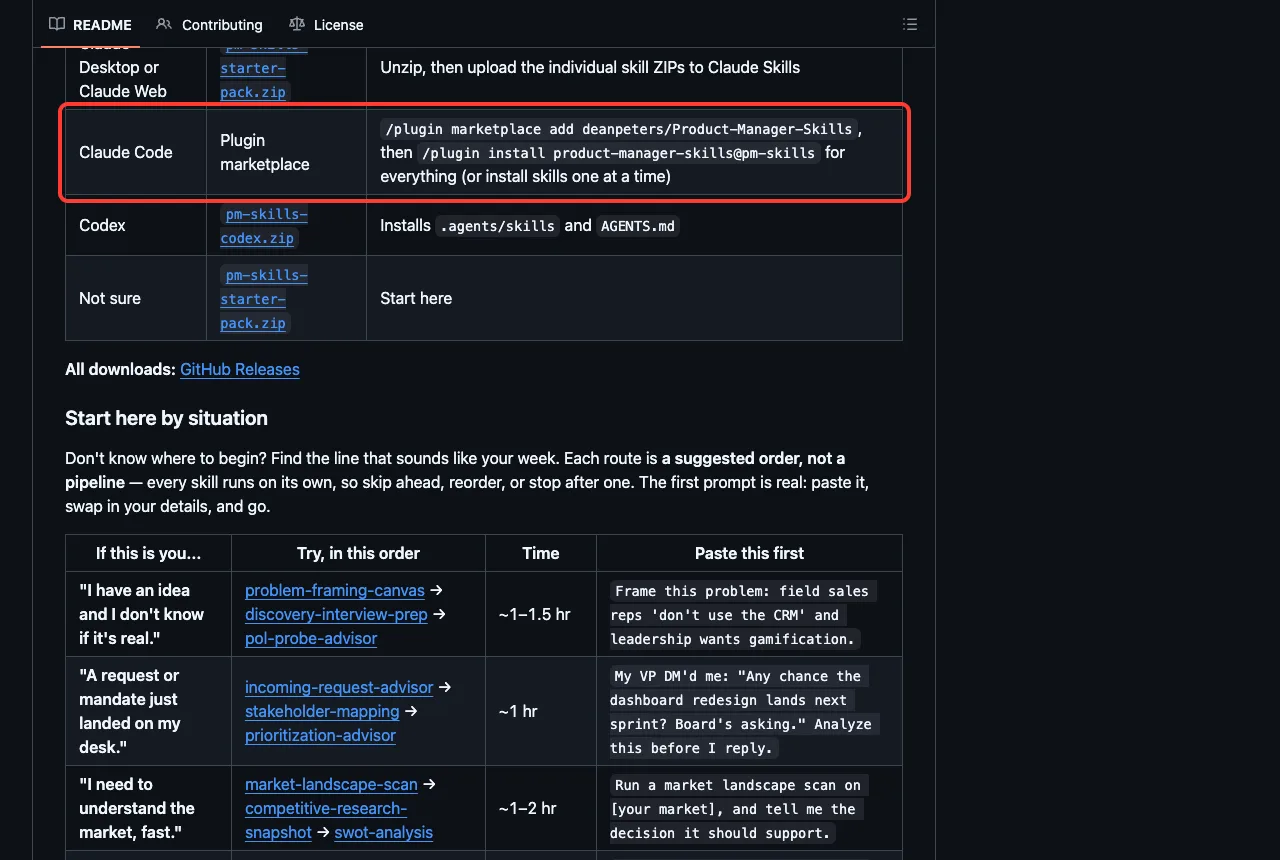
This repository is one plugin named product-manager-skills with 77 skills. It covers discovery, strategy, finance, lifecycle, career and more. The README says you can install everything or pick single skills.
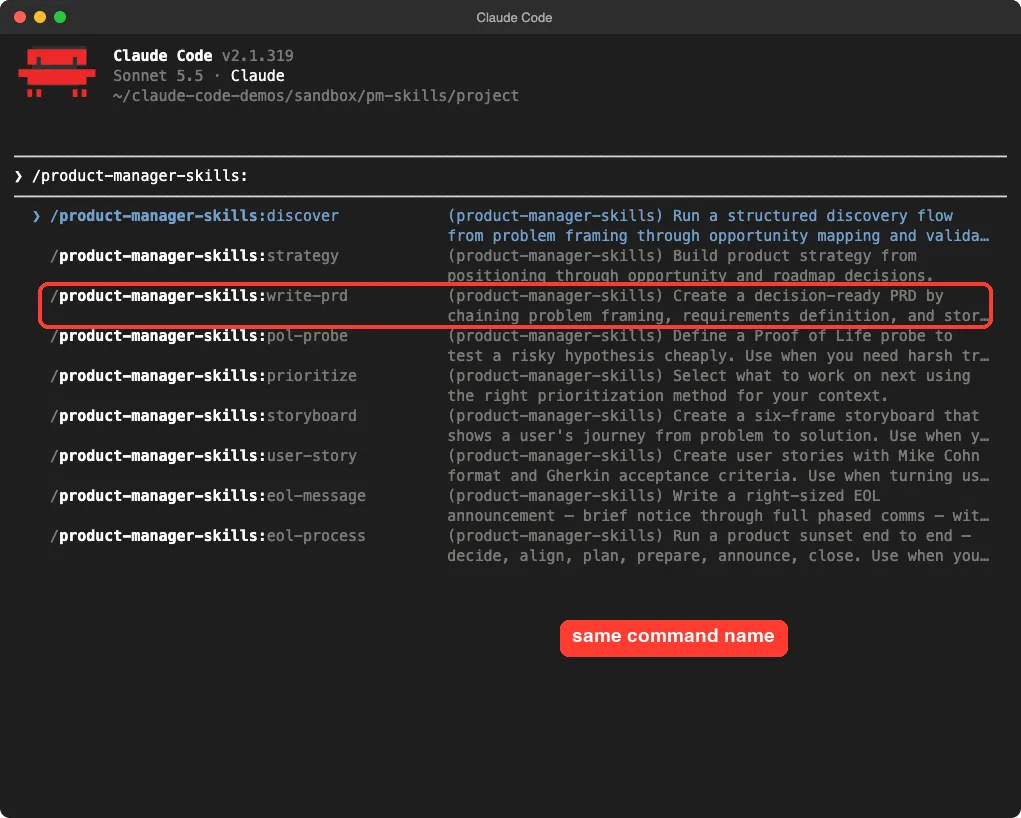
It has only six commands: /discover, /strategy, /write-prd, /prioritize, /plan-roadmap and /leadership-transition. Each one chains several skills. For example, /write-prd uses problem-statement, proto-persona, prd-development, user-story and user-story-splitting.
How We Tested Them Safely
Both packs are community projects, so we read them before running anything. We searched every JSON file for hooks and found none. Neither pack defines an MCP server.
The shell scripts in the Dean Peters repo are build and packaging helpers, and we did not run them.
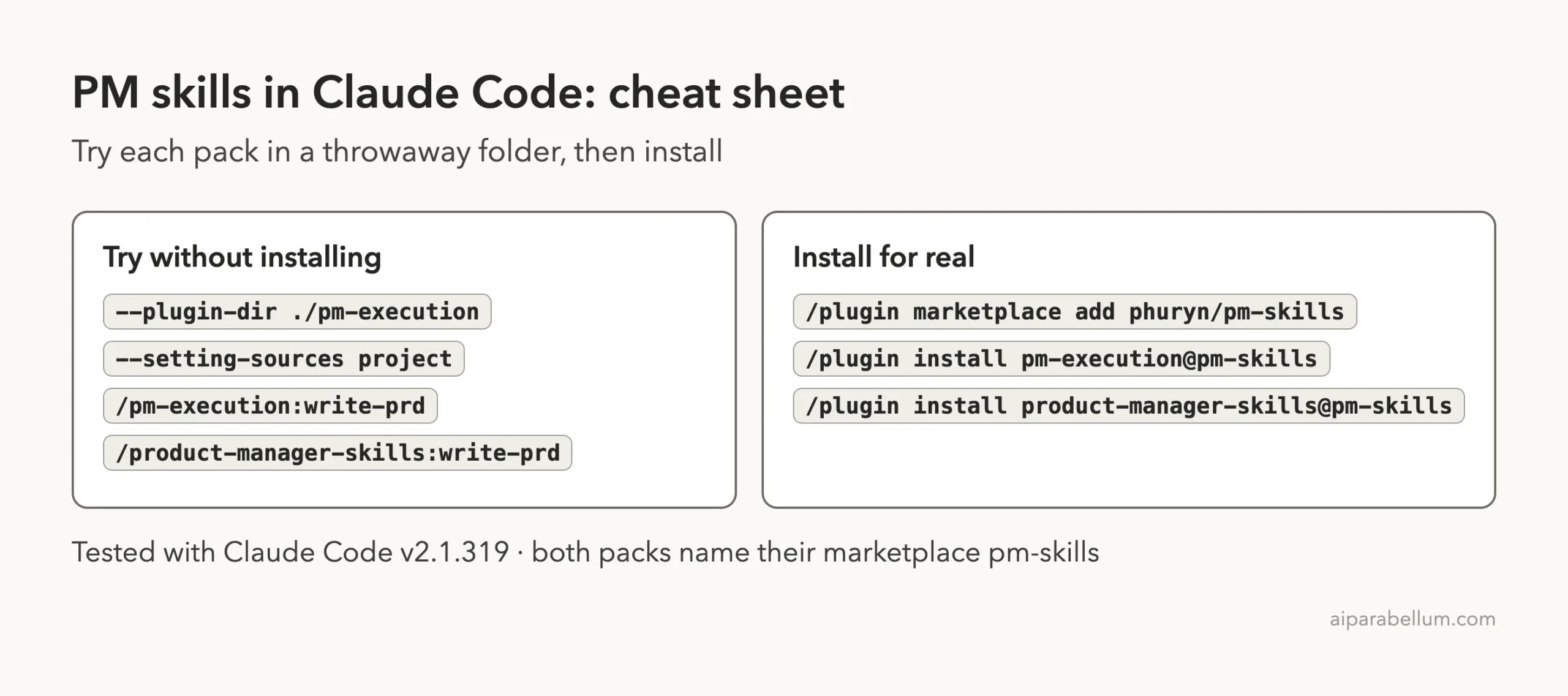
We did not install either pack into our own setup. Instead we cloned each repo into a sandbox and started Claude Code with --plugin-dir and --setting-sources project. That loads only the plugin folder and ignores our personal settings.
| Check | Result |
|---|---|
| Hooks in plugin files | None found in either pack |
| MCP servers | None in either pack |
| How we loaded them | --plugin-dir with --setting-sources project |
| Prompts we ran | One in each live session, plus one in each non-interactive run for word counts |
| Files Claude created | None, we asked for chat output only |
The Test: Write a PRD From a Five-Line Brief
We wrote a made-up brief for an invoicing app called PocketInvoice. Freelancers copy invoices into a spreadsheet by hand for their accountants, support gets about 40 emails a month about it, and the idea is a CSV export.
We sent the same prompt to both packs, changing only the command name. The prompt said to skip questions, mark any gaps as assumptions and print the PRD in chat only.
/pm-execution:write-prd Add CSV export of invoices (see brief.md). Do not ask me questions; mark any gaps as assumptions. Print the PRD in chat only, do not create files.

/product-manager-skills:write-prd Add CSV export of invoices (see brief.md). Do not ask me questions; mark any gaps as assumptions. Print the PRD in chat only, do not create files.
Both followed the instructions. Neither asked a question, and neither created a file. Everything else was different.
What the Lean PRD Looked Like
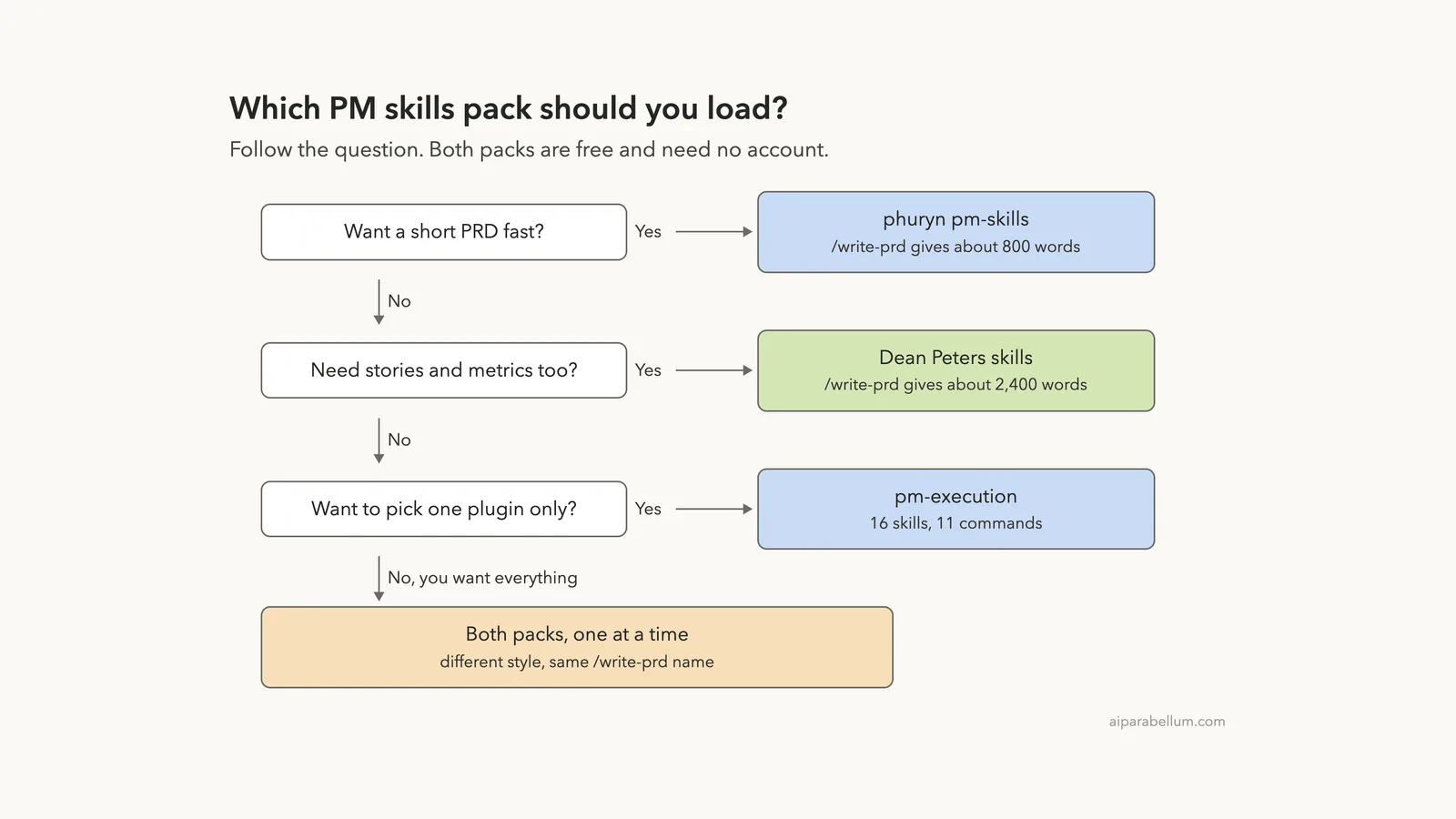
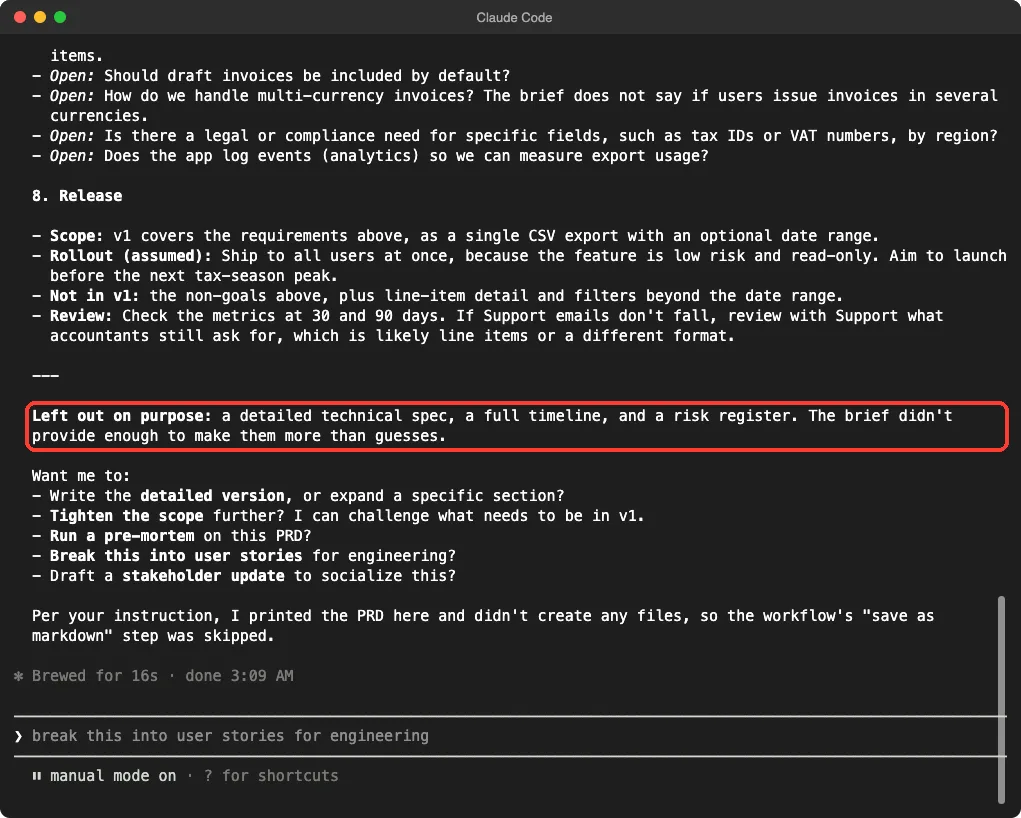
The PM Skills version used its 8-section template: summary, contacts, background, objective, market segments, value propositions, solution and release. It came to about 800 words in our measured run.
It also told us what it skipped. The note read “Left out on purpose”: a detailed technical spec, a full timeline and a risk register, because the brief did not give enough to do more than guess. It finished in 16 seconds in our live session.
What the Full PRD Looked Like
The Dean Peters version was about three times longer, at roughly 2,400 words in our measured run. It had a problem statement, a proto-persona, goals and non-goals, metrics, functional and non-functional requirements, a user flow, user stories with Gherkin acceptance criteria, risks, rollout and open questions.
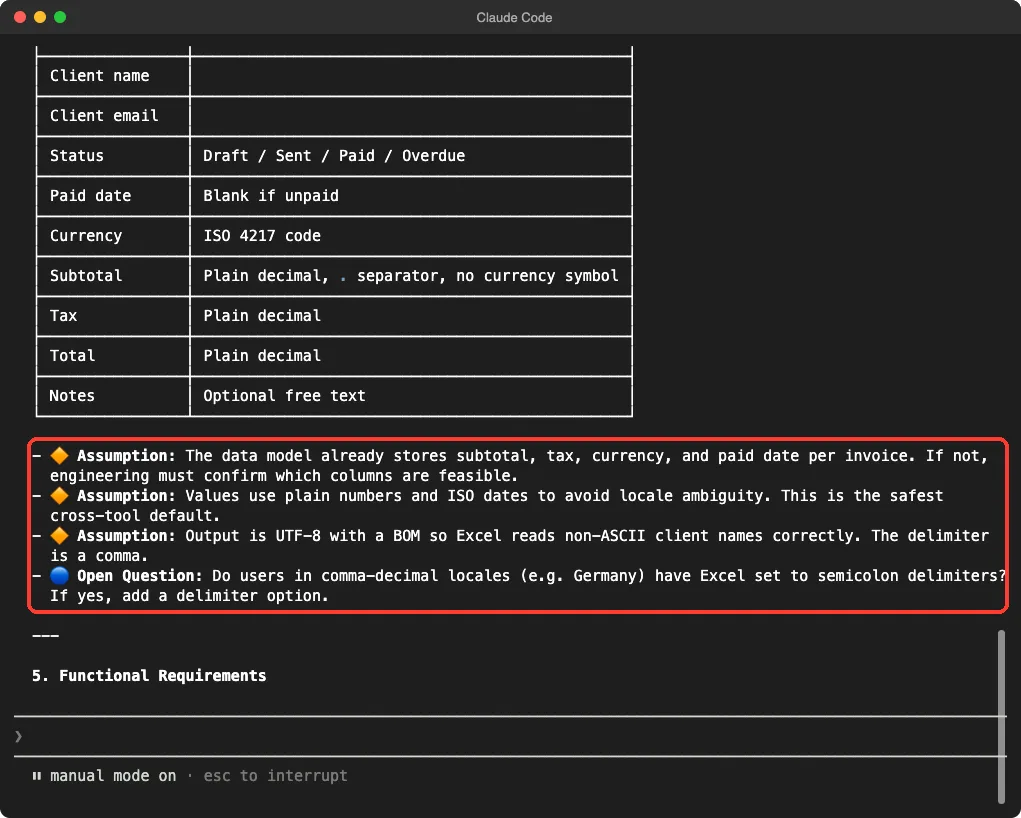
It tagged gaps in a clear way. An orange marker means an assumption, and a blue marker means an open question that needs research. In our measured run, 15 lines carried each marker.
The live run took 42 seconds.
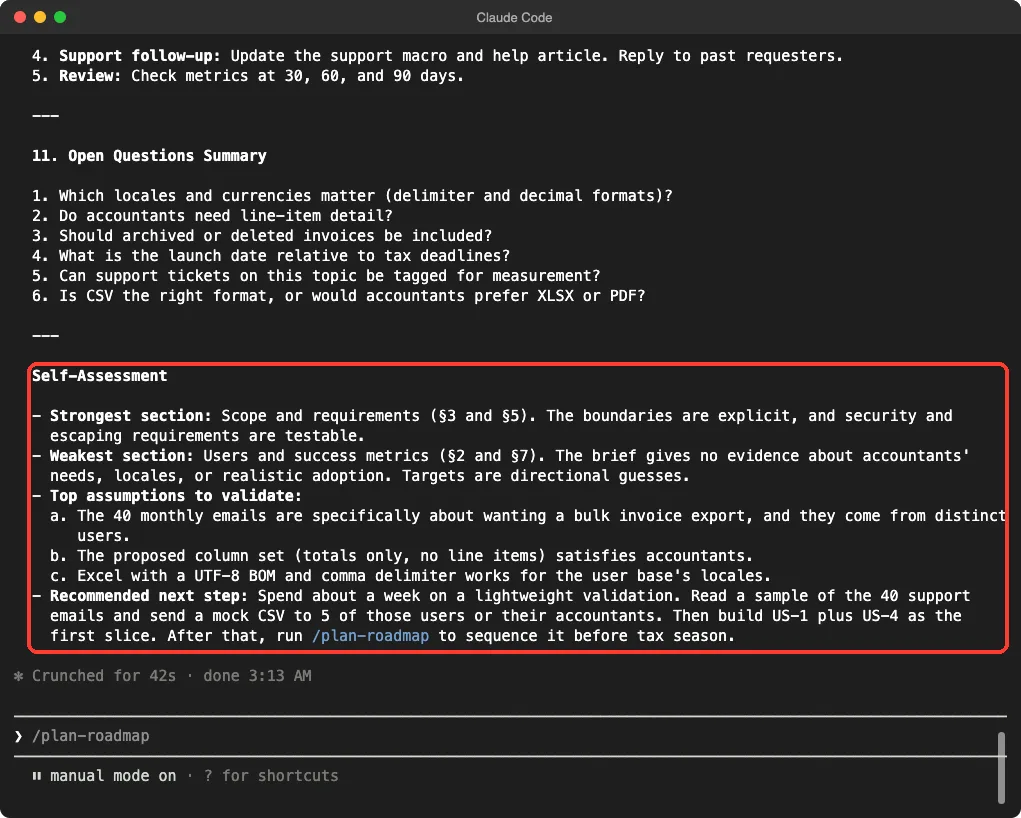
The PRD ended with a self-assessment. It named the strongest section, the weakest section, the top assumptions to check and a recommended next step.
Side by Side: Which Output Fits Which Job
The lean pack gives you a draft to discuss, and the full pack gives you a document to hand over.
Neither result is better in every case. They are built for different moments.
| Question | PM Skills | Product Manager Skills |
|---|---|---|
| Length in our run | About 800 words | About 2,400 words |
| Gaps | Italic assumptions and open questions in the text | Tagged assumptions and open questions, plus a summary list |
| User stories | Offered as a follow-up | Written in the PRD |
| Self-check | Lists what it left out | Full self-assessment |
| Asks questions first | Up to three, unless told to go ahead | Checkpoints per section |
| Best for | A quick first draft to discuss | A document you hand to engineering |
One caution: Claude does not write the same text twice. The section count and word totals above come from one run of each, and a second run can differ a little. The pattern, short versus long, was clear in both of our runs per pack.
Which Pack Should You Install?
Start with how you work. If you write a PRD often and want a draft you can edit in minutes, the lean pack saves reading time. If you want stories, personas and acceptance criteria in one pass, the bigger pack does more of the work.
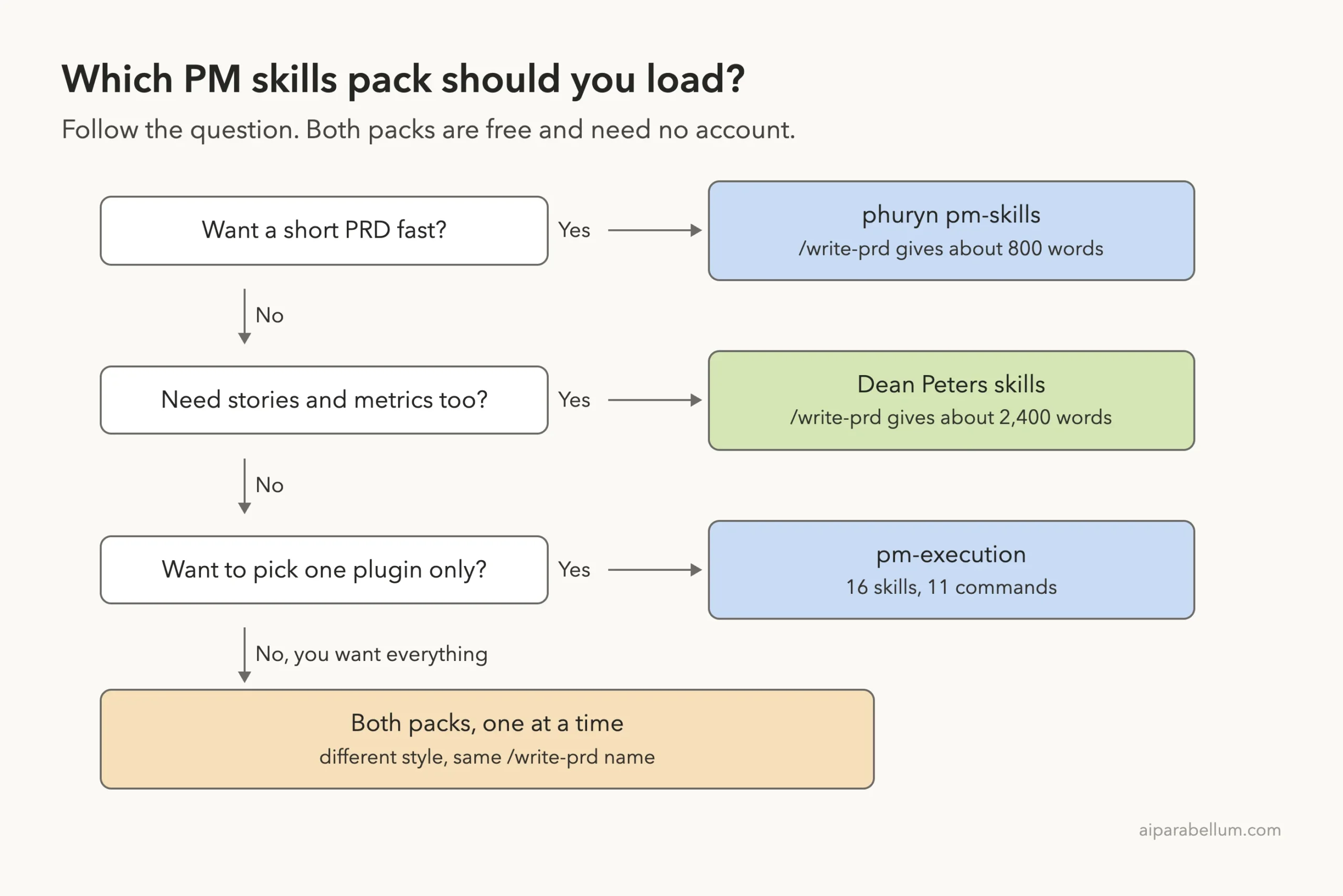
Our honest verdict: PM Skills is the better first install if you are new to this, because you can add one plugin at a time and the output is easy to read. Product Manager Skills is the stronger pick when the output must go to engineers as is. Both are free, and neither asked for an account.
Two things we did not test. We did not add both marketplaces to one setup, even though both name themselves pm-skills, so try one at a time. We also ran only the PRD command, so we cannot vouch for the other 100-plus skills across the two packs.
How to Install Them for Real
When you are happy with a trial, install through the plugin system. Our guide to plugin marketplaces and the official discover plugins page explain each step. The Claude Code plugins overview covers updates and removal.
/plugin marketplace add phuryn/pm-skills
/plugin install pm-execution@pm-skills

/plugin marketplace add deanpeters/Product-Manager-Skills
/plugin install product-manager-skills@pm-skills
Both sets of commands come from each repository’s own README: phuryn/pm-skills and deanpeters/Product-Manager-Skills. After installing, type the plugin name and a colon, such as /pm-execution:, to see every command it added.
Plugin features change with Claude Code versions, so check the official plugins guide if a command does not appear.
Try It Yourself
Make a throwaway folder, add a brief of your own and load one pack with --plugin-dir. Then run the prompt below and look at what the command asks, what it tags and what it leaves out.
/pm-execution:write-prd Add a weekly email summary to my app (see brief.md). Do not ask me questions; mark any gaps as assumptions. Print the PRD in chat only.Then run the same brief through the other pack and compare the two side by side. It takes under two minutes each.
Common Mistakes
- Installing both packs at once without a plan, then not knowing which
/write-prdran. Use the full name, such as/pm-execution:write-prd. - Giving no brief at all. The lean pack will ask up to three questions when the problem, users or metric are missing.
- Treating tagged assumptions as facts. Each one is a guess that needs a real check.
- Trying a pack inside a real project first. Use a throwaway folder and
--setting-sources project. - Expecting the same length every time. Output varies between runs, so judge the structure rather than the word count.
Pro Tips
- Use the lean pack for a first draft and the full pack when you need user stories.
- Tell Claude to print in chat only if you do not want files created.
- Type the plugin name and a colon to browse commands before you install anything.
- Run the pre-mortem command from PM Skills on any PRD, no matter which pack wrote it.
- Pair these with a CLAUDE.md file that states your product and users, so Claude needs fewer questions.
Cheat Sheet
Frequently Asked Questions
Are Claude Code product manager skills free?
Both packs are free open projects on GitHub, and the repositories list licenses. You still pay for the Claude usage your prompts use, and longer outputs use more of it.
Do I need an account or API key for these PM skills?
No. We found no MCP servers or hooks in either pack, and we entered no keys. You only need a signed-in Claude Code.
Can I use both packs together?
Probably, but we did not test it. Both marketplaces are named pm-skills, so add one at a time and use full command names to avoid mixing them up.
Which pack writes the better PRD?
It depends on the job. In our run the lean pack gave a short draft with a list of what it skipped, and the full pack gave a long document with user stories and a self-assessment.
Do these skills work outside Claude Code?
The READMEs say they also support other tools such as Codex, Claude Desktop and Claude Cowork. We tested only Claude Code on a Mac, so check each README for those steps.
Conclusion
PM Skills and Product Manager Skills both turn Claude Code into a capable product management helper, and both are free to try. In our test the same brief produced a lean 800-word PRD from one and a 2,400-word PRD with stories and a self-assessment from the other. Try each in a sandbox with --plugin-dir, keep the one that matches how your team reads documents, and use the full command name so you always know which pack is running. For more on how Claude works with product work, see our Claude AI page.