The Expo Claude Code plugin is a bundle of 23 skills from the Expo team that teaches Claude how to build, ship and fix React Native apps the Expo way. We loaded it into a throwaway project, checked what it adds, and asked Claude to add a new tab to a tiny app. This guide shows what worked, what needs an account, and who should bother installing it.
This guide is part of our Claude Code tutorials. Find more add-ons in our skills directory.
Tested with Claude Code v2.1.318 on November 7, 2026, with Expo plugin version 1.14.3 (repository commit a9e5bd3).
Expo Claude Code Plugin: Quick Summary
| Question | Answer |
|---|---|
| What is it? | The official expo plugin, with 23 skills for Expo and EAS work |
| Who makes it? | The Expo team, in the expo/skills repository |
| Install command | /plugin install expo@claude-plugins-official |
| Does it cost money? | The plugin is free; the EAS skills point to paid Expo services |
| Does it need an account? | Its MCP server asked us to authenticate; the skills worked without it |
| Our verdict | Worth installing if you build Expo apps |
What the Expo Claude Code Plugin Does
Expo is a toolkit for building iPhone and Android apps with React Native. It changes quickly, and a model’s memory of it can be out of date. The plugin gives Claude written guidance from the people who make Expo, so it can follow current patterns instead of guessing.
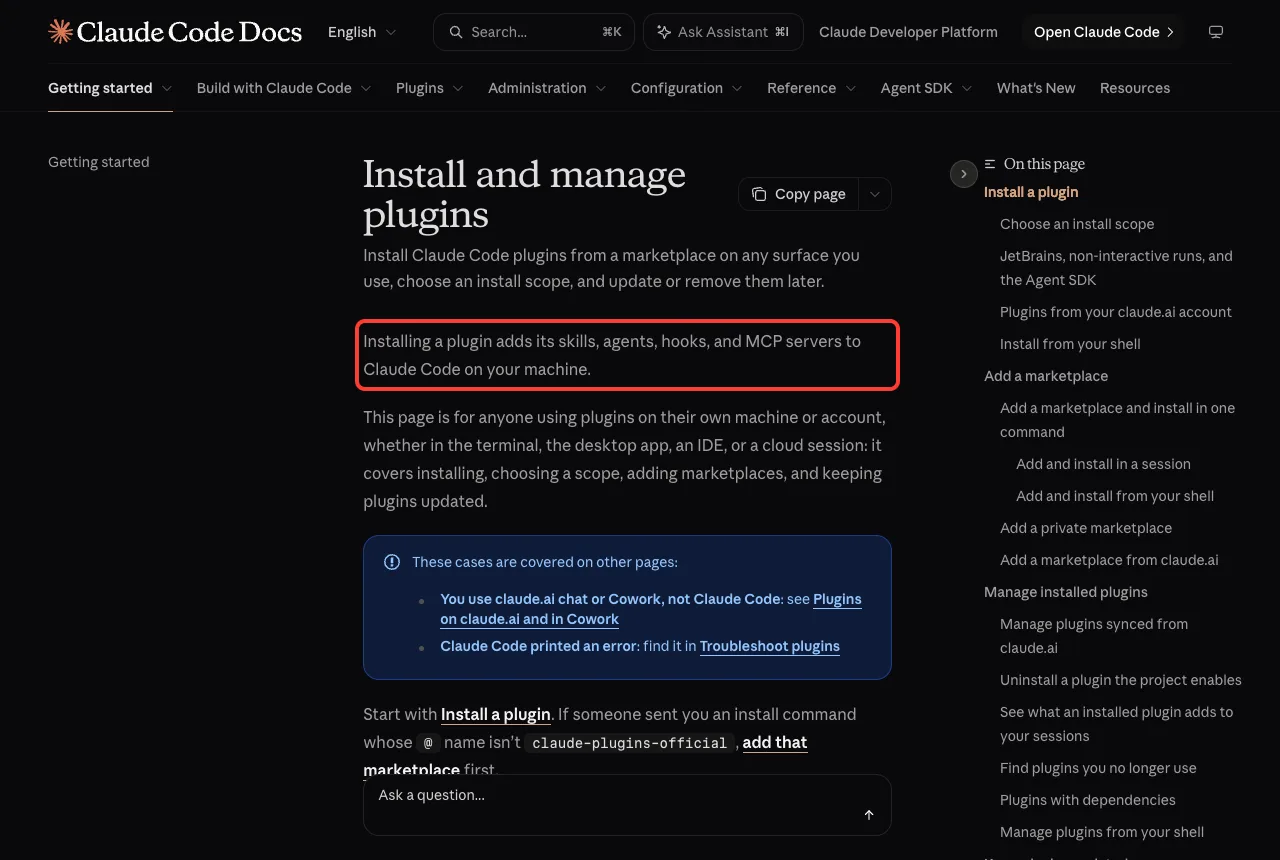
A plugin can add skills, agents, hooks and MCP servers to Claude Code. You can read the exact wording in the official plugin docs. The Expo plugin uses two of those pieces: skills and one MCP server.
If you are new to the idea, read our guides to Claude Code plugins and Claude Code skills first. They explain the basics in plain English.
The free skills and the paid skills
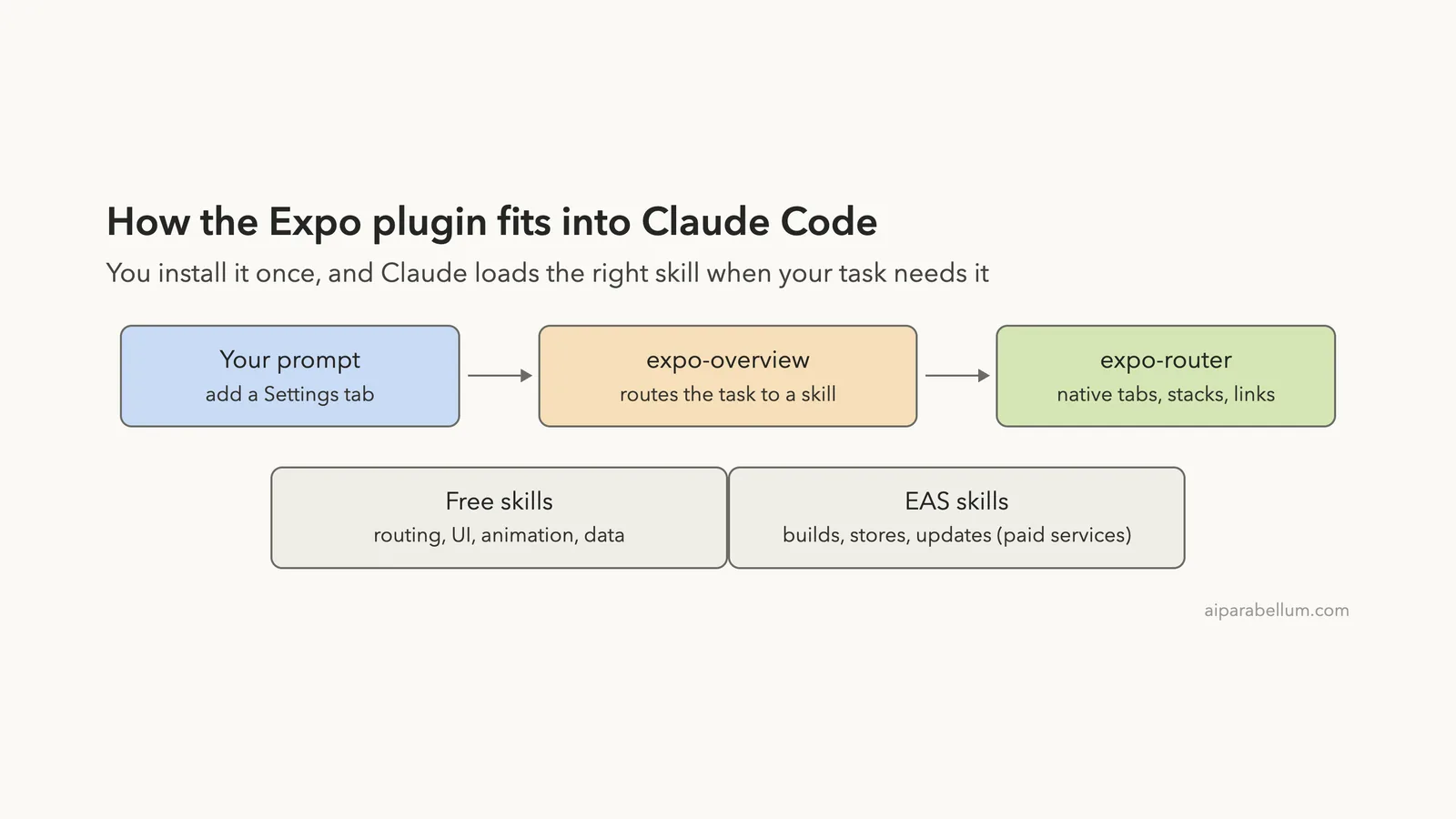
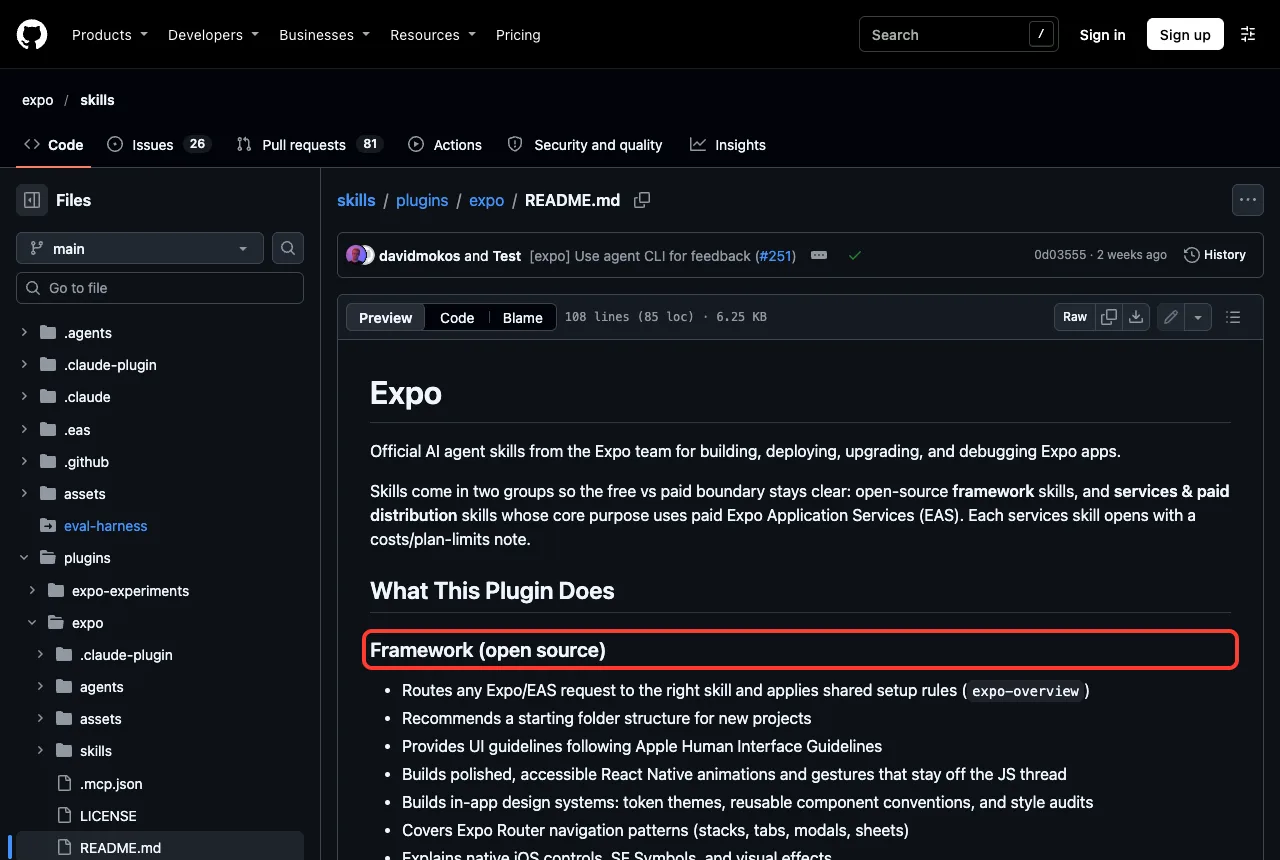
The plugin’s README splits the skills into two groups. The framework group is open source and covers things like routing, screen styling, animation, data fetching and design systems. The services group covers store submissions, builds, over-the-air updates and hosting, which rely on paid Expo Application Services (EAS).
Each services skill opens with a note about costs and plan limits, according to the README. That is a nice touch, because you know when Claude is about to point you at a paid service.
Is It Safe to Try?
We never install third-party add-ons into our real Claude Code setup. Instead we used a throwaway folder, cloned the repository there, and loaded only the plugin folder with the --plugin-dir flag. Nothing was written to our normal ~/.claude folder.
Before running anything, we read the plugin files. The plugin has a manifest, a README, a license, an agents folder with one YAML file, and the skills folder. We found no hooks in the plugin manifest or its JSON files, so nothing runs automatically on your commands.
The only moving part outside your machine is the MCP server. The plugin’s .mcp.json points to a remote server at mcp.expo.dev. We did not sign in to it, so this post does not claim anything about what it can do.
Our test setup
- A demo folder with a
package.jsonthat listsexpoandexpo-router, anapp.json, and one Home screen. - No
npm install, so we only tested how Claude writes code, not how the app runs. - A clone of the repository, loaded with
--plugin-dirand--setting-sources project.
Step 1: Load the Plugin
Start Claude Code with the plugin folder. You can try this in any scratch folder.
git clone --depth 1 https://github.com/expo/skills
claude --plugin-dir ./skills/plugins/expo
If you would rather install it for good, the Claude Code Skills Directory lists this command for the official marketplace:
/plugin install expo@claude-plugins-officialUse the sandbox way first if you want to look around. Our guide on skills versus plugins explains when each one makes sense.
Step 2: Check the Skills List
Type /skills to see what loaded. We saw 23 skills, each named with the expo: prefix, and each marked as locked by the plugin. That means you cannot toggle them one by one from that screen; you manage them through /plugin.
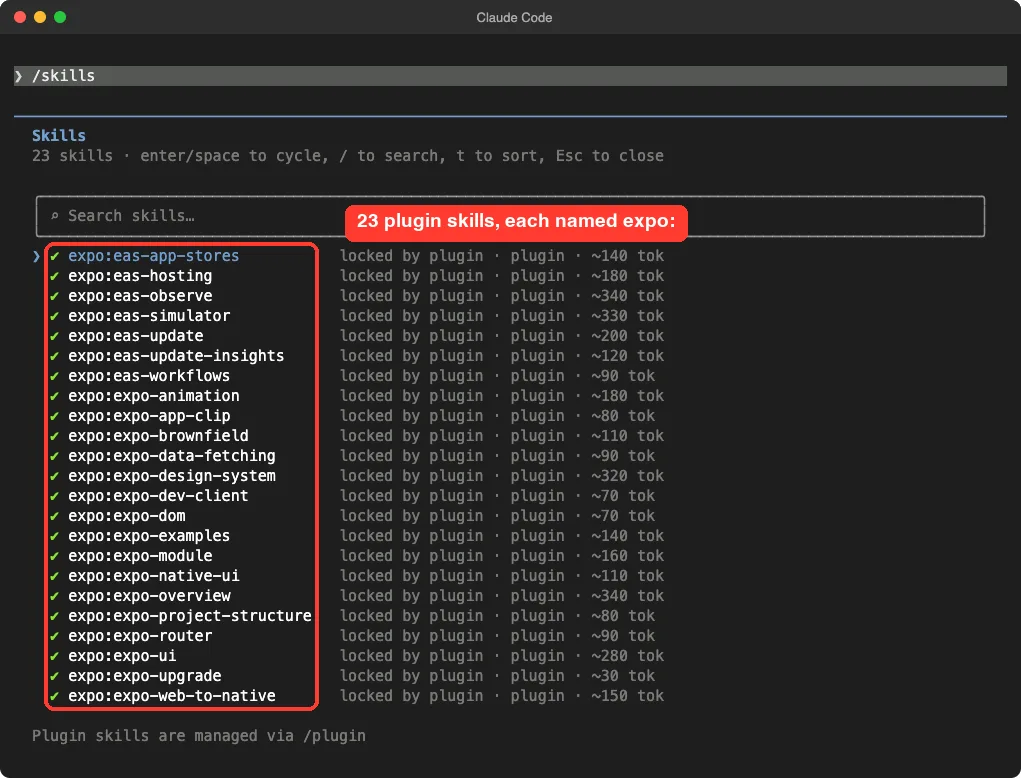
The list also shows a token estimate for each skill. The router skill, expo-overview, was about 340 tokens, while expo-upgrade showed about 30.
These token numbers are Claude Code’s own estimates, so treat them as a guide.
The skills we saw include these:
| Skill | What it is for |
|---|---|
expo-overview | Entry point that routes your request to the right skill |
expo-router | Navigation: tabs, stacks, modals and links |
expo-native-ui | Screens, styling and native controls |
expo-data-fetching | Network requests, caching and offline support |
expo-upgrade | Moving to a newer Expo SDK |
eas-app-stores | Submitting to the App Store and Google Play |
eas-workflows | CI/CD workflow files |
Step 3: Check the MCP Server
Next we typed /mcp. The plugin’s server showed up as plugin:expo:expo with a warning that it needs authentication. Claude Code also showed a yellow notice at the top of the screen.
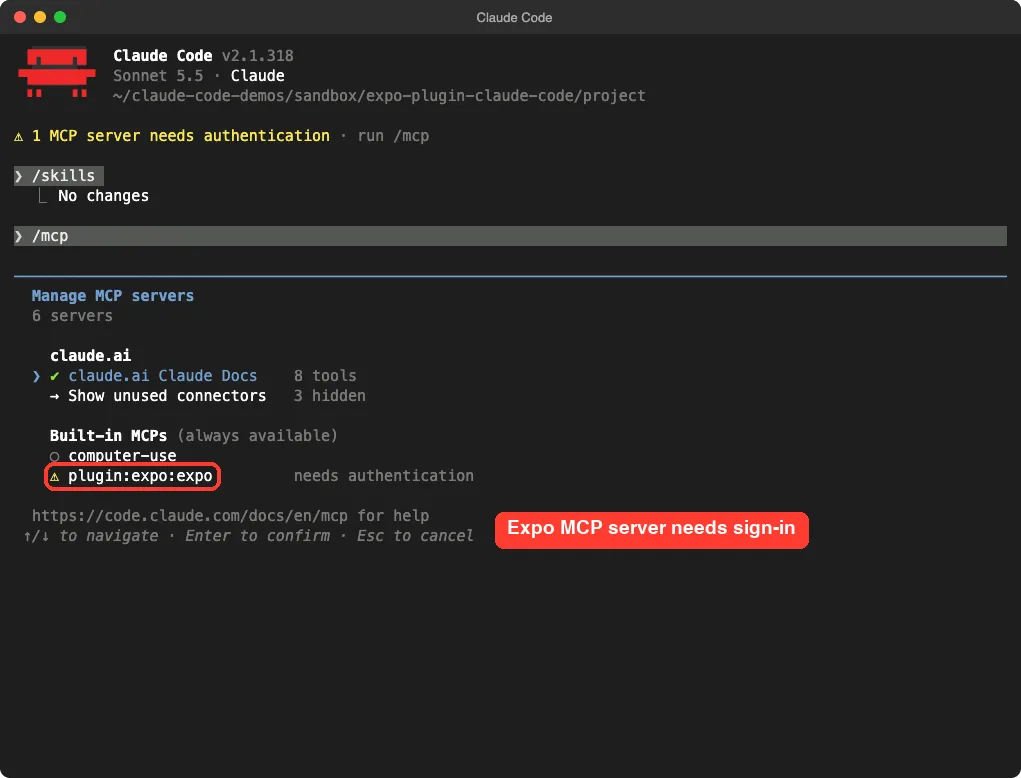
This is normal for a remote MCP server. The skills do not depend on it, as our next test shows. We chose not to sign in during this run, so the tools behind that server are untested.
Step 4: Ask Claude to Build Something
Here is the exact prompt we used in the demo app:
Using the Expo skills, add a Settings tab next to the Home screen in this app with Expo Router native tabs. Only edit files in src/app/. Do not run npm install. Keep it short.Claude called the expo:expo-router skill right away, and the screen reported that it loaded successfully. It then looked at our existing files and the skill’s reference folder before writing anything. It asked our permission for each step, which is the default behavior in manual mode.
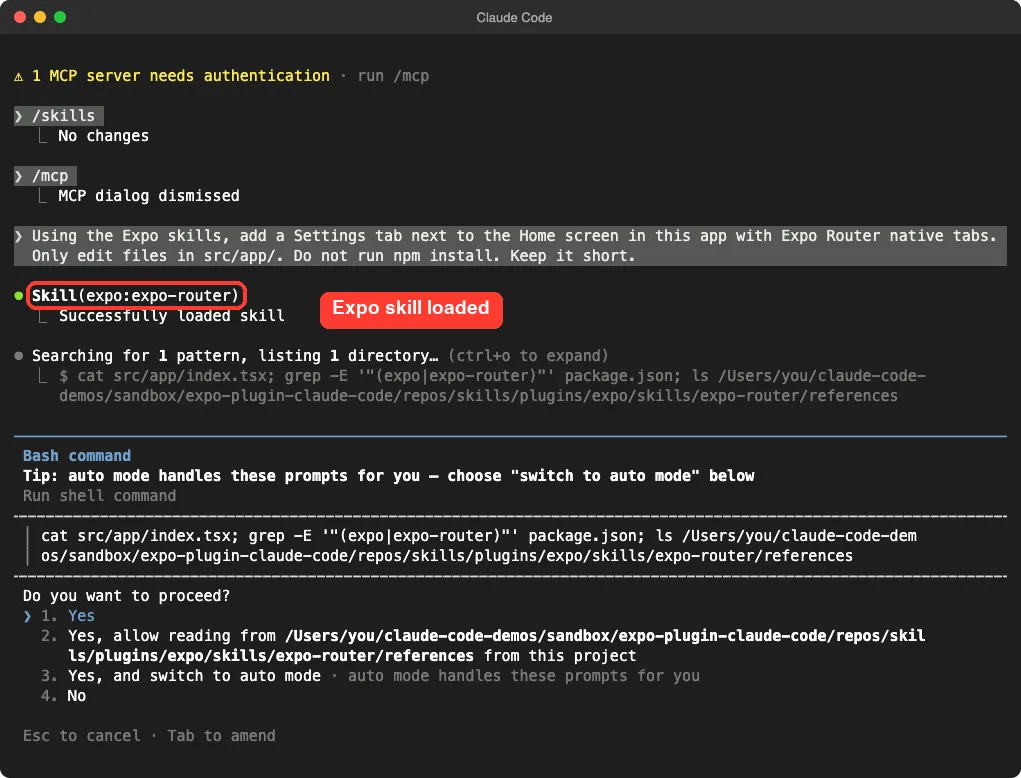
Notice that we named the skills in the prompt. Skills also load by description, but a clear mention makes it more likely. Our guide to reliable skill triggers covers the reasons.
Step 5: Review the Result
Claude created two files and left the Home screen alone. The first is a layout with two tabs. The second is a simple Settings screen.
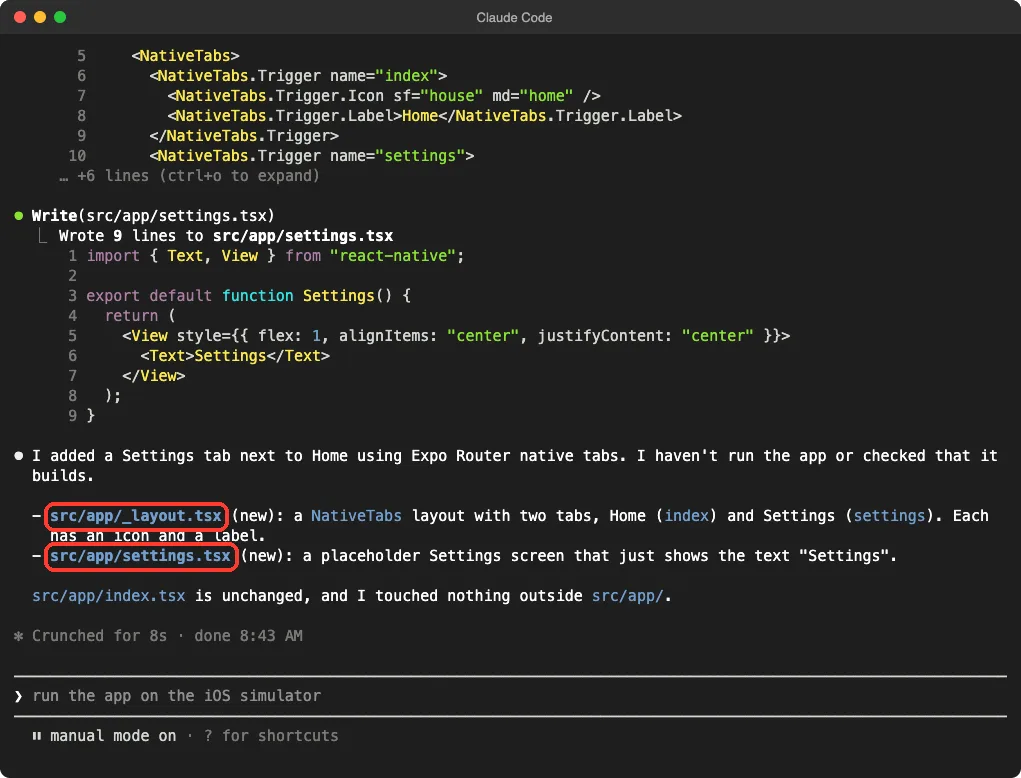
Here is the layout file it wrote:
import { NativeTabs } from "expo-router/unstable-native-tabs";

export default function Layout() {
  return (
    <NativeTabs>
      <NativeTabs.Trigger name="index">
        <NativeTabs.Trigger.Icon sf="house" md="home" />
        <NativeTabs.Trigger.Label>Home</NativeTabs.Trigger.Label>
      </NativeTabs.Trigger>
      <NativeTabs.Trigger name="settings">
        <NativeTabs.Trigger.Icon sf="gearshape" md="settings" />
        <NativeTabs.Trigger.Label>Settings</NativeTabs.Trigger.Label>
      </NativeTabs.Trigger>
    </NativeTabs>
  );
}
Two details stand out. It used one icon name for iPhone (sf) and another for Android (md).
It also imported from a path that includes unstable-native-tabs, which signals that this API may change. Claude itself said it had not run the app or checked that it builds, and we did not either.
What we did not test
One demo is one demo. We did not install dependencies, start the app, or use any EAS skill.
We also did not sign in to the MCP server. If you need those parts, test them in your own project and read the skill files first.
How the Pieces Fit Together
The router skill is the key idea. When your request mentions Expo, Claude loads expo-overview, which decides which specialist skill to use. That keeps every skill short and focused.
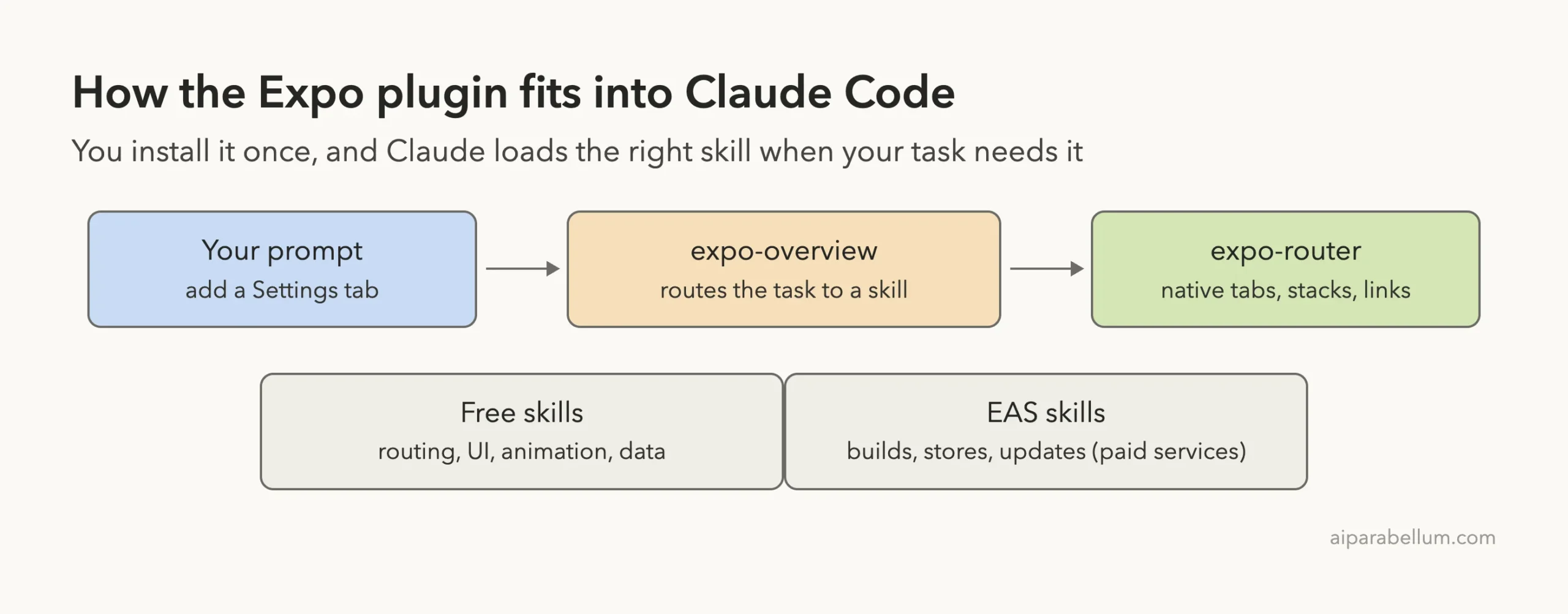
The router’s own description says it should load first whenever a request mentions Expo or EAS, or when the project has an expo dependency in package.json. It also says a bare React Native project without that dependency is not Expo work. That is a sensible guardrail.
Who Should Install It?
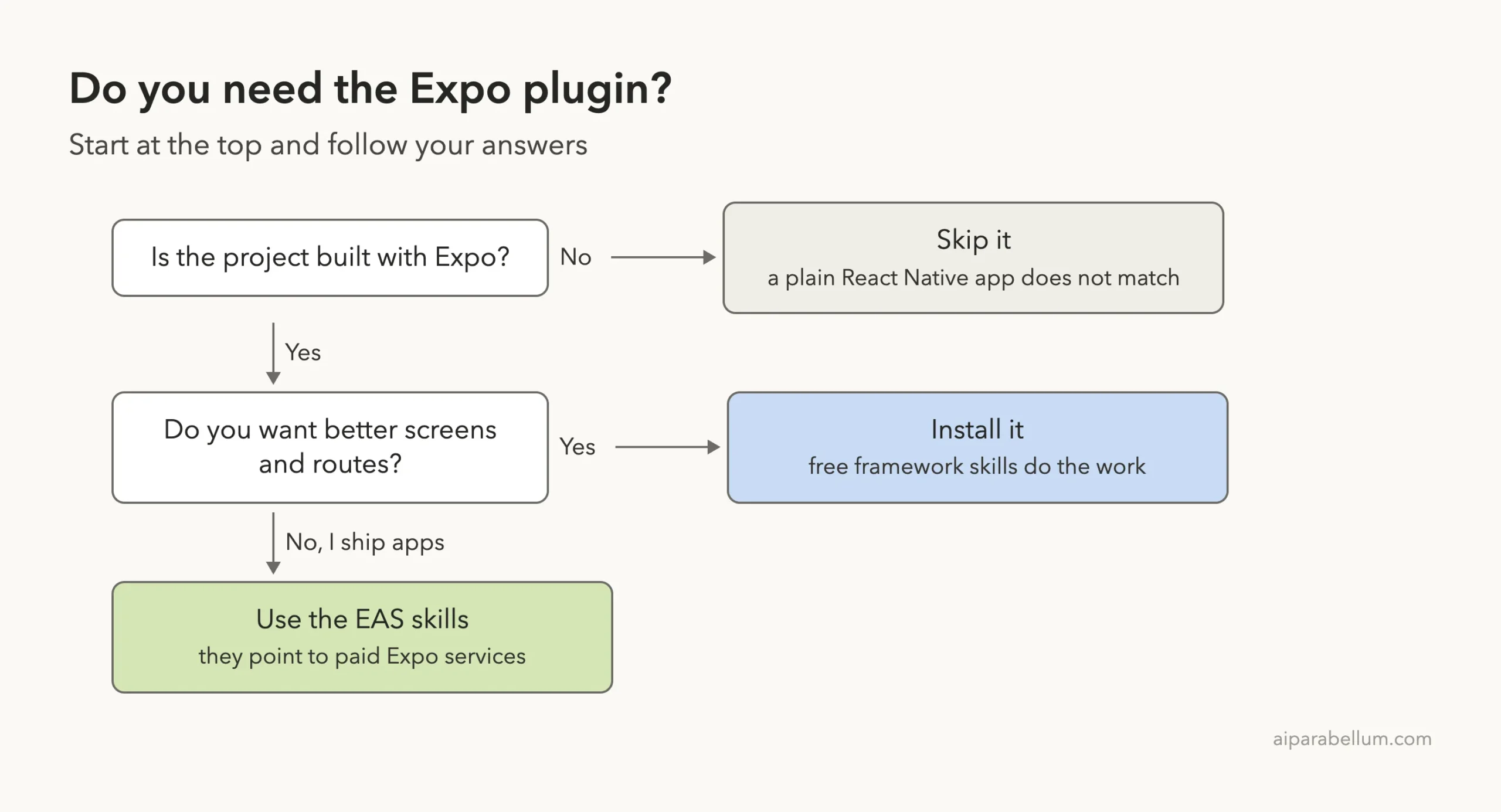
The plugin is a good fit when your project already uses Expo, or you are about to start one. It helps most with tasks where Expo has strong opinions: routing, native tabs, folder layout and SDK upgrades.
Good reasons to install it
- You build with Expo Router and want Claude to follow Expo’s own patterns.
- You plan an SDK upgrade and want a guided checklist.
- You want a starting folder structure for a new project.
Reasons to wait
- Your app is plain React Native without Expo.
- You do not want a remote MCP server in your setup.
- You only need a one-off tweak that Claude can do without help.
Our Honest Verdict
The plugin did what it promised in our small test. It loaded cleanly, listed its skills, called the right skill for a routing task, and kept its edits inside the folder we named. We also like that the README is clear about which parts connect to paid services.
The limits are real, though. We tested only guidance for one screen, not a full build. The MCP server needs sign-in, which we skipped, and the native tabs API in the generated code is marked unstable in its import path.
Try It Yourself
Practice in a scratch folder, never in a real app. Create a small Expo project folder, load the plugin with --plugin-dir, and paste this prompt:
Using the Expo skills, suggest a folder structure for a new habit tracker app with Expo Router. Do not create files yet. List which expo skills you used.Then compare the answer with the folder tree in the expo-project-structure skill. If the two agree, the skill is guiding Claude as intended.
Common Mistakes
- Installing into your main setup before you have read the plugin files.
- Expecting the MCP tools to work without signing in.
- Using Expo skills on a project that has no
expodependency. - Assuming generated code builds. Run it and check.
- Ignoring the cost notes on the EAS skills.
Pro Tips
- Name the skill or say Expo Router in your prompt to make it load.
- Use
/skillsafter loading to confirm the plugin is active. - Limit edits to one folder in the prompt, as we did with
src/app/. - Press
ctrl+oto expand tool output when you want to see what Claude read. - Keep your own notes in a
CLAUDE.mdfile so the plugin and your rules work together.
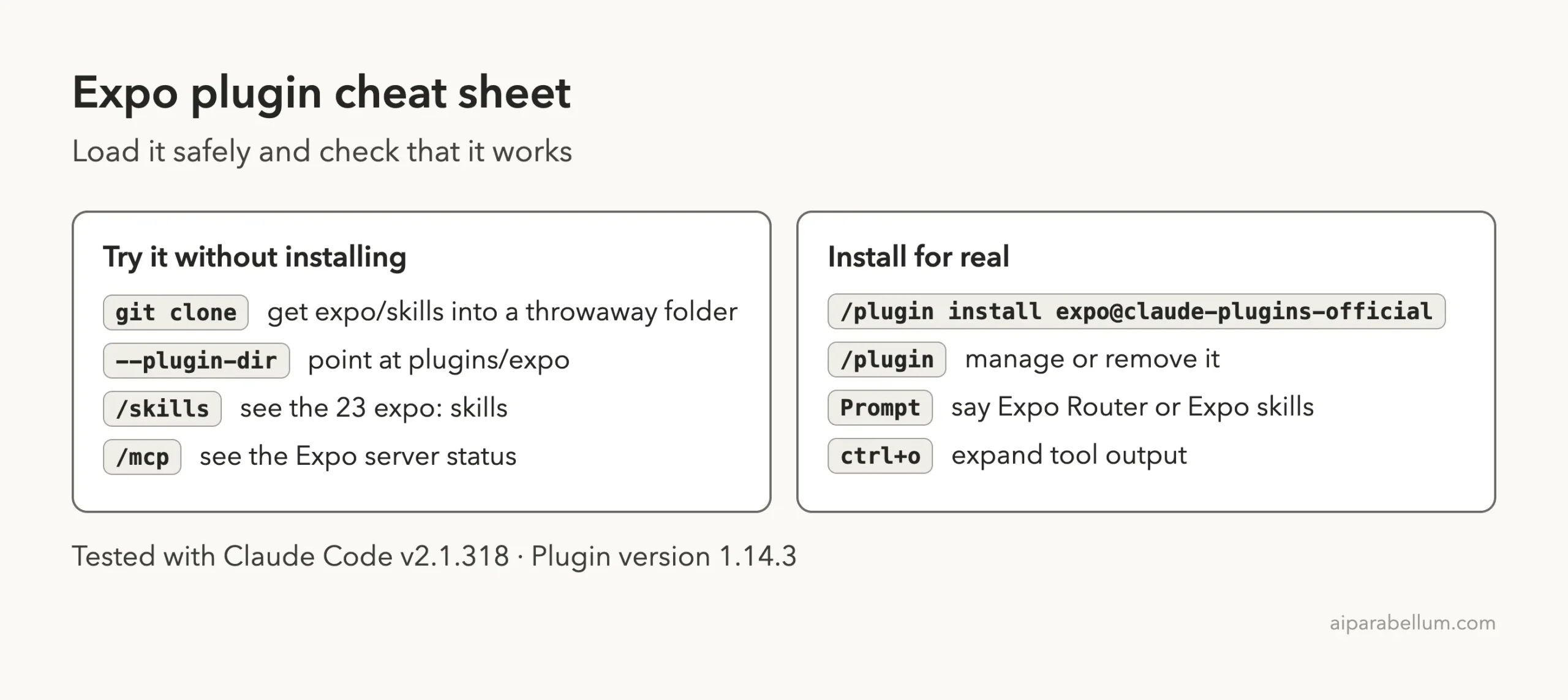
Cheat Sheet
Frequently Asked Questions
Is the Expo plugin for Claude Code official?
Yes. It comes from the Expo team’s expo/skills repository, and the Claude Code Skills Directory lists it in the official marketplace.
Is the Expo plugin free?
The plugin itself is free to load. According to its README, the services skills cover paid Expo Application Services, so those features may cost money.
Do I need to sign in to use it?
The skills worked in our test without any sign-in. The plugin’s MCP server showed a needs-authentication warning, and we did not sign in to it.
Will it work in a project without Expo?
It is not meant to. The router skill says a bare React Native project with no expo dependency is not Expo work.
How do I remove it?
If you loaded it with --plugin-dir, just start Claude Code without the flag. If you installed it, manage or remove it from the /plugin screen.
Conclusion
The Expo plugin gives Claude Code a set of official skills for building and shipping mobile apps, and in our short test it loaded cleanly and chose the right skill for a navigation task. Install it if you work with Expo, keep an eye on the paid EAS parts and the sign-in for its MCP server, and always run the generated code yourself. For more add-ons, browse our web development skills and the Claude AI page.