The Pydantic AI skills for Claude Code are a free plugin from the Pydantic team that teaches Claude Code how to build and port AI agents with the Pydantic AI framework. We loaded the plugin in a throwaway project, asked for a small support-triage agent, and then ran the exact same request with no plugin at all. This post shows both runs side by side, plus a LangChain migration, and gives an honest verdict on who needs it.
This guide is part of our Claude Code tutorials. Find more add-ons in our skills directory.
Tested with Claude Code v2.1.319 on November 11, 2026, using the plugin ai version 0.1.0 from pydantic/skills at commit 98f591c (October 16, 2026) and Pydantic AI 2.66.0 on Python 3.14. We tested on macOS; the Windows and Linux steps follow Anthropic’s official instructions.
| Question | Short answer |
|---|---|
| What is it? | One plugin called ai with nine skills: one for building agents and eight for migrating from other frameworks |
| Do you need an API key? | Not for what we ran. We tested the agent offline with Pydantic AI’s TestModel |
| What did we run? | The building skill, the LangChain migration skill, and one control run with no plugin |
| Did it work? | Yes. Both runs produced agents whose tests passed (3 of 3 and 2 of 2) |
| Did it beat plain Claude Code? | Barely, on this small task. The code was almost the same |
| Cost to try | Free plugin; the Claude Code session uses your normal Claude usage |
What the Pydantic AI skills for Claude Code are
Pydantic AI is a Python framework for building AI agents. You describe an agent with a model, instructions, tools and a typed output, and the framework handles the loop between your code and the model. It comes from the team behind the Pydantic validation library.
The framework changes quickly. A model that learned Python patterns a year ago may write code that no longer matches the current API. That is the gap these skills try to fill, by giving Claude Code current patterns, decision trees and gotchas to read when the task matches.
If skills are new to you, our guide to Claude Code skills explains how a skill differs from a normal prompt. In short, a skill is a folder of instructions that Claude loads when it needs them.
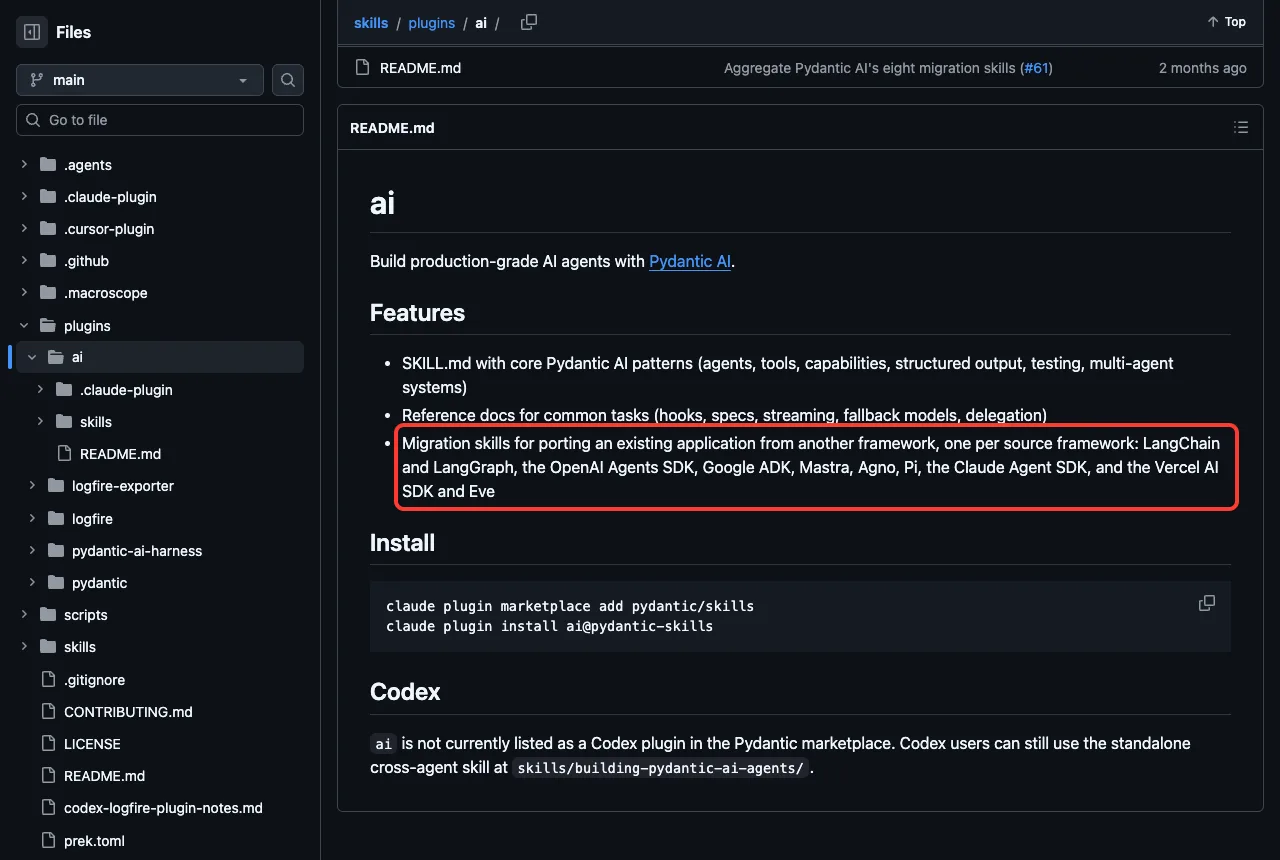
We found the plugin in the repo github.com/pydantic/skills. It lists nine skills under plugins/ai/skills.
| Skill | What it is for | Did we run it? |
|---|---|---|
building-pydantic-ai-agents | Tools, structured output, streaming, testing, multi-agent patterns | Yes |
migrating-langchain-to-pydantic-ai | Port LangChain, LangGraph or Deep Agents apps | Yes |
migrating-openai-agents-sdk-to-pydantic-ai | Port OpenAI Agents SDK apps | No |
migrating-google-adk-to-pydantic-ai | Port Google ADK apps | No |
migrating-mastra-to-pydantic-ai | Port TypeScript Mastra apps | No |
migrating-agno-to-pydantic-ai | Port Agno apps | No |
migrating-pi-to-pydantic-ai | Port TypeScript Pi coding agents | No |
migrating-claude-agent-sdk-to-pydantic-ai | Port Claude Agent SDK apps | No |
migrating-vercel-ai-sdk-and-eve-to-pydantic-ai | Port Vercel AI SDK and Eve apps | No |
We covered this plugin briefly in our plugins roundup. This post is the full hands-on test.
How we loaded the plugin safely
The normal install from the README is two commands.
claude plugin marketplace add pydantic/skills
claude plugin install ai@pydantic-skills
We did not run either one. Both write to your personal Claude Code setup, and we wanted a test that leaves nothing behind. Our plugins guide covers the normal install and manage steps, and Anthropic’s own pages are Plugins and Discover plugins.
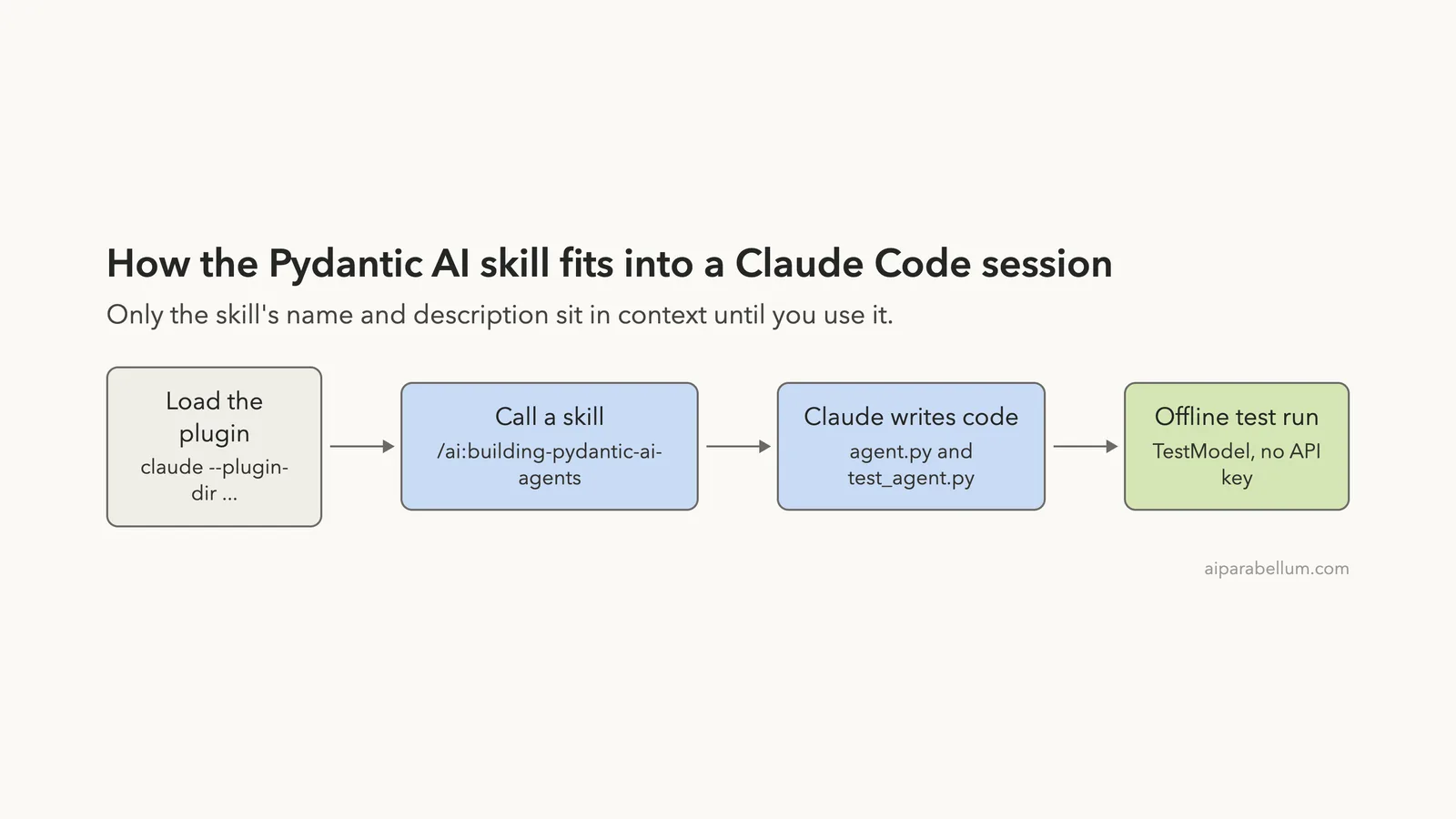
Instead we cloned the repo into a throwaway folder and loaded the plugin for one session.
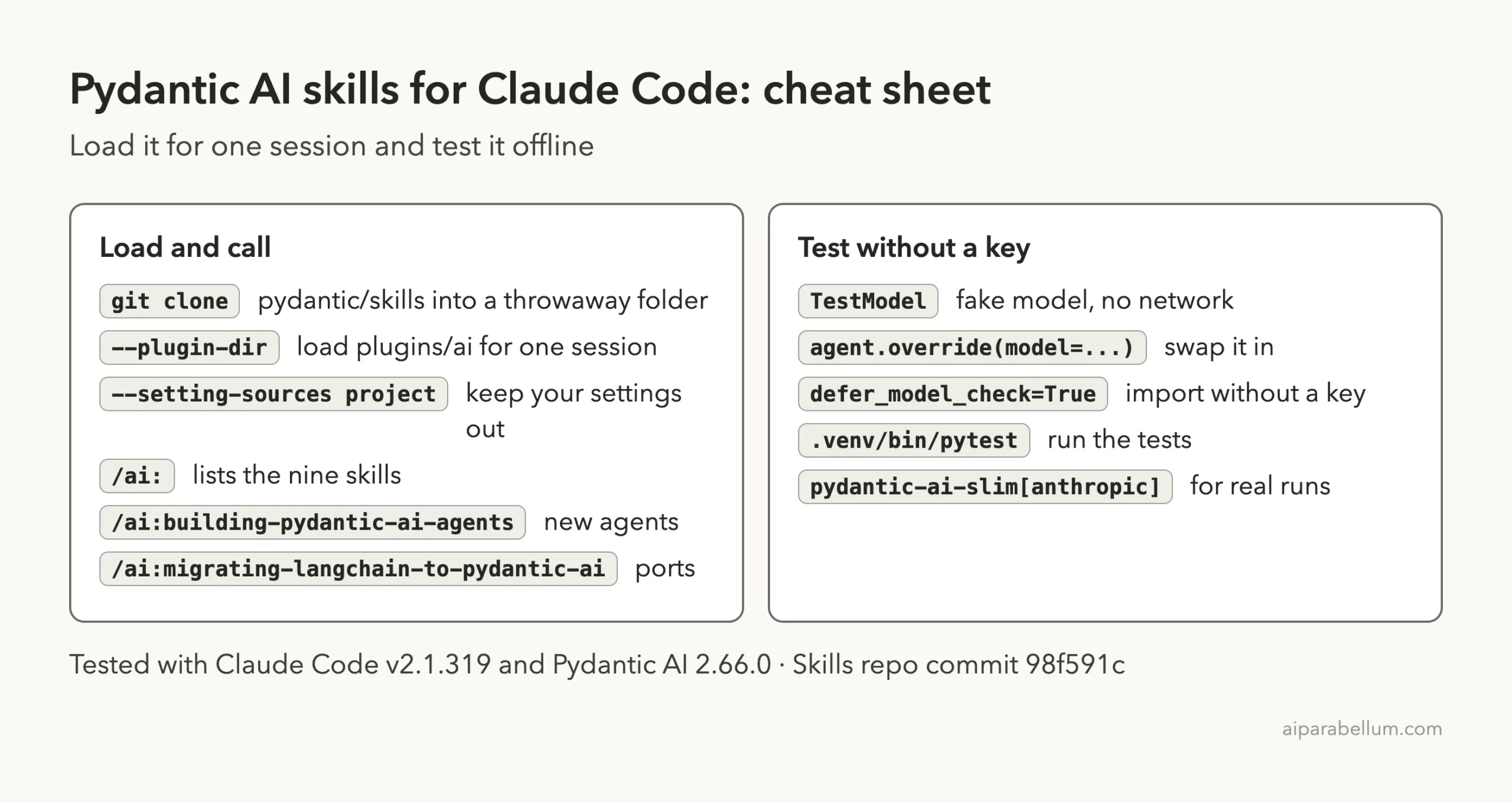
claude --plugin-dir /path/to/skills/plugins/ai --setting-sources projectThe --plugin-dir flag loads a plugin from a folder for that run only. The --setting-sources project flag keeps your personal settings out of the session. When we closed Claude Code, nothing was left in our real setup.
What we read before running it
Before loading anything we looked through the ai plugin folder. It holds a plugin.json, a short README and a skills folder of Markdown files. We found no hooks, no shell scripts and no MCP server config in this plugin.
We also searched it for commands such as curl, wget, rm -rf and for key handling. The only hits were documentation text about API keys for model providers. We saw nothing that looked unsafe.
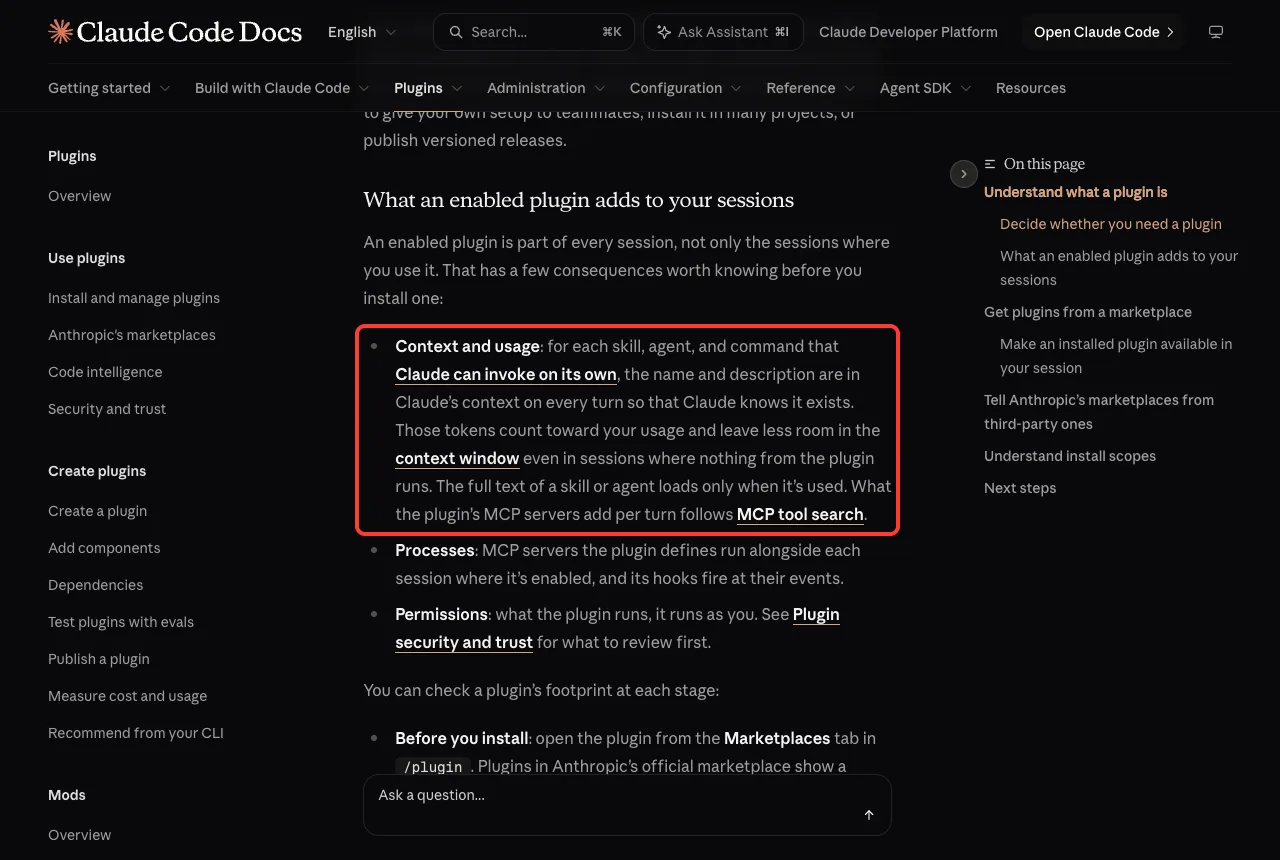
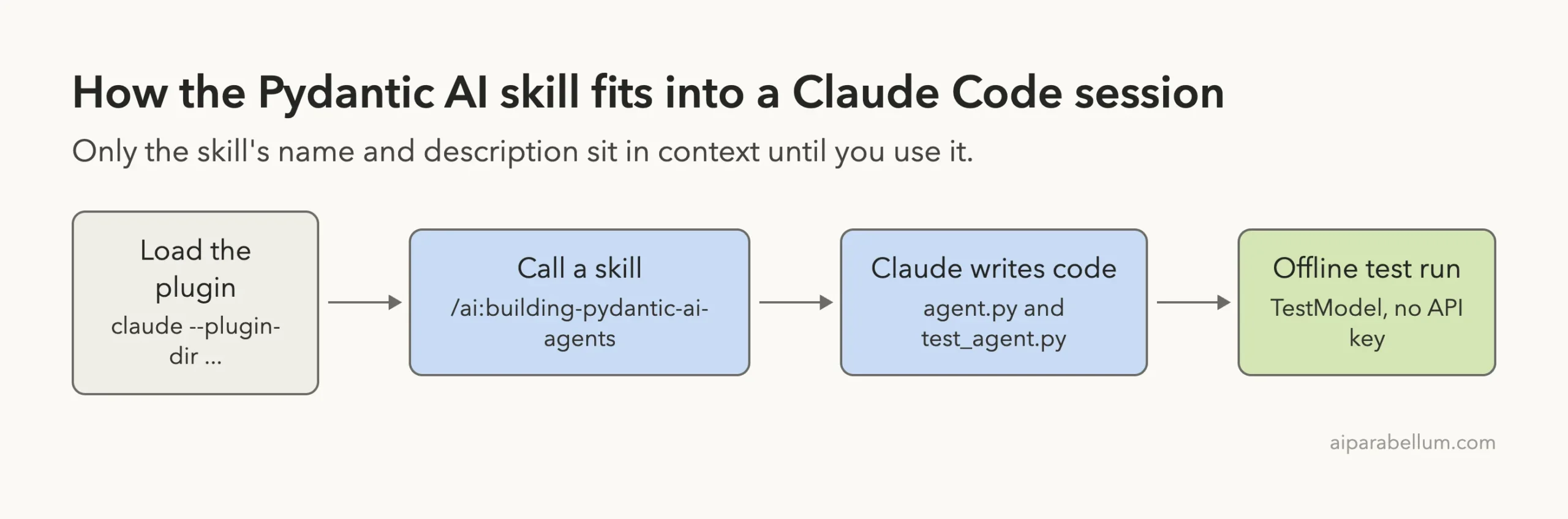
One cost to know about: Anthropic’s docs say that for each skill Claude can invoke on its own, the name and description sit in Claude’s context on every turn. The full text loads only when the skill is used. Nine skills means nine short descriptions in every session where the plugin is enabled.
Step 1: Load the Pydantic AI plugin in Claude Code
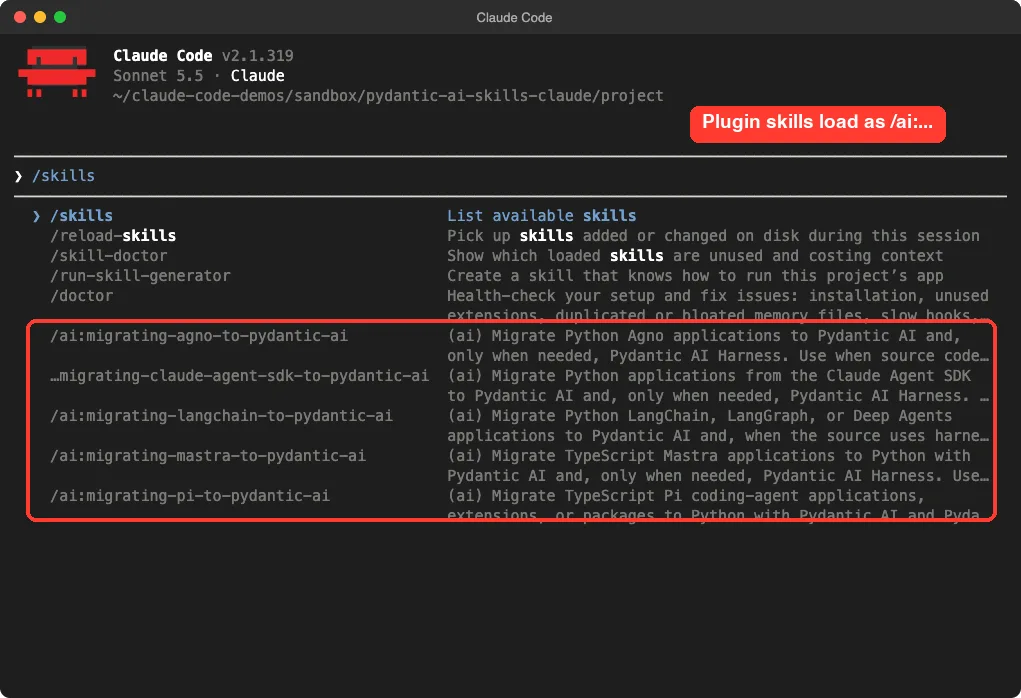
Typing /skills and then /ai: in the prompt box shows the plugin’s skills. Plugin skills carry the plugin name as a prefix, so the building skill is /ai:building-pydantic-ai-agents.
Our first attempt went wrong in a small way. We typed /skills, pressed Esc, then typed our prompt, and Claude Code read it as one unknown command.
We cleared the box with backspace and reran. If you see “Unknown command”, that is the cause.
How we kept the session predictable
We started in the default permission mode and pre-allowed a short list of commands in the demo project’s .claude/settings.json, such as .venv/bin/python and .venv/bin/pytest. Our permission modes guide explains the modes.
Claude still asked before running some commands, like pip list and a sed edit. Our script pressed Enter to approve each one. Expect a few approval prompts when you try this yourself.
Step 2: Build an agent with the building skill
The demo project was an empty folder with a Python virtual environment holding pydantic-ai-slim and pytest. We had no model API key, so the agent could not call a real model. That is why we asked for an offline test.
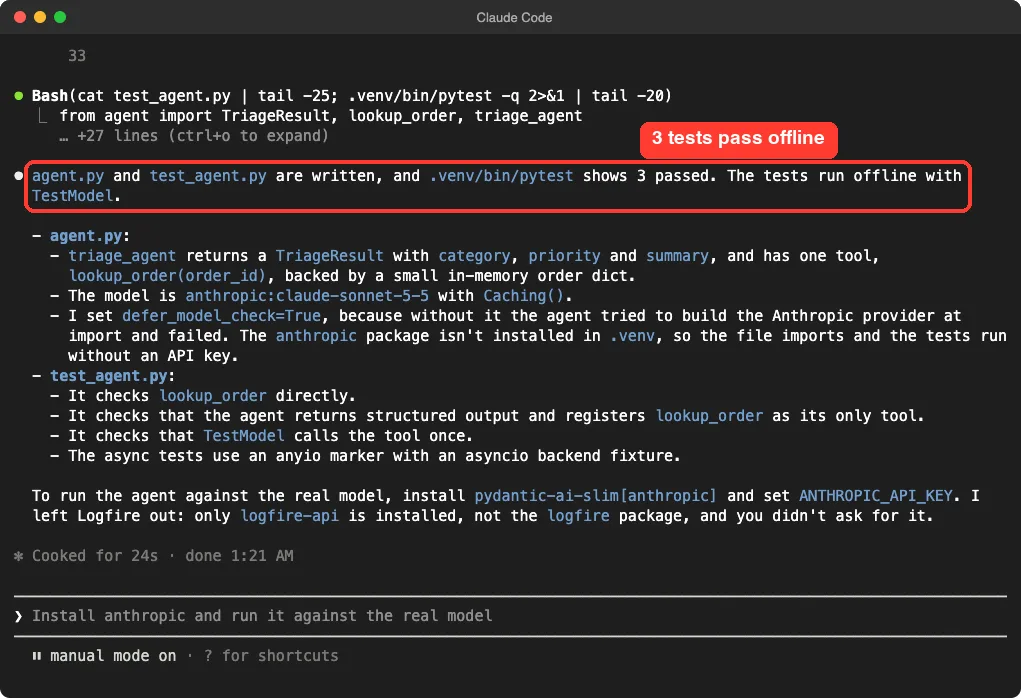
/ai:building-pydantic-ai-agents Write agent.py: a support-triage Pydantic AI agent with structured output (category, priority, summary) and one tool lookup_order(order_id). Then write test_agent.py that runs it offline with TestModel, and run it with .venv/bin/pytest.Claude checked which packages were installed, wrote both files, ran the tests, fixed one problem and ran them again. The whole step took about 24 seconds of working time plus our approvals.
This is the heart of the file Claude wrote.
class TriageResult(BaseModel):
    category: Literal['billing', 'shipping', 'technical', 'account', 'other']
    priority: Literal['low', 'medium', 'high', 'urgent']
    summary: str = Field(description='One-sentence summary of the customer issue.')

triage_agent = Agent(
    'anthropic:claude-sonnet-5-5',
    name='support_triage_agent',
    output_type=TriageResult,
    instructions='You triage customer support tickets. ...',
    capabilities=[Caching()],
    defer_model_check=True,
)

@triage_agent.tool_plain
def lookup_order(order_id: str) -> dict:
    """Look up an order by id and return its status and total."""
    return ORDERS.get(order_id, {'error': f'order {order_id} not found'})
Three things are worth noticing. The output is a typed Pydantic model, so a bad answer fails validation instead of slipping through.
The tool is a plain decorated function. And defer_model_check=True lets the file import without a provider key.
The Caching() capability comes straight from the skill’s starter example, which shows prompt caching in the first version of every agent. We take that as a sign Claude really followed the skill and not only its own habits.
How the offline test works
Pydantic AI ships a fake model called TestModel. You swap it in with agent.override(model=...), and it returns the output you choose while still calling your tools. No network, no key, no cost.
m = TestModel(custom_output_args={'category': 'shipping', 'priority': 'high', 'summary': 'Late order.'})
with triage_agent.override(model=m):
    result = await triage_agent.run('Order 1002 is late')
assert result.output == TriageResult(category='shipping', priority='high', summary='Late order.')
One snag: the async tests needed an anyio marker and a backend fixture, which Claude added after its first test run failed. The test run we repeated ourselves afterward showed 3 passed in 0.20s.
Step 3: Run the same Pydantic AI task in Claude Code with no plugin
A skill only earns its place if it changes the result. So we opened a second folder, started Claude Code with no plugin and no /ai: prefix, and gave it the same request word for word.
Write agent.py: a support-triage Pydantic AI agent with structured output (category, priority, summary) and one tool lookup_order(order_id). Then write test_agent.py that runs it offline with TestModel, and run it with .venv/bin/pytest.It finished in 14 seconds, and again all three tests passed.
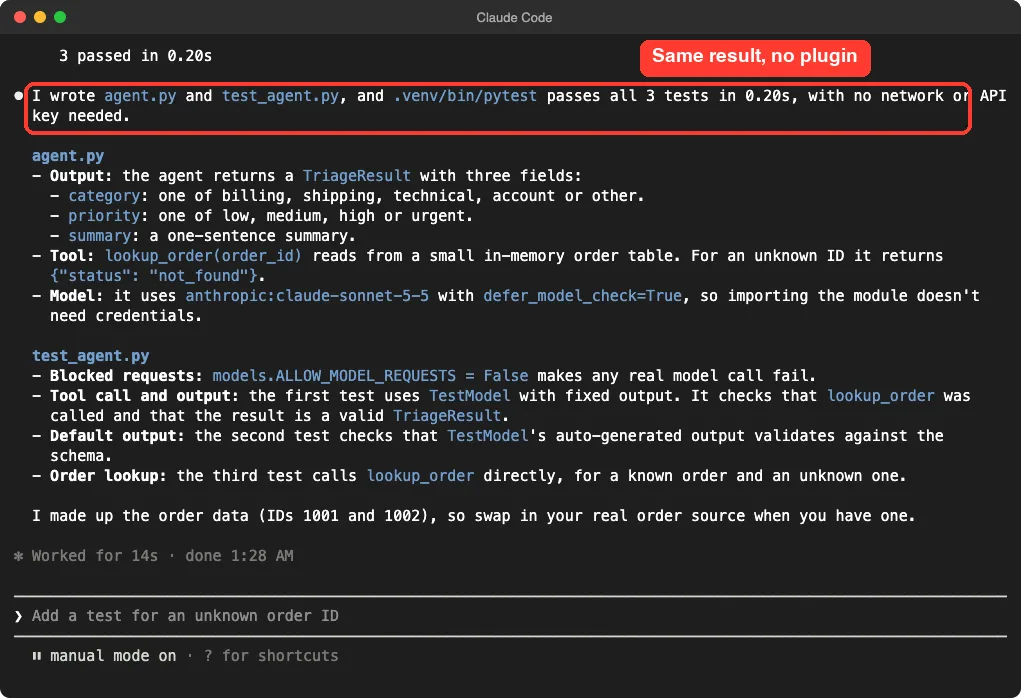
The code was close to identical: the same typed output, the same tool, the same defer_model_check=True. The no-plugin test file even had one extra safety line, models.ALLOW_MODEL_REQUESTS = False, which makes any accidental real model call fail.
| Detail | With the skill | Without it |
|---|---|---|
| Typed output model | Yes | Yes |
| Tool for order lookup | Yes | Yes |
defer_model_check=True | Yes | Yes |
Agent name | Yes (support_triage_agent) | No |
Caching() capability | Yes | No |
| Test that blocks real model calls | No | Yes |
| Tests passing | 3 of 3 | 3 of 3 |
| Working time shown | 24 seconds | 14 seconds |
This is one run of each, so treat the timing as a rough guide only. What we can say is that on a small, well-known task the current Claude model already wrote working Pydantic AI code without help.
Step 4: Port a LangChain agent
The migration skills looked like the stronger part of the plugin, so we tried one. We wrote a tiny LangChain agent in agent_langchain.py with one weather tool and a system prompt. LangChain was not installed, and we did not need it to be.
/ai:migrating-langchain-to-pydantic-ai Migrate agent_langchain.py to Pydantic AI in agent_pydantic.py. LangChain is not installed here, so do not run the original; add one offline TestModel test and run it with .venv/bin/pytest.Claude wrote agent_pydantic.py in about 14 seconds. The system prompt became instructions, the tool became an @agent.tool_plain function, and agent.invoke(...) became agent.run_sync(...) with result.output replacing the old message lookup.
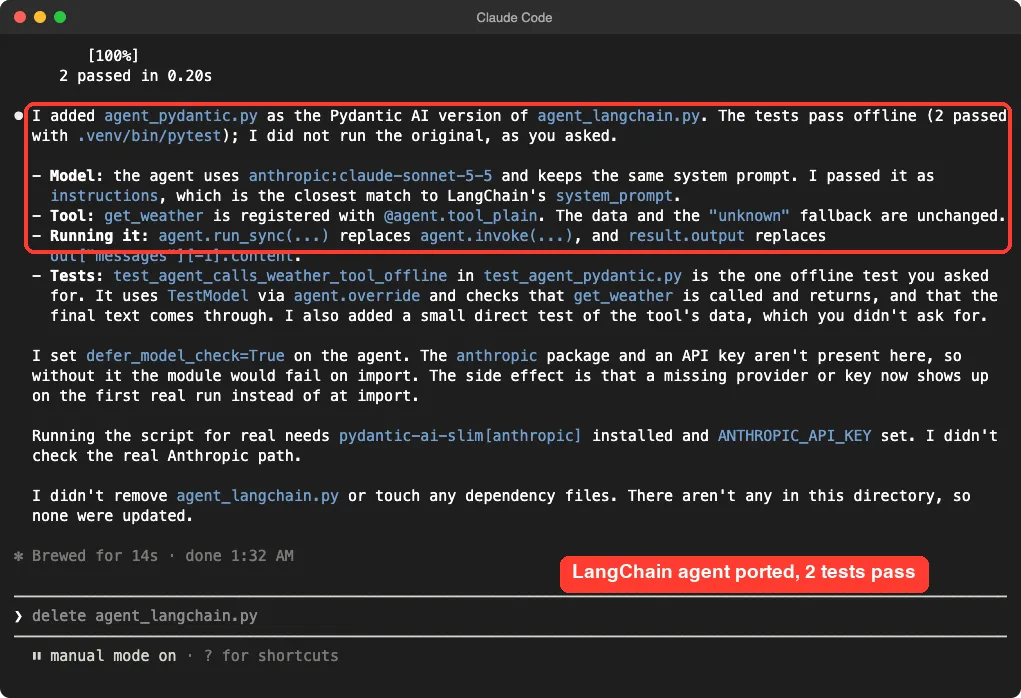
We liked the honesty of the summary. It said it did not run the original, as we asked, did not check the real Anthropic path, and did not delete the old file. It also added one extra test of the tool’s data and told us so.
This was a toy: one agent, one tool, no state. The migration skill’s own text talks about tracing real request paths, characterization tests and cutover plans for production apps. We did not exercise any of that, so we cannot say how it handles a large LangGraph project.
On a small task, plain Claude Code matched the skill. The plugin matters most when you port a real app or want current patterns kept in reach.
Which skill should you use?
Based on what we saw, the plugin fits some jobs better than others.
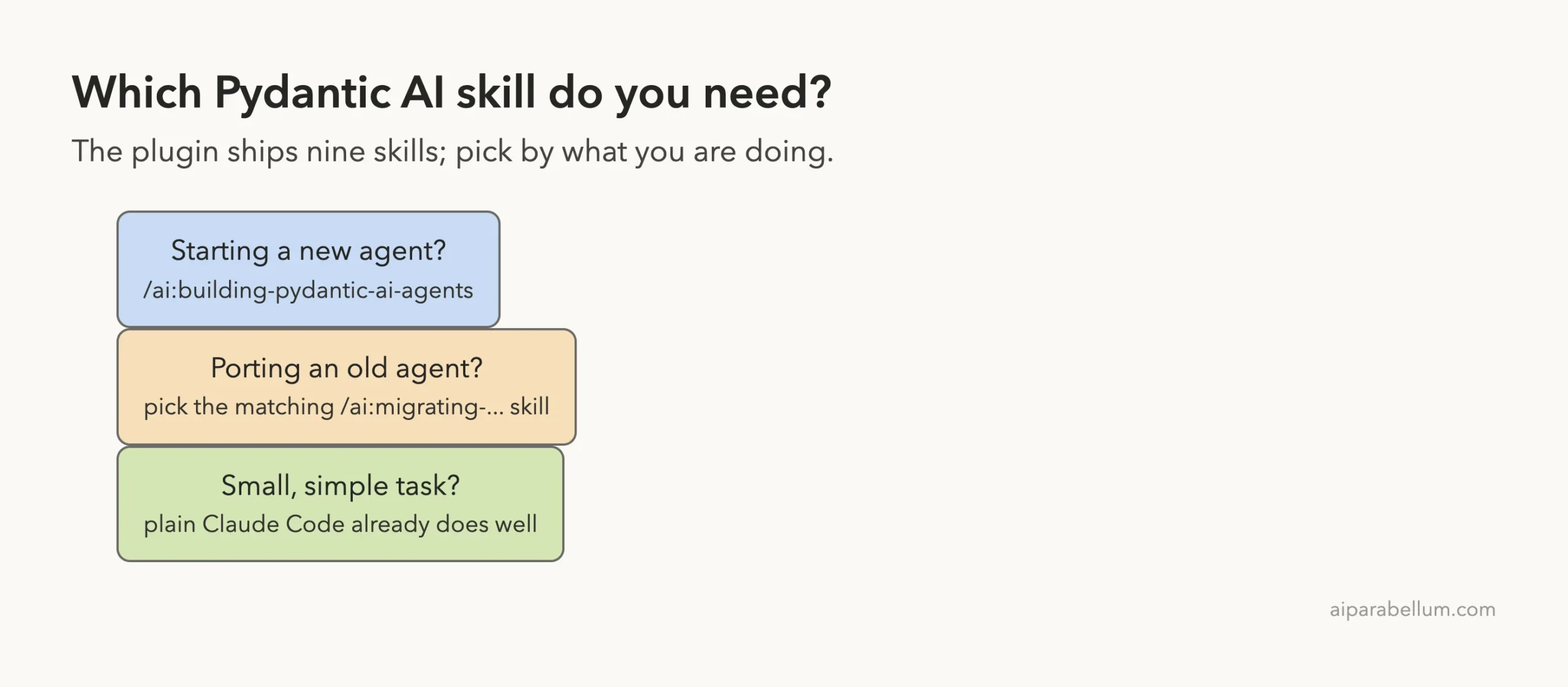
- Starting a new agent in a codebase that already uses Pydantic AI: the building skill helps keep Claude on current patterns.
- Porting an app from one of the eight listed frameworks: use the matching migration skill, which spells out a careful process.
- A quick, small agent or a one-off script: plain Claude Code did fine in our test.
Try it yourself
You can repeat our test in a throwaway folder in about ten minutes. Start with a clean clone and a virtual environment.
git clone https://github.com/pydantic/skills
python3 -m venv .venv
.venv/bin/pip install pydantic-ai-slim pytest
claude --plugin-dir ./skills/plugins/ai --setting-sources project
Then paste a prompt like this one.
/ai:building-pydantic-ai-agents Write agent.py: a recipe-suggestion Pydantic AI agent with structured output (title, minutes, steps) and one tool get_pantry(). Then write test_agent.py that runs it offline with TestModel and run it with .venv/bin/pytest.Once the tests pass, rerun the same prompt in a new folder without --plugin-dir and compare the two files yourself.
Common mistakes
- Typing
/skills, pressing Esc and typing on. Clear the box first, or Claude Code reads it as one unknown command. - Forgetting the prefix. Plugin skills are called
/ai:..., not just by their folder name. - Running the agent for real with no key. The code in our test needs
pydantic-ai-slim[anthropic]installed and anANTHROPIC_API_KEYset before a live call works. - Installing the plugin when you only want a trial. Use
--plugin-dirso nothing lands in your personal setup. - Trusting a green test too much.
TestModelchecks your wiring, not the quality of a real model’s answers.
Pro tips
- Ask Claude to block real model calls in tests with
models.ALLOW_MODEL_REQUESTS = False. The no-plugin run did this on its own. - Name your agents. A
namehelps when you trace runs later. - Read the skill’s description before you enable it for good, since nine descriptions are in context every turn.
- Run the skill on a real task of yours, not only a toy. That is where a migration skill should show its value.
What we did not test
We did not call a real model, so we cannot tell you how the agents behave on actual tickets. We did not set up Logfire, the observability service the building skill recommends for new apps. Claude left it out and said so in its summary, because we had not asked for it.
We also ran only two of the nine skills, on toy projects, once each. Different prompts could give different results.
Frequently Asked Questions
Do the Pydantic AI skills work without an API key?
Yes, for writing code and running offline tests. A real model call needs a provider key such as ANTHROPIC_API_KEY, or a gateway key as the skill describes.
How do you install the Pydantic AI skills for Claude Code?
The README gives two commands: claude plugin marketplace add pydantic/skills and claude plugin install ai@pydantic-skills. For a trial, load the folder with --plugin-dir instead.
Is the plugin better than plain Claude Code?
On our small task the results were nearly the same. The skill added an agent name and the Caching() capability, while the plain run added a stricter test. We did not test a large migration.
Which frameworks can it migrate from?
LangChain and LangGraph, the OpenAI Agents SDK, Google ADK, Mastra, Agno, Pi, the Claude Agent SDK, and the Vercel AI SDK with Eve.
Does it run scripts or hooks on your machine?
Not that we found. The ai plugin is Markdown skills plus a manifest, with no hooks, scripts or MCP servers. The wider repo has other plugins and scripts, which we did not load.
Conclusion
The Pydantic AI skills for Claude Code are a safe, free add-on that worked in our tests, but on a small support-triage agent they did not beat plain Claude Code by much. Install them if you build on Pydantic AI regularly or need to port an agent from another framework, and skip them for one-off scripts. For more add-ons worth a look, see how design skills test against no skill at all.