If you want to use Redis with Claude Code, the official Redis plugin gives Claude a set of 14 skills that teach it how Redis should be used. We loaded it, asked Claude to review a small shop script, and then had it build a cache and a job queue. This post shows exactly what happened, what worked, and what you should know before you install it.
This guide is part of our Claude Code tutorials. Find more add-ons in our skills directory.
Tested with Claude Code v2.1.319 on November 11, 2026. We used the redis-development plugin version 1.7.0 from github.com/redis/agent-skills (commit 74708da).
The plugin did not write magic code. It made Claude follow Redis best practice, and we still approved every edit.
Quick Summary: What We Tested
| Question | Answer |
|---|---|
| What is it? | An official plugin from Redis with 14 skills and a docs server |
| Does it need an account? | Not for the core skills we used |
| What did we run? | A code review, a cache rewrite and a queue, all from a demo folder |
| What did we not run? | A real Redis server, the Redis Iris skills and the semantic cache skill |
| Our verdict | Useful if you write Redis code and want sensible defaults |
One honest note up front. There is no Redis server on our test Mac, so we ran the finished code against fakeredis, a Python library that imitates Redis in memory. It proves the logic works, but it is not a speed test.
What the Redis Plugin for Claude Code Is
A plugin is a bundle that adds skills, commands or tools to Claude Code. A skill is a short guide that Claude reads when your request matches it. If plugins are new to you, or you want to know how Claude uses skills, our plugins guide explains how to find and manage them.
The Redis plugin is called redis-development. Its manifest lists a skills folder and one MCP server, redis-docs, which points at https://redis.io/mcp. We read both files and the repo has no hooks and no install scripts, so loading it only adds skills and that docs connection.
We covered it briefly in our database plugins roundup. This post is the hands-on version.
The 14 Redis Skills at a Glance
| Skill group | Skills | What it covers |
|---|---|---|
| Everyday Redis | redis-core, redis-connections, redis-clustering, redis-security, redis-observability | Data types, key names, pooling, pipelining, clusters, safety, monitoring |
| Search and caching | redis-search, redis-semantic-cache | Search indexes, vector search, caching AI answers |
| Docs | redis-docs-mcp | Looking things up on redis.io |
| Redis Iris | add-agent-memory, add-agent-playbooks, add-context-gateway, add-intent-router, add-lens, add-redis-iris | Adding memory and routing to AI agents |
The semantic cache skill says in its own text that LangCache on Redis Cloud is in preview. The memory skill talks about provisioning a service from the terminal. We treated both as account features and did not run them.
How to Load the Redis Plugin Safely
We did not install the plugin into our normal setup. We cloned the repo into a throwaway sandbox and loaded the plugin folder for one session with the --plugin-dir flag, plus --setting-sources project so no personal settings came along.
git clone --depth 1 https://github.com/redis/agent-skills
cd my-demo-project
claude --plugin-dir /path/to/agent-skills/plugins/redis-development --setting-sources project
When you want it permanently, the official route is /plugin install redis-development@claude-plugins-official. The plugin discovery docs explain marketplaces, and the plugins docs cover the --plugin-dir flag we used.
Step 1: Check That the Skills Loaded
Once Claude Code opened, we typed /skills. All 14 skills appeared under the redis-development name, each marked as locked by the plugin.
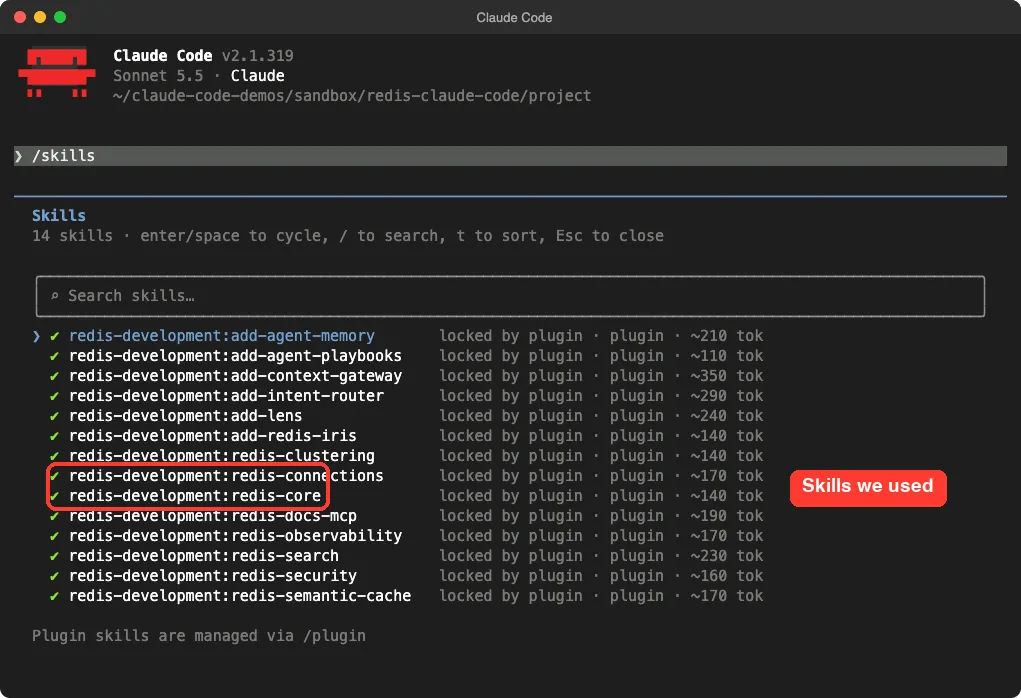
We also ran /mcp. It listed plugin:redis-development:redis-docs as connected with 3 tools. We did not call those tools in this test.
Step 2: Let Claude Review Redis Code
We wrote a small file called shop.py with the kind of mistakes beginners make. It opens a new connection in every function, uses mixed-case key names, has no expiry on cached data, and calls KEYS to list products.
import json
import redis

def get_product(product_id):
    r = redis.Redis()          # new connection on every call
    raw = r.get("Product_" + str(product_id))
    if raw:
        return json.loads(raw)
    product = load_from_database(product_id)
    r.set("Product_" + str(product_id), json.dumps(product))
    return product

def list_all_products():
    r = redis.Redis()
    return [r.get(k) for k in r.keys("Product_*")]
Then we asked Claude to review it with the Redis skills and not to edit anything yet.
Review shop.py for Redis problems using the Redis skills. Do not edit any files yet. Keep the answer short.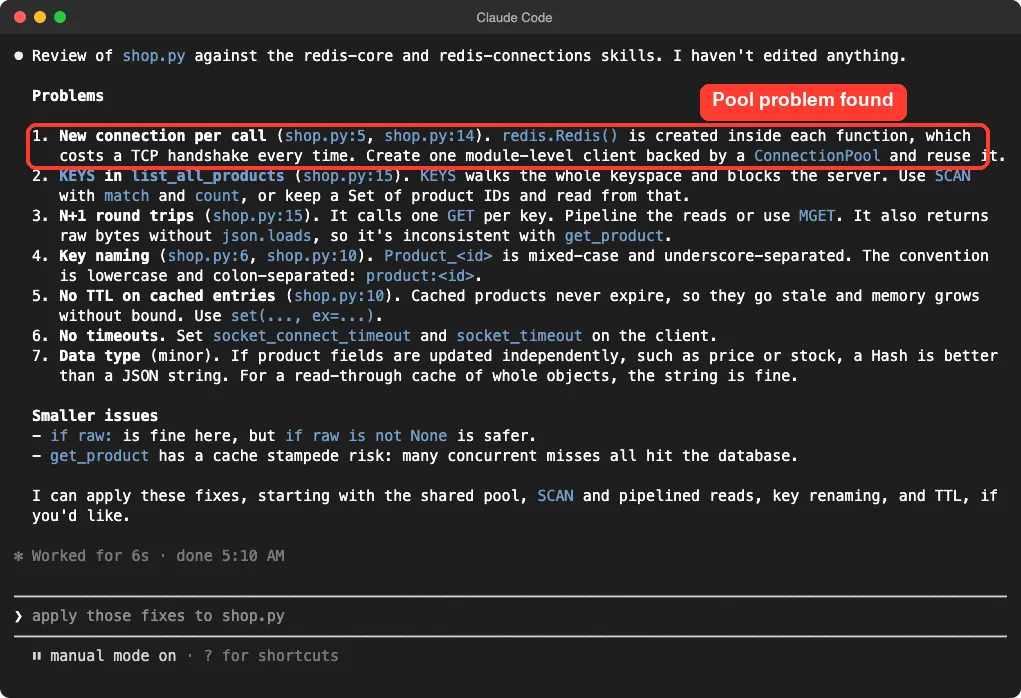
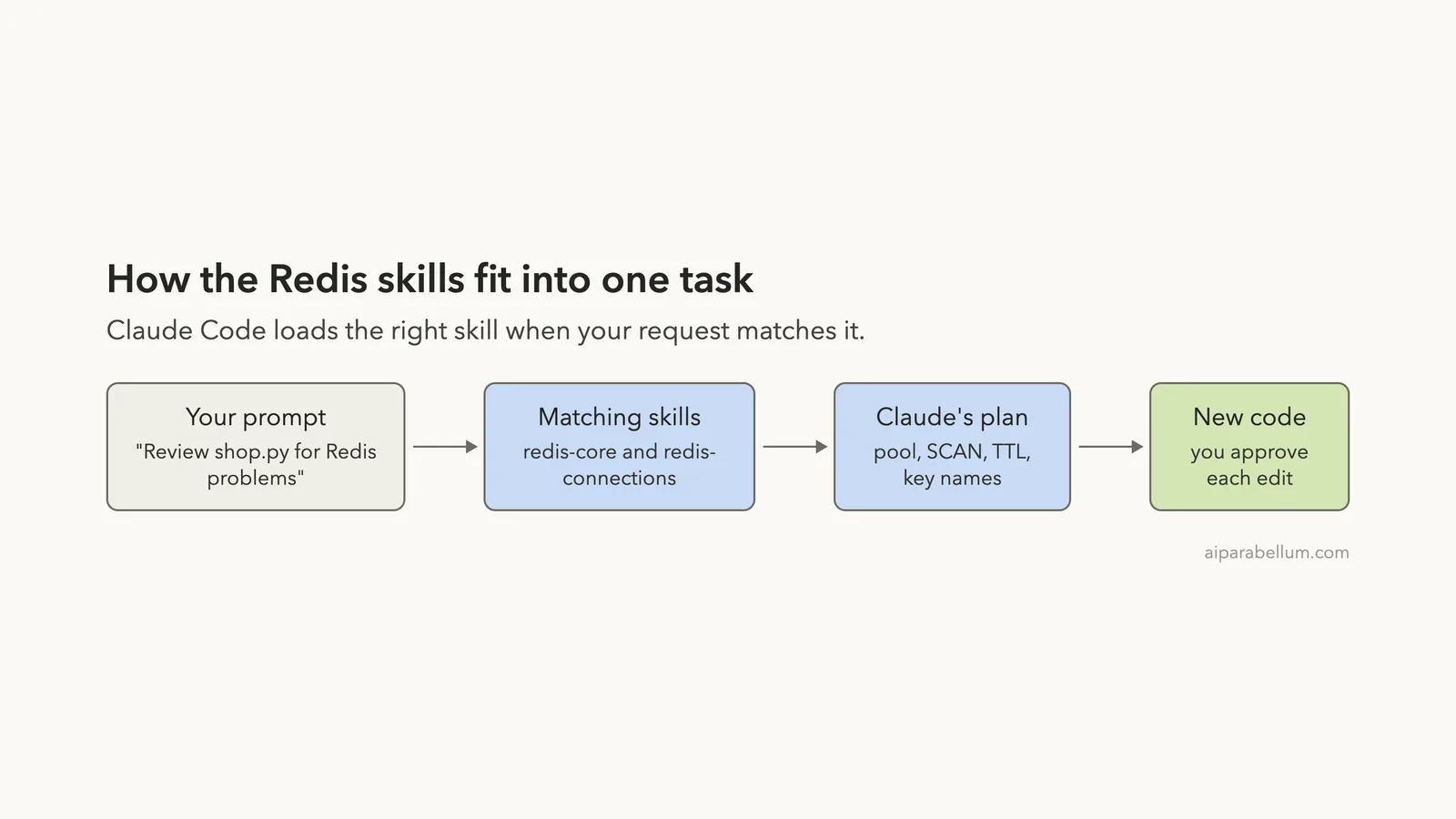
The answer named the redis-core and redis-connections skills and found seven problems. The big ones were a new connection per call, KEYS blocking the server, one GET per key, mixed-case key names, no TTL, and no timeouts.
It also made a fair call on data types. Claude said a Hash is better if fields like price change on their own, but a plain string is fine for a read-through cache of whole objects. That matches the skill’s own table, which tells you to pick a type by access pattern.
Step 3: Build the Cache and the Queue
Next we asked for the rewrite and a small queue in one prompt.
Using the Redis skills, rewrite shop.py as a read-through product cache with a shared connection pool, product:<id> keys, a 10 minute TTL and no KEYS. Then add queue.py with enqueue(job) and a worker that pops jobs from a Redis list with a blocking pop. Keep both files short.Claude Code showed each edit as a diff and asked us to approve it. Nothing was written until we said yes.
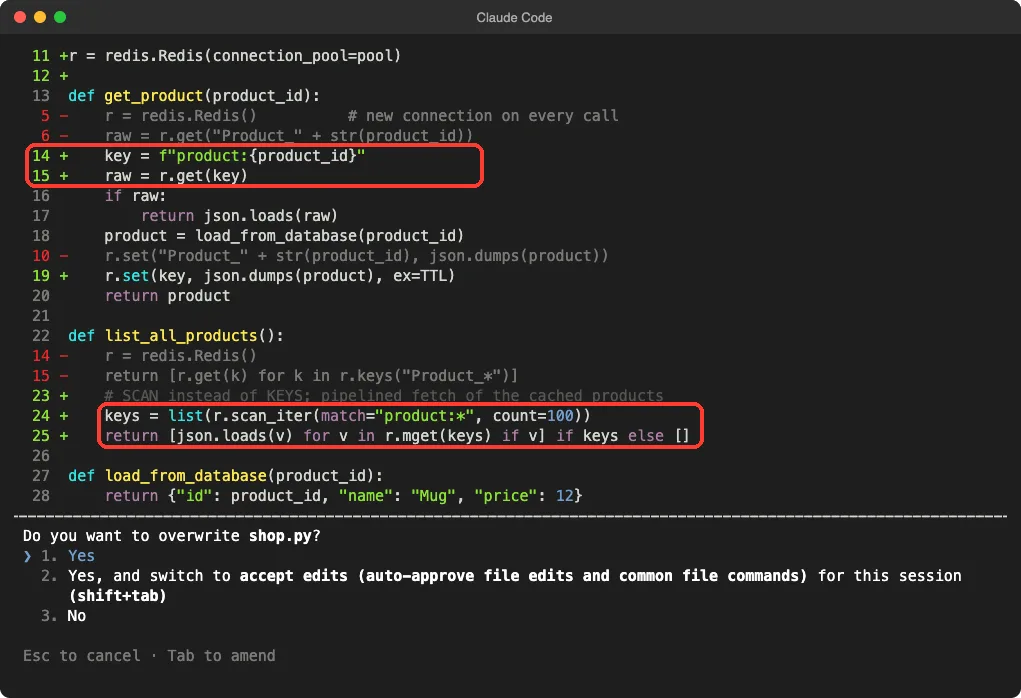
This is the cache it wrote, trimmed only by leaving out nothing important.
import json
import redis

TTL = 600  # 10 minutes

pool = redis.ConnectionPool(
    host="localhost", port=6379, max_connections=50,
    socket_connect_timeout=2.0, socket_timeout=5.0,
)
r = redis.Redis(connection_pool=pool)

def get_product(product_id):
    key = f"product:{product_id}"
    raw = r.get(key)
    if raw:
        return json.loads(raw)
    product = load_from_database(product_id)
    r.set(key, json.dumps(product), ex=TTL)
    return product

def list_all_products():
    keys = list(r.scan_iter(match="product:*", count=100))
    return [json.loads(v) for v in r.mget(keys) if v] if keys else []
And this is the queue. The producer pushes onto a list with RPUSH, and the worker waits with BLPOP.
import json
from shop import r  # reuse the shared connection pool

QUEUE = "queue:jobs"

def enqueue(job):
    r.rpush(QUEUE, json.dumps(job))

def worker(handle):
    while True:
        item = r.blpop(QUEUE, timeout=5)  # blocking pop; None on timeout
        if item:
            handle(json.loads(item[1]))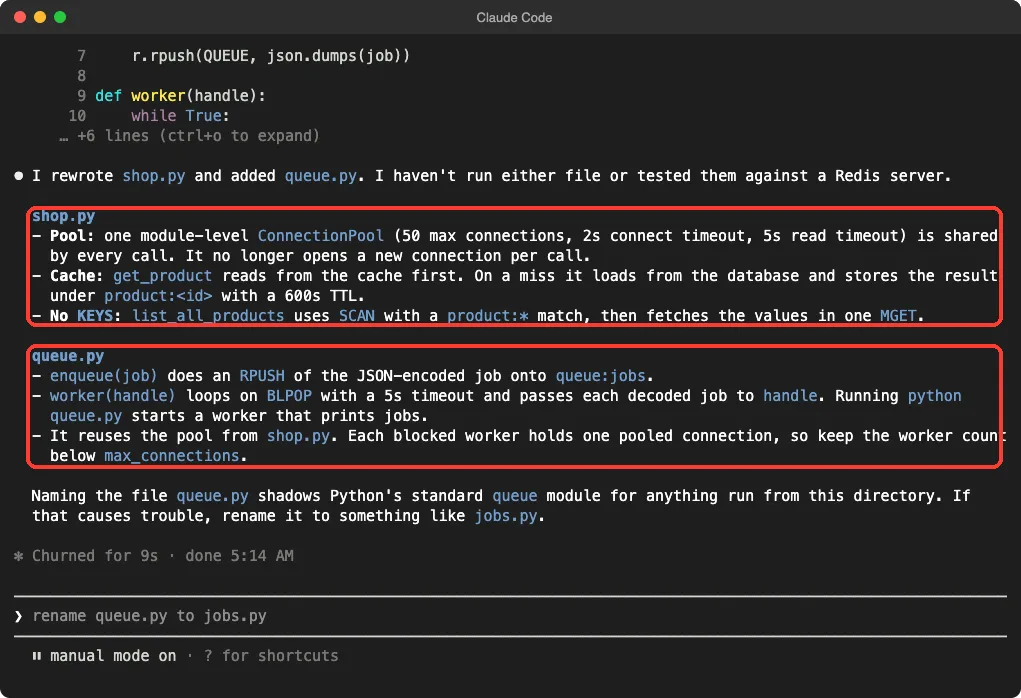
Two details here impressed us. Claude said plainly that it had not run either file against a Redis server. It also warned that queue.py shadows Python’s built-in queue module and suggested jobs.py, so we renamed it.
Step 4: Run It for Real
To check the code, we wrote our own short script, run_demo.py, that swaps in fakeredis and runs the cache and the queue. Claude did not write this part.
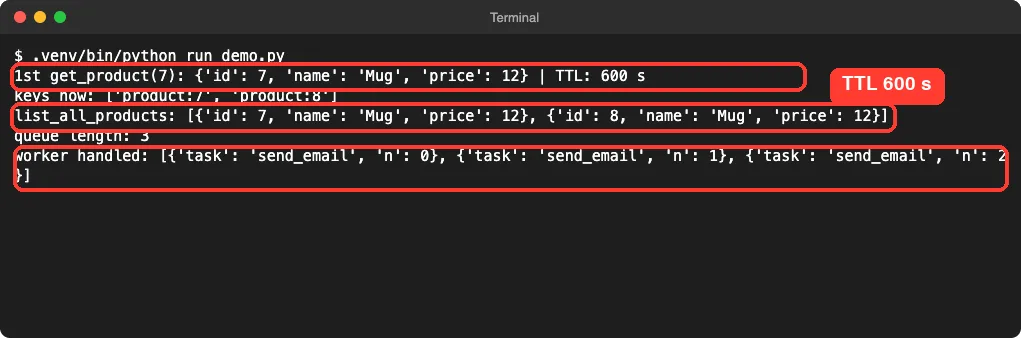
The results matched the plan. The first lookup stored product:7 with a TTL of 600 seconds, list_all_products found both products through SCAN, and the three jobs came out of the list in the order they went in.
What we did not measure is speed or behavior under load. A fake Redis cannot show you connection costs or blocking, so we make no performance claims.
How the Pieces Fit Together
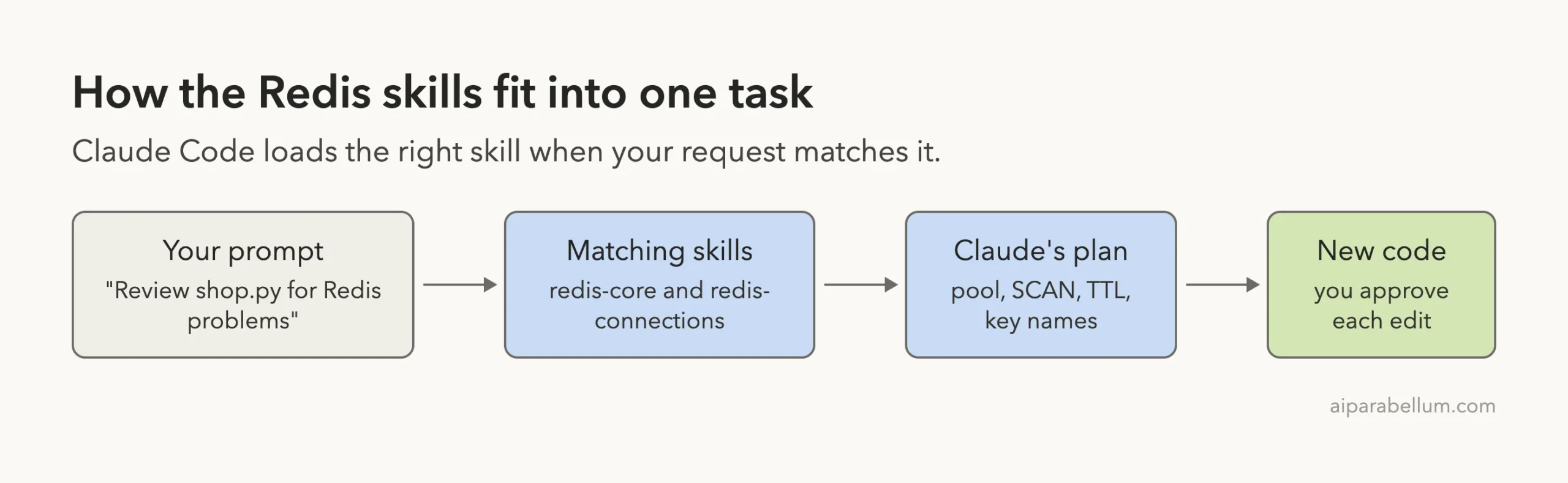
The skills do not run anything on their own. They are text that Claude reads when your request fits, and that text shaped the review and the rewrite. Because you approve each edit, you stay in charge of what lands in your files.
What Worked and What Did Not
| Worked well | Watch out for |
|---|---|
| Review found the real problems in our script | We never tested against a real Redis server |
Fixes matched Redis best practice: pool, SCAN, TTL, key names | A blocked worker holds one pooled connection, so size the pool |
| No hooks or scripts, only skills and a docs connection | Iris and semantic cache skills need outside services we did not use |
| Claude was honest about what it had not run | A basic BLPOP loop has no retries or failure handling |
That last point matters for a real queue. Our worker removes a job before handling it, so a crash mid-job loses that job. For anything important, ask Claude about reliable queues or Redis Streams before you ship.
Who Should Install the Redis Plugin
It suits developers who already touch Redis for caching, sessions, counters or queues. The skills cost a small number of tokens each, and the review we got was specific to our code, not a generic lecture.
If you only need a database to query, you may prefer a different tool. Our MongoDB plugin test shows that style, and our vector database plugins compares options for search.
Why Skills Beat a Plain Prompt for Redis
You can ask Claude about Redis without any plugin, and it will often do fine. The difference is consistency. A skill puts the same rules in front of Claude every time, such as colon key names, a TTL on cache entries and no KEYS in application code.
That helps most on a team. When three people ask for Redis code, they all get the same conventions instead of three different styles. It also helps you review, because you know which rules the code was meant to follow.
The cost is small. Each skill we saw in the list showed a token estimate of a few hundred tokens at most, so loading all 14 does not swamp a session. If you want to compare how skills, subagents and plugins differ, read our skills versus plugins explainer.
One limit is worth saying out loud. A skill cannot know your traffic, your memory budget or your Redis version. It gives sensible defaults, and you still decide the numbers, such as the pool size and the TTL.
Try It Yourself
Make a small file with a few Redis mistakes, load the plugin in a throwaway folder, and ask for a review before any edits. Use this prompt:
Review my Redis code with the Redis skills. List each problem with the line number and the fix. Do not edit anything yet.Then ask for the fixes and read each diff before you approve it.
Common Mistakes
- Installing into your main setup before you have read the repo’s files.
- Running
KEYSin code that talks to a real server. - Naming a file
queue.pyand shadowing Python’s own module. - Treating a fake Redis run as proof of speed.
- Skipping the diff review and approving every edit.
Pro Tips
- Ask for a review first, then the rewrite, so you can compare.
- Name the skills in your prompt when you want a specific one used.
- Run
/skillsto confirm what loaded before you start. - Keep worker counts below the pool size.
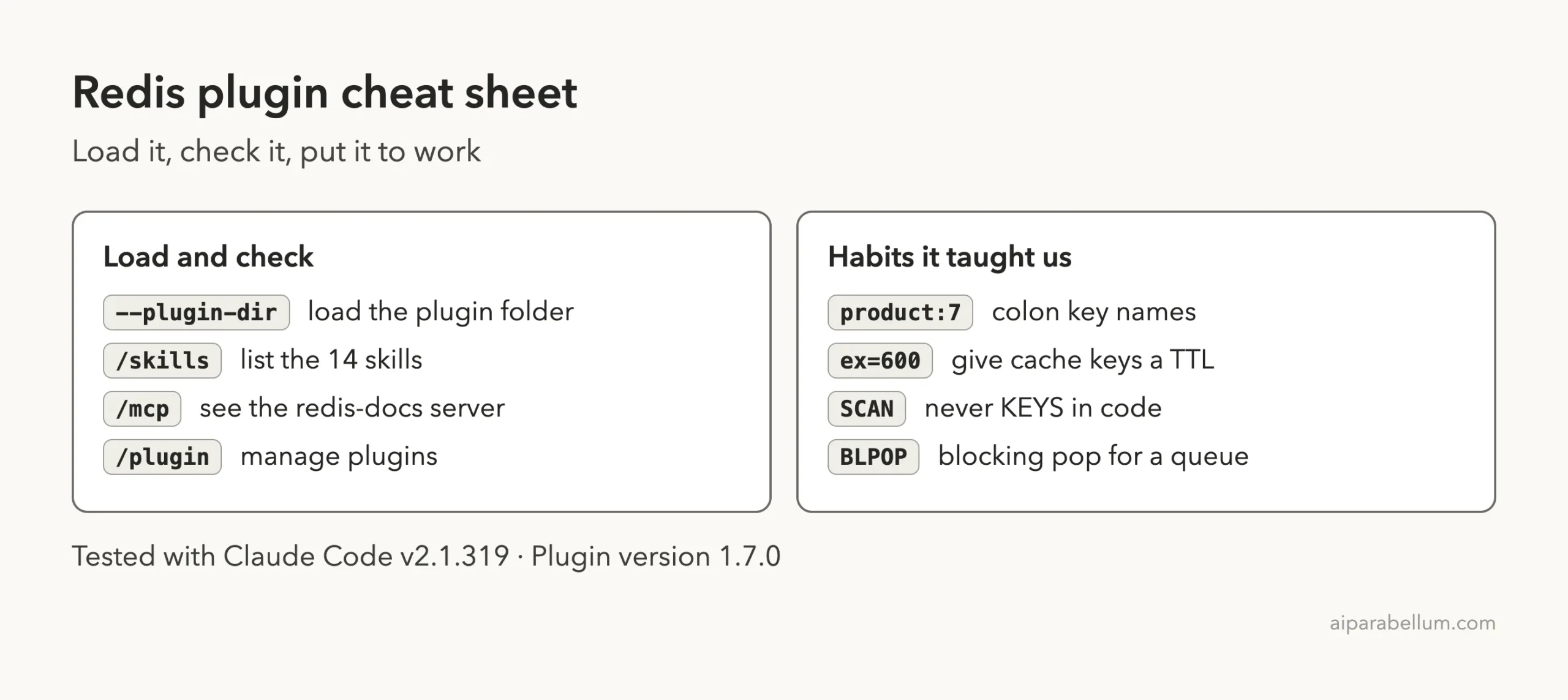
Cheat Sheet
Frequently Asked Questions
Does the Redis plugin need a Redis account?
The core skills we used did not. Some others, like the semantic cache skill for Redis Cloud, are written for Redis services, so check each skill before you rely on it.
Does the plugin install Redis on my computer?
No. It adds skills and a docs connection to Claude Code. You still need your own Redis server to run the code.
How do I install the Redis plugin for good?
Use /plugin install redis-development@claude-plugins-official. For a one-session trial, load the plugin folder with --plugin-dir.
Is the plugin safe to load?
We read its files first. It has skills and one HTTP docs server and no hooks. You should still read any plugin yourself before loading it.
Which skills should a beginner start with?
Start with redis-core and redis-connections. They cover data types, key names, pooling and the commands to avoid.
Conclusion
The Redis plugin turned a loose request into a focused review and a clean cache and queue, with each edit shown for approval. We ran the result against a fake Redis, so treat it as a solid starting point and test it on a real server before relying on it.