If you want to use Terraform with Claude Code, two add-ons come up first: the official HashiCorp plugin and a community skill called TerraShark. They sound similar, but they do very different jobs. One connects Claude to live Terraform data through a server, and the other teaches Claude a safer way to review and write infrastructure code.
We tried both on a small demo project that was full of deliberate mistakes. This guide shows what we ran, what worked, what did not start, and which one you should install first.
This guide is part of our Claude Code tutorials. Find more add-ons in our Skills Directory.
Tested with Claude Code v2.1.318 on November 8, 2026, on macOS. We used TerraShark at commit 21f2c18 (marketplace version 2.3.0) and the HashiCorp plugin from the anthropics/claude-plugins-public repository at commit 0412be7.
Quick Summary
| Question | TerraShark | HashiCorp plugin |
|---|---|---|
| What is it? | A skill: Markdown instructions and reference files | A plugin that starts the Terraform MCP server |
| Who makes it? | LukasNiessen (community) | HashiCorp (listed in the official marketplace) |
| Needs an account? | No | A TFE_TOKEN is passed to the server for HCP Terraform |
| Needs Docker? | No | Yes, the server runs with docker run |
| Did it run for us? | Yes, on a demo review | No, the server showed as failed because Docker was not running |
| Best for | Safer code review and generation | Live registry and workspace data, if you already use HCP Terraform |
What Terraform Needs From Claude Code
Terraform describes cloud infrastructure as code. A small mistake in a file can expose a database to the internet, leak a password into logs, or delete data during an apply. That is why a general chat answer is not always enough.
An assistant needs two things for this kind of work. First, good habits. For example, it should ask which Terraform version and state backend you use before it writes anything.
Second, it needs accurate data, such as provider documentation and module versions. TerraShark focuses on the first need, and the HashiCorp plugin focuses on the second.
If you are new to add-ons, our guides on Claude Code skills, MCP servers and plugins explain the basics. Anthropic’s own plugins documentation says a plugin can bundle skills, agents, commands, hooks and MCP servers.
How We Kept Our Own Setup Safe
We did not install anything into our normal Claude Code setup. We cloned both repositories into a throwaway sandbox folder and read their files before running them. TerraShark has no hooks or scripts that run on their own, only Markdown files and a marketplace manifest.
For TerraShark we copied SKILL.md and the references folder into the demo project’s .claude/skills/terrashark/ folder. We started Claude Code with --setting-sources project, so only that project’s settings were used. That is a project skill, which is slightly different from installing it through the marketplace, but the skill content is the same.
For the HashiCorp plugin we loaded its folder with --plugin-dir. This is the safe way to try a plugin without touching your user settings. We did not run /plugin install for either one.
The Demo Project With Deliberate Mistakes
We wrote one file, main.tf, with a small AWS database setup. It looks innocent at first glance, but it contains many classic problems.
- Fake AWS keys written straight into the provider block
- A variable with a plaintext default password
- An output that prints that password
- A database with
publicly_accessible = true - A
skip_final_snapshot = truesetting, so a destroy leaves no backup - Three databases created with
count = 3, which addresses them by number
All keys and passwords in the file are made-up values. Nothing was ever applied, and Terraform itself is not even installed on our test Mac, so the whole test is about code review, not deployment.
Step 1: Confirm TerraShark Is Loaded
After starting Claude Code in the project folder, we typed /skills. The list showed one project skill, terrashark, with a small token cost next to it.
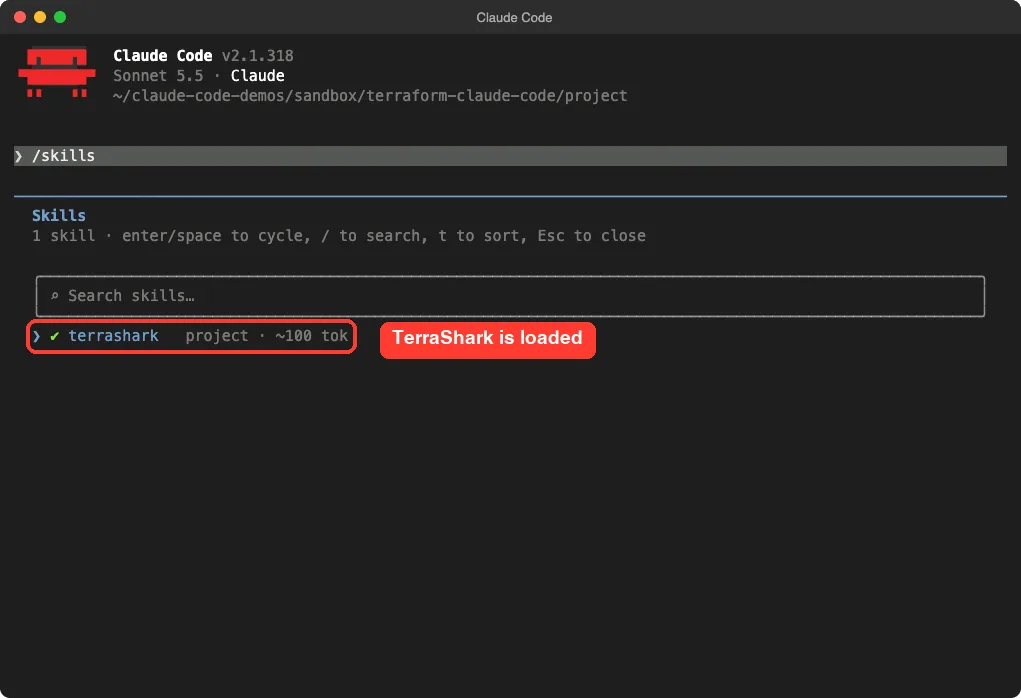
The listing says about 100 tokens. That is what Claude Code showed us, and it is only the name and description that sit in context each turn. The repository’s own comparison page claims the full skill file costs around 600 tokens when it activates, but we did not measure that ourselves.
Step 2: Run /terrashark on the Demo File
We ran one prompt that named the skill directly. Typing /terrashark followed by your request tells Claude to follow the skill’s workflow.
/terrashark Review main.tf for the 6 most serious problems, one short line each. Do not edit any files.Claude read three files, which the screen shows as “Read 3 files”. Then it opened its answer by stating its assumptions: Terraform with the AWS provider, no backend configured, and unknown environment criticality. It also named the failure modes it was looking for, secret exposure and blast radius.
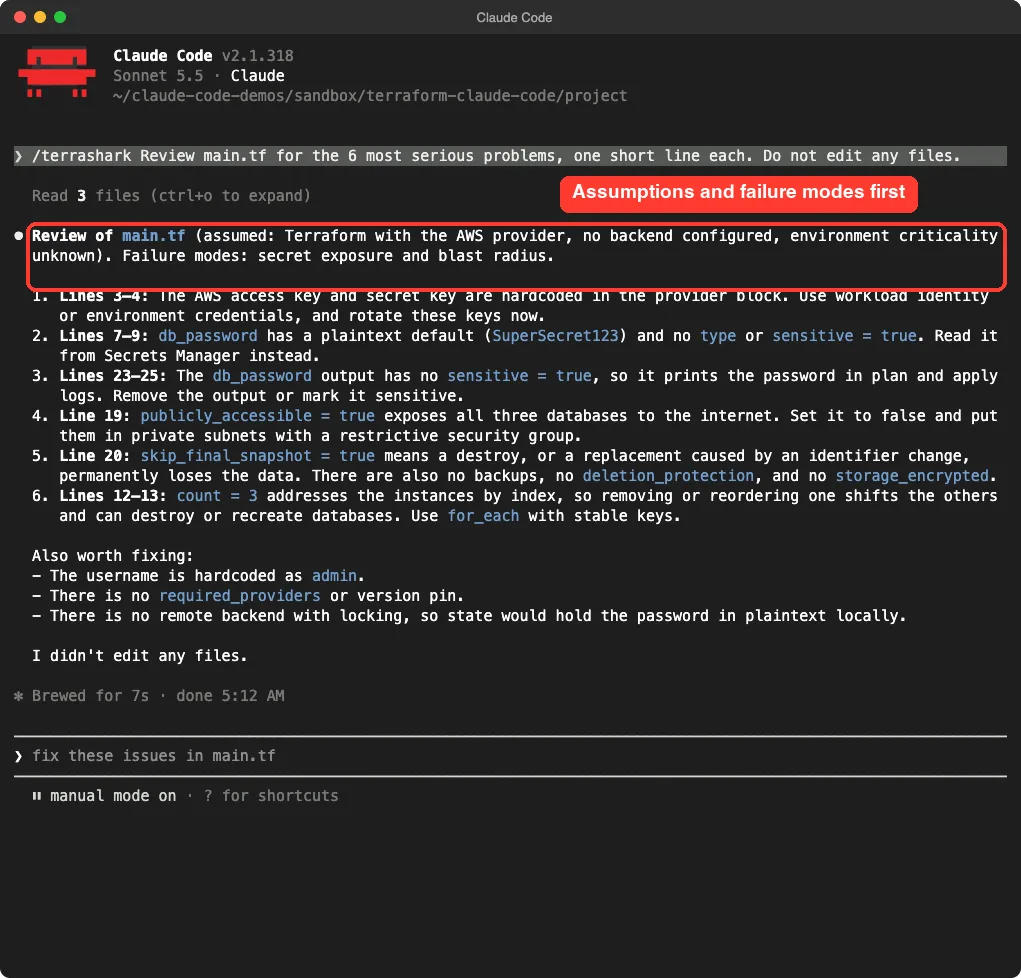
This matches the skill’s own steps. Its SKILL.md tells Claude to capture the execution context, diagnose likely failure modes and only then load the relevant reference files. The answer then listed six problems with one-line fixes.
After the six items, Claude added a short “Also worth fixing” list: the hardcoded admin username, no required_providers or version pin, and no remote backend with locking. It ended by confirming it had not edited any files.
Step 3: The Same Prompt Without the Skill
A fair test needs a baseline. We copied the same main.tf into a second folder with no skill and asked the same question, minus the /terrashark part.
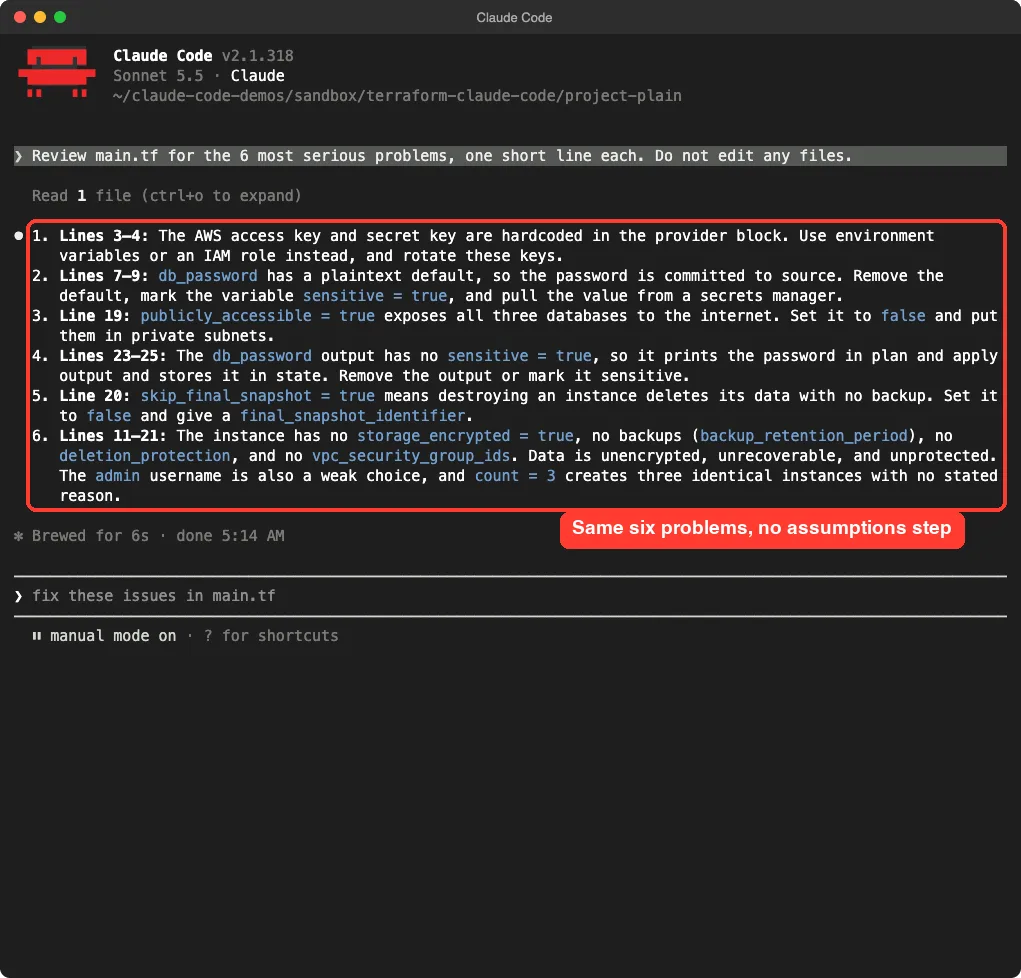
The result was closer than we expected. Plain Claude Code also flagged the hardcoded keys, the plaintext default password, the public database, the password output, the missing final snapshot and the missing encryption and backups. It even mentioned the weak admin username and the unexplained count = 3.
So where did the skill help? In our single run, it added three things.
It stated its assumptions up front. It named the failure modes it was checking. It brought up the missing backend and version pins, and it explained that count addresses databases by position, so removing one can shift the others.
What this comparison does and does not show
This was one file and one run for each setup, so treat it as a demo, not a benchmark. A model can answer differently each time you ask. Our honest reading is that the skill made the answer more structured and a little more careful, not dramatically smarter on an obvious file.
The skill likely matters more on harder jobs. Think of module refactors, state migrations or CI pipeline changes, where its reference files cover things like moved blocks and plan-and-apply separation. We did not test those tasks.
What Is Inside TerraShark
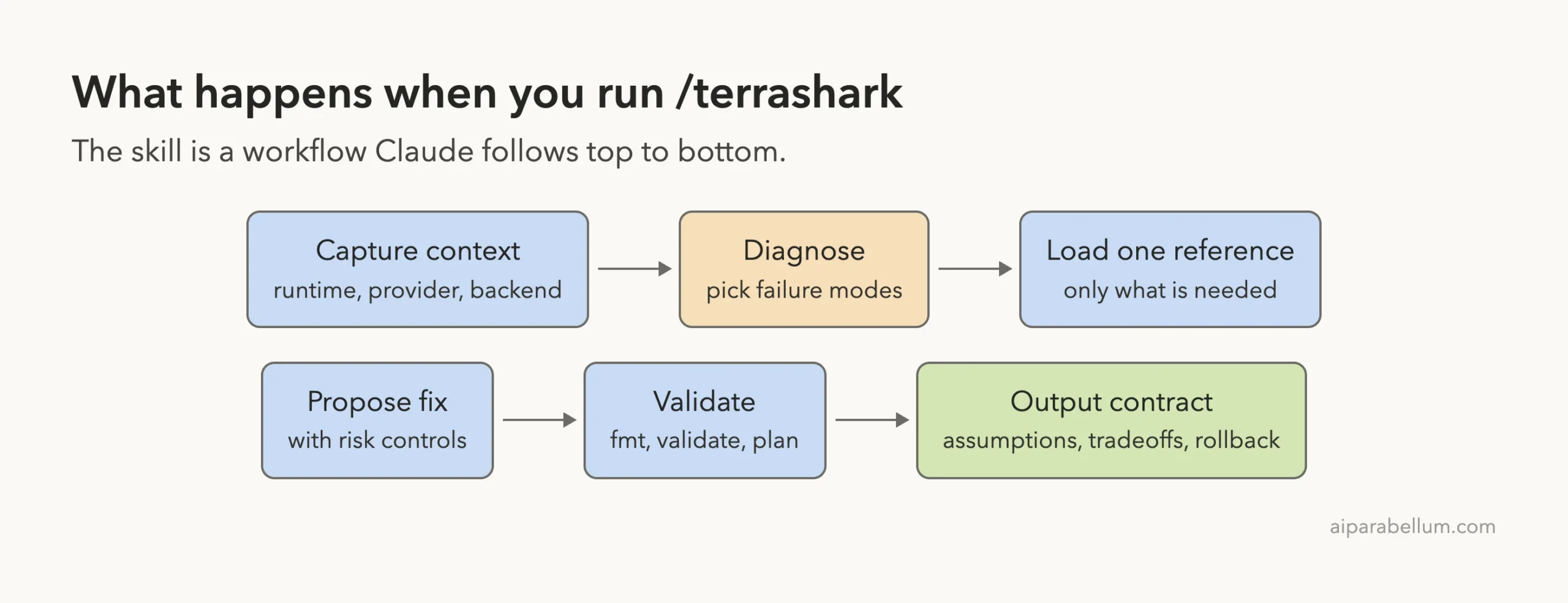
The skill is a set of Markdown files. The main SKILL.md is a short workflow, and the references folder holds focused guides that Claude loads only when they apply.
| Part | What it does |
|---|---|
SKILL.md | A seven-step workflow from context capture to an output contract |
references/secret-exposure.md | Guidance on secrets in state, logs and defaults |
references/blast-radius.md | Guidance on stack size, boundaries and safe applies |
references/identity-churn.md | Guidance on stable resource addresses and refactors |
references/ci-drift.md | Guidance on version mismatch and unreviewed applies |
references/compliance-gates.md | Guidance on policies, approvals and audit controls |
The repository has more reference files for testing, module design, examples and migration playbooks. The workflow’s last step asks for an output contract: assumptions, chosen fix and tradeoffs, a validation plan and rollback notes.
Our takeaway: both found the same core problems, but TerraShark stated its assumptions first.
The skill also says never to recommend a direct production apply without a reviewed plan and approval. That is a sensible default for infrastructure code, and it is one reason we like the idea.
The HashiCorp Plugin: What We Could and Could Not Run
The HashiCorp plugin is very small. Its folder contains a plugin manifest and an .mcp.json file, and no skills of its own. The manifest describes it as the Terraform MCP Server, which brings the Terraform ecosystem into Claude Code for infrastructure as code work.
The MCP file tells Claude Code to start the server with Docker. In plain terms it runs docker run -i --rm, passes in an environment variable called TFE_TOKEN, and uses the image hashicorp/terraform-mcp-server:0.4.0. The token is for HCP Terraform (also called Terraform Enterprise), so that part needs an account.
We loaded the plugin folder with --plugin-dir and opened /mcp. The server plugin:terraform:terraform showed a red cross, meaning it did not start.

The likely reason is simple. Docker’s background service was not running on our Mac when we checked, and the server needs it. We chose not to start Docker or add a token, because the token needs an HCP Terraform account and we do not create accounts for these tests.
That means we cannot tell you how well the server answers questions. What we can say from our run is that the plugin loads, registers an MCP server, and fails clearly when its requirements are missing. Anything beyond that comes from the plugin’s own files, not from our testing.
When the HashiCorp plugin makes sense
An MCP server gives Claude tools to call, such as looking up provider details or working with HCP Terraform. That is useful if you manage real workspaces there and want Claude to read live data instead of guessing. If you only write Terraform files on your laptop, the extra Docker and token steps probably are not worth it yet.
Which Terraform With Claude Code Add-On First?
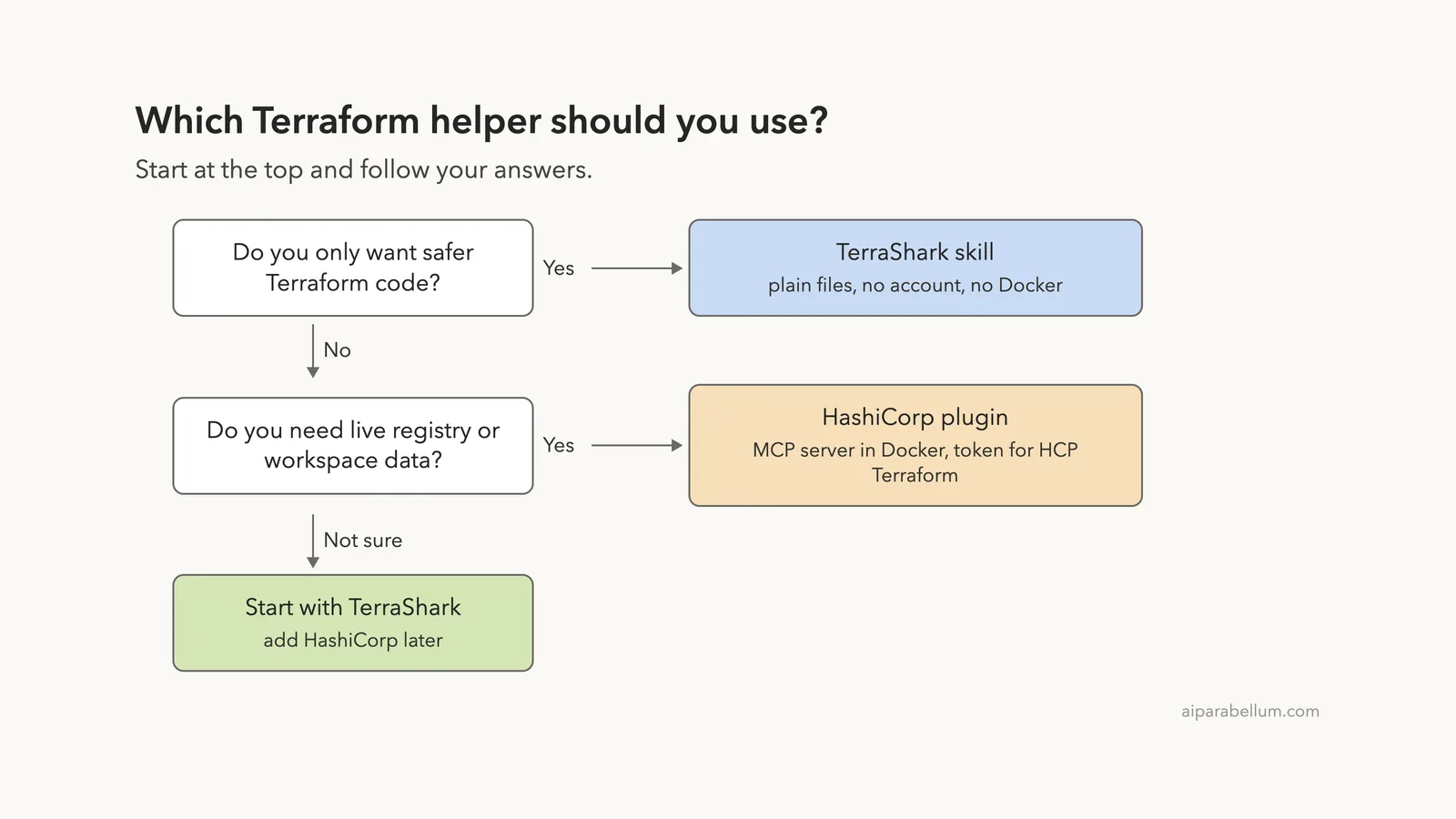
The two are not rivals. One teaches Claude how to think about Terraform risk, and the other gives Claude a connection to HashiCorp’s tooling. You can use both later, but you need to pick a starting point.
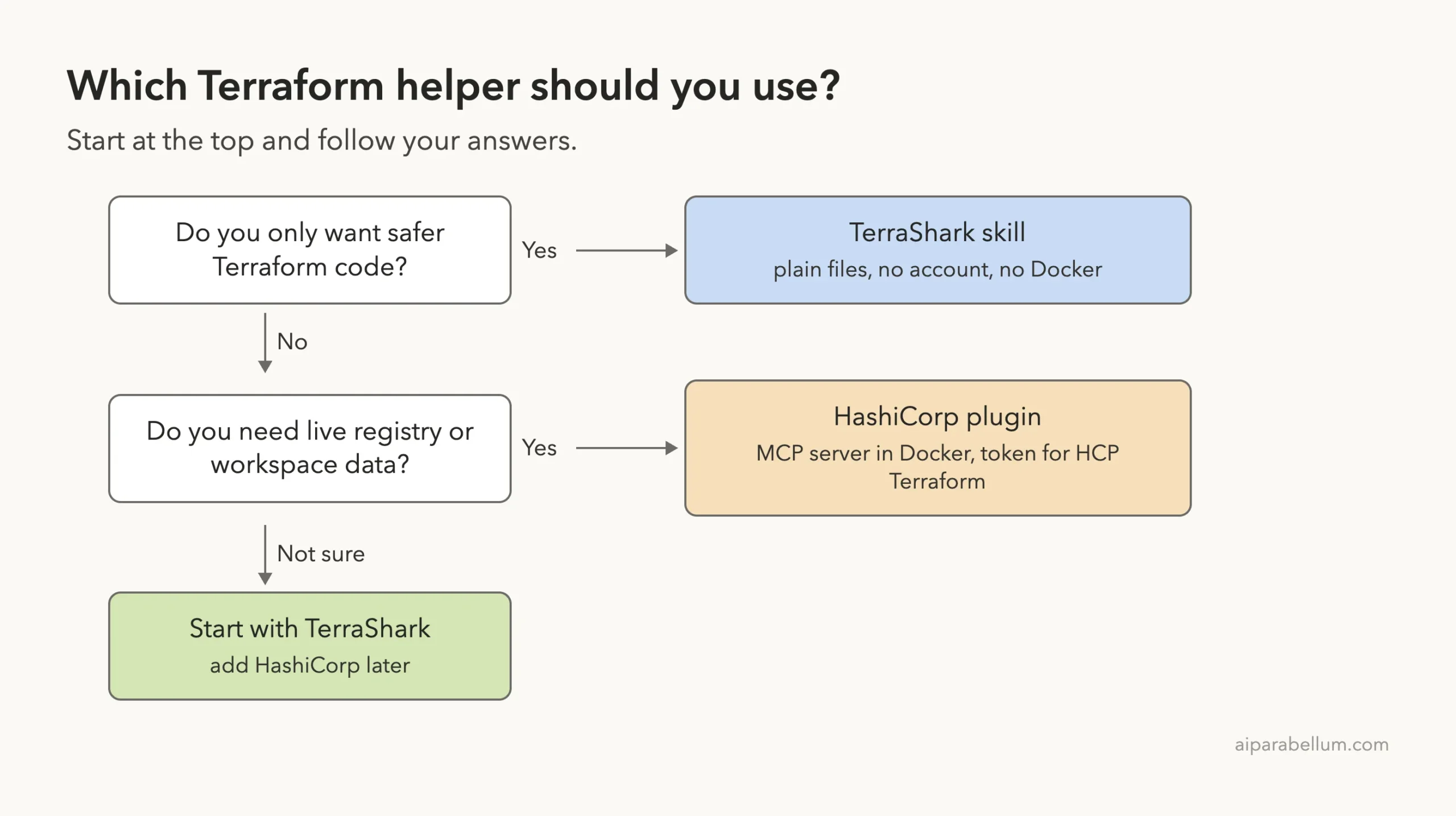
- Choose TerraShark if you want a safer review habit with no account and no Docker.
- Choose the HashiCorp plugin if you already use HCP Terraform and are comfortable running Docker.
- Not sure? Start with TerraShark, since it is the easiest to try and to remove.
How to Install Each One
These commands come from the TerraShark README and from the official marketplace listing. We tested loading the files in a sandbox instead of running these install commands, so use them in your own setup at your own pace.
TerraShark
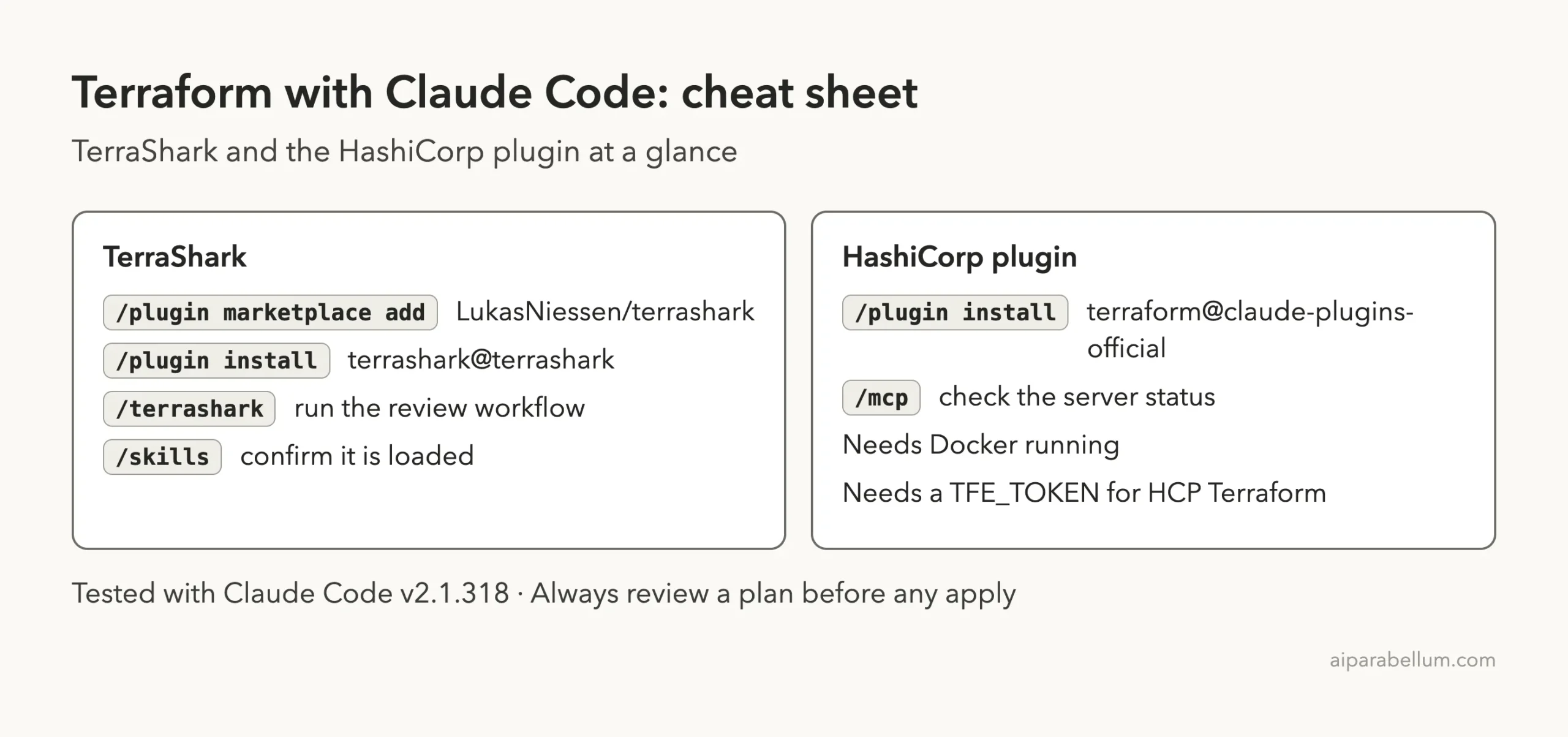
/plugin marketplace add LukasNiessen/terrashark
/plugin install terrashark@terrashark
After that, /skills should list it and /terrashark should run it. The TerraShark repository has the full README and reference files. Our guide to the plugin marketplace explains how adding a marketplace works.
HashiCorp Terraform plugin
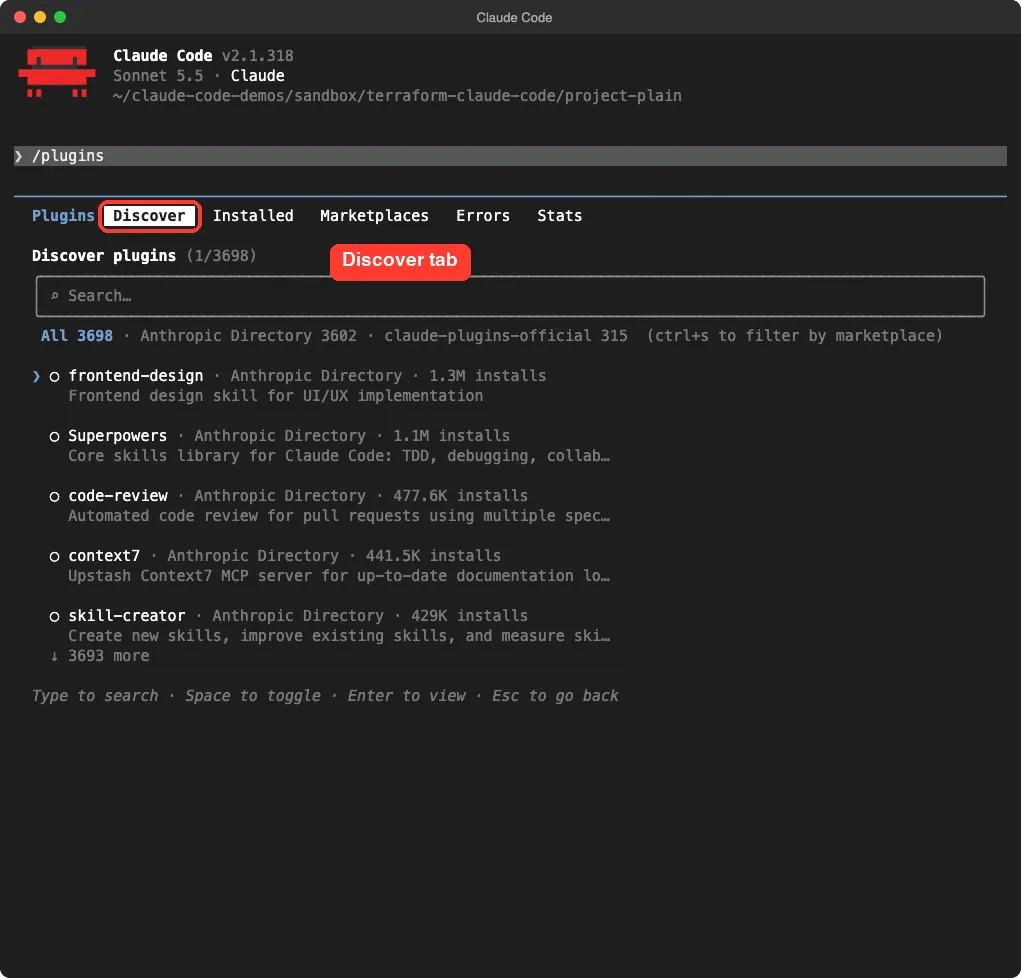
/plugin install terraform@claude-plugins-officialStart Docker first, and set TFE_TOKEN in your environment if you want HCP Terraform features. Then run /mcp to check that the server shows as connected. The official discover plugins guide covers the Discover tab.
Try It Yourself
Make a throwaway folder, add a small main.tf with a few obvious mistakes, and run the same review twice: once with the skill and once without. Compare the answers for structure, not just for the number of issues found.
/terrashark Review main.tf for the 6 most serious problems, one short line each. Do not edit any files.Then ask a harder follow-up, such as how to switch from count to for_each without destroying anything. This is where the skill’s migration guidance should matter most.
Common Mistakes
- Installing a plugin into your main setup before reading its files. Try it in a sandbox or with
--plugin-dirfirst. - Assuming the HashiCorp plugin works out of the box. It needs Docker running and a token for HCP Terraform features.
- Letting any assistant apply changes. Always read the plan yourself before an apply.
- Pasting real keys into a test file. Use fake values, as we did.
- Expecting a skill to catch everything. Run
terraform validateand a scanner as well.
Pro Tips
- Ask for assumptions first. Telling Claude your Terraform version, provider and backend leads to better advice.
- Use
/skillsto confirm a skill loaded before you rely on it. - Use
/mcpto see whether a plugin’s server started, and run Claude Code with--debugif it did not. - Keep plans small. A smaller blast radius means a smaller review.
- Read our comparison of skills vs plugins if you are unsure which add-on type you need.
Cheat Sheet
Frequently Asked Questions
Is TerraShark an official HashiCorp project?
No. It is a community project by LukasNiessen. The HashiCorp plugin is the one listed in Anthropic’s official marketplace under HashiCorp as the author.
Do I need Terraform installed to use TerraShark?
Not for a code review like ours. Terraform was not even installed on our test machine. You will want it to run the validation commands the skill suggests, such as terraform validate and terraform plan.
Does the skill work with OpenTofu?
The skill’s description says it covers Terraform and OpenTofu. We only tested Terraform files.
Why did the HashiCorp server fail in your test?
We saw a red cross for it in /mcp. The plugin starts its server with Docker, and Docker was not running on our test Mac, so that is the most likely cause. We did not start Docker or add a token to confirm.
Can I use both together?
Nothing in their files stops it, since one is a skill and the other is an MCP server. We did not run them together, so we cannot report how they behave side by side. For the bigger picture of how Claude fits in, see our Claude AI overview.
Conclusion
For Terraform with Claude Code, TerraShark is the easiest place to start: it needs no account or Docker, and in our demo it made the review more structured by stating assumptions and failure modes first, even though plain Claude Code found the same six core problems. The HashiCorp plugin is a different tool for people who use HCP Terraform, and in our test its server did not start without Docker. Try TerraShark in a sandbox on one of your own files, compare it with a plain run, and add the HashiCorp server only when you need live workspace data.