Claude Code is great at general programming, but it does not always know the library you are fighting with today. One fix is a skill that carries that library’s documentation. This guide shows how Skill Seekers helps you build a Skill Seekers Claude skill from any public docs site, and what you really get at the end.
We ran it for real: we scraped a small docs site, packaged the result, loaded it in Claude Code and asked a question. The result was useful but not magic, and we will tell you exactly where it fell short.
This guide is part of our Claude Code tutorials. Find more add-ons in our Skills Directory.
Tested with Claude Code v2.1.319 and skill-seekers 3.10.0 (from PyPI) on November 9, 2026, on macOS. We also read the code of the GitHub repo at commit 5b5d8df, which lists version 3.11.0.dev0 in its pyproject.toml.
Quick Summary
| Question | Short answer |
|---|---|
| What is it? | A Python command line tool that turns docs sites, GitHub repos, PDFs and more into skill folders |
| Maker | yusufkaraaslan (community project, MIT license) |
| Install | pip install skill-seekers (we used a virtual environment) |
| Account or API key needed? | No, not for scraping and packaging |
| What we ran | doctor, detect, create, quality, package, then loaded the skill in Claude Code |
| What we did not run | AI enhancement, the MCP server, the Claude Code plugin and a real install-agent |
| Our verdict | A fast way to get a docs skeleton; you must fix the description and check the content |
What Skill Seekers Is and Why It Exists
A Claude Code skill is a folder with a SKILL.md file and optional reference files. Claude reads the short description at the start, and loads the rest only when the task fits. Our guide to the SKILL.md format covers every field.
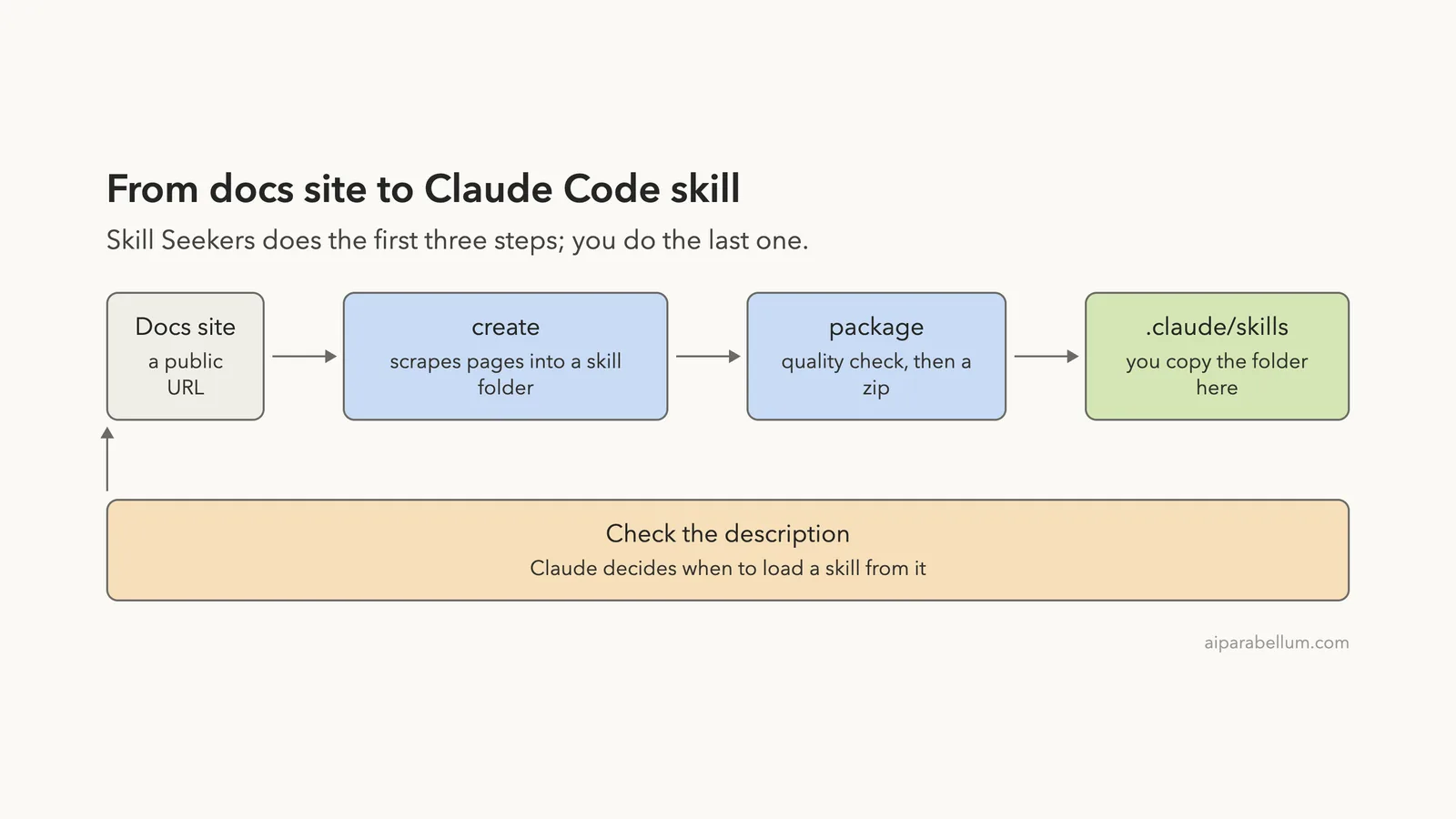
Writing that folder by hand for a big docs site is slow. Skill Seekers automates it: you give it a URL, and it crawls the pages, sorts the text and writes a skill folder for you.
The project says it handles 18 source types, including docs sites, GitHub repos, PDFs and videos. We tested only the docs site path. If you want the PDF route, see our post on turning a book into a skill with Book-to-Skill.
How We Kept Our Own Setup Safe
Skill Seekers has an install-agent command that copies skills into your agent folders. That would touch the real ~/.claude folder, so we did not use it for real. We only ran it with --dry-run.
Instead we worked in a throwaway sandbox. We installed the tool in a virtual environment inside it, and we copied the finished skill into the sandbox project’s own .claude/skills folder. We also started Claude Code with --setting-sources project so only that project’s settings loaded.
Before running anything we read the repo’s Claude plugin folder. It has no hooks, only three command files, one skill file and an MCP config. We did not run the plugin.
Step 1: Install It and Run the Doctor
Create a virtual environment and install the package. The install is a normal pip install.
python3 -m venv .venv
./.venv/bin/pip install skill-seekers
./.venv/bin/skill-seekers --version
Our install reported skill-seekers 3.10.0. Next, run the health check.
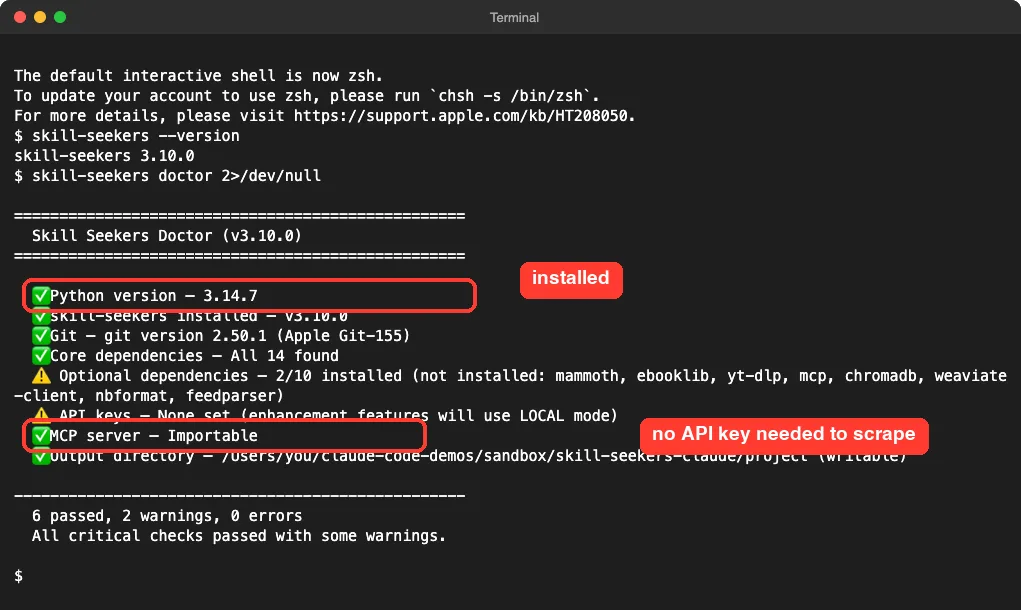
The two warnings are harmless for our test. Optional extras like video support were not installed, and no API keys were set, which only matters for AI enhancement.
Step 2: Preview What Skill Seekers Sees
The detect command guesses the source type without creating anything. It is a cheap sanity check before a long crawl.
skill-seekers detect https://click.palletsprojects.com/en/stable/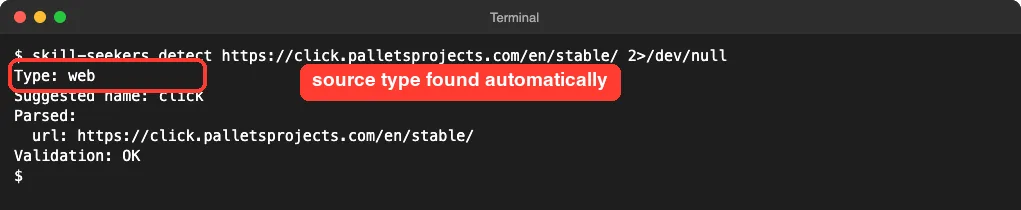
We picked the docs of Click, a popular Python library for command line tools, because it is small and public.
Step 3: Create the Skill From the Docs Site
Now the real work. We capped the crawl at 12 pages, turned AI enhancement off and added a small delay between requests to be polite to the site.
skill-seekers create https://click.palletsprojects.com/en/stable/ \
  --name click-docs --max-pages 12 --enhance-level 0 --rate-limit 0.5
It finished with no errors. The tool visited 12 URLs, and wrote nine page files into a click-docs_data folder. One of the 12 was an image file, which it reported as having no content, and the site index page added little.
The output folder holds a SKILL.md (3,000 bytes in the zip) and a references folder. The main reference file, other.md, is about 30 KB.
What the generated SKILL.md looked like
The file starts with the required name and description. Here is the top of it, exactly as generated:
---
name: click-docs
description: Use when working with click-docs
---
That description is the weak spot. Claude uses the description to decide when to load a skill, and “Use when working with click-docs” tells it almost nothing about what the skill knows. The body then lists five “patterns”, which are mostly --help output examples from the docs.
Skill Seekers has an AI enhancement step that rewrites this content, but it needs an agent or an API key, and we skipped it to keep our usage tiny. So this is the raw, non-enhanced result.
Step 4: Check the Quality Score and Package It
The package command runs a quality check first, then builds a zip for the target you choose. We picked claude.
skill-seekers package output/click-docs --target claude --no-open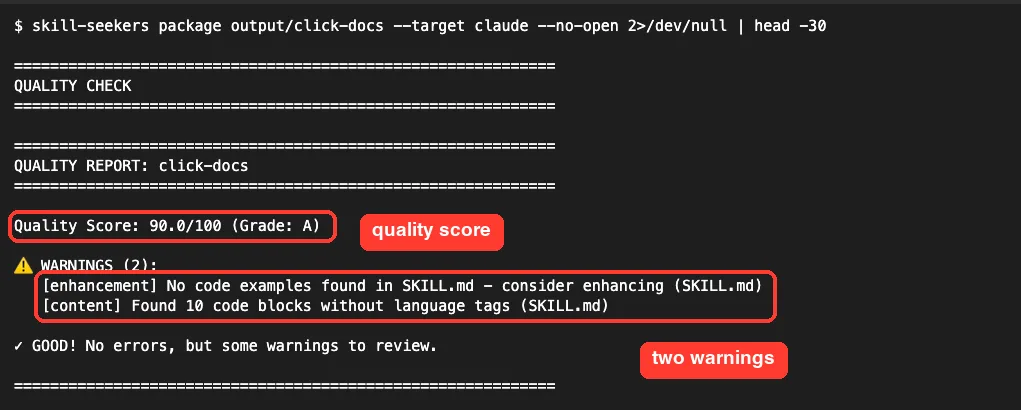
The two warnings were honest: no code examples were found in the main file, and ten code blocks had no language tags. The same command also printed a second score of 72.8 out of 100 (grade B-) a few lines later, so the two numbers do not match. We would treat the score as a rough hint, not a guarantee.
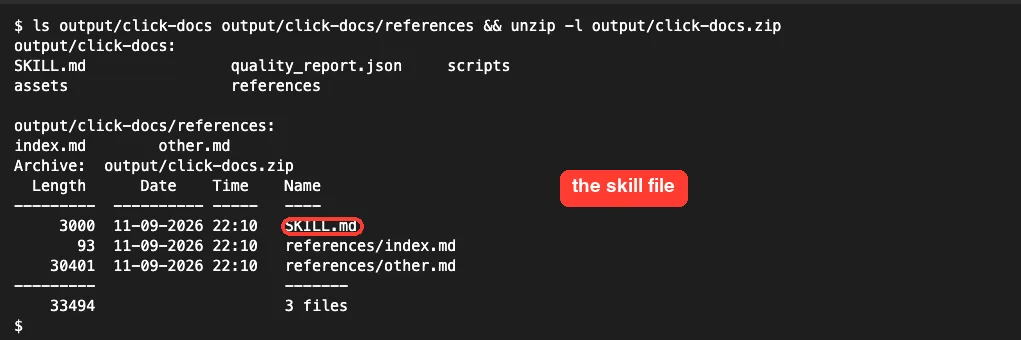
The zip contains SKILL.md, references/index.md and references/other.md. That zip is meant for the Claude web app’s skill upload. For Claude Code you use the folder instead.
A generated skill is only as good as its description and its content, so review both before you trust it.
Step 5: Install the Skill Into a Project
Claude Code reads skills from a .claude/skills/<name>/ folder inside a project, or from your personal ~/.claude/skills folder. The official skills docs describe both places.
Skill Seekers can do this copy for you with install-agent. A dry run shows the plan without changing anything:
skill-seekers install-agent output/click-docs --agent claude --dry-runWe stopped there and copied the folder by hand into the sandbox project. We also replaced the weak description with a real one:
mkdir -p .claude/skills
cp -R output/click-docs .claude/skills/click-docs
description: Answers questions about the Python Click command-line library: options, arguments, quickstart, packaging and FAQs. Use when writing or debugging Click CLI code.This one edit matters more than anything else in the process. If your skill never loads, read our guide on a skill not triggering.
Step 6: Load It in Claude Code and Ask a Question
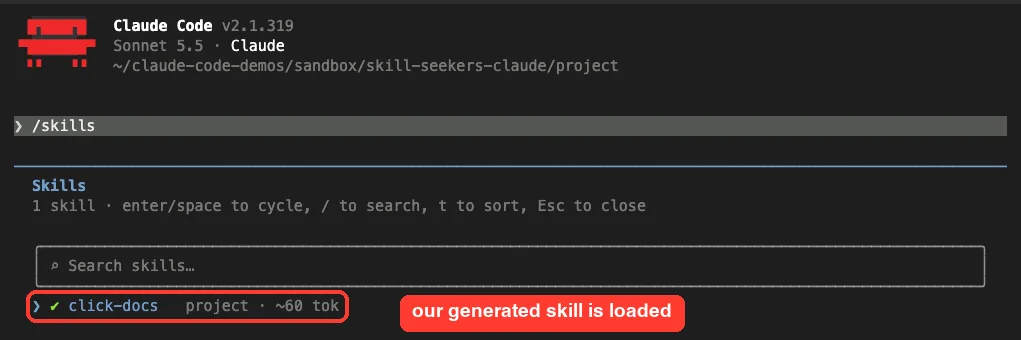
We started Claude Code in the sandbox project and ran /skills. The new skill showed up as a project skill, costing about 60 tokens.
Then we asked one question: how to add a --count option with a default of 1 to a Click command.
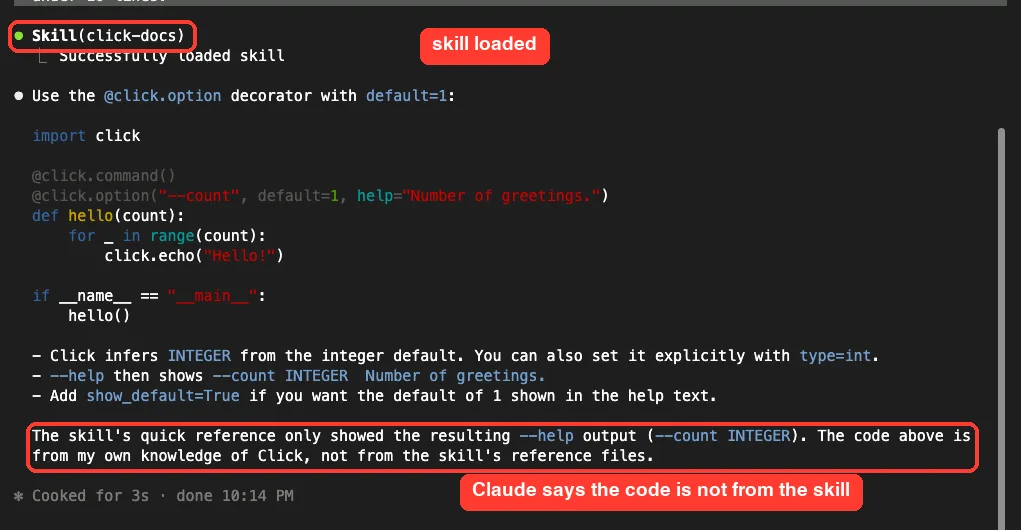
Claude loaded the skill and gave a correct, short answer. But it also told us that the skill’s quick reference showed only the resulting --help output, and that the code came from its own knowledge of Click.
That is one demo, so we will not over-claim. It does show the limit of a non-enhanced skill: for a very popular library, Claude already knows a lot, so the raw docs add little on easy questions.
How the Whole Flow Fits Together
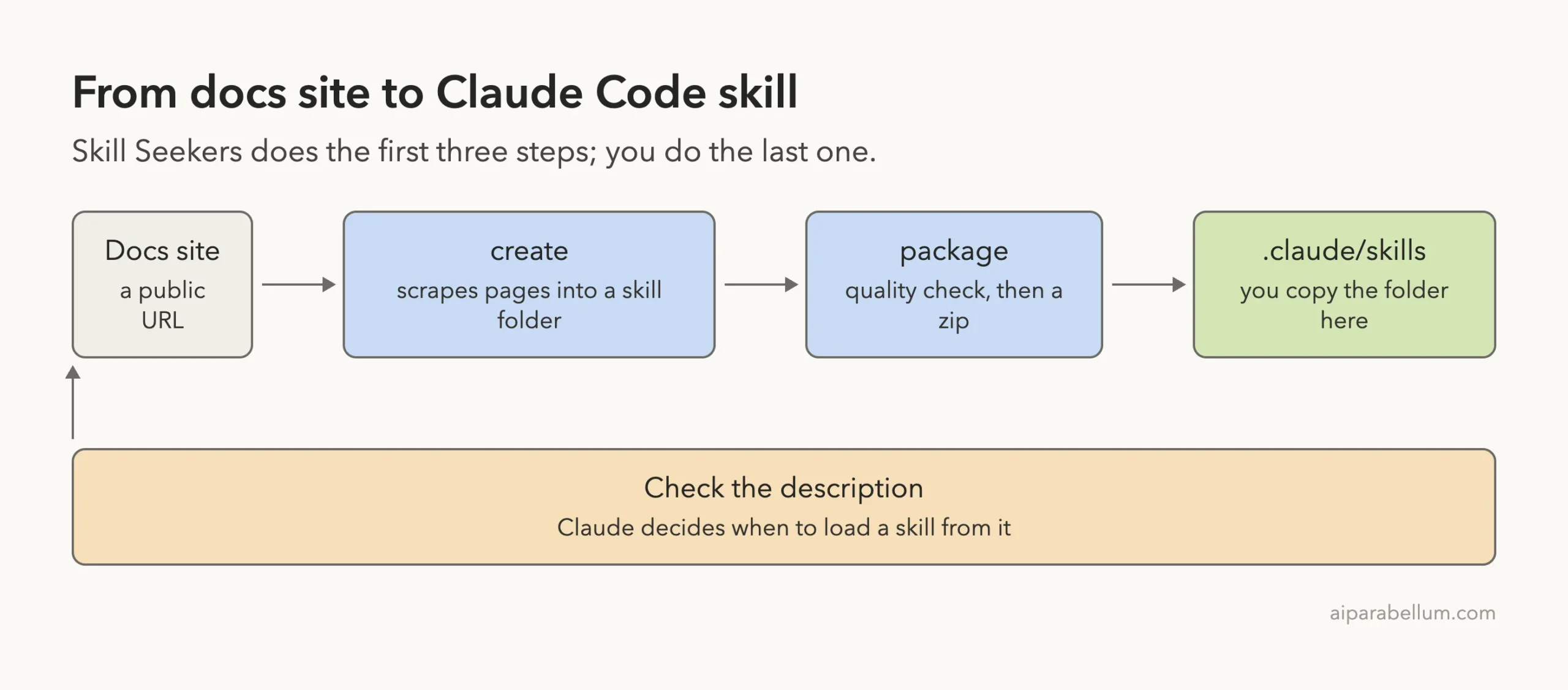
The Claude Code Plugin and MCP Server (Not Tested)
The repo also ships a Claude Code plugin in distribution/claude-plugin. From its files, it contains three slash command files (create-skill, install-skill and sync-config), one skill called skill-builder and an MCP config that starts python -m skill_seekers.mcp.server_fastmcp.
We read these files but did not run the plugin or the MCP server. If you want to try it, the plugin docs explain how marketplaces work, and our post on skills versus plugins helps you choose.
| Part | What it does | Did we run it? |
|---|---|---|
CLI create | Scrapes a source into a skill folder | Yes |
CLI package | Quality check and zip for a target platform | Yes |
CLI install-agent | Copies a skill into agent folders | Dry run only |
| AI enhancement | Rewrites the skill with an AI agent | No |
| Claude Code plugin | Slash commands and a skill-builder skill | No, files read only |
| MCP server | Lets Claude call the tools directly | No |
Is It Safe to Use?
The scraping runs on your machine and needs no account. Still, a generated skill is text that Claude will follow, and it comes from a website you do not control. A page with hidden instructions could end up inside your skill.
Read the generated SKILL.md and the reference files before you rely on them. You can also scan skills with a tool such as SkillSpector. Also respect the docs site’s terms and keep the page limit low.
Try It Yourself
Pick a small docs site you actually use. Run it in a virtual environment, not in a real project. Then give Claude this prompt after loading the skill:
Use the click-docs skill. Which reference file did you read for this answer? Quote the line you used.Swap in your own skill name. If Claude cannot name a reference line, the skill is not adding much yet, and you should improve the description or the content.
Common Mistakes
- Keeping the generated description. A vague description means Claude rarely loads the skill. Rewrite it.
- Crawling too many pages. Start with a low
--max-pagesvalue and check the output first. - Running
install-agentwithout a dry run. It writes into agent folders, so preview it with--dry-run. - Trusting the score. We saw two different scores in one run.
- Skipping the content check. Raw scraped text can hold errors or odd instructions.
Pro Tips
- Use skills for libraries Claude knows less well: new releases, small packages and your own team’s docs.
- Keep the main file short and the detail in reference files. Our skills best practices guide explains why.
- Put the skill in the project, not in your personal folder, so the whole team gets it.
- Re-run the crawl when the docs change, and review the diff.
Cheat Sheet
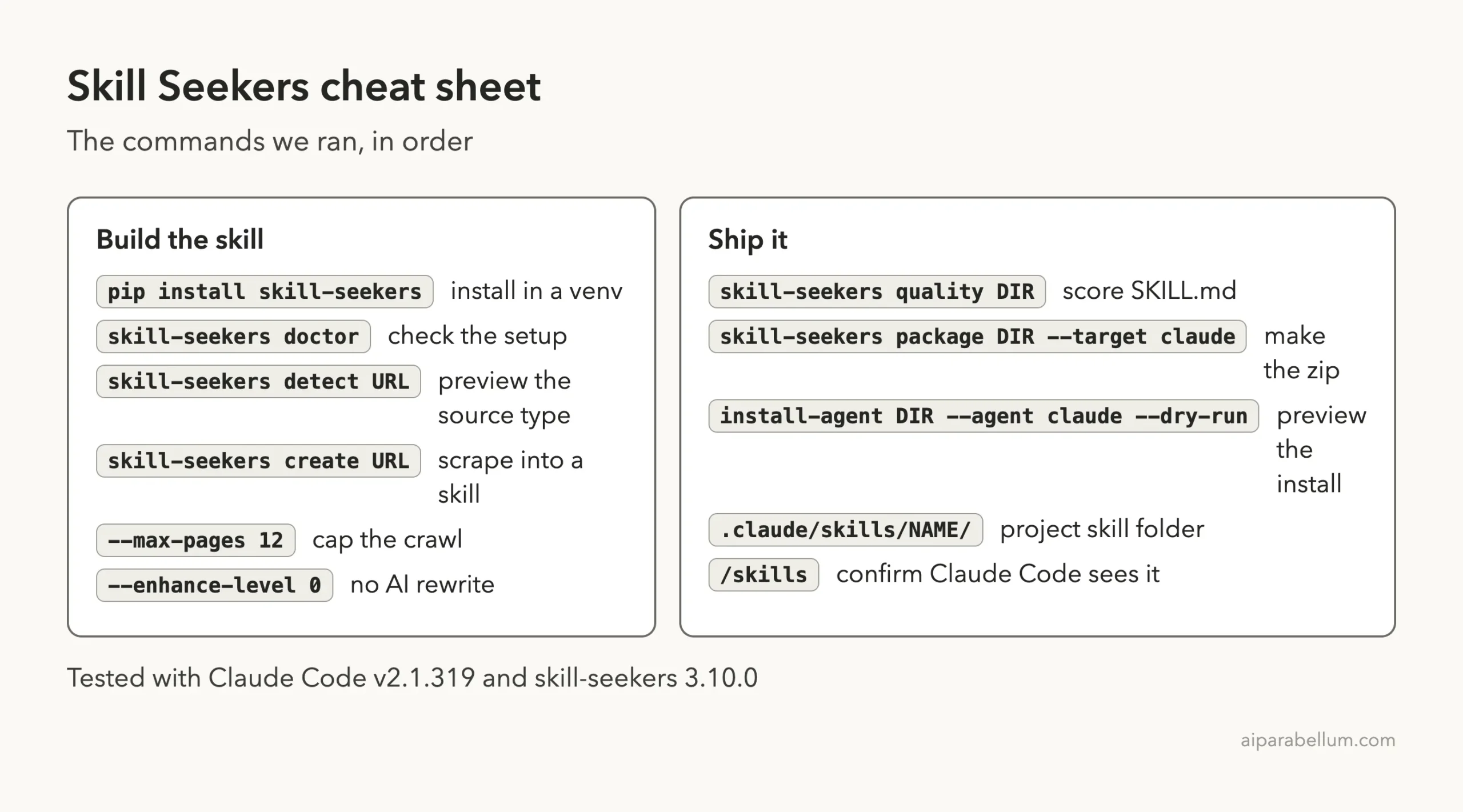
Frequently Asked Questions
Is Skill Seekers made by Anthropic?
No. It is a community project by yusufkaraaslan, released under the MIT license. You can read the code in the GitHub repo.
Do I need an API key to make a skill?
Not for scraping and packaging; our run used none. The AI enhancement step needs an agent or key, and we did not test it.
Can I use the zip file in Claude Code?
The zip is meant for uploading in the Claude web app. In Claude Code we used the unzipped folder inside .claude/skills.
Will the skill make Claude answer better?
It depends on the library and the content quality. In our one test, Claude said its answer came from its own knowledge, not from the skill. Expect more value for lesser-known docs.
Can it handle more than docs sites?
The project lists 18 source types, such as GitHub repos and PDFs. We tested only a docs site, so we cannot confirm the others.
Conclusion
Skill Seekers turns a docs URL into a Claude Code skill folder in a few commands, with no account needed, and it worked cleanly in our test. The raw result is a starting point: the description was too vague, the quality score was inconsistent and Claude did not lean on the references for an easy question. If you rewrite the description, review the text and use it for docs Claude knows less well, it is a handy time saver. You can see how the tool fits with other add-ons in our Claude guide.