Claude Code multiple models is a simple idea: instead of trusting one model’s answer, you ask a few and compare. Three community add-ons now do this from inside Claude Code, and they work very differently.
We cloned all three into a throwaway sandbox, read their files, and loaded two of them in real Claude Code sessions. This guide shows what ran, what stayed on the page, and which one fits your budget and patience.
This guide is part of our Claude Code tutorials. Find more add-ons in our Skills Directory.
Tested with Claude Code v2.1.319 on 2026-11-10 (macOS). Commits we read: claude-octopus 635f6e5 (v11.21.0), claude-council a18db56 (v2026.11.1) and llm-council-skill 0f95431.
What We Ran and What Came From the Docs
These tools talk to outside providers such as OpenAI, Google and others. We never created an account, signed in or entered an API key. So this is a roundup, not a full test of every feature.
We loaded claude-council and claude-octopus with --plugin-dir and --setting-sources project, so the plugins lived only in our demo session. We ran claude-council’s status check and one real council with Claude-only members.
For claude-octopus we loaded the plugin, listed its commands and stopped at the approval prompt of its council runner. The llm-council skill was copied into the demo project and read, not run.
Safety checks before loading anything
We read the hooks and scripts first. claude-council ships one hook, a stop review that stays off unless a project creates .claude/council-stop-gate.json.
claude-octopus ships many hooks. Most only act inside its own commands, and its telemetry hook does nothing unless you set OCTOPUS_WEBHOOK_URL.
One side effect to know about: after loading claude-octopus, a new ~/.claude-octopus folder appeared with a few state files. Your ~/.claude settings stayed unchanged, but this plugin does write outside the session folder.
| Tool | Kind | What it does | Account or key needed | We ran it |
|---|---|---|---|---|
| claude-council | Plugin, 4 commands | Asks several providers the same question and writes a synthesis | At least one provider key or CLI, or --local for none | Loaded, status check, one local council |
| claude-octopus | Plugin, 56 command files | Workflows, personas and a council with quorum gates | None to start; up to twelve optional providers | Loaded, commands listed, stopped at the approval prompt |
| llm-council-skill | One skill | Asks ChatGPT and Gemini, then merges their ideas into a plan | OpenAI and Gemini keys, or the codex and gemini CLIs | Files copied and read, not run |
Our plugins guide explains how installing plugins works in general, and our marketplace guide covers where they come from.
Why Use Claude Code Multiple Models?
Every model has blind spots. If you ask one model whether your database design is sound, you get one set of habits and one set of gaps.
A council puts the same question to several seats and then compares the answers. The useful part is the disagreement, not the vote. When two seats differ, you know where to look harder.
There is a catch, and claude-council states it plainly in its own README: agreement is not verification, because the models share your description and its assumptions. Keep that in mind for everything below.
claude-council: The Lightweight Option
A council is only as independent as its members.
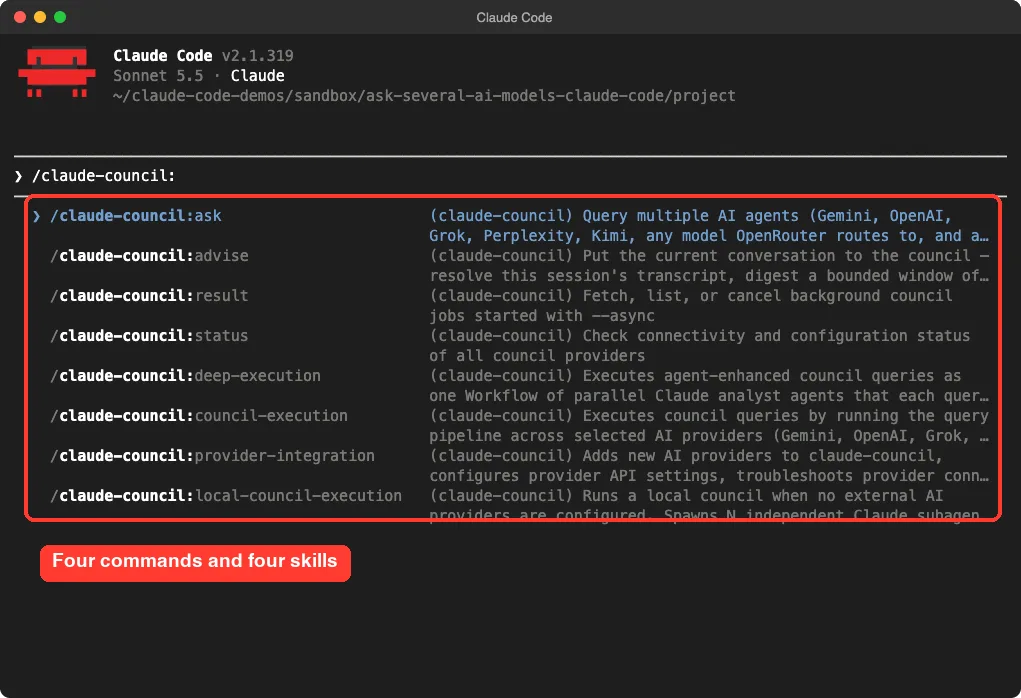
claude-council is a plugin with four commands: /claude-council:ask, /claude-council:advise, /claude-council:result and /claude-council:status. It also ships four skills that run the work behind them.
Install and first run
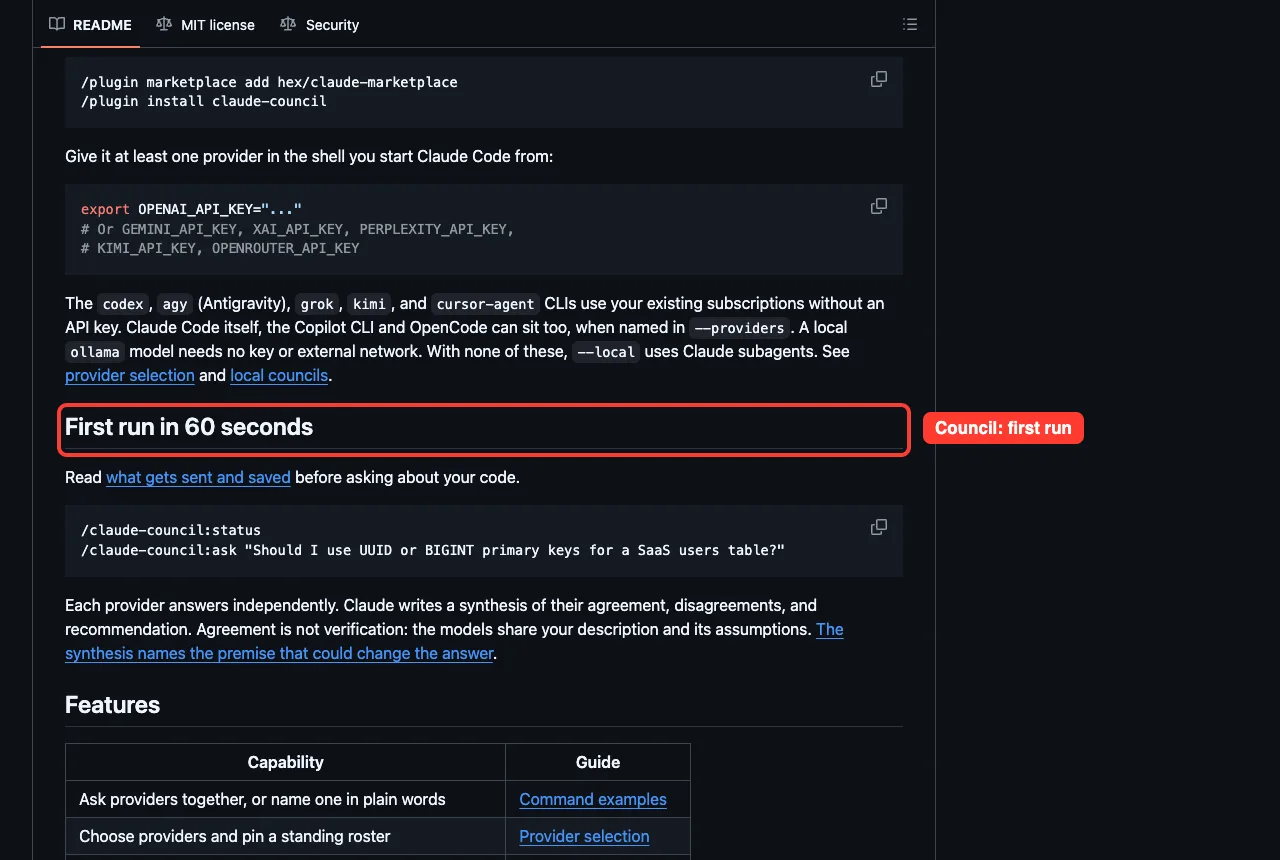
Per its README, you add the author’s marketplace and install the plugin. You also need curl and jq.
/plugin marketplace add hex/claude-marketplace
/plugin install claude-council
You then give it at least one provider. Keys it reads include OPENAI_API_KEY, GEMINI_API_KEY, XAI_API_KEY, PERPLEXITY_API_KEY, KIMI_API_KEY and OPENROUTER_API_KEY. The codex, agy, grok, kimi and cursor-agent command-line tools use their own subscriptions instead of a key, and a local ollama model needs no outside network.
We loaded the plugin from the cloned folder instead. Typing /claude-council: lists the commands and skills it adds.
Check which seats work
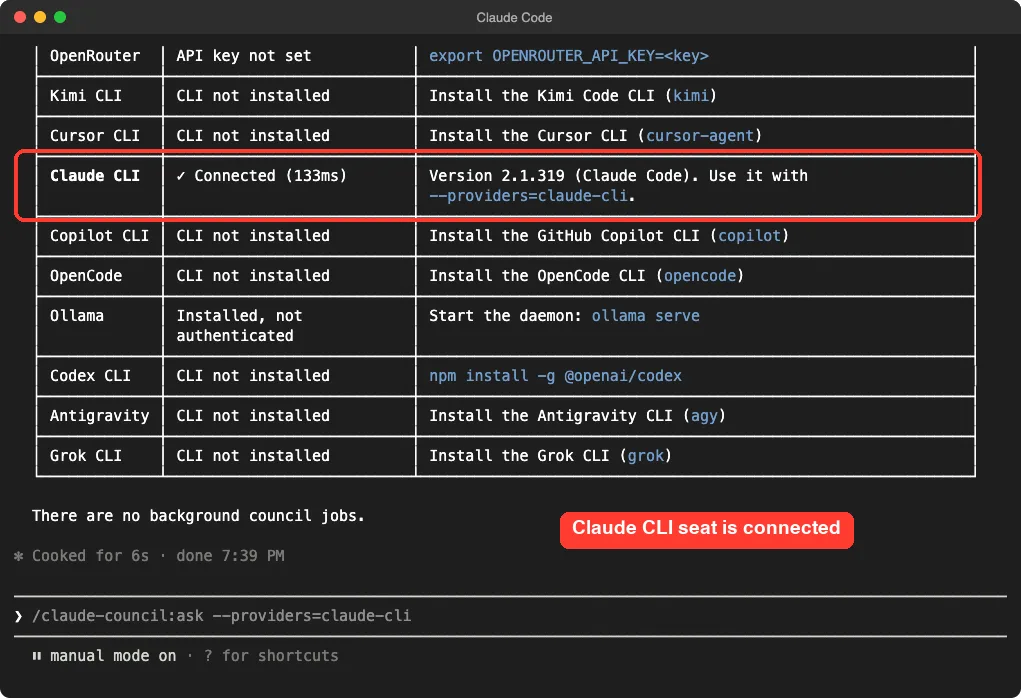
Running /claude-council:status checks every provider. With no keys set, the rows we could see said API key not set, CLI not installed, or installed but not authenticated. One seat was connected: the Claude CLI, which the plugin tests by running our own claude and can use with --providers=claude-cli.
This table is the best feature for beginners. It tells you the exact command to fix each missing seat, such as export OPENROUTER_API_KEY=<key> or npm install -g @openai/codex.
A real council with no keys: –local
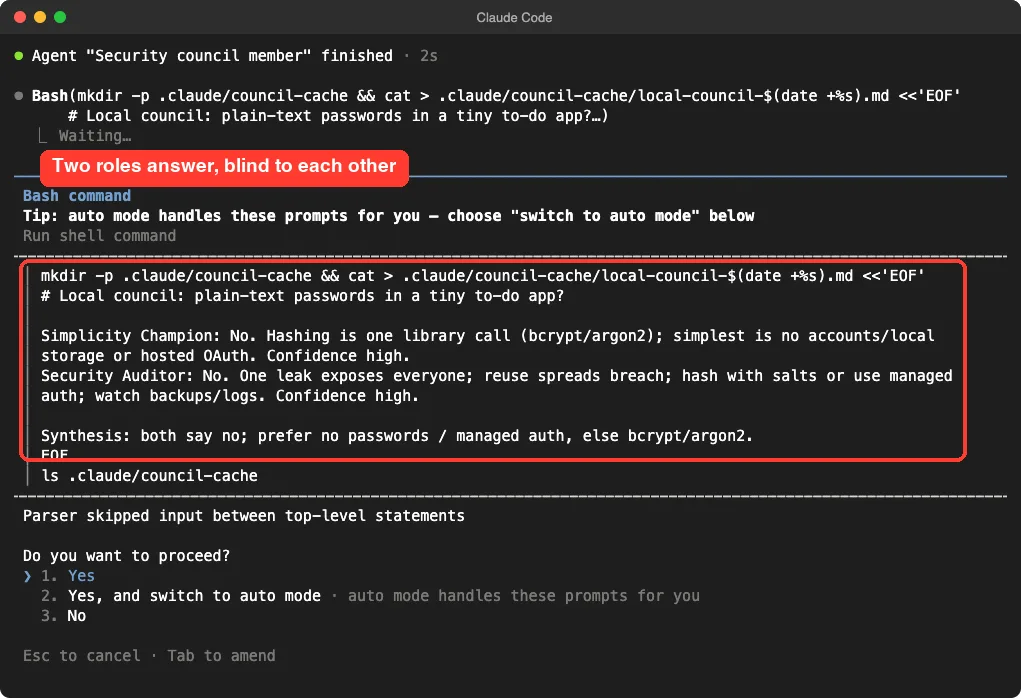
When no outside provider is set up, the plugin can convene a local council. It starts several Claude subagents, gives each a different role, keeps them blind to one another and then writes a synthesis. We asked a deliberately simple question with two roles.
/claude-council:ask --local --roles=simplicity,security "Should a tiny to-do app store passwords in plain text? Keep every answer under 60 words."The run took about a minute. It asked for approval several times, each time for a command that sourced the plugin’s own scripts or wrote its cache file. The first attempt at a helper command failed with a shell error, then the plugin retried and carried on.
Both members said no. The Simplicity Champion suggested avoiding accounts or using hosted sign-in, and the Security Auditor said one leak exposes everyone and told us to watch backups and logs.
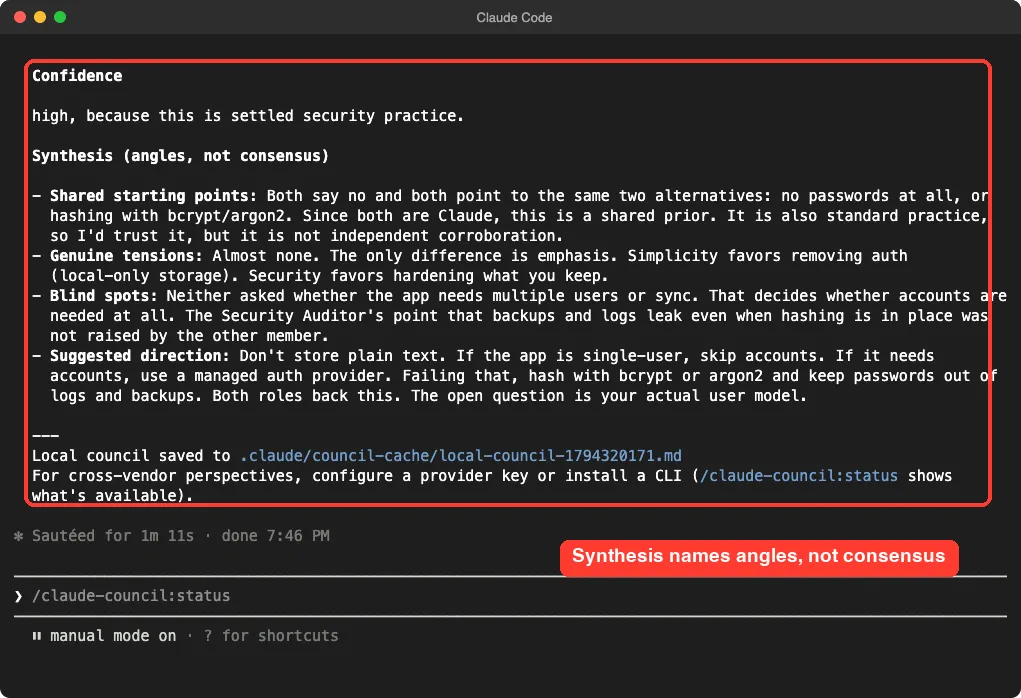
The synthesis is the honest part. It is titled angles, not consensus, and it says that because both members are Claude, their agreement is a shared prior, not independent proof. It also named a blind spot: neither member asked whether the app needs multiple users at all.
What it saves and sends
Per its documentation, your question goes to every selected provider, along with up to five relevant files of roughly 10,000 tokens, listed before sending. The full prompt, files and answers are saved in plain text under .claude/council-cache/. Use --no-auto-context to stop file selection.
Other flags worth knowing, all from its usage guide: --debate adds a second round where providers answer each other, --quiet shows only the synthesis, and --async runs in the background.
claude-octopus: The Big Toolbox
claude-octopus is the largest of the three. Its README describes support for twelve outside providers, 31 personas, 56 commands and 64 skills. In the clone we counted 56 command files and 62 skill folders, so treat the README numbers as approximate.
Dormant until you ask
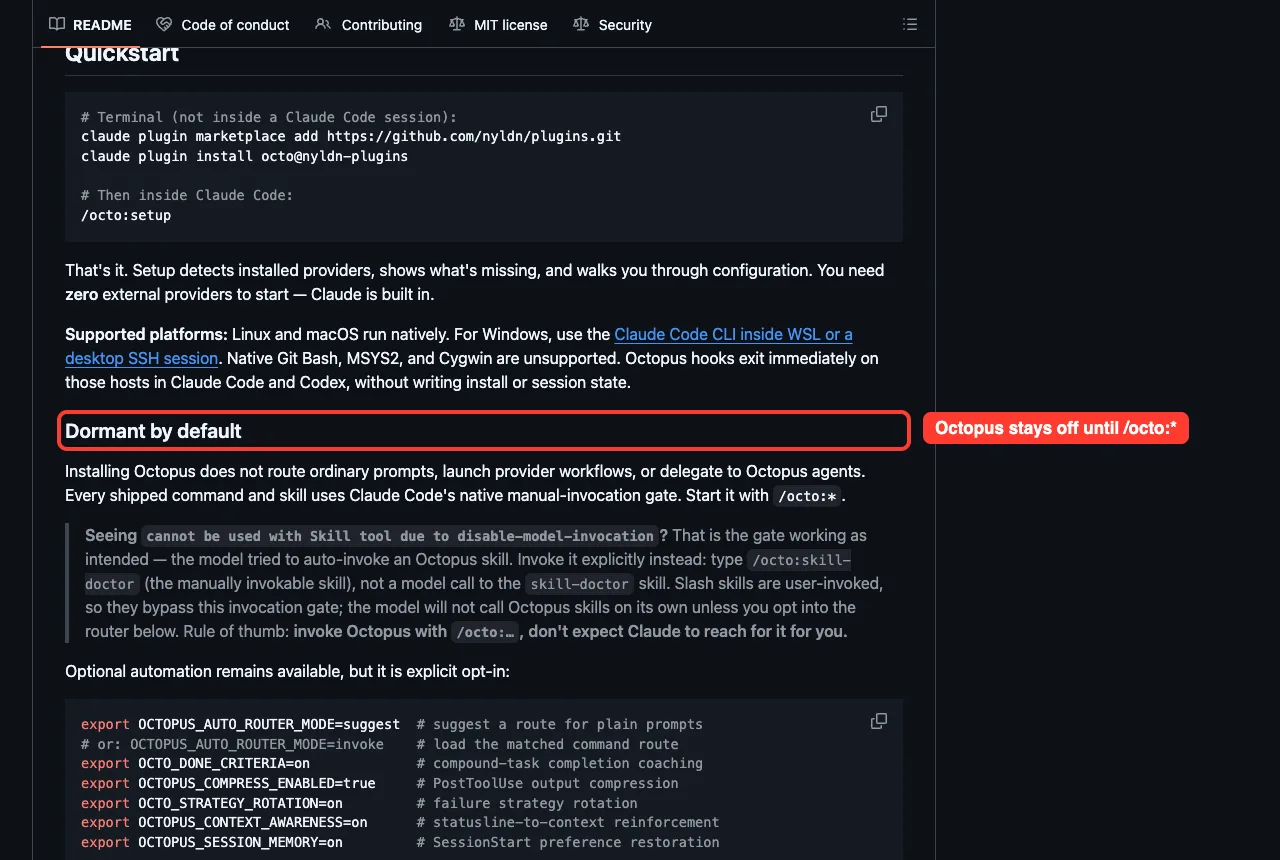
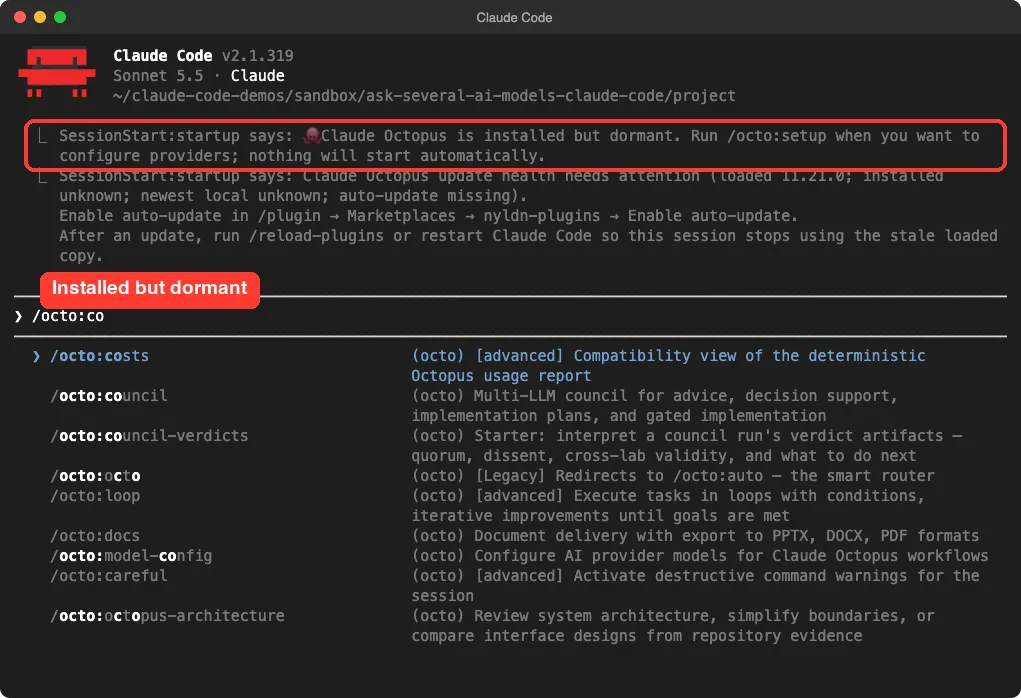
The README says installing it does not change how ordinary prompts work. Every command and skill needs a manual /octo: call. We saw this ourselves: on startup it only printed that it was installed but dormant, plus an update-health note.
The council command
Its council command, /octo:council, runs a structured discussion with 3, 5 or 7 personas. The README lists goal modes (advice, decision, plan, implement, review), styles such as balanced, adversarial and red-team, and gates that need a quorum before a plan can move on.
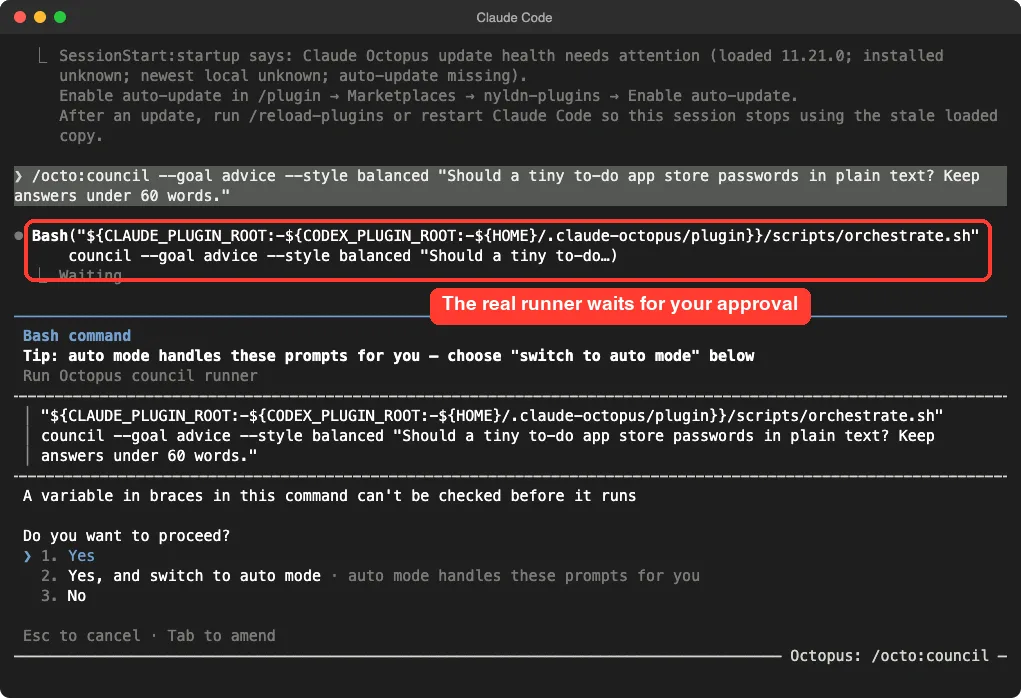
/octo:council --goal decision --style adversarial "Should this service stay monolithic?"We tried the advice goal with the same password question. Claude Code showed a prompt to run the plugin’s real orchestrate.sh runner. The command file forbids the model from faking a council: it must run the runner, or you pass --simulate and get a label saying so.
We stopped at that approval prompt. Running the runner would have executed a large shell orchestrator with the provider setup of the demo machine, and a full workflow was beyond a short test. So we cannot tell you what its output looks like.
Setup and cost
Per the README, install from a normal terminal, then run setup inside Claude Code. It needs Claude Code 2.1.14 or newer.
claude plugin marketplace add https://github.com/nyldn/plugins.git
claude plugin install octo@nyldn-plugins
/octo:setup
Several providers use subscriptions you may already have, such as Codex and Cursor CLI. Others need keys or paid plans. The README says Qwen’s free sign-in tier ended on 2026-04-15, so check before you count on it.
llm-council-skill: The Smallest One
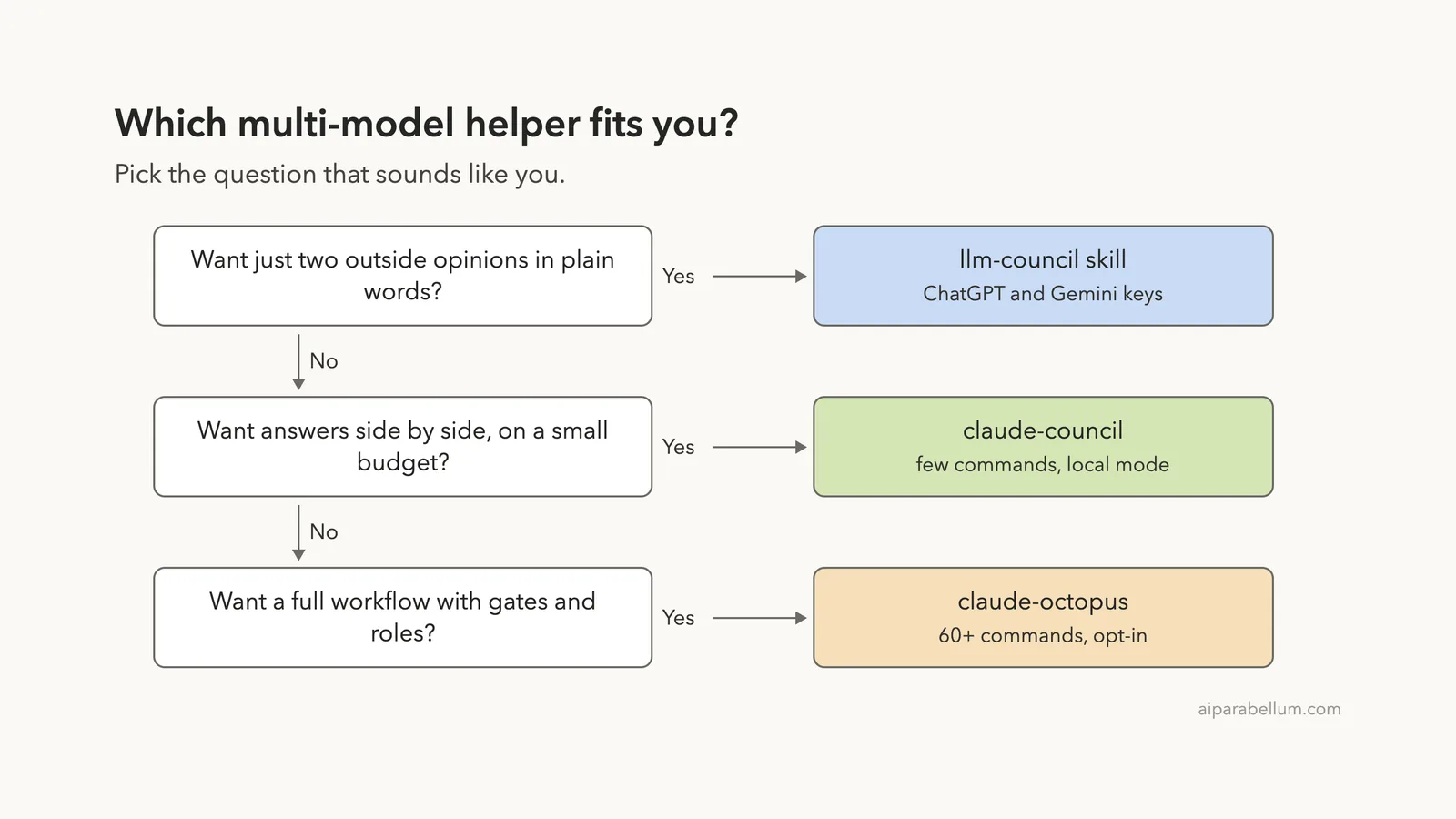
llm-council-skill is a single skill. You ask Claude things like “Consult the council: how should I structure my React app?” and it queries ChatGPT and Gemini, then merges their ideas into one plan with credit to each model.
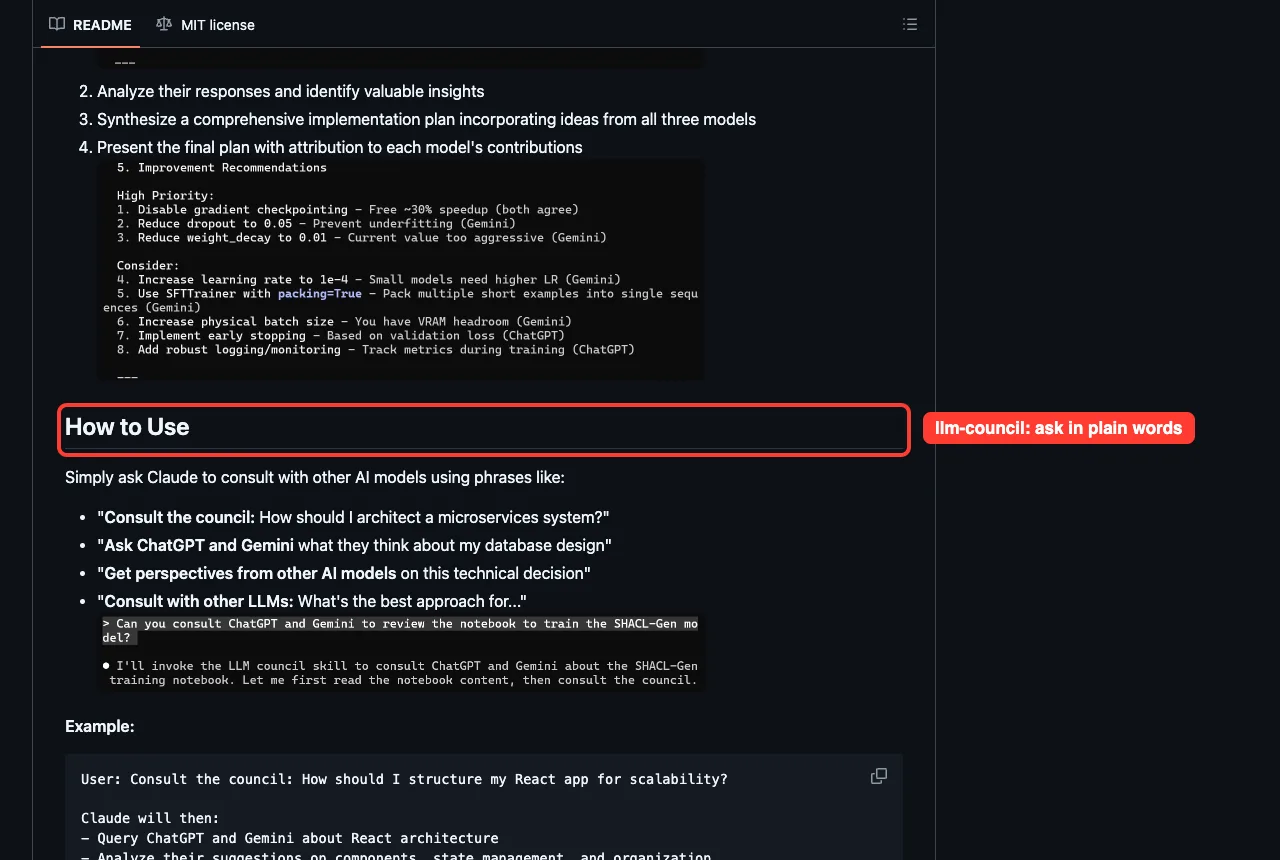
Its Python script tries the codex command first, then the OpenAI API, and does the same for Gemini. Keys come from a .env file in your working directory or from environment variables. The defaults are gpt-5-nano and gemini-3-flash-preview, and the README lists pricier upgrades.
We read the script instead of running it, because it needs API keys we do not enter. It makes two calls per question and sends your prompt to both vendors. The README says API calls time out after 30 seconds and a failed model is skipped.
One caution: the repository has a single commit, dated 2026-01-08, and its README tells you to upload a .skill file rather than install from a marketplace. Copy the folder into .claude/skills/ of a project instead, as we did.
Side-by-Side Comparison
| Question | claude-council | claude-octopus | llm-council-skill |
|---|---|---|---|
| Size | 4 commands, 4 skills | 56 command files, 62 skill folders | 1 skill, 1 script |
| Works with no keys | Yes, --local (Claude only) | Yes, Claude host only | No |
| Outside models | Many APIs and CLIs | Up to twelve providers | ChatGPT and Gemini |
| Starts on its own | Only when you call it | Dormant until /octo: | When your phrase matches the skill |
| Saves answers | Plain text in .claude/council-cache/ | Run files from its runner | No file, answers in chat |
| Writes outside the project | Not seen | Yes, ~/.claude-octopus | Not seen |
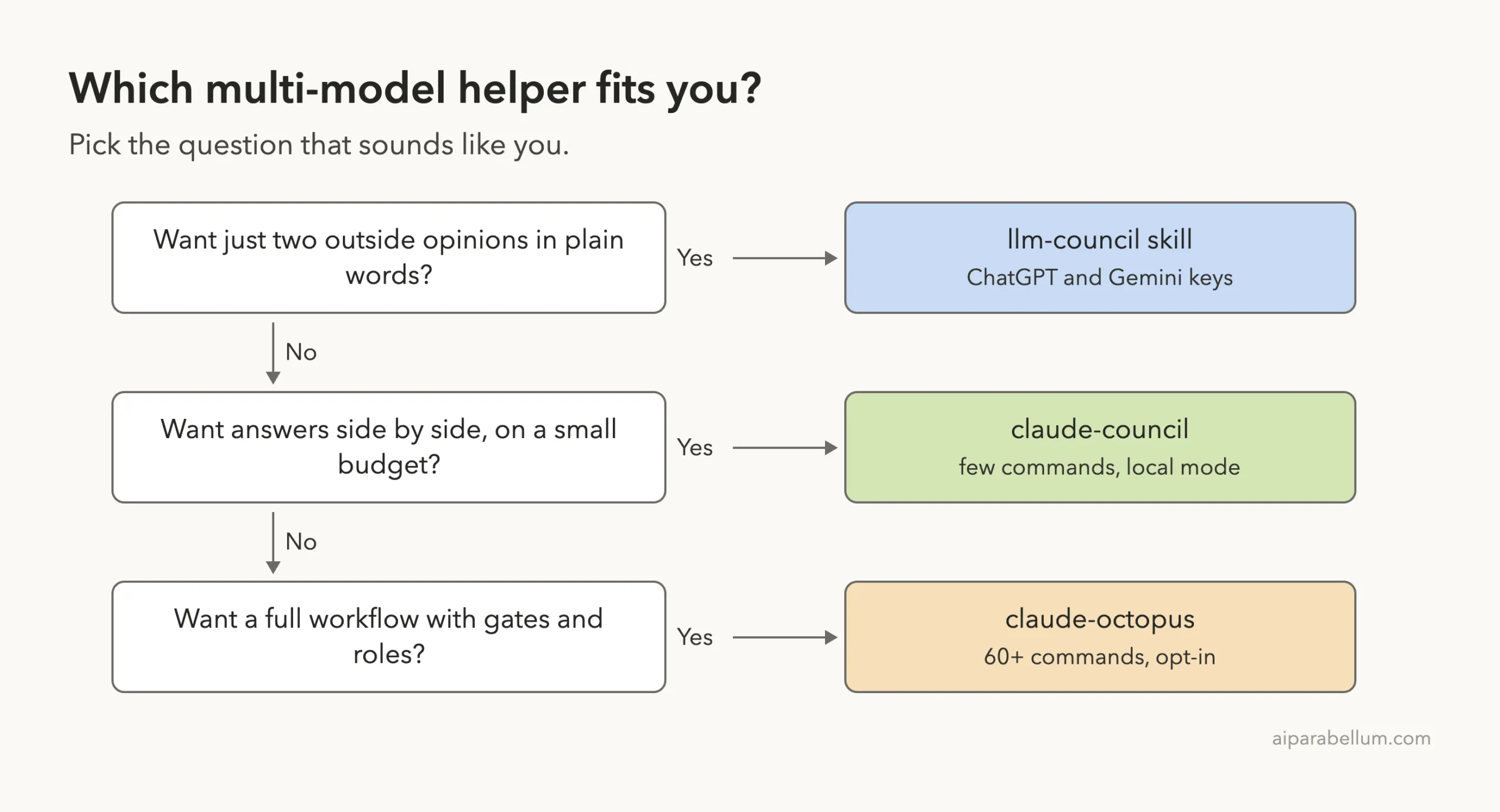
| Best for | Quick second opinions | Teams that want gates and personas | Two-model brainstorming |
Which Claude Code Multiple Models Helper to Pick
Start with claude-council. Its status table teaches you what each seat needs, and the local mode lets you try the idea with no key. We saw it work end to end and the synthesis was careful about its own limits.
Choose claude-octopus only if you want a full workflow system and will read its settings. It stayed quiet until called, but it is a big package that writes a state folder in your home directory.
Choose llm-council-skill if you already have OpenAI and Gemini keys and want the simplest setup. Because it is small and old, read its script before you trust it with your prompts.
Whichever you pick, send a description of the problem, not secrets. Every outside seat sees what you send.
Try It Yourself
Clone claude-council into a scratch folder, start Claude Code with the plugin loaded, and run the free local council. Replace the question with one you are really weighing.
claude --plugin-dir ./claude-council --setting-sources project/claude-council:status
/claude-council:ask --local --roles=simplicity,security "Should I use SQLite or Postgres for a small side project? Keep every answer under 60 words."Common Mistakes
- Treating agreement as proof. A local council made only of Claude members shares one set of priors.
- Pasting secrets into a question. Every selected provider receives your text and any files it attaches.
- Skipping the status check, then wondering why only one seat answered.
- Approving every prompt without reading it. Check that each command only touches the plugin’s own scripts and cache.
- Expecting free outside models. API keys and some CLIs bill separately.
Pro Tips
- Use
--rolesso each seat takes a different lens, such as security, performance or simplicity. - Add
--debatewhen two answers disagree and you want rebuttals. - Delete the council cache when a question contained private code, since it is plain text.
- Try plugins with
--plugin-dirfirst, as our permissions guide and costs guide suggest for anything new.
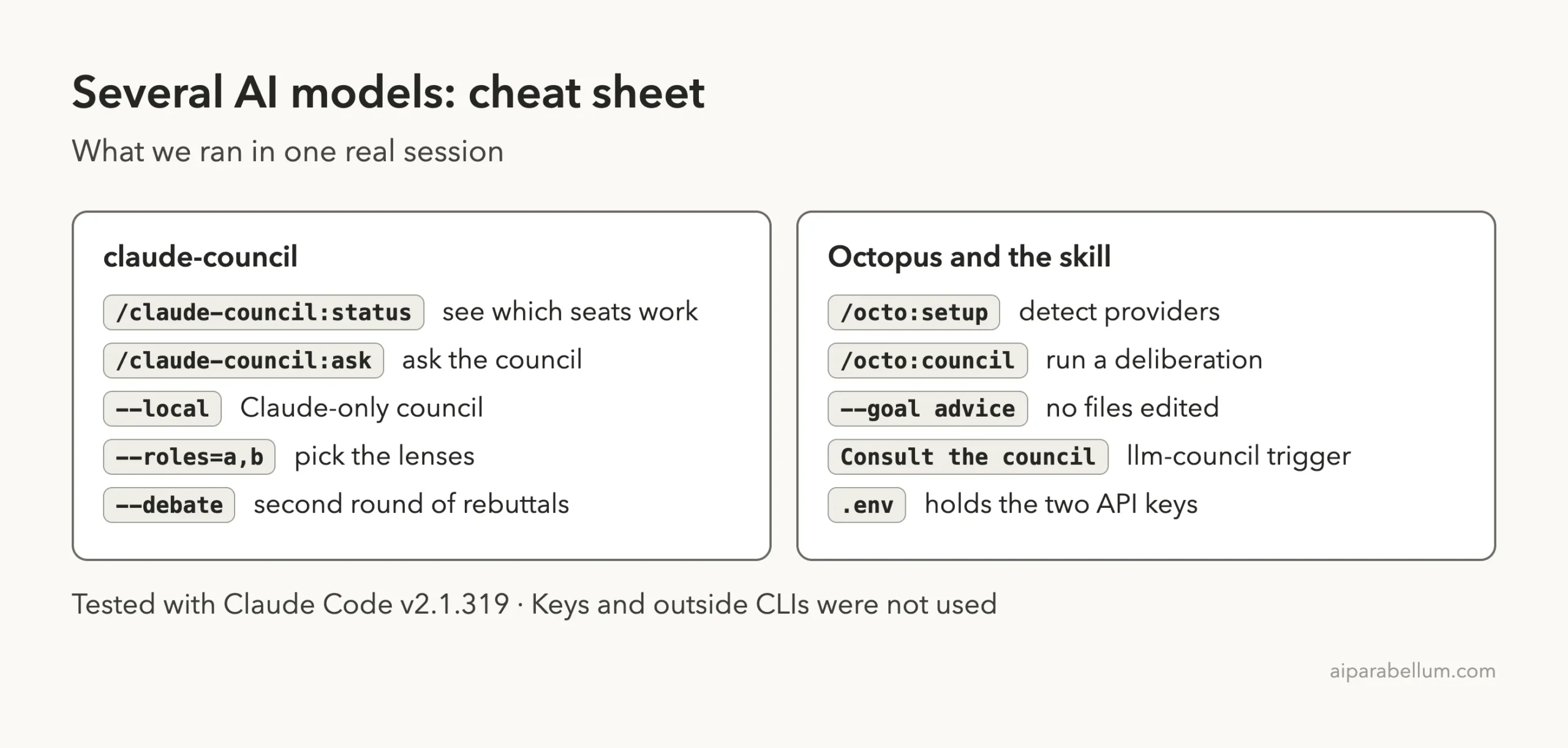
Cheat Sheet
Frequently Asked Questions
Can Claude Code ask several AI models at once?
Not out of the box. Plugins such as claude-council and claude-octopus add it by calling other providers or running several Claude subagents.
Do I need API keys?
For outside models, yes, or a subscription CLI such as codex. claude-council’s --local mode needs none, but all of its members are Claude.
Which one is cheapest to try?
claude-council with --local. It uses only your own Claude Code session. Our subagents guide explains the same idea.
Is a council the same as agent orchestration?
No. A council compares opinions on one question. Orchestration hands different tasks to different agents, which our orchestration roundup covers.
Are these tools official Anthropic products?
No. They are community projects. claude-octopus says so in its own README.
Conclusion
Asking several models is a good habit for big decisions, as long as you remember that a council shares your question and its assumptions. In our test, claude-council loaded cleanly and its local council gave a careful, honest synthesis, claude-octopus stayed dormant until called and wrote a state folder, and llm-council-skill is a small script that needs your own keys. Start small, read what each tool sends, and add outside seats only when the question deserves them. Browse all our Claude Code tutorials and our Claude guide for the next step, and see the official plugins docs and plugin discovery docs.
Project pages we read, all opened with nofollow: claude-octopus, claude-council and llm-council-skill.