If you want to use ClickHouse with Claude Code, the official best practices skill from ClickHouse gives Claude a set of rules to check before it gives advice. We loaded it, handed Claude a deliberately bad table and a slow query, and watched it review and rewrite both. This post shows what happened, what the skill got right, and what we could not test.
This guide is part of our Claude Code tutorials. Find more add-ons in our skills directory.
Tested with Claude Code v2.1.319 on November 11, 2026. We used the repo github.com/ClickHouse/agent-skills at commit d3b2b5b. The skill file says version 0.4.0 and the plugin manifest says 0.3.0.
The skill did not run our database. It made Claude check a schema against written rules and name each rule it used.
Quick Summary: What We Tested
| Question | Answer |
|---|---|
| What is it? | An official skill from ClickHouse with rules for schema, queries and inserts |
| Does it need an account? | No, the skill is plain text that Claude reads |
| What did we run? | A schema review, then a rewrite of one table and one query |
| What did we not run? | A real ClickHouse server, so no speed numbers |
| Our verdict | A good safety net if you write ClickHouse SQL and do not know the sparse index rules by heart |
One honest note up front. There is no ClickHouse server on our test Mac. Everything below is a review of SQL files, not a benchmark, so we make no claims about how much faster the new table is.
What the ClickHouse Best Practices Skill Is
A skill is a short guide that Claude Code reads when your request matches it. A plugin is a bundle that can carry skills, commands and tools. If these terms are new, our plugins guide explains how to find and manage them, and our skills versus plugins explainer shows how they differ.
The skill we tested is called clickhouse-best-practices. Its SKILL.md says it contains 31 rules, grouped by impact into categories such as primary key choice, data types, joins, inserts, partitions and materialized views. Each rule is its own short file in a rules folder, with a bad example and a good example.
The skill also tells Claude how to behave. It says to check the rules first, cite the rule name in the answer, and fall back to general knowledge only when no rule applies. That last part is why our review output named rules so clearly.
We covered this plugin briefly in our database plugins roundup. This post is the hands-on version.
Why ClickHouse Schemas Go Wrong
ClickHouse is a column database built for fast reports over large tables. It does not work like a normal row database, so habits from other databases cause real trouble.
The biggest one is the sort key. In a MergeTree table, the ORDER BY clause decides how data sits on disk and what the sparse index can skip. You cannot change it later without rebuilding the table, so a poor choice on day one is expensive.
The second is data types. It is tempting to store everything as String, but ClickHouse is fast when columns have real types. The third is partitioning, where a key with too many values creates a huge number of small data parts.
How We Loaded the Skill Safely
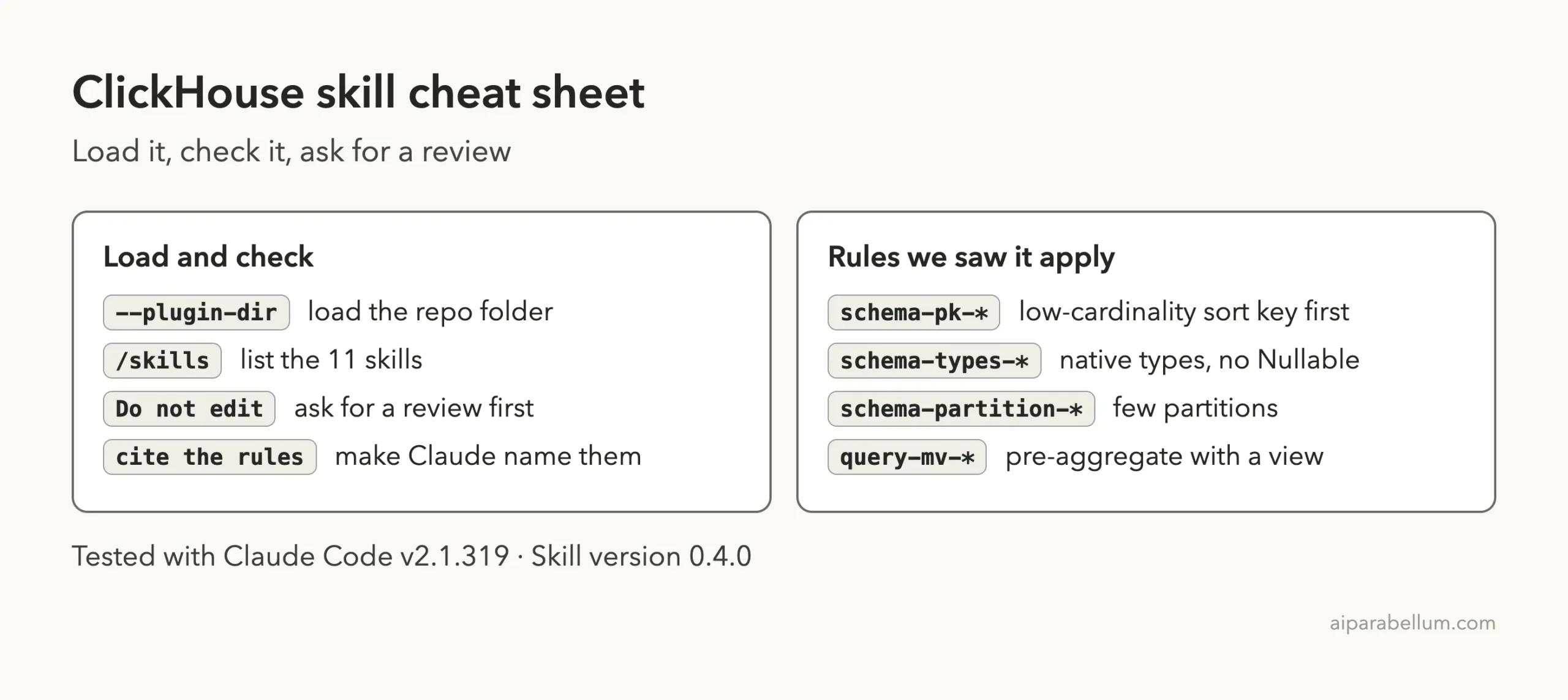
We did not install anything into our normal setup. We cloned the repo into a throwaway sandbox folder and loaded it for one session with the --plugin-dir flag, plus --setting-sources project so no personal settings came along.
git clone --depth 1 https://github.com/ClickHouse/agent-skills
cd my-demo-project
claude --plugin-dir /path/to/agent-skills --setting-sources project
Before running it, we read the repo. It has a plugin manifest, skill folders, a small build package and some GitHub workflow files. We found no hooks and no install scripts, so loading it only adds skills.
When you want it permanently, the route in the official directory is /plugin install clickhouse-best-practices@claude-plugins-official. The plugin discovery docs explain marketplaces, and the plugins docs explain what an enabled plugin adds to a session.
Step 1: Check That the Skills Loaded
Once Claude Code opened, we typed /skills. The list showed 11 skills, all marked as locked by the plugin. The one we wanted, clickhouse-best-practices, showed a cost of about 90 tokens.
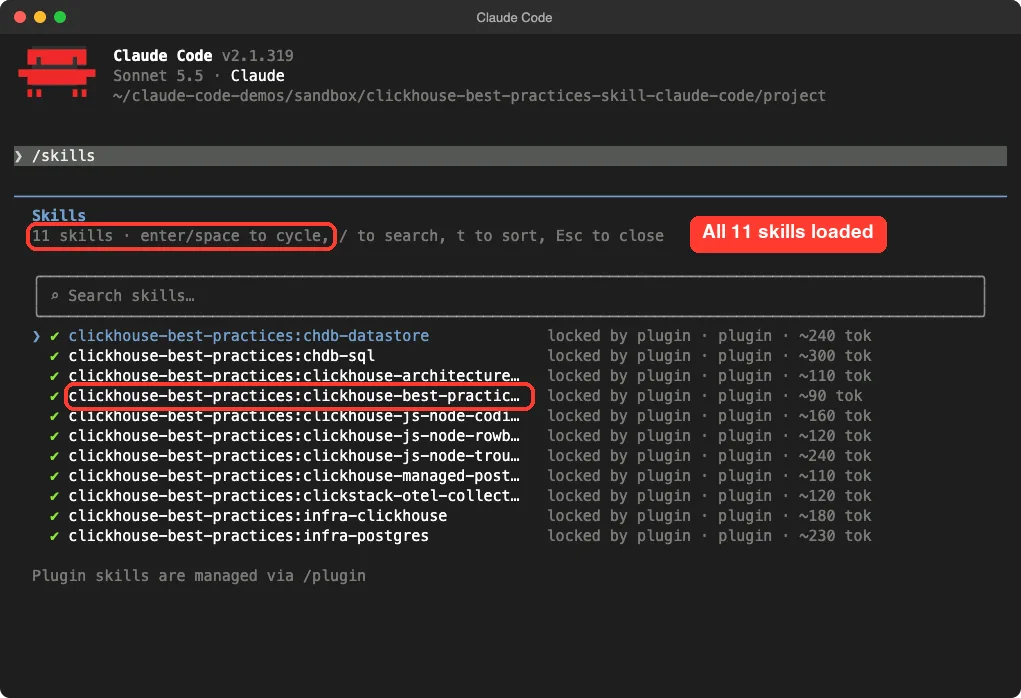
The manifest names 8 skills, but Claude Code listed 11 because it also found the other skill folders in the repo. Some of those cover things we did not use, such as a Node.js client, a local engine called chDB and Postgres tools. We left them alone.
Step 2: Build a Bad Schema on Purpose
We wrote a small demo project with three files. The first is schema.sql, a table of web shop events with the mistakes beginners make.
CREATE TABLE events
(
    event_id    String,
    user_id     String,
    event_type  String,
    country     String,
    price       Nullable(String),
    created_at  String,
    payload     String
)
ENGINE = MergeTree()
PARTITION BY user_id
ORDER BY (event_id, created_at);
The second is queries.sql, a dashboard query that counts purchases per country for one day.
SELECT country, count() AS purchases
FROM events
WHERE event_type = 'purchase' AND toDate(created_at) = '2026-11-01'
GROUP BY country;
The table has a unique ID at the front of the sort key, a partition per user, text everywhere, and a nullable price stored as text. The query wraps a text column in a function. That is a lot of trouble for six lines.
Step 3: Ask Claude for a Review Before Any Edits
We asked for a review only, and we told Claude to name the rules it used.
Review schema.sql and queries.sql against the ClickHouse best practices skill. Do not edit files. Give a short list of the top problems and cite the rule names.Claude loaded the skill first. The screen shows Skill(clickhouse-best-practices:clickhouse-best-practices) and a line saying the skill loaded successfully.
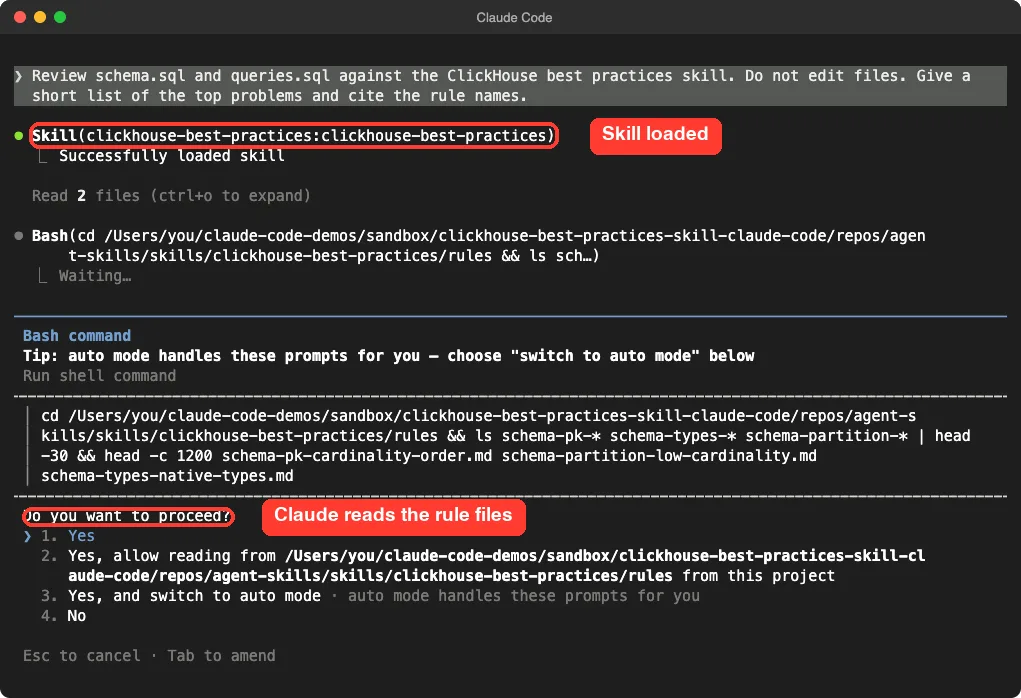
Then it asked permission to run a shell command that reads the rule files. The main skill file is short and the details live in the rule files, so Claude reads the ones that match the task. We approved the read.
The answer took about 11 seconds. It was a numbered list, and every item carried a rule name and often a line number.
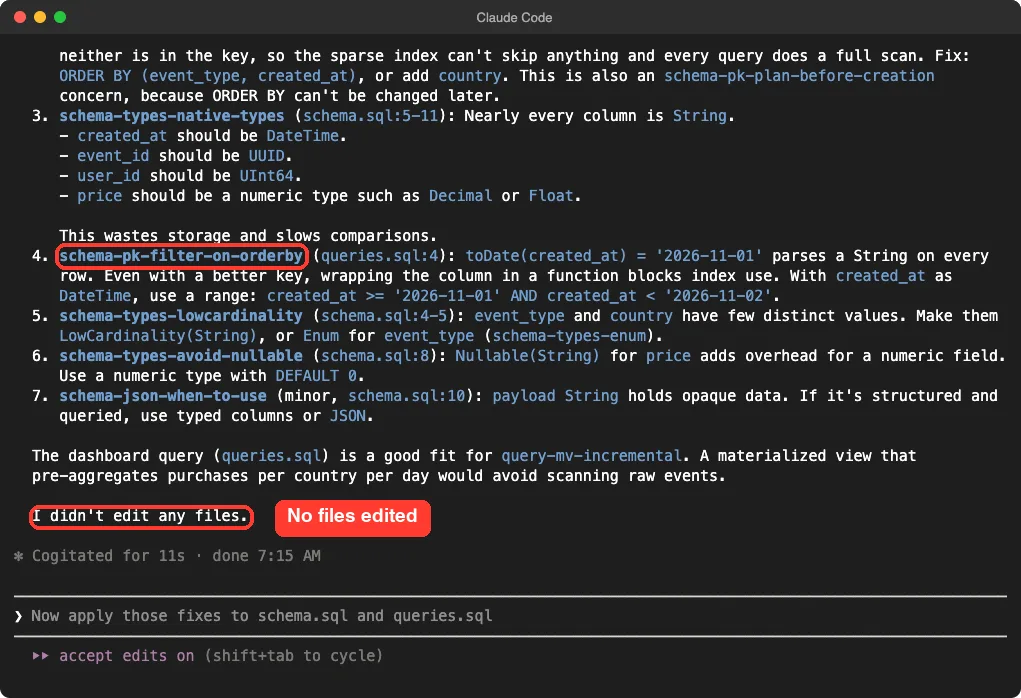
What the Review Found
| Problem in our files | Rule Claude cited |
|---|---|
| Sort key led with a unique ID | schema-pk-cardinality-order |
| Filters not in the sort key, so full scans | schema-pk-prioritize-filters, schema-pk-plan-before-creation |
Almost every column was a String | schema-types-native-types |
toDate() wrapped around the date column | schema-pk-filter-on-orderby |
| Few-value text columns | schema-types-lowcardinality, schema-types-enum |
| Nullable price | schema-types-avoid-nullable |
| Payload column as plain text | schema-json-when-to-use |
In one run it also pointed to query-mv-incremental, which suggests a materialized view that pre-counts purchases per country per day, so the dashboard does not scan raw events every time.
Claude ended the answer by saying it had not edited any files, which is what we asked for.
Step 4: Let Claude Rewrite the Files
Next we asked for the fix. For this run we started Claude Code with --permission-mode acceptEdits, so file edits went through without a prompt for each one. In a real project you may prefer the default mode, where you approve every diff.
Using the ClickHouse best practices skill, rewrite schema.sql and queries.sql to follow the top rules (sort key, native types, LowCardinality, no Nullable, date range filter). Edit the files, keep comments short.This is the new schema.sql that ended up on disk.
CREATE TABLE events
(
    event_id    UUID,
    user_id     UInt64,
    event_type  LowCardinality(String),
    country     LowCardinality(String),
    price       Decimal(10, 2) DEFAULT 0,
    created_at  DateTime,
    payload     String
)
ENGINE = MergeTree
PARTITION BY toYYYYMM(created_at)
ORDER BY (event_type, created_at);
And this is the new query.
SELECT country, count() AS purchases
FROM events
WHERE event_type = 'purchase'
  AND created_at >= '2026-11-01'
  AND created_at <  '2026-11-02'
GROUP BY country;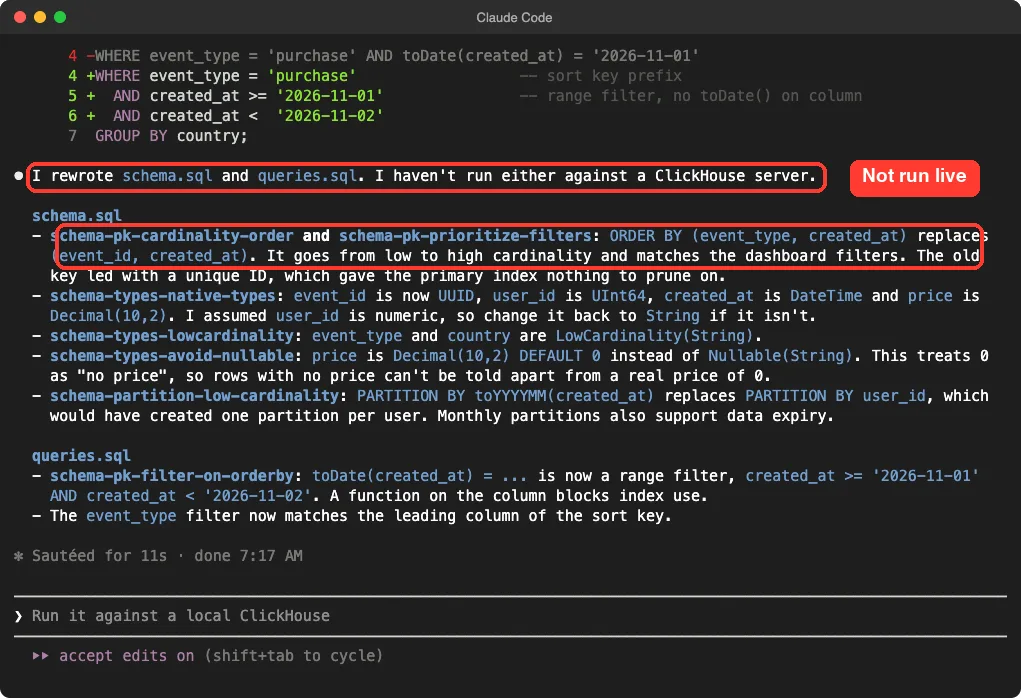
The summary tied each change to a rule. The sort key now starts with the low-cardinality event_type, which matches the dashboard filter.
The types are native, and the price is a decimal with a default. The partition is by month instead of by user.
What Claude Got Right and Where It Guessed
Two details earned our trust. Claude said plainly that it had not run either file against a ClickHouse server. It also flagged its own guess: it assumed user_id is numeric, and said to change it back to String if it is not.
Is the new schema truly the best one? The sort key (event_type, created_at) suits this one query, but it is a guess about your workload. If your dashboards also filter by country or user, the right key may differ.
The zero default for price is a trade-off too. Claude warned that a row with no price now looks like a price of zero. That is the kind of honest note you want from a reviewer.
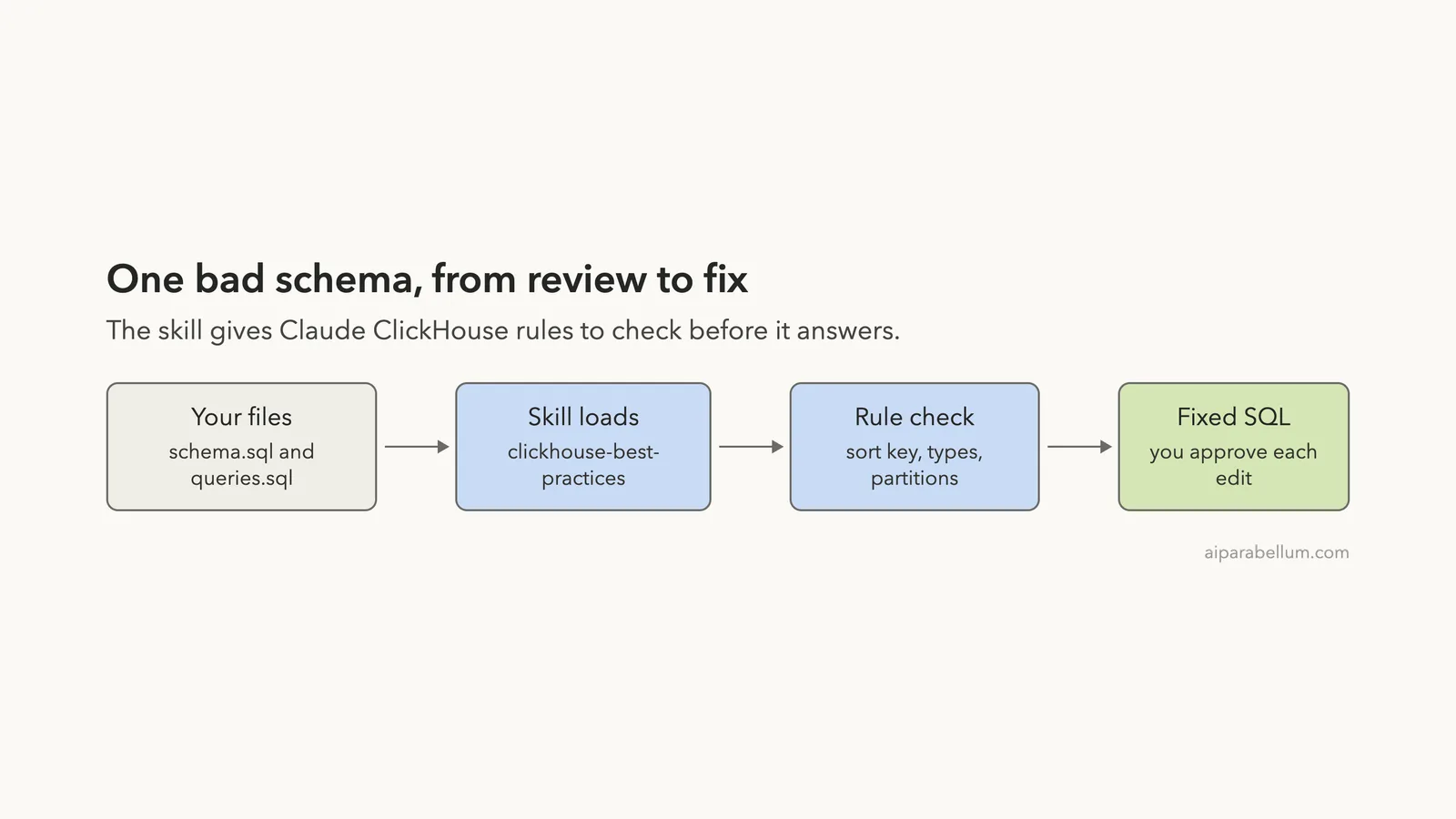
How the Pieces Fit Together
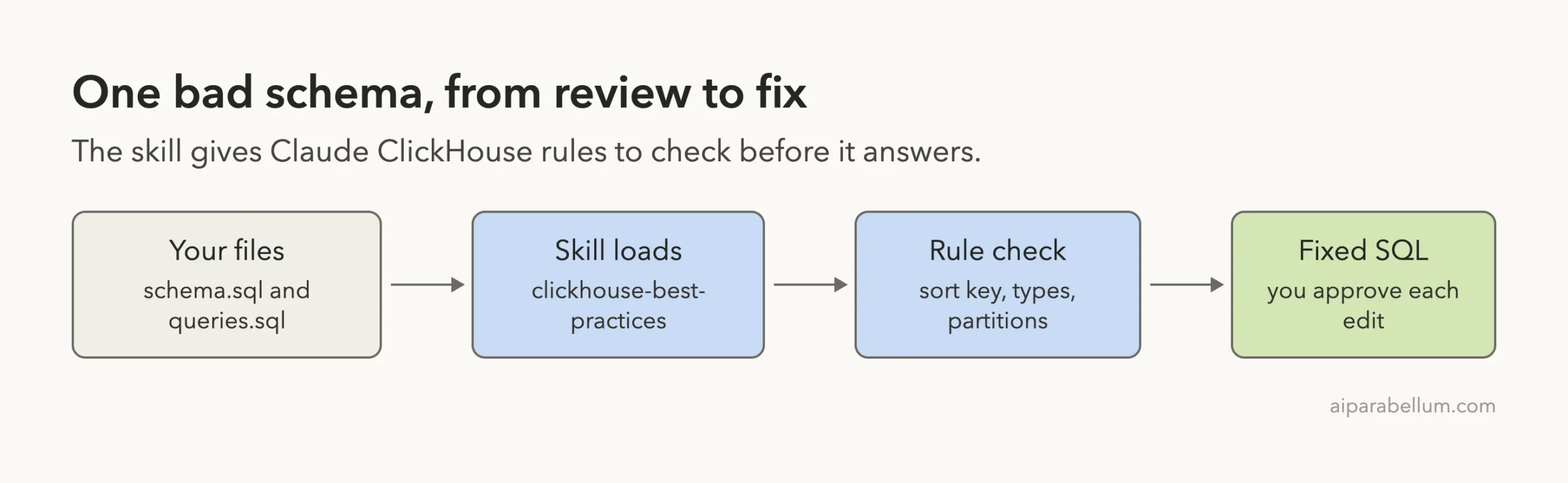
The skill does not run anything on its own. It is text that Claude reads when your request fits. The review quality came from Claude reading specific rule files, not from any special tool.
What the ClickHouse Claude Code Skill Does Not Do
This skill reviews and guides. It does not connect to your database, and it does not measure query speed. The repo also holds a separate plugin that connects Claude to ClickHouse Cloud, and that one needs an account, so we left it out of this test.
The skill does include rules about connecting an AI agent to a database, such as using limits and timeouts on queries. We did not test those because we had no server to connect to.
Who Should Use ClickHouse With Claude Code
This setup, made by ClickHouse for Claude, fits developers who write ClickHouse tables or queries but have not memorized how the sparse primary index works. It is also useful on teams, because everyone gets the same rules in front of Claude.
If you already know ClickHouse well, the value is smaller, though a second pair of eyes on a schema is still handy. If you work with other databases, our MongoDB plugin test and our Redis plugin test show the same review-first approach, and our vector database plugins comparison covers search.
What Worked and What Did Not
| Worked well | Watch out for |
|---|---|
| The review found every planted problem and named the rule | We never ran the SQL on a real ClickHouse server |
| Claude read the rule files before answering | It asked permission for a shell read each time in default mode |
| It flagged its own assumptions | A good sort key still depends on your real queries |
| No hooks or scripts, only skills | Plugin manifest and skill file show different version numbers |
One more thing we noticed. Our first attempt typed the follow-up prompt while Claude was still answering, and it did not submit. If you script or paste several prompts, wait for the previous answer to finish.
Try It Yourself
Make a small schema.sql with a few mistakes, load the skill in a throwaway folder, and ask for a review before any edits. Use this prompt:
Review my ClickHouse table and query against the best practices skill. List each problem with the rule name and the fix. Do not edit anything yet.Then ask for the rewrite and read every change. Ask Claude what query your sort key is built for, so you can check that it matches how you really use the table.
Common Mistakes
- Putting a unique ID first in the
ORDER BYclause. - Partitioning by a column with thousands of values, such as a user ID.
- Wrapping a filtered column in a function, such as
toDate(). - Storing numbers and dates as
String. - Treating a file review as proof of speed.
- Installing a plugin into your main setup before reading the repo.
Pro Tips
- Ask for a review first, then the rewrite, so you can compare.
- Tell Claude to cite rule names so you can read the rule yourself.
- Run
/skillsto confirm what loaded before you start. - Test the new table on a copy of real data before you move anything.
Cheat Sheet
Frequently Asked Questions
Does the ClickHouse skill need a ClickHouse account?
No. The best practices skill is plain text that Claude reads. A separate ClickHouse Cloud plugin exists, and that one needs an account.
Does it install ClickHouse on my computer?
No. It adds skills to Claude Code. You still need your own ClickHouse server to run the SQL.
How do I install it for good?
Use /plugin install clickhouse-best-practices@claude-plugins-official. For a one-session trial, load the cloned folder with --plugin-dir.
Is it safe to load?
We read the repo first and found no hooks or install scripts. You should still read any plugin yourself before loading it.
Will the new schema be faster?
The rules say it should help, but we did not measure it. Test on your own data before you trust any speed claim.
Conclusion
The ClickHouse best practices skill turned a loose request into a focused review with named rules, then into a cleaner table and query. We only reviewed SQL files, so treat the result as a strong starting point and test it on a real server before you rely on it.
Browse all our Claude Code tutorials on the tutorials hub.