Excalidraw is the whiteboard tool known for its sketchy, hand-drawn look, and it has an official MCP server that lets an AI assistant draw for you. In this Claude Code MCP Excalidraw test, we added the hosted server, gave it a short checkout flow written as plain notes, and asked for a diagram. This guide shows what came back in the terminal, what did not, and the simple route that gave us a drawing we could open.
This guide is part of our Claude Code tutorials. Find more add-ons in our Claude Code Skills Directory.
Tested with Claude Code v2.1.322 on November 13, 2026, on macOS, using the hosted Excalidraw MCP server at https://mcp.excalidraw.com. It is hosted, so there is no package to install or pin. It comes from github.com/excalidraw/excalidraw-mcp, which we read at commit 157aa23, where package.json lists version 0.3.2.
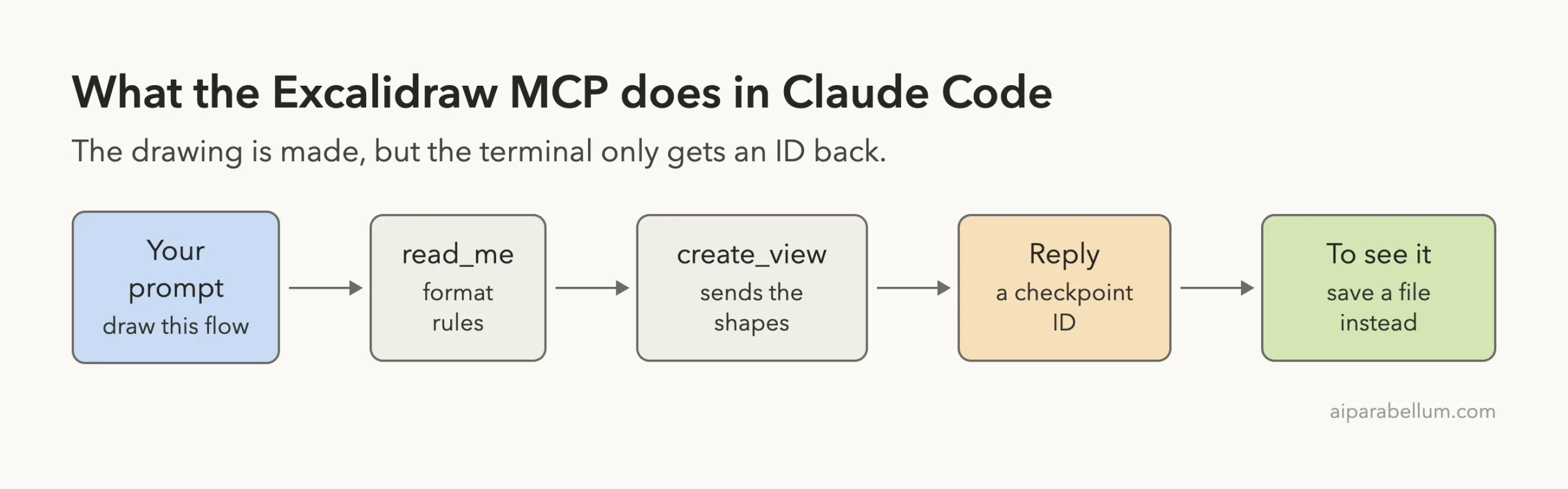
The server connected with no sign-in and accepted our drawing. In the terminal, Claude Code got back a checkpoint ID, not a picture and not a link.
Quick Summary: What We Tested
| Question | Answer |
|---|---|
| What is it? | The official hosted Excalidraw MCP server, built for chat apps that can show the drawing inline |
| Does it need an account? | No. /mcp showed “connected” and “Auth: not signed in” |
| How many tools? | /mcp listed 5. Claude could call 2 of them: read_me and create_view |
| What did the drawing tool return? | Only a checkpoint ID. No image, no link |
| Did a real diagram exist? | Yes. We pulled it from the server ourselves and it opened correctly in Excalidraw |
| What worked best in the terminal? | Asking Claude to save a .excalidraw file, which needed no server at all |
| Our verdict | Great idea, wrong place. In a terminal, skip the server and ask for a file |
One honest note. We ran each test once, so treat this as one demo and not a benchmark.
What the Excalidraw MCP Is and Why It Exists
MCP is the Model Context Protocol, a standard way to give Claude extra tools. If it is new to you, our MCP guide explains it.
The Excalidraw team publishes this server so an assistant can draw diagrams during a chat. The repository describes it as a server that streams hand-drawn diagrams with camera control and fullscreen editing.
The key detail is in the README. It says the server works with any client that supports MCP Apps, and it names Claude, ChatGPT, VS Code and Goose.
MCP Apps is an extension that lets a server send a small interactive screen into the chat. We built one ourselves in our MCP Apps walkthrough.
A terminal has nowhere to show that screen. So the real question for this guide is simple: what does Claude Code get when the drawing has no place to appear?
The repository was not archived when we checked. Its last push was on March 24, 2026, about eight months before our test, so do not expect fast changes.
How to Add the Excalidraw MCP to Claude Code
We worked in a throwaway demo folder and used local scope, so the server exists only in that folder. Your normal setup stays unchanged.
claude mcp add --scope local --transport http excalidraw https://mcp.excalidraw.comClaude Code printed that it added an HTTP server named excalidraw to the local config for that folder. Then claude mcp list showed it as connected.
We started claude in the folder and ran /mcp to look closer.
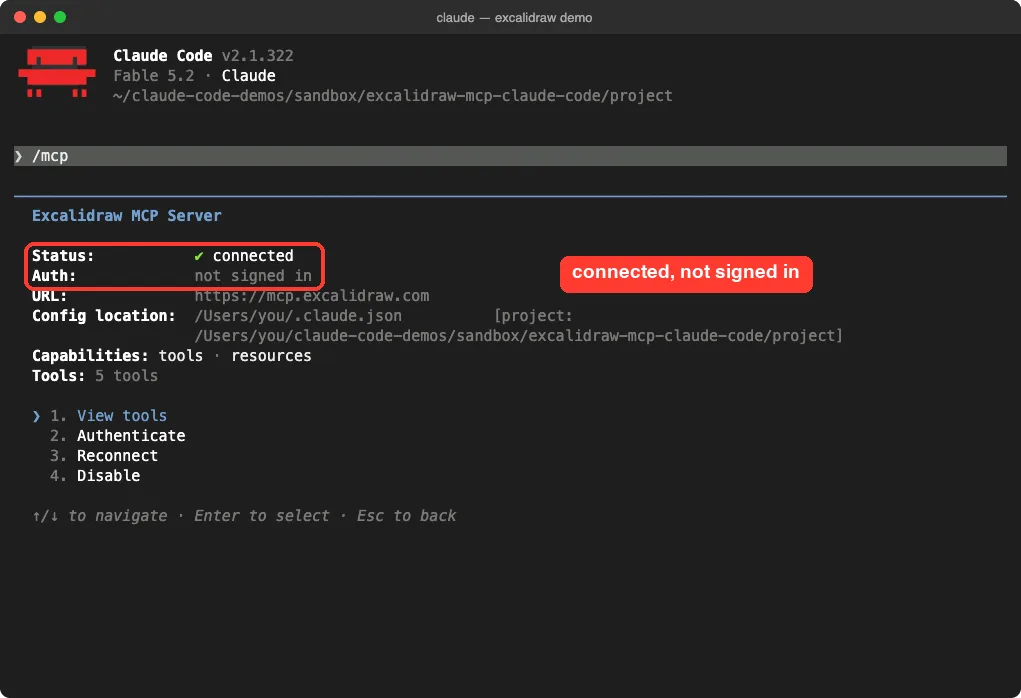
There was no sign-in prompt, no key and no install. Scopes and the claude mcp add command are covered in the official MCP docs.
Local scope stores the entry in ~/.claude.json under that one project. Our guide on MCP config files shows where each scope lives.
The Five Tools Claude Code Lists, and the Two It Can Use
The detail screen said “Tools: 5 tools”. Opening the list showed all five names.
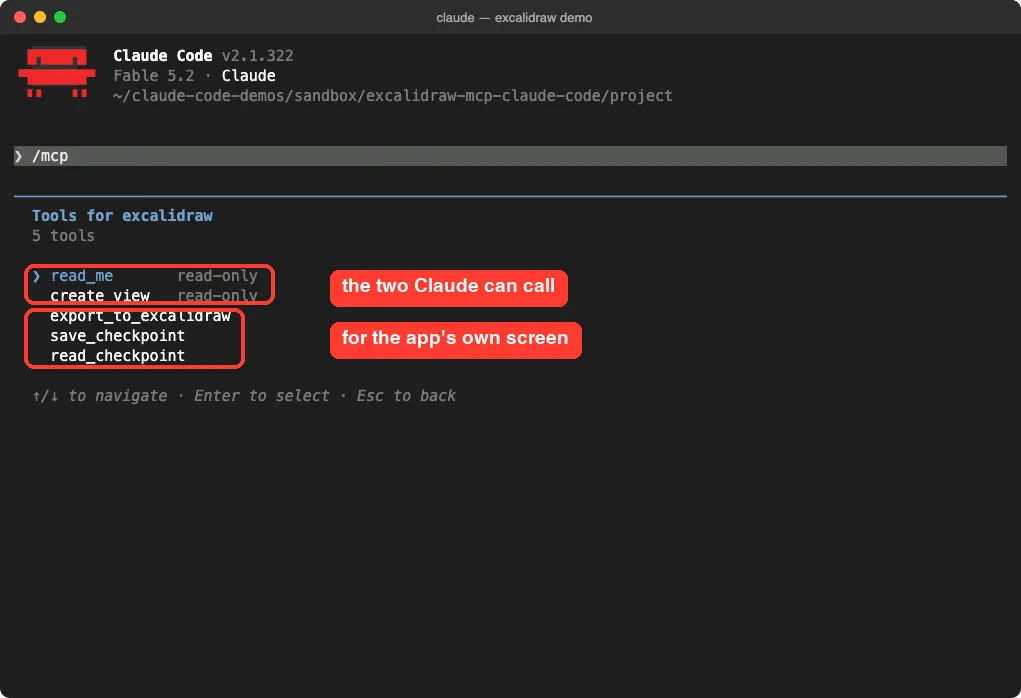
| Tool | What its description says | Could Claude call it? |
|---|---|---|
read_me | Returns the element format reference, with color palettes, examples and tips | Yes |
create_view | Renders a hand-drawn diagram from a JSON list of Excalidraw elements | Yes |
export_to_excalidraw | Uploads the diagram to excalidraw.com and returns a shareable URL | No |
save_checkpoint | Updates a checkpoint with user-edited state | No |
read_checkpoint | Reads checkpoint state for restore | No |
Why the split? The server marks the last three tools as visible to the app only. They are meant for the drawing screen itself, such as its export button, and not for the model.
Claude Code followed that. The /mcp screen lists all five, but in our sessions Claude was offered only read_me and create_view.
Is the Excalidraw MCP Safe to Add?
Ask what a server can do and where your data goes. This one is hosted, so every shape and label Claude sends goes to the Excalidraw team’s server.
We also noticed something worth knowing. Each drawing is saved on the server as a checkpoint, and we could read our own checkpoint back with a plain request and no sign-in, using only its ID.
The IDs are long random strings, so nobody will guess yours by chance. Still, treat a checkpoint ID like a private link, and do not put confidential details in a diagram.
The server code sets a 30-day expiry for checkpoints in its hosted storage option. We read that in the source and did not verify how the live server is set up.
The tool list showed nothing that edits your files. Claude Code asks before using a tool unless you allow it, and we allowed only this server for our tests with --allowedTools mcp__excalidraw.
Test 1: Draw a Checkout Flow From Notes
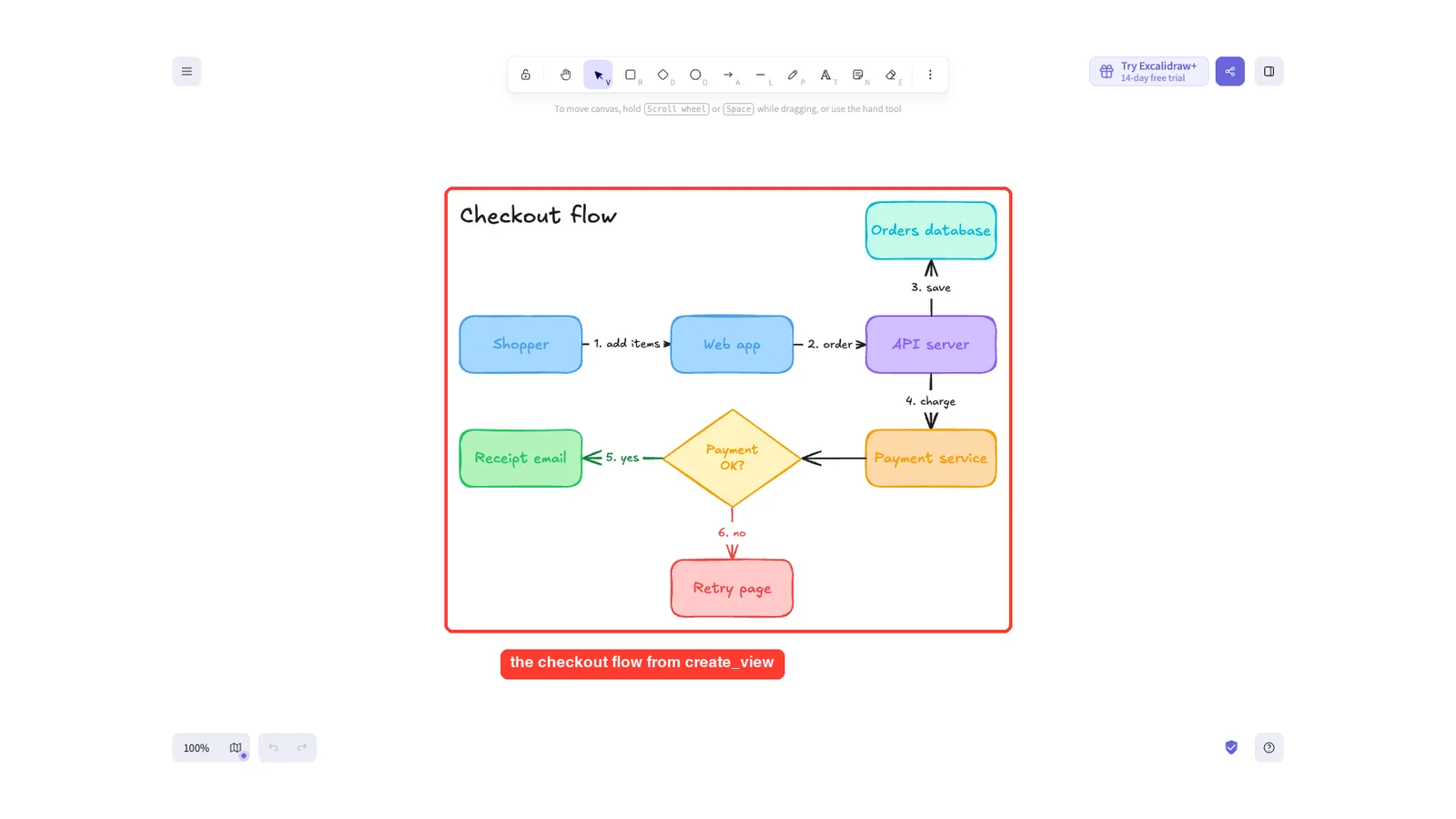
We made a small notes.md file with six steps. A shopper adds items, the web app sends the order to an API server, the order is saved to a database, a payment service charges the card, and the shopper gets a receipt email or a retry page.
Read notes.md, then use the excalidraw MCP to draw that checkout flow as a hand-drawn diagram. Keep your answer short and tell me exactly what the tool returned.Claude read the notes and called the server three times. The run took 1 minute 6 seconds.
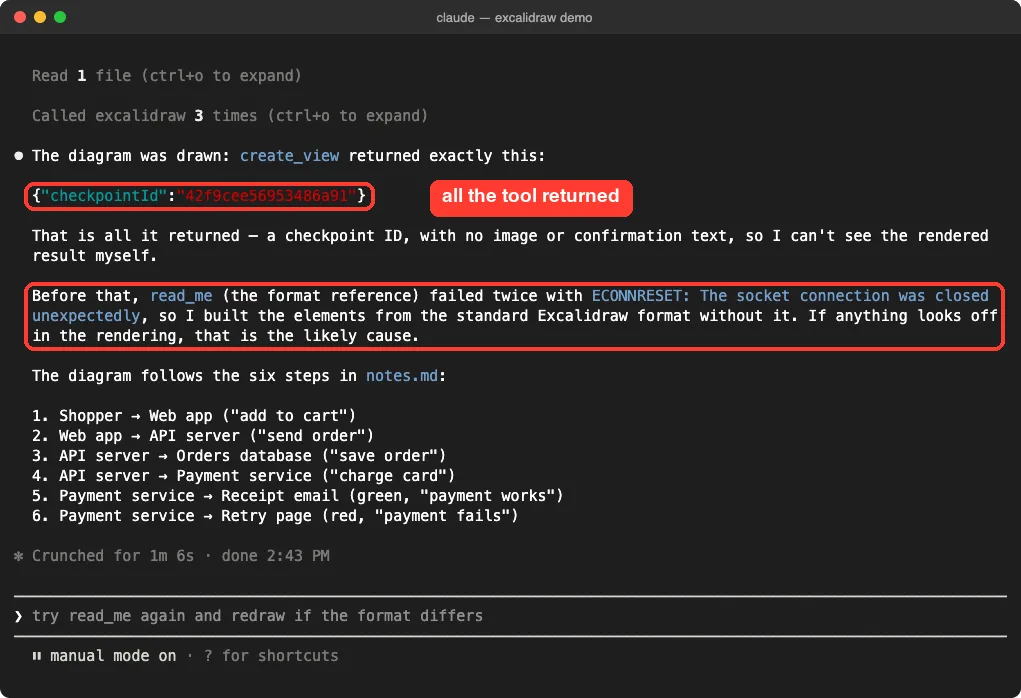
Two things stand out. First, create_view returned only a checkpoint ID, and Claude said plainly that it could not see the result.
Second, read_me failed twice with a connection reset error, so Claude built the shapes without the format guide. In our next run a few minutes later, the same tool worked on the first try, so it looked like a passing network hiccup.
Test 2: Ask Claude Code for a Shareable Link
The tool list has an export tool, so we asked for a link in a fresh session.
Use the excalidraw MCP: call read_me once, draw the checkout flow from notes.md with create_view, then call export_to_excalidraw and give me the link. No files, no shell commands. Keep it short and say what each tool returned.This run took 44 seconds. Claude called read_me, which worked this time, and then create_view, which again returned a checkpoint ID.
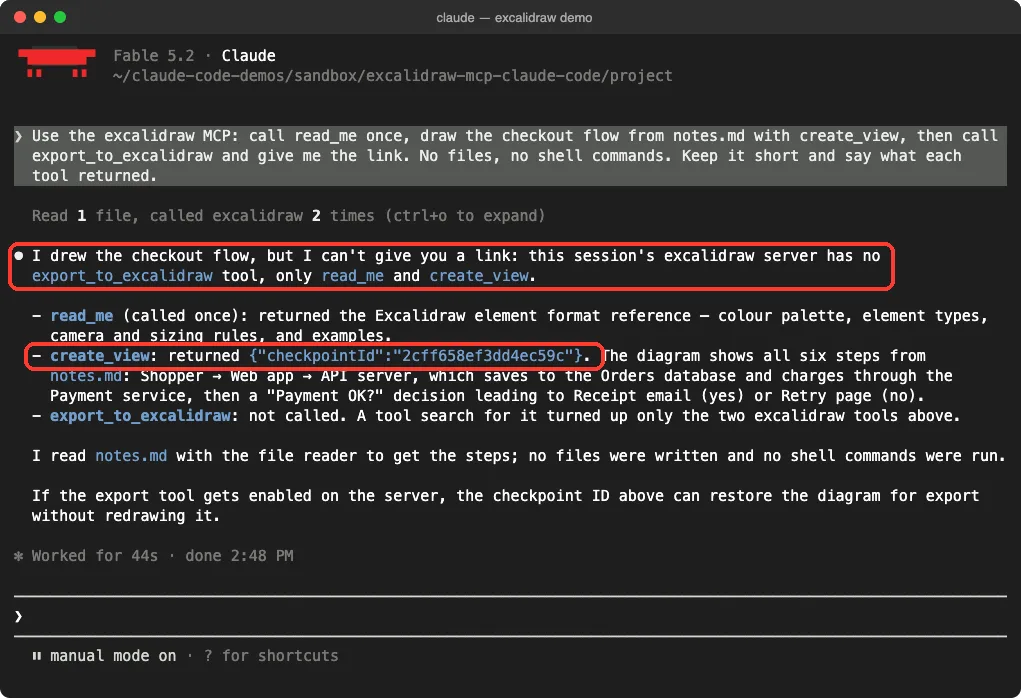
Then it stopped. Claude said its session had no export_to_excalidraw tool, only the other two, so it could not give us a link.
That is the honest result for terminal users. The server drew something, but Claude Code gave us no way to look at it.
What the Hand-Drawn Diagram Looked Like
We wanted to know if the drawing was any good, so we went around Claude Code. This part takes a few manual requests, and most readers will not want to repeat it.
- We read the checkpoint from Test 2 back from the server with a direct request.
- We converted its shapes with Excalidraw’s own library, version 0.18.0, in a headless Chrome browser. The app does the same step before it exports.
- We called the server’s
export_to_excalidrawtool directly. It returned an excalidraw.com link. - We opened that link in headless Chrome.
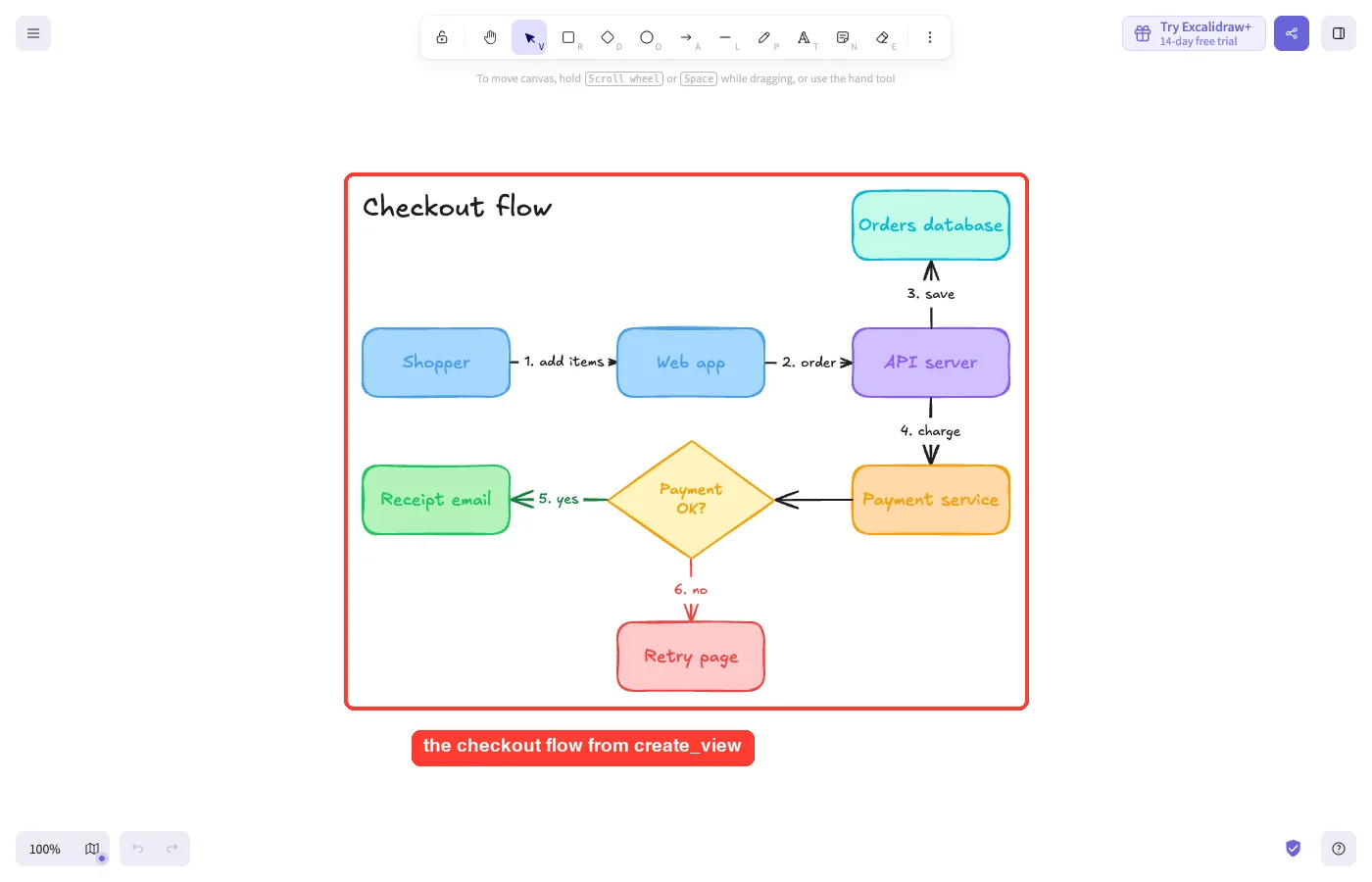
The diagram was right. All six steps from the notes are there, in order, with numbered labels on the arrows.
Claude also added a “Payment OK?” decision diamond that splits into a green receipt path and a red retry path. Colors follow the palette from read_me, with blue for inputs, teal for storage and red for the failure path.
So the server and the model did good work together. The missing piece is only the screen to show it on.
Test 3: Save a .excalidraw File and Skip the Server
For a terminal, a file is the natural output. So we asked for one.
Read notes.md and save the checkout flow as checkout.excalidraw, a standard Excalidraw file I can open at excalidraw.com. Use only the Write tool, no shell commands. Keep your answer short.Claude wrote a 50-line file with 26 elements in 1 minute 22 seconds. It did not call the Excalidraw server at all, even though the server was connected and allowed.
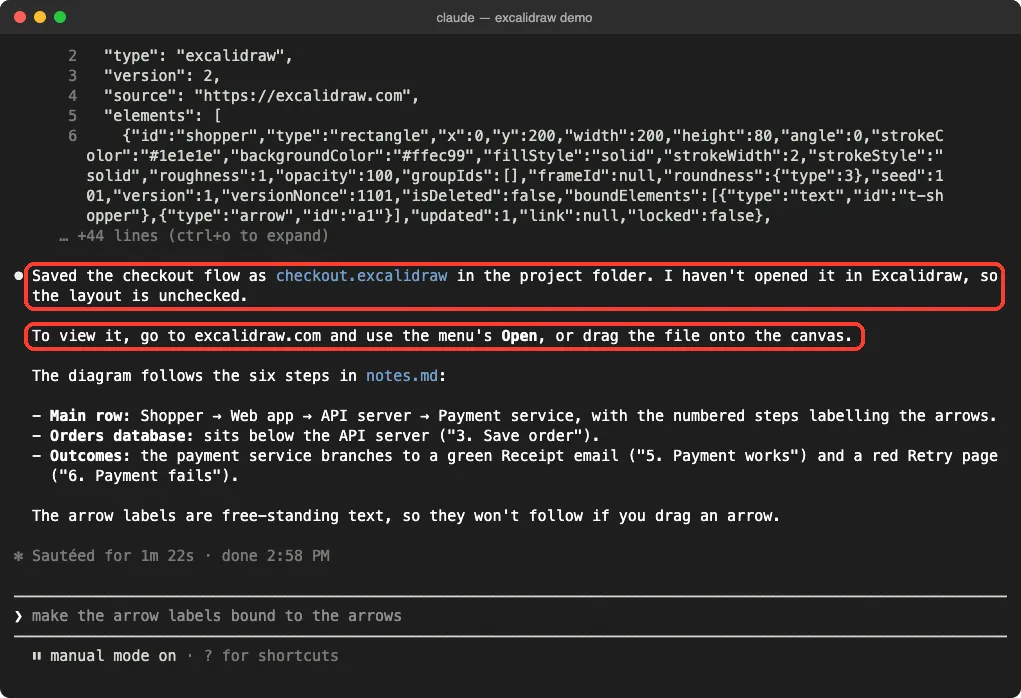
Claude was upfront that it had not opened the file. So we checked it by loading the file’s elements into excalidraw.com in headless Chrome and zooming to fit.
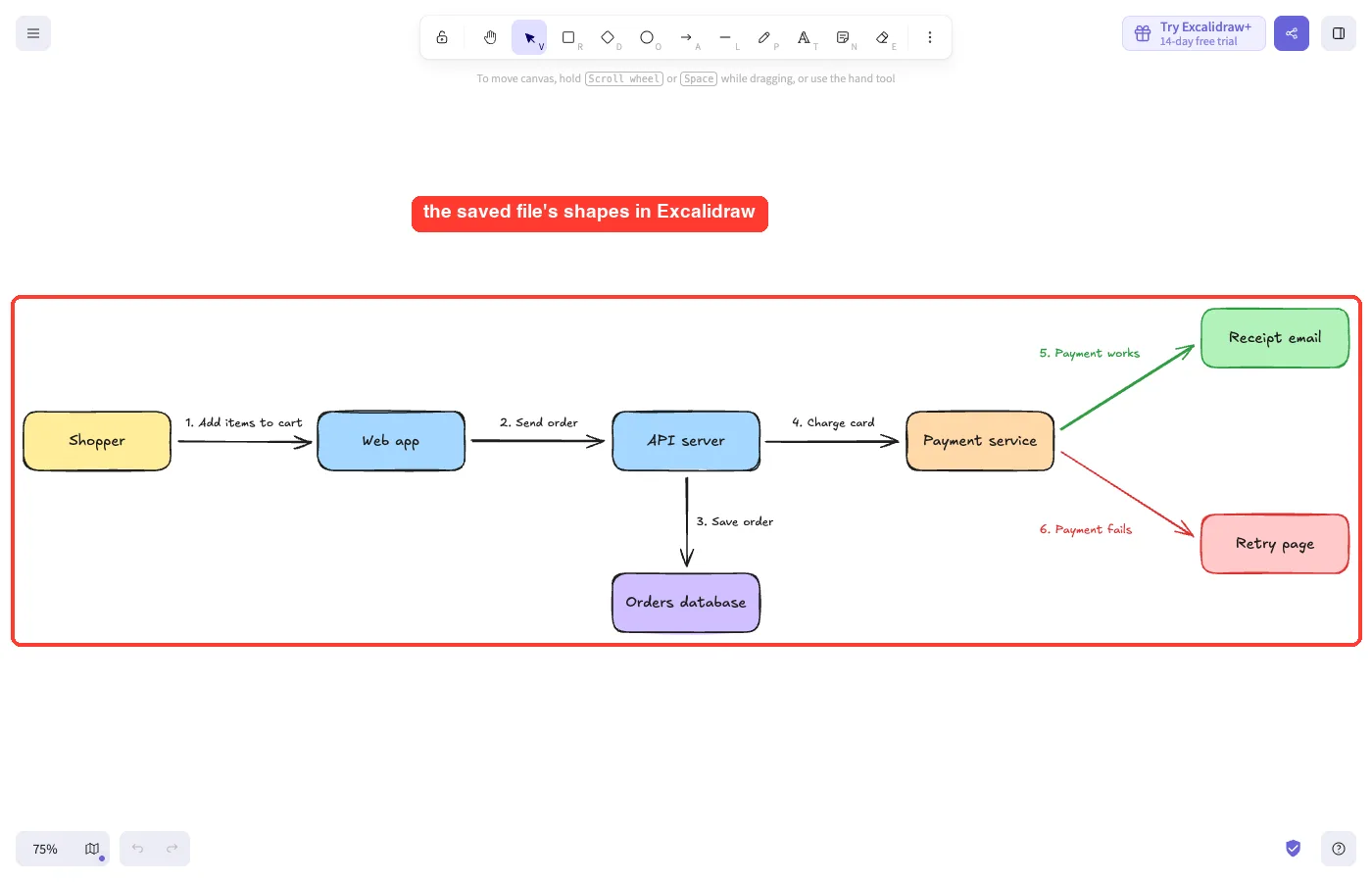
It worked on the first try. Every box and arrow was in place, with the same hand-drawn style.
There is one limit, and Claude named it. The arrow labels are free-standing text, so they will not follow an arrow if you drag it.
How the Three Routes Compare
| Route | Time in our run | What you get in the terminal | Can you open the drawing? |
|---|---|---|---|
create_view through the server | 44 seconds to 1 minute 6 seconds | A checkpoint ID | Not from Claude Code |
| Export link through the server | Not available | Nothing. Claude has no export tool | Only with manual requests |
A saved .excalidraw file | 1 minute 22 seconds | A file in your folder | Yes, in Excalidraw |
Other diagram servers handle terminals differently. The draw.io MCP returned an editor link we could open, and our tldraw MCP test hit limits much like this one.
Who Should Add the Excalidraw MCP to Claude Code?
| Your situation | Our advice |
|---|---|
| You use Claude Code in a terminal only | Skip it. Ask for a .excalidraw file |
| You use a chat app that supports MCP Apps | The README says it is built for that. We did not test it there |
| You want a link to share | Not from Claude Code. Open the saved file in Excalidraw and share from there |
| You work with private architecture | Think twice. Drawings are stored on a hosted server |
For more servers, our MCP servers directory lists options by task.
Common Mistakes
- Expecting a picture in the terminal.
create_viewreturns a checkpoint ID and nothing you can view. - Asking Claude to export a link. The export tool shows in
/mcp, but Claude cannot call it. - Counting tools on the
/mcpscreen. Five are listed, and two reach the model. - Adding the server at user scope for a quick test. Use
--scope localto keep it in one folder. - Forgetting to remove it afterward with
claude mcp remove excalidraw -s local.
Pro Tips
- Ask for a
.excalidrawfile by name. It opens in Excalidraw from the menu, or you can drag it onto the canvas. - Ask Claude to say exactly what each tool returned. That is how we caught the checkpoint-only reply and the failed
read_mecalls. - If a tool fails with a connection error, try again in a minute before you change anything.
- Keep notes short and numbered. Our six plain steps became six labeled arrows.
- Prefer Mermaid text in your docs? Our diagram skills comparison covers that route.
Try It Yourself
Run this in a throwaway folder. It adds the server, shows you the checkpoint-only reply, and then gets a file you can open.
claude mcp add --scope local --transport http excalidraw https://mcp.excalidraw.com
claude
# inside Claude Code:
Use the excalidraw MCP to draw how a customer places an order: cart, payment, confirmation. Tell me exactly what the tool returned.
Now save the same flow as order.excalidraw, a standard Excalidraw file. Use only the Write tool.
# when finished:
claude mcp remove excalidraw -s local
Open order.excalidraw at excalidraw.com to see your drawing.
Cheat Sheet
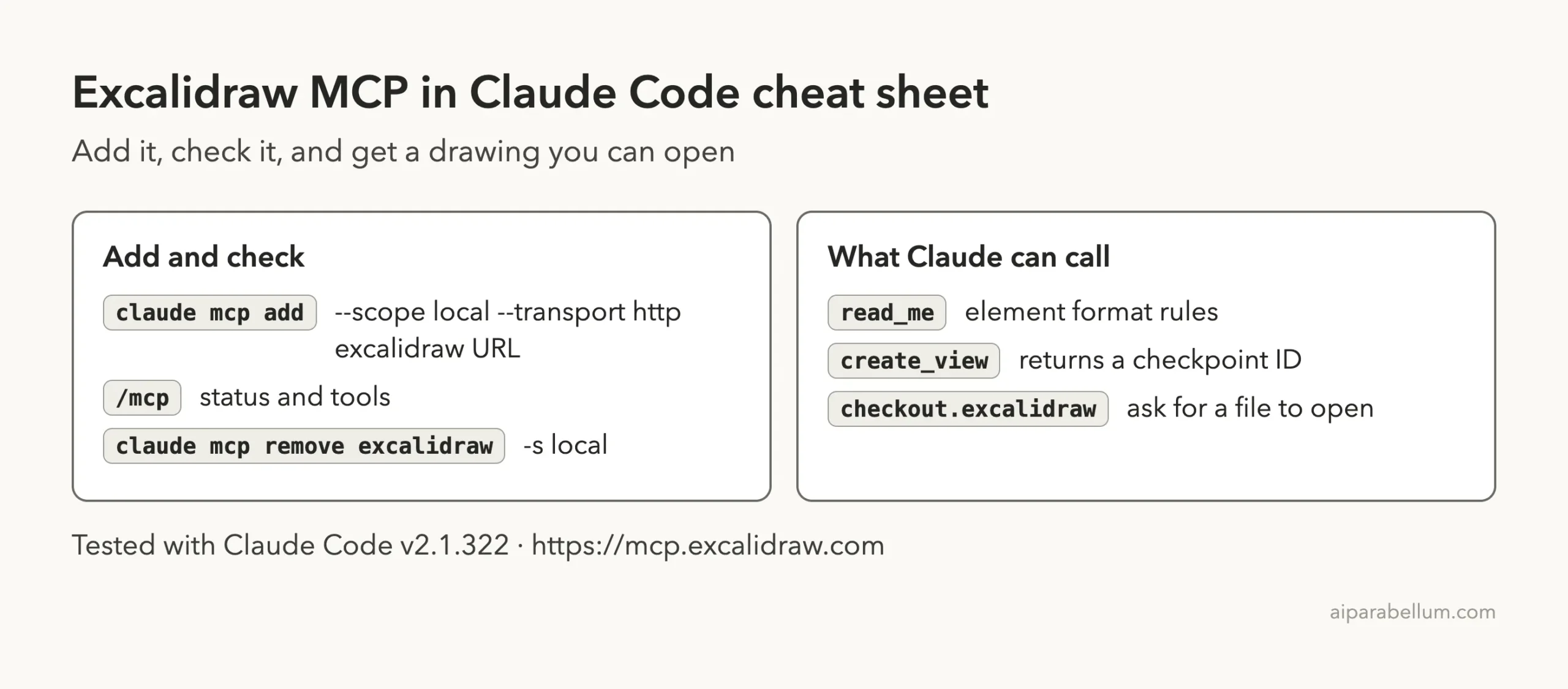
Frequently Asked Questions
Does the Excalidraw MCP need an account or API key?
No. In our test, /mcp showed it connected with “Auth: not signed in”, and we entered no key.
Can Claude Code show the Excalidraw diagram in the terminal?
No. In our runs, create_view returned only a checkpoint ID, with no image and no link.
Why can’t Claude export a link to excalidraw.com?
The export tool is marked for the app’s own screen. Claude Code listed it in /mcp, but Claude was not offered it in our sessions.
Do I need the server to get an Excalidraw file?
Not in our test. Claude wrote a working .excalidraw file with the Write tool alone and did not call the server.
How do I remove it?
Run claude mcp remove excalidraw -s local from the same folder where you added it.
Conclusion
The Excalidraw MCP is easy to add, needs no account, and the diagram it produced from our notes was accurate and good looking. But it is built for chat apps that can show a drawing inline, and in Claude Code the drawing tool returned only a checkpoint ID while the export tool stayed out of Claude’s reach. The route that worked in a terminal was the plain one: ask Claude to save a .excalidraw file and open it in Excalidraw. If you live in the terminal, start there, and keep the server for an app that can display it.
Next, browse all our Claude Code guides, or read the Claude overview.