The MLflow skills for Claude Code let you ask for tracing, evaluation and debugging in plain English instead of reading the MLflow docs first. We loaded the plugin in a throwaway project, built a tiny agent, and asked Claude Code to trace it, score it, find a bug and fix it. This post shows exactly what happened, including the parts that did not go smoothly.
This guide is part of our Claude Code tutorials. Find more add-ons in our skills directory.
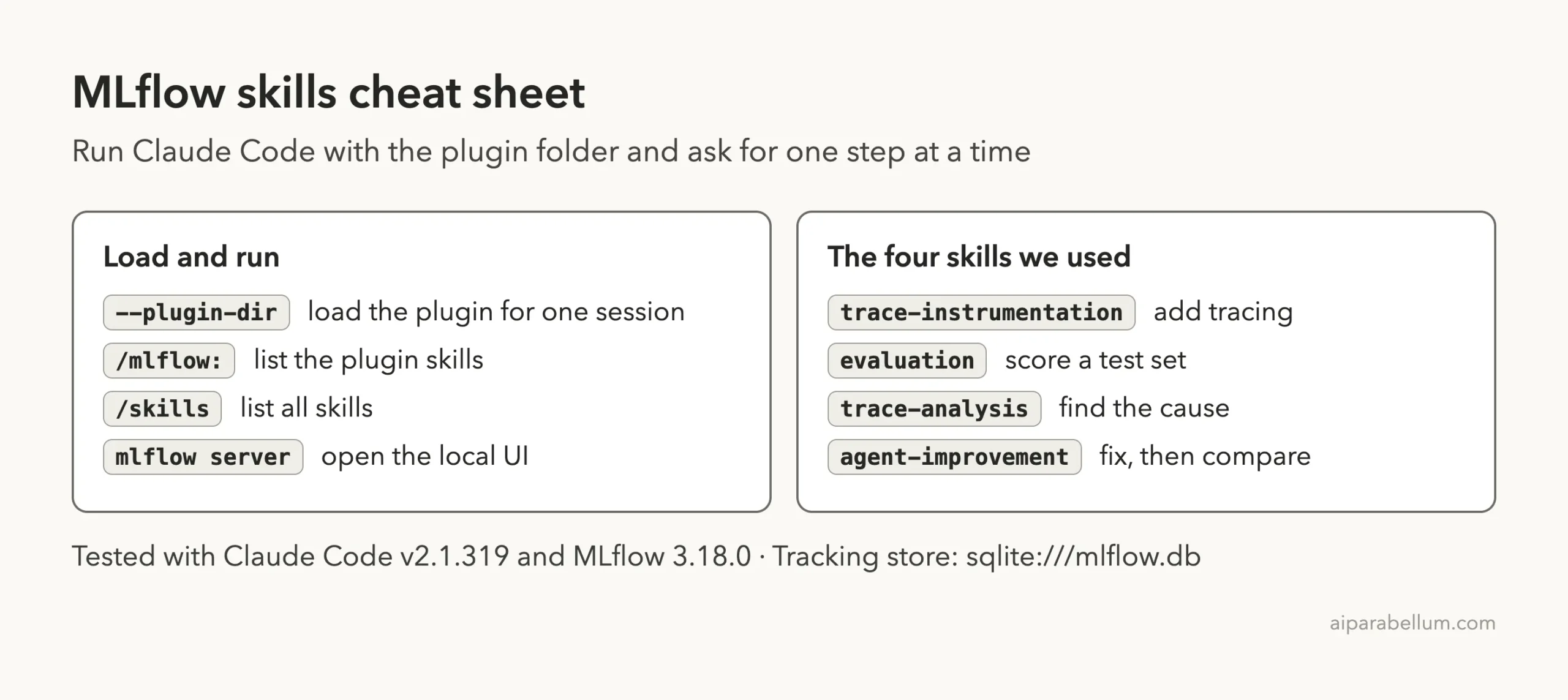
Tested with Claude Code v2.1.319 on November 10, 2026, using MLflow Skills 1.0.0 from mlflow/skills at commit 6303169 and MLflow 3.18.0. We tested on macOS; the Windows and Linux steps follow Anthropic’s official instructions.
| Question | Short answer |
|---|---|
| What is it? | A set of 10 skills and 1 hook from the MLflow team, in the repo mlflow/skills |
| Do you need an API key? | No, not for what we ran. Tracing and code scorers work locally with a SQLite file |
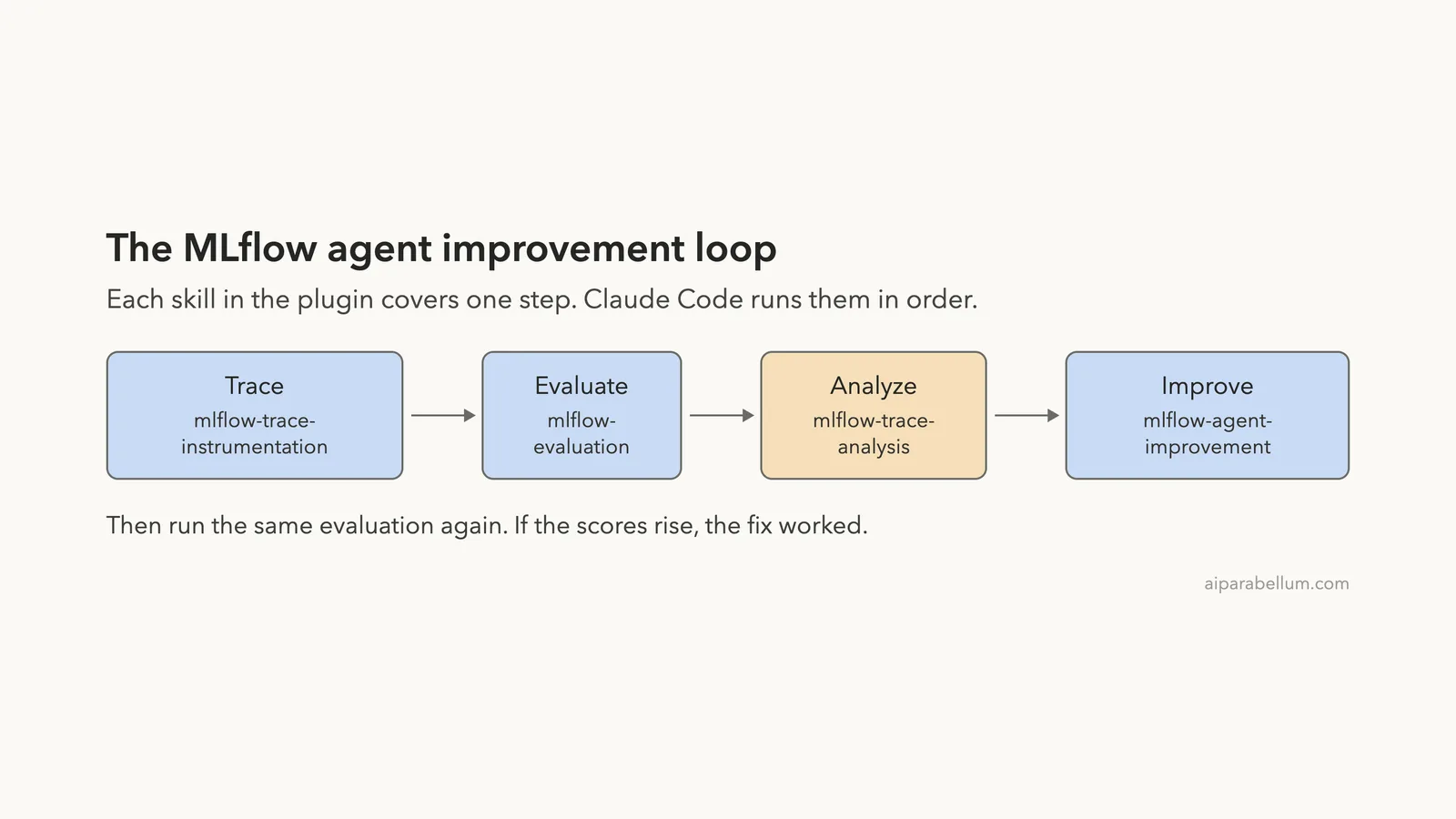
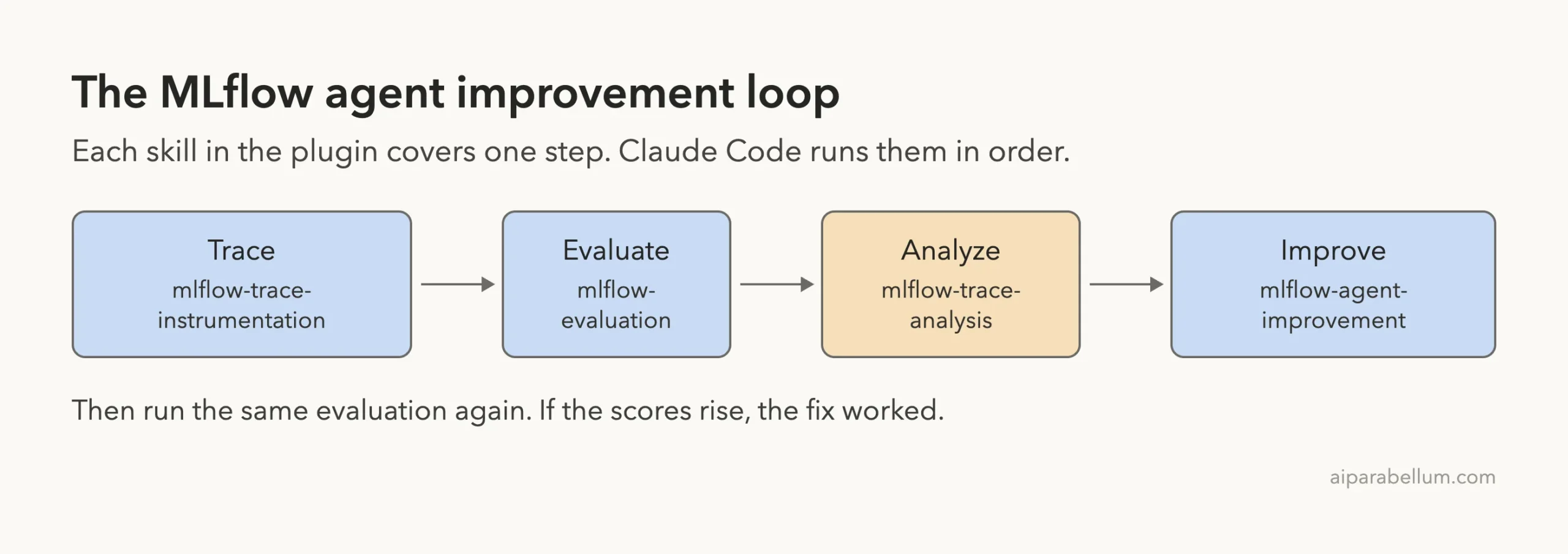
| What did we run? | Four skills: tracing, evaluation, trace analysis and agent improvement |
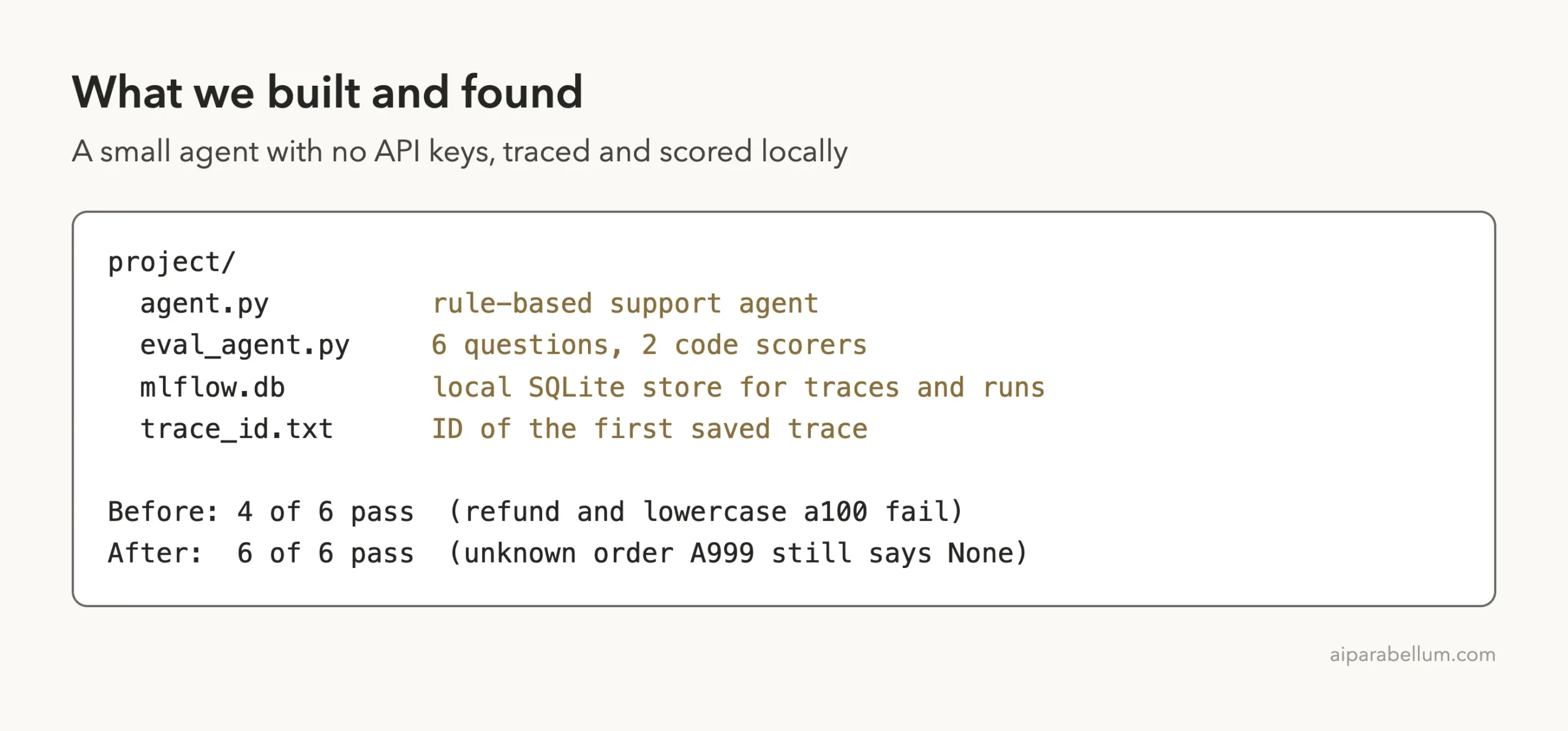
| Did it work? | Yes. It found two real bugs, fixed them, and the score went from 0.667 to 1.0 |
| What did it miss? | It skipped some of its own steps and did not catch a third bug (unknown order IDs) |
| Cost to try | Free plugin; the Claude Code session itself uses your normal Claude usage |
What the MLflow skills for Claude Code are
MLflow is an open-source tool for tracking what AI apps do. A trace is a recording of one request: which functions ran, what went in and what came out. The MLflow team packaged what it knows about tracing and evaluation as skills that Claude Code can load.
If you are new to the idea, our guide to Claude Code skills explains how a skill differs from a normal prompt. In short, a skill is a folder of instructions that Claude reads when the task matches.
The plugin lists ten skills in its .claude-plugin/plugin.json file. We read the repo at commit 630316930230, dated November 4, 2026.
| Skill | What it does | Did we run it? |
|---|---|---|
mlflow-agent | Routes broad MLflow requests to the right skill | No |
mlflow-onboarding | Sets up MLflow for GenAI or classic ML | No |
mlflow-docs | Searches the MLflow documentation | No |
mlflow-sagemaker | Connects to SageMaker Managed MLflow | No (needs an AWS account) |
mlflow-trace-instrumentation | Adds tracing to Python or TypeScript code | Yes |
mlflow-trace-retrieval | Finds and filters saved traces | No |
mlflow-trace-analysis | Explains why a trace went wrong | Yes |
mlflow-trace-metrics | Reads token, latency and quality numbers | No |
mlflow-evaluation | Builds scorers and runs an evaluation | Yes |
mlflow-agent-improvement | Fixes behavior, then re-checks the scores | Yes |
How we installed the MLflow plugin for Claude Code safely
The normal install is /plugin install mlflow@claude-plugins-official, which lists it in Anthropic’s official marketplace. Our plugins guide covers the full install and manage steps, and Anthropic’s own pages are Plugins and Discover plugins.
For testing we did not install anything. We cloned github.com/mlflow/skills into a throwaway folder and loaded it for one session only.
claude --plugin-dir /path/to/skills --setting-sources projectThe --plugin-dir flag loads a plugin from a folder for that run, and --setting-sources project keeps your personal settings out of the session. When we closed Claude Code, nothing was left behind.
What we read before running it
We read the hook and the scripts first. The one hook is hooks/mlflow-suggest-hook.py, a UserPromptSubmit hook.
It checks your prompt for words such as “trace” or “evaluate” and prints a suggestion like “Use the mlflow-evaluation skill”. It does not call the network or change files. Our hooks guide explains how this kind of hook works.
The two shell scripts under mlflow-trace-analysis/scripts only call the mlflow traces command and jq. We did not see anything that looked unsafe. We did not check whether the hook’s suggestion text appeared on screen during our runs.
The demo agent: small on purpose
To avoid API keys we wrote a rule-based support agent. It has no AI model inside. It looks up an order status, or answers a question about shipping or returns.
It also has two known gaps: it ignores lowercase order IDs, and it does not know the word “refund”.
def find_policy(question):
    q = question.lower()
    if "ship" in q:
        return POLICIES["shipping"]
    if "return" in q:
        return POLICIES["returns"]
    return None

def answer(question):
    words = question.replace("?", "").split()
    for w in words:
        if w.startswith("A") and w[1:].isdigit():
            status = lookup_order(w)
            return f"Order {w} is {status}."
    ...
A real agent would call a model and tools, and the tracing setup would differ. That is a limit of this test, and we come back to it in the verdict.
Step 1: Load the plugin and see its skills
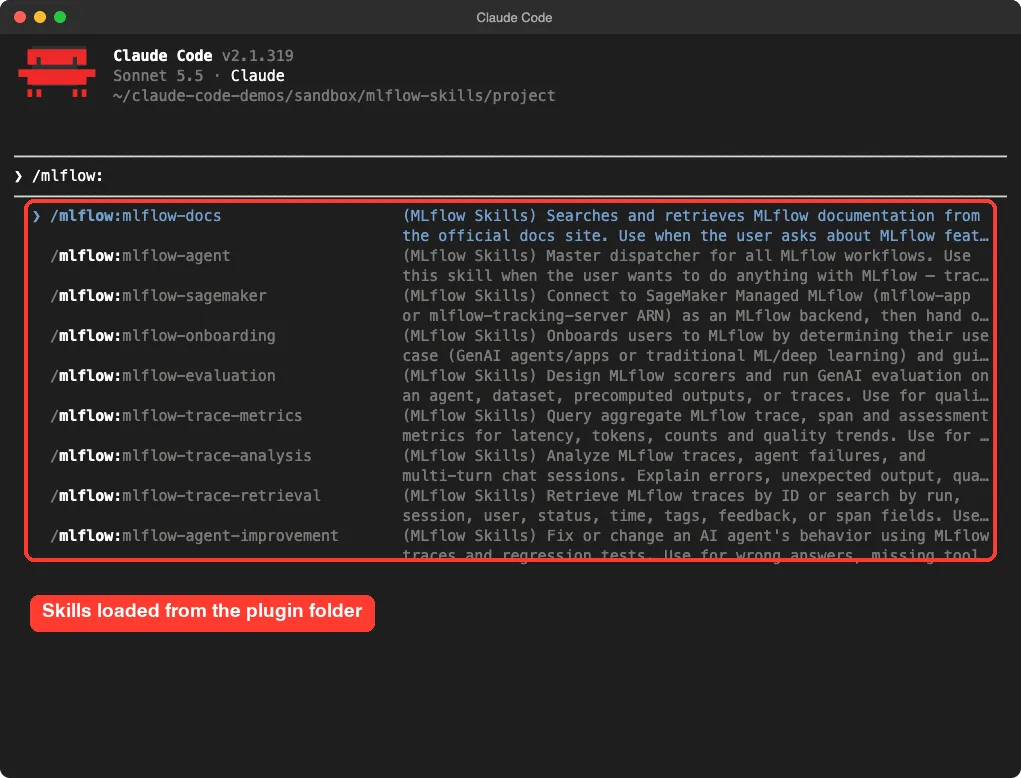
Typing /mlflow: in the prompt box lists the plugin’s skills. Plugin skills carry the plugin name as a prefix, so the tracing skill is /mlflow:mlflow-trace-instrumentation.
How we kept the session predictable
We started Claude Code in acceptEdits permission mode and pre-allowed a short list of read and run commands such as python and mlflow. If you want to understand the modes, see our permission modes guide.
This mattered.
Our first two attempts stalled on approval prompts for commands like echo $MLFLOW_TRACKING_URI and env, and our script then typed over them. We added those commands to the allow list and reran from a clean state. Plan on a few approval prompts when you try this yourself.
Step 2: Add MLflow tracing and read a real trace back
Our first prompt used the tracing skill by name.
/mlflow:mlflow-trace-instrumentation Add MLflow tracing to agent.py. Use a local SQLite backend (sqlite:///mlflow.db) in this folder, no API keys. Run the question 'Where is order A200?' once and show me the trace ID and spans.Claude edited agent.py, added @mlflow.trace to the three functions, ran one question, then read the saved trace back from the database. The whole step took about 21 seconds.
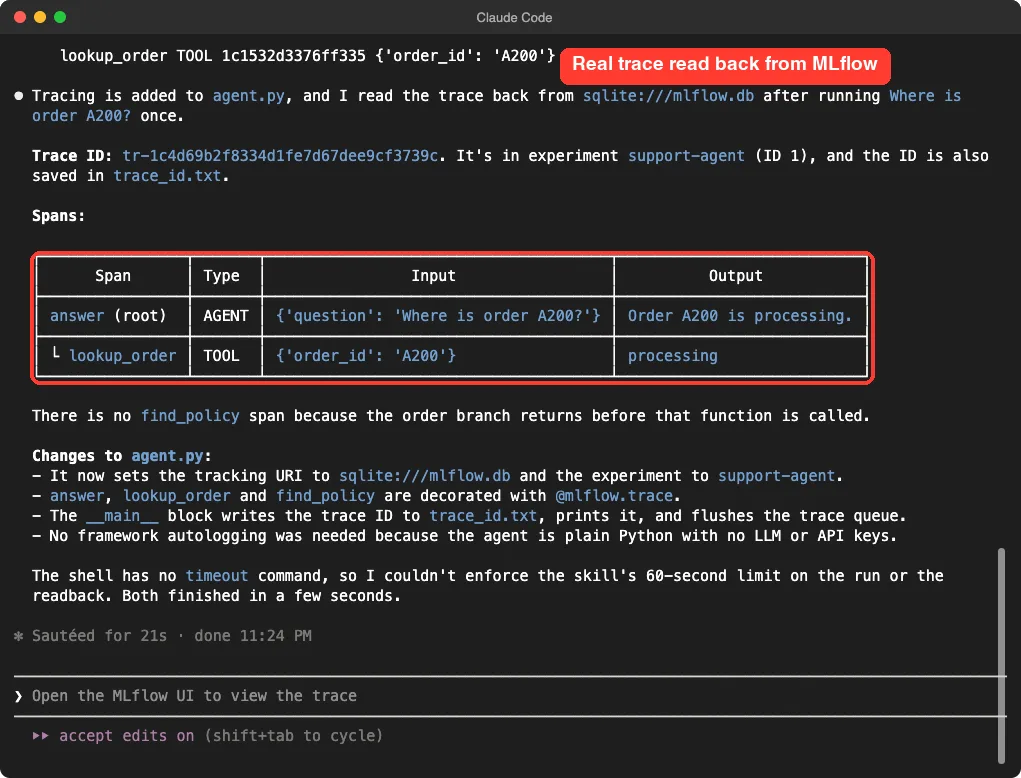
Two details stood out.
Claude noticed there was no find_policy span for an order question, because the order branch returns first. And it told us the shell on this Mac has no timeout command, so it could not enforce the skill’s 60-second limit on the readback. We liked that it said so instead of pretending.
Step 3: Evaluate the agent with simple scorers
Next we asked for an evaluation with code scorers, so no AI judge and no key.
/mlflow:mlflow-evaluation Evaluate agent.py on 6 questions (include a refund question and a lowercase order id like a100) using simple code scorers, no LLM judge, no API keys. Tell me which questions fail.Claude wrote eval_agent.py with six questions and two scorers. One checks that the answer contains the expected text. The other checks that the answer is not the generic fallback.
Then it ran mlflow.genai.evaluate().
@scorer
def contains_expected(outputs, expectations):
    return expectations["expected_response"].lower() in str(outputs).lower()

@scorer
def not_fallback(outputs):
    return FALLBACK not in str(outputs)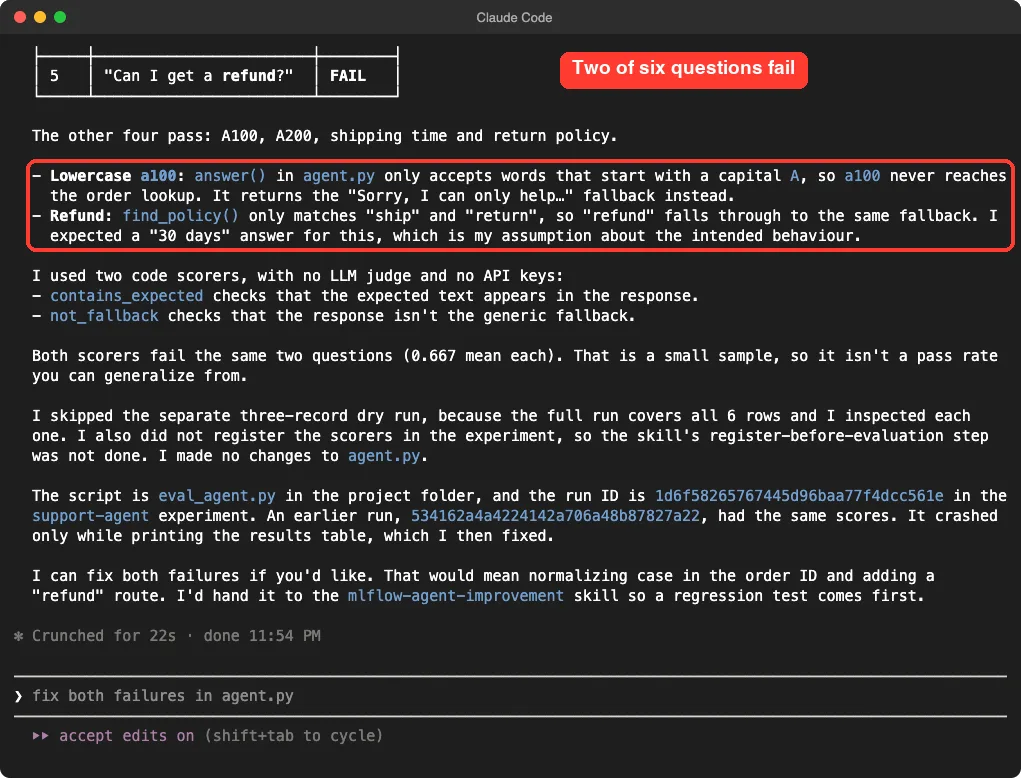
Both scorers failed the same two questions, a mean of 0.667 each. Claude also said, plainly, that six rows is too small to treat as a pass rate.
What the skill skipped
The evaluation skill asks for a three-record dry run and for scorers to be registered in the experiment. Claude told us it skipped both.
It said the full run already covered all six rows, and that it did not register the scorers. That is an honest report, but it also means the skill is a guide Claude follows loosely, not a script that runs every step.
Step 4: Ask why the refund question failed
Now the trace analysis skill. We asked it to look at the refund question’s trace and not to edit anything.
/mlflow:mlflow-trace-analysis Look at the trace for the refund question in the evaluation run. Why did the answer fail? Do not edit any files.The answer was a clear chain of evidence. Claude found the trace ID, then named the decisive span: find_policy received “Can I get a refund?” and returned None. It pointed to the source lines that only match “ship” and “return”, and it said the confidence was high because the agent has no AI model in it.
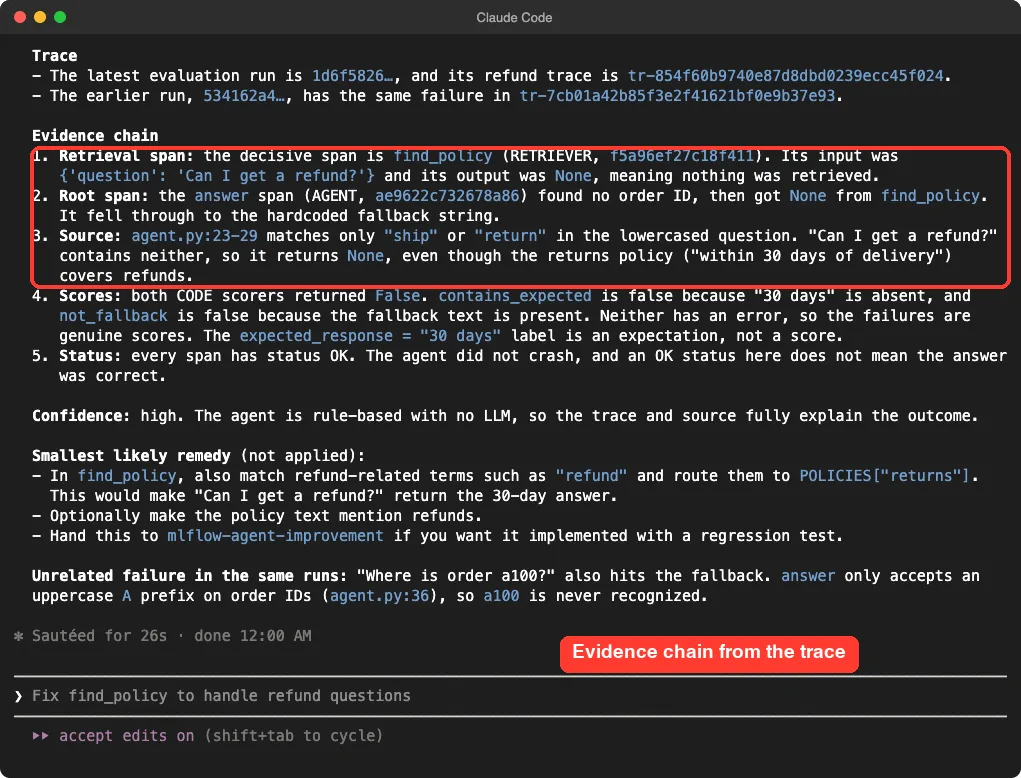
One line is worth remembering.
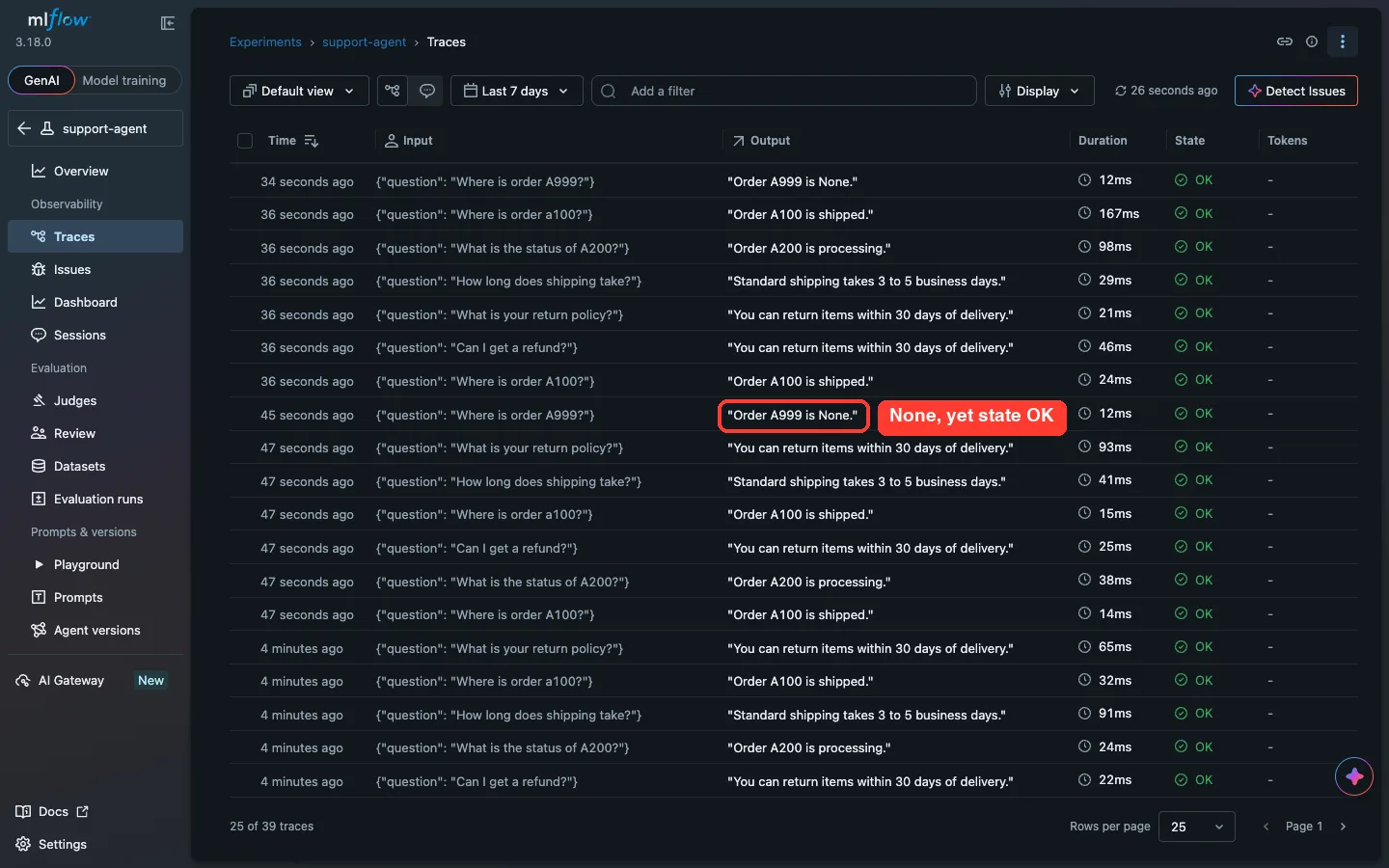
Claude pointed out that every span had status OK, and that an OK status does not mean the answer was correct. The skill’s own text says the same. It also spotted the lowercase ID bug in the same runs, without being asked.
The same trace in the MLflow UI
You do not need the UI for any of this, but it helps to see it. We started a local server with mlflow server --backend-store-uri sqlite:///mlflow.db and opened the failing trace.
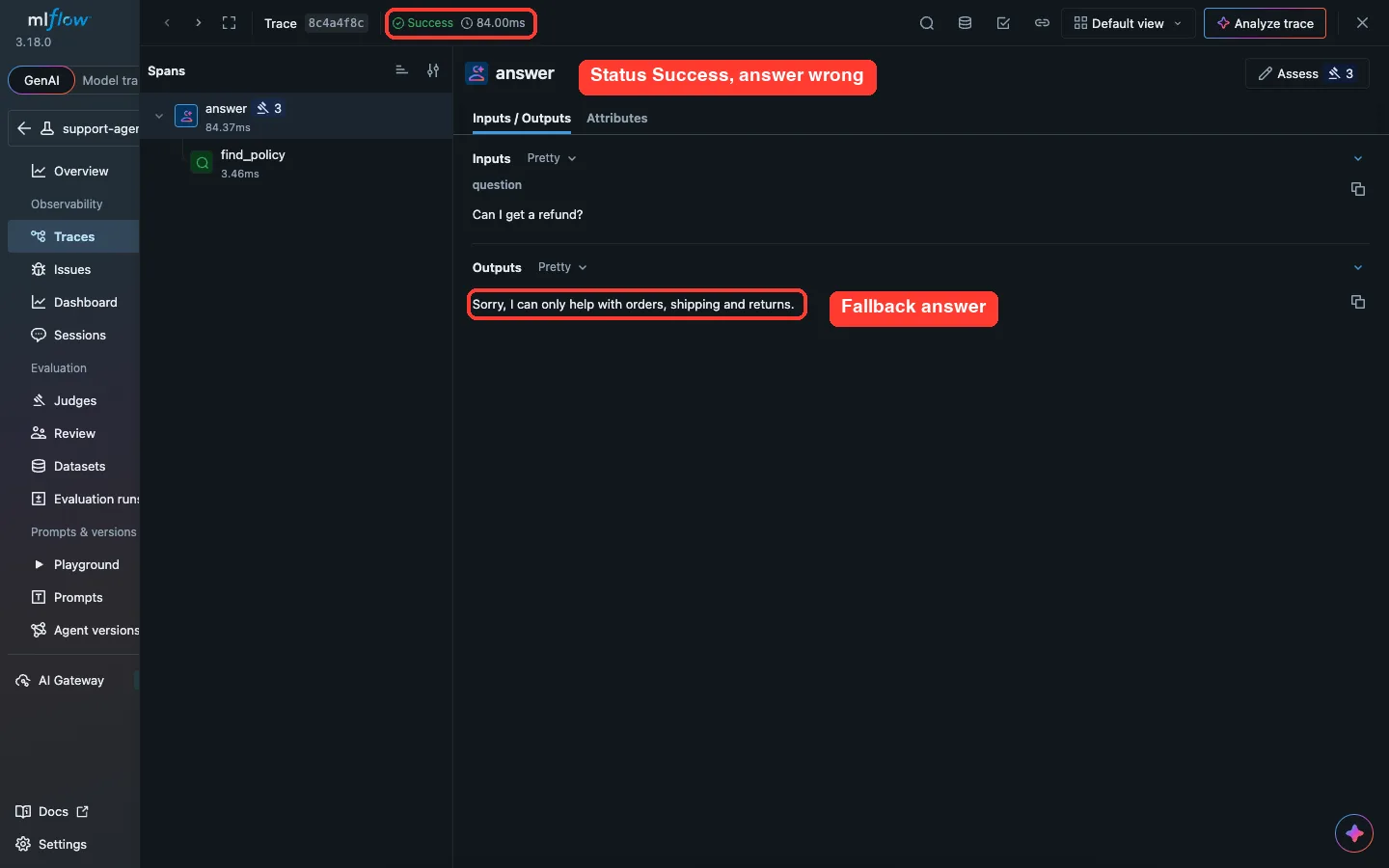
The span tree matches what Claude described: an answer span with a find_policy child. The MLflow 3.18.0 UI also shows an Assistant panel; we did not test it.
Step 5: Fix the bugs and compare before and after
The last skill is for changing behavior.
/mlflow:mlflow-agent-improvement Fix the refund question and the lowercase order id in agent.py, then re-run the same evaluation and compare before and after.Claude made two small edits. It now matches the order ID letter in any case and uppercases it before the lookup. And it sends “refund” questions to the returns policy.
-    if "return" in q:
+    if "return" in q or "refund" in q:
...
-        if w.startswith("A") and w[1:].isdigit():
-            status = lookup_order(w)
-            return f"Order {w} is {status}."
+        if w[:1].upper() == "A" and w[1:].isdigit():
+            order_id = w.upper()
+            status = lookup_order(order_id)
+            return f"Order {order_id} is {status}."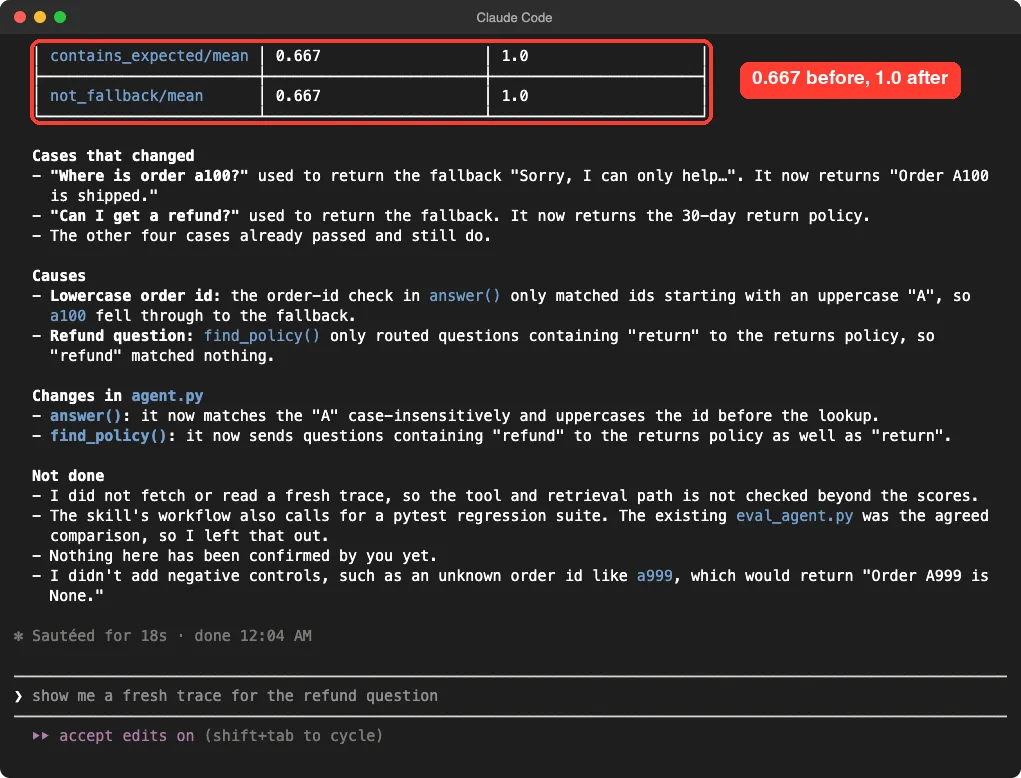
We then ran the evaluation ourselves, outside Claude, to check. All six questions scored True on both scorers. The MLflow UI chart shows the same jump.
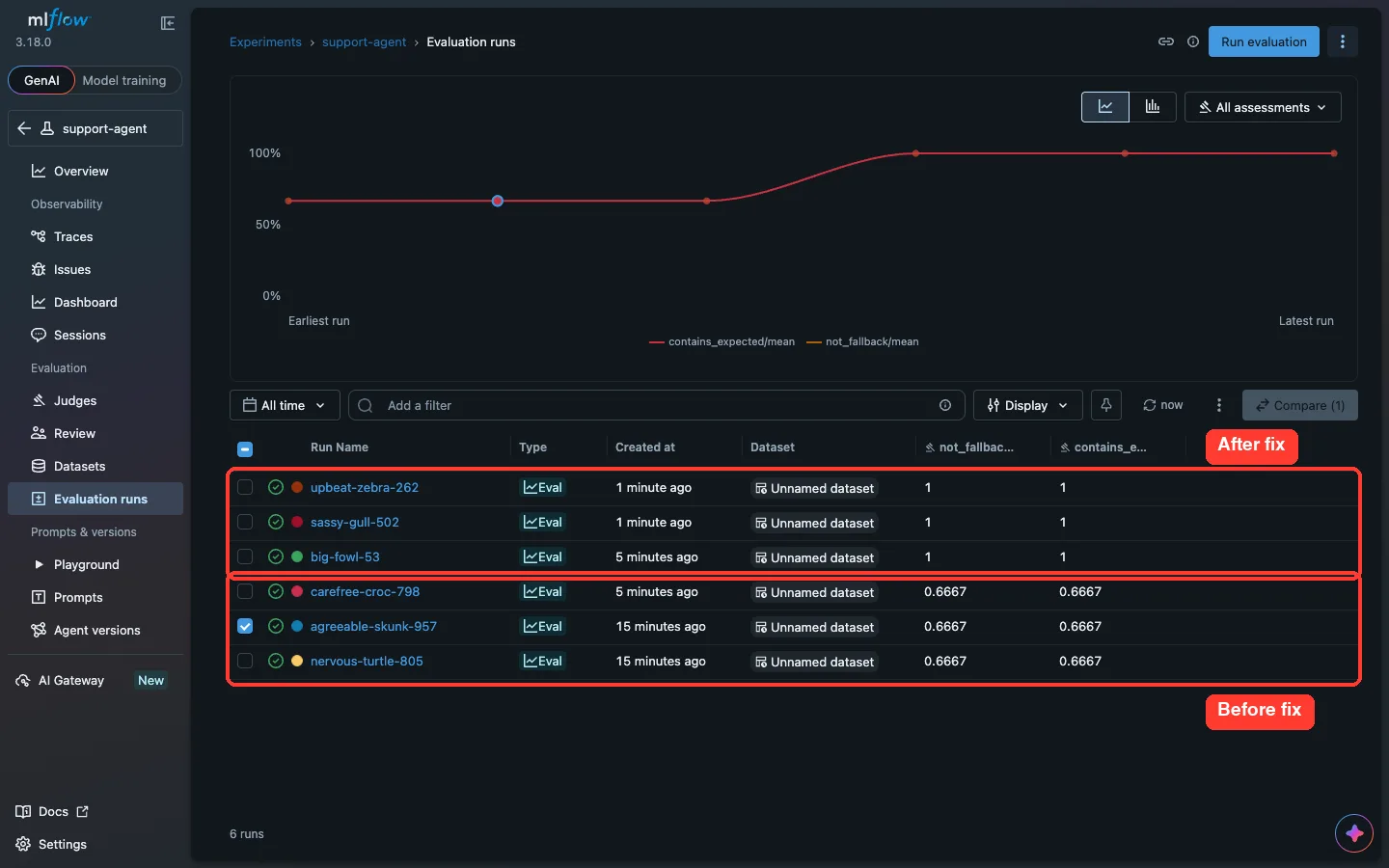
The runs list has six rows, not two, because our early attempts and our own check also created runs. All three runs before the fix score 0.6667 and all three after score 1.
What it said it did not do
Claude ended with a “Not done” list, which we found useful.
It did not fetch a fresh trace after the fix. It left out the pytest regression suite that the skill calls for. It did not add negative controls such as an unknown order ID.
That last point is real. When we asked the fixed agent about order A999, it answered “Order A999 is None.” and the trace status was OK. Our six questions never tested it, so the scores stayed at 1.0.
Our verdict: who should use MLflow with Claude Code
Here is the honest summary of one demo on one small agent.
- Install it if you already use MLflow, or want to start, and you build agents in Python or TypeScript. The skills know the right APIs and the safe order of steps.
- The trace analysis answer was the strongest part. It went from the failed answer to a span, a source line and a fix.
- Treat the skills as guidance, not an autopilot. Claude skipped a dry run, skipped scorer registration and skipped the regression suite, and it said so each time.
- You still own the test set. Six questions found two bugs and missed a third.
- Skip it if you do not use MLflow. It will not help with other tracing tools.
What we did not test
We did not test LLM judges, autologging for a real model framework, TypeScript, Databricks, SageMaker, the metrics skill, the retrieval skill, or the docs skill.
Those need an AI provider or an outside account. Our eval plugins roundup covers MLflow next to Langfuse and DeepEval, from their docs rather than a run. If you build on Anthropic’s SDK, see the Agent SDK plugin too.
Takeaway: the skills give Claude the right steps, but you still decide what to test.
Try it yourself
Make a small folder with a Python agent of your own, install MLflow in a virtual environment, and start Claude Code with the plugin folder. Then paste this prompt.
/mlflow:mlflow-trace-instrumentation Add MLflow tracing to my agent. Use sqlite:///mlflow.db and no API keys. Run one question and show me the trace ID and spans.Then ask the evaluation skill for six questions that include one you expect to fail, and add one question with a bad input on purpose. That second step is what would have caught our A999 case.
Common mistakes
- Trusting status OK. A trace can finish fine and still hold a wrong answer.
- Using too few test questions. A score of 1.0 on six rows is a hint, not proof.
- Forgetting the plugin prefix. Type
/mlflow:and pick from the list. - Typing the next prompt while Claude waits for an approval. Answer the prompt first.
- Installing into your main setup just to try it.
--plugin-dirkeeps the test contained.
Pro tips
- Ask for one skill at a time. Each prompt took about 20 seconds in our run.
- Say “no LLM judge, no API keys” if you want a free local test.
- Ask Claude for a “Not done” list at the end of each step.
- Set
MLFLOW_DISABLE_AGENT_HINT=1if MLflow’s install message about its bundled skills gets in the way. - Check the result yourself. We re-ran the evaluation outside Claude to confirm the scores.
Frequently Asked Questions
Do the MLflow skills need an API key?
Not for what we ran. Tracing to SQLite and code scorers worked with no key. LLM judges and some integrations will need a provider key.
How do I install the MLflow plugin for Claude Code?
Use /plugin install mlflow@claude-plugins-official from the official marketplace. For a one-session test, clone the repo and start Claude Code with --plugin-dir.
Why are the skill names prefixed with mlflow?
Plugin skills are namespaced by the plugin name. That is why we typed /mlflow:mlflow-evaluation.
Does the plugin work with other coding agents?
The repo’s README says the skills work with other agents that support skills. We only tested Claude Code.
Can I trust the scores Claude reports?
Check them. Ours matched when we re-ran the evaluation, but Claude also skipped some steps, and a small test set can hide bugs.
Conclusion
The MLflow skills turned a vague request into a working loop: trace the agent, score it, find a bug from the trace, fix it and score again. In our small test the result moved from 0.667 to 1.0, and Claude was honest about the steps it skipped. The skills still need a good test set and a human who asks the awkward question, like what happens with an unknown order ID. For background on the assistant itself, see our Claude page.