Claude writes good web code, but its habits come from training data, and the web changes fast. Modern web guidance for Claude Code is a plugin from the Google Chrome team that adds a lookup step, so Claude checks current best practices before it writes HTML, CSS or browser JavaScript.
We loaded the plugin in a throwaway project, asked Claude to add a delete confirmation popup, and watched what changed. Below you will see how it works, what it ran on our Mac, the code it produced, and the parts you should know about before you install it.
This guide is part of our Claude Code tutorials. Find more add-ons in our skills directory.
Tested with Claude Code v2.1.318 on November 7, 2026, using Modern Web Guidance v0.0.194 from GoogleChrome/modern-web-guidance at commit b31dc0a.
Takeaway: the plugin does not make Claude smarter, it makes Claude look things up before it writes web code.
Quick Summary
| Item | What we found |
|---|---|
| Maker | Google Chrome |
| Where it lives | Anthropic’s official plugin marketplace, category development |
| Install command | /plugin install modern-web-guidance@claude-plugins-official |
| What you get | Two skills: modern-web-guidance and chrome-extensions |
| Needs an account | No |
| Needs outbound network | Yes, it runs through npx |
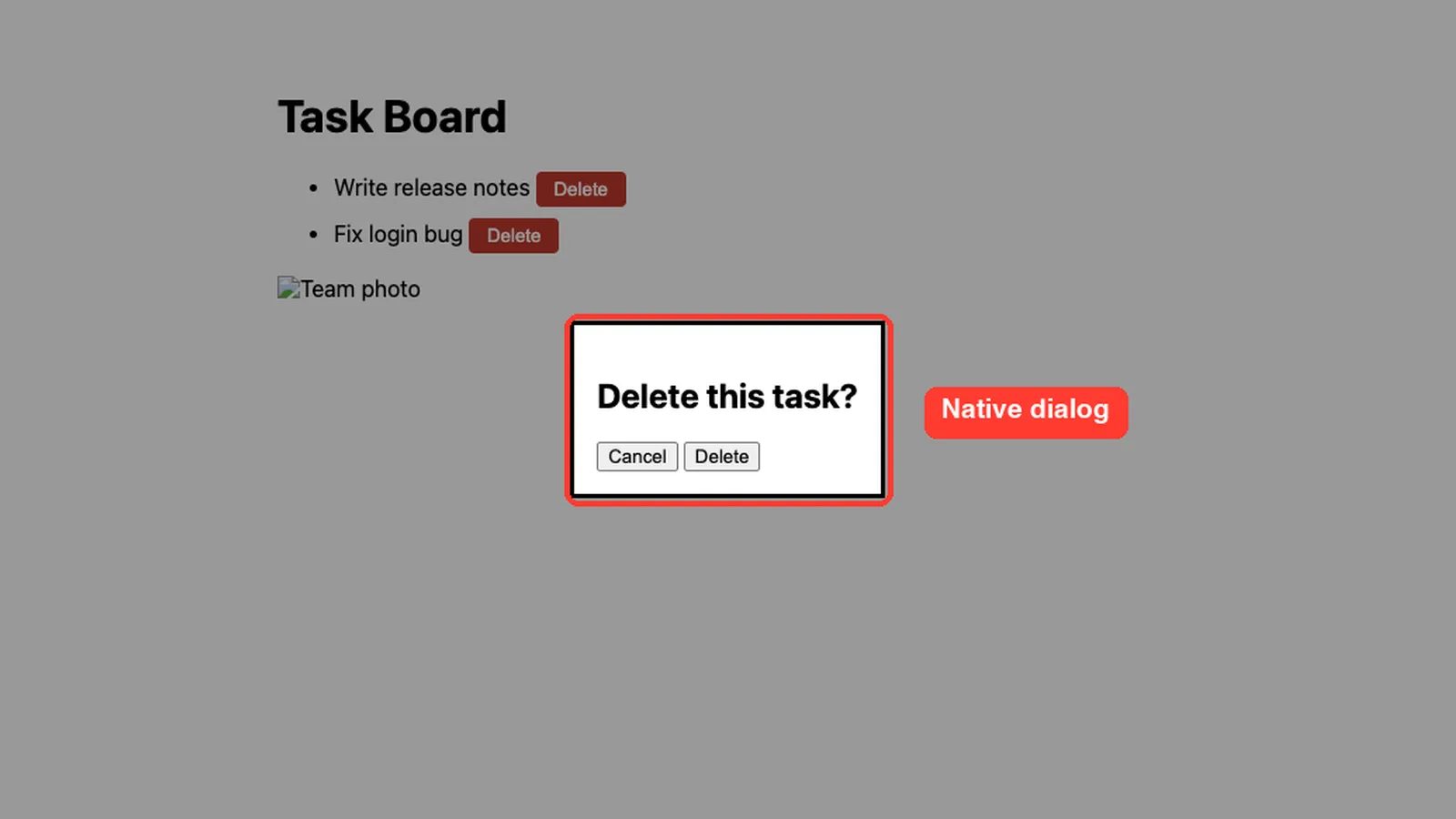
| Our demo | A popup for a task list, built with a native <dialog> |
| Verdict | Useful for anyone who builds web pages with Claude, with a few caveats below |
What Is Modern Web Guidance for Claude Code?
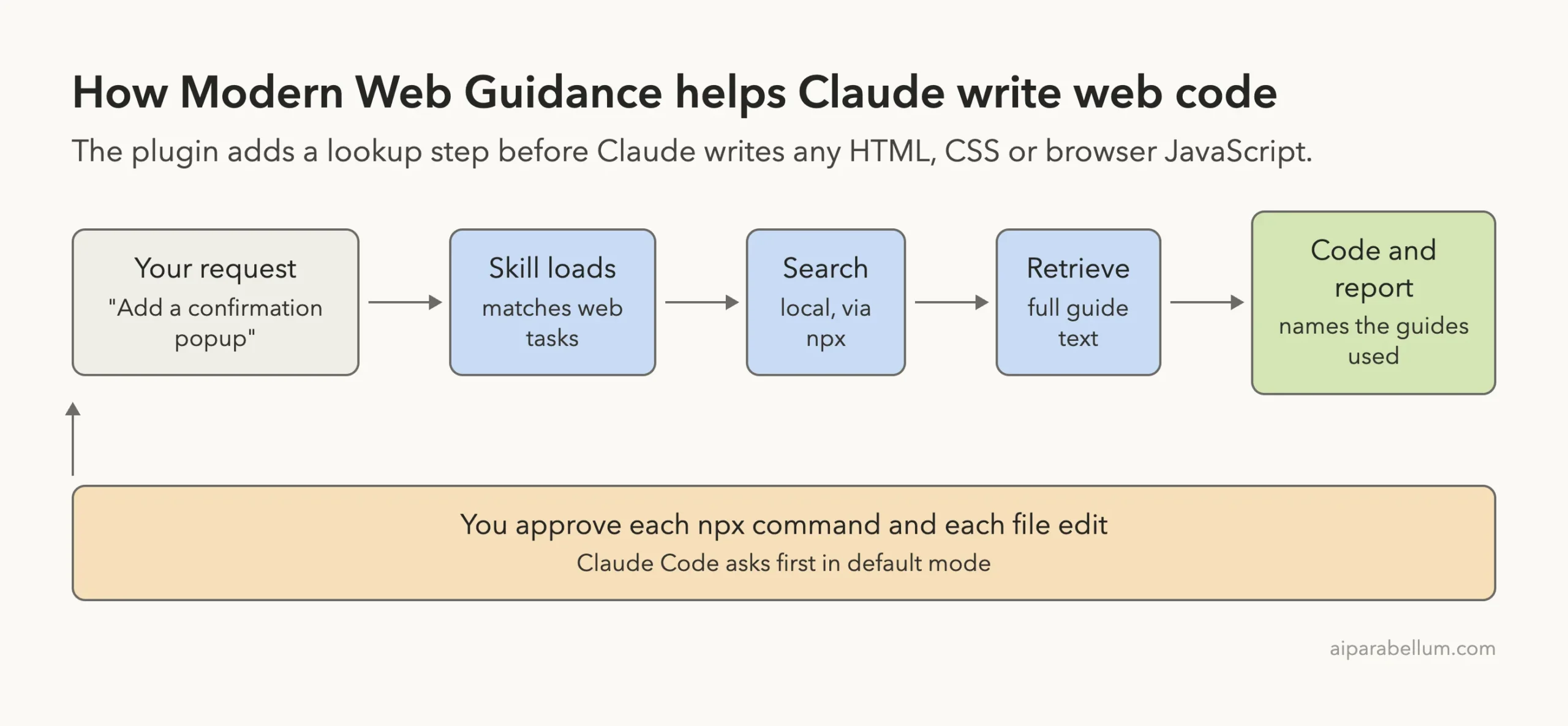
It is a small plugin with one clear job. When you ask Claude for UI work, the main skill tells it to search a library of short guides first, read the right one, and only then write code.
The guides cover things like modal dialogs, scroll animations, forms, image loading, security headers and accessibility. The plugin package we inspected holds about 190 guide files across 17 categories, such as performance, forms, CSS, security and UI components.
The idea is simple. A model trained a year ago might build a popup from a hand-rolled overlay, a click handler and a focus trap. A current guide says a native <dialog> element already does all of that, so Claude can write less code and get better behavior.
The two skills inside the plugin
The plugin adds two skills. The first, modern-web-guidance, handles general HTML, CSS and browser JavaScript tasks. Its own description says to run it first for those tasks and not to trigger it for backend work such as SQL, Docker or CI.
The second, chrome-extensions, covers building Chrome extensions with Manifest V3. We did not test that one, so we only list what its files contain: reference pages on topics such as storage, permissions, message passing, service workers and side panels.
How We Set Up Modern Web Guidance in Claude Code Safely
You can install the plugin the normal way with /plugin install. The official plugin discovery docs explain the install scopes and the /reload-plugins step.
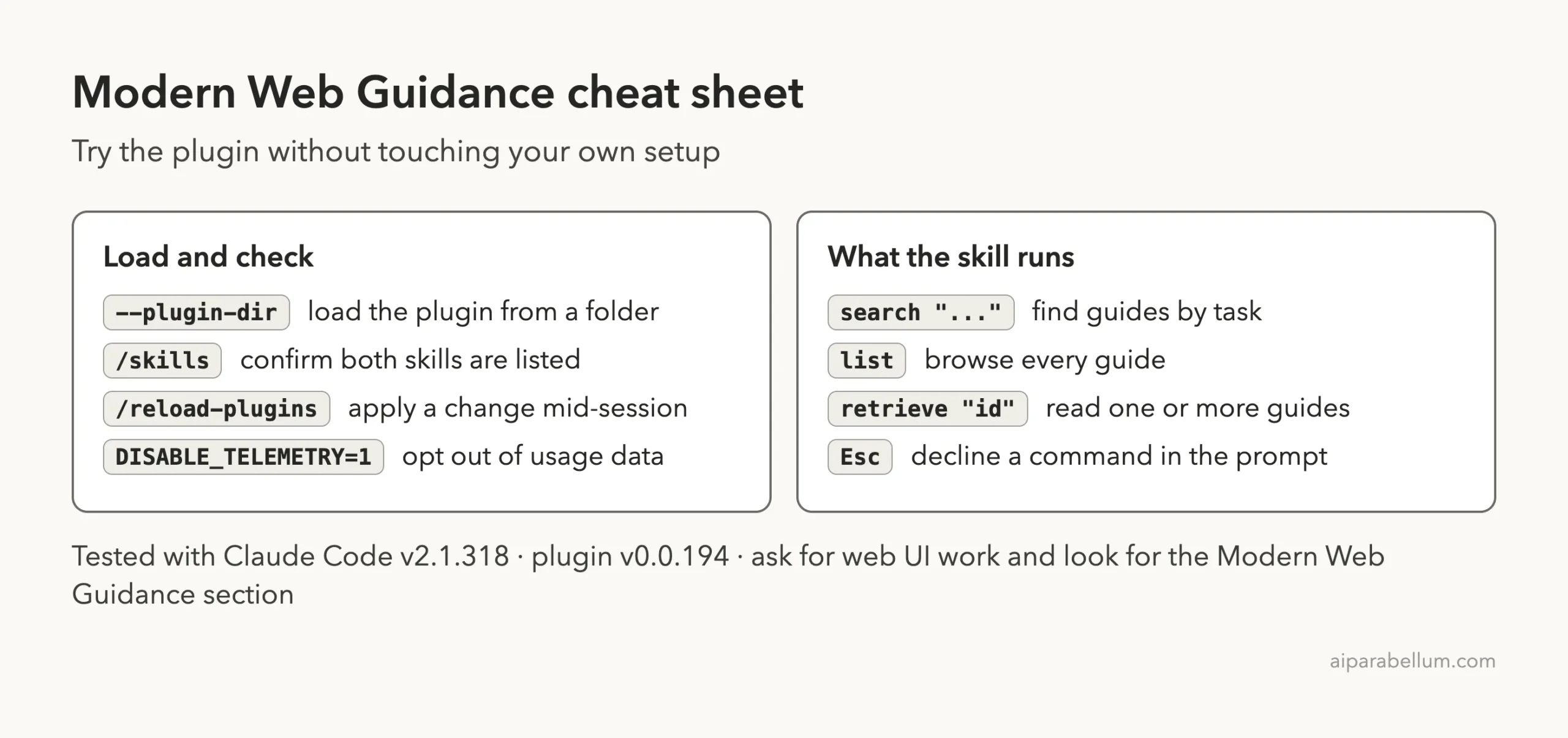
For our test we did not touch our own Claude Code setup. We cloned the official marketplace and the plugin at the commit it pins (b31dc0a, release v0.0.194) into a sandbox folder, then started Claude Code with --plugin-dir and --setting-sources project. That loads the plugin for one session and nothing else.
claude --plugin-dir ./modern-web-guidance --setting-sources projectBefore running anything we read the plugin files. The plugin itself is only skill text and guide files, with no hooks. The search tool comes from an npm package that the skill runs with npx, so we downloaded that package too and read its code.
What the npm tool does
The package contains the search and retrieve commands plus the files of a small embedded model for matching your query to guides. It also contains an anonymous telemetry sender.
The telemetry code builds a payload with your search query text, the guide IDs, your operating system, versions and the agent name. Google’s own code comments say it can be turned off with DISABLE_TELEMETRY=1, and we set that variable for the whole test. If your search queries could contain private project details, set it too.
Step 1: Confirm the Skills Loaded
Once the session started we ran /skills. Both plugin skills appear, marked as locked by the plugin, with a small token cost listed next to each.
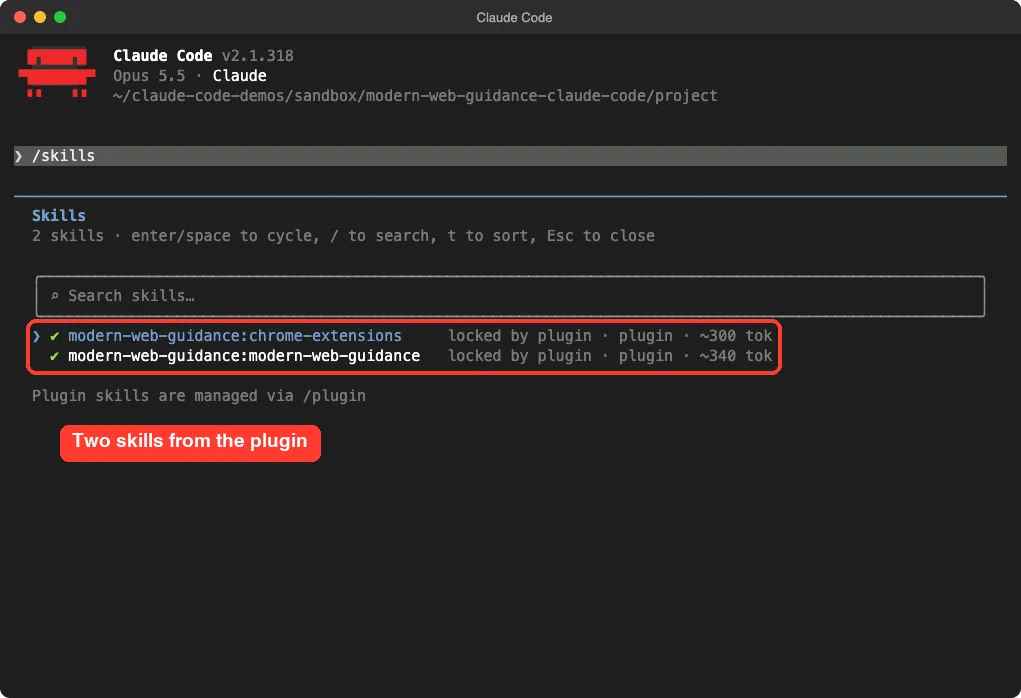
That small size matters. The skill text is short, and the heavy guide text is only pulled in when Claude retrieves a specific guide.
Step 2: Ask for Web UI Work
Our demo project is a tiny task board with two Delete buttons that do nothing yet. We typed one short prompt.
Add a small confirmation popup to index.html that opens when I click a Delete button, with Cancel and Delete choices. Keep it short.Claude loaded the modern-web-guidance skill on its own, without us naming it. The skill description matches words like modal, popup and dialog, so a prompt like ours is enough to trigger it.
The search command needs your approval
Claude then ran a search through npx. In default permission mode, Claude Code stops and asks before running it, so you see exactly what will run.
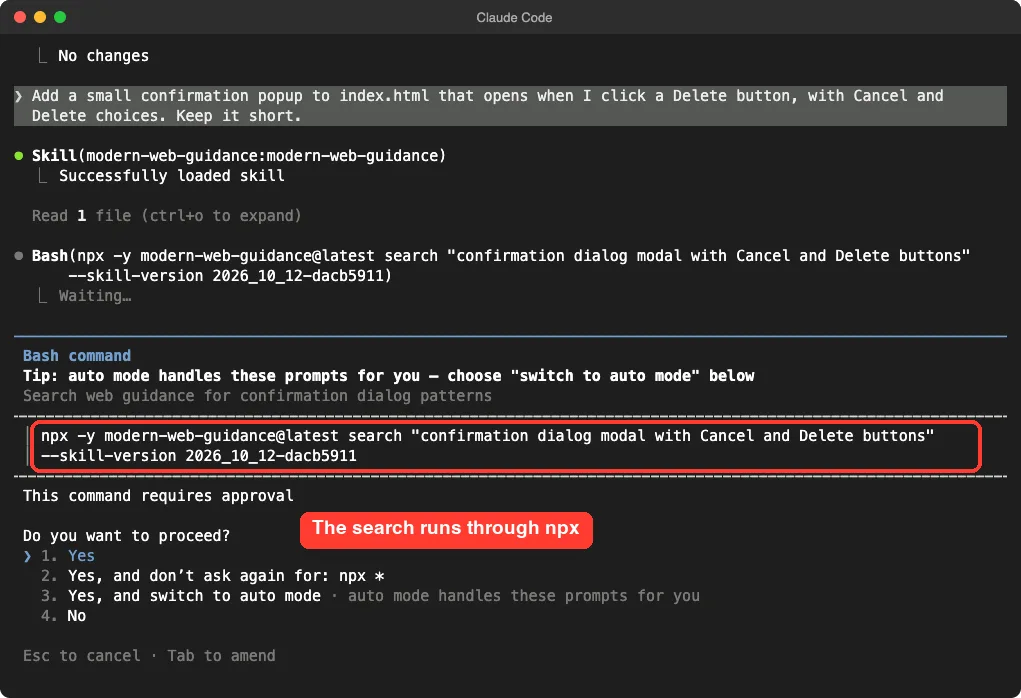
The command looks like this, with the query Claude chose for itself.
npx -y modern-web-guidance@latest search "confirmation dialog modal with Cancel and Delete buttons" --skill-version 2026_10_12-dacb5911The search result lists matching guides with short descriptions and similarity scores. Claude picked two, dialog and declarative-dialog-popover-control, and ran a second approved command to retrieve their full text.
The skill itself suggests allowlisting only npx -y modern-web-guidance@latest * rather than bare npx *. That is good advice, since a broad npx permission would let Claude run any package.
Step 3: Review the Edit
Before writing the file, Claude Code shows a diff and asks for approval. The code is short and uses current browser features.
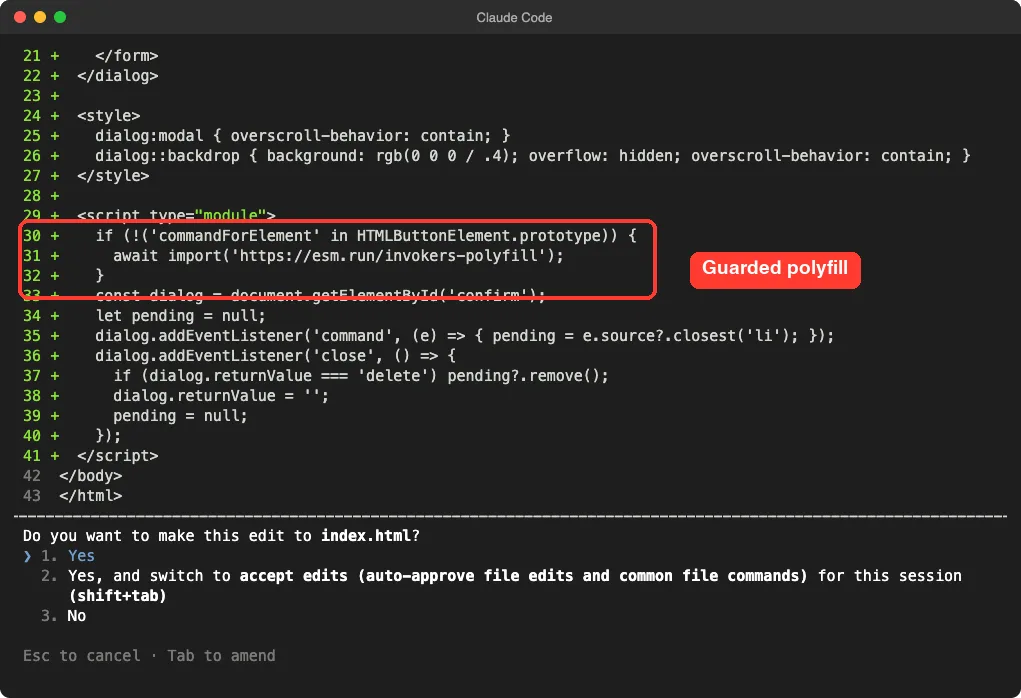
Here is the key part of the finished page. The buttons open the dialog with attributes instead of click handlers.
<button class="delete" command="show-modal" commandfor="confirm">Delete</button>

<dialog id="confirm" aria-labelledby="confirm-title">
  <h2 id="confirm-title">Delete this task?</h2>
  <form method="dialog">
    <button value="cancel" autofocus>Cancel</button>
    <button value="delete">Delete</button>
  </form>
</dialog>
The script is about ten lines. It removes the task only when the dialog closes with the value delete, then resets that value so an old answer cannot leak into the next click.
Step 4: Read the Disclosure
The skill tells Claude to end its answer with a section named Modern Web Guidance. It lists each guide that shaped the code, with the pitfall it prevented and a short quote from the guide.
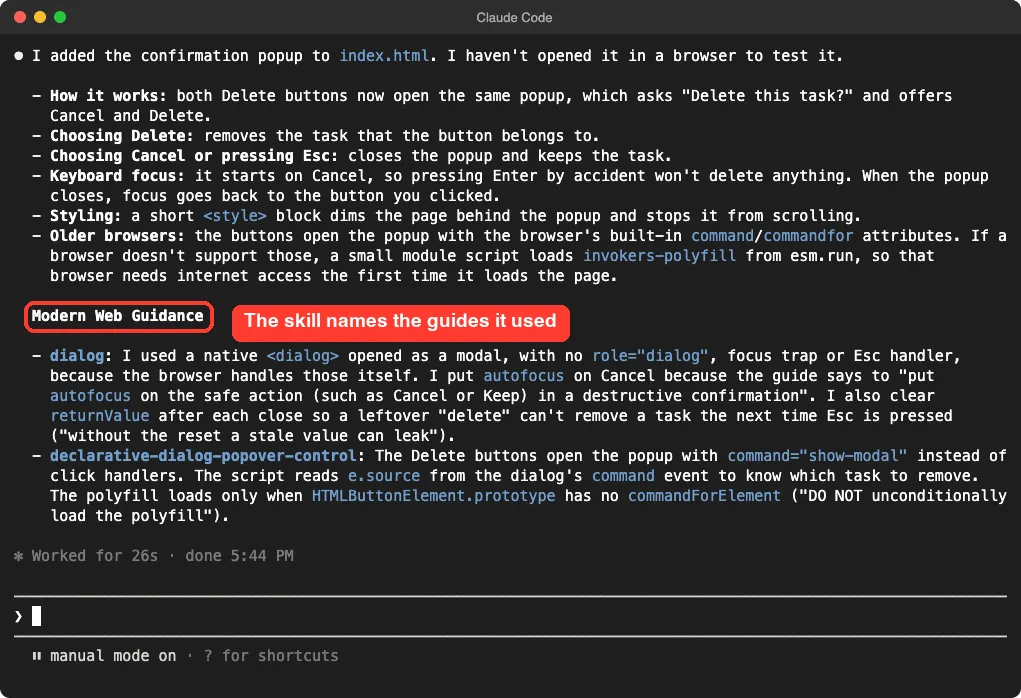
This is the feature we liked most. You can check whether Claude really used the guidance, and you learn why the code looks the way it does.
The guide for dialog told Claude to put autofocus on the safe choice, to skip role="dialog" and any custom focus trap, and to stop the page from scrolling behind the popup. The second guide told it to load the polyfill only when the browser lacks commandForElement.
Does the Result Actually Work?
Claude’s own summary said it had not opened the page in a browser. So we did, in headless Chrome, and clicked through the flow ourselves.
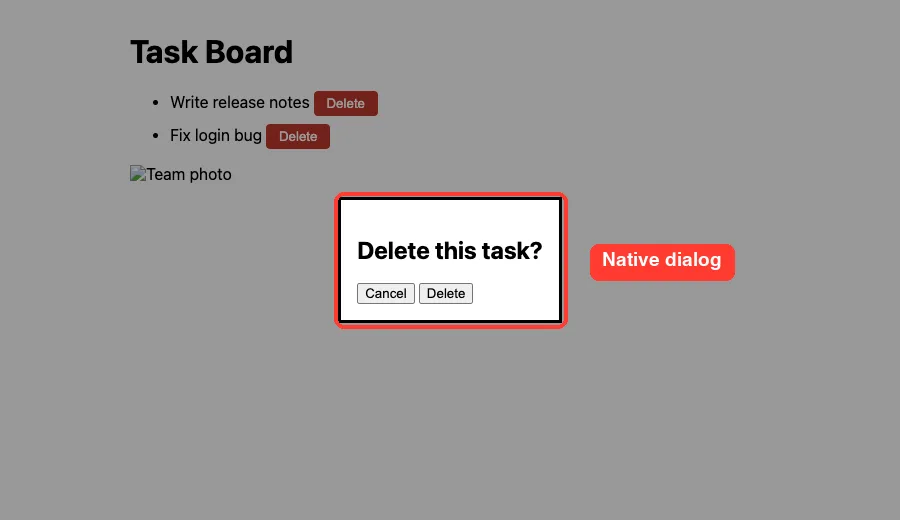
Our checks and results:
- Clicking Delete opened the dialog, and the focused button was Cancel.
- Pressing Enter closed the dialog, and both tasks were still there.
- Opening it again and clicking Delete in the dialog removed one task, leaving “Fix login bug”.
That is one demo in one browser, so treat it as a sanity check and not a full test. The placeholder image in our page is a fake file we made, which is why the alt text shows.
The Flow in One Picture
What to Watch Out For
The plugin worked well in our demo, but a few details are worth knowing.
It needs network access every time
The skill fetches the tool with npx -y modern-web-guidance@latest, so it needs outbound network access and downloads the latest package. The package we downloaded was about 32 MB unpacked.
The skill text can lag the tool
Our search output warned that a new SKILL.md was available. The plugin we loaded was v0.0.194 while the npm package was already newer. The warning is harmless, but it shows the plugin and the tool update separately.
The polyfill comes from a CDN
Claude’s code loads the fallback from a public CDN address, and only on browsers that lack the feature. If your project avoids third-party scripts, tell Claude so in your prompt or in your CLAUDE.md file. The skill even suggests writing a browser support policy there.
Telemetry is on unless you opt out
As described above, anonymous usage data includes your query text. Set DISABLE_TELEMETRY=1 in your shell if you want it off.
Who Should Install It?
| You are | Should you install it? |
|---|---|
| Building pages or components with Claude | Yes, it nudges Claude toward native, current features |
| Writing a Chrome extension | Worth trying, though we did not test that skill |
| Working only on backend code | No, the skill says not to trigger there |
| On a locked-down or offline machine | Probably not, since it needs the network |
If you also want Claude to test the result in a real browser, pair it with the Playwright plugin or our guide to the webapp testing skill. For more options, see our list of web development skills.
Try It Yourself
Make a new empty folder with a simple index.html, then start Claude Code and install the plugin. Ask for something a model often builds the old way.
Add a dark-mode toggle button to index.html that remembers the choice, and a card that fades in when it scrolls into view. Keep it short.Approve the search and retrieve commands, then read the Modern Web Guidance section at the end. Compare the guides it names with what you expected.
Common Mistakes
- Allowing bare
npx *instead of the specificmodern-web-guidancecommand. - Expecting it to help with backend tasks, which the skill skips on purpose.
- Trusting the result without opening the page in a browser.
- Forgetting to run
/reload-pluginsafter installing in an open session. - Ignoring the browser support note when your users need older browsers.
Pro Tips
- Write your browser support rule in
CLAUDE.mdonce, such as the oldest browsers you must support, so Claude applies it every time. - Run
/skillsto confirm the plugin loaded before you blame it for doing nothing. - Ask Claude to name the guides it used when the disclosure section is missing.
- Read our plugins guide and our skills versus plugins post if the terms are new to you.
Cheat Sheet
Frequently Asked Questions
Is Modern Web Guidance free?
We did not need an account or a paid key for anything in this test. Claude Code itself still uses your normal plan or API billing.
Does it work with frameworks like React?
The skill description lists adapting layout and styles in React, Vue and Angular as a trigger. We only tested plain HTML, so we cannot say how well it does in your framework.
Can I use it without installing the plugin?
The plugin is what gives Claude the skill. We loaded it for one session with --plugin-dir, which leaves your normal setup alone. Our marketplace guide covers the regular install route.
Why did Claude ask for permission twice?
Each npx command and each file edit is a separate approval in default mode. That is Claude Code’s normal safety behavior, not a plugin setting.
Does it replace testing?
No. In our run Claude said it had not tested the page, and the guidance cannot prove your code works. Always open the result yourself.
Conclusion
Modern Web Guidance adds a short research step to Claude Code, and in our demo it turned a typical popup request into a small native <dialog> with sensible focus, a reset value and a guarded fallback. The disclosure section makes the guidance easy to check, and our browser test passed. Install it if you build web pages with Claude, but approve commands carefully, decide about telemetry, and read the official plugins docs if you want to build your own.