You built a small web page, and now you want to know if the buttons really work. Clicking through it by hand gets old fast. The Claude Code webapp testing skill lets Claude do that clicking for you with a real headless browser, and we tried it on a tiny demo app.
This guide is part of our Claude Code tutorials. Find more add-ons in our Claude Code Skills Directory.
Tested with Claude Code v2.1.318 and the skill from the anthropics/skills repository (commit 2c5958e, dated 2026-11-06) on 2026-11-07, on macOS. We tested one small app with two checks. We did not try a large app, a login flow or a Windows or Linux machine.
Webapp Testing Skill at a Glance
| Question | Answer |
|---|---|
| What is it? | An Agent Skill: a folder with a SKILL.md file, one helper script and three example scripts |
| Skill name | webapp-testing |
| Maker | Anthropic, in its public skills repository |
| Tool it uses | Playwright for Python, with a headless Chromium browser |
| Helper script | scripts/with_server.py, which starts your app, runs a command, then stops the app |
| Needs an account? | No. It runs on your own machine |
| Our result | Two checks passed, two screenshots saved, browser console messages reported |
What Is the Claude Code Webapp Testing Skill?
An Agent Skill is a folder of instructions that Claude reads when a task matches its description. If you are new to the idea, our guide to Claude Code skills explains the basics. The official skills documentation covers where skills live and how they load.
The description of this skill says it is a toolkit for testing local web applications with Playwright. It supports checking front-end behavior, debugging what the page does, capturing screenshots and reading browser logs.
The skill does not ship a test framework. It tells Claude to write short Playwright scripts, and it gives Claude one helper for starting servers. That makes it light, but it also means you must set up Playwright yourself.
What Is Inside the Folder
SKILL.mdholds the instructions, including a small decision tree for static pages and dynamic apps.scripts/with_server.pystarts one or more servers, waits until their ports answer, runs your command and cleans up.examples/has three sample scripts:element_discovery.py,static_html_automation.pyandconsole_logging.py.
The instructions tell Claude to run the helper with --help first and to treat it as a black box, so its code does not fill the conversation.
How the Skill Tests a Local Web App
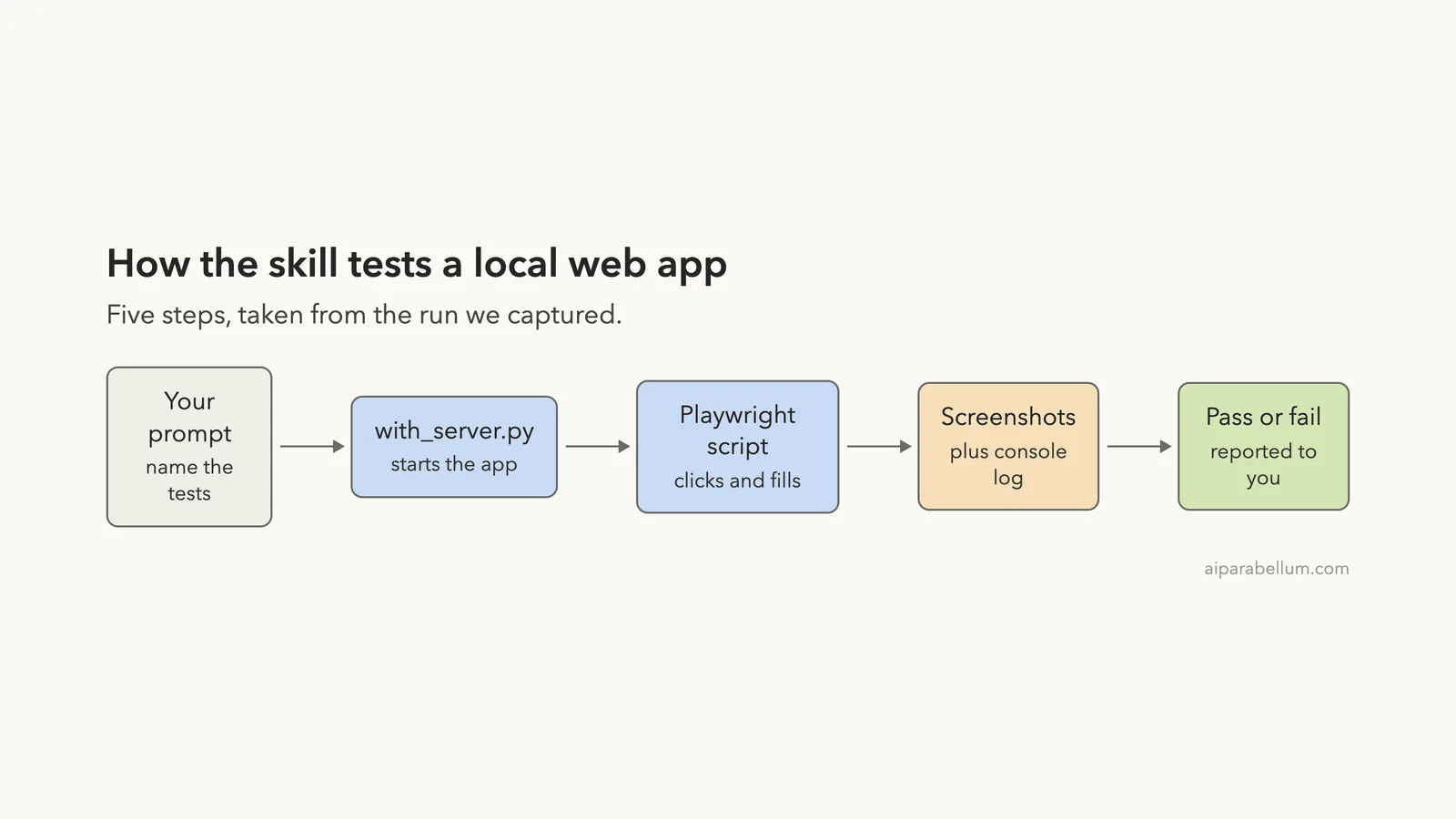
The diagram shows the path from your prompt to the report. Claude starts your app with the helper, runs a Playwright script that fills and clicks, saves screenshots, and then tells you what passed.
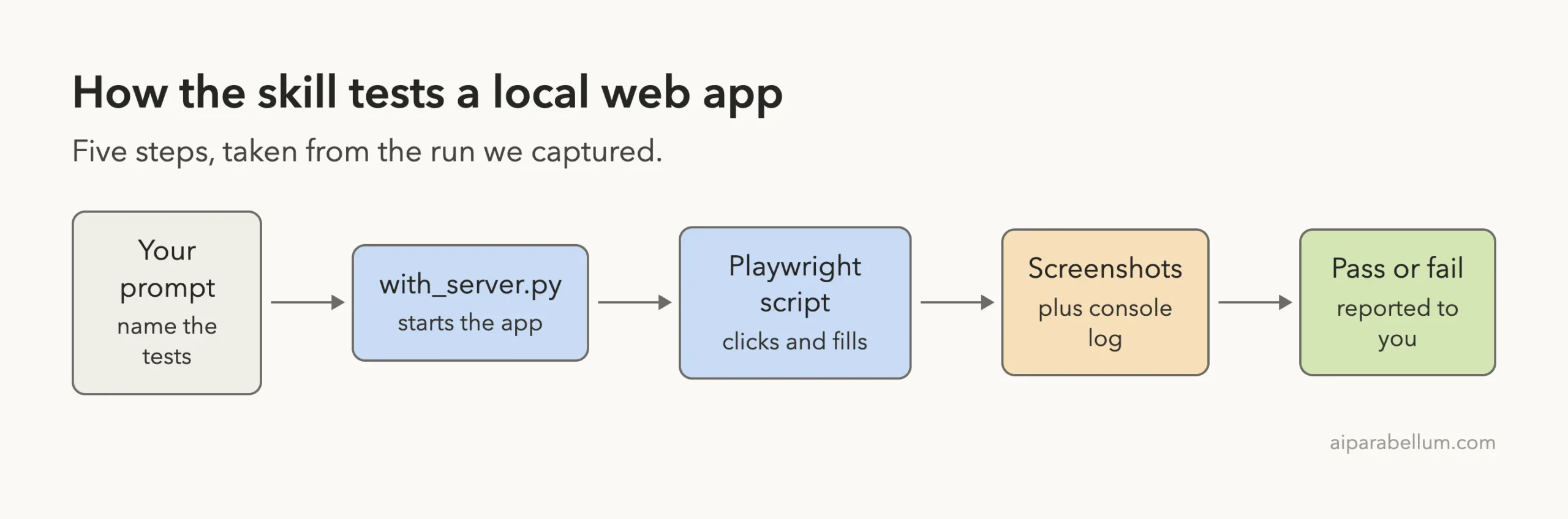
The decision tree in SKILL.md has three paths.
For a static HTML file, Claude reads the file to find selectors. For a dynamic app that is not running, it uses the server helper. For an app that already runs, it looks at the rendered page first, then acts.
Step 1: Install It Safely
We did not touch our normal Claude Code setup. We cloned the repository into a sandbox folder and copied only the webapp-testing folder into the demo project’s .claude/skills/ folder. Then we started Claude Code with --setting-sources project, so only that project’s settings were loaded.
Before running anything, we read the helper script. It starts the commands you give it with a shell, waits for the port, runs your command and then stops the servers. It does not download anything.
If you prefer a plugin route, the skill is also part of Anthropic’s example skills, which our walkthrough of the Anthropic skills repository covers. The official plugin discovery docs explain marketplaces.
Install Playwright in the Demo Folder
Playwright was not on our Mac, and the skill does not install it. We created a Python virtual environment inside the demo project, installed Playwright version 1.60.0 there and downloaded its headless Chromium browser into the sandbox folder. Nothing was installed globally.
python3 -m venv .venv
.venv/bin/pip install playwright
PLAYWRIGHT_BROWSERS_PATH=../pw-browsers .venv/bin/playwright install chromium
The browser download is the biggest part of the setup, so expect a wait the first time.
Step 2: The Demo App We Tested
We wrote a tiny page called Tip Splitter. It has three fields (bill, tip percent, people) and a Calculate button. It lives in two files, app/index.html and app/app.js. This is the core of the script:
document.getElementById('calc').addEventListener('click', function () {
  var bill = parseFloat(document.getElementById('bill').value);
  var tip = parseFloat(document.getElementById('tip').value);
  var people = parseInt(document.getElementById('people').value, 10);
  var out = document.getElementById('result');
  if (isNaN(bill) || bill <= 0) { out.className = 'err'; out.textContent = 'Enter a bill amount'; console.error('Invalid bill'); return; }
  var total = bill + bill * tip / 100;
  var each = total / people;
  out.className = '';
  out.textContent = 'Each person pays $' + each.toFixed(2);
  console.log('calculated', each);
});
The page logs on purpose: a normal message when it calculates and an error message when the bill is empty. That gives the console part of the test something real to catch. We also left the people field unchecked, to see whether the test would notice.
Step 3: Check That the Skill Loaded
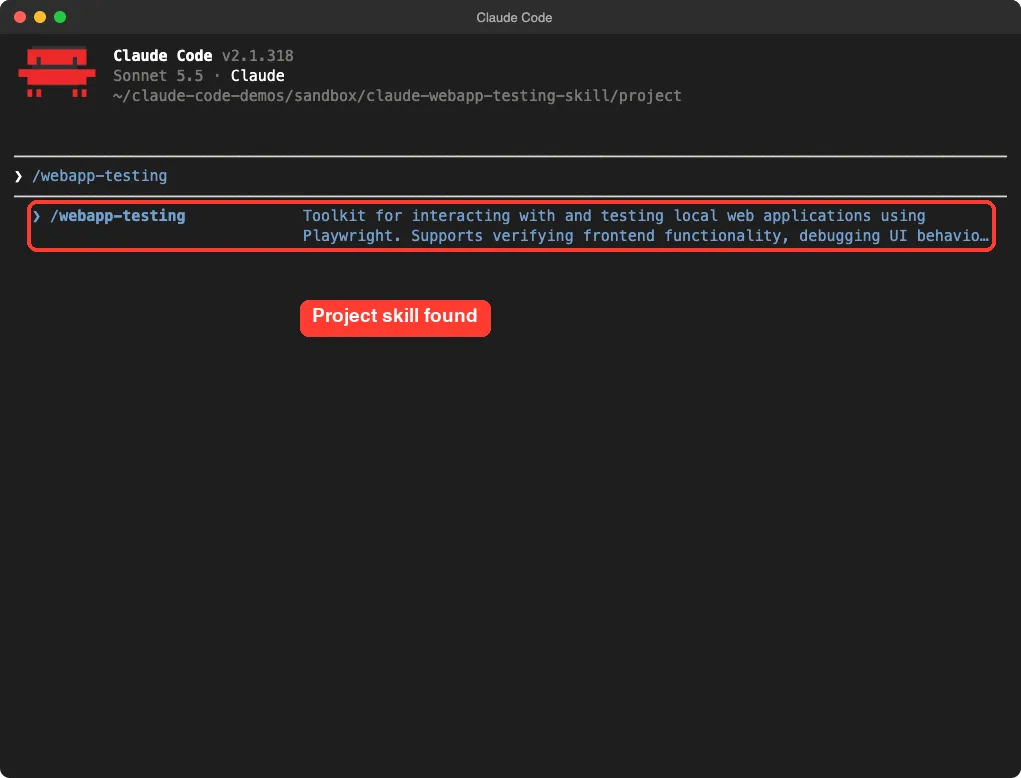
Inside Claude Code we typed /webapp-testing. The skill appeared in the slash menu with its description, loaded from the project folder.
Step 4: Ask Claude to Run the Tests
We named the skill and gave Claude the server command, the port and the two checks. We also told it which Python to use, because Playwright lives in the demo’s virtual environment.
/webapp-testing Test the Tip Splitter page in app/. Serve it with the skill's with_server.py helper using python3 -m http.server 8000 --directory app on port 8000, and run your Playwright script with .venv/bin/python. Test 1: bill 80, tip 20, people 4 should show $24.00 per person. Test 2: empty bill should show an error. Save a screenshot of each into shots/ and report the browser console messages.The math for test 1: 80 plus 20 percent is 96, and 96 split four ways is 24. If the page shows anything else, the test should fail.
The Permission Prompt
Claude Code ran in its default permission mode, so it asked before running shell commands. We had pre-allowed a short list in the demo’s .claude/settings.json, such as ls, cat and the project’s Python. Claude’s command was a longer combination that wrote the script and ran it, so it still asked.
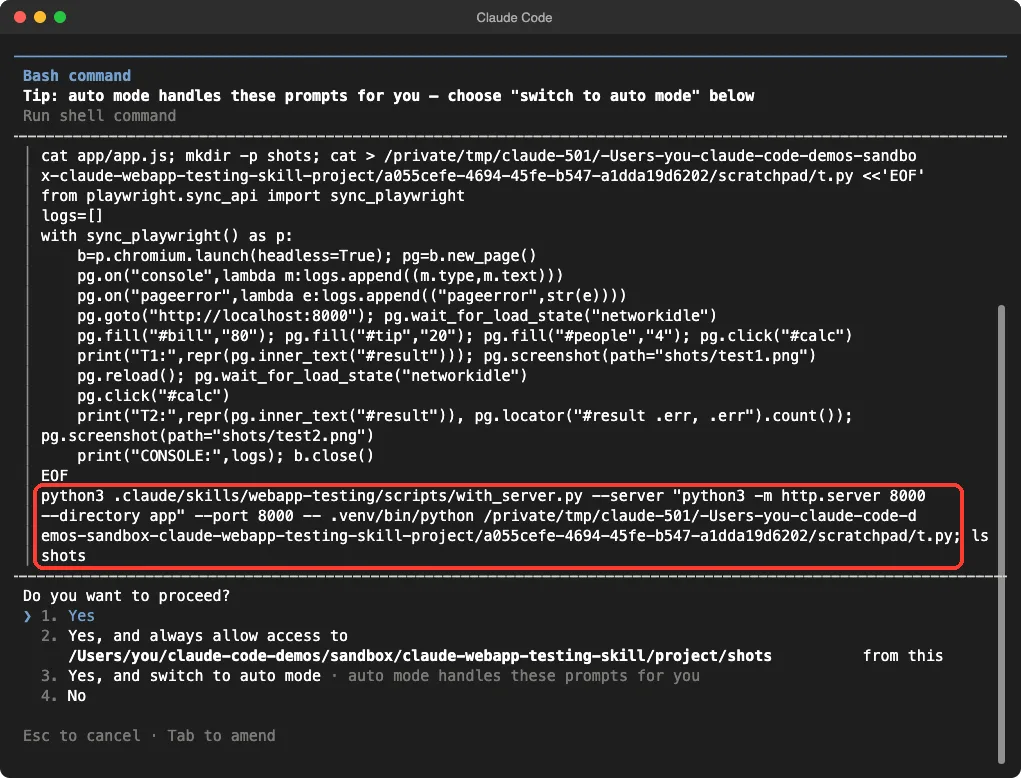
This is the moment to read what you approve. The script drives a browser and fills fields on a page you control, and the helper runs the server command you supplied. Both are harmless here, but you should look every time.
Step 5: Read the Result
Claude finished in 13 seconds, according to its own timer. It reported that both tests passed and showed a small table of inputs and results. It also listed the two console messages it saw.
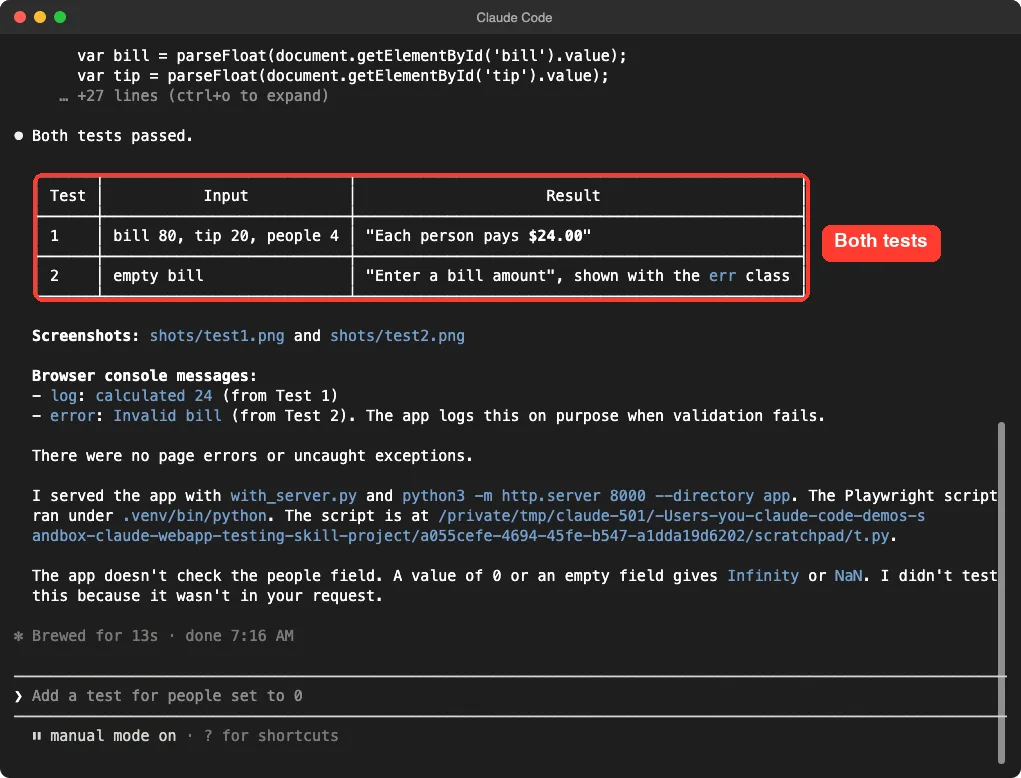
- Test 1: bill 80, tip 20, people 4 gave “Each person pays $24.00”.
- Test 2: an empty bill gave “Enter a bill amount”, shown with the
errclass. - Console: one log message (“calculated 24”) from test 1 and one error message (“Invalid bill”) from test 2.
- Page errors: none, meaning no uncaught exceptions.
Claude also pointed out that the error message was logged on purpose by the app, so it did not call it a bug. That is the kind of judgment a plain script would not give you.
Step 6: Look at the Screenshots
The skill’s whole point is evidence, so we opened the two screenshots Claude saved in the shots/ folder. They match the report.
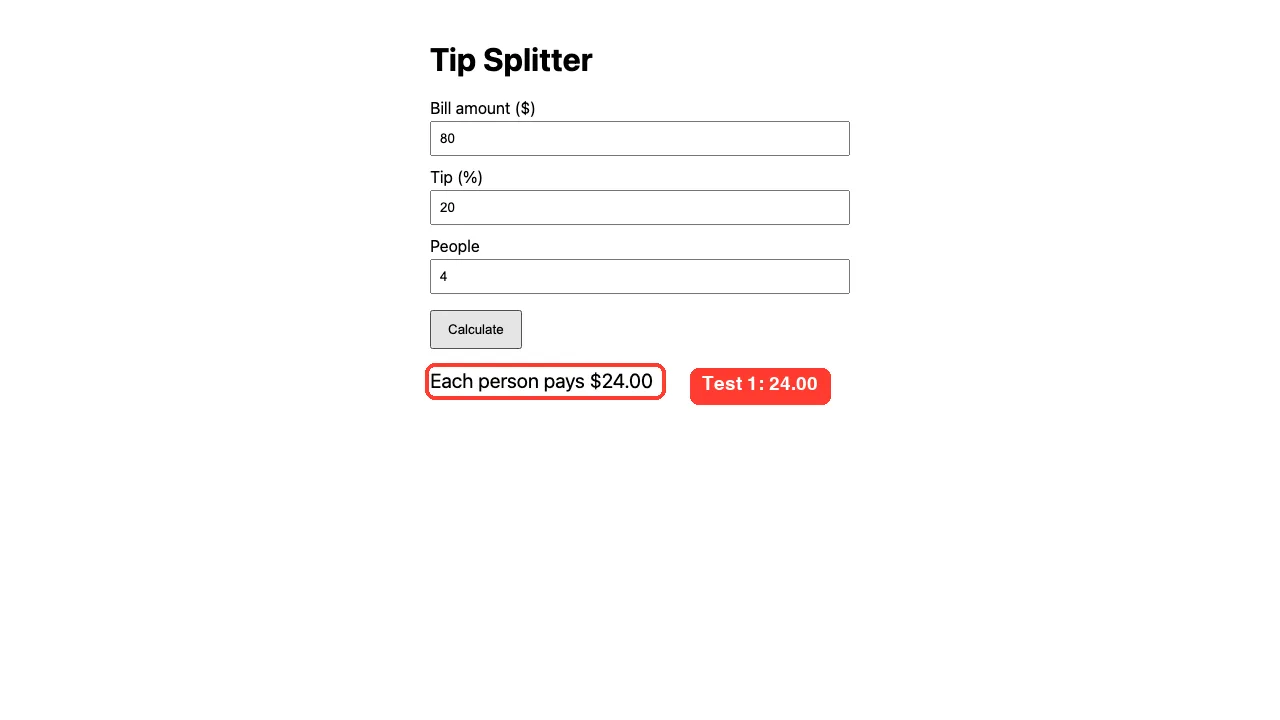
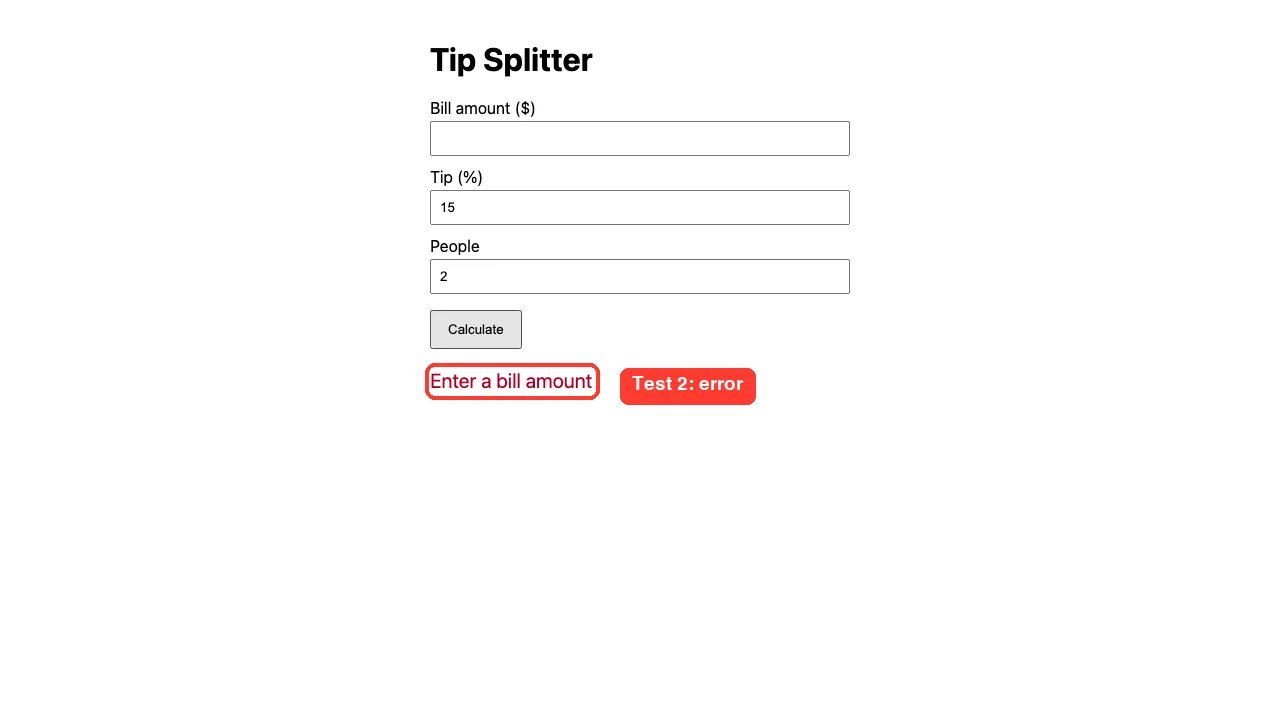
The test 2 script reloaded the page before clicking, so the fields went back to their defaults of 15 and 2. That is why the tip and people boxes differ from test 1.
What Claude Noticed Without Being Asked
At the end of its report, Claude added a note we had not asked for. It said the app does not check the people field, and that a value of 0 or an empty field would give Infinity or NaN. It said it did not test that because we had not asked.
That matched our code, since people is never validated. The skill did not find a failing test, but the reading of the code turned up a real gap. A natural next prompt is to ask for a test with people set to 0, then ask Claude to fix the page.
Give the skill exact inputs and expected text, and you get a report plus screenshots as proof.
When to Use This Skill and When to Skip It
| Your task | Better choice |
|---|---|
| Check that a form or button works on a local page | webapp-testing |
| Get screenshots and console messages from a page | webapp-testing |
| Unit tests for functions, not pages | A normal test runner, see our test-driven development guide |
| A large suite you run on every commit | Playwright’s own test runner, written once and kept in your repo |
| Understand when a skill beats a plugin or subagent | Our comparison guide |
The skill suits quick checks while you build. For a repeatable suite, ask Claude to turn a good script into a saved test file you can run yourself. For other web helpers, see our list of web development skills.
What We Did Not Test
We want to be plain about the limits of one demo. The app was tiny, with one page and no server code. We did not test logins, file uploads, several servers at once or pages that load data late.
We also did not run the three example scripts on their own, and we did not try the skill on Windows or Linux. Our setup used a Python virtual environment, a downloaded headless Chromium and a plain static server. Your setup may differ.
Real Examples You Can Try
- A to-do list: add three items, tick one, and check that the counter reads 2 left.
- A signup form: submit it empty and check that every required field shows an error.
- A calculator page: press a short sequence of keys and compare the display to the right answer.
- A page with a console warning: ask Claude to load it and list every console message.
Each one needs exact inputs and an expected result, just like our two checks.
Try It Yourself
Practice in a throwaway folder, never inside a real project. Create a small page, set up Playwright in a virtual environment, copy the skill into .claude/skills/ and paste a prompt like this one.
/webapp-testing Test my page in app/. Serve it with the skill's with_server.py helper using python3 -m http.server 8000 --directory app on port 8000, and run your Playwright script with .venv/bin/python. Fill every field, click the main button, and tell me what the page shows. Save a screenshot and report every browser console message.When it passes, ask for one more test with a bad input, such as an empty field or a zero. Then ask Claude to fix any problem it finds and run the same tests again.
Common Mistakes
- Forgetting to install Playwright. The skill does not do it, so the first run fails until you set it up.
- Not telling Claude which Python to use. If Playwright is inside
.venv, say so in the prompt. - Giving vague checks such as “see if it works”. Name the inputs and the exact text you expect.
- Approving the command without reading it. Look at what the script fills and which server command it starts.
- Treating one passing run as proof. We only tested two cases, and the unchecked people field shows how gaps hide.
Pro Tips
- Name the skill in your prompt, or type its slash command. Our skill best practices guide shows how to make skills trigger reliably.
- Ask for a screenshot of every test, and open them. A report says what Claude saw, and the picture proves it.
- Ask for the browser console messages every time. Errors in the console often show problems that the page hides.
- Keep the server command and port in your prompt, so Claude does not guess them.
- Pre-allow only safe, narrow commands in the project’s settings and keep the rest on prompts.
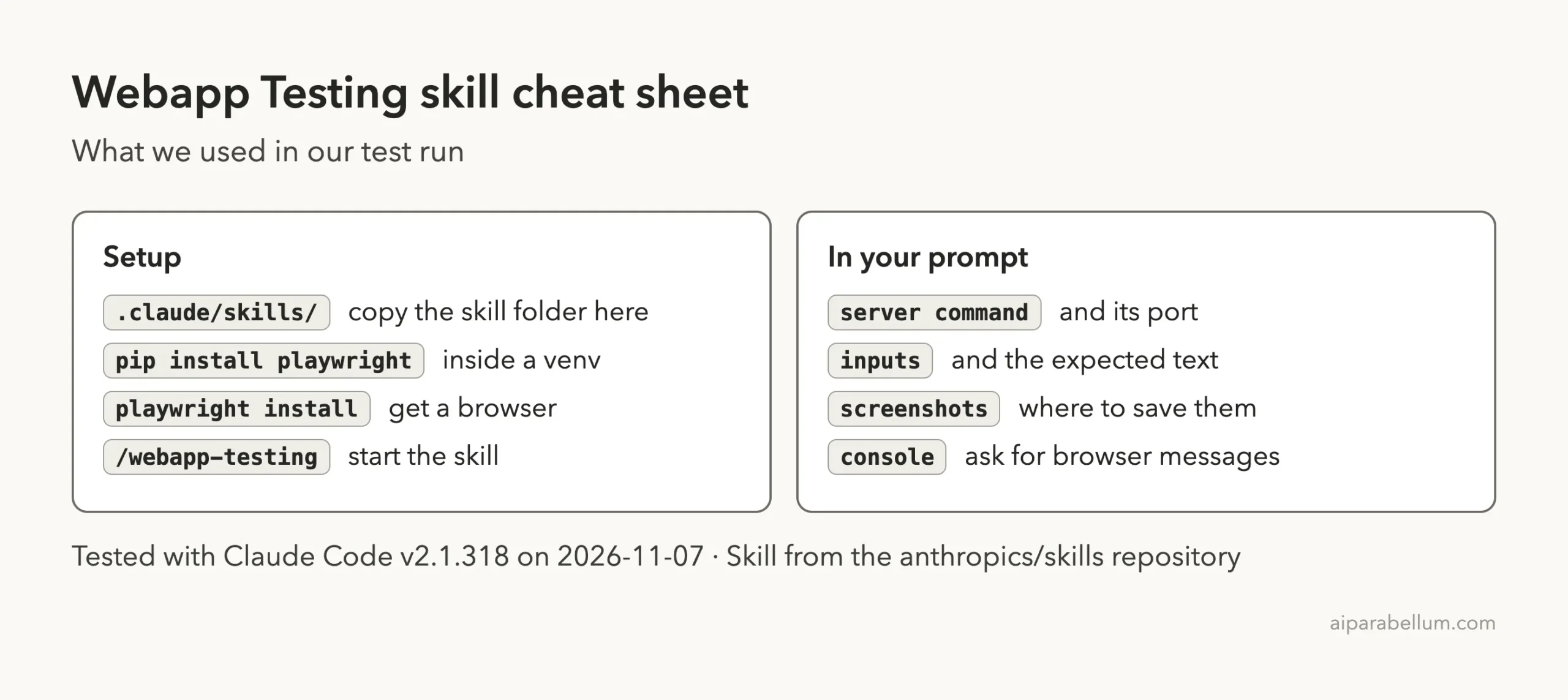
Cheat Sheet
Frequently Asked Questions
What does the webapp testing skill do?
It guides Claude to test a local web app with Playwright scripts. It can fill fields, click buttons, take screenshots and read the browser console, and it includes a helper that starts your app server first.
Does the skill need an account or API key?
The skill itself needs no account or key. It runs on your computer, but Claude Code still needs to be signed in to run your prompts. Our Claude overview covers the product side.
Do I need to install Playwright first?
Yes. In our test the skill did not install it, so we set it up in a virtual environment inside the demo folder, with a headless Chromium browser.
Does it only work with Python?
The skill’s instructions tell Claude to write native Python Playwright scripts. The app you test can be written in anything that serves a page on a local port.
Can it start my dev server for me?
Yes. The helper with_server.py takes a server command and a port, waits until the port answers, runs your test command and then stops the server. It can manage several servers in one call, though we only tried one.
Conclusion
In our single test, the webapp testing skill took one prompt to two passing checks, two screenshots and a clear list of console messages, and Claude even spotted that our page never checks the people field. It needs a Playwright setup you do yourself, and it suits quick checks more than a repeatable test suite. Give it exact inputs and expected text, read the command before you approve it, and open the screenshots before you trust the report.