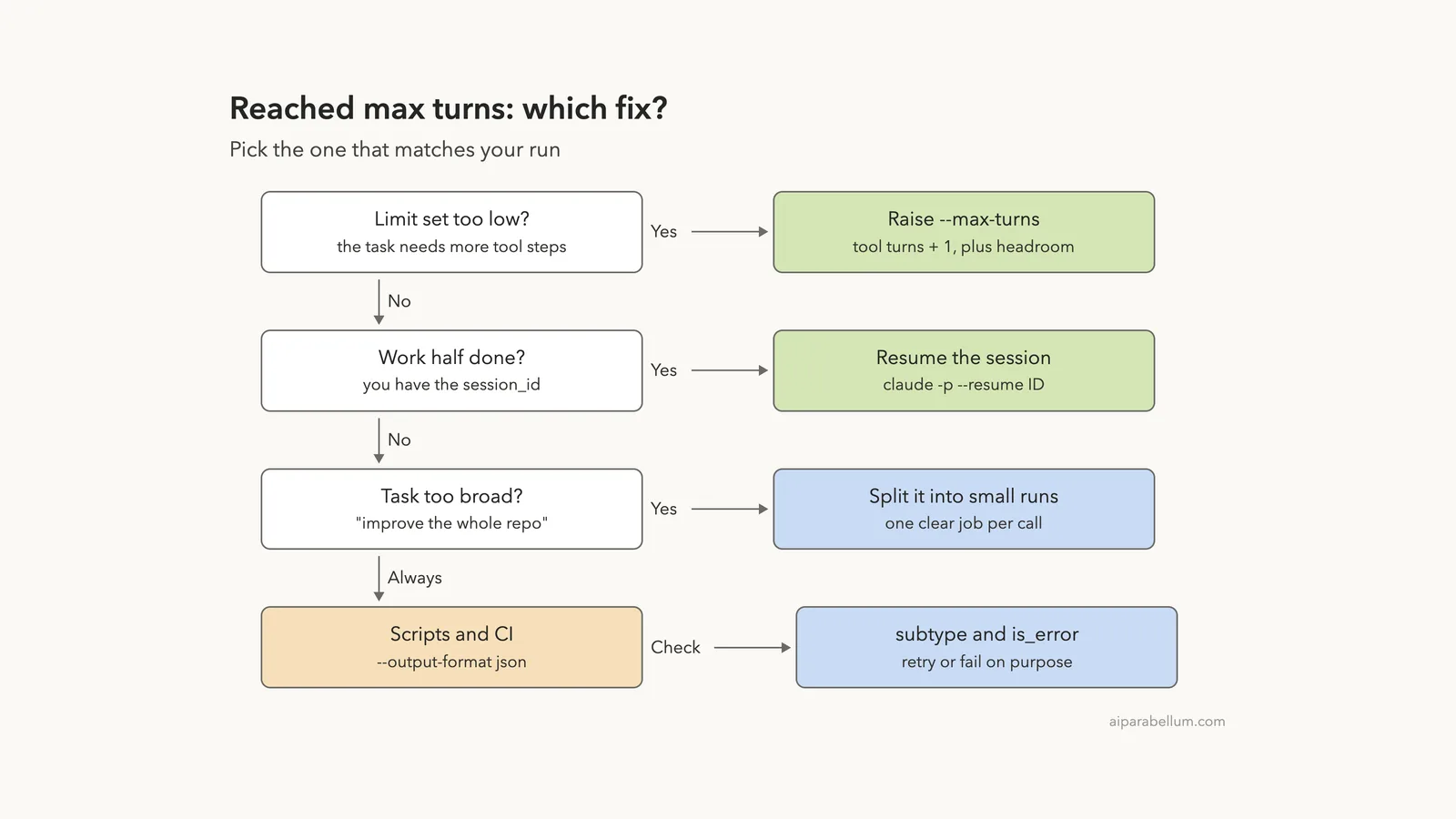
The Claude Code reached max turns error means a claude -p run used up the turn limit you gave it with --max-turns before Claude could write its final answer. Claude Code stops, prints Error: Reached max turns (N), and exits with code 1. Nothing is broken; the task simply needed more steps than the limit allowed.
The quick fix is to raise the limit. Count the tool steps the task needs, add one for the final answer, and add a little headroom, for example claude -p --max-turns 6 "your task". If the run already did useful work, resume the same session with claude -p --resume <session-id> instead of starting over.
In scripts and CI, add --output-format json and check the subtype field. A stopped run reports error_max_turns with an empty result, so your script can retry, raise the limit or fail on purpose instead of passing along a blank answer.
Browse all our Claude Code tutorials for more fixes and how-tos.
Tested with Claude Code v2.1.328 on macOS on November 21, 2026. We triggered the error in a throwaway demo folder with three tiny text files, then ran each fix. Every terminal capture below is real output from that session.
Quick Summary
| Question | Short answer |
|---|---|
| Exact message | Error: Reached max turns (N) |
| Where it appears | Print mode only: claude -p with --max-turns |
| Exit code | 1 |
| JSON subtype | error_max_turns, with result set to null |
| Default limit | None; there is no turn limit unless you set one |
| Fix 1 | Raise --max-turns (tool turns + 1 for the answer) |
| Fix 2 | Resume the stopped session with --resume |
| Fix 3 | Split a broad task into smaller -p runs |
| For scripts | Check subtype and is_error in JSON output |
What “Reached Max Turns” Means in Claude Code
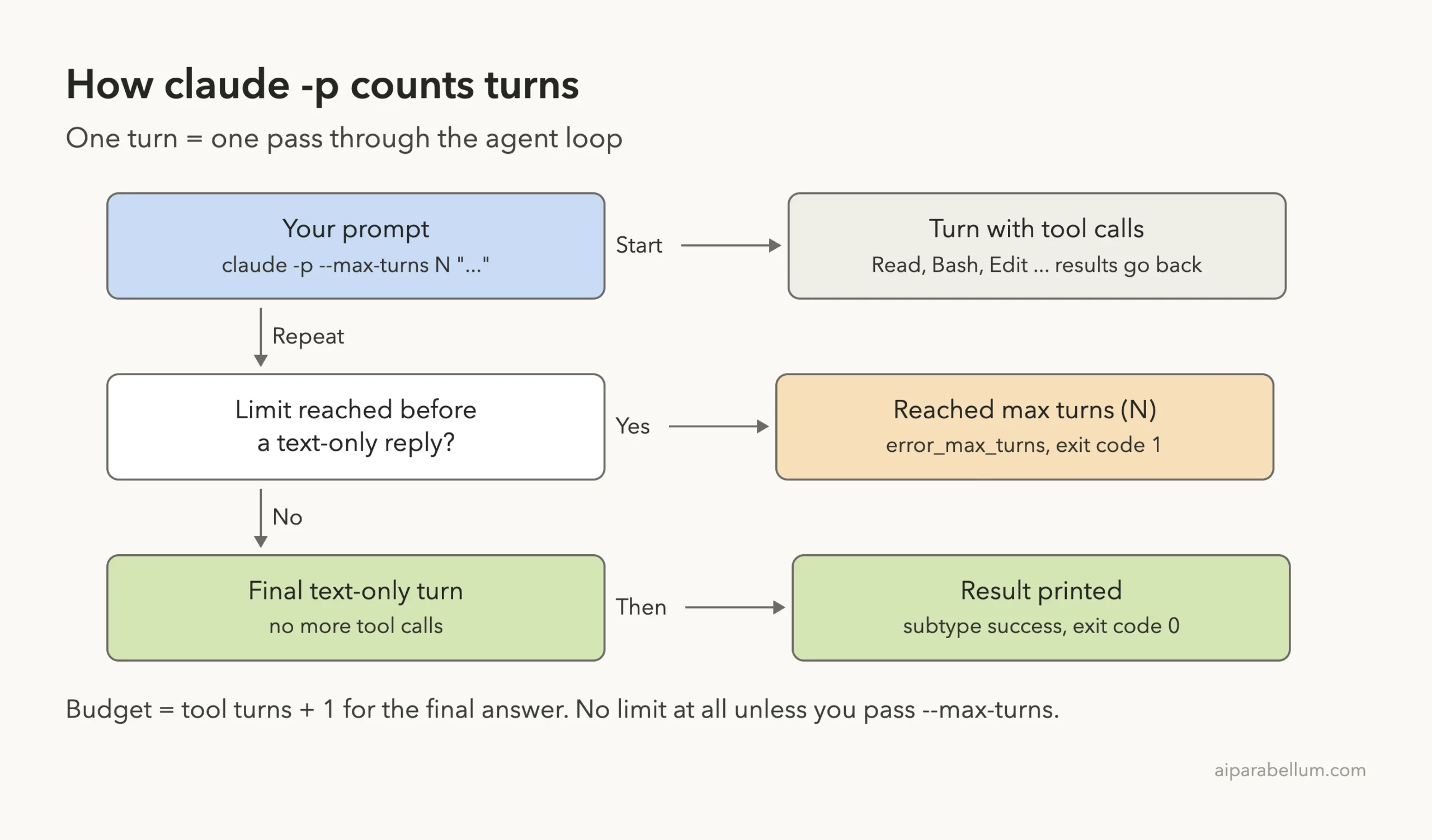
When you run claude -p, Claude Code works in a loop. Claude replies, and if that reply asks for tools like Read, Bash or Edit, Claude Code runs them and sends the results back. Each pass through that loop is one turn.
The loop keeps going until Claude sends a reply with no tool calls. That last, text-only reply is your answer. The --max-turns flag puts a ceiling on how many passes the loop may take.
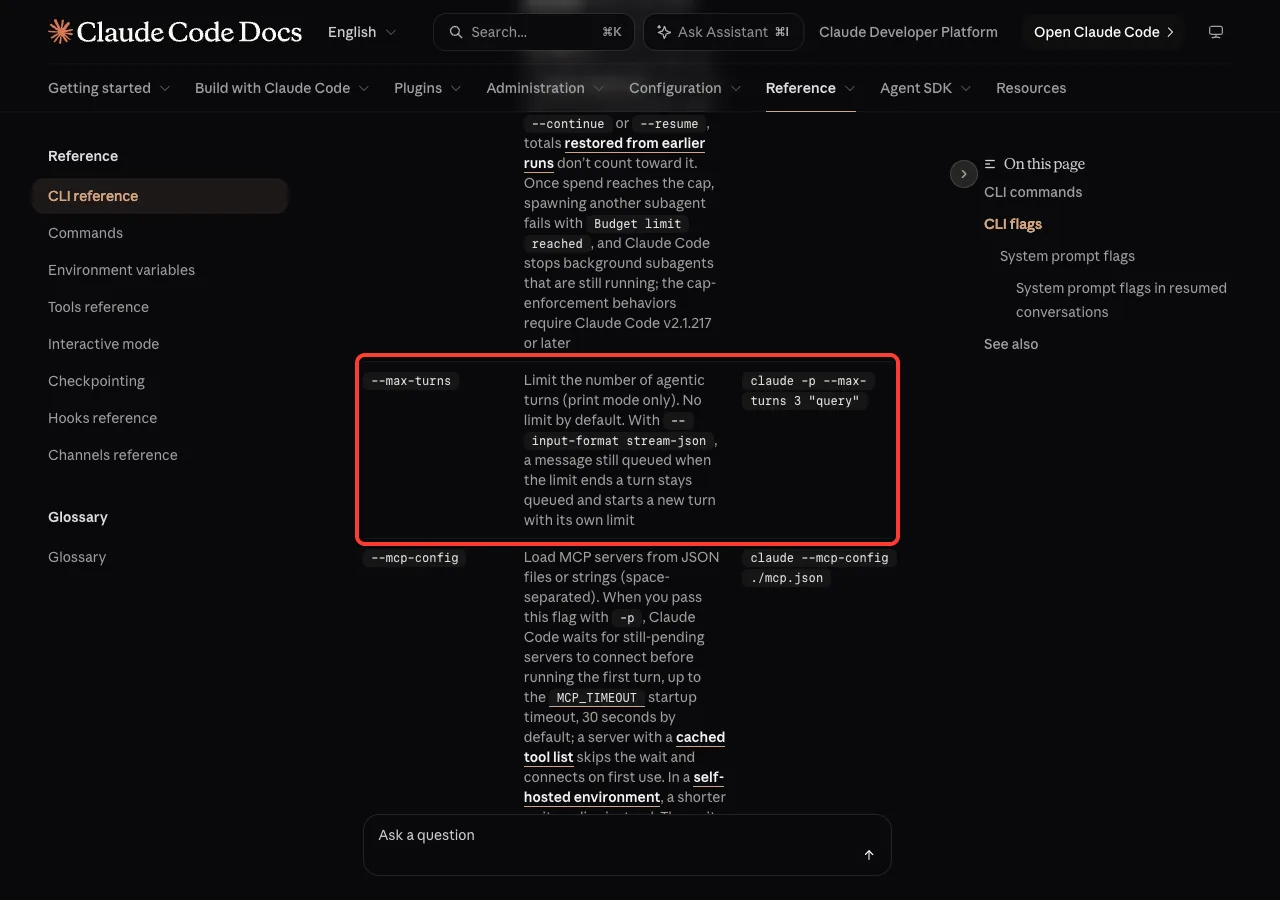
The CLI reference describes --max-turns as a limit on agentic turns that works in print mode only, with no limit by default. So you only see this error if you, a script, an alias or a CI config passed the flag.
The rule that catches people: count the final answer
Anthropic’s agent loop guide spells out how to budget turns. Count every turn that uses tools, then add one more for the final text-only response. Without that extra turn, the run ends with error_max_turns and no final answer.
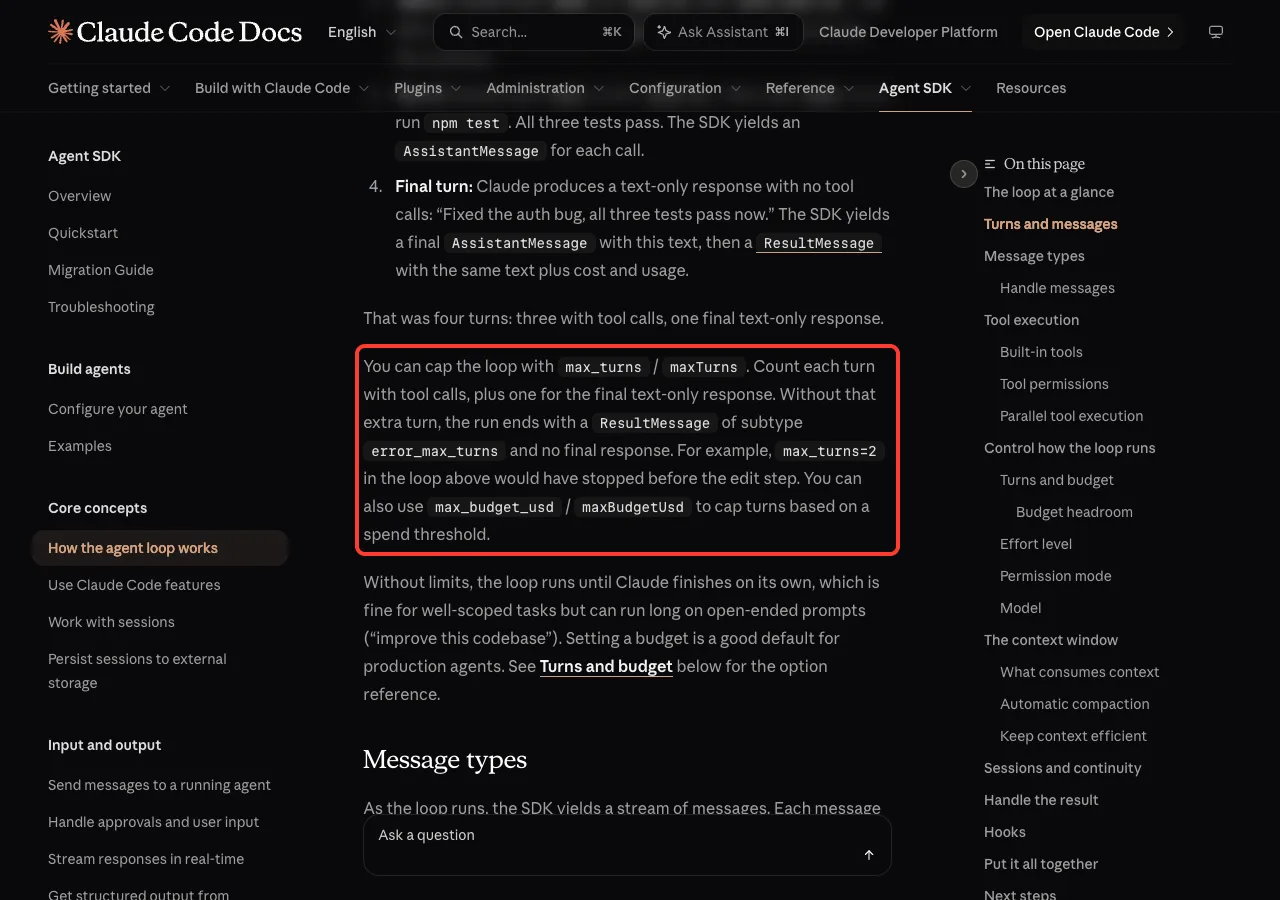
That is why --max-turns 1 fails on almost any real task. If Claude needs even one tool call, such as reading a file, the single turn is spent on the tool and nothing is left for the answer.
A turn limit is a safety brake, not a timer. Give the task room for every step plus the answer.
We Reproduced the Error on v2.1.328
Our demo folder held three small files: todo.txt, notes.txt and ideas.txt. We asked Claude to read all three and list the three most urgent items, but allowed only one turn:
claude -p --max-turns 1 'Read todo.txt, notes.txt and ideas.txt, then list the 3 most urgent items'
echo "exit code: $?"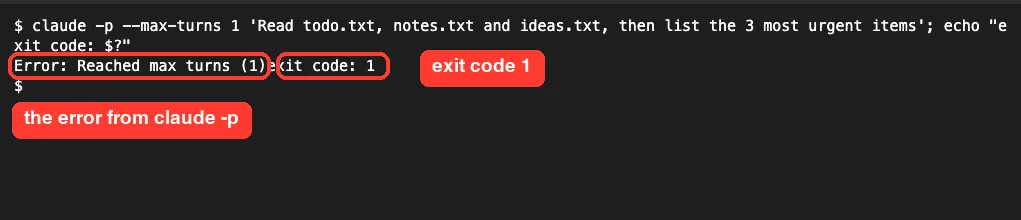
Claude Code printed Error: Reached max turns (1) and nothing else. Note that the message has no line break at the end, so our exit code: 1 line ran straight into it. In a log file, the two can look glued together like that.
The same run in JSON
Scripts usually ask for JSON, so we ran the same task again with --output-format json, saved it to run.json, and pulled out the useful fields with jq:
claude -p --max-turns 1 --output-format json 'Read todo.txt, notes.txt and ideas.txt, then list the 3 most urgent items' > run.json
jq '{subtype, is_error, num_turns, terminal_reason, result, errors, session_id}' run.json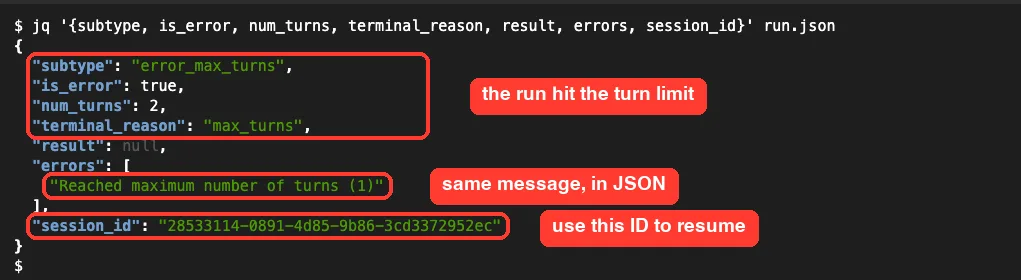
Here is what each field told us:
subtypewaserror_max_turns, the clearest sign of this problem.is_errorwastrueandterminal_reasonwasmax_turns.resultwas null, because there was no final answer to return.errorsheld “Reached maximum number of turns (1)”, the longer form of the message.session_idwas still there, so the work can be picked up again.
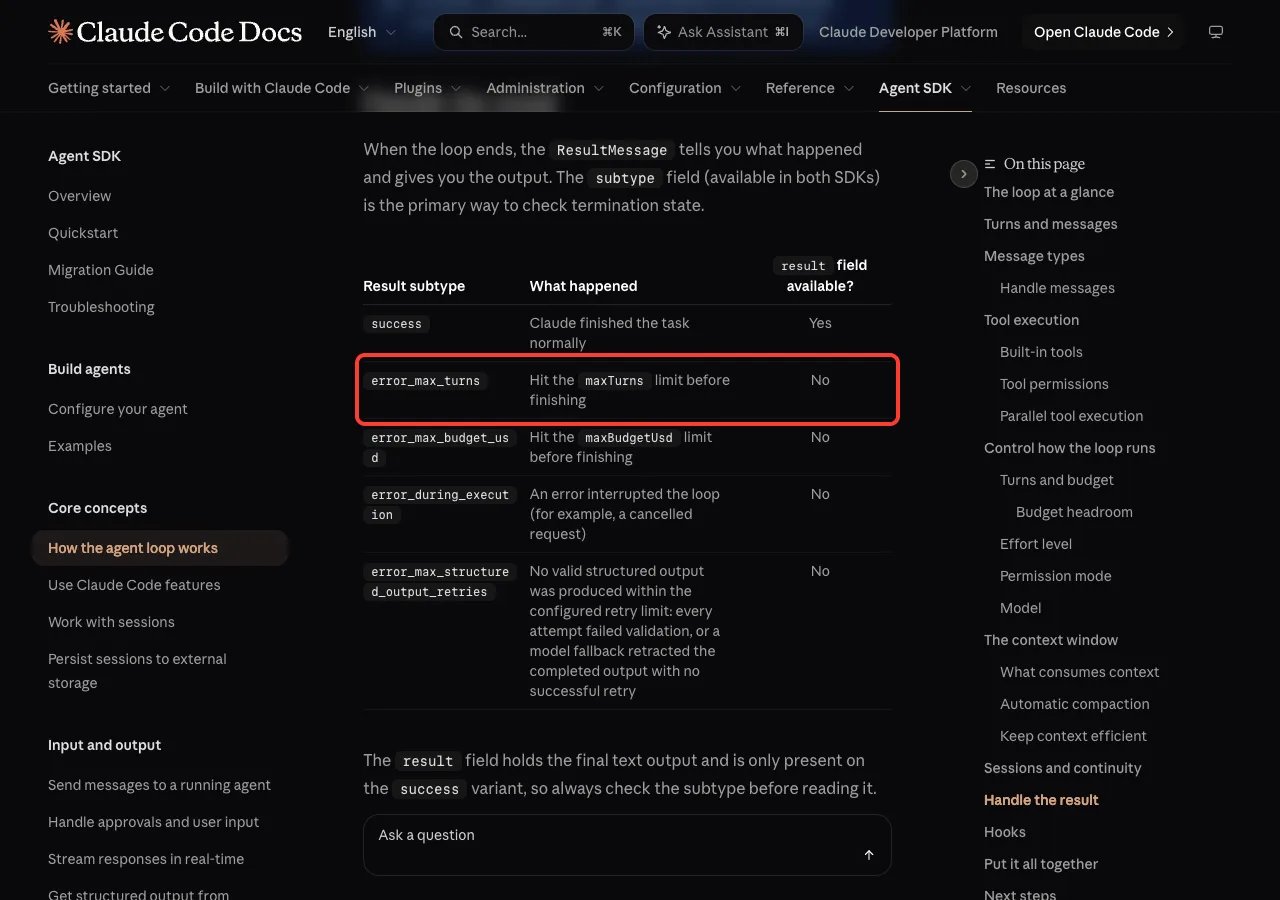
One detail surprised us: num_turns said 2 even though the limit was 1. So don’t write a check like “num_turns equals the limit”. Check subtype instead, which is what the docs recommend.
How the Turn Limit Works
This diagram shows where the limit cuts in. Each tool turn uses one slot, and the answer needs one more.
Common reasons you hit the limit
- The limit was copied from an example like
--max-turns 3and never tuned to the real task. - The prompt asks for many files to be read, tests to be run, or several edits, and each one costs a turn.
- The task is open-ended, like “improve this codebase”, so Claude keeps finding more to do.
- A wrapper script, shell alias or CI workflow sets
--max-turnsand you didn’t notice. - Claude runs a command, sees a failure, and spends extra turns fixing and rerunning it.
How to Fix “Reached Max Turns” in Claude Code
Start at the top of this decision ladder and stop at the first fix that matches your run.
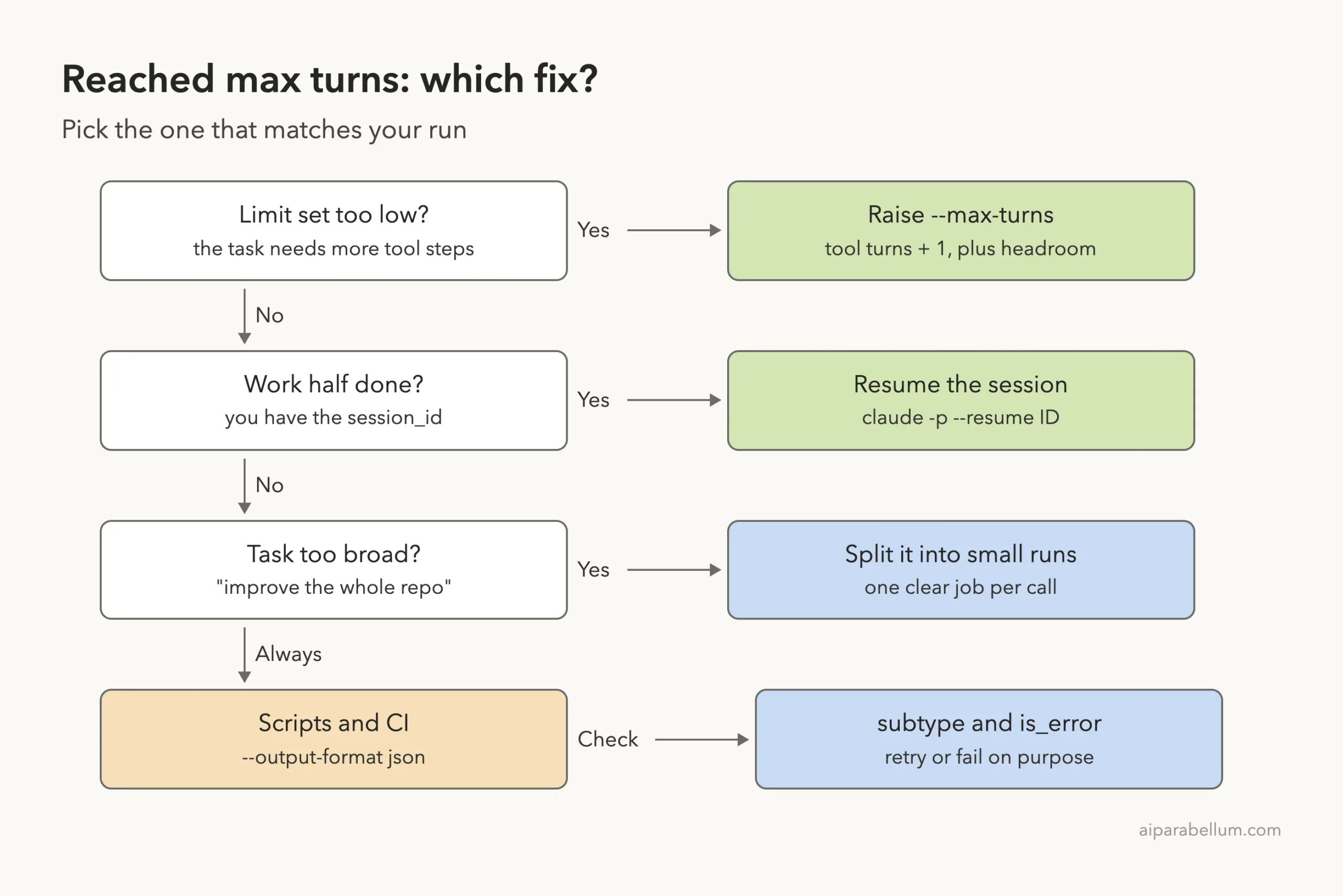
Fix 1: Raise –max-turns to match the task
Work out roughly how many tool steps the task needs, add one for the answer, then add a couple of turns of headroom. We gave the same three-file task six turns:
claude -p --max-turns 6 --output-format json 'Read todo.txt, notes.txt and ideas.txt, then list the 3 most urgent items' > ok.json
jq '{subtype, is_error, num_turns, terminal_reason, result}' ok.json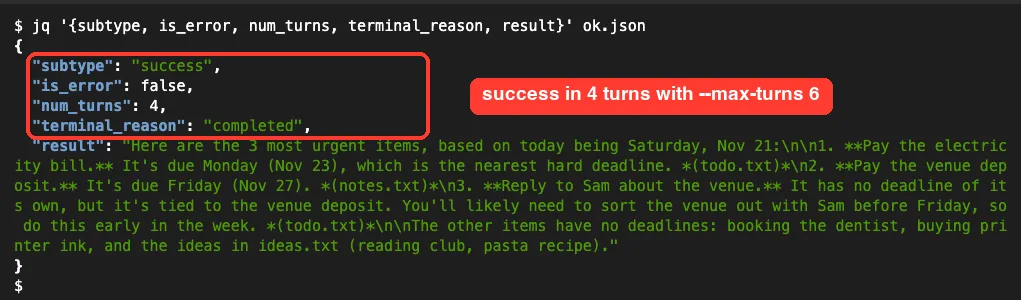
This time the run ended with subtype set to success, terminal_reason set to completed, and the ranked list in result. It used 4 turns and exited with code 0. If you don’t need a safety brake at all, you can also drop the flag, since there is no limit by default.
Fix 2: Resume the stopped session
A stopped run still has a session, and the docs note that every result subtype carries session_id so you can resume after errors. That saves the work Claude already did, like files it read.
claude -p --resume "$(jq -r .session_id run.json)" --max-turns 6 'Finish the task you started'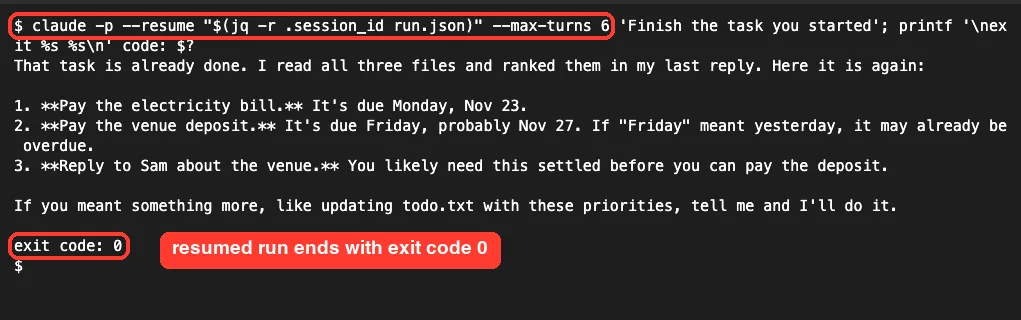
To be transparent: this was our second resume of that session, because our first resume screen didn’t capture cleanly. That’s why Claude says the task was already done and repeats its list. It still shows the point: the resumed session kept its context and finished with exit code 0.
If you only run one conversation at a time, claude -p --continue "Finish the task" picks up the most recent session without an ID. Our sessions guide explains how resume and continue differ.
Fix 3: Split a broad task into smaller runs
If a task keeps running out of turns even with a generous limit, it’s probably too big for one call. Break it into steps that each have a clear finish line:
claude -p --max-turns 5 "List the files in src/ that have no tests" > untested.txt
claude -p --max-turns 8 "Write tests for the first file in untested.txt"
Smaller runs are easier to check, cheaper to retry, and less likely to wander. They also make your logs easier to read when something goes wrong.
Fix 4: Check the JSON result in scripts
Use --output-format json whenever another program reads the reply. The headless docs describe it as structured JSON with the result, session ID and metadata.
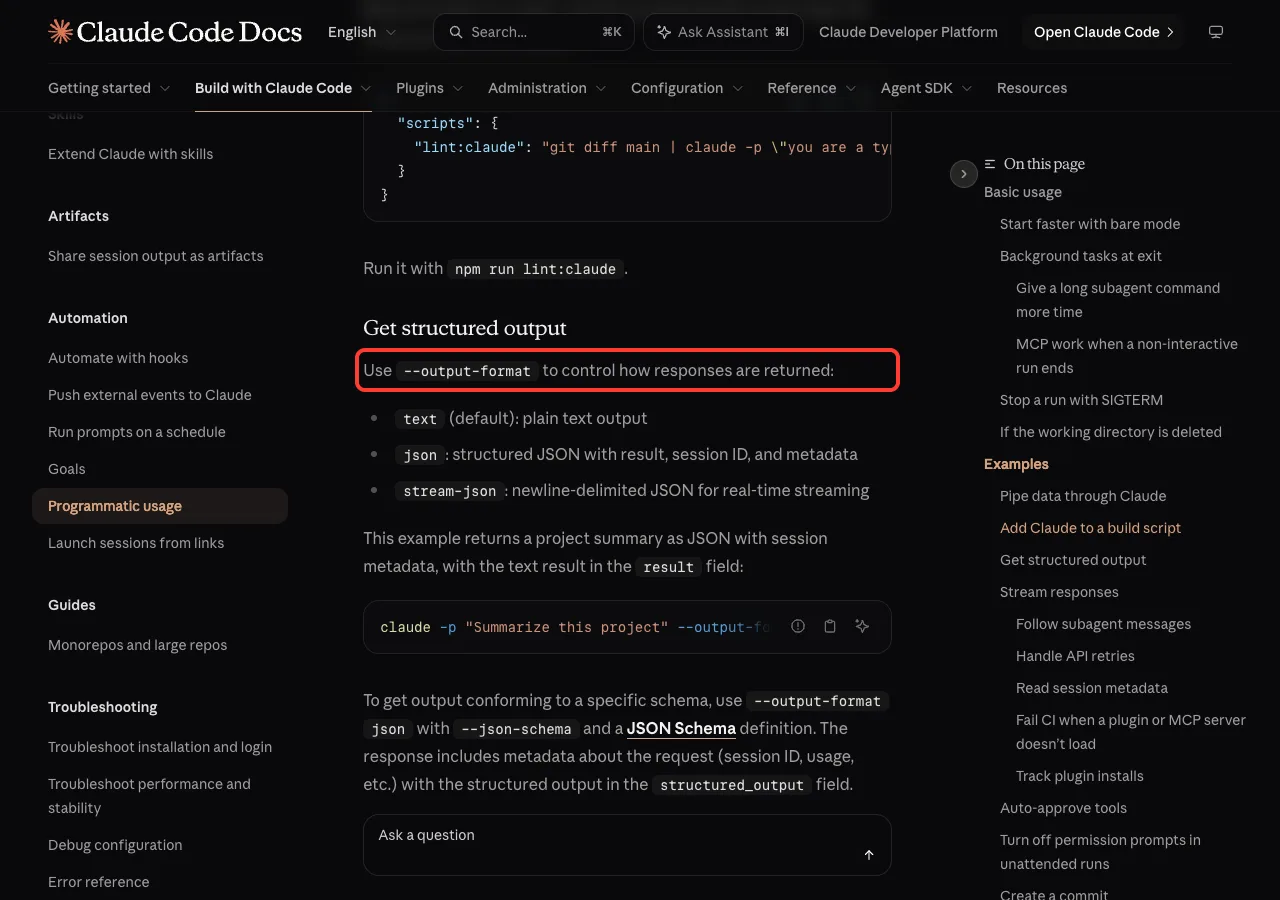
Then branch on subtype before you use result:
claude -p --max-turns 6 --output-format json "Summarize CHANGELOG.md" > run.json
case "$(jq -r .subtype run.json)" in
  success)         jq -r .result run.json ;;
  error_max_turns) echo "Out of turns, resuming"
                   claude -p --resume "$(jq -r .session_id run.json)" --max-turns 6 "Finish the summary" ;;
  *)               echo "Run failed: $(jq -r '.errors' run.json)"; exit 1 ;;
esac
Checking only the exit code also works, since a stopped run exits with 1. The JSON just tells you why it stopped, so you can handle a turn limit differently from other failures.
Fix 5: Use a spend cap when cost is the real worry
Many people set a low turn limit to keep costs down. The CLI also has --max-budget-usd, which stops the run once the estimated spend reaches an amount you choose. The docs warn that spend can pass the cap a little, so leave some headroom.
A budget cap gives Claude room for more steps on a hard task while still protecting you from runaway runs.
When a budget cap stops the run, the subtype is error_max_budget_usd instead. To learn more about tracking spend, see our guide to Claude Code costs.
Real Examples: Turn Limits in Scripts and CI
Here is how the limits look in the places people usually set them.
| Situation | Suggested setting | Why |
|---|---|---|
| Question about one file | --max-turns 3 | One read, one answer, one spare |
| Read several files, then summarize | --max-turns 6 | Our three-file task used 4 |
| Fix a bug and rerun tests | --max-turns 15 or a budget cap | Edits and test runs add up fast |
| Nightly CI review | --max-budget-usd plus JSON checks | Limits cost, still finishes the job |
| Open-ended cleanup | Split into small runs | No single limit fits a vague task |
These numbers are starting points, not rules; only the three-file case is one we measured. If you run Claude Code in a pipeline, our CI/CD pipeline example shows a full setup, and the guide to headless mode covers the other -p flags.
Try It Yourself
You can see both outcomes in about a minute. In any small folder you trust, create two files and run the same task with a tight and a roomy limit:
printf 'pay rent friday\nbook flights\n' > a.txt
printf 'dentist monday\n' > b.txt
claude -p --max-turns 1 "Read a.txt and b.txt and list what is due first"; echo " exit: $?"
claude -p --max-turns 5 "Read a.txt and b.txt and list what is due first"; echo " exit: $?"
The first run should stop with the max turns error and exit code 1. The second should answer and exit with 0. If you have a script that keeps running out of turns, paste it into a working Claude Code session with this prompt:
This script calls claude -p with --max-turns and sometimes fails with
"Reached max turns". Add --output-format json, check the subtype field,
resume the session with --resume when the subtype is error_max_turns,
and explain each change in one line.
Common Mistakes
- Setting
--max-turnsto the number of steps and forgetting the extra turn for the final answer. - Reading
resultwithout checkingsubtypefirst. On a stopped run, it is null. - Starting a brand-new run after a stop, which throws away the files Claude already read. Resume instead.
- Expecting
--max-turnsto work in the interactive app. It is a print mode flag. - Using a tiny turn limit as a cost control. A budget cap with
--max-budget-usdfits that job better. - Comparing
num_turnsto the limit. In our test, a run limited to 1 reported 2.
Pro Tips
- Log
num_turnsfrom successful runs for a week, then set the limit a bit above the highest value you see. - Keep the
session_idfrom every JSON result in your logs, so any stopped run can be resumed later. - Name the files you want read right in the prompt. Claude spends fewer turns searching.
- If the message you see is different, our list of common Claude Code errors covers the others, and the raw mode fix helps when
clauderuns without a terminal. - Building on the SDK instead of the CLI? The same limit is called
max_turnsormaxTurns; see our Agent SDK guide.
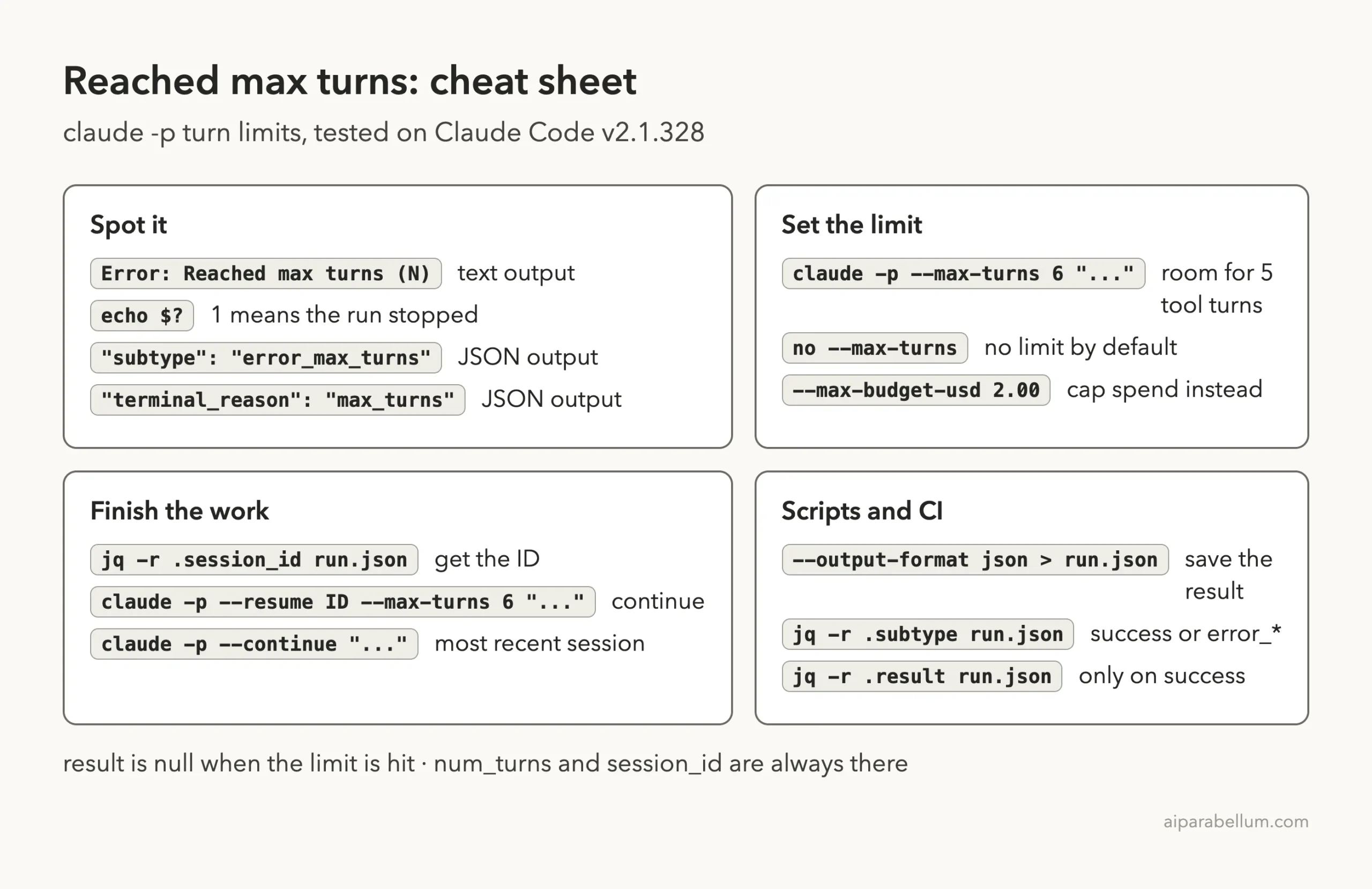
Cheat Sheet
Frequently Asked Questions
What does “Reached max turns” mean in Claude Code?
It means a claude -p run hit the limit set with --max-turns before Claude wrote its final answer. The run stops with exit code 1 and no result text.
What is the default max turns in Claude Code?
There is no default limit. The CLI reference says --max-turns has no limit unless you set one, so a script or config must have added it.
How many turns should I allow?
Count the tool steps the task needs and add one for the answer, then a little headroom. Our three-file reading task finished in 4 turns with a limit of 6.
Do I lose the work when the limit is hit?
No. The result still includes a session_id, and claude -p --resume <id> picks up the same conversation with its context.
Does –max-turns work in interactive Claude Code?
No. The docs list it as a print mode flag, so it only applies to claude -p runs.
Conclusion
The Claude Code reached max turns error is a limit doing its job: the run used every turn you allowed before Claude could answer. In our test on v2.1.328, --max-turns 1 stopped a three-file task with exit code 1 and an error_max_turns result, while --max-turns 6 finished it in 4 turns with exit code 0, and resuming the stopped session also ended cleanly. Budget one turn per tool step plus one for the answer, resume instead of starting over, split broad tasks, and check subtype in your scripts. To learn more about the model behind the tool, see our overview of Claude AI.