If you want to use Qdrant with Claude Code, the official Qdrant skills teach Claude how to size, build and fix vector search. We loaded them into a throwaway project, asked for a RAM estimate, built a small ticket search with a local Qdrant database, and then asked why the results looked wrong. This post shows exactly what happened, what worked, and where the skills stopped helping.
This guide is part of our Claude Code tutorials. Find more add-ons in our skills directory.
Tested with Claude Code v2.1.319 on November 11, 2026. We used the qdrant plugin version 1.0.0 from github.com/qdrant/skills (commit 1d01072, November 9, 2026) and qdrant-client 1.16.1. We tested on macOS; the Windows and Linux steps follow Anthropic’s official instructions.
The skills did not build a search engine for us. They made Claude pick the right Qdrant mode, do the sizing math properly, and explain a bad result instead of guessing.
Quick Summary: What We Tested
| Question | Answer |
|---|---|
| What is it? | An official plugin from Qdrant with 14 skills (33 skill files in all) |
| Does it need an account? | No, not for anything we ran |
| What did we run? | A sizing question, a small search script on local-mode Qdrant, and a search-quality diagnosis |
| What did we not run? | A Qdrant server, Qdrant Cloud, hybrid search and the model fix the skill suggested |
| Our verdict | Worth loading if you build vector search; it is guidance, not automation |
One honest note up front. The Docker engine was not running on our test Mac, so we did not start a Qdrant server.
We used Qdrant’s local mode instead, which is the same Python API but stores data in a plain folder. It proves the code and the skills work together, but it says nothing about server speed.
What the Qdrant Skills for Claude Code Are
A plugin is a bundle that adds skills, commands or tools to Claude Code. A skill is a short guide that Claude reads when your request matches it. If plugins are new to you, our plugins guide explains how to find and manage them, and you can see how Claude treats skills in general.
Qdrant is an open-source vector database.
You store vectors, which are lists of numbers that represent text or images, and ask for the ones closest to a query. The plugin does not contain Qdrant itself. It contains advice on using it well.
We covered it briefly in our vector database plugins and in our database plugins roundup. This post is the hands-on version.
The 14 Qdrant Skills for Claude Code at a Glance
| Skill group | Skills | What it covers |
|---|---|---|
| Build and connect | qdrant-clients-sdk, qdrant-deployment-options, qdrant-edge | Client libraries, local mode versus server versus cloud, running on devices |
| Plan and size | qdrant-sizing, qdrant-scaling, qdrant-multitenancy | RAM and disk math, growing a cluster, many customers in one collection |
| Quality and speed | qdrant-search-quality, qdrant-performance-optimization, qdrant-monitoring | Bad results, slow queries, reading metrics |
| Operate and move | qdrant-version-upgrade, qdrant-model-migration, qdrant-migration-tool | Upgrades, switching embedding models, copying data between systems |
| Cloud | qdrant-managed-cloud-quickstart, qdrant-hybrid-cloud-setup | Qdrant Cloud and hybrid cloud setup |
The cloud skills are written for Qdrant’s own services, so we treated them as account features and did not run them. Several skills are routers. For example, qdrant-search-quality is a small table that tells Claude which deeper file to read for a given symptom.
How We Loaded the Qdrant Skills Safely
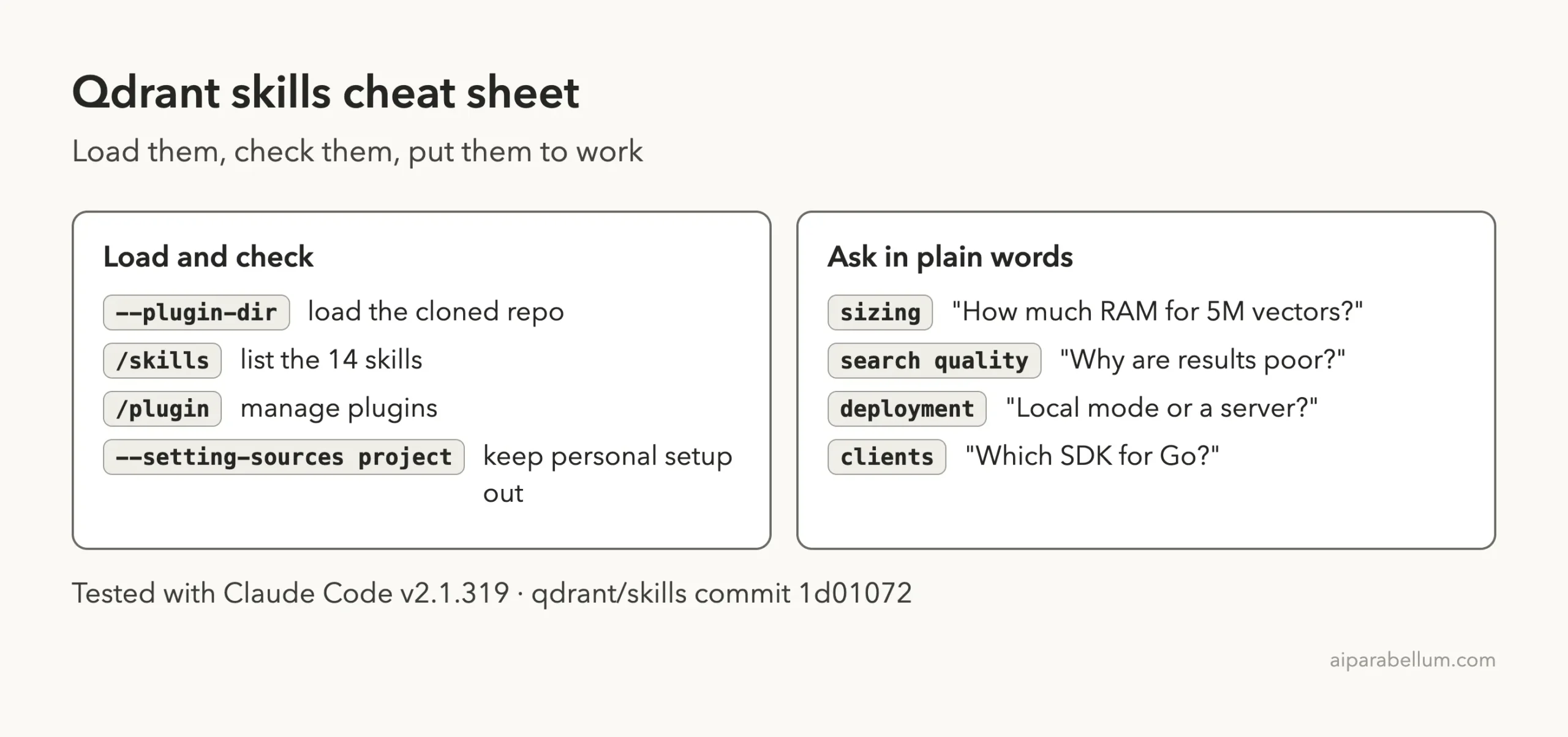
We did not install the plugin into our normal Claude Code setup. We cloned the repo into a throwaway sandbox and loaded it for one session with the --plugin-dir flag, plus --setting-sources project so no personal settings came along.
git clone --depth 1 https://github.com/qdrant/skills
cd my-demo-project
claude --plugin-dir /path/to/skills --setting-sources project
Before loading anything, we read the repo.
The skills folder holds only Markdown files, 33 of them. The plugin manifest lists no hooks, no MCP servers and no install scripts, so loading it only adds skills.
The skills do link out a lot: we counted 322 links to skills.qdrant.tech, which Claude can fetch for current documentation. A few skills, such as the clients one, also allow shell commands, and Claude Code still asks you before each one.
When you want it permanently, the official route is /plugin install qdrant-skills@claude-plugins-official. The plugin discovery docs explain marketplaces, and the plugins docs cover the --plugin-dir flag.
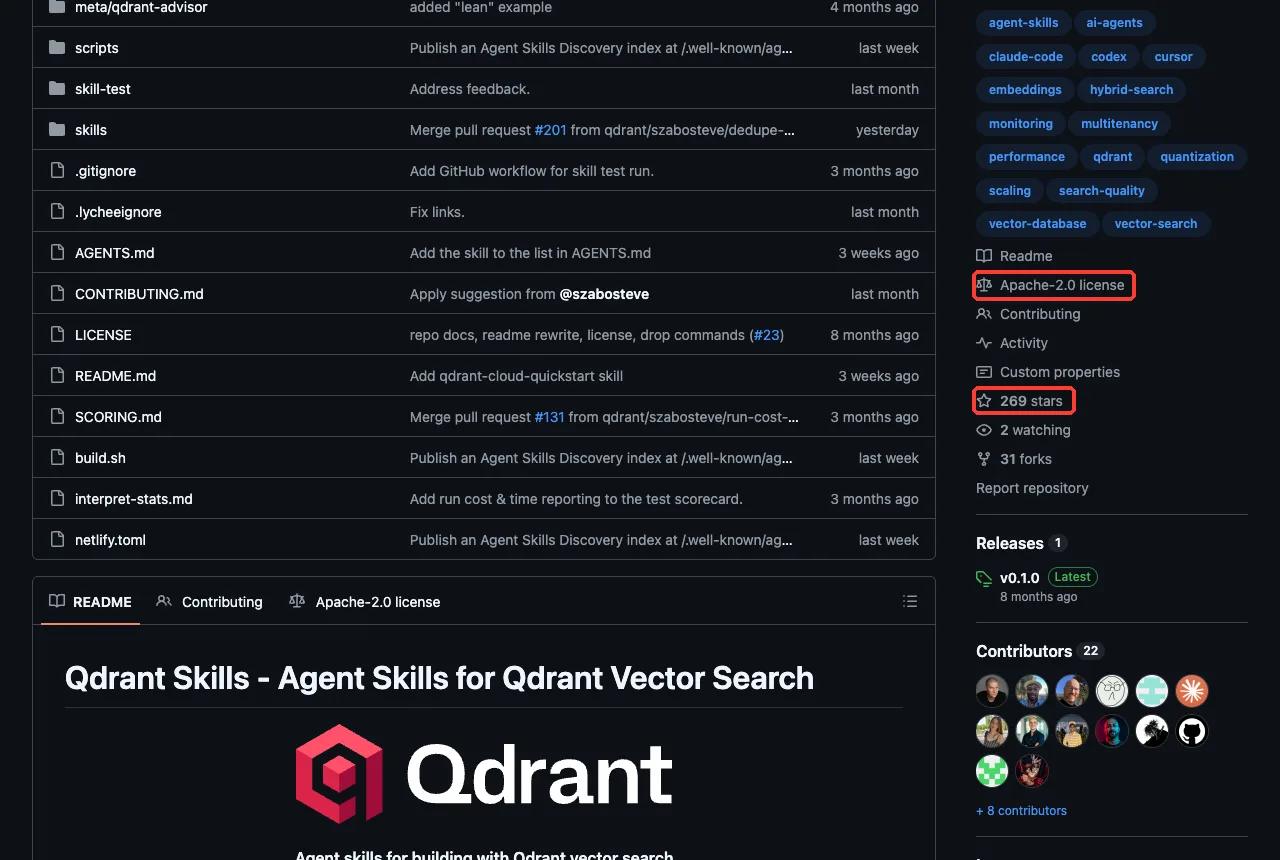
The repo looked active. Its latest commit was two days old, it has 22 contributors, and the license is Apache-2.0. Its only tagged release, v0.1.0, is eight months old, so we pinned the commit instead.
Step 1: Check That the Skills Loaded
Once Claude Code opened, we typed /skills. All 14 skills appeared with the qdrant: prefix, each marked as locked by the plugin.
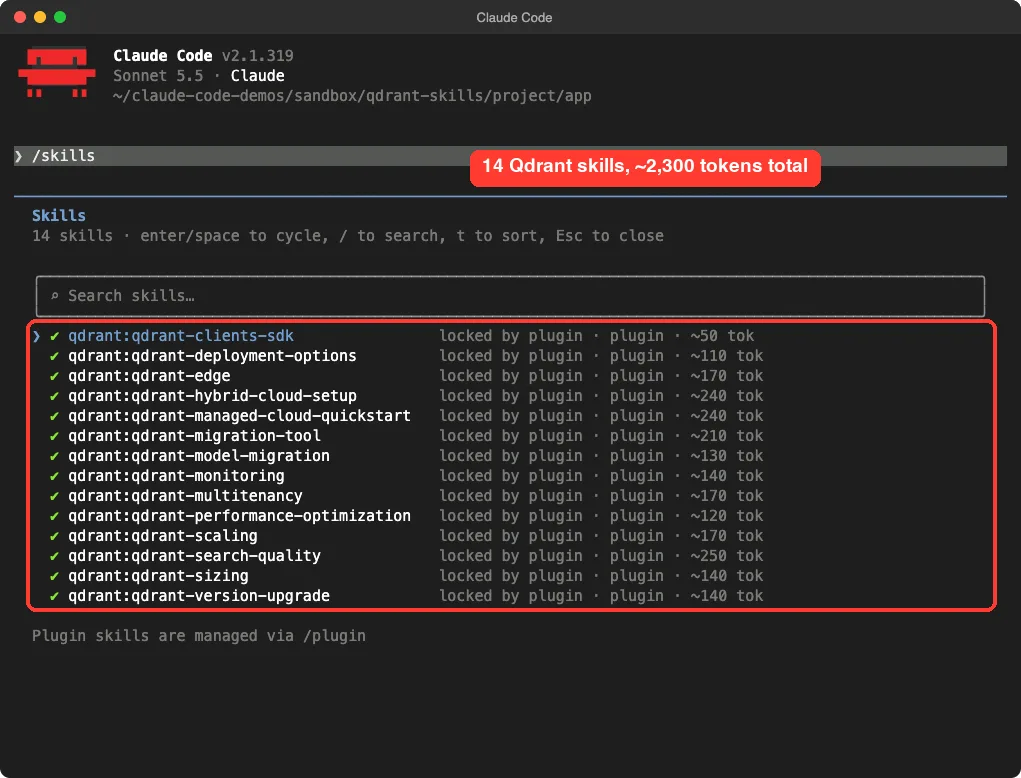
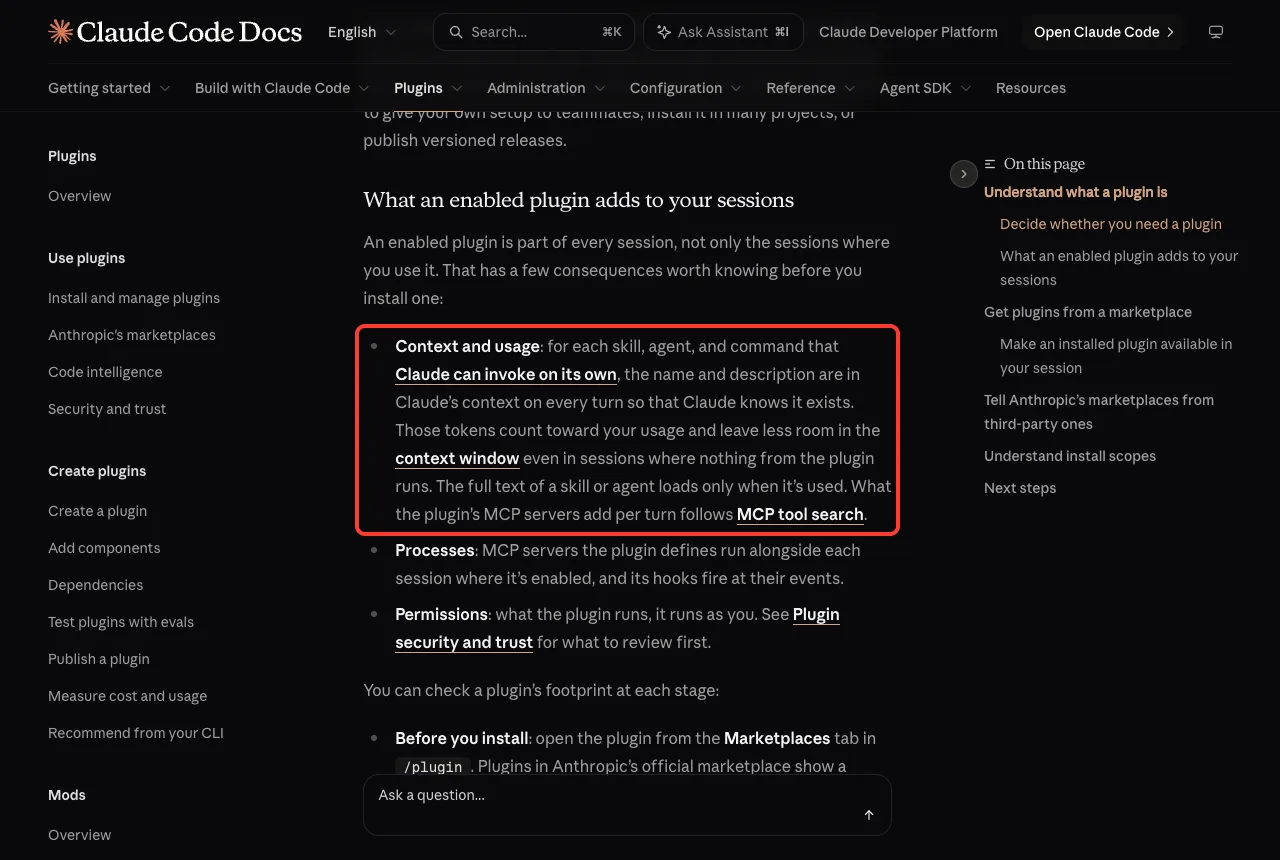
The list also shows a token estimate for each skill. Adding them up gives roughly 2,300 tokens for all 14. The Claude Code docs explain why that matters: for every skill Claude can invoke on its own, the name and description sit in context on every turn, while the full text loads only when the skill is used.
Step 2: Ask a Sizing Question
Our first prompt was a planning question, with no code. We said we would store 5 million support tickets as 768-dimension vectors and asked how much RAM and disk to plan for.
I will store 5 million support tickets as 768-dimension vectors in Qdrant. How much RAM and disk should I plan for? Use the Qdrant skills. Do not run anything, just answer.Claude answered with a table of components and two options. The key numbers from its answer:
- Everything in RAM with no compression: about 16.5 GB of RAM and 22 GB of disk, or roughly 20 GB and 27 to 30 GB with 20 percent headroom.
- With int8 scalar quantization: about 5 GB of RAM for the compressed vectors and indexes, around 6 GB with headroom, and about 30 GB of disk.
- For production, at least 3 nodes with
replication_factor: 2, which doubles the totals.
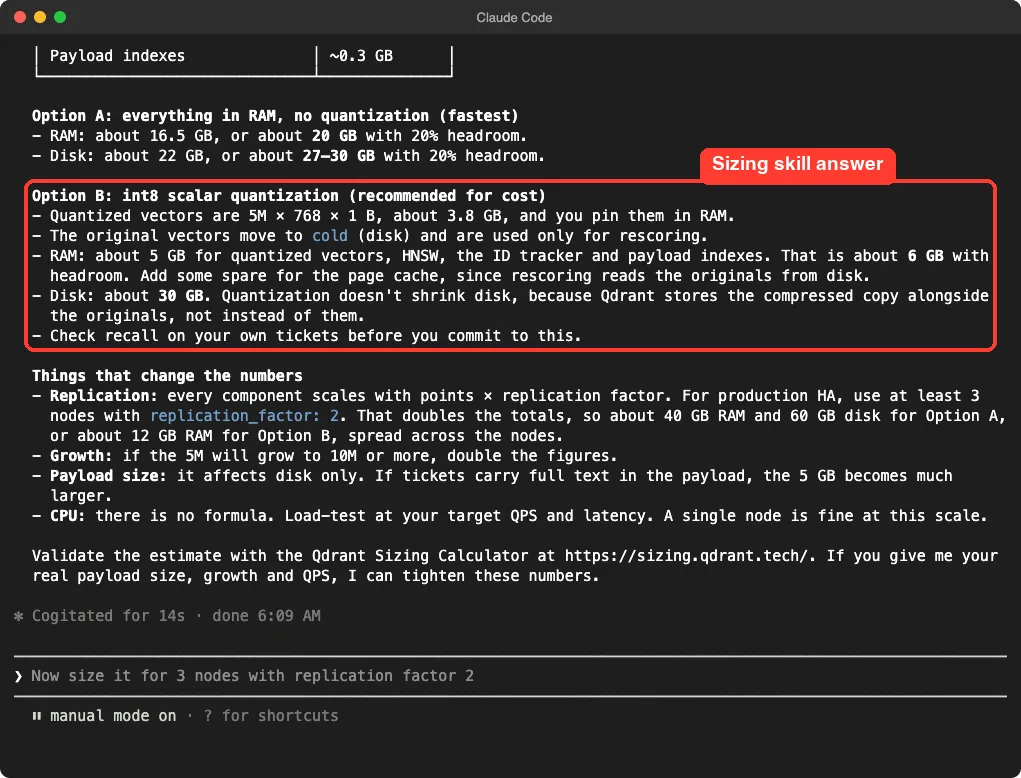
The detail we liked is the disk number.
Claude explained that quantization does not shrink disk, because Qdrant keeps the compressed copy next to the originals. That matches the sizing skill’s own text, which warns that sizing is not just points times dimensions times four bytes. A quick check of the raw math, 5 million times 768 times 4 bytes, gives about 15.4 GB, so the 16.5 GB figure is a sensible starting point once you add indexes.
These are Claude’s estimates from the skill, not measurements from a real cluster. The answer itself said to validate them with Qdrant’s sizing calculator and to load-test for CPU.
Step 3: Build Vector Search With Qdrant and Claude Code
Next we made a small demo folder with a file called tickets.json, holding 20 short support tickets we wrote ourselves, such as a password reset question and a double-charge complaint. We also created a Python environment in that folder and installed qdrant-client and numpy.
We asked Claude to build the search. We said no model downloads, so it had to make simple embeddings itself.
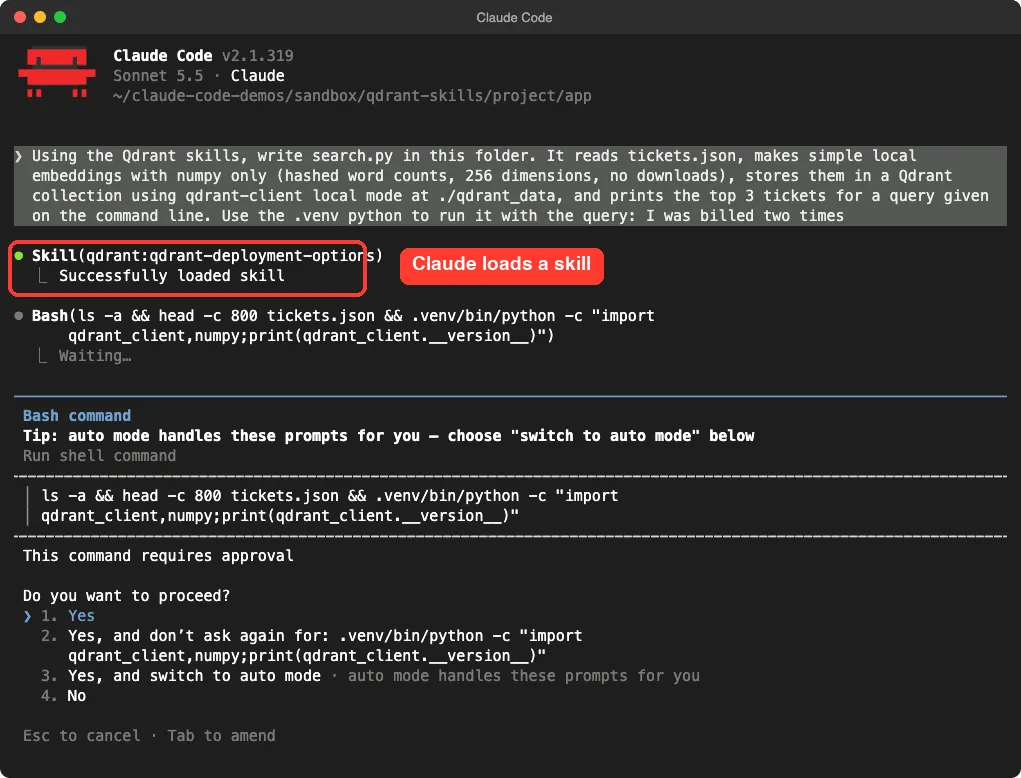
Using the Qdrant skills, write search.py in this folder. It reads tickets.json, makes simple local embeddings with numpy only (hashed word counts, 256 dimensions, no downloads), stores them in a Qdrant collection using qdrant-client local mode at ./qdrant_data, and prints the top 3 tickets for a query given on the command line. Use the .venv python to run it with the query: I was billed two timesThe first thing Claude did was load a skill, qdrant-deployment-options. Claude Code showed it as a skill call, then moved on to inspect the folder.
Then it wrote search.py, 54 lines, and asked before running it. We used the accept-edits permission mode, so file writes went through, but shell commands still needed a yes from us.
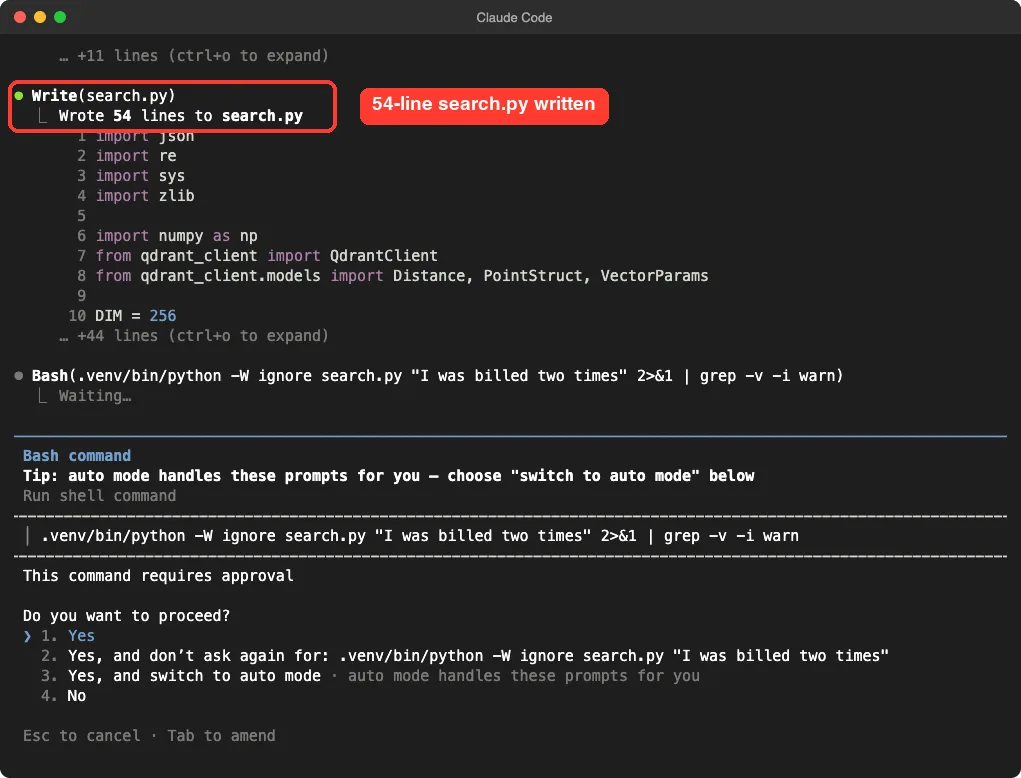
The core of the script is short. This is the part that talks to Qdrant:
client = QdrantClient(path="./qdrant_data")
client.create_collection(
    "tickets", vectors_config=VectorParams(size=256, distance=Distance.COSINE)
)
client.upsert("tickets", points=[
    PointStruct(id=t["id"], vector=embed(t["text"]).tolist(), payload=t)
    for t in tickets
])
hits = client.query_points("tickets", query=embed(query).tolist(), limit=3).points
Claude also told us why it chose local mode: the deployment skill recommends it for prototypes, and it warned that the local data format does not work with a Qdrant server, so you should not use it for production. That is a useful guardrail, and it came from the skill, not from our prompt.
Step 4: When the Results Were Bad
The script ran, and the results were poor. For the query “I was billed two times”, the top three were:
- Score 0.316: ticket 20, “Search inside the app ignores words with accents.”
- Score 0.283: ticket 13, “I was charged twice for the same plan this month.”
- Score 0.270: ticket 10, “Where can I download last year’s invoices as PDF files?”
The right answer, ticket 13, came second behind an unrelated ticket.
That is not a bug in Qdrant. Our fake embeddings only match identical words, and “billed” is not “charged”. We kept this result on purpose, because it is the best test of the next skill.
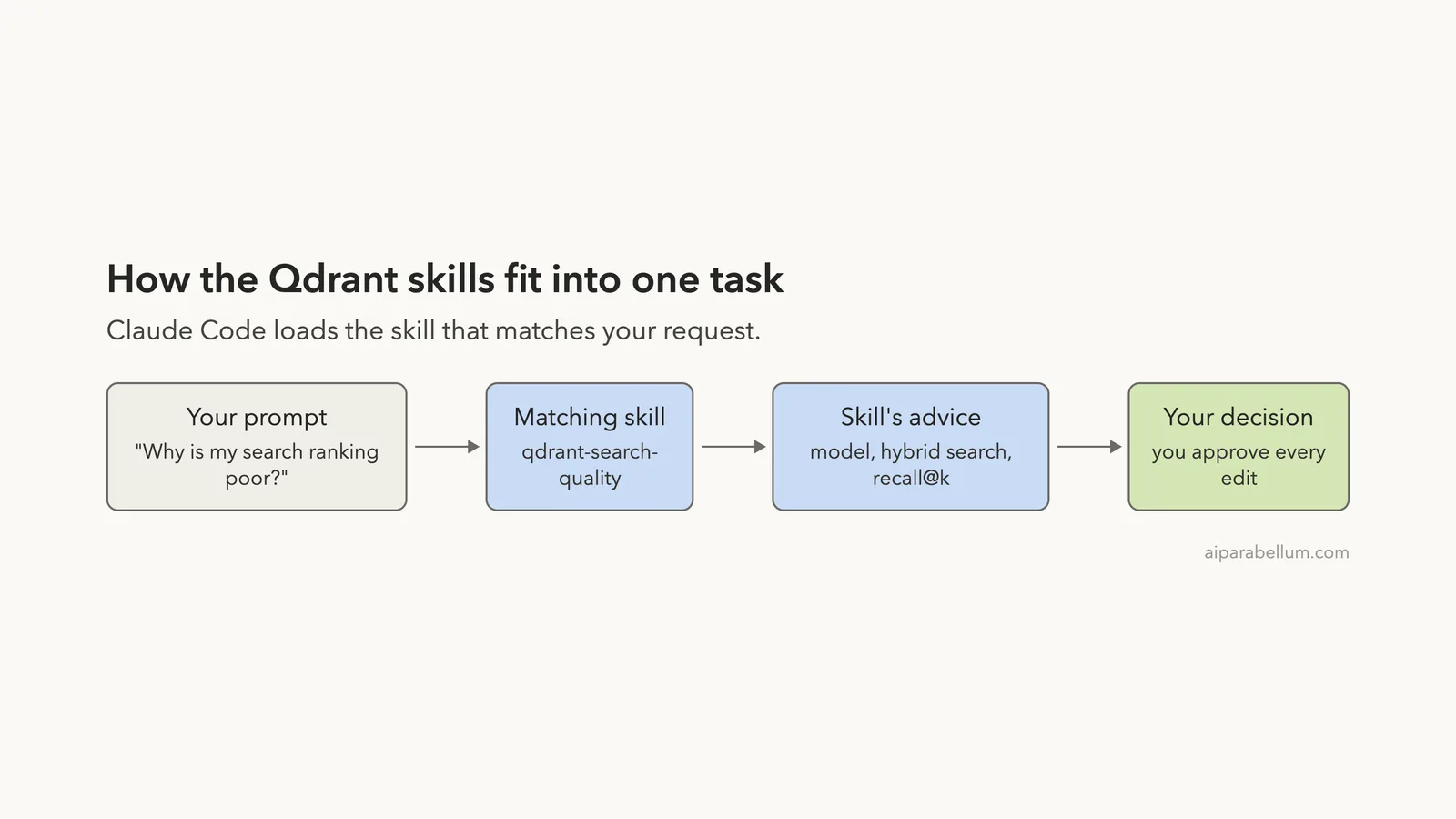
So we opened a fresh session and asked Claude to run the search and then use the Qdrant skills to explain the ranking and give two fixes. Claude Code asked before using the qdrant-search-quality skill, showing the skill description first.
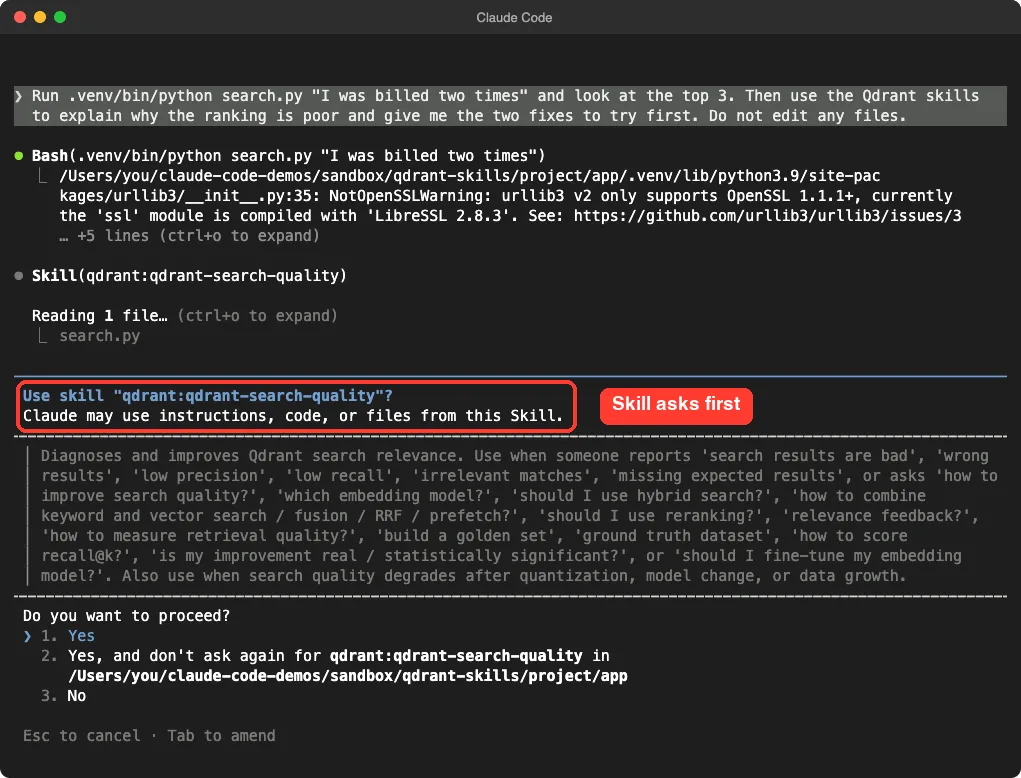
After we approved, Claude read the skill and then checked its own theory with a small read-only script before answering. Its diagnosis listed three causes: no synonyms, hash collisions in 256 slots, and common words like “I” and “was” counting as much as real words. It also said, honestly, that it had not verified which words collided.
It then made a point from the skill: with a small local collection, approximate search settings are not the cause, so tuning them would not help. If exact search returns the same bad order, the skill says the problem is the model or the data.
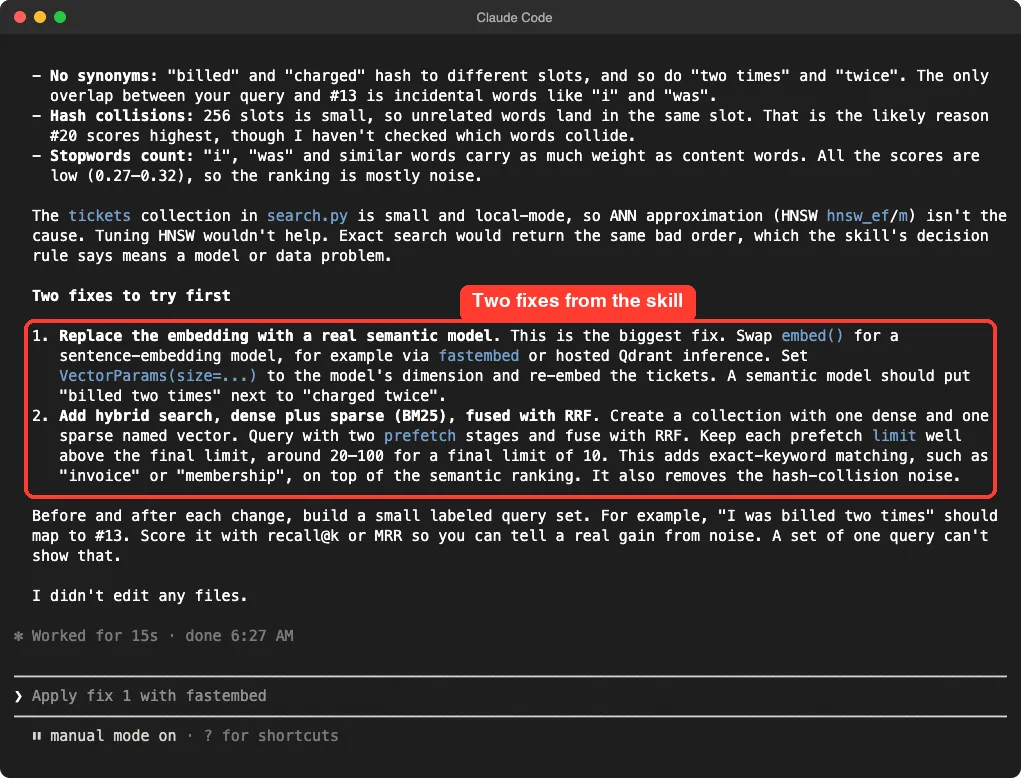
The two fixes were:
- Replace the embedding with a real semantic model, for example through
fastembed, and re-embed the tickets. - Add hybrid search with a dense vector and a sparse BM25 vector, merged with reciprocal rank fusion, so exact words like “invoice” still count.
Claude also advised building a small labeled query set and scoring it with recall at k or MRR, because one query cannot show a real gain. We did not apply either fix. We only tested the diagnosis, so we cannot say how much each fix would improve this data.
How the Pieces Fit Together
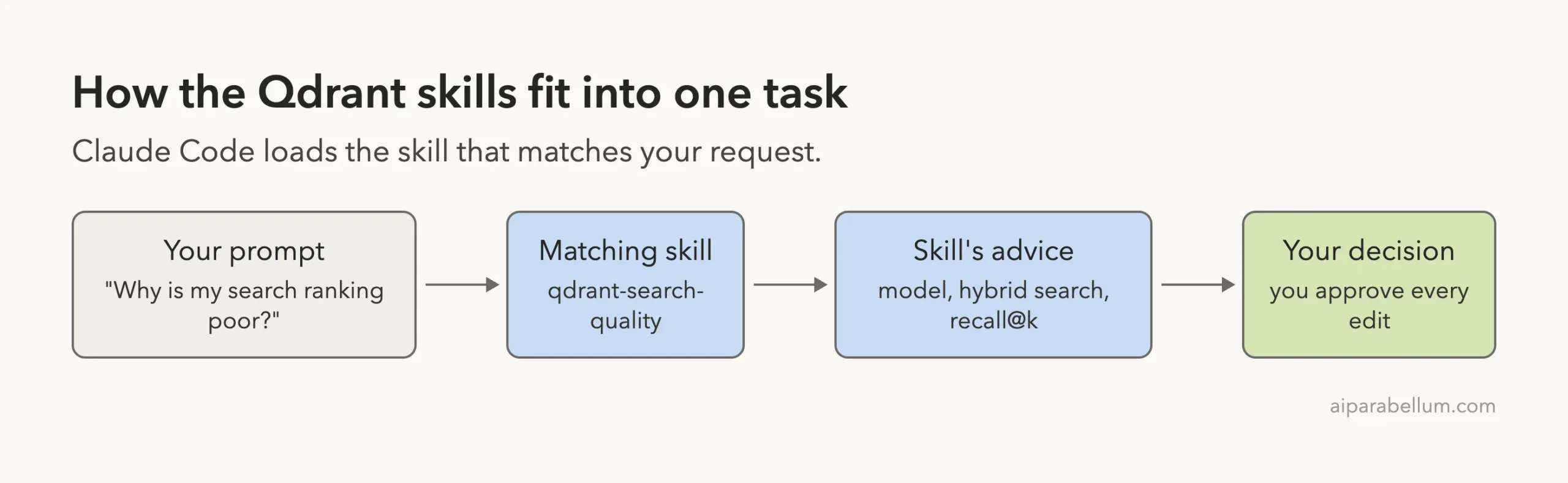
The skills do not run anything on their own.
They are text that Claude reads when your request fits. That text shaped three of our answers: the sizing math, the choice of local mode, and the diagnosis. You still approve every command and edit.
What Worked and What Did Not
| Worked well | Watch out for |
|---|---|
| Sizing answer used the right parts: vectors, indexes, replication and disk | The numbers are estimates, not measurements from a cluster |
| Claude chose local mode and warned it is not for production | We never ran a real Qdrant server |
| Bad results got a reasoned diagnosis, not random tuning | We did not apply or measure the suggested fixes |
| Only Markdown files, no hooks and no MCP servers | Skills point Claude at a docs website, so check which commands you approve |
Who Should Install the Qdrant Skills
They suit developers who are building or running vector search, even a small one. They help most with decisions that are easy to get wrong early, such as how much memory to buy, which mode to use and why results look off.
If you only want to query a database, they will add little. Our MongoDB plugin test shows a tool-based approach, and our Redis plugin test shows another skills-first one. If you are unsure how skills differ from plugins and subagents, read our skills versus plugins explainer.
Why Skills Beat a Plain Prompt for Vector Search
You can ask Claude about Qdrant without any plugin, and it will often do fine. The difference is that a skill puts the same rules in front of Claude every time, and it keeps those rules close to the current Qdrant docs.
That matters for facts that change between versions. The sizing skill tells Claude to read the official capacity formulas instead of estimating from memory. In our test, Claude’s answer included the quantization detail that most quick estimates miss.
The cost is small. All 14 skills together add roughly 2,300 tokens of descriptions to each turn. The full text of a skill loads only when it is used.
One limit is worth saying out loud. A skill cannot know your data. Our test showed it clearly: the skill explained why a hashing trick failed, but only a real model and a labeled query set can show whether the fix works for your tickets.
Try It Yourself
Make a folder with 20 short sentences in a JSON file, create a Python environment, and install qdrant-client and numpy. Load the plugin in that folder and use this prompt:
Using the Qdrant skills, build a tiny search over my sentences with qdrant-client local mode. Run one query, then tell me why the top result is or is not the best match.Then ask for the two fixes and read each change before you approve it.
Common Mistakes
- Installing into your main setup before you have read the repo’s files.
- Using local mode data in production. Claude warned us that a server cannot read that format.
- Judging a search from one query. Build a small labeled set first.
- Tuning index settings when the real problem is the embedding model.
- Approving shell commands without reading them.
Pro Tips
- Run
/skillsto confirm what loaded before you start. - Name the skill in your prompt when you want a specific one used.
- Ask for a diagnosis first and edits second, so you can compare.
- Ask for the sizing before you pick hardware, and size for the vectors you expect in a year.
Cheat Sheet
Frequently Asked Questions
Do the Qdrant skills need a Qdrant account?
Not for anything we ran. The cloud skills are written for Qdrant Cloud and hybrid cloud, so check each one before you rely on it.
Do the skills install Qdrant on my computer?
No. They add guidance to Claude Code. You still need Qdrant itself, either as a server, in the cloud, or through the Python client’s local mode.
How do I install the Qdrant skills for good?
Use /plugin install qdrant-skills@claude-plugins-official. For a one-session trial, load the cloned folder with --plugin-dir.
Is the plugin safe to load?
We read its files first. It holds only Markdown skills and no hooks or servers. You should still read any plugin yourself before loading it.
Which skills should a beginner start with?
Start with qdrant-deployment-options, qdrant-clients-sdk and qdrant-sizing. Add qdrant-search-quality as soon as your first results look wrong.
Conclusion
The Qdrant skills turned loose questions into a careful sizing answer, a sensible choice of local mode and a reasoned diagnosis of poor search results, with every command shown for approval. We never ran a real server or measured the suggested fixes, so treat the output as a strong starting point and test it on your own data before relying on it.