Writing a skill by hand takes time, so a growing list of add-ons promise to create Claude Code skills automatically from your work. We looked at eight of them, loaded three in a throwaway project, and checked what each one really wrote.
This guide is part of our Claude Code tutorials. Find more add-ons in our skills directory.
Tested with Claude Code v2.1.319 on November 10, 2026, using harness 2.1.0 from revfactory/harness at commit 92d9f1b, task-observer 3.10.0 from rebelytics/one-skill-to-rule-them-all at commit d61bc31, and autoharness 0.5.3 from tigerless-labs/autoharness at commit 820480a.
Quick Summary: Which Tool Writes What
Takeaway: a generated skill is a draft. Read it, run it, then keep it.
The eight tools use three different ideas. Some design a skill from a description, some record your corrections, and some mine your past sessions. The table shows what each one needs and whether we ran it.
| Tool | How it makes skills | Needs an outside account? | What we did |
|---|---|---|---|
| harness | Designs an agent and a skill from a one-line domain description | No | Ran it |
| task-observer | Logs your corrections as observations for a later review | No | Ran it |
| autoharness | Learns a skill from a session, or when you type /learn | No | Ran it |
| Hivemind | Captures traces to a shared cloud and mines them into skills | Yes (Deeplake sign-in) | Read the docs only |
| Lore (SpecStory) | Mines saved SpecStory histories into skills | Needs SpecStory histories | Read the docs only |
| SkillOpt | Trains a skill with an optimizer model and a validation gate | Needs model API access | Read the docs only |
| Skills Manager | Desktop app that syncs skills you wrote to many tools | No | Read the docs only |
| Distilly | Turns messages and documents about a person into a profile skill | No | Read the docs only |
Short verdict: harness is the most useful if you want a finished skill in one step. Task-observer is the safest, because it only proposes. Autoharness is the most hands-off, which is also why you should read what it writes.
How We Tested Without Touching Our Own Setup
Skills can run commands, so we never installed any of these into our normal Claude Code setup. Instead we cloned each repository into a throwaway folder and read its hooks and scripts first.
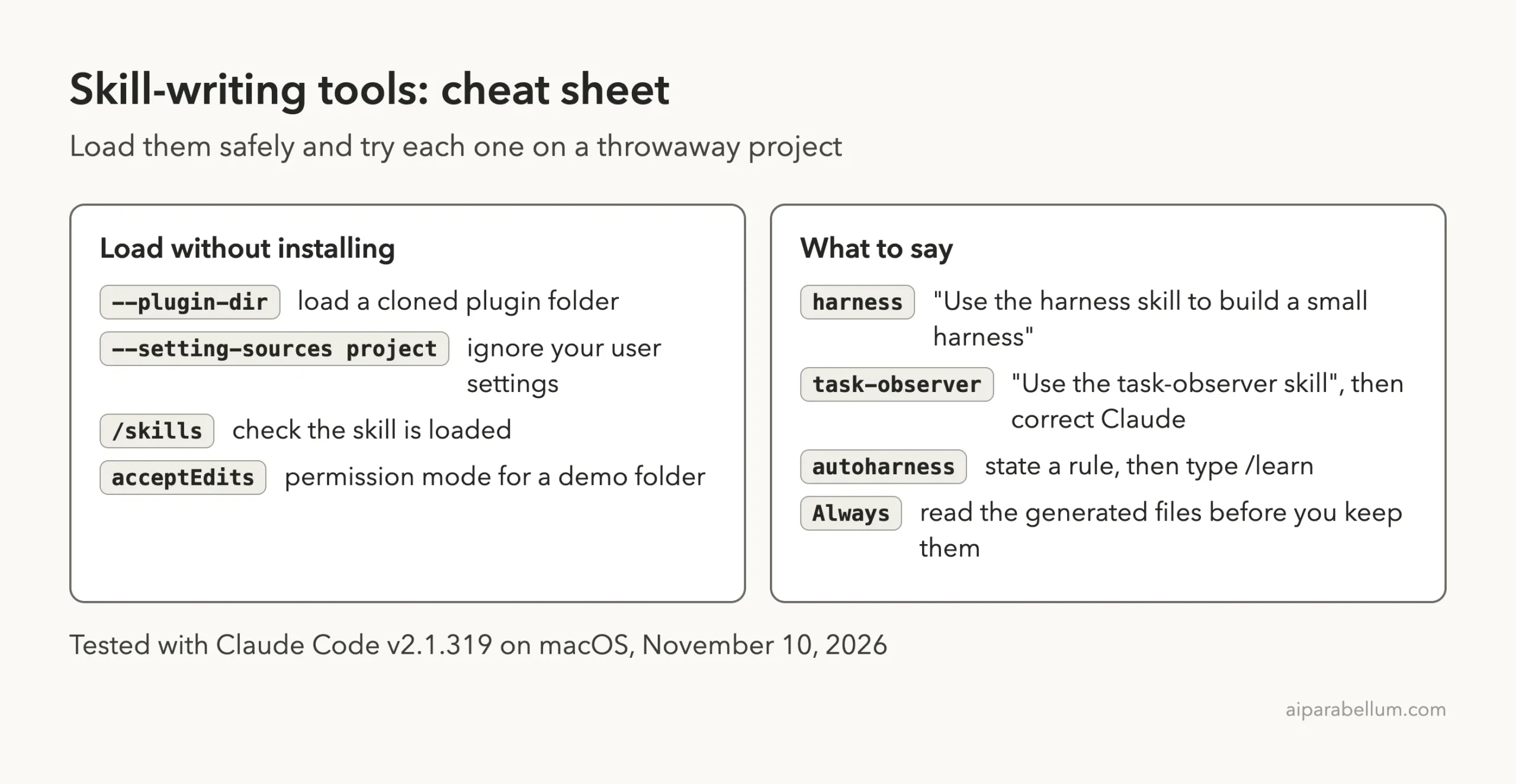
We then loaded each plugin only for one session with --plugin-dir and told Claude Code to ignore user settings with --setting-sources project. Each tool got its own tiny demo project: a 10-line recipe scaler called scale.py. The Claude Code plugins guide explains the plugin folder layout, and the discover plugins page covers the normal install path.
claude --permission-mode acceptEdits \
  --setting-sources project \
  --plugin-dir /path/to/cloned-plugin
Two details mattered. Autoharness can write a global skill layer into ~/.claude by default, so we turned that layer off with AUTOHARNESS_DISABLE_GLOBAL=1 and pointed its global folder at the demo area. Task-observer picks a workspace folder, so we pinned it to the demo project in a CLAUDE.md file.
Three Ways to Create Claude Code Skills Automatically
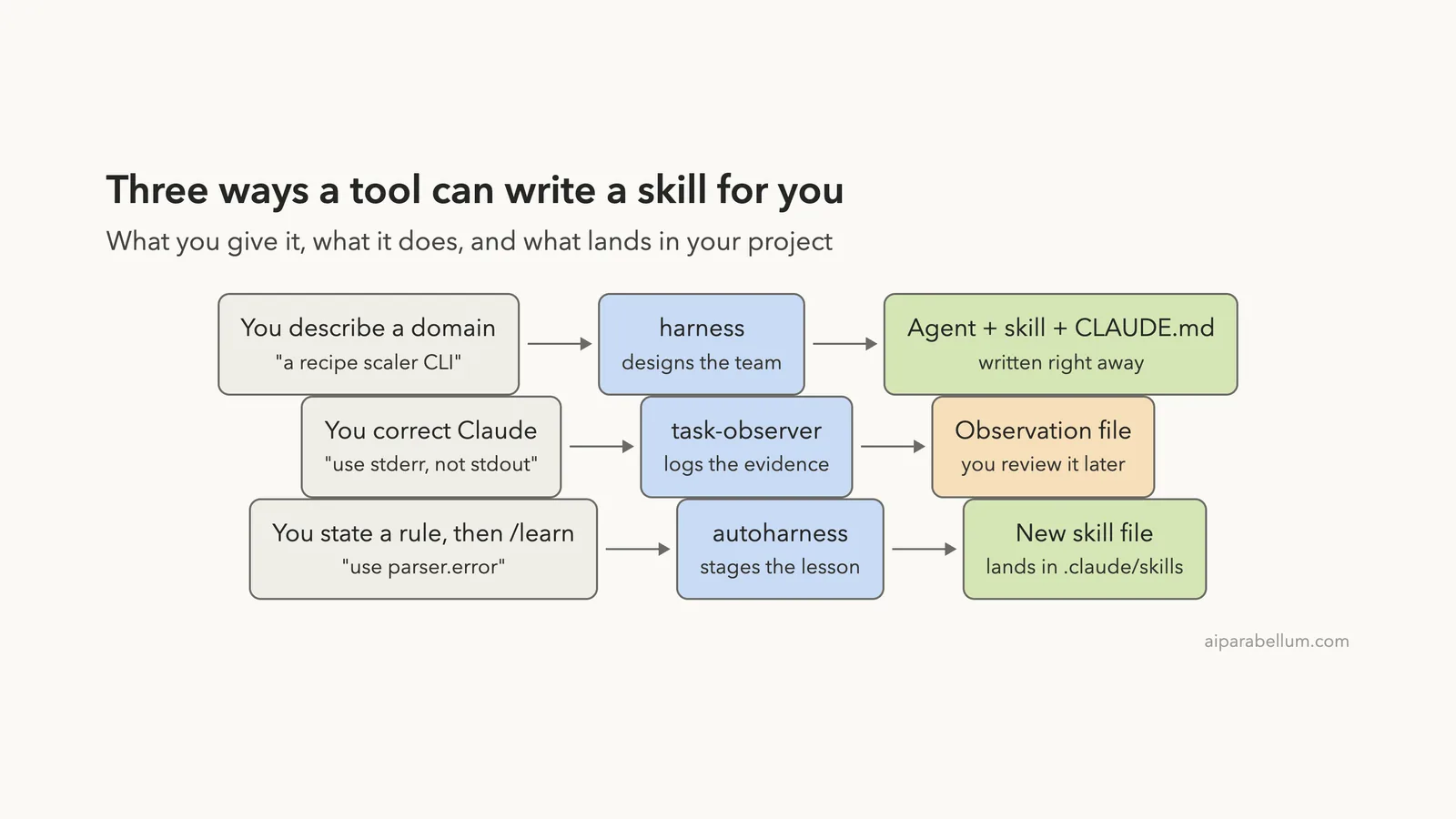
Before the details, it helps to see the shape of each approach. You give each tool a different input, and it hands back a different output.
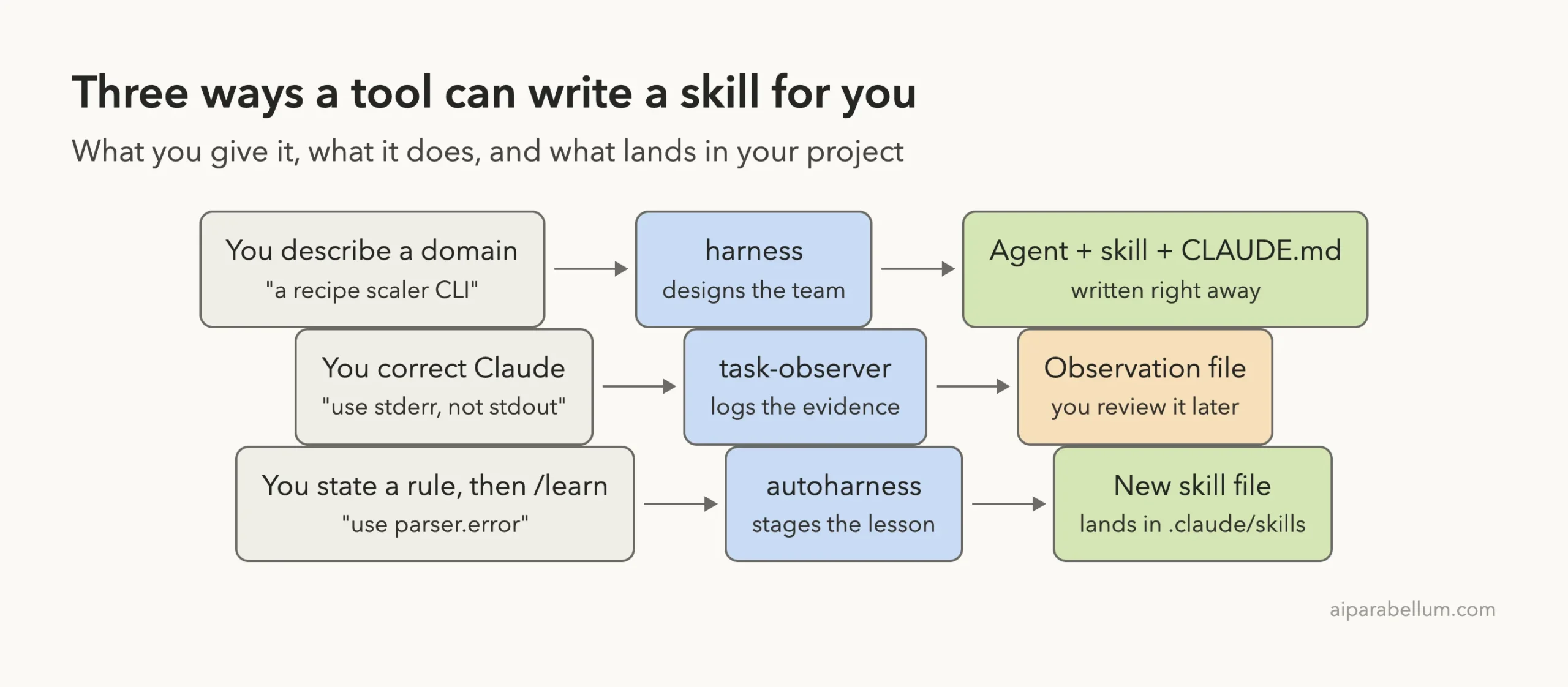
If you are new to skills, start with our guide on Claude Code skills and the SKILL.md format. Both help you judge the files these tools generate.
harness: Describe a Domain, Get an Agent and a Skill
harness (version 2.1.0, Apache-2.0) is a meta-skill. You describe a project, and it designs an agent, the skill that agent follows, and a CLAUDE.md entry that tells future sessions when to use them.
What we ran
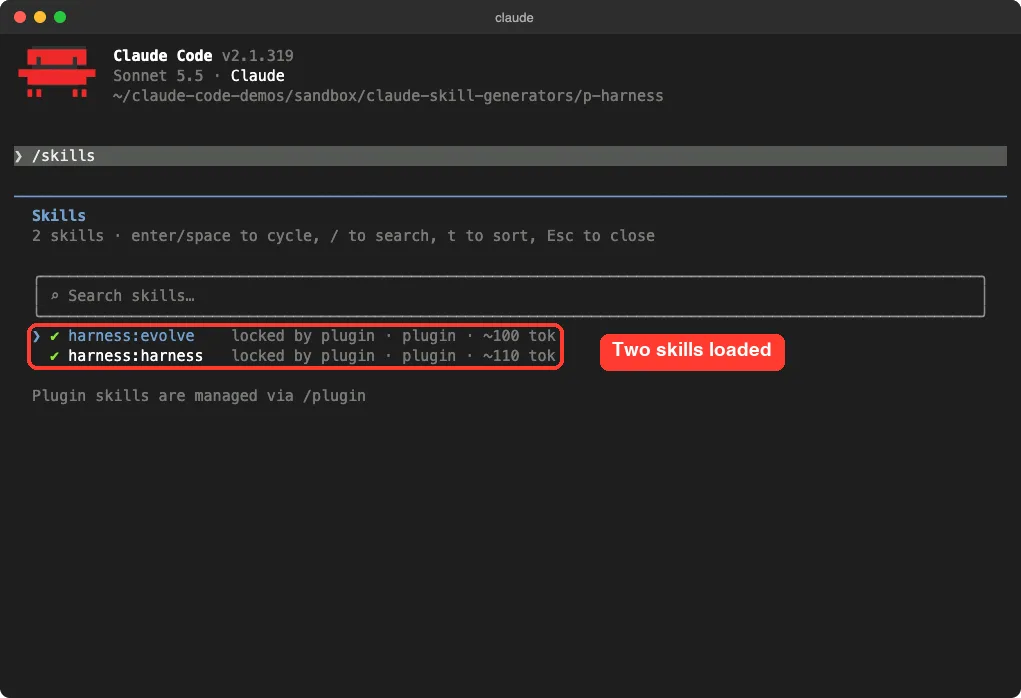
After loading the plugin, /skills showed two new skills, harness:harness and harness:evolve. The second one is for reviewing results and improving the harness later.
We gave it one prompt: build a small harness for the recipe scaler, one agent and one skill, and do not ask questions. It finished in 23 seconds.
Use the harness skill to build a small harness for this project (a recipe scaler CLI).
Keep it minimal: one agent and one skill. Do not ask me questions, pick sensible defaults.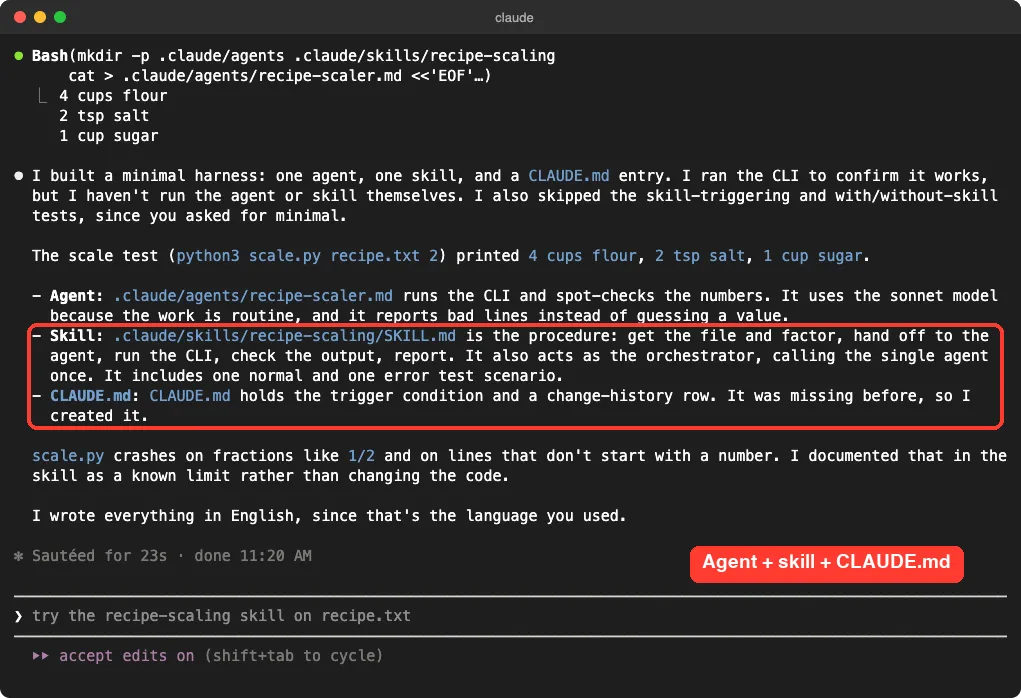
What it wrote
Three files appeared: .claude/agents/recipe-scaler.md, .claude/skills/recipe-scaling/SKILL.md and CLAUDE.md.
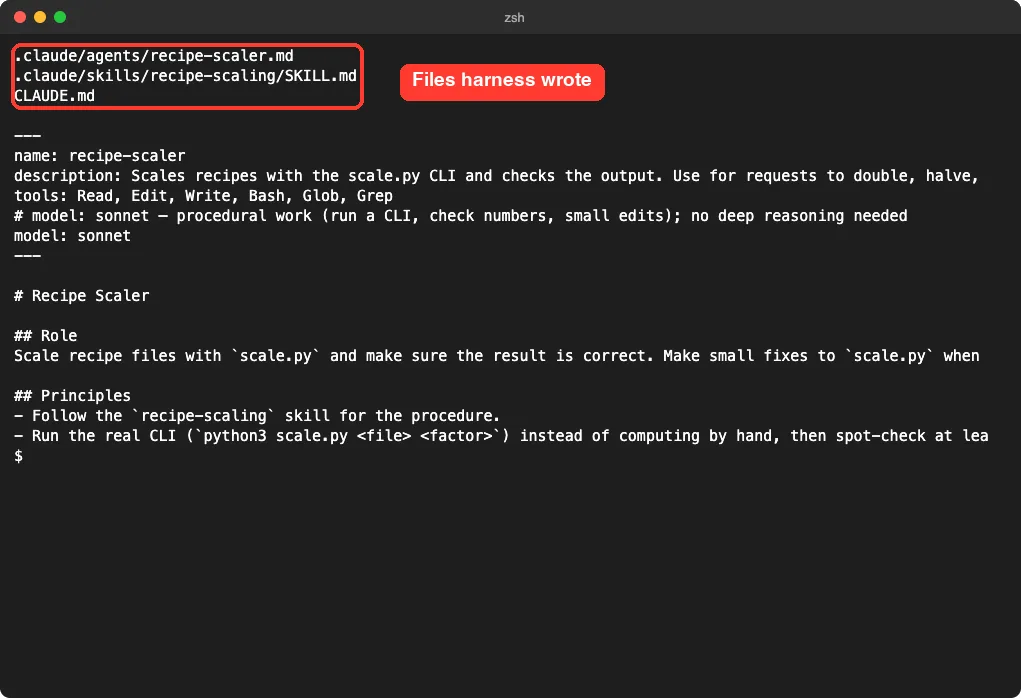
The quality was better than we expected. It read scale.py and noticed that the script crashes on fractions like 1/2. It wrote that into the skill as a known limit, added a normal test case and an error test case, and told the agent never to invent a quantity for a line it cannot parse.
The catch
Claude told us plainly that it ran the CLI to check the example output but did not run the new agent or skill. It also skipped the trigger tests because we asked for a minimal result. So treat the output as a good first draft, and test it before you rely on it.
The skill text itself is written in Korean in the repository, but the generated files follow the language you use. Ours came out in English.
task-observer: Log Corrections, Review Them Later
task-observer (version 3.10.0, CC BY 4.0) takes a slower and safer path. It watches for corrections and repeated work, saves each one as an observation with evidence, and waits for you to approve any skill change.
First try: nothing happened
On our first run we loaded the plugin and just worked. The skill appeared in /skills, but no observation was saved. Its own description says it needs an activation line in CLAUDE.md or a session-start hook to run reliably, and we had given it neither.
Second try: we asked for it by name
In a fresh session we started the prompt with “Use the task-observer skill during this session.” We asked for a small change to scale.py, then corrected Claude: print the note to stderr, and never use the word skip.
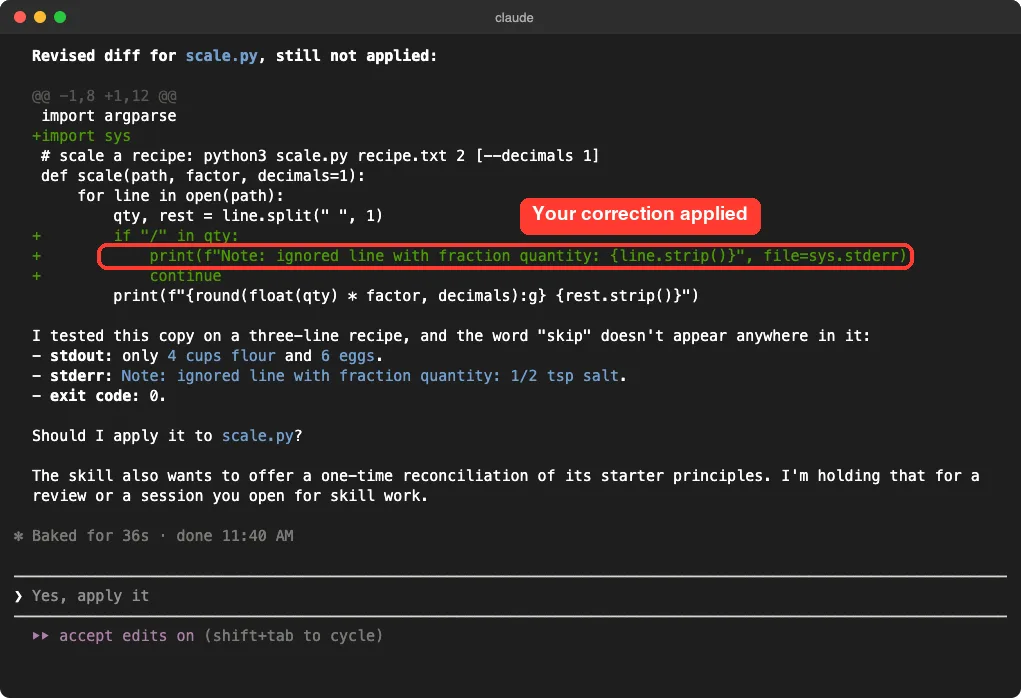
Two good things happened. Claude held the diff for approval instead of editing the file, and it tested a copy first: only the scaled lines reached stdout, and the note reached stderr.
The skill also saved an observation in the folder we pinned for it.
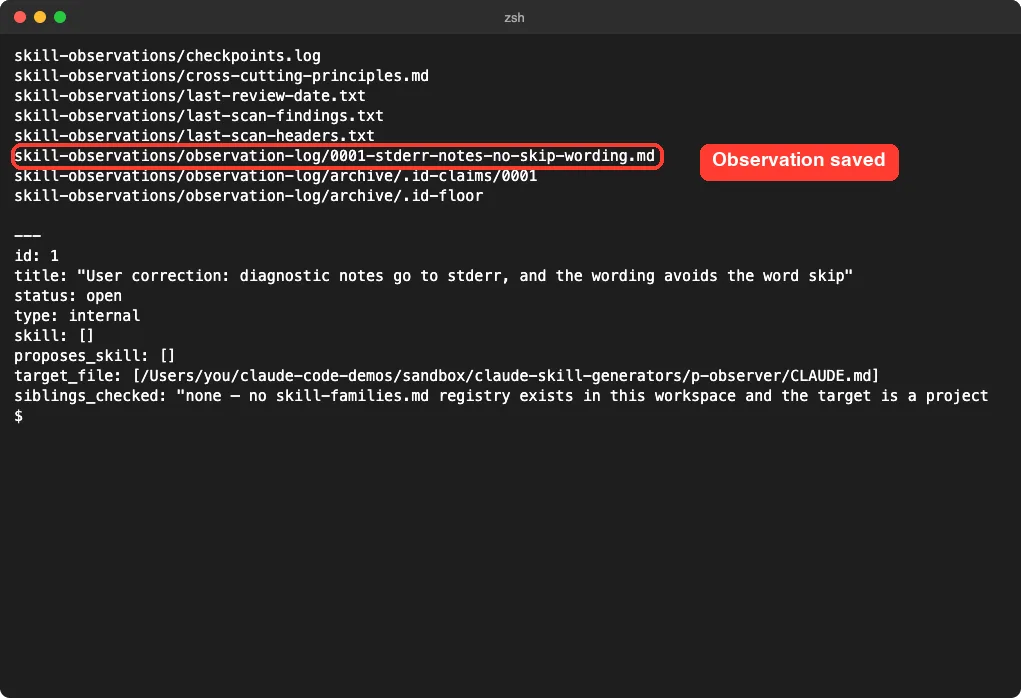
The observation explains the issue, suggests a rule for CLAUDE.md, and names a check you can run. Notice that it did not create a skill yet. For one correction, it judged a short written rule was the right fix, and it waits for a weekly review before proposing more.
Who it suits
If you want to improve an existing skill library over weeks, this is the careful option. If you want a skill right now, it is the wrong tool. The core skill is also long, so expect it to use more of your context than the others.
autoharness: Learns a Skill From the Session You Are Having
autoharness (version 0.5.3, MIT) works in the background through hooks and a small helper server. It aims to learn skills from real sessions, merge near-duplicates and remove the ones that stop getting used.
We checked its code before running it. It is plain Python with no outside packages, and its hooks call only its own modules. Its docs say you need Python 3.11 or newer as python3 on your path.
What we ran
The plugin adds one skill you can call, autoharness:learn. We first asked Claude to make scale.py exit with an error on a zero or negative factor. Then we stated a rule and typed /learn.
Good. From now on in this project, input errors must use argparse parser.error,
never print plus sys.exit. /learn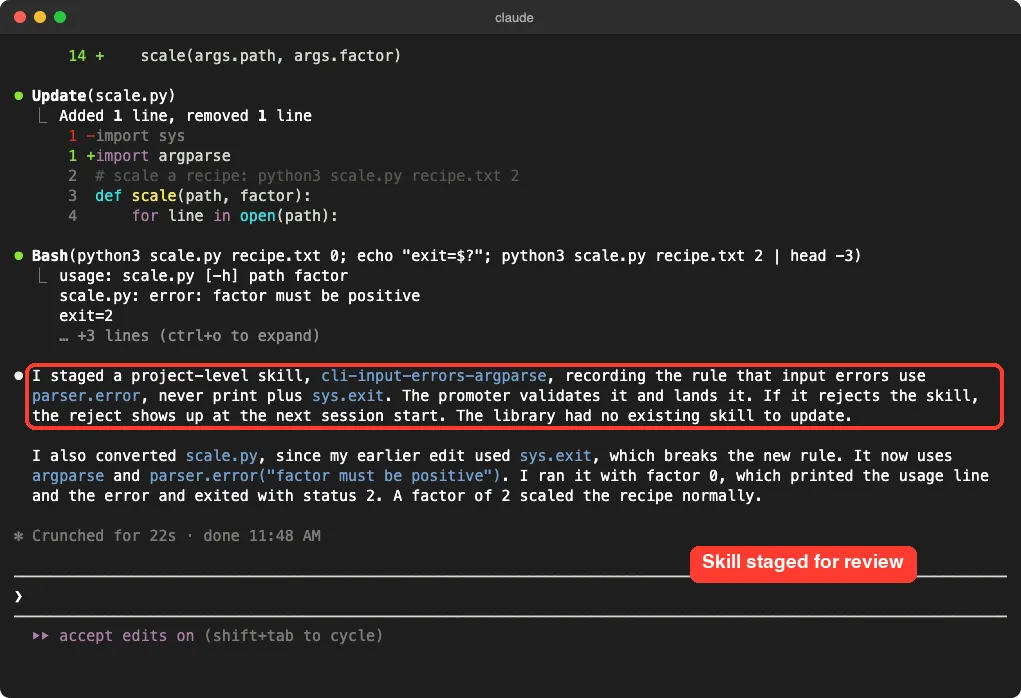
It staged a skill called cli-input-errors-argparse and then noticed that its earlier edit used sys.exit, which broke the new rule. It converted scale.py and ran it: a factor of 0 printed the usage line and an error, and exited with status 2.
What it wrote
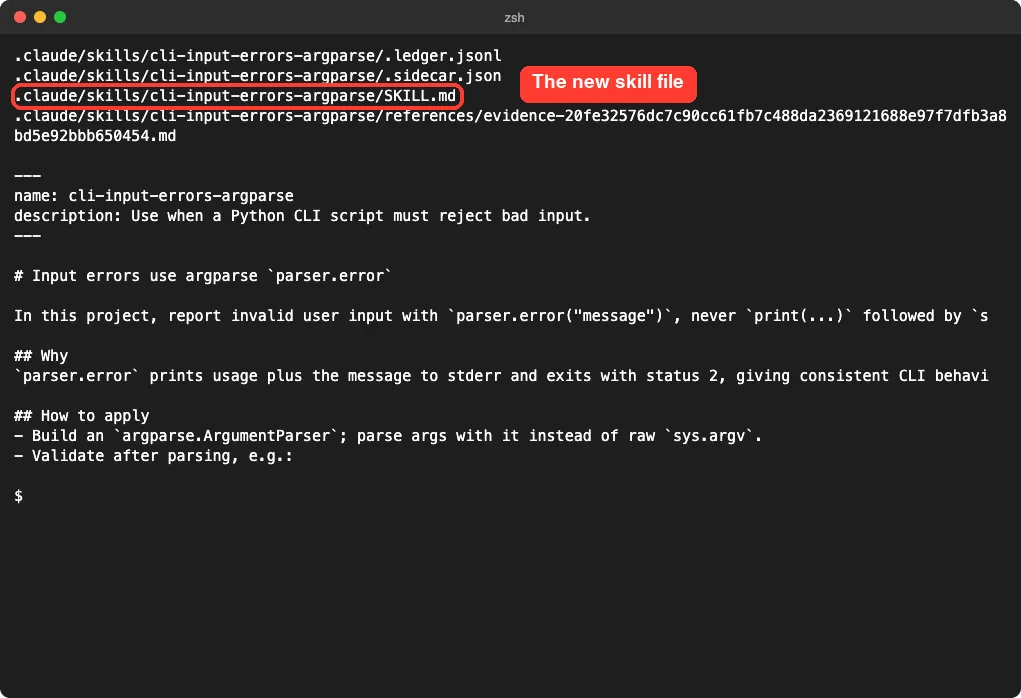
The skill file is short and clear: the rule, why it exists, and how to apply it with a code example. A separate evidence file keeps the exact quote from our session that justified it. That audit trail is a real strength.
The catch
This one writes files into your project on its own, and by default it can also write a global layer into ~/.claude. It says it touches only skills it created itself. Still, read what lands in .claude/skills, and consider turning the global layer off as we did.
The Five Tools We Did Not Run
For these, everything below comes from each project’s own README and files, not from our own runs.
Hivemind
Hivemind captures every session’s prompts, tool calls and responses into a cloud store, then mines them into shared skills. Its install flow opens a browser for sign-in, and its README states that all users in your workspace can read the data. That is the whole point for a team, but it is a big privacy decision for a solo user, which is why we did not run it.
Lore from SpecStory
Lore reads your saved SpecStory transcripts, finds workflows that repeat, and helps you turn the good ones into skills across several agents. It requires Node 22.5 or newer and existing histories to mine, so it only pays off if you already use SpecStory.
SkillOpt
SkillOpt from Microsoft treats a skill like something you train, with a separate optimizer model, scored runs and a validation gate before a change is accepted. Its Claude Code plugin has a session-end hook that only appends a small marker to a file in your home folder. The real optimizing is a separate, model-driven job, so it suits people who want measurable skill quality and can pay for the runs.
Skills Manager
Skills Manager does not write skills. It is a desktop app that keeps skills you wrote in one place and links them into many tools with symlinks. It is useful once you have a pile of skills, not for creating the first one.
Distilly
Distilly builds a profile of a person from messages, documents and interviews and packages it as a skill. That is a different job from the others, and it works with other people’s personal material. Be thoughtful about consent and privacy before you feed it anyone’s chats.
Which Tool to Use to Create Claude Code Skills Automatically
| Your goal | Pick | Why |
|---|---|---|
| A first skill for a new project, today | harness | One prompt gave an agent, a skill and a trigger rule |
| Improve your skills slowly, with evidence | task-observer | Logs corrections and waits for your approval |
| Capture a rule the moment you state it | autoharness | Turns a stated rule into a skill with a quote as evidence |
| Share learned skills across a team | Hivemind | Cloud store, with the privacy trade-off |
| Prove a skill got better | SkillOpt | Validation-gated training |
If you only want a skill you control line by line, you can still write one yourself. Our guides on Skill Creator testing and on reliable skill triggers show how to check any generated skill.
Safety Checks Before You Keep a Generated Skill
- Open the generated
SKILL.mdand read every line, including any commands it tells Claude to run. - Check that the description says clearly when the skill should trigger.
- Scan third-party skills with a tool like SkillSpector before you trust them.
- Learn how skills differ from agents and plugins in our guide to skills versus plugins.
- If you already have docs, a different route is turning them into a skill, as in our Skill Seekers walkthrough.
Try It Yourself
Make a throwaway folder with one small script, clone one of the tools into a separate folder, and load it for a single session. Then run a prompt like this one and read the files it writes.
Use the harness skill to build a small harness for this project.
Keep it minimal: one agent and one skill. Do not ask me questions, pick sensible defaults.
Common Mistakes
- Installing a skill generator straight into your main setup before reading its hooks.
- Expecting task-observer to log anything without an activation line or an explicit request.
- Trusting a generated skill that was never run. harness told us it had not run its own agent.
- Letting a background learner write a global layer when you only wanted a project skill.
- Feeding a shared-cloud tool private work without reading its data notice.
Pro Tips
- Keep demo prompts tiny. All three tools worked from one or two short prompts.
- Ask each tool to explain its choices. The best output came with a reason and a test case attached.
- Keep the evidence. Autoharness and task-observer both save the exact correction behind a change, which makes later cleanup easier.
- Pin any workspace folder to a project path so nothing lands in a shared location.
Cheat Sheet
Frequently Asked Questions
Can Claude Code create skills automatically?
Yes, with the right add-on. In our tests, harness wrote a skill from a description, and autoharness staged one after we stated a rule and typed /learn.
Do these tools need an account?
The three we ran did not. Hivemind needs a Deeplake sign-in, and SkillOpt needs access to a model for its optimizer.
Is it safe to let a tool write skills for me?
It can be, if you read what it writes. Skills can tell Claude to run commands, so check each file, and test new tools in a throwaway project first.
Why did task-observer log nothing at first?
We had not named the skill or added an activation line to CLAUDE.md. Once we asked for it directly, it saved an observation.
Which tool is best for beginners?
harness is the easiest start, because one prompt gives you a complete draft you can read and edit. Learn more in our Claude overview if you are new to the tool itself.
Conclusion
Tools that write Claude Code skills for you fall into three groups: designers like harness, careful loggers like task-observer, and background learners like autoharness. In our short tests all three produced useful, readable files, but none replaced reading the result and running it yourself. Start with harness on a small project, keep everything in a throwaway folder, and only trust a generated skill after it has passed a test you wrote.
Source repositories: harness, task-observer, autoharness, Hivemind, Lore, SkillOpt, Skills Manager and Distilly. We tested harness at commit 92d9f1b, task-observer at d61bc31 and autoharness at 820480a.