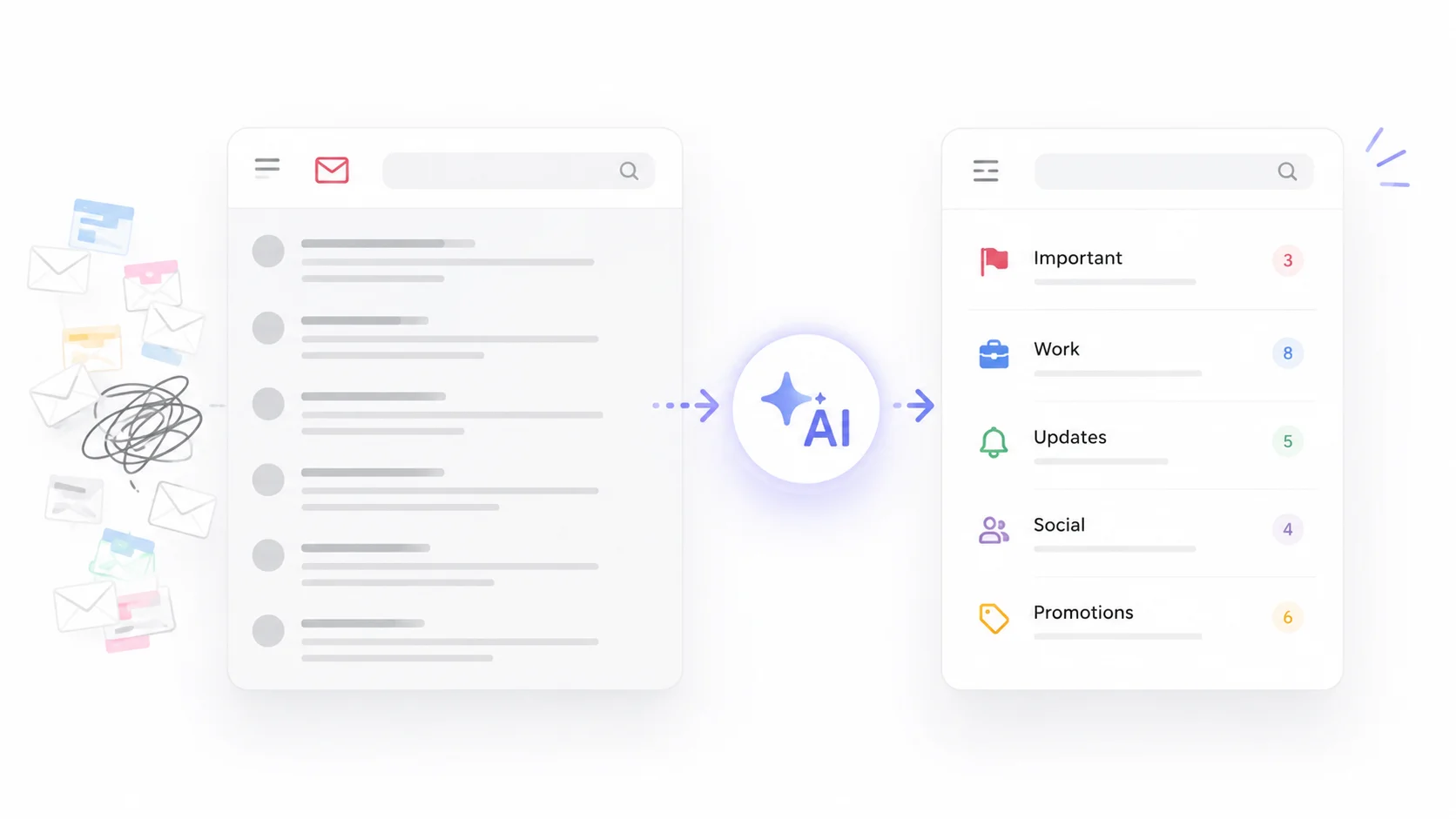
Your inbox has 3,247 unread emails. Some are important client messages buried under a pile of newsletters, promotional offers, and automated notifications. Finding the one email you actually need feels like searching for a needle in a digital haystack.
AI can fix this. Modern AI email tools go far beyond basic spam filtering. They categorize, prioritize, summarize, and even archive emails automatically so your inbox stays clean and manageable without you lifting a finger.
The difference between a chaotic inbox and an organized one is not discipline. It is the right tools.
Why Your Inbox Is a Mess in the First Place
The average professional receives 121 emails per day. That number has been climbing steadily as more tools, platforms, and services send automated messages. Even if you are disciplined about deleting and archiving, the volume alone makes it nearly impossible to stay organized manually.
The problem is not just volume. It is variety. Your inbox contains a mix of urgent messages from colleagues, newsletters you subscribed to months ago and forgot about, order confirmations, calendar invites, marketing emails, and actual spam. Your brain has to process each one to decide what it is and what to do with it.
AI eliminates that mental sorting work. It reads each email, understands its purpose, and takes action based on rules you set or patterns it learns from your behavior.
How AI Email Organization Works
AI email tools use natural language processing and machine learning to understand what each email is about, who sent it, and how important it is to you. Here is what happens behind the scenes.
The AI analyzes the email content, sender history, your past behavior with similar messages, and contextual signals like time sensitivity and keywords. Based on this analysis, it categorizes the email, assigns a priority level, and can take automated actions like archiving, labeling, or moving it to a specific folder.
The more you use these tools, the smarter they get. They learn which senders you always read immediately, which newsletters you never open, and which types of emails need your attention versus those that can wait. This kind of intelligent sorting is one reason AI-powered personal assistants have become essential for professionals managing high email volumes.
AI Email Organization Tools Compared
Several AI tools specialize in inbox management. Here is how they stack up.
| Tool | Platform | Key Feature | Price |
|---|---|---|---|
| Gmail AI Features | Gmail | Smart categories, priority inbox, nudges | Free |
| Microsoft Copilot | Outlook | Email summaries, prioritization, drafting | $30/user/month |
| Superhuman | Gmail, Outlook | AI triage, split inbox, instant reply | $30/month |
| SaneBox | Any email provider | AI filtering, SaneLater folder, digest | $7/month |
| Clean Email | Any email provider | Bulk cleanup, auto-rules, unsubscribe | $10/month |
| Shortwave | Gmail | AI summaries, bundles, instant search | Free / $9 month |
Gmail and Outlook’s built-in AI features are good starting points if you do not want to add another tool. For more advanced organization, SaneBox and Superhuman offer the most powerful AI-driven inbox management.
Using Gmail AI to Organize Your Inbox
Gmail already has several AI features built in that most people never fully utilize. Turning them on and configuring them properly can transform a messy inbox.
Priority Inbox
Gmail’s Priority Inbox uses AI to separate your email into sections: important and unread, starred, and everything else. The AI learns from your reading and replying patterns to determine which emails matter most to you.
To enable it, go to Settings, then Inbox, and select Priority Inbox as your inbox type. Within a few days of use, the AI starts accurately sorting your most important messages to the top.
Smart Categories
Gmail automatically sorts incoming mail into tabs: Primary, Social, Promotions, Updates, and Forums. This alone removes a huge amount of clutter from your main inbox view. Marketing emails land in Promotions. Social media notifications go to Social. Your actual conversations stay in Primary.
You can train these categories by dragging emails between tabs. When you move a promotional email out of Primary, Gmail learns and applies that pattern to future messages from the same sender.
Nudges
Gmail’s nudge feature uses AI to surface emails you might have forgotten to reply to or follow up on. It moves them back to the top of your inbox with a note like “Received 3 days ago. Reply?” This prevents important messages from getting buried and forgotten.
The best inbox is not one with zero emails. It is one where every email you see actually needs your attention, and everything else is handled automatically.
SaneBox: AI Filtering That Works With Any Email
SaneBox is one of the most effective AI inbox organizers because it works with virtually any email provider, including Gmail, Outlook, Yahoo, and iCloud. It does not require you to switch email clients.
The AI analyzes your email history to learn which messages are important and which are not. Unimportant emails get moved to a SaneLater folder, which you can check once or twice a day instead of being interrupted by every incoming message.
How SaneBox Categorizes Email
SaneBox creates several smart folders that keep your inbox organized.
- SaneLater catches emails that are not urgent and do not need immediate attention.
- SaneNews collects newsletters and subscription emails into a daily digest.
- SaneBlackHole lets you banish emails from specific senders permanently with one click.
- SaneReminders sends you a follow-up reminder if someone does not reply to your email within a set timeframe.
- SaneNoReplies flags sent emails that never received a response.
The combination of these folders means your primary inbox only contains emails that actually require your attention. Everything else is automatically sorted without you touching it.
Superhuman: AI-Powered Speed and Triage
Superhuman takes a different approach by replacing your entire email client with one designed for speed. Its AI features are built around the concept of getting through your inbox as fast as possible.
The Split Inbox feature automatically groups emails by category: VIP contacts, team messages, newsletters, and notifications. You process each group separately, which is far more efficient than handling a mixed stream of unrelated emails.
Superhuman’s AI Triage feature reads incoming emails and suggests whether to reply, archive, or snooze each one. Combined with keyboard shortcuts that let you take action without touching your mouse, it is designed for people who process hundreds of emails daily. These productivity tools are particularly popular with executives, founders, and sales professionals.
Automating Email Cleanup With AI
Organizing your inbox going forward is only half the battle. You also need to deal with the thousands of old emails cluttering your account. AI makes bulk cleanup manageable.
Mass Unsubscribe
Tools like Clean Email and SaneBox can identify all the newsletters and marketing lists you are subscribed to and let you unsubscribe from them in bulk. Instead of clicking unsubscribe on each email individually, you can clear out dozens of subscriptions in minutes.
Smart Archiving
AI can identify old emails that are safe to archive based on their age, read status, and content type. Order confirmations from two years ago, expired calendar invites, and promotional emails you never opened can all be archived automatically without risk of losing anything important.
Duplicate and Similar Email Cleanup
AI identifies groups of similar emails, like 47 shipping notifications from the same retailer, and lets you archive or delete them all at once. This kind of pattern-based cleanup is something only AI can do efficiently at scale.
| Cleanup Task | Manual Time | With AI |
|---|---|---|
| Unsubscribe from 50 newsletters | 2-3 hours | 10 minutes |
| Archive 1,000 old promotions | 1-2 hours | 2 minutes |
| Find and delete duplicate emails | Not practical manually | 5 minutes |
| Sort 500 emails into folders | 3-4 hours | Automatic |
Setting Up AI Email Rules and Filters
AI-powered email rules go beyond traditional filters. Instead of matching exact sender addresses or subject line keywords, AI rules understand the intent and content of emails.
For example, you can create a rule that says “Move all emails asking me to review a document to my Reviews folder” and the AI will catch those requests regardless of how the sender phrases them. Traditional filters would miss any email that does not contain the exact keywords you specified.
Here are some practical AI email rules that keep inboxes organized.
- Auto-archive all marketing emails older than 7 days that you have not opened.
- Star any email from a contact you have replied to more than three times in the past month.
- Move all emails with attachments from your team to a dedicated folder for easy file finding.
- Snooze low-priority emails until the end of the workday so they do not interrupt your morning focus time.
- Flag any email that contains words like “urgent,” “deadline,” or “ASAP” for immediate attention.
The combination of AI understanding and automated actions means you can design an inbox that practically manages itself.
AI Email Summaries for Faster Processing
One of the most useful AI email features is the ability to summarize long email threads. Instead of reading through 15 replies to understand where a conversation stands, AI gives you a one-paragraph summary of the key points and decisions.
Microsoft Copilot in Outlook and Shortwave both offer this feature. It is particularly valuable for threads you were CC’d on or conversations you missed while on vacation. Instead of spending thirty minutes catching up on a long thread, you spend thirty seconds reading the summary.
AI can also summarize your entire inbox at the start of the day. Imagine opening your email and seeing “You have 12 new emails. 3 need replies today. 2 are meeting invites. The rest are newsletters and notifications.” That kind of at-a-glance overview transforms how you approach your inbox each morning.
Email was designed to deliver messages. AI turns it into a managed communication system where the important stuff rises to the top and the noise fades into the background.
Protecting Your Organized Inbox
Once your inbox is clean, you need to keep it that way. AI helps with ongoing maintenance in several ways.
- Automatic spam and phishing detection that goes beyond basic filters. AI catches sophisticated AI-generated phishing emails that traditional spam filters miss.
- Smart unsubscribe suggestions when the AI notices you consistently ignore emails from a particular sender.
- Weekly inbox health reports that show how many emails you received, how many were important, and where your time went.
- Automatic rule updates as your behavior changes. If you stop engaging with a category of emails, the AI adjusts its filtering accordingly.
Keeping an inbox organized is an ongoing process, but AI reduces it from a daily chore to something that mostly runs on autopilot.
AI Inbox Organization for Teams
Shared inboxes and team email accounts benefit even more from AI organization. Customer support teams, sales departments, and project teams often share email addresses where dozens of messages arrive daily.
AI can route incoming emails to the right team member based on the topic, customer, or type of request. It can detect duplicate inquiries and merge them. It can prioritize emails based on customer value or issue urgency. This kind of intelligent routing used to require a dedicated person managing the shared inbox full time.
For business teams handling high volumes of email, AI organization is not a nice-to-have. It is essential for maintaining response times and ensuring nothing falls through the cracks.
Getting Started: A Step-by-Step Plan
If your inbox is currently a disaster, here is a practical plan to get it organized using AI.
Step 1: Choose Your Tool
If you use Gmail, start with its built-in AI features. Enable Priority Inbox and category tabs. If you want more power, add SaneBox or try Superhuman. For Outlook users, Microsoft Copilot is the natural choice.
Step 2: Do a Bulk Cleanup
Use Clean Email or a similar tool to mass-archive old emails, unsubscribe from newsletters you do not read, and delete obvious clutter. This one-time cleanup can remove thousands of emails in minutes.
Step 3: Set Up AI Rules
Create rules for your most common email types. Start with three to five rules that cover the majority of your incoming mail. You can always add more later as you notice patterns.
Step 4: Maintain Daily
Spend five minutes at the end of each day training your AI. Move miscategorized emails to the right place, mark senders as important or unimportant, and let the AI tool learn from your corrections. Within two weeks, the system will handle most sorting automatically.
Tips for Staying Organized Long-Term
Even with AI doing the heavy lifting, a few habits keep your inbox permanently organized.
- Process email in batches rather than checking constantly. Two or three focused email sessions per day are more efficient than responding to every notification in real time.
- Use the two-minute rule. If an email takes less than two minutes to handle, do it immediately. If it takes longer, schedule time for it.
- Unsubscribe aggressively. Every newsletter you do not read is an email your AI has to process and you have to ignore. Cut it at the source.
- Use your email’s search instead of folders when possible. AI-powered search is now good enough that you can find any email in seconds without elaborate folder structures.
- Review your AI settings quarterly. Your email patterns change over time, and your AI rules should evolve with them.
These habits combined with AI tools create an inbox management system that stays clean without constant effort. The same productivity principles that help in other areas of work apply directly to email management.
Conclusion
Using AI to organize your messy email inbox is one of the fastest ways to reclaim lost time in your workday. Whether you start with Gmail’s built-in AI features, add a dedicated tool like SaneBox, or invest in a full email client like Superhuman, the result is the same: an inbox where important emails are easy to find, noise is filtered automatically, and you spend minutes instead of hours managing your messages. The initial cleanup takes a bit of effort, but once your AI is trained and your rules are set, maintaining a clean inbox becomes almost effortless. Stop fighting your inbox manually and let AI do what it does best: sort, prioritize, and organize at a speed and scale that no human can match.