Search for awesome claude skills on GitHub and you get a wall of repos, each promising hundreds or even thousands of ready-made skills. Some are small hand-picked lists. Others are giant catalogs, automated indexes or even learning apps wearing an “awesome” badge.
We cloned 14 of the most visited ones on November 10, 2026, measured what is really inside, and ran a skill and a plugin from two of them in Claude Code. This guide shows what each list is, which ones deserve a bookmark, and how to try any entry without risking your own setup.
This guide is part of our Claude Code tutorials. Find more add-ons in our Skills Directory.
Tested with Claude Code v2.1.319 on November 10, 2026. We ran one skill from the Composio list and one plugin from the ccplugins list on macOS.
We read, counted and scanned the other repos, and we did not install them. We tested on macOS only, so the Windows and Linux notes follow Anthropic’s official instructions.
Quick Summary: What We Found
| Question | Short answer |
|---|---|
| Biggest list by stars | ComposioHQ/awesome-claude-skills, about 79,200 stars |
| Biggest catalog by content | agentic-awesome-skills, 2,955 unique skill names |
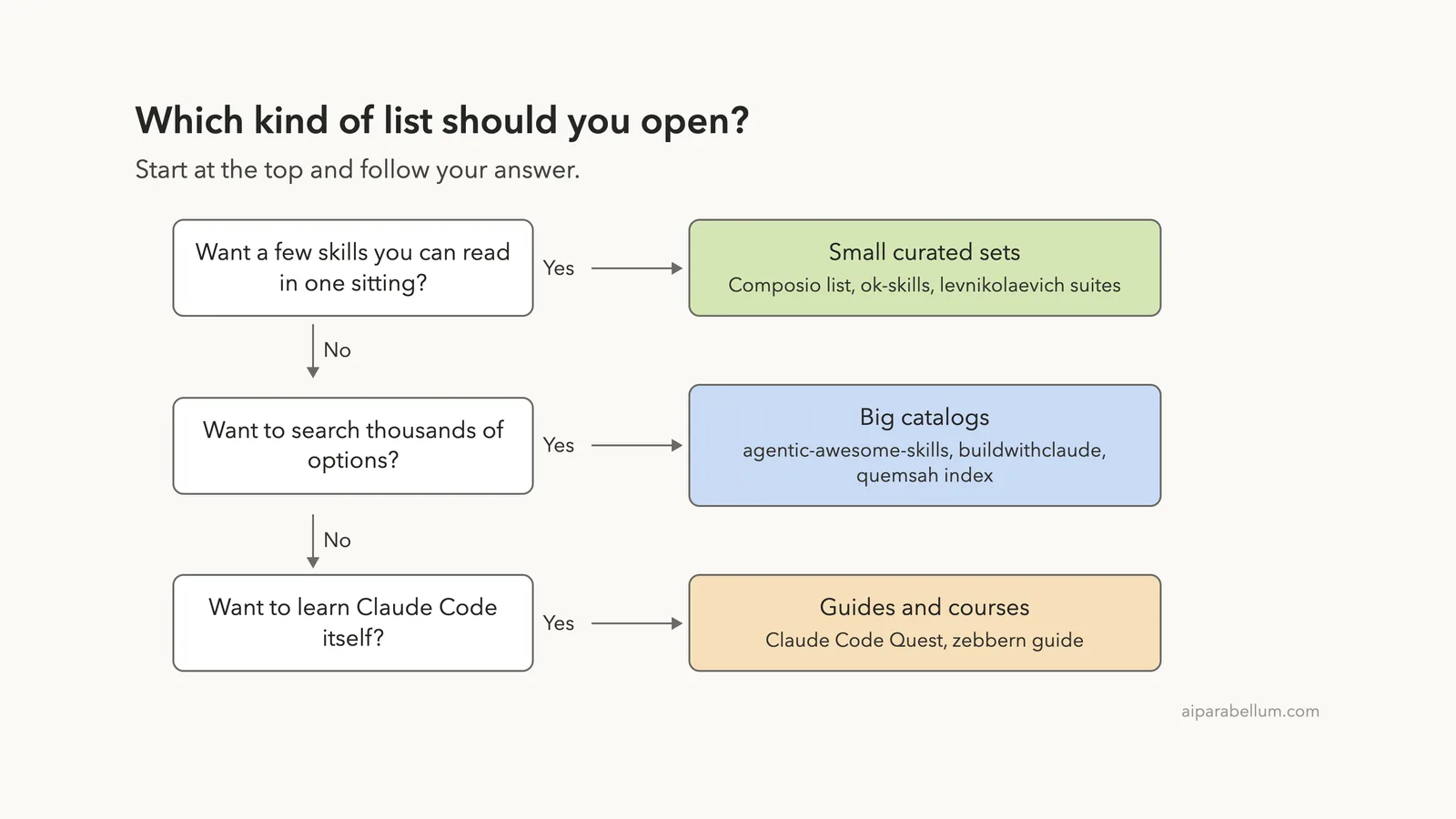
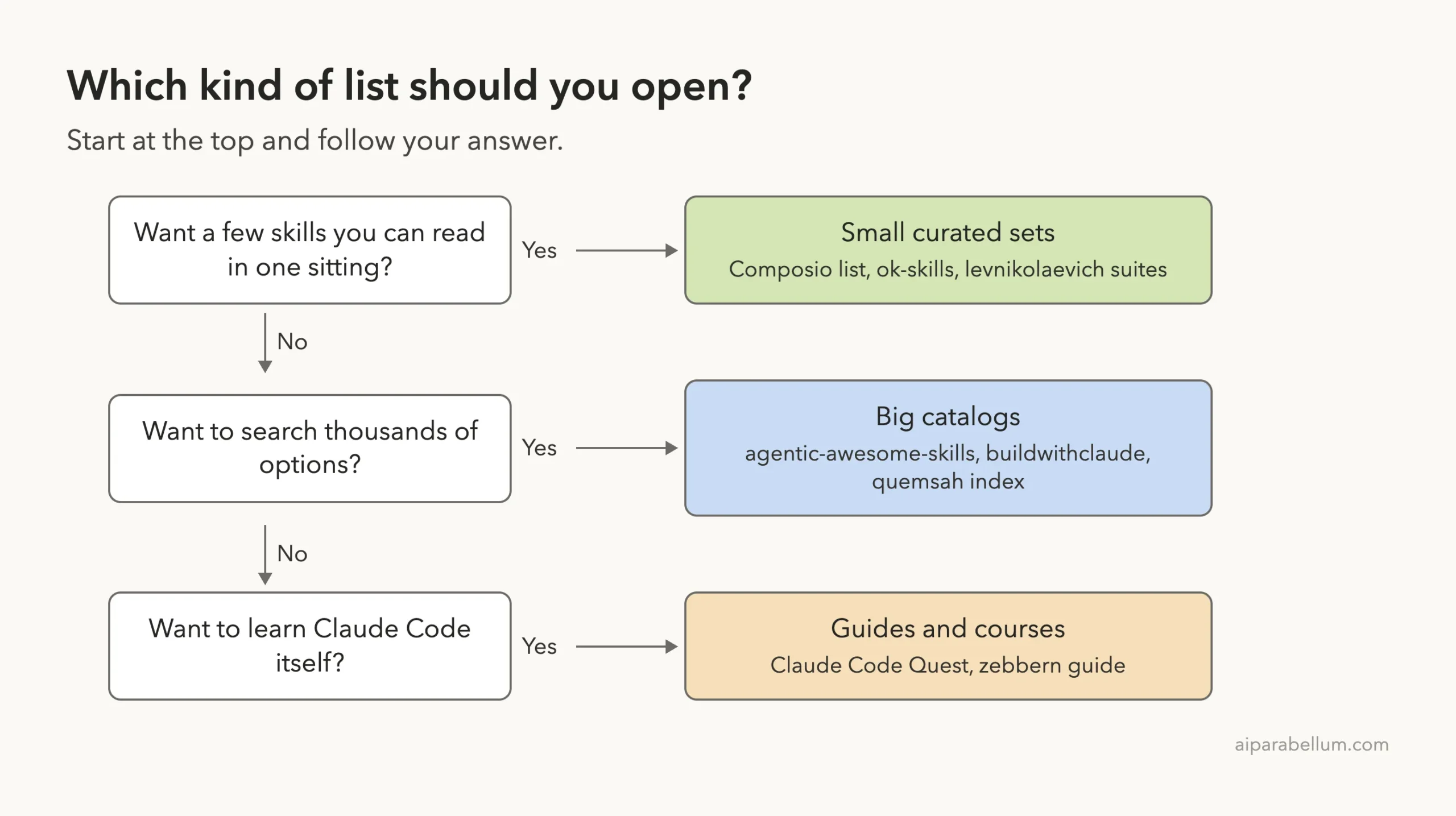
| Best small starter set | The Composio list for single-file skills you can read in minutes |
| Best for finding mods and plugins | karanb192/awesome-claude-code-mods, because it records what each mod can access |
| Not really a skills list | Claude Code Quest, zebbern guide and the quemsah index |
| Biggest risk | Skills and plugins that ship hooks or scripts that run as you |
What an Awesome List Actually Is
An awesome list is a public GitHub page, usually a README, that collects links to useful tools on one topic. For Claude Code, the topic is skills, plugins, commands, agents, hooks and now mods.
The word “awesome” is a naming habit, not a quality stamp. Anyone can start one, and nobody at Anthropic reviews them. Anthropic’s own docs say a marketplace name tells you who publishes the catalog, not what each plugin in it does.
That matters because a skill is just a folder with a SKILL.md file, but a plugin can carry much more. Claude Code is part of the Claude family from Anthropic. Read our guide to Claude Code skills and the one on Claude Code plugins if you want the basics first.
Skills, plugins and mods in one minute
- A skill is a folder with a
SKILL.mdfile that Claude loads when the task matches. It is plain instructions, though it may include scripts. - A plugin is a package that can bundle skills, commands, agents, hooks and MCP servers.
- A mod is a plugin that runs JavaScript inside Claude Code to change how it looks or behaves, such as a status band or a usage meter.
If you are unsure which one you need, our comparison of skills versus plugins explains the choice.
The 14 Lists at a Glance
The numbers below come from our own scan of each repo on November 10, 2026. Stars and last-push dates come from the GitHub API on the same day. Skill counts are the number of SKILL.md files we found in the checkout.
| Repo | Type | Stars | Last push | SKILL.md files |
|---|---|---|---|---|
| ComposioHQ/awesome-claude-skills | Skills list and folders | 79.2k | Sep 18, 2026 | 864 |
| sickn33/agentic-awesome-skills | Giant skill library | 49.5k | Nov 10, 2026 | 9,080 (2,955 unique names) |
| zebbern/claude-code-guide | Guide plus skills | 4.7k | Nov 10, 2026 | 78 |
| Appllama/appllama-skills | Two mobile design skills | 5.0k | Sep 6, 2026 | 2 |
| wesammustafa/Claude-Code-Quest | Learning app | 3.7k | Nov 10, 2026 | 15 |
| davepoon/buildwithclaude | Marketplace and hub | 3.7k | Nov 9, 2026 | 423 |
| composio-community/awesome-claude-plugins | Plugin list | 2.0k | Nov 5, 2026 | 23 |
| quemsah/awesome-claude-plugins | Automated index | 1.6k | Nov 10, 2026 | 0 |
| fcakyon/claude-codex-settings | Configs and plugins | 1.2k | Nov 9, 2026 | 116 |
| ccplugins/awesome-claude-code-plugins | Plugin list | 1.0k | Aug 12, 2026 | 84 |
| karanb192/awesome-claude-code-mods | Mods catalogue | 0.9k | Nov 10, 2026 | 0 |
| YeonwooSung/my-claude-code-mods | One person’s mods | 0.9k | Nov 1, 2026 | 0 |
| levnikolaevich/claude-code-skills | Skill suites | 0.6k | Nov 5, 2026 | 41 |
| mxyhi/ok-skills | Curated skills | 0.5k | Nov 8, 2026 | 37 |
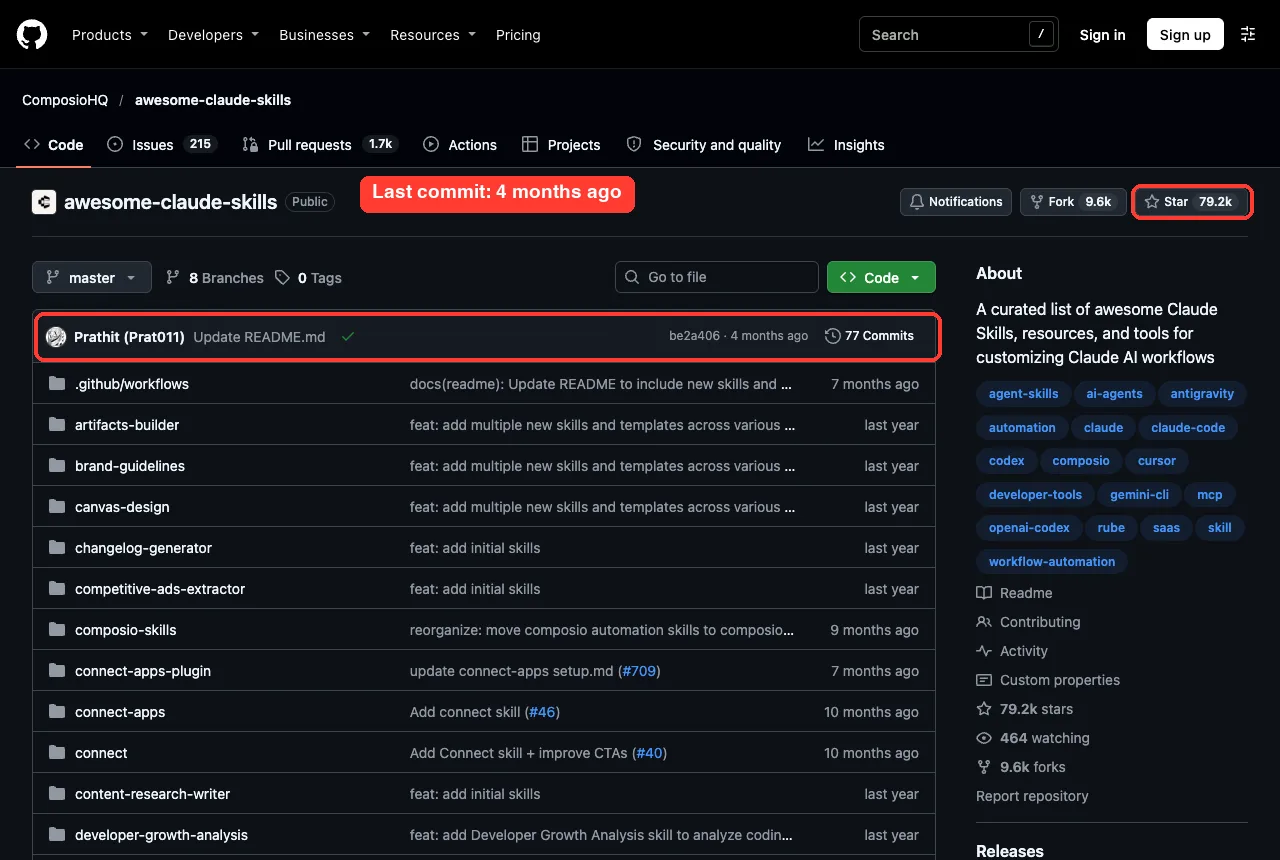
Two things stand out. Star counts do not track content, since the 79,000-star list has fewer skill files than the 49,000-star one. The Composio list’s default branch showed a latest commit about four months old (GitHub’s Sep 18 push date comes from another branch), and the ccplugins and Appllama repos had also been quiet for more than two months.
Which Awesome Claude Skills Lists Are Worth Your Time
Here is our verdict on each group, based on what we found in the files.
The Composio skills list: a good place to start small
The Composio awesome-claude-skills list calls itself a curated list of 1000+ skills. In the checkout we found 864 SKILL.md files, and every one had a valid name and description in its front matter. Most are short, with a median of 372 words, so you can read one before lunch.
The top level holds single skills such as changelog-generator, file-organizer and invoice-organizer. The large composio-skills folder is different, because it is tied to Composio’s app-connection service. Its quick start asks for a Composio API key, so that part needs an outside account.
GitHub’s license field was empty when we checked, although the README shows an Apache-2.0 badge. If you plan to reuse a skill in a company project, check that detail yourself.
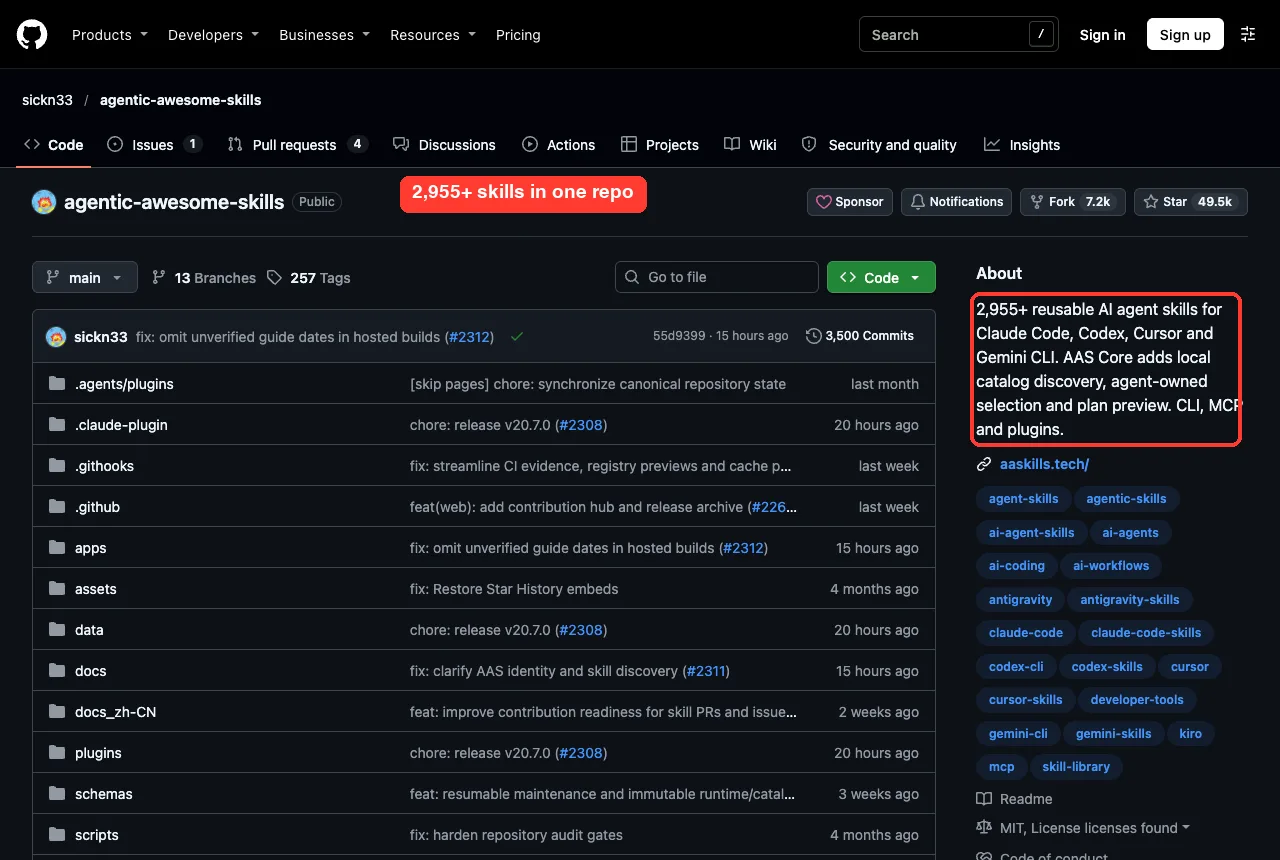
agentic-awesome-skills: the biggest library, so be picky
The agentic-awesome-skills repo is MIT licensed and pushed to the day we looked. Its README says it was previously named Antigravity Awesome Skills, and it describes version 20.7.0.
We found 9,080 SKILL.md files, but only 2,955 unique skill names. The rest are the same skills mirrored into other folders for other tools, so do not treat the file count as a skill count. About 470 skill folders include a scripts directory, and 194 skills declare allowed-tools.
Our advice is to use its search catalog rather than browsing the folders, and to read any skill with a scripts folder before you copy it.
Plugin lists: ccplugins, Composio community and buildwithclaude
The ccplugins list is Apache-2.0 and holds 188 plugin manifests in the checkout. It includes the commit-commands plugin we ran below. It also carries 10 hooks.json files, so some entries run shell commands.
The Composio plugin list is smaller, with 25 plugin manifests. Its headline plugin, connect-apps, asks for a Composio API key during setup, so we loaded none of it.
The buildwithclaude repo is a marketplace you add with /plugin marketplace add davepoon/buildwithclaude. Its README table counts 26 skills and 51 plugins, while we counted 423 SKILL.md files because we counted every copy.
The repo has 7 hooks.json files and 14 MCP config files, so review before you install. Our explainer on plugin marketplaces covers how adding one works.
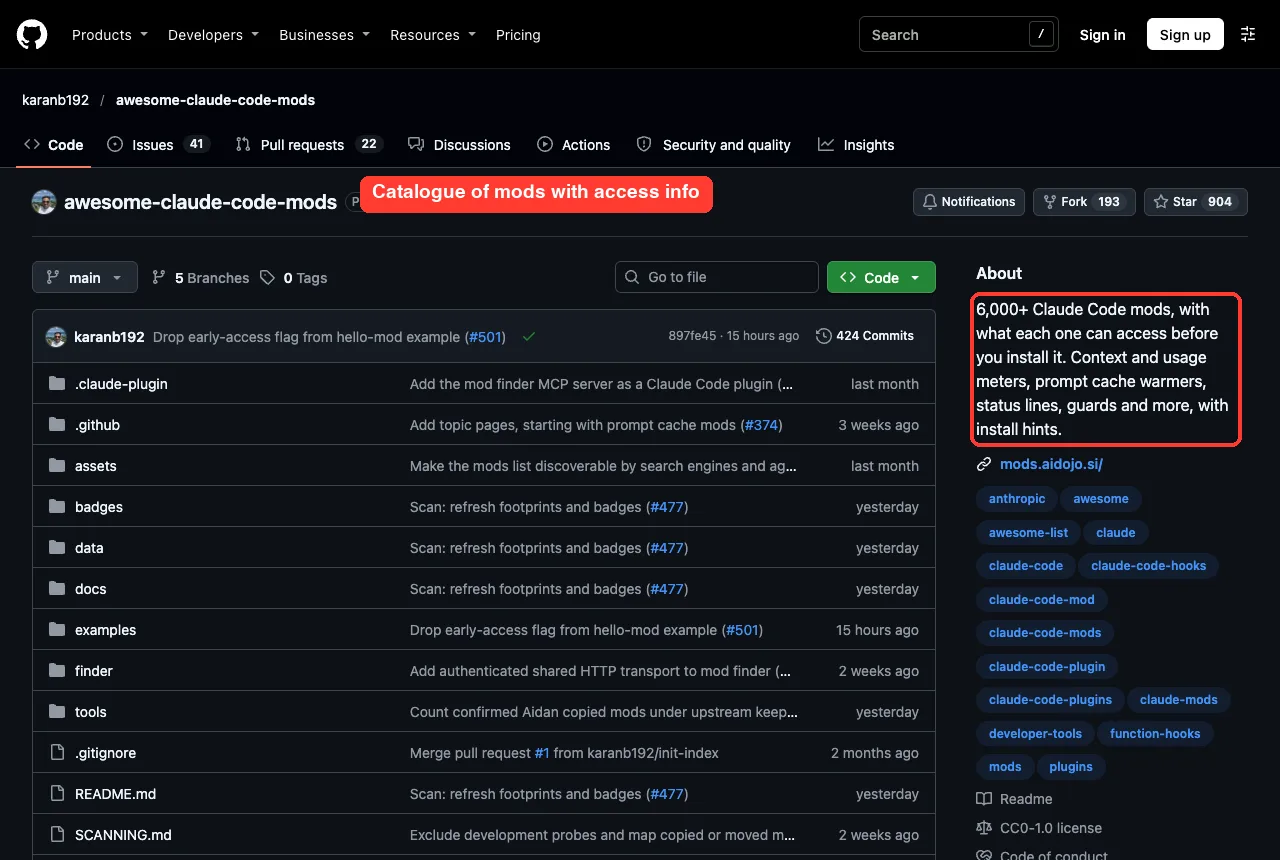
Mods: the newest and the riskiest category
Mods are plugins that run JavaScript inside Claude Code. The awesome-claude-code-mods catalogue stands out because it lists what each mod can read, write, run or send over the network. Its README reports 7,848 mods, last scanned November 9, 2026, and says plainly that it is an independent scan, not an official directory.
The my-claude-code-mods repo is one developer’s set of 17 mods, each with a hooks.json. The README says mods are enabled by default from Claude Code 2.1.287, and we ran 2.1.319. We did not run any mod.
Curated skill sets: ok-skills, levnikolaevich and Appllama
The ok-skills repo bundles 37 skill folders (its README says 33) under an Apache-2.0 license. One of them, planning-with-files, declares hooks in its front matter that run on every prompt and tool call. That is not a flaw, but it is exactly the kind of thing to know before copying it.
The levnikolaevich skills are MIT licensed and organized into task-based suites, such as implementation, architecture and quality assurance. The skills are long, with a median of 1,715 words, and only one hooks file turned up.
The Appllama skills are two detailed mobile design skills with an MCP config. Their README points to the Appllama MCP service for research, and we did not connect it.
Guides, learning apps and indexes
Three entries are not skill lists in the strict sense. The zebbern guide is a very long reference README with 78 bundled skills. The claude-codex-settings repo is a set of configs and plugins for several tools, with 9 hooks files.
The quemsah index is an automated ranking of repositories, with no skills of its own. Use it to discover projects, not to install from.
The repo you may know as wesammustafa/Claude-Code-Everything-You-Need-to-Know now lives at Claude Code Quest. It is a browser app that teaches Claude Code step by step and checks your work. Its README says the app has no AI in it.
What We Measured in Every Awesome Claude Skills Repo
We wrote a small script that walked each checkout and checked every SKILL.md for a front matter block with a name and a description. Claude Code needs those to list a skill, so a missing one is a real defect.
| Repo | Valid front matter | Median words | Folders with scripts | hooks.json files |
|---|---|---|---|---|
| Composio skills list | 864 of 864 | 372 | 8 | 0 |
| agentic-awesome-skills | 9,080 of 9,080 | 1,033 | 470 | 0 |
| buildwithclaude | 415 of 423 | 717 | 38 | 7 |
| ccplugins list | 82 of 84 | 587 | 7 | 10 |
| claude-codex-settings | 116 of 116 | 892 | 12 | 9 |
| ok-skills | 37 of 37 | 689 | 8 | 0 (1 skill with front matter hooks) |
| levnikolaevich skills | 41 of 41 | 1,715 | 0 | 1 |
| Claude Code Quest | 12 of 15 | 104 | 0 | 0 |
Most skills were well formed. The few missing front matter blocks were in buildwithclaude, the ccplugins list and Claude Code Quest. This is a structure check, not a quality grade, so a valid skill can still be a poor one.
Step 1: Check Before You Install Anything
Anthropic’s docs are blunt here. A plugin you install can execute arbitrary code on your machine with your user privileges. Hooks and monitors run as shell commands, and skills and commands enter Claude’s context as instructions that shape what Claude does.
The docs also say that when auto-update is on for a marketplace, a plugin can change on disk after you reviewed it. Community and third-party marketplaces are off by default for auto-update, so leave it that way. Read the full page on plugin security page.
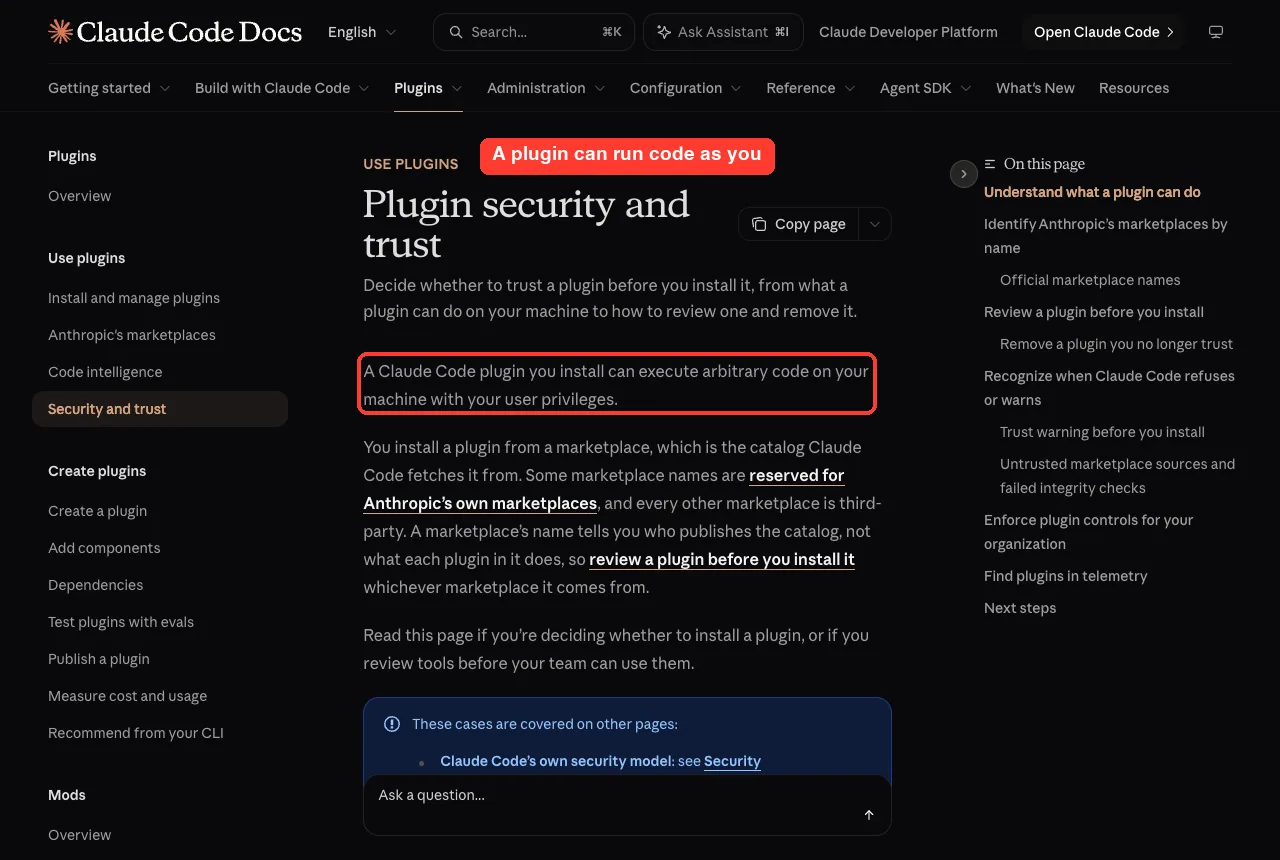
A five-point review you can do in five minutes
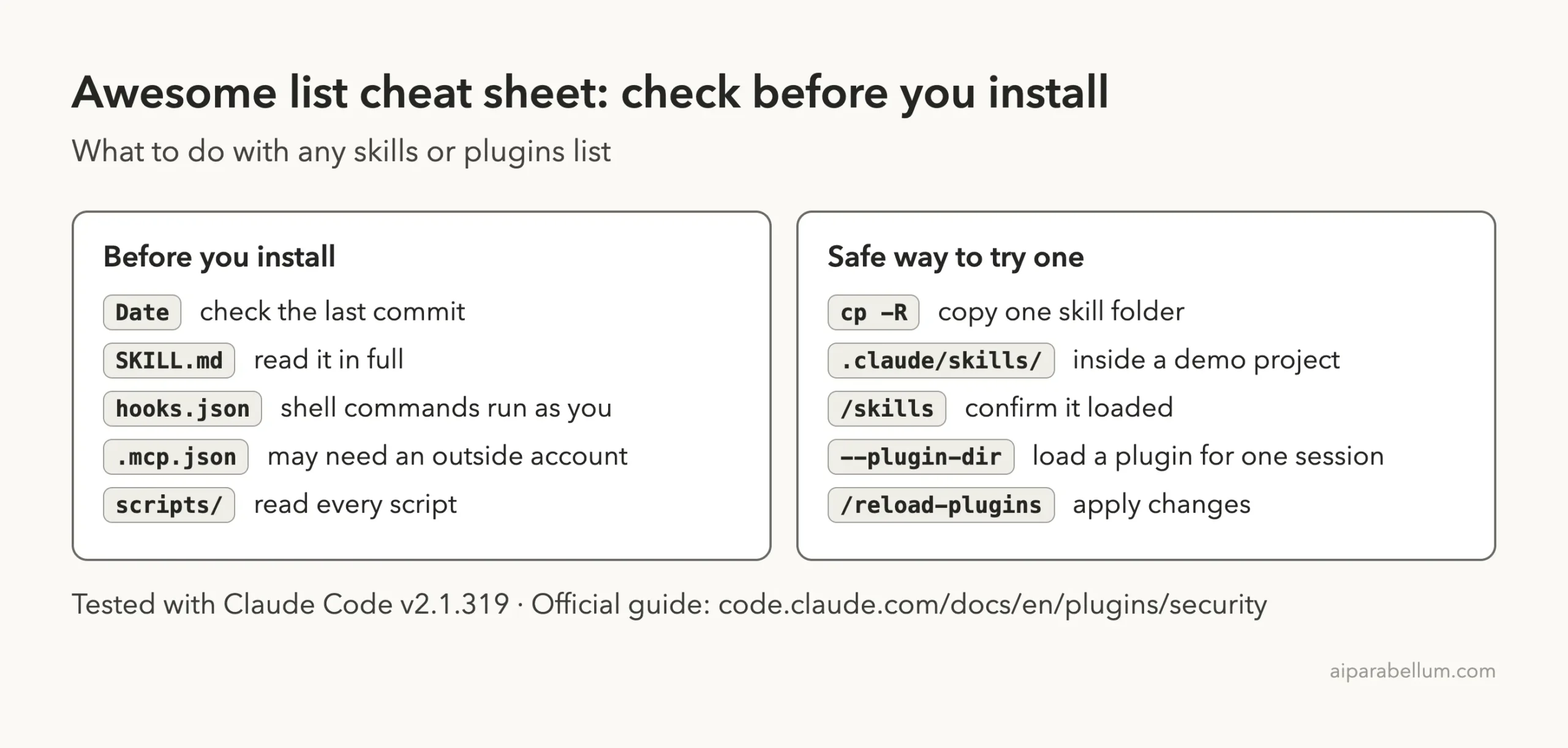
- Check the last commit date. A list untouched for months may point to dead links.
- Open
SKILL.mdand read it in full, including the front matter. - Search the folder for
hooks.jsonand ahooks:block in front matter. - Look for
.mcp.json. An MCP server may need an outside account or send data out. - Read every file in a
scriptsfolder, or skip the skill.
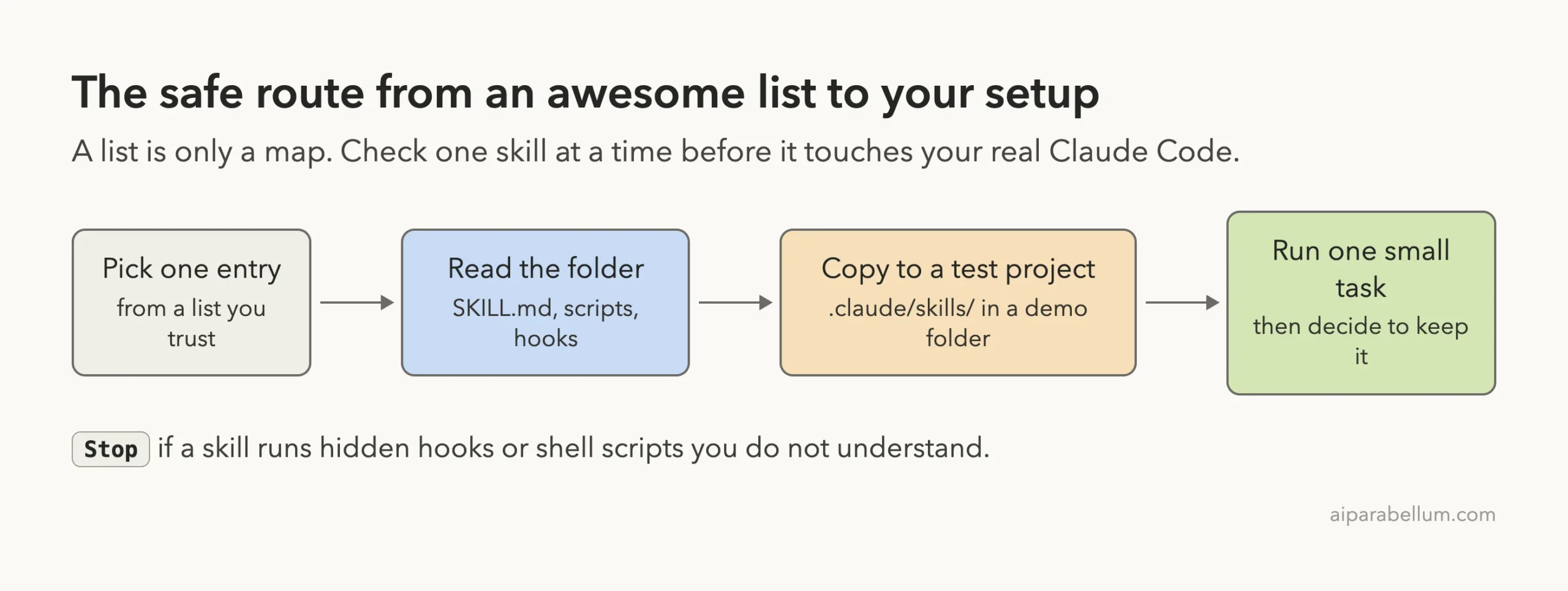
Step 2: Try One Skill in a Throwaway Project
For the skill test we picked changelog-generator from the Composio list. It is a single SKILL.md with no scripts, hooks or MCP files, which made the review quick. We made a demo project with four git commits, then copied the skill folder into it.
mkdir -p demo/.claude/skills
cp -R awesome-claude-skills/changelog-generator demo/.claude/skills/
cd demo
claude --setting-sources project
Running /skills inside the session listed it right away as a project skill with a cost of about 100 tokens. That small token cost is why a long list of skills still works, since Claude loads the full text only when a task matches.
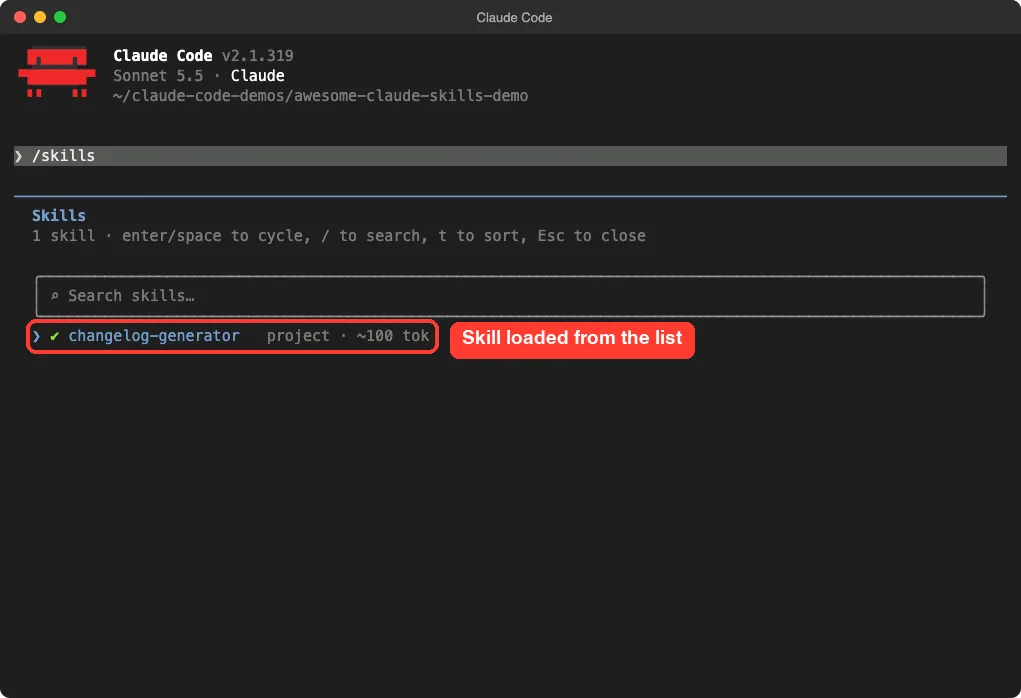
/skills list as a project skillWhat happened when we ran it
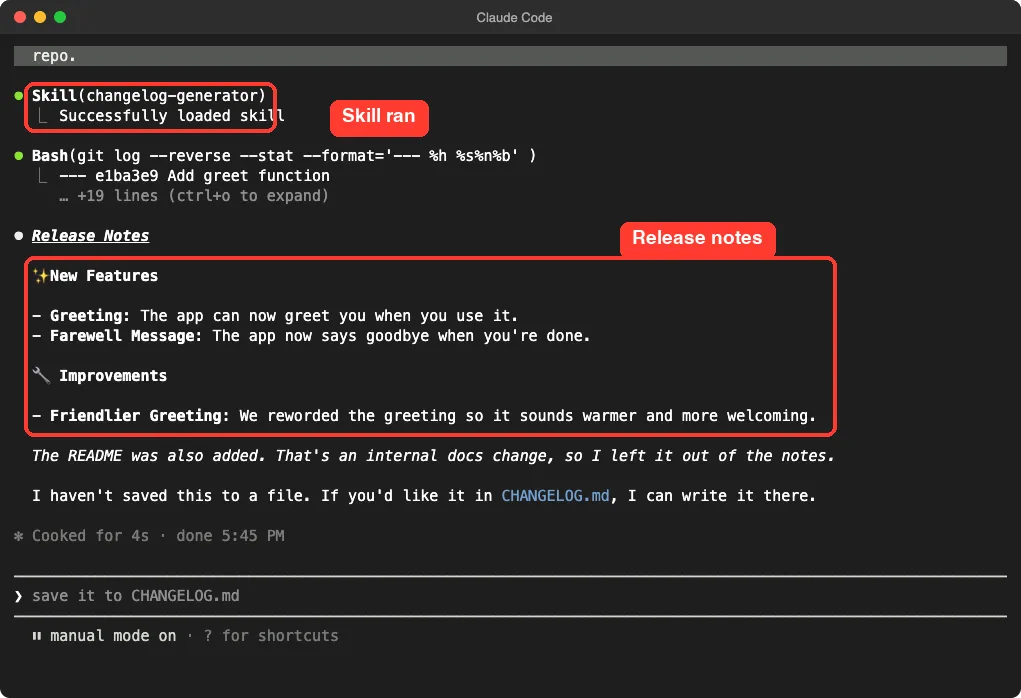
We typed one prompt: use the changelog-generator skill to write short customer-friendly release notes from the four commits. Claude loaded the skill, then asked permission to run git log, which is a read-only command. We approved it once.
The result grouped the commits into New Features and Improvements and left out the README commit as an internal docs change. It also offered to save the notes to CHANGELOG.md and did not write anything on its own. That matches what the skill promises, and it is a fair small demo, not proof the skill handles a large repo.
Step 3: Load a Plugin for One Session Only
To test a plugin we used commit-commands from the ccplugins list. It contains three markdown command files and no hooks. Instead of installing it, we loaded it for one session with the --plugin-dir flag.
claude --plugin-dir ./awesome-claude-code-plugins/plugins/commit-commands --setting-sources projectTyping /commit showed the plugin commands /commit-commands:commit, /commit-commands:clean_gone and /commit-commands:commit-push-pr. The copied skill appeared in the same list. We did not run the commit commands, because they would change the demo repo and the point was loading.
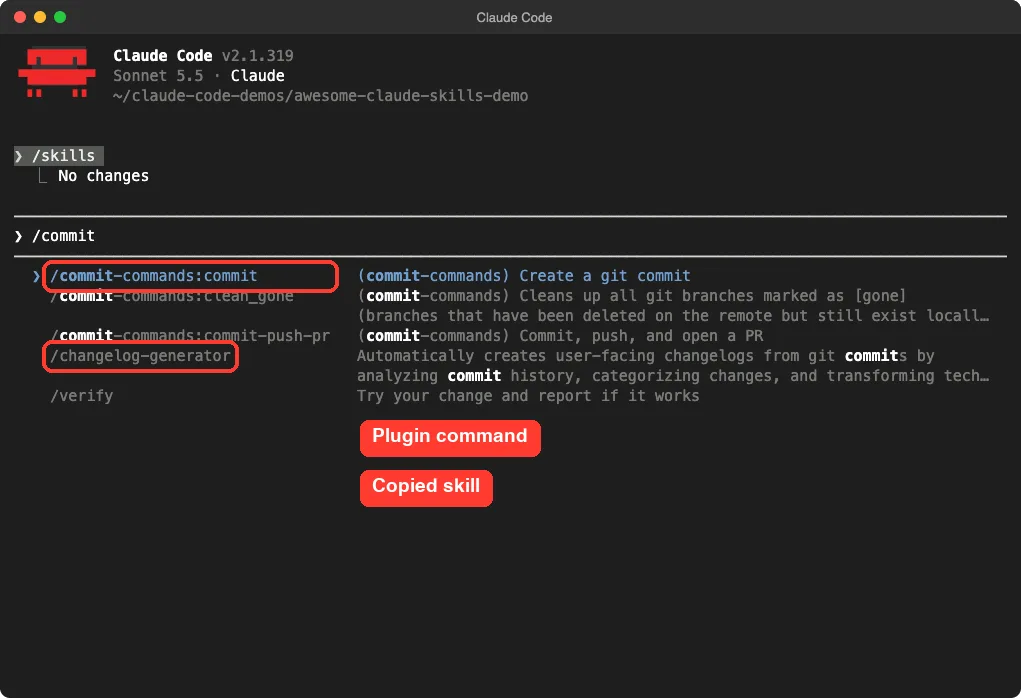
--plugin-dir, without touching the real setupThis approach never writes to your ~/.claude folder, and closing the session ends the test. Our guide to creating a plugin uses the same flag.
What We Did Not Test
We did not run any mod, any MCP server, or any plugin that asks for an account or key. That covers the Composio connect-apps plugin, the Appllama MCP and the Composio app-connection skills.
We also did not run the skills that carry hooks, such as planning-with-files. Everything we say about those comes from reading their files and each project’s README. If you want a tested walkthrough of a framework of that kind, see our Superpowers guide.
Try It Yourself
Pick one small skill from any list above and run it in a demo folder. Never use a project you care about for the first run.
Use the skill I just copied to .claude/skills to summarize this folder, and tell me which tools you asked to use and why.Then compare what the skill promised in its description with what Claude actually did. If the two differ, remove the folder.
Common Mistakes
- Trusting star counts. Stars show interest, not safety or fit.
- Counting skills by file count. Mirrored copies inflate the numbers.
- Installing a whole marketplace for one skill. Copy just the folder you need.
- Skipping the
hooksfiles. Hooks run shell commands as you. - Installing into your main setup first. Test in a demo project.
- Forgetting old names. A repo can be renamed, as Antigravity Awesome Skills and the Claude Code Quest repo both show.
Pro Tips
- Start with skills under 500 words. They are easy to review.
- Use
/skillsto see the token cost of each skill you add. - Keep project skills in
.claude/skills/and commit them if the team needs the same ones. - Prefer lists that state what a mod or plugin can access.
- Check the license field. An empty one, as on two of the lists, means you should ask before reusing the code.
- Want a skill that fits your own work? Our guide to building useful skills shows how.
Cheat Sheet
Frequently Asked Questions
What is the best awesome Claude skills list?
For a small, readable starting set, the Composio list is the easiest to browse. For sheer size, agentic-awesome-skills wins. For plugins and mods, the ccplugins list and the mods catalogue are more useful.
Are awesome Claude skills lists safe to install from?
A list is only links and folders, and nobody reviews it for you. Anthropic says an installed plugin can run arbitrary code with your user privileges, so read the files first and test in a throwaway project.
Do I need to install a plugin to use one skill?
No. A skill is a folder, so you can copy it into .claude/skills/ in a project, or into your user skills folder. We used the project folder, and /skills showed it at once.
Why do the skill counts in these repos differ?
Some repos mirror the same skill for several tools, and some count differently in the README than in the files. We counted SKILL.md files and unique names, and we say which one we mean.
Is Claude Code Quest a skills list?
No. It is a browser-based learning app for Claude Code with practice steps and checks, and it is the new name of the repo some pages still list as Claude Code Everything You Need to Know.
Treat every awesome list as a map: read the files, check for hooks, and test one entry at a time in a demo project.
Conclusion
Awesome lists are great maps, but they are maps, not guarantees. The Composio list is a friendly place to begin, the big catalogs reward searching rather than browsing, and the mods catalogue is the one that tells you the most about risk. Whatever you choose, read the files, look for hooks and MCP configs, and try one entry at a time in a demo project before it goes near your real setup.