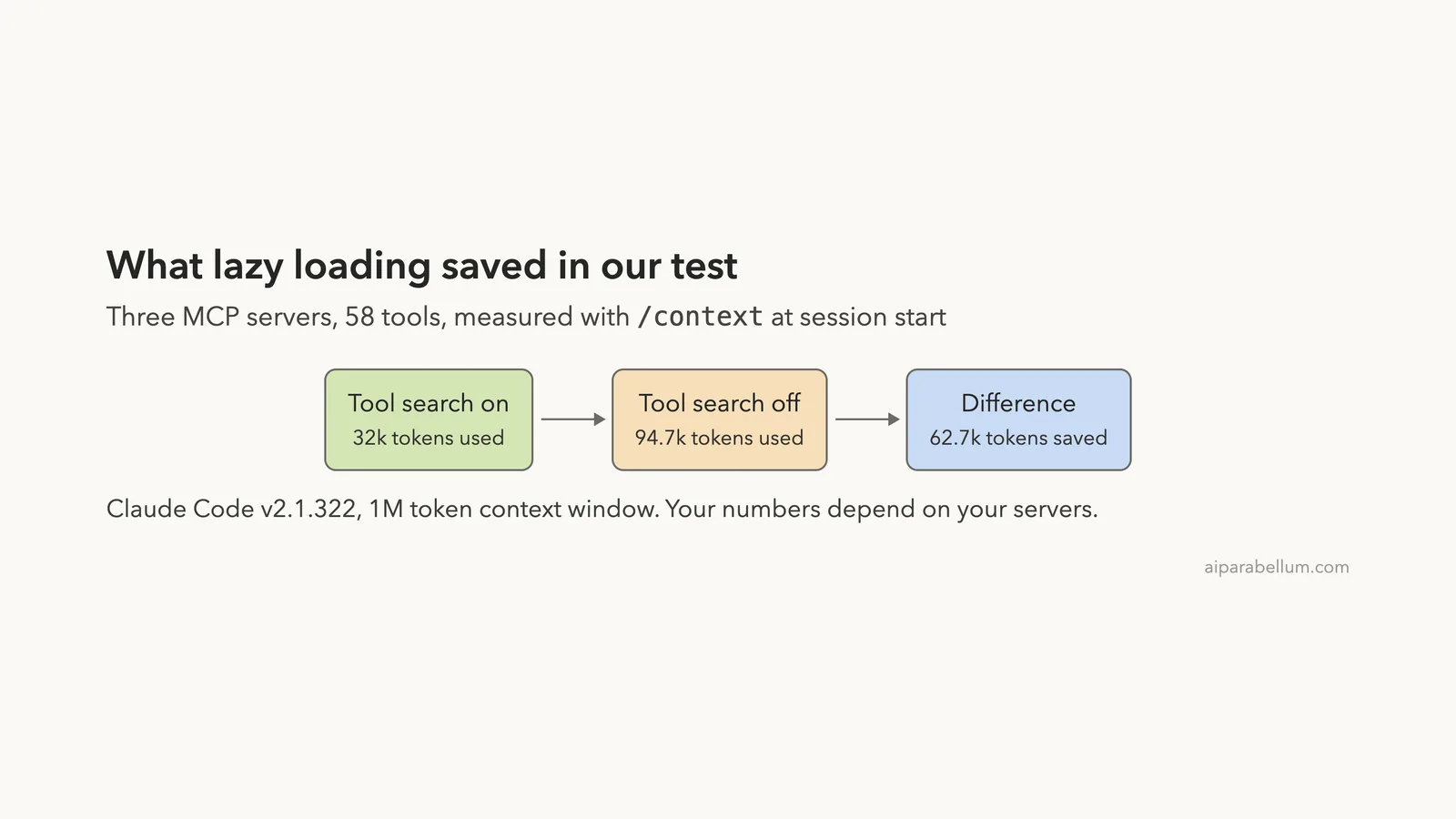
Every MCP server you connect brings a list of tools, and every tool has a description that takes up room in the context window. Claude Code MCP lazy loading, which Anthropic calls tool search, keeps those descriptions out of the context until a task needs them. We connected three real servers with 58 tools, turned tool search on and off, and wrote down what /context reported each time.
The short answer: the same setup started at 32k tokens with tool search on and 94.7k tokens with it off.
This guide is part of our Claude Code tutorials. You can compare the token cost of many more servers in our MCP servers directory.
Tested with Claude Code v2.1.322 on November 13, 2026, on macOS, in a throwaway project with three hosted MCP servers that need no sign-in. We measured the context with tool search on, off, in auto mode and with alwaysLoad, and made two real tool calls. The gateway, cloud platform and server-author details below follow Anthropic’s official docs, and we did not run them.
| Question | Short answer |
|---|---|
| What is MCP tool search? | Tool definitions stay out of the context until Claude needs them |
| Is it on by default? | Yes, on current Claude models |
| What did it save in our test? | 62.7k tokens at session start, with 3 servers and 58 tools |
| What did a loaded tool cost? | 75 tokens for the one tool Claude used |
| How do you change it? | The ENABLE_TOOL_SEARCH variable, or alwaysLoad per server |
| How do you check it? | Run /context and read the MCP tools line |
What Is MCP Tool Search in Claude Code?
MCP is the standard that lets Claude Code talk to outside tools, such as a database, a docs site or a compiler. If the idea is new to you, start with our MCP basics guide. Each server gives Claude a set of tools, and each tool comes with a name, a description and a list of inputs.
Those descriptions are text, and text costs tokens. Without tool search, every description from every server is sent to the model from the first message. A server with 48 tools can use tens of thousands of tokens before you type a word.
Tool search changes the timing. The docs put it this way: only tool names and server instructions load at session start, and the full definitions are deferred until Claude needs them. The docs also say Claude Code sets no fixed cap on tools per server, so the practical limit is your context window.
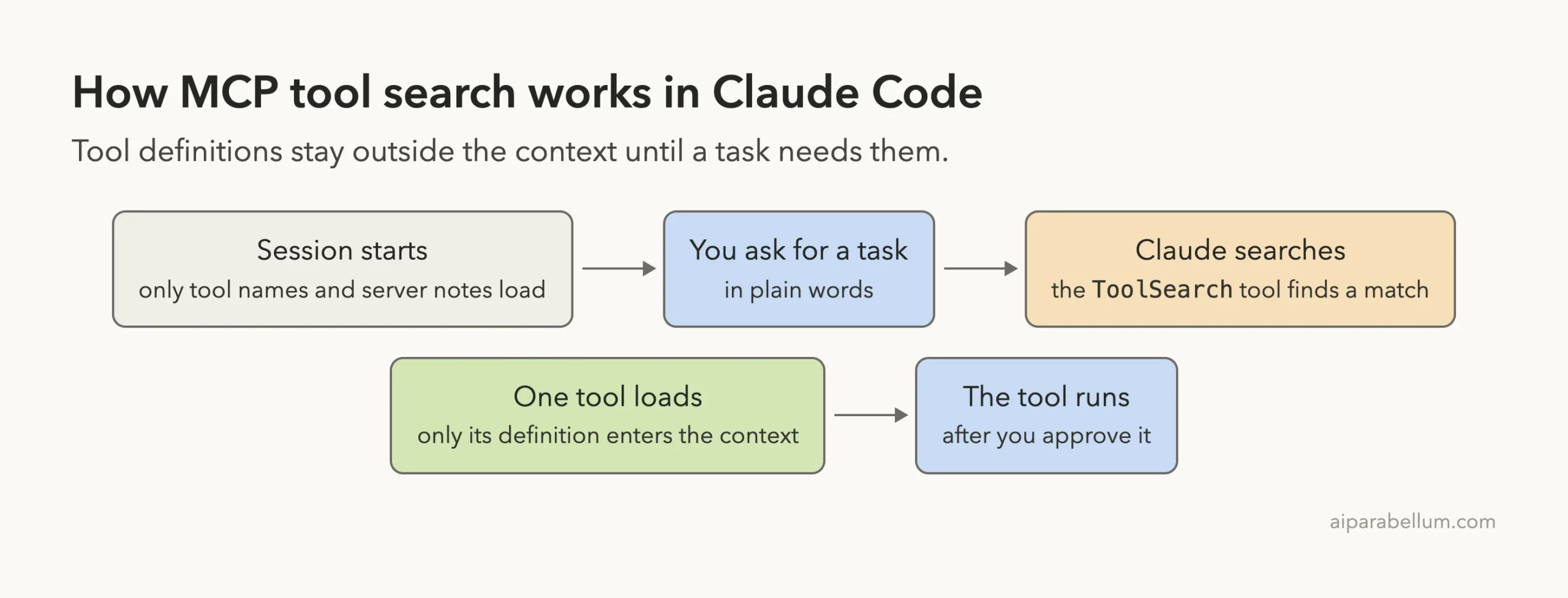
Lazy loading does not remove your tools. It moves their cost from the start of every session to the moment you use them.
Our Test Setup
We never test inside a real project, so we made an empty sandbox folder with one config file. The file lists three hosted servers that answer without an account: Apollo’s GraphQL server, the Compiler Explorer server at godbolt.org and the Microsoft Learn docs server. Here is the whole file.
{
  "mcpServers": {
    "apollo": { "type": "http", "url": "https://mcp.apollographql.com" },
    "godbolt": { "type": "http", "url": "https://godbolt.org/mcp" },
    "ms-learn": { "type": "http", "url": "https://learn.microsoft.com/api/mcp" }
  }
}
We started Claude Code with flags that load only this file and only project settings, so nothing from our normal setup could change the numbers.
claude --mcp-config mcp.json --strict-mcp-config --setting-sources projectRunning /mcp showed all three servers connected: 48 tools from apollo, 7 from godbolt and 3 from ms-learn. Claude Code also listed two built-in servers of its own, and one of them adds a single chart tool. We left those alone.
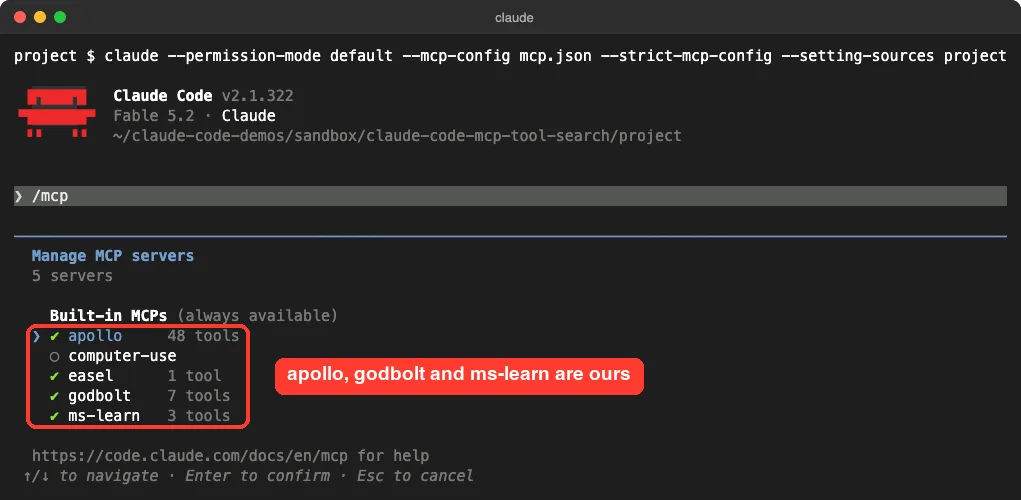
If you are not sure where your own server list lives, see our post on the MCP config file. The model in our session had a 1 million token context window, which matters when you read the percentages below.
Test 1: Tool Search On (the Default)
We changed nothing and ran /context in the fresh session. This command shows how the context window is being used, and our guide to the context window explains every line of it.
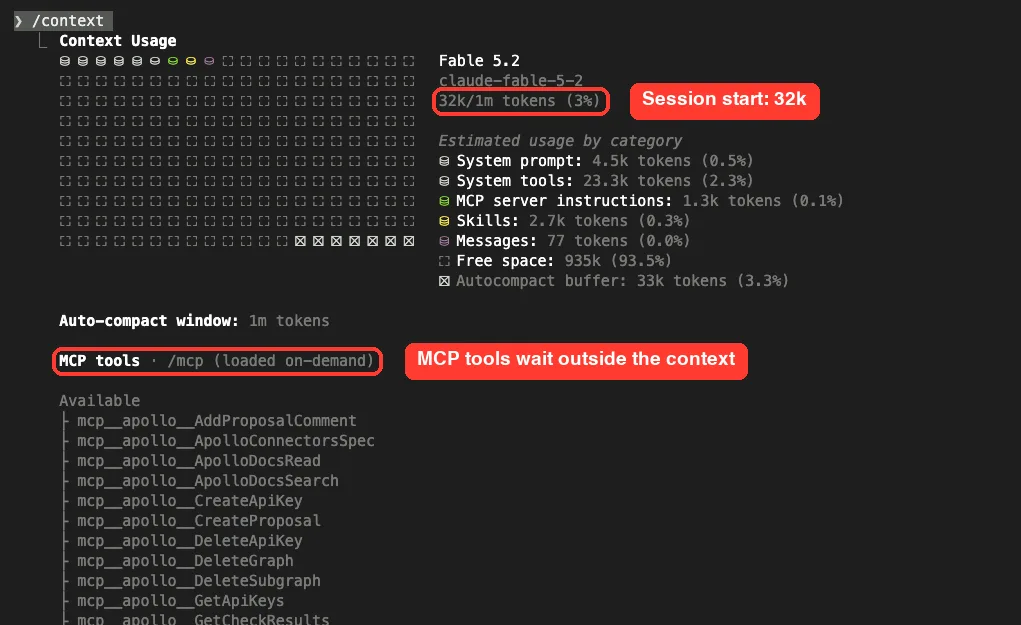
The session started at 32k tokens, which is 3% of the window. The category list has no MCP tools line at all. The only MCP cost is 1.3k tokens of server instructions, the short notes each server sends to explain what it is for.
Further down, the MCP tools section is labeled “loaded on-demand”. All 58 tools sit under an Available heading, shown by name only, with no token count next to them.
Test 2: Tool Search Off
Next we closed the session and started a new one with tool search disabled. The only change was one environment variable in front of the same command.
ENABLE_TOOL_SEARCH=false claude --mcp-config mcp.json --strict-mcp-config --setting-sources project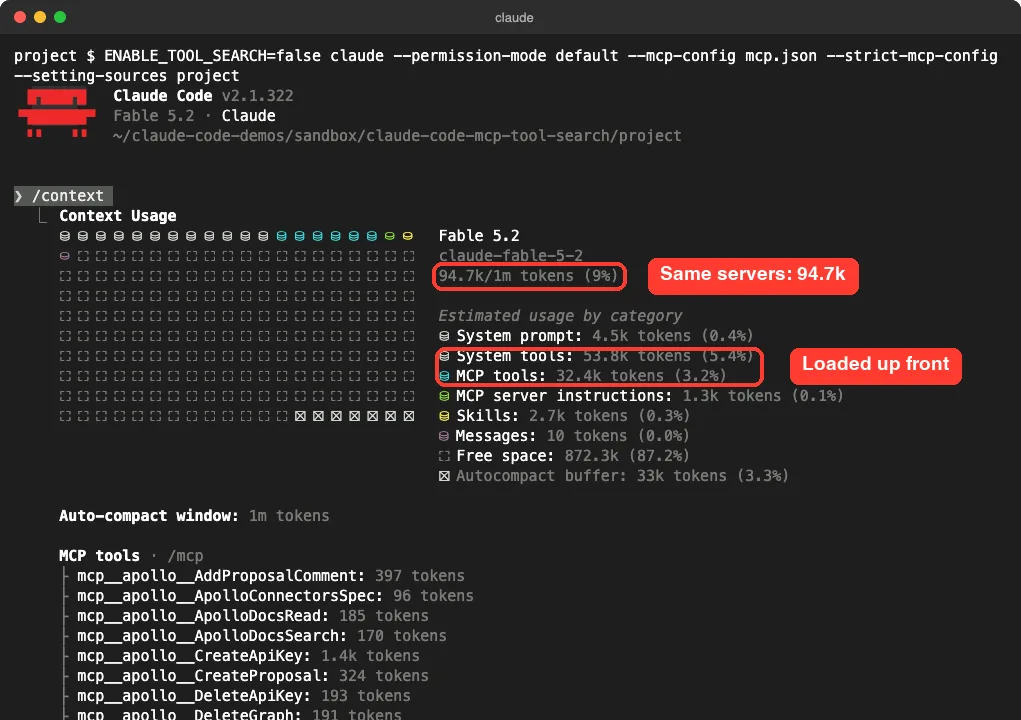
The same empty session now started at 94.7k tokens, or 9% of the window. A new MCP tools line appeared at 32.4k tokens, and every tool in the list now shows its own cost. The largest single tool we saw was 2.3k tokens.
There was a second change we did not expect. The System tools line grew from 23.3k to 53.8k tokens. The setting also controls Claude Code’s own built-in tools, and with tool search on, part of that built-in set is deferred too.
How Much Context Claude Code MCP Lazy Loading Saved
Here are the two interactive sessions side by side. Both had the same servers, the same model and no conversation yet.
| Line in /context | Tool search on | Tool search off |
|---|---|---|
| Total at session start | 32k | 94.7k |
| System prompt | 4.5k | 4.5k |
| System tools | 23.3k | 53.8k |
| MCP tools | Not loaded | 32.4k |
| MCP server instructions | 1.3k | 1.3k |
| Skills | 2.7k | 2.7k |
The difference is 62.7k tokens. About 32.4k of that came from the MCP tools, and about 30.5k came from Claude Code’s built-in tools. So in our test, roughly half of the saving had nothing to do with the servers we added.
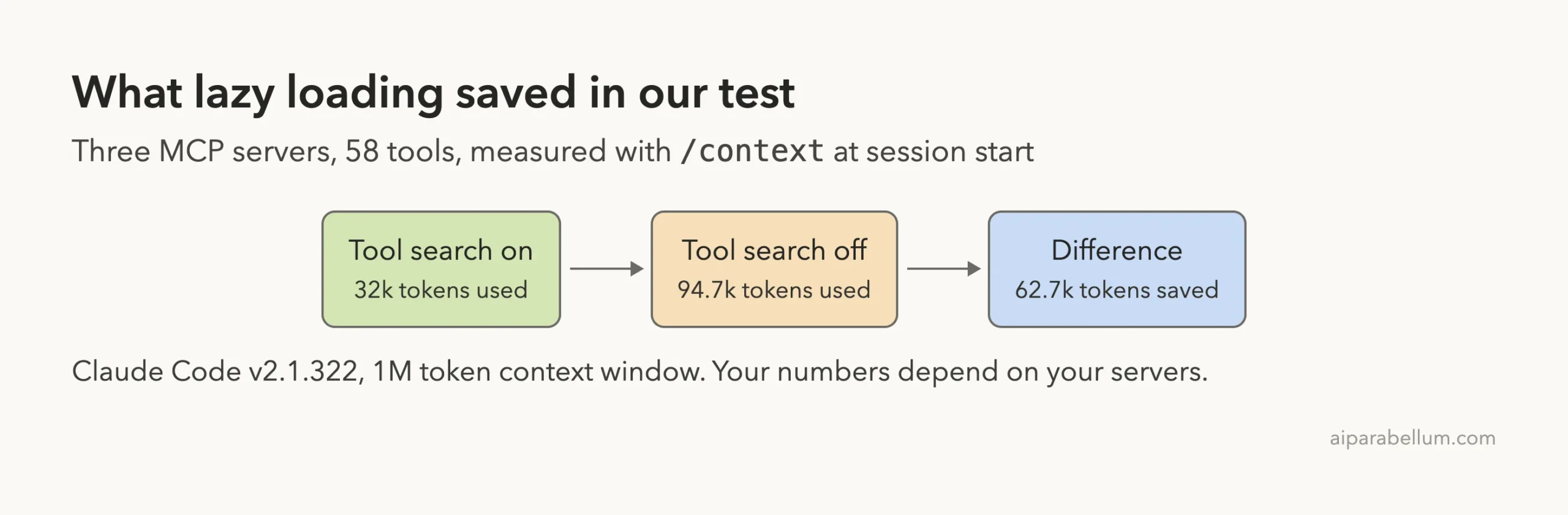
On a 1 million token window, 62.7k tokens is about 6% of the space. The same count would be close to a third of a 200,000 token window. We did not test a smaller window, so treat that second figure as plain arithmetic.
Where the MCP Tokens Came From
With tool search off, /context lists a cost for each tool. We added up the rows for each server. The rows are rounded, so the sums are close estimates.
| Server | Tools | Tokens when loaded up front |
|---|---|---|
| apollo | 48 | About 26.1k |
| godbolt | 7 | About 3.3k |
| ms-learn | 3 | About 1.6k |
One large server made up most of the cost. Our directory lists these servers at 23,744, 3,531 and 1,487 tokens from its own measurement two days earlier, so the figures move a little between runs and versions. If you want a closer look at the godbolt server, we tested it in our Compiler Explorer guide.
What Three Servers Cost With Tool Search On
We also ran the same check in headless mode with claude -p /context, once with no MCP servers and once with all three. That session started at 26.5k tokens with no servers and 27.9k with them. Adding 58 deferred tools cost about 1.4k tokens, almost all of it server instructions.
Headless totals are lower than the interactive ones because that mode loads fewer built-in tools. The pattern is the same in both.
What Happens When Claude Needs a Tool
Deferred tools are only useful if Claude can still find them. We went back to the default session and asked for something only one server could do.
Use the godbolt tools to list the supported languages. Reply with only the count.Claude went straight to the right tool and asked for permission to run it. On screen you only see “Calling godbolt”, so the search step is easy to miss.
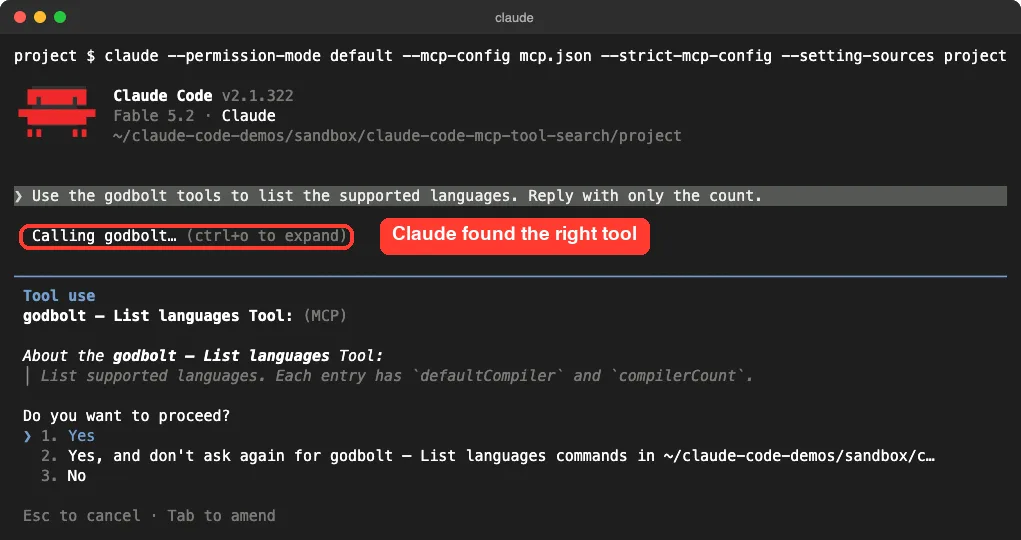
To see the hidden step, we ran a second small request in headless mode with JSON output. The log shows Claude calling a built-in tool named ToolSearch first, then the MCP tool itself. This is the real sequence from our run, trimmed to the key fields.
tool_use     ToolSearch  {"query": "select:mcp__godbolt__lookup_asm_instruction", "max_results": 1}
tool_result  [{"type": "tool_reference", "tool_name": "mcp__godbolt__lookup_asm_instruction"}]
tool_use     mcp__godbolt__lookup_asm_instruction  {"instruction_set": "amd64", "opcode": "NOP"}
Claude already knew the tool’s name, because names load at session start. It used the search to pull in that one definition, and then made the call.
The Context After One Tool Call
Back in the interactive session, we approved the call, got the answer (103 languages) and ran /context again.
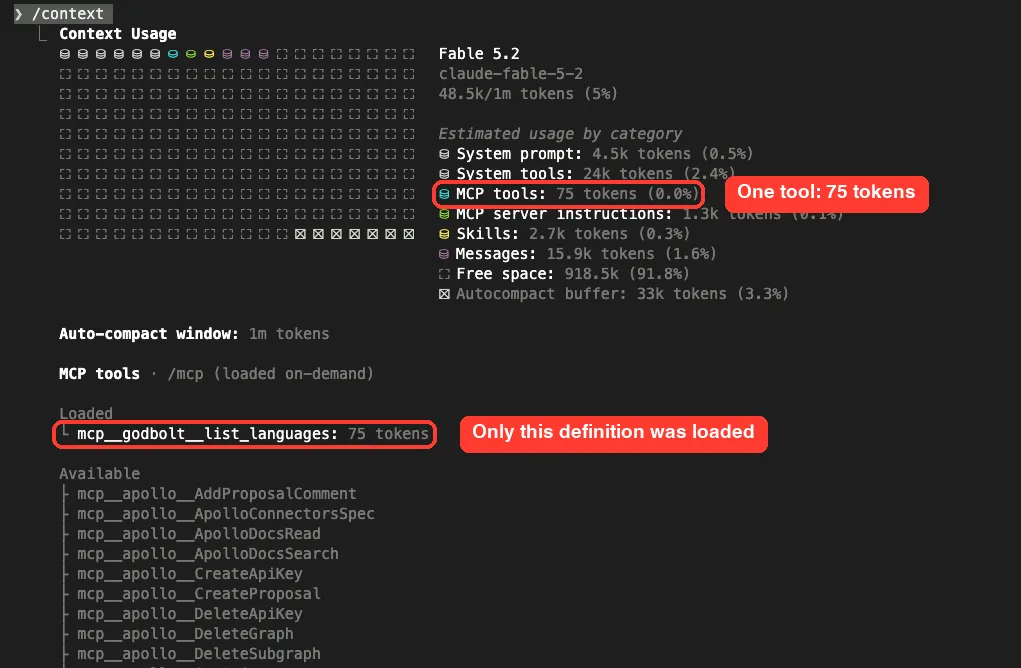
An MCP tools line appeared, at 75 tokens. Under a new Loaded heading sits the one tool Claude used, and the other tools are still listed as Available. The session paid for one definition, not 58.
There is a catch in the same screenshot. Messages jumped to 15.9k tokens, because the tool returned a long list of languages. Tool search shrinks the cost of tool definitions, and it does nothing for the size of tool results.
The ENABLE_TOOL_SEARCH Settings
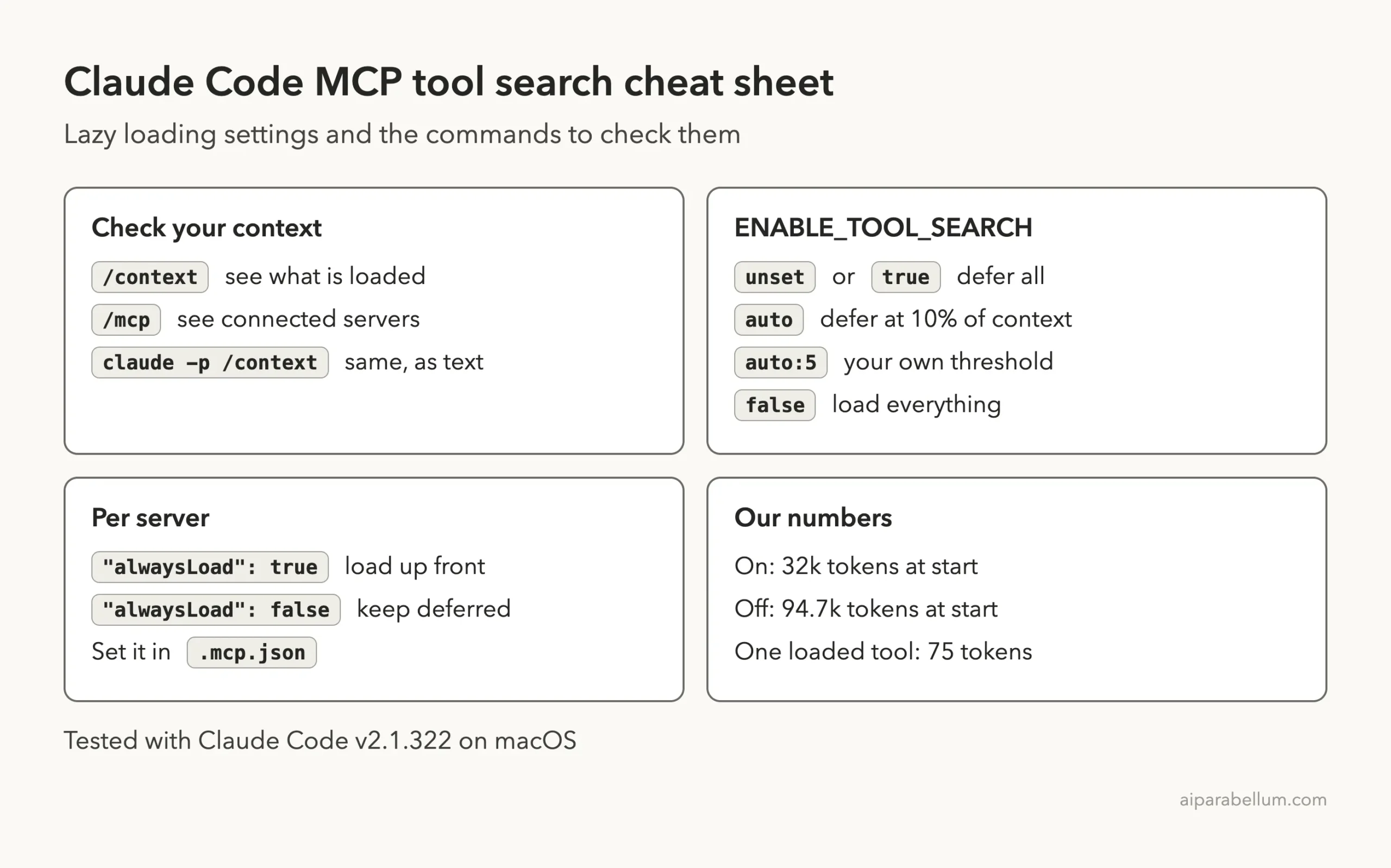
The docs list five values for the ENABLE_TOOL_SEARCH environment variable. You can set it in your shell before starting Claude Code, or in the env field of a settings file. Our settings examples show how that field looks.
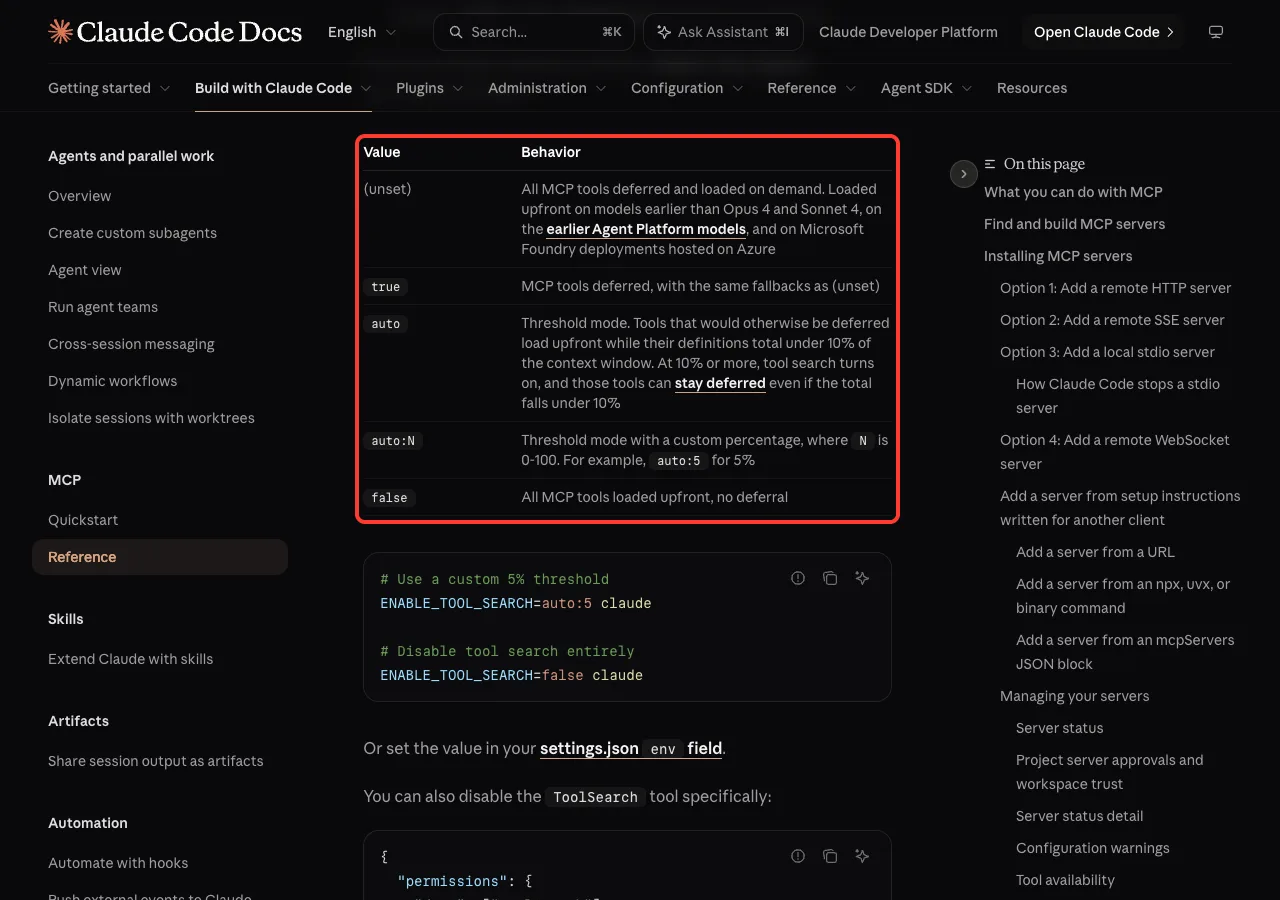
| Value | What the docs say | Our result (headless, 3 servers) |
|---|---|---|
| Unset | All MCP tools deferred and loaded on demand | 27.9k tokens at start |
true | Same as unset | Not run |
auto | Tools load up front while they total under 10% of the context window | 81.9k, everything loaded |
auto:N | Same, with your own percentage from 0 to 100 | auto:2 gave 27.9k, everything deferred |
false | All MCP tools loaded up front | 81.3k tokens at start |
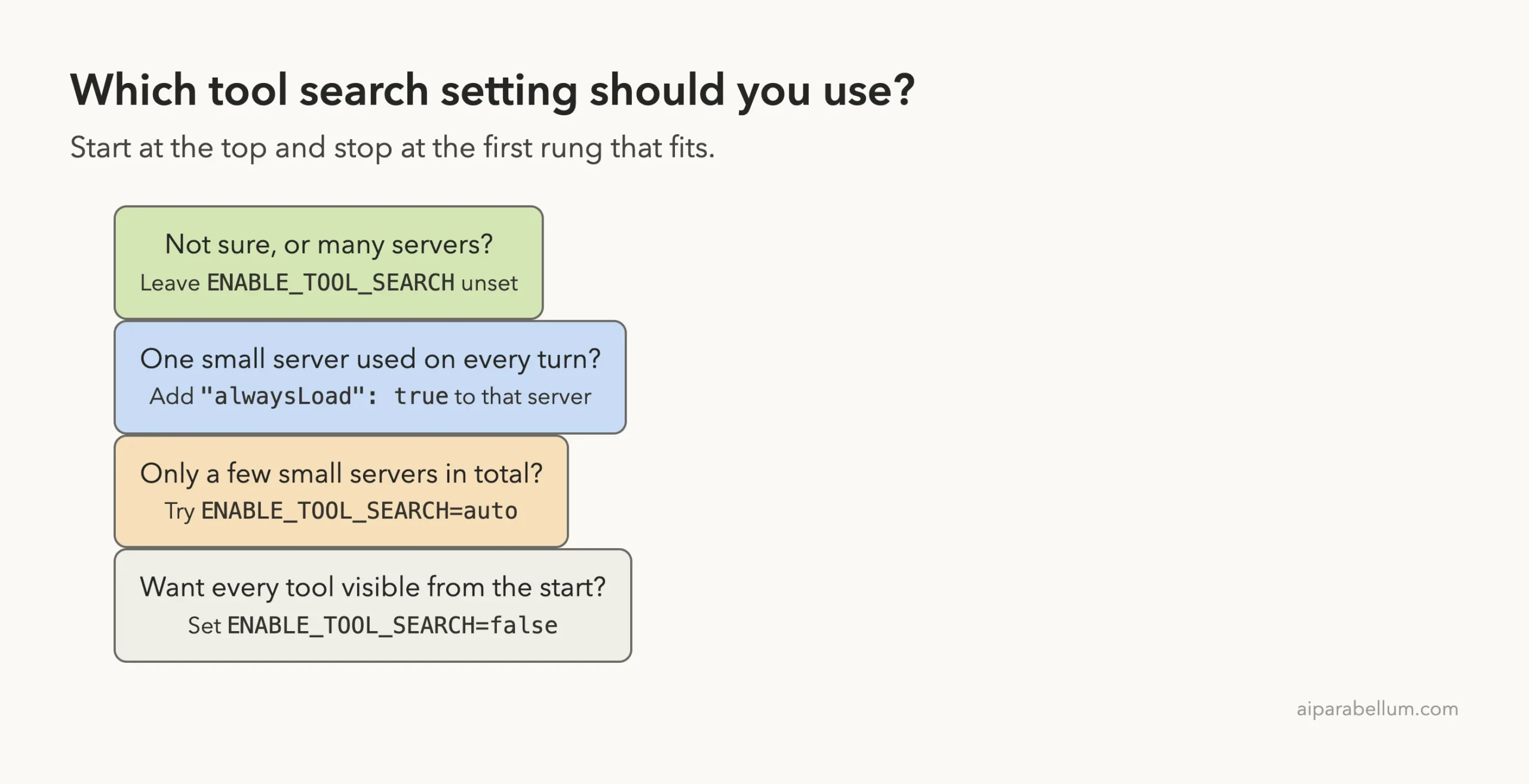
The auto result surprised us at first. Our MCP tools were about 3% of a 1 million token window, which is under the 10% line, so auto loaded everything up front. With the threshold lowered to 2%, the tools were deferred again.
On a large window, plain auto can cost you more than the default. Check with /context before you keep it.
The docs add a few limits. Tool search works on Claude Opus 4, Sonnet 4, Haiku 4.5 and later models, and older models load all MCP tools up front even if you set the variable to true. It is also not supported on Microsoft Foundry deployments hosted on Azure, where Claude Code falls back to loading tools up front.
You can also turn it off by denying the ToolSearch tool in your permission rules. The docs say MCP tools then load up front. Read the full list of cases in the tool search settings section of the docs.
Keep One Server Always Loaded With alwaysLoad
Sometimes you want one small server ready on every turn, with no search step. The docs give a per-server switch for that: add "alwaysLoad": true to the server’s entry in your MCP config.
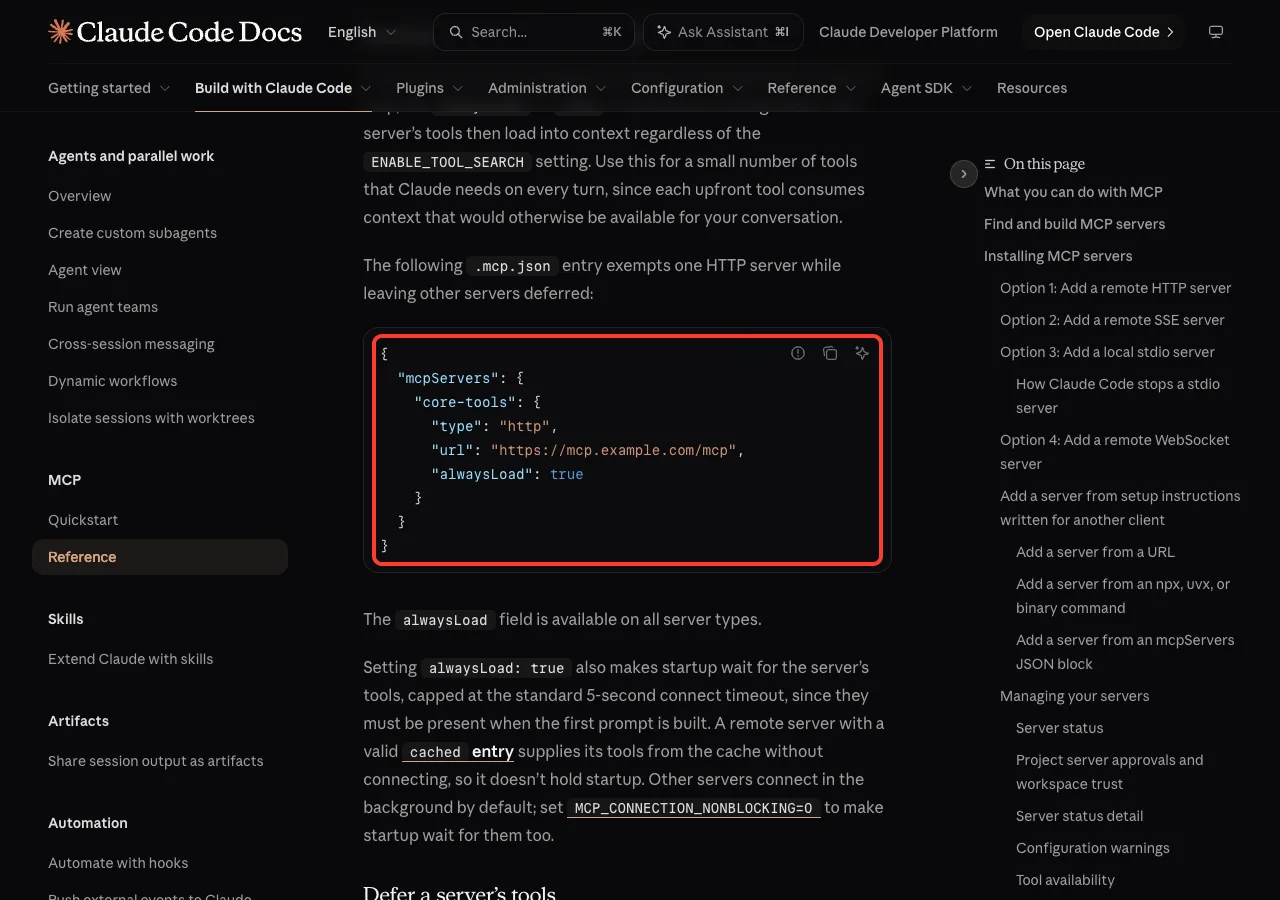
We tried it on our smallest server. We added the field to ms-learn and left the other two alone.
"ms-learn": { "type": "http", "url": "https://learn.microsoft.com/api/mcp", "alwaysLoad": true }The headless check then showed two MCP lines: 1.6k tokens of loaded tools and 29.4k still deferred. The session started at 29.4k tokens instead of 27.9k. That is a fair price for three tools you use all the time, and a poor one for a 48-tool server.
The docs note two more things. The field works on all server types, and setting it makes startup wait for that server’s tools, up to the standard 5-second connect timeout. You can also set "alwaysLoad": false to keep a server deferred even when its author marked some tools to load up front, which needs v2.1.287 or later.
Try It Yourself
You can repeat our test in five minutes with any server you already use. Make an empty folder, start Claude Code there and run /context. Note the total and look for the words “loaded on-demand” next to MCP tools.
Then quit and start again with the variable set, and compare.
ENABLE_TOOL_SEARCH=false claudeRun /context once more and write down both totals. To finish, go back to the default session and paste this prompt, with the name of one of your own servers in it.
Use the tools from my [server name] server to answer one small question, then tell me which tool you used.Run /context a last time. You should see one tool under Loaded and the rest still under Available.
Common Mistakes
- Turning tool search off to make tools “more reliable”. In our test Claude found the right tool among 58 deferred ones on the first try, and off cost 62.7k tokens.
- Assuming
autoalways saves context. On our 1 million token window it loaded every tool, because the total was under 10%. - Putting
alwaysLoadon a big server. Our 48-tool server would have added about 26k tokens to every session. - Reading the wrong line. With tool search on, a missing MCP tools line in the category list is normal, and the label to look for is “loaded on-demand”.
- Expecting smaller tool results. One call added 15.9k tokens of messages in our session, and tool search does not change that.
- Forgetting the model. The docs say models older than Opus 4 and Sonnet 4 load every MCP tool up front.
Pro Tips
- Run
claude -p /contextto get the same report as plain text. It is handy for comparing two setups, and our guide to headless mode covers the flag. - Use
auto:Nwith a low number if you want small setups loaded up front and large ones deferred. - Put the variable in the
envfield of a project settings file if a whole team should share the same behavior. - Check a server’s token cost before you add it. One 48-tool server made up most of our MCP total.
- If you build MCP servers, write clear server instructions. The docs say they help Claude know when to search for your tools, and Claude Code cuts them at 4,096 characters.
- Pair this with other habits from our token saving tips, since tool definitions are only one part of the bill.
MCP Tool Search Cheat Sheet
Frequently Asked Questions
Is Claude Code MCP lazy loading on by default?
Yes. The docs say tool search is enabled by default, so MCP tools are deferred and found on demand. Our fresh session confirmed it: /context marked every MCP tool as loaded on-demand without any setting from us.
How do I turn off tool search in Claude Code?
Set ENABLE_TOOL_SEARCH=false before you start Claude Code, or add it to the env field in a settings file. You can also deny the ToolSearch tool in your permission rules. All MCP tools then load up front.
Does tool search make Claude miss tools?
It did not in our two calls. Tool names still load at session start, and Claude used the search to fetch the definition it needed. Two calls are a small sample, so watch how it behaves with your own servers.
How many tokens does an MCP server use?
It depends on the server. In our test, three servers with 58 tools used 32.4k tokens when loaded up front, and one of them accounted for about 26k. With tool search on, the same three cost about 1.4k tokens at session start.
What does “loaded on-demand” mean in /context?
It means tool search is active and the MCP tool definitions are not in the context yet. Tools you have used move under a Loaded heading with their token cost. The docs say you may also see the label “deferred”, which is how the headless report showed it in our runs.
Conclusion
Tool search is one of the few Claude Code features that saves context without asking anything from you. In our test, three MCP servers with 58 tools started a session at 32k tokens with it on and 94.7k with it off, and the one tool Claude used cost 75 tokens to load. Leave the default alone, use alwaysLoad only for a small server you need on every turn, and check auto with /context before you trust it on a large window. If you are new to Claude itself, our Claude AI guide is a good place to start, and the full reference is in the official tool search docs.