Sometimes a single HTML file is not enough for the app you have in mind. You want React components, Tailwind styling and ready-made buttons and cards, but you still want to hand over one file at the end. The web artifacts builder skill is Anthropic’s answer, and we tested it inside Claude Code in a throwaway project.
This guide is part of our Claude Code tutorials. Find more add-ons in our Claude Code Skills Directory.
Tested with Claude Code v2.1.318 and the skill from the anthropics/skills repository (commit ca45fc4, dated 2026-10-28) on 2026-11-07, on macOS. We asked Claude to build one small habit tracker with it. We did not upload the result to claude.ai, so we do not claim how it behaves there.
Web Artifacts Builder Skill at a Glance
| Question | Answer |
|---|---|
| What is it? | An Agent Skill: a folder with a SKILL.md file and two shell scripts |
| Skill name | web-artifacts-builder |
| Maker | Anthropic, in its public skills repository |
| Stack it sets up | React 18, TypeScript, Vite, Parcel, Tailwind CSS and shadcn/ui |
| What you get | One self-contained bundle.html file |
| Needs an account? | No. It runs on your machine with Node and pnpm |
| Our result | A working habit tracker, 311,164 bytes, after two small fixes |
What Is the Web Artifacts Builder Skill?
An Agent Skill is a folder that Claude reads when a task matches its description. You can learn the basics in our guide to Claude Code skills. This one is for building larger HTML apps, the kind that need state, several components or shadcn/ui parts.
The description in its SKILL.md file is clear about the limit. It says to use it for complex artifacts and not for simple single-file HTML or JSX artifacts. If your page is one small file, you do not need it.
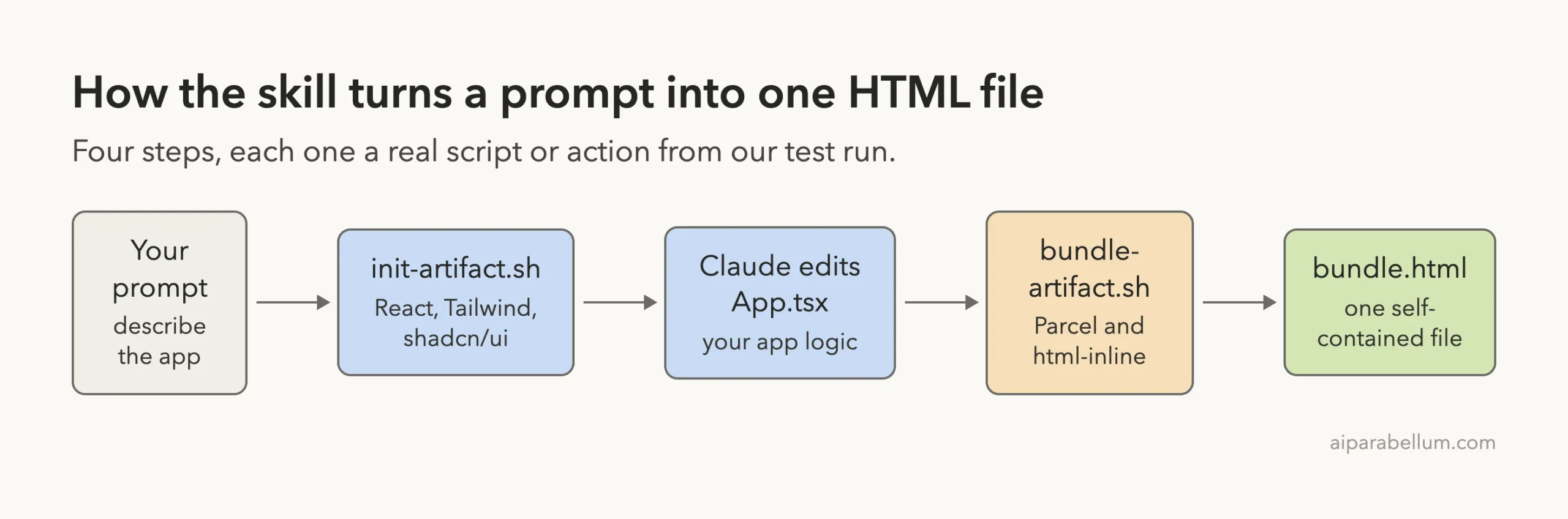
The skill has no magic inside. It gives Claude a recipe: create a project, edit the code, bundle everything into one HTML file, then show it to you. The two scripts do the heavy lifting.
The Two Scripts
init-artifact.shcreates a Vite React project, installs Tailwind CSS 3.4.1, adds many Radix UI packages and unpacks more than 40 shadcn/ui components intosrc/.bundle-artifact.shinstalls Parcel andhtml-inline, builds the app, and inlines every script and style intobundle.html.
The SKILL.md file also carries one design warning. It tells Claude to avoid excessive centered layouts, purple gradients, uniform rounded corners and the Inter font, to dodge what it calls AI slop.
How the Skill Works
The diagram shows the path from your prompt to the finished file. Claude runs the first script, writes your app code, then runs the second script.
Step 1: Install It Safely
We did not touch our normal Claude Code setup. We cloned the repository into a sandbox folder and copied only the web-artifacts-builder folder into the demo project’s .claude/skills/ folder. Then we started Claude Code with --setting-sources project, so only that project’s settings were loaded.
Before running anything, we read both scripts. They install npm packages and write files inside the project folder.
One detail matters: if pnpm is missing, init-artifact.sh runs npm install -g pnpm, which changes your whole machine. We installed pnpm inside the sandbox instead and put it on the path for the test.
If you prefer a plugin install, the skill also ships inside Anthropic’s example skills plugin. Our walkthrough of the Anthropic skills repository covers that route, and the official plugin discovery docs explain marketplaces.
Step 2: Check That It Loaded
Inside Claude Code we typed /skills. The skill showed up as a project skill with a small token cost of about 100 tokens, which is just its short description.
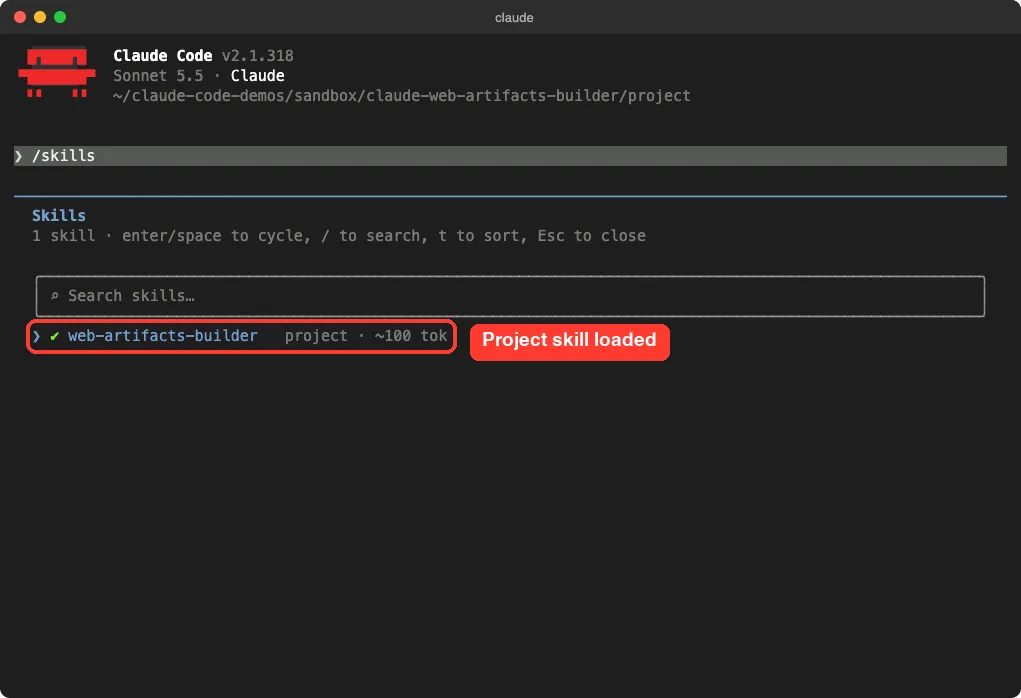
The full body of SKILL.md only loads when Claude decides the task matches. You can read how that works in the official skills documentation.
Step 3: Ask Claude to Build the App
We used one short prompt. It names the skill and keeps the app small, so the run stays quick.
Use the web-artifacts-builder skill to build a small habit tracker called habit-tracker: add habits, tick them off for each day of the week, show a progress card. Keep it small, then bundle it to bundle.html.We ran Claude Code in acceptEdits mode, with only a short list of allowed commands such as bash and pnpm. Everything happened inside the demo folder. Claude started the project, installed packages and wrote the app.
What Went Wrong on the First Build
The first bundle did not work. Our run hit two problems, and Claude fixed both without us writing any code. We think this is useful to know before you try it.
Problem 1: pnpm 12 Blocked the Build Scripts
The version of pnpm we used was 12. It ignored the old pnpm.onlyBuiltDependencies field in package.json and refused to run install scripts that Parcel’s native packages need. Claude noticed, wrote an allowBuilds list into a new pnpm-workspace.yaml file and rebuilt.
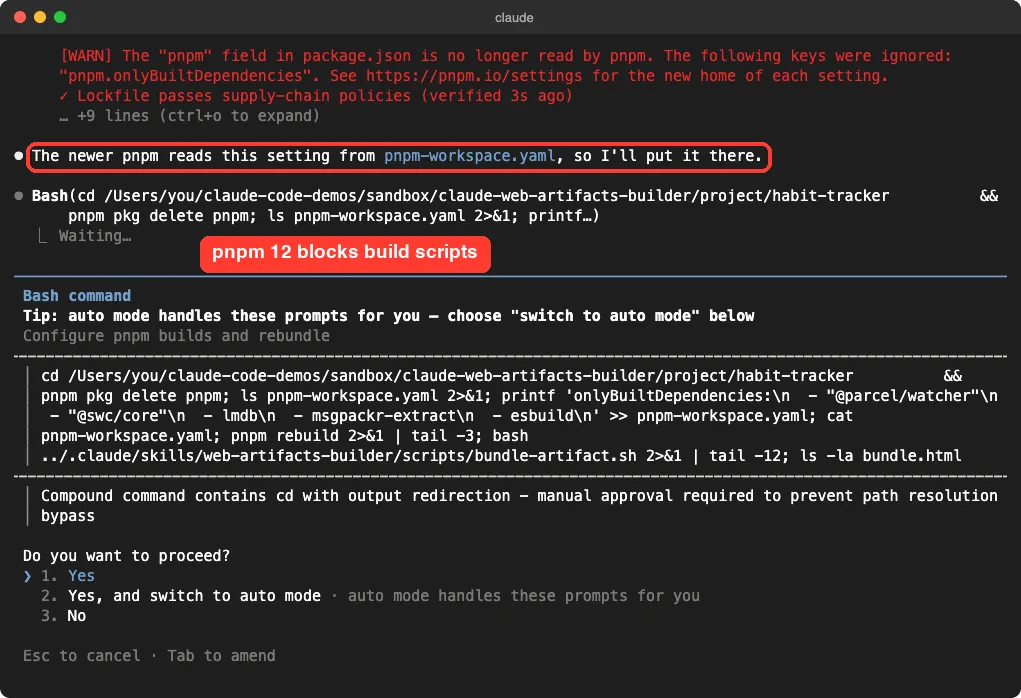
The file Claude wrote lists five packages: @parcel/watcher, @swc/core, lmdb, msgpackr-extract and esbuild. These are build tools, and they run install scripts on your machine. Read the list before you approve it.
Problem 2: A Favicon That Did Not Exist
The second build failed because the Vite template points to /favicon.svg, and that file was gone. Parcel stops on a missing file. Claude deleted that one link line from index.html and bundled again.
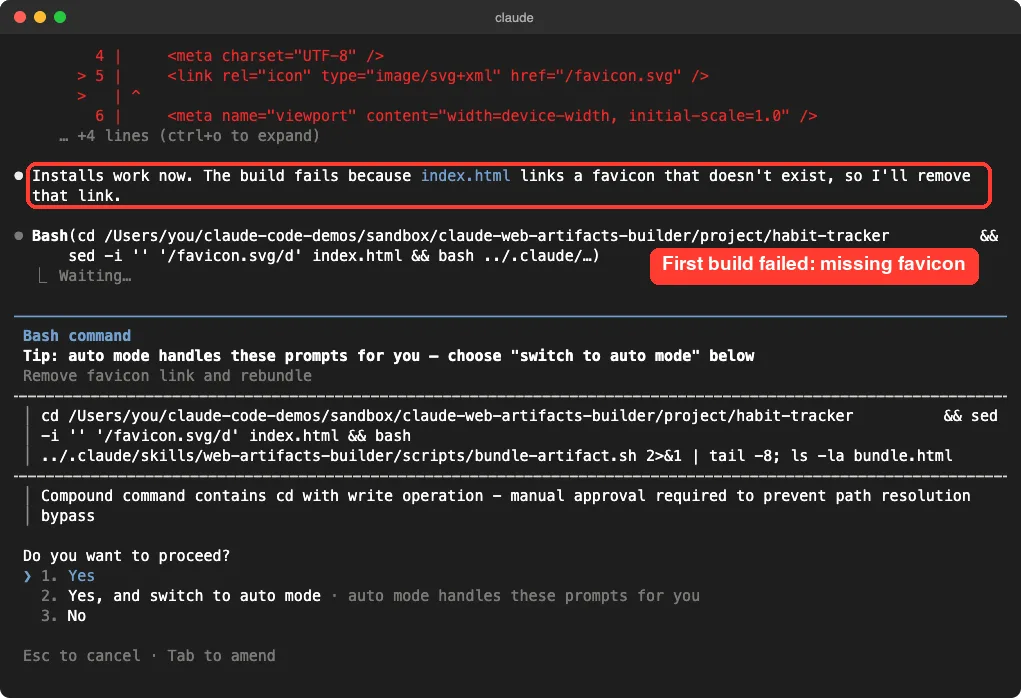
Neither problem is the skill’s fault in a deep sense. They come from a newer pnpm and the Vite template. Still, they show that a script written for one tool version can need small fixes on a fresh machine.
Step 4: The Bundle Is Done
After the fixes, bundle.html appeared in the project. Claude reported its size as 311,164 bytes, about 304 KB. It also said it had not opened the page in a browser.
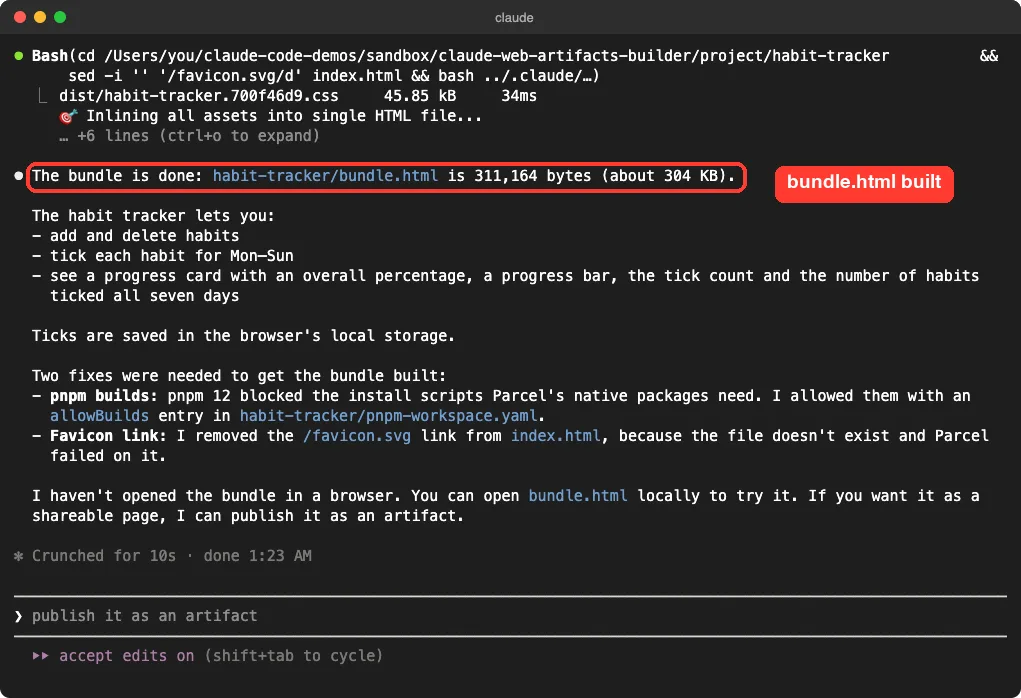
That last sentence matches the skill’s own advice. The SKILL.md file says testing is optional and that Claude should not test upfront, to keep things fast. So it is on you to open the file and check it.
Step 5: Open the Result Yourself
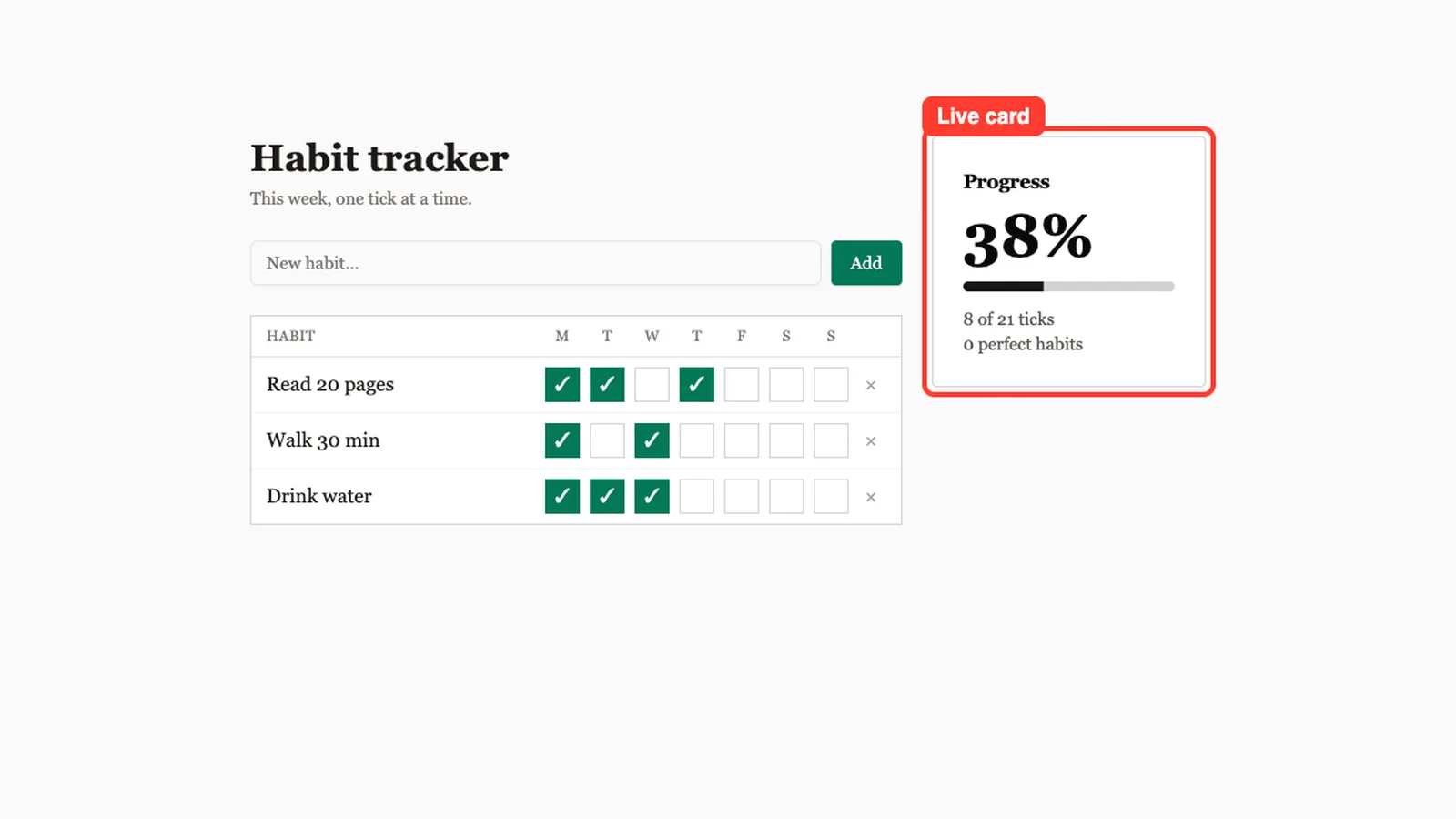
We opened bundle.html straight from disk in a headless Chrome window, with no server. We added a habit called Drink water, then ticked three days. The progress card updated to 38 percent, which is 8 of 21 ticks.
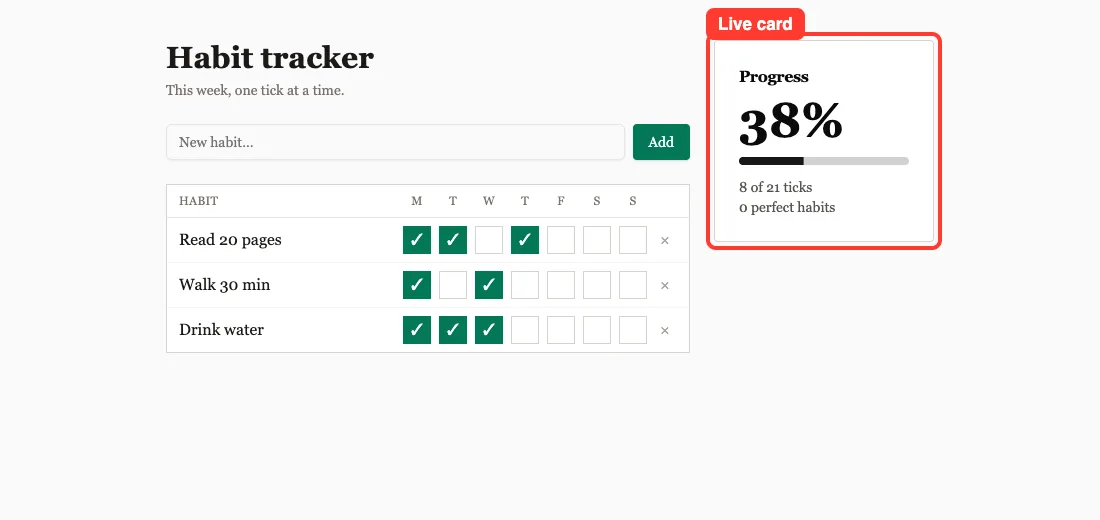
The look follows the skill’s design rule. It uses a warm off-white page, a serif font and square corners instead of the purple gradient style. The app also saves ticks in the browser’s local storage, and when we reloaded the page the ticks were still there.
The Key Code Claude Wrote
The whole app is one file, src/App.tsx, of 94 lines. This short part shows how the progress card gets its numbers.
const total = habits.length * 7;
const checked = habits.reduce((s, h) => s + h.done.filter(Boolean).length, 0);
const pct = total ? Math.round((checked / total) * 100) : 0;
const perfect = habits.filter(h => h.done.every(Boolean)).length;
The file imports Button, Input, Card and Progress from the shadcn/ui parts that the init script unpacked. That is the real value of the skill: you get those parts without installing each one yourself.
Use the skill for apps with state and shadcn/ui parts, and skip it for small single-file pages.
When to Use This Skill and When to Skip It
| Your task | Better choice |
|---|---|
| A small page with one HTML file | Ask Claude directly, no skill needed |
| An app with state and several components | web-artifacts-builder |
| You want shadcn/ui buttons, cards and dialogs | web-artifacts-builder |
| A full production site with a backend | A normal project, not a single bundled file |
| You need a nicer visual style | Add a design skill, see our UI design skills list |
If you want a simple marketing page instead of an app, our guide to a business landing page is a lighter path. For other web helpers, see the web development skills.
What We Did Not Test
We want to be plain about the limits of one demo. We built one small app. We did not try routing, a bigger app, or other shadcn/ui parts such as dialogs and dropdown menus.
We also did not upload bundle.html to claude.ai, and we did not run the skill on Windows or Linux. The skill says its output can be shared as an artifact in Claude conversations, but that is the skill’s claim and not something we confirmed. Our macOS run used Node 25 and pnpm 12.
Real Examples You Can Try
- A budget planner with a table, a form and a total card.
- A quiz app with a start screen, questions and a score page.
- A kanban board with columns, cards and a dialog to add tasks.
- A unit converter with tabs for length, weight and temperature.
Each of these needs state and a few shadcn/ui parts, which is the case the skill is built for.
Try It Yourself
Practice in a throwaway folder, never inside a real project. Copy the skill folder into .claude/skills/ of your demo, install pnpm first, then paste this prompt.
Use the web-artifacts-builder skill to build a small budget planner called budget-planner: a form to add expenses with a category, a table of expenses and a card with the total. Keep it small, then bundle it to bundle.html and tell me the file size.Open bundle.html in your browser and add three expenses. Then ask Claude to add a delete button to each row and bundle again.
Common Mistakes
- Using the skill for a tiny page. The skill itself says it is not for simple single-file artifacts.
- Letting the init script run
npm install -g pnpmon your own machine. Install pnpm yourself, in a place you control. - Approving an
allowBuildslist without reading it. Those packages run scripts when they install. - Trusting the bundle without opening it. Claude told us it had not tested the page.
- Running it in a real project. Use a demo folder, because the scripts create many files and install many packages.
Pro Tips
- Name the skill in your prompt. It makes sure Claude reaches for it.
- Keep the first prompt small, then ask for changes one at a time, as we do in our skill best practices guide.
- Ask Claude to report the file size, so you notice if the bundle gets far bigger than expected.
- Ask for a specific look, such as fonts and colors, since the skill only says what to avoid.
- Know the difference between skills, subagents and plugins. Our comparison guide explains it.
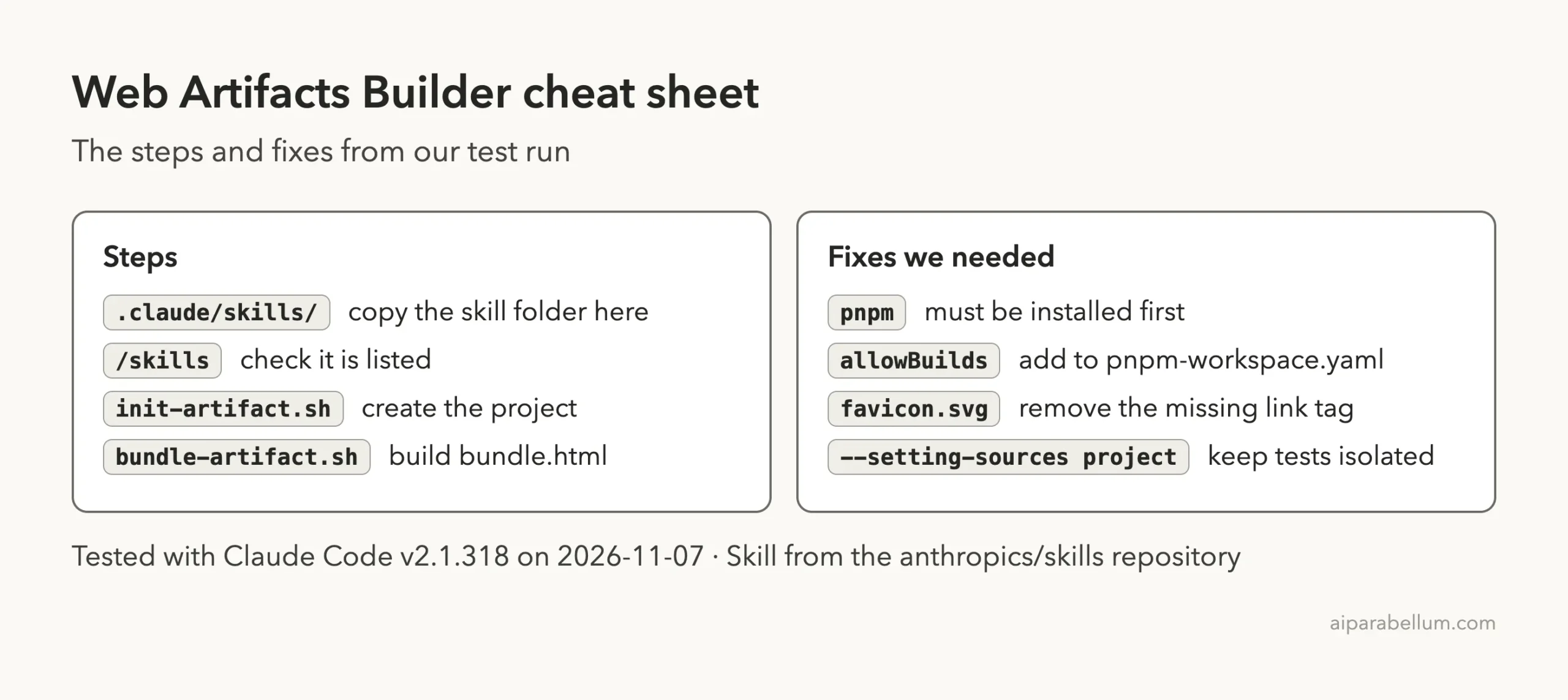
Cheat Sheet
Frequently Asked Questions
What does the web artifacts builder skill do?
It guides Claude through creating a React and Tailwind project with shadcn/ui, editing it, and bundling it into one HTML file named bundle.html.
Does the skill need an account or API key?
The skill itself needs no account or key. It runs scripts on your computer, but Claude Code still needs to be signed in to run your prompts.
What do I need installed first?
You need Node 18 or newer and pnpm. The init script stops if Node is older than 18, and it tries to install pnpm globally if it is missing.
Can I open the bundle without a server?
In our test, yes. We opened bundle.html directly from disk and the app worked, including saving ticks in local storage.
Can I use it in claude.ai?
The skill is described as a tool for claude.ai HTML artifacts, but we only tested it in Claude Code. Check that route yourself before you rely on it. Our Claude overview covers the product side.
Conclusion
In our single test, the web artifacts builder skill took one short prompt to a working habit tracker in one 304 KB file, but only after Claude fixed a pnpm build-script block and a missing favicon. It suits apps that need state and shadcn/ui parts, and it is overkill for a small page. Install pnpm yourself, read the scripts first, work in a demo folder, and open the bundle in a browser before you share it.