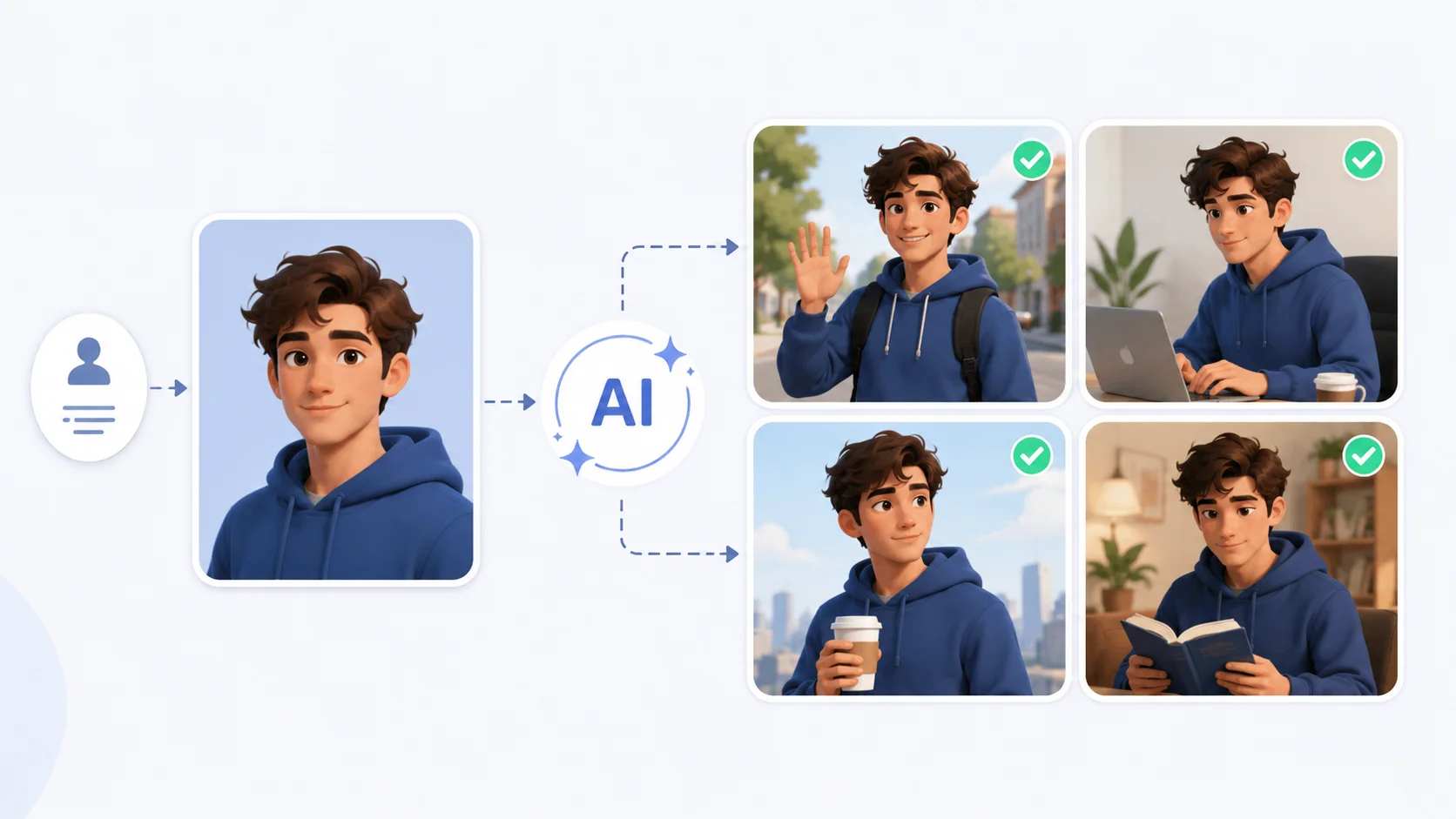
You generated a perfect character in one image. The face, outfit, and pose all looked exactly right. Then you tried to create a second image of the same character, and it looked like a completely different person.
Character consistency is one of the biggest challenges in AI image generation. Every new prompt produces a new interpretation, and getting the same character across multiple images requires specific techniques. Here is how to do it reliably.
Why AI Struggles with Character Consistency
AI image generators do not have memory between prompts. Each image is generated independently based on the text you provide and the random seed the model uses. Even identical prompts can produce different-looking characters because the generation process involves randomness at every step.
Understanding how these models work makes this clearer. Diffusion models start from random noise and refine it into an image. Two different noise patterns lead to two different faces, even with the same prompt. The model has no concept of “this is the same person from the last image.”
This is fundamentally different from traditional illustration where an artist holds a mental model of a character. AI rebuilds from scratch every single time.
Method 1: Use Character Reference in Midjourney
Midjourney introduced the –cref (character reference) parameter specifically for this problem. You provide an image of your character, and the model uses it as a reference to maintain facial features, body type, and overall appearance across new generations.
To use it, add –cref [image URL] to your prompt. You can also adjust the strength with –cw (character weight) from 0 to 100. A value of 100 keeps the character almost identical, while lower values allow more variation.
| Parameter | What It Controls | Recommended Value |
|---|---|---|
| –cref | Character reference image URL | Use your best character image |
| –cw 100 | Face and body preserved closely | Use for same-character scenes |
| –cw 50 | General look preserved, more flexibility | Use when changing outfits or poses |
| –sref | Style reference for consistent art style | Combine with –cref for best results |
The –cref parameter changed the game for Midjourney users. Before it existed, character consistency required workarounds that rarely produced reliable results.
Method 2: Train a LoRA for Your Character
A LoRA (Low-Rank Adaptation) is a small, trainable model that teaches an AI to recognize and reproduce a specific character. This is the most reliable method for getting consistent characters in Stable Diffusion.
You need 10 to 20 reference images of your character from different angles, expressions, and lighting conditions. Upload these to a LoRA training tool, set the training steps, and let it learn the character’s features. Once trained, you trigger the character by using a specific keyword in your prompt.
- Use Civitai, Kohya, or similar platforms for training.
- Include varied angles, expressions, and lighting in your training images.
- Train for 1000 to 2000 steps for best results without overfitting.
- Test with different prompts to confirm consistency before using in production.
- Adjust the LoRA weight (typically 0.6 to 0.8) to balance consistency with prompt flexibility.
LoRA training takes some effort upfront but gives you a reusable character that works across unlimited prompts and scenarios.
Method 3: Use Seed Values for Reproducibility
Every AI image generation starts with a random seed number. Using the same seed with the same prompt and settings produces the same image. This is useful for maintaining consistency when you want to make small changes to a scene without altering the character.
In Stable Diffusion, you can lock the seed value in the generation settings. In DALL-E, seed control is more limited, but the API allows specifying seeds for reproducible outputs.
The limitation is that changing the prompt significantly, even with the same seed, will alter the character. Seeds work best for minor adjustments like changing backgrounds or small scene details while keeping the character intact.
Method 4: Create a Character Sheet First
A character sheet is a single image showing your character from multiple angles, typically front, side, and three-quarter views. Professional animators and game designers use them, and they work well as references for AI generation too.
Write a detailed prompt asking for a character reference sheet with multiple views. Something like “character reference sheet, front view, side view, three-quarter view, same character, white background, full body.” Then use individual views from this sheet as references for future generations.
This technique works across most image generation platforms because you are giving the model a visual anchor rather than relying on text descriptions alone.
Method 5: Use IP-Adapter for Face Consistency
IP-Adapter is a tool for Stable Diffusion that lets you use an image as a visual prompt alongside your text prompt. For character consistency, you provide a face or full-body reference, and the model blends it with your text description.
This is similar to Midjourney’s –cref but available in open-source Stable Diffusion workflows. You can control how strongly the reference image influences the output, allowing you to maintain the character’s face while changing everything else about the scene.
- IP-Adapter Face ID focuses specifically on facial features for tighter face matching.
- IP-Adapter Plus provides stronger adherence to the reference image overall.
- Combine IP-Adapter with ControlNet poses for precise character positioning.
- Stack multiple IP-Adapter references to maintain both character and style consistency.
Prompting Techniques for Better Consistency
Even without specialized tools, your prompt structure significantly affects character consistency. Detailed, specific character descriptions produce more consistent results than vague ones.
Build a Character Description Template
Create a fixed block of text that describes your character’s key features. Include hair color and style, eye color, skin tone, face shape, body type, and any distinguishing marks. Copy this exact description into every prompt where the character appears.
Lock the Art Style
Changing art styles between images guarantees your character will look different. Pick one style and stick with it across all generations. If you are working in digital illustration, keep your style references identical.
Use Consistent Clothing Descriptions
Outfits are part of how viewers recognize characters. Describe clothing in the same way every time. “Red leather jacket, white t-shirt, dark jeans” used consistently helps the model anchor on visual patterns that tie images together.
Consistency starts with your prompt. The more specific and unchanging your character description is, the less the AI has to guess.
Which Tools Handle Character Consistency Best
Different platforms offer different levels of support for maintaining characters across images.
| Platform | Consistency Method | Reliability |
|---|---|---|
| Midjourney | –cref and –sref parameters | High for faces, moderate for full body |
| Stable Diffusion | LoRA, IP-Adapter, ControlNet | Very high with proper setup |
| DALL-E | Detailed prompting, seed control via API | Moderate |
| Leonardo AI | Character reference and style consistency | High with recent updates |
Comparing tools like Midjourney and Leonardo AI shows that both have made character consistency a priority in recent updates. Your choice depends on whether you prefer ease of use or fine-grained control.
Common Mistakes That Break Consistency
Even with the right tools, certain habits will ruin your character consistency across images.
- Changing the model or checkpoint between generations. Different models interpret the same prompt differently, so your character will look different.
- Using vague descriptions like “a young woman” instead of specifying exact features. The model fills in gaps differently each time.
- Switching aspect ratios between images. A portrait crop and a landscape crop generate different compositions that affect how the character is rendered.
- Over-editing individual images. If you heavily modify one image with a photo editor, it drifts from what the AI can reproduce in subsequent images.
- Ignoring lighting consistency. A character lit by warm sunset light will look fundamentally different from the same character under cool fluorescent lighting.
Building a Character Consistency Workflow
The most reliable approach combines multiple methods into a repeatable workflow.
- Start by generating a strong initial character image that matches your vision.
- Create a character sheet showing multiple angles from that initial design.
- Write a detailed character description template and save it for reuse.
- Use platform-specific tools like –cref, LoRA, or IP-Adapter to lock in the reference.
- Keep your art style, model version, and core settings identical across all generations.
- Review each new image against the reference and regenerate anything that drifts too far.
This workflow takes a few extra minutes to set up but saves hours of regenerating images that look nothing like your character. As creative AI tools continue improving, built-in consistency features are getting stronger, but a structured workflow remains your best guarantee.
Conclusion
Getting consistent characters in AI images requires a combination of the right tools and disciplined prompting. Use character reference features like Midjourney’s –cref for quick consistency, train a LoRA for long-term character reuse in Stable Diffusion, and always maintain a detailed character description template. The key is treating character consistency as a workflow problem, not a single-prompt problem. Lock your settings, keep your descriptions identical, use visual references, and your characters will stay recognizable across every image you generate.