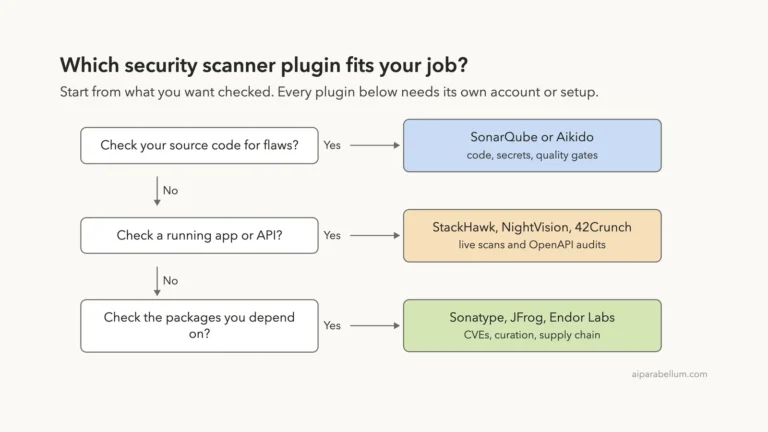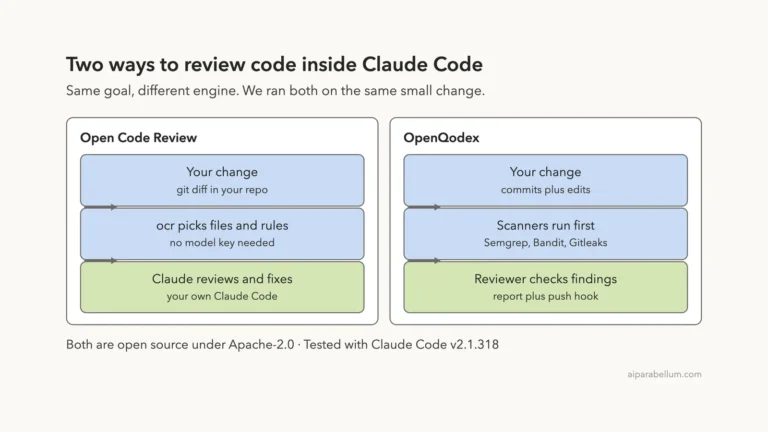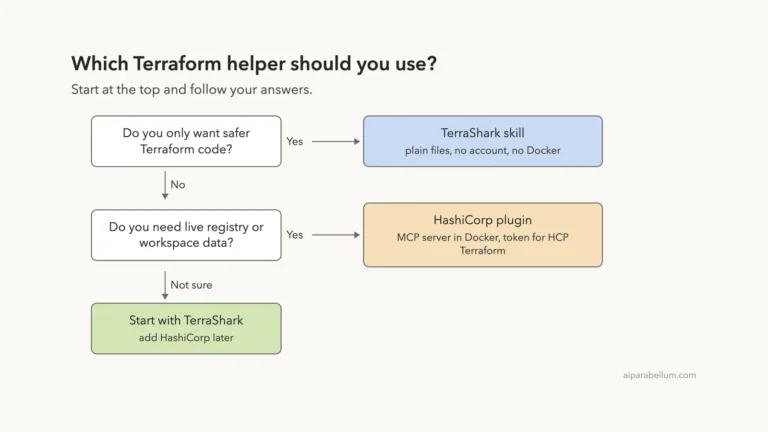
Want to build an MCP server with Claude Code but not sure where to start? Anthropic publishes two free helpers for exactly this job. One is a skill called mcp-builder, and the other is a plugin called mcp-server-dev.
They sound alike and overlap a lot, but they behave differently in the first minute. We loaded both in a sandbox, gave them the same request, and compared what each one planned.
This guide is part of our Claude Code tutorials. Find more add-ons in our Skills Directory.
Tested with Claude Code v2.1.318 on November 8, 2026. The skill came from the anthropics/skills repository at commit 2c5958e, and the plugin came from anthropics/claude-plugins-official at commit 0412be7.
Quick Summary
| Question | mcp-builder skill | mcp-server-dev plugin |
|---|---|---|
| What it is | One skill with a main guide and five reference guides | A plugin that bundles three skills |
| Command we ran | /mcp-builder | /mcp-server-dev:build-mcp-server |
Cost at rest in /skills | About 100 tokens | About 140 to 170 tokens per skill |
| Language it chose for us | TypeScript with the v2 SDK | TypeScript with the official SDK |
| Transport it chose for us | stdio | stdio |
| Extra paths | Python guide, evaluation guide | MCP app widgets, MCPB bundles, remote HTTP |
| What we ran | A plan-mode design request | The same plan-mode design request |
We want to be clear about scope. We ran the planning step of both tools. We did not let either one write and ship a server, so this post compares how they think, not how well their finished code runs.
What an MCP Server Is and Why You Would Build One
MCP stands for Model Context Protocol. An MCP server is a small program that gives Claude new tools, like reading a folder of notes or looking up an order. Our guide to MCP guide explains how Claude Code connects to servers, and our roundup of tested MCP servers shows what already exists.
Sometimes nothing off the shelf fits. Maybe you have an internal API, a folder of files, or a service your team uses every day. Then you build your own server, and that is where these two helpers come in.
Two Ways to Build an MCP Server With Claude Code
The mcp-builder skill
A skill is a folder with a SKILL.md file and optional extras. Our guide to Claude Code skills covers the basics. The mcp-builder folder holds a main guide of about 1,400 words and five reference guides: best practices, a TypeScript v2 guide, an older TypeScript v1 guide, a Python guide and an evaluation guide.
It also has a few helper scripts for running evaluations.
Its main guide describes four phases: research and planning, implementation, review and testing, and creating evaluations. It recommends TypeScript, and it recommends stdio for local servers and streamable HTTP for remote ones.
The mcp-server-dev plugin
A plugin is a bundle that can carry skills, commands, hooks and more. The Claude Code plugins guide shows how to find and manage them. The mcp-server-dev plugin carries three skills.
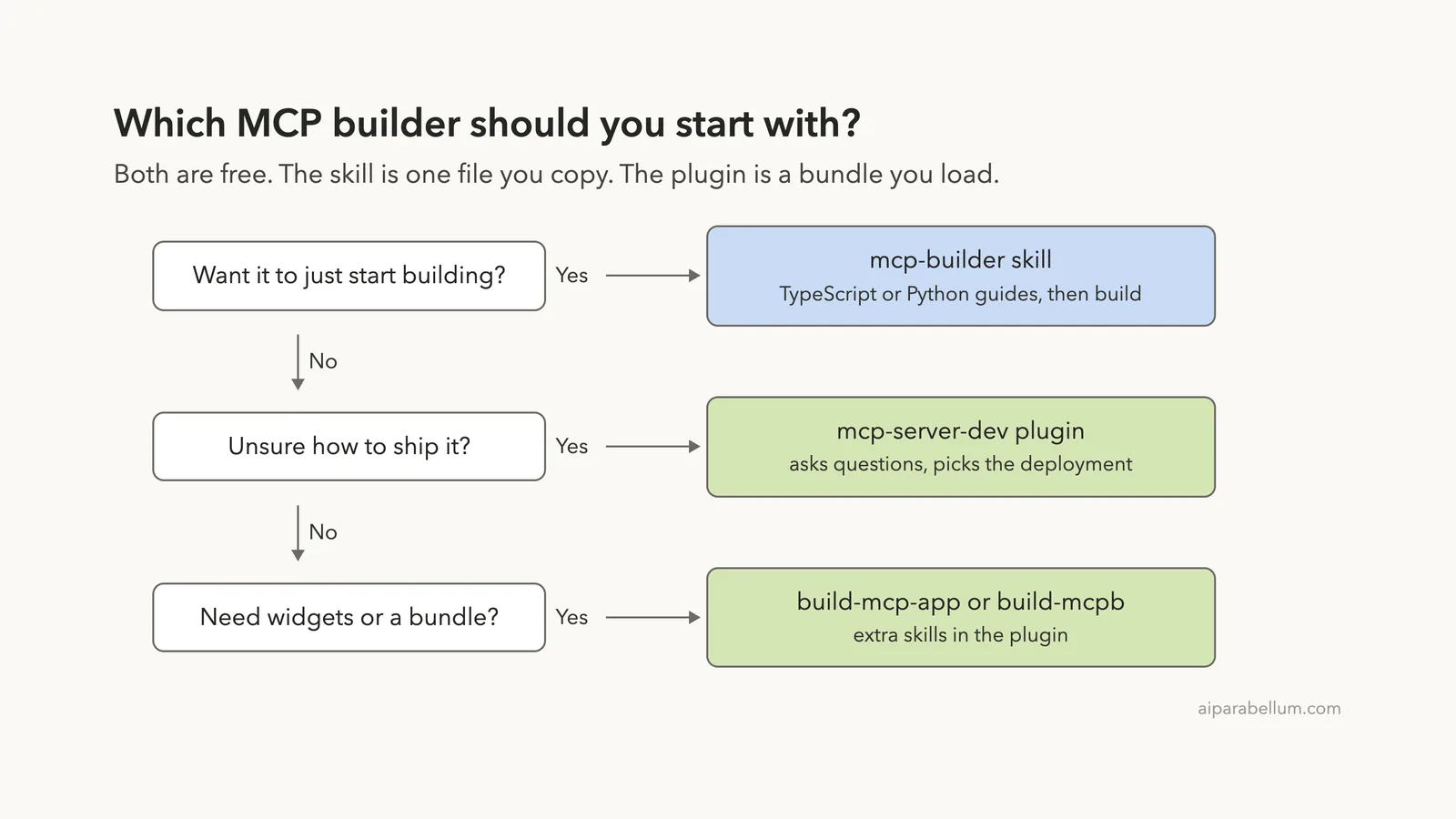
build-mcp-serveris the front door. It asks about your use case and picks a deployment model.build-mcp-appadds interactive widgets, like forms and pickers, that show up inside the chat.build-mcpbpackages a local server with its runtime so people can install it without Node or Python.
Its README describes four possible paths: a remote streamable HTTP server, an MCP app, an MCPB bundle, or a local stdio prototype.
How We Set Up the Test Safely
We never touched our real Claude Code setup. We cloned both repositories into a throwaway sandbox folder and made two separate demo projects, each with the same three tiny markdown notes that we wrote ourselves.
- Before running anything, we read both tools. Neither one contains hooks or shell scripts that run on their own. The skill’s scripts only matter if you ask for evaluations.
- For the skill, we copied the
mcp-builderfolder into the first project’s.claude/skills/folder. - For the plugin, we started Claude Code with
--plugin-dirpointing at the cloned plugin folder, so nothing was installed. - Both sessions used
--setting-sources project, so only the demo project’s own settings loaded, and both ran in plan mode so no files could be written.
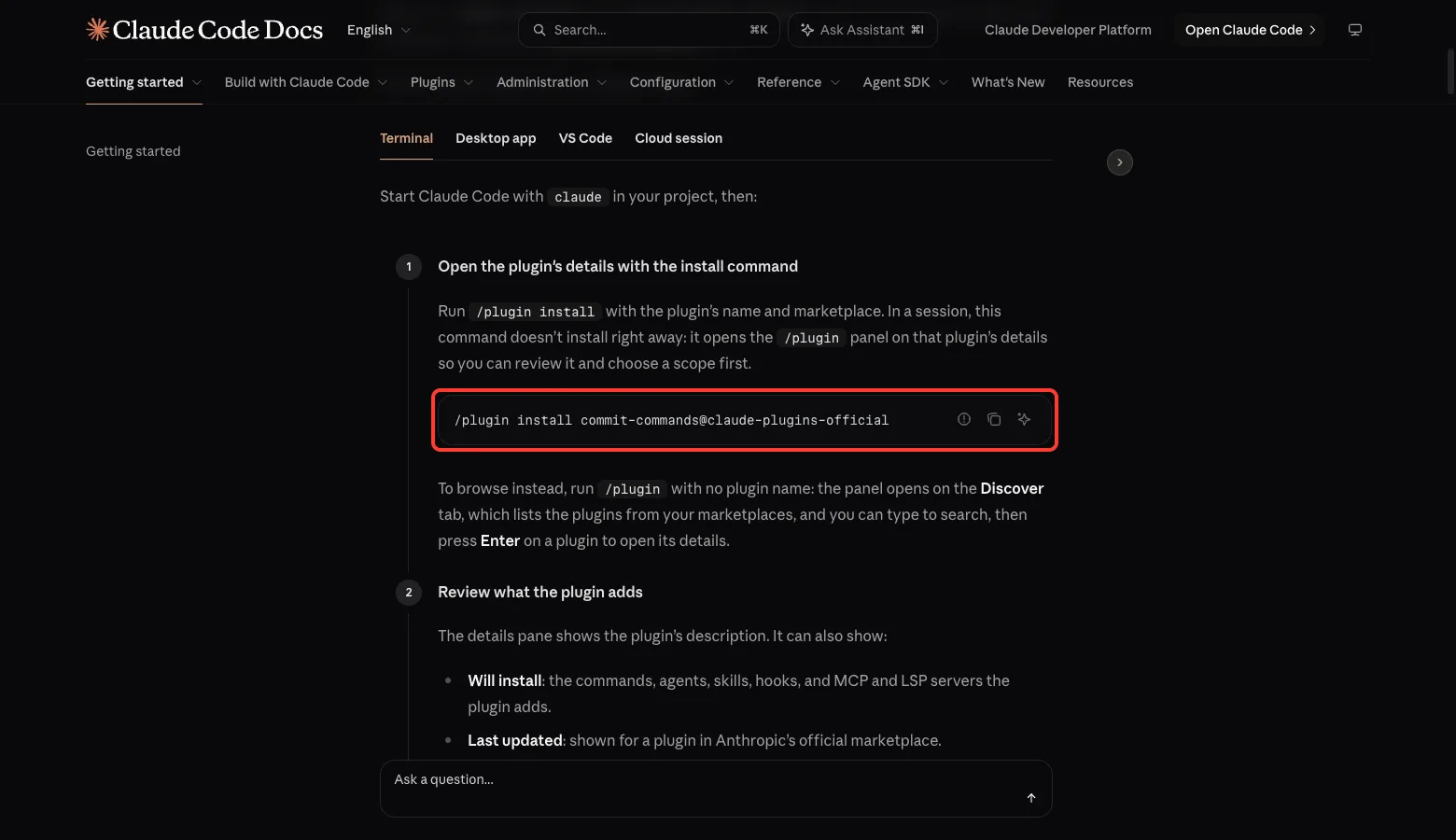
The official plugin docs show the normal way to install from a marketplace. Here is the command from the docs, using a different example plugin name. For ours you would swap in mcp-server-dev@claude-plugins-official.
Step 1: Load the mcp-builder Skill
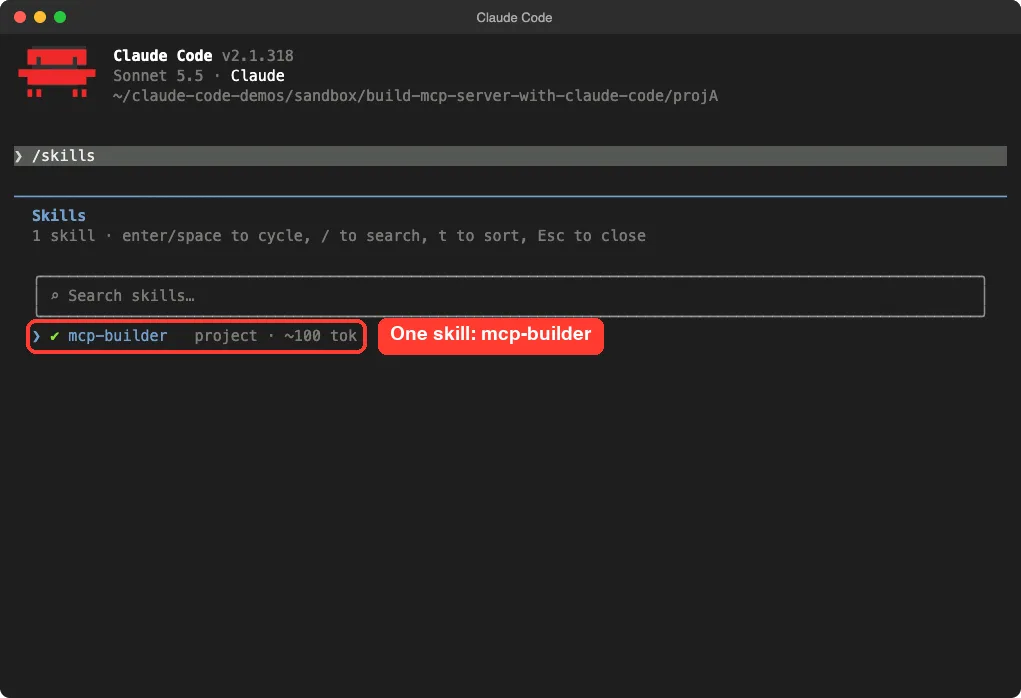
After starting Claude Code in the first demo project, we typed /skills. The list showed one skill, mcp-builder, tagged as a project skill with a cost of about 100 tokens.
That small number is the short description Claude keeps loaded. The full guide only loads when you run the skill.
/skills list shows mcp-builder as a project skill with a tiny token costStep 2: Plan an MCP Server With the Skill
We used the same prompt for both tools. It describes a personal server for a notes folder and asks for a plan only.
/mcp-builder I want an MCP server that lets Claude list, read and search the markdown files in a notes folder. It is just for me, on my Mac. Plan only, do not write any files. In 5 short bullets: which language, transport and tools you would pick, and why.The skill produced a full plan and then showed Claude Code’s approval screen, asking whether to proceed. We did not approve it.
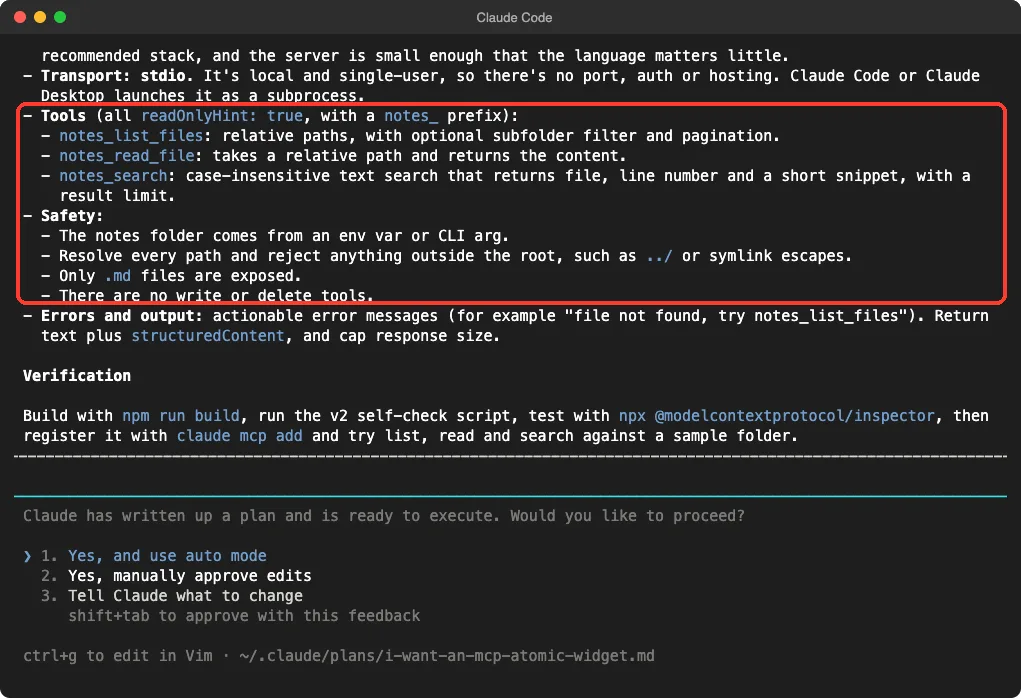
The plan chose TypeScript with the v2 SDK package @modelcontextprotocol/server and Zod schemas, and it said this follows the skill’s recommended stack. It chose stdio because the server is local and single-user, so there is no port, auth or hosting to worry about.
It planned three tools with a notes_ prefix: notes_list_files, notes_read_file and notes_search. All three would be read-only, and the plan listed safety rules: the folder comes from an environment variable or argument, paths outside the root are rejected, only .md files are exposed, and there are no write or delete tools. It ended with a verification path: build, run the self-check script, try the MCP Inspector, then register it with claude mcp add.
notes_ tools, path safety rules and a verification pathStep 3: Load the mcp-server-dev Plugin
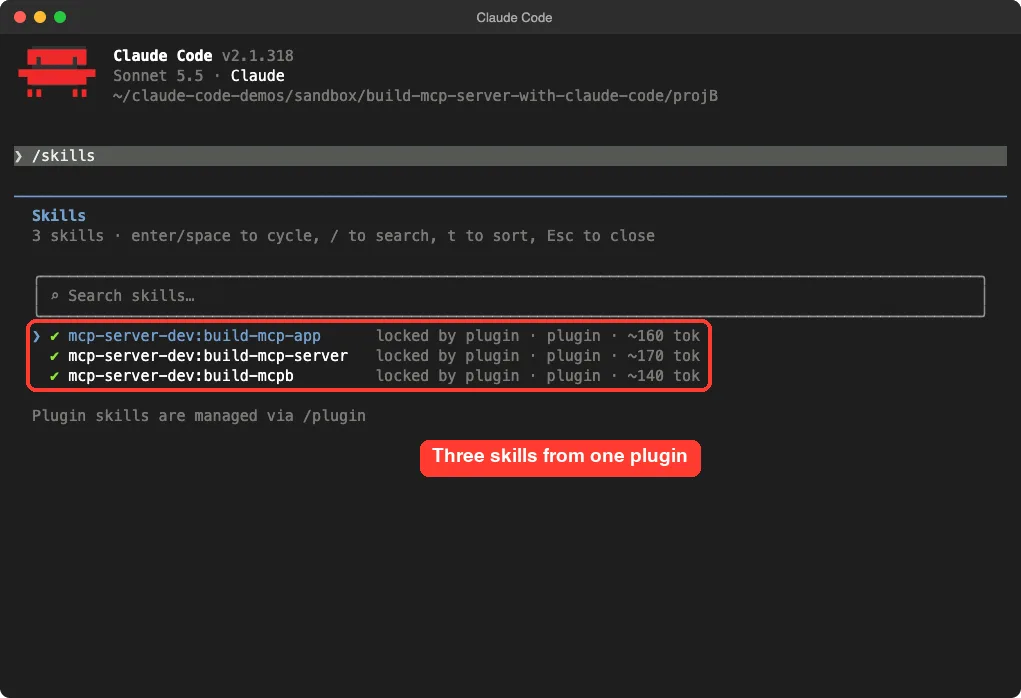
In the second project, /skills showed three entries, all labeled as locked by the plugin: mcp-server-dev:build-mcp-app, mcp-server-dev:build-mcp-server and mcp-server-dev:build-mcpb. Each costs roughly 140 to 170 tokens at rest. The screen also notes that plugin skills are managed through /plugin, which means you cannot toggle them one by one here.
Step 4: Plan an MCP Server With the Plugin
We ran the same request through the plugin’s entry skill.
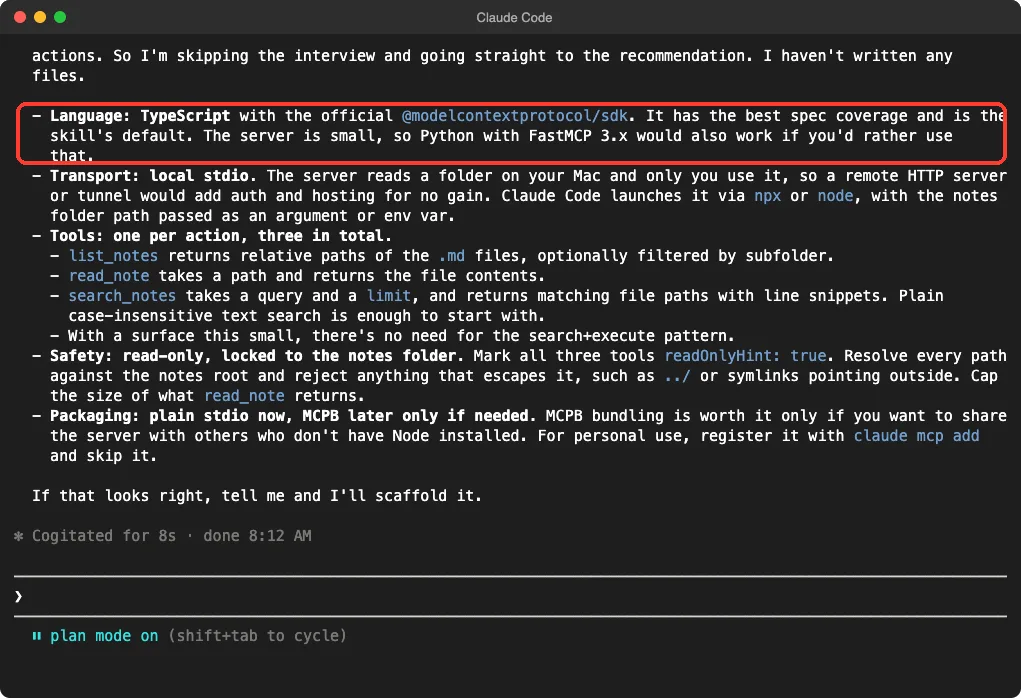
/mcp-server-dev:build-mcp-server I want an MCP server that lets Claude list, read and search the markdown files in a notes folder. It is just for me, on my Mac. Plan only, do not write any files. In 5 short bullets: which language, transport and tools you would pick, and why.This is where the plugin showed its personality. Its guide tells Claude to interview you before writing code. But our message already answered the questions, so Claude said it was skipping the interview and going straight to a recommendation.
If your first message is vague, expect questions about what you connect to, who will use it and how many actions it needs.
The plan picked TypeScript with the official @modelcontextprotocol/sdk package and mentioned Python with FastMCP as an alternative. It chose local stdio and listed three tools: list_notes, read_note and search_notes. It marked all three read-only, locked them to the notes folder, and added a packaging note: plain stdio now, and MCPB later only if you want to share the server with people who lack Node.
What Was the Same and What Differed
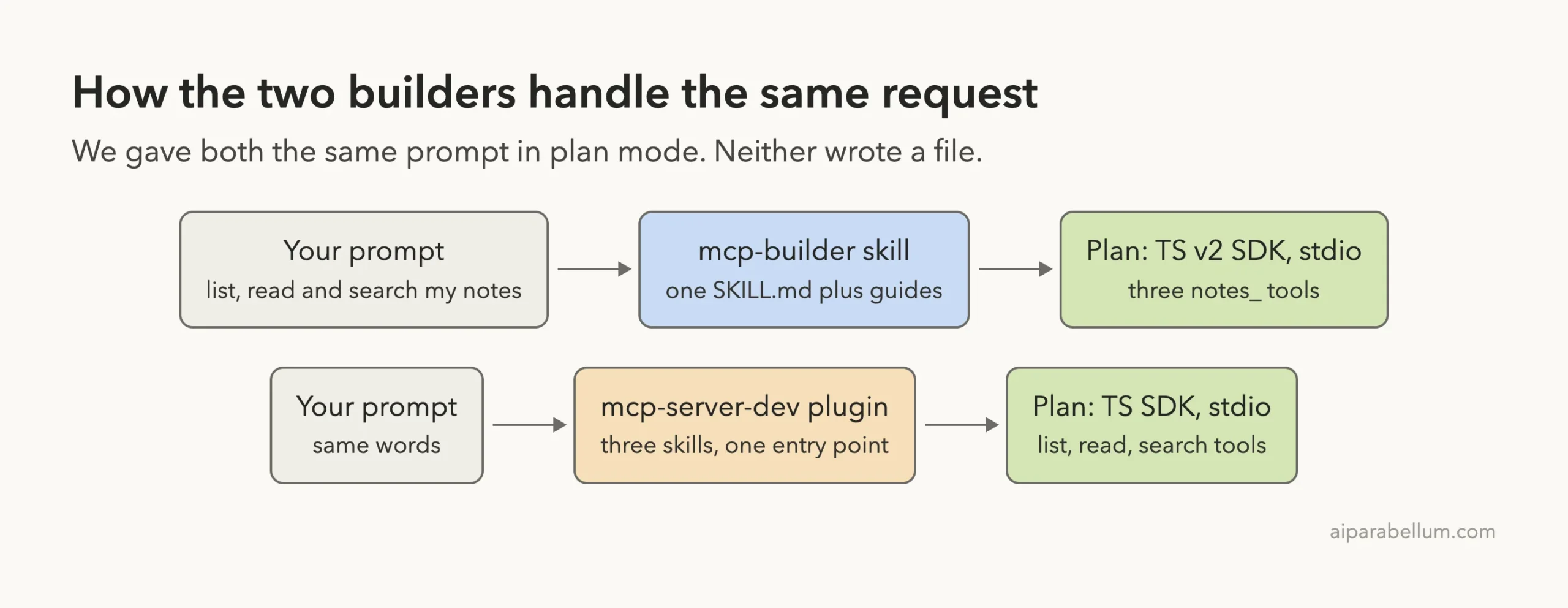
The plans agreed on the big decisions. Both picked TypeScript, both picked stdio, both split the work into three read-only tools, and both wanted the server locked to one folder. For a small personal server, that agreement is reassuring.
The differences were in the details.
- SDK package: the skill named the v2 package
@modelcontextprotocol/server, while the plugin named@modelcontextprotocol/sdk. The skill’s own text says the v1 package receives only bug and security fixes and v2 is current for new servers. We did not check this against the SDK itself, so verify the package name before you start. - Tool names: the skill used a
notes_prefix on every tool, matching its advice on consistent naming. The plugin used shorter names. - Next step: the skill showed an approval screen to start building right away. The plugin ended with a question and waited for our go-ahead.
- Reach: the plugin’s other two skills cover widgets and bundles, which the skill does not.
Which One Should You Use?
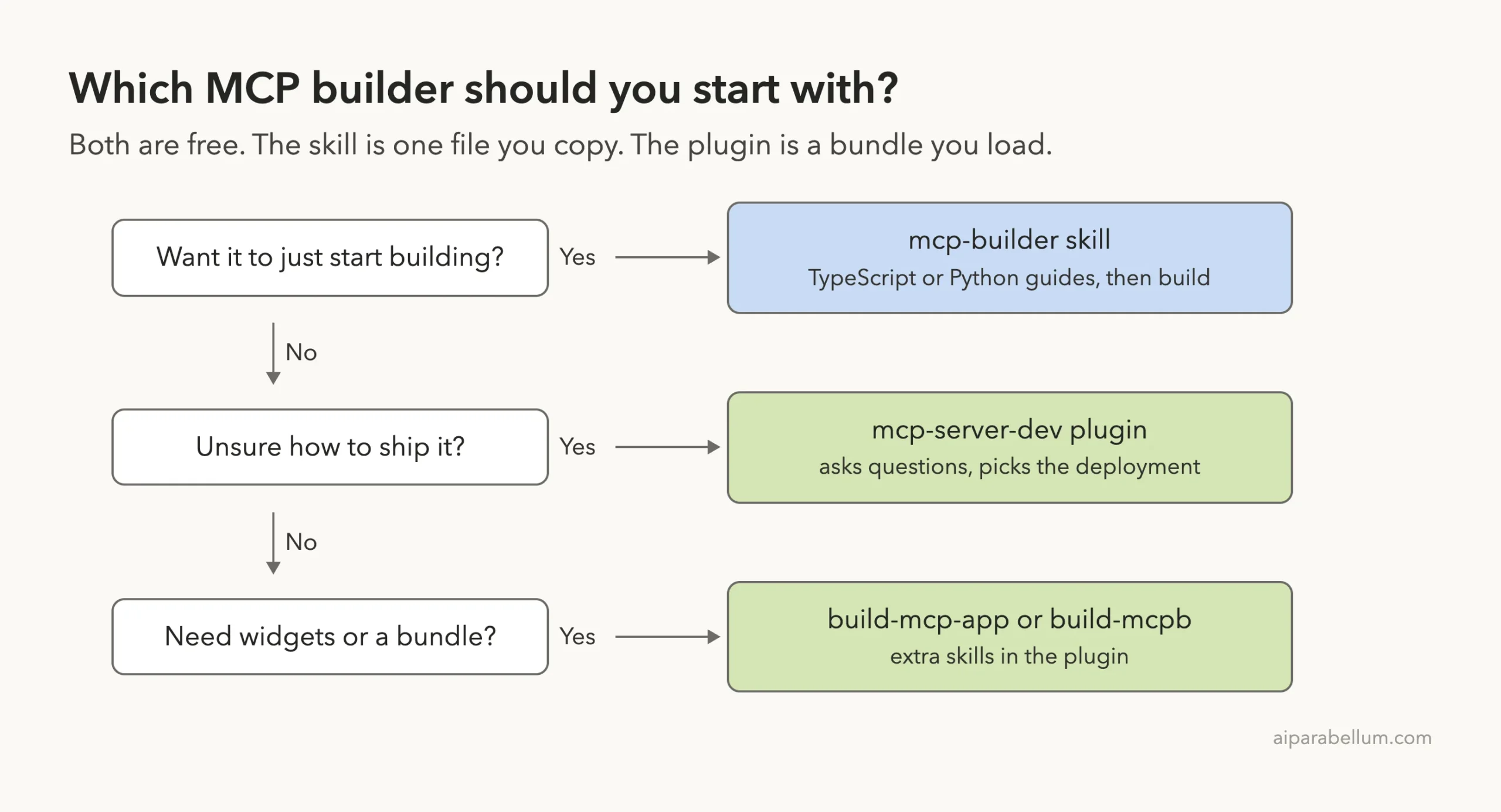
Choose the skill when you already know roughly what you want and just need Claude to build it with good habits. Its reference guides cover tool design, error messages, pagination and testing, and its evaluation guide helps you write test questions for your server later.
Choose the plugin when you are unsure about the shape of the project. Its entry skill is built to ask whether you need a remote server, a local bundle or interactive widgets, and it hands off to a specialist skill. That helps when the answer is not obvious, for example when other people will install your server.
Nothing stops you from trying both. They cost almost nothing at rest, and the plans are cheap to compare.
Registering Your MCP Server With Claude Code
Once a server exists, Claude Code needs to know about it.
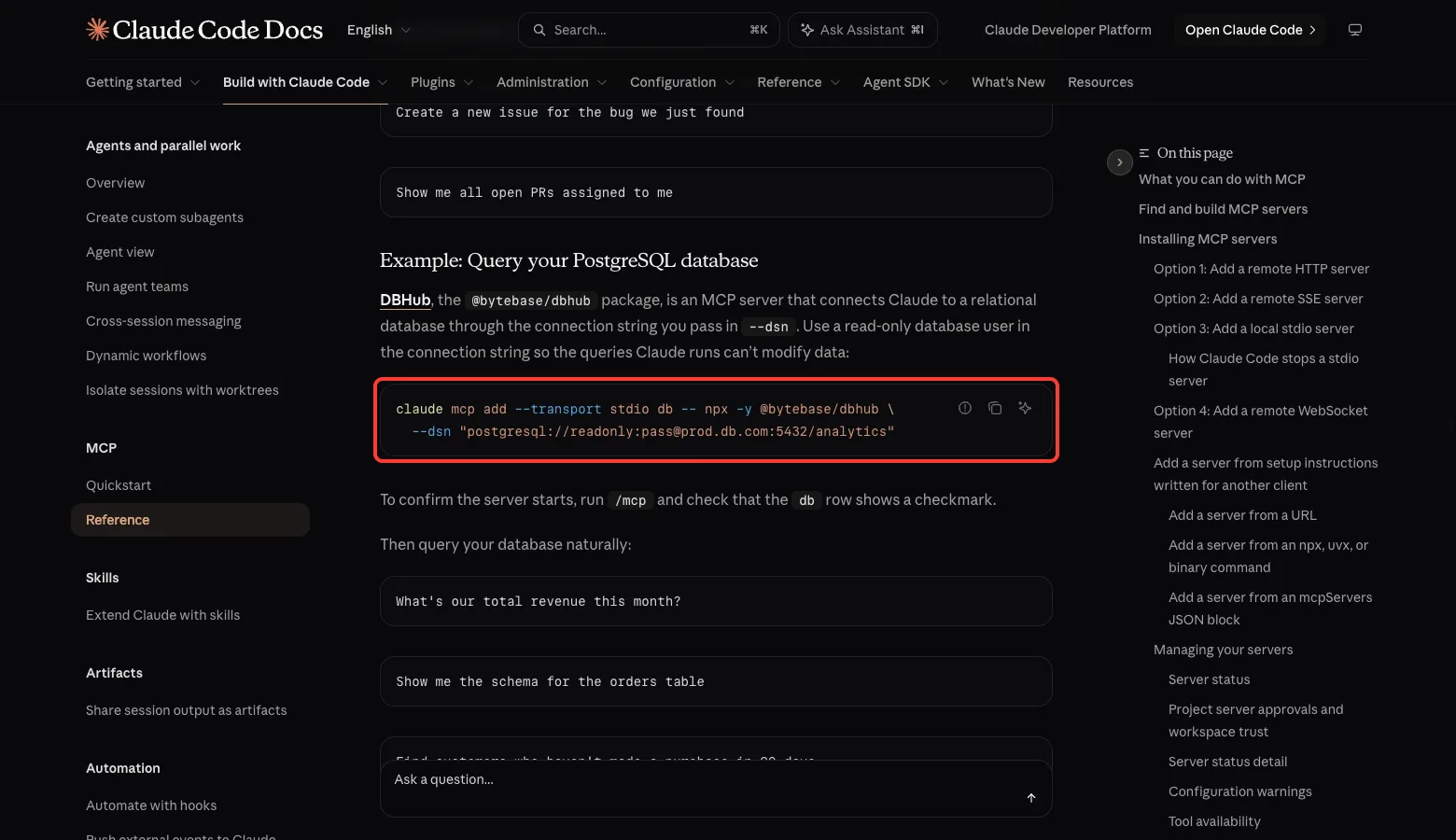
The official MCP docs show a pattern for local stdio servers: claude mcp add --transport stdio NAME -- COMMAND. After adding it, run /mcp and check that the server shows a checkmark. If you need to find where those settings live, see our guide to the MCP config file.
claude mcp addTry It Yourself
Make a throwaway folder with a few small markdown files. Do not use a real notes folder. Load one of the builders as shown above, start Claude Code in plan mode, and paste this prompt.
I want an MCP server that lets Claude list, read and search the markdown files in a notes folder. It is just for me, on my Mac. Plan only, do not write any files. In 5 short bullets: which language, transport and tools you would pick, and why.Then run the same prompt with the other builder and compare the two answers. Ask one follow-up question: which choices were required and which were taste. That teaches you how to review any plan.
Common Mistakes
- Skipping plan mode. Planning first costs a few seconds and lets you change the design before any file exists.
- Giving a vague request. The plugin will interview you, and the skill will guess, so say who uses the server and where it runs.
- Exposing write tools too early. Both plans started read-only, which is a safer way to learn.
- Trusting the package name without checking. The two tools named different SDK packages, so check the current docs.
- Installing into your main setup to test. Use
--plugin-diror a project skills folder, so removal is just deleting a folder.
Pro Tips
- Say what you connect to, who will use it and how many actions you need in your first message. The plugin then skips its questions.
- Keep the first version to three tools or fewer, then add more after it works.
- Test with the MCP Inspector before registering the server with Claude Code.
- Write a few real questions to test your server later. The skill’s evaluation guide describes how.
- Read our Claude AI overview if you are new to the model behind these tools.
Honest Verdict
Both helpers gave sensible, safety-minded plans, and the plans were close enough that neither is a wrong choice for a small local server. We did not run the build step, so we cannot compare code quality, bugs or the time to a working server.
The skill suits people who want to move fast. The plugin suits people who want guidance on how to ship, especially if widgets or bundles might matter later.
For a small personal server, start with either one, keep it read-only, and review the plan before approving anything.
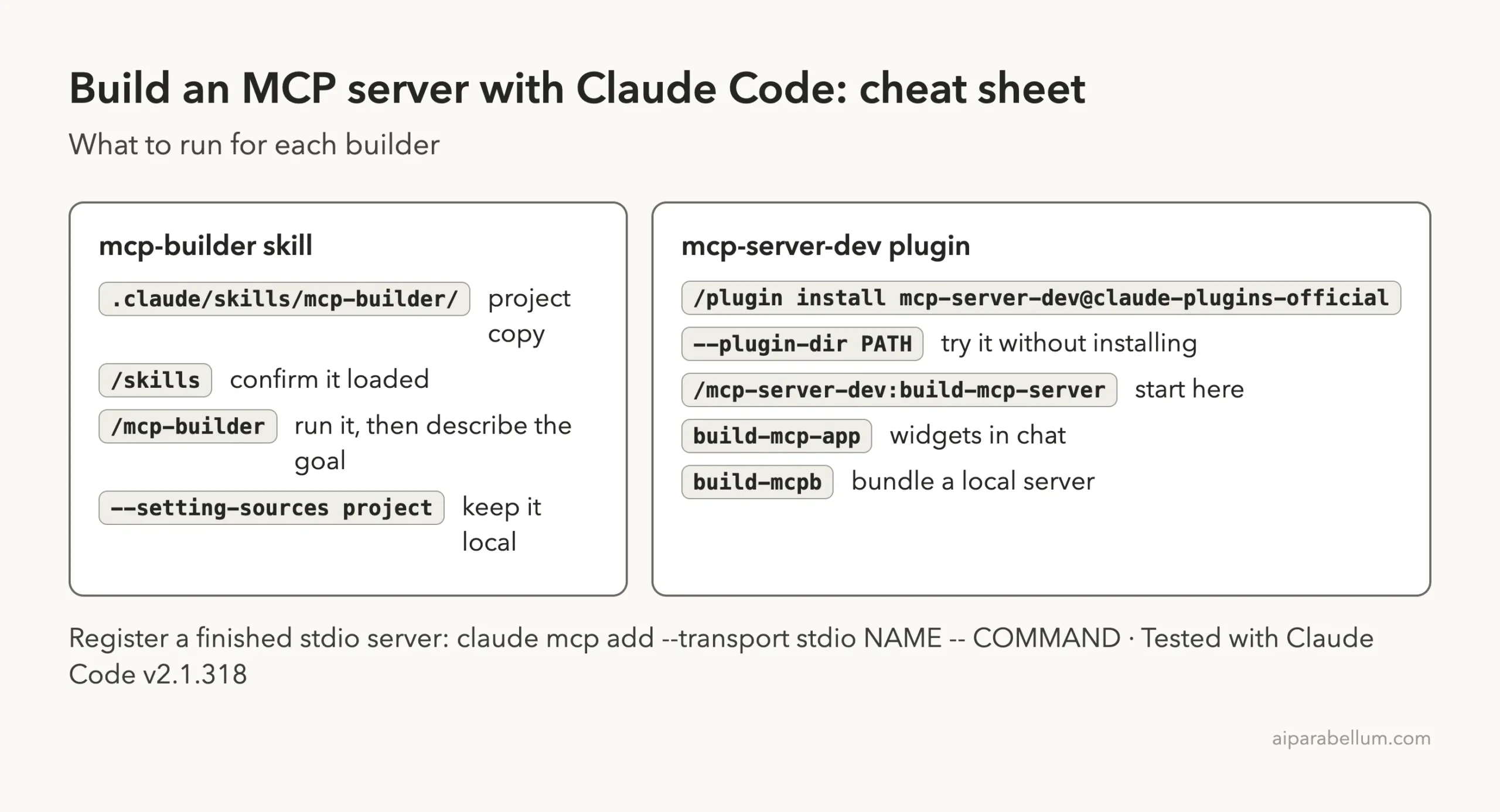
Cheat Sheet
Frequently Asked Questions
Are mcp-builder and mcp-server-dev free?
Yes, both are published in Anthropic’s repositories and the files cost nothing. Using Claude Code follows your normal plan or API billing.
Do I need to know TypeScript to use them?
Not much. Both tools write the code for you. The skill also includes a Python guide, and the plugin mentioned Python with FastMCP as an option.
Can I use both at once?
You can load both in the same session. We ran them in separate projects so each plan stayed clean, so we cannot say how they behave side by side.
Will they write files without asking?
We ran both in plan mode, where no files are written. In normal modes, Claude Code asks before edits unless you allow them.
What is the difference between MCPB and a normal server?
According to the plugin’s guide, MCPB is a local server packaged with its runtime, so users do not need Node or Python installed. It is useful when the server must run on the user’s machine.
Conclusion
The mcp-builder skill and the mcp-server-dev plugin both helped Claude Code plan a clean, read-only notes server, and they agreed on language, transport and tools. Pick the skill for speed and the plugin for guidance on how to ship, run the same plan-mode prompt through each, and read the plan before you approve a single file.