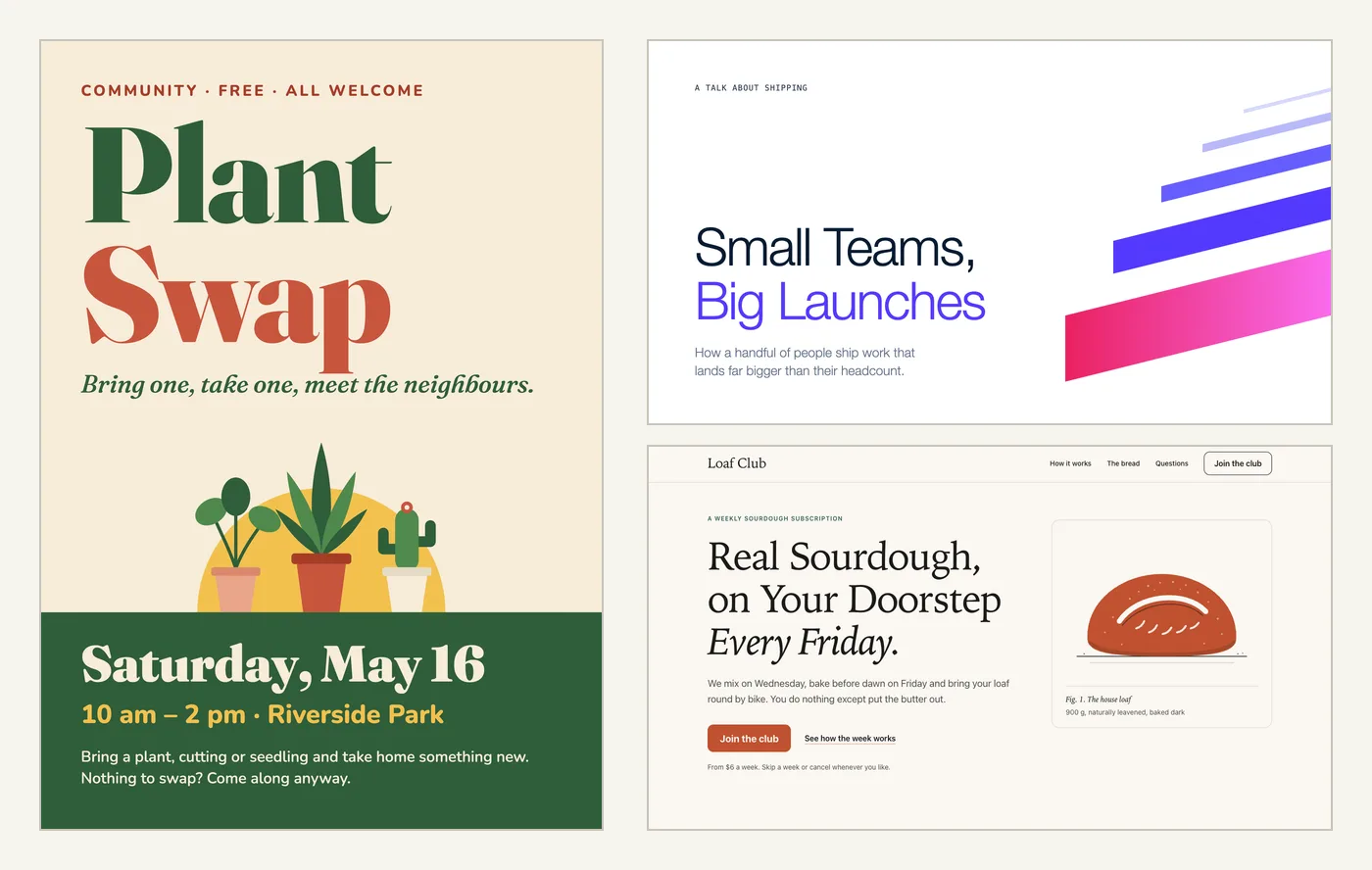
Claude Code writes good code, but ask it for a poster and you often get something that looks like every other AI page. Open Design for Claude Code tries to fix that by giving Claude a library of design recipes, 198 ready-made design systems and a way to check its own work. We installed it in a clean project and made three things with it: a poster, a slide and a landing page.
This guide is part of our Claude Code tutorials. Find more add-ons in our Claude Code Skills Directory.
Tested with Claude Code v2.1.322 on November 13, 2026, using Open Design Agent Kit 0.4.0 from github.com/feimacode/open-design-agent-kit at commit 2d3d53e.
Quick Summary
| Question | Short answer |
|---|---|
| What is it? | Open Design Agent Kit, a free MIT-licensed package that adds design skills and an MCP server to your project |
| Install command | npx @feimacode/[email protected] init --tools claude |
| What it writes | 43 skills in .claude/skills/, a .mcp.json entry and .claude/launch.json |
| Account or API key needed? | No. Claude Code’s own model does the design work |
| What you need | Node.js 18 or later, plus Chrome, Edge or Chromium for checks and exports |
| Exports we got | PNG, PDF and two kinds of PowerPoint file |
| Our verdict | The poster and landing page were strong. The editable PowerPoint needs care with fonts |
What Open Design for Claude Code Is
Open Design is an open-source design workspace that runs as a desktop app. Open Design Agent Kit is a separate community project that takes the content from that app and packs it for coding agents. You get the recipes and styles without installing the app.
The kit has two parts. Skills tell Claude when and how to design, and an MCP server gives Claude the tools to pick a style, check a design and export it. If MCP is new to you, our guide to MCP servers covers the basics.
We counted what ships in version 0.4.0. The content package holds 198 design systems, 114 design templates and 193 remixable examples. The design systems range from brand looks such as Stripe, Notion and Spotify to general styles such as Warm Editorial and Neobrutalism.
Open Design does not draw anything itself. It hands Claude a recipe, a style and a checker, and Claude writes the HTML.
We covered Open Design briefly in an earlier roundup of design skills. This post goes deeper on the lightweight route, where everything lives in one project folder.
How to Install Open Design in Claude Code
The kit offers three routes: a plugin, a single MCP server, or a project setup command. We used the project setup command because it changes only the folder you run it in. Before running it, we confirmed that the npm package points to the same GitHub repository and has no install scripts.
Step 1: Run the init command
Open a terminal in your project folder and run this command. Pinning the version means you always get the release you checked.
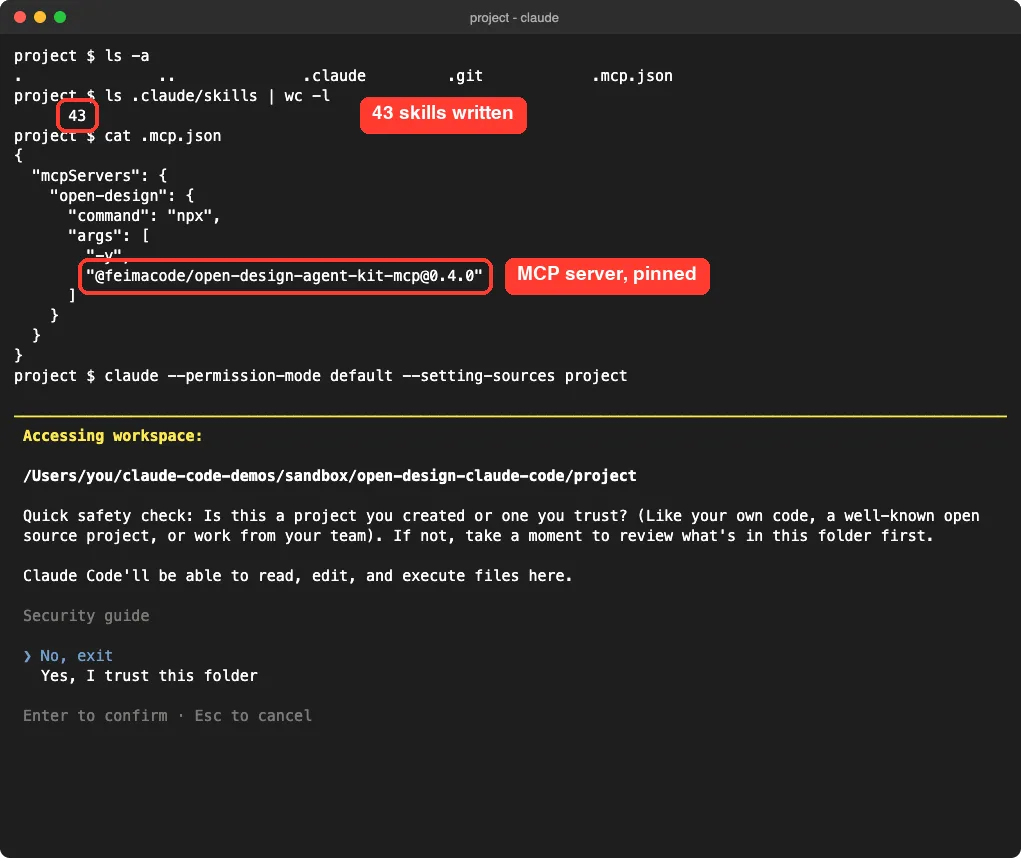
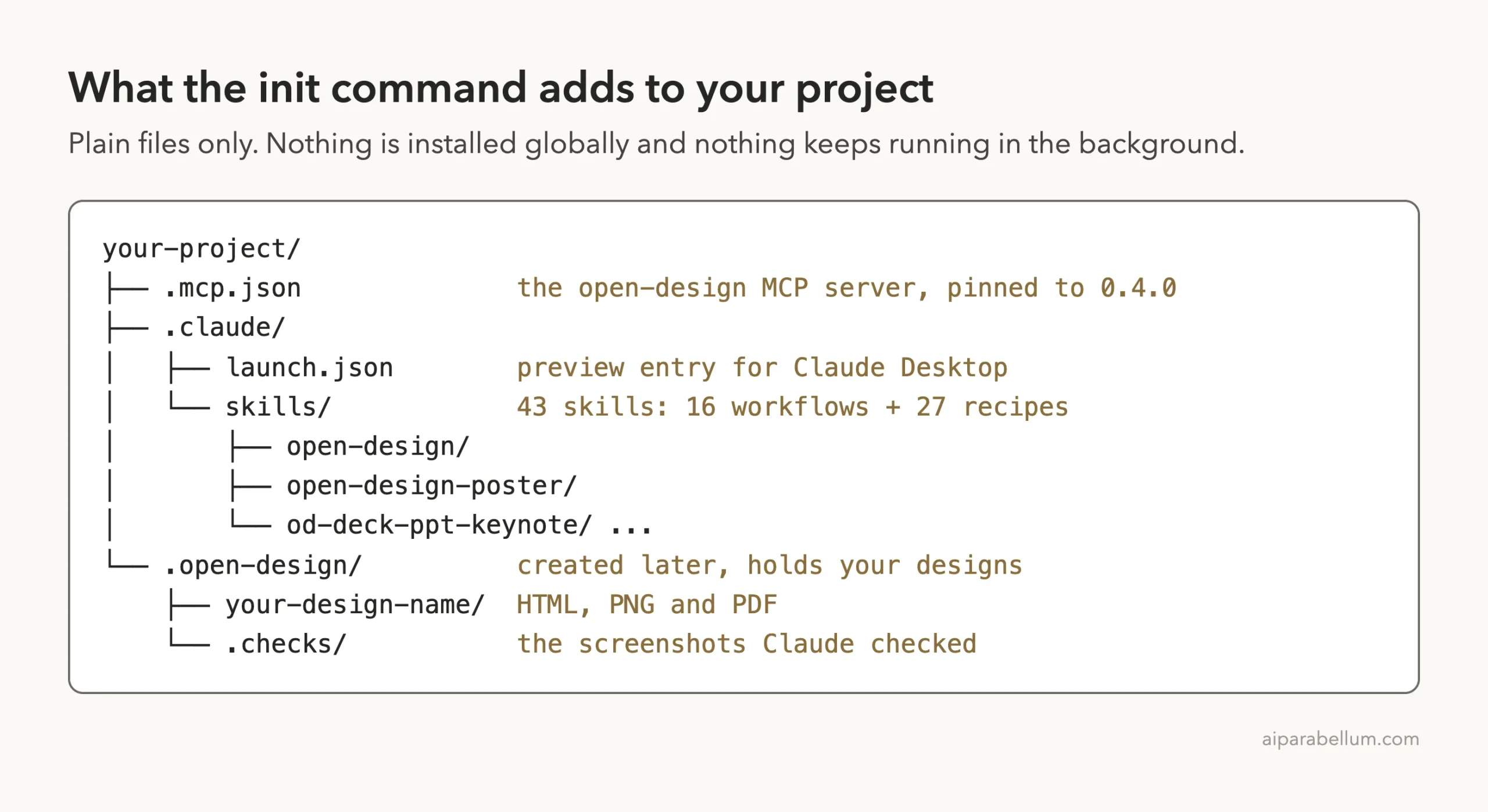
npx @feimacode/[email protected] init --tools claudeIn our run it printed one line: it wrote 43 skills, created .mcp.json and created .claude/launch.json. The skills folder is small, about 360 KB of plain Markdown files. The --tools claude flag skips the files meant for Codex.
Step 2: Approve the MCP server
Start Claude Code in the same folder. Because the server comes from a project file, Claude Code asks before using it. Choose Use this MCP server.
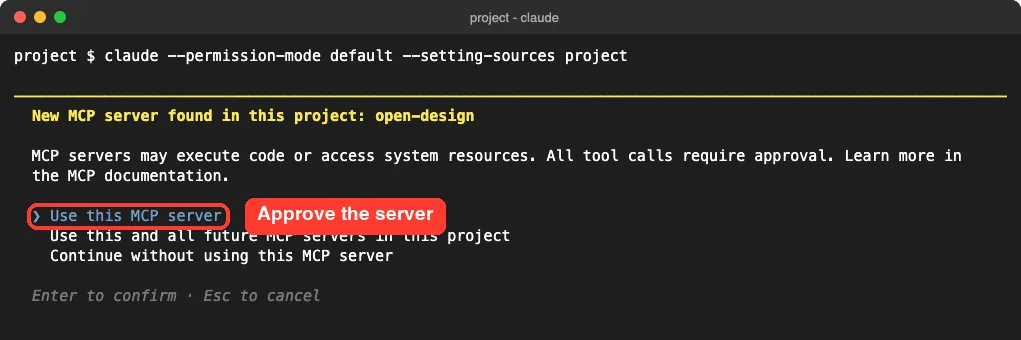
.mcp.jsonYour choice is saved in .claude/settings.local.json under enabledMcpjsonServers. The official MCP documentation explains this approval step for project-scoped servers. For a full tour of that file, see where the MCP config file lives.
Step 3: Confirm the tools are loaded
Type /mcp and open the open-design server. In our session it showed as connected with 40 tools. The first start takes a little longer because npx downloads the server package.
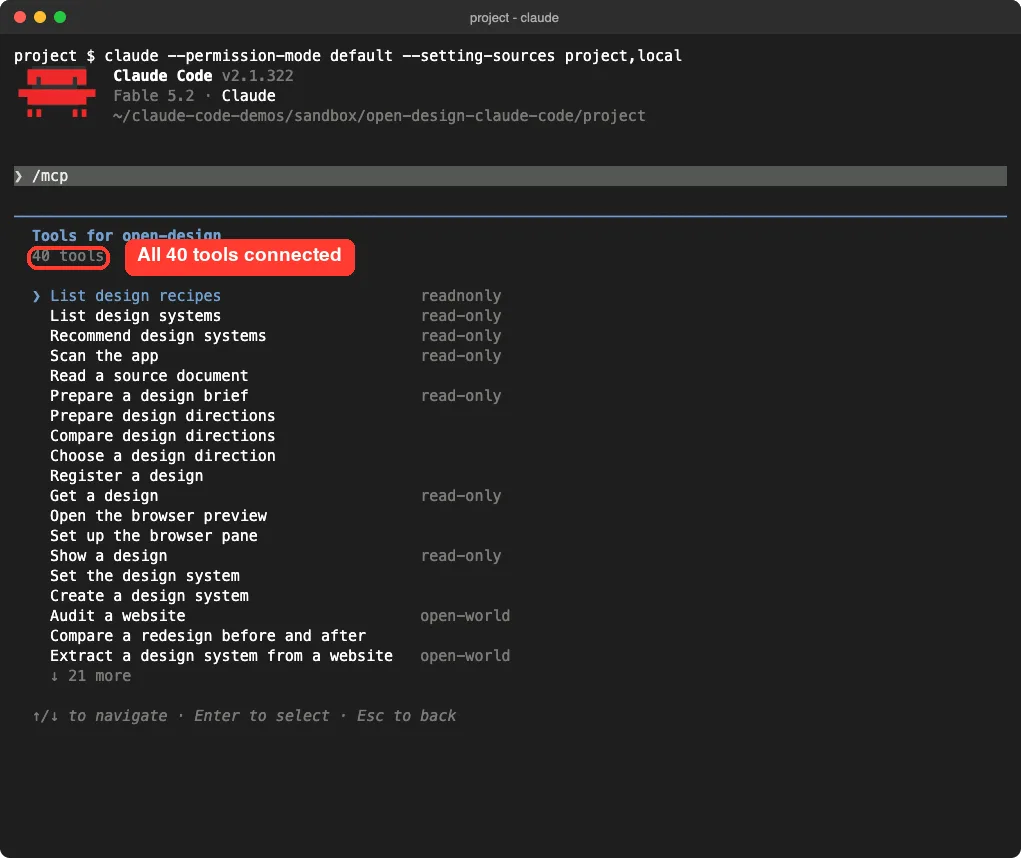
/mcp panel lists all 40 Open Design tools, from listing recipes to exporting a designNow type /od- to see the ready-made recipes. Of the 43 skills, 27 are recipes you start by name, such as /od-prototype-poster-hero or /od-deck-ppt-keynote. The other 16 are workflow skills that Claude loads by itself when your request matches.
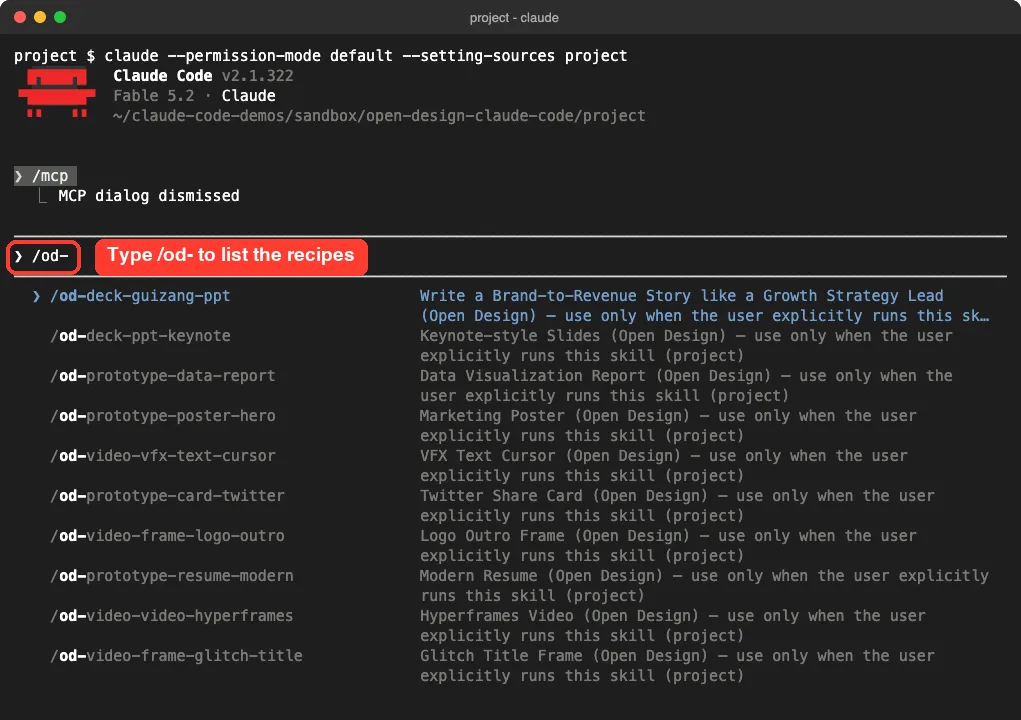
/od- lists the recipes you can run by nameHow a Design Gets Built
You do not need to learn the tool names. You describe what you want, and the skill walks Claude through the same steps each time.
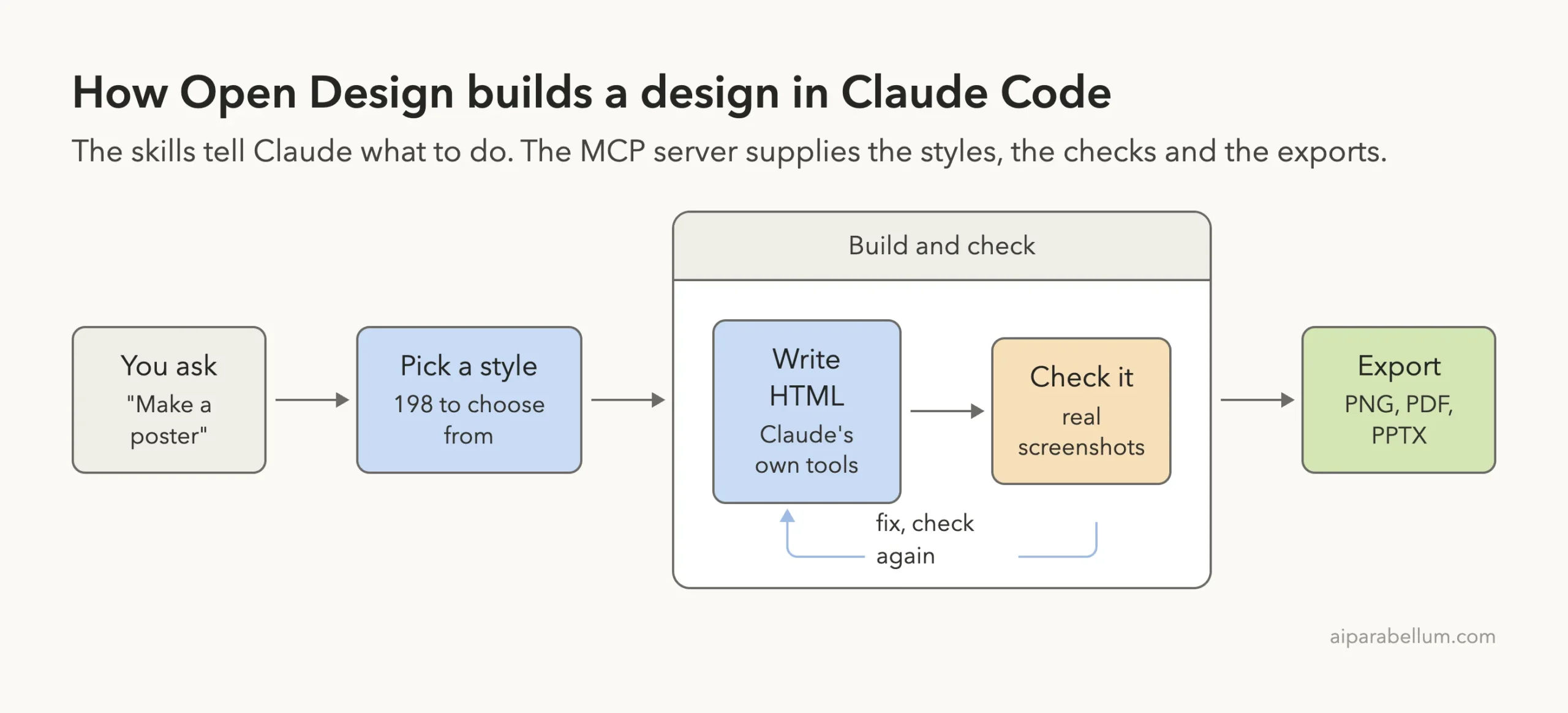
The check step is what sets this kit apart. Claude renders the design in a headless browser, looks at real screenshots and reads a list of findings before it tells you the work is done. The kit uses a browser already on your machine and its documentation says it never downloads one.
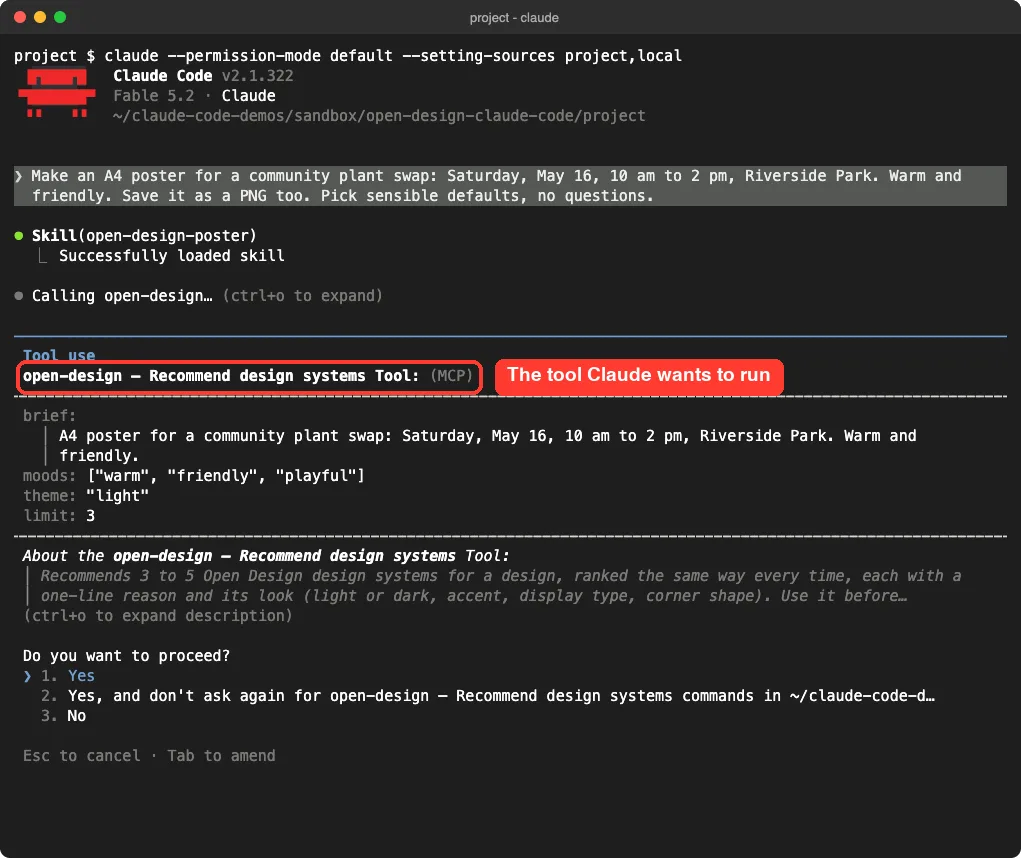
In the default permission mode, Claude Code asks before each new MCP tool runs. You can approve them one by one, or choose the option that stops asking for that tool in this project.
Test 1: A Poster for a Plant Swap
Our first prompt asked for a print poster and a PNG copy. We gave the size, the date, the place and the mood, and told Claude to pick sensible defaults.
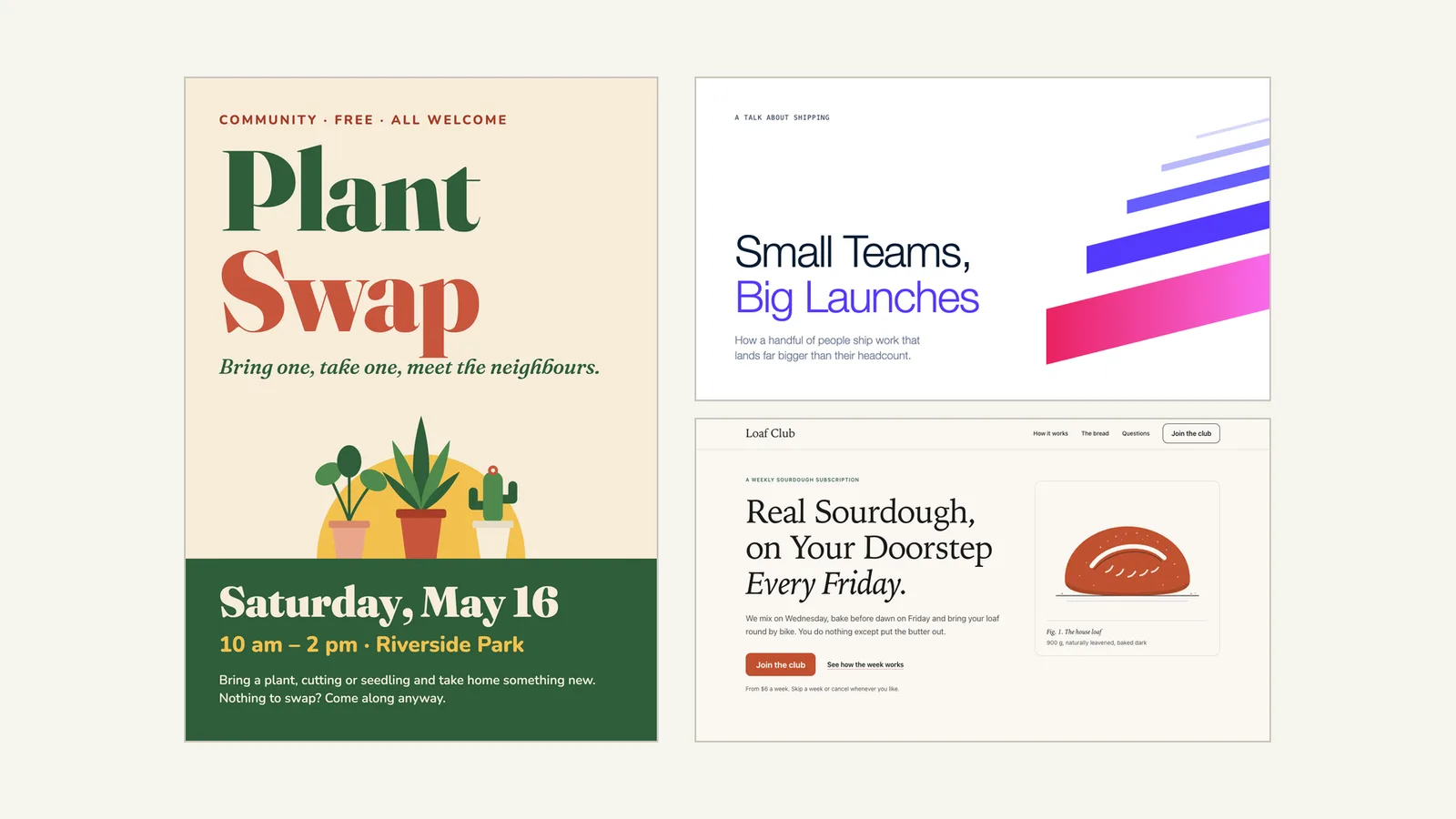
Make an A4 poster for a community plant swap: Saturday, May 16, 10 am to 2 pm, Riverside Park. Warm and friendly. Save it as a PNG too. Pick sensible defaults, no questions.Claude loaded the open-design-poster skill and finished in 2 minutes 8 seconds. The check came back with zero errors and zero warnings on the first try.
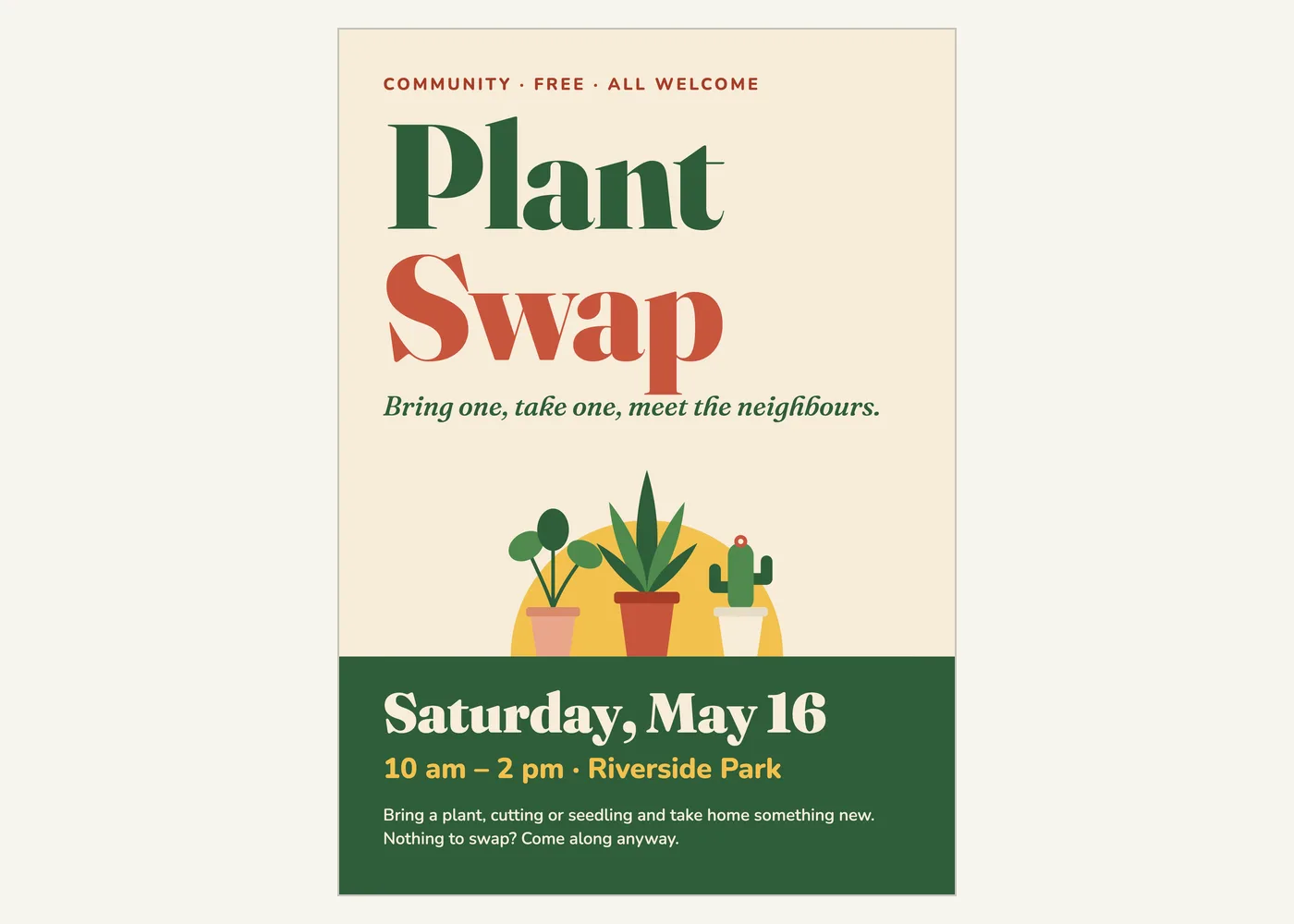
The result looks like a real poster. It has one clear headline, a drawn illustration and a strong band for the date and place. Nothing about it says template.
The exports were print aware. We got a PNG at 2551 by 3579 pixels and a PDF, both with a 3 mm print edge added around the A4 page. Claude also told us the PDF is RGB and that some print shops ask for CMYK.
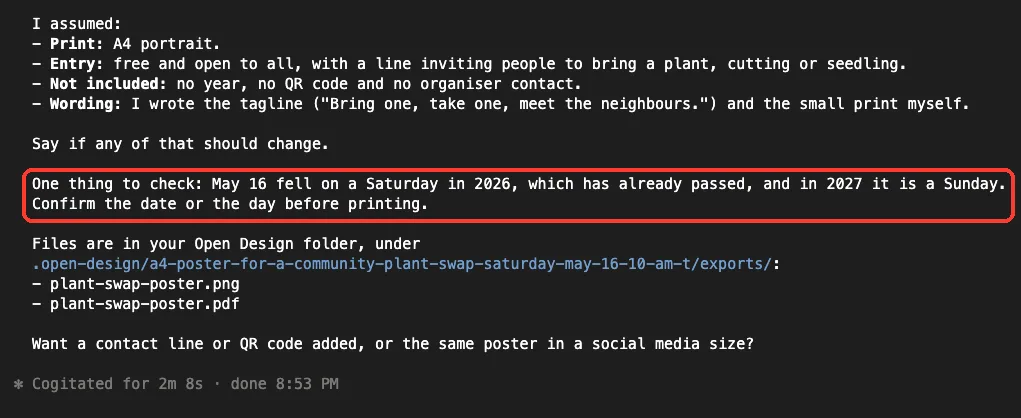
The date warning was the nicest surprise. Claude noticed that May 16 was a Saturday in 2026 and falls on a Sunday in 2027, and asked us to confirm before printing. If you only need simple graphics, the built-in Canvas Design skill is a lighter choice.
Test 2: A Title Slide in the Stripe Style
The second test named a design system. This is where the 198 styles come in.
Make one 16:9 title slide for a talk called Small Teams, Big Launches. Use the Stripe design system. Save it as PowerPoint too. Pick sensible defaults, no questions.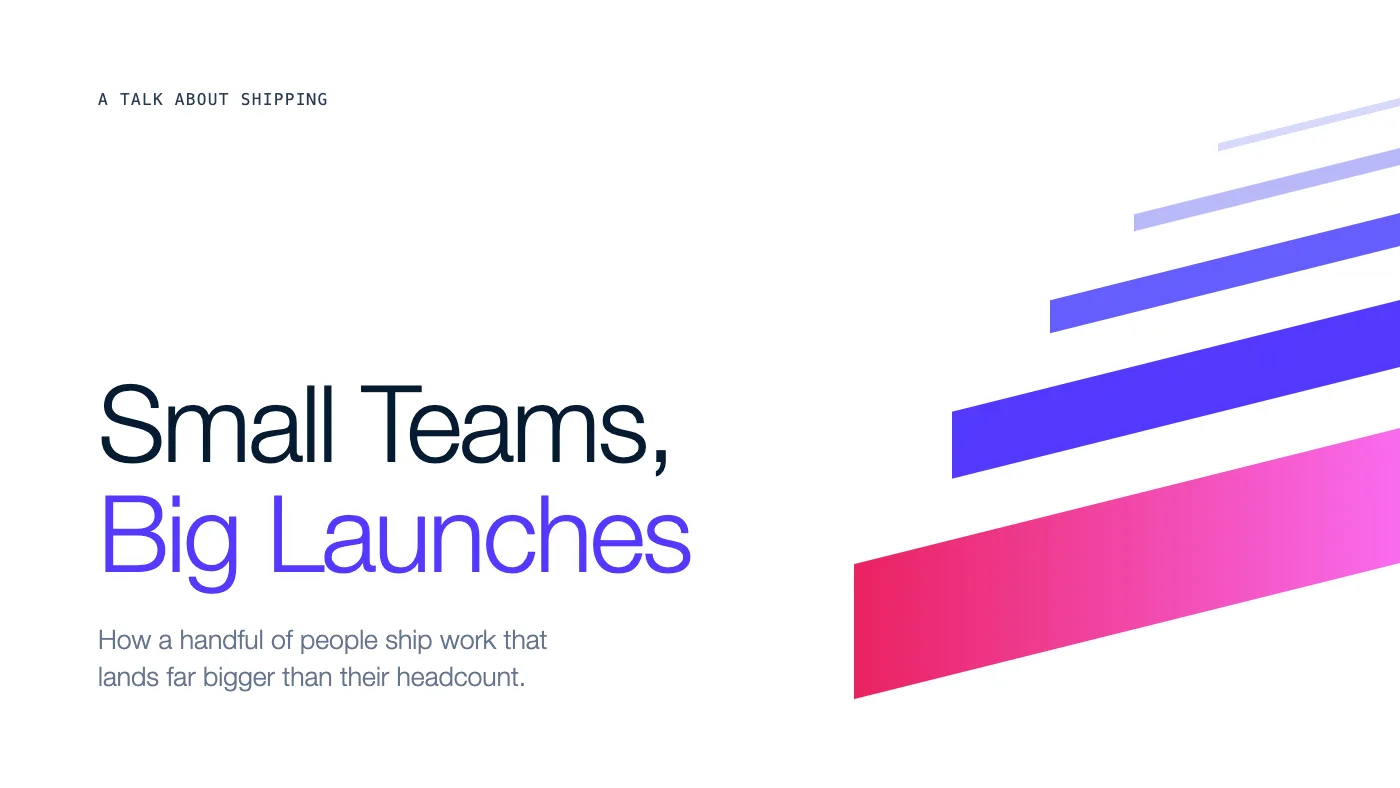
The slide passed its check with no findings. It used the colors and thin type the Stripe-inspired system describes, and it stayed restrained instead of filling every corner.
Claude then exported two PowerPoint files without being asked for both. One is a picture version, where the slide is a single image. The other is an editable version with three real text boxes.
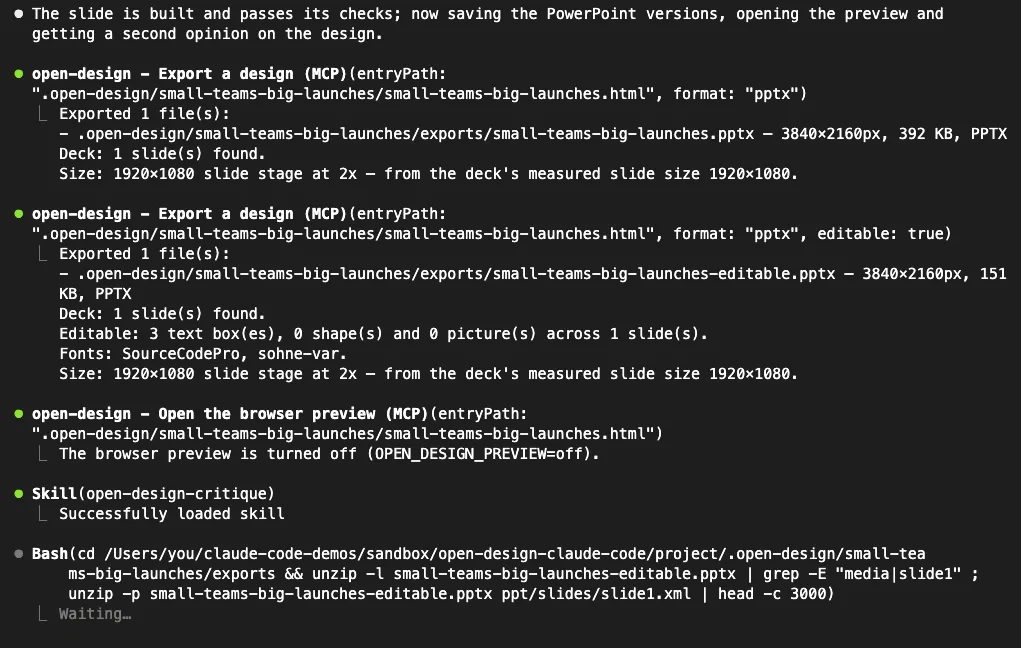
Here we hit the first real limit. The editable file names the fonts SourceCodePro and sohne-var, and neither is installed on a standard Mac. In a macOS Quick Look preview the title fell back to a serif font and ran into the line below it.
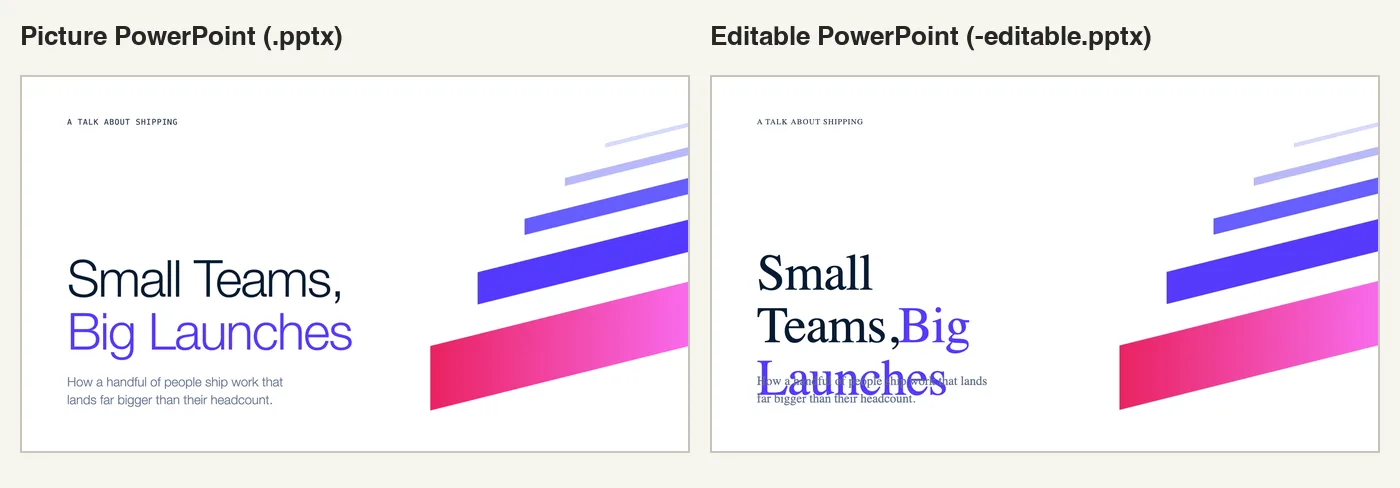
We previewed the files with Quick Look and did not open them in PowerPoint itself. Still, the lesson holds: brand-inspired systems can name fonts you do not own. Use the picture version to present, or ask Claude to rebuild the slide with a font you have installed.
Our run also stopped here to ask for approval. Claude wanted to run an unzip shell command to inspect its own PowerPoint file. For a longer deck workflow, compare this with the PowerPoint skill from Anthropic.
Test 3: A Landing Page With a Mobile Check
The last test was a full page. We asked for a mobile check in the prompt.
Make a one-page landing page for Loaf Club, a weekly sourdough subscription. Warm and editorial. Check it on mobile too. Pick sensible defaults, no questions.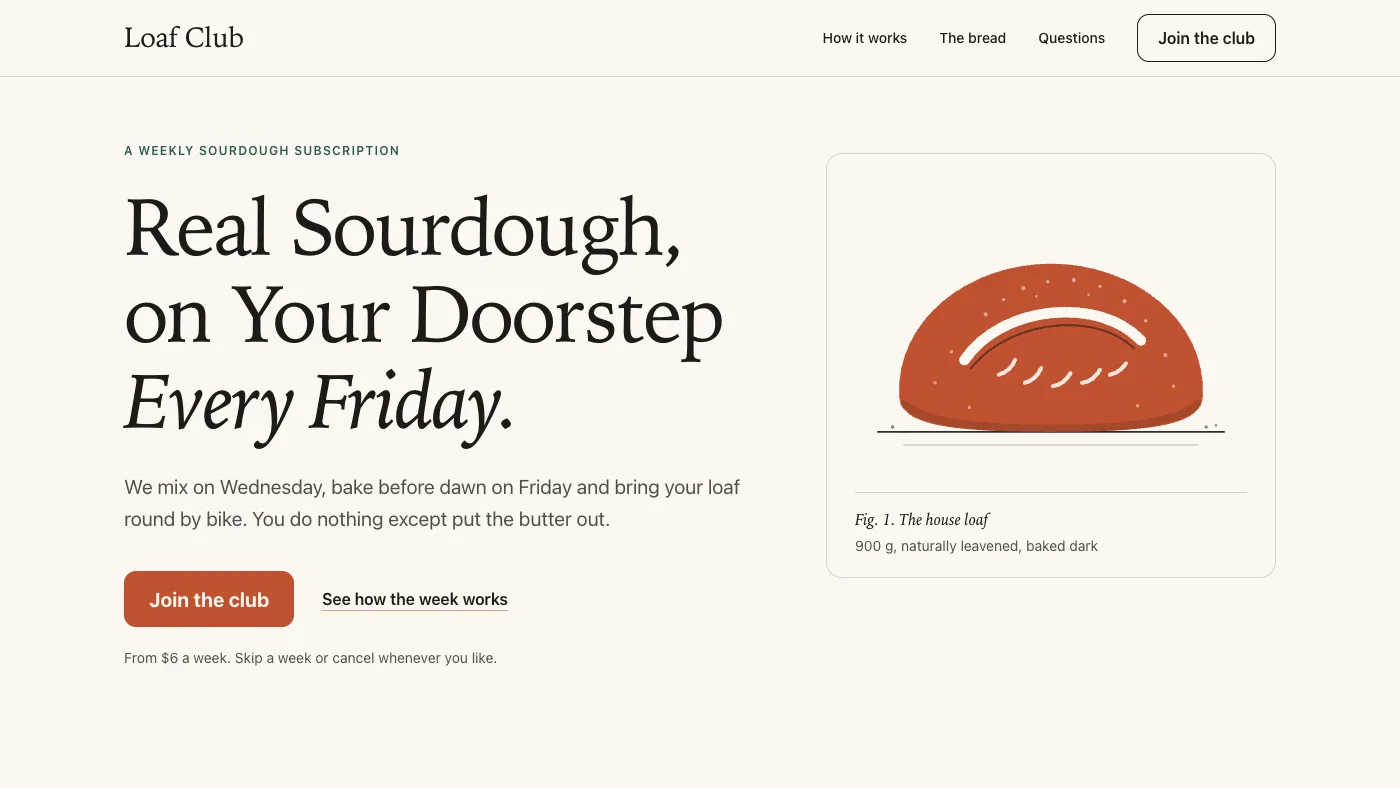
Claude chose the Warm Editorial design system and wrote a single 28 KB HTML file. The page has seven parts: a hero, a three-day timeline, a dark section about the bread, a monthly rotation, three plans with a sign-up form, questions and a footer.
The check tool took screenshots at 1440 pixels and at 390 pixels wide. Claude looked at them, then made three fixes on its own: a better loaf drawing, a caption that no longer wrapped badly and darker day labels.
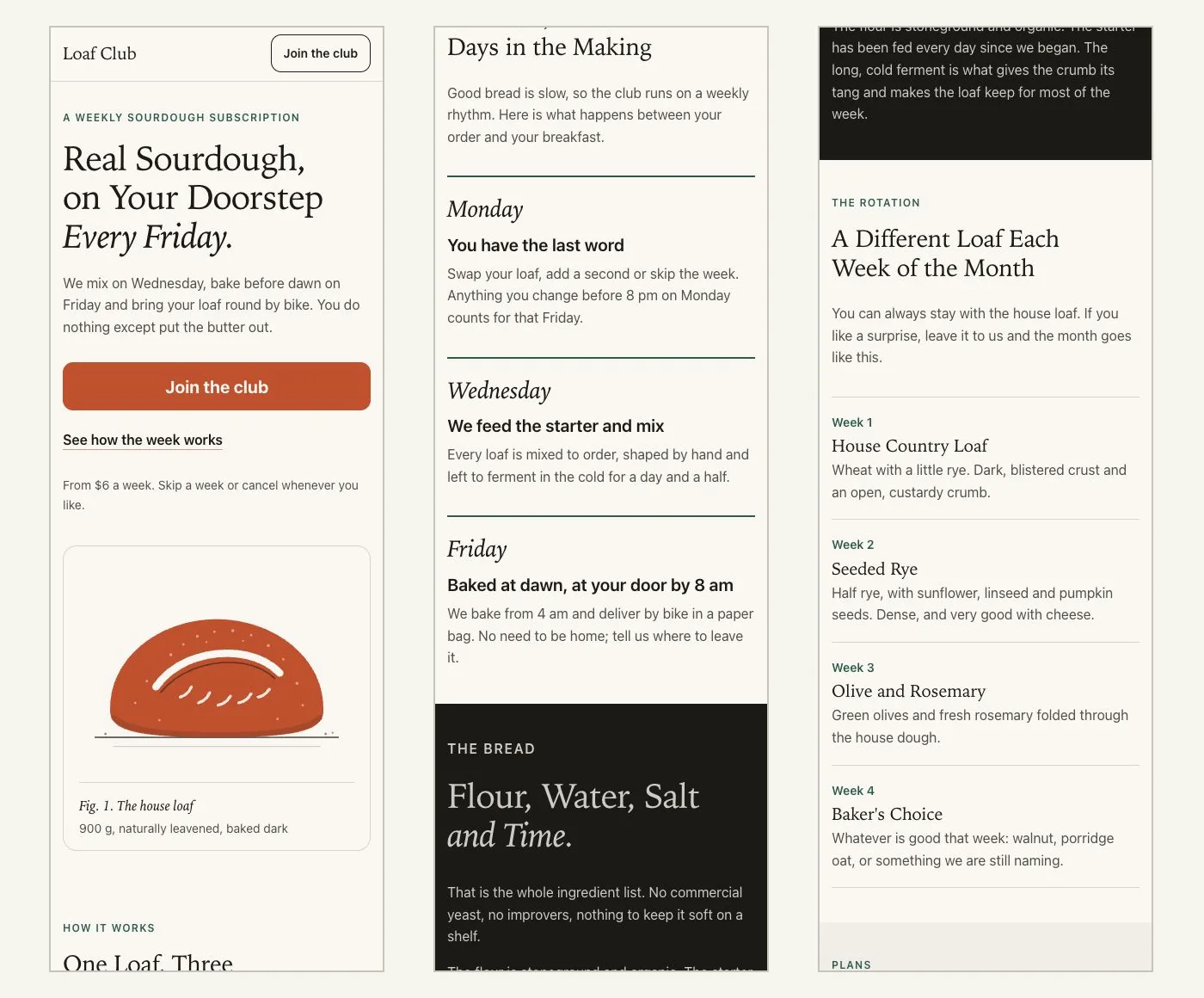
.open-design/.checks/The checker was not perfect. It kept reporting overlap warnings in the questions section. Claude called them false alarms caused by collapsed answers, so we opened every question ourselves in a browser and found no overlap.
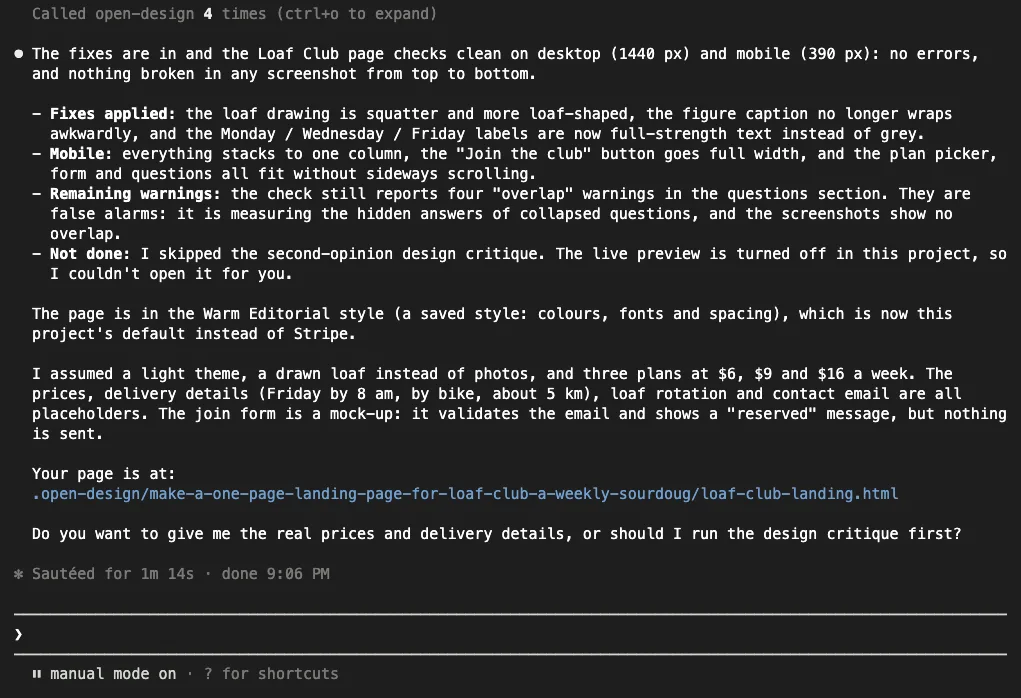
Claude was also honest about what is not real. The prices and delivery details are placeholders, and the sign-up form is a mock-up that sends nothing. For a version you plan to put online, our guide to making a landing page covers hosting and forms.
What Worked and What Did Not
| Area | What we saw |
|---|---|
| Setup | One command, project files only, no account and no API key |
| Poster | Passed its check first time, print-ready PNG and PDF in about 2 minutes |
| Slide | Clean design, but the editable PowerPoint broke in preview without the named fonts |
| Landing page | Full responsive page, Claude fixed three issues after looking at screenshots |
| Checker | Useful screenshots, but repeated false overlap warnings on collapsed questions |
| Permission prompts | Two runs paused on shell commands that needed approval |
| Claude artifact preview | Published once without us asking for it, see below |
One behavior deserves a clear warning. On our first poster run, Claude Code also published the poster as a private Claude artifact on claude.ai. The kit’s skill tells Claude to do this when an artifact tool is available, and the summary said the page is private until you share it.
Private or not, a tool that uploads your design should be something you choose. Block it if your work is confidential.
We blocked it for the other runs with a deny rule. Add this to .claude/settings.local.json in the project.
{
  "permissions": {
    "deny": ["Artifact"]
  }
}
We also changed one setting on purpose. Open Design can open a live preview window in Chrome, where you click on elements and leave comments. We turned it off with the OPEN_DESIGN_PREVIEW setting in .mcp.json, so the preview window and its comment tools are not part of this test.
"env": { "OPEN_DESIGN_PREVIEW": "off" }Video output, the Figma and Canva connections, the plugin install route and the Codex setup are also outside this test. The claims here cover the project setup route on macOS only.
Try It Yourself
Make a new empty folder, run the init command and approve the server. Then paste this prompt and change the details to an event of your own.
Make an A4 poster for a neighborhood book swap: Sunday, June 7, 11 am to 3 pm, Maple Street Library. Calm and bookish. Save it as a PNG and a PDF. Pick sensible defaults, no questions.When it finishes, open the .open-design/ folder. You will find the HTML source, an exports folder and a .checks folder with the screenshots Claude looked at. Then ask for the same poster in a social media size and watch how little changes.
Common Mistakes
- Running init in your home folder. Run it inside a project so the files and designs stay together.
- Skipping the version pin. Without
@0.4.0you get whatever is newest, which may behave differently from what you reviewed. - Expecting exports without a browser. Checks and PNG, PDF and PowerPoint exports need Chrome, Edge or Chromium installed.
- Walking away in default mode. Claude may stop and wait for you to approve a shell command.
- Trusting the editable PowerPoint blindly. Open it and check the fonts before you present.
- Forgetting the active style. After our landing page, Warm Editorial became the project default in
.open-design/config.json.
Pro Tips
- Name a design system in the prompt when you have a look in mind, such as Stripe, Notion or Neobrutalism.
- Give real details. The poster was good because the prompt had a size, a date, a place and a mood.
- Ask for a mobile check on any web page. It adds screenshots at phone width to the check.
- Read the assumptions list at the end of each reply. It tells you exactly which parts Claude made up.
- Commit
.claude/skills/and.mcp.jsonif your team should share the setup. See our guide to MCP scopes for the options. - Browse other servers in our MCP Servers Directory if you need charts or diagrams next to your designs.
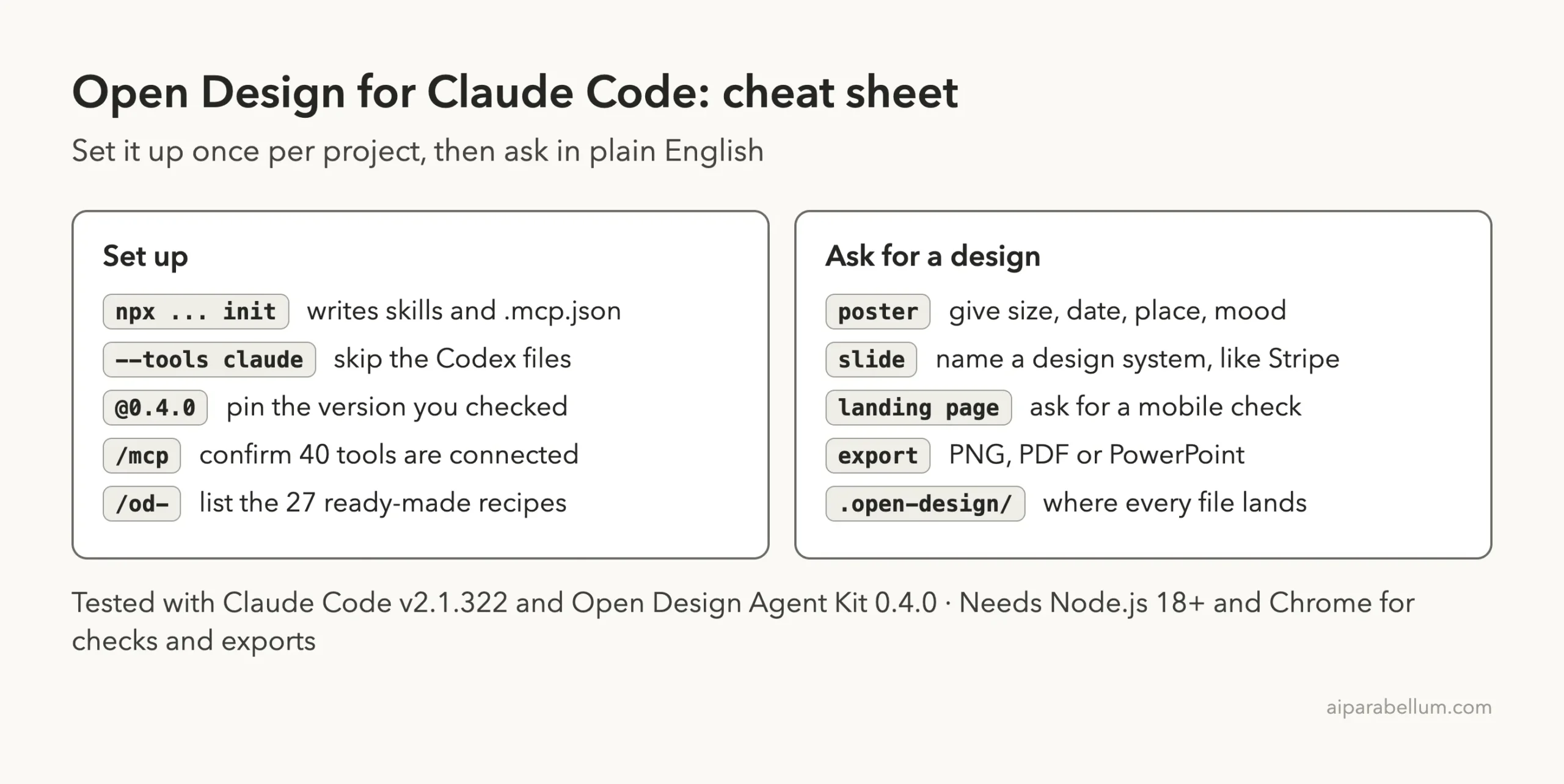
Open Design Cheat Sheet
Frequently Asked Questions
Is Open Design for Claude Code free?
Yes. The kit is MIT licensed and needs no account or API key. You still pay for Claude Code usage as normal, because Claude’s own model writes every design.
Do I need the Open Design desktop app?
No. The kit bundles the recipes, templates and design systems as files and runs a small MCP server with npx. Nothing keeps running after you close Claude Code.
Which file types can it export?
In our test we exported PNG, PDF, a picture PowerPoint and an editable PowerPoint. The kit’s documentation also lists standalone HTML, JPEG and animation formats, which we did not test.
Does it work with other AI coding tools?
The project says it supports Codex, Cursor, GitHub Copilot and other MCP-capable agents. We tested it only in Claude Code. If you want a general assistant instead, start with Claude AI.
How do I remove it?
Delete the generated folders inside .claude/skills/, remove the open-design entry from .mcp.json and delete .open-design/ if you no longer need the designs. The project lives at Agent Kit repository on GitHub, along with its full documentation.
Conclusion
Open Design for Claude Code is one of the better design add-ons we have tried, mainly because Claude checks real screenshots before it calls a design finished. In our test one command set it up, and one prompt each produced a print-ready poster, a clean title slide and a responsive landing page. The weak spots were an editable PowerPoint that depends on fonts you may not have, some false alarms from the checker and an artifact upload we did not ask for. Install it in a project folder, pin the version, block the artifact tool if your work is private, and it is well worth an afternoon of experiments.