A claude code skill for powerpoint lets you describe a slide deck in plain words and get a real .pptx file back, without opening PowerPoint. Anthropic publishes one, called pptx, in its official skills collection. We loaded it into a throwaway project, asked for a five-slide deck, then asked for a sixth slide, and checked every result we could check on a Mac with no Office apps installed.
This is Part 14 of 45 in our Claude Code Deep Dives, part of our Claude Code tutorials. In the last part we wrote a documentation skill ourselves. This time we test a skill that someone else built.
Tested with Claude Code v2.1.318 on November 5, 2026, using the pptx skill from the anthropics/skills collection at commit ca45fc4 (October 28, 2026). Everything ran in a sandbox folder with --setting-sources project, so nothing was added to the global Claude Code setup.
Quick Summary
| Question | Answer |
|---|---|
| What is it? | A skill that teaches Claude Code to create, edit and read PowerPoint files |
| Who makes it? | Anthropic, in the anthropics/skills collection |
| What we asked for | A 5-slide deck with a native bar chart, then a sixth slide |
| Build time | Claude reported 24 seconds for the first deck and 9 seconds for the edit |
| Did the file pass its checks? | Yes, the skill’s validator passed on both decks |
| Biggest catch | The validator needs Python 3.10 or newer plus a few extra packages |
| What we could not test | Opening the deck in PowerPoint itself, because it is not installed here |
What the PowerPoint Skill for Claude Code Does
A skill is a folder with a SKILL.md file that Claude loads when a task matches its description. If you are new to the idea, our guide to Claude Code skills explains how they work.
The pptx skill describes itself as the one to use any time a .pptx or .potx file is involved, whether as input or output. That covers new decks, edits to old decks, reading text out of a deck and working with templates and speaker notes.
A .pptx file is really a ZIP archive of XML files, and the skill’s notes say so right at the top. The skill then picks a different approach for each kind of job.
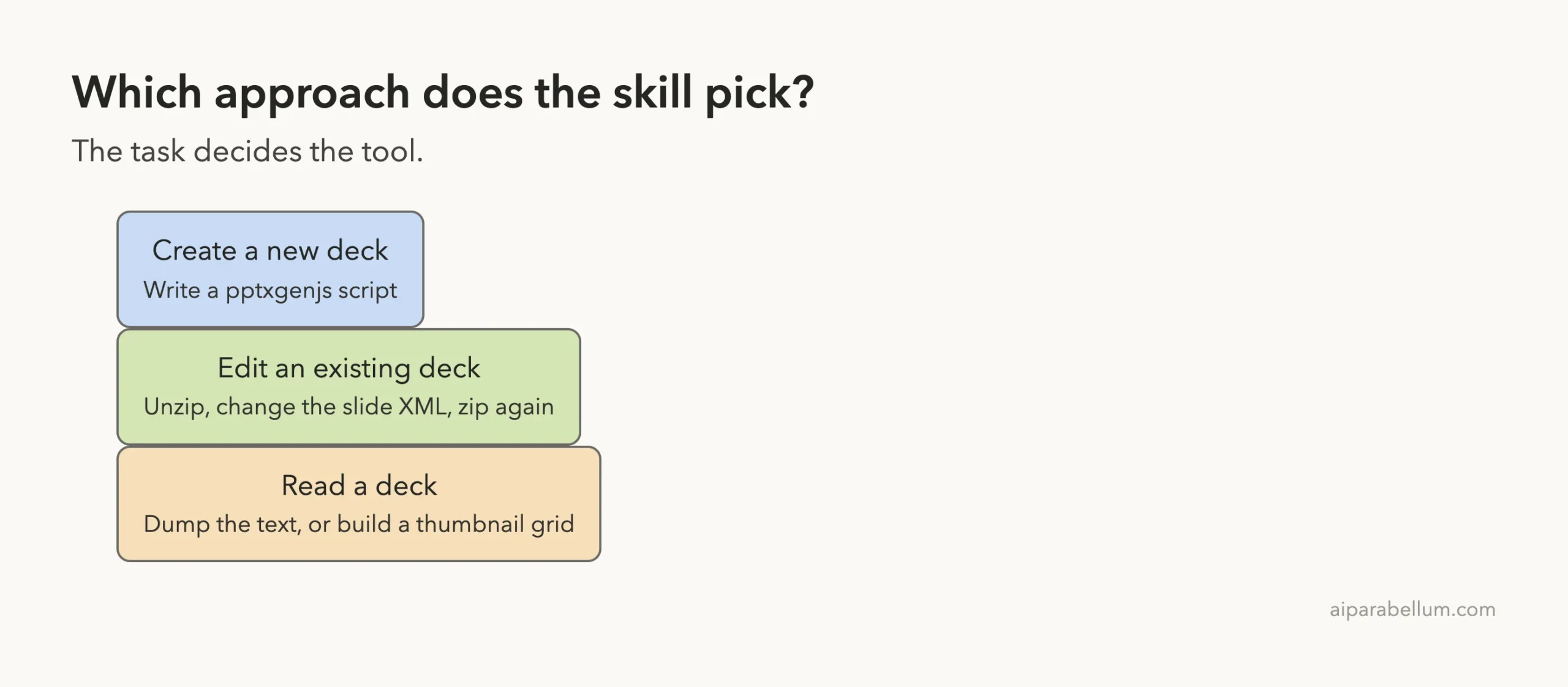
| Job | Approach the skill describes |
|---|---|
| Create a new deck | Write a script with the pptxgenjs library |
| Edit a deck or fill a template | Unzip the file, edit the slide XML, zip it again |
| Read a deck | Dump the text with markitdown, or build a picture grid with thumbnail.py |
It also ships small helper scripts: add_slide.py to duplicate a slide, clean.py to remove leftover parts, thumbnail.py for a labeled grid of slides, and office/validate.py to check a finished file.
A Note on the License Before You Copy It
The skill folder has its own LICENSE.txt, and the collection’s README says the document skills are source-available, not open source. The license text limits copying the materials outside the services.
For that reason, we only used a temporary copy inside our sandbox and moved it to the Trash when we finished. If you want it yourself, use the official route instead of copying folders around. Our skills repo guide walks through it, and the two commands are these:
/plugin marketplace add anthropics/skills
/plugin install document-skills@anthropic-agent-skills
Those commands change your own Claude Code setup, so try them in a project you do not mind experimenting in.
How We Set Up the Test
We made a demo project under ~/claude-code-demos/, put the skill in .claude/skills/pptx/, and started Claude Code there. Project skills are one of the places Claude Code loads skills from, and Anthropic’s skills documentation lists the locations.
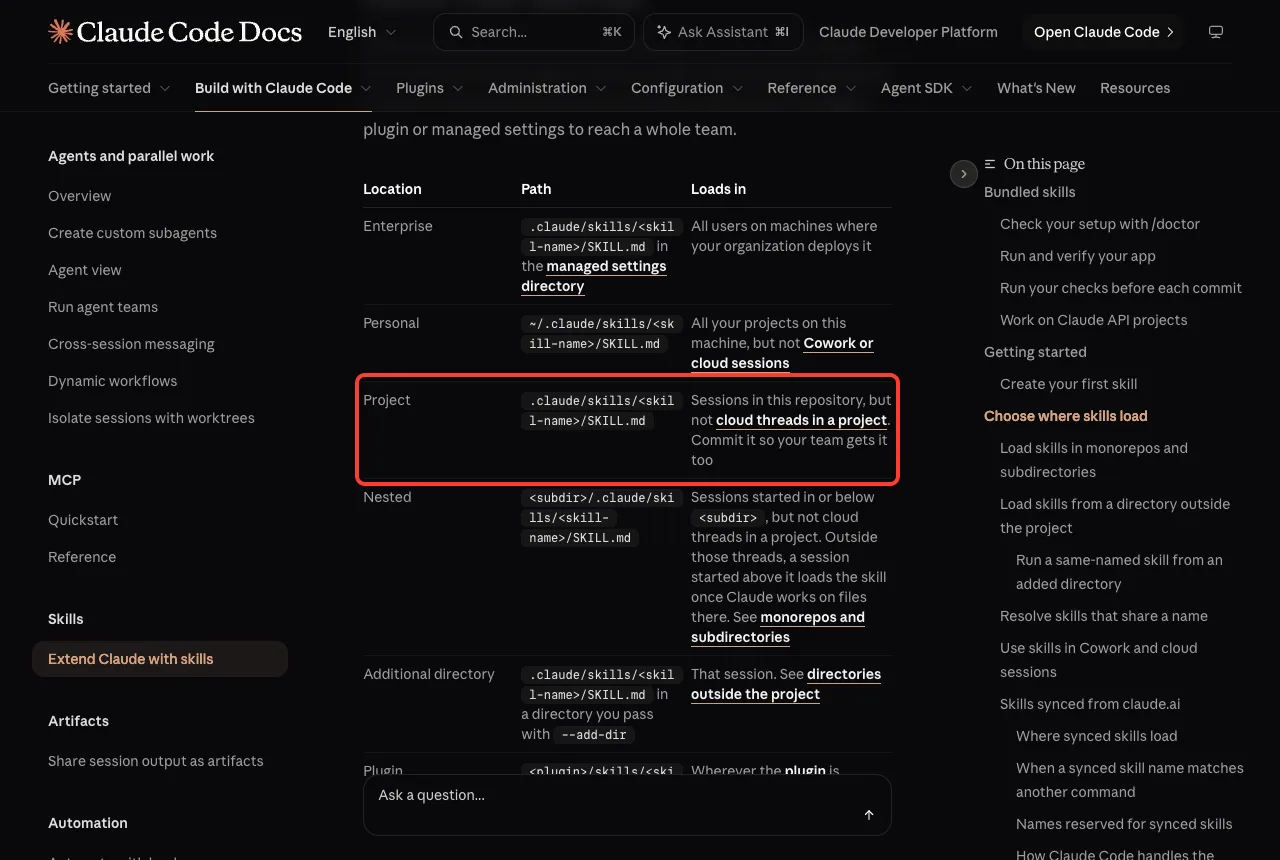
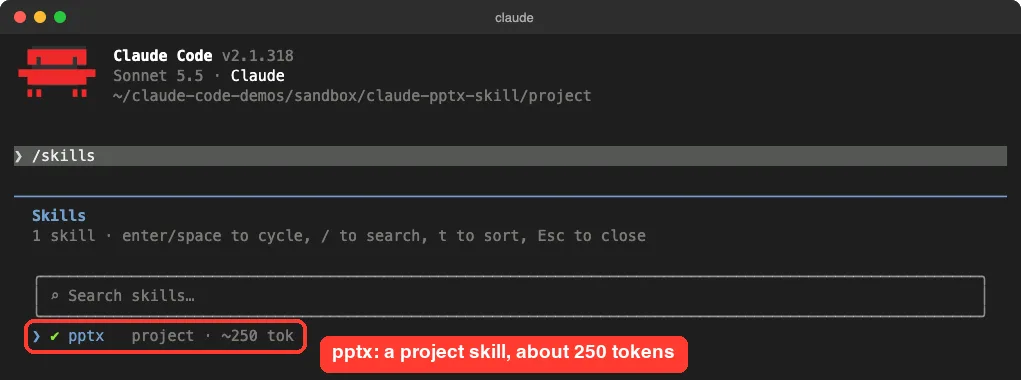
.claude/skills/ loads for sessions in that repositoryRunning /skills confirmed that Claude Code saw it. The list showed pptx as a project skill that costs about 250 tokens while idle.
The extra tools the skill expects
Skills can call tools that are not part of Claude Code, and this one does. It expects Node with pptxgenjs for building decks, and Python with defusedxml, lxml and Pillow for its helper scripts. For image previews it wants LibreOffice and pdftoppm.
The skill’s notes say pptxgenjs is preinstalled, which is true in Anthropic’s own environment but not on a plain Mac. We ran npm install pptxgenjs inside the demo folder and created a Python virtual environment for the rest. We did not install LibreOffice, so there was no image rendering inside the session.
We also added a small .claude/settings.json to the demo project that lets Claude run node and our Python commands without asking. We ran in the acceptEdits permission mode, and when other commands needed approval we answered Yes once.
The Python Version Catch
Our first attempt used a virtual environment built from the Python that ships with macOS, version 3.9. The validator crashed before it checked anything.
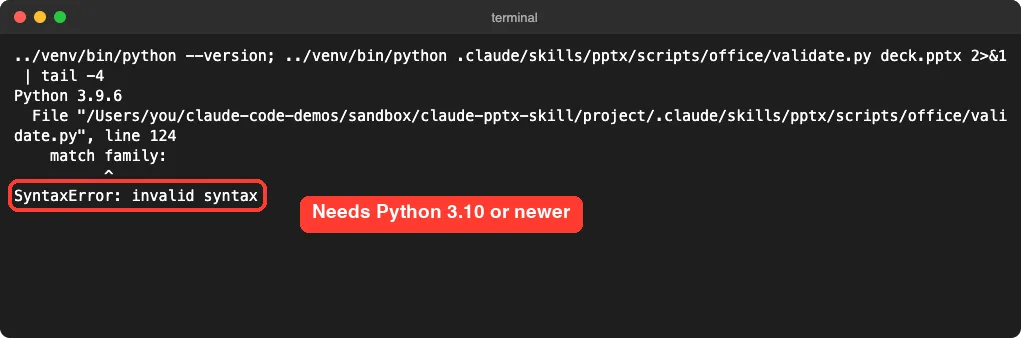
The error points at a match statement, which only exists in Python 3.10 and newer. The skill does not stop and tell you that, so a reader on an older Python would just see a traceback.
The fix was simple. We built a new environment from Python 3.14, installed the packages and pointed the prompt at it. The deck from that first attempt passed the validator once we ran it with the newer Python, so the deck itself was fine.
A different mistake gives a different error. Running the validator with a Python that lacks defusedxml stops with a ModuleNotFoundError. Both problems are easy to fix, but you should expect to spend a few minutes on setup the first time.
Building the Deck With the Claude Code PowerPoint Skill
We started a fresh session and typed one prompt. It named the title, the five slides, the three chart values and where the tools were.
Use the pptx skill to make a 5-slide deck called deck.pptx titled 'Why Try Claude Code Skills'. Slides: title, what a skill is, 3 benefits, a small native bar chart of minutes saved per week (Reports 40, Docs 30, Reviews 25), and a closing slide. Write the generator as make_deck.js in the current folder and use the pptxgenjs in ./node_modules. Run the skill's scripts with ../venv314/bin/python (markitdown is ../venv314/bin/markitdown). LibreOffice is not installed, so skip image rendering.Claude loaded the skill, wrote a 70-line generator called make_deck.js, ran it, and then ran the validator and a text dump in one command. The whole turn took 24 seconds by Claude’s own timer.
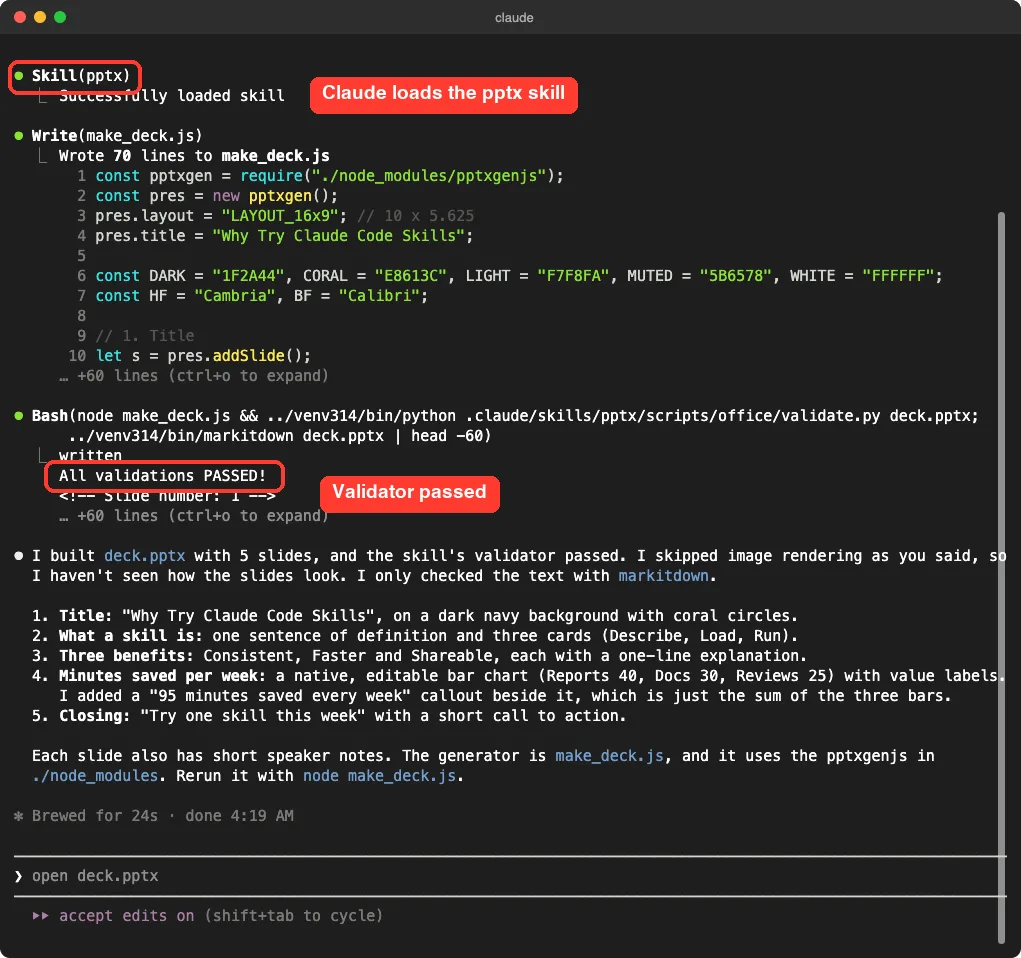
The summary was honest about its limits. Claude said it had skipped image rendering because we asked it to, so it had only checked the text and had not seen how the slides looked.
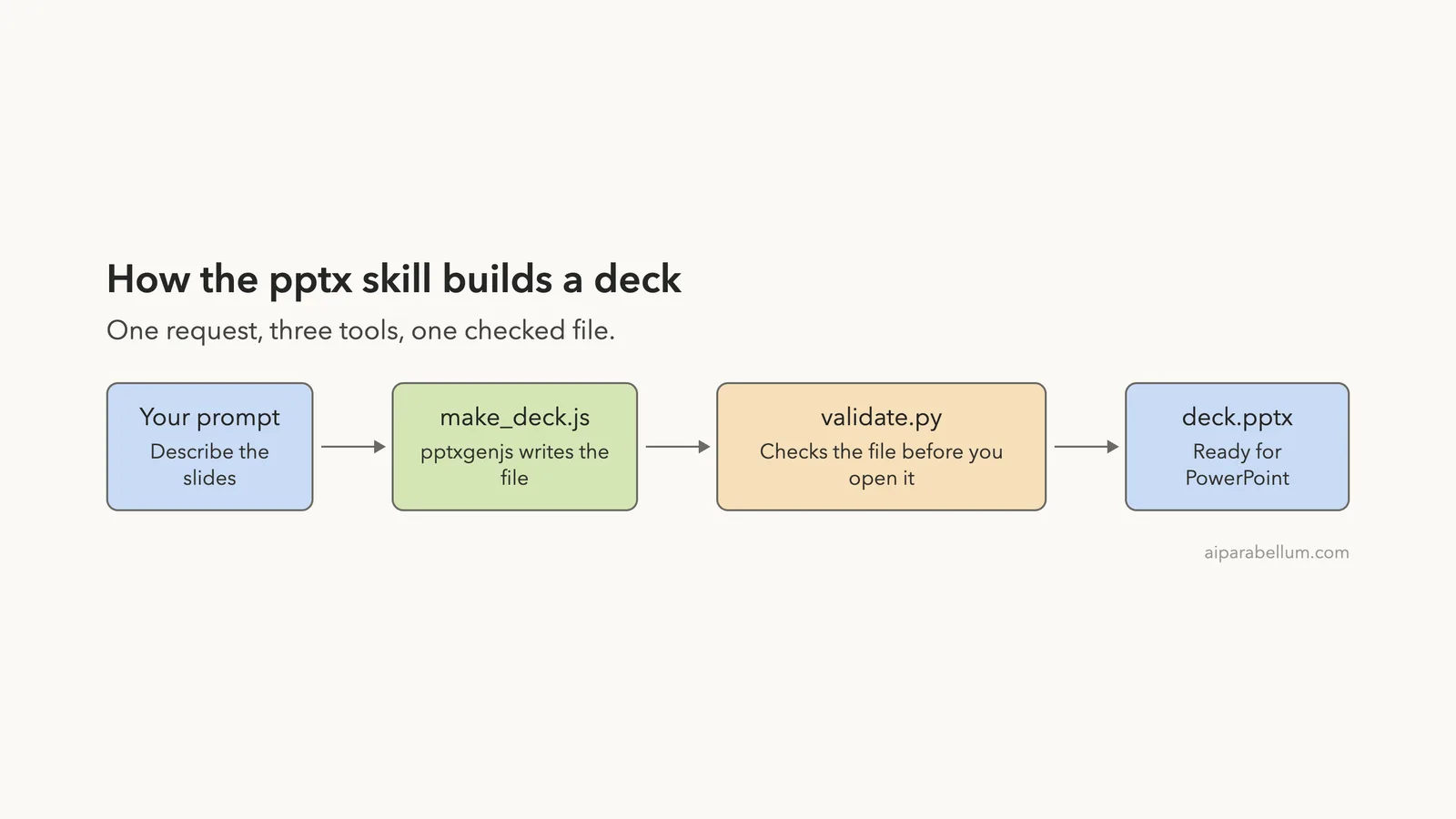
The flow in one picture
The work happens in three steps. A script builds the file, a validator checks it, and you open the result.
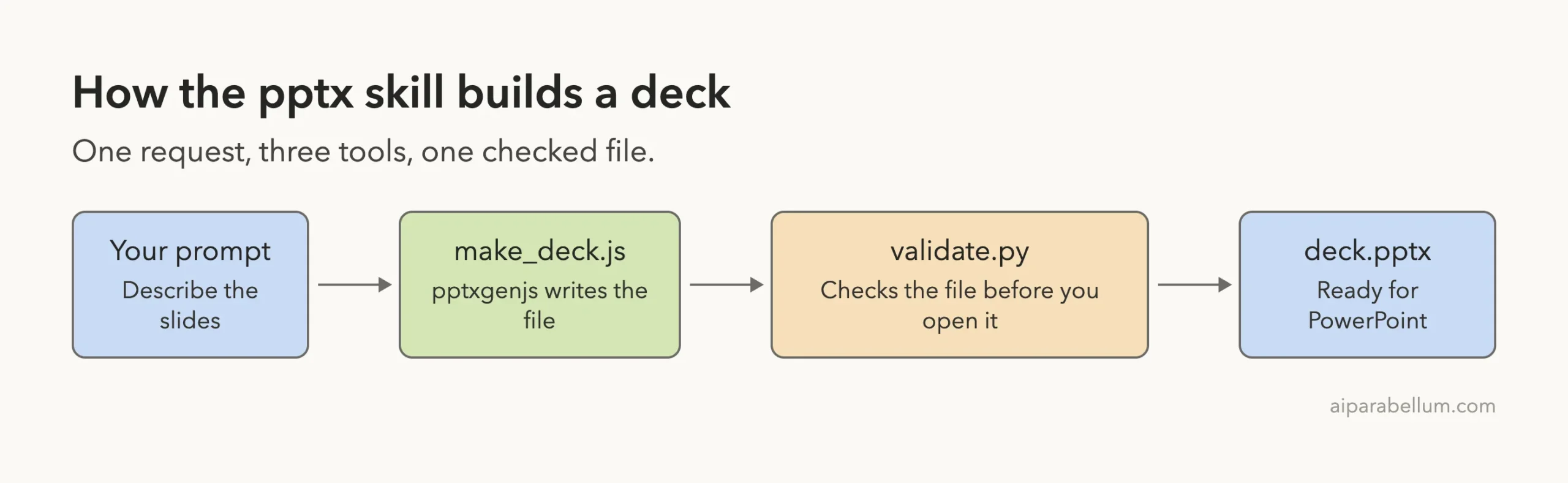
Because the deck comes from a script, you can change a number or a title and rebuild it in seconds. That is a real advantage over asking for slides one at a time.
What the Slides Look Like
Since Claude did not render anything, we checked the slides ourselves. macOS Quick Look can draw the first slide of a .pptx file, so we made one copy of the deck per slide with that slide moved to the front, then rendered each copy.
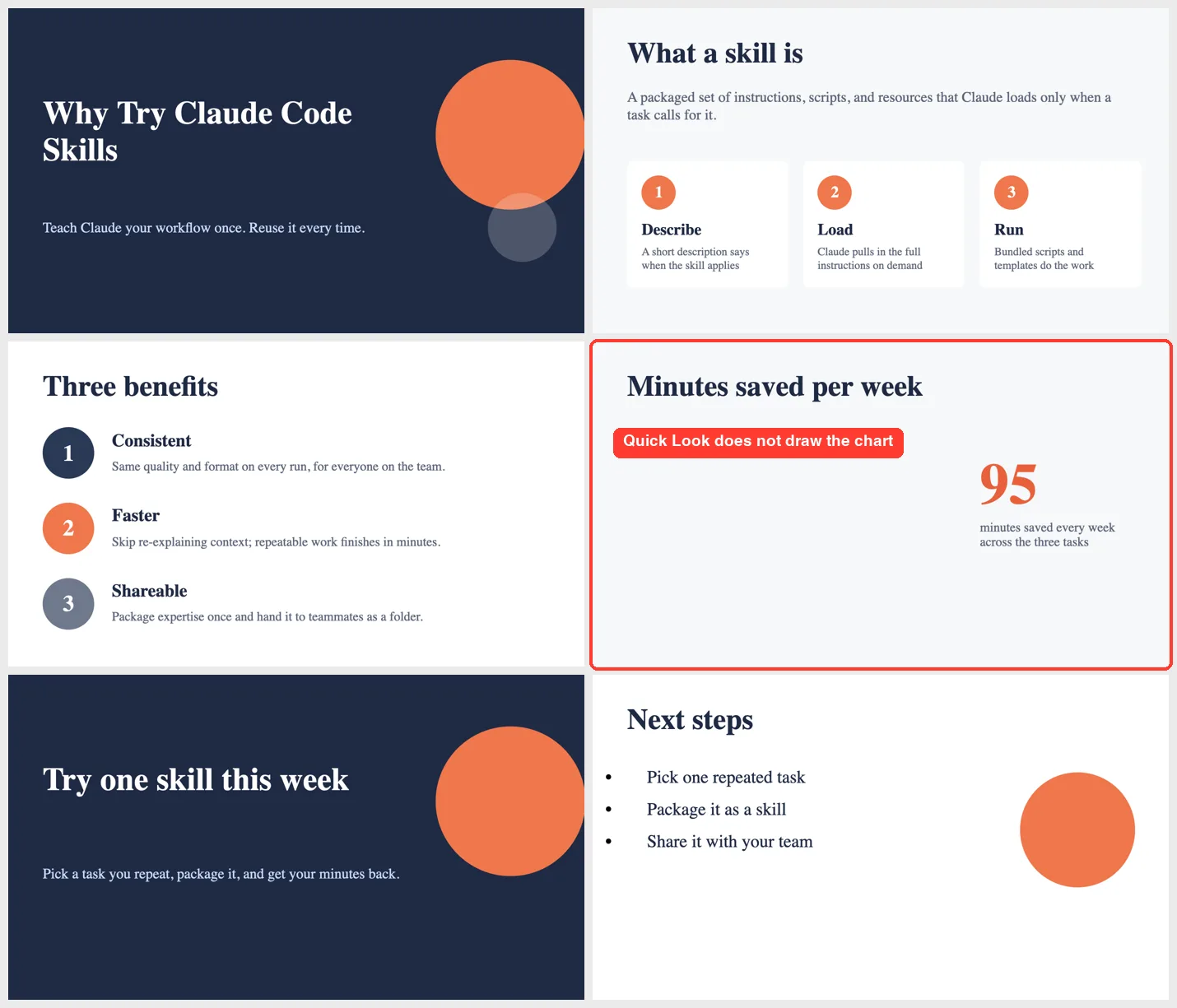
Most of the slides look clean. The dark title and closing slides frame three lighter content slides, the cards and numbered circles are consistent, and the text fits its boxes.
We also saw a few things to know about.
- The big orange circle on the title and closing slides runs off the right edge. It looks like a deliberate design choice, but Claude never rendered the slides, so it did not check.
- Quick Look does not draw charts, so the bar chart slide shows only the large 95 callout. We checked the chart a different way, described below.
- We never opened the file in PowerPoint, Keynote or Google Slides. A file that passes a validator and renders in Quick Look should open, but we cannot promise it.
Checking that the chart really exists
To confirm the chart, we ran the validator and markitdown on the finished deck. The text dump listed a chart table with Reports 40, Docs 30 and Reviews 25, which are the values we asked for.
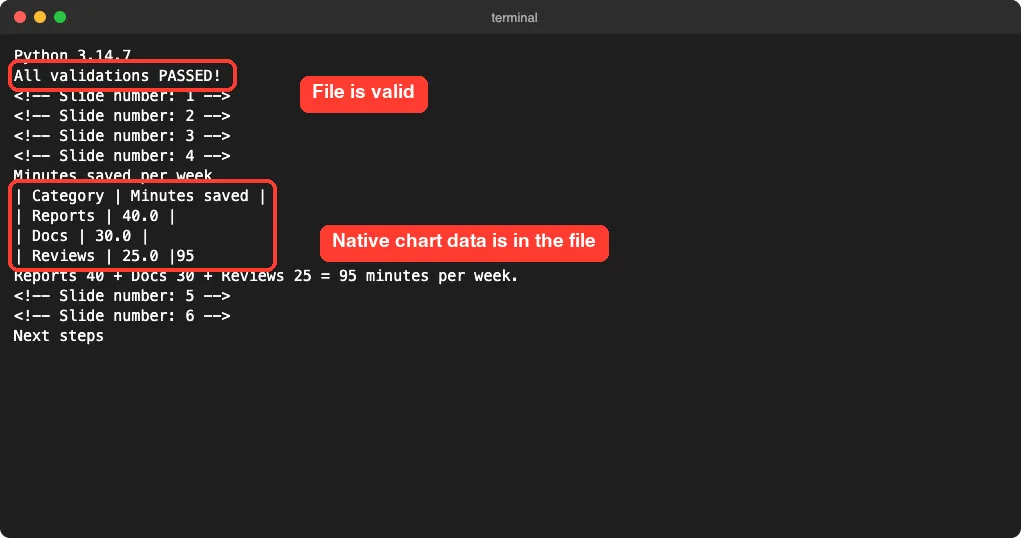
That tells us the chart is stored as real chart data, not as a picture. It does not tell us how the bars look, so check that one yourself before presenting.
Editing the Deck With a Second Prompt
Next we asked for a change: add a sixth slide called Next steps with three short bullets, validate again and save as deck-v2.pptx.
The skill’s notes describe an unzip-and-edit method for existing decks. Claude took a simpler route here.
Because it had written the deck from a script, it added a --v2 flag to make_deck.js and regenerated the file. The original deck.pptx stayed untouched, and the edit took 9 seconds.
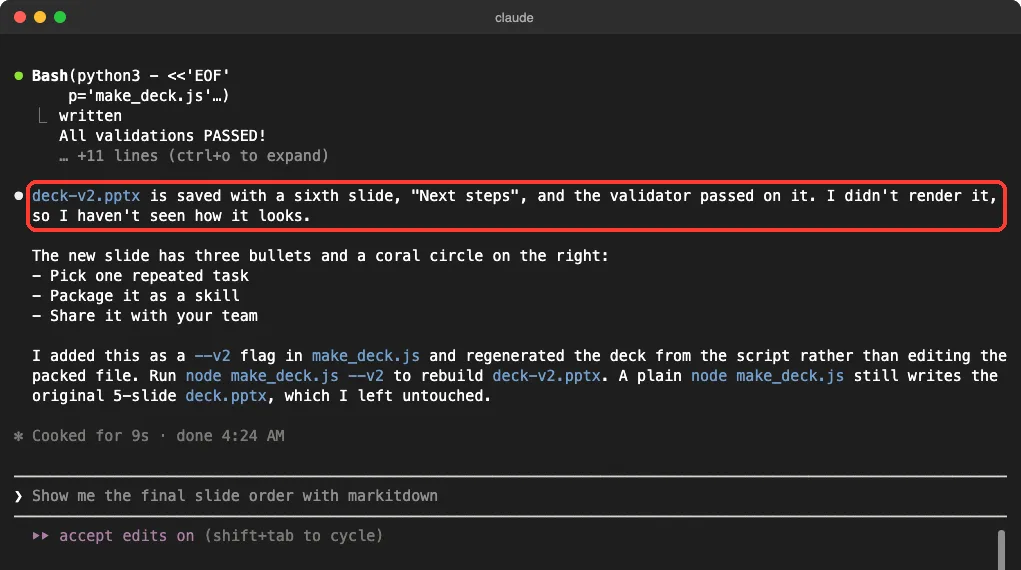
This shortcut works because we built the deck ourselves. If you hand Claude a deck made in PowerPoint, the generator script does not exist, so the skill’s unzip-and-edit route is the one that applies. We did not test that route.
The new slide is the plainest of the six. It is three bullets and a circle, and the bullets sit a little to the left of the title above them. It is fine for a draft, and a good example of why you should read the slides before sending the file.
Real Examples of What to Ask For
The same skill can handle many deck jobs, though we only tested the first one in the list.
- Build a short deck from a topic and a list of numbers, as we did.
- Read an old deck and summarize each slide into an email.
- Add or remove slides in a deck you already have.
- Pull the speaker notes out of a presentation.
If a prompt does not trigger the skill, the description may not match your words. Our posts on a skill not triggering and trigger-friendly descriptions cover that problem, and you can always run it by name.
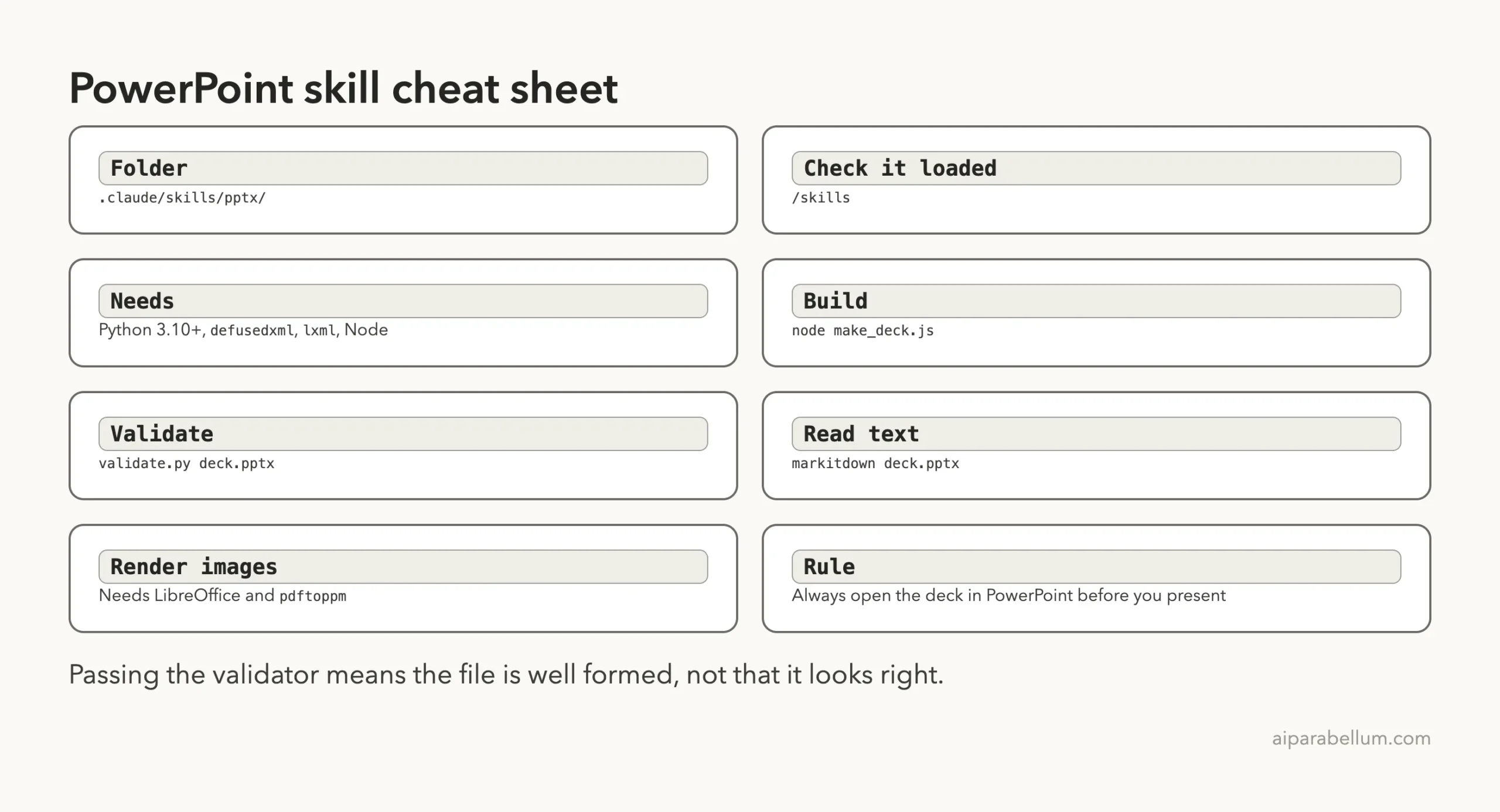
A passing validator means the file is well formed. It does not mean the slides look right.
Try It Yourself
Make a demo folder first, never your real work folder. Then install the skill the official way in a project you do not mind changing, or load a copy you are allowed to use in .claude/skills/pptx/.
Once /skills lists it, try this prompt with your own topic.
Use the pptx skill to make a 4-slide deck called team-update.pptx about our weekly goals. Slides: title, three goals, one native bar chart with numbers I will give you, and a closing slide. Write the generator as make_deck.js, run the validator when done, and tell me what you did not check.The last sentence is worth copying. It makes Claude report the gaps, such as skipped image rendering, instead of hiding them.
Common Mistakes
- Using an old Python. The validator needs 3.10 or newer, and macOS ships 3.9 by default.
- Skipping the packages. Install
defusedxml,lxmlandPillowbefore running the helper scripts. - Trusting the validator to judge looks. It checks that the file is well formed, not that the slides are good.
- Presenting without opening the deck. Open it in your own slide app and read every slide first.
- Copying the skill folder around. Use the official install commands, because the folder has its own license.
Pro Tips
- Keep the generator script. Changing a number and rebuilding is faster than editing slides.
- Install LibreOffice and
pdftoppmif you want Claude to render and look at its own slides. The skill’s notes describe that visual check as part of its quality steps, and we could not run it. - Ask for fonts like Arial or Calibri, which the skill lists as safe because they ship with Office.
- Run
claude --versionand note it, because skills and Claude Code both change quickly.
Our Honest Verdict
The skill did what it promised. One prompt produced a tidy, consistent six-slide deck with a native chart and speaker notes, and the validator caught nothing wrong once Python was right.
It is not a finished presentation tool. Setup took us several tries, Claude cannot see its own slides without LibreOffice, and we could not confirm how the file behaves in PowerPoint. We would use it for first drafts and repeatable decks, and we would review every slide before presenting.
If you want to compare it with other add-ons, our skills versus plugins comparison and the Skills Directory are good next stops. You can also read about the models behind these tools on our Claude AI page.
Cheat Sheet
Frequently Asked Questions
Does Claude Code have a PowerPoint skill?
Yes. Anthropic’s official skills collection includes a pptx skill for creating, editing and reading PowerPoint files. It is not built into Claude Code, so you add it as a skill or through a plugin.
Do I need PowerPoint installed to use it?
No. The skill writes the file itself. We had no Office apps on our Mac and still got a valid deck, but we could not check how it opens in PowerPoint.
Why did the validator fail with a SyntaxError?
You are probably running Python 3.9 or older. The validator uses a match statement, which needs Python 3.10 or newer. Use a newer Python and install the packages it imports.
Can Claude Code preview the slides?
The skill describes a preview step that converts slides to images with LibreOffice and pdftoppm. We did not have those tools, so Claude only checked the text. Install them if you want the visual check.
Is the pptx skill free to use?
It is source-available under Anthropic’s own license, which ties use to your agreement with Anthropic and limits copying. Read its LICENSE.txt and use the official install route.
Conclusion
The claude code skill for powerpoint turns a short description into a real deck in under half a minute, and it can rebuild or extend that deck on request. Plan on a little setup work, check the Python version first, and always open the finished slides yourself before you present them.
Previous in the series: Part 13
Next in the series: Part 15: Claude Code Resume Skill: Build and Test One.