Many Gemini users are finding out this week that paying for Google AI Pro doesn’t stop Google from training on their chats. On a personal Google account, your saved Gemini chats can be used to train Google’s AI models, whether you pay or not.
We checked this against Google’s own help pages, and it’s true. There’s one switch that controls it, but turning it off has a catch that ChatGPT and Claude don’t have.
Here’s how to stop Gemini training on your chats on the web and on your phone, what you give up, what Google still keeps, and how Gemini compares with ChatGPT and Claude.
Does Gemini Train on Your Chats If You Pay?
Yes, on a personal account. Google’s Gemini Apps Privacy Hub says your activity is used to improve its services, “including training generative AI models,” when a setting called Keep Activity is on. It doesn’t make an exception for paid Google AI plans.
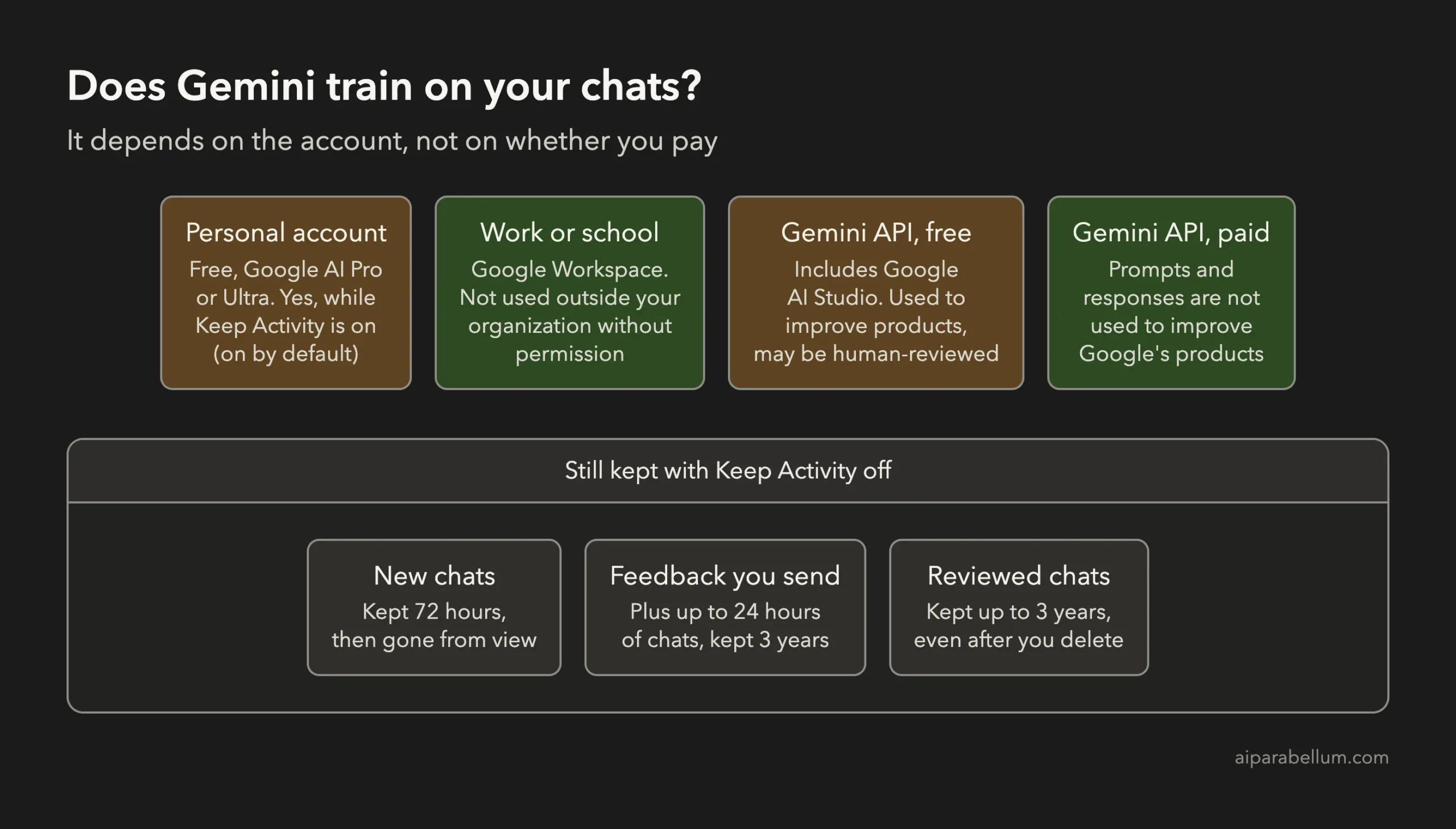
Keep Activity is on by default if you’re 18 or over. Here’s how it works for each kind of account:
| How you use Gemini | Used to train AI models by default? | Who controls it |
|---|---|---|
| Personal Google account, free | Yes, while Keep Activity is on | You, in Gemini Apps Activity |
| Personal Google account with Google AI Pro or Ultra | Yes, while Keep Activity is on | You, in Gemini Apps Activity |
| Work or school account (Google Workspace) | No, not outside your organization without permission | Your Workspace admin |
| Gemini API free tier, including Google AI Studio | Yes, and human reviewers may read it | Google’s unpaid API terms |
| Gemini API paid tier | No | Google’s paid API terms |
So the line isn’t free versus paid. It’s personal versus business. A Google AI Pro subscription buys you more features and limits, not different privacy terms.
Can People at Google Read Your Gemini Chats?
Some of them, yes. Google says “a subset of chats are reviewed by human reviewers,” including trained reviewers from its service providers, who rate answers and suggest better ones.
Google disconnects reviewed chats from your account first. But it also asks you not to enter anything confidential that you wouldn’t want a reviewer to see.
How to Stop Gemini Training on Your Chats
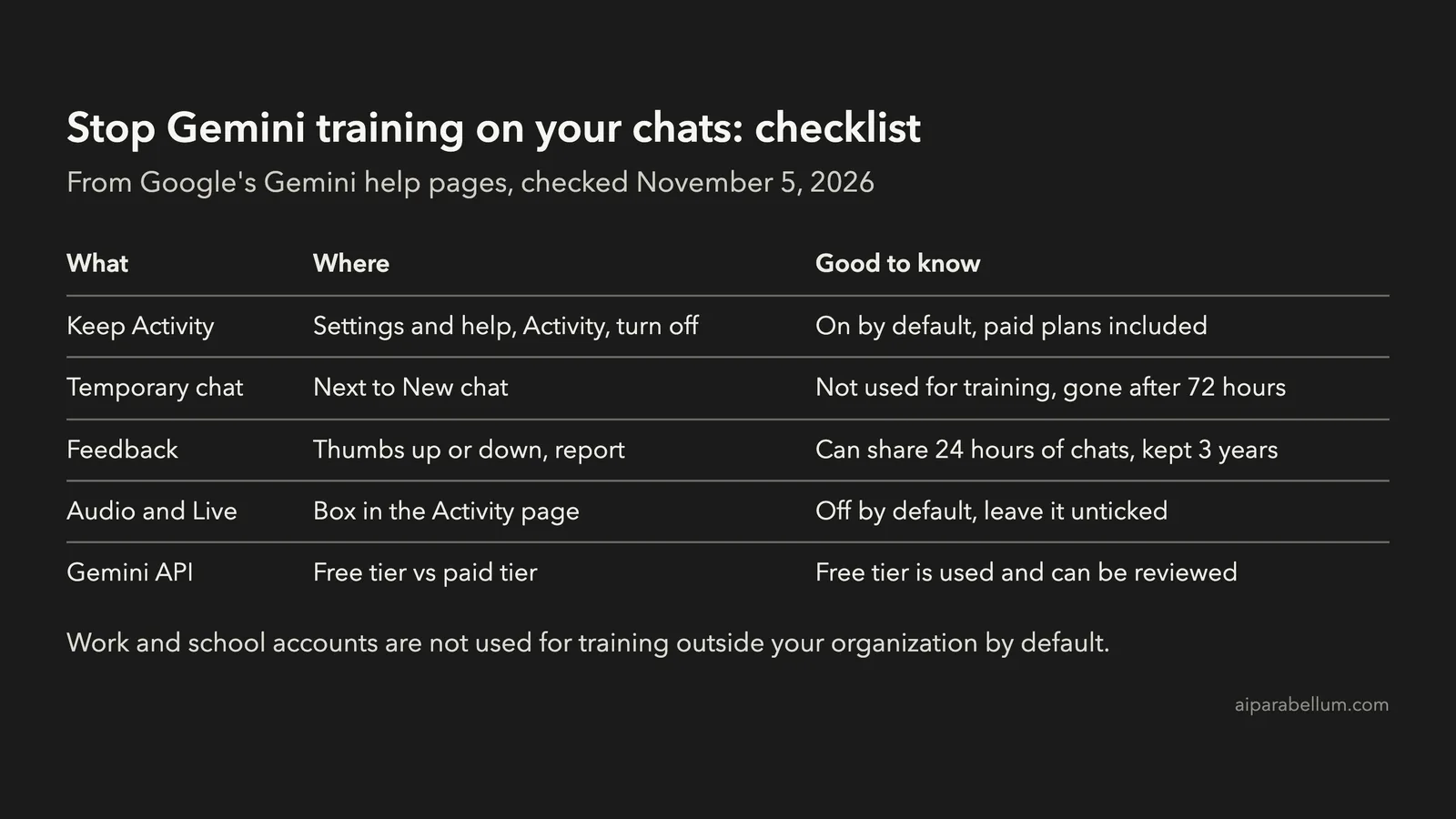
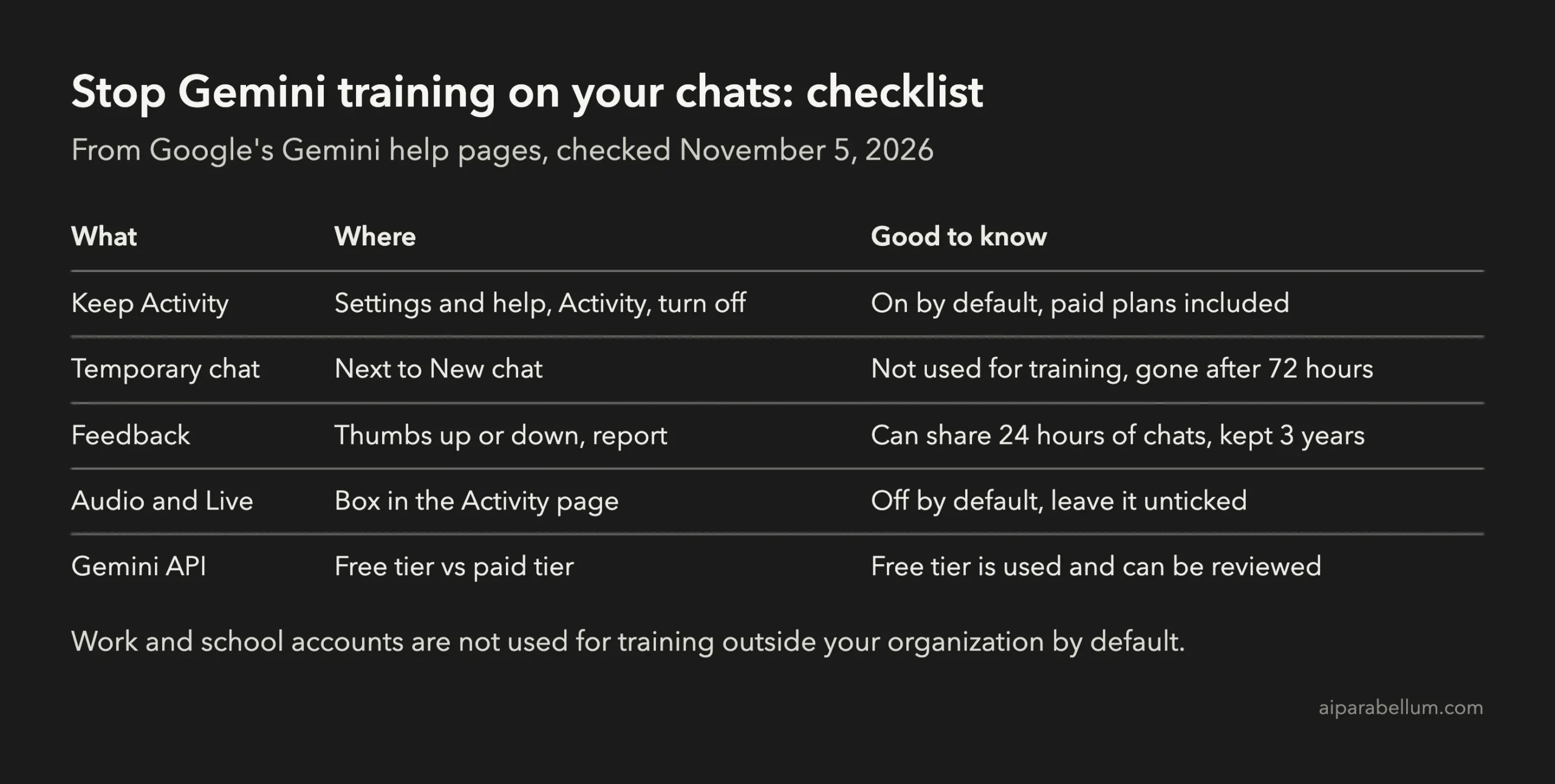
The switch is called Keep Activity, and it lives in Gemini Apps Activity. Turning it off stops your future chats from being used to train Google’s AI models, unless you send feedback.
On the Web
- Go to
gemini.google.comand sign in. - Click Settings & help, then Activity. You can also go straight to
myactivity.google.com/product/gemini. - Near the top, click On, then choose Turn off, or Turn off and delete activity.
On Android or iPhone
- Open the Gemini app.
- Tap Menu at the left, then your profile picture or initial, then Gemini Apps Activity.
- Near the top, tap On, then choose Turn off, or Turn off and delete activity.
The setting belongs to your Google Account, so turning it off once covers the web and the apps. Turn off and delete activity also clears your saved chats, which is worth doing if you’ve shared anything sensitive.
What You Lose When You Turn Off Keep Activity
This is the catch. In ChatGPT and Claude, turning off training keeps your chat history. In Gemini, the same switch controls both, so turning off training also turns off your saved history.
- New chats are kept for only 72 hours and don’t appear in your activity, so you can’t go back to them later.
- Gems you create are still saved, but chats with your Gems aren’t.
- Most Connected Apps stop working. Only Device assistance, Gemini Notebook, Messages, Phone and WhatsApp stay available, so things like Google Workspace are off.
- Tasks that use a remote browser or computer need Keep Activity on.
If you rely on Gemini to remember past chats or reach into Gmail and Drive, this is a real cost. That’s why many people leave it on without knowing what it does.
Use Temporary Chats for Sensitive Questions
If you want to keep your history but protect some conversations, use a temporary chat. Google says temporary chats aren’t used to train its AI models.
- Go to
gemini.google.com. - Next to New chat, click Temporary chat.
- Type your prompt and send it.
A temporary chat is kept for 72 hours and then gone from your view. You can’t use Gems, Connected Apps or feedback in one, and it only works on a personal account in the Gemini web or mobile app.
What Google Still Keeps With Keep Activity Off
Turning the switch off doesn’t make Gemini forget everything right away. Google’s privacy hub lists a few things that still happen:
| What | What happens |
|---|---|
| Your chats for the next 72 hours | Kept with your account so Gemini can answer you and Google can handle safety and feedback |
| Feedback you send | Your feedback and up to the last 24 hours of chats can be used to improve Gemini, and are kept for up to 3 years |
| Chats already reviewed by people | Not deleted when you delete your activity; kept for up to 3 years, disconnected from your account |
| Safety checks | Chats are still used to protect Google and its users, including with human reviewers |
| Other Google services | Not covered; for example, Gemini for Home voice recordings have their own setting in Google Home History |
The feedback row is the easy one to miss. If you’ve turned training off, skip the thumbs up and down on anything private.
Check the Audio and Gemini Live Setting Too
There’s a second setting for your voice. If you leave Keep Activity on, Gemini Apps Activity also has a box for improving Google services with your audio and Gemini Live videos and screenshares.
This box is off by default. If you ever ticked it, untick it in the same Activity page to keep your recordings out of training.
Gemini API and Google AI Studio
Developers get different terms. On the free tier of the Gemini API, including Google AI Studio, Google uses what you send to improve its products, and “human reviewers may read, annotate, and process” your input and output.
On the paid tier, Google says it doesn’t use your prompts or responses to improve its products. It keeps them for a limited time only to catch abuse.
If you used the Gemini CLI with your Google account, note that Google stopped that sign-in for the Code Assist for individuals, Google AI Pro and Ultra tiers on June 18, 2026. The CLI still works with an API key, and the API terms above apply.
How Gemini Compares to ChatGPT and Claude
All three train on personal accounts in some way, but they handle it differently:
| App | Training switch | On by default? | Keep history with training off? |
|---|---|---|---|
| Gemini | Keep Activity | Yes, for adults | No, chats last 72 hours |
| ChatGPT | Improve the model for everyone | Yes, on Free, Plus and Pro | Yes |
| Claude | Help improve our AI models | Set by you in Privacy settings on Free, Pro and Max | Yes |
Gemini is the only one of the three that makes you trade your chat history for privacy. For the ChatGPT, Codex and Claude switches step by step, see our guide on how to turn off Codex training.
Should You Turn Keep Activity Off?
For casual questions, leaving it on is a fair choice. You keep your history, and your chats help improve the model.
For anything private, like health questions, client work or code you can’t share, turn it off or use temporary chats. If you need both privacy and history, a Google Workspace account keeps your chats out of training by default.
If you’re still choosing an assistant, our Claude vs Gemini comparison and our look at ChatGPT, Claude and Gemini cover more than privacy. You can also browse more AI assistant tools.
FAQ
Does Google AI Pro stop Gemini from training on my chats?
No. On a personal account, your chats can be used for training while Keep Activity is on, whether you pay or not. Only work and school accounts and the paid Gemini API are kept out of training by default.
Does turning off Keep Activity delete my old chats?
Not unless you choose Turn off and delete activity. Chats that human reviewers have already seen stay for up to 3 years either way.
Are Gemini temporary chats used for training?
No. Google says temporary chats aren’t used to train its AI models. They’re kept for 72 hours to answer you and handle safety.
Is Gemini in Google Workspace used for training?
No. Google says Workspace content and prompts aren’t used to train generative AI models outside your organization without permission.
Conclusion
To stop Gemini training on your chats, open Gemini Apps Activity and turn off Keep Activity, on the web under Settings & help, then Activity, or in the app under your profile. A paid plan doesn’t change this on a personal account, and turning it off means new chats disappear after 72 hours, so use temporary chats if you want to keep your history, skip feedback on private chats, and remember that work accounts and the paid Gemini API stay out of training by default. Google’s Gemini Apps Privacy Hub and its page on how to manage your Gemini activity are worth bookmarking.