The Claude Code Ralph Loop plugin makes Claude try the same task again and again until a stop condition is met. You give it one prompt, a stop word and a safety cap. Claude then keeps going without you typing “continue” every time.
We installed it in a sandbox, ran it on a small coding task and watched exactly what it did. Some of it worked as advertised, and one thing surprised us.
This guide is part of our Claude Code tutorials. Find more add-ons in our Claude Code Skills Directory.
Tested with Claude Code v2.1.318 on November 8, 2026. The plugin is ralph-loop version 1.0.1 from Anthropic’s public plugins repository at commit 0412be7, and the second tool is ralph-specum version 4.12.2 from tzachbon/smart-ralph at commit ac7251a.
Quick Summary
| Question | Answer |
|---|---|
| What is it? | A plugin that re-sends the same prompt each time Claude tries to stop |
| Install command | /plugin install ralph-loop@claude-plugins-official |
| Start a loop | /ralph-loop:ralph-loop with a prompt and options |
| Stop a loop | A stop word, the iteration cap, or /ralph-loop:cancel-ralph |
| Needs an outside account | No |
| Our verdict | Useful for tasks with a clear pass or fail check, as long as you set a cap |
What Is the Ralph Loop?
The name comes from the “Ralph Wiggum technique”. It is a simple idea: run the same prompt in a loop, and let the files on disk carry the progress from one round to the next.
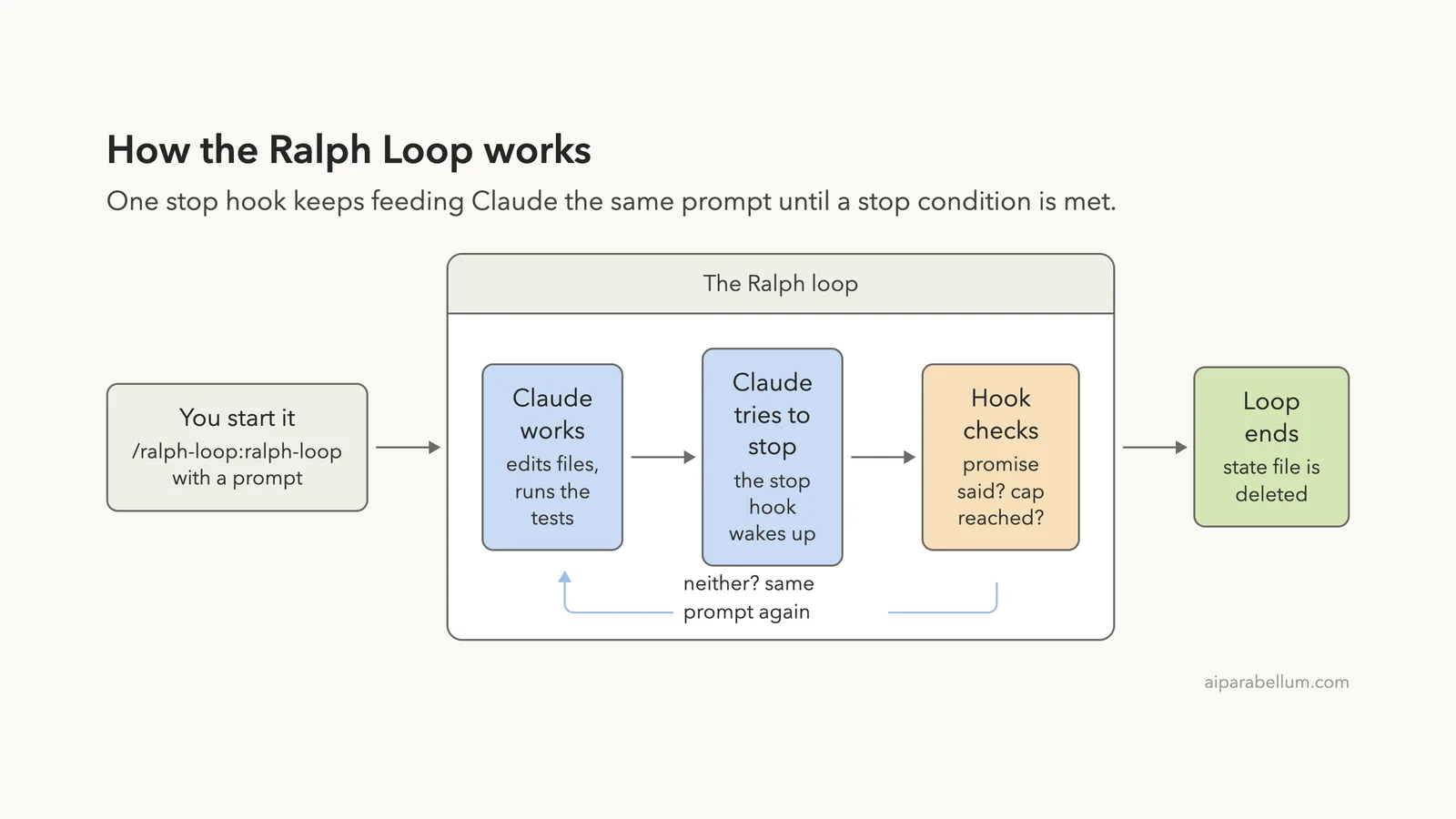
Normally Claude Code does a job and then stops to wait for you. With a Ralph loop, a hook catches that moment and sends the original prompt back. Claude sees its earlier work in the files and keeps improving it.
The plugin is built from a few small parts. If you are new to extensions, our guide to Claude Code plugins explains how they are installed and managed.
- A slash command that writes a small state file and starts the loop
- A second command that cancels the loop
- A help command that explains the plugin
- A stop hook, which is the part that does the looping
How the Ralph Loop Plugin Works
The loop depends on a stop hook. Hooks are small scripts that Claude Code runs at set moments, and you can read more in our guide to Claude Code hooks. This one runs every time Claude finishes a turn.
We read the hook script before running anything. It looks for a file named .claude/ralph-loop.local.md in your project. If the file is missing, the hook does nothing and Claude stops as usual.
If the file exists, the hook reads the current iteration number, the cap and the stop word. It checks whether the cap is reached, or whether Claude’s last message contains your stop word inside <promise> tags. If neither is true, it adds one to the counter and sends the same prompt back.
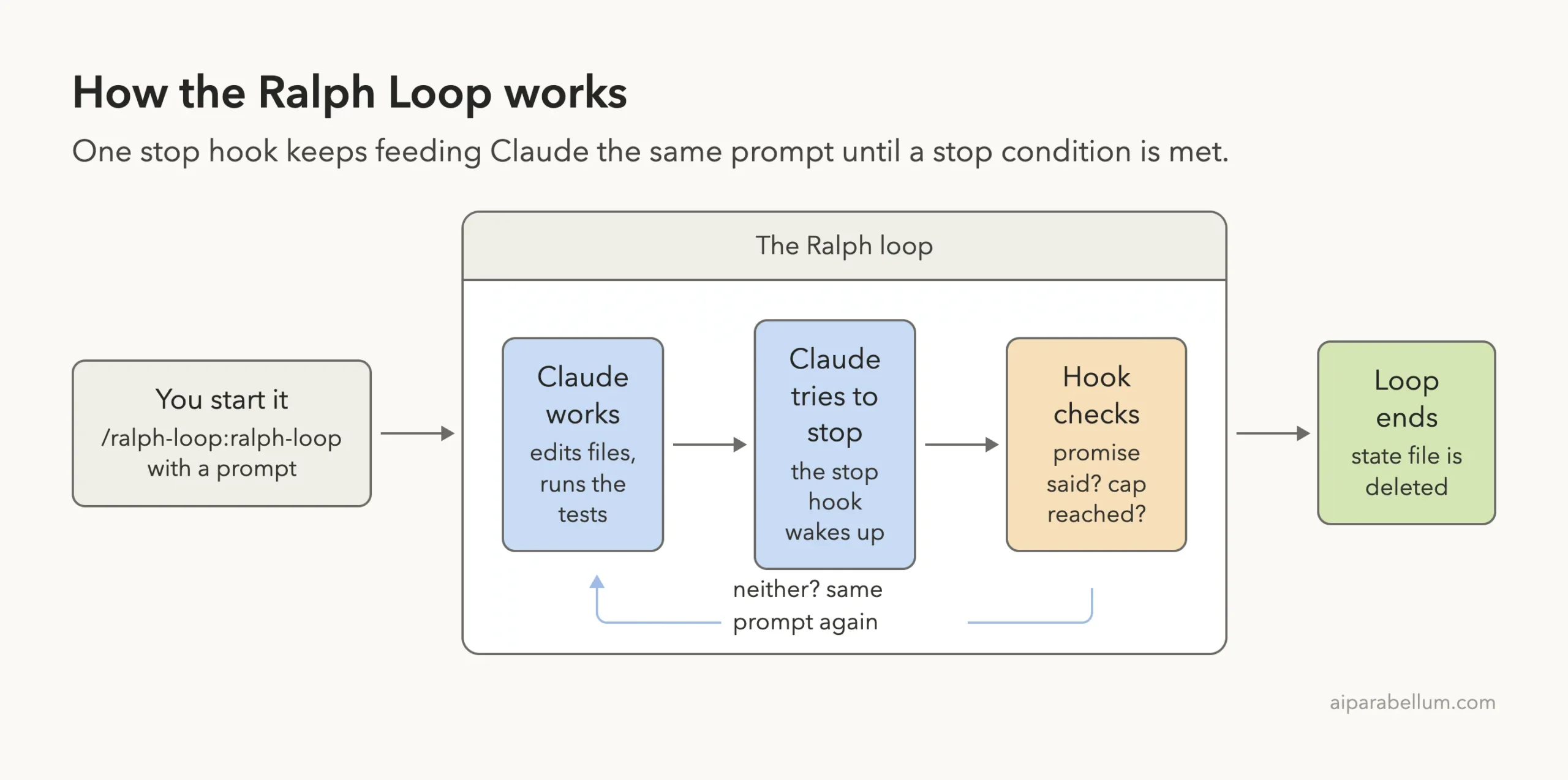
The state file is project scoped, but the script also stores a session ID. A different Claude session in the same folder will not be blocked by your loop.
How to Install the Ralph Loop Plugin
The plugin lives in the official marketplace, so the install is one command. Run it inside Claude Code.
/plugin install ralph-loop@claude-plugins-officialWe did not run that command on our own setup. To keep our everyday Claude Code untouched, we cloned the repository into a throwaway folder and loaded the plugin for one session only.
claude --plugin-dir path/to/plugins/ralph-loop --setting-sources projectYou can read how this works in the official discover plugins and plugins docs. We tested on macOS, and the Windows and Linux steps follow Anthropic’s official instructions.
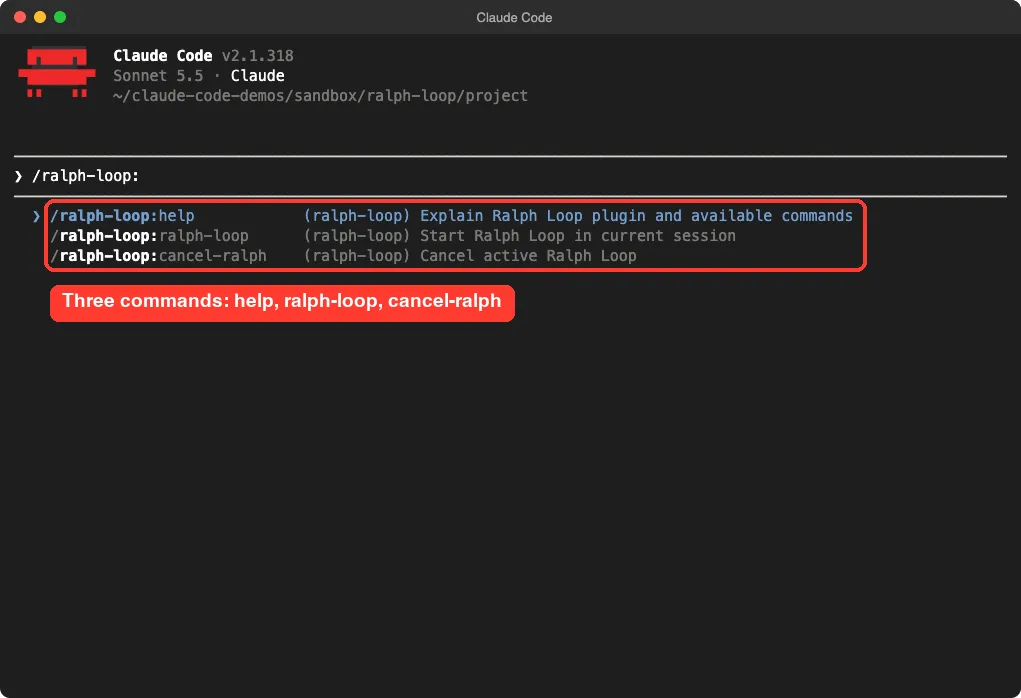
Once loaded, type /ralph-loop: and you will see the three commands.
Our Test: Make the Tests Pass
A Ralph loop works best when there is a clear way to check the result. We made a tiny Python project with a calc.py file full of empty functions and a test_calc.py file with three tests. At the start, all three tests failed.
The folder was brand new, inside a sandbox, and had nothing else in it. Here is the exact prompt we sent.
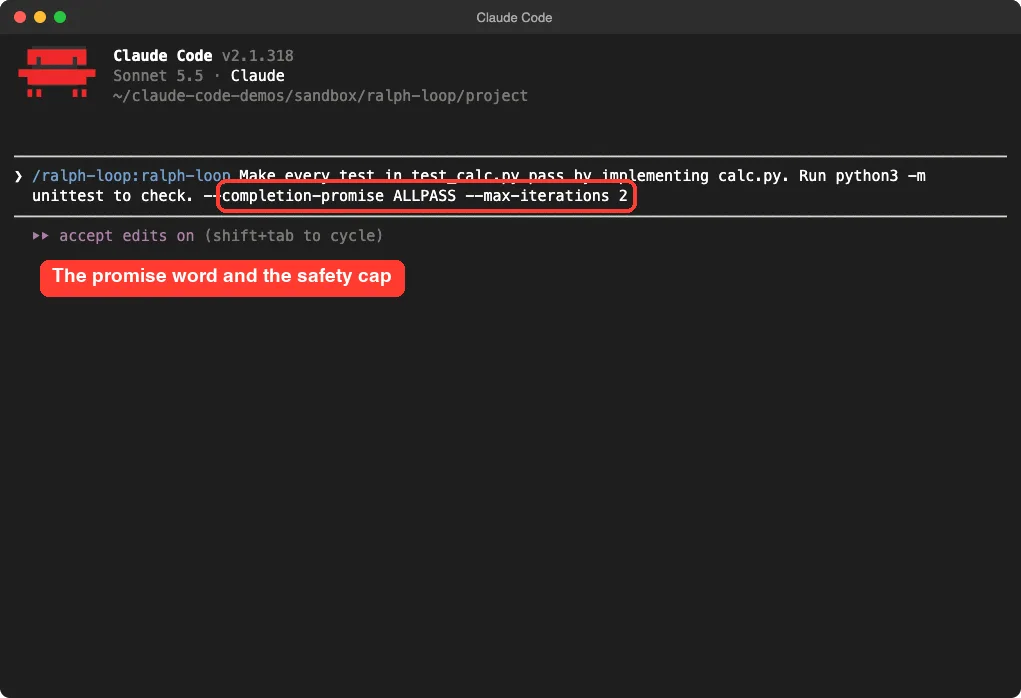
/ralph-loop:ralph-loop Make every test in test_calc.py pass by implementing calc.py. Run python3 -m unittest to check. --completion-promise ALLPASS --max-iterations 2Two options matter here. --completion-promise ALLPASS sets the stop word, and --max-iterations 2 sets the safety cap.
Round One: Claude Does the Work
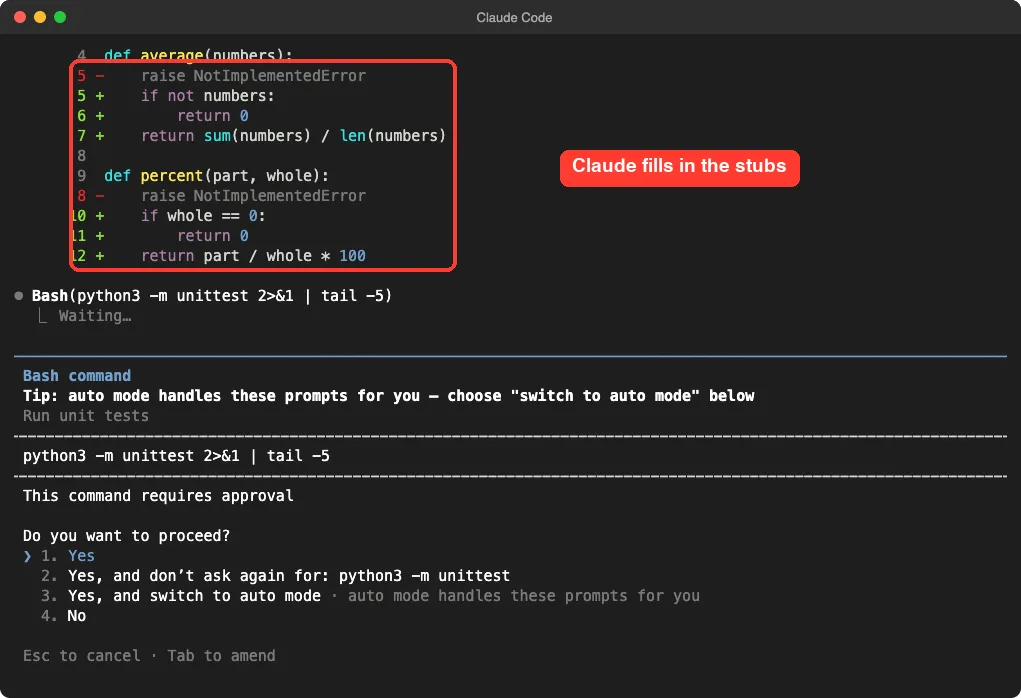
Claude replaced the empty functions with real code, then asked permission to run the tests. We approved it, and all three tests passed.
It then printed the stop word in its final message, exactly as the plugin told it to. This is the point where we expected the loop to end.
Round Two: The Same Prompt Comes Back
The loop did not end. Claude Code showed a “Stop says” line reading “Ralph iteration 2”, followed by our original prompt as feedback from the stop hook.
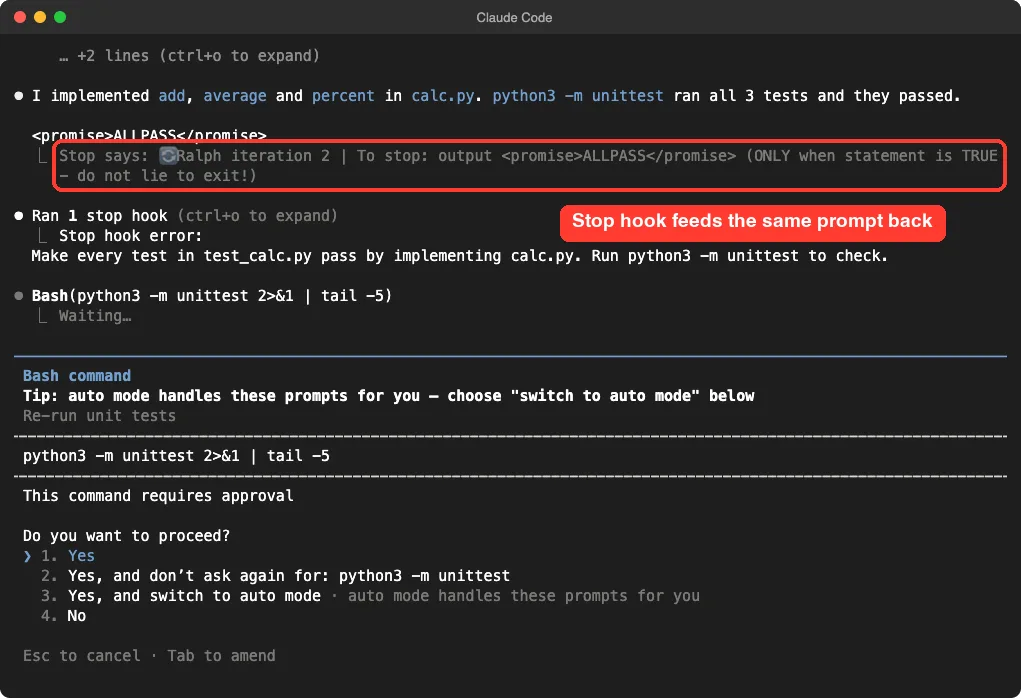
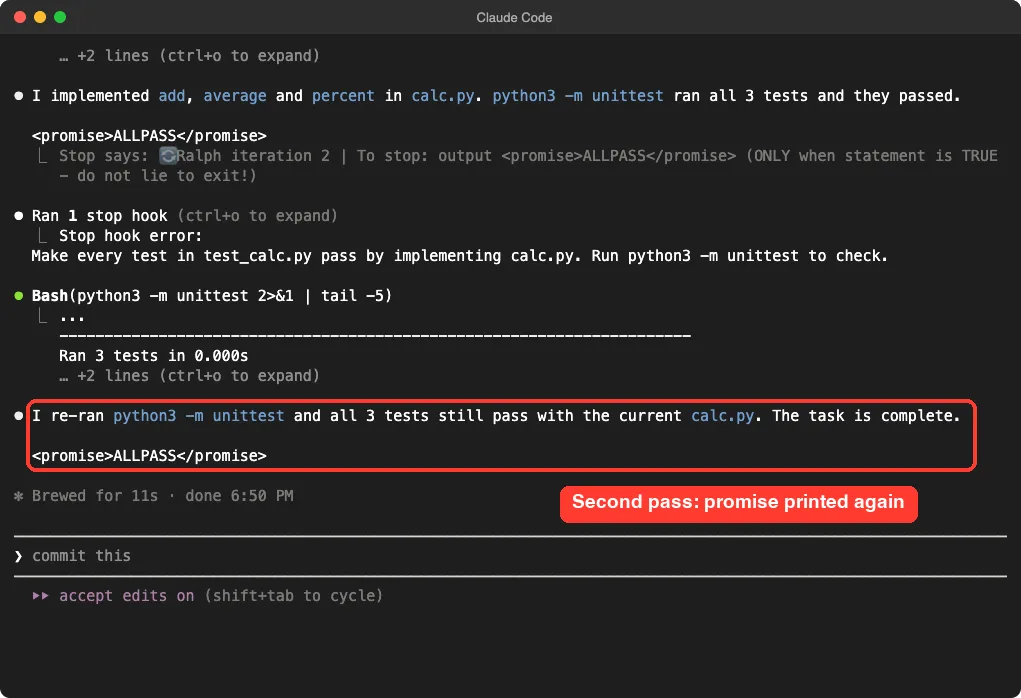
Claude ran the tests again, saw they still passed, said the task was complete and printed the stop word a second time. This time the loop ended, and the state file was gone from the project folder.
What We Observed, and What We Can’t Explain
We ran the demo twice with the same prompt. In both runs Claude printed the stop word after the first pass, and in both runs the loop still started iteration 2. In our first run we used a cap of 5, and we stopped the session by hand while iteration 2 was waiting.
In the second run, with a cap of 2, the loop ended after the second pass. With a cap of 2 we cannot tell whether the stop word or the cap ended it. We read the hook script, and it only checks the last text block in Claude’s reply, but we did not dig into why the first stop word was not accepted.
So here is what we can honestly say from one small task:
- The loop really does feed the same prompt back, and Claude Code shows it on screen
- An extra round on an already finished task cost one more test run and nothing else
- The iteration cap is the one control you should never skip
One demo is one demo, and a bigger task could behave differently.
The Loop’s Safety Controls
Always set a cap: the iteration limit is the one control that always ends the loop.
An endless loop can burn through your usage, so the plugin gives you three ways to stop it.
| Control | How it works | When to use it |
|---|---|---|
--max-iterations N | The hook deletes the state file once the counter reaches N | Always |
--completion-promise WORD | The loop ends when Claude’s reply contains <promise>WORD</promise> | When success is easy to state |
/ralph-loop:cancel-ralph | Deletes the state file so the hook lets Claude stop | When you change your mind |
The plugin’s own help text says a loop with no cap and no stop word runs forever. We would not start one that way.
You can also check progress while it runs. The state file records the current round, so a quick look at .claude/ralph-loop.local.md tells you where you are.
When to Use a Ralph Loop
The loop shines when Claude can test its own work. Our guide to test-driven development shows the same idea by hand.
- Getting a failing test suite to pass
- Fixing lint or type errors until the checker is clean
- Small clean-up jobs with a clear finish line
It is a poor fit for vague goals such as “make the design nicer”. Without a pass or fail check, Claude has no honest way to know it is done.
Loop Plugin vs Other Ways to Repeat Work
Claude Code has other ways to repeat things, and they solve different problems.
| Option | What repeats | Best for |
|---|---|---|
| Ralph Loop plugin | The same prompt, right after Claude stops | Work with a clear pass or fail check |
| Built-in loop command | A prompt on a time schedule | Checking something every few minutes |
| Plan mode | Nothing repeats; you review a plan first | Risky or unclear jobs, see plan mode |
A Second Tool: smart-ralph
The topic of this guide also covers a community project called smart-ralph. It is a different idea built on the same name. Instead of repeating one prompt, it turns a feature request into written research, requirements, a design and a task list, then runs the tasks one at a time.
We want to be clear about how much we tested. We read its hooks and scripts, loaded the plugin in the sandbox and listed its commands. We did not run its full spec workflow, so we cannot say how well it builds a real feature.
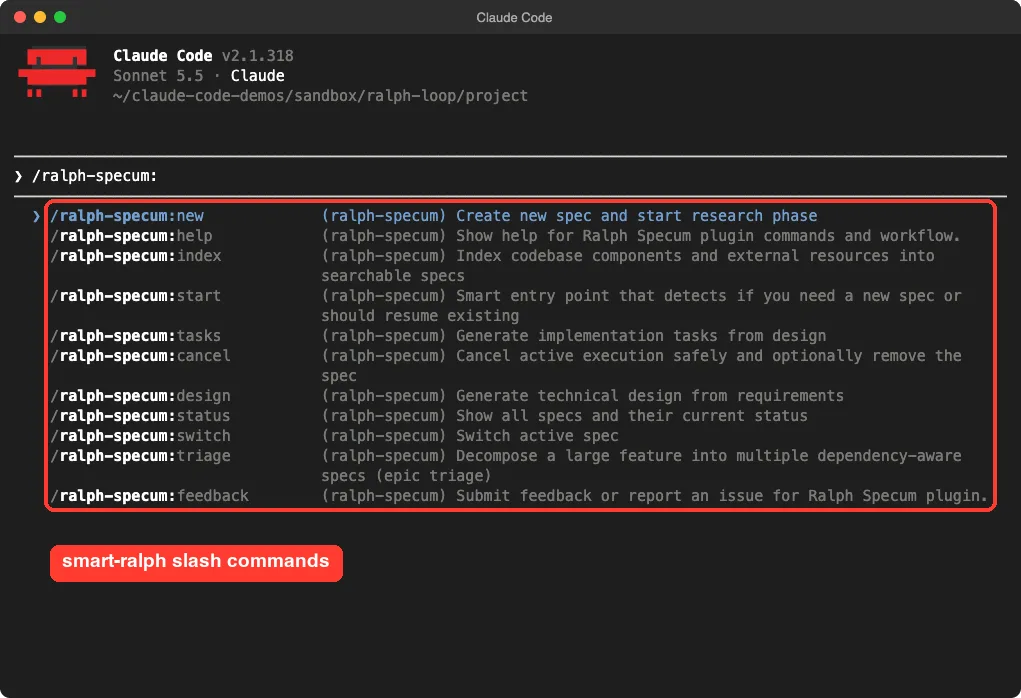
Its README lists commands for each phase, including /ralph-specum:start, /ralph-specum:tasks and /ralph-specum:implement. It uses start, stop and session hooks, so read them before you install. If you like spec-first work, our Spec Kit test covers a similar approach.
| Plugin | Idea | What we ran |
|---|---|---|
ralph-loop | Repeat one prompt until a stop word or cap | Full demo, twice |
ralph-specum | Spec first, then tasks one at a time | Loaded it and listed commands only |
Try It Yourself
Make a safe practice folder, never your real project. Put a few empty functions in one file and tests in another, then start Claude Code with the plugin loaded.
/ralph-loop:ralph-loop Make every test in test_calc.py pass by implementing calc.py. Run python3 -m unittest to check. --completion-promise ALLPASS --max-iterations 3Watch the round counter, and try /ralph-loop:cancel-ralph during a run to see the cancel path.
Common Mistakes
- Starting a loop without
--max-iterations - Giving a vague prompt with no way to check the result
- Putting angle brackets in the prompt on the command line, which the shell can misread; use a plain stop word instead
- Running a loop in a real project before you have tried it in a practice folder
- Choosing a stop word that Claude could print without the task being finished
Pro Tips
- Write the prompt so it names the exact check to run
- Keep the first cap low, such as 3, and raise it only if needed
- Use a single plain word for the stop word
- Commit your work before a long loop so you can roll back
- Keep the permission prompt on while you learn; our permission modes guide explains the options
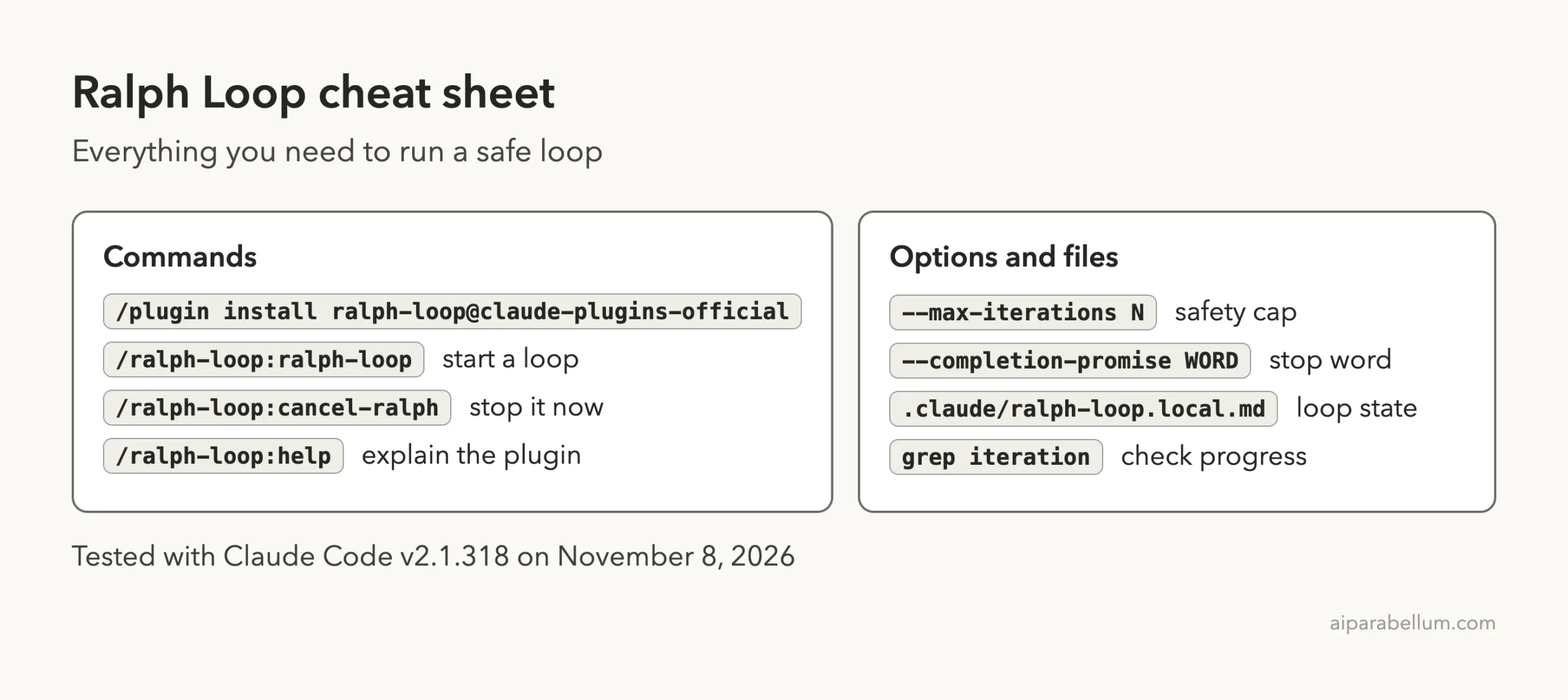
Cheat Sheet
Frequently Asked Questions
What does the Claude Code Ralph Loop plugin do?
It uses a stop hook to send the same prompt back to Claude each time it tries to stop. Claude sees its earlier work in your files and keeps improving it.
How do I stop a Ralph loop?
Set --max-iterations when you start, give a --completion-promise, or run /ralph-loop:cancel-ralph. The plugin’s help text says a loop with no cap or stop word runs forever.
Does it need an account or API key?
No. It is a local plugin with shell scripts, and we needed nothing beyond Claude Code itself.
Is it safe to run?
We read the hook and setup scripts and found only local file and text handling. Still, a loop can use a lot of your usage and edit many files, so use a cap and keep your work in version control.
Is smart-ralph the same thing?
No. It borrows the name but plans a feature in written phases and runs tasks one at a time. We only loaded it and listed its commands.
Conclusion
The Ralph Loop plugin is a simple, readable tool: one stop hook, one state file and a prompt that keeps coming back. In our test it did what it says, though it ran one extra round after Claude printed the stop word, so always set a low iteration cap and give it work with a clear pass or fail check. For more add-ons like this, browse our Claude guides and the plugin marketplace explainer.