The claude code simplifier plugin is a small add-on from Anthropic that rewrites tangled code into something easier to read, without changing what the code does. It comes from the official plugin marketplace and adds one subagent called code-simplifier. We loaded it into a throwaway project, pointed it at a deliberately messy file, and checked the result with real tests.
This guide is part of our Claude Code tutorials. Find more add-ons in our Skills Directory.
Tested with Claude Code v2.1.318 on November 7, 2026, using the code-simplifier plugin version 1.0.0 from the official claude-plugins-official repository (commit a1ecfbc, November 5, 2026). Everything ran in a sandbox folder with --setting-sources project and the plugin loaded through --plugin-dir, so nothing was added to the global Claude Code setup.
Quick Summary
| Question | Answer |
|---|---|
| What is it? | An official plugin with one subagent, code-simplifier, that refines code for clarity and consistency |
| Who makes it? | Anthropic, in the official plugin marketplace |
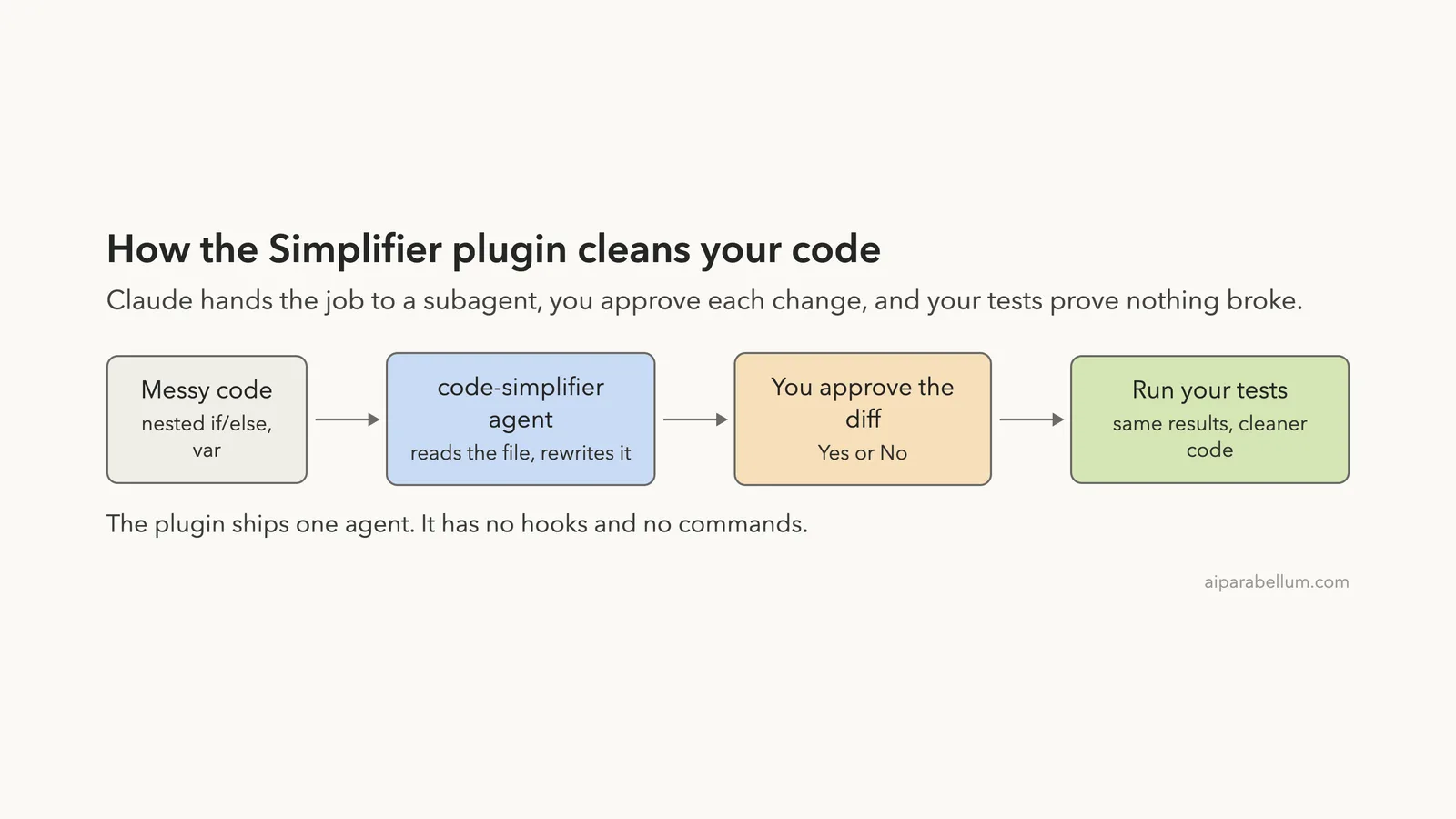
| What does it add? | One agent file. No hooks, no slash commands, no MCP servers |
| Install command | /plugin install code-simplifier@claude-plugins-official |
| Our test | A 30-line order calculator with nested if/else and var, five passing tests |
| Result | The agent split it into small helper functions, and all five tests still passed |
| Main catch | You still approve the edit and the test run, and the result can vary between runs |
What the Claude Code Simplifier Plugin Is
A plugin is a bundle of extras for Claude Code. It can hold skills, agents, hooks and tool servers. You can read the basics in the official plugins documentation, or in our guide to Claude Code plugins.
The simplifier is the smallest kind of plugin. We read every file in it before loading it. It has a manifest, a license, and a single agent file.
That agent file is a set of instructions for a helper Claude that does one job: tidy code.
The instructions tell the helper to keep behavior exactly the same, follow the rules in your CLAUDE.md file, reduce nesting, remove redundant code, and avoid clever one-liners. It also tells the helper to focus on recently changed code unless you ask for more. The file sets the helper’s model to opus.
Why it exists
Code written in a hurry gets messy fast. Claude itself sometimes leaves behind extra branches or long functions after a big edit. A second pass with a cleanup specialist gives you a tidier file before you commit.
What it is not
It is not a linter, and it does not run your tests for you. It also adds no commands of its own. You ask for it in plain English and Claude hands the work to the agent.
How to Install It
On a normal setup you install it from the official marketplace inside a session. The official marketplace is on by default, so no extra setup is needed.
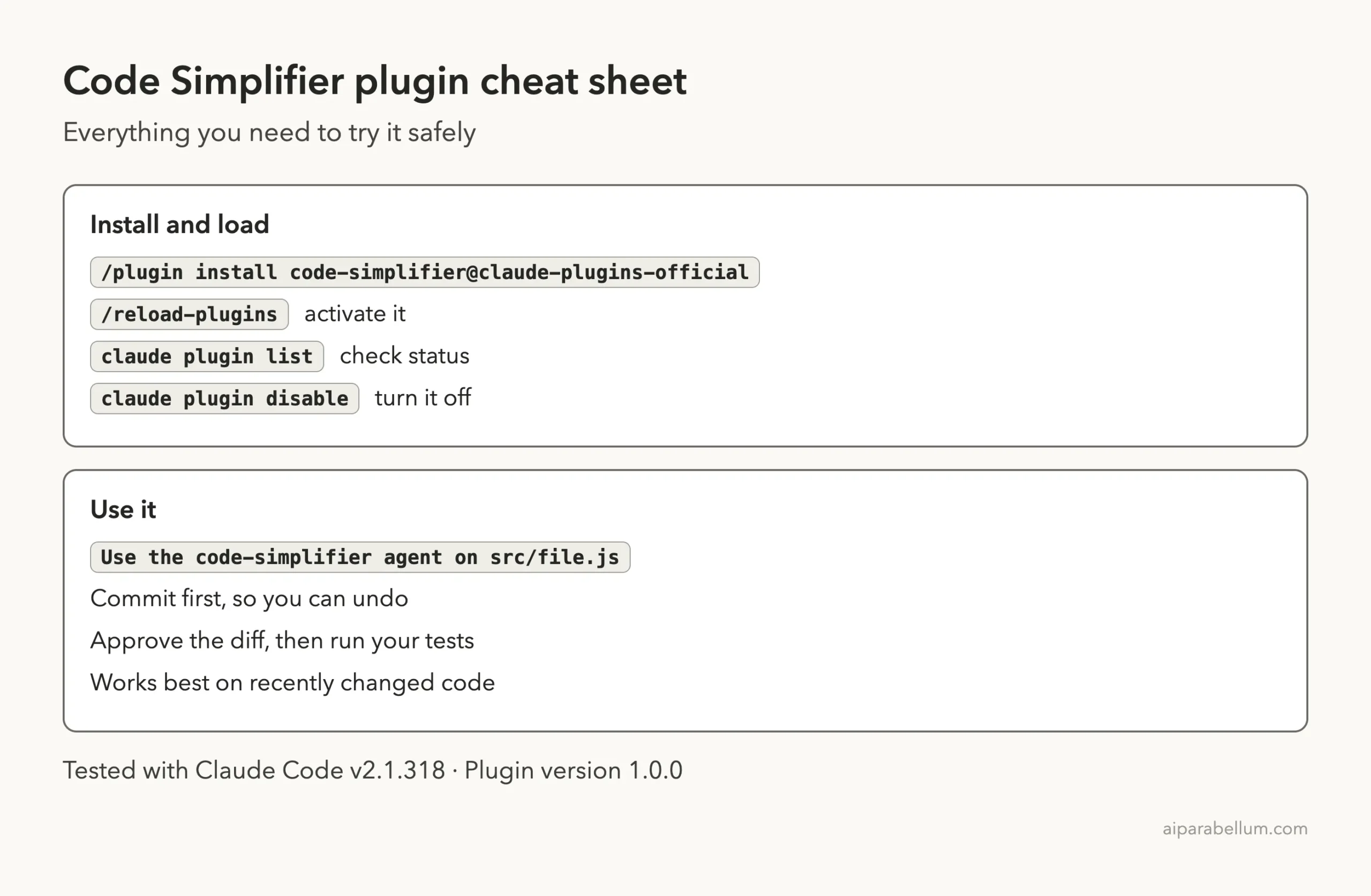
/plugin install code-simplifier@claude-plugins-official
/reload-plugins
The /plugin panel asks which scope you want: just you, everyone on the repository, or only you in this repository. Pick the narrowest one if you are only trying it.
You can confirm it with claude plugin list in your shell and switch it off later with claude plugin disable. The discover plugins page explains each scope.
For this test we did not install it at all. We cloned the official repository into a sandbox and loaded the plugin folder for one session only.
claude --permission-mode default \
  --setting-sources project \
  --plugin-dir ./claude-plugins-official/plugins/code-simplifier
That way our own setup stayed untouched. You do not need to do this, but it is a safe way to try any plugin before you commit to it.
One thing that changed: no /agents wizard
You might expect to see the new agent in the /agents screen. In version 2.1.318 that wizard has been removed, and typing /agents only prints a note that points you to the agent folders.
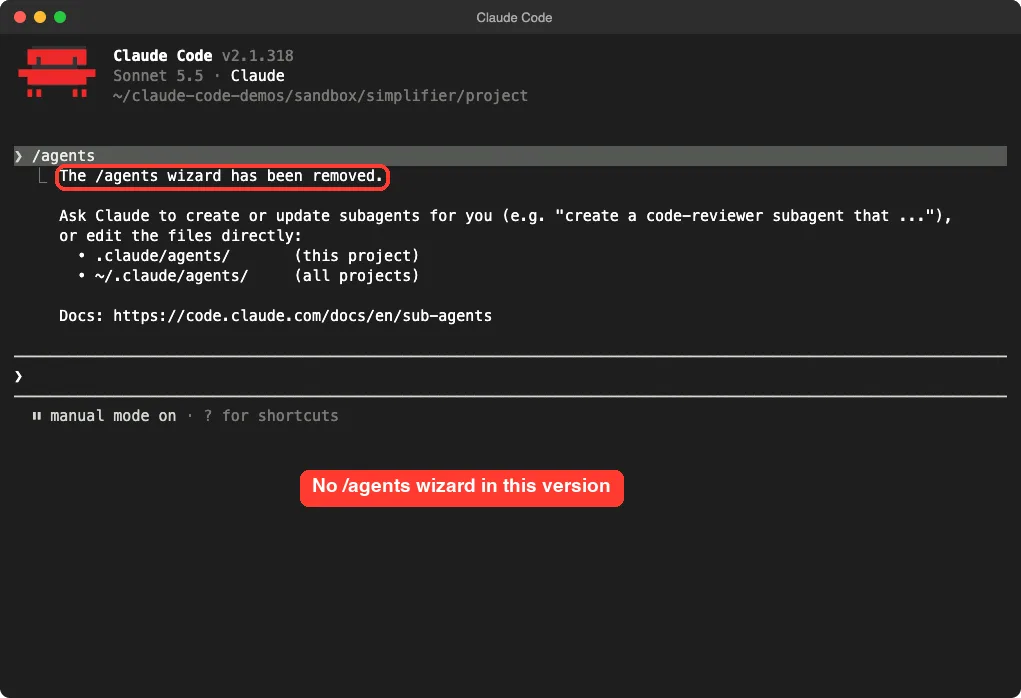
So the way to use the plugin is to name the agent in your prompt. Our guide to Claude Code subagents explains how Claude picks a helper.
The Messy File We Tested
We wanted code that works but is ugly. So we wrote a small order calculator by hand. It adds up items, applies a coupon, and adds shipping.
function calc(o) {
  var t = 0;
  for (var i = 0; i < o.items.length; i++) {
    if (o.items[i].qty > 0) {
      if (o.items[i].price > 0) {
        t = t + o.items[i].qty * o.items[i].price;
      } else {
        t = t + 0;
      }
    }
  }
  // apply discount
  if (o.coupon != null) {
    if (o.coupon == 'SAVE10') {
      t = t - t * 0.1;
    } else {
      if (o.coupon == 'SAVE20') {
        t = t - t * 0.2;
      } else {
        t = t;
      }
    }
  }
  // shipping
  var s;
  if (t > 100) { s = 0; } else { if (t > 0) { s = 5; } else { s = 0; } }
  return Math.round((t + s) * 100) / 100;
}
This is the full function, trimmed only of its export line. It has nesting four levels deep, a branch that adds zero, a line that assigns a value to itself, and short names like t and s.
Next to it we added a test.js file with five checks: a plain order, a 10 percent coupon, a 20 percent coupon with free shipping, an item with zero quantity, and an item with a negative price.
We also added a tiny CLAUDE.md that asks for const and let instead of var. We ran the tests first, and all five passed. Then we committed the folder, so any change would show up clearly.
Running the Claude Code Simplifier Plugin
Our prompt was one sentence. We named the agent and asked for the test run in the same message.
Use the code-simplifier agent to simplify src/orders.js, then run node test.js to prove it still works.Claude answered by starting the agent, which shows up as code-simplifier:code-simplifier. It ran in the background while the main session waited. The panel at the bottom showed it as a separate worker with its own token count.
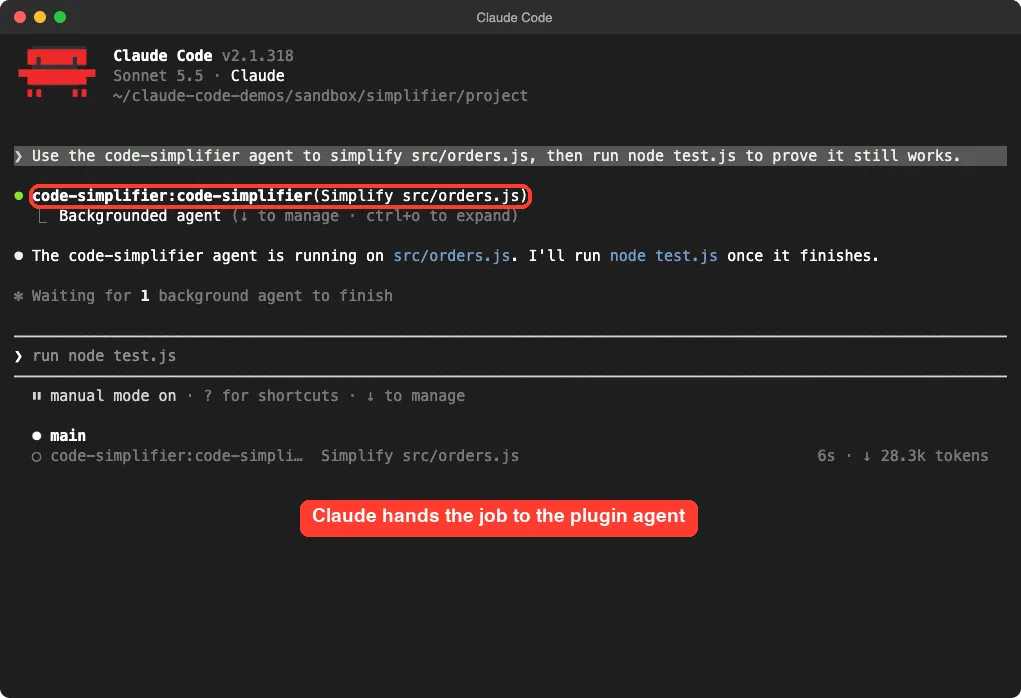
The agent finished in about one minute. If you want a feel for how this fits with other helpers, see our comparison of skills versus plugins.
The diff you approve
Before anything changed on disk, Claude showed the edit and asked Do you want to overwrite orders.js?. We were in the default permission mode, so nothing is written until you say yes. You can read more about that in our guide to permission modes.
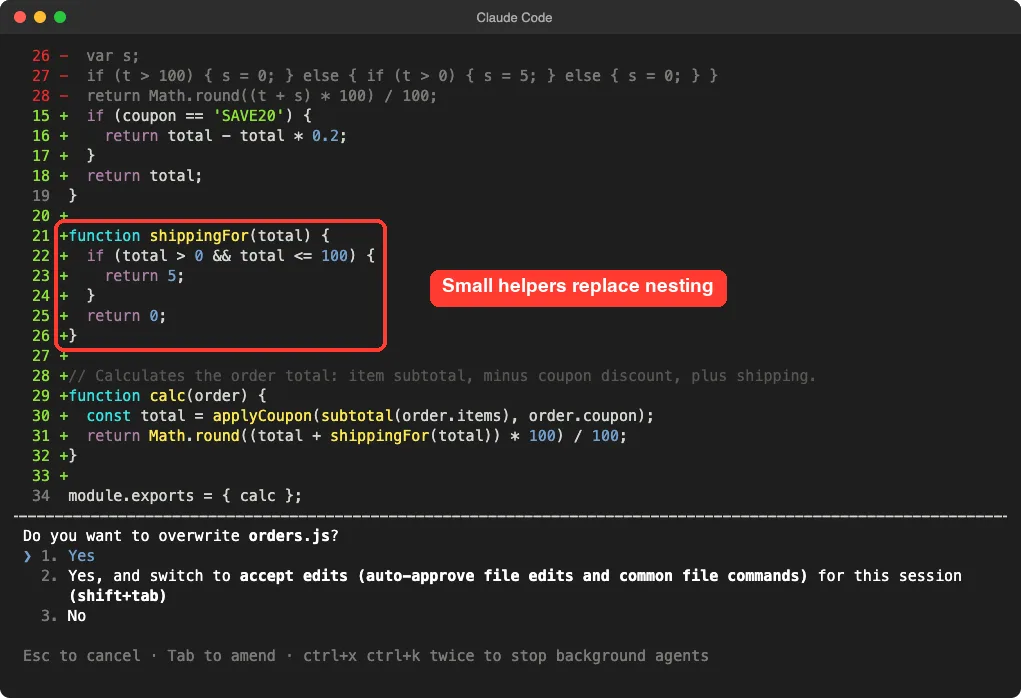
The diff is easy to read. Red lines are the old nested code. Green lines are new helpers.
The result
After we approved the edit, the file looked like this.
function subtotal(items) {
  let total = 0;
  for (const item of items) {
    if (item.qty > 0 && item.price > 0) {
      total += item.qty * item.price;
    }
  }
  return total;
}

function applyCoupon(total, coupon) {
  if (coupon == 'SAVE10') {
    return total - total * 0.1;
  }
  if (coupon == 'SAVE20') {
    return total - total * 0.2;
  }
  return total;
}

function shippingFor(total) {
  if (total > 0 && total <= 100) {
    return 5;
  }
  return 0;
}

// Calculates the order total: item subtotal, minus coupon discount, plus shipping.
function calc(order) {
  const total = applyCoupon(subtotal(order.items), order.coupon);
  return Math.round((total + shippingFor(total)) * 100) / 100;
}
Here is what changed. The two nested checks became one combined condition. The dead branches (adding zero, assigning a value to itself) are gone.
The var declarations became const and let, which matches our CLAUDE.md. The long function became four short ones, each with a name that says what it does.
The shipping rule is the same: five dollars for a positive total up to one hundred, otherwise free. Each rule now sits in its own small function, so you can read and change it on its own.
Did It Break Anything?
This is the question that matters. The agent’s own instructions promise to preserve behavior, but a promise is not a proof. Your tests are the proof.
In the capture, the agent asked to run node test.js && git status --short to check its own work. That is a command that needs your approval too. Our scripted session stopped at that prompt, so the screenshot below shows the request rather than the output.
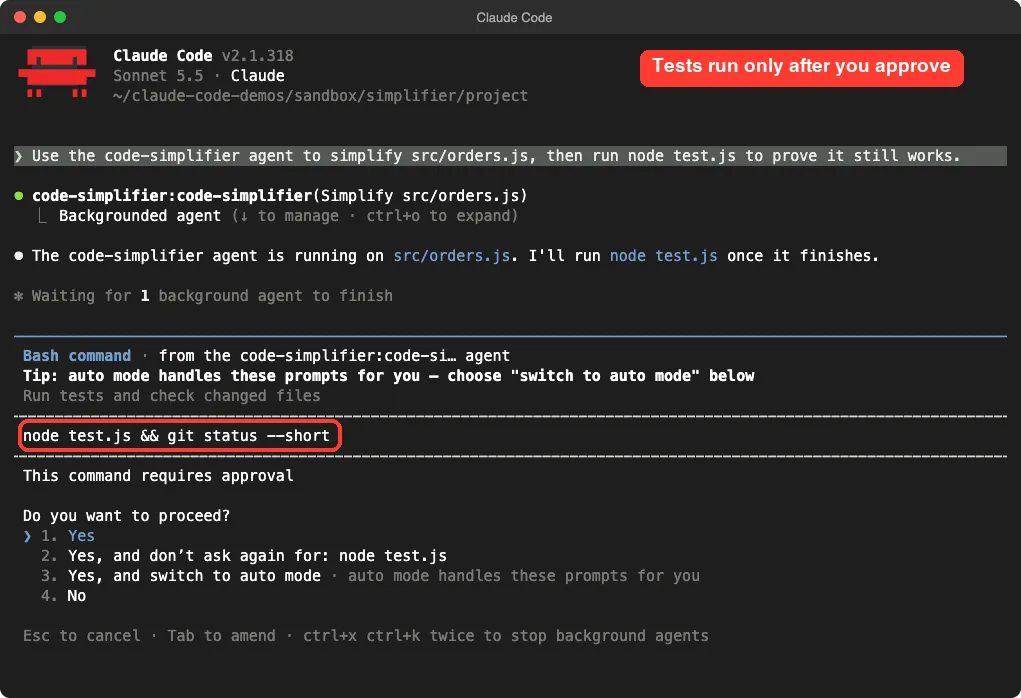
So we ran the check ourselves in the demo folder after the edit. node test.js printed All 5 tests passed, and git diff --stat showed one changed file, src/orders.js, with 29 insertions and 25 deletions. That is what you would expect from a cleanup: roughly the same amount of code, arranged better.
We want to be clear about the limits of this demo. It is one small file and one approved run. Five tests do not cover every case, and we cannot say how the plugin behaves on a large codebase.
The result can vary
We ran the same prompt twice. In our first attempt, the agent proposed a similar split with different helper names (getSubtotal and getShipping), and we did not approve that edit.
The second run is the one shown above. Both used the same idea, but the exact code was not identical.
That is normal for a language model. It is also why the approval step and your tests matter.
How the Whole Flow Fits Together
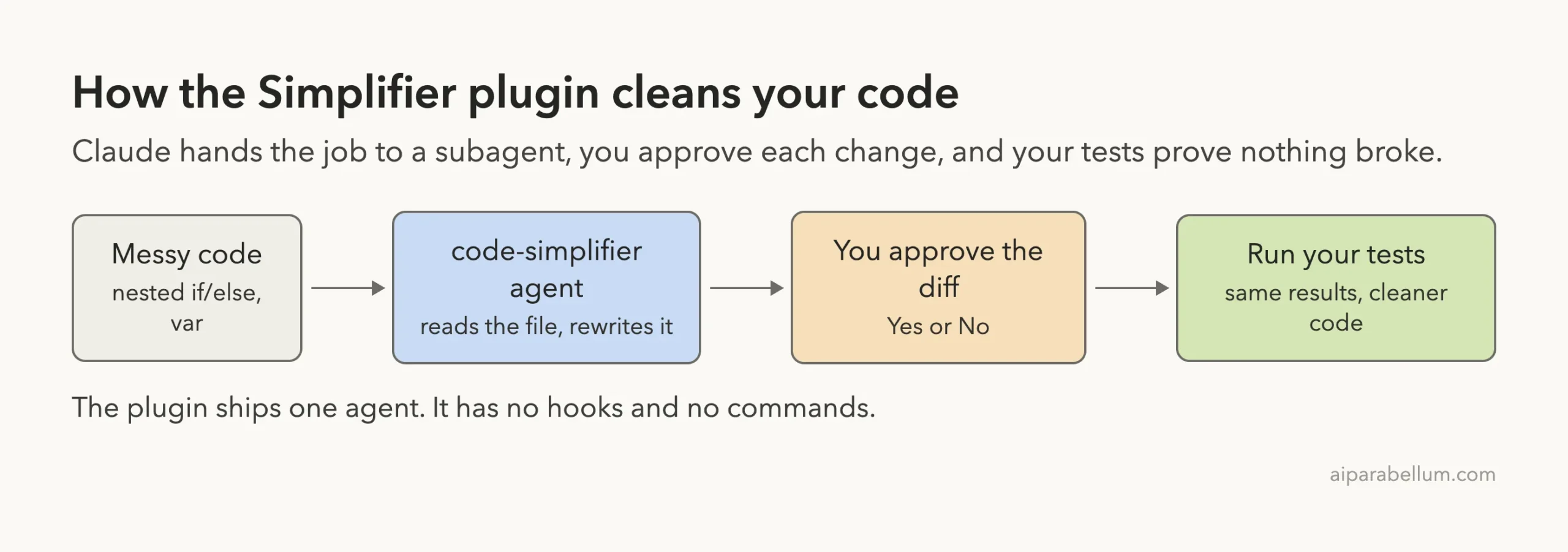
Think of the plugin as a careful editor. It reads, rewrites and shows you the change. You stay in charge of what is saved, and your tests tell you whether the meaning survived.
What It Costs and What It Adds
The official docs say that every skill and agent Claude can use on its own adds its name and description to the context on every turn. That costs a few tokens even when you never use it. The full text of the agent loads only when it runs.
The plugin has no hooks and no servers, so it runs nothing in the background. It only does work when Claude hands it a task. The agent file sets its own model, opus, which can matter if you watch usage closely.
| Part | What it does | Cost to you |
|---|---|---|
| Agent name and description | Lets Claude know the helper exists | A small amount of context each turn |
| Agent instructions | Loaded when the agent runs | Tokens only when used |
| Hooks and servers | None in this plugin | Nothing |
| File edits and test runs | Need your approval in default mode | A few extra clicks |
Try It Yourself
Practice on a copy of one of your own files, or make a messy demo like ours. Put it in a git repository first.
- Create a folder with one messy file and a few tests that pass.
- Run
git initand commit, so you can undo withgit checkout. - Start Claude Code and load the plugin.
- Paste the prompt below.
- Read the diff, approve it, then run your tests.
Use the code-simplifier agent to simplify src/yourfile.js. Keep behavior identical, then run the tests and tell me if anything changed.If the tests fail, roll back. Our guide to Claude Code rewind shows how to undo edits inside a session.
Common Mistakes
- Skipping git. Without a commit, you have no easy way to compare before and after.
- Running it on code with no tests. You cannot prove behavior stayed the same, so you are trusting the model alone.
- Pointing it at the whole project. The agent is designed for recently changed code, so keep the scope small.
- Leaving out your rules. The agent follows your
CLAUDE.md, so an empty one gives it fewer hints. See our guide to the CLAUDE.md file. - Approving without reading. Short diffs take a minute to check, and that minute is the whole safety net.
Pro Tips
- Run it right after a big feature, while the changes are still fresh and few.
- Ask for one file at a time, so each diff is small enough to review.
- Put your style rules in
CLAUDE.md, for example no nested ternaries, so the agent has clear targets. - Use it as a second pair of eyes, and still keep your own code review. For a bigger cleanup project, see how we refactor messy code without a plugin.
Cleaner code is only a win if your tests say the behavior is the same.
Who Should Install the Simplifier Plugin
Install it if you write code with Claude every day and often want a tidy pass before committing. It is also a good fit if you like small, official add-ons that do one thing. Skip it if you already get the same result by typing a short cleanup prompt, because the plugin is just a saved set of instructions.
Honestly, that is the main point to understand. The plugin does not unlock a hidden power.
It packages a good cleanup prompt as an agent, so you do not have to rewrite that prompt each time. If you want to build your own version, our guide to the subagent file format shows how. You can also read about Claude itself on our tool page.
Cheat Sheet
Frequently Asked Questions
What does the Claude Code simplifier plugin do?
It adds one subagent, code-simplifier, that rewrites code for clarity, consistency and maintainability while keeping the same behavior. It focuses on recently changed code unless you ask for more.
Is the simplifier plugin made by Anthropic?
Yes. It sits in the official claude-plugins-official marketplace, and the plugin manifest lists Anthropic as the author.
Does it add a slash command?
No. In version 1.0.0 it ships a single agent file. You ask for it by name in your prompt, such as “Use the code-simplifier agent to simplify this file.”
Will it change what my code does?
It is told not to, and in our small test all five tests still passed. That is one demo, so run your own tests every time and read the diff before you approve it.
How do I turn it off?
Run claude plugin disable in your shell, or switch it off on the Installed tab in /plugin. You can also remove it completely with the uninstall option.
Conclusion
The claude code simplifier plugin turned a tangled 30-line function into four small, well-named ones, and our five tests still passed afterward. It is a light, official add-on that asks before it writes and adds nothing that runs in the background. Install it if a ready-made cleanup agent saves you typing, keep git and tests close, and treat every diff as a suggestion you review before saving.