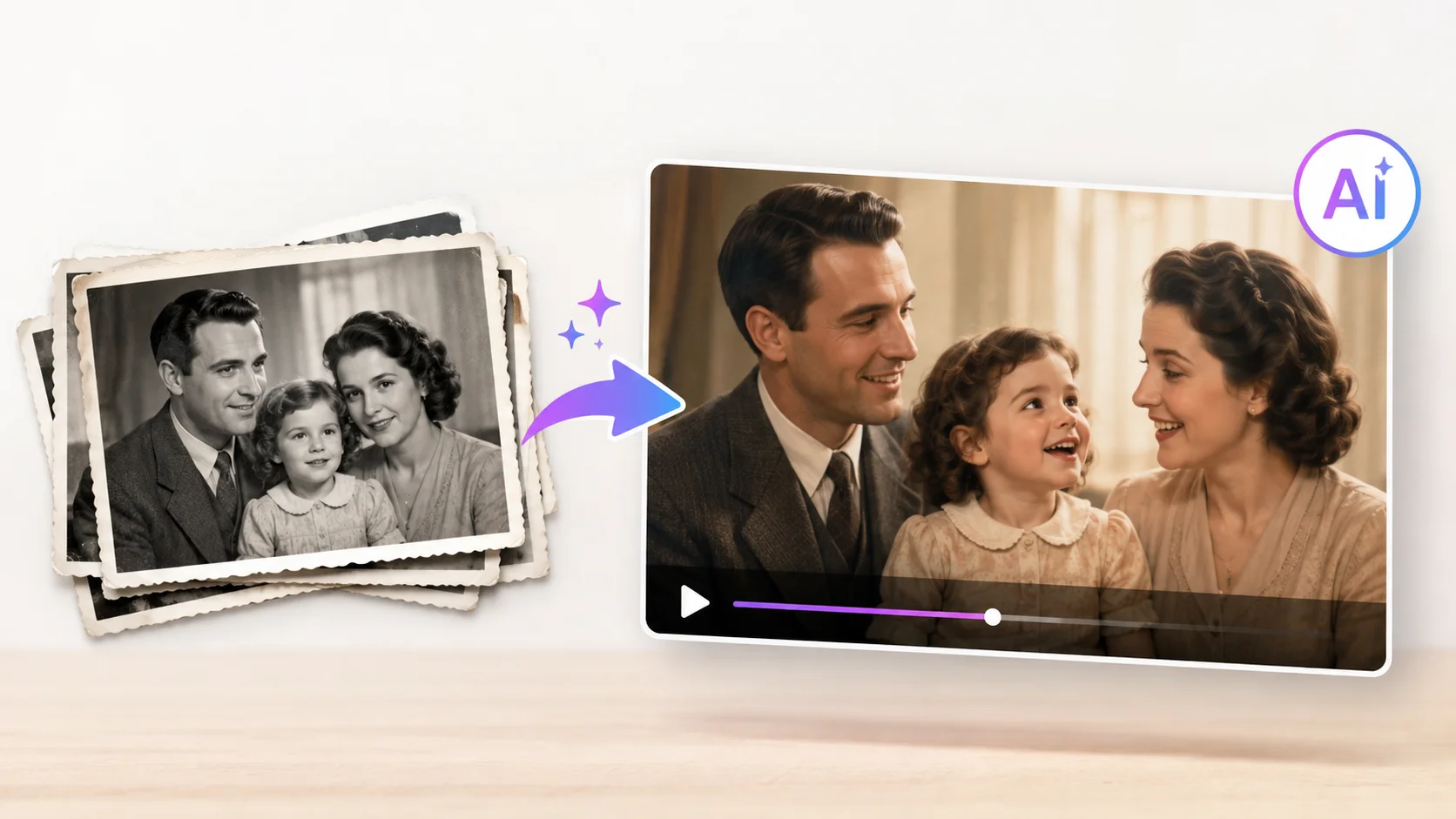
That black-and-white photo of your grandmother sitting on the porch in 1952 has hung on the wall your entire life. You know every detail of the image, the slight tilt of her head, the way she holds her hands, the hint of a smile. But the photo never moves. It never blinks, nods, or looks around. It is frozen in a single fraction of a second from seven decades ago.
AI changes that. Tools powered by deep learning can now take a still photograph and generate realistic motion, turning a static portrait into a short video where the person appears to breathe, smile, and look around naturally. The technology works on photos from any era, including faded prints, sepia-toned portraits, and damaged images that have barely survived the years.
Here is how to animate old family photos with AI, which tools produce the most realistic results, and how to preserve your family’s visual history in a way that feels alive rather than frozen in time.
How AI Photo Animation Works
AI photo animation uses deep learning models trained on millions of videos of human faces. These models understand how faces move: how muscles contract when someone smiles, how the head rotates on the neck, how eyes blink and shift direction. When you feed the AI a still photo, it applies those learned motion patterns to the face in the image.
The process involves several steps happening automatically. First, the AI detects the face in the photo and maps its key features: eyes, nose, mouth, jawline, and facial contours. Then it generates a sequence of frames where those features move naturally according to a predefined motion pattern or a driving video. Finally, it stitches those frames into a smooth video clip.
The result is not a crude morph or a simple zoom effect. Modern AI animation produces subtle, lifelike movements that make the person in the photo look like they were captured on video rather than in a still image. According to MIT Technology Review, the face animation models behind these tools have improved dramatically since 2021, with current versions producing results that are nearly indistinguishable from real video at typical social media resolutions.
A photograph captures how someone looked. An animated photo captures how they might have felt. That small shift changes everything about how we connect with the people in old pictures.
AI Tools for Animating Old Photos
Several platforms offer AI-powered photo animation, ranging from free mobile apps to professional-grade tools with fine control over the animation output.
| Tool | Free Option | Best For | Key Feature |
|---|---|---|---|
| MyHeritage Deep Nostalgia | Limited free animations | Family photo animation with predefined motions | Multiple animation styles per photo |
| D-ID | Free trial | Speaking portraits and custom animations | Add voice and speech to animated photos |
| Runway | Free tier with limits | Professional-quality video generation | Advanced motion control and editing tools |
| Pixbim | Free trial | Desktop-based photo animation | Works offline with no upload required |
| Synthesia | Free demo | Creating talking-head presentations | AI avatars from photos with full lip sync |
| AnimateDiff | Free and open source | Custom animation with technical control | Open-source flexibility for advanced users |
For most people looking to animate family photos quickly, MyHeritage Deep Nostalgia provides the simplest experience. Upload a photo, pick an animation style, and the result is ready in seconds. For more control over the animation or to add voice narration, D-ID and Synthesia offer deeper capabilities.
Step-by-Step Guide to Animate Family Photos
The process is straightforward regardless of which tool you choose. These steps walk through the general workflow that applies across all major platforms.
Step 1: Prepare the Photo
Start with the highest quality version of the photo you can find. Scan printed photos at 300 DPI or higher if possible. If you only have a phone photo of a printed picture, take it in good lighting with the camera directly above the photo to avoid distortion.
AI animation works best with clear, front-facing or slightly angled portraits where the face is well-lit and visible. Group photos work too, but the AI animates one face at a time, and results are better when each face is reasonably large in the frame.
Step 2: Restore and Enhance First
Old photos often have damage: scratches, fading, tears, discoloration, and noise. Running the photo through an AI restoration tool before animating it produces significantly better results. The animation AI works with whatever pixel data it receives, so cleaner input means cleaner output.
- Use RestorePhotos to fix scratches, tears, and general damage automatically.
- Apply AI upscaling to increase the resolution of small or low-quality scans.
- Use PhotosRevive to add natural color to black-and-white photos before animating them.
Restoring and colorizing a photo before animation creates a much more vivid and emotionally impactful result. A colorized, restored, and then animated portrait of a great-grandparent feels remarkably present compared to an animation of a damaged, faded original.
Step 3: Upload and Animate
Upload the prepared photo to your chosen platform. Most tools detect the face automatically and present animation options. On MyHeritage, you choose from several predefined motion patterns: a gentle nod, a slow smile, a look to the side. On D-ID, you can either use preset motions or upload a driving video that the AI will map onto the face in the photo.
Processing typically takes 10 to 30 seconds depending on the platform and image resolution. The output is a short video clip, usually 5 to 15 seconds long, that you can download, share, or embed in a digital family album.
Step 4: Add Voice (Optional)
Some platforms let you add voice narration so the person in the photo appears to speak. D-ID and Synthesia both support this feature. You type the text you want the person to “say,” choose a voice that matches their likely speaking style, and the AI generates lip-synced animation that matches the audio.
This feature works well for memorial tributes, family history projects, and educational presentations about ancestors. It does raise ethical considerations, which we cover below.
When my grandmother’s photo smiled at me for the first time, I cried. Not because it was perfect. Because for three seconds, she was here again.
Getting the Most Realistic Results
AI photo animation quality varies depending on the input photo and the settings you choose. These tips help you get the most natural-looking output.
| Factor | What Helps | What Hurts |
|---|---|---|
| Photo resolution | High-res scans (300+ DPI) | Tiny thumbnails or heavily compressed JPEGs |
| Face angle | Front-facing or slight three-quarter turn | Full profile or extreme angles |
| Lighting | Even, clear lighting on the face | Deep shadows, backlighting, or overexposure |
| Obstructions | Full face visible | Hats, hands, or objects covering parts of the face |
| Photo damage | Restored and enhanced before animation | Scratches or tears across the face area |
| Expression | Neutral or slight smile | Extreme expressions (wide open mouth, squinting) |
The single biggest improvement comes from starting with a restored, high-resolution image. A five-minute restoration pass before animation makes the difference between an uncanny result and one that genuinely moves people emotionally.
Creative Uses for Animated Family Photos
Animating old photos goes far beyond novelty. Families, educators, and historians use this technology in meaningful ways that preserve and share heritage.
Family History Projects
Create video compilations of animated ancestor photos paired with narration about their lives. This format engages younger family members who connect more easily with moving images than static prints. A digital family tree where each ancestor’s photo comes alive when clicked transforms genealogy from a paper exercise into a living experience.
The same AI creativity tools that artists and designers use for professional work are equally powerful for personal family history projects. You do not need design skills to create compelling visual narratives about your family’s past.
Memorial Tributes
Animated photos of deceased loved ones create powerful memorial presentations for funerals, anniversaries, and celebrations of life. A slideshow where each photo gently comes to life hits differently than static images set to music. Many families report that seeing an animated photo of someone they lost brings comfort rather than sadness.
Educational and Heritage Presentations
Teachers use animated historical photos to make history feel immediate and personal. A lesson about the Civil Rights movement hits harder when the faces in those historical photos look directly at the students and appear alive. Museums and heritage organizations use the same technology to create interactive exhibits where visitors connect with historical figures on a human level.
Social Media Sharing
Animated family photos generate significant engagement on social media platforms. The combination of nostalgia and technology creates shareable moments that resonate across generations. Short animated clips of grandparents, great-grandparents, and other ancestors consistently go viral because they tap into universal emotions about family and memory. The AI content creation tools available today make producing this kind of shareable content accessible to anyone.
History books show us what happened. Animated photos show us who it happened to. That human connection is what makes the past feel real.
Combining AI Tools for Complete Photo Restoration
The most impressive results come from chaining multiple AI tools together in a workflow that transforms a damaged old photo into a vivid animated portrait.
- Scan the original photo at the highest resolution available or photograph it carefully with a phone camera.
- Run the scan through an AI restoration tool to repair scratches, tears, stains, and general degradation.
- Upscale the restored image to increase resolution and reveal detail the original scan missed.
- Colorize the photo if it is black and white, using an AI colorization tool that applies historically accurate colors.
- Animate the restored, upscaled, colorized image using your chosen animation platform.
- Optionally add voice narration to create a speaking portrait.
Each step builds on the previous one, and the cumulative effect is dramatic. A faded, cracked, two-inch black-and-white photo from the 1940s becomes a full-color, high-resolution, animated portrait in about ten minutes of total processing time. The AI productivity tools that handle each step work together seamlessly even though they come from different platforms.
Ethics and Best Practices for AI Photo Animation
Animating photos of real people, especially deceased ones, raises important ethical considerations that deserve thoughtful attention.
Respect and Consent
Animating photos of deceased family members for personal remembrance and family sharing is generally considered respectful and appropriate. Making those animations public, especially with added voice or controversial context, crosses into territory that requires more careful judgment.
- Keep animations of deceased loved ones within the family unless you have a clear reason to share publicly.
- Do not put words in a deceased person’s mouth that they would not have said in life.
- Consider how living family members feel about seeing their relatives animated before sharing widely.
- Never animate photos of living people without their knowledge and consent.
- Be especially cautious with photos of children, whether living or deceased.
Historical Accuracy
AI animation adds motion that was never captured in the original photo. The movements are generated by an algorithm, not recorded from the actual person. This distinction matters for historical and educational uses. Always label animated historical photos as AI-generated animations, not as real footage.
According to the Library of Congress, digital preservation of historical photos is crucial for maintaining accurate historical records. AI-enhanced versions should supplement, never replace, the original unmodified images in archival contexts.
Free vs Paid Animation Tools
Free tools cover basic animation needs, while paid options offer more control, higher quality, and additional features.
| Feature | Free Tools | Paid Tools |
|---|---|---|
| Animation quality | Good for social sharing | Broadcast and print quality |
| Motion options | Preset animations only | Custom motion and driving videos |
| Voice addition | Usually not included | Full lip-sync and voice cloning |
| Output resolution | Standard definition | HD and 4K options |
| Watermarks | Often present | No watermarks |
| Batch processing | One photo at a time | Multiple photos in one session |
Start with the free tier on MyHeritage or D-ID to test the technology with your own photos. If the results resonate and you want higher quality or more features, upgrading to a paid plan is straightforward. For large family history projects involving dozens of photos, the paid tiers save significant time through batch processing and higher output quality.
Preserving and Sharing Your Animated Photos
Once you have created animated family photos, preserving and organizing them matters as much as creating them.
- Save animations in MP4 format for maximum compatibility across devices and platforms.
- Keep the original unmodified photo alongside every animation so the source is always preserved.
- Create a digital family album organized by generation, branch, or time period.
- Back up animated photos to cloud storage so they survive device failures.
- Share via family group chats, private social media groups, or dedicated family history platforms rather than only public posts.
Building a library of animated ancestor photos creates a family resource that grows more valuable over time. As AI animation technology improves, you can re-animate the same source photos with newer, more realistic tools. The AI avatar creation tools available today will only get better, making your preserved high-quality scans increasingly useful.
Conclusion
Animating old family photos with AI transforms static memories into living moments that connect generations in ways a printed picture never could. The technology is accessible, affordable, and produces results that genuinely move people. Start with the best scan you can get, restore and enhance the image before animating, and choose the right tool based on whether you want quick social sharing or a polished family heritage project. The faces in your family albums have stories to tell, and AI gives them a way to come alive and tell them.