Here is what’s new in Claude Code this week. Anthropic shipped four releases between October 26 and October 31, moving the tool from version 2.1.311 to 2.1.316. The headline items are a stronger ultrathink keyword, a setting that stops file writes outside your project, a new effort control for subagents, and a deadline for fast mode on Opus 4.8.
We read every entry in the official changelog for the week, picked the changes that matter most for everyday use, and tested two of them for real in a small demo folder. Below you will find what changed, why it matters, and how to try it yourself.
This roundup is part of our Claude Code tutorials, where you can also find step-by-step guides to every major feature. If you missed last week, read our October 19-25 roundup first.
Tested with Claude Code v2.1.316 on November 2, 2026, on macOS, inside a small throwaway demo folder.
Claude Code Updates This Week at a Glance
Here is every version released during the week, with the change from each that most people will notice. Versions 2.1.313 and 2.1.315 do not appear in the official changelog, so we cover only the four it lists.
| Version | Date | Headline change |
|---|---|---|
| 2.1.311 | October 26 | ultrathink runs its turn at xhigh effort, and the rainbow only shows where it works |
| 2.1.312 | October 27 | Click a queued message’s “to send now” hint to send it, plus “5-hour limit” wording |
| 2.1.314 | October 30 | New permissions.blockWritesOutsideWorkingDirectories setting and idle compaction |
| 2.1.316 | October 31 | CLAUDE_CODE_SUBAGENT_EFFORT, CLAUDE_CODE_DISABLE_ULTRATHINK and a fast mode sunset for Opus 4.8 |
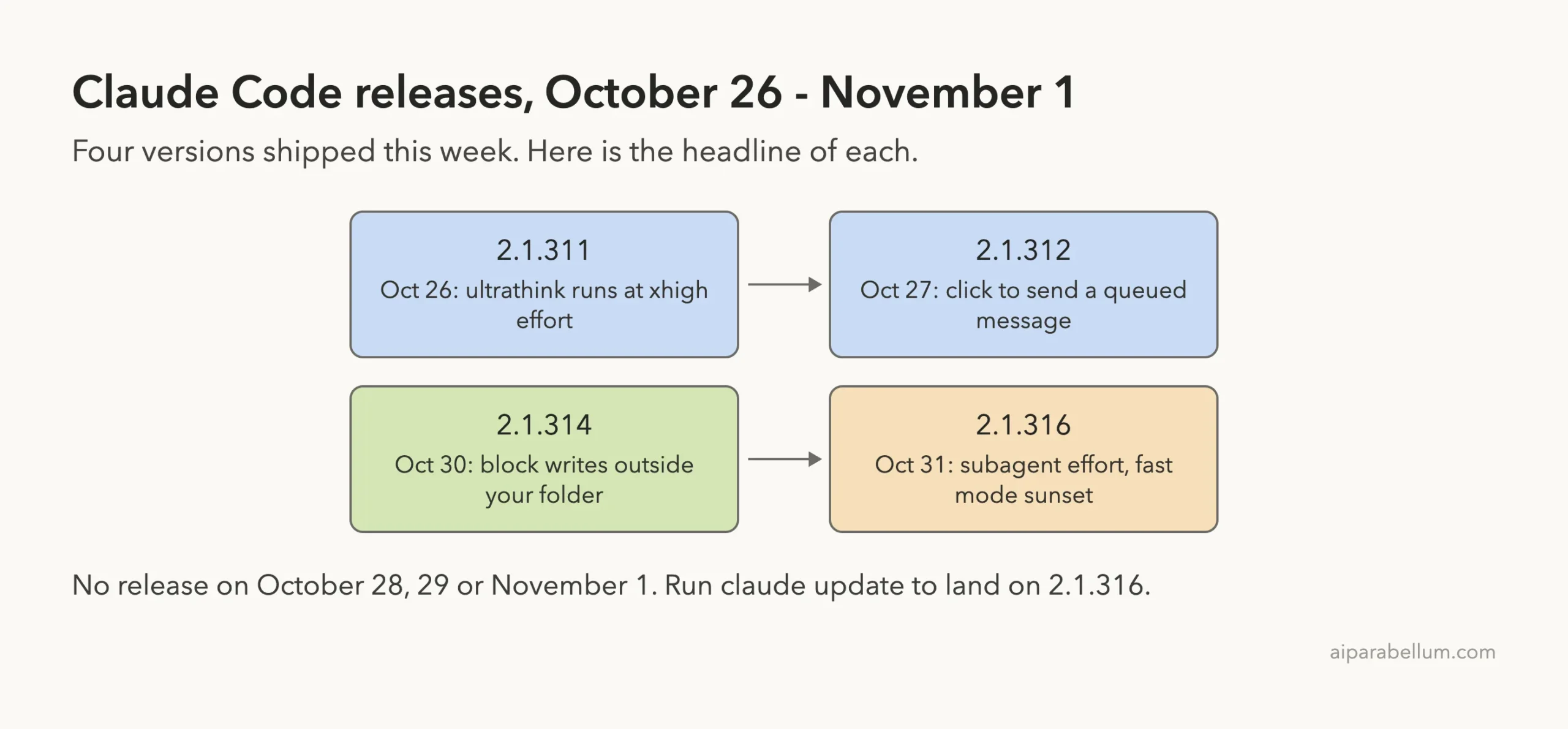
There were no new versions on October 28, 29 or November 1. If you update today, 2.1.316 is the version you will get.
Change 1: A Stronger Ultrathink Keyword
Version 2.1.311 changed what ultrathink does in the interactive terminal. When you put the word in a prompt, Claude now runs that turn at xhigh effort on Opus 5.5, Sonnet 5.5, Haiku 5.5 and Fable 5.1 through Anthropic’s API.
Effort controls how much thinking the model does before it answers. A higher level can help with tricky bugs or design choices, but it also takes longer. If you want the full picture, our guide to ultrathink guide explains each level.
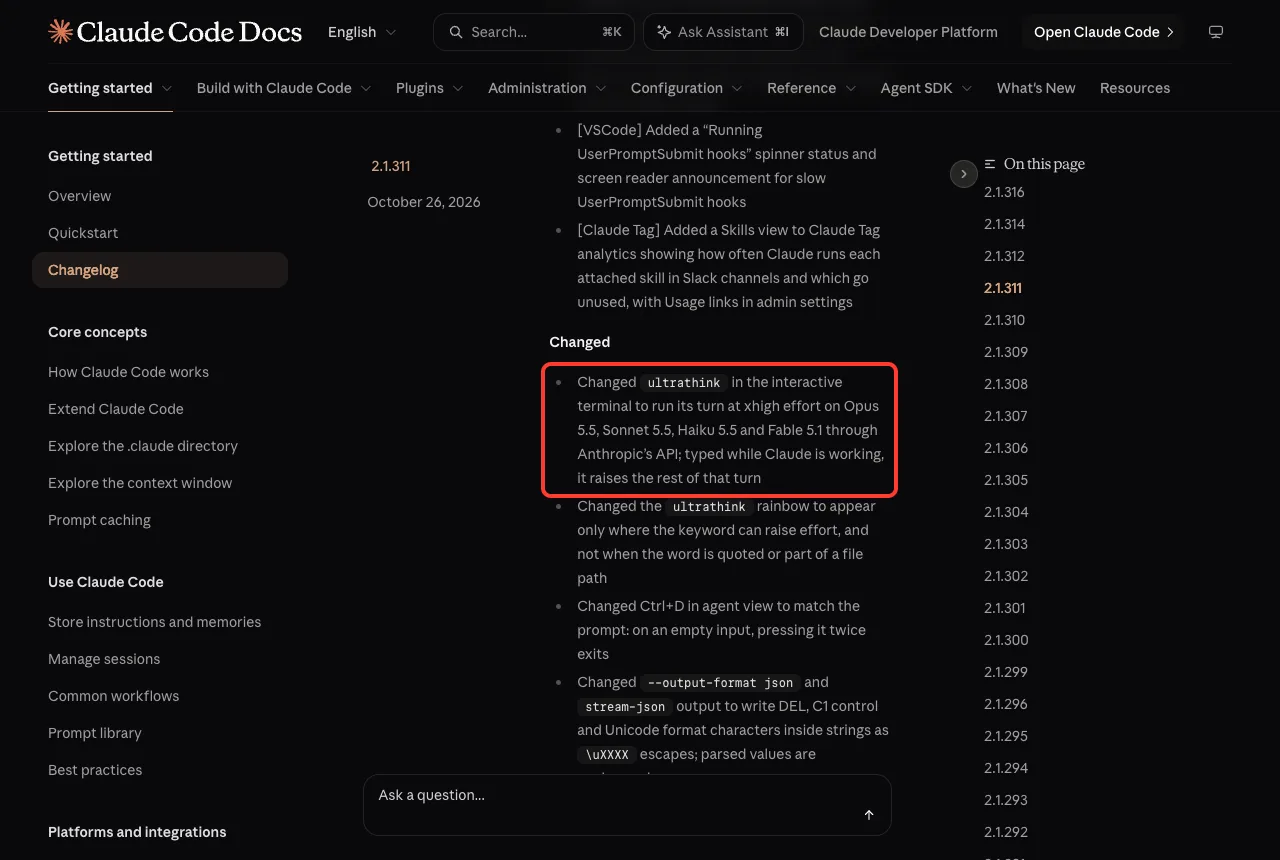
The same release changed the rainbow. The colorful styling now appears only where the keyword can actually raise effort, and not when the word is quoted or part of a file path. The changelog also says that if you type it while Claude is already working, it raises the rest of that turn.
How to try it
Open Claude Code and type a prompt that contains the word. In our demo, the word turned into a rainbow in the input box as we typed it.
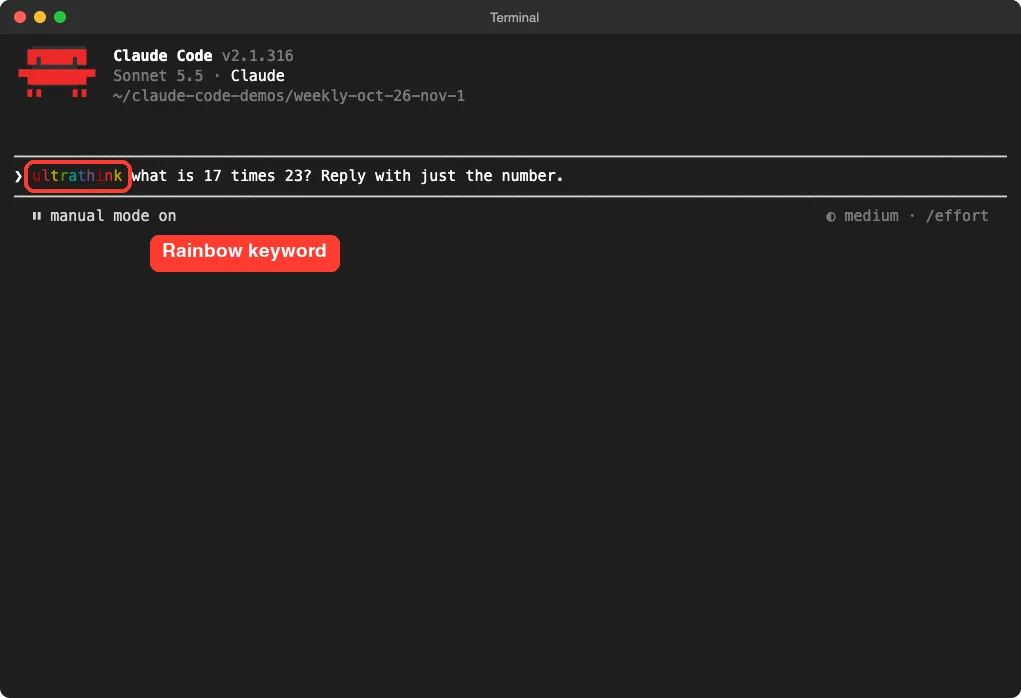
We sent a tiny math question, and Claude answered with just the number. We chose a trivial prompt on purpose to keep usage low, so this shows the keyword is recognized, not how much deeper the thinking goes on a hard task.
Turning it off
Version 2.1.316 added the CLAUDE_CODE_DISABLE_ULTRATHINK environment variable, which turns the keyword off. That helps if you write the word often in normal prose and do not want it to raise effort by accident.
Change 2: Block Writes Outside Your Project
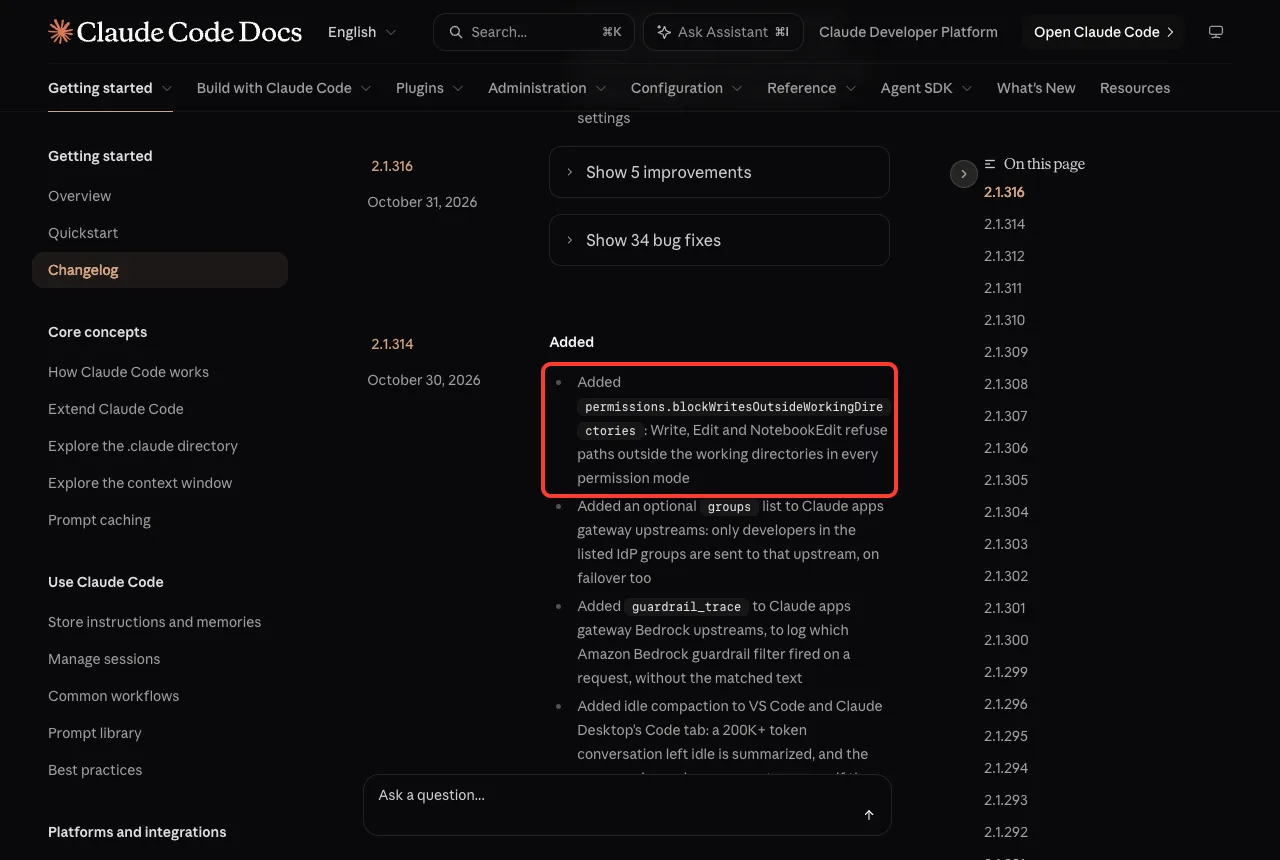
Version 2.1.314 added a new setting called permissions.blockWritesOutsideWorkingDirectories. The changelog says that when it is on, the Write, Edit and NotebookEdit tools refuse paths outside your working directories in every permission mode.
That last part matters. Even in a mode that approves edits for you, Claude cannot use those three tools to change a file outside your project. Our guide to permission modes explains the modes, and this setting acts as a hard fence on top of them.
How we tested it
We created a demo folder with a .claude/settings.json file that contains only this:
{
  "permissions": {
    "blockWritesOutsideWorkingDirectories": true
  }
}
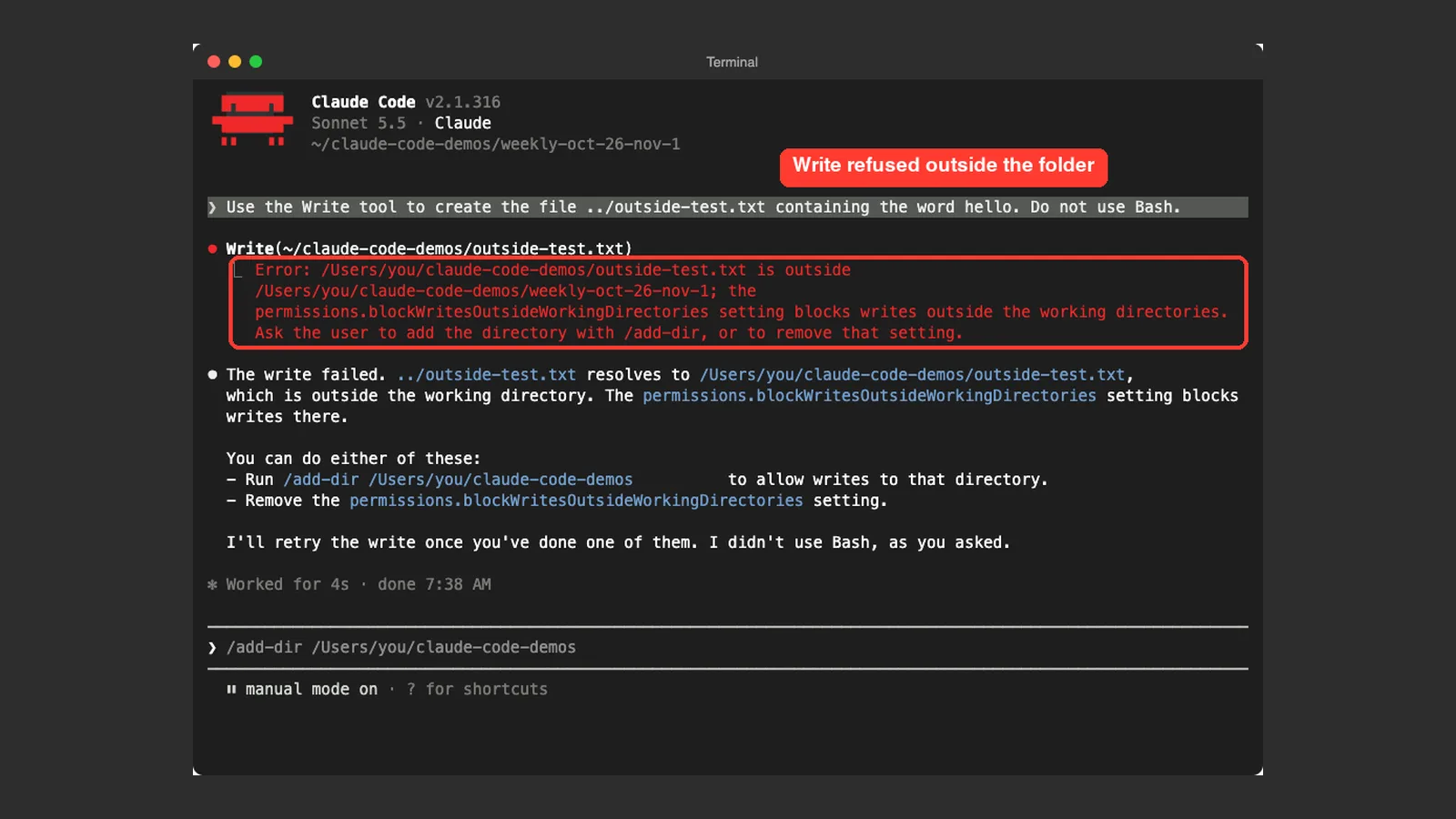
Then we started Claude Code in that folder and asked it to use the Write tool to create ../outside-test.txt, a file one level above the project. Claude tried, and the tool refused.
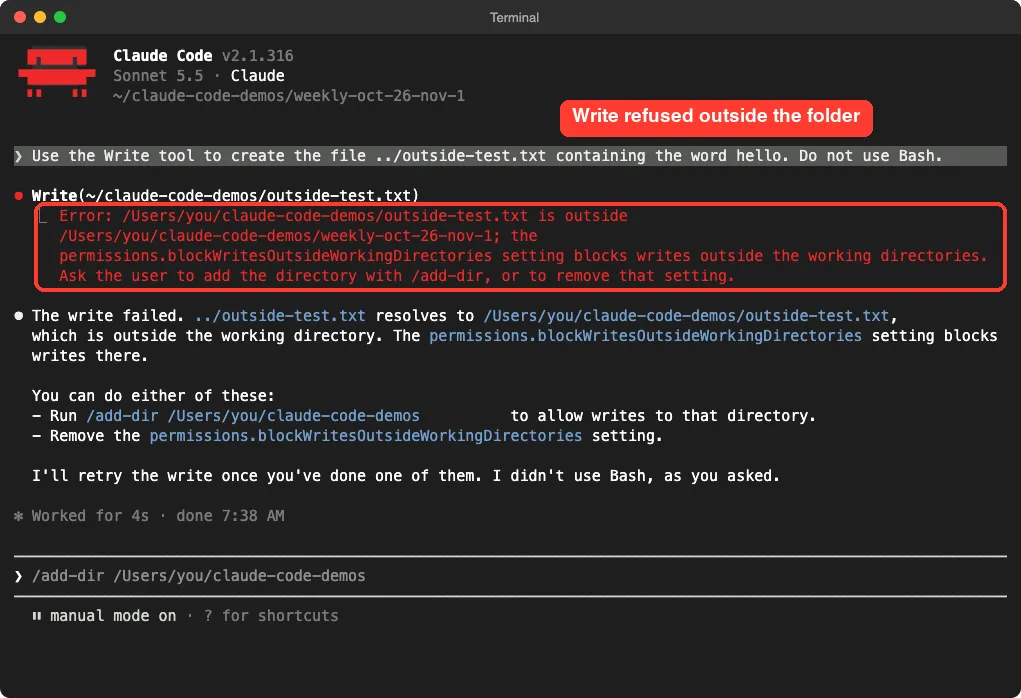
The error named the setting and suggested two fixes: add the folder with /add-dir, or remove the setting. Claude also explained that it had not used Bash, as we asked. We did not approve either fix, so no file was created.
What this does not cover
The changelog names three tools: Write, Edit and NotebookEdit. We did not test other routes, such as shell commands, so do not treat this setting as a full sandbox. For that, see our sandbox guide.
You can put the setting in a project file or your user file. Our guide on Claude Code settings shows where each file lives.
Change 3: Idle Compaction in VS Code and Desktop
Also in 2.1.314, Anthropic added idle compaction to the VS Code extension and the Code tab in Claude Desktop. If a conversation of 200K or more tokens sits idle, it is summarized. The summary is used on your next message if the prompt cache has expired.
In plain English: long chats that you leave for a while can come back cheaper and lighter, because Claude does not have to reprocess everything. The same release says it also runs for subscribers with telemetry turned off, and on Bedrock, Vertex, Foundry and LLM gateways once the one-hour prompt cache is on.
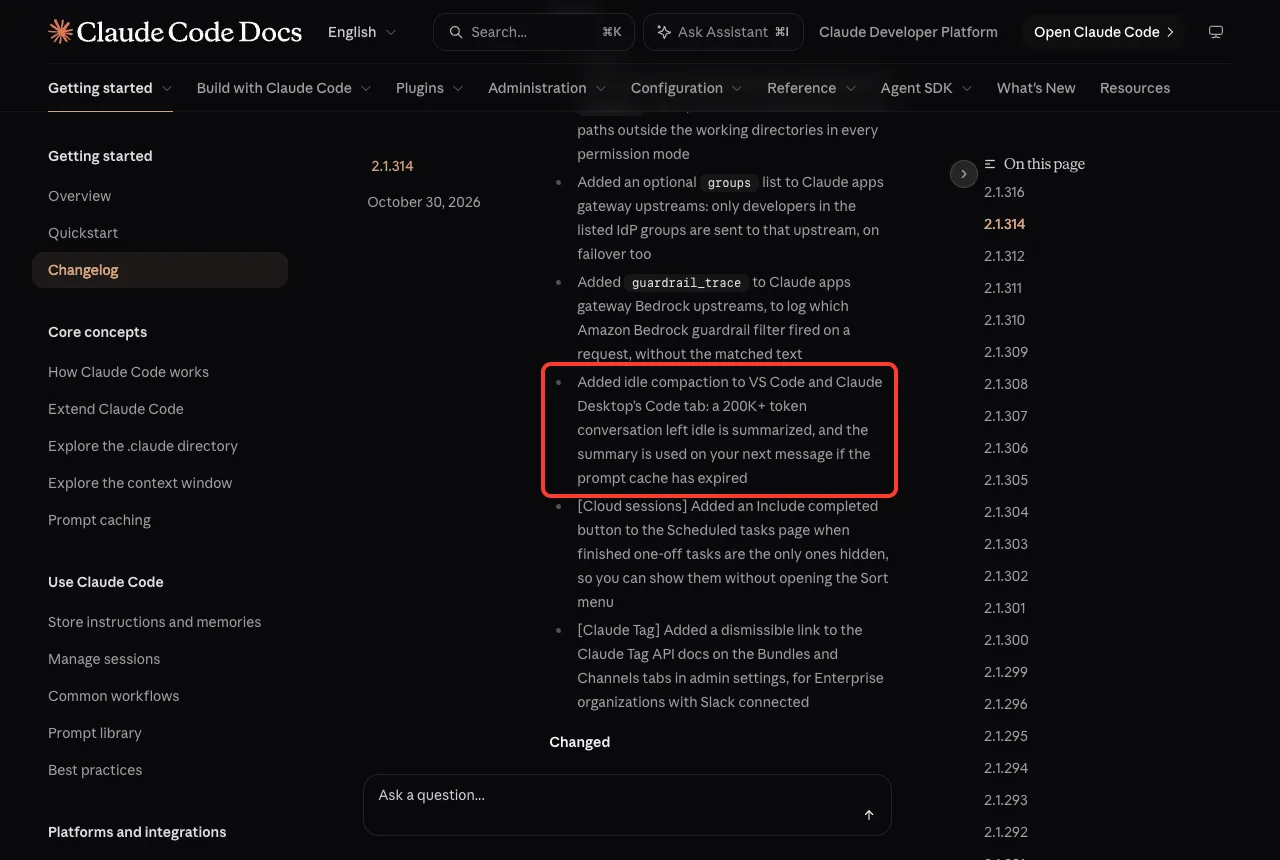
We use the terminal, so we could not test this one in a 200K-token chat. It is based on the changelog entry. To learn what fills a long conversation, read our guide to the context window.
Change 4: Set the Effort Level for Subagents
Version 2.1.316 added CLAUDE_CODE_SUBAGENT_EFFORT. It sets the effort level that subagents run at when nothing else names one. Before this, subagents inherited the effort of your session.
Why would you want that? You might run your main chat at a high level for planning, while helper agents that read files or run searches can work at a lower level and finish sooner. Our guide to subagents explains how they work.
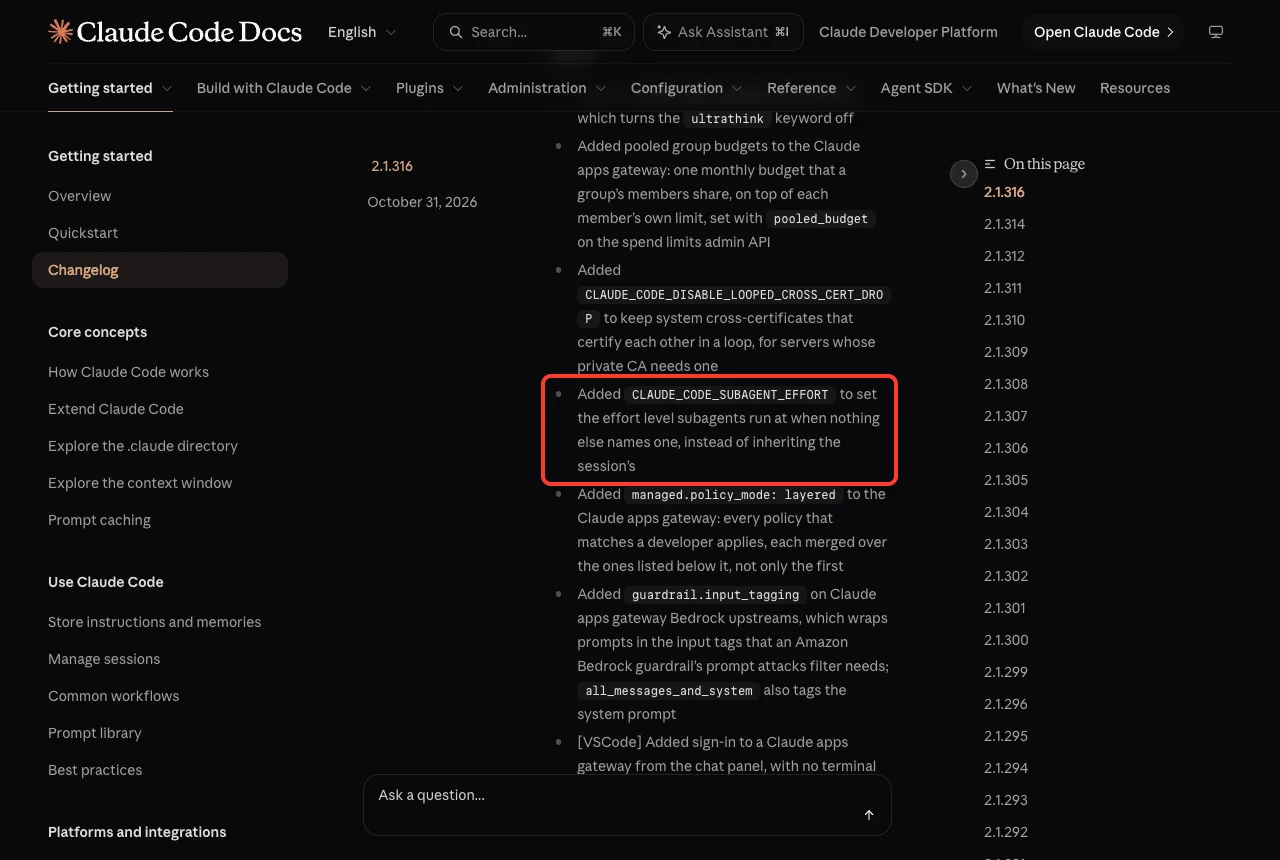
The changelog does not list the accepted values in this entry, so check the official changelog and the settings docs before you set it. A related note from 2.1.312: a subagent’s autoCompactWindow can now lower the window set by CLAUDE_CODE_AUTO_COMPACT_WINDOW, but it never raises it.
Change 5: Fast Mode on Opus 4.8 Is Going Away
This one has a deadline. Version 2.1.316 says fast mode for Opus 4.8 was deprecated as of October 30, 2026, and will be removed on November 30, 2026.
After removal, fast mode requests on Opus 4.8 return an error and do not fall back to standard Opus 4.8. The changelog advises you to migrate to Opus 5.5 to keep the speedup.
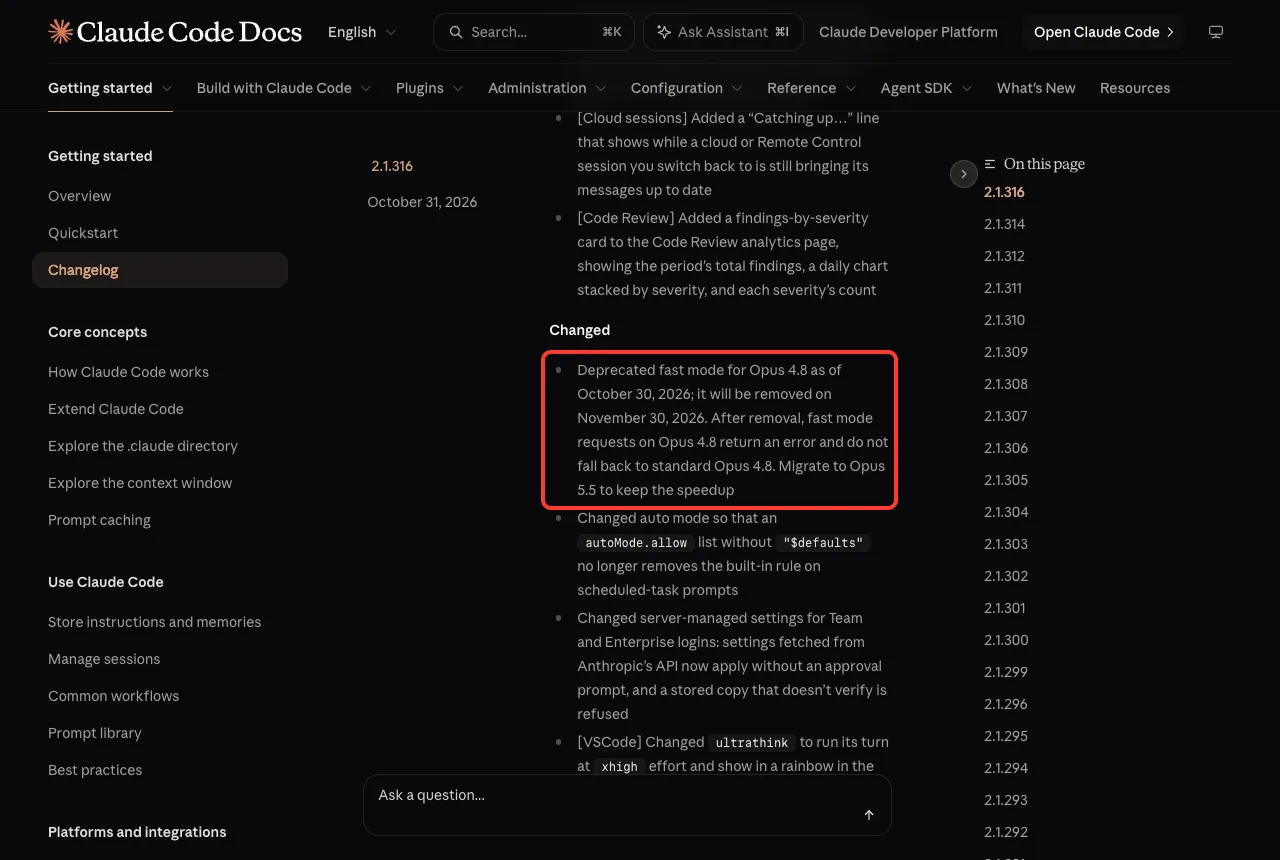
If you use fast mode, switch your model to Opus 5.5 before November 30, especially in scripts that pin Opus 4.8. Our fast mode guide covers how the toggle works, and the official fast mode docs have the current details.
Change 6: Click to Send and Clearer Limit Wording
Version 2.1.312 made a small but handy change. In fullscreen mode, you can now click the “to send now” hint under a queued message to send it right away, which does the same as its key.
If you type a follow-up while Claude is busy, it waits in a queue. Before, you needed the keyboard shortcut to push it through. Now a mouse click works too.
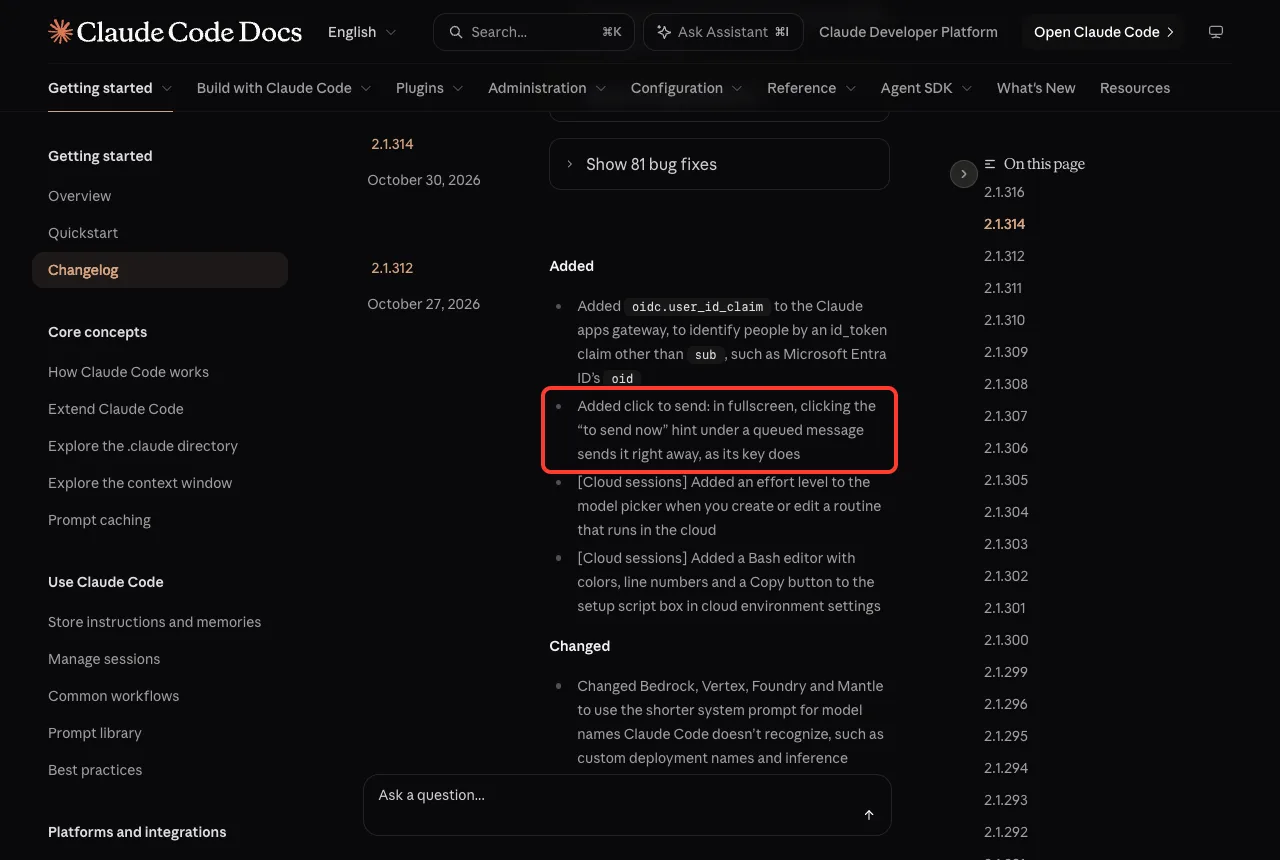
The same release changed usage limit messages to call the 5-hour window the “5-hour limit” instead of the “session limit”. The VS Code extension now shows a clock time such as “Resets at 3:10 PM”. It is only wording, but it makes the message easier to read.
Should You Update?
For most people, yes. This week fixed well over a hundred bugs, and nothing asks you to relearn how you work. The two things to check are any scripts that pin Opus 4.8 with fast mode, and whether you want the new write fence.
How to update and check your version
- Open your terminal.
- Run
claude update. It checks for the latest version and installs it. - Run
claude --versionto confirm you are on 2.1.316.
claude update
claude --version
On our Mac, the update moved Claude Code from 2.1.312 to 2.1.316. If an update fails or you cannot sign in afterward, our troubleshooting guide can help.
Also Fixed This Week
The changelog counts 193 bug fixes across the four releases: 56 in 2.1.311, 22 in 2.1.312, 81 in 2.1.314 and 34 in 2.1.316. Here are a few that many users will feel:
- Sessions no longer fail turn after turn with “Invalid effort level” when an admin caps a model’s effort. Claude Code now lowers the effort, retries and says which level it uses (2.1.314).
claude -pno longer exits with code 0 and no output when startup fails. It prints the error and exits 1 (2.1.314).- Claude no longer overwrites a very large
CLAUDE.mdor rules file after seeing only its start. Write now asks Claude to read it all or edit in place (2.1.312). - Prompts containing invisible characters no longer need a second Enter to send (2.1.316).
- Shell commands are no longer left running on macOS and Linux when Claude Code exits by itself (2.1.316).
- Ctrl+R prompt history search now matches text inside collapsed pasted-text pills (2.1.314).
If you keep a long CLAUDE.md file, the 2.1.312 fix is worth knowing about. Our guide on permissions shows how to control what Claude may edit.
Try It Yourself
Want to see the new write fence with your own eyes? Make an empty folder called fence-demo, then create a file inside it at .claude/settings.json with the JSON shown earlier. Start Claude Code in that folder and paste this prompt:
Use the Write tool to create the file ../outside-test.txt containing the word hello. Do not use Bash.You should see an error that names the setting. Then try the same prompt without the setting file, and compare what happens. While you are there, type a prompt that starts with ultrathink and watch the rainbow appear.
Common Mistakes
- Assuming the write fence covers everything. The changelog lists Write, Edit and NotebookEdit only.
- Putting the setting in the wrong place. It belongs under
permissionsin a settings file, not at the top level. - Ignoring the fast mode deadline. After November 30, fast mode requests on Opus 4.8 return an error instead of falling back.
- Typing
ultrathinkin quotes and expecting the rainbow. It no longer appears when the word is quoted or part of a file path. - Expecting idle compaction in the terminal. The changelog names VS Code and the Code tab in Claude Desktop.
Pro Tips
- Run
claude updateonce a week, right after you read a roundup like this, so you know what changed. - Pair the write fence with a project-level settings file that you commit, so everyone on your team gets the same guardrail.
- Use
/add-dirwhen you truly need Claude to write in a second folder, instead of turning the setting off. - Keep
ultrathinkfor hard problems. For simple questions, normal effort is faster. - Keep the full changelog bookmarked, so you can check every release yourself.
The safest setup is a high-effort main chat, cheaper subagents and a fence around your project folder.
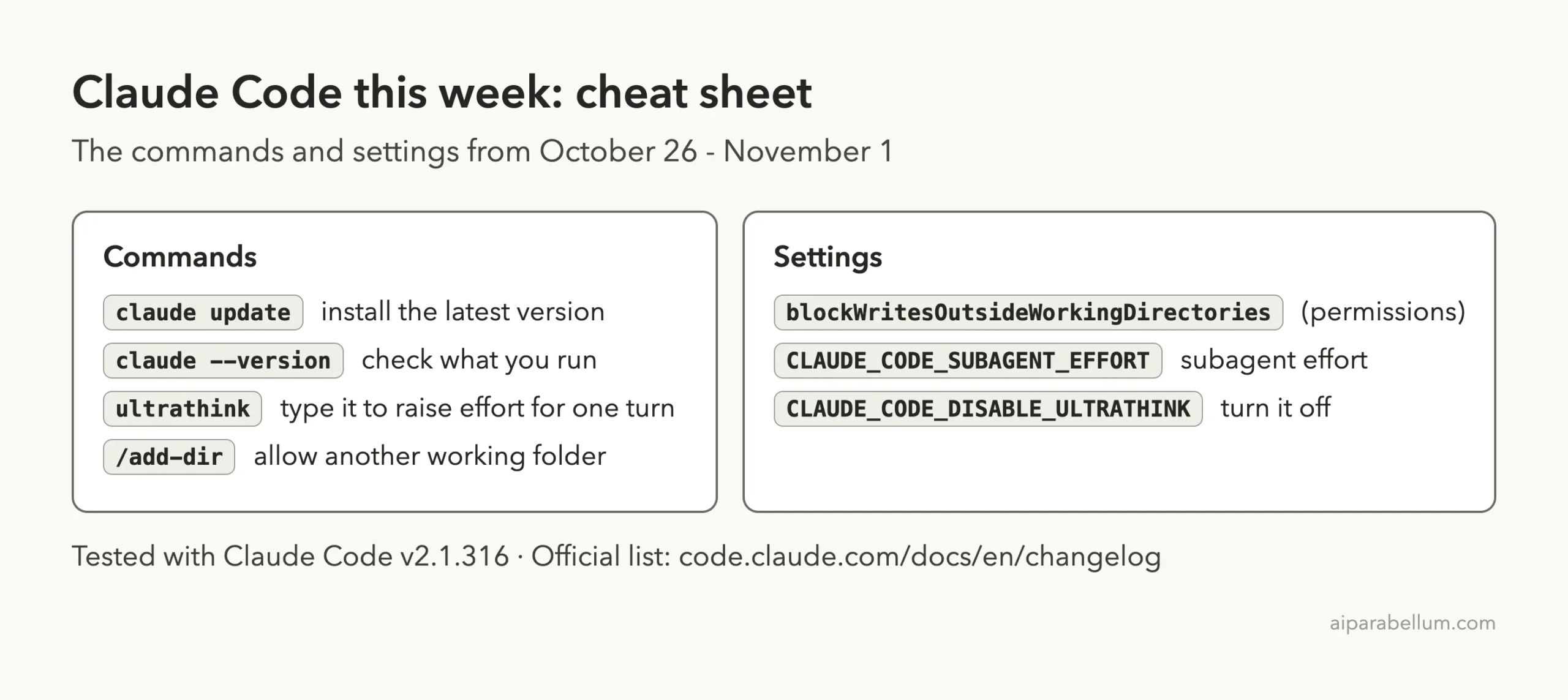
Cheat Sheet: This Week’s Claude Code Changes
Frequently Asked Questions
What is the latest version of Claude Code this week?
Version 2.1.316, released on October 31, 2026. No newer version came out on November 1.
What does the ultrathink keyword do now?
In the interactive terminal, a prompt containing it runs that turn at xhigh effort on Opus 5.5, Sonnet 5.5, Haiku 5.5 and Fable 5.1 through Anthropic’s API. You can turn the keyword off with CLAUDE_CODE_DISABLE_ULTRATHINK.
How do I stop Claude from writing files outside my project?
Set permissions.blockWritesOutsideWorkingDirectories to true in a settings file. Write, Edit and NotebookEdit then refuse paths outside your working directories in every permission mode.
When does fast mode on Opus 4.8 stop working?
The changelog says it will be removed on November 30, 2026. After that, requests return an error, and Anthropic advises migrating to Opus 5.5 to keep the speedup.
Do I need to do anything for idle compaction?
No. It is automatic in VS Code and the Code tab in Claude Desktop for conversations of 200K or more tokens left idle.
Conclusion
This week’s Claude Code updates were about control: an ultrathink keyword that now means something specific, a setting that fences file writes inside your project, an effort dial for subagents, and a clear deadline for fast mode on Opus 4.8. Run claude update, confirm you are on 2.1.316, and check any scripts that rely on fast mode. For more on the model behind it all, see our Claude AI overview, and come back next week for the next roundup.