You typed a follow-up while Claude was busy, pressed Enter, and then realized it was the wrong thing to say. Good news: you can cancel a queued message in Claude Code before Claude ever reads it. This guide shows the exact key, what happens to your text, and what to do when the Up key does not seem to work.
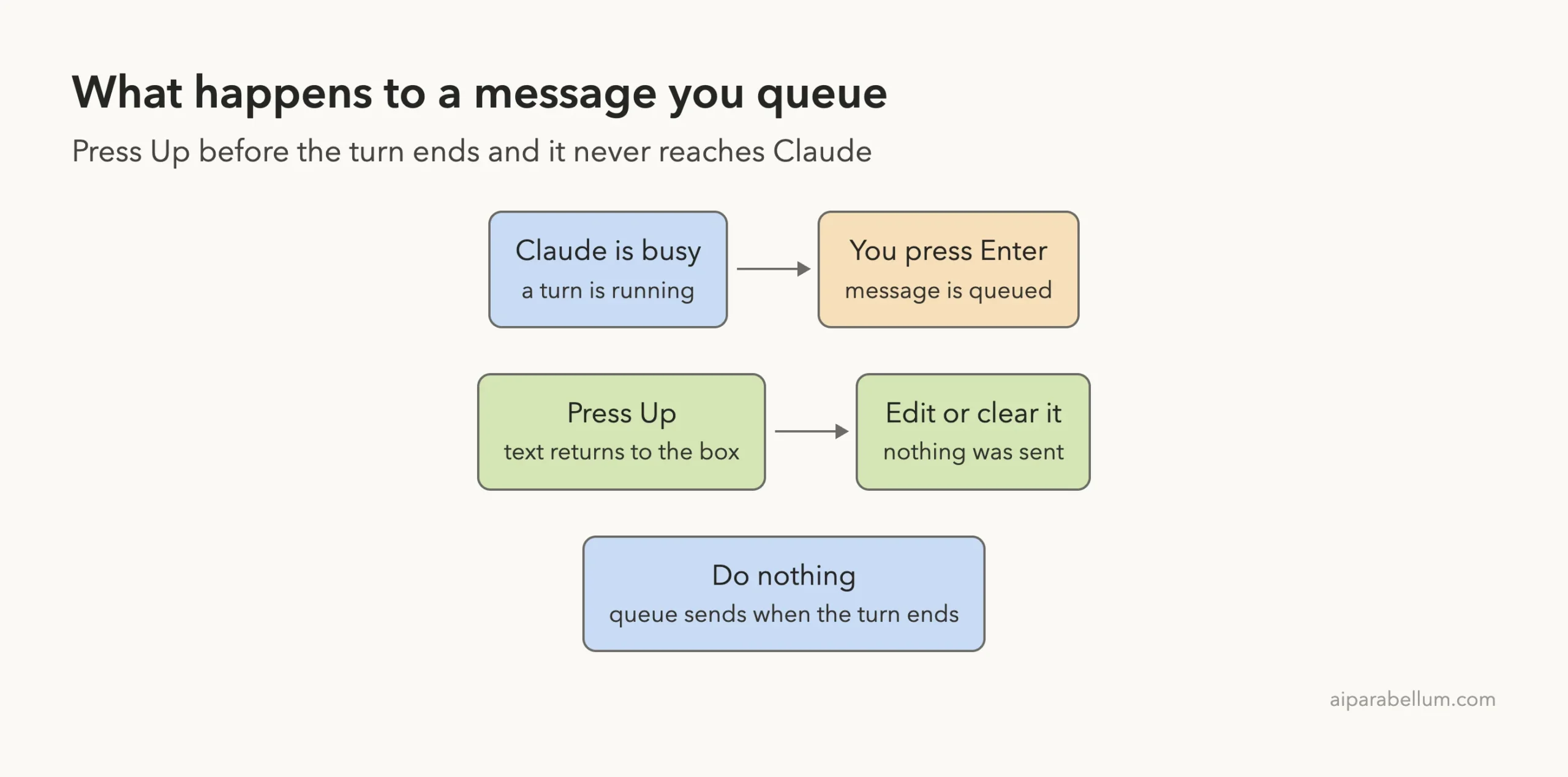
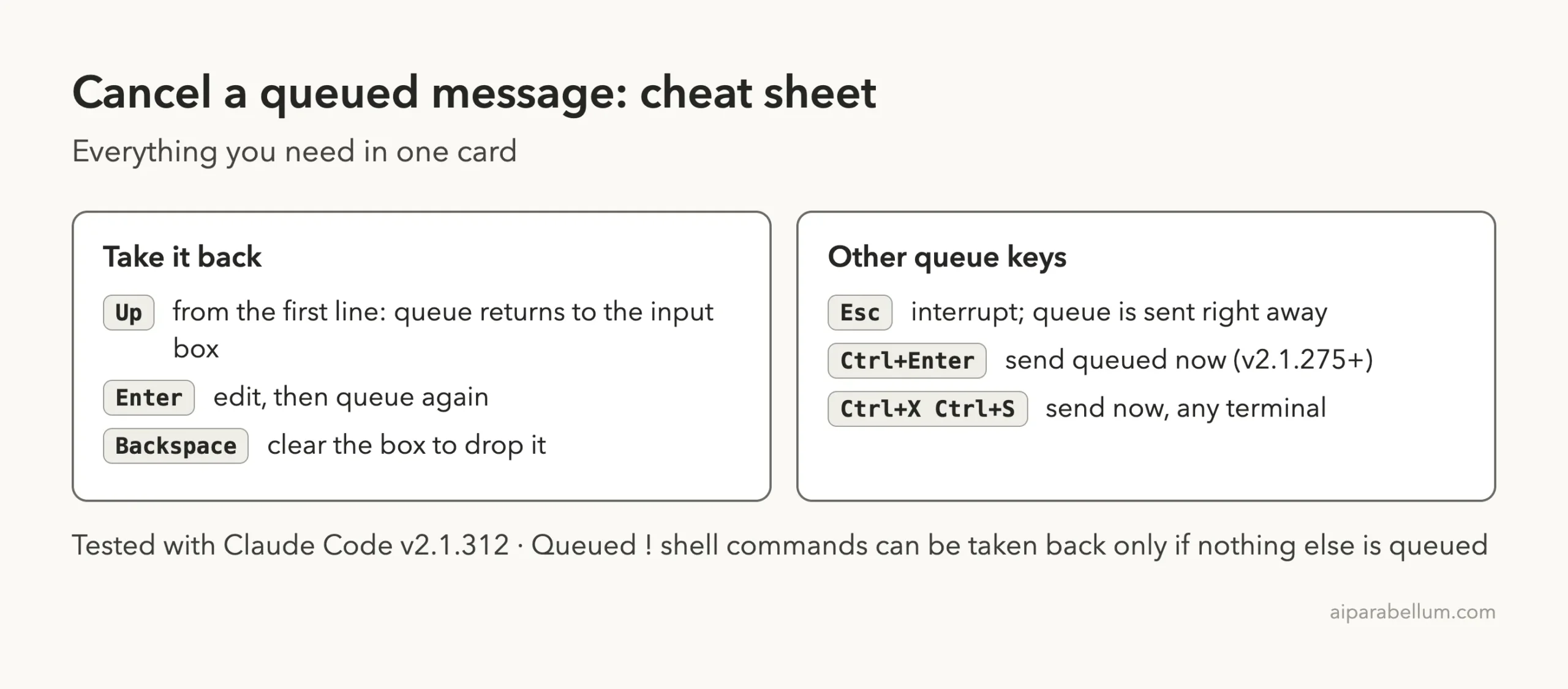
Here is the short answer. Press Up from the first line of the input box. Claude Code pulls the queued messages out of the queue and puts them back in the input box, where you can edit them or clear them.
Browse all our Claude Code tutorials. Tested with Claude Code v2.1.312 on October 31, 2026.
Quick Summary: Cancel a Queued Message
| What you want | What to do | Result |
|---|---|---|
| Cancel a queued message | Press Up from the first line of the input box | The text moves back into the input box |
| Drop it for good | Clear the input box after pressing Up | Nothing is sent |
| Fix a typo | Press Up, edit, then press Enter | Queued again as one entry |
| Send it now instead | Press Ctrl+Enter or Ctrl+X then Ctrl+S | Queue goes out right away |
| Stop Claude mid-turn | Press Esc | Turn stops, queued text is sent right away |
What Is a Queued Message in Claude Code?
Claude Code lets you keep typing while Claude works. If you type a message and press Enter during a turn, Claude Code does not interrupt anything. It adds your message to a queue and lists it in the conversation until it sends it.
You can queue ! shell commands and most slash commands the same way.
A few commands, such as /status, run as soon as you send them instead of waiting in line. The official interactive mode reference describes this under “Queue messages while Claude works”.
Queued messages show in gray until Claude starts on them. That gray color is your clue that you can still change your mind.
Step 1: See a Message Sitting in the Queue
To test this safely, we made a throwaway demo folder with two tiny text files. We asked Claude for a long essay, which gave us several seconds of working time. While it wrote, we typed a second request and pressed Enter.
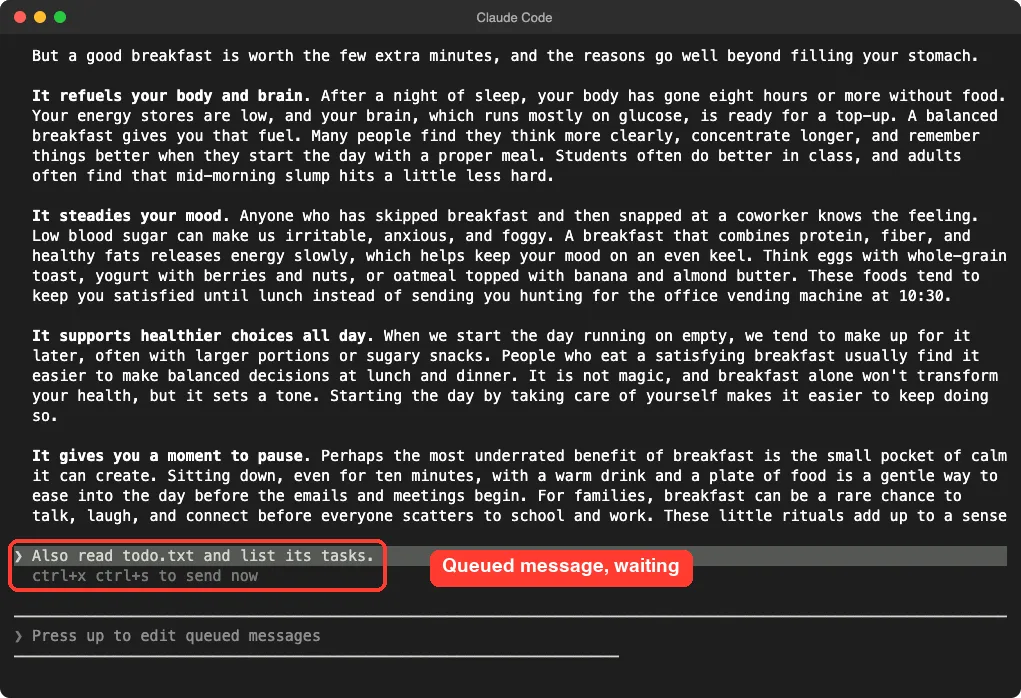
Notice two things in the screenshot. The queued line is highlighted, and the input box now shows the hint “Press up to edit queued messages”. That hint is the whole answer in one line.
The gray line under the message also mentions ctrl+x ctrl+s to send now. We will use that shortcut later.
Step 2: Press Up to Cancel the Queued Message
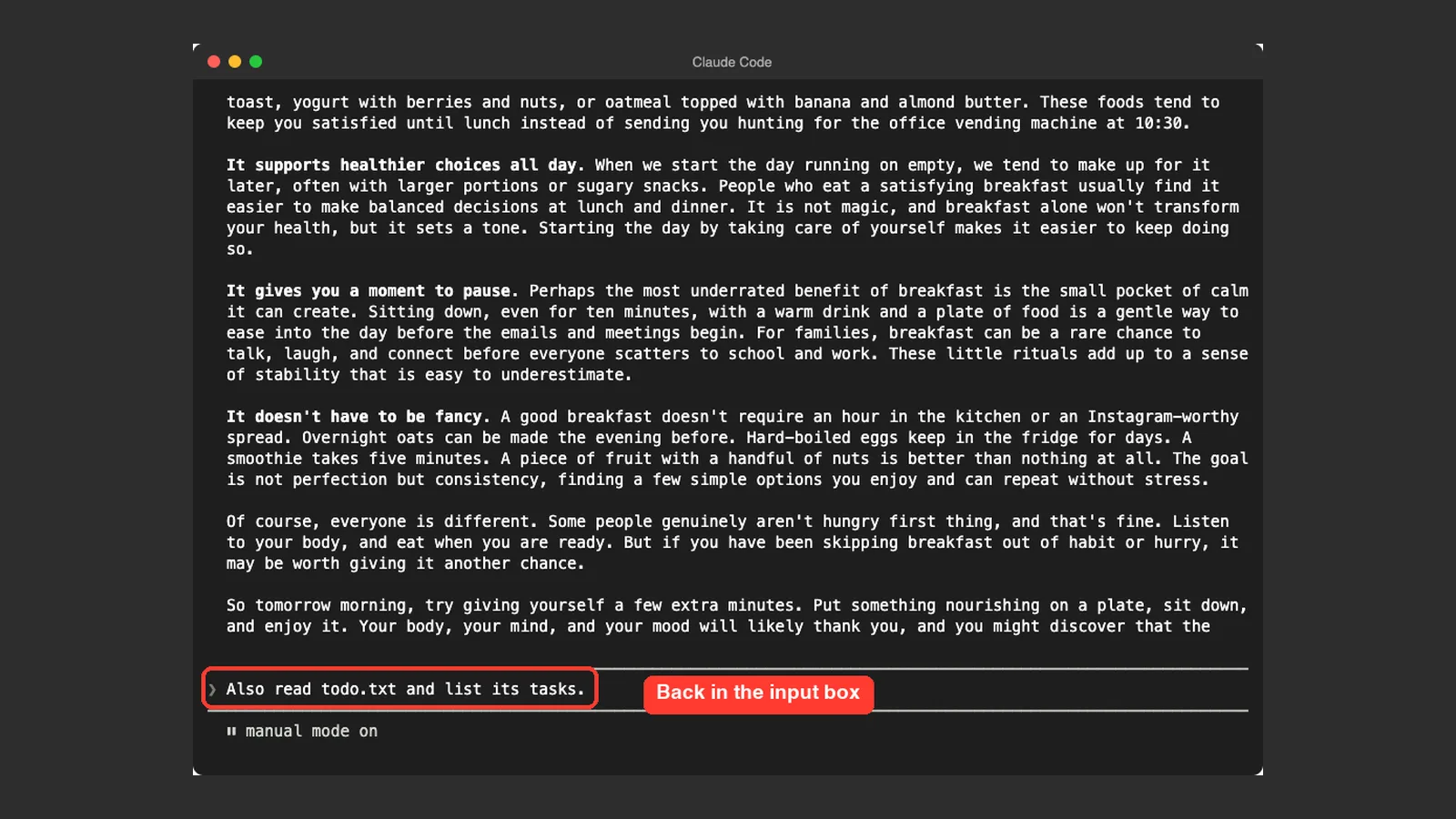
Press Up while the cursor is on the first line of the input box. Claude Code removes the entry from the queue and puts the text in the input box. If you queued several messages, they come back one per line, ahead of anything you had typed.
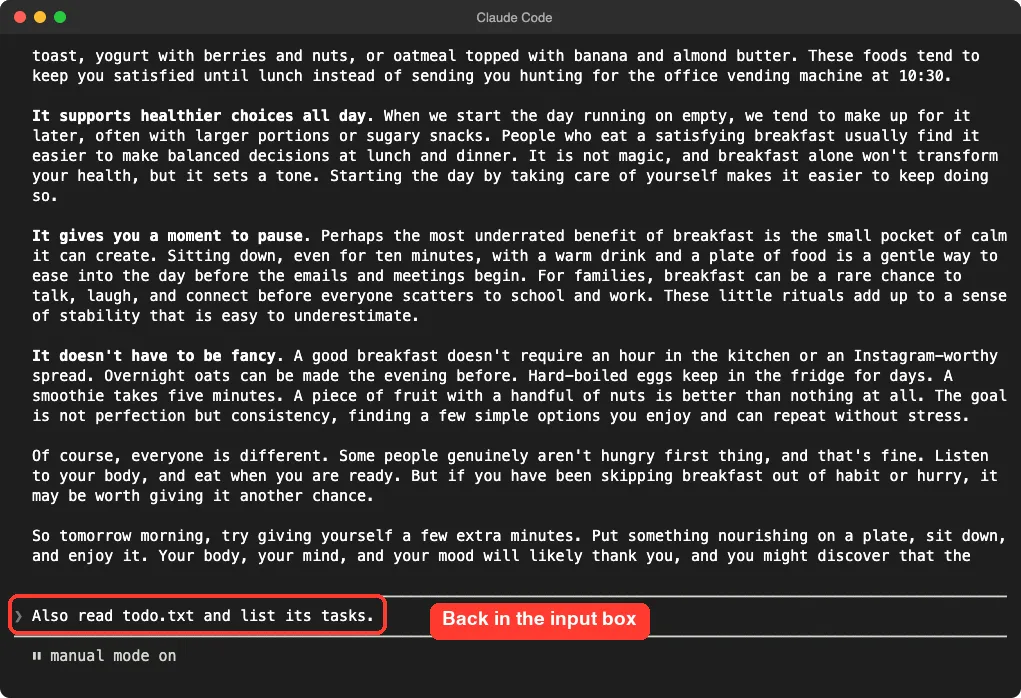
At this point the message has not gone anywhere. Claude has not read it, and it will not run when the turn ends.
Edit it and queue it again
If you only want to fix a typo or add detail, edit the text and press Enter. Claude Code queues it again as a single entry.
This is handy when you queued several short messages and now want to merge them into one clear request.
Clear the input box to drop it
If you want to cancel the message completely, clear the input box. We pressed Backspace until the text was gone. The docs say clearing the input box drops the entry.
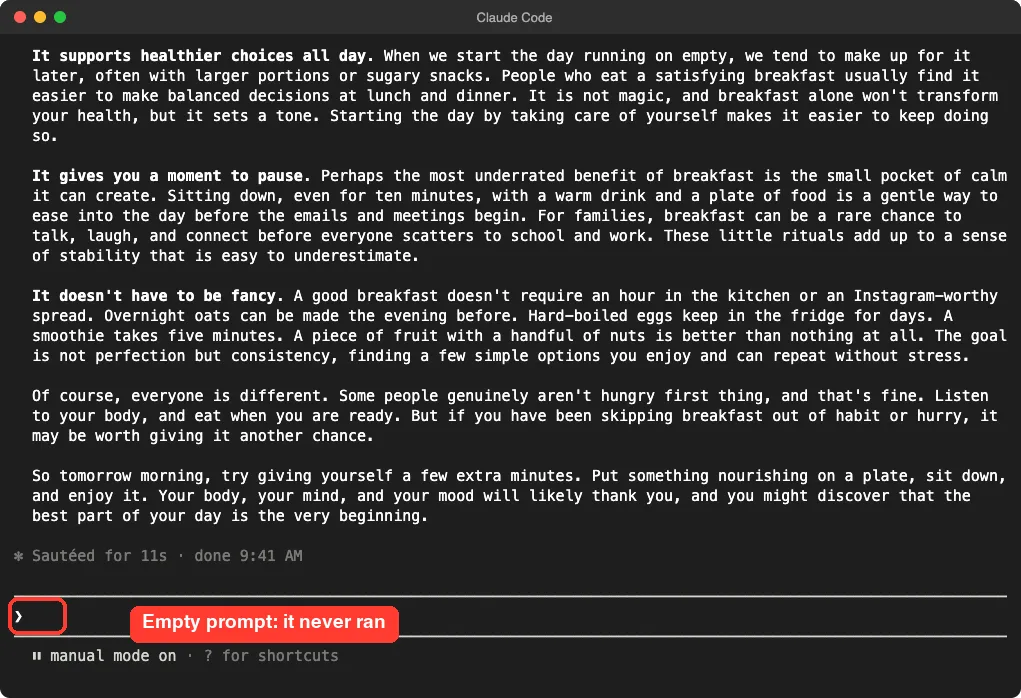
In our demo, the dropped request was to read todo.txt. Claude finished the essay and never touched that file, which confirms the cancel worked.
What the Official Docs Say
The docs describe this under the heading “Take back what you queued”. We highlighted the paragraph so you can check it yourself.
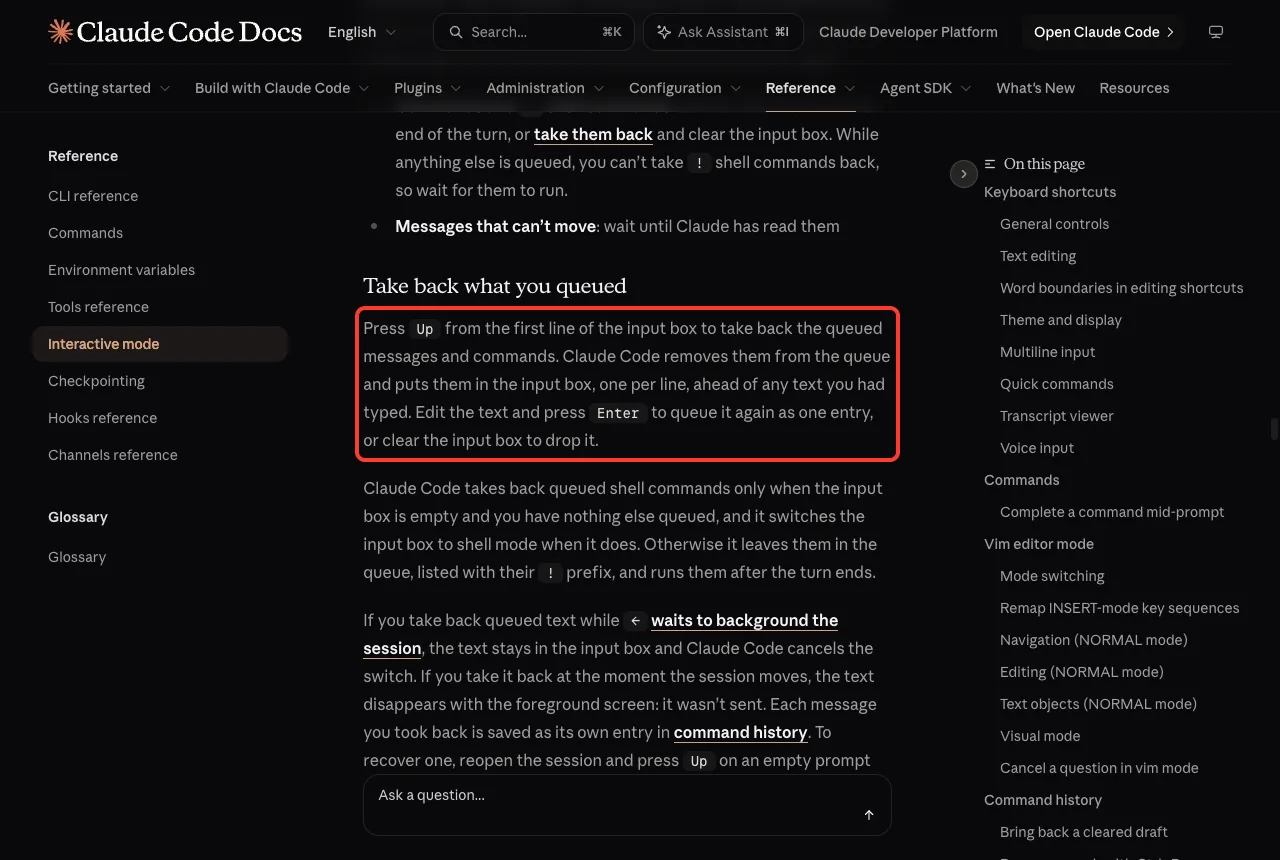
The same page also says each message you took back is saved as its own entry in command history. To recover one later, reopen the session and press Up on an empty prompt with nothing queued.
How Queued Messages Get Sent
Knowing when the queue goes out helps you decide how fast you need to act. The rules depend on what you queued.
- Messages: if Claude is running tool calls, your message is passed to Claude as soon as those calls finish, within the same turn.
- When the turn ends with messages still queued, they go out without another key press, in the order you typed them.
- Commands and shell commands: Claude Code holds them until the turn ends, then runs them one at a time, in the order you queued them.
So for a message, your window to cancel can be short. If Claude is calling tools, the message may be handed over mid-turn. If you want a message to wait safely, there is no guarantee, so press Up as soon as you notice the mistake.
Cancel Queued Shell Commands
Queued ! shell commands follow stricter rules.
Claude Code takes them back only when the input box is empty and nothing else is queued. When it does, it switches the input box to shell mode.
If anything else is queued, the shell commands stay in the queue, listed with their ! prefix, and run after the turn ends. So if you queued a message and a shell command, take back the message first, then press Up again for the command, or wait for it to run.
Check your command before you queue it. A queued ! command that deletes or moves files is a good example of something you do not want to leave to chance.
Other Keys Worth Knowing
Esc interrupts the turn
Press Esc to interrupt the turn without submitting your draft. Claude Code keeps what you queued and sends it right away.
So Esc does not cancel a queued message. It speeds it up.
Send what you queued without waiting
Press Ctrl+Enter to send queued messages immediately, with your draft queued behind them if you had typed one. This needs Claude Code v2.1.275 or later. In terminals that do not report extended keys, Ctrl+Enter arrives as plain Enter, so use Ctrl+X then Ctrl+S instead, which works in any terminal.
What happens to the turn depends on what Claude is doing. If it is running shell commands or subagents, that work moves to the background and Claude reads your messages in the same turn. If it is only writing a response, Claude Code interrupts the turn and sends your messages next.
Why Up Might Not Work
If pressing Up does nothing, check these common causes.
- The cursor is not on the first line. If your draft has several lines, move to the first line, then press
Up. - The message already left the queue. If Claude has started responding to it, it is no longer gray and cannot be taken back. Press
Escand ask Claude to disregard it, or use/rewindif you need to undo edits. - You queued a shell command alongside other items. Shell commands come back only when the input box is empty and nothing else is queued.
- The turn ended first. Once the turn ends, the queue sends on its own.
Our permission prompts guide is a good next read if Claude keeps stopping for approvals, which also stretches out your queueing window.
Real Examples
Taking a message back is cheap, while sending a wrong one can waste a whole turn. Claude Code treats the queue as your last chance to change your mind, so use it freely.
A habit helps here. Glance at the gray lines under Claude’s response before each turn ends, and press Up if one looks off.
Here are three situations where taking a message back saves time and money.
- You queued “delete the old logs” and then remembered you needed them. Press
Upand clear the box. - You queued two short follow-ups. Press
Up, join them into one clear request, and pressEnter. - You queued a message with a typo in a file name. Press
Up, fix the name, and pressEnter.
Every message that Claude has to answer counts toward your usage. You can keep an eye on this with our guide to usage and costs.
Press Up to take a queued message back; press Esc and you send it instead.
Try It Yourself
Make a small demo folder, never a real project, and open Claude Code there. Give it a long task so you have time to practice.
Write a friendly 500-word essay about why a good breakfast matters.While it writes, type a second message and press Enter. Then press Up, delete the text, and watch Claude finish without it.
Common Mistakes
- Pressing
Escto cancel. It interrupts the turn and sends the queue right away. - Waiting too long. Messages can be passed to Claude as soon as tool calls finish.
- Pressing
Upwith the cursor on line two of a long draft. - Expecting to recover a message from a session you already closed. Use command history instead.
Pro Tips
- Watch for gray text. Gray means Claude has not started on that message yet.
- Queue one clear message instead of three short ones. It is easier to take back.
- Use
Ctrl+XthenCtrl+SifCtrl+Enteracts like plainEnterin your terminal. - If you lose a message, press
Upon an empty prompt in a reopened session to find it in history. - To clear old conversations, see our guide to clearing session history.
Cheat Sheet
For more on how Claude itself works, see our Claude overview.
Frequently Asked Questions
How do I cancel a queued message in Claude Code?
Press Up from the first line of the input box. The queued text returns to the input box, and you can edit it or clear it.
Does Esc cancel a queued message?
No. Per the docs, Esc interrupts the turn without submitting your draft, and Claude Code sends what you queued right away.
Can I edit a message after queueing it?
Yes. Press Up, change the text, and press Enter to queue it again as one entry.
Can I cancel a queued shell command?
Sometimes. Claude Code takes back queued shell commands only when the input box is empty and nothing else is queued. Otherwise they run after the turn ends.
What if I already see Claude answering my message?
Then it has left the queue. Press Esc to interrupt the turn and tell Claude to ignore it.
Conclusion
To cancel a queued message in Claude Code, press Up from the first line of the input box, then edit the text or clear it so nothing is sent. Remember that Esc sends your queue instead of cancelling it, and that queued messages go out on their own when the turn ends. We tested this on macOS in a demo folder, and the steps match Anthropic’s official interactive mode docs.