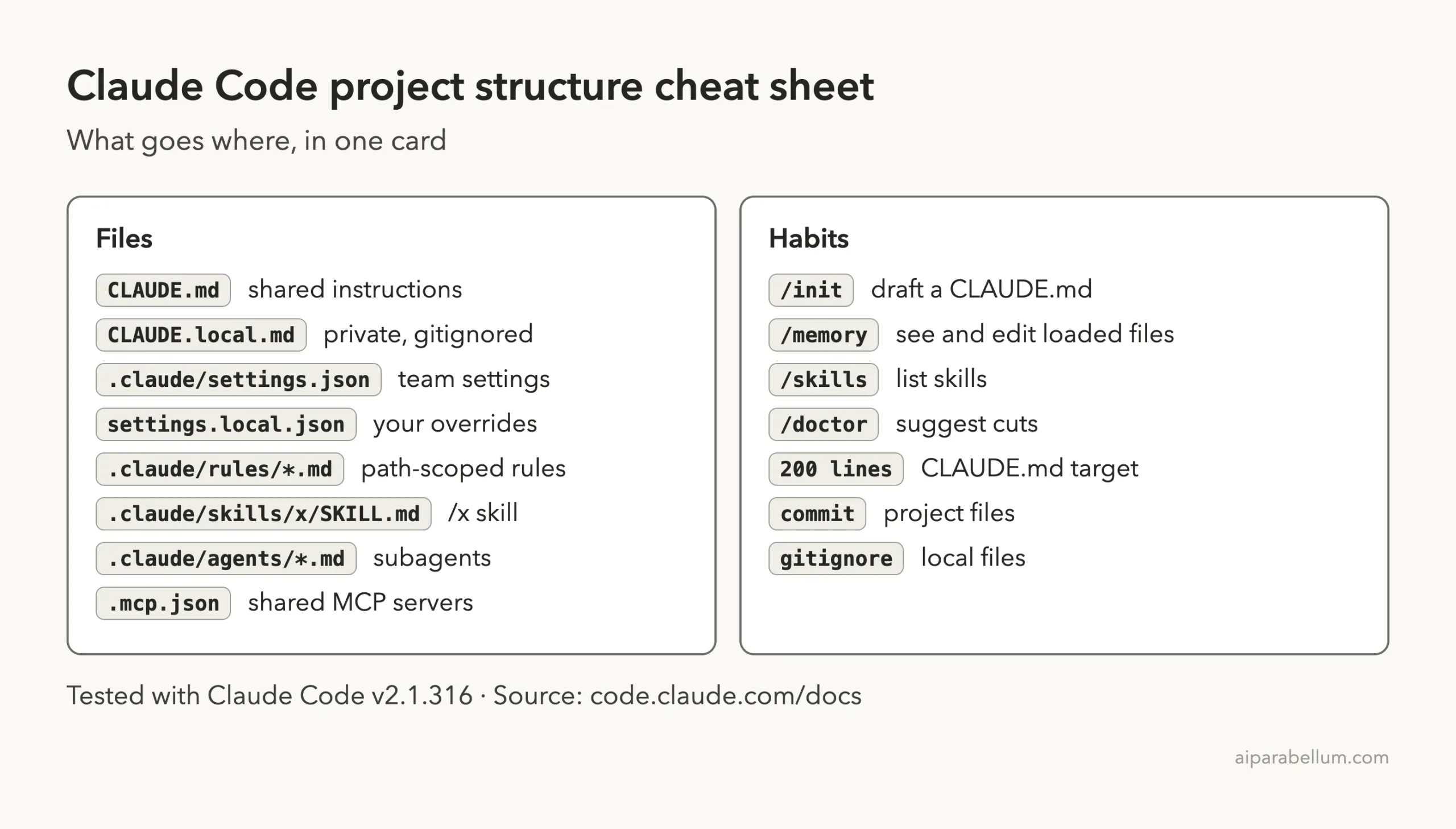
The best Claude Code project structure is small: one CLAUDE.md at the root, one .claude/settings.json for permissions, and optional folders for rules, skills and subagents that you add only when a real need shows up. Commit the shared files, and keep your personal ones out of git.
This guide shows the full layout from Anthropic’s docs, what loads when, and which file each kind of instruction belongs in. We also built a demo project and checked in a real session that Claude Code finds each piece.
This post is part of our Claude Code tutorials collection, where each post answers one specific question. If you are still choosing between instruction files, read our guide to AGENTS.md vs CLAUDE.md first.
Tested with Claude Code v2.1.316 on November 2, 2026. We tested on macOS; the Windows and Linux steps follow Anthropic’s official instructions.
Quick Answer: The Recommended Claude Code Project Structure
Start with the two files most people ever edit, then grow. The docs say most users only edit CLAUDE.md and settings.json, and that the rest of the directory is optional.
| Path | Purpose | Commit to git? |
|---|---|---|
CLAUDE.md | Instructions loaded every session | Yes |
CLAUDE.local.md | Your private notes for this project | No, add it to .gitignore |
.claude/settings.json | Permissions, hooks, environment variables, model defaults | Yes |
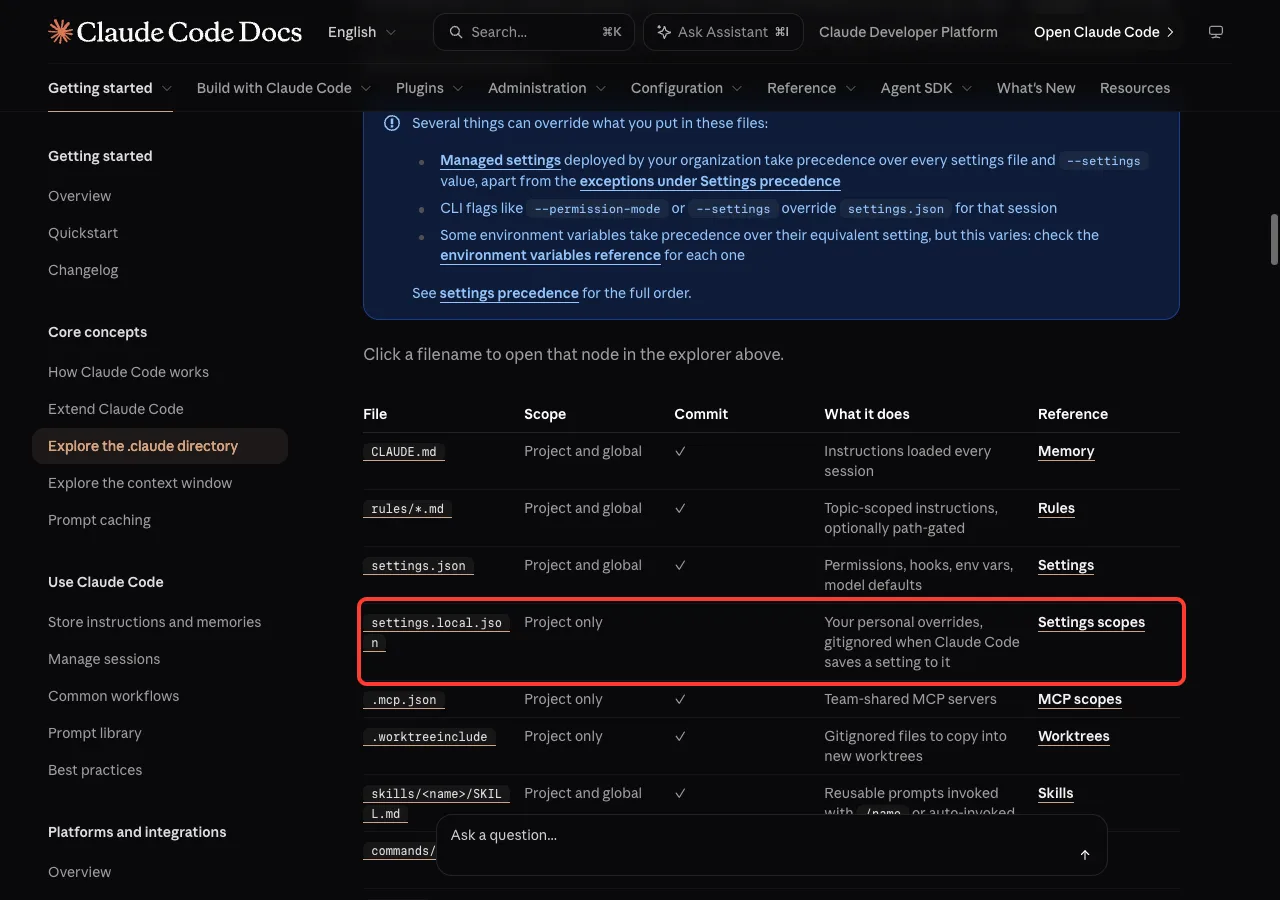
.claude/settings.local.json | Your personal setting overrides | No |
.claude/rules/*.md | Topic rules, optionally limited to certain paths | Yes |
.claude/skills/<name>/SKILL.md | Reusable prompts you call with /name | Yes |
.claude/agents/*.md | Subagent definitions with their own tools | Yes |
.mcp.json | Team-shared MCP servers | Yes |
What the Official Docs Say About the .claude Directory
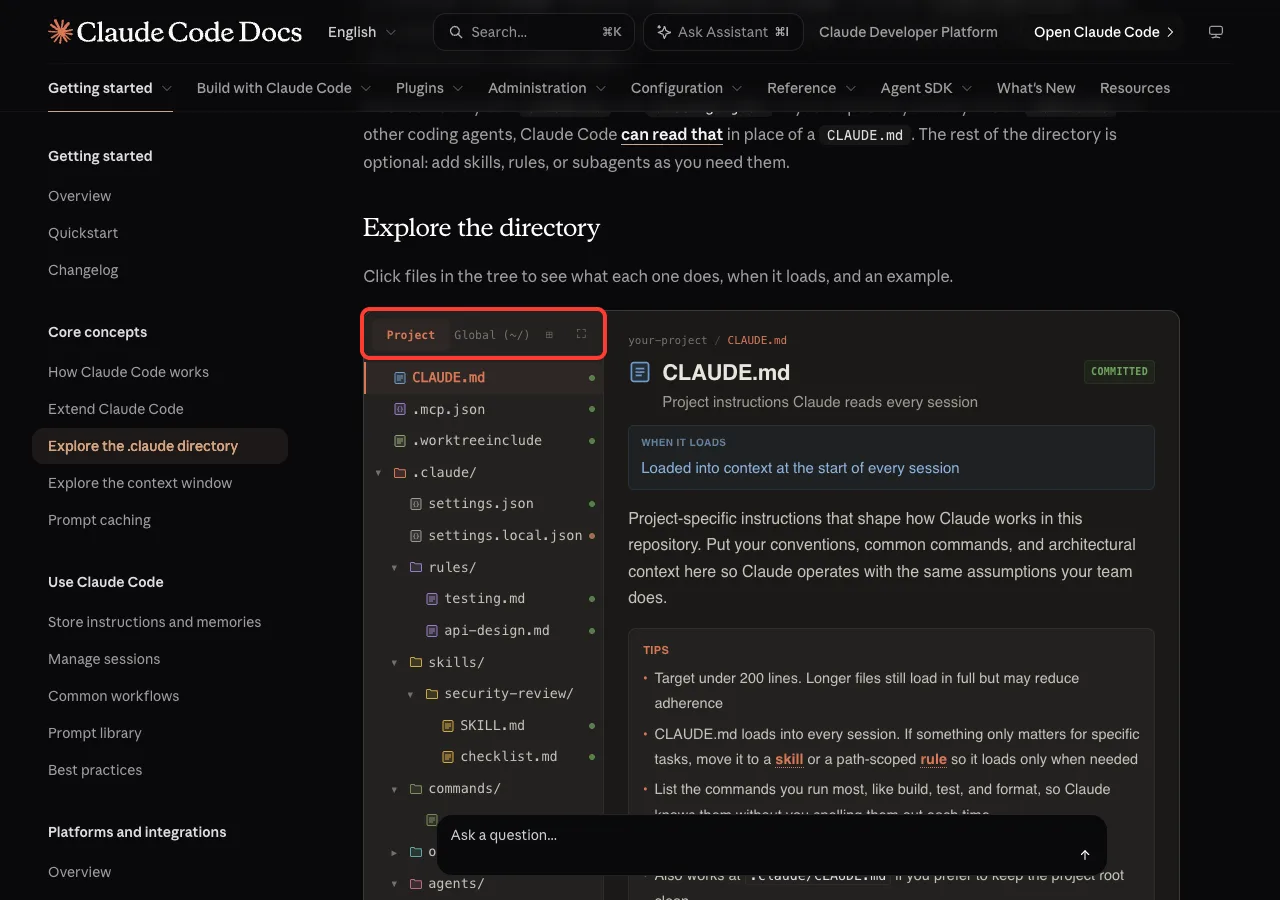
Anthropic has a page called Explore the .claude directory. It explains that Claude Code reads instructions, settings, skills, subagents and memory from your project folder and from ~/.claude in your home folder.
Project files are meant to be committed so your team shares them. Files in ~/.claude are personal and apply to every project you open.
The page includes an interactive tree. You click a file and it tells you what the file does, when it loads and shows an example.
Start with CLAUDE.md and settings.json, and add the other folders only when you need them.
Step 1: Create a Short CLAUDE.md at the Project Root
This is the file Claude reads at the start of every session. Put your build and test commands, the rules a newcomer would not guess, and anything you have had to correct twice.
The docs recommend targeting under 200 lines. Longer files still load in full, but they may reduce how well Claude follows them.
Here is the CLAUDE.md from our demo project, a tiny recipe app:
# Recipe Box

A tiny Python app that stores recipes in a JSON file.

## Commands
- Run tests: `python3 -m unittest discover tests`
- Run the app: `python3 src/recipes.py`

## Rules
- Keep all code in `src/`. Tests go in `tests/`.
- Never edit files in `docs/generated/`.
- See @README.md for what the app does.
The last line uses an import. Writing @README.md pulls that file in alongside CLAUDE.md, so you do not copy its content.
If you do not have a file yet, run /init inside Claude Code to generate a starting version. Anthropic’s best practices page says that from there, the work is mostly removing lines. For ready-made starting points, see our CLAUDE.md template.
Prove That Claude Loaded It
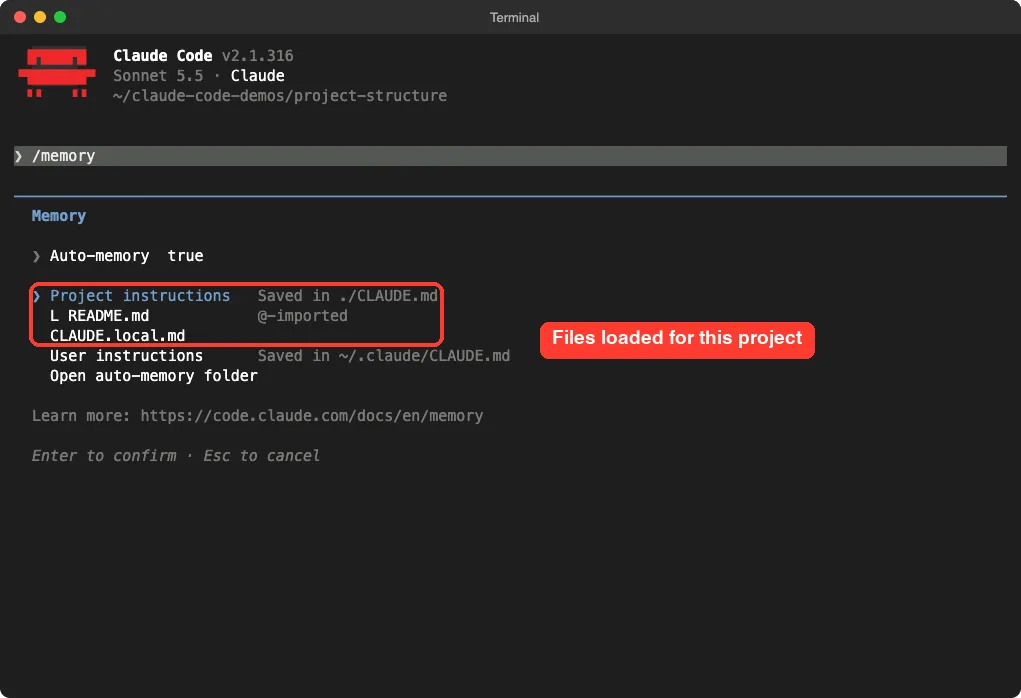
Open Claude Code in the folder and type /memory. The menu lists every instruction file in use. In our demo it showed the project CLAUDE.md, the imported README.md and the local file.
/memory menu shows which instruction files are loadedStep 2: Keep Private Notes in CLAUDE.local.md
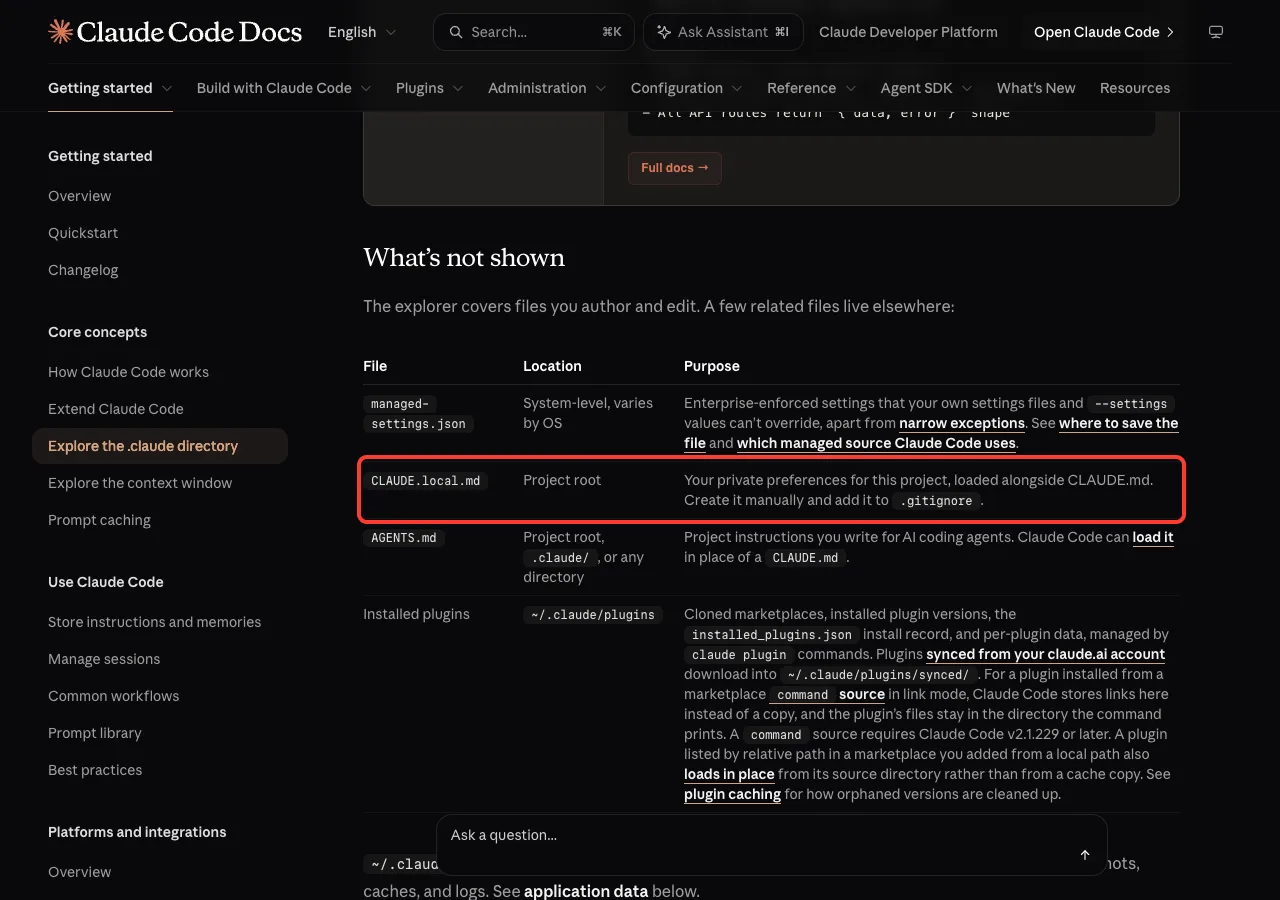
Some notes are only useful to you, like the path of a sample file on your laptop. The docs describe CLAUDE.local.md as your private preferences for the project, loaded alongside CLAUDE.md.
You create it by hand and add it to .gitignore yourself. That second part is easy to forget, so do it right away.
echo "CLAUDE.local.md" >> .gitignore
echo ".claude/settings.local.json" >> .gitignore
The second line covers the personal settings file. The docs note that Claude Code gitignores settings.local.json when it saves a setting there, but adding the line yourself costs nothing.
CLAUDE.local.md manually and gitignore itStep 3: Add .claude/settings.json for Rules That Cannot Break
A line in CLAUDE.md is a request. The model reads it and usually follows it, but there is no guarantee. A setting is different, because Claude Code itself enforces it every time.
The best practices page draws this line clearly: instructions in prompts, CLAUDE.md and skills are non-deterministic, while hooks, deny rules and managed settings are deterministic. Use the second group for anything that must never happen.
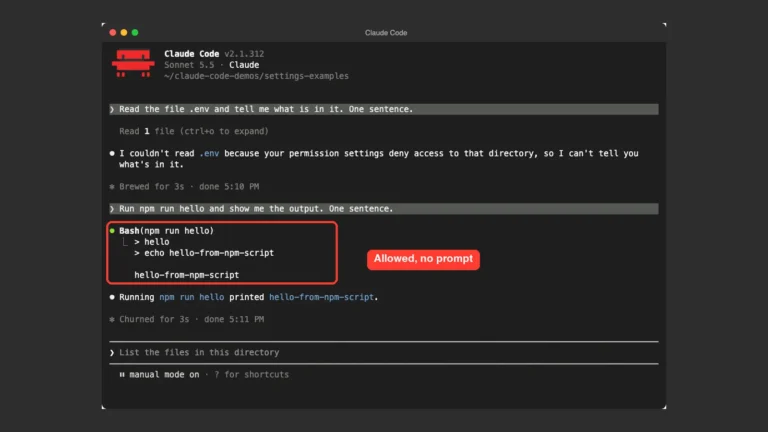
Our demo file allows one test command and blocks reading .env:
{
  "permissions": {
    "allow": ["Bash(python3 -m unittest *)"],
    "deny": ["Read(./.env)"]
  }
}
The first time you open a folder with this file, Claude Code tells you about it. The trust screen listed the pre-approved command and warned that it applies without asking.
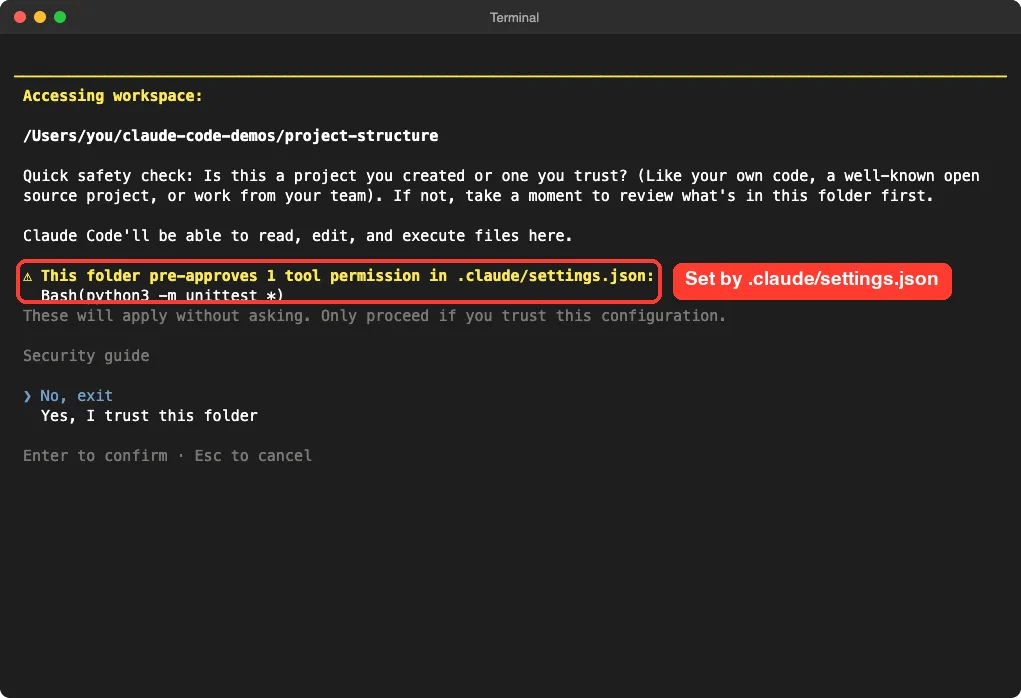
settings.json pre-approves before you trust the folderThis is a good reason to read a stranger’s .claude folder before you trust it. For copyable examples, see our settings.json examples.
Step 4: Split Out Rules, Skills, Commands and Agents
When CLAUDE.md grows past a screen or two, move some of it out. The docs say that if something only matters for specific tasks, move it to a skill or a path-scoped rule so it loads only when needed.
Rules in .claude/rules
A rule file holds topic-scoped instructions. Add a paths list in the frontmatter at the top and the rule is limited to matching files. Our demo has one for tests:
---
paths:
  - "tests/**"
---
# Testing rules
- Use the standard library `unittest`, no extra packages.
- Name each test file `test_<module>.py`.
Skills and Commands
A skill is a folder with a SKILL.md file. You call it with /name, or Claude can use it on its own when the description fits. A file in commands/ uses the same mechanism, according to the docs, but is a single file.
We tested both. The demo skill release-notes and the command tests both appeared in Claude Code, tagged project, which means they came from our folder.
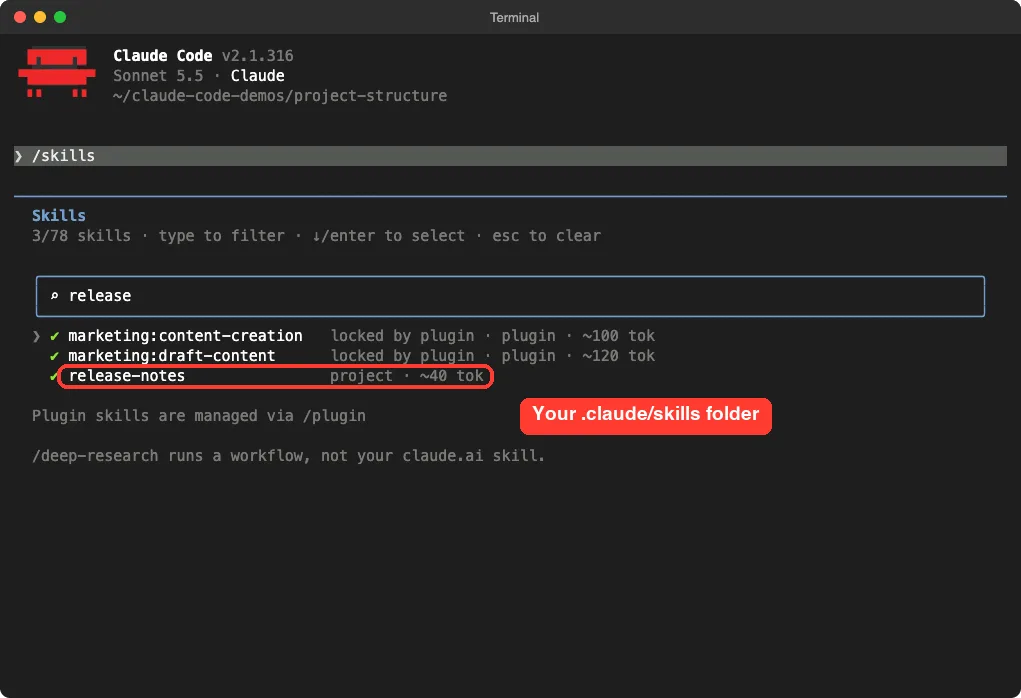
/skills list shows our project skill next to plugin skillsThe command file contains a single sentence telling Claude to run the unit tests and summarize failures. Typing /tests offered it in the menu with the word project beside it.
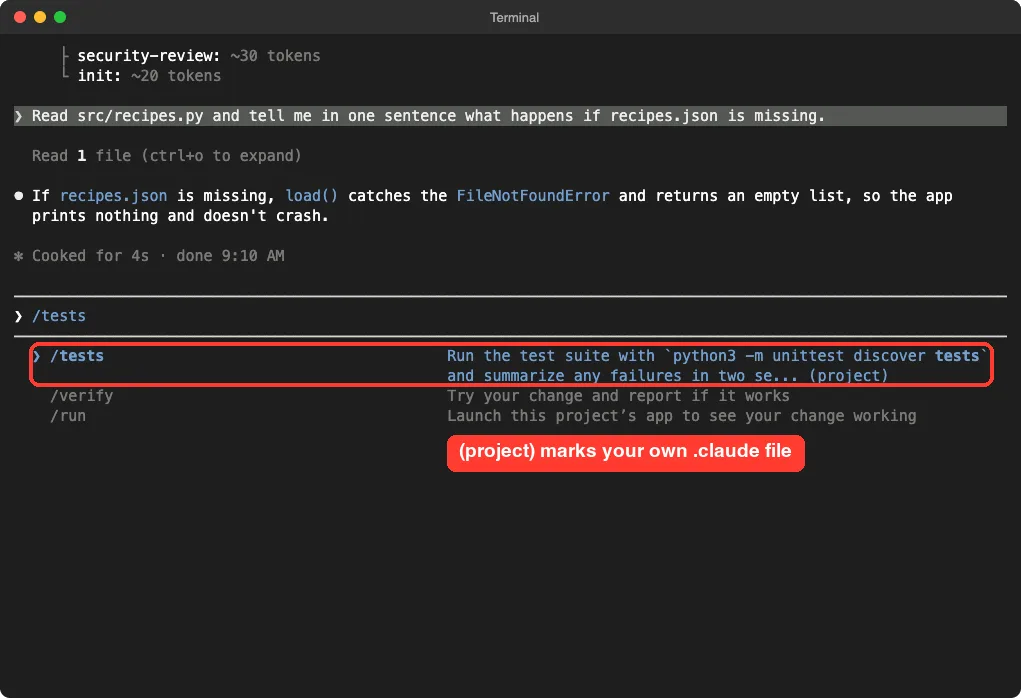
.claude/commands/tests.md file became the /tests commandRunning it worked, and because of the allow rule from Step 3, the test command ran without a permission prompt.
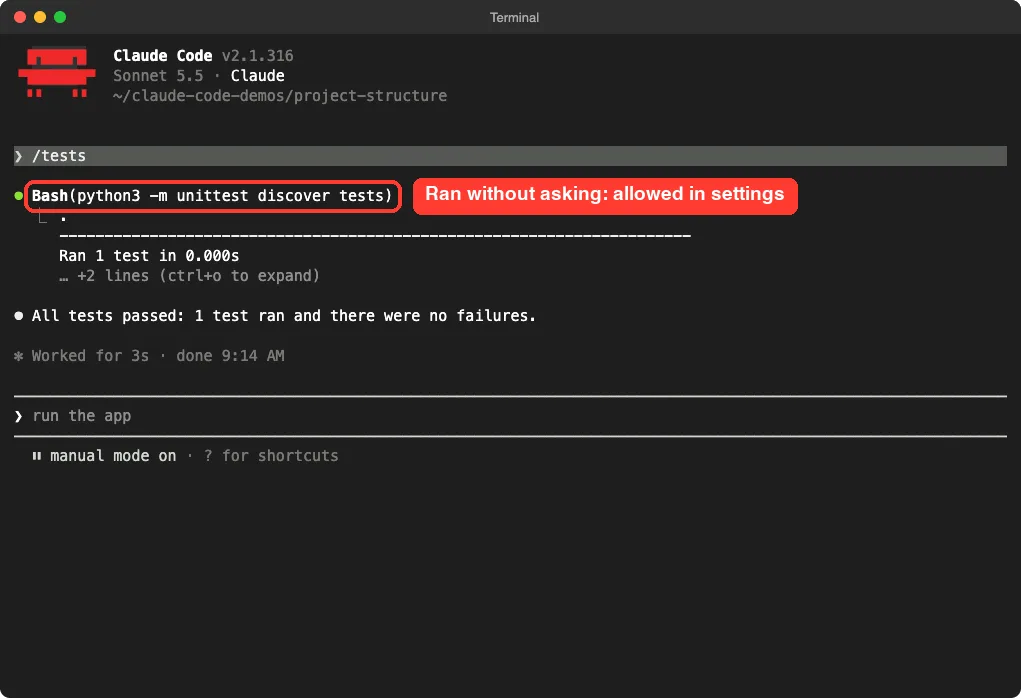
settings.json allows itSubagents in .claude/agents
A subagent is a helper with its own prompt and its own tool list. Our demo reviewer.md gets only Read, Grep and Glob, so it can look at code but never edit it.
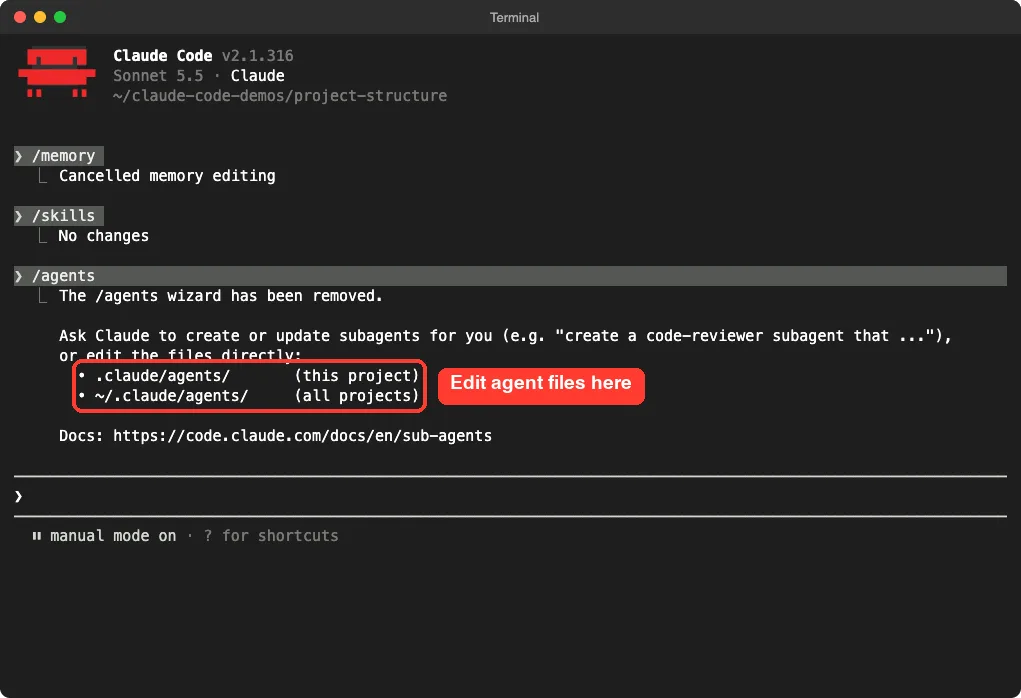
One thing changed recently. In v2.1.316, typing /agents printed a message that the wizard has been removed. It tells you to ask Claude to create a subagent or to edit the files directly in .claude/agents/ or ~/.claude/agents/.
.claude/agents/Where Should Each Instruction Live?
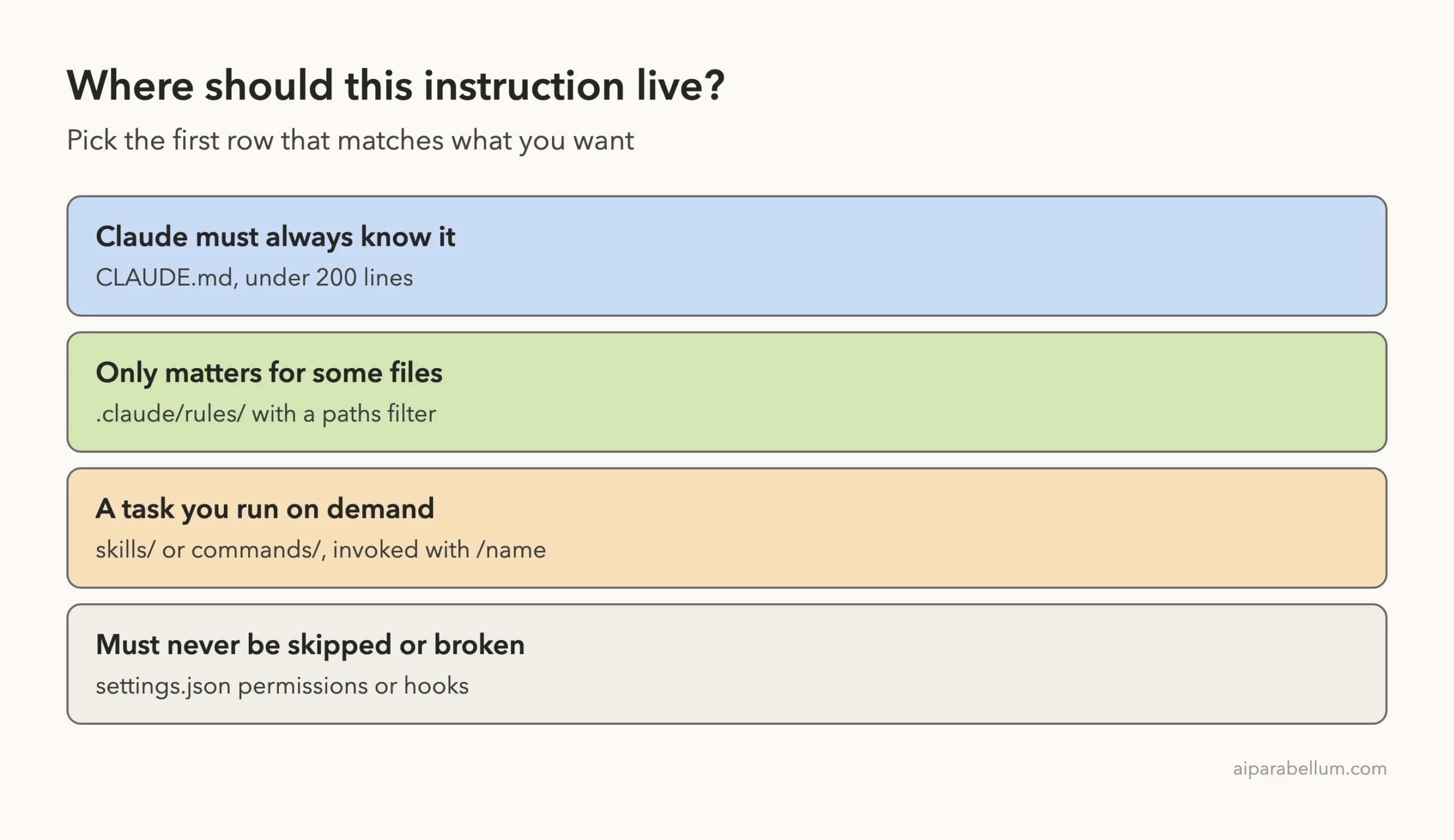
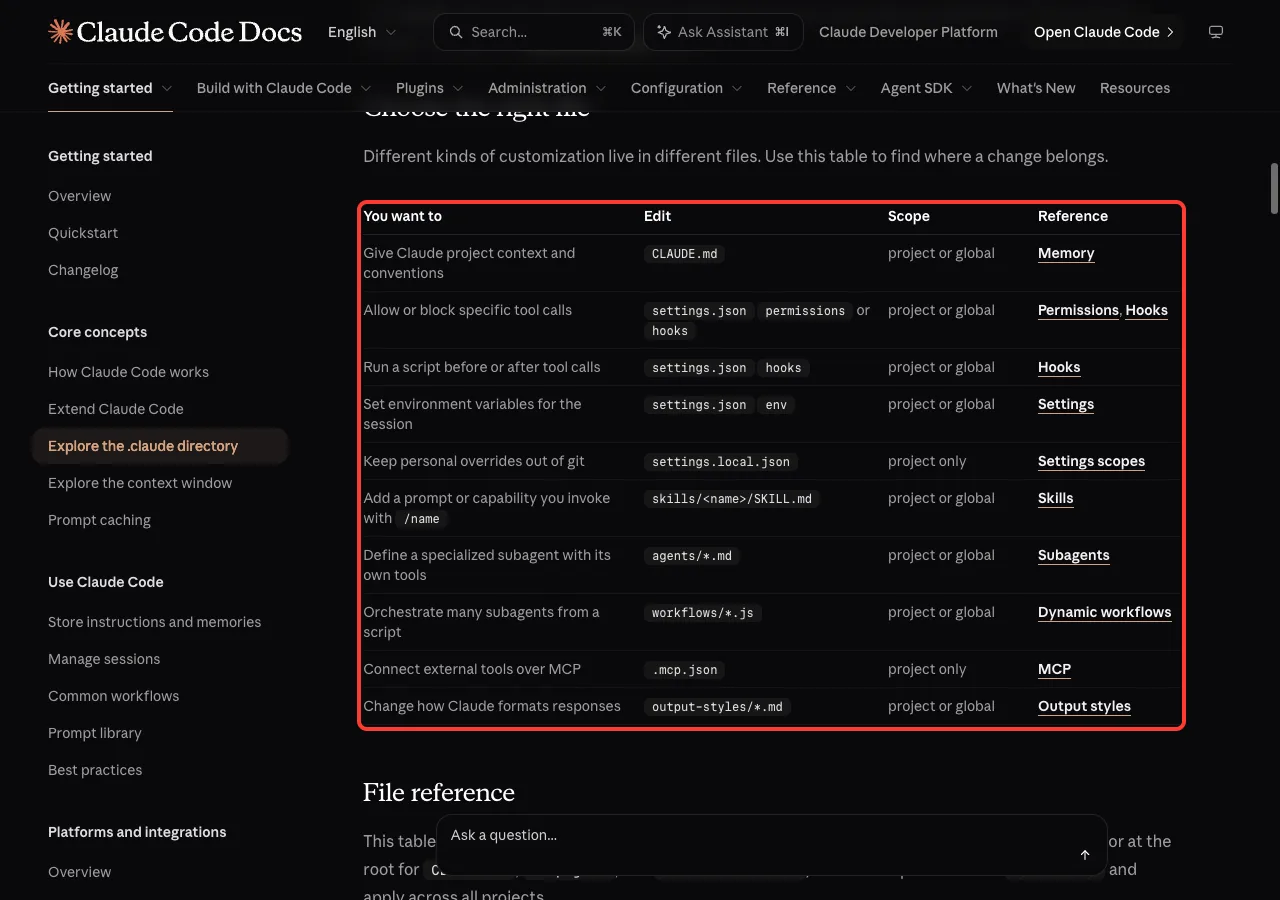
The docs include a table called Choose the right file. We turned it into a short ladder: pick the first row that matches what you want.
Here is the official table in a shortened form:
| You want to | Edit |
|---|---|
| Give Claude project context and conventions | CLAUDE.md |
| Allow or block specific tool calls | settings.json permissions or hooks |
| Set environment variables for the session | settings.json env |
| Keep personal overrides out of git | settings.local.json |
Add a prompt you invoke with /name | skills/<name>/SKILL.md |
| Define a specialized subagent | agents/*.md |
| Connect external tools over MCP | .mcp.json |
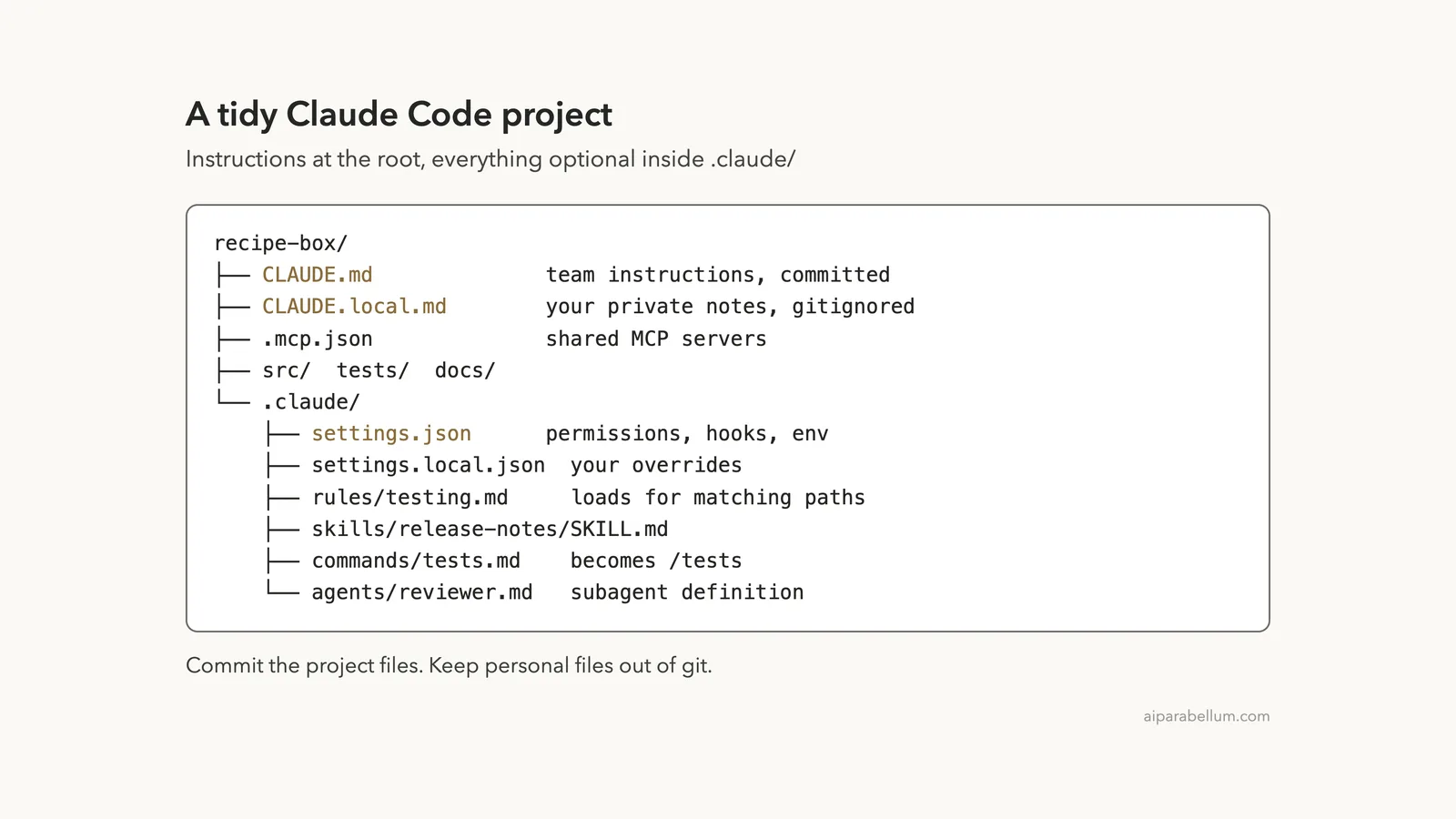
The Final Folder Layout
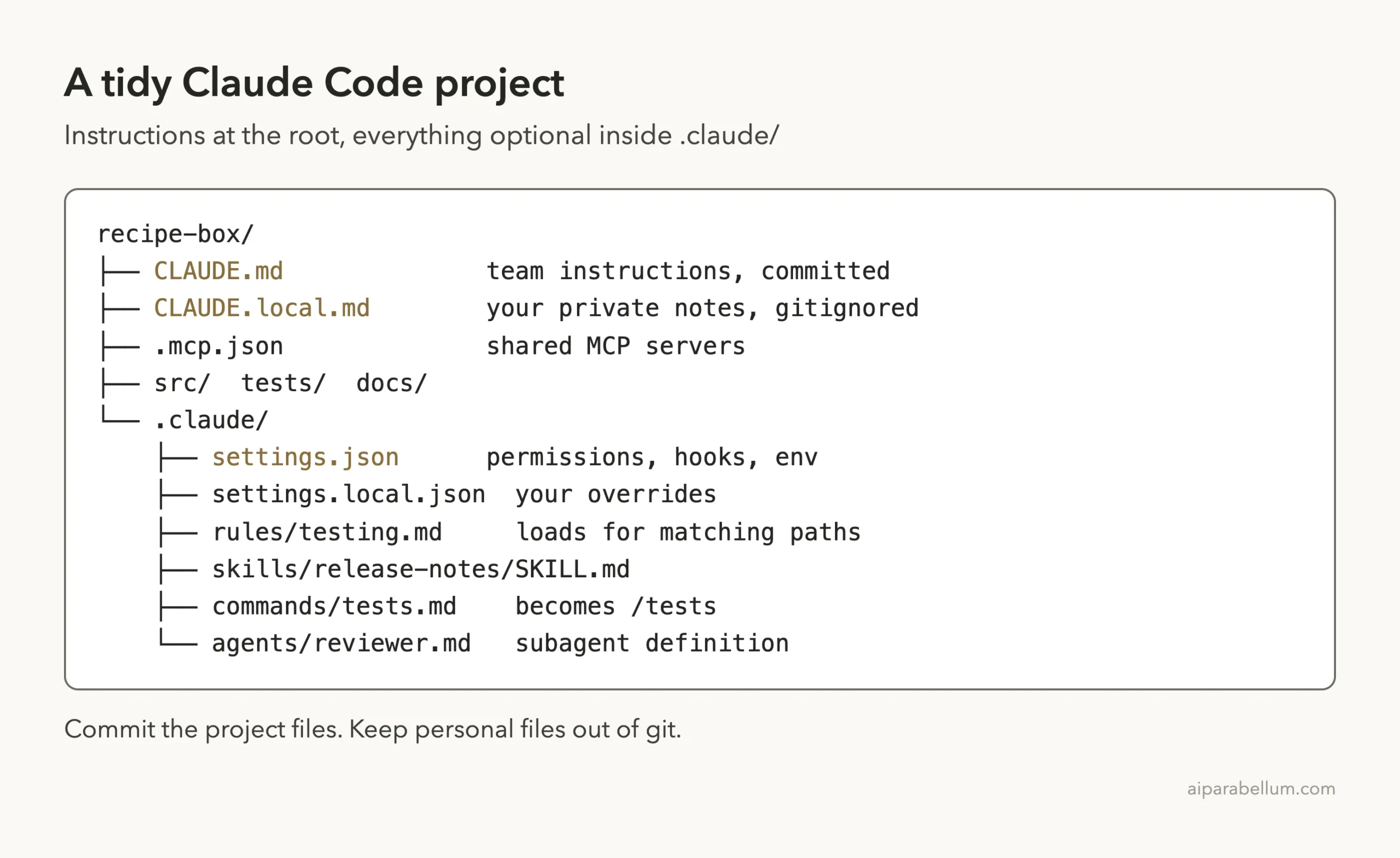
Put it all together and the demo project looks like this. Notice how little sits at the root and how everything optional hides inside .claude/.
The docs table also lists files you may meet later: .worktreeinclude for gitignored files to copy into new worktrees, output-styles/*.md for custom response styles, and workflows/*.js for saved workflow scripts. Each is optional, and each belongs in the project if the team shares it.
Global Files: What Belongs in ~/.claude
Your home folder has a .claude directory too. Put things there that follow you everywhere, such as a personal CLAUDE.md, your own skills and subagents, keybindings.json and custom themes.
The /memory menu in our test lists a user instructions file saved at ~/.claude/CLAUDE.md, so the two levels stack. If you use Windows, ~/.claude means %USERPROFILE%\.claude, and the CLAUDE_CONFIG_DIR variable can move it.
That home folder also stores transcripts and history as plain text. The docs warn that a value read from a .env file can end up in a transcript, so deny reads of credential files with a permission rule, as we did above.
Try It Yourself
Make a throwaway folder, never a real project, and ask Claude Code to build the starter structure. Then check it with /memory and /skills.
Create a CLAUDE.md with build and test commands for a small Python app,
a .claude/settings.json that allows my test command and denies reading .env,
and a .claude/rules/testing.md that only applies to files in tests/.
Keep CLAUDE.md under 30 lines.
Read what Claude wrote before you accept it. Delete any line you would not miss.
Common Mistakes
- Writing a huge
CLAUDE.mdwith everything in it. Move task-only details into a rule or skill. - Putting a must-never rule in
CLAUDE.mdonly. Use a deny rule or a hook so Claude Code enforces it. - Committing
CLAUDE.local.mdorsettings.local.json. Add both to.gitignore. - Copying the whole docs example tree on day one. Add folders when you need them.
- Describing things Claude can already read from the code, like the folder names. Spend your lines on what it cannot see.
- Waiting for an
/agentswizard. In v2.1.316 it is gone, so write the file in.claude/agents/.
Pro Tips
- Run
/doctor. The best practices page says it suggests cuts for anything Claude can already work out from the code. - Run
/doctor prompt-auditto flag instructions written for older models, files that no longer exist, or lines that contradict each other. - Use
.claude/CLAUDE.mdinstead of the root file if you want a clean project root. The docs say both locations work. - If your repository already has an
AGENTS.md, Claude Code can read it in place ofCLAUDE.md. - Give a reviewer subagent only read tools, so the limit is enforced by Claude Code and not by a prompt.
Frequently Asked Questions
Do I need a .claude folder at all?
No. A single CLAUDE.md works on its own. The folder is for settings and the optional extras.
Should I commit the .claude folder?
Commit the shared files, such as settings.json, rules, skills and agents. Keep settings.local.json and CLAUDE.local.md out of git.
How long should CLAUDE.md be?
The docs recommend under 200 lines. Longer files still load fully, but Claude may follow them less closely.
What is the difference between a command and a skill?
The docs say a file in commands/ is a single-file prompt that uses the same mechanism as a skill. A skill folder can hold extra files beside SKILL.md.
Where do global settings go?
Put them in ~/.claude, such as ~/.claude/settings.json and ~/.claude/CLAUDE.md. They apply to every project, and the project files add to them.
Conclusion
A good Claude Code project structure is mostly restraint: a short CLAUDE.md, a settings.json for the rules that cannot bend, and extra folders only when a real need appears. We checked each piece in a demo project, and Claude Code found the instructions, the skill, the command and the permissions every time. For more on how Claude fits your workflow, visit our Claude AI page, and check the official .claude directory guide and best practices pages for updates.