Everything Claude Code, now simply called ECC, is one of the biggest Claude Code add-on repos on GitHub. It ships hundreds of skills, dozens of agents, a pile of slash commands and a long list of hooks, all in one plugin. That is a lot to load into a tool you use every day, so we asked a simple question: which parts are actually worth using?
This is Part 20 of 45 in our Claude Code Deep Dives, part of our Claude Code tutorials.
Tested with Claude Code v2.1.318 on 2026-11-05, using ECC plugin version 2.2.3 (commit b38be6a, merged on October 29, 2026).
Quick Summary
| Question | Short answer |
|---|---|
| What is it? | An MIT-licensed plugin with 71 agents, 314 skills and 98 command shortcuts, plus hooks and rules |
| What did we run? | Skills, agents and commands, loaded for one session with --plugin-dir |
| What did we not run? | The hooks. We read them and loaded a copy of the plugin without hooks/hooks.json |
| What did it cost in context? | The skills row grew from 2.7k to 9.9k tokens and a new custom agents row added 6.5k |
| Worth using? | Yes for a few skills such as /ecc:tdd-workflow and /ecc:code-review. No need to keep all of it loaded |
What Is Everything Claude Code?
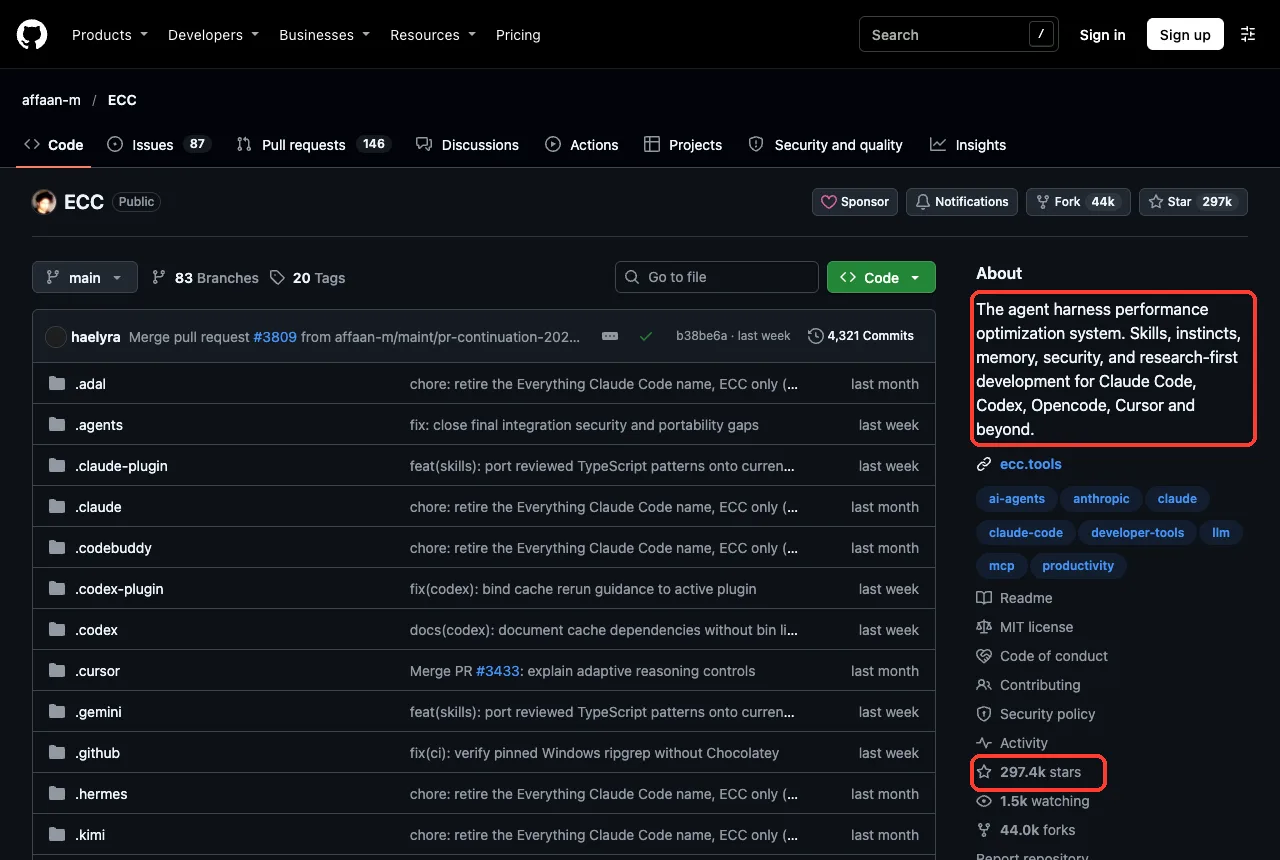
The repo lives at github.com/affaan-m/ECC. Its own description calls it an agent harness performance optimization system for Claude Code, Codex, Opencode, Cursor and other tools. The GitHub page showed about 297 thousand stars and 44 thousand forks when we looked, and the license is MIT.
Recent commit messages on the repo mention retiring the “Everything Claude Code” name in favor of “ECC”. Most people still search for the long name, so we use both in this guide.
What is inside the plugin
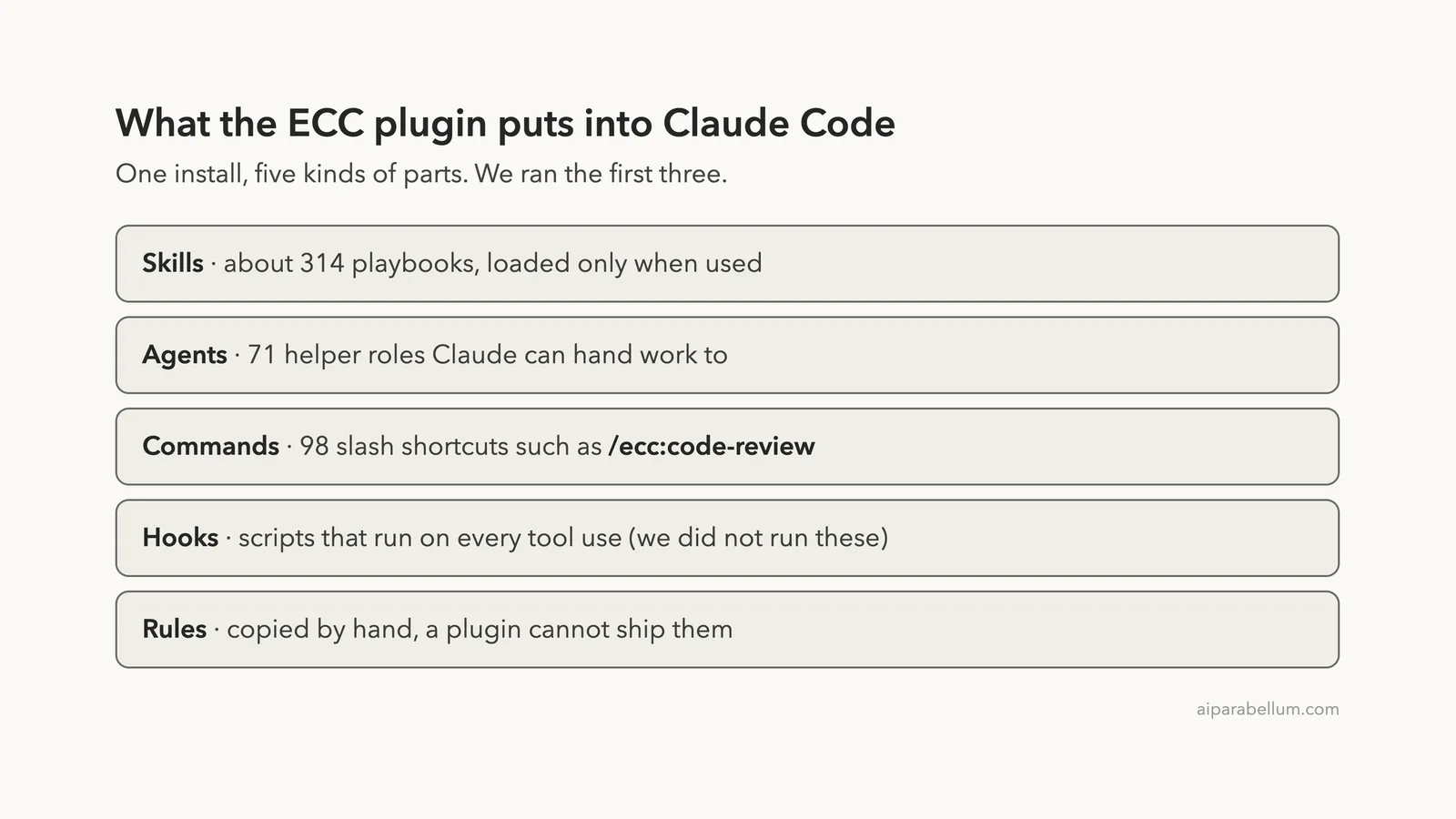
The plugin manifest describes 71 agents, 314 skills and 98 legacy command shims, plus reusable hooks and rules. In plain words: skills are playbooks Claude can follow, agents are helper roles Claude can hand work to, and commands are shortcuts that start a playbook with a slash.
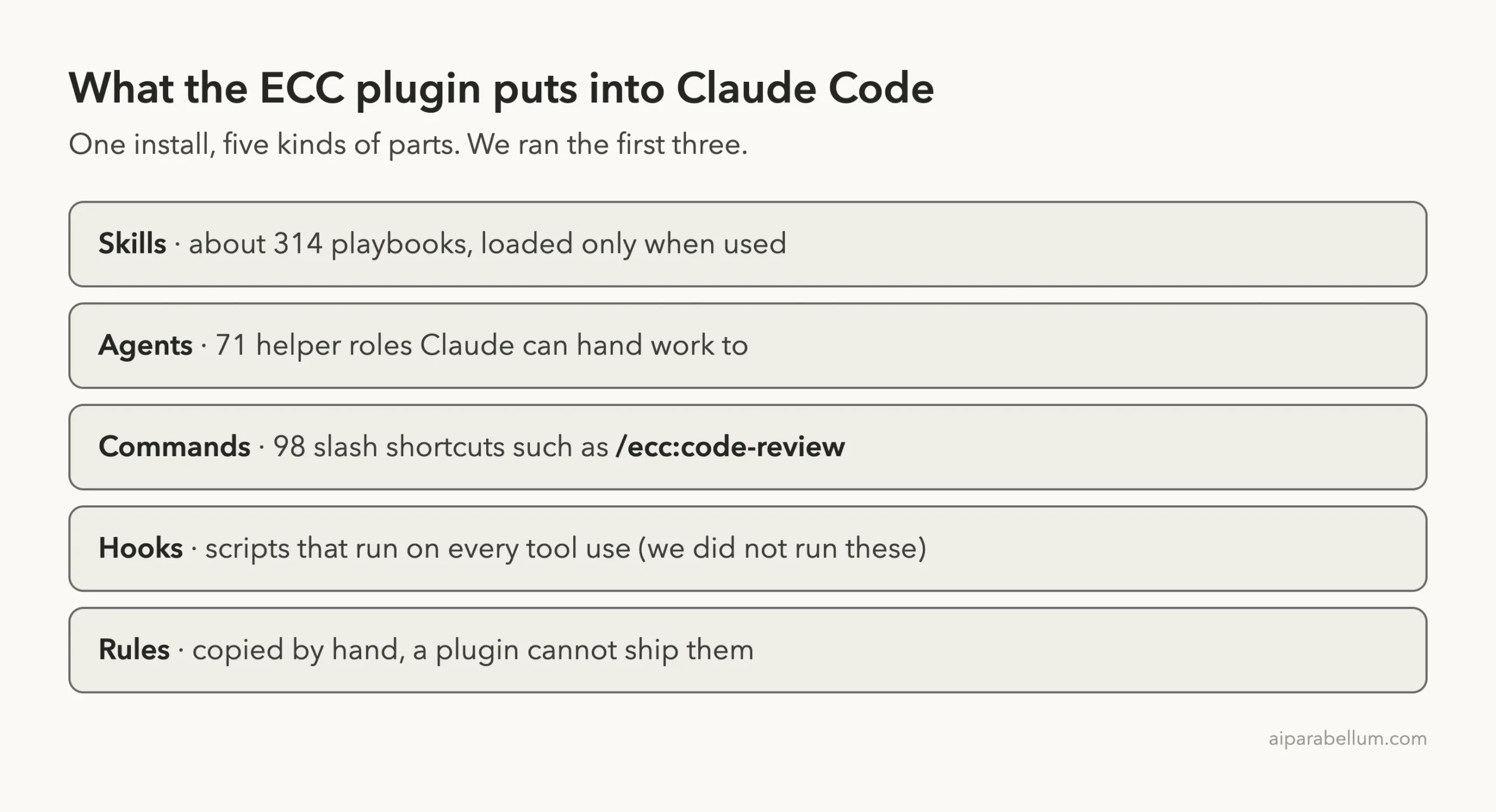
Rules are different. The README says a Claude Code plugin cannot distribute rules, so you copy the rule packs you want into your own rules folder by hand. We did not do that.
How ECC Is Meant to Be Installed
The README gives two official paths. The first is a guided setup script. The second is the native plugin route inside Claude Code:
/plugin marketplace add https://github.com/affaan-m/ECC
/plugin install ecc@ecc
The README also says to pick one path only and not to stack a full manual install on top of the plugin. It lists the official sources (the GitHub repo, the npm packages ecc-universal and ecc-agentshield, and the site ecc.tools) and warns that unofficial mirrors may contain malware. Good advice for any add-on.
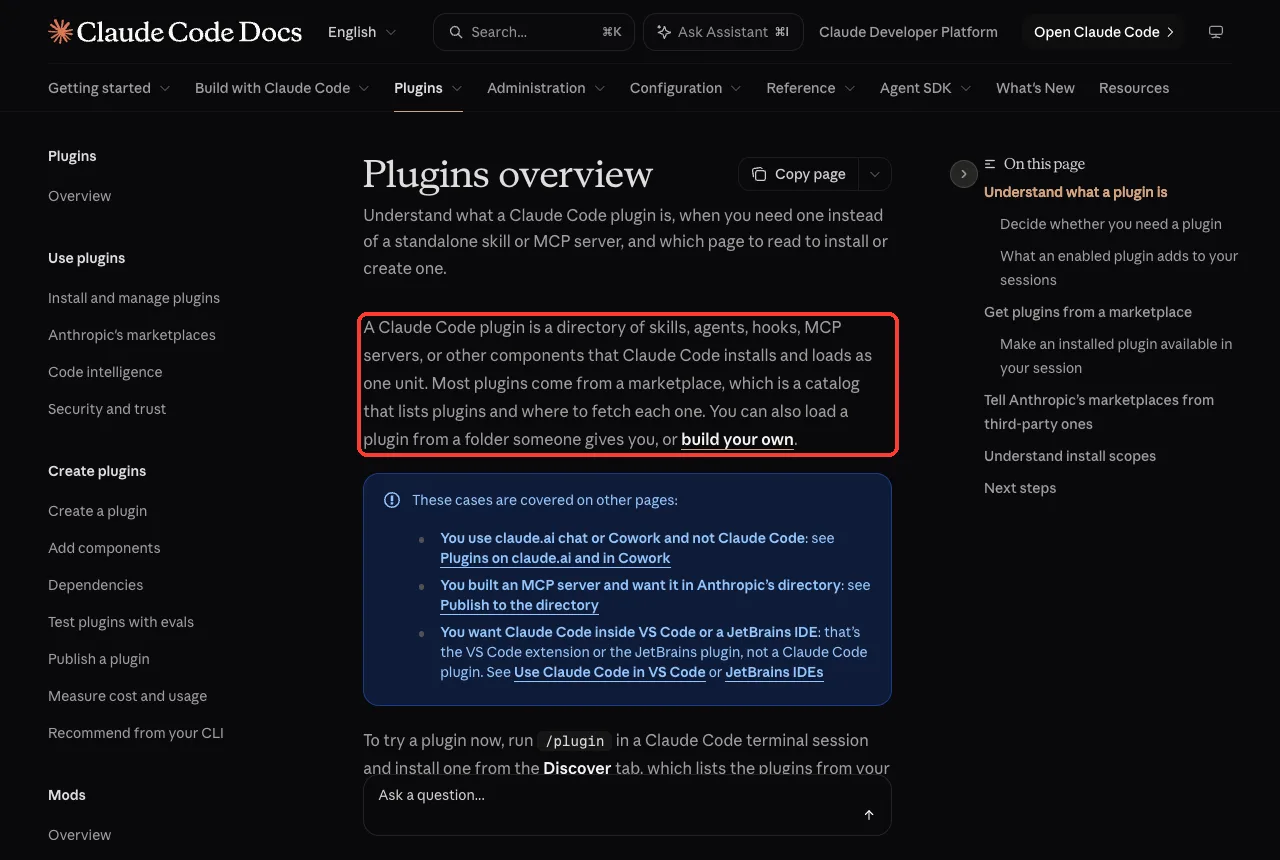
We did not use either install path. A plugin install writes into your Claude Code setup, and we wanted to try ECC without touching ours. Anthropic’s plugins overview explains that a plugin is a folder of skills, agents, hooks and MCP servers that Claude Code loads as one unit, and that you can also load a plugin straight from a folder.
How to Test Everything Claude Code Safely
We cloned the repo into a throwaway folder and made a tiny demo project: a short Python file with a hardcoded fake key, an unsafe database query and a function that divides by the list length. Then we started Claude Code with the plugin loaded from the cloned folder for that one session:
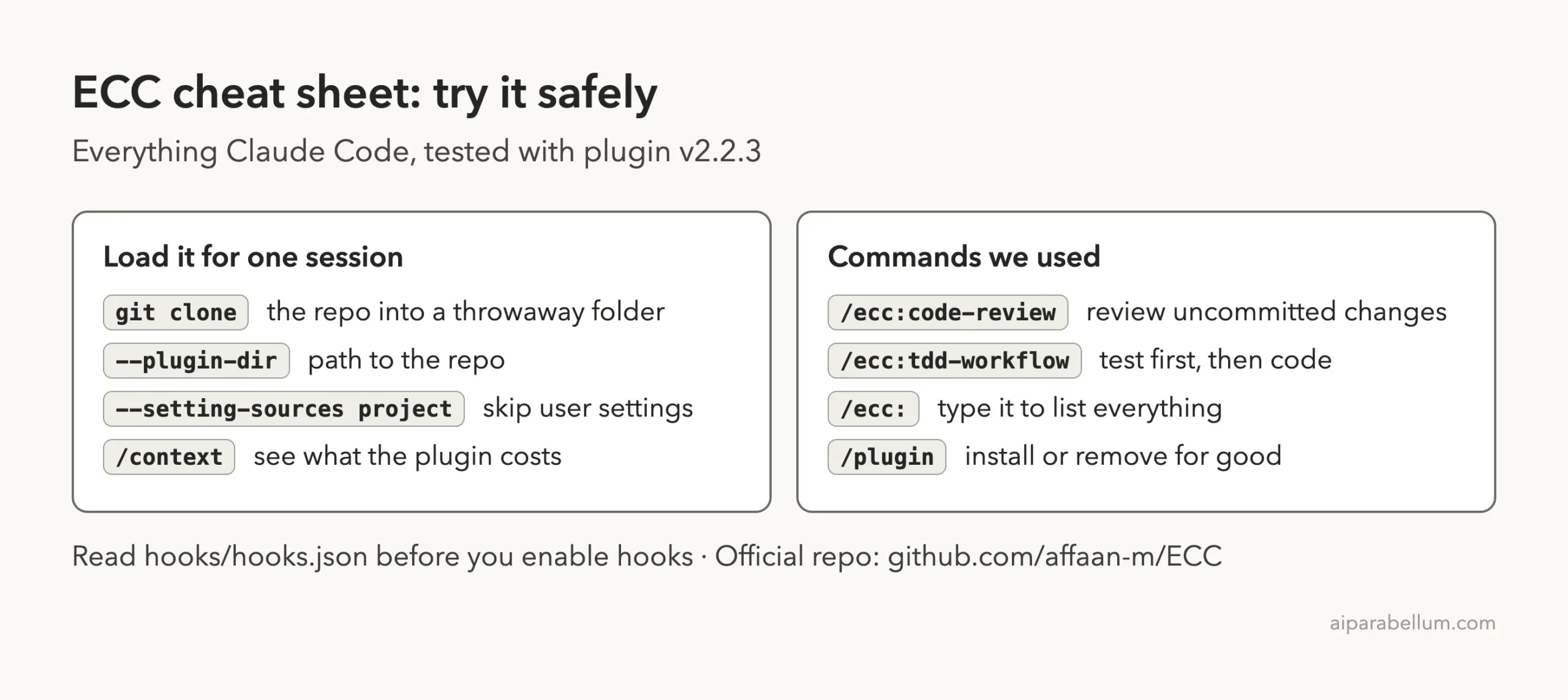
claude --setting-sources project --plugin-dir /path/to/ECCThe --plugin-dir flag loads the plugin only for that run, and --setting-sources project skips user-level settings. When the session ends, nothing stays installed.
Why we skipped the hooks
Before running anything we read hooks/hooks.json. It registers 27 hook commands across the events PreToolUse, UserPromptSubmit, PreCompact, SessionStart, PostToolUse, PostToolUseFailure, Stop and SessionEnd. Each one starts a Node script.
The scripts we opened write metrics and session notes into an agent data folder, and one talks to a local address on the same computer.
For this test we loaded a copy of the plugin with hooks/hooks.json deleted, so only skills, agents and commands ran. That means we can tell you what those parts do, but not how the hooks behave. Anything we say about hooks below comes from the repo’s own files and README, not from running them.
Step 1: See What the Plugin Costs in Context
Anthropic’s plugin docs point out that the name and description of every skill and agent sits in Claude’s context on every turn, even when you never use it. So we ran /context with and without the plugin and compared the tables.
| Context row | Without ECC | With ECC loaded |
|---|---|---|
| Skills | 2.7k tokens | 9.9k tokens |
| Custom agents | not listed | 6.5k tokens |
That is roughly 13.7k tokens of descriptions added before you type a word. On a model with a large window it is only a slice, but it counts toward your usage.
The skills table also showed over 350 entries with the ecc: prefix, most of them marked under 20 tokens each. Small entries add up.
The other rows in the two runs differed a little because our account’s connected tools loaded differently each time, so we only compare the two rows that come from the plugin.
Step 2: Find the Commands
Every ECC skill and command shows up with the ecc: prefix. Type /ecc: and start a word, and Claude Code lists the matches with a one-line description.
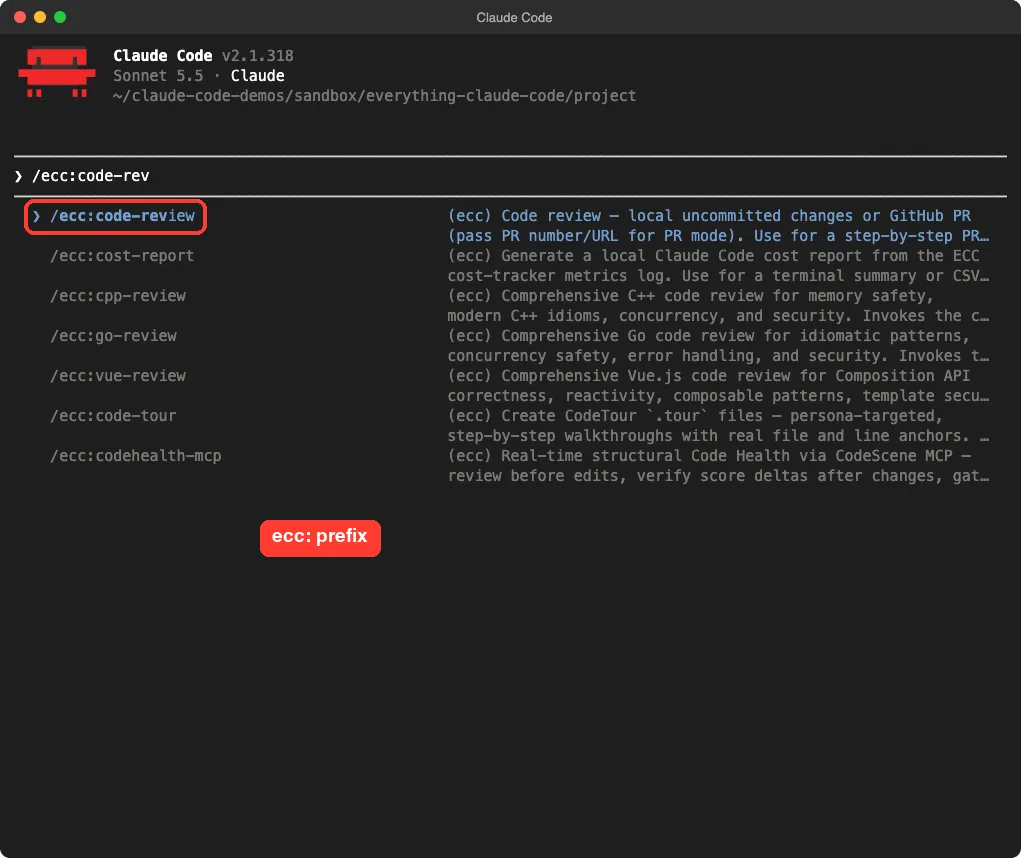
/ecc:code-rev lists the ECC commands that match, each marked with (ecc)The prefix is handy. It keeps ECC’s names from clashing with Claude Code’s own built-in /code-review skill. We did not compare the two reviewers head to head, so we make no claim about which is better.
Step 3: Run a Code Review
Our demo folder had one uncommitted change: a new greet() function. We ran /ecc:code-review, which reviews local uncommitted changes. Claude read the whole file, not just the diff, and came back with a verdict.
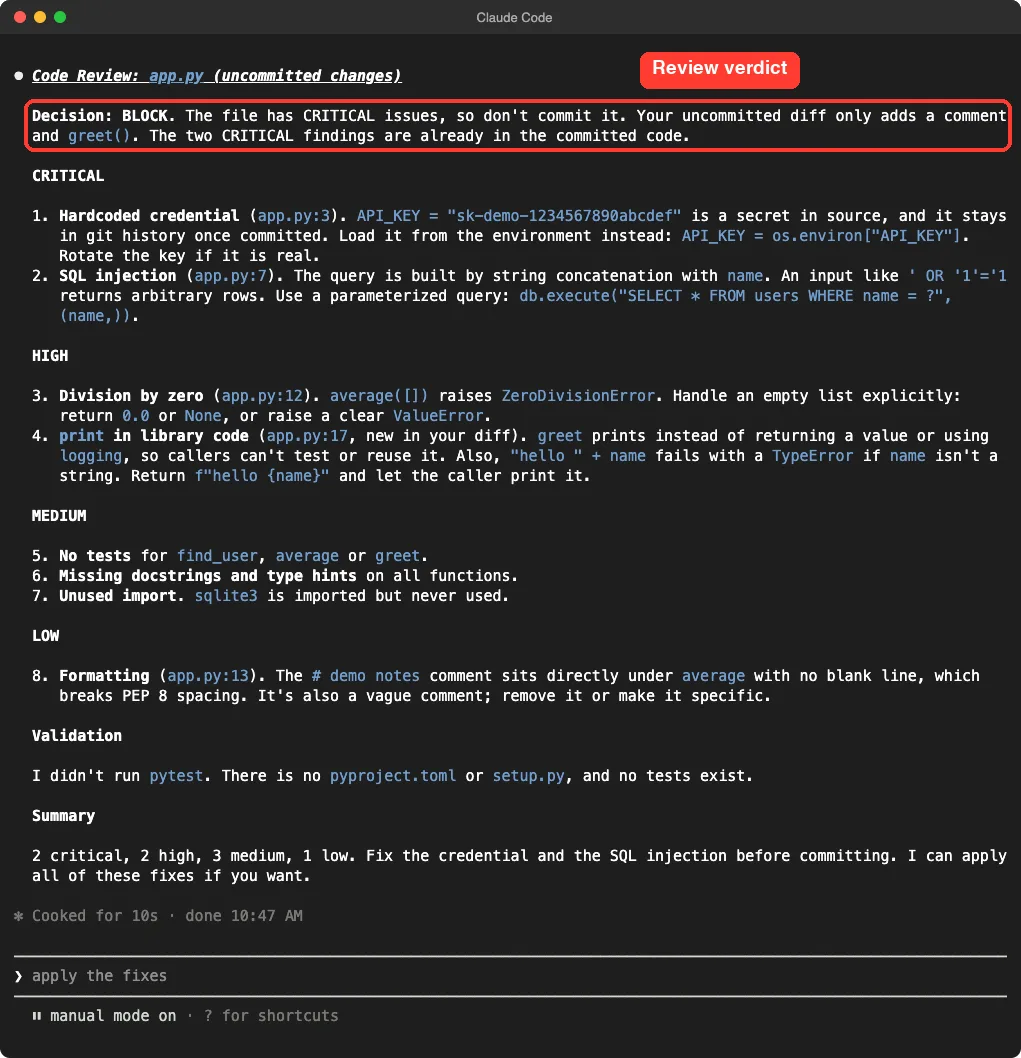
It flagged the hardcoded key and the unsafe query as critical, then a division by zero on an empty list, then smaller items such as a missing docstring and an unused import. The summary was two critical, two high, three medium and one low. It also said plainly that the two critical problems were already in the committed code, not in the new change.
What it got right and wrong
The findings were real, and the severity order made sense. But it was not perfect.
In this run it said no tests exist, while our demo has a small test_app.py file. We ran the same command twice: the first run listed nine findings and the second listed eight. So treat it as a sharp second pair of eyes, not a final judge.
Step 4: Try the Test-First Skill
Next we tried /ecc:tdd-workflow, which asks Claude to write a failing test first, then the smallest code to pass it. Our prompt was one line:
/ecc:tdd-workflow add a median(numbers) function to app.pyClaude asked permission for each command and each edit, as normal in default mode. It wrote tests first, ran them and reported a failing import because median did not exist yet. Only then did it edit app.py.
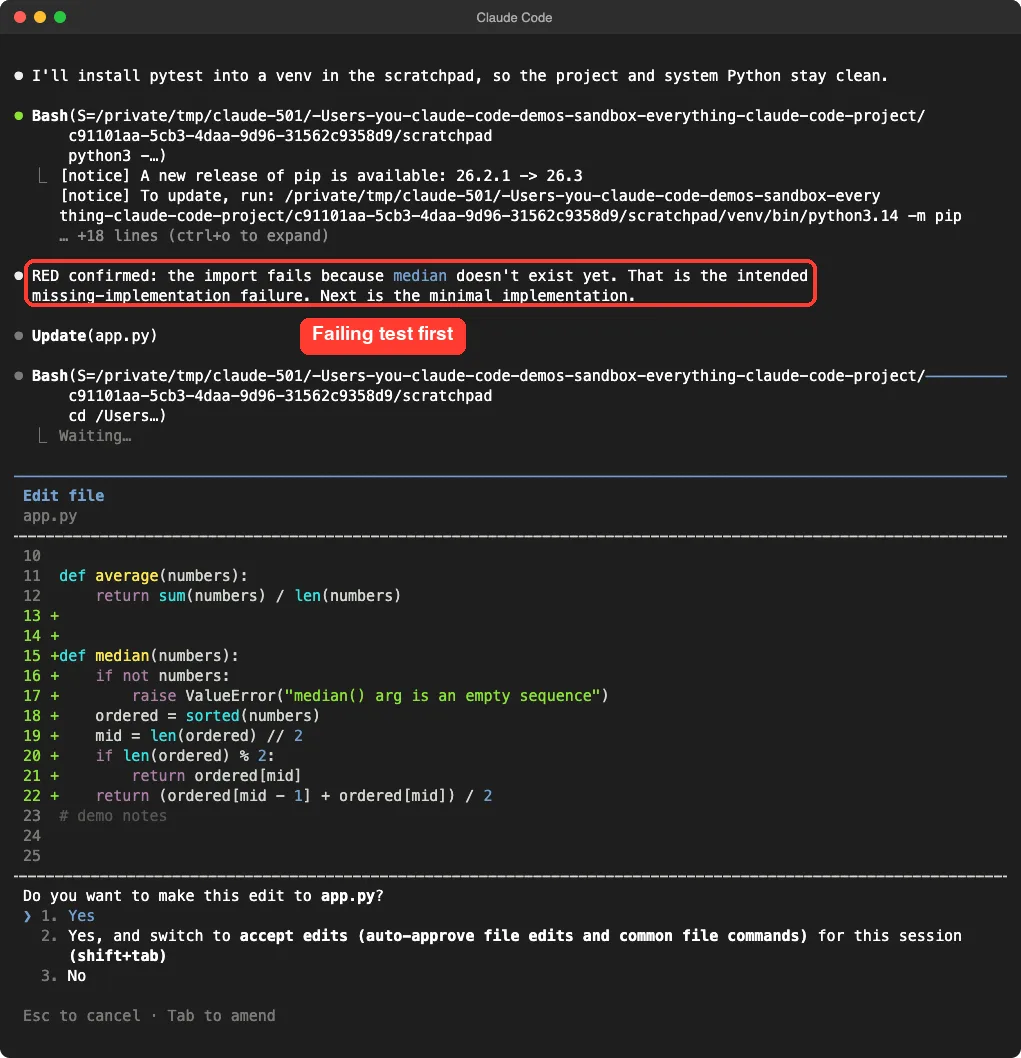
app.py waits for your approvalAt the end Claude reported seven passing tests, covering odd and even lists, a single item, negatives and floats, and an empty list that raises an error.
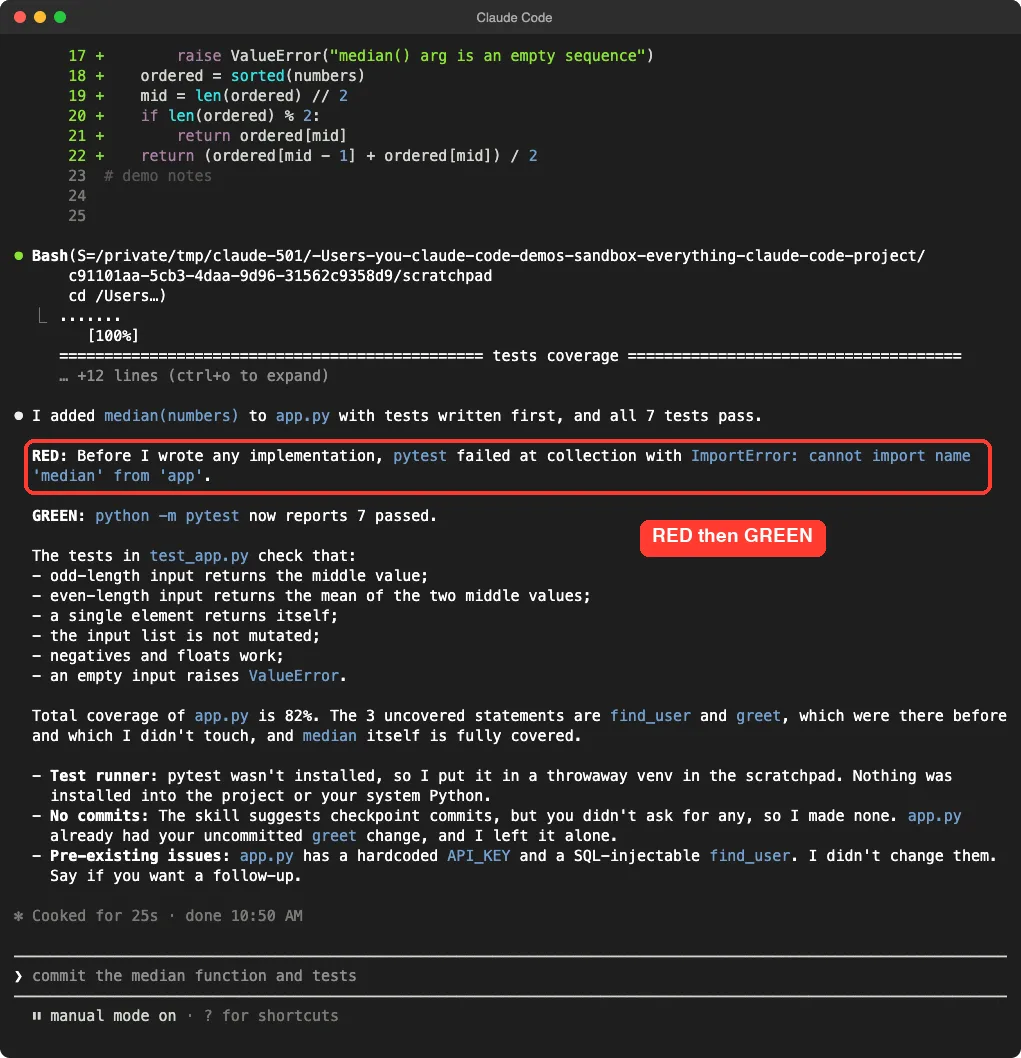
Three details stood out. It installed the test tool into a throwaway virtual environment instead of your system Python.
It made no commits even though the skill suggests checkpoint commits, because we had not asked for any. And it pointed out the old hardcoded key and unsafe query without touching them. Those are all behaviors we like, though they are what Claude chose to do with the skill, so your run may differ.
Which Everything Claude Code Parts Are Worth Using?
Based on what we ran and read, here is our honest ranking.
| Part | Our verdict | Why |
|---|---|---|
/ecc:tdd-workflow | Worth using | Clear red then green steps, and it respected our limits |
/ecc:code-review | Worth using | Useful severity list, but double-check it |
| Language review agents | Use only your language | There are separate ones for many languages; most will never apply to you |
| Hooks | Read first | We did not run them; they execute scripts on many events |
| Rules packs | Pick one | Start with the common pack plus your language, as the README suggests |
| The full catalog | Skip loading all of it | Over 13k tokens of descriptions before you start |
About the hooks and GateGuard
The README highlights a hook called GateGuard.
According to its skill file, it blocks the first edit of a file until Claude has shown concrete facts about the code, such as which files import it. The skill file quotes A/B test scores in its favor.
We did not run it, so we cannot confirm those numbers. If you enable hooks, read what each one does first.
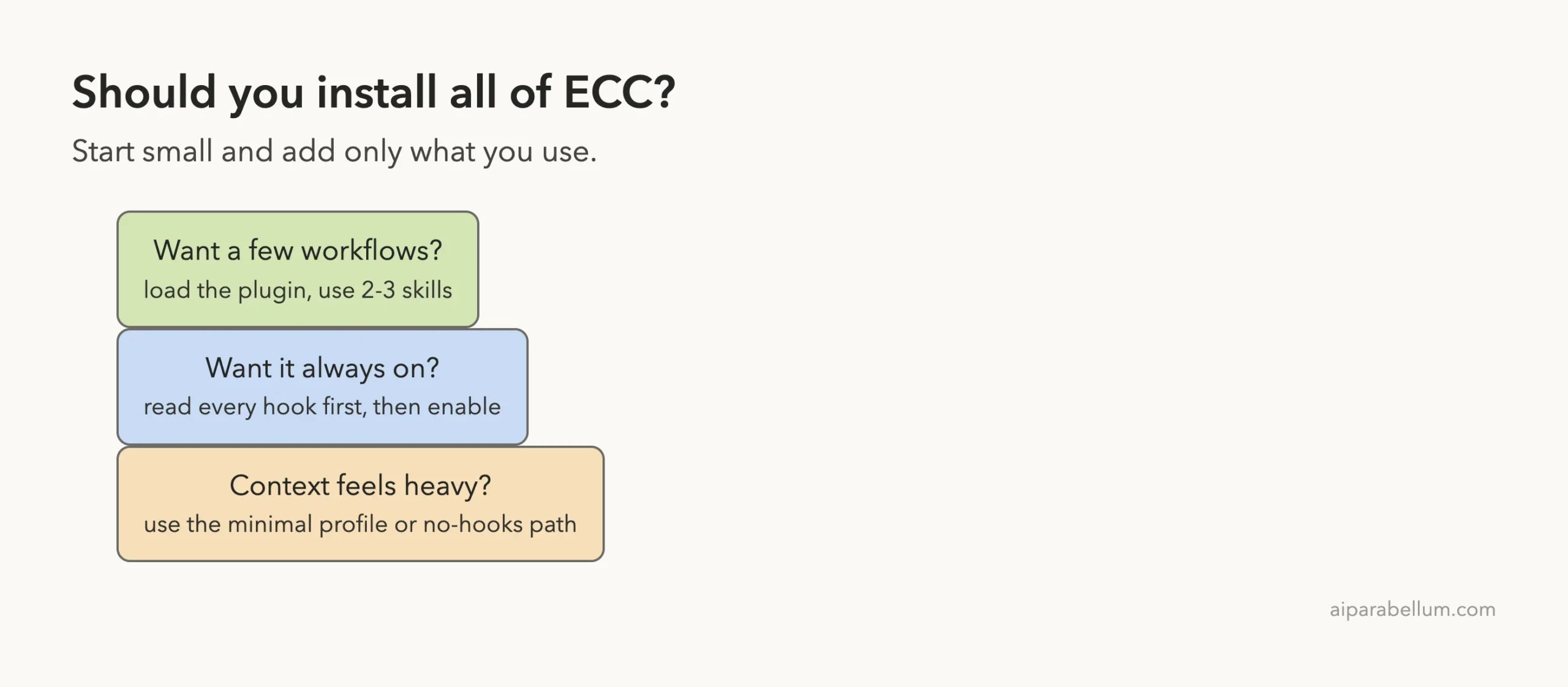
The README also offers a no-hooks install path and a hook profile setting with minimal, standard and strict levels. That is a sensible way to ease in.
Common Mistakes
- Installing the plugin and also running the full manual installer. The README says to choose one path only.
- Turning on every hook without reading
hooks/hooks.json. - Installing from an unofficial mirror instead of the official repo or the
ecc@eccplugin. - Forgetting that the skill and agent descriptions use context on every turn.
- Trusting one review run as final. Our two runs gave different counts.
Pro Tips
- Try ECC with
--plugin-dirin a throwaway folder before you install it for good. - Run
/contextbefore and after to see the real cost. - Use the
ecc:prefix to keep ECC commands separate from built-in ones. - The README’s token tips include setting the model to
sonnetand compacting earlier withCLAUDE_AUTOCOMPACT_PCT_OVERRIDEset to 50. We did not test these settings. - Browse the skills directory to compare ECC with smaller add-ons.
Try It Yourself
Make a small throwaway project with one short Python file and one bug, commit it, then change one line. Start Claude Code with --plugin-dir pointing at your clone of the repo and paste this:
/ecc:code-reviewThen ask for a new small function with the test-first skill:
/ecc:tdd-workflow add a function that returns the largest number in a listCompare what you get with a plain request and see which one you prefer. If you want another take on spec-first work, our guide to Spec Kit guide shows a different approach, and our look at what gstack installs shows how another big add-on behaves.
Load a big add-on for one session first, measure what it costs, and keep only the few skills you really use.
Cheat Sheet
Frequently Asked Questions
Is Everything Claude Code the same as ECC?
Yes. The project is moving to the short name ECC. The GitHub repo is affaan-m/ECC and the plugin name is ecc@ecc.
Is it free?
The repo is MIT-licensed and free to use. The README also mentions a paid hosted GitHub App for private repos, which we did not test.
Does it work with other tools than Claude Code?
The README says it supports several tools, including Codex and Cursor. We only tested it in Claude Code.
Will it slow my sessions or use more tokens?
The skill and agent descriptions add about 13.7k tokens of context in our test. The hooks could add work too, but we did not run them.
Do I need to install everything?
No. The README itself says to start with the workflow you need and offers a minimal, no-hooks path. Load it for one session first and keep only what you use.
Conclusion
Everything Claude Code is a huge toolbox, and the honest answer to what is worth using is: a small slice. In our test the test-first skill and the code review command were useful and well behaved, while the full catalog cost over 13k tokens of context before we typed anything. Try it for one session with --plugin-dir, read the hooks before you turn them on, and keep only the few skills you actually reach for. This guide is also listed in our Claude Code tutorials hub, and you can learn more about the tool itself on our Claude AI page.
Previous in the series: Part 16, Claude Code Superpowers, which covers install and what it really does
Next in the series: Part 21, Everything Claude Code vs gstack: Which Should You Install?, is coming soon.