gstack is one of the most popular Claude Code skill packs on GitHub right now, with more than 139,000 stars. Its install is a single prompt you paste into Claude Code, and Claude does the rest.
That’s convenient, but it also means you may not see what changes on your machine. So we read gstack’s setup script and docs line by line before running anything.
Here’s what gstack is, everything its setup changes, what it sends off your machine, how to install it with fewer side effects, and how to remove it.
What Is gstack for Claude Code?
gstack is a free, open source set of Claude Code skills under the MIT license, built by Garry Tan. The repo describes it as an opinionated setup where skills act as a CEO, designer, eng manager, release manager, doc engineer and QA.
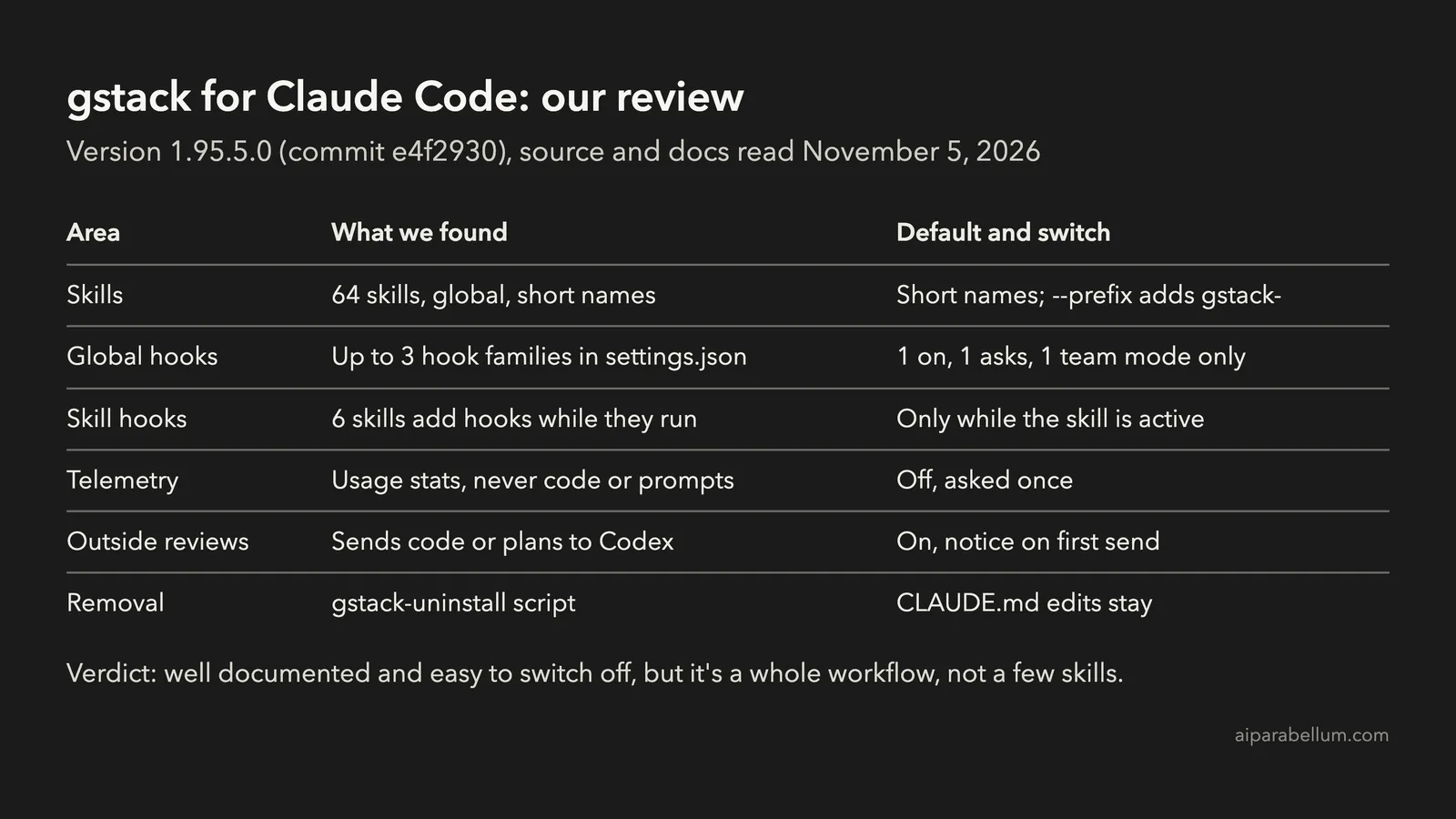
The repo description still says 23 tools, but it has grown a lot. The version we read, 1.95.5.0 from November 5, 2026, had 64 skill folders and a setup script of 5,164 lines.
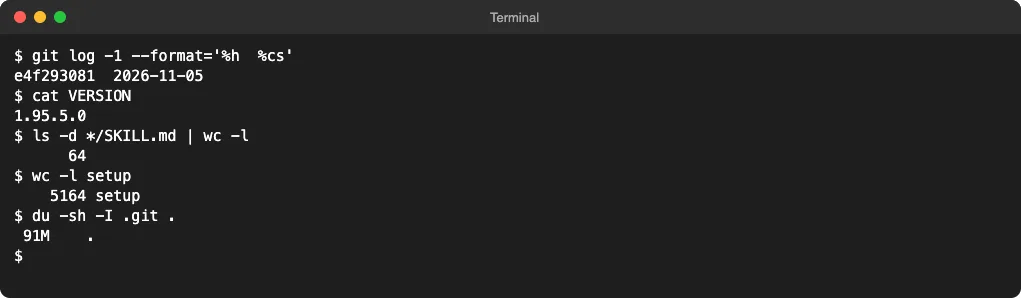
This review covers the code and the docs. It explains what setup is written to do; it doesn’t measure how well each skill works on real projects.
What gstack’s Setup Changes on Your Machine
The README’s install prompt asks Claude Code to clone gstack into ~/.claude/skills/gstack, run ./setup, then add a gstack section to CLAUDE.md. Here’s what that adds up to:
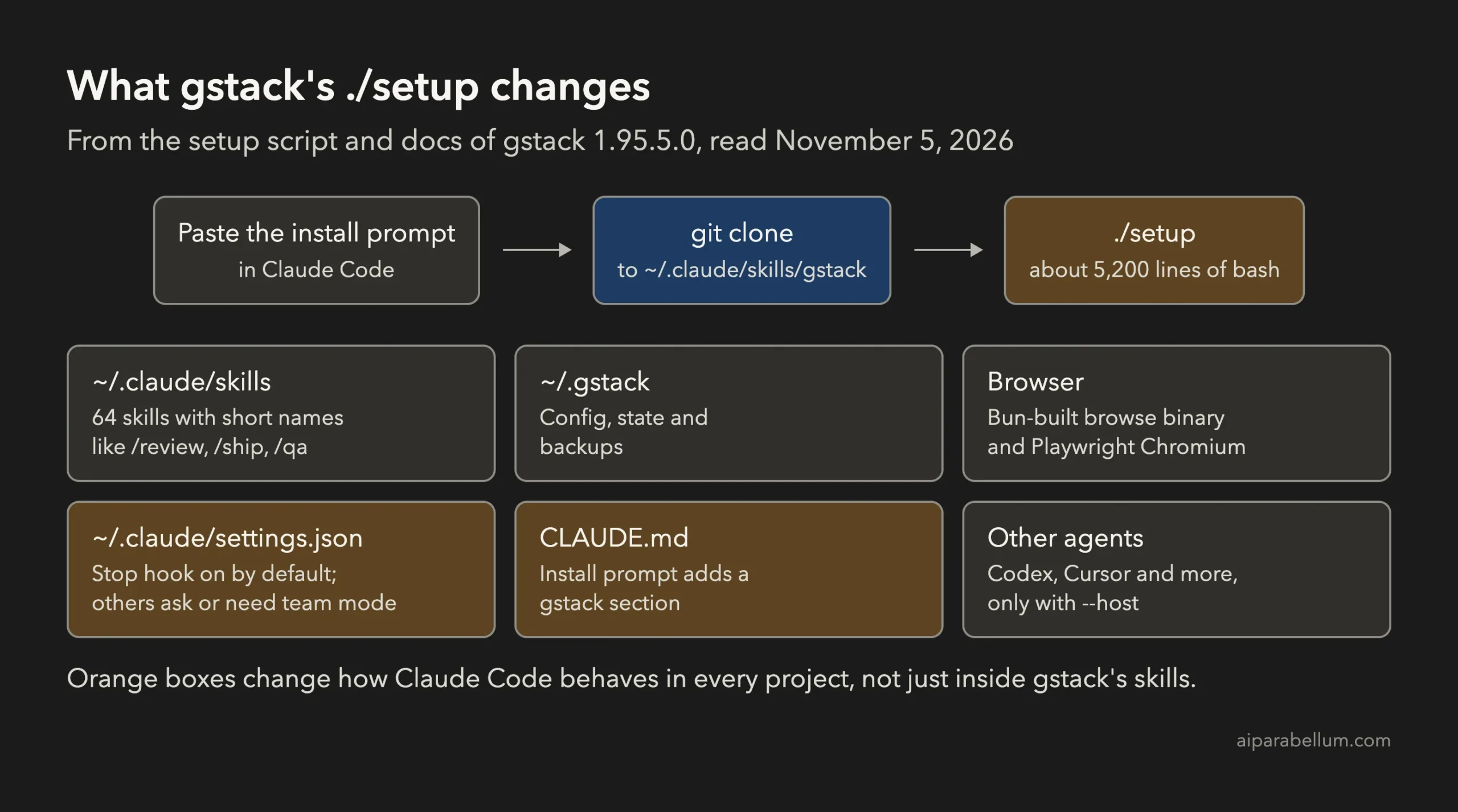
| Where | What setup puts there | Default |
|---|---|---|
~/.claude/skills/gstack | The whole repo, about 91 MB of files | Always |
~/.claude/skills/ | One folder per skill, linked back to the repo | Short names like /review and /ship |
~/.gstack | Config, project state and backups | Always |
| Browser | A browse binary built with Bun, plus Playwright’s Chromium | On; skip with --no-browser |
~/.claude/settings.json | Up to three hook families | One on by default (see below) |
| CLAUDE.md | A gstack section added by the install prompt | Added by Claude, not by setup |
| Other agents | Skills for Codex, Cursor, Gemini CLI and more | Only with --host |
Setup also needs Bun 1.4.2 or newer and refuses anything older than 1.3.3. The docs say a full setup took 31 seconds on a cloud machine, including the browser download.
The Hooks gstack Adds to settings.json
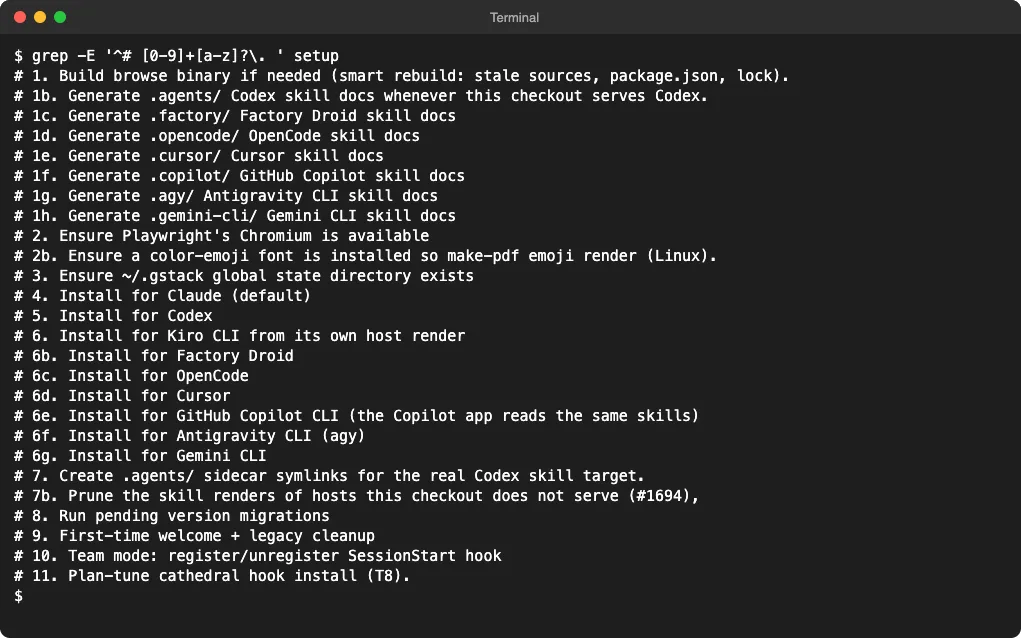
This is the part most people miss. Hooks in ~/.claude/settings.json run in every Claude Code session, whether or not you use a gstack skill. If hooks are new to you, our guide to Claude Code hooks explains how they work.
| Hook | What it does | Default | How to turn it off |
|---|---|---|---|
| Stop: session timeline | Closes timeline entries when a session is interrupted | On | ./setup --no-timeline-stop-hook |
| AskUserQuestion: PreToolUse and PostToolUse | Logs your answers for /plan-tune | Setup asks first | Say no, or --no-plan-tune-hooks |
| SessionStart: auto-update | Checks for gstack updates at every session start | Team mode only | ./setup --no-team |
| Skill routing and skill contracts | Suggests a skill for your prompt; blocks a skill that ends early | Off | Already off |
The default-on Stop hook is small. The docs say it has a 2-second budget, always exits cleanly and can’t block a session.
Every setup run also cleans up its own hooks. It removes dead gstack entries, points the rest at the stable install and writes a backup when it changes the file.
Six Skills Bring Their Own Hooks
Six skills also declare hooks in their own SKILL.md files: autoplan, careful, freeze, guard, investigate and plan-ceo-review. These only run while that skill is active, not in every session.
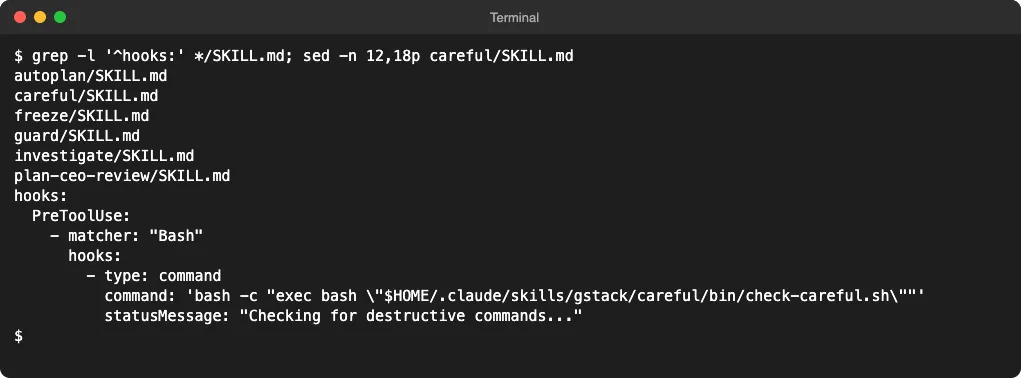
The useful ones are careful and freeze. Careful asks before destructive commands like rm -rf, and freeze blocks edits outside one folder. The script itself says careful is best-effort string matching, not a security boundary.
The CLAUDE.md Section
The install prompt tells Claude to add a gstack section to CLAUDE.md. It says to use gstack’s /browse skill for all web browsing and never the Claude in Chrome tools.
If you use Claude in Chrome, that line will stop Claude from using it. Check which CLAUDE.md Claude edited after the install, and change or remove that line if it doesn’t suit you.
What gstack Sends Off Your Machine
gstack’s privacy doc lists three kinds of network traffic, each with its own switch:
| Traffic | What’s sent | Default | Turn it off |
|---|---|---|---|
| Telemetry | Skill name, outcome, duration, version and OS; never code, prompts or file paths | Off; asked once | gstack-config set telemetry off |
| Update check | Requests to GitHub for the latest version | On | gstack-config set update_check false |
| Outside reviews | Your code, diff or plan, sent to Codex for a second opinion | On; notice on first send | gstack-config set codex_reviews disabled |
Outside reviews matter most. Plan reviews, /autoplan, /review, /ship, /spec and several design skills can send your code to a second model using your own Codex login.
If your code shouldn’t go to a second AI provider, turn that off before you use those skills. gstack keeps a receipt for each send, and gstack-egress list shows them.
The 64 gstack Skills by Role
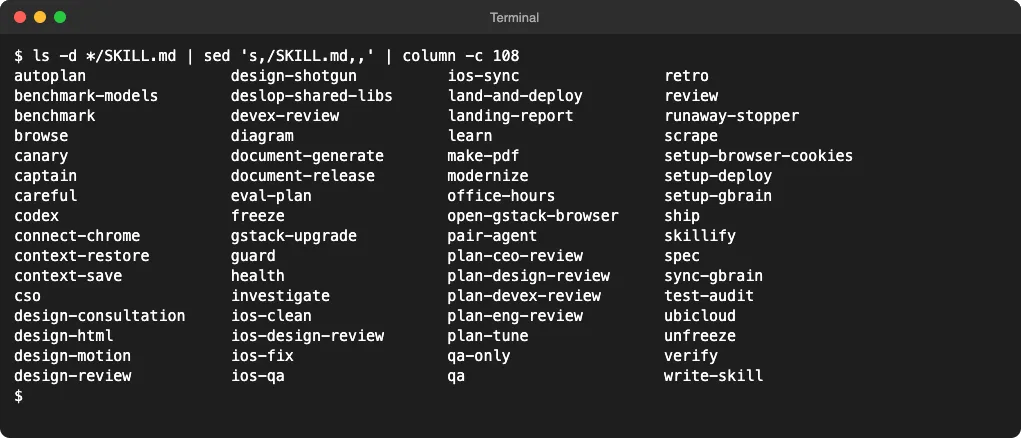
| Role | Example skills |
|---|---|
| Planning | /office-hours, /spec, /plan-ceo-review, /plan-eng-review, /autoplan |
| Design | /design-consultation, /design-review, /design-shotgun, /design-html |
| Coding and review | /investigate, /review, /verify, /test-audit, /health |
| QA and browser | /qa, /qa-only, /browse, /scrape, /benchmark |
| Shipping | /ship, /land-and-deploy, /canary, /document-release |
| Safety | /careful, /freeze, /guard, /cso |
| iOS | /ios-qa, /ios-fix, /ios-design-review |
The README suggests two first moves. Use /office-hours or /spec for a new idea, and /qa or /investigate for existing code.
How to Install gstack With Fewer Side Effects
You need Claude Code, Git and Bun first. If you’re new, start with our guide to install Claude Code.
Instead of pasting the install prompt, you can run the commands yourself and pick the flags:
git clone --single-branch --depth 1 https://github.com/garrytan/gstack.git ~/.claude/skills/gstack
cd ~/.claude/skills/gstack
./setup --prefix --no-timeline-stop-hook
With --prefix, skills are named /gstack-review and /gstack-ship, so they don’t clash with other skill packs. With --no-timeline-stop-hook, setup leaves your global hooks alone unless you say yes to the /plan-tune hooks.
Then decide on outside reviews. To keep your code from going to a second provider, run:
~/.claude/skills/gstack/bin/gstack-config set codex_reviews disabledAdd the CLAUDE.md section by hand only if you want it. To check the install, run ~/.claude/skills/gstack/bin/gstack-doctor, which prints one row per check without starting a skill.
What Team Mode Adds
Team mode, ./setup --team plus gstack-team-init, commits gstack setup files and a CLAUDE.md change into your repo. Teammates then get gstack automatically.
It also adds the SessionStart hook, which updates gstack from GitHub at most once an hour on its stable release channel. That’s handy for a team, but your skills change without you reviewing each update.
How to Uninstall gstack
gstack ships an uninstall script:
~/.claude/skills/gstack/bin/gstack-uninstallIt removes the skills, hooks, ~/.gstack state, browser processes and temp files. Add --keep-state to keep your config.
Two things stay behind. The script doesn’t edit CLAUDE.md, so remove the gstack and Skill routing sections yourself, and on macOS it leaves Playwright’s browser cache in ~/Library/Caches/ms-playwright because other tools may use it.
Our Verdict on gstack
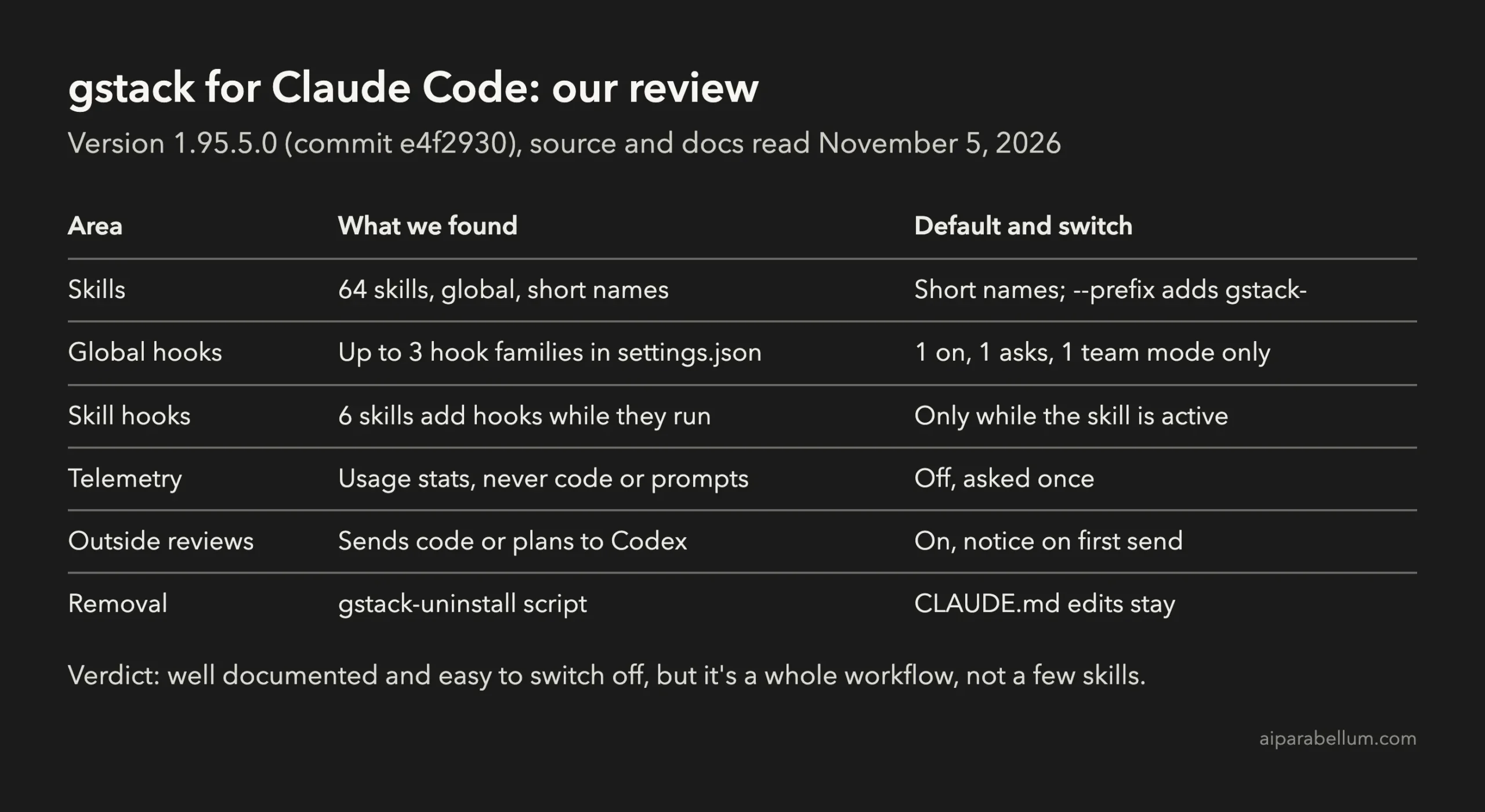
gstack is better behaved than its size suggests. Telemetry is off, the default hook can’t block a session, every network send has a switch, and there’s a real uninstall script.
The cost is scope. You get 64 global skills, a hook in every session, a browser download, outside reviews on by default and a CLAUDE.md rule against Claude in Chrome.
Install it if you want one opinionated workflow from idea to shipped PR and you’ll use many of its roles. If you only want a few skills, a smaller pack like Superpowers or a single workflow like Spec Kit is easier to keep track of.
FAQ
Is gstack free?
Yes. gstack is open source under the MIT license. You pay only for the Claude Code usage its skills create, plus Codex usage if outside reviews run.
Does gstack change my Claude Code settings?
Yes. Setup adds a Stop hook to ~/.claude/settings.json by default, asks before adding the /plan-tune hooks, and adds an auto-update hook in team mode.
Does gstack send my code anywhere?
Telemetry never sends code. But outside reviews, which are on by default, send code, diffs or plans to Codex for a second opinion until you run gstack-config set codex_reviews disabled.
Can I install only some gstack skills?
Setup installs all of them, but you can hide the ones you don’t use. Run gstack-config set disabled_skills make-pdf,pair-agent with your own list, and those skills stop loading into each session. For more on how skill packs fit together, see our guides to Claude Code skills and Claude Code plugins.
Conclusion
gstack for Claude Code installs 64 skills, a browser, a ~/.gstack state folder and at least one global hook, and its install prompt adds a CLAUDE.md rule against Claude in Chrome. Everything is documented and can be turned off, so install it with --prefix, decide on the Stop hook and outside reviews up front, and check CLAUDE.md afterward. The full details are in the gstack repository and its install notes.