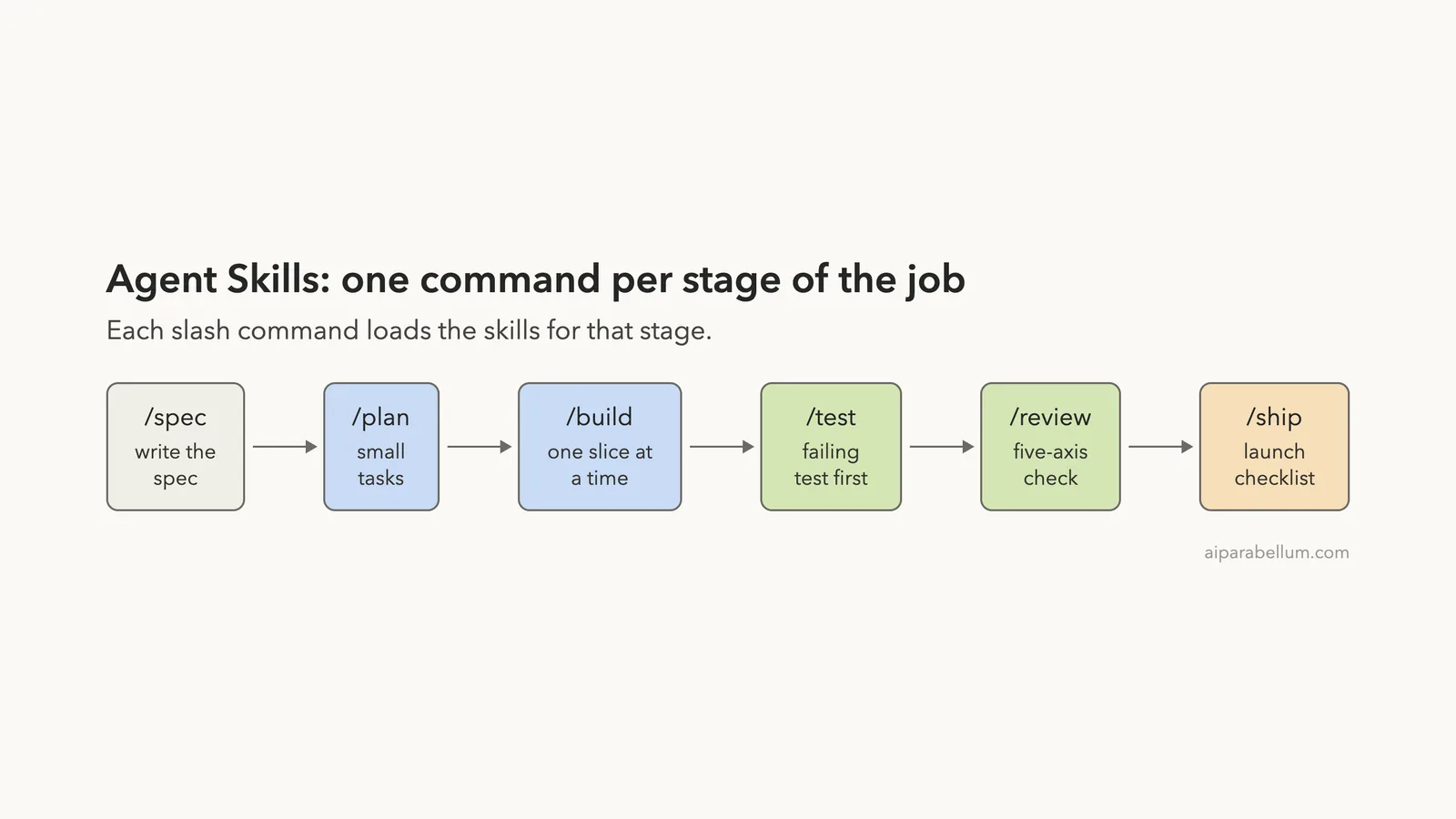
Addy Osmani agent skills is a free, open-source pack of 25 engineering skills and 9 slash commands that you can add to Claude Code. Every stage of a software job, from writing a spec to shipping, gets its own written routine. We loaded it in a throwaway sandbox, ran two of its commands on a tiny buggy shopping-cart file, and read its hooks before trusting it.
This guide shows how to install it, what we saw, and who should keep it.
This guide is part of our Claude Code tutorials. Find more add-ons in our Claude Code Skills Directory.
Tested with Claude Code v2.1.318 on November 5, 2026, with agent-skills v0.6.15 (commit 301b02b, dated November 1, 2026). We loaded it with --plugin-dir and --setting-sources project in a throwaway folder, so nothing was installed into the normal Claude Code setup.
Quick Summary
| Question | Answer |
|---|---|
| What is it? | A plugin with 25 skills, 9 slash commands and 4 agent personas for the full development lifecycle |
| Who made it? | Addy Osmani, MIT license, repository addyosmani/agent-skills |
| Official install commands | /plugin marketplace add addyosmani/agent-skills then /plugin install agent-skills@addy-agent-skills |
| How we tested it | A cloned copy loaded with --plugin-dir in a demo folder |
| Commands we ran | /agent-skills:test and /agent-skills:review |
| What we did not run | /spec, /plan, /build, /ship, /webperf and the agent personas |
What Are Addy Osmani’s Agent Skills?
A skill is a folder with a SKILL.md file that Claude can read when a job matches its description. If skills are new to you, our guide to Claude Code skills explains them from scratch.
The README describes this pack as production-grade engineering skills that encode the workflows and quality gates senior engineers use. Each skill covers one habit, such as writing a failing test before the fix, or reviewing code on five separate axes. The pack also adds 9 slash commands that line up with the stages of a project.
Our checkout of the repository held 25 skill folders, 9 command files and 4 agent files. The agents are code-reviewer, security-auditor, test-engineer and web-performance-auditor.
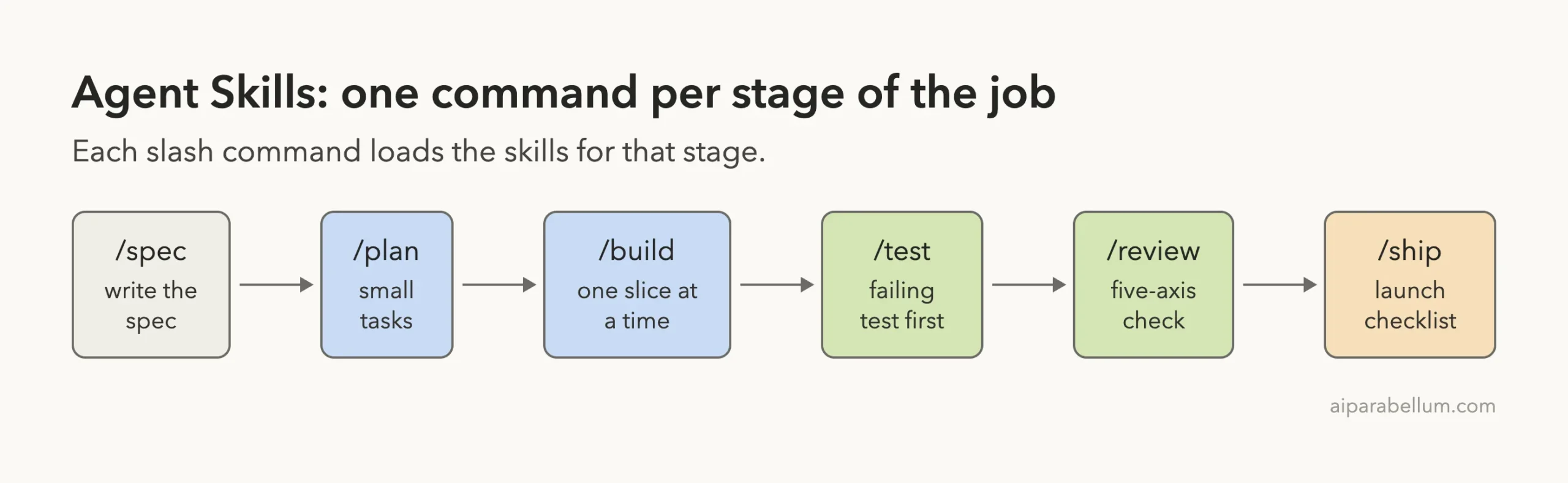
The Nine Commands and What They Do
The README lists the commands in a table. Here is the same list in plain English, with the key principle the README gives for each one.
| Command | When you use it | Key principle |
|---|---|---|
/spec | Define what to build | Spec before code |
/plan | Plan how to build it | Small, atomic tasks |
/build | Build in slices | One slice at a time |
/test | Prove it works | Tests are proof |
/constraints | Set the quality bar | Decide it once, enforce it everywhere |
/review | Review before merge | Improve code health |
/webperf | Audit web performance | Measure before you optimize |
/code-simplify | Simplify the code | Clarity over cleverness |
/ship | Ship to production | Faster is safer |
In Claude Code these install as plugin commands, so they carry the plugin name. The README says to use the namespaced form, for example /agent-skills:review, because Claude Code already has a built-in /review command. We used the namespaced form for both of our tests.
The skills also fire on their own. The README says that designing an API triggers api-and-interface-design, and building a screen triggers frontend-ui-engineering. We saw this only through the commands, so we cannot say how often the automatic route fires on its own.
How to Install Agent Skills in Claude Code
Option 1: The plugin marketplace
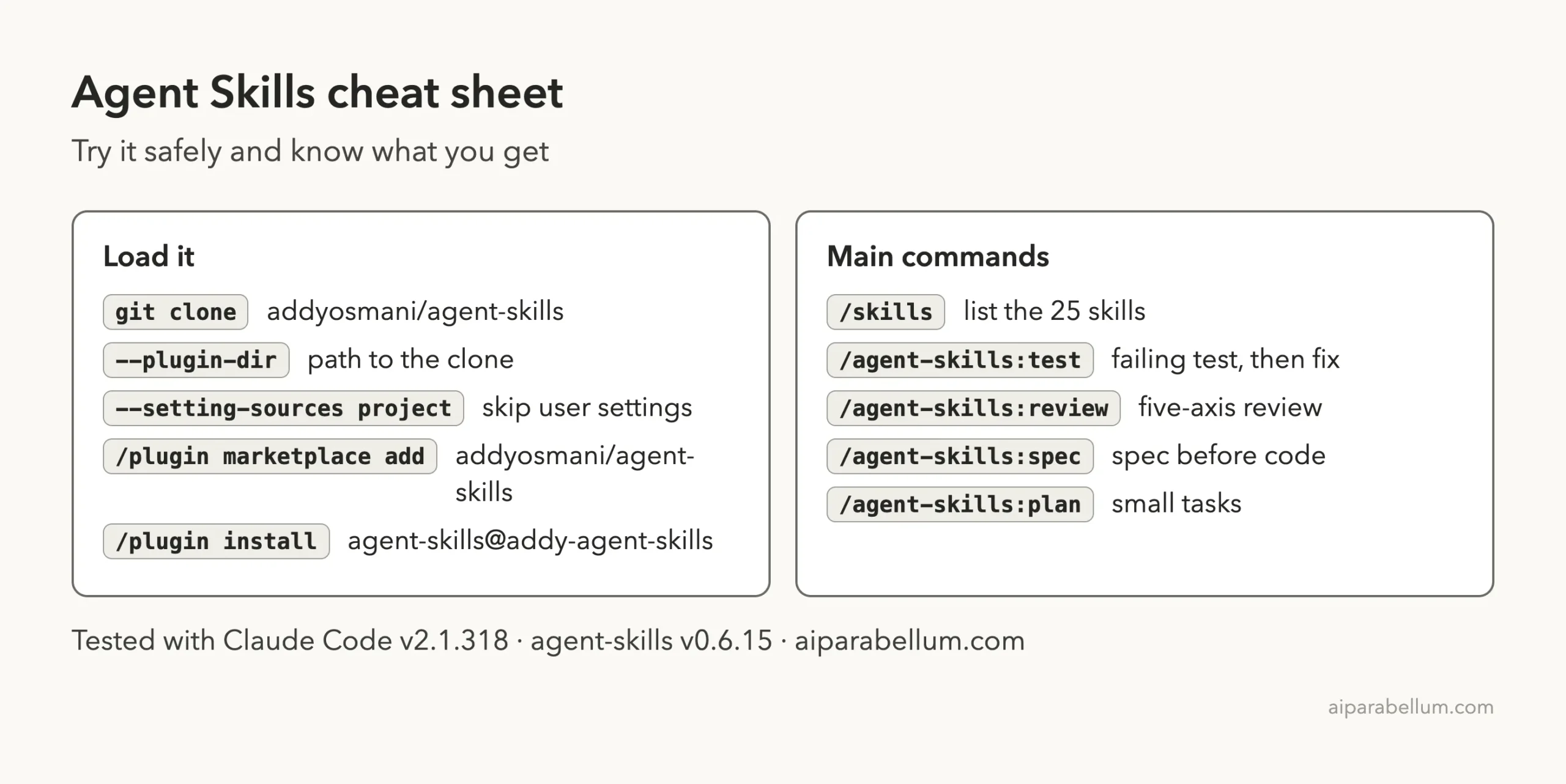
The README recommends this route for Claude Code. Inside Claude Code, add the author’s marketplace, then install the plugin from it.
/plugin marketplace add addyosmani/agent-skills
/plugin install agent-skills@addy-agent-skills
Both commands write to your own Claude Code setup, so we did not run them for this test. Our plugins guide explains how plugin installs work, and the official discover plugins page covers the marketplace commands.
Option 2: The skills CLI
The README also shows a one-line install with the open skills CLI, which works with many coding agents. You can install all 25 skills, list them first, or pick one.
npx skills add addyosmani/agent-skills --list
npx skills add addyosmani/agent-skills --skill code-review-and-quality
There is a catch the README states itself. A single-skill install copies only that skill’s folder, not the shared references/ folder, so some checklist links stop working. We did not run this option.
Option 3: Try it without installing (what we did)
You can load a plugin from a folder for a single session. That leaves your normal setup alone, which is the safer way to judge a tool before keeping it. The official plugins documentation describes the --plugin-dir flag for this purpose.
git clone --depth 1 https://github.com/addyosmani/agent-skills
cd my-demo-folder
claude --setting-sources project --plugin-dir /path/to/agent-skills
The --setting-sources project flag tells Claude Code to read only the project’s own settings, so your personal skills and hooks stay out of the test.
Read the Hooks Before You Trust Them
A plugin can run code on your machine, so we read the hooks folder first. It holds scripts for a session-start message, a cache for fetched web pages, and a tool that protects code from being simplified.
The plugin’s manifest file, plugin.json, lists commands and skills but no hooks, so none of these scripts run when you load the plugin. The comments in the session-start script say the plugin does not wire it, because Claude Code already routes skills from their descriptions. If you want the web-page cache, the README tells you to add it to your own settings by hand.
The session-start script only reads one skill file, using-agent-skills, and prints it as JSON. We found no network call in it.
The cache script is the one place that talks to the network, and it only runs if you wire it in yourself. For more on how hooks behave, see our guide to Claude Code hooks.
What We Saw After Loading It
Our demo folder held two small files: cart.py with an apply_discount function and a cart_total function, and test_cart.py with one passing test. We planted one bug: the discount divided by 10 instead of 100, so a 20 percent discount on 100 gave -100 instead of 80.
Typing /skills after loading the plugin listed the nine commands first, then the individual skills, all marked as coming from agent-skills.
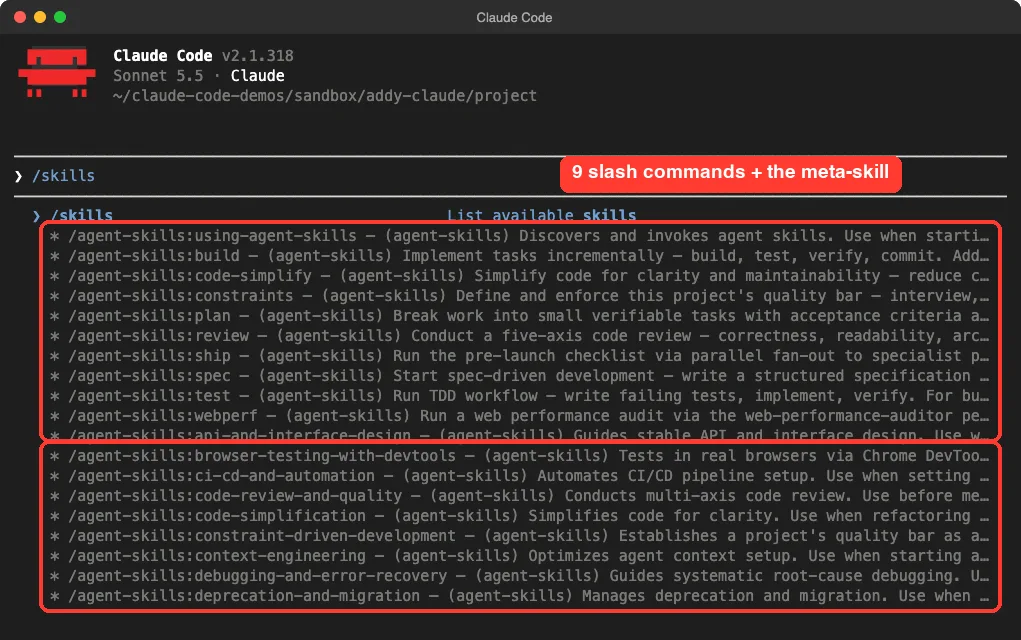
/skills screen after loading the plugin: the nine commands, then the skillsTest 1: A Failing Test Comes Before the Fix
We ran the test command with one short sentence describing the bug. The command takes your text as the task, so the plugin name plus your sentence is all you type.
/agent-skills:test apply_discount(100, 20) in cart.py should return 80 but returns -100. Fix this bug.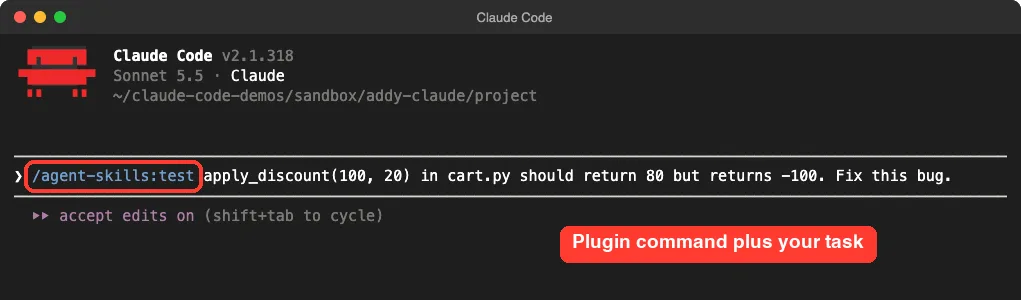
The command file tells Claude to use the Prove-It pattern for bugs. That means write a test that reproduces the bug, confirm it fails, fix it, then confirm it passes and run the full suite.
Claude did exactly that. It added three tests, ran them, and printed “RED confirmed” with the real result of -100.0. Only after that did it edit one line in cart.py, changing / 10 to / 100, and rerun all four tests, which passed.
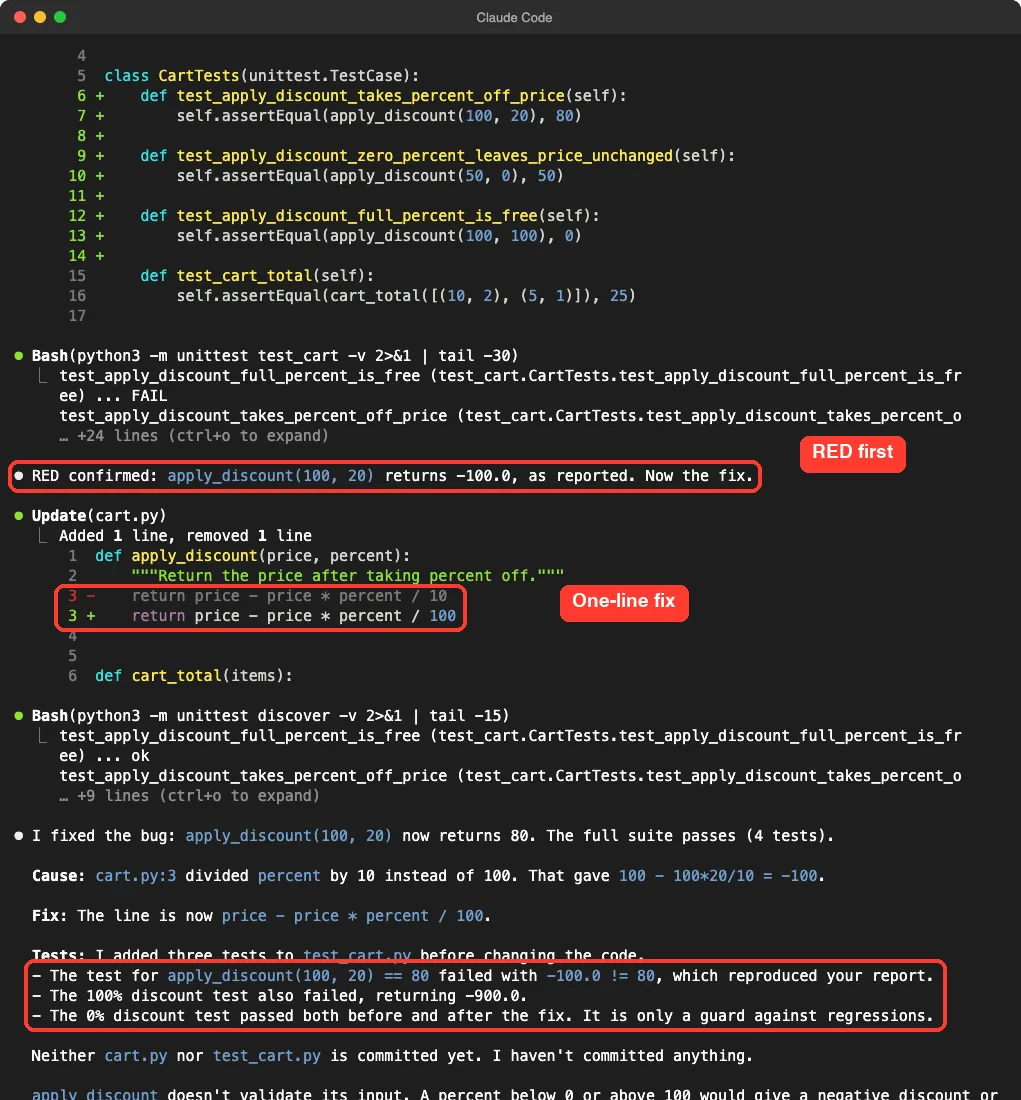
Two details impressed us. The summary said the 0 percent test passed both before and after the fix, so it was only a guard against regressions. And Claude noted that it had not committed anything.
We cannot say how much of this came from the plugin. A plain Claude Code session might also write a test first. What the plugin added was a written routine that makes the order predictable, and the output followed that routine step by step.
Test 2: A Five-Axis Code Review
Next we ran the review command on the fixed files. Claude loaded the code-review-and-quality skill, read both files, and asked to run a short Python check on edge cases. We approved that in our script settings and let it finish.
/agent-skills:review cart.py and test_cart.pyThe skill says every review covers five axes: correctness, readability, architecture, security and performance. The output matched, with a heading for each axis, then a verification section and a severity summary.
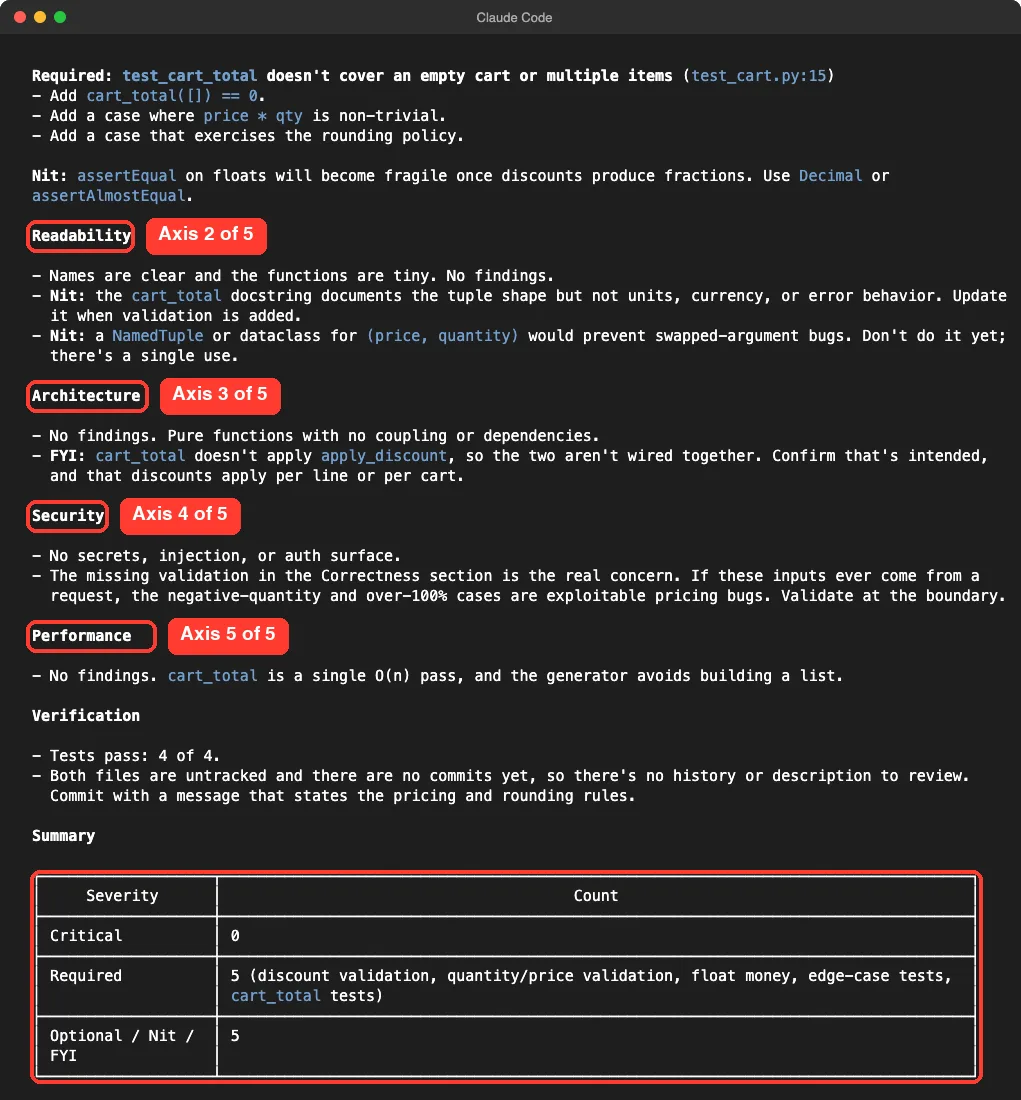
The findings were useful for such a tiny file. Claude flagged that apply_discount accepts a percent above 100 or below 0, and that float math is fragile for money. It also pointed out that cart_total never calls apply_discount, and asked us to confirm that was intended.
The summary counted 0 critical items, 5 required and 5 optional. For a ten-line file, five required items feels strict. That strictness is the plugin’s style, and you may find it helpful or noisy depending on your project.
Honest Verdict
The pack followed its own written routine in both commands we ran.
The pack does what its README says in the two places we checked. Both commands followed their written routine, and the output was easy to read. We ran only two of nine commands on a ten-line file, so we cannot judge the long chains, the agent personas or the shipping checklist.
| Good fit if you | Maybe skip it if you |
|---|---|
| Want a fixed routine for tests and reviews | Like quick, loose answers on small tasks |
| Work in a team and want everyone to follow the same steps | Already have your own review skill |
| Want to read and edit the skills, since they are plain files | Do not want 25 extra skill descriptions in your session |
One cost to keep in mind: 25 skills means 25 more descriptions that Claude Code may read. Our add-on comparison explains how that choice fits with the other add-on types. If you only want the review, install just that one skill and copy the shared checklist yourself.
Try It Yourself
Practice on a throwaway folder, never a real project. Create a small file with a bug and a passing test, load the plugin with --plugin-dir, and run the test command.
mkdir -p ~/claude-code-demos/skills-try && cd ~/claude-code-demos/skills-try
git clone --depth 1 https://github.com/addyosmani/agent-skills ../agent-skills
claude --setting-sources project --plugin-dir ../agent-skills

/agent-skills:test the function in app.py gives the wrong total. Reproduce it with a test first, then fix it.
After it finishes, run /agent-skills:review app.py and compare the findings to your own reading of the code.
Common Mistakes
- Typing
/reviewand getting the built-in command. Use/agent-skills:review. - Assuming the hooks are active. They are not wired by the plugin; you add them yourself.
- Installing one skill with
npxand wondering why a checklist link fails. The sharedreferences/folder is not copied. - Treating every “required” item as a must-fix. Read each one and decide for your project.
- Running it on a real project before a trial. Test in a demo folder first.
Pro Tips
- Run
/skillsright after loading, so you know exactly what was added. - Give the command a specific bug sentence, with the real wrong value you saw.
- Read
SKILL.mdfor a skill before relying on it. They are short and written in plain English. - Commit or stash your work before any command that edits files.
- If a skill does not fire when you expect, see our guide on skills not triggering.
Cheat Sheet
Frequently Asked Questions
Are Addy Osmani’s agent skills free?
Yes. The repository uses the MIT license and the plugin costs nothing. You still pay for the normal Claude Code usage that its extra steps consume.
Does it change my Claude Code settings?
Loaded with --plugin-dir, it ran for that session only. A normal /plugin install adds it to your own setup until you remove it.
Does it work with tools other than Claude Code?
The README lists setup steps for many other coding agents, and the skills CLI targets them too. We tested only Claude Code, so we cannot speak for the rest.
Can I use only one skill?
Yes. The README shows a command to install a single skill, but it warns that shared reference files are not copied with it.
Do the hooks run automatically?
No. The plugin manifest does not list any hooks, so they stay off unless you add them to your own settings.
Conclusion
Addy Osmani’s agent skills give Claude Code a written routine for each stage of a job. In our two small tests, the test command proved the bug before fixing it, and the review command checked five axes and ended with a clear severity count. Try it in a sandbox first, because we did not run the planning, build or ship commands, and keep it if you like having a process. For the source code, see the repository at addyosmani/agent-skills. For background on the model behind it, see our Claude AI overview.