A tampered copy of the Claude Code extension reached the Cursor Marketplace on October 29, 2026, and it tried to plant an SSH backdoor on developer machines. If you use Cursor, the Claude Code extension backdoor is worth a one-minute check today.
The copy has been removed, and Cursor says the attacker’s server is offline. Still, removing it from the store doesn’t clean a machine that already ran it.
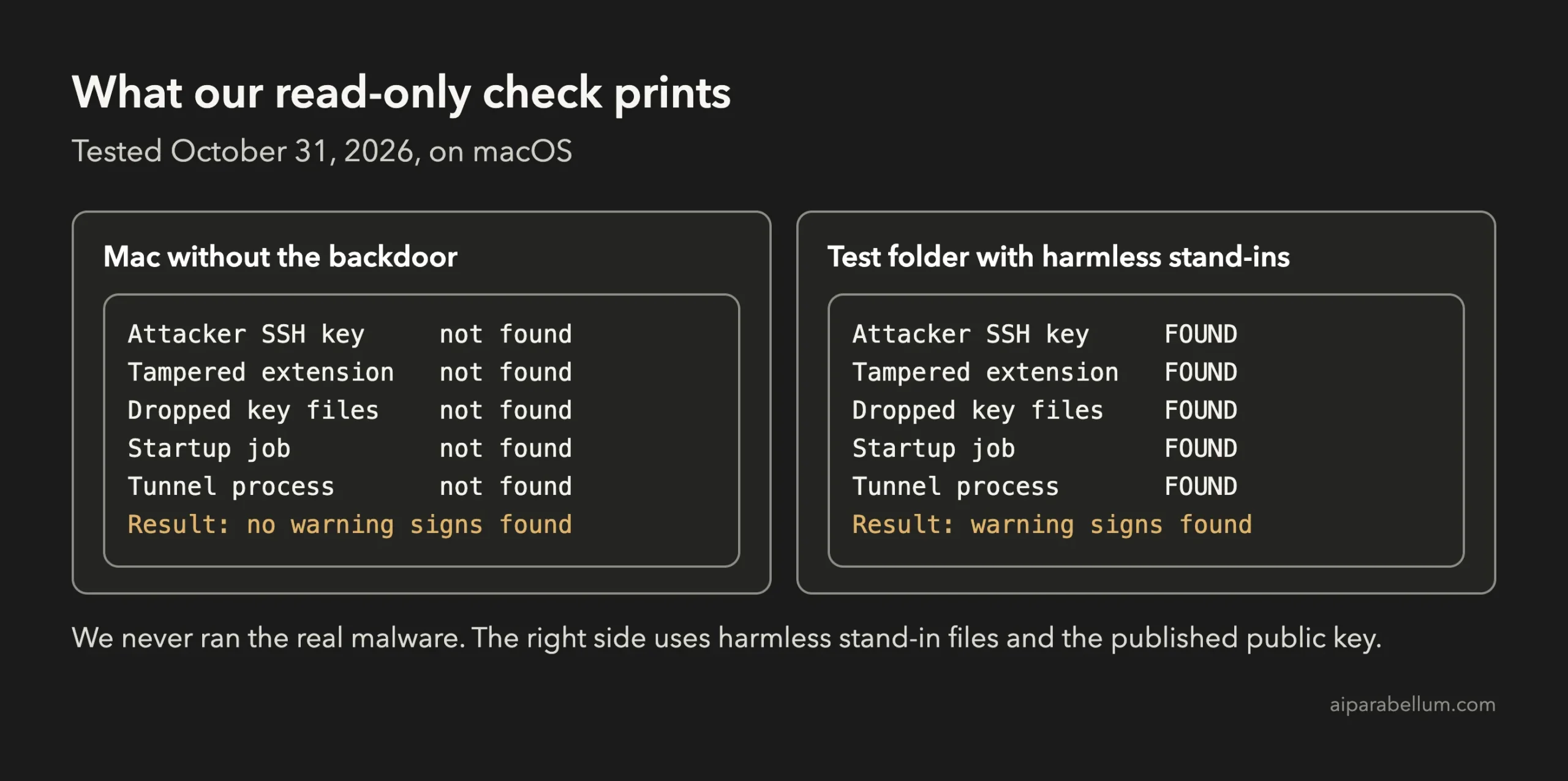
Below you’ll find a read-only check you can paste into your terminal, plus what to do if it finds something. We tested the macOS check on October 31, 2026, without ever running the malware.
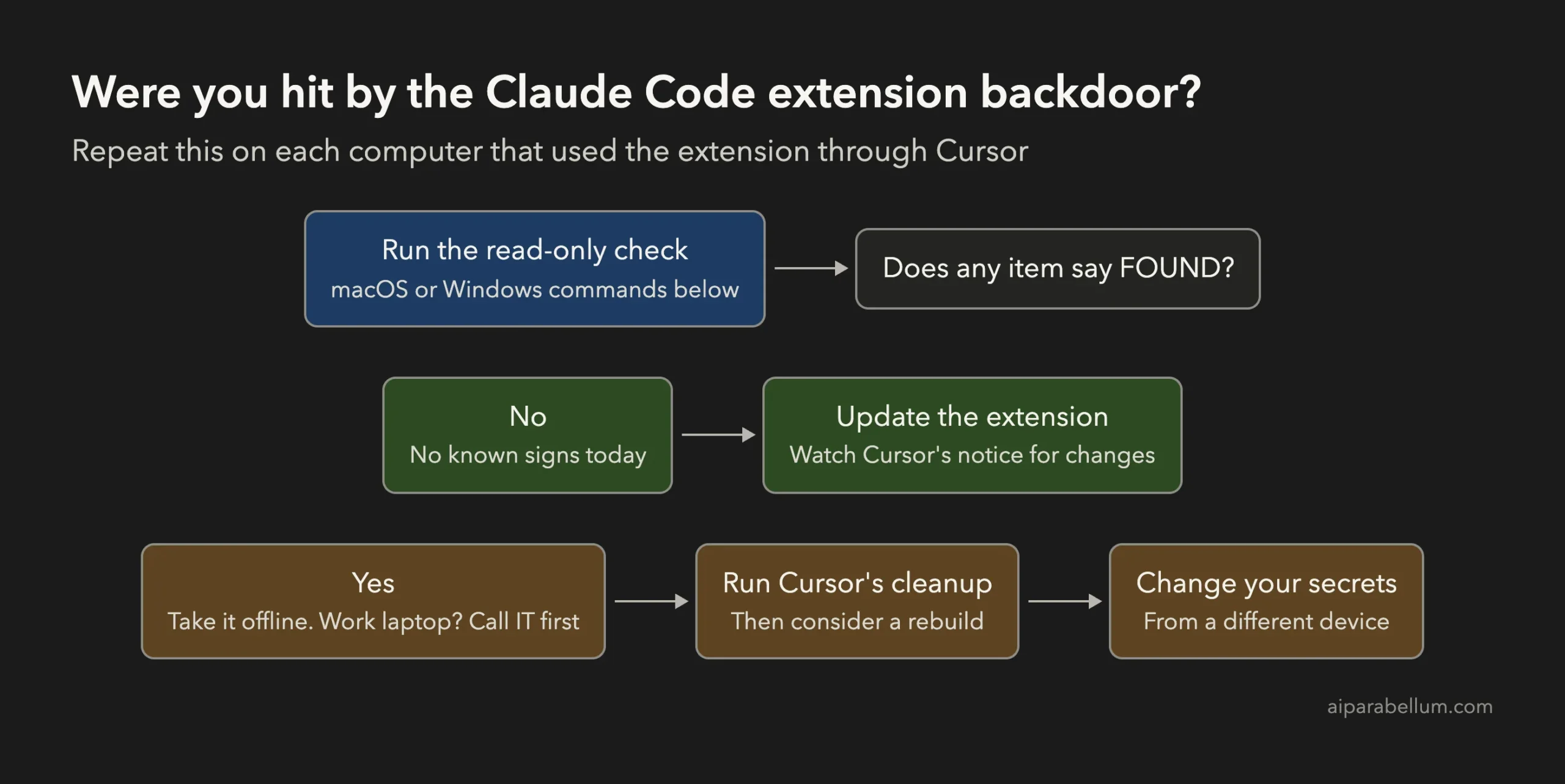
Key takeaway: If you installed or updated the extension through Cursor on October 29, run the check. Uninstalling alone may leave the backdoor behind.
What Happened With the Claude Code Extension Backdoor
Someone published modified versions 2.1.312 and 2.1.313 of the Anthropic.claude-code extension to Cursor’s marketplace. According to Cursor’s security notice, they were available from about 2:27 a.m. to 1:35 p.m. Pacific time (5:27 a.m. to 4:35 p.m. Eastern).
Anthropic says it didn’t build or publish this copy. In its statement, the company said this “wasn’t a compromise of Anthropic’s systems or employee laptops.”
Cursor says it has no evidence that other versions or the official distribution are affected, and that its audit found no other tampered extensions. As of October 31, neither notice we read explains how the attacker got marketplace access or how many people installed the copy.
What the Tampered Extension Did
Security firm Phorion’s technical analysis found that the code ran as soon as the extension loaded. You didn’t have to click anything.
- It added an attacker’s public key, labeled
svc-telemetry, to yourauthorized_keysfile. - It tried to turn on your computer’s SSH service and open a reverse tunnel to the attacker’s server.
- It set up a startup job so the tunnel attempts would survive a reboot.
- It reported your hostname, username, Git email, public IP and the names of environment variables that look like secrets.
That last point deserves care. The report included the names of variables, not their values, so an attacker could learn that you have an AWS key without receiving it in that report.
Why the Damage May Be Limited
Bugs in the malware help here. Cursor says turning on SSH needs admin rights that the extension doesn’t have on most Mac and Windows machines, so the attacker couldn’t log in through the tunnel on those computers.
That isn’t a free pass. The key, the startup job and the report could still go through, and a computer with SSH already turned on is a different situation, so clean up either way.
Who Needs to Check
| Your setup | What to do |
|---|---|
| Installed or updated through Cursor on October 29, on macOS or Windows | Run the check now. |
| Use the extension in Cursor, but unsure about updates that day | Run the check. Extensions can update without you noticing. |
| Use VS Code’s own marketplace or the Claude Code terminal app | Cursor has no evidence of a problem here. The check is optional. |
| Use Linux | Cursor lists Mac and Windows builds, while Phorion found setup code for Linux too. Check the same files if you got the extension from Cursor. |
Don’t rely on the version number alone. Cursor’s cleanup script notes that the tampered copy keeps the real version number, so it looks inside the file for the marker instead, and our check does the same.
How to Check Your Mac for the Backdoor
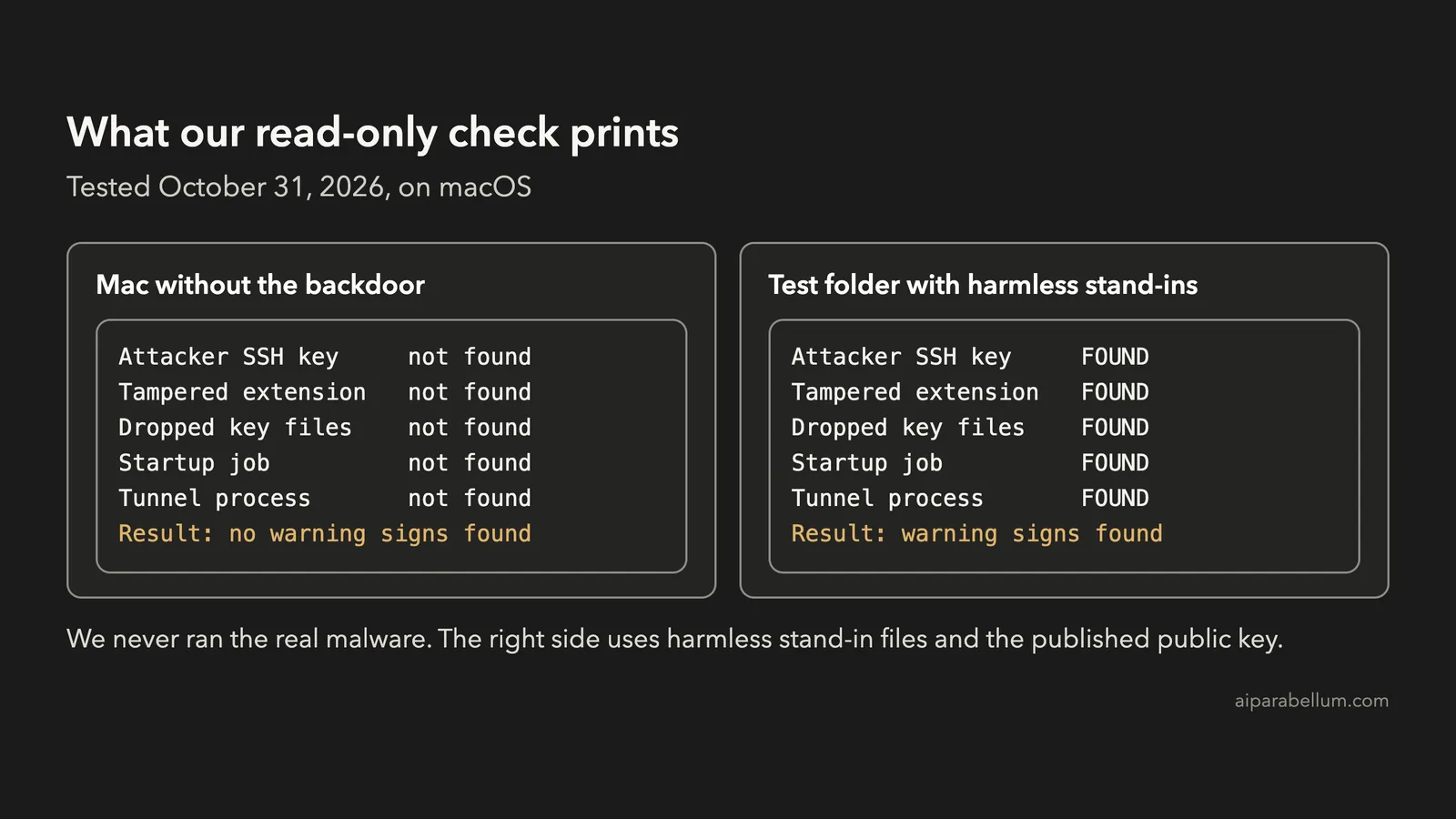
Open Terminal and paste the whole block. It only reads files and lists running processes, so it won’t change anything on your computer.
sh <<'CHECK'
FP='SHA256:0Z6R+DF64Do2nwQic8a7kkfDLNNk4IiK+2U2Rci4htk'
PROCS='/\.stk_[0-9a-f]{10}|/\.config/\.smtk|^/bin/sh .*/\.config/\.smt$'
hits=0
show() { if [ "$2" = 0 ]; then printf '%-20s not found\n' "$1"; else printf '%-20s FOUND\n' "$1"; hits=1; fi; }
n=0; grep -qs svc-telemetry ~/.ssh/authorized_keys && n=1; ssh-keygen -lf ~/.ssh/authorized_keys 2>/dev/null | grep -q "$FP" && n=1; show 'Attacker SSH key' $n
n=0; for f in ~/.[!.]*/extensions/anthropic.claude-code-*/extension.js; do grep -qs svc-telemetry "$f" && n=1; done; show 'Tampered extension' $n
n=0; for f in ~/.config/.smt ~/.config/.smtk; do [ -e "$f" ] && n=1; done; show 'Dropped key files' $n
n=0; [ -e ~/Library/LaunchAgents/com.apple.sysmond.plist ] && n=1; launchctl list 2>/dev/null | grep -q com.apple.sysmond && n=1; show 'Startup job' $n
n=0; pgrep -f "$PROCS" >/dev/null 2>&1 && n=1; show 'Tunnel process' $n
[ "$hits" = 1 ] && echo 'Result: warning signs found' || echo 'Result: no warning signs found'
CHECK
Every indicator comes from Cursor’s published list and cleanup script. The fingerprint test catches the key even if someone renamed its label, and we confirmed that the published fingerprint matches the published key.
Our test had two sides. A clean Mac came back with no warning signs, and a test folder with harmless stand-in files and a harmless dummy process triggered all five lines.
A clean result covers the signs on that list, as they stand today. It can’t prove that nobody touched your machine, so it isn’t the same as a full security review.
How to Check Windows
Open PowerShell and run Cursor’s own key check. We didn’t test the Windows commands ourselves, so this part relies on Cursor’s notice.
$files = "$HOME\.ssh\authorized_keys", "C:\ProgramData\ssh\administrators_authorized_keys" | Where-Object { Test-Path $_ }
if ($files -and (Select-String svc-telemetry $files)) { "svc-telemetry key found" } else { "No key found; machine not impacted" }
Then look for the other files and the scheduled task from Cursor’s list. Anything that returns True or a task entry needs attention.
Test-Path "$HOME\.config\smt.cmd"
Test-Path "$HOME\.config\smtk"
Test-Path "$env:APPDATA\Microsoft\Windows\Start Menu\Programs\Startup\sysmon.cmd"
schtasks /query /tn SysMon
What to Do if You Find the Backdoor
If this is a work laptop, stop here and call your security team. They may want evidence from the machine before anyone cleans it.
- Take the computer off the network so nothing else can reach it.
- Get the cleanup script for your system from Cursor’s notice, using another device if you can, and read it. On a Mac, run it as yourself and not as root, and on Windows use PowerShell with Run as Administrator.
- Check that the script finishes without errors. It exits with a non-zero status if anything is left behind.
- Check your SSH logs if SSH was on. Phorion says a login through the tunnel would look like it came from localhost, using the
svc-telemetrykey. - Decide whether to rebuild the machine. If SSH was on or you can’t explain what happened, a clean install is the safer choice.
- From a different, trusted device, change the passwords, API keys, SSH keys, cloud credentials and sessions this computer could reach.
- Install the extension again only after the cleanup finishes.
Uninstalling isn’t enough, because Cursor says the scripts it drops can keep running without the extension. We read the Mac cleanup script but didn’t run it, since we had no infected machine to clean.
On a Mac, you should also open System Settings, go to General, then Sharing, and confirm that Remote Login is off unless you need it. See our guide to Claude Code in VS Code and JetBrains IDEs if you need to set the extension up again.
How to Lower Your Risk Next Time
You can’t fully prevent a poisoned update from a store you trust. You can make one much less damaging, though.
- Don’t start your editor with admin rights, since that was one condition that could make the SSH step work.
- Keep Remote Login and other SSH services off when you don’t use them.
- Keep long-lived secrets out of your shell’s environment variables where you can.
- Look through
~/.ssh/authorized_keysnow and then, and remove any key you don’t recognize. - Use a separate work environment for risky projects. Our guide to running Claude Code in a devcontainer shows one way, though it doesn’t replace these habits.
For the bigger picture, read our explainer on Claude Code data usage, privacy and security.
Claude Code Extension Backdoor FAQs
Was Anthropic hacked?
Anthropic says no. It describes this as a tampered copy published through access to Cursor’s marketplace, and Cursor also says Anthropic didn’t develop these versions.
Is the Claude Code terminal app affected?
Nothing we read points to it. The notices cover the editor extension from Cursor’s marketplace, and Cursor says it has no evidence that the official distribution is affected.
Did the attacker get my API keys?
The report sent environment variable names, not their values. Cursor still warns that this doesn’t rule out later access through the backdoor, so change your secrets if your check finds anything.
The check is clean. Do I need to do anything else?
Update your extension and keep an eye on Cursor’s notice, which has already changed once as the affected versions became clearer. Your clean result only reflects today’s known signs.
Conclusion
The Claude Code extension backdoor was a store-level attack on a tool people trust, and its own bugs may have limited the harm. Even so, a planted key and a startup job shouldn’t stay on your computer, so run the check on every machine that used the extension through Cursor. If it finds anything, follow Cursor’s cleanup steps and change your secrets from another device.