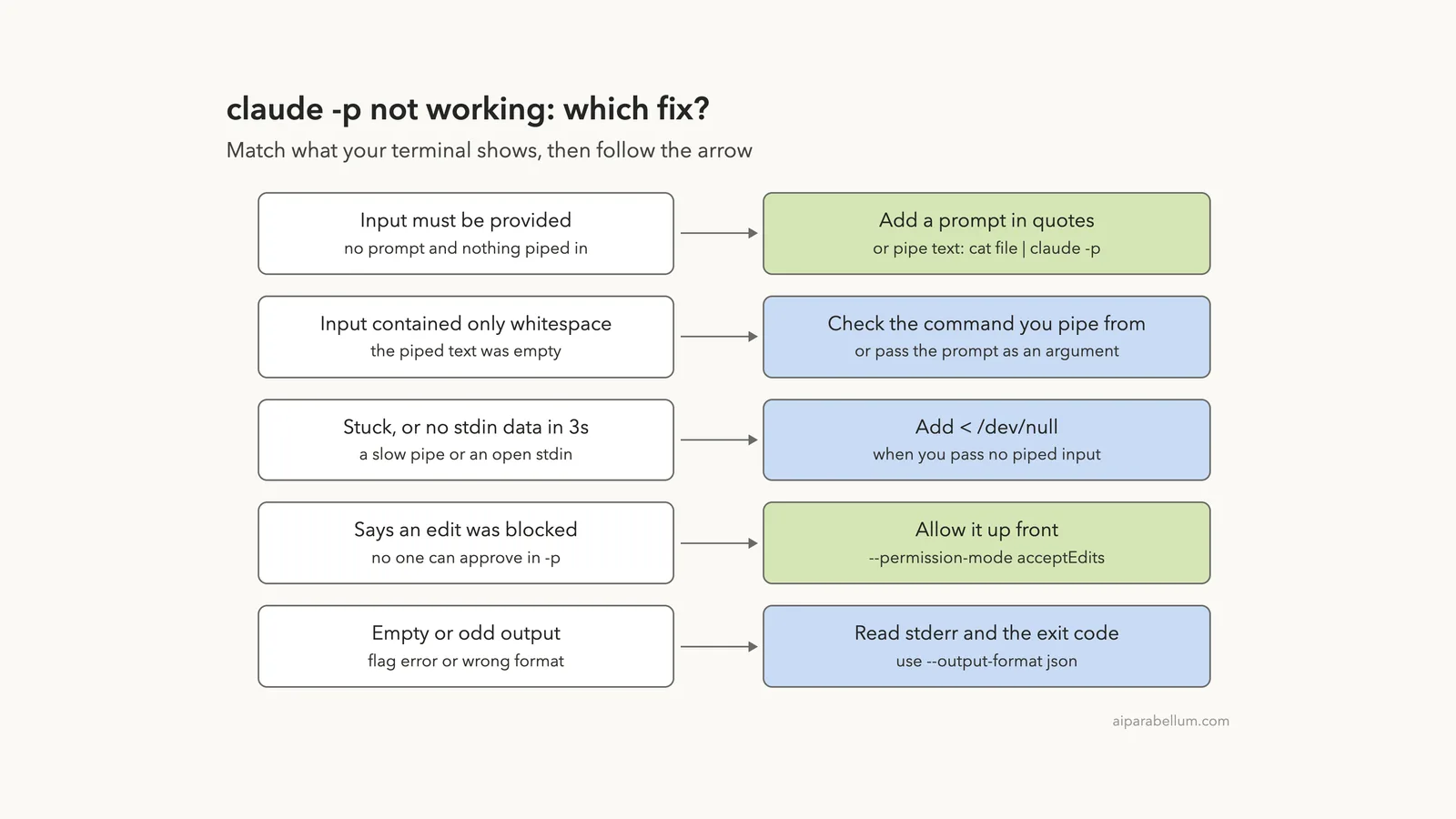
If claude -p is not working and prints Error: Input must be provided either through stdin or as a prompt argument when using --print, Claude Code got no prompt at all. Put your prompt in quotes right after the flag, like claude -p "explain this error", or pipe text into it with cat build-error.txt | claude -p "explain this". A missing closing quote or an empty variable in a script are the usual reasons the prompt never arrives.
If the run seems stuck instead, it is often waiting on stdin from a slow command, so add < /dev/null when you don’t pipe anything in. If it finishes but says an edit was blocked, nobody was there to approve it: pass --permission-mode acceptEdits or list the tools with --allowedTools. If the output is empty or strange, read stderr and the exit code, and use --output-format json so your script can read the result field.
Below, we reproduce each problem in a real terminal, show the exact messages Claude Code prints, and walk through every fix that worked for us.
Browse all our Claude Code tutorials for more fixes and how-tos.
Tested with Claude Code v2.1.330 on macOS on November 23, 2026, in a throwaway demo project. Every screenshot shows a real run. Fixes we could not trigger safely come from Anthropic’s official docs, and we say so where that applies.
Quick Summary
| What you see | Likely cause | Fix |
|---|---|---|
Input must be provided either through stdin or as a prompt argument | No prompt and nothing piped in | Add a quoted prompt or pipe text in |
Input contained only whitespace | The piped text was empty | Check the command before the pipe |
--output-format=stream-json requires --verbose | Missing flag | Add --verbose |
error: unknown option | Typo in a flag name | Use the spelling Claude Code suggests |
Warning: no stdin data received in 3s | A slow or open stdin | Add < /dev/null |
| Reply says an edit was blocked | No one can approve prompts in -p | --permission-mode acceptEdits or --allowedTools |
| Run sits there for minutes | Background work or a permission host | Check stderr, use --permission-prompts none |
| Empty or odd output in a script | Error went to stderr, or wrong field read | Check $?, read .result from JSON |
What claude -p Does and Why It Fails Differently
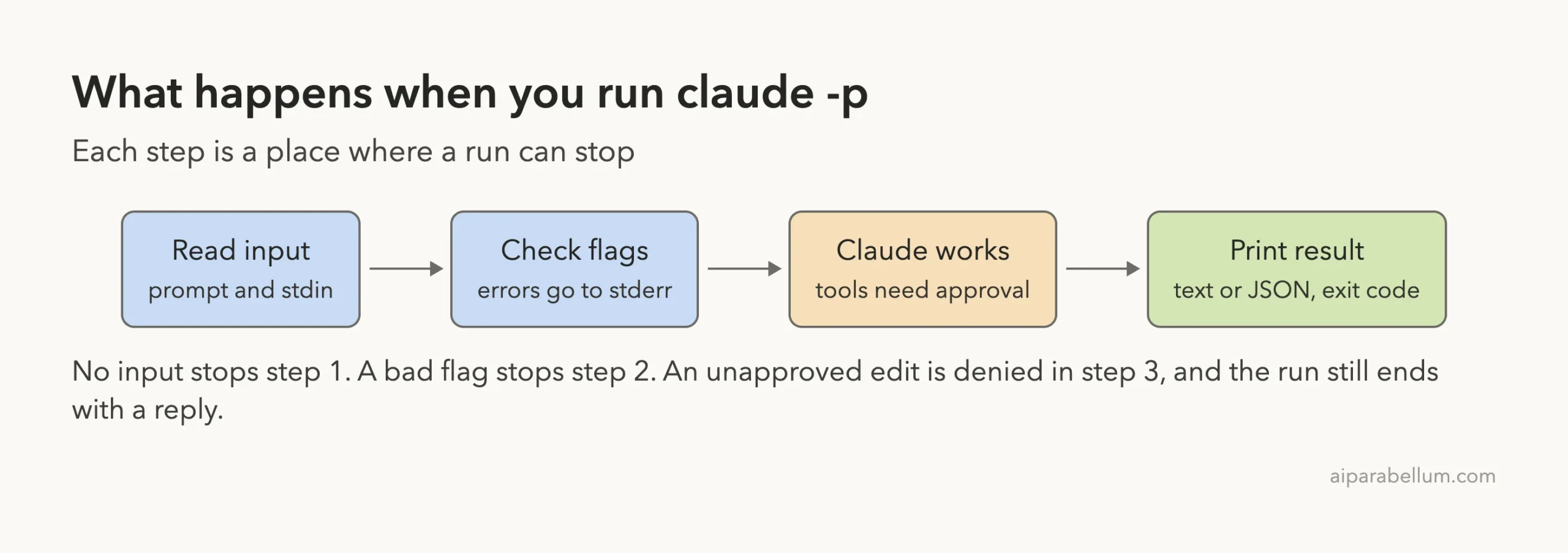
The -p flag, short for --print, runs Claude Code without the interactive screen. It takes one prompt, does the work, prints the answer and exits. Anthropic’s headless docs call this non-interactive mode, and it is what you use in scripts, cron jobs and CI pipelines.
Because there is no screen, three things change. There is no input box, so the prompt must arrive as an argument or through stdin. There is no one to click “allow”, so any action that needs approval is denied unless you approve it ahead of time.
The third change is about output. The result goes to stdout while flag errors go to stderr, which matters when a script captures only one of them.
If you are new to print mode, our guide to headless mode covers the basics. This post focuses on what to do when it breaks.
Fix 1: “Input Must Be Provided” When Using –print
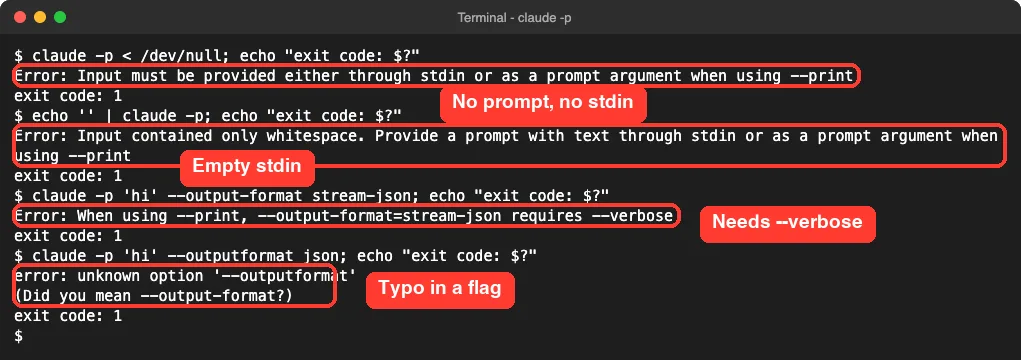
This is the error most people search for. We triggered it three ways: typing claude -p alone, running claude -p < /dev/null, and calling it from a script where the prompt variable was empty. Each time it failed at once with exit code 1.
Common causes
- You typed
claude -pand expected it to ask for a prompt. It never does in print mode. - The prompt sits in a variable that is empty, such as
claude -p "$PROMPT"whenPROMPTwas never set. - Your shell ate the prompt. An unmatched quote leaves zsh at a
quote>ordquote>prompt, which looks like a hang. - The prompt went to the wrong place, for example after a flag that takes a value, so the flag swallowed it.
How to fix it
- Put the prompt in quotes right after
-p:claude -p "Summarize README.md". - In scripts, check the variable before calling Claude Code, for example
[ -n "$PROMPT" ] || exit 1. - If your prompt contains an apostrophe, wrap it in double quotes, or your shell will wait for a closing quote.
- When a flag takes a value, keep the value next to it:
claude -p "query" --output-format json.
The “Input contained only whitespace” variant
When we piped an empty string with echo '' | claude -p, Claude Code printed Error: Input contained only whitespace. That means stdin was connected but carried nothing useful.
Run the command before the pipe on its own and confirm it prints text. A git diff with no changes is a classic case.
Fix 2: Pipe Input Into claude -p the Right Way
Print mode reads stdin, so you can send a log, a diff or a file straight in. When you pipe text and also pass a prompt, Claude Code uses both: the prompt is the question and the piped text is the material.
We piped a short Node.js build error into Claude Code and asked for the root cause in one sentence. It found the real bug: config.json had no title field, so build.js crashed when it called toUpperCase().
cat build-error.txt | claude -p 'In one short sentence, what is the root cause of this error?'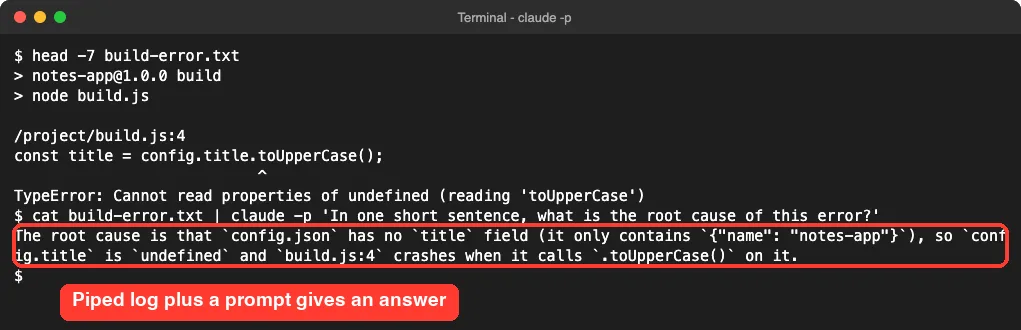
The docs note that piped stdin is capped at 10MB. Above that, Claude Code exits with an error, so for big logs write the content to a file and name the file in your prompt instead.
Fix 3: claude -p Hangs or Seems Stuck
A run that never seems to finish usually has one of four causes. We reproduced the first one and took the others from the official docs.
It is waiting for stdin
When stdin is a pipe from a slow command, Claude Code waits for data. In our test we piped from sleep 15.
After 3 seconds Claude Code printed a warning, went ahead with the prompt alone and answered. The whole pipeline still took 15 seconds, because the shell waits for the slow command to end.
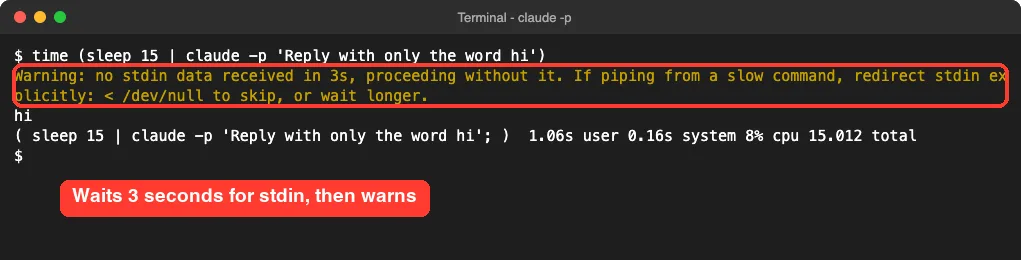
The warning itself names the fix: if you are not piping anything on purpose, add < /dev/null so Claude Code skips the wait. This matters in cron jobs, CI runners and tools that start a child process with stdin left open.
claude -p "Summarize CHANGELOG.md" < /dev/nullIt is waiting for background work
According to the docs, a claude -p run can stay open after Claude’s reply to wait for background commands, background subagents or Monitor watches that Claude started. After five seconds of waiting it prints a line to stderr that starts with Waiting for background work to finish. By default it stops idle background work after 10 minutes, and the env var CLAUDE_CODE_PRINT_BG_WAIT_CEILING_MS changes that cap.
It is waiting for a permission answer
If your run has a permission host, such as an Agent SDK app or a tool passed with --permission-prompt-tool, the run waits for that host to answer each request. For unattended jobs, the docs recommend --permission-prompts none, which denies those requests instead of waiting. It needs Claude Code v2.1.259 or later.
It is waiting for MCP servers
When you pass --mcp-config with -p, Claude Code waits for pending servers before the first turn, up to the MCP_TIMEOUT limit, which is 30 seconds by default. A slow or broken server can make every run start late. Our post on MCP not working shows how to find the server that is holding things up.
Fix 4: claude -p Says an Edit Was Blocked
This one surprises many people because the run looks successful. It exits normally and prints a polite reply, but nothing changed. We asked Claude Code to add a field to config.json with no permission flags, and it answered that writing to the file was blocked.
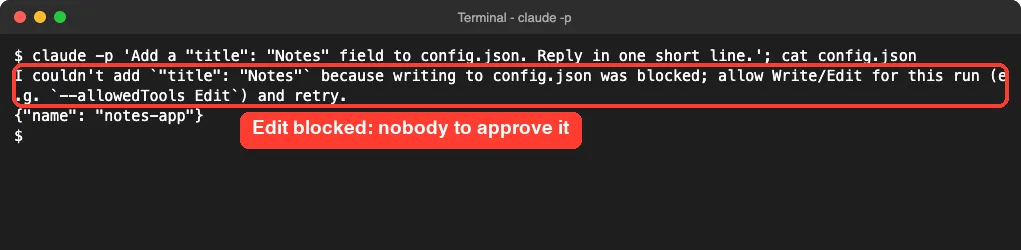
The docs explain why. Since v2.1.302, claude -p starts in Manual mode when nothing sets a permission mode, and in a print run a call that needs approval is denied unless something approves it. File reads in your project and read-only commands still run, which is why questions work while edits do not.
Allowing a single tool was not enough in our test
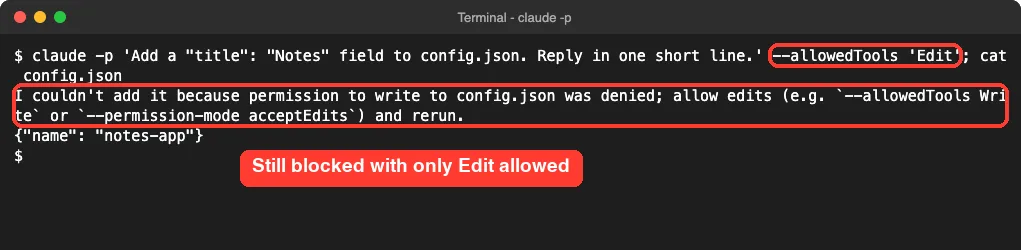
Next we passed --allowedTools 'Edit'. The edit was still blocked, and Claude’s reply suggested allowing Write or using acceptEdits instead. We did not dig into which call was refused, but the lesson is simple: if you list tools, list every tool the task may need.
The fix that worked: acceptEdits
With --permission-mode acceptEdits, the same prompt worked on the first try. Claude Code added the field, and node build.js ran cleanly.
claude -p 'Add a "title": "Notes" field to config.json.' --permission-mode acceptEdits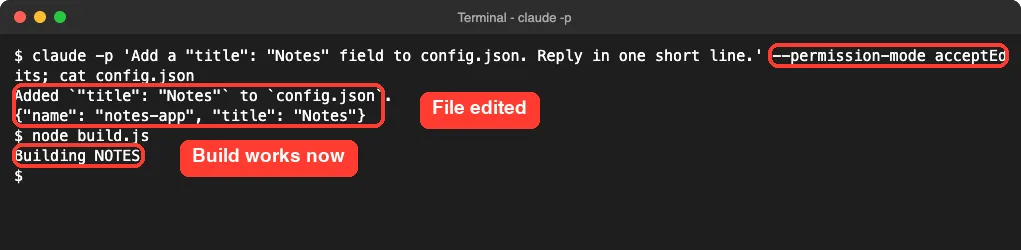
Pick the narrowest option that does the job:
--permission-mode acceptEditsfor file edits plus common file commands likemkdirandmv.--allowedTools "Read,Edit,Write"to name tools, or rules like"Bash(git diff *)"for specific commands.--permission-mode dontAskfor locked-down CI, where anything that would prompt is denied.
Our guides to permission modes and permission rules explain every option in detail.
Fix 5: Empty Output or Output Your Script Can’t Read
When a script says Claude Code “returned nothing”, the answer was usually somewhere else. Check these in order.
- Look at the exit code with
echo $?. The docs sayclaude -pexits with 0 on success and non-zero on failure. - Look at stderr. Flag errors such as
unknown optionprint there before the run starts. If your script uses2>/dev/null, you will never see them. - Look at stdout for an error message. When a failure happens inside the run, such as missing authentication, Claude Code prints it as the result on stdout.
- Check where you redirected it.
> output.txtsends the answer to a file, not your screen.
Use JSON output in scripts
Plain text is fine for people, but scripts do better with --output-format json. We asked for a one-word reply and piped it through jq. The result field holds the text, and is_error tells your script whether the run failed.
claude -p 'Reply with only the word ready' --output-format json | jq '{result, is_error, num_turns, session_id}'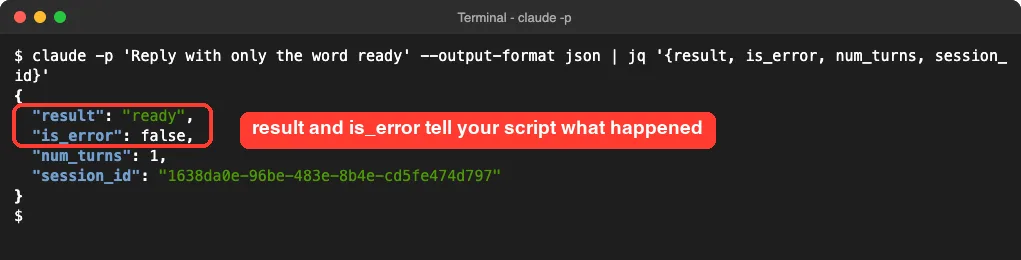
stream-json needs –verbose
We also hit Error: When using --print, --output-format=stream-json requires --verbose. Add --verbose and it runs. If you use --json-schema, the docs warn that the structured_output field can be missing when Claude declines, so check that it exists before you use it.
Fix 6: –bare Ignores Your Login
The docs recommend --bare for scripts because it starts faster and skips hooks, plugins, MCP servers and CLAUDE.md. But bare mode never reads OAuth credentials or the keychain. If you are signed in with a subscription and add --bare, the run needs ANTHROPIC_API_KEY or an apiKeyHelper instead.
We did not break our sign-in to show this, so this fix comes from the official docs. If you see an auth failure only when --bare is on, that is the reason. Our post on headless authentication explains both setups.
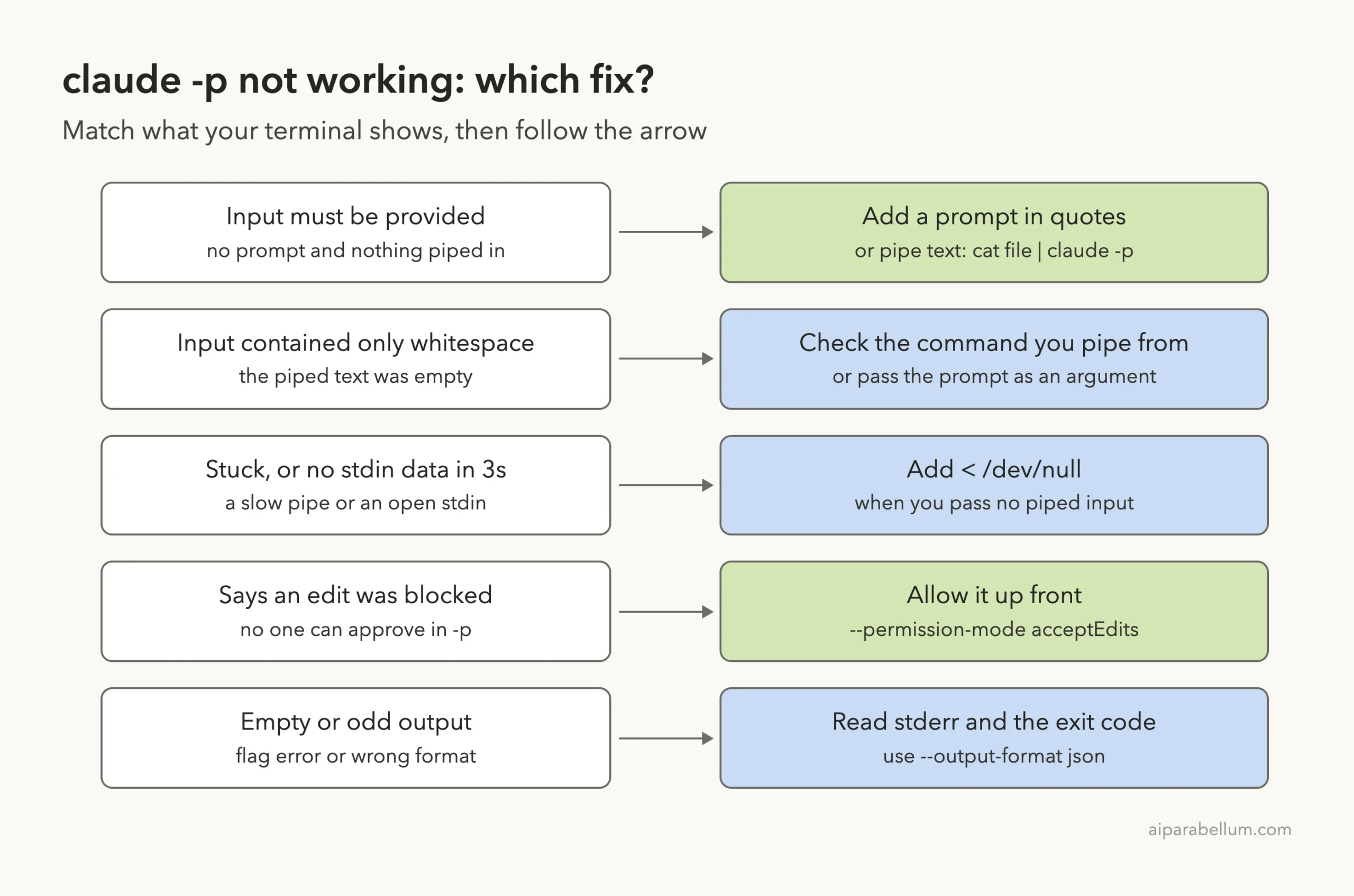
Which claude -p Fix Do You Need?
Try It Yourself
Make a folder with a small broken script and practice the safe pattern for scripts. This prompt reads a file, makes one edit and returns JSON your shell can check.
mkdir claude-p-practice && cd claude-p-practice
echo 'print("helo world")' > hello.py
claude -p "Fix the typo in hello.py. Reply in one short line." \
  --permission-mode acceptEdits \
  --output-format json < /dev/null | jq -r '.result'
echo "exit code: $?"
Then remove --permission-mode acceptEdits and run it again on a new typo. You will see the blocked message, which is a good way to recognize it later.
A zero exit code means the run finished, not that it did what you asked. Always check the result text.
Common Mistakes
- Expecting
claude -pto ask for a prompt, like the interactive screen does. - Hiding stderr with
2>/dev/null, then wondering why nothing printed. - Trusting a zero exit code to mean files changed. A blocked edit still ends normally, so check the result text or the file.
- Allowing one tool when the task needs two, such as
EditwithoutWrite. - Reaching for
--dangerously-skip-permissionson your own machine just to make edits work, whenacceptEditsis enough. - Using single quotes around a prompt that contains an apostrophe, which leaves the shell waiting.
Pro Tips
- Add
< /dev/nullto every scheduledclaude -pcall that does not pipe input. It removes the 3-second wait and its warning. - Run
claude --helpwhen a flag fails. Claude Code also suggests the right spelling, as it did for our--outputformattypo. - Use
--max-turnsor--max-budget-usdto stop runaway jobs in CI. Both are print-mode only. - Save the
session_idfrom JSON output so you can follow up later with--resume. - Test a new script interactively first, then move the same prompt to
-pwith the permissions it needed.
For a full pipeline setup, see our CI/CD pipeline example, and keep the commands cheat sheet handy for other flags.
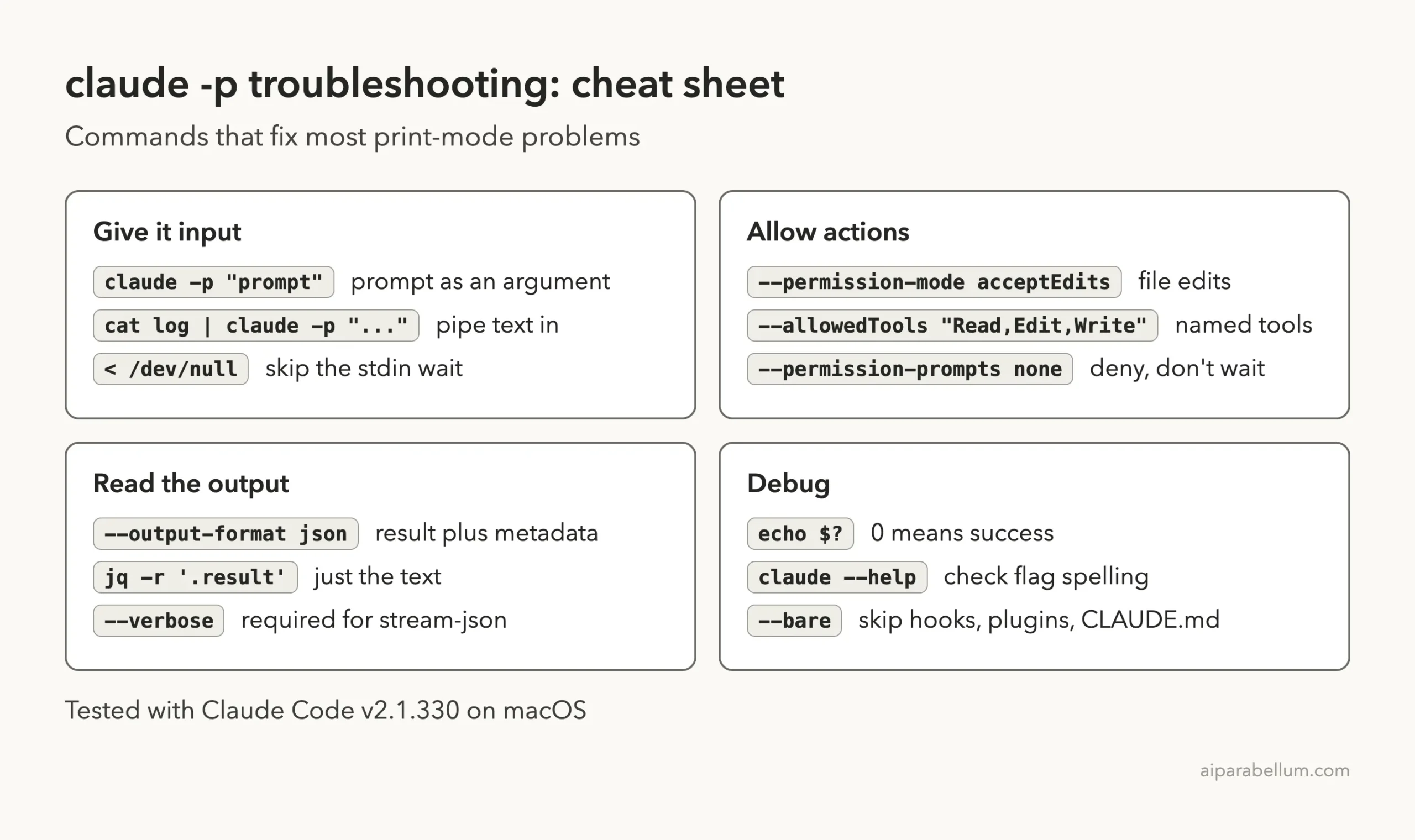
claude -p Troubleshooting Cheat Sheet
Frequently Asked Questions
Why does claude -p say “Input must be provided”?
Claude Code received no prompt argument and no text on stdin. Add a quoted prompt after -p, or pipe text in. In scripts, check that the prompt variable is not empty.
Why does claude -p work in my terminal but not in cron or CI?
Scheduled jobs often leave stdin open, run as a different user, or lack your login. Add < /dev/null, make sure the job can authenticate, and pass the permissions the task needs with --permission-mode or --allowedTools.
Can claude -p edit files?
Yes, but only when you approve edits in advance, because there is no one to answer a prompt. --permission-mode acceptEdits worked in our test.
How do I get only the answer text from claude -p?
The default text output is already just the answer. In scripts, use --output-format json and read the result field with jq -r '.result'.
Does claude -p use my Claude subscription?
Yes, a normal claude -p run uses the same login as your interactive sessions. With --bare it does not, and you need an API key instead. Our Claude overview covers the plans.
Conclusion
When claude -p is not working, the message usually tells you which step failed: no input, a bad flag, a blocked action or a stdin wait. Give it a quoted prompt or piped text, add < /dev/null when nothing is piped, approve edits up front with acceptEdits or a full tool list, and read stderr, the exit code and the JSON result before deciding a run returned nothing. For errors outside print mode, our list of common Claude Code errors picks up where this guide ends.