Grammarly vs QuillBot is one of the most common questions people ask when they want help with their writing, and feature lists alone won’t answer it. So we skipped the marketing pages and put both free tools through the same hands-on tests: fixing a sentence full of mistakes, rewriting a paragraph and checking text for AI. Here’s exactly what happened, with real screenshots of every result.
Grammarly vs QuillBot: The Quick Verdict
If you only have a minute, this table sums up what we saw in our tests. The details, and the surprises, come right after.
| Test (free, no account) | Grammarly | QuillBot |
|---|---|---|
| Finding grammar mistakes | Flagged all 5 problems in seconds | Found and fixed most of them |
| Applying fixes without signing up | Showed one fix, then asked for a free account | Let us accept every free fix |
| Quality of the final sentence | Not testable without an account | One fix made the sentence wrong in a new way |
| Paraphrasing a paragraph | Worked as a guest, up to 125 words | Asked us to sign up first |
| Spotting AI-written text | Correctly flagged it as 100% AI | Rated it 0% AI |
In short, Grammarly was sharper at spotting problems, while QuillBot gave guests more hands-on fixing. Both push you to create a free account fairly quickly.
How We Tested Grammarly and QuillBot
We wanted a fair, repeatable test that you can copy at home. Every test used the free web tools on each company’s own website, without signing in.
- Date: October 23, 2026, on each tool’s public web page.
- Account: none, so you see what a first-time visitor gets.
- Text: the exact same sample text pasted into both tools for each test.
- Cookies: we did not accept any optional cookies.
Keep in mind that a free account unlocks more on both sites. Our results show the guest experience, which is often what people try first before they decide which tool to sign up for.
Test 1: Grammar Check on a Sentence Full of Mistakes
We wrote a short passage with five classic errors that real people make every day. Here is the text we pasted into both checkers:
Their going to the meeting tomorow, but they has not finished the report yet. Me and him thinks the deadline is to tight.
The five problems are “Their” instead of “They’re,” the misspelled “tomorow,” “has” instead of “have,” the pronoun mix-up in “Me and him thinks” and “to” instead of “too.” A good checker should catch all of them.
What Grammarly Found
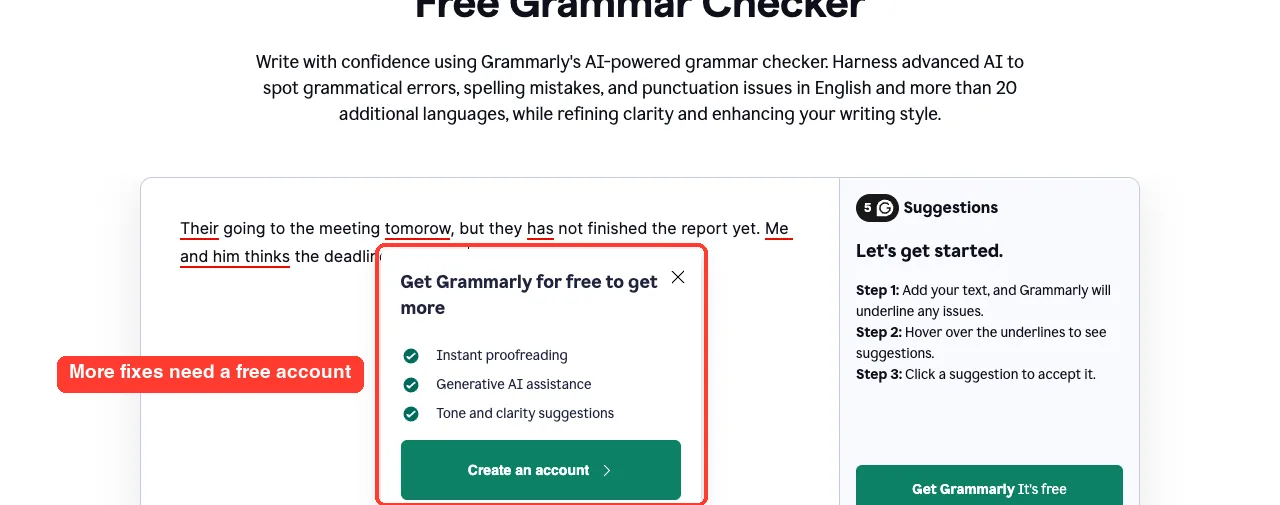
Grammarly underlined every problem within a few seconds and showed a count of 5 suggestions in the side panel. When we hovered over “tomorow,” a small card offered the correct spelling with one click.
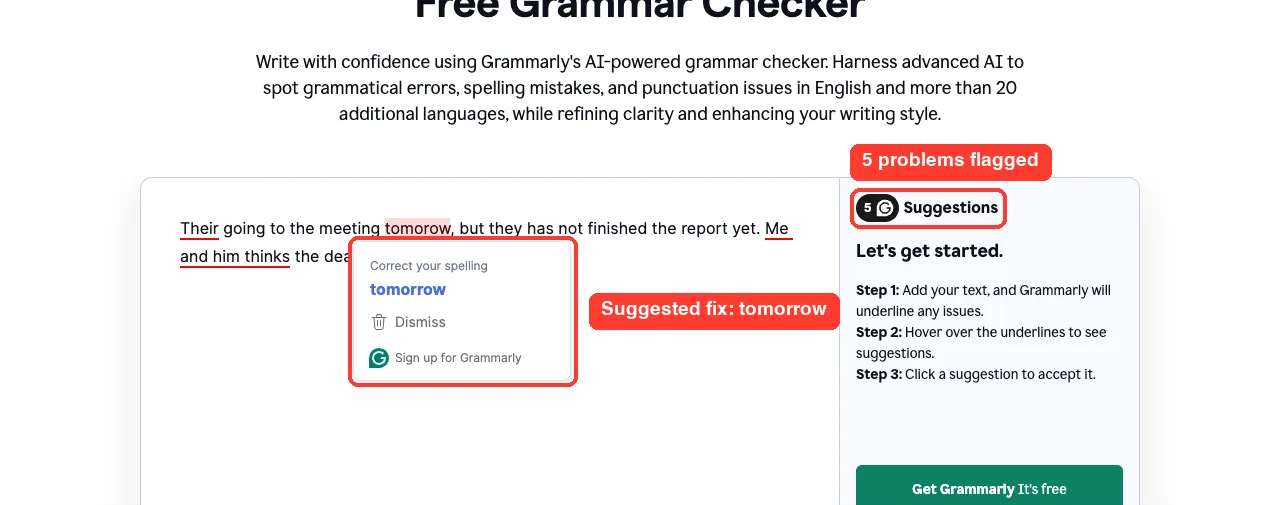
Grammarly also treated “Me and him thinks” as a single problem instead of three separate word errors. That’s a smart choice, because the whole phrase needs to change, not just one word.
The catch came next. When we hovered over the other underlined words, Grammarly stopped showing suggestions and asked us to create a free account instead.
What QuillBot Found
QuillBot’s free grammar checker worked differently. After we clicked Check grammar, it showed one suggestion card at a time, starting with “Their” changed to “They are.”
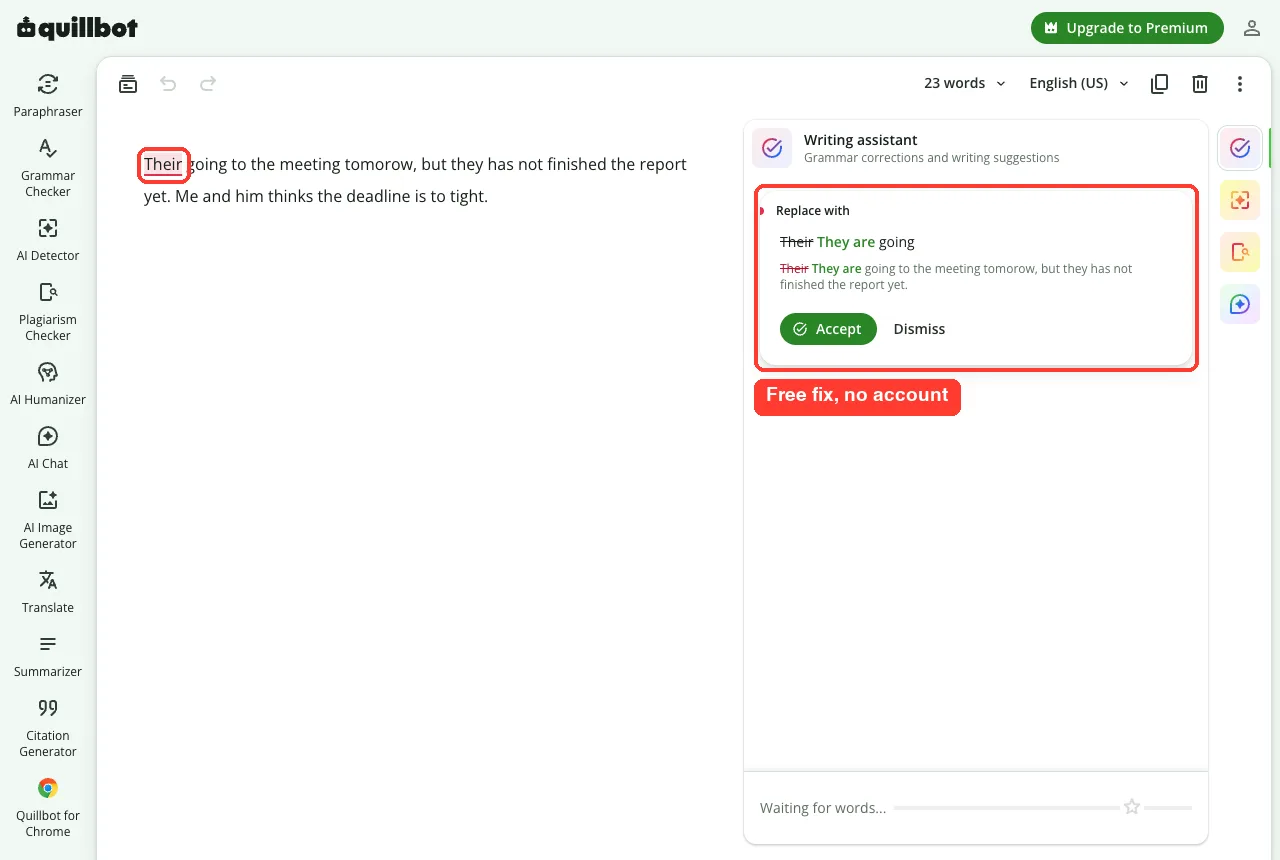
We clicked Accept on every card, six in total, without being asked to sign up. The final text looked like this:
They are going to the meeting tomorrow, but they have not finished the report yet. He and he think the deadline is too tight.
Four fixes were perfect: “They are,” “tomorrow,” “have” and “too.” But the pronoun fix went wrong, turning “Me and him thinks” into “He and he think,” which still doesn’t make sense.
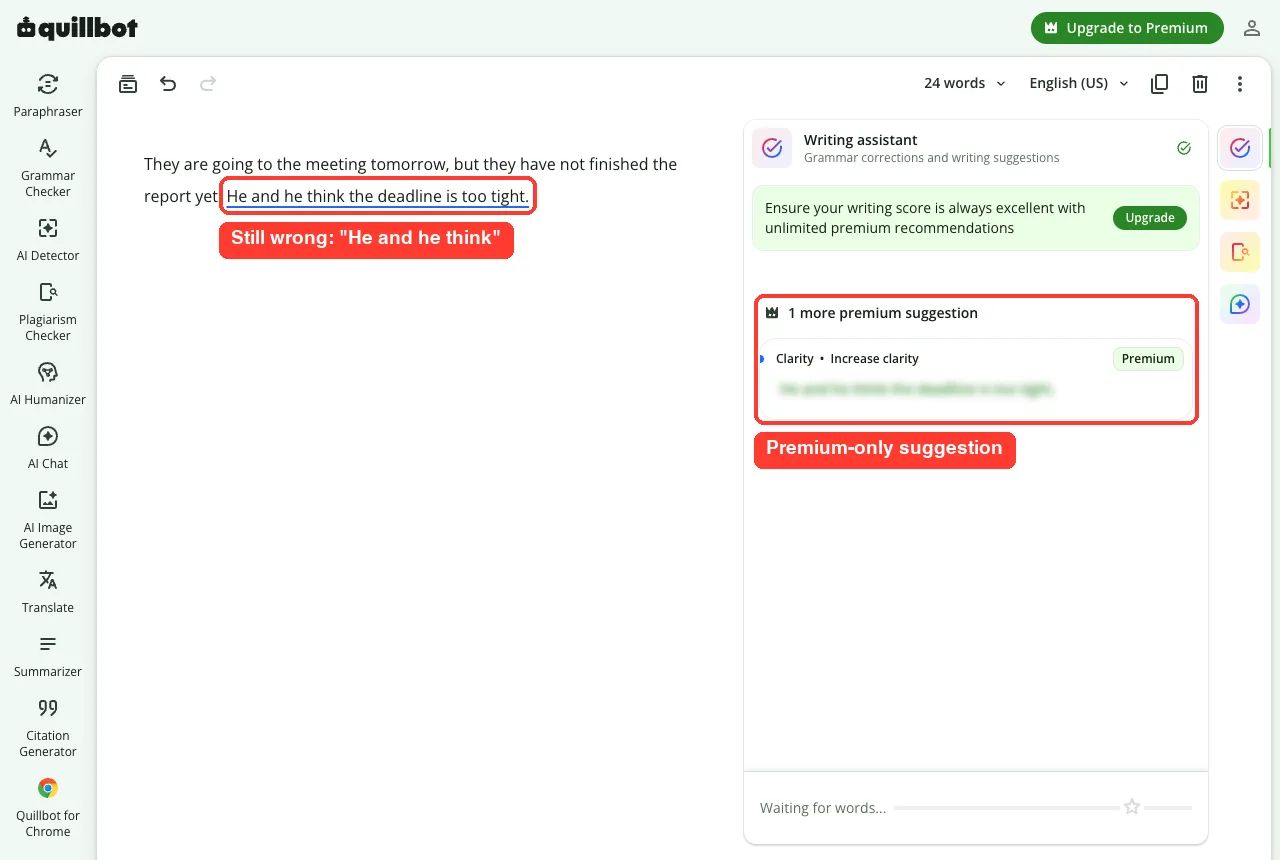
QuillBot also showed one more suggestion for that sentence, but it was blurred and marked Premium. The correct version should read “He and I think the deadline is too tight.”
Grammar Test Results
| Mistake in our text | Correct version | Grammarly (guest) | QuillBot (guest) |
|---|---|---|---|
| Their going | They’re going | Flagged | Fixed (They are) |
| tomorow | tomorrow | Flagged and fixed | Fixed |
| they has | they have | Flagged | Fixed |
| Me and him thinks | He and I think | Flagged as one issue | Changed to “He and he think” (wrong) |
| to tight | too tight | Flagged | Fixed |
Takeaway: never click Accept on autopilot. Read the full sentence after each fix, because even a good checker can trade one mistake for another.
Test 2: Paraphrasing the Same Paragraph
Next, we tested rewriting, which is where QuillBot built its name. We used a plain work update that anyone might need to polish:
Our team finished the quarterly report two days early. The numbers show that customer sign-ups grew by 18 percent, mostly because of the new referral program. We think the program should get a bigger budget next quarter.
QuillBot’s Paraphraser
QuillBot’s paraphrasing page loaded with its familiar modes, including Standard, Fluency, Humanize and Formal. It accepted our 37 words, but when we clicked Paraphrase, a “Sign up to continue” window appeared.
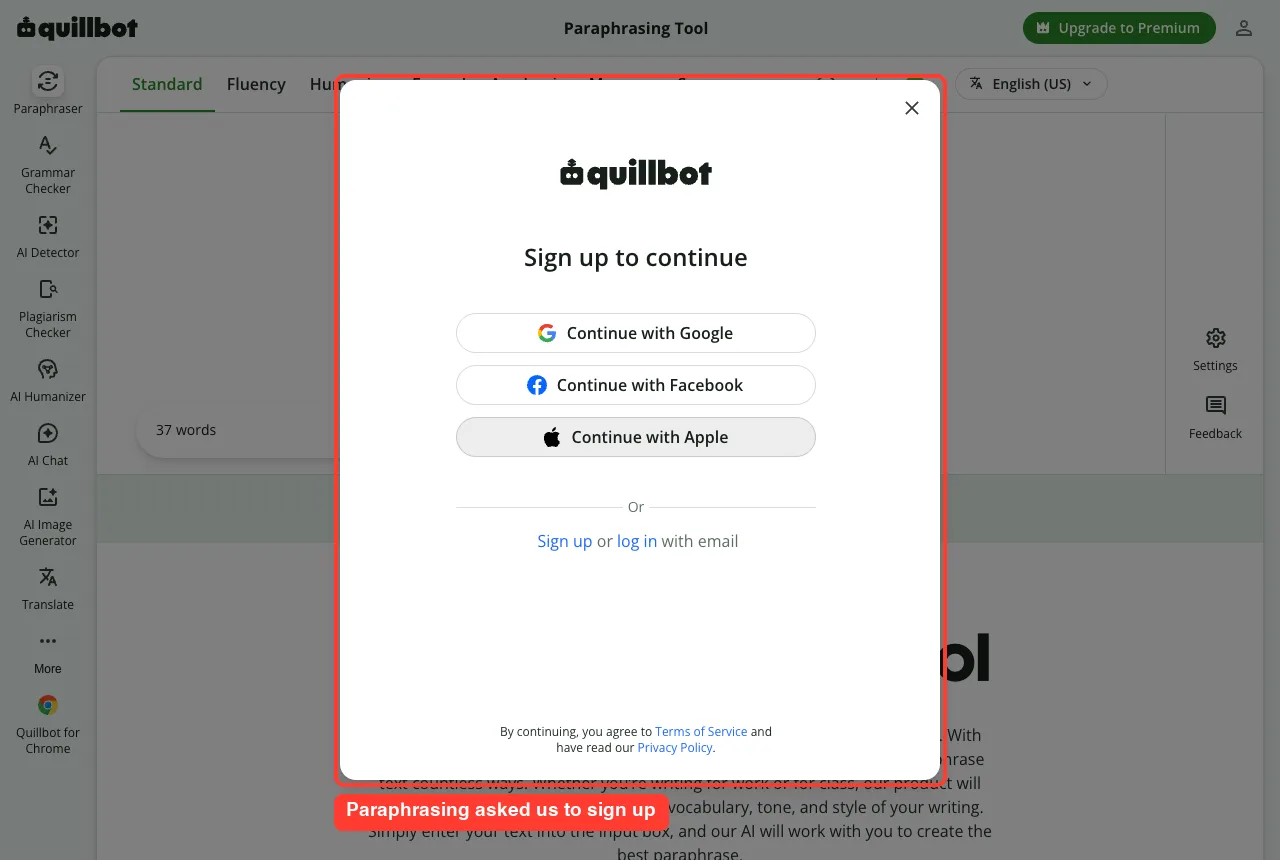
A free QuillBot account removes this wall, so you can still paraphrase without paying. Just expect to sign in with Google, Facebook, Apple or email first.
Grammarly’s Paraphraser
Grammarly’s free paraphrasing tool rewrote our paragraph right away, with no account needed. The guest version has a limit of 125 words per rewrite, shown under the text box.
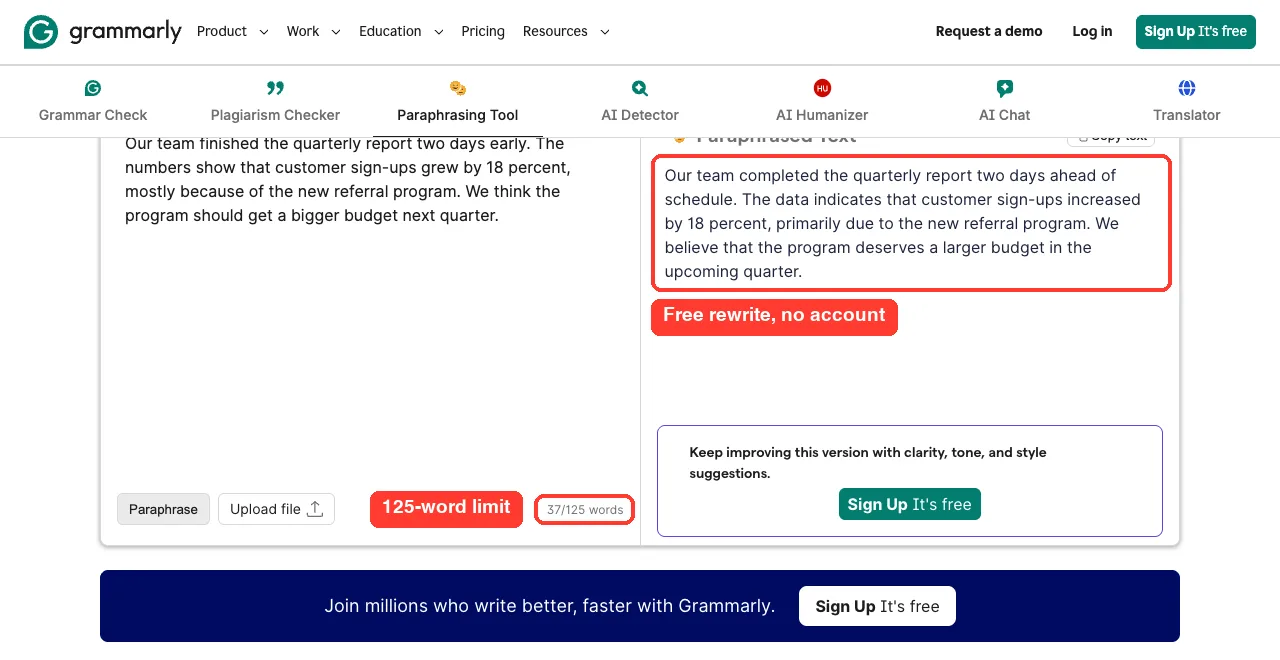
Here is how the rewrite compared with our original, sentence by sentence:
| Our original | Grammarly’s rewrite |
|---|---|
| Our team finished the quarterly report two days early. | Our team completed the quarterly report two days ahead of schedule. |
| The numbers show that customer sign-ups grew by 18 percent, mostly because of the new referral program. | The data indicates that customer sign-ups increased by 18 percent, primarily due to the new referral program. |
| We think the program should get a bigger budget next quarter. | We believe that the program deserves a larger budget in the upcoming quarter. |
The rewrite kept every fact, including the 18 percent figure, and made the tone more formal. That suits a report or an email to your boss, though it’s a bit stiffer than the original for a casual team chat.
Test 3: Checking Text for AI
Both tools now offer a free AI detector, so we gave them the same 90-word paragraph. To make the test meaningful, we used a casual, personal story that was written by an AI assistant and designed to sound human.
I started running last spring because my doctor kept nagging me about my blood pressure. The first week was awful, honestly. I could barely finish a mile without stopping, and my neighbor’s dog chased me twice.
That’s the opening of the paragraph; the rest followed the same friendly, first-person style. A detector that works well should flag it as AI-written.
QuillBot’s AI Detector
QuillBot rated the paragraph 0% AI and 100% human-written. In other words, it was fooled completely by the casual tone.
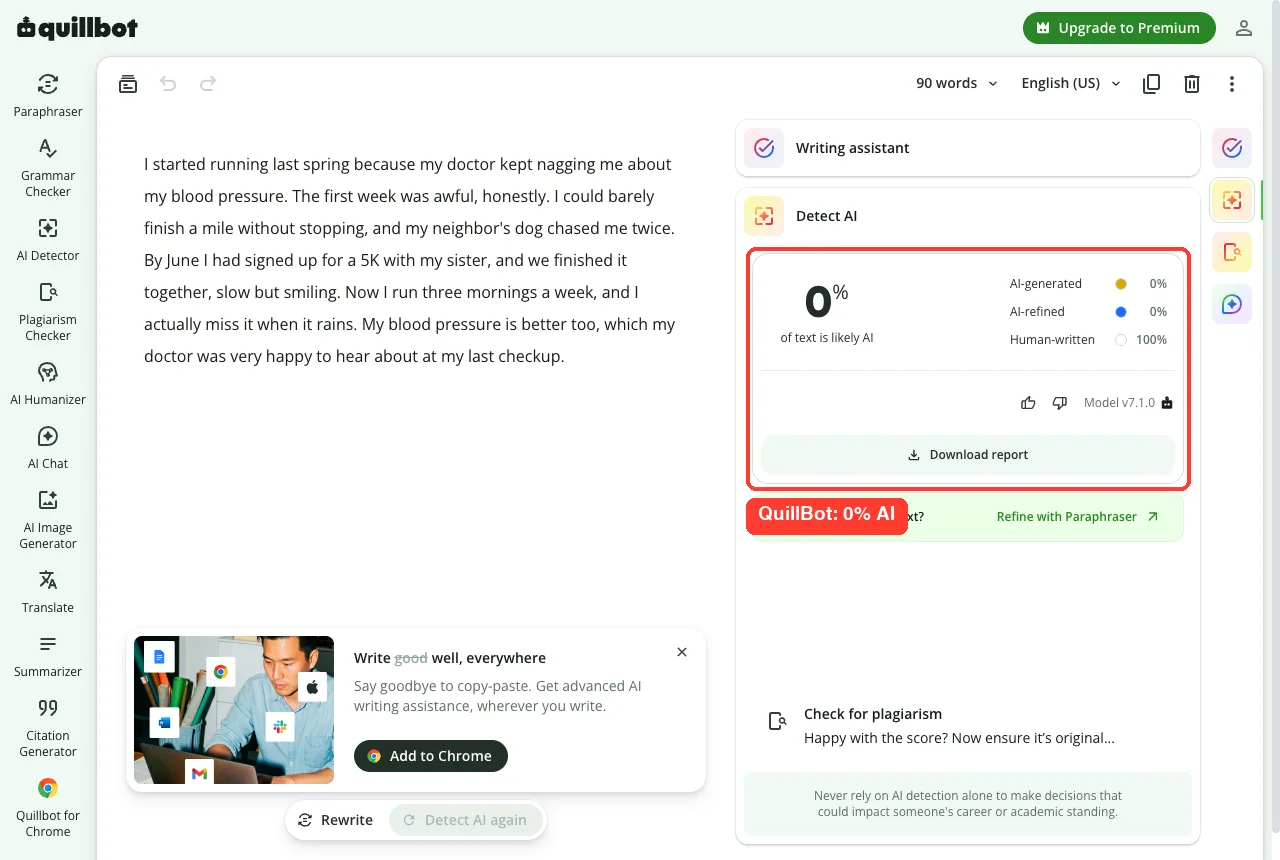
To its credit, QuillBot shows a clear note under the result. It warns you never to rely on AI detection alone for decisions that could affect someone’s career or grades.
Grammarly’s AI Detector
Grammarly reached the opposite verdict. It said 100% of the text appeared to be AI-generated, which was correct for this sample.
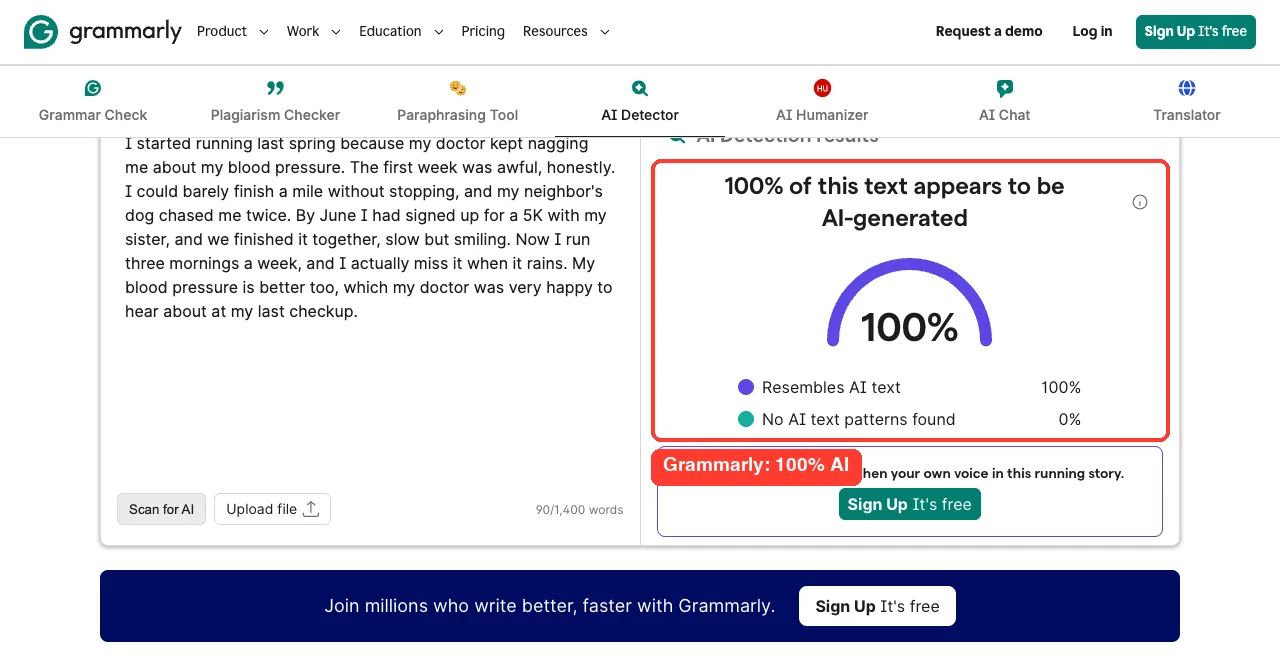
One test can’t prove which detector is better overall, and both can make mistakes on other text. Still, the gap was striking: the same paragraph scored 0% on one tool and 100% on the other.
Takeaway: treat any AI detector score as a hint, not proof. If the result matters, check with more than one tool and look at the writing yourself.
Free vs Paid: What You Get With Each Tool
Both tools give you a lot for free, and more once you create a free account. Paid plans add deeper rewriting and extra checks.
Grammarly Plans
Grammarly’s free plan corrects spelling and grammar, shows your writing tone and includes 100 AI prompts a month. Paid plans add full-sentence rewrites, tone adjustments, plagiarism and AI text detection inside the app and many more AI prompts.
QuillBot Plans
QuillBot’s free plan covers the grammar checker, core writing suggestions and limited paraphrasing. Premium unlocks fuller paraphrasing, more modes and synonym levels, and extra suggestions like the blurred clarity fix we saw in our test.
Prices change often and can vary by country, so check each company’s own pricing page before you subscribe. Look for annual or student discounts, which can lower the cost a lot.
Where You Can Use Each Tool
Your daily writing habits matter as much as test results. Both tools reach beyond their websites, but in slightly different ways.
| Where you write | Grammarly | QuillBot |
|---|---|---|
| Web browser | Browser extension | Chrome extension |
| Desktop | Desktop app | macOS and Windows apps |
| Microsoft Word | Supported | Word add-in |
| Phone | Mobile keyboard app | Mobile keyboard app |
Grammarly’s big strength is that it quietly checks your writing almost everywhere you type. QuillBot shines more when you open its toolbox on purpose to rework a specific passage.
Which One Should You Choose?
After testing both, the answer depends on what you need help with most. Here’s a simple way to decide.
Choose Grammarly If You…
- Want mistakes caught automatically in emails, documents and chats
- Care most about accuracy and clear, correct writing
- Want a quick paraphrase without creating an account
- Need a second opinion on whether text sounds AI-written
Choose QuillBot If You…
- Often need to reword sentences in different styles
- Want to accept grammar fixes before deciding on an account
- Like having many writing tools, such as a summarizer and citation generator, in one place
- Are comfortable reviewing each suggestion carefully
Plenty of people use both: Grammarly running in the background, and QuillBot opened when a paragraph needs a fresh angle. Since both have free plans, you can try that setup without spending anything.
Tips to Get Better Results From Either Tool
Our tests showed that these tools work best when you stay in charge. A few habits make a big difference.
- Read the whole sentence after every accepted fix, not just the changed word.
- Keep paraphrasing input short, and check that numbers and names survive the rewrite.
- Don’t paste private or confidential text into free online tools.
- Use AI detection results as a starting point for a conversation, never as final proof.
- Create a free account on the tool you use most, since both unlock more without payment.
If you write with AI chatbots too, our guide on sounding less robotic pairs well with either tool. Students may also want our tips on citing AI content correctly.
More Writing Tools Worth Exploring
Grammarly and QuillBot aren’t the only options. If you want to compare more, browse our roundup of content creation tools or read our review of GrammarlyGO, Grammarly’s built-in AI writing assistant.
For school work, an AI essay checker can add feedback on structure and arguments. If AI detection matters for your work, you can also compare results with the Copyleaks detector.
And if you’re using these tools for everyday messages, our guide to faster email replies shows how to combine them with an assistant like ChatGPT.
Conclusion
In our hands-on Grammarly vs QuillBot test, Grammarly was the sharper proofreader and the more accurate AI detector, and its free paraphraser worked without an account. QuillBot let guests apply grammar fixes freely and offers a wide set of rewriting tools, but one of its fixes created a new error and its AI detector missed AI-written text completely. If you want reliable everyday proofreading, start with Grammarly; if rewording is your main job, try QuillBot with a free account and review every change. Whichever you pick, read your final text yourself before you hit send.