Matt Pocock’s skills are a free set of 27 Claude Code skills built around everyday engineering habits: plan first, test first and debug with a clear signal. The repo has passed 300,000 GitHub stars, so we tested the most popular ones against plain Claude Code on the same small project.
The short version: the skills didn’t produce more correct code in our small tests, and they took longer and cost more. The most useful one was /grill-me, which forces decisions you’d otherwise skip, as long as you read its answers rather than accepting them all.
Tested with Claude Code v2.1.312 and skills version 1.3.2 on October 31, 2026, using the Sonnet model on macOS. We ran each task once on a tiny store project, so treat these numbers as a first look and not a benchmark.
Key takeaway: start with /grill-me on your next vague task, and save /tdd and /diagnosing-bugs for work where a mistake would really cost you.
Matt Pocock’s Skills at a Glance
| Question | Short answer |
|---|---|
| What are they? | Instruction files for planning, testing, debugging, reviews and more. |
| What do they cost? | Free under the MIT license, but they use your Claude usage when they run. |
| How big is the install? | 436 KB for all 27 skills in our project. |
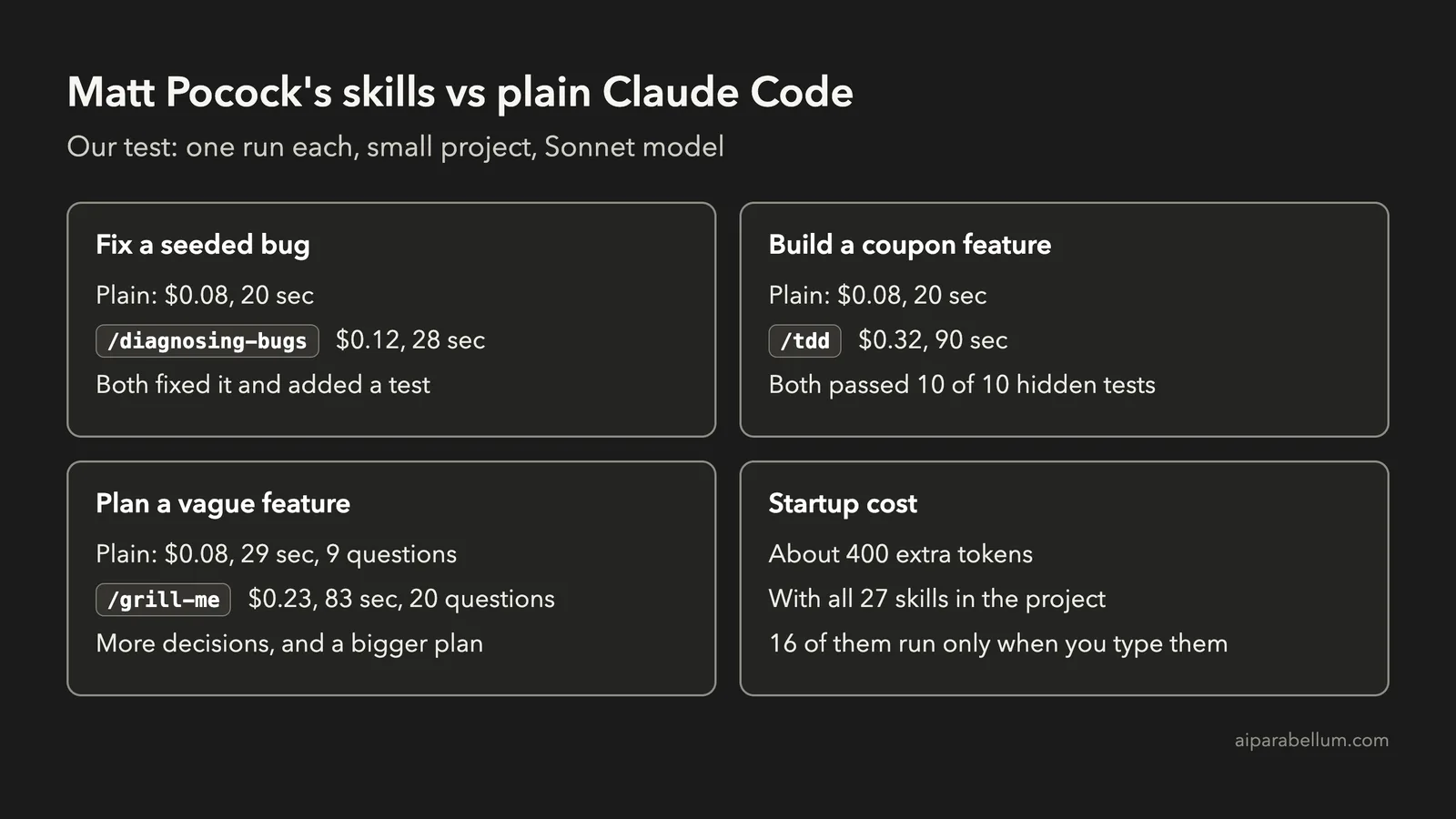
| Do they slow every session? | Barely. Startup grew by about 400 tokens in our test. |
| Is setup required? | Not for the skills we tested. The setup skill matters for the ticket and tracker skills. |
| Best skill in our test? | /grill-me, with one important warning below. |
What Are Matt Pocock’s Skills?
A Claude Code skill is a folder of instructions that Claude loads when it needs them. If that’s new to you, read our guide to Claude Code skills or the official Claude Code skills documentation first.
This set aims to be small and easy to change. The repo describes the skills as “small, easy to adapt, and composable,” and it contrasts them with bigger frameworks that take over your whole process.
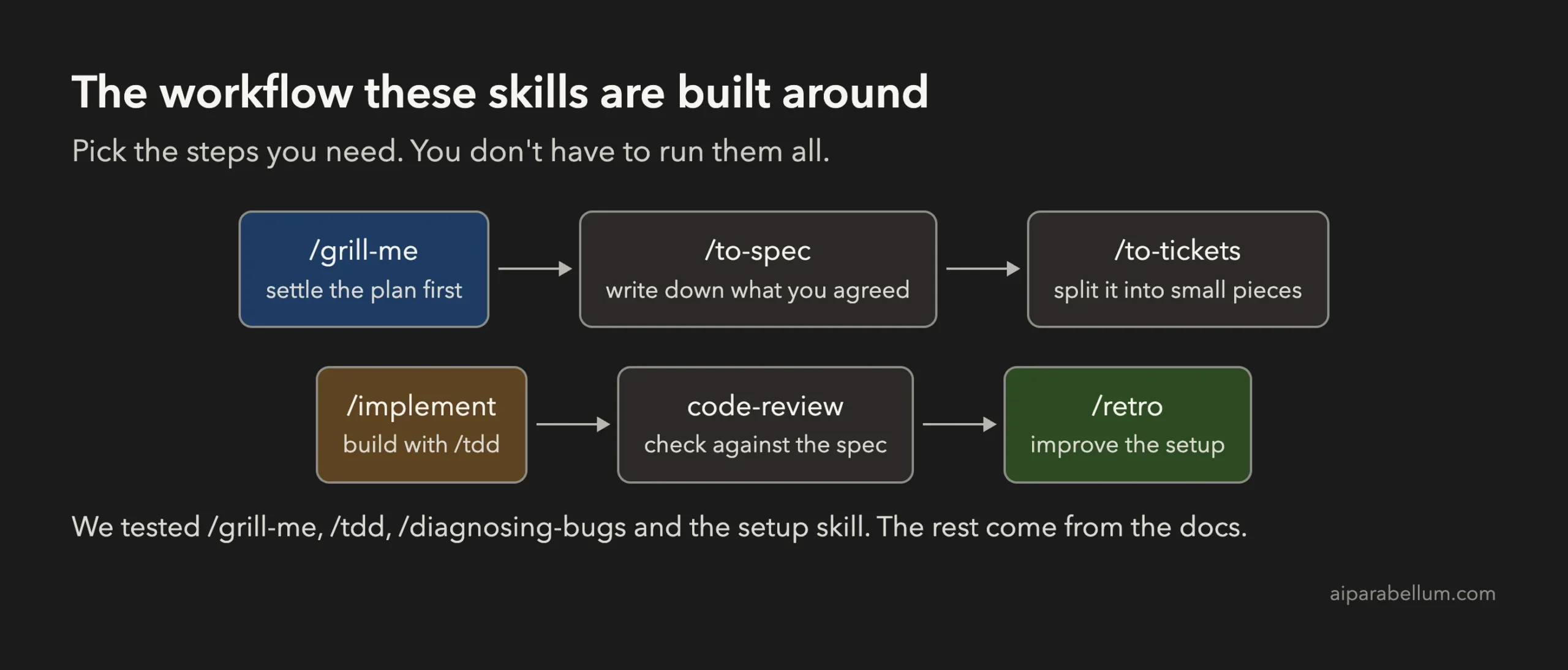
Of the 27 skills, 16 run only when you type them, such as /grill-me. The rest, such as tdd and diagnosing-bugs, can also be picked up by Claude when the task fits.
How to Install Matt Pocock’s Skills in Claude Code
You have two sensible routes, and you should pick one. The project warns that installing both gives you every skill twice.
Option 1: The Official Plugin
This is the route the project recommends for Claude Code. It updates itself by default, and you can read more about how this works in our Claude Code plugins guide. We did not run this route ourselves.
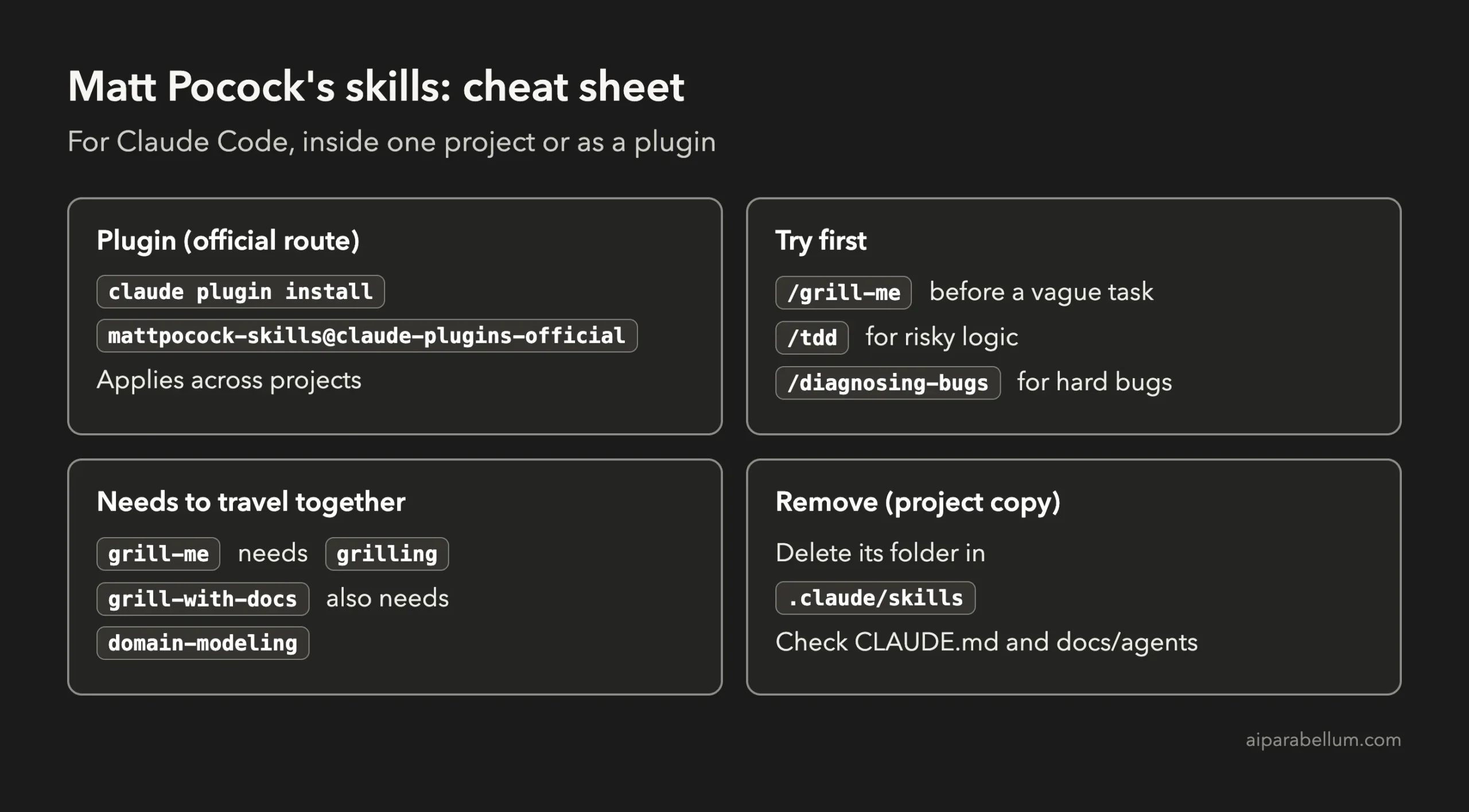
claude plugin install mattpocock-skills@claude-plugins-officialOption 2: Copy Only What You Want Into One Project
This is what we did, because it touches nothing outside the project. Our test copied all 27 skills, and these commands do the same for the four we’d start with. Run them from your project folder, and we confirmed they work.
curl -L https://github.com/mattpocock/skills/archive/refs/heads/main.tar.gz | tar -xz
mkdir -p .claude/skills
cp -R skills-main/skills/productivity/grill-me skills-main/skills/productivity/grilling \
  skills-main/skills/engineering/tdd skills-main/skills/engineering/diagnosing-bugs .claude/skills/
rm -r skills-main
Copy the helpers along with the main skill. For example, grill-me is just a pointer to grilling, and grill-with-docs also needs domain-modeling.
You don’t get automatic updates this way, but you can edit the files freely. Restart Claude Code afterwards, then type /grill-me to confirm it’s there.
What the Setup Skill Adds
The project asks you to run /setup-matt-pocock-skills once per repo. In our run it asked about the issue tracker and labels, then wrote a CLAUDE.md with an agent skills section, plus three files in docs/agents.
That took 44 seconds and $0.17. We skipped it for our other tests, and /grill-me, /tdd and /diagnosing-bugs all worked fine without it, so run it when you’re ready for the ticket and triage skills. If you already have a CLAUDE.md file, check what it adds.
How We Tested Them
We built a tiny online store with a cart, checkout and two tests, then made two identical copies. One had no skills, and the other had all 27.
- A bug fix: a coupon that discounts more each time the checkout page refreshes.
- A feature: coupon rules with expiry, a minimum spend and a per-customer limit.
- A plan: a deliberately vague request to add coupons that expire and have limits.
For the feature, we also wrote 10 hidden tests that neither version could see. The dollar figures are what Claude Code reported for each run, which would come out of your plan’s usage on a subscription.
Test Results: Skills vs Plain Claude Code
| Task | Plain Claude Code | With the skill | Result |
|---|---|---|---|
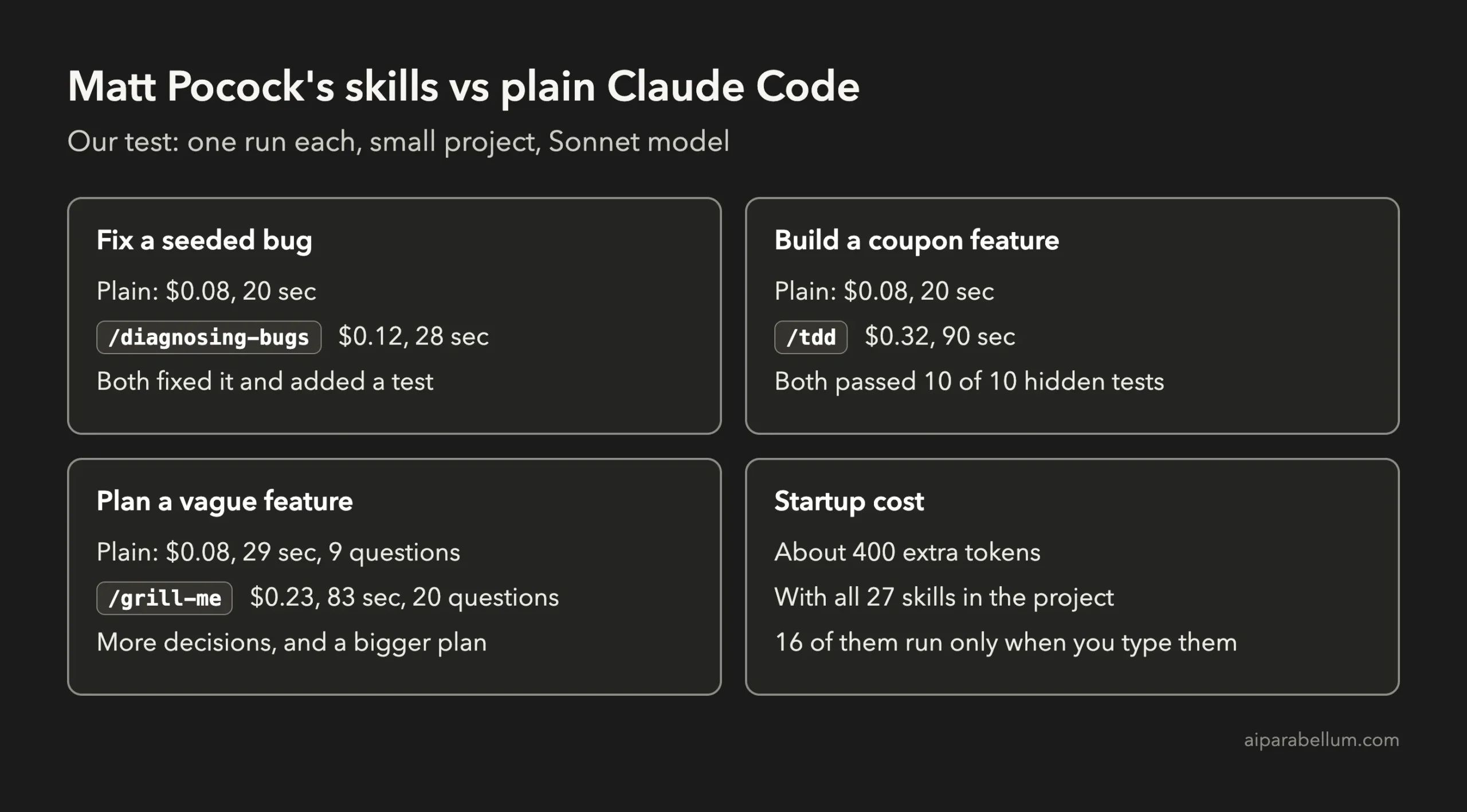
| Fix the bug | $0.08, 20 seconds | /diagnosing-bugs: $0.12, 28 seconds | Both fixed it and added a regression test |
| Build the feature | $0.08, 20 seconds | /tdd: $0.32, 90 seconds | Both passed all 10 hidden tests |
| Plan the feature | $0.08, 29 seconds | /grill-me: $0.23, 83 seconds | 9 questions vs 20 questions |
/diagnosing-bugs: A Slightly Better Fix for This Bug
Both versions found the real cause, which was code changing the cart’s prices on every call. The skill wrote the failing test first and showed it going red, with 810 instead of 900 on the second call.
Its fix was also a little cleaner. Plain Claude Code worked around the problem inside orderSummary, so calling applyCoupon directly would still change the cart, while the skill fixed applyCoupon itself.
Still, this was an easy bug in a 19-line file, and the skill said it skipped one of its own steps for that reason. The skill is really aimed at hard bugs, which this test didn’t include.
/tdd: Same Result, About 4 Times the Cost
The /tdd skill stopped first and asked us to confirm which behaviors to test, which is a helpful check on assumptions. It then built eight small slices, and seven of them failed first and then passed.
The eighth passed straight away, so it tried a deliberately broken copy to prove that the test could catch the mistake. That’s real discipline, but plain Claude Code also passed all 10 hidden tests, with one more test of its own, at about a quarter of the cost.
On a clear spec this small, you’re paying for process and not a better result. It should earn its cost on risky logic or a larger codebase, but we didn’t measure that here.
/grill-me: The Most Useful, and the One to Watch
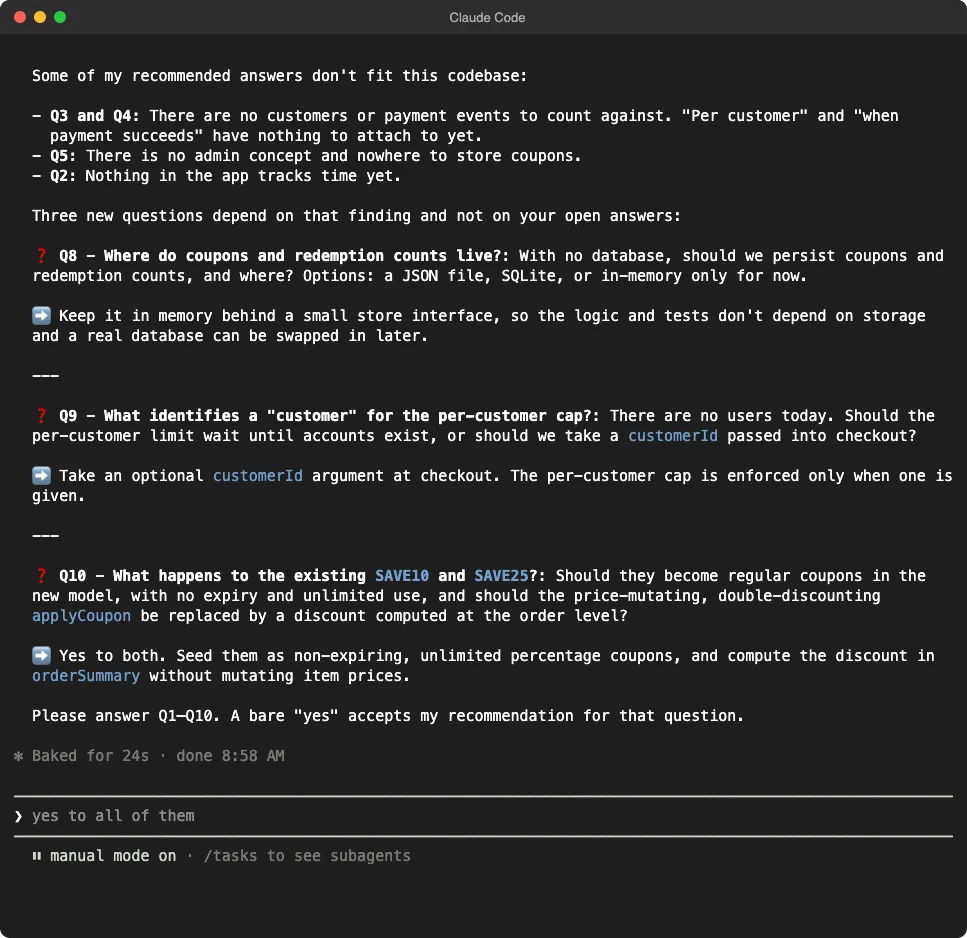
The skill’s instructions begin: “Interview the user relentlessly until you reach a shared understanding.” It asked 20 numbered questions over three rounds, each with a recommended answer, and it wrote no code until we confirmed.
Plain Claude Code did better than we expected. Its single reply listed nine decisions with recommendations and flagged the same double-discount bug, so you can get much of this by simply asking for a plan.
The skill went deeper on things like whether a minimum spend applies before or after the discount, and it kept going until no decisions were left. That’s useful when a task is vague and a wrong guess is expensive.
Here’s the warning. We accepted every recommendation, and a small store’s coupon idea grew into SQLite storage, 15-minute checkout holds and a reservation system. In our screenshot run, it recommended simple in-memory storage instead, so the advice can change between runs and you need to actually answer.
Are Matt Pocock’s Skills Worth It?
Yes, if you pick a few and use them on purpose. They’re cheap to keep around, since they added so little at startup, and they’re easy to read and change. Just don’t expect every task to improve by typing a slash command.
| Skill | Use it when | Skip it when |
|---|---|---|
/grill-me | The task is vague or expensive to get wrong | You already know exactly what you want |
/tdd | The logic is risky, like money or permissions | The spec is clear and the change is small |
/diagnosing-bugs | A bug keeps coming back or is hard to reproduce | The cause is obvious from the code |
/setup-matt-pocock-skills | You want the ticket and triage skills | You only use the three above |
You can check what they cost on your own work with our guide to monitoring Claude Code usage and costs. If you want a stricter, more complete process, compare them with our tested guide to Superpowers for Claude Code.
What We Didn’t Test
We didn’t test /improve-codebase-architecture, /to-spec, /to-tickets, /implement or the code-review skill. Our tiny project also can’t show how any of these behave on a large codebase, where the project says the skills matter most.
How to Remove Matt Pocock’s Skills
If you copied the files, delete the skill folders from .claude/skills. If you ran the setup skill, also remove its section from CLAUDE.md and delete docs/agents, after checking nothing else of yours lives there.
If you used the plugin, Claude Code has an uninstall command, which we didn’t run for this plugin:
claude plugin uninstall mattpocock-skills@claude-plugins-officialMatt Pocock’s Skills FAQs
Are Matt Pocock’s skills free?
Yes. The repo uses the MIT license, though running the skills uses your Claude plan or API credits.
Do they work with tools other than Claude Code?
The project lists install steps for Codex, GitHub Copilot, Gemini CLI, Cursor and others. We only tested Claude Code.
Will they change my global Claude Code settings?
Not with the copy method, because the files stay in your project’s .claude/skills folder. We checked our Claude Code settings and plugin list before and after the test, and no skill or plugin had been added. The plugin route does apply beyond a single project.
Do I need every skill?
No. We’d start with grill-me and its helper, then add others when you run into the problem they solve.
Conclusion
Matt Pocock’s skills are well written, light to keep installed and easy to adapt, but in our small tests they added time and cost without making the code more correct. Their real value is discipline: /grill-me made us face decisions we would have skipped, as long as we questioned its answers. Install a few, use them where mistakes are expensive, and find more ideas in our full Claude Code tutorials.