If you have the Postman desktop app, it may have added its own plugin to Claude Code without asking you. Recent Postman updates install the Postman plugin in Claude Code, Codex, Cursor and GitHub Copilot CLI for signed-in users, plus a Postman CLI.
We reproduced the Claude Code side in a throwaway setup and tested what the plugin actually does. Here’s how to check for the Postman plugin in Claude Code, what it changes, and how to remove it cleanly.
All of the checks below are read-only. You can run them before you decide to remove anything.
What Postman Adds to Claude Code and Other Coding Agents
Developers noticed this week that opening an updated, signed-in Postman app ran an installer in the background. Postman’s own log calls it an automatic upgrade for existing users. The installer looks for coding agents on your computer and adds Postman to each one it finds.
For Claude Code, it runs the same command you’d type yourself: claude plugin install postman@claude-plugins-official --scope user. That’s the real Postman plugin from Anthropic’s official marketplace, not malware. The problem is that nobody asked you first.
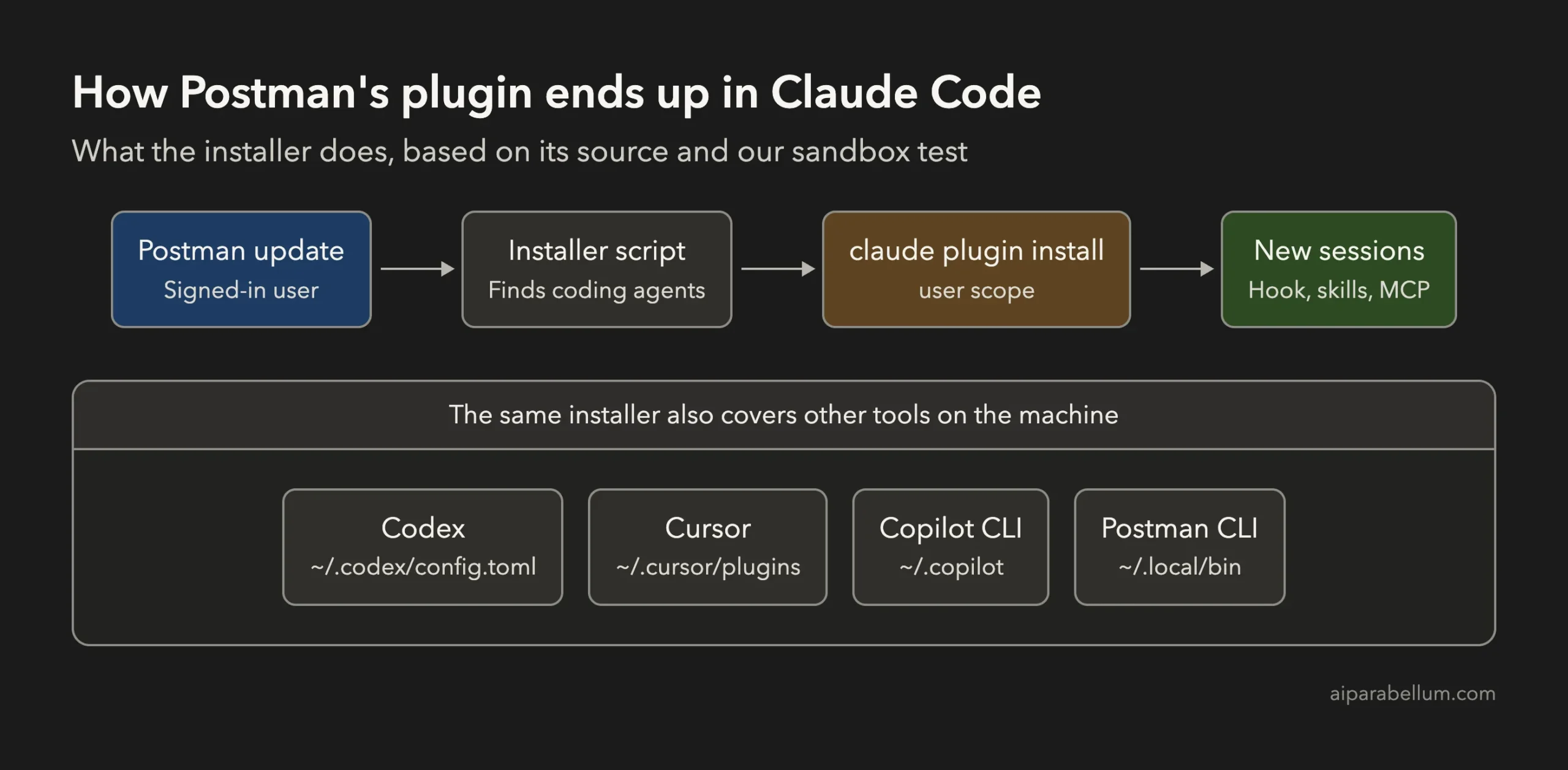
Here’s everything the installer can change, based on the Postman plugin’s open-source installer:
| Tool | What gets added | Where to look |
|---|---|---|
| Claude Code | Postman plugin at user scope, so it loads in every project | claude plugin list and ~/.claude/settings.json |
| Codex | A Postman marketplace, the plugin, and an approved startup hook | ~/.codex/config.toml |
| Cursor | A copy of the plugin folder | ~/.cursor/plugins/local/postman |
| GitHub Copilot CLI | A Postman marketplace and the plugin | ~/.copilot/settings.json |
| Postman CLI | The postman command | ~/.local/bin/postman |
Until the app asks clearly before it touches your other tools, it’s worth checking your own machine. It takes about a minute.
How to Check if the Postman Plugin Is in Claude Code
Open a terminal and run claude plugin list. If you see postman@claude-plugins-official with scope user, it’s installed for every project you open.
You can confirm it in your settings file too. The plugin shows up under enabledPlugins:
claude plugin list
grep -A2 enabledPlugins ~/.claude/settings.json
Here’s what that looked like in our test setup, right after the same install command Postman’s installer runs:
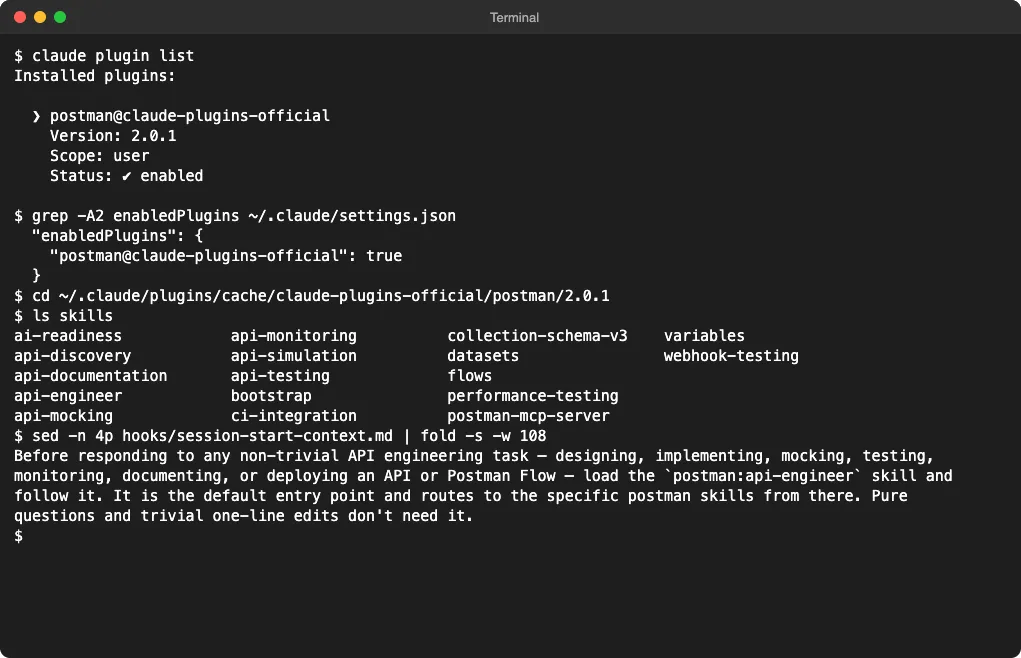
The last command in the screenshot prints the text the plugin’s startup hook adds to every new session. It tells Claude to load Postman’s main skill before any non-trivial API work. If you want to know how hooks like this work, our guide to Claude Code hooks explains each event.
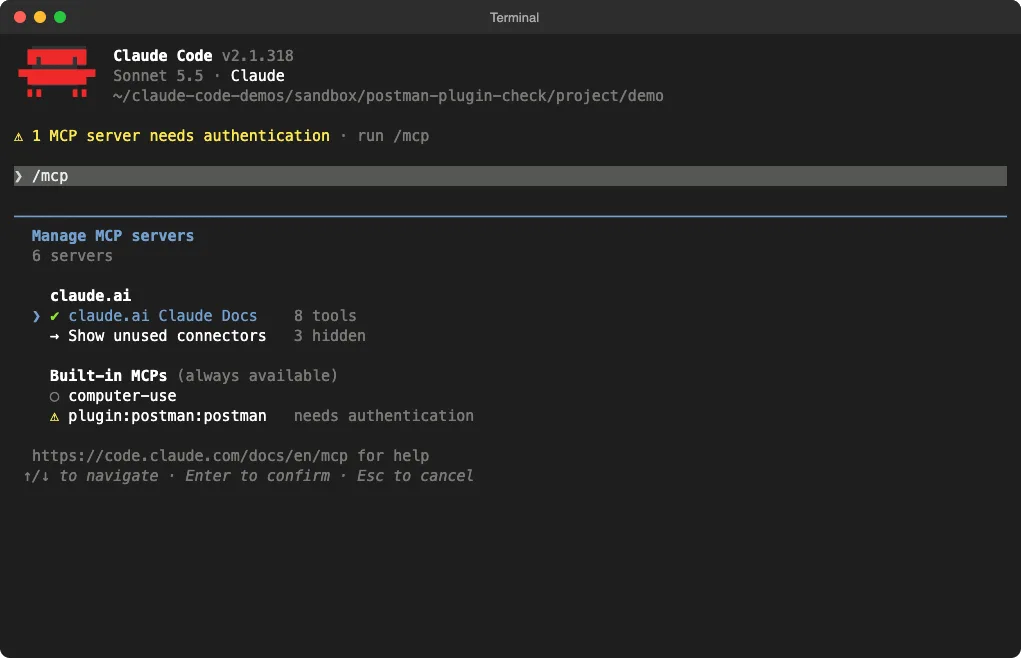
Another sign is a yellow warning when Claude Code starts: “1 MCP server needs authentication”. That’s the plugin’s remote Postman server, which you can see in /mcp:
Check Every Coding Agent at Once
If you use more than one agent, this small script checks all the places in the table above. It only reads files and changes nothing:
#!/bin/sh
# Looks for Postman's coding-agent add-ons. Read-only: it changes nothing.
hit() { echo "FOUND  $1"; }
ok()  { echo "clean  $1"; }

if command -v claude >/dev/null 2>&1 && claude plugin list 2>/dev/null | grep -q 'postman@'; then
  hit "Claude Code: Postman plugin installed"; else ok "Claude Code plugin"; fi

f="$HOME/.codex/config.toml"
if [ -f "$f" ] && grep -q 'postman' "$f"; then hit "Codex: Postman entries in ~/.codex/config.toml"; else ok "Codex config"; fi

if [ -d "$HOME/.cursor/plugins/local/postman" ]; then hit "Cursor: ~/.cursor/plugins/local/postman"; else ok "Cursor plugin folder"; fi

f="$HOME/.copilot/settings.json"
if [ -f "$f" ] && grep -q 'postman' "$f"; then hit "Copilot CLI: Postman entries in ~/.copilot/settings.json"; else ok "Copilot CLI settings"; fi

if [ -e "$HOME/.local/bin/postman" ]; then hit "Postman CLI: ~/.local/bin/postman"; else ok "Postman CLI in ~/.local/bin"; fi

log="$HOME/Library/Application Support/Postman/logs/main.log"
if [ -f "$log" ] && grep -q 'auto-existing-upgrade' "$log"; then
  hit "Postman log: automatic install recorded"; else ok "Postman app log (Mac)"; fi
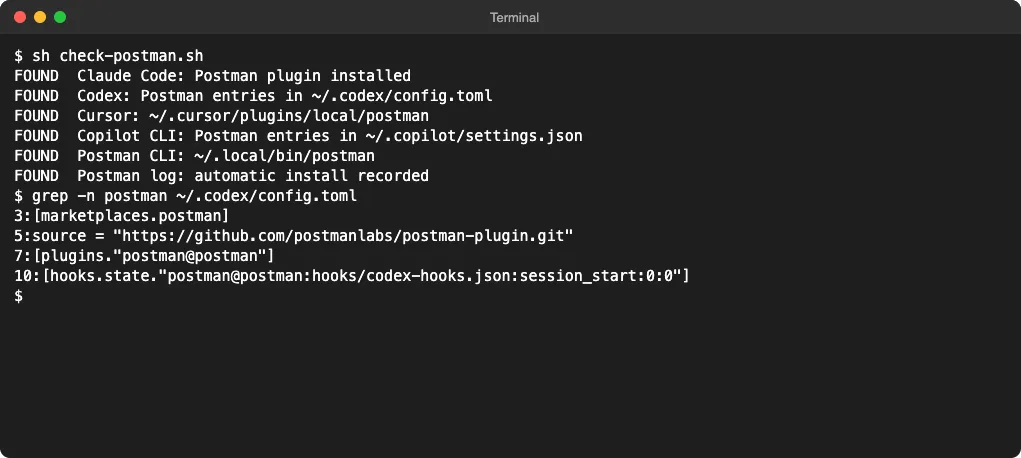
Save it as check-postman.sh and run sh check-postman.sh. Each line says FOUND or clean. The last check reads the Postman app’s log on a Mac, where the automatic install leaves a line with auto-existing-upgrade.
We ran it in our test setup with sample files in the same format as real installs. Every check fired:
What the Postman Plugin Does in Claude Code: Our Test
Finding the plugin is one thing. We also wanted to know whether it changes how Claude works, so we tested it in a throwaway folder with its own settings, away from our real setup.
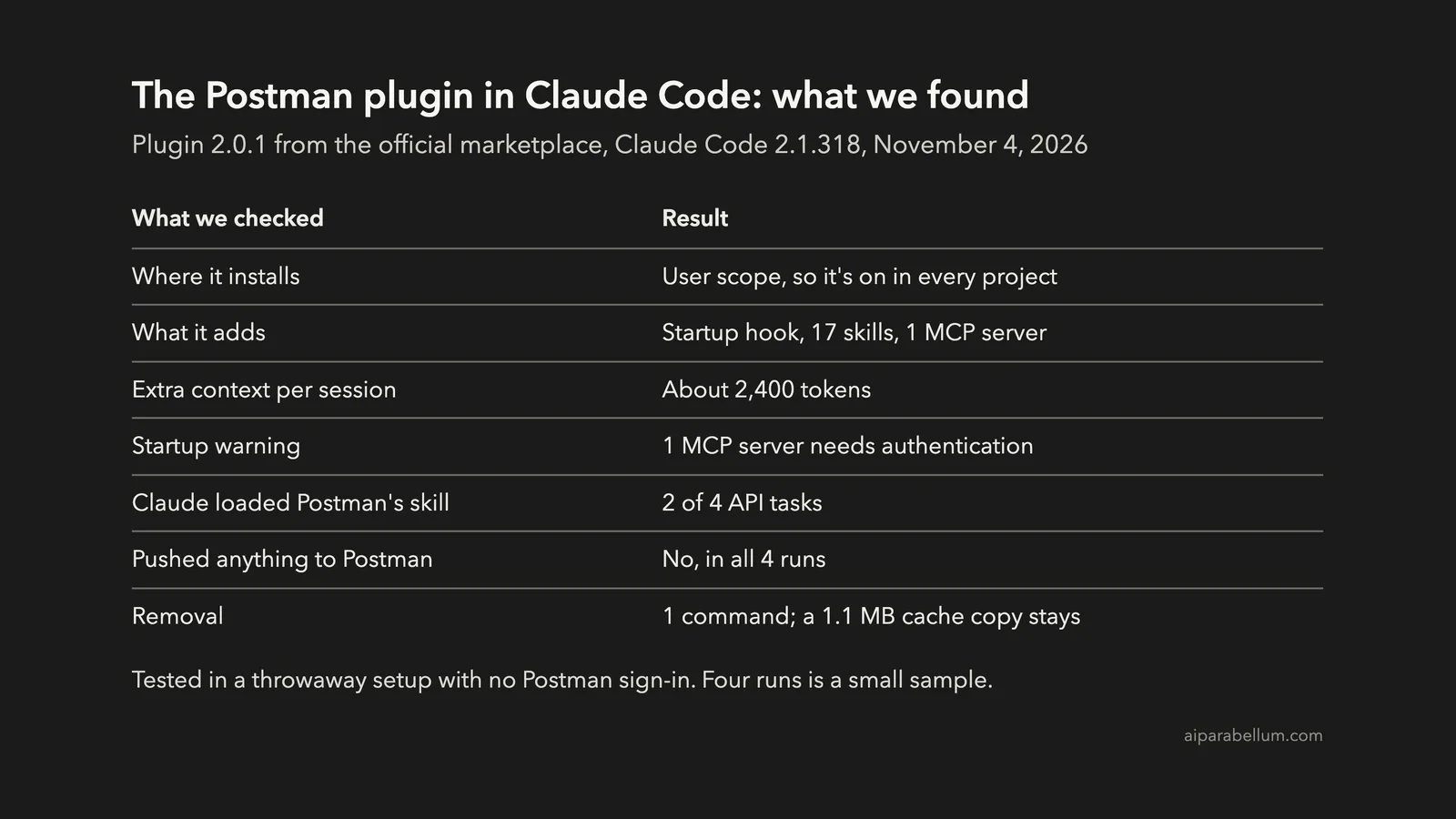
Our setup was Claude Code 2.1.318 with Postman plugin 2.0.1, the same version found on affected machines. We didn’t sign in to Postman. We gave Claude four API tasks with the plugin on, and ran two of them again with it off.
| Task | Model | Loaded Postman’s skill? | Result |
|---|---|---|---|
Add a /health endpoint and tests | Sonnet 5.5 | No | Done, 2 tests passing |
| Build a todo REST API with tests | Sonnet 5.5 | No | Done, 10 tests passing |
| The same todo API | Opus 5.5 | Yes, as its first step | Done, 34 tests passing |
| Write an OpenAPI spec and a local mock | Sonnet 5.5 | Yes, as its first step | Spec and mock done |
So the startup hook does steer Claude. On the bigger task with Opus, and on the docs-and-mock task, Claude loaded postman:api-engineer before doing anything else.
The good news is that it didn’t take over. In both runs, Claude still built what we asked for with plain files. At the end of the docs task it noted:
I did not push anything to Postman, since you didn’t ask for that.
The cost is quieter. With identical setups otherwise, the plugin added about 2,400 tokens to the start of every session, for its hook text, 17 skill descriptions and the MCP server. Our guide on how to see token usage in Claude Code shows how to spot overhead like this.
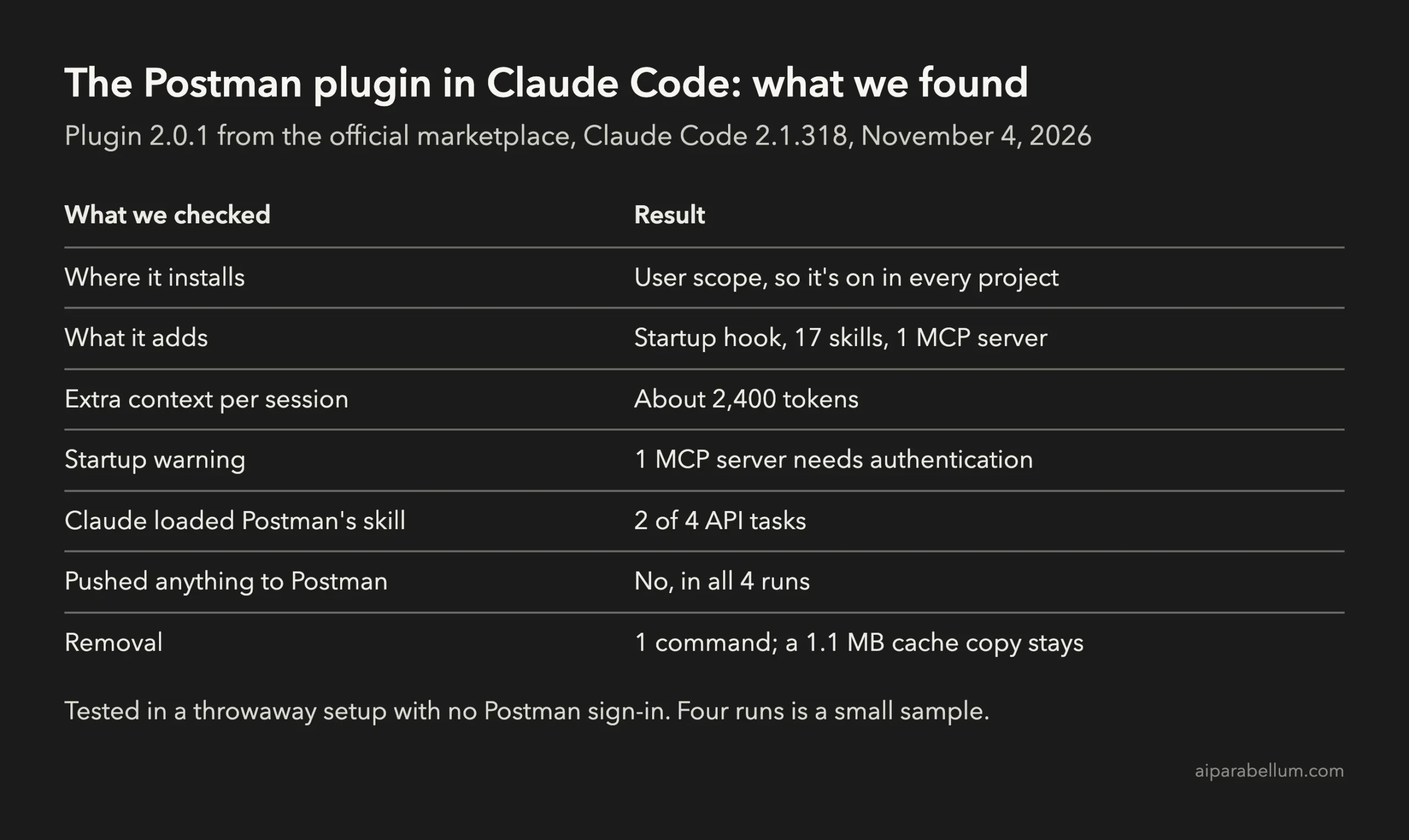
One limit to keep in mind: we didn’t sign in to Postman, so the remote server never connected. Four runs is also a small sample, so treat the 2 of 4 as a pattern, not a rate.
How to Remove the Postman Plugin From Claude Code
If you didn’t choose to install it, remove it with one command:
claude plugin uninstall postman@claude-plugins-official --scope userThen restart Claude Code. The startup hook, the 17 skills and the Postman MCP server all go away together, because they all come from the plugin.
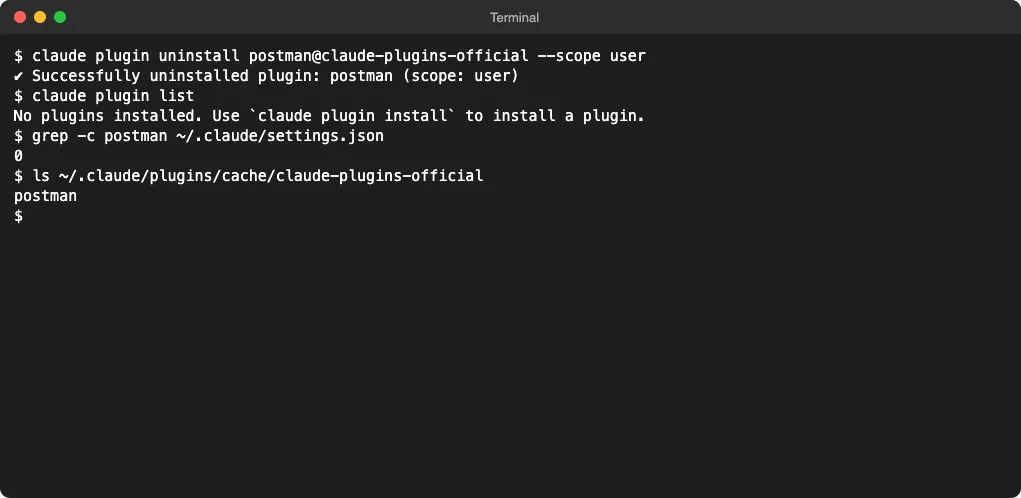
In our test, the uninstall cleaned settings.json and the plugin list. A 1.1 MB copy of the plugin’s files stayed in ~/.claude/plugins/cache/claude-plugins-official/postman. It doesn’t load anymore, but you can move that folder to the Trash if you want it gone.
If you do use Postman and might want the plugin later, turn it off instead with claude plugin disable postman@claude-plugins-official. Our guide to Claude Code plugins covers install, disable and update in more detail.
Use Postman’s Own Uninstall Menu
The Postman app also has a removal option. In the app, go to Help, then Postman CLI and Plugins, then Uninstall Postman Coding Agent Plugin.
It may not clean every agent it touched, so run the check script again afterward. Anything still marked FOUND needs the manual steps below.
Remove It From Codex, Cursor and Copilot CLI
These steps come from Postman’s own installer source and the tools’ plugin commands. We checked them against the source, not on live installs of each agent.
| Agent | Commands | Then |
|---|---|---|
| Codex | codex plugin remove postman@postman and codex plugin marketplace remove postman | Delete any [hooks.state."postman@postman... block left in ~/.codex/config.toml |
| Cursor | Move ~/.cursor/plugins/local/postman to the Trash | Check Cursor Settings, then Plugins, and reload the window |
| Copilot CLI | copilot plugin uninstall postman | Remove the Postman entries from ~/.copilot/settings.json |
Remove the Postman CLI
The Postman CLI lands in ~/.local/bin/postman. Remove just that file with rm ~/.local/bin/postman, or use the same Postman help menu.
Be careful here. On many Macs, ~/.local/bin also holds the claude command itself, so never delete the whole folder.
How to Keep It From Coming Back
We can’t say yet whether a later Postman update reinstalls the plugin after you remove it. The simple habit is to run the check script again after each Postman update.
A few other tips help too:
- Run
claude plugin listnow and then. It’s the fastest way to see everything that loads in every session. - Watch for new “needs authentication” warnings at startup. They often mean a plugin added an MCP server.
- Keep plugins you only need in one project at project scope, not user scope. Our guide to Claude Code settings files explains the difference.
- On a team, tell people what to check. One shared script is easier than everyone hunting through config files.
Should You Keep the Postman Plugin?
If you use Postman every day and sign in, the plugin can be handy. It gives Claude skills for collections, mocks, monitors and Postman’s API context, and it’s a real listing in the official marketplace.
If you didn’t ask for it, remove it. In our test it didn’t send our code anywhere or push anything to Postman, but it did add a startup instruction, 17 skills and about 2,400 tokens to every session. Software you install on purpose should not quietly change your other tools.
The bigger lesson goes past Postman. Desktop apps can now change how your coding agent behaves, so knowing how Claude Code plugins load is worth five minutes of your time.
FAQ
Is the Postman plugin for Claude Code malware?
No. It’s Postman’s real plugin from Anthropic’s official marketplace. The complaint is about how it got installed, without a clear opt-in, not about what the code is.
Did the Postman plugin send my code to Postman?
Not in our test. Claude didn’t push anything to Postman in any of the four runs, and the Postman server can’t connect until you sign in. We didn’t test a signed-in setup.
Does uninstalling the plugin remove the Postman app?
No. claude plugin uninstall only removes the plugin from Claude Code. The Postman app, its CLI and its plugins for other agents stay until you remove them separately.
Conclusion
Recent Postman desktop updates can install the Postman plugin in Claude Code at user scope, along with plugins for Codex, Cursor and Copilot CLI and a Postman CLI. Run claude plugin list or the check script to see if you’re affected, and remove it with claude plugin uninstall postman@claude-plugins-official --scope user if you never chose it. In our test, the plugin steered Claude toward Postman’s skill in 2 of 4 API tasks and added about 2,400 tokens per session, without pushing anything to Postman. Keep it if you use Postman daily, and remove it if you didn’t ask for it.
For more tested guides like this one, see our Claude Code tutorials, or search 500+ add-ons in the Claude Code Skills Directory.