Claude Code MCP headers are how a remote server learns who you are, and env vars do the same job for a server that runs on your own machine. Both are easy to set, and the hard part is keeping the key out of a file that ends up in Git. In this guide we pass a fake token to two tiny test servers, watch exactly what each server receives, and then move the secret out of the shared config.
Browse all our Claude Code tutorials for more guides like this one.
Tested with Claude Code v2.1.322 on November 14, 2026, on macOS. Every command ran in a throwaway project against two small local servers that print what they receive. The token and key in the screenshots are made-up values, never real ones.
Claude Code MCP Headers and Env Vars: The Quick Answer
For a remote server, add a header with --header. For a local server, set a variable with --env.
claude mcp add --transport http billing https://api.example.com/mcp \
  --header "Authorization: Bearer your-token"

claude mcp add --env API_KEY=your-key --transport stdio reports \
  -- python3 server.py
Both commands save the value as plain text. That is fine for a private setup, but for a shared .mcp.json file you should write a variable name such as ${BILLING_TOKEN} instead and set the real value in your shell.
| You want to | Use this | Where the secret ends up |
|---|---|---|
| Send a key to a remote server | --header "Name: value" | Plain text in the server’s config entry |
| Give a key to a local server | --env KEY=value | Plain text in the server’s config entry |
| Share a config with your team | ${VAR} in .mcp.json | In each person’s shell, not in the file |
| Set a fallback value | ${VAR:-default} | The default is in the file, so never a secret |
| Use a token that changes | headersHelper | Wherever your script reads it from |
Why MCP Servers Need Headers and Environment Variables
MCP servers give Claude extra tools, such as a database or an issue tracker. If the idea is new to you, start with our MCP servers guide. Most useful servers talk to a paid or private service, so they need a credential.
How that credential travels depends on the server type. A remote HTTP server gets it as a request header, usually Authorization or X-API-Key. A local stdio server is a program Claude Code starts on your machine, so it reads the key from an environment variable.
The official MCP docs cover both, plus a third option for tokens that expire. We tested all three with fake values so you can see what really happens.
A key in your shell is a secret. The same key in a committed file is a leak waiting for a push.
Our Test Setup
We made an empty project named billing-app with two small Python scripts and no outside packages. The first is an HTTP server that logs the headers of every request and has one tool, show_headers. The second is a stdio server with one tool, show_env, that returns the value of DEMO_API_KEY.
These servers exist only to echo what they get. That makes them a good mirror: if a header is wrong, empty or never expanded, the log shows it at once. Our fake token is demo-token-12345 and our fake key is fake-key-abc123.
Step 1: Pass a Header to a Remote MCP Server
The --header flag takes one string in the form Name: value. The docs note that -H is the short form, and you can repeat the flag for more than one header.
claude mcp add --transport http billing http://127.0.0.1:8931/mcp \
  --header "Authorization: Bearer demo-token-12345"
The confirmation message hid the value and printed [REDACTED] in its place. It also named the file it changed, ~/.claude.json, because local scope is the default. Then we ran claude mcp get billing, and that command printed the token in full.
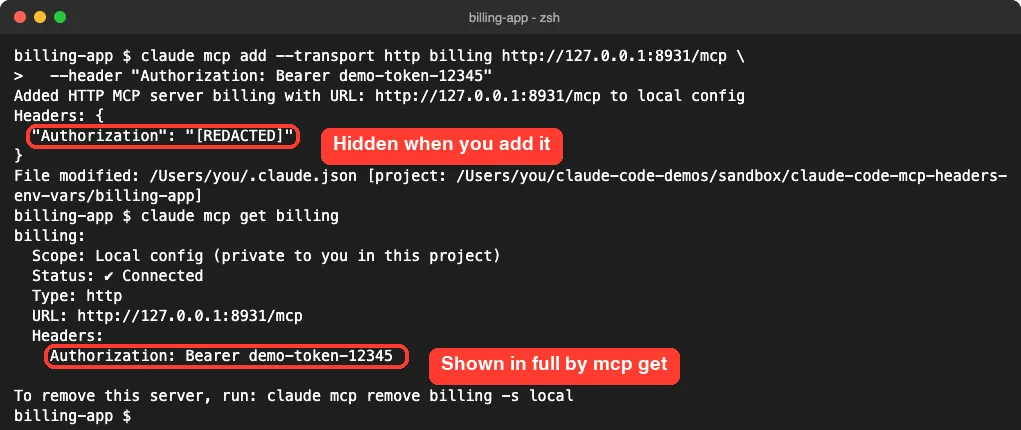
So the header is stored as plain text, and anyone who can run that command on your machine can read it. Keep this in mind before you share your screen or paste terminal output into a chat.
Our test server confirmed the other half. Every request, from the first handshake to the tool list, carried the same header.

Step 2: Pass an Environment Variable to a Local Server
A stdio server runs as a child process, so there are no headers. You hand it the key with --env, or -e for short.
claude mcp add --env DEMO_API_KEY=fake-key-abc123 --transport stdio reports \
  -- python3 servers/env_stdio.py
Two details from the docs matter here. The double dash separates Claude Code’s own options from the command that starts the server. And because --env accepts several pairs, you need another option, such as --transport stdio, between it and the server name.
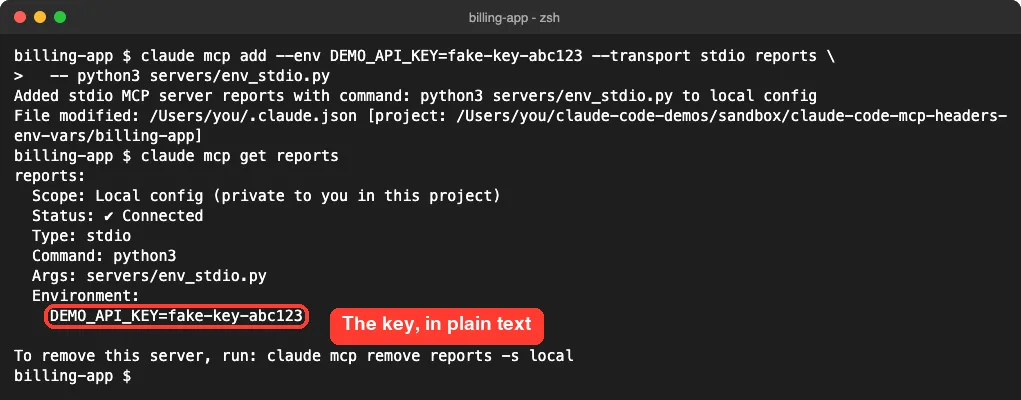
Again the value is stored as written. The variable is set only for that server’s process, not for your whole session. For the wider picture, see our guide to environment variables in Claude Code.
Where the Leak Happens: Project Scope
Local scope keeps a server private to you. Project scope is different: it writes the server into .mcp.json at the project root, and that file is meant to be committed. Our post on MCP server scopes covers the three choices in detail.
We added the same server with --scope project and the same header, then opened the file.
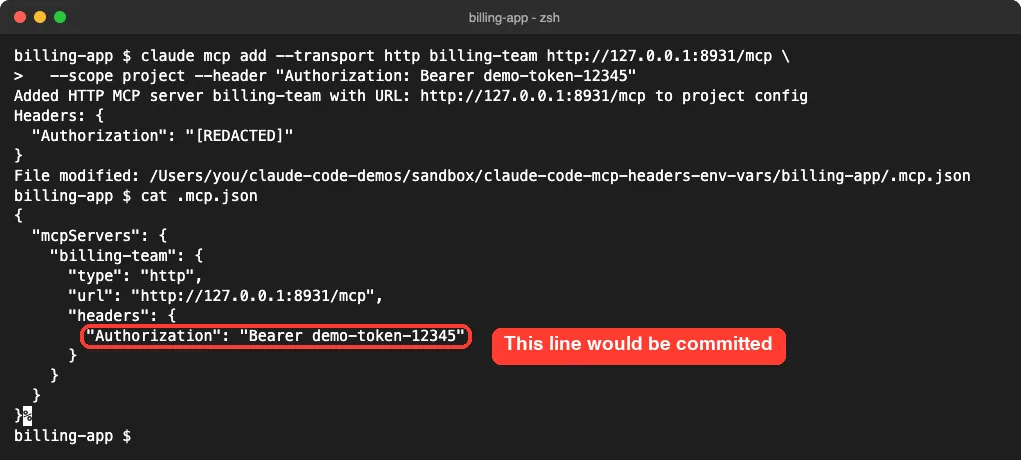
The token is right there in the file. One git add and one push later, it is in your repository history for everyone with access. Nothing in the add message warns you about this, since the value shows as redacted.
Step 3: Use Variable Expansion in .mcp.json
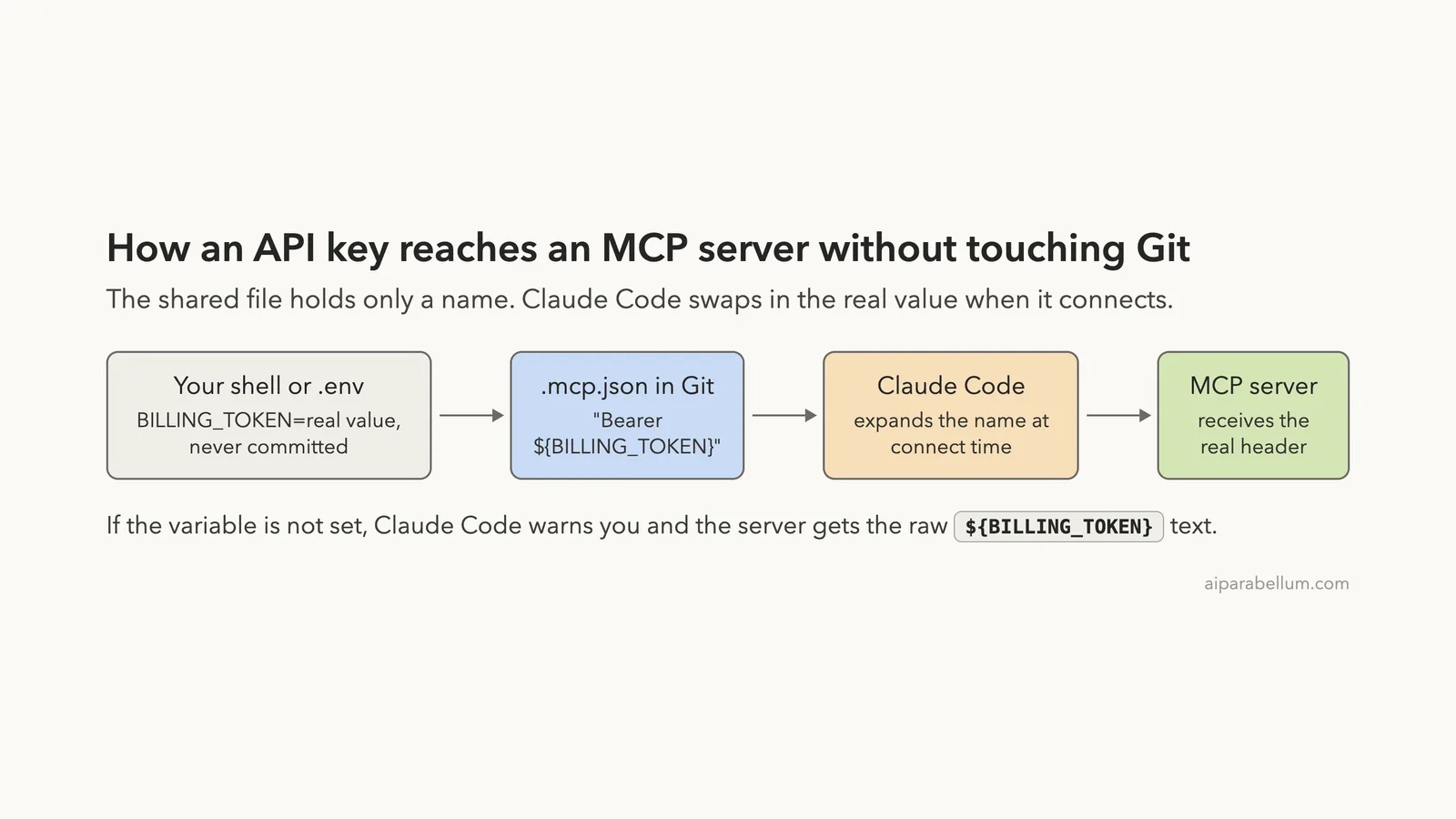
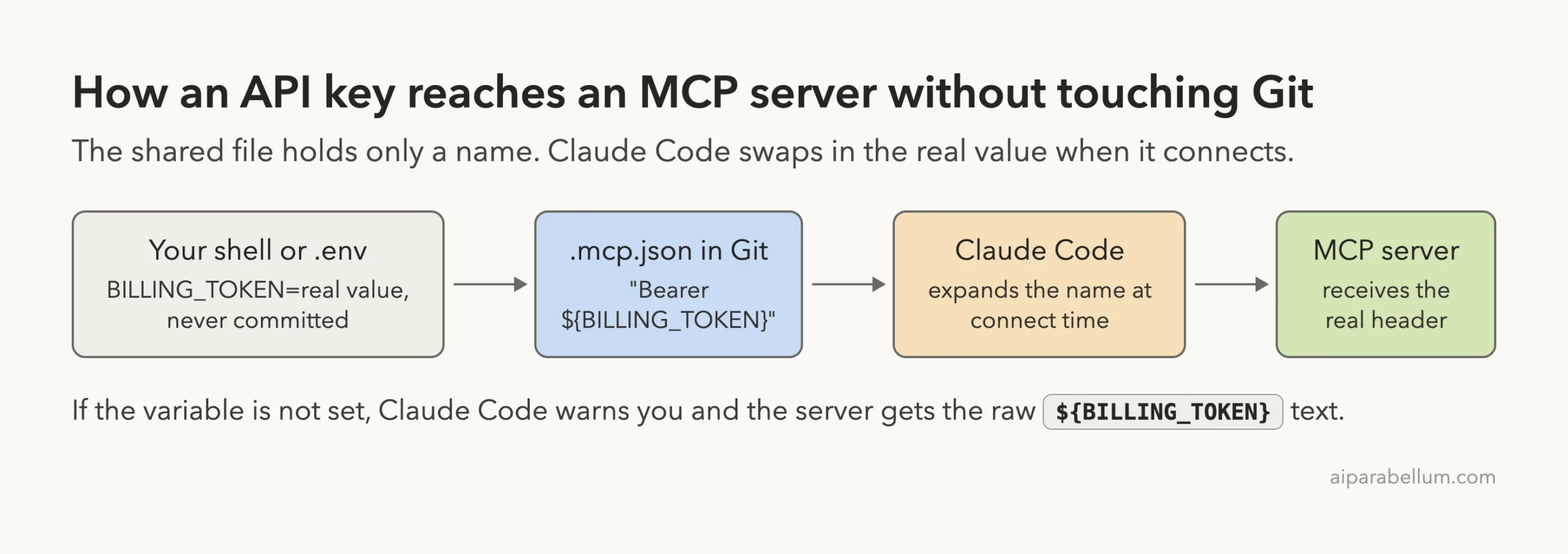
The fix is built in. According to the docs, you can reference an environment variable in a server’s command, args, env, url or headers. Write ${VAR} for the value, or ${VAR:-default} to fall back when the variable is unset.
{
  "mcpServers": {
    "billing-team": {
      "type": "http",
      "url": "http://127.0.0.1:8931/mcp",
      "headers": {
        "Authorization": "Bearer ${BILLING_TOKEN}"
      }
    },
    "reports-team": {
      "command": "python3",
      "args": ["servers/env_stdio.py"],
      "env": {
        "DEMO_API_KEY": "${REPORTS_KEY}"
      }
    }
  }
}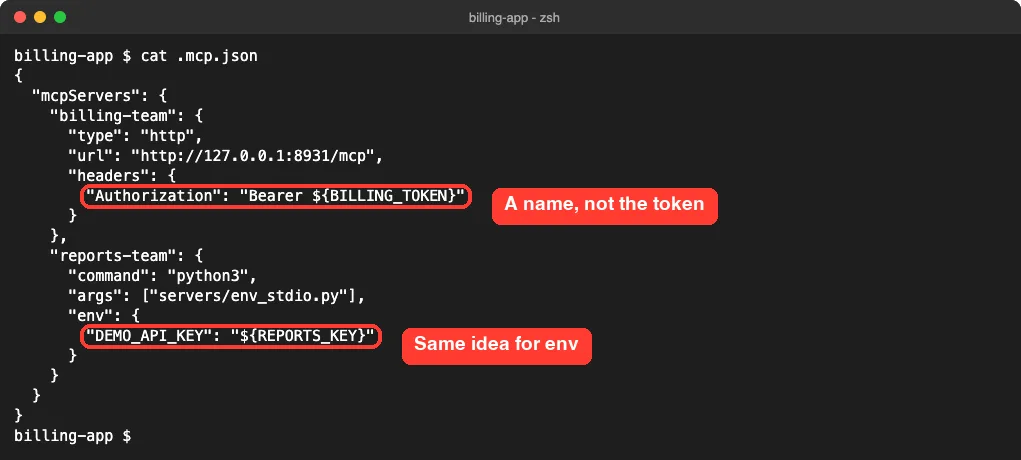
Now the file is safe to commit. Each teammate sets the two variables in their own shell, and they can each use a different key.
What Happens When a Variable Is Missing
We ran claude mcp list before setting anything. Claude Code loaded the config and printed a warning that named each missing variable.
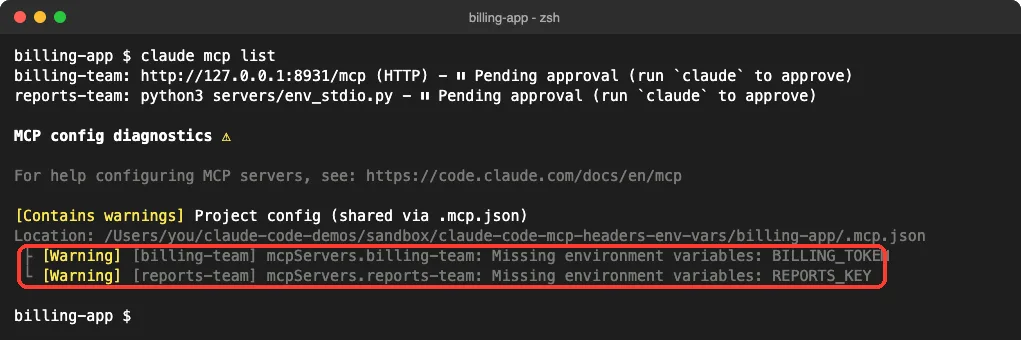
The docs say the server still loads with the ${VAR} text left as it is, and our log proved it. The server received the literal string Bearer ${BILLING_TOKEN} as its header. A real service would reject that, so treat this warning as an error.
What Claude Code Shows After You Set Them
With both variables exported, claude mcp get looked very different from Step 1. It printed the reference by name, not the value behind it.
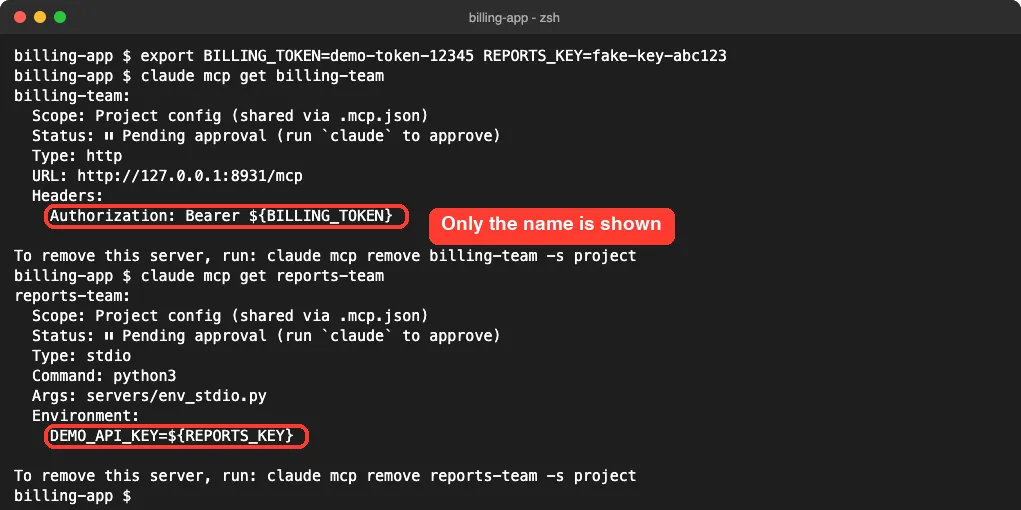
This is a nice side effect. A variable reference protects you in Git and also in your terminal output.
Step 4: Confirm the Real Value Reaches the Server
Servers from .mcp.json need your approval before they run. When we started claude in the project, it listed both servers and asked which ones to enable.
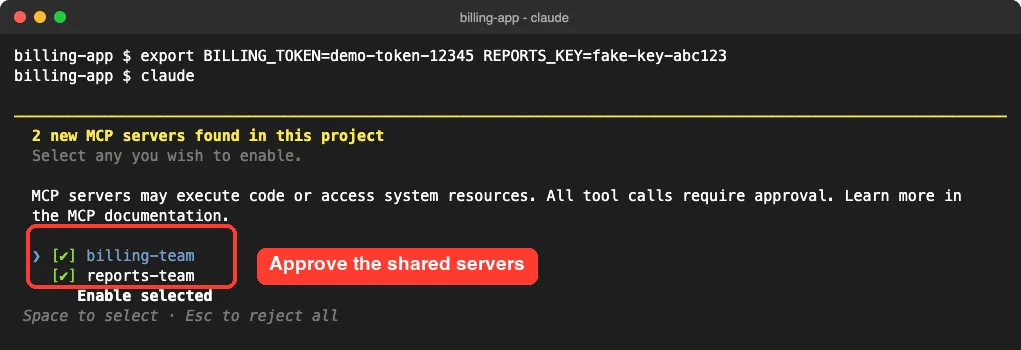
Then we asked Claude to call both tools and print what came back.
Call show_headers on billing-team and show_env on reports-team. Print exactly what each one returns.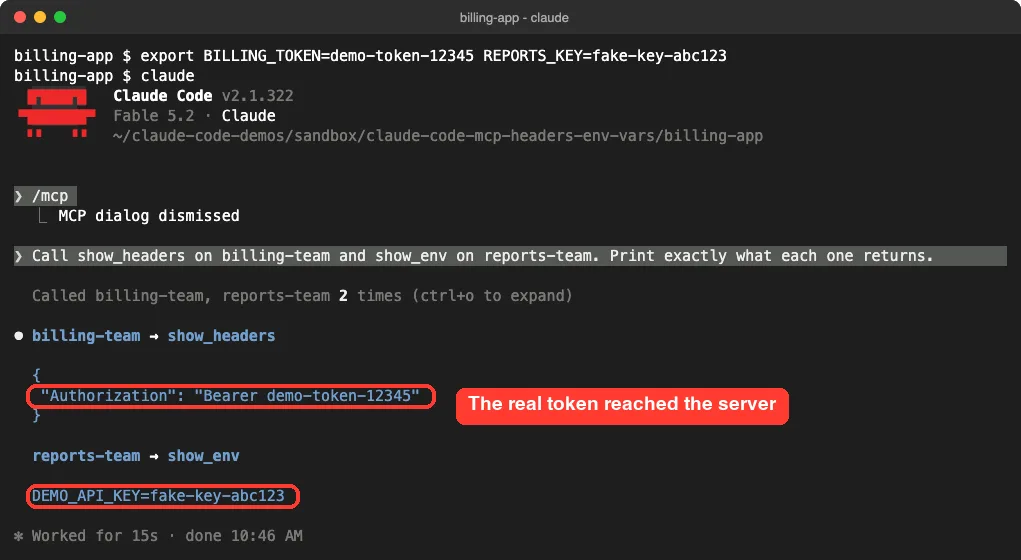
The HTTP server got the real token and the stdio server got the real key. In the /mcp panel, the server’s detail view showed its status, URL and config location, and no header values at all.
There is a lesson in this screenshot too. Our test tool echoed the secret back, so the token is now part of the conversation. A well-built server never returns its own credentials, and you should not ask one to.
Credential Variables That Read as Empty
Not every variable expands. The docs list a set of credential names that Claude Code reads as empty in a remote server’s url and headers. The set includes ANTHROPIC_API_KEY, ANTHROPIC_AUTH_TOKEN, cloud provider credentials, and others such as NPM_TOKEN and HTTPS_PROXY.
The reason is safety. A project’s .mcp.json could otherwise name one of your existing credentials and send it to a server you have never heard of.
We tested it with a fake NPM_TOKEN and a second header that uses a default value.
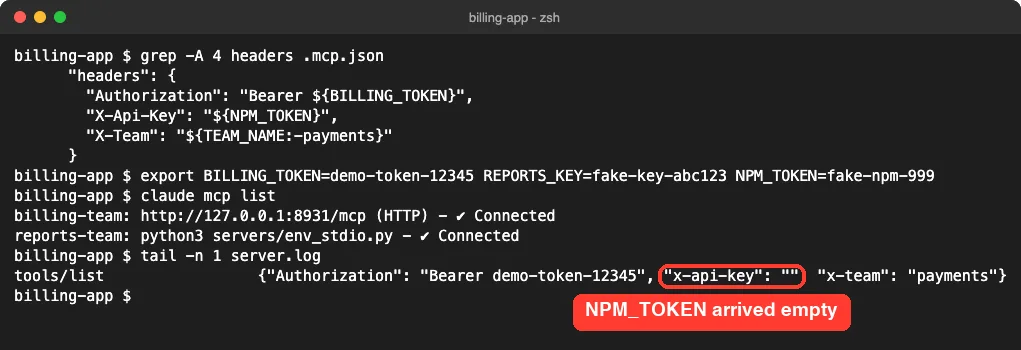
The X-Api-Key header arrived empty even though the variable was set, and there was no warning. The X-Team header fell back to its default, payments. If you really need one of the covered credentials, the docs suggest copying it into a variable with a name of your own.
Does Claude Code Read a .env File for MCP Servers?
Many projects keep secrets in a .env file, so we tried that next. We put both variables in .env, left the shell unset, and ran claude mcp list.
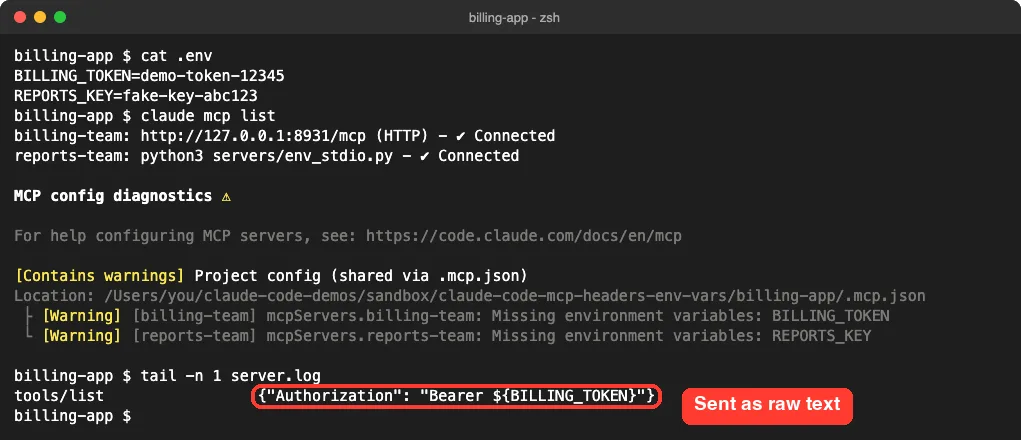
In our test the file was ignored. The warning stayed, and the server again received the unexpanded text. We also tried an env block in the project’s local settings file, and claude mcp list still reported both variables as missing.
What worked was loading the file into the shell first.
set -a; source .env; set +a
claude
A tool such as direnv can do this for you when you enter the folder. Either way, the variables must exist in the environment that starts Claude Code.
Step 5: Generate Headers With headersHelper
Some tokens expire after an hour, or come from a company sign-in tool. For those, the docs describe headersHelper: a command that Claude Code runs when it connects, whose output is merged into the headers.
The rules from the docs are short:
- The command must print a JSON object of string pairs to stdout.
- It runs in a shell and is dropped after 10 seconds.
- It runs fresh on every connection, with no caching.
- Its headers override static
headerswith the same name.
Our helper reads the fake token from a file in a .secrets folder and prints one header.
#!/bin/sh
# Prints the auth header as JSON. The token lives in a file Git never sees.
TOKEN=$(cat "$CLAUDE_PROJECT_DIR/.secrets/billing-token" 2>/dev/null || cat .secrets/billing-token)
printf '{"Authorization": "Bearer %s"}\n' "$TOKEN"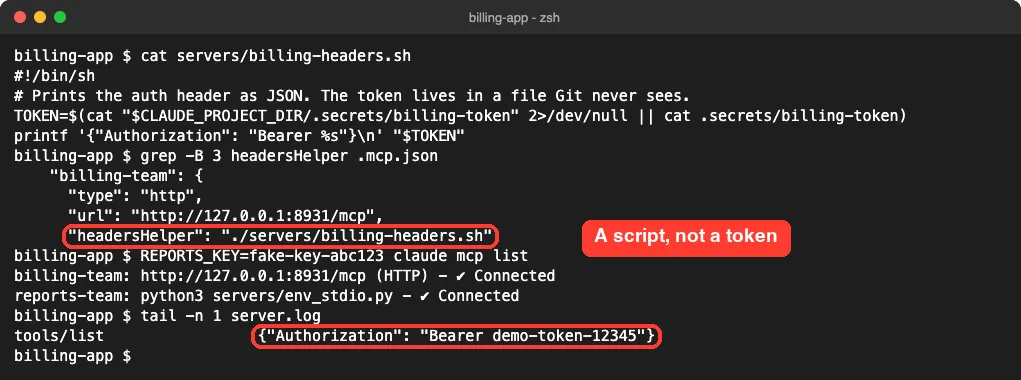
It worked, and .mcp.json now contains neither a token nor a variable name. Reading from a file was a deliberate choice. The docs say a helper that comes from a project’s .mcp.json runs without environment variables whose names look like credentials, such as ones containing TOKEN, SECRET or KEY.
One more rule: for project and local servers, the helper runs only after you accept the trust dialog for that folder. Until then, the docs say Claude Code connects with the static headers alone.
Keep Secrets Out of Git
The last step is to make sure the files that do hold secrets can never be committed. Our .gitignore has four lines.
.env
.secrets/
.claude/settings.local.json
server.log
Then we staged everything and searched the tracked files for both fake values.
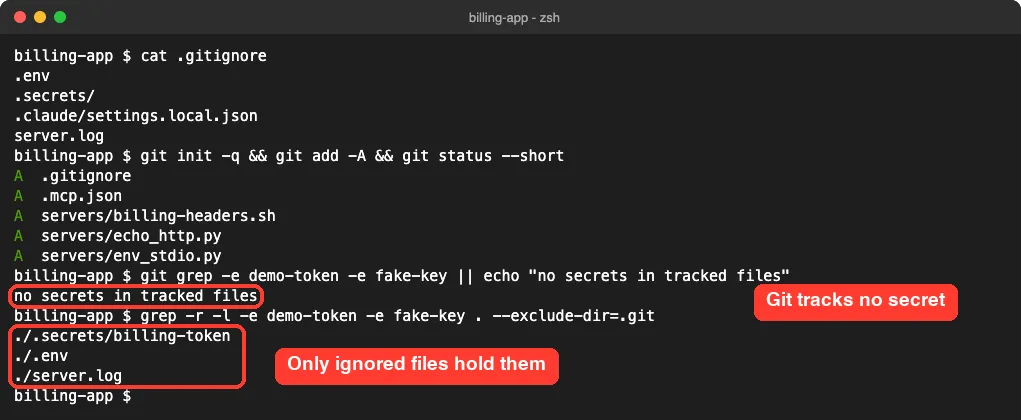
Git found nothing, while a plain search found the values only in the three ignored files. Note the log file on that list. Logs often capture headers, so ignore them too.
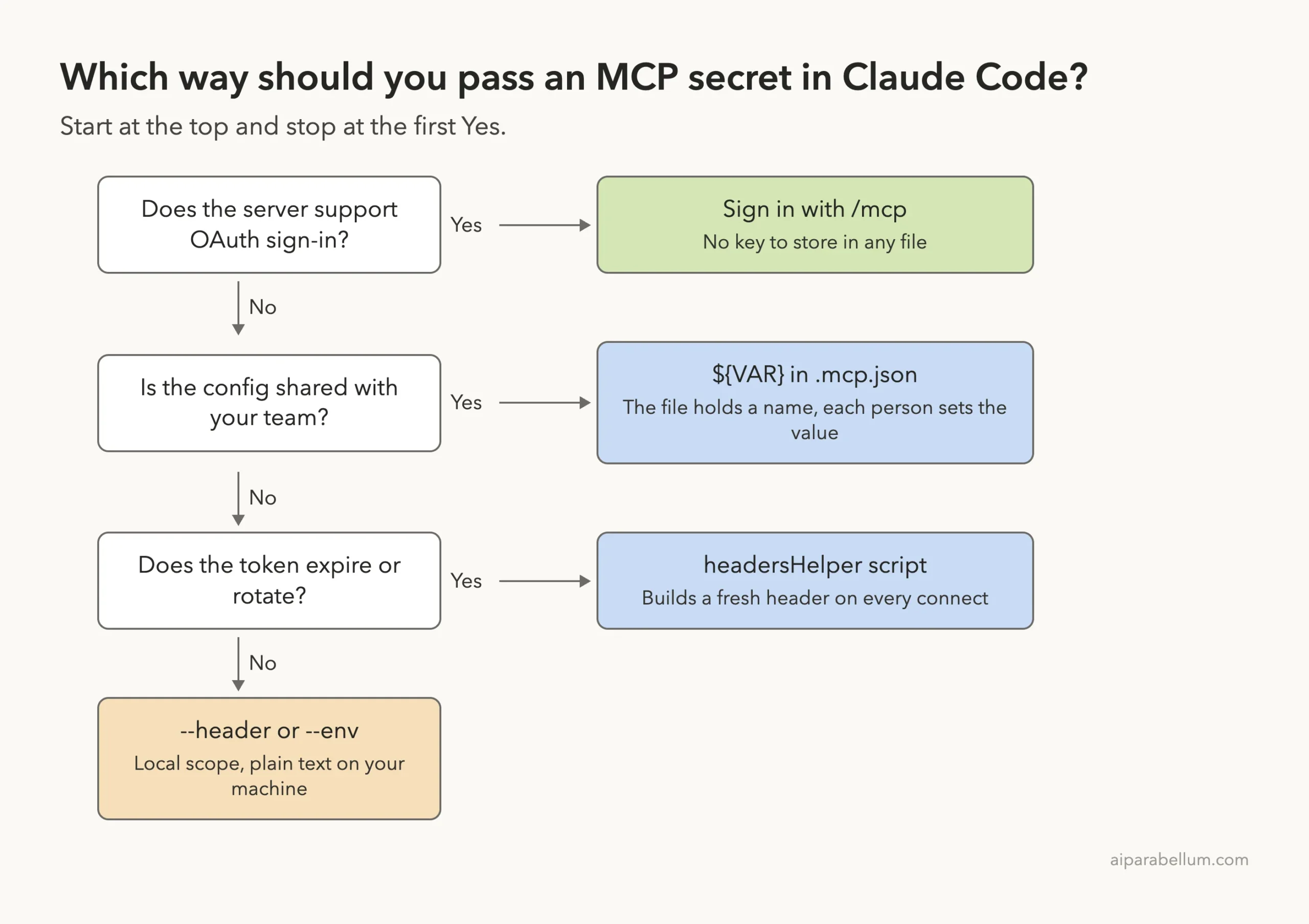
If a server supports OAuth, that is the cleanest route of all, since you sign in through /mcp and store no key yourself. Our MCP Servers Directory lists servers along with how they connect.
Try It Yourself
You can repeat the core test in a few minutes with any server you already use. Move one real key out of your config and into your shell, then ask Claude to check the result without printing the secret.
Read .mcp.json and list every header and env value in it. Tell me which ones are ${VAR} references and which are hard-coded values. Do not print any hard-coded value in full.Then run claude mcp list in a fresh terminal. A missing-variable warning tells you which names you still need to export.
Common Mistakes
- Using
--scope projectwith a real key in--header. The key goes straight into.mcp.json. - Ignoring the missing-variable warning. The server still connects in some cases, but it receives the raw
${VAR}text. - Expecting a
.envfile to load by itself. In our test it did not. - Referencing a covered name such as
NPM_TOKENin a remote header. It arrives empty with no warning. - Putting the server name right after
--env. The CLI reads it as another pair and rejects it. - Pasting a token with a trailing newline. The docs say Claude Code warns about hidden whitespace but does not trim it.
Pro Tips
- Run
git grepfor the first few characters of your key before every first push of a new project. - Use
${VAR:-default}for values that are not secret, such as a base URL or a team name. - Do not overwrite
.claude/settings.local.jsonby hand. When we replaced it, our approved project servers went back to pending approval. - If a server fails after these changes, our guide to reading MCP logs shows where the errors are.
- After you edit a header or variable, reconnect the server. Our post on how to reload MCP servers explains what a reconnect picks up.
- If a key was ever committed, rotate it. Removing the line later does not remove it from history.
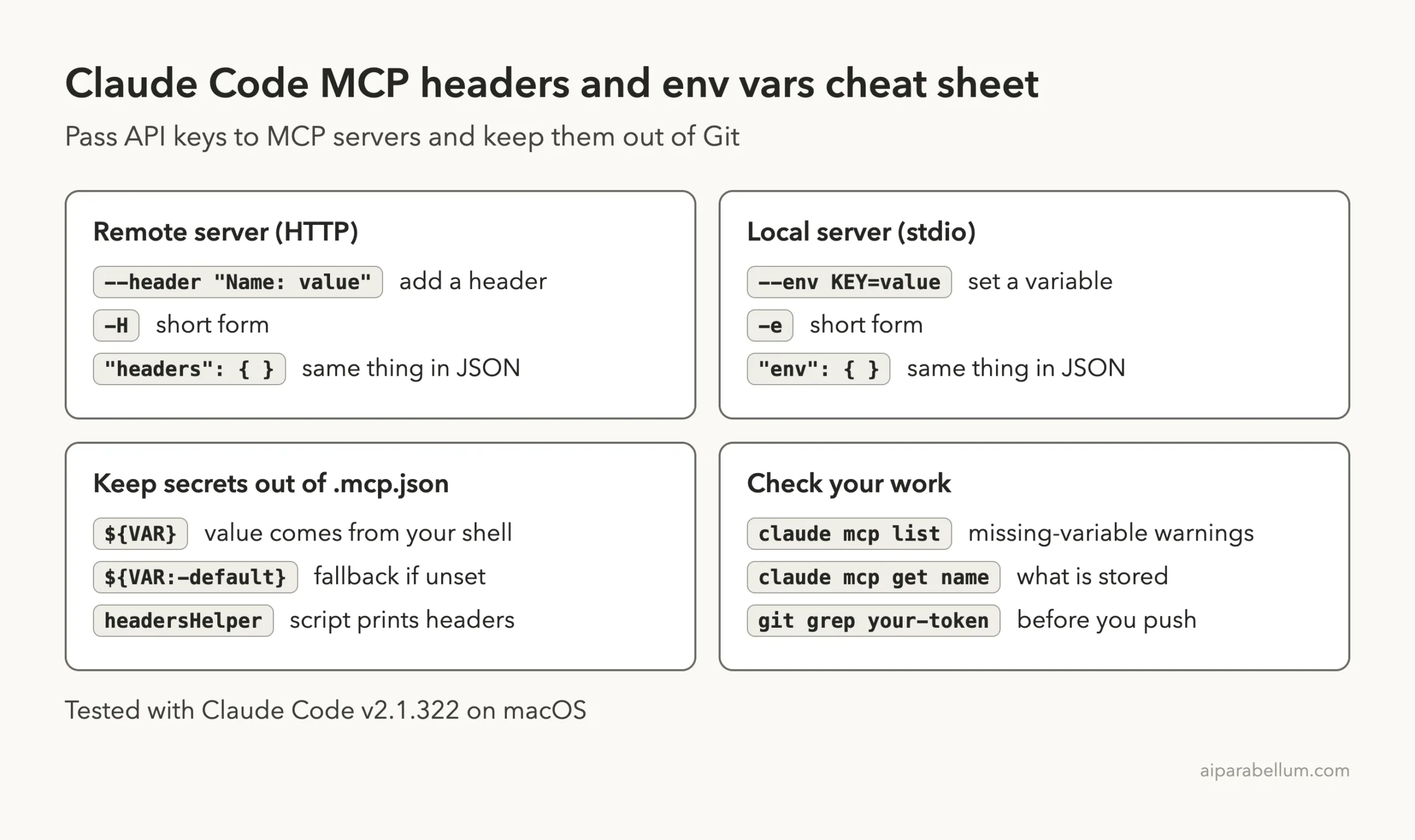
Cheat Sheet
Frequently Asked Questions
How do I add a header to an MCP server in Claude Code?
Use claude mcp add --transport http with --header "Name: value", or add a headers object to the server’s JSON entry. In our test the header was sent on every request to the server.
Where does Claude Code store MCP API keys?
In the server’s config entry, as plain text. For local and user scope that is ~/.claude.json, and for project scope it is .mcp.json in the project root. The docs say OAuth client secrets are different and go to the system keychain on macOS.
Can I use environment variables in .mcp.json?
Yes. The docs support ${VAR} and ${VAR:-default} in command, args, env, url and headers. Both forms worked in our test.
Why is my MCP header empty even though the variable is set?
The variable is probably on Claude Code’s list of credential names, such as ANTHROPIC_API_KEY or NPM_TOKEN. Those read as empty in a remote server’s url and headers. Copy the value into a variable with a different name and reference that one.
What is headersHelper in Claude Code?
It is a field that names a command. Claude Code runs the command when it connects and merges the JSON it prints into the request headers. It suits short-lived tokens, and our small script delivered the right header on the first try.
Conclusion
Claude Code MCP headers and env vars are simple to set with --header and --env, but both save your key as plain text, and project scope puts that text in a file built for sharing. In our tests a ${VAR} reference fixed that cleanly: the real value reached the server, claude mcp get showed only the name, and Git tracked no secret. Keep three surprises in mind: a missing variable is sent as raw text, some credential names always read as empty, and a .env file does nothing until you load it.