The Claude Code Ultimate Guide is one of the largest community handbooks for Claude Code, and it ships with its own MCP server. Add that server and Claude can search the guide, open the exact section, look up release notes and pull templates without leaving your terminal. We installed it in a throwaway folder, asked it four real questions, and checked its answers against Anthropic’s own documentation.
This guide is part of our Claude Code tutorials. Find more add-ons in our Claude Code Skills Directory.
Tested with Claude Code v2.1.322 on November 14, 2026, using claude-code-ultimate-guide-mcp 1.3.7 from github.com/FlorianBruniaux/claude-code-ultimate-guide at commit b563663. We ran it on macOS. At that commit the repository already lists server version 1.3.8, which was not on npm yet, so every result here is from 1.3.7.
The guide’s answers matched the official docs on every point we checked. The weak spots were stale release notes and a template tool that returned scripts one line at a time.
Quick Summary: What We Tested
| Question | Answer |
|---|---|
| What is it? | A community guide to Claude Code with an MCP server that makes it searchable. It is not an official Anthropic product |
| Does it need an account? | No. It connected with no sign-in and no API key |
| How do you install it? | One claude mcp add line that runs a pinned npm package through npx |
| How many tools? | /mcp listed 17 tools, plus resources and one prompt |
| Were its answers right? | Yes on hooks, hook timeouts and MCP scopes, which we compared with the official docs |
| What was weak? | Release notes stopped at v2.1.310, and script templates came back one line per call |
| Our verdict | Worth adding for one project if you often ask Claude how Claude Code works. Keep it at local scope |
One honest note. We ran each prompt once, so treat this as one demo and not a benchmark.
What the Claude Code Ultimate Guide Is and Why It Has an MCP Server
The guide is a public GitHub repository written by Florian Bruniaux. It covers Claude Code features, hooks, agents, MCP servers and security, and it comes with ready-made templates and a website.
It is a community project. Anthropic does not write or review it, so treat it as a well-kept second opinion and not as the source of truth.
The repository was active when we checked. It was not archived, its last push was on November 13, 2026, and it showed 6,436 stars.
The guide is huge, which is the reason for the server. MCP, the Model Context Protocol, is the standard way to give Claude extra tools, and our MCP guide explains the basics.
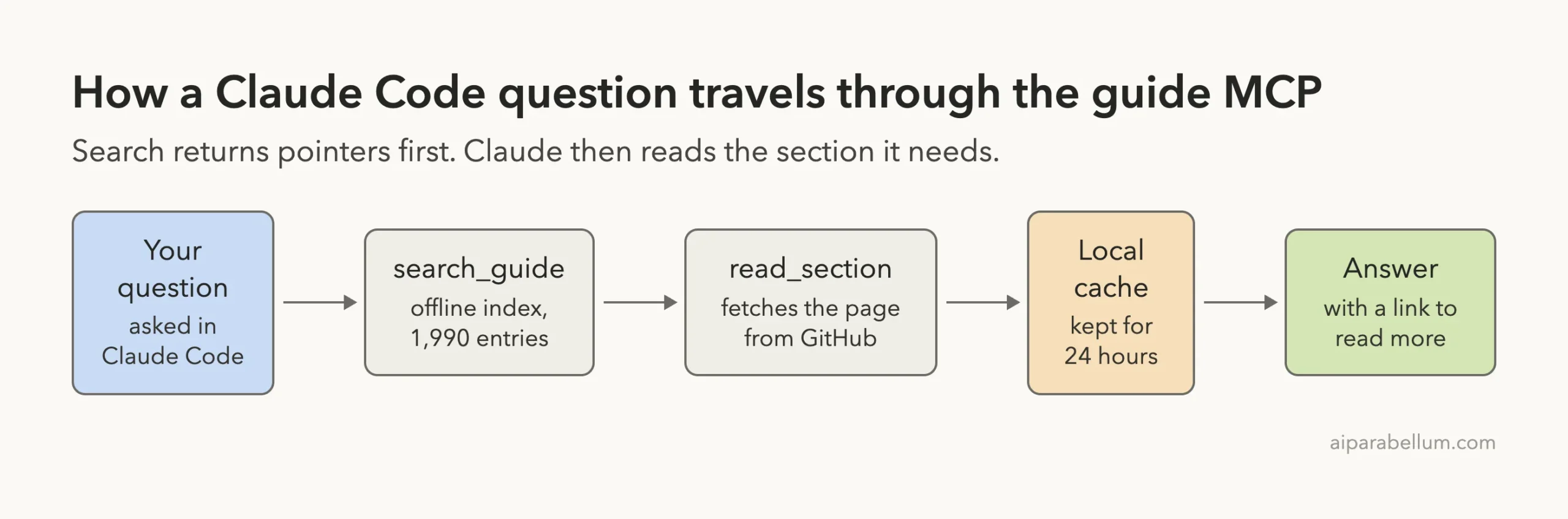
With the server added, Claude does not have to load the whole guide. It searches a small index first and then reads only the section it needs.
Is the Package Safe to Run? What We Checked First
The install line runs an npm package on your machine, so we looked inside it before running anything. Here is what we found in version 1.3.7.
- The npm page points to the same GitHub repository, in its
mcp-serverfolder, and the publisher is the guide’s author. - The package is small: 15 files and about 1.26 MB unpacked.
- It has no install scripts, so nothing runs on its own during download.
- We found no code that starts other programs.
- The only web addresses in the code belong to GitHub, the guide’s website and Anthropic’s docs site.
The README states that the server has no telemetry of its own. It also explains that some tools fetch files from GitHub and keep them in a cache folder at ~/.cache/claude-code-guide for 24 hours.
We saw that folder appear during our test. After a few questions and a docs snapshot it held about 23 MB, so remember it when you clean up.
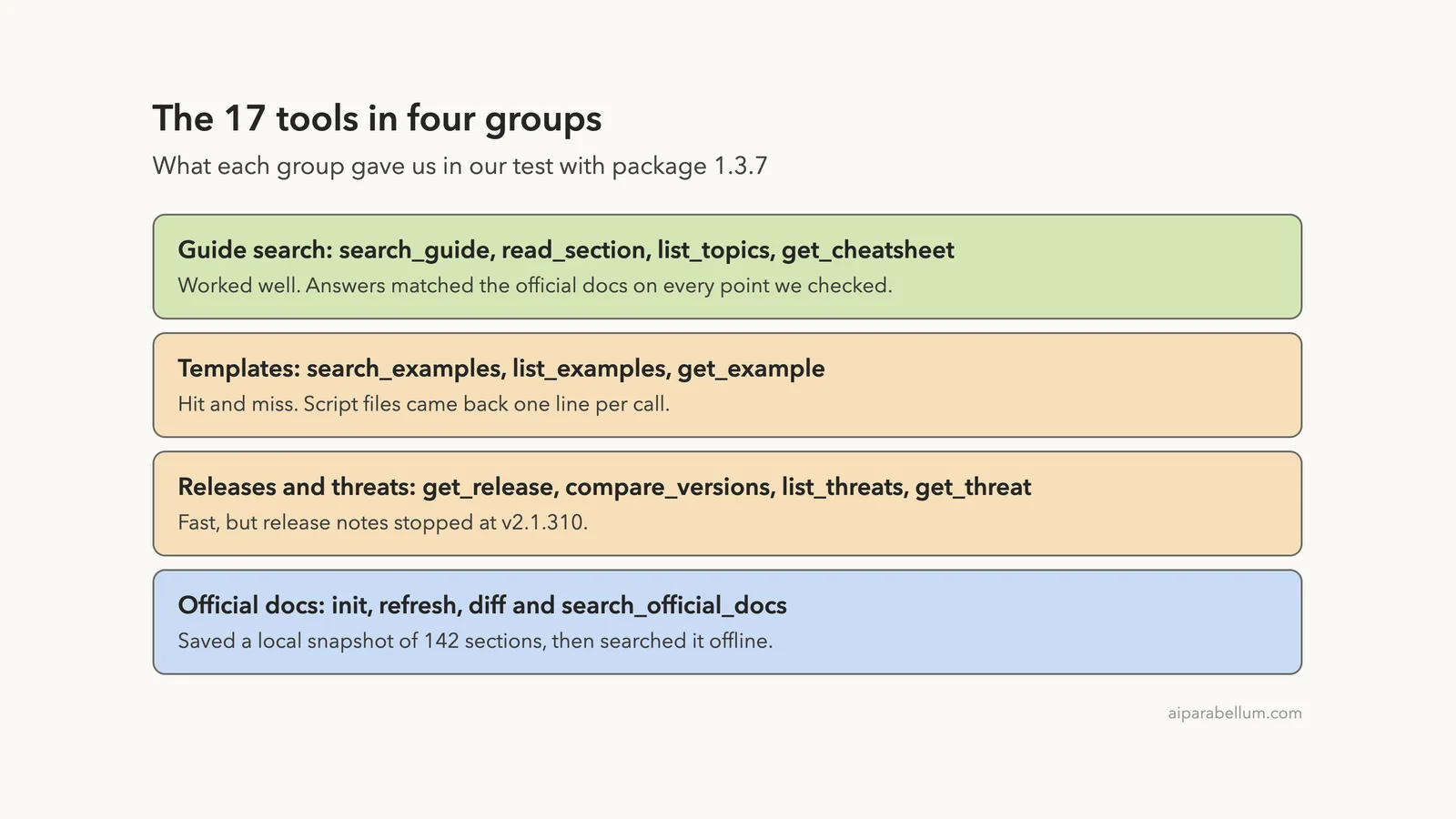
All 17 tools read information. None of them edits your project files.
How to Add the Claude Code Ultimate Guide MCP Server
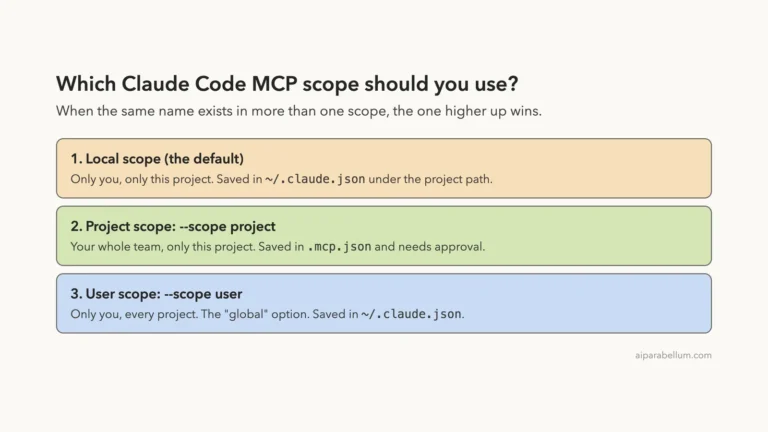
The README suggests user scope, which makes the server load in every project. We used local scope instead, so it exists in one folder only and your normal setup stays as it was.
claude mcp add --scope local claude-code-guide -- npx -y [email protected]The @1.3.7 part pins the version. That way a later release cannot change what runs on your machine without you choosing it.
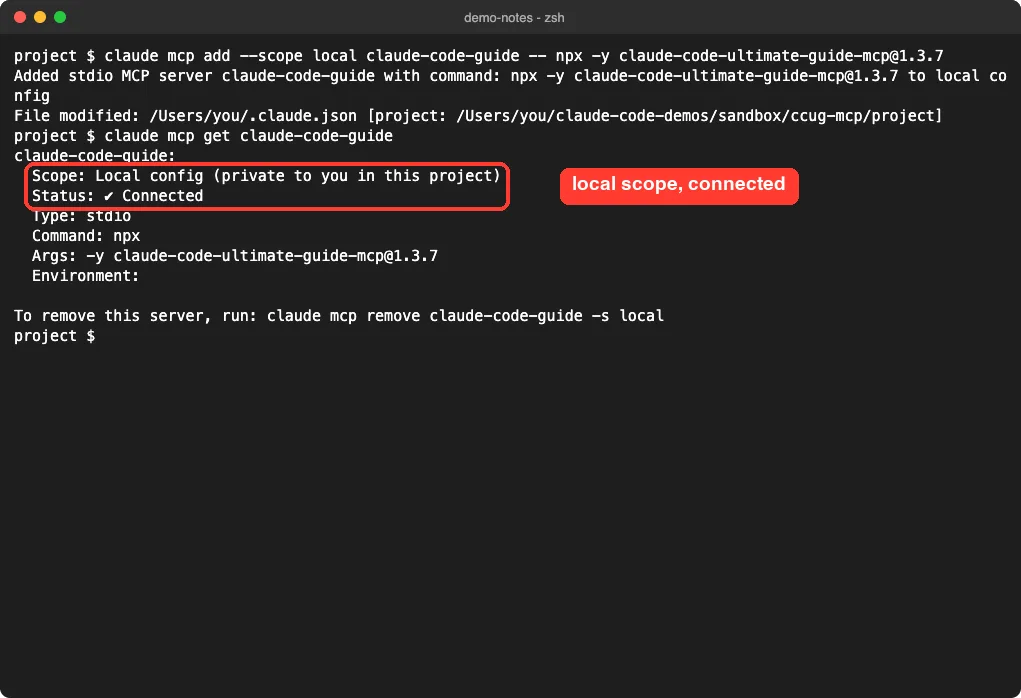
Claude Code confirmed that it wrote the entry to ~/.claude.json under our project path. The check command claude mcp get claude-code-guide then showed it as connected.
Scopes and the claude mcp add command are covered in the official MCP docs. Our guide to MCP scopes shows when user or project scope makes more sense.
Next we started claude in the folder and opened /mcp.
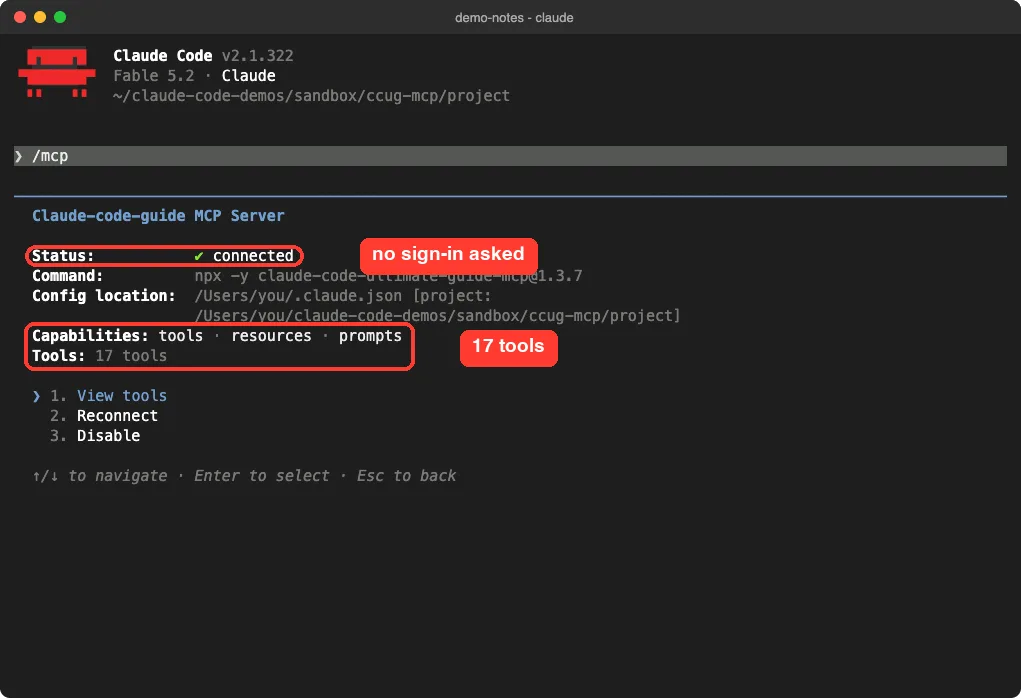
There was no sign-in prompt and no key to paste. Our session loaded only this server and the built-in ones, which is why the screen looks so clean.
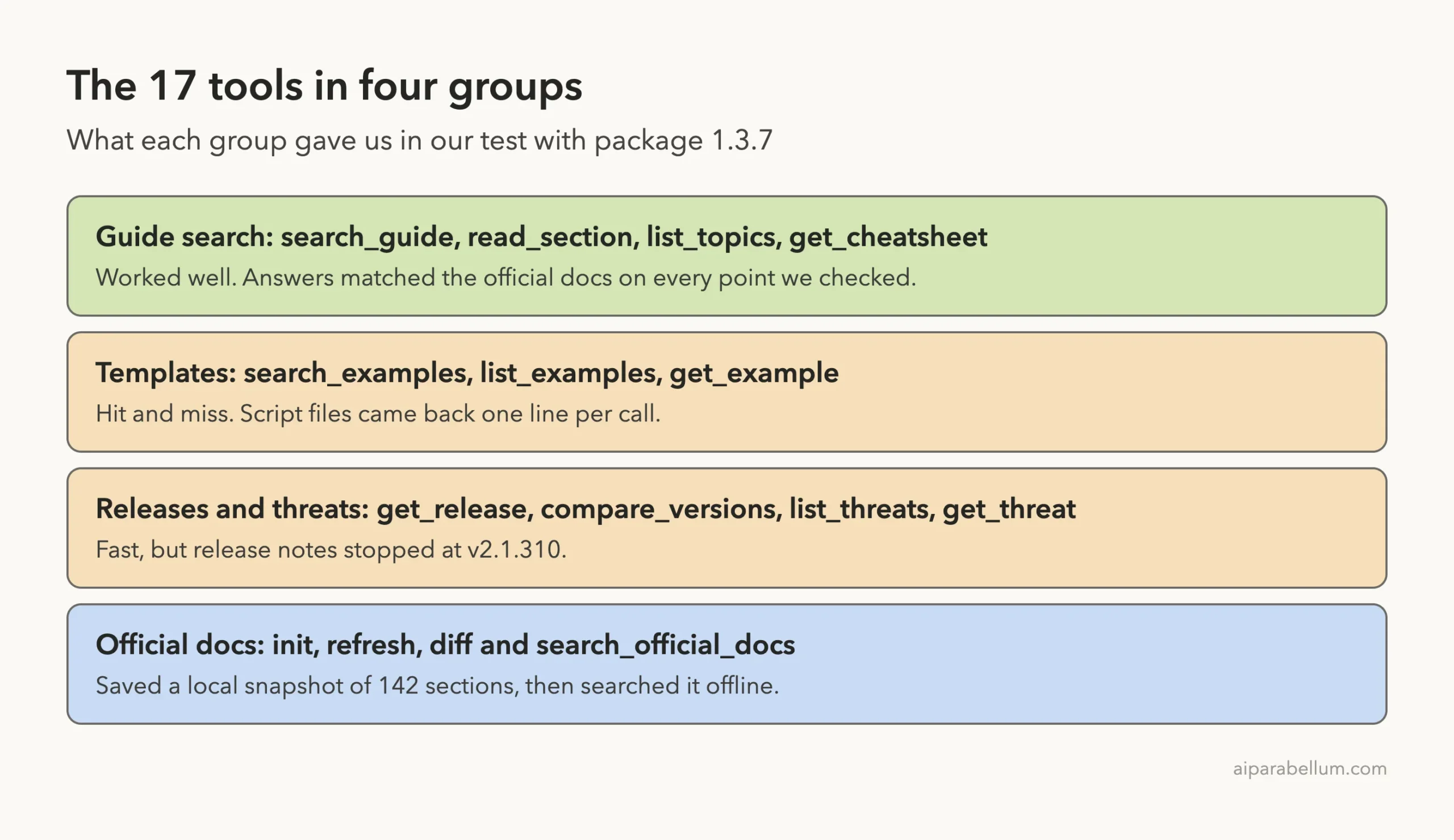
The 17 Tools Claude Code Lists
Choosing View tools showed the full list. Fifteen tools are marked read-only and two are marked open-world.
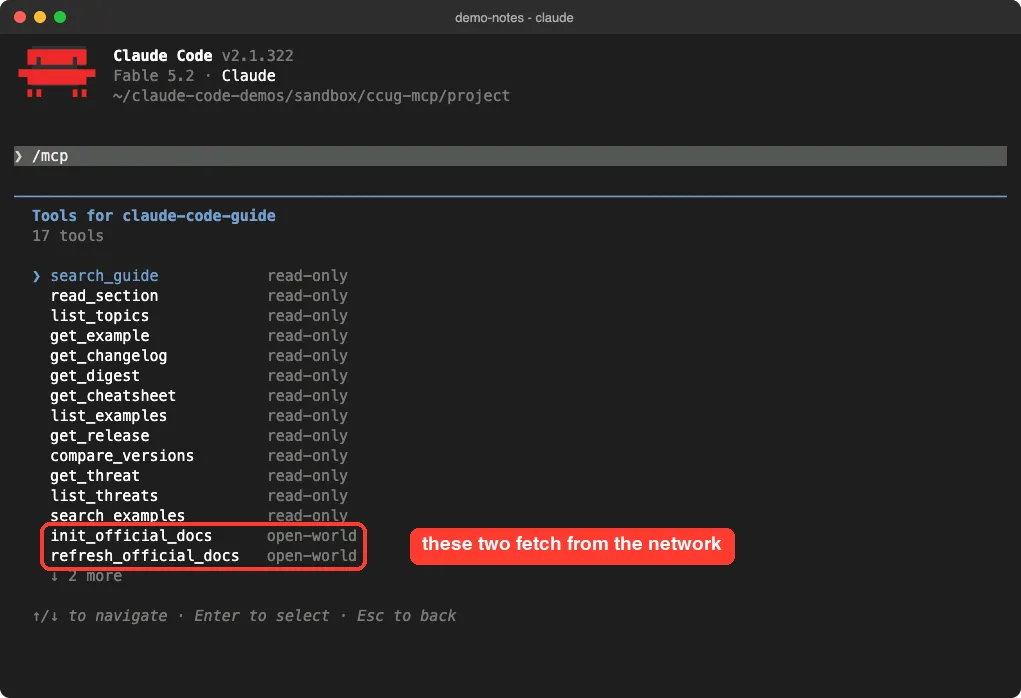
Open-world means the tool reaches outside your machine. Here that is init_official_docs and refresh_official_docs, which download Anthropic’s documentation.
Do 17 tools fill up your context? Not much in our session. The /context screen listed them as loaded on demand, and the server’s own instructions took 198 tokens.
That on-demand loading is Claude Code’s tool search at work. We measured it in our post on tool search.
One thing to know about those instructions. They tell Claude to use this server first for any Claude Code question, before a web search.
Test 1: Ask Which Hook Events Can Block an Action
Hooks are a good test because the details are easy to get wrong. If hooks are new to you, start with our hooks tutorial.
Use the claude-code-guide MCP: which Claude Code hook events can block an action? Answer with one short list, then one line naming the tools you called and the guide link.Claude answered in 19 seconds. It called search_guide, then read_section, and listed 17 events with what each one blocks.
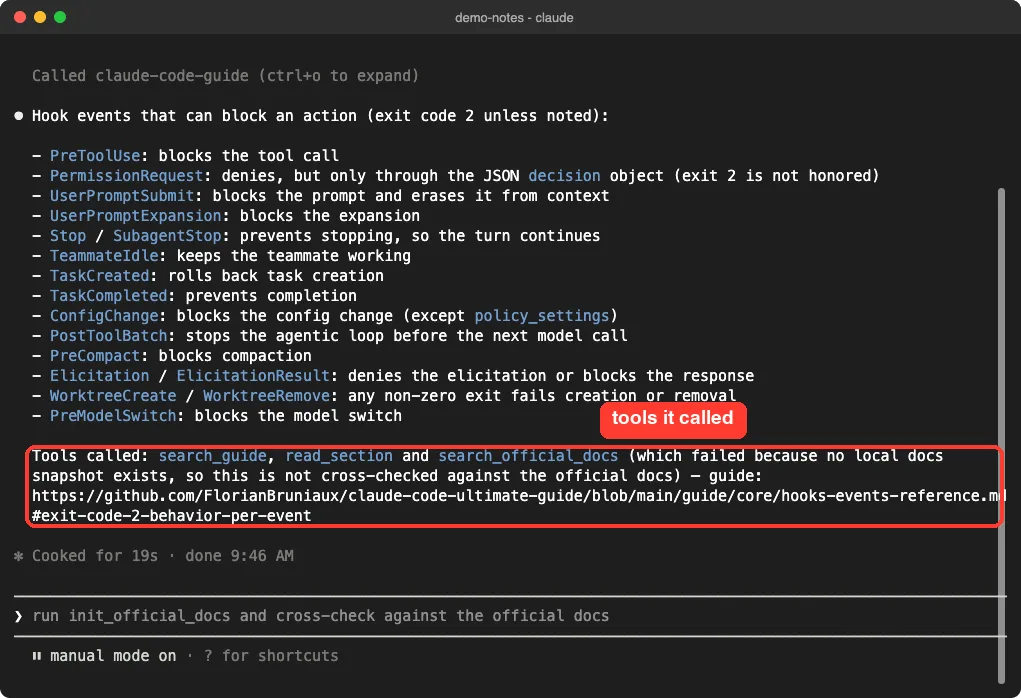
We compared that list with the exit code table in the official hooks reference. It matched: the same 16 events block with exit code 2, and PermissionRequest can deny only through its decision object.
Claude also tried search_official_docs to double-check itself. That call failed because no docs snapshot existed yet, and Claude said so plainly.
Test 2: Ask for the Newest Claude Code Release
The server has release tools, so we asked about the version we were running.
Same MCP: what is the newest Claude Code release it knows, and does it have notes for v2.1.322? Three lines at most.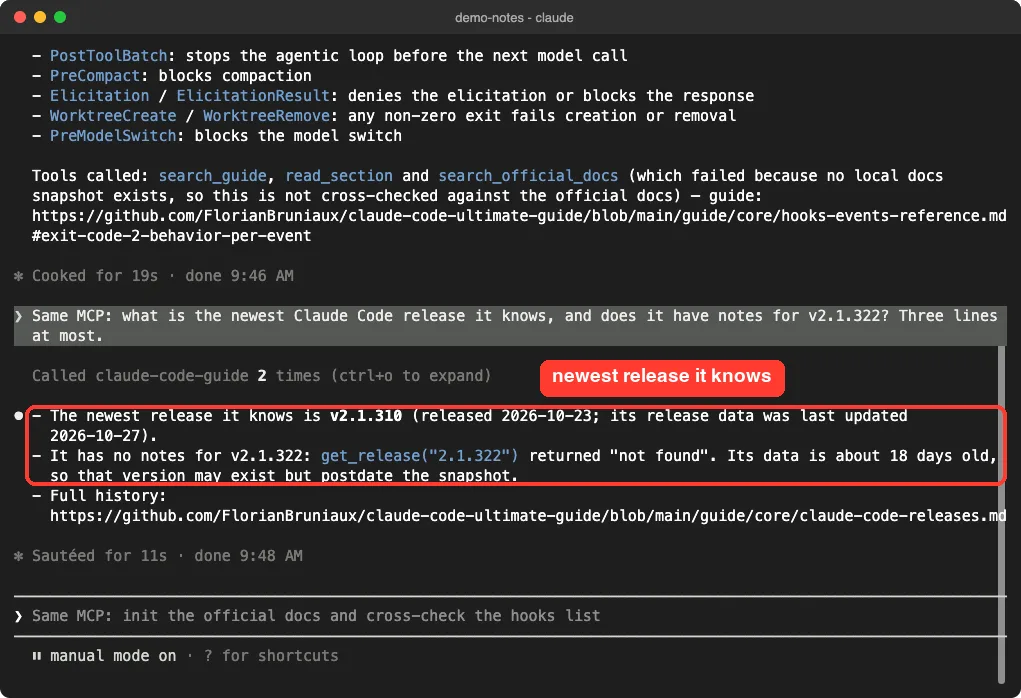
The answer came in 11 seconds. The newest release it knew was v2.1.310 from October 23, 2026, and it had nothing for v2.1.322.
The reason is simple. Release notes are bundled inside the package, so they are only as fresh as the package itself, and 1.3.7 was published on October 28, 2026.
The official changelog listed nine newer versions on our test day. The date the server gave for v2.1.310 did match the changelog.
For recent changes, read the changelog or our weekly roundup instead.
Test 3: Find a Ready-Made Hook Template
The guide includes templates for hooks, agents, skills and commands. We asked for one that blocks risky shell commands.
Use the claude-code-guide MCP to find a ready-made hook template that blocks dangerous shell commands. Show its name, repo path and first 10 lines. Do not save anything. Keep it short and say which tools you called.This was the roughest run, at 55 seconds. Claude did find the right file, dangerous-actions-blocker.sh, but it took a detour to get there.
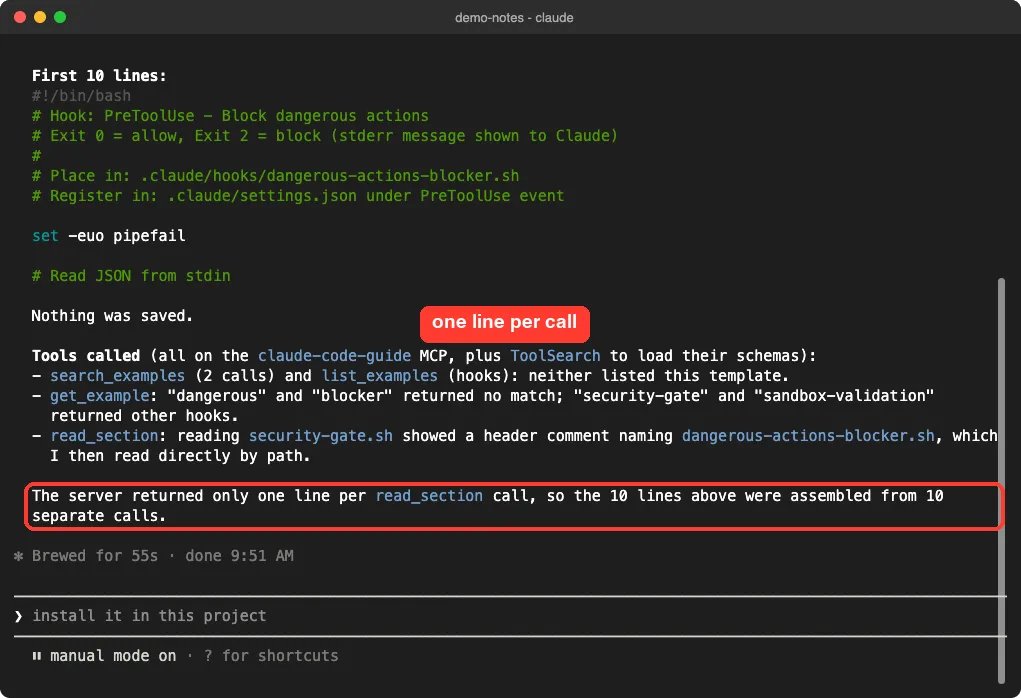
Two things went wrong. The search and list tools did not show this template, and get_example found no match for the words “dangerous” or “blocker”.
Then the file itself came back one line at a time. We called the server directly to confirm, and it reported “Lines: 1-1 of 242” for that script.
Markdown pages did not have this problem. A guide page returned 500 lines in one call in our direct check.
So for scripts, use the GitHub link the server prints and open the file there. Or pick from our own list of ready-to-copy hooks.
Test 4: Search the Official Docs Through the Same Server
Four tools work with Anthropic’s documentation. You save a local copy once, and then search or compare it offline.
Now run init_official_docs, then search_official_docs for local scope. In four short lines, say what each tool returned and where MCP local scope is stored.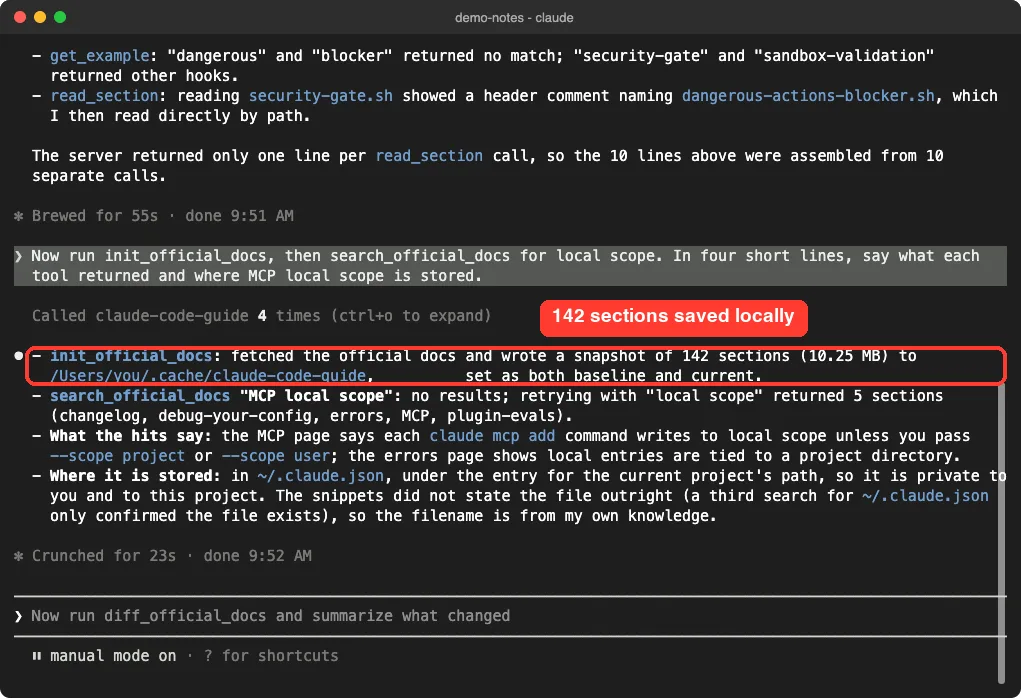
The run took 23 seconds. The snapshot held 142 sections at about 10.25 MB, saved in the cache folder.
The search was basic. Claude’s first query returned nothing, a shorter one returned five sections, and the snippets were too short to answer the question alone.
Claude was upfront about that. It said the file name in its answer came from its own knowledge, not from the snippets.
Guide vs Official Docs: What Matched
A community guide is only useful if it is right. We compared four of its claims with Anthropic’s pages ourselves.
| What we checked | The guide, through the server | Official docs | Match? |
|---|---|---|---|
| Hook events that can block | 16 by exit code 2, plus PermissionRequest by decision | Same | Yes |
| Number of hook events | 33 in its events table | The same 33 names | Yes |
| Hook timeouts | 600 seconds by default, 30 for UserPromptSubmit, 10 for MessageDisplay | Same | Yes |
| Where MCP scopes are stored | Local and user in ~/.claude.json, project in .mcp.json | Same | Yes |
| Newest release | v2.1.310 | v2.1.322 | Out of date |
Four checks is a small sample, and the guide covers far more than we could verify. Still, the content we read was careful and named the Claude Code version it was checked against.
We did hit one rough edge in search. A result for MCP servers pointed a few lines above the MCP chapter and carried a link to the hooks chapter.
The storage answer also agrees with what we found in our own post on the MCP config file.
Who Should Add the Claude Code Ultimate Guide MCP?
| Your situation | Our advice |
|---|---|
| You are learning Claude Code and ask it how features work | Add it at local scope. Answers came with links to read more |
| You set up hooks, agents or skills often | Useful for reference tables. Get script templates from GitHub directly |
| You want the latest release notes | Skip that part. Use the official changelog |
| You only trust official sources | Use it as a pointer, then confirm on Anthropic’s pages |
| You work offline | Search works offline. Reading a section the first time needs GitHub |
For more servers like this one, our MCP servers directory lists options by task.
Common Mistakes
- Treating the guide as official. It is a community project, so confirm anything important in Anthropic’s docs.
- Copying the README’s user-scope line for a quick trial. Use
--scope localto keep it in one folder. - Dropping the version from the command. Without
@1.3.7,npxmay run a newer package than the one you checked. - Trusting its release notes for your current version. Ours ended twelve version numbers back.
- Calling
search_official_docsbeforeinit_official_docs. It needs the snapshot first. - Forgetting the cache folder at
~/.cache/claude-code-guidewhen you remove the server.
Pro Tips
- Name the server in your prompt. “Use the claude-code-guide MCP” made Claude go straight to it.
- Ask Claude to name the tools it called. That is how we caught the failed docs search and the one-line reads.
- Ask for the guide link in the answer, then read the section yourself for anything you plan to rely on.
- Keep answers short. One changelog call returned about 44,000 characters in our direct check, which is a lot of context.
- Run
refresh_official_docsand thendiff_official_docsnow and then to see what Anthropic changed since your first snapshot. We did not test the diff.
Try It Yourself
Run this in a throwaway folder. It adds the server, asks one question you can verify, and removes everything afterward.
claude mcp add --scope local claude-code-guide -- npx -y [email protected]
claude
# inside Claude Code:
Use the claude-code-guide MCP: what are the three MCP scopes and where is each one stored? Name the tools you called and give me the guide link.
# when finished:
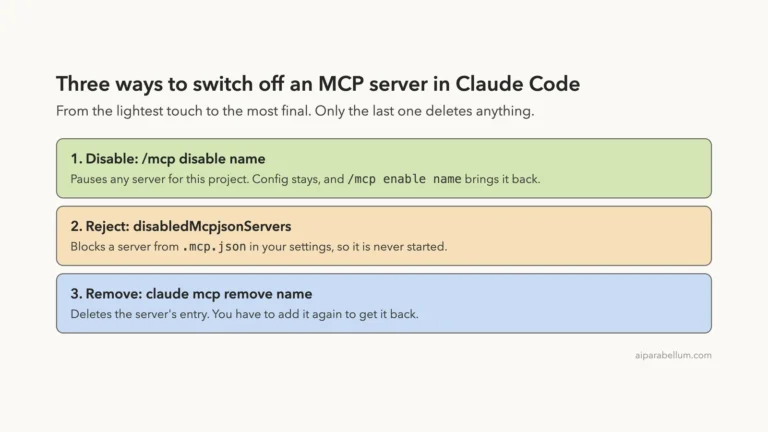
claude mcp remove claude-code-guide -s local
Then compare the answer with the scopes table in the official MCP docs. If you want a clean machine, delete the ~/.cache/claude-code-guide folder too.
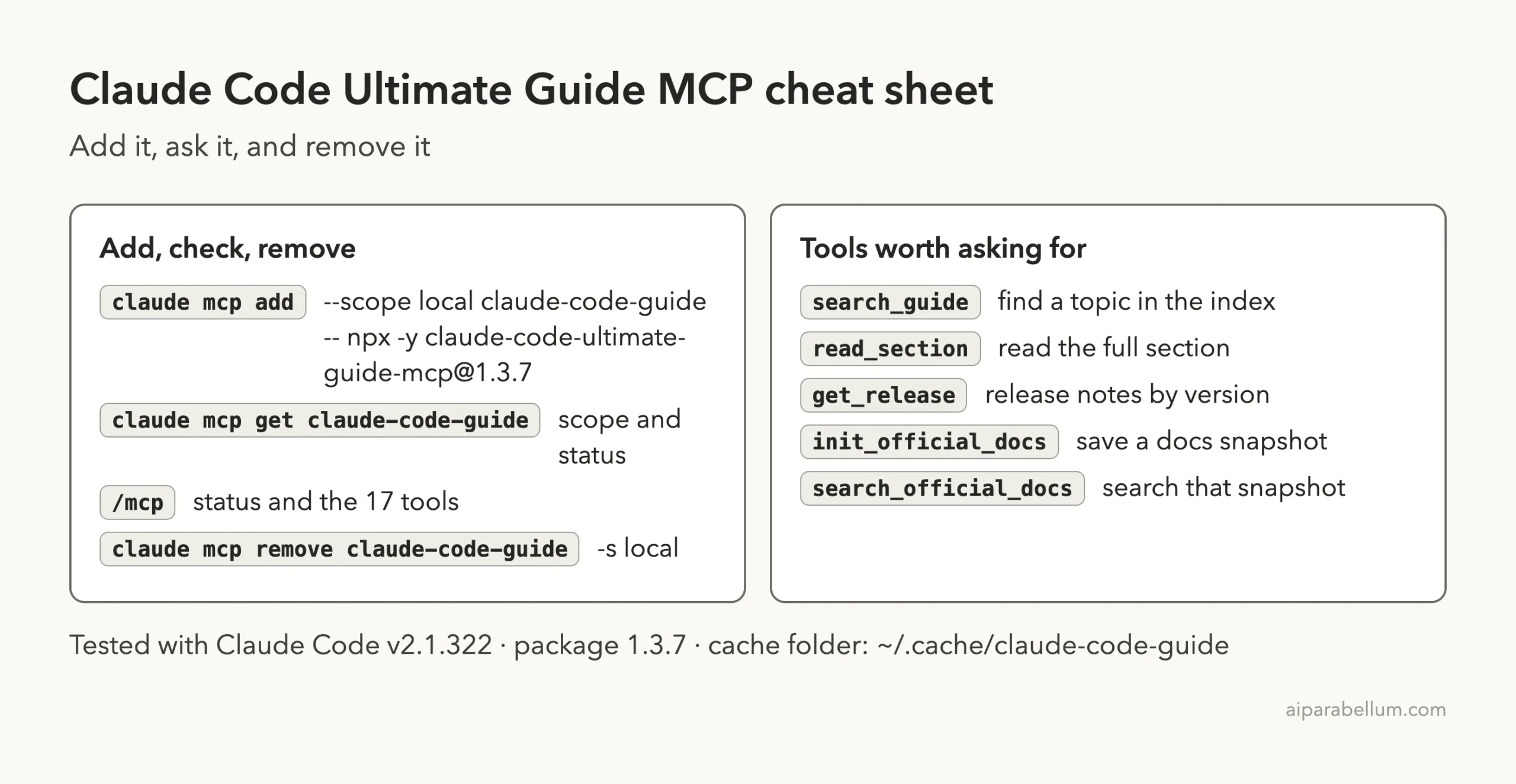
Cheat Sheet
Frequently Asked Questions
Is the Claude Code Ultimate Guide an official Anthropic guide?
No. It is a community project by an independent author. The official documentation lives on Anthropic’s own site.
Does the MCP server need an account or API key?
No. In our test it connected with no sign-in, and we entered no key.
Does it work offline?
Partly. Search and release lookups use bundled data. Reading a section for the first time fetches it from GitHub, and then it is cached for 24 hours.
How current is the information?
Guide pages are fetched from GitHub, so they are current. Bundled release notes in version 1.3.7 stopped at v2.1.310.
How do I remove it?
Run claude mcp remove claude-code-guide -s local in the folder where you added it, then delete ~/.cache/claude-code-guide.
Conclusion
The Claude Code Ultimate Guide MCP server does what it promises: it lets Claude search a very large community guide, read the right section and answer with a link, with no account and a one-line install. In our test its facts on hooks, timeouts and MCP scopes matched Anthropic’s documentation, which is the result that matters most. Its limits were just as clear, with release notes that ended at v2.1.310 and script templates that arrived one line per call. Add it at local scope in the project where you are learning or configuring Claude Code, pin the version, and keep the official docs as your final check.
Next, browse all our Claude Code guides, or read the Claude overview.