What if you could ask Claude Code to check twenty files at the same time, instead of reading them one by one? That is what Claude Code workflows do. Claude writes a small script, a team of helper agents runs it in the background, and you get one clean answer at the end.
In this tutorial, we run a real workflow on a tiny demo project, read the script Claude wrote, watch the agents work, and look at what it costs. You do not need to write any code yourself.
This is Part 5 of 10 in our Advanced Claude Code series, part of our Claude Code tutorials.
Tested with Claude Code v2.1.312 on October 29, 2026.
Claude Code Workflows at a Glance
| Question | Short answer |
|---|---|
| What is a dynamic workflow? | A JavaScript script that Claude writes to run many subagents at once |
| How do I start one? | Ask in plain words (“use a workflow to…”) or include the word ultracode in your prompt |
| Do I have to approve it? | In the default mode, yes. Claude Code shows the plan and asks before every run |
| How do I watch it? | Type /workflows to open the progress view |
| Can I reuse it? | Yes. Select the run in /workflows, press s, and it becomes a /command |
| What does it cost? | More tokens than a normal chat, so start small |
What Are Claude Code Workflows?
A dynamic workflow is a script that organizes many subagents. Claude writes the script for the job you describe. A runtime then runs it in the background while your session stays free for other things.
According to the official workflows guide, workflows suit tasks that need more agents than one conversation can handle. Examples include a codebase-wide bug sweep, a 500-file migration, and a research question that needs sources cross-checked against each other.
Dynamic workflows are available on all paid plans, with Anthropic API access, and on Amazon Bedrock, Google Cloud, and Microsoft Foundry. On the Pro plan, you turn them on from the Dynamic workflows row in /config.
Who holds the plan?
The key difference is who decides what happens next. With a subagent or an agent team, Claude decides turn by turn, and every result goes into its context window. With a workflow, the script holds the plan.
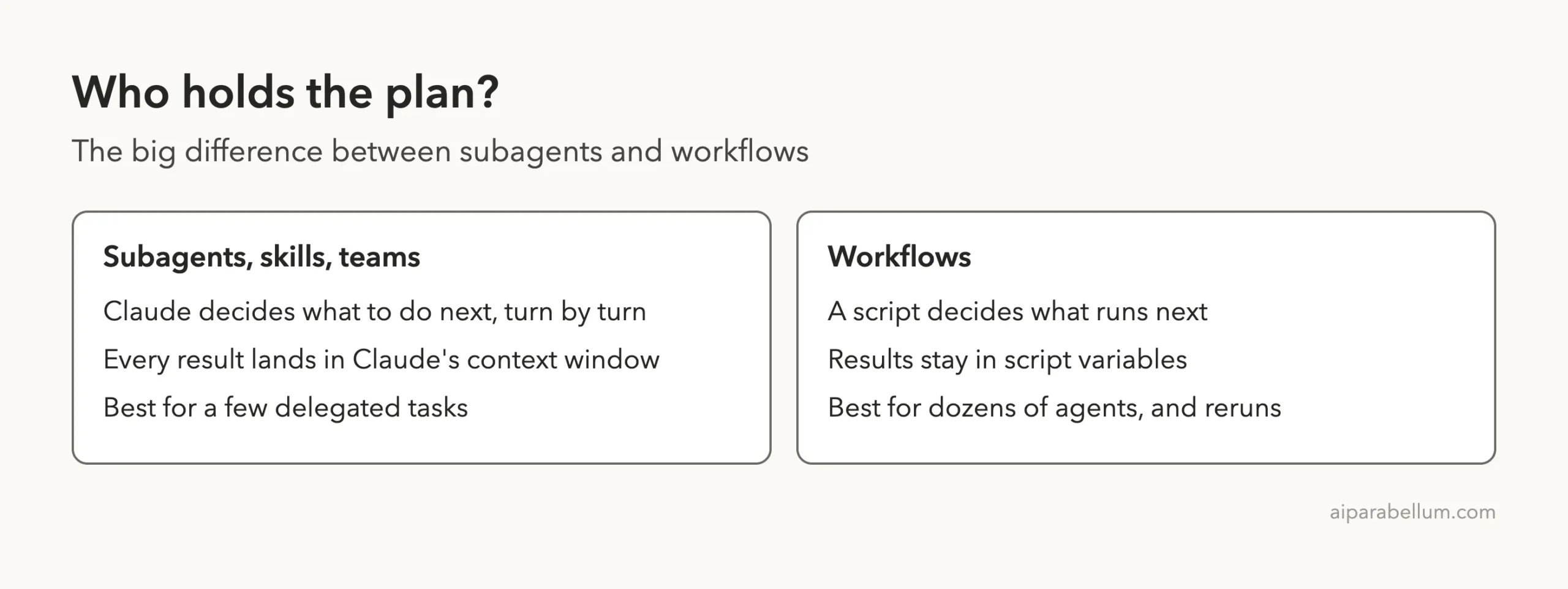
That has two practical effects. First, Claude’s context stays small, because it only receives the final answer. Second, the plan is code, so you can read it, save it, and run it again.
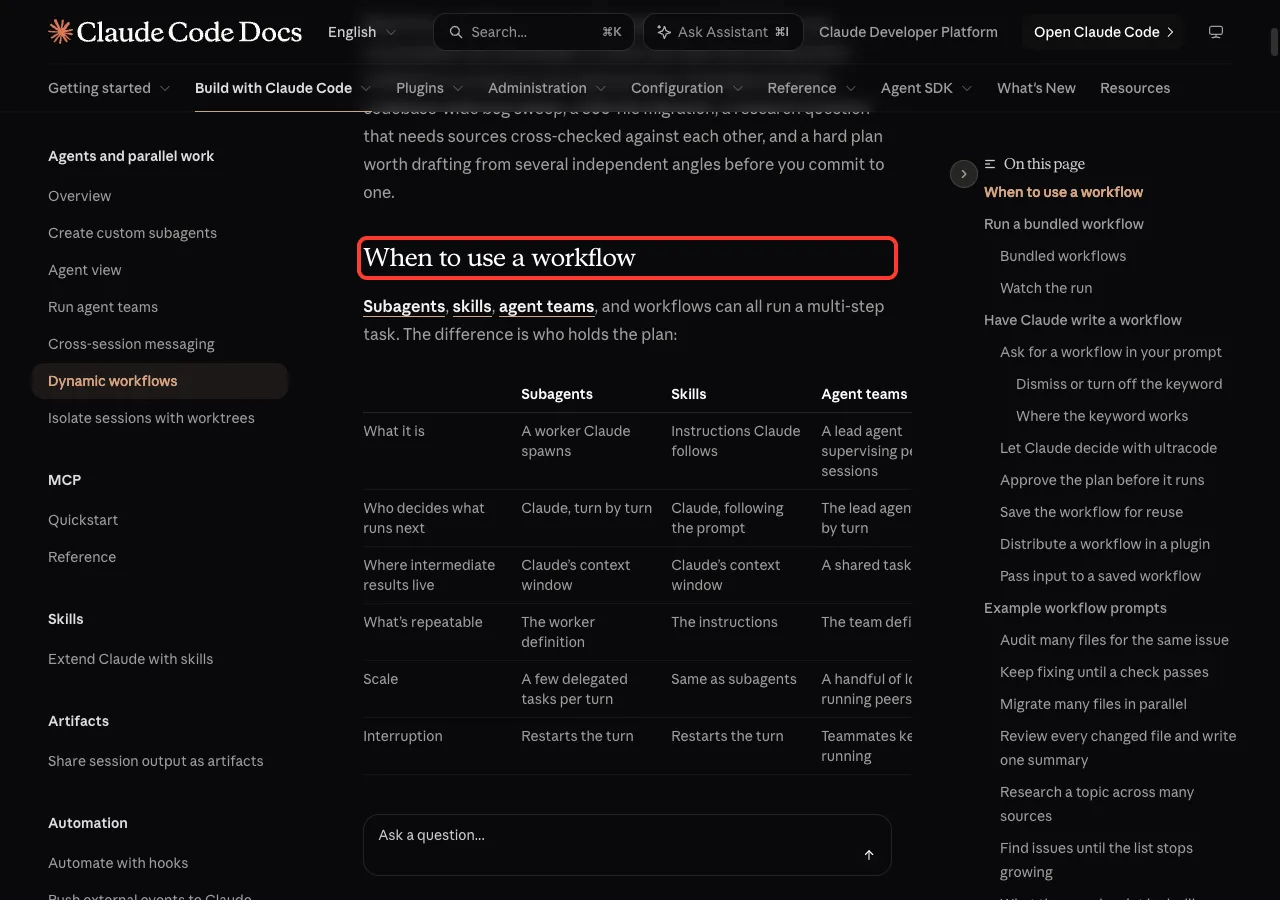
Workflow or something simpler?
Do not reach for a workflow every time. If you only need one helper to read a few files, a subagent is simpler.
Use a workflow when the job is bigger than one chat can hold, or when you want the plan saved as a script.
If you want several long-running sessions, look at agent teams. The docs describe scale this way: a few delegated tasks per turn for subagents, and dozens to hundreds of agents per run for workflows.
How a Claude Code Workflow Runs
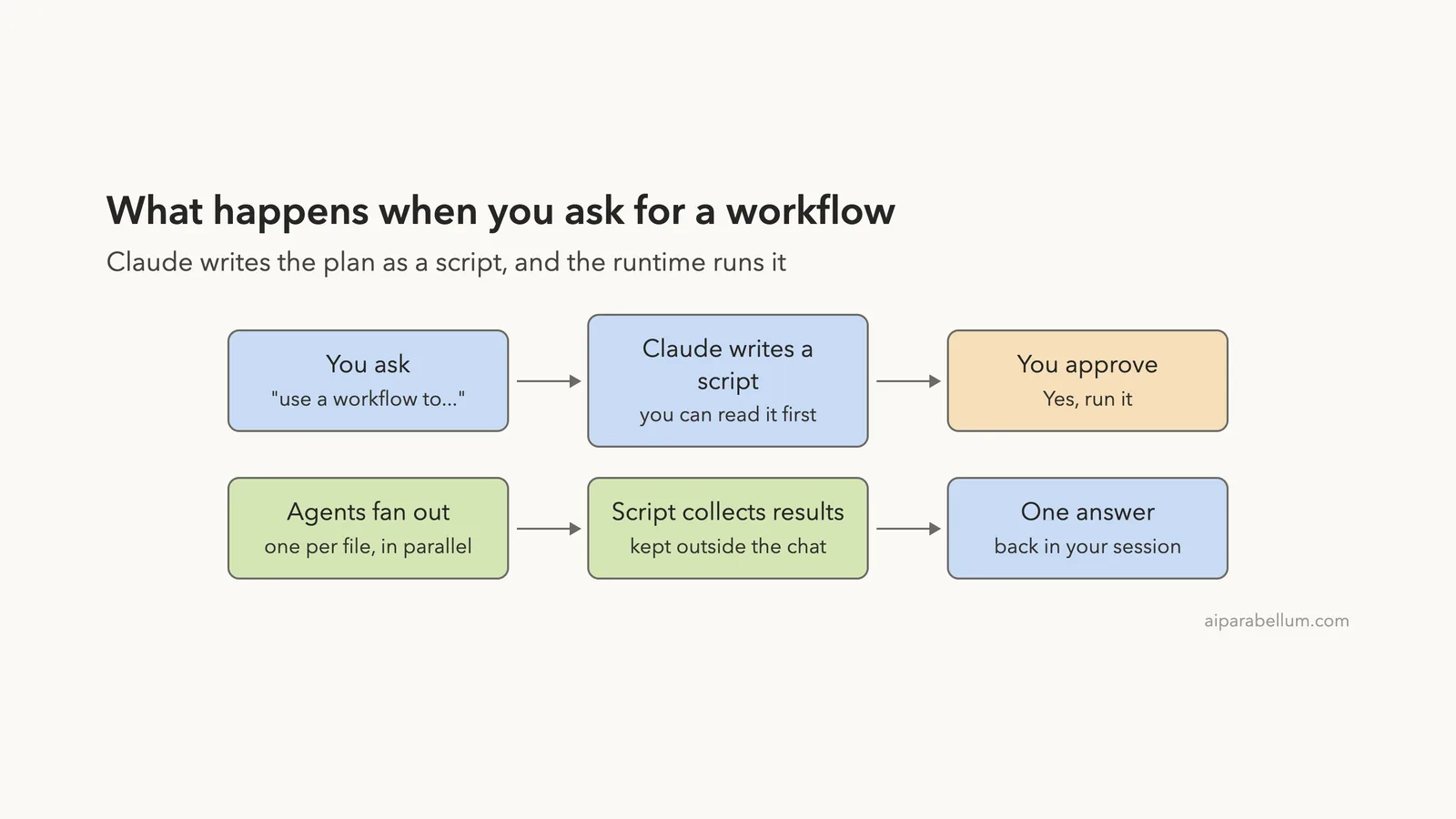
Every workflow follows the same path. You ask, Claude writes a script, you approve it, and the agents run. Then the script gathers their results and hands one answer back to your chat.
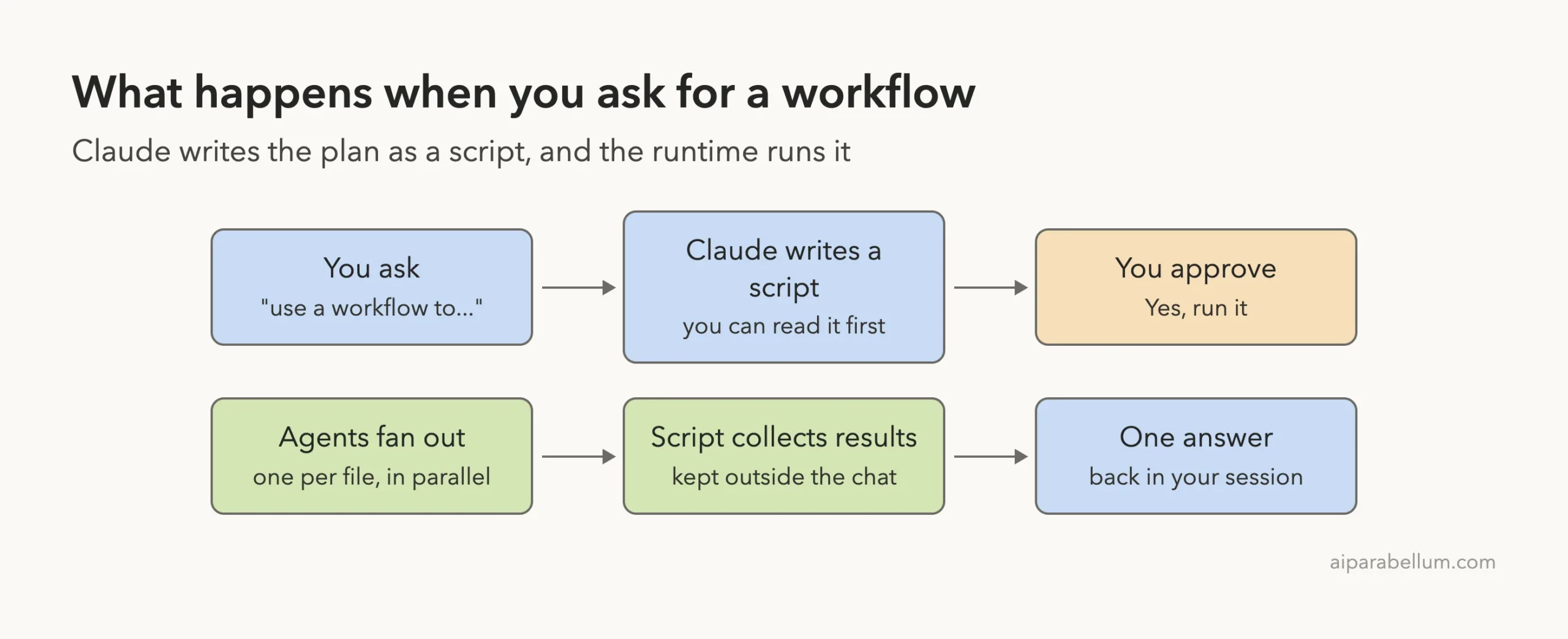
The workflow itself cannot touch your files or run shell commands. The docs say the agents do the reading, writing, and commands, while the script only coordinates them. Your normal permission rules and sandboxing still apply to every agent’s tool calls.
Set Up a Demo Project
We never test inside a real project. So we made a small folder with four tiny Python files: cart.py, dates.py, names.py, and scores.py. Each has a few lines of code with a hidden weakness, such as a leap-year check or a function that fails on an empty list.
Four files are plenty for a demo. The same prompt would work on four hundred files, which is when a workflow really pays off.
Ask Claude for a Workflow
We started Claude Code in the demo folder and typed one prompt. Notice that we asked for a workflow in plain words and set a size limit.
use a workflow to review each .py file in this folder for bugs, one agent per file, then give me one short ranked summary. Keep it to 4 agents.The docs say that a direct request such as “use a workflow” works the same as the keyword ultracode. Claude Code first loaded its workflow-authoring skill, then wrote the script, then stopped to ask us a question.
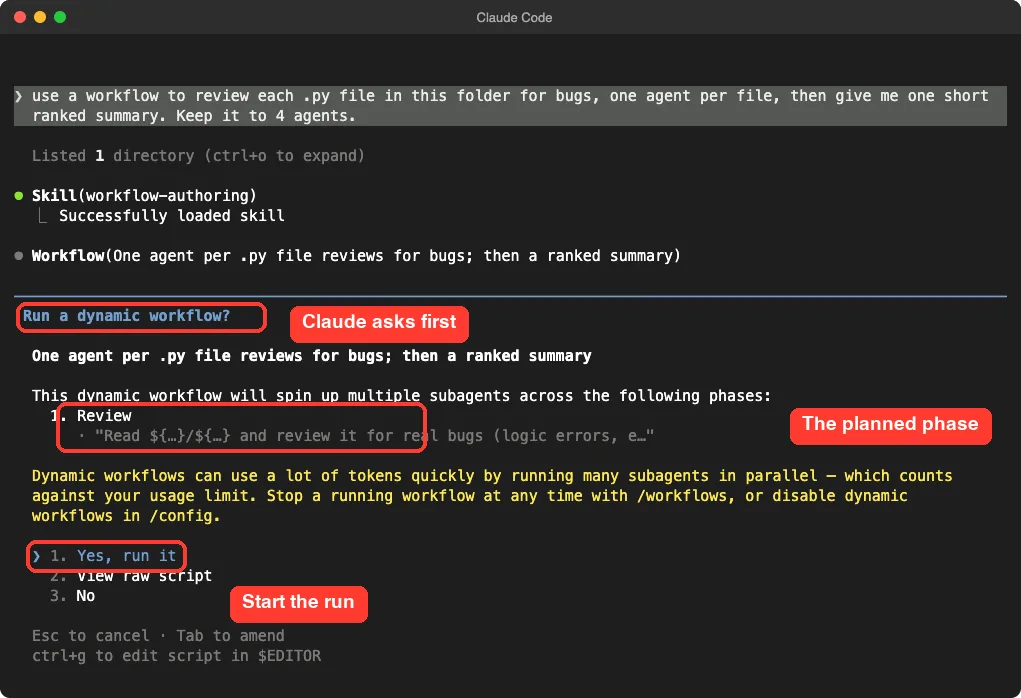
This dialog has three choices. Yes, run it starts the run, and View raw script lets you read the code first. No cancels.
A yellow warning reminds you that workflows can use many tokens quickly, because they run many subagents in parallel.
When you will and will not be asked
The prompt depends on your permission mode. This table follows the official docs.
| Permission mode | When you are asked |
|---|---|
| Manual or accept edits | Every run, unless you chose “don’t ask again” for a saved workflow |
| Auto | First launch only, and never when ultracode is on |
| Bypass permissions | Never. The run starts at once |
| claude -p or the Agent SDK | Never shown, but permission rules still decide if it can start |
Read the Script Before You Run It
You do not have to trust a script blindly. Choose View raw script and Claude Code prints the whole thing. We read ours before approving.
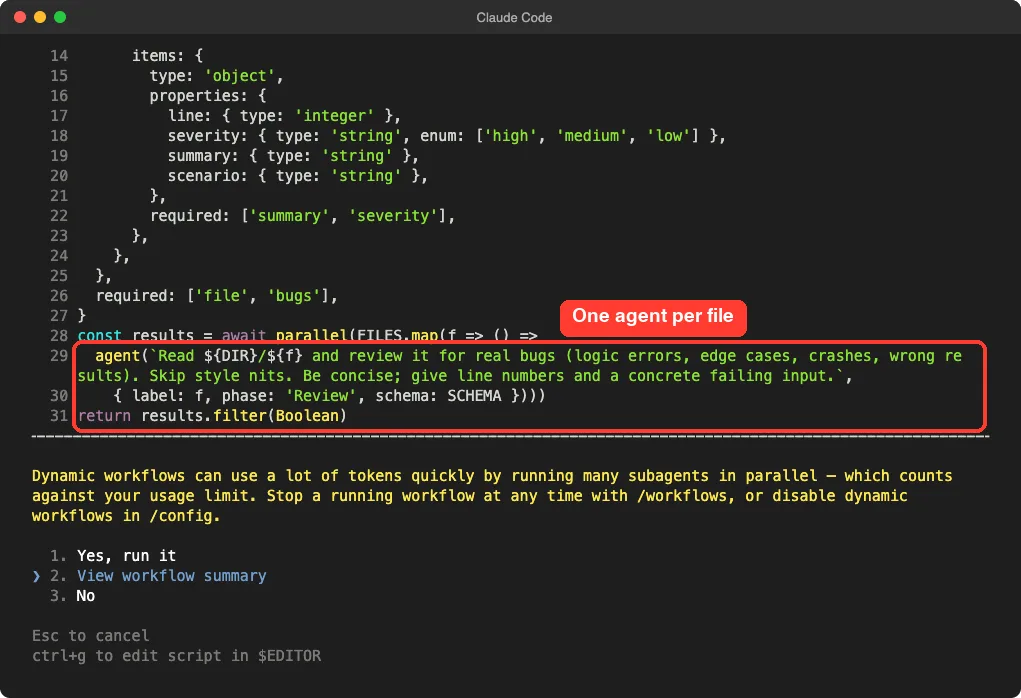
You do not need to know JavaScript to follow it. The script lists the four files, then uses a function called parallel to start one agent for each file. Each agent gets a short instruction: read the file and look for real bugs, skip style nits, and give a line number and a failing example.
The script also asks each agent to answer in a fixed shape, with fields for the file, the line, a severity, and a summary. That keeps the results tidy for the final step. The docs call this a schema, and they say the agent returns JSON that matches it instead of loose prose.
Claude writes a fresh script each time, so yours may look a little different from ours. We saw one variation on a second try, where Claude added a separate summary step inside the script. Either way, the shape is the same.
Watch Your Claude Code Workflow Run
We chose Yes, run it. The run started in the background, and the chat stayed usable. A progress line appeared below the input box, showing agents done and tokens used.
To open the full view, type this command.
/workflowsIf you have only one run, it opens straight away. Otherwise you see a list and pick one. Our four agents had already finished, so we saw all four marked done.
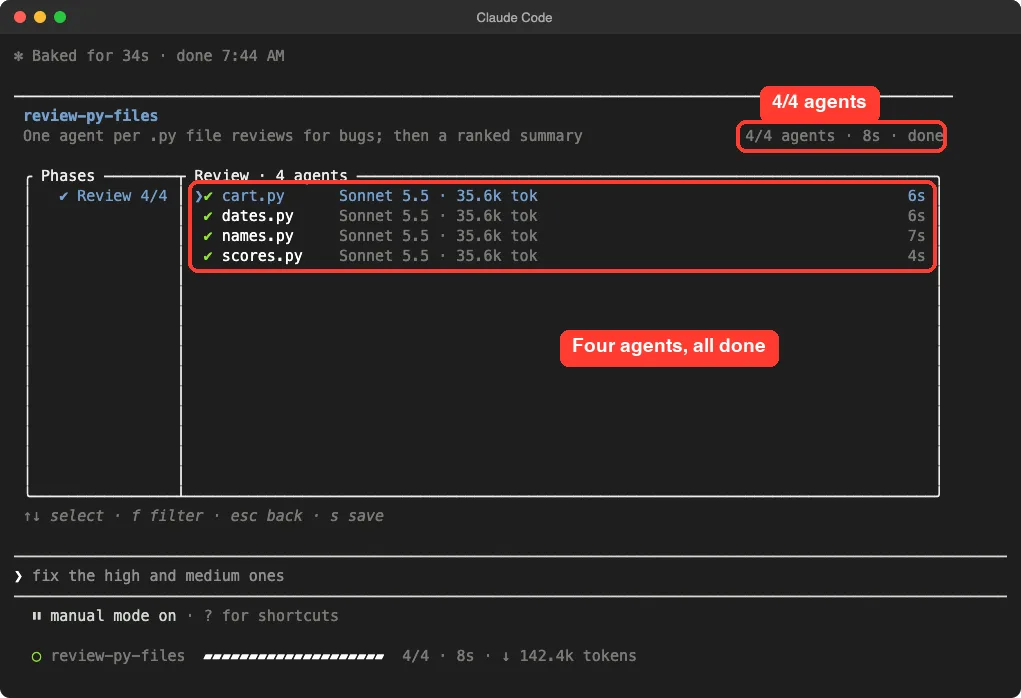
Each row shows the model, the tokens used, and the time. In our run, every agent used about 35.6k tokens, and the whole job took 8 seconds of agent time. The footer at the bottom of the screen lists the keys you can press.
Keys in the progress view
| Key | What it does |
|---|---|
| Up and Down | Select a phase or an agent |
| Enter | Go one level deeper, into an agent’s detail |
| Esc | Go back one level |
| f | Filter agents by status |
| p | Pause or resume the run |
| x | Stop the selected agent, or the whole run |
| r | Restart the selected running agent |
| s | Save the run’s script as a command |
Pressing Enter on an agent shows its prompt, its recent tool calls, and its result. This is how you check that an agent did what you expected, and it is a good way to learn how Claude splits up work.
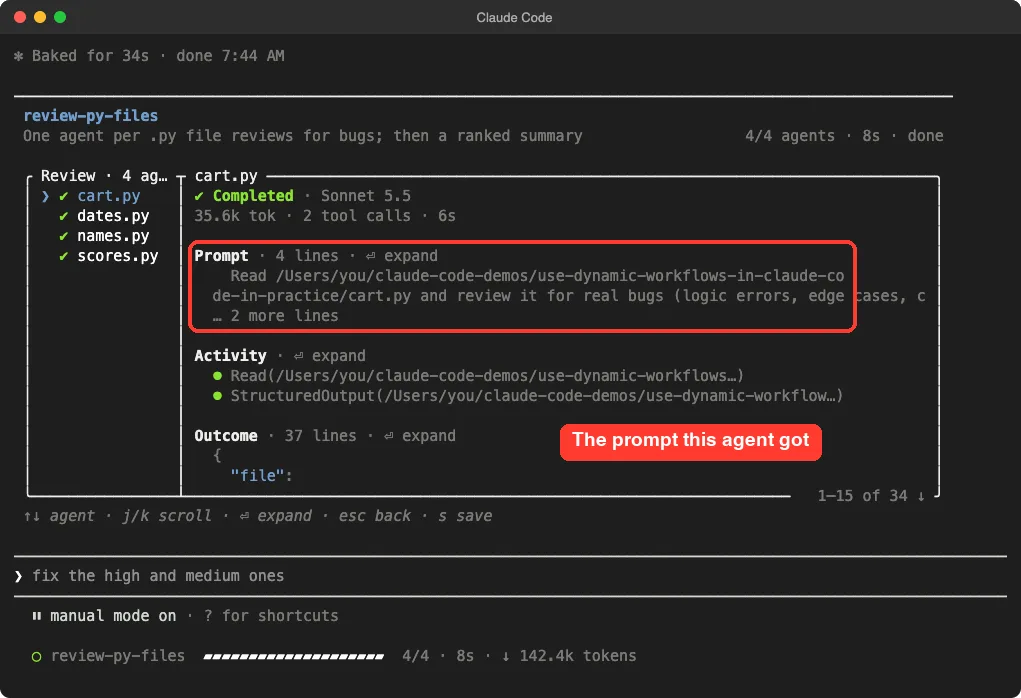
For cart.py, the agent made two tool calls: one to read the file and one to return its structured answer. That is a small, focused job, which is exactly what you want from each agent in a fan-out.
Read the Answer
When the run finished, Claude Code added a note to the chat, and Claude gave us one ranked list. It found bugs in all four files, and it did not change any files.
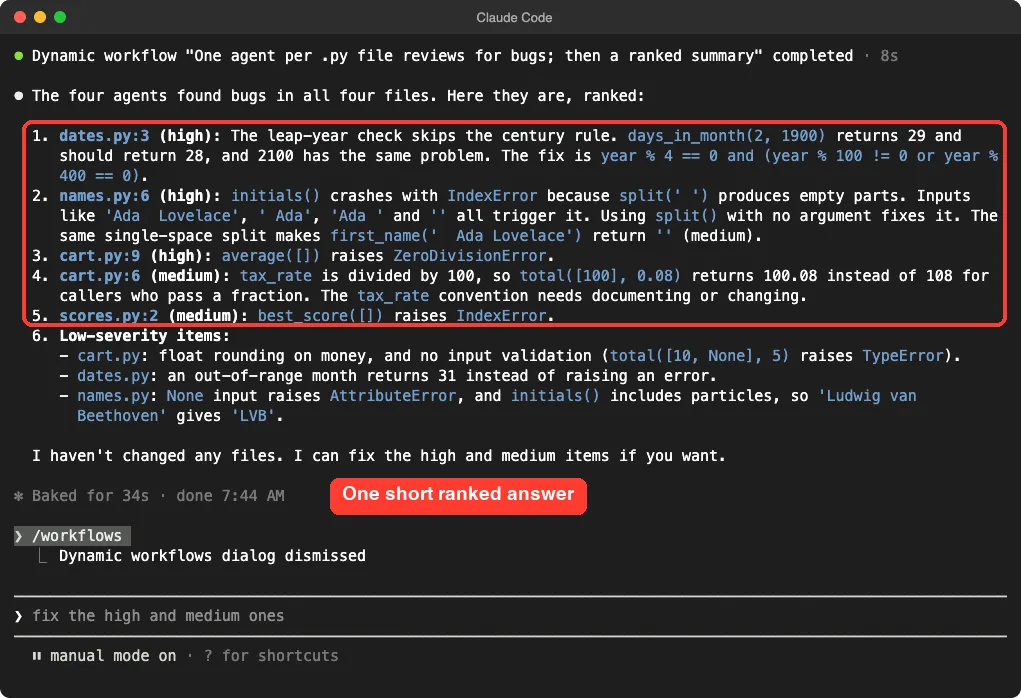
The top finding was a leap-year check in dates.py that skips the century rule. The next ones were a crash in names.py when a name has extra spaces, a divide-by-zero in cart.py when the list is empty, and an empty-list crash in scores.py. These are the kinds of problems a quick human look can miss.
Our chat showed a total of 142.4k tokens for the four agents, plus a short wait for Claude to write the summary. That is far more than a one-line question, which brings us to cost.
What a Workflow Costs
A workflow spawns many agents, so one run can use many more tokens than the same task in a normal chat. Runs count toward your plan’s usage and rate limits, as the docs explain. See our cost guide for the bigger picture.
The official advice is simple: try the workflow on a small slice first. Use one directory instead of the whole repo, or a narrow question instead of a broad one.
Built-in guardrails
- A Large workflow warning appears when a run schedules more than 25 agents or projects more than 1.5 million tokens. It is advice only and does not stop the run.
- The size guideline tells Claude how many agents to aim for: small is fewer than 5, medium fewer than 10, large fewer than 50, and unrestricted has no guideline. The default is medium, or small on a Pro plan.
- Change it in /config, or run /config workflowSizeGuideline=small.
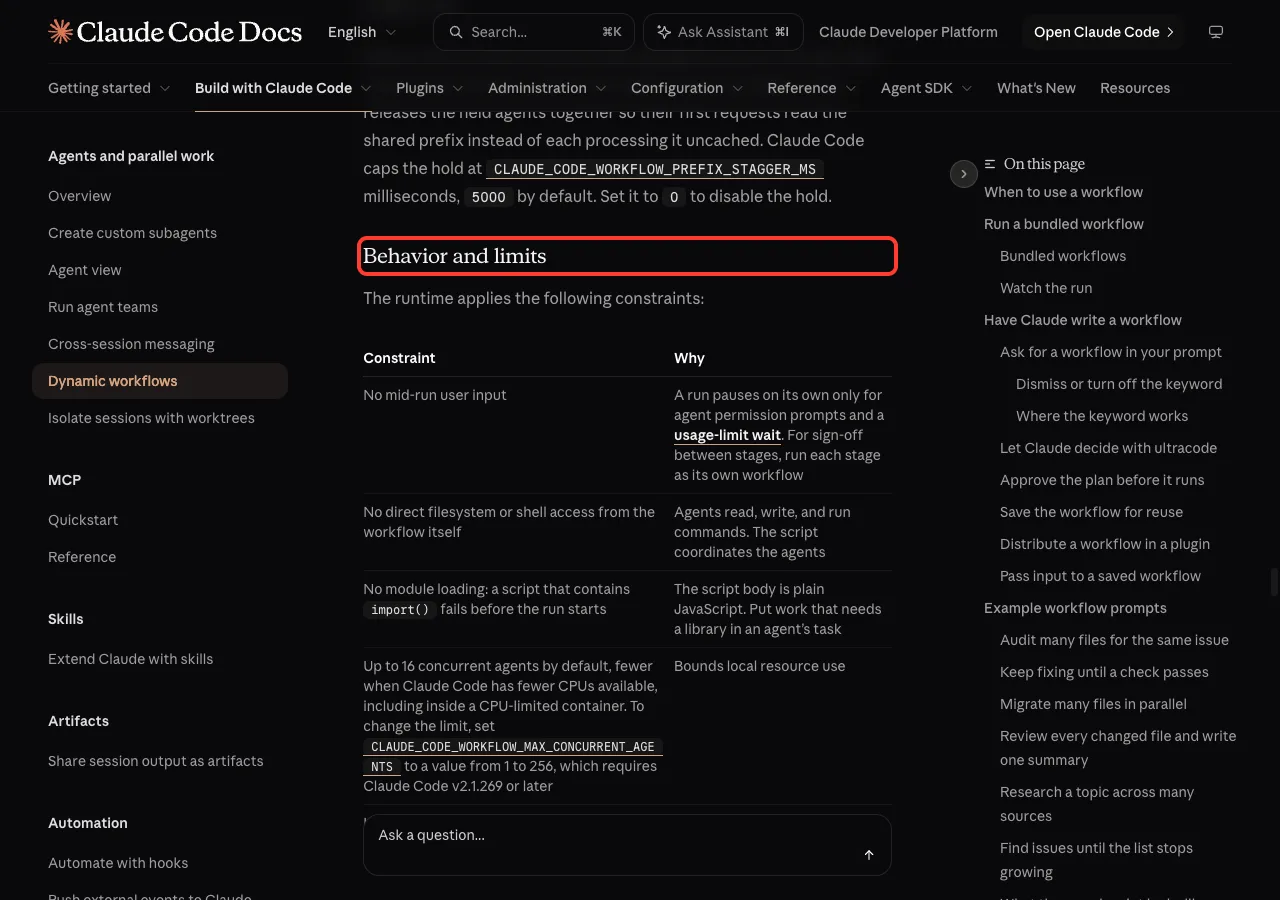
- No run can use more than 1,000 agents in total, and no more than 16 agents run at once by default.
- Ask Claude to use a smaller model for stages that do not need the strongest one.
Save a Workflow So You Can Reuse It
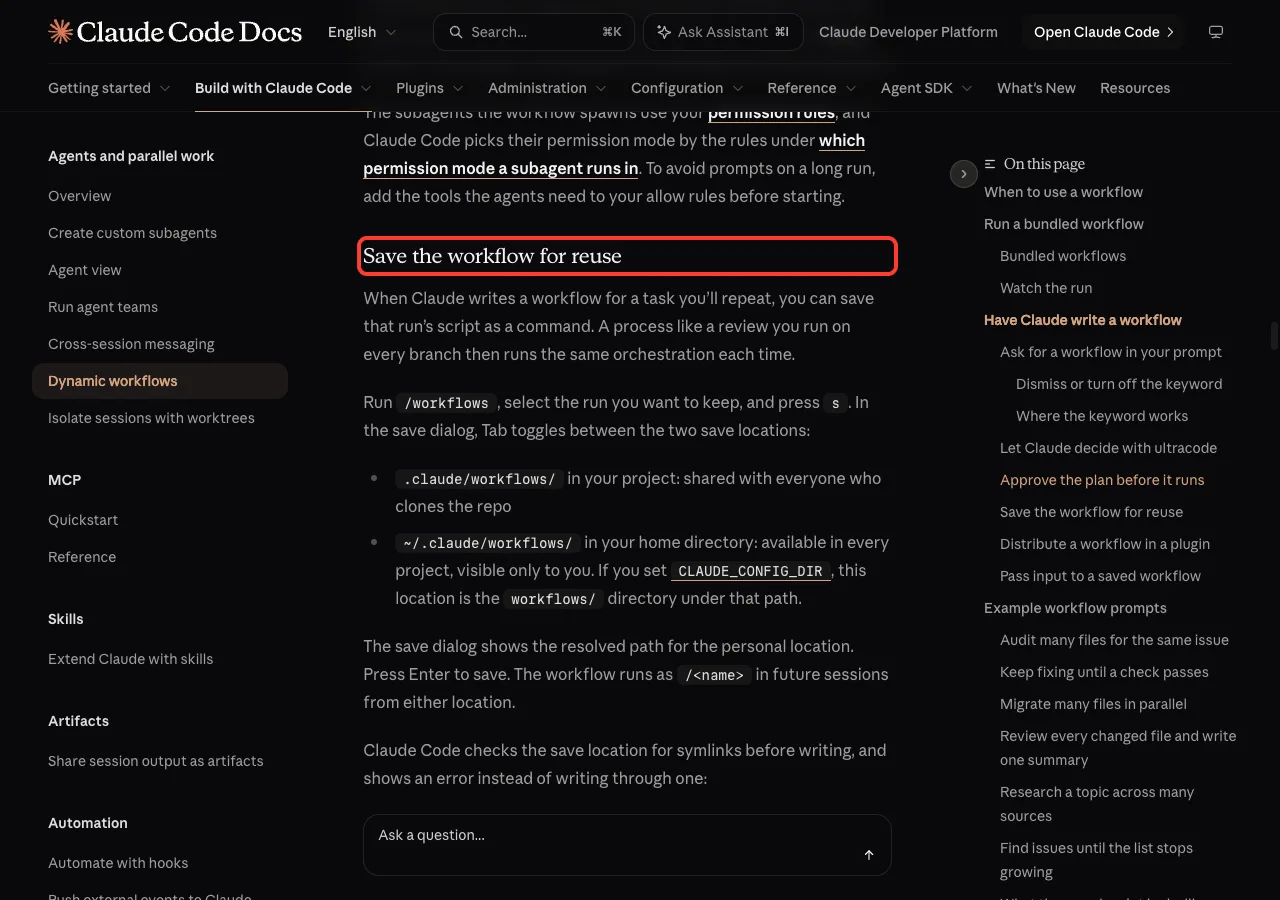
Suppose your review worked well and you want the same steps next week. Open /workflows, select the run, and press s. A save dialog lets you press Tab to choose where to keep it.
- .claude/workflows/ in your project, shared with everyone who clones the repo
- ~/.claude/workflows/ in your home folder, available in every project but visible only to you
After saving, the workflow becomes a /command in future sessions. If a project workflow and a personal one share a name, the project one runs. You can also pass input to a saved workflow, such as a list of issue numbers, by naming them in your prompt.
We did not save ours in this test, so we are only reporting what the docs say. Editing a saved script is possible too: run the /workflow-authoring skill first so Claude loads the script-writing reference, then edit the file or ask Claude to change it.
Other Ways to Start a Workflow
Asking in plain words is the easiest way, but it is not the only one.
- The ultracode keyword: put it in a prompt you type yourself, and Claude writes a workflow for that task. It does not work in a prompt passed with -p, in a scheduled task, or in a pasted webhook.
- Ultracode mode: run /effort ultracode and Claude plans a workflow for every substantial task in the session. That uses more tokens, so turn it off with /effort ultracode off when you go back to routine work.
- The bundled /deep-research command: it runs a research workflow that fans out web searches, cross-checks sources, and returns a cited report. It needs the WebSearch tool.
If you start a keyword by mistake, press Option+W on macOS or Alt+W on Windows and Linux to dismiss the highlight. We tested on macOS; the Windows and Linux steps follow Anthropic’s official instructions.
Workflow Prompts to Copy
The docs share several prompt shapes. Each one asks Claude to write and run the workflow, so you do not write the script.
| Goal | Prompt starts with |
|---|---|
| Audit many files | use a workflow to audit every route handler under src/routes/ for missing authentication checks |
| Keep fixing until a check passes | use a workflow to run npx tsc –noEmit and keep fixing the errors until it passes |
| Migrate many files | use a workflow to migrate every component under src/components/ to TypeScript, each in its own isolated copy |
| Review a pull request | use a workflow to review every file changed in this PR, then merge the findings into one ranked summary |
| Find flaky tests | use a workflow to find flaky tests, and stop once two rounds in a row find nothing new |
If a Run Is Interrupted
Workflows are resumable inside the same session. Press p in /workflows to pause and resume. If you stopped a run, ask Claude to relaunch it with the same script.
Completed agents return their saved results, so you do not pay for them twice. An agent that was still running starts over. A failed agent runs again, and so does every agent started after it.
If an agent stalls, Claude Code restarts it on its own, up to five times. If your plan’s usage limit is hit, the run can pause and continue after the reset, but only in an interactive session signed in with a claude.ai subscription.
Common Mistakes
- Starting big. Run your first workflow on one folder, not the whole repo.
- Skipping the plan. Read the phases and the raw script before you click Yes.
- Using a workflow for a small job. A single subagent or a normal prompt is cheaper.
- Forgetting permissions. Agents use your permission rules, so a long run can stop on a prompt. Add the tools the agents need to your allow rules first.
- Expecting mid-run questions. A workflow cannot ask you anything halfway. For sign-off between stages, run each stage as its own workflow.
Pro Tips
- Name a number of agents in your prompt, as we did. Claude treats the size guideline as advice, so a clear request wins.
- Ask for adversarial checking when results matter: a second set of agents tries to disprove each finding before it is reported.
- Keep an eye on the token count in /workflows and stop the run with x if it grows faster than you expected.
- Save good runs. A review you repeat on every branch is the perfect case for a saved command.
- To turn workflows off, switch Dynamic workflows off in /config or set the disableWorkflows setting to true.
Try It Yourself
Make a new folder with three or four small files from any language you like. Start Claude Code there and paste this prompt.
use a workflow to read every file in this folder, one agent per file, and list any bugs or risky spots. Keep it to 4 agents and do not change any files.Before you approve, choose View raw script and read it. After the run, open /workflows and press Enter on one agent to see what it was told. Then compare the token total with what you would expect from a normal chat.
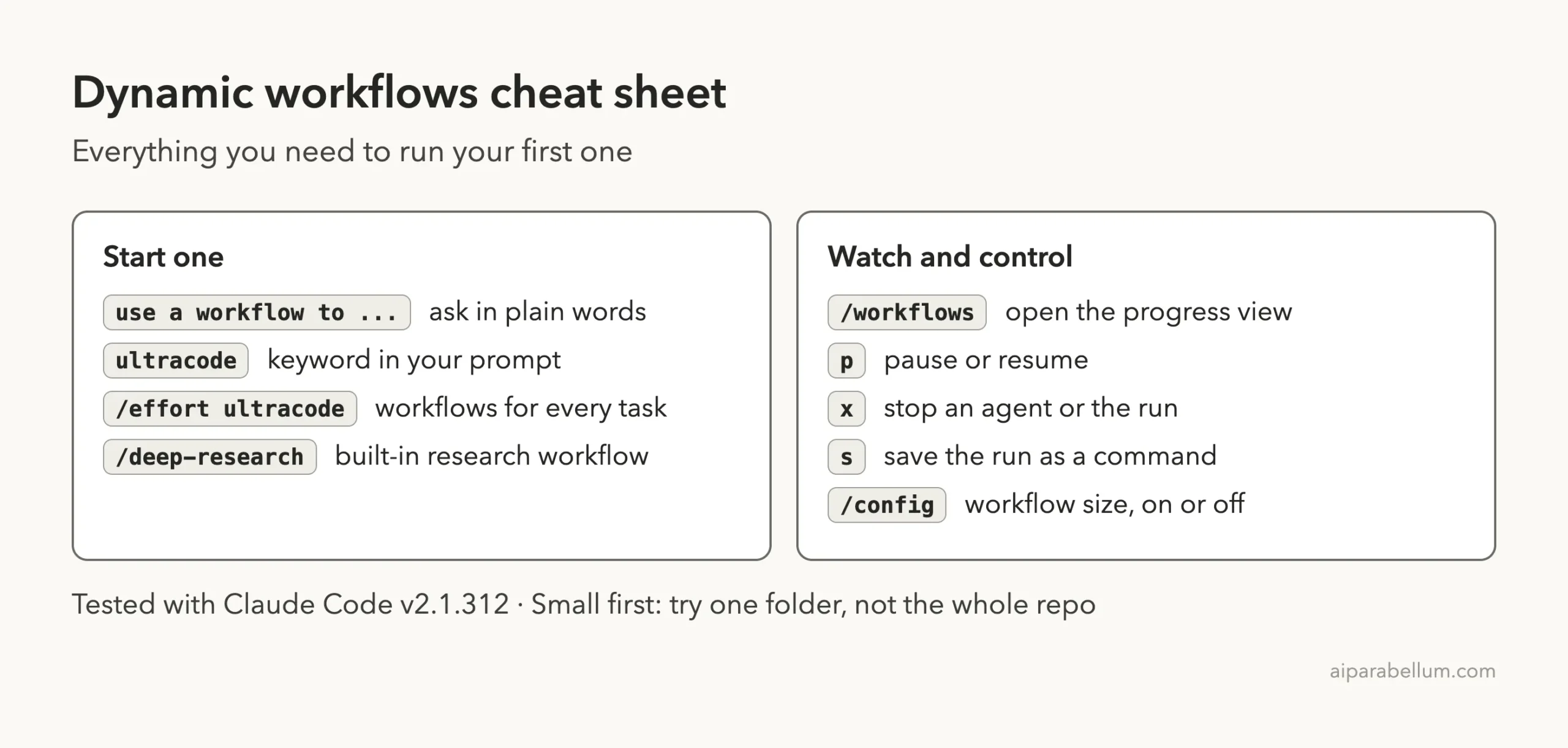
Dynamic Workflows Cheat Sheet
Frequently Asked Questions
What is the difference between a workflow and a subagent?
A subagent is one worker that Claude starts and manages. A workflow is a script that starts and manages many workers. The script holds the plan, so Claude’s own context holds only the final answer.
Do I need to know JavaScript?
No. Claude writes the script. It helps to be able to skim it, but you can also just read the plan summary and approve.
How do I stop a workflow?
Open /workflows, select the run, and press x. You can also stop a single agent. Stopping usually keeps completed work.
Does a workflow cost more than a normal chat?
Usually yes, because many agents run at once and each one uses tokens. Our four-agent demo used 142.4k tokens. Start with a small slice and watch the token count.
Can I turn workflows off?
Yes. Switch Dynamic workflows off in /config, set the disableWorkflows setting to true, or set CLAUDE_CODE_DISABLE_WORKFLOWS=1. Runs already in progress keep going.
Conclusion
Claude Code workflows turn a big job into a script that many agents carry out in parallel, so you get one ranked answer instead of a long back-and-forth. In our test, four agents reviewed four files and found bugs in every one. The best habits are to read the plan, start small, and save any run you will repeat. For more on Claude itself, see our Claude overview.
Previous in the series: Part 4: Change How Claude Code Looks With Mods
Next in the series: Part 6, 10 Ready-to-Copy Claude Code Hooks, is coming soon.