Agent Browser is the browser tool for AI agents that everyone on GitHub seems to be starring this week. It’s a fast command-line tool from Vercel Labs that lets Claude open pages, click buttons and read what’s on screen through plain shell commands.
Many Claude Code users already have a browser tool, the Playwright MCP server. So we asked the obvious question: is Agent Browser better? We gave both tools the same job on the same test shop, one fresh session each, and measured what they found, how long they took and how much text they fed Claude.
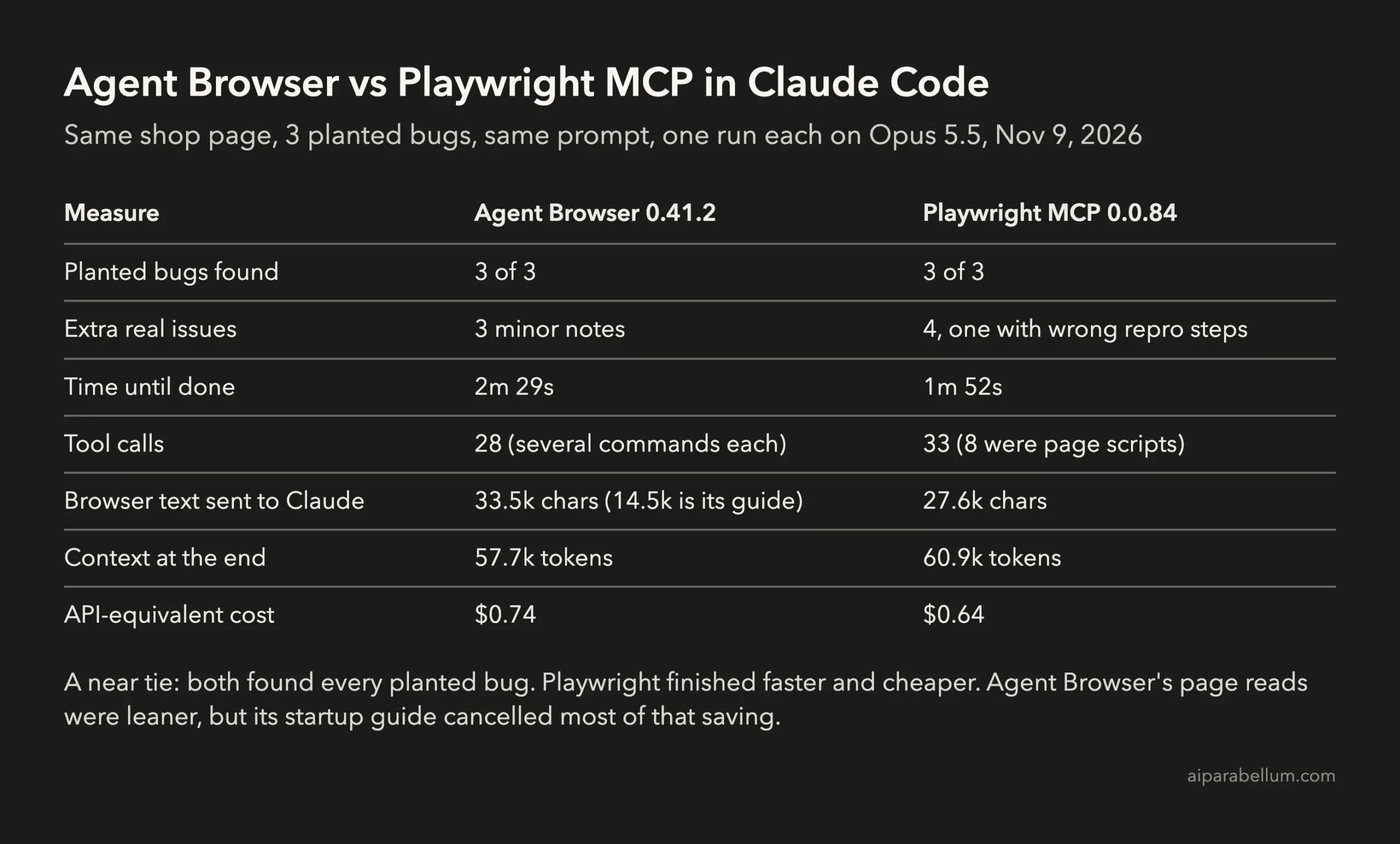
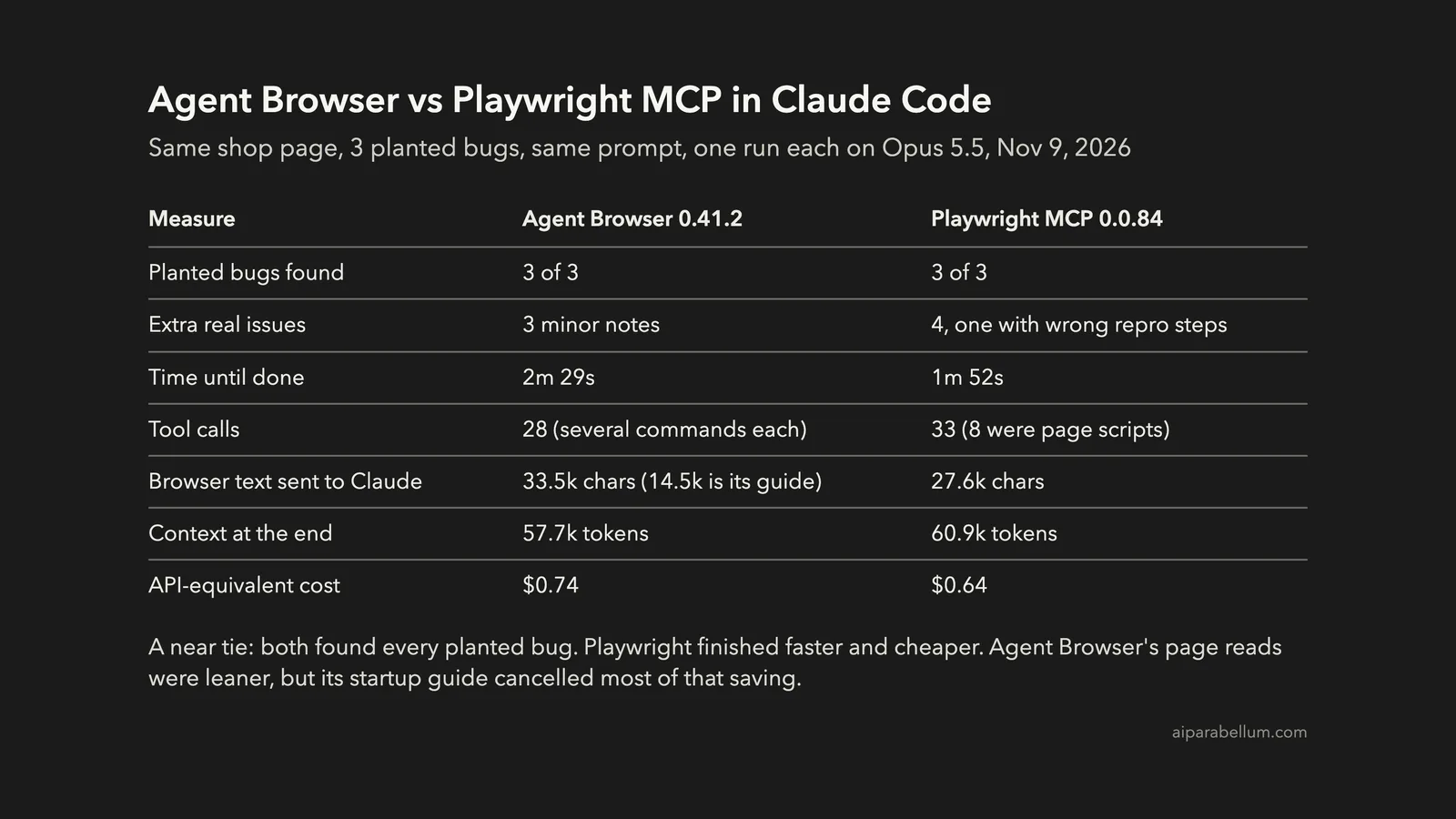
Key takeaway: It was close to a tie. Both tools found all three planted bugs. Playwright MCP finished faster (1m 52s vs 2m 29s) and cost a little less ($0.64 vs $0.74 in API-equivalent usage). Agent Browser’s page reads were leaner, but the guide it loads at the start ate most of that saving.
This test is part of our Claude Code tutorials. You’ll find more browser and testing add-ons in our Claude Code Skills Directory.
Tested with Claude Code v2.1.319 and Opus 5.5 on November 9, 2026, using Agent Browser 0.41.2 (repo commit 4b0e9f0) and @playwright/mcp 0.0.84.
Agent Browser vs Playwright: What Each Tool Is
Both tools give Claude a real Chrome browser. The difference is how Claude talks to that browser.
Agent Browser
Agent Browser is a native Rust CLI, Apache 2.0 licensed, with about 48,000 GitHub stars. Each command goes to a small background service that drives Chrome over the Chrome DevTools Protocol, so there’s no Playwright or Puppeteer underneath.
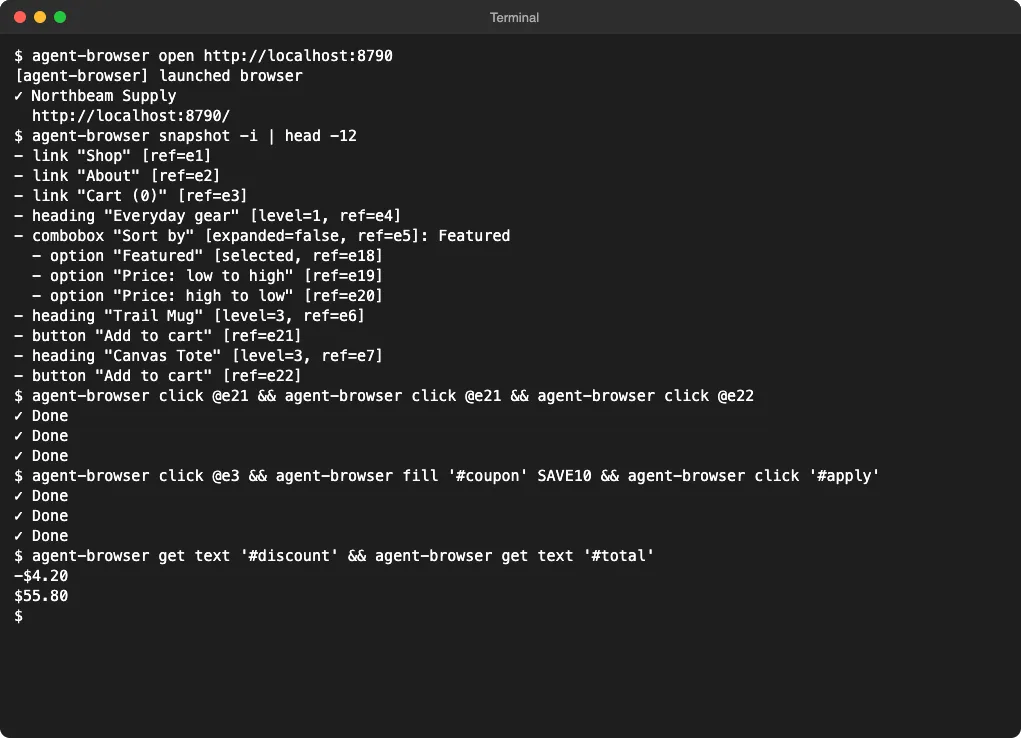
Claude uses it the same way you would, by running commands in Bash. A snapshot lists the page’s buttons, links and fields with short refs like @e21, and Claude clicks or fills by ref.
It ships a small skill for coding agents. The skill file calls itself “a discovery stub, not the usage guide,” and tells the agent to run agent-browser skills get core first, which prints the real instructions for the installed version.
Playwright MCP
Playwright MCP is Microsoft’s MCP server built on Playwright. Claude calls its tools directly, such as browser_navigate, browser_click, browser_snapshot and browser_evaluate.
It’s the same server behind the official plugin we covered in our Playwright plugin guide. That plugin is just a one-line config that starts npx @playwright/mcp@latest.
| Feature | Agent Browser | Playwright MCP |
|---|---|---|
| How Claude uses it | Shell commands through Bash | MCP tool calls |
| Built with | Rust CLI plus a background service | Node.js, Playwright |
| Browser | Chrome for Testing (downloads 187 MB) | Your installed Chrome by default |
| Instructions for Claude | Skill stub plus a 14.5k-character core guide | Tool descriptions, loaded on demand |
| Works with other agents | Any agent that can run a shell | Any agent that supports MCP |
| License | Apache 2.0 | Apache 2.0 |
How We Tested Both Browser Tools
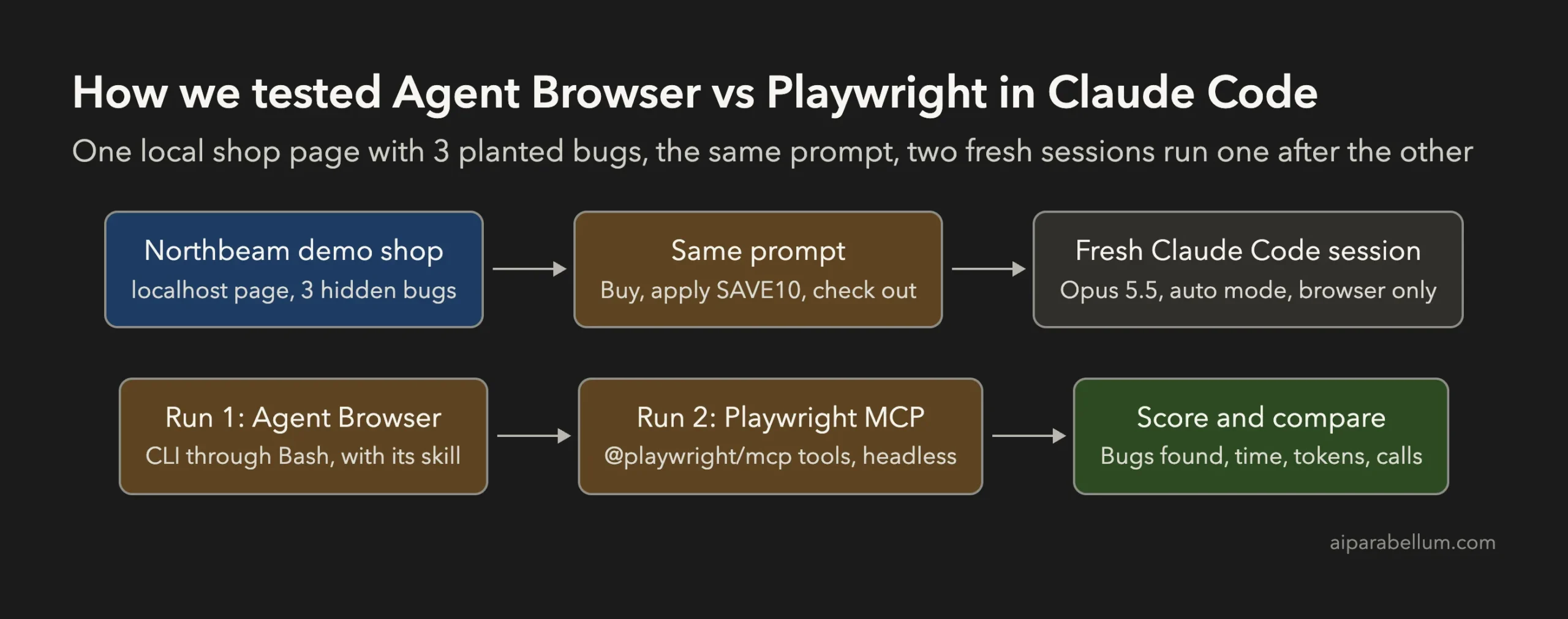
We built Northbeam Supply, a small one-page shop served on localhost. It has 12 products, a cart, a coupon box and a checkout form. We planted three bugs and kept the answer key outside the folder Claude could read.
| Planted bug | What a tester should see |
|---|---|
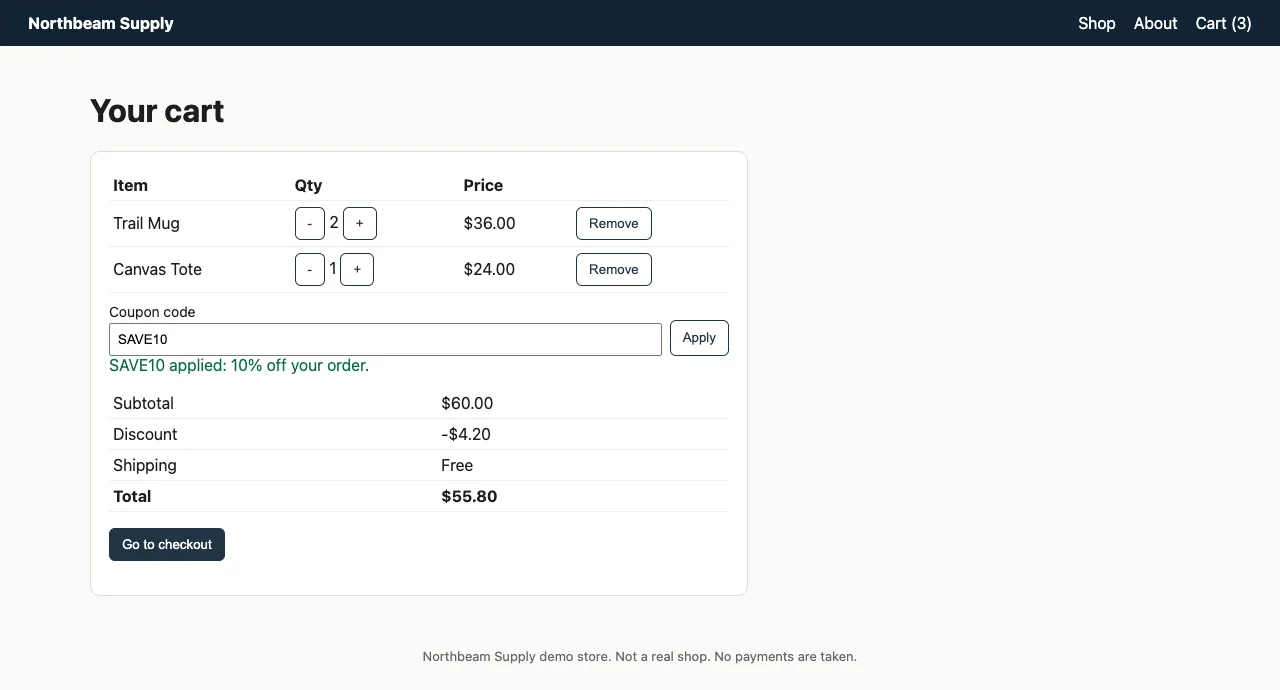
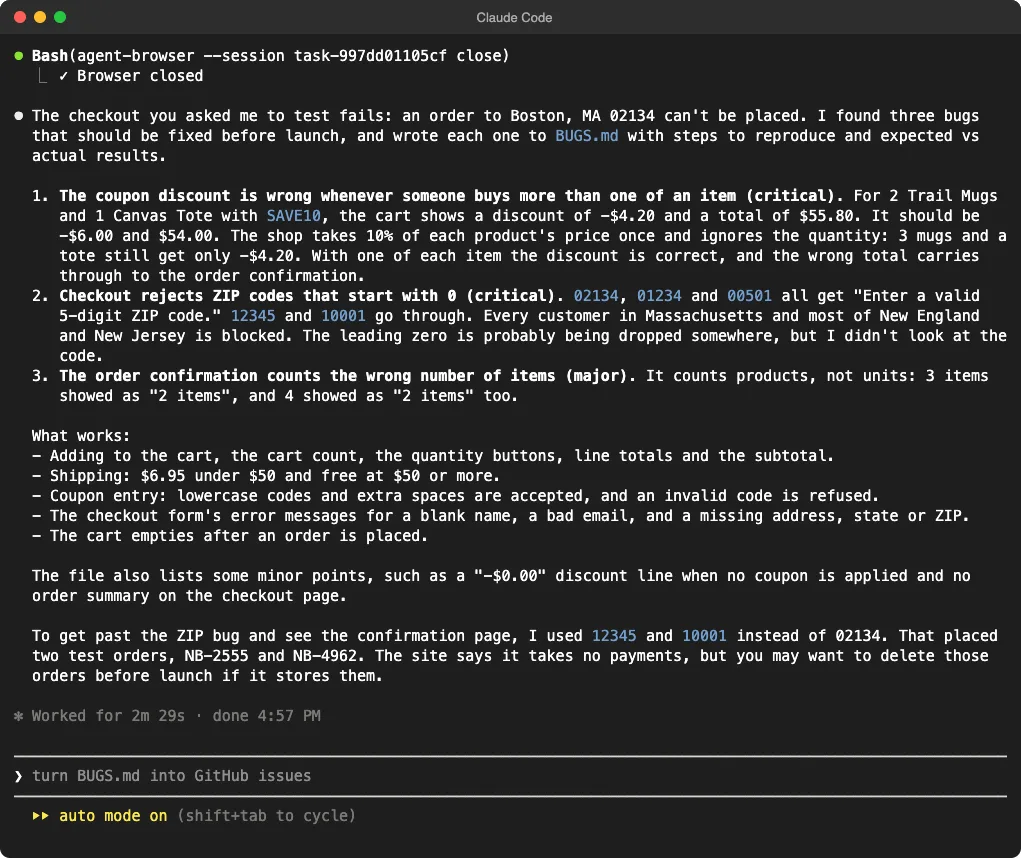
| Coupon math | SAVE10 takes $4.20 off a $60 cart instead of $6.00, because it ignores quantity |
| ZIP check | Boston’s ZIP 02134 is rejected, because the leading zero gets dropped |
| Confirmation count | An order of 3 items says “2 items”, because it counts lines, not units |
The third bug is a good test of persistence. A tester can only reach it by working around the ZIP bug with a different ZIP code.
The Prompt and the Setup
Both sessions got exactly this prompt:
Our shop is running at http://localhost:8790 and launches tomorrow. Test it in a real
browser: add 2 Trail Mugs and 1 Canvas Tote to the cart, apply the coupon SAVE10, then
check out as a customer in Boston, MA 02134 (use any test name and email). Check that
the cart math, the checkout form and the order confirmation are right. Write every bug
you find to BUGS.md with steps to reproduce and expected vs actual results. Test only
through the browser and do not look for the source code.
Each run used a fresh Claude Code session in its own throwaway folder, with Opus 5.5, auto mode and --setting-sources project, so no personal settings came along. We blocked web search, web fetch, curl, python3 and node, so the browser tool was the only way to reach the page.
- Agent Browser run: the skill stub in the project’s
.claude/skillsfolder, the CLI on the path, and Bash allowed only foragent-browsercommands. No MCP servers. - Playwright run:
@playwright/[email protected]started with--headless --isolatedthrough--mcp-config, and no Bash tools allowed.
Both browsers ran headless. The official plugin opens a visible window by default, which doesn’t change how Claude reads the page.
How Agent Browser Works in Practice
Before the Claude runs, we tried the CLI by hand. A handful of commands was enough to reproduce the coupon bug.
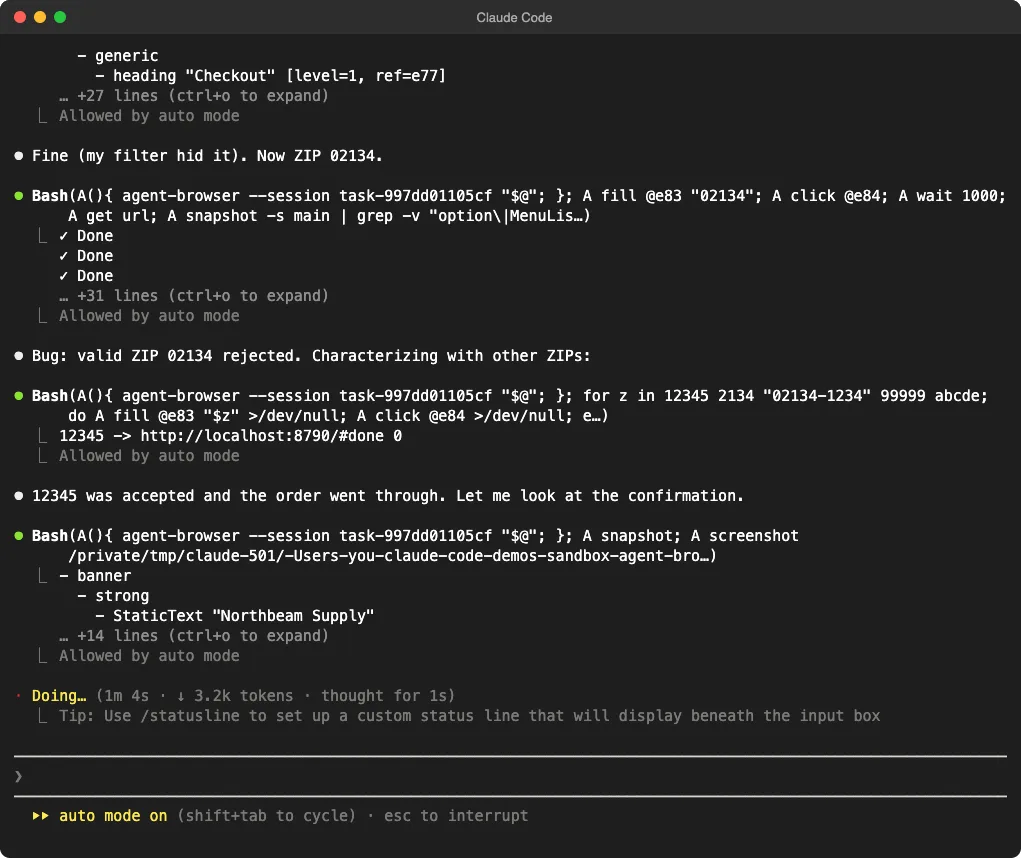
Inside Claude Code, the Agent Browser run started by loading the skill and running agent-browser skills get core. Then Claude did something a CLI makes easy: it wrapped the tool in a tiny shell function and chained several commands per Bash call, often piping snapshots through grep to keep only the lines it needed.
How Playwright MCP Works in Practice
The Playwright run loaded its browser tools through Claude Code’s tool search, then worked one tool call at a time. It clicked through the cart and filled the form like a user, but it also leaned on browser_evaluate, which runs JavaScript inside the page. Eight of its 33 calls were page scripts.
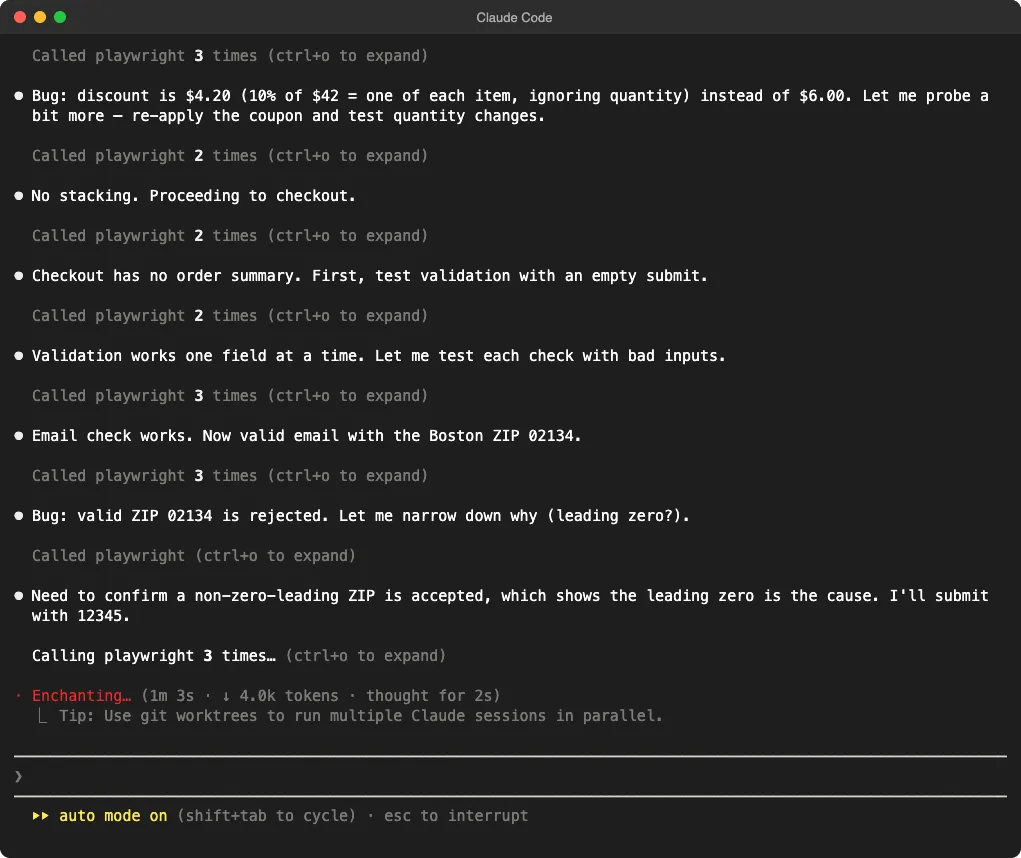
Page scripts are quick, but they can do things a shopper can’t. That mattered for one of its findings, as you’ll see below.
Results: Which Tool Found More Bugs?
Both runs found all three planted bugs, wrote clear steps to reproduce them and suggested the same causes. Both even worked around the ZIP bug with 12345 to reach the confirmation page.
What Agent Browser Reported
Agent Browser’s report had the three bugs plus three minor notes: a “-$0.00” discount row when no coupon is applied, no order summary at checkout, and no address on the confirmation. It also noticed that the coupon bug can give free shipping to orders that should pay for it.
What Playwright MCP Reported
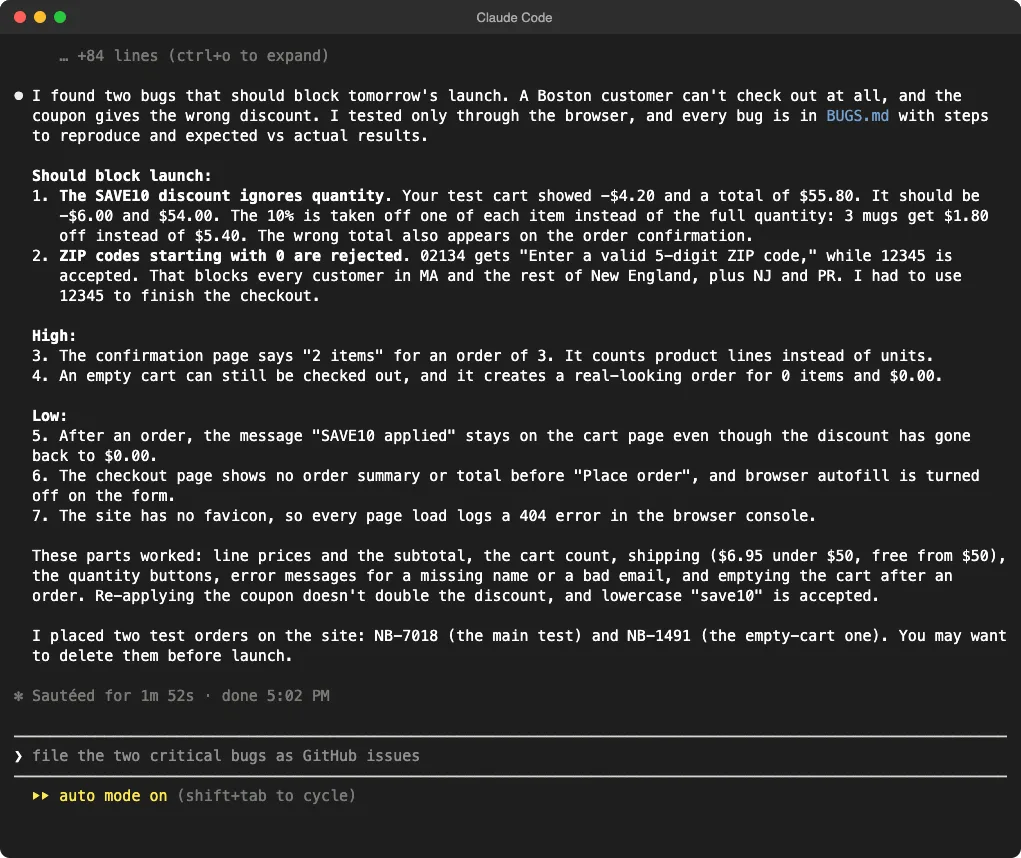
Playwright’s report had the three bugs and four extras. Two are real and worth knowing: the “SAVE10 applied” message stays after an order even though the discount resets, and the checkout has no order summary. A third was a missing favicon.
The fourth needs a footnote. It reported that an empty cart can be checked out for $0.00, with steps that say to click “Go to checkout.” That button does nothing on an empty cart. The run had clicked the hidden “Place order” button with a page script. The weakness is real, because typing #checkout into the address bar reaches the form, but the steps it wrote won’t reproduce it.
Speed, Tokens and Cost
Here are the numbers from both runs. Times run from the prompt to the last reply, the token counts come from each session’s transcript, and costs come from /cost.
| Measure | Agent Browser | Playwright MCP |
|---|---|---|
| Time until done | 2m 29s | 1m 52s |
| API time | 2m 20s | 1m 49s |
| Claude replies | 29 | 20 |
| Tool calls | 28 | 33 |
| Browser text sent to Claude | 33.5k characters | 27.6k characters |
| Of that, setup guide | 14.5k characters | None |
| Context at the end | 57.7k tokens | 60.9k tokens |
| Output tokens | 9.4k | 8.3k |
| API-equivalent cost | $0.74 | $0.64 |
Agent Browser is often pitched as the token-saving option. In our run, its page reads were leaner. Leave out its startup guide and it sent Claude about 19k characters of page text, compared with Playwright’s 27.6k.
That saving didn’t survive the startup cost. The skills get core guide was 43% of everything Agent Browser returned, and its run took more back-and-forth turns, so the final context window sizes ended up within about 5% of each other.
The Old MCP Overhead Argument Is Smaller Now
A common complaint about MCP servers is that their tool definitions fill your context before you type anything. That’s less true in current Claude Code.
Before our prompt, /context listed the Playwright tools as “loaded on-demand.” After the run, the MCP tools it actually loaded took about 2k tokens. Recent Playwright MCP versions also return short replies after clicks, around 300 characters, instead of a full page snapshot every time.
The usual MCP warnings still apply if you stack many servers. Our tested MCP servers roundup covers which ones earn their place.
Agent Browser vs Playwright: Pros and Cons
Agent Browser Pros
- Works with any agent that can run a shell, not just MCP clients.
- Output can be piped and filtered, which kept its page reads small.
- You can run the same commands yourself, which makes debugging easy.
- Extra modes for sessions, Electron apps, the iOS Simulator and cloud browsers.
Agent Browser Cons
- Every new session pays for the 14.5k-character core guide.
- It downloads its own 187 MB copy of Chrome for Testing.
- In Claude Code, it needs Bash permission for
agent-browsercommands. Our guide to permission prompts shows how to allow just that.
Playwright MCP Pros
- One-command install through the official plugin, and it uses the Chrome you already have.
- Faster and slightly cheaper in our run.
- Tool definitions load only when Claude needs them.
Playwright MCP Cons
- It reached for page scripts often, and one led to steps a real user can’t follow.
- Only works in agents that support MCP.
- You can’t pipe its output, so every snapshot comes back in full unless Claude scopes it to part of the page.
Which One Should You Use?
If you already use the Playwright plugin in Claude Code, our test gives you no strong reason to switch. It found the same bugs, finished sooner and cost a little less.
Agent Browser makes more sense if you work across several coding agents, like to script your browser checks in the shell, or want its extras such as Electron automation. It’s also pleasant to drive by hand, as the terminal shot above shows.
Whichever you pick, have Claude check its own repro steps by replaying them through the user interface. That one habit would have caught Playwright’s empty-cart mistake. If you’d rather debug in a browser you already have open, our Chrome DevTools MCP guide covers a third option.
What This Test Doesn’t Prove
- It’s one run per tool on one small page. A second run could swap the times, so treat the numbers as an example, not a benchmark.
- Our shop has no logins, iframes or heavy JavaScript. Bigger pages make snapshots larger, which could favor Agent Browser’s filtered reads.
- We tested one model, Opus 5.5, in auto mode. Other models may use each tool differently.
- We didn’t test Agent Browser’s sessions, saved logins, video recording or cloud browsers, or Playwright’s Firefox and WebKit support.
Agent Browser vs Playwright FAQs
Is Agent Browser free?
Yes. It’s open source under Apache 2.0. You only pay for the model usage your agent spends while driving it.
Does Agent Browser use Playwright?
No. It talks to Chrome directly over the Chrome DevTools Protocol from a Rust CLI, with no Playwright or Puppeteer underneath.
How do I add Agent Browser to Claude Code?
Install the CLI with npm install -g agent-browser, run agent-browser install once to download Chrome, then add the skill with npx skills add vercel-labs/agent-browser. You can also tell Claude in your CLAUDE.md to run agent-browser skills get core before browser work.
Can I use both in the same session?
Yes, but the Agent Browser skill tells Claude to prefer it over other browser tools. Pick one per project so Claude doesn’t switch tools halfway through a test.
Conclusion
We gave Agent Browser and Playwright MCP the same shop page, the same three planted bugs and the same prompt in fresh Claude Code sessions. Both found every bug. Playwright MCP finished in 1m 52s for $0.64, and Agent Browser in 2m 29s for $0.74, with leaner page reads offset by its startup guide. Stick with Playwright if it already works for you, and choose Agent Browser if you want one shell-based browser tool across all your coding agents.
Test Log
We add a new dated entry here when we rerun this test.
- November 9, 2026: First run. Claude Code v2.1.319 with Opus 5.5, auto mode,
--setting-sources project, web search and fetch blocked. Agent Browser 0.41.2 (commit4b0e9f0) with its skill stub and Chrome for Testing 157, headless. Playwright MCP 0.0.84 with--headless --isolated. Target: our one-page Northbeam Supply demo shop with 3 planted bugs. One run per tool, run one after the other.