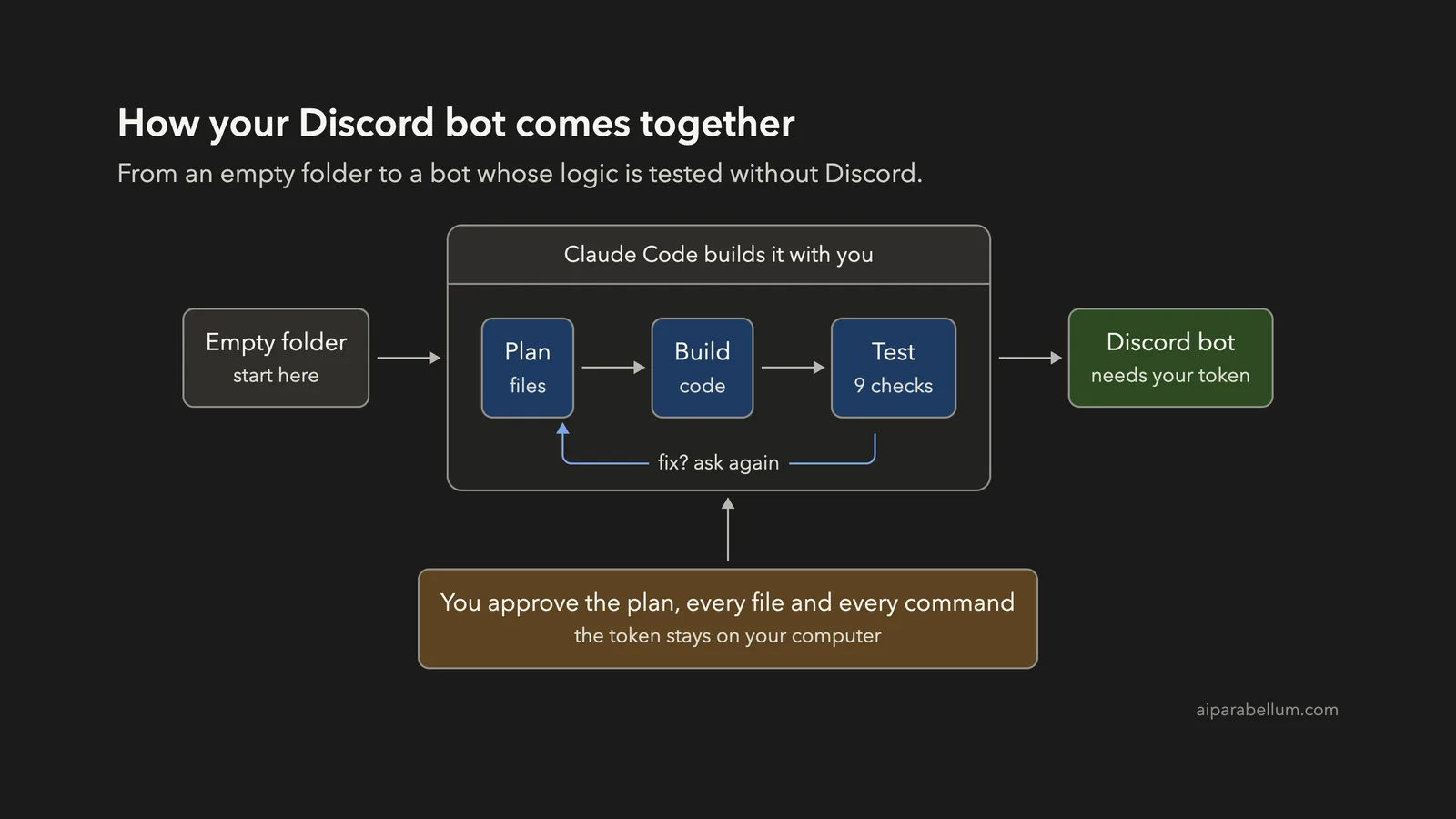
Want to build a Discord bot with Claude Code, but you do not have a bot account or a server ready? You can still plan, write and test a working bot from an empty folder, and you only need Node.js on your computer to see the logic pass its tests.
This is Project 9 of 20 in our Build with Claude Code series, part of our Claude Code tutorials. In Project 8 we wrote a WordPress plugin and tested it with stubs. A Discord bot has a similar problem: it needs an outside service and a secret, so we use the same trick again.
Tested with Claude Code v2.1.310 on October 26, 2026, on macOS.
One honest note before we start. We did not create a Discord bot account, and we did not connect to Discord.
That needs your own bot token, and we never create accounts or handle tokens in these demos. Claude wrote the bot, and we tested the command logic and the missing-token check without Discord.
The step where the bot actually logs in is for you to try with your own token, which we explain near the end. We tested on macOS; the Windows and Linux steps follow Anthropic’s official instructions.
What We Built
Keep the bot’s brain separate from the Discord connection, and you can test almost everything without Discord.
| Item | Details |
|---|---|
| Project | A Discord bot using discord.js with slash commands |
| Commands | /roll for dice like 2d6, /8ball, /poll with up to 4 options, and later /choose |
| Files | commands.js, index.js, test.js, package.json, README.md and .gitignore |
| Prompts used | 5 short prompts, plus the approvals |
| Install needed | Claude Code and Node.js. The discord.js package and a bot token are only needed to run it live. |
| Checks | 9 passing tests with node:test |
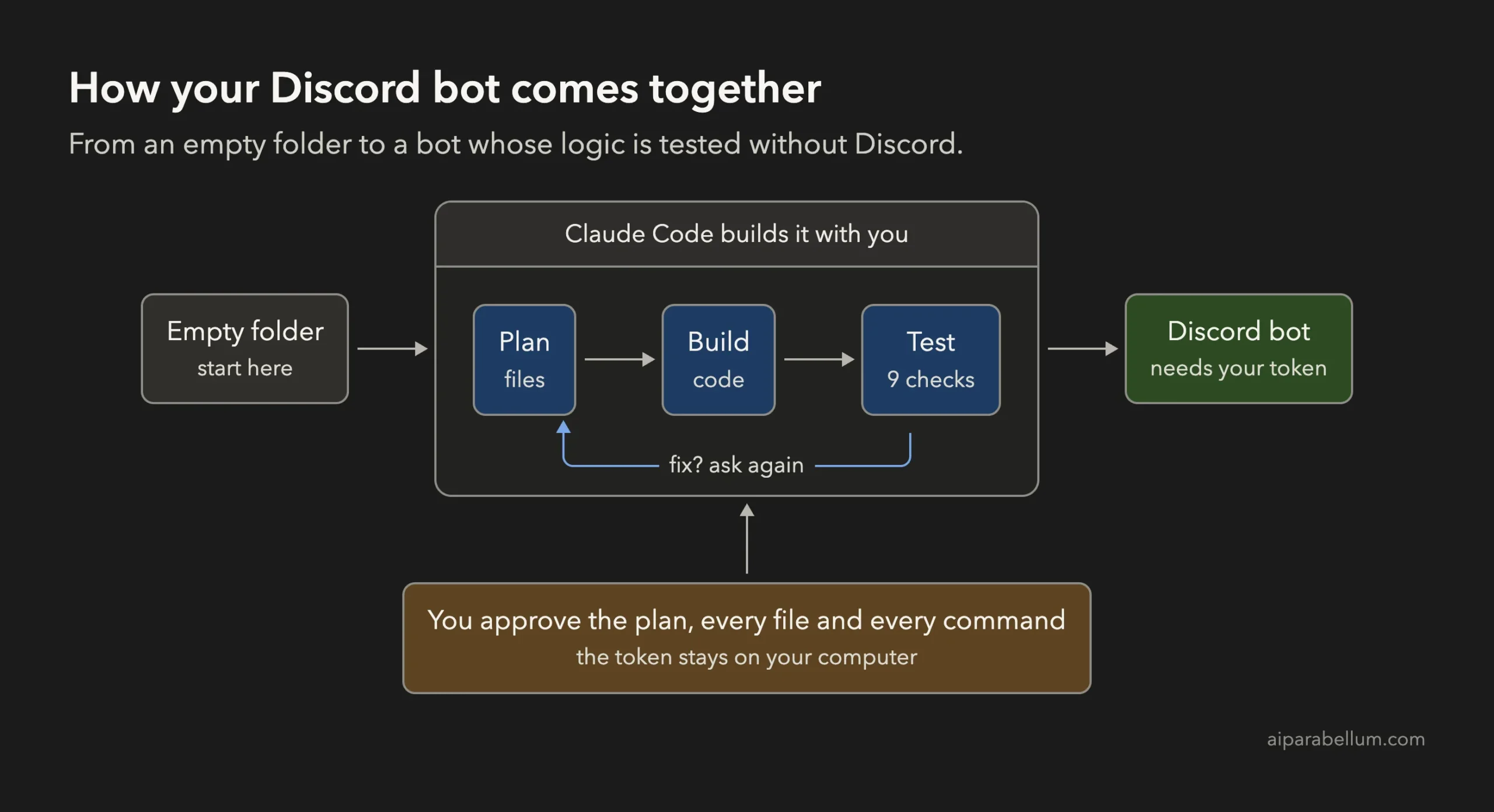
What Is a Discord Bot?
A Discord bot is a program that logs in to Discord as its own account. It can read events, such as someone using a slash command, and reply in a channel. Discord gives each bot a secret token, which works like a password.
A slash command is a command you type in a chat box that starts with a forward slash, such as /roll. Discord shows the available commands as you type, so people do not need to remember them.
Most beginner bots are built with a library called discord.js, which handles the connection for you. Our bot uses it too, but only one file touches it.
Why Build a Discord Bot With Claude Code?
A bot has a few traps for beginners. The token must never be written into a file you share.
The connection code is easy to get wrong. And you cannot test it without a real server, unless the code is organized well.
Claude Code can plan that organization with you and follow safety rules you give it. If you are new to the tool, our first session guide is a good start, and our guide to permission modes explains the approval screens below.
Step 1: Start in Plan Mode in an Empty Folder
Make a folder, open a terminal inside it and start Claude Code in plan mode. Claude can read and think in this mode, but it cannot change files until you approve its plan.
mkdir my-discord-bot
cd my-discord-bot
claude --permission-mode plan
Our guide to plan mode covers the approval flow in more detail.
Step 2: Describe Your Bot to Claude Code
A good bot prompt names the library, the commands, the safety rule for the token and the test plan. This is the first prompt we used:
Build a small Discord bot in Node.js using discord.js. Commands: /roll (dice like 2d6), /8ball, and /poll (a question and up to 4 options). Put the command logic in commands.js as plain functions that do not import discord.js, so I can test them without Discord. The bot token must come from the DISCORD_TOKEN environment variable, never hard-coded. Do not install any packages. Also write test.js using node:test. Plan the files first, keep it small.Each part of the prompt does a job.
The sentence about plain functions is the most important one, because it makes the logic testable. The token sentence sets a safety rule before any code exists. “Do not install any packages” keeps Claude from running npm during the demo, and it keeps the tests free of outside code.
Step 3: Review the Plan
Claude’s plan listed six files and what each would do. The plan said index.js would read the token from the environment, print a clear error if it was missing, register the slash commands and answer each one by calling a function from commands.js. It also noted that an error from the logic would become a private reply, so only the person who typed the command sees it.
The plan listed the test cases too, such as a seeded random number giving the expected dice roll, and a poll with 1 or 5 options being rejected. It ended with a verification list, and it said plainly that a live run against Discord needs your token and an npm install, so it would not do that. After the plan, Claude asked how to continue.
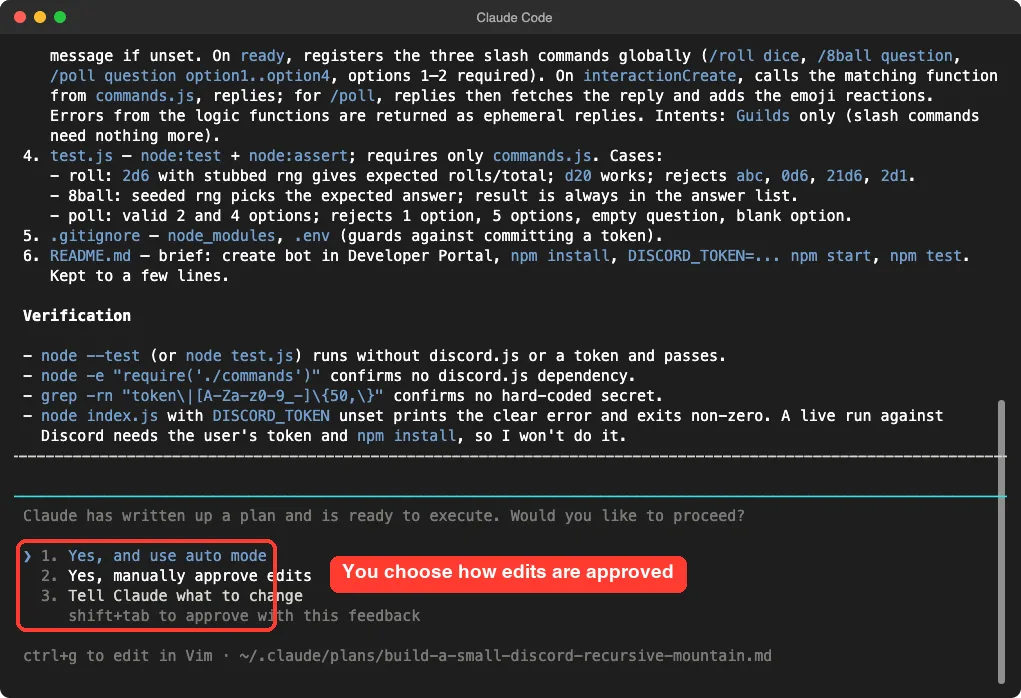
We chose to approve edits manually so we could read each file first.
Step 4: Approve the Files
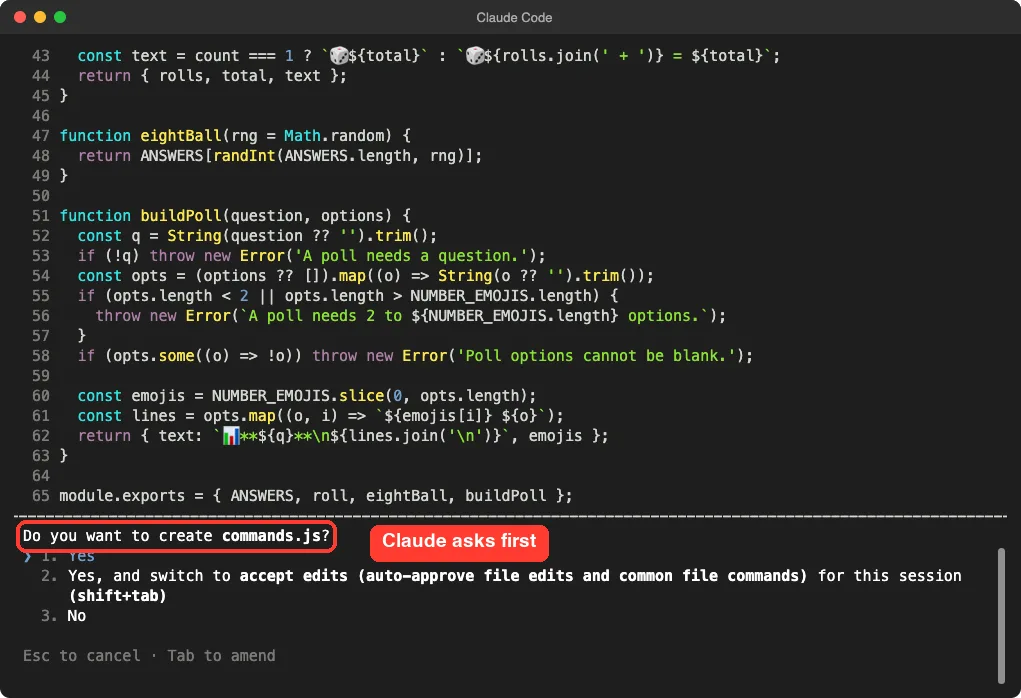
Claude showed each file and asked before creating it. Here it shows commands.js and asks, “Do you want to create commands.js?” You can say yes once, switch to accept edits for the session, or say no.
Next, Claude wanted to run its own checks. Running a command needs approval too, just like editing a file.
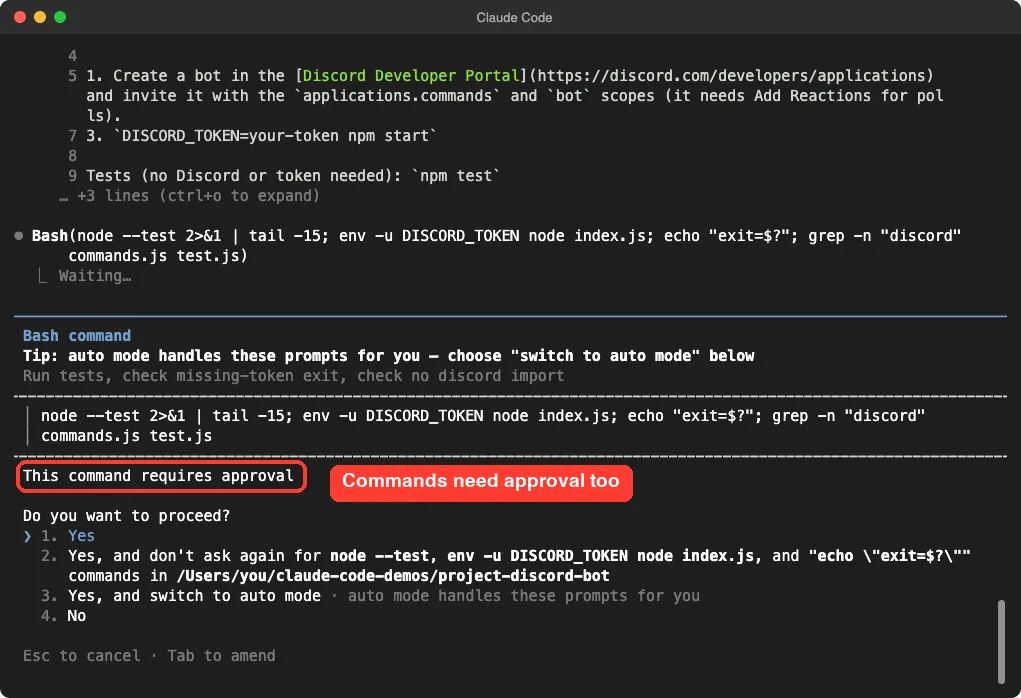
Our script closed the session while this approval was still open, so that first check was cut off. This is a good reminder that an unapproved command does not run. We resumed the same session with the continue option and asked again, which is the right move when an approval gets interrupted.
Step 5: Run the Tests
The second prompt was a plain request:
Run node --test and tell me the result.Claude reported that all 7 tests passed. It also said it had not confirmed that index.js exits cleanly when the token is missing, because the earlier check was cut off.
It added that it had not run the bot against Discord. That honest note is the kind of detail worth looking for in every summary.
Step 6: Add a Command
The third prompt added a new command to a bot that already worked:
Add a /choose command that picks one item from a comma-separated list, with a test. Keep the same style.Claude added a choose function to commands.js, a /choose entry in index.js and two new tests.
One test checks that spaces are trimmed. The other checks that empty items are ignored and that fewer than two choices gives an error. Because the logic lives in its own file, the new command took only a few lines.
Step 7: Fix the Problem Claude Found
The fourth prompt asked for two checks at once:
Run node --test, then run node index.js with DISCORD_TOKEN unset, and tell me both results.Here is the useful part. All 9 tests passed, including the two new ones.
But running index.js without a token did not print our friendly message. It crashed with “Cannot find module ‘discord.js'”, because the require line for the library ran before the token check, and we had not installed the package.
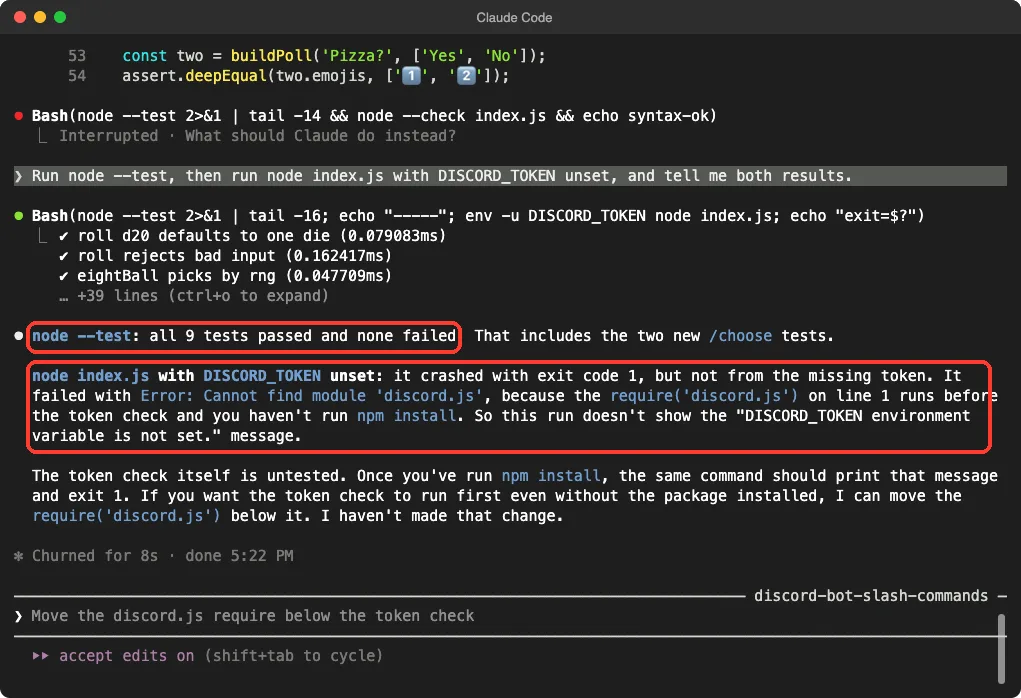
Claude did not hide this. It said the token check itself was untested, and it offered to move the require below the check. We said yes in the fifth prompt:
Yes, move the discord.js require below the token check, then run node index.js again with DISCORD_TOKEN unset and tell me the result.Claude made the edit and ran the command again. This time it printed the clear message and exited with code 1.
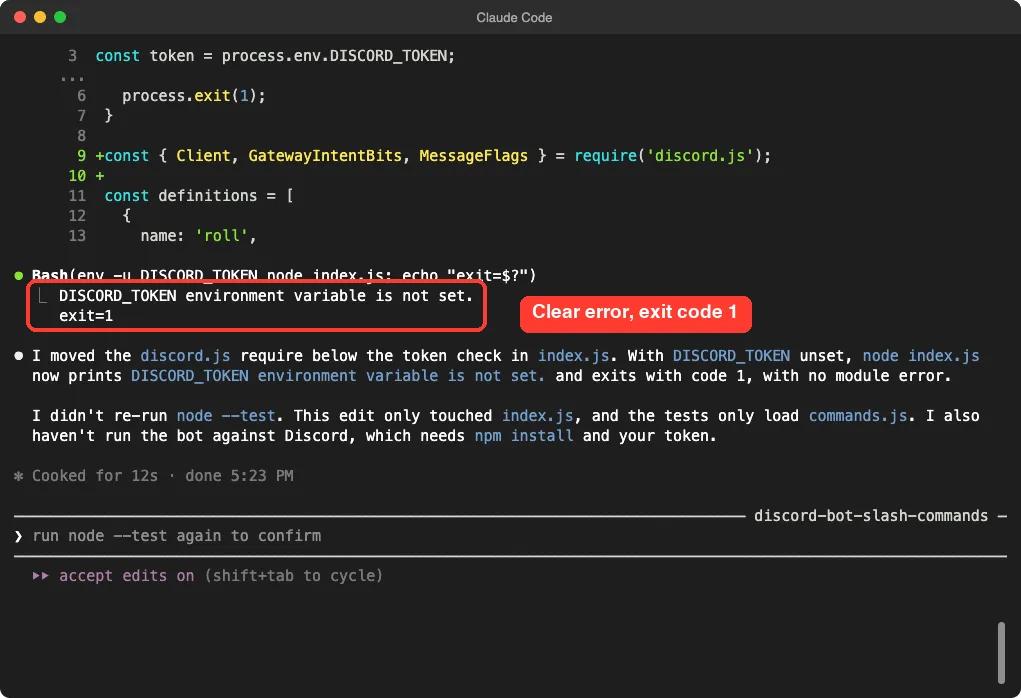
Claude also said it had not re-run the tests after that edit. That is fair, because the tests only load commands.js. We ran them ourselves, outside Claude Code, in the next step.
Step 8: See the Results Yourself
These two screenshots are from our own terminal, not Claude’s. First, the test run with the spec reporter, which prints one line per test.
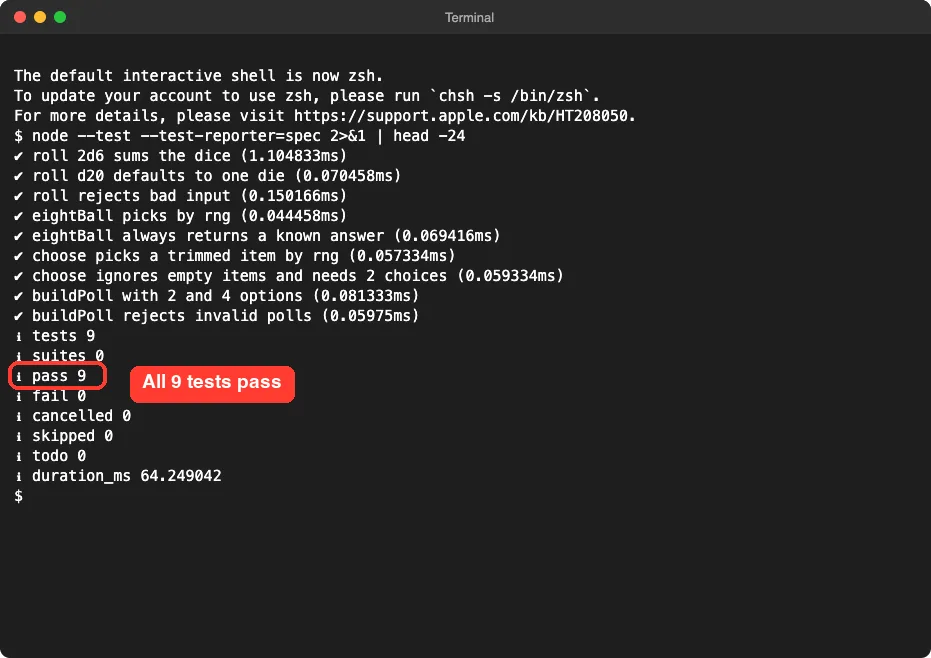
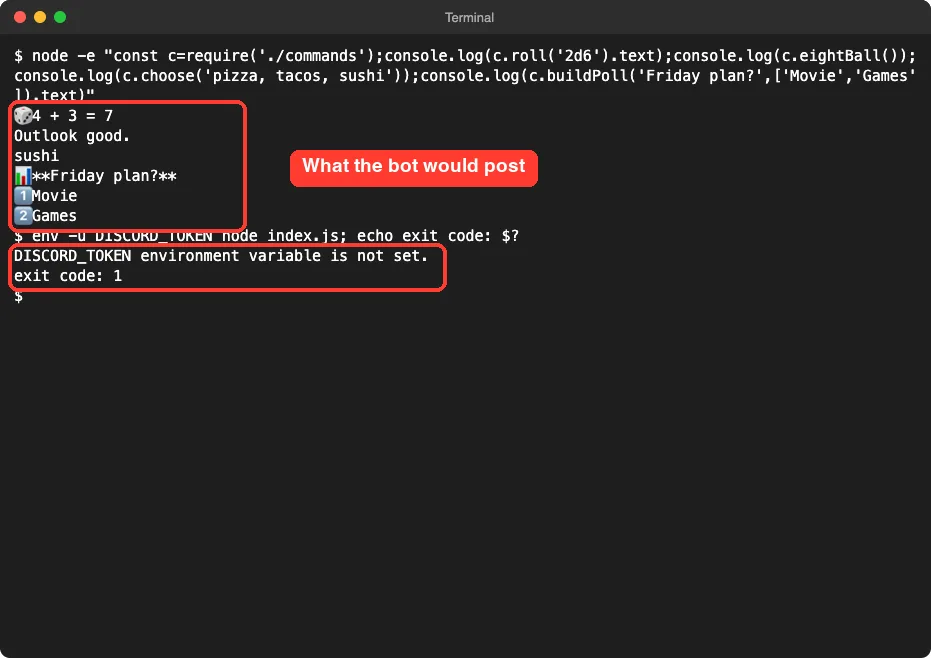
Second, we called the command functions directly to see what the bot would post, then ran the bot with no token. The dice roll and the 8-ball answer change each time because they are random.
The Final Project Files
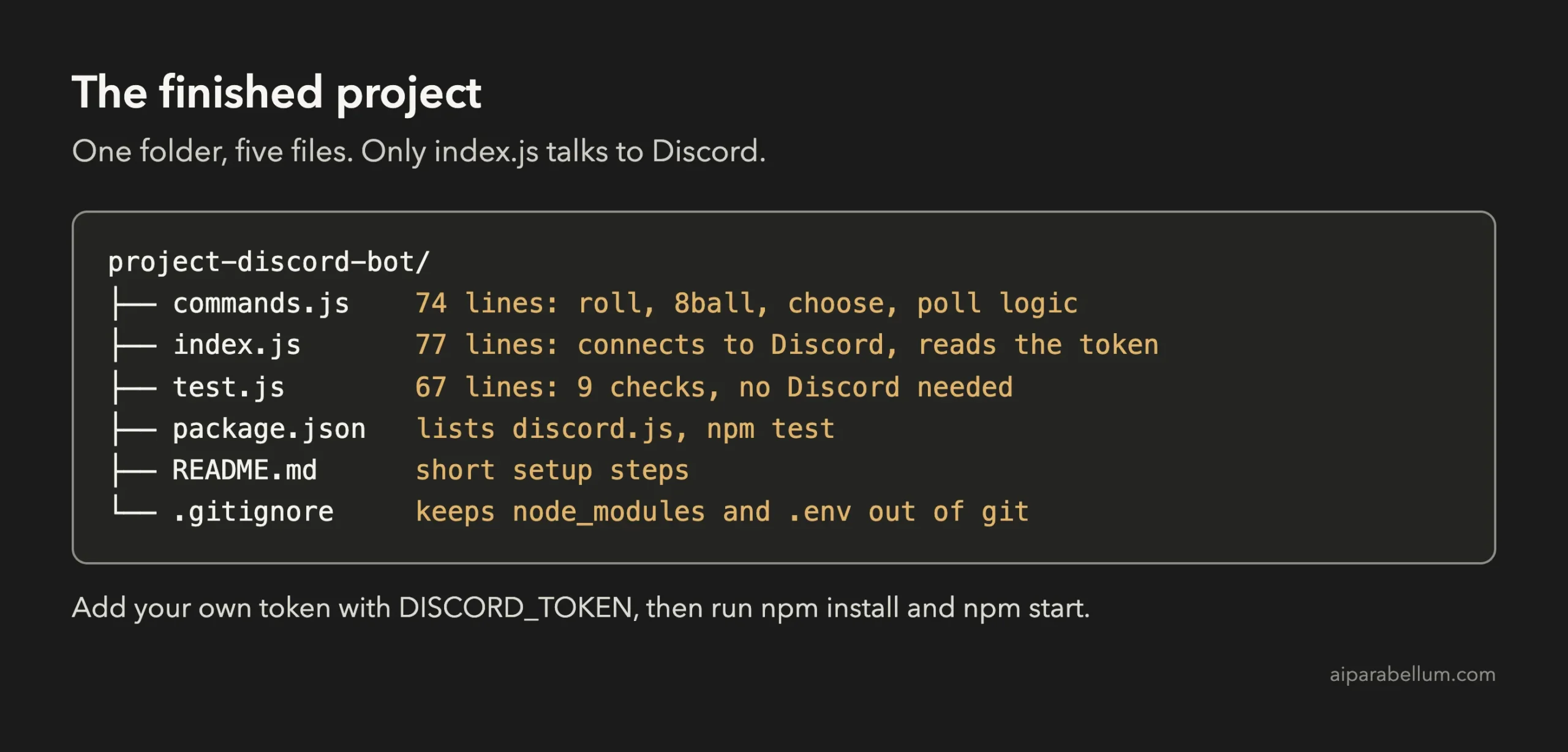
Here are the key parts. The first is the dice function from commands.js. It checks the input, limits the size and returns both the rolls and a ready-to-send message:
function roll(spec, rng = Math.random) {
  const match = /^(\d*)d(\d+)$/i.exec(String(spec).trim());
  if (!match) throw new Error('Use dice notation like 2d6 or d20.');
  const count = match[1] === '' ? 1 : Number(match[1]);
  const sides = Number(match[2]);
  if (count < 1 || count > MAX_DICE) throw new Error(`Roll between 1 and ${MAX_DICE} dice.`);
  if (sides < 2 || sides > MAX_SIDES) throw new Error(`Dice need between 2 and ${MAX_SIDES} sides.`);

  const rolls = Array.from({ length: count }, () => randInt(sides, rng) + 1);
  const total = rolls.reduce((sum, n) => sum + n, 0);
  const text = count === 1 ? `🎲 ${total}` : `🎲 ${rolls.join(' + ')} = ${total}`;
  return { rolls, total, text };
}
Notice the rng argument. It defaults to the real random function, but a test can pass a fixed one, so the same roll comes out every time. That is how the tests can check exact answers for something random.
The second part is the start of index.js after the fix. The token is read from the environment, and the library is loaded only after the check:
const { roll, eightBall, choose, buildPoll } = require('./commands');

const token = process.env.DISCORD_TOKEN;
if (!token) {
  console.error('DISCORD_TOKEN environment variable is not set.');
  process.exit(1);
}

const { Client, GatewayIntentBits, MessageFlags } = require('discord.js');
The rest of index.js, which we trimmed, defines the slash commands and replies to them. Any error from commands.js is sent back as a private reply, so a bad dice string shows a short message only to the person who typed it.
Run It With Your Own Token
This is the step we did not do, and it is yours to try. In the Discord Developer Portal, create an application, add a bot to it and copy the bot token.
Then invite the bot to a test server you own, using an invite link with the bot and applications.commands scopes. Our README from Claude also noted that polls need permission to add reactions.
Back in your folder, install the library and start the bot with the token set for that one command:
npm install
DISCORD_TOKEN=your-token-here npm start
Never paste your token into a prompt, a file or a screenshot. If it leaks, reset it in the Developer Portal right away. The .gitignore file Claude made already keeps a .env file out of git, but the safest habit is to keep the token only in your shell or in a password manager.
If something does not work live, copy the exact error message and ask Claude to explain it. Keep the token out of what you paste.
Try It Yourself
Build your own version with this starter prompt. Start Claude Code in plan mode in an empty folder first.
Build a small Discord bot in Node.js using discord.js. Commands: /roll (dice like 2d6), /8ball, and /poll (a question and up to 4 options). Put the command logic in commands.js as plain functions that do not import discord.js, so I can test them without Discord. The bot token must come from the DISCORD_TOKEN environment variable, never hard-coded. Do not install any packages. Also write test.js using node:test. Plan the files first, keep it small.Then try these variations, one at a time:
- Add a /coinflip command and a test for it.
- Make /roll accept a bonus, such as 2d6+3.
- Add a /remindme command that stores the reminder in a variable, then ask how to make it survive a restart.
- Ask Claude to explain every line of index.js in plain English.
- Ask for a short list of what could go wrong when you run the bot on a real server.
Common Mistakes
- Hard-coding the token. Always read it from an environment variable, and say so in your prompt.
- Putting all the logic in the file that connects to Discord. You then cannot test it without a real server.
- Trusting a passing test too much. Our tests prove the command logic, not the live connection.
- Typing while an approval screen is open. Your text can end up in the wrong place.
- Pasting the token into a chat to “get help”. Paste the error message only.
Pro Tips
- Tell Claude what you do not have. Saying “do not install packages” kept the tests simple.
- Ask for two checks in one prompt. Running the tests and the missing-token check together is what exposed the crash.
- Read the summary for what was not tested. Claude told us twice that the bot had not run against Discord.
- Test a new bot only in a server you own, never in a public one.
- If a change goes wrong, the rewind feature can roll your files back, and our costs guide helps you watch your usage.
Cheat Sheet
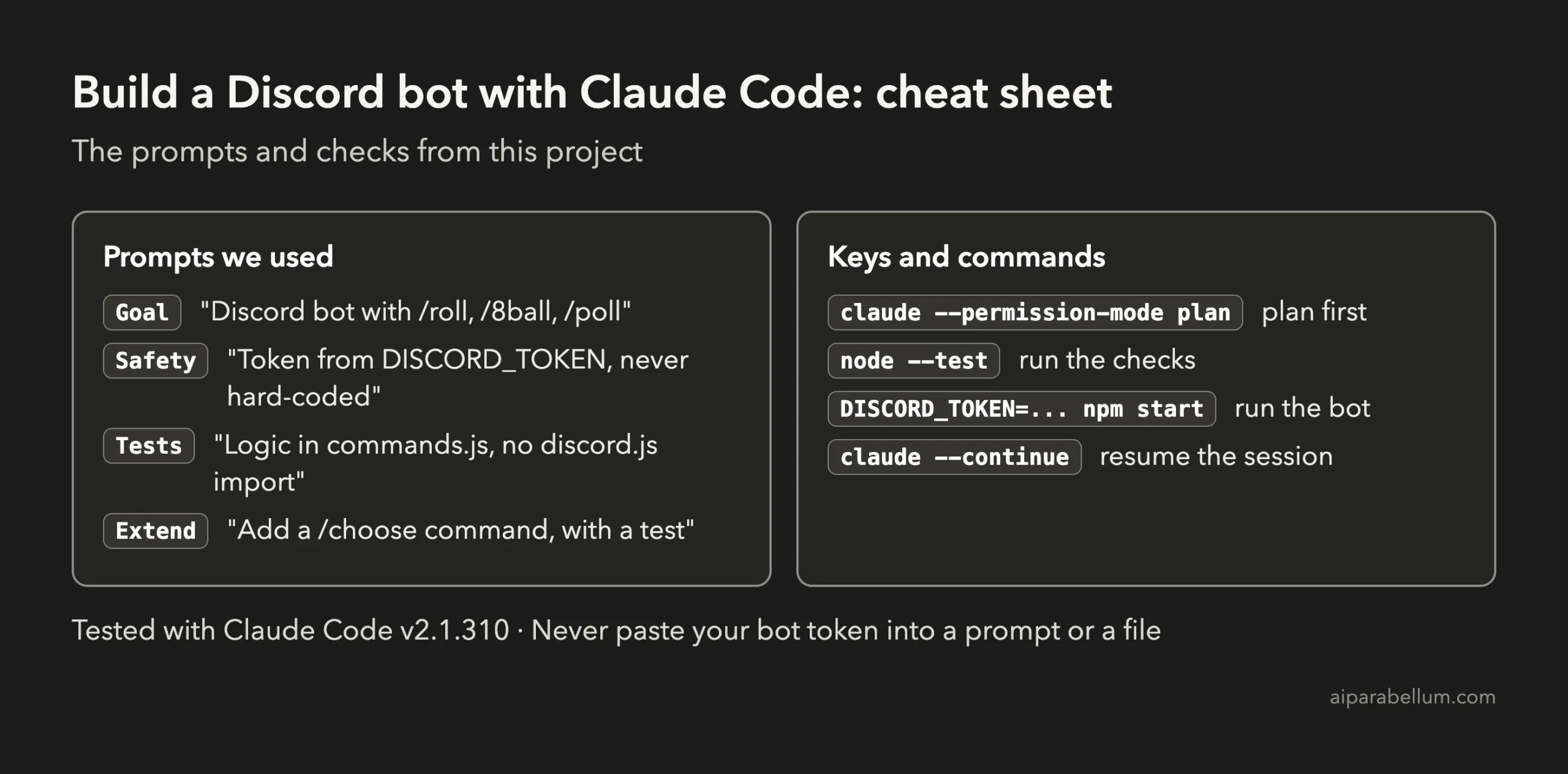
For the official reference, see Anthropic’s page on common workflows. To learn more about the assistant behind the tool, read our Claude AI overview.
Frequently Asked Questions
Can I build a Discord bot with Claude Code without a bot token?
Yes, you can write the bot and test its command logic without a token, as we did. You need your own token only to run the bot live on a server.
Do I need to know JavaScript?
No. You describe the commands in plain English and Claude writes the code. Reading the code it shows you is a good way to learn.
Why did the bot crash before checking the token?
The first version loaded discord.js on line 1, before the token check, and the package was not installed. Moving that line below the check fixed the message. After npm install, both orders work.
Is it safe to give Claude Code my bot token?
Do not. Keep the token in an environment variable on your own computer and never paste it into a prompt or a file. If it leaks, reset it in the Discord Developer Portal.
What does node –test do?
It runs the test files in your folder using the built-in Node.js test runner. It needs no extra packages.
Conclusion
You now know how to build a Discord bot with Claude Code: plan first, keep the command logic away from the Discord connection, read the token from the environment, and approve each file and command. Five short prompts gave us a bot with four slash commands, 9 passing tests and a clear error when the token is missing. Try the starter prompt, then run it with your own token on a test server, and come back for the next project in the series.
Previous in the series: Project 8: Build a WordPress Plugin With Claude Code
Next in the series: Project 10: Build a Personal Expense Tracker With Claude Code.