If you have written Claude Code custom slash commands and then heard that skills replaced them, you are probably wondering what to do with your old files. We built both in a throwaway project, ran them in real sessions and checked each claim against Anthropic’s documentation. The short answer: the two have been merged, your old files still work, and skills simply do more.
This is Part 5 of 45 in our Claude Code Deep Dives, part of our Claude Code tutorials. Before this, read Part 4.
Tested with Claude Code v2.1.318 on November 4, 2026. We tested on macOS in a demo folder, with project settings only, so nothing in our personal setup was used or changed.
Quick Answer: Commands and Skills Are Now the Same Thing
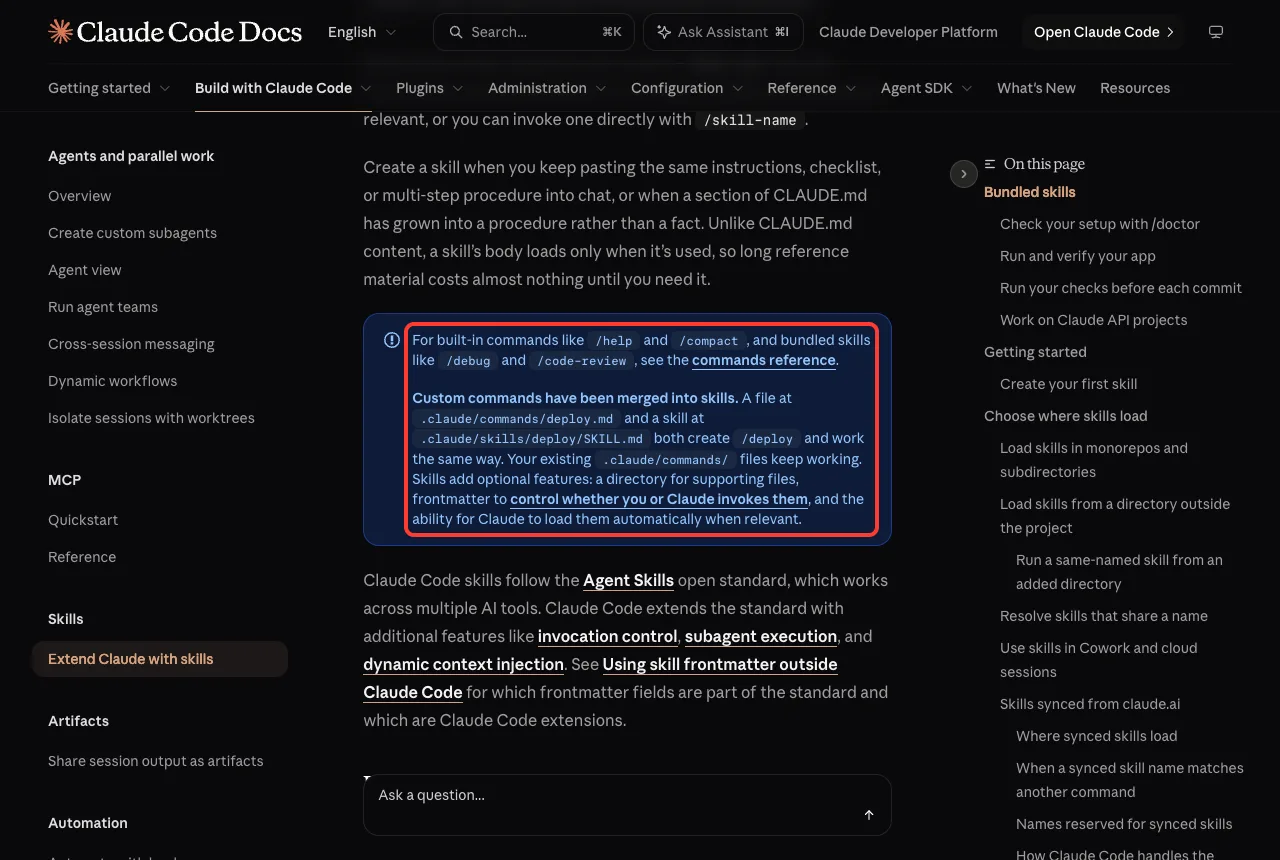
According to the official skills documentation, custom commands have been merged into skills. A file at .claude/commands/deploy.md and a skill at .claude/skills/deploy/SKILL.md both create /deploy and work the same way.
| Question | Command file | Skill |
|---|---|---|
| Where it lives | .claude/commands/name.md | .claude/skills/name/SKILL.md |
| Do you get a slash command? | Yes | Yes |
| Can it hold extra files? | No, it is one file | Yes, the folder can hold templates and scripts |
| Can Claude load it by itself? | Same frontmatter, minus name and paths | Yes, based on its description |
| Does it still work? | Yes, existing files keep working | Yes, and it is preferred for new work |
| Same name in both? | Loses | Wins |
A command file is a skill without a folder. If you ever need more than one file, you move it into a folder and nothing else changes.
What Custom Slash Commands Were
A custom slash command is a Markdown file you put in .claude/commands/. The file name becomes the command, and the text inside becomes the prompt Claude receives when you type it.
That made them a great way to stop pasting the same instructions into chat. You wrote a prompt once, then ran it with a few keystrokes.
You can keep the file in the project, so teammates get it too, or in your home folder for personal use. Our Claude guide explains the wider product these commands belong to.
What Skills Add to Custom Slash Commands
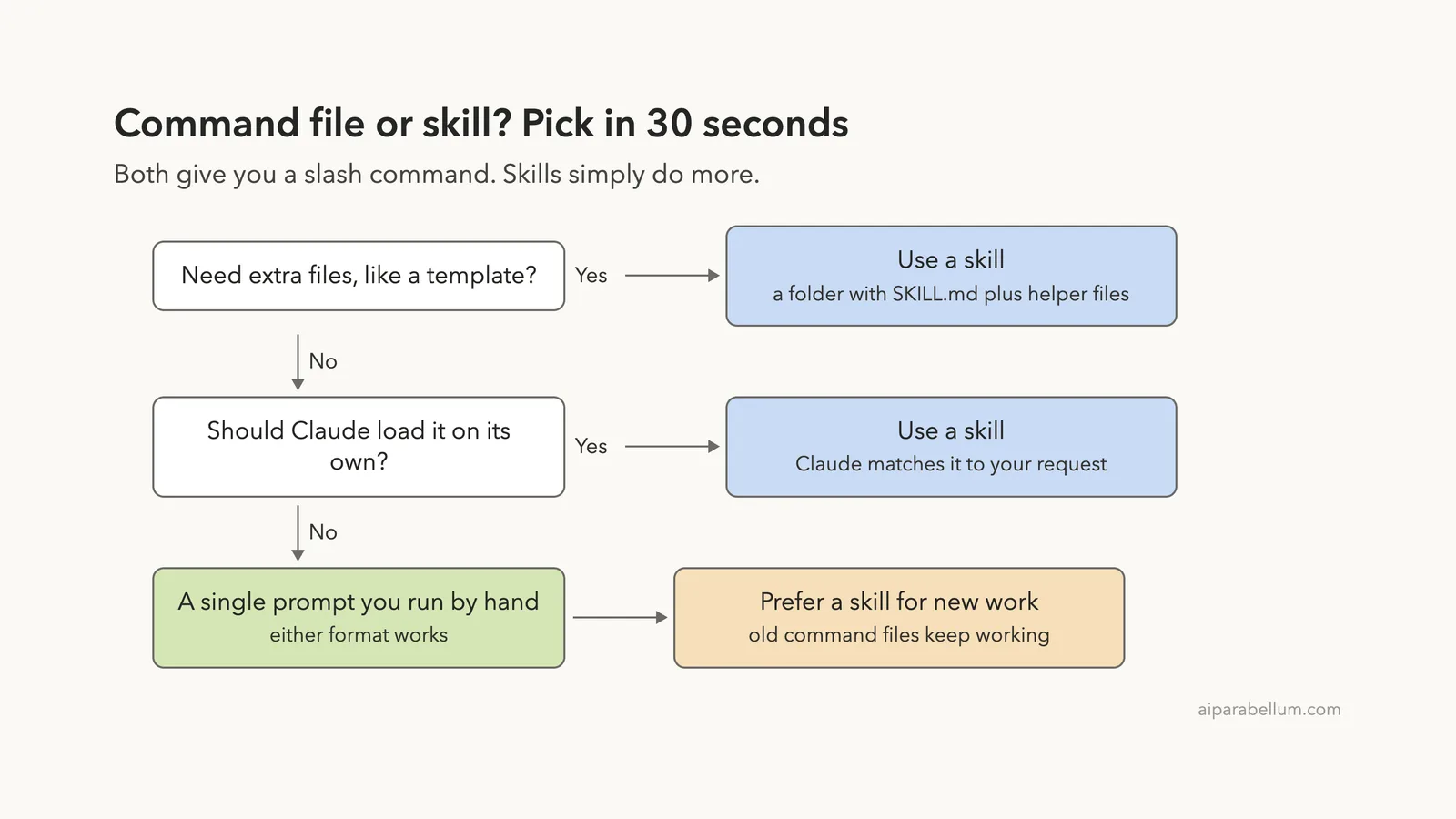
A skill is a folder that holds a SKILL.md file. The docs list three extras that command files do not have: a directory for supporting files, frontmatter to control whether you or Claude invokes the skill, and the ability for Claude to load it automatically when it is relevant.
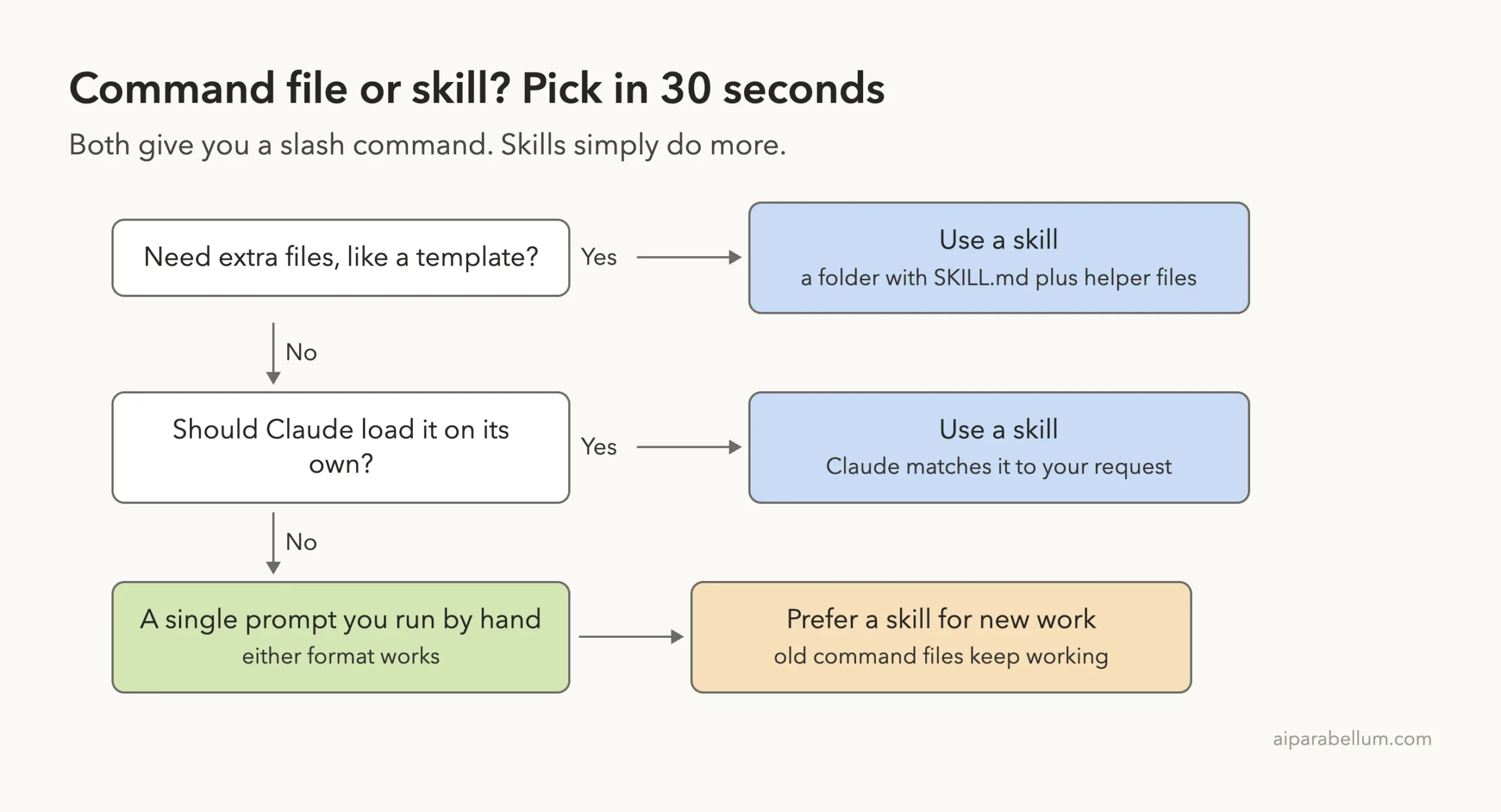
That is why the docs say to prefer a skill for new work. A command file is the older format and, in the docs’ words, it still works.
If you want the full list of fields, our guide to the SKILL.md format covers each one.
Our Demo Project
We made a tiny folder with an app.py, a three-line CHANGES.md and five extension files. The layout looked like this:
slash-vs-skills/
├── app.py
├── CHANGES.md
└── .claude/
    ├── commands/
    │   ├── standup.md
    │   ├── ship-check.md
    │   └── frontend/component.md
    └── skills/
        ├── release-note/
        │   ├── SKILL.md
        │   └── template.md
        └── ship-check/SKILL.md
We started Claude Code with claude --permission-mode default --setting-sources project. The second flag kept our personal settings out of the demo, so only the project files you see above were loaded.
Step 1: Run an Old-Style Command File
Our command file is short. It has a description, an argument hint and a prompt that uses $ARGUMENTS, which stands for whatever you type after the command name.
---
description: Write a three-line standup from CHANGES.md
argument-hint: [name]
---

Read CHANGES.md and write a three-line standup update for $ARGUMENTS: Yesterday, Today, Blockers.
Keep each line under 12 words.
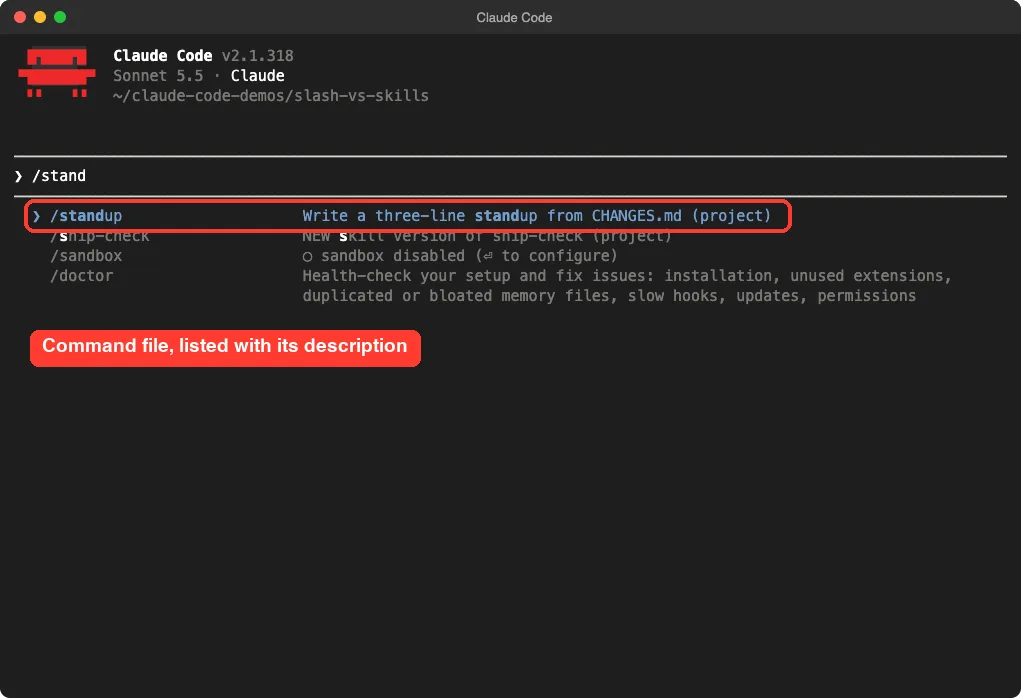
When we typed /stand, the menu listed /standup with the description from the file and a (project) tag.
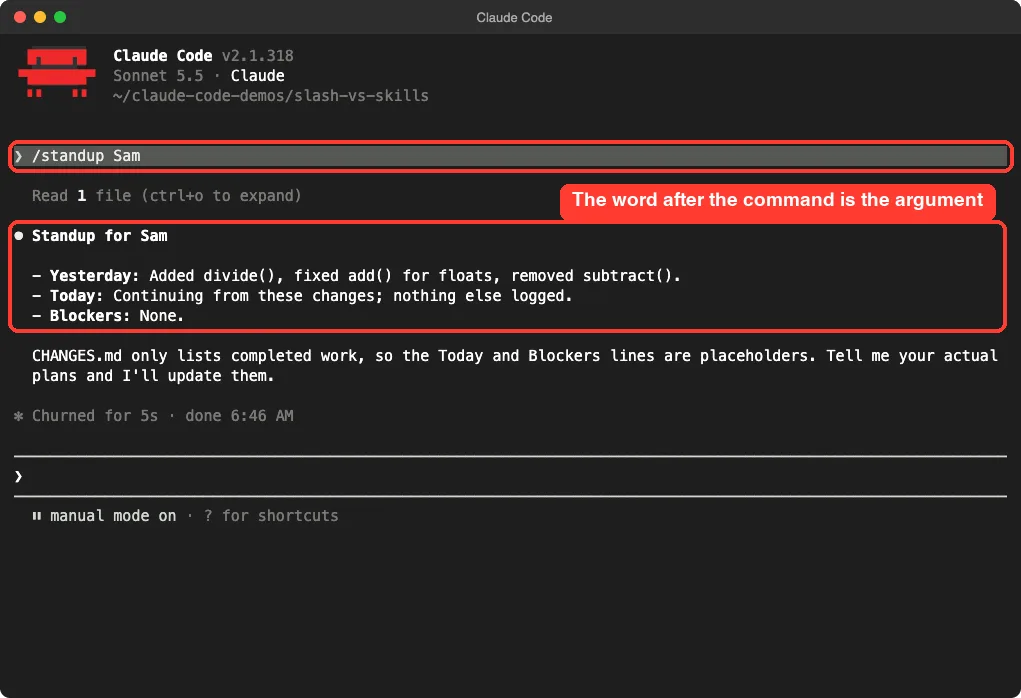
Then we ran /standup Sam. Claude read CHANGES.md and answered with a three-line update for Sam.
Nothing about this needed a skill. If a single prompt is all you need, the old format is fine.
Step 2: Run a Skill With a Supporting File
Our skill lives in .claude/skills/release-note/. Besides SKILL.md, the folder holds a template.md, which is something a one-file command cannot carry.
---
description: Turn CHANGES.md into a release note. Use when the user asks for a release note.
argument-hint: [version]
---

Read CHANGES.md and write a release note for version $ARGUMENTS.
Follow the layout in template.md in this skill folder (${CLAUDE_SKILL_DIR}/template.md).
The placeholder ${CLAUDE_SKILL_DIR} is documented as the directory that holds the skill’s SKILL.md file. It lets the skill point at its own files no matter where you started the session.
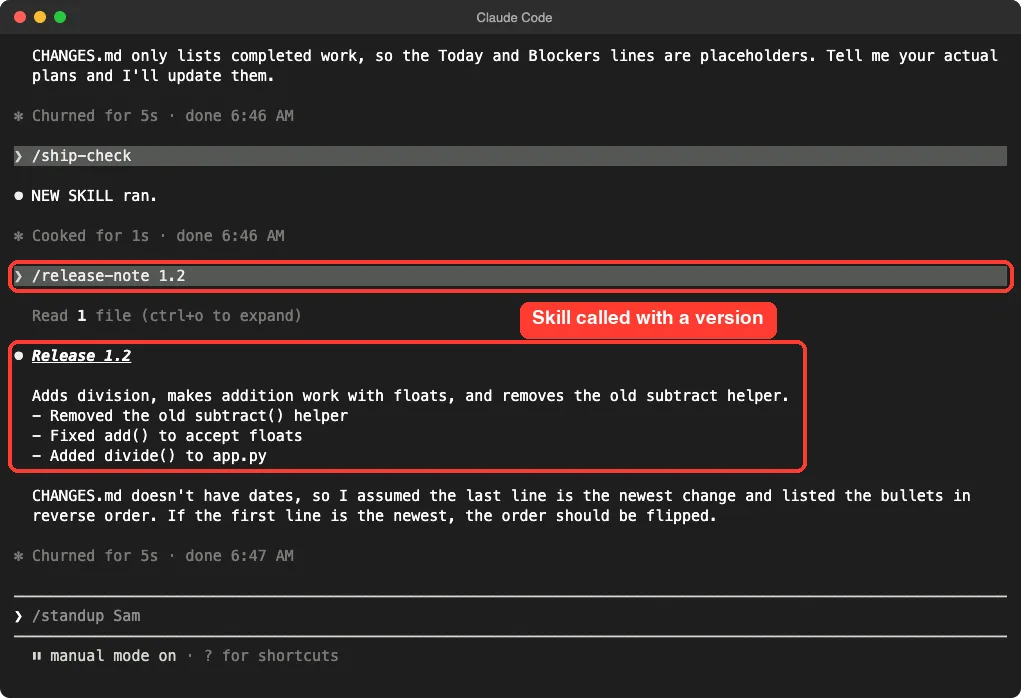
We ran /release-note 1.2 and got a short release note headed “Release 1.2”. We did not verify that Claude opened the template in this one run, so treat the template as available to the skill rather than proven to be used.
Step 3: What Happens When Both Share a Name
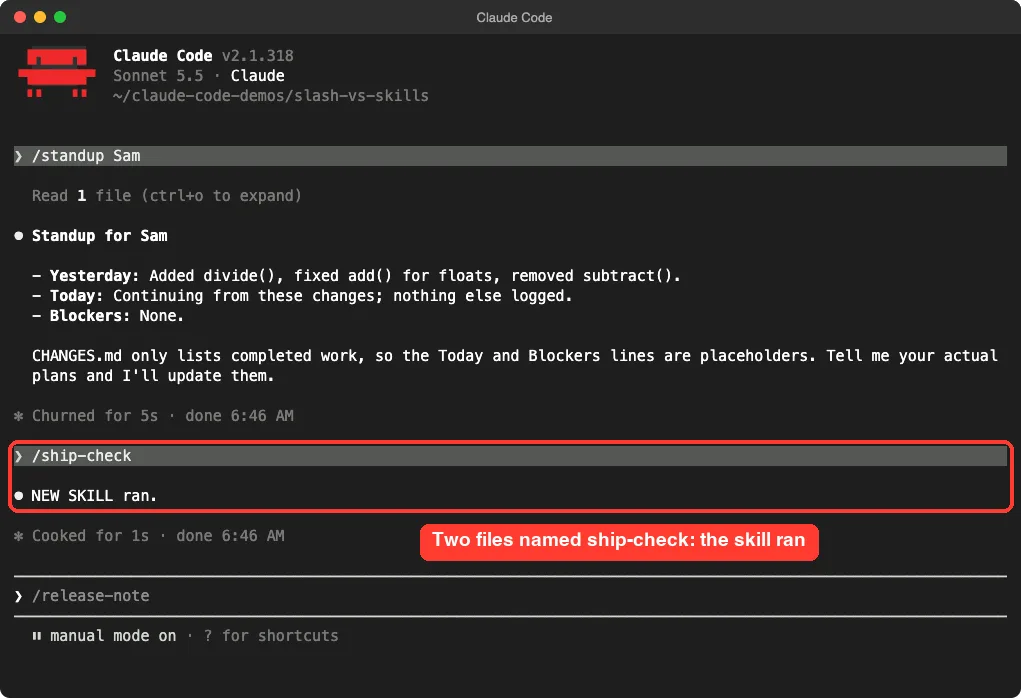
This is the question most people have after migrating. We created a command file and a skill that were both called ship-check. The command file replies “OLD COMMAND FILE ran.” and the skill replies “NEW SKILL ran.”
The slash menu listed both entries side by side, each with its own description. When we ran /ship-check, the skill answered.
That matches the docs, which have a table for resolving skills that share a name. For a skill and a file in .claude/commands/, the skill runs.
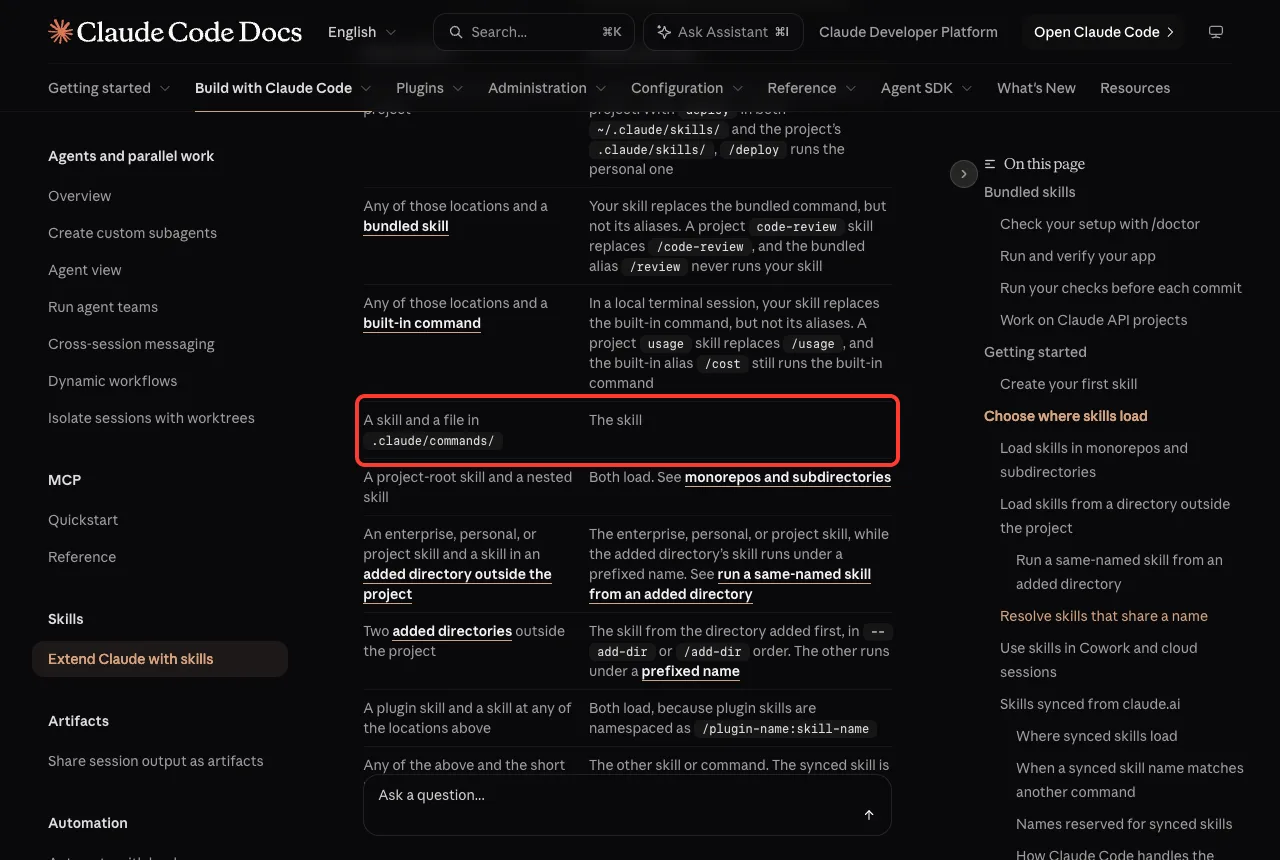
The same table covers other clashes. For example, a skill replaces a built-in command of the same name in a local terminal session, though not the built-in’s aliases, so a name like usage is worth avoiding.
Step 4: How Folders Turn Into Command Names
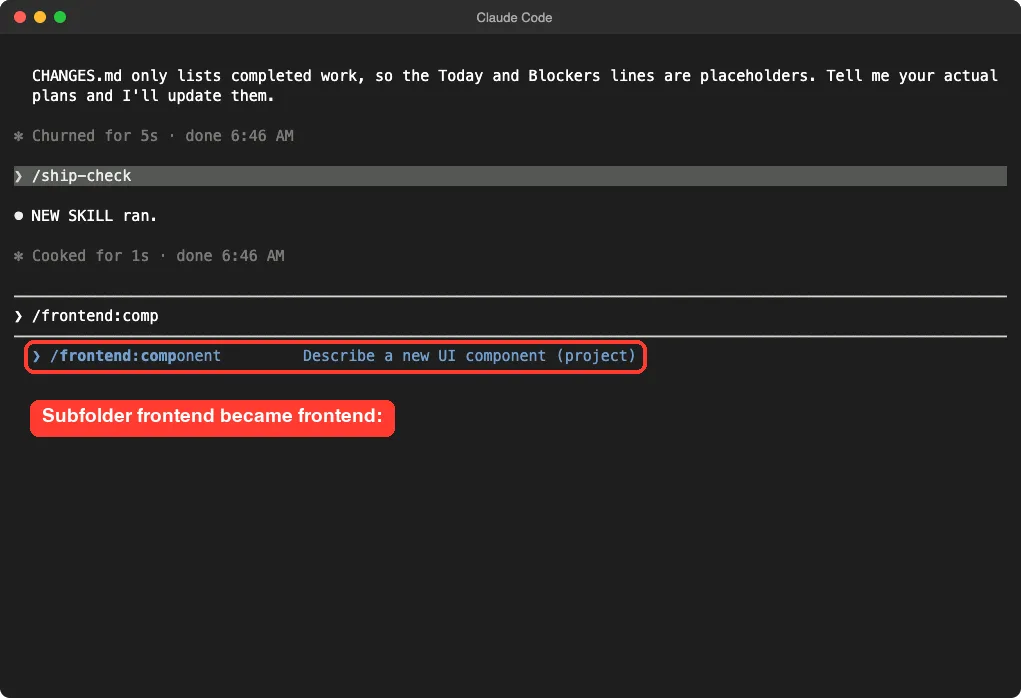
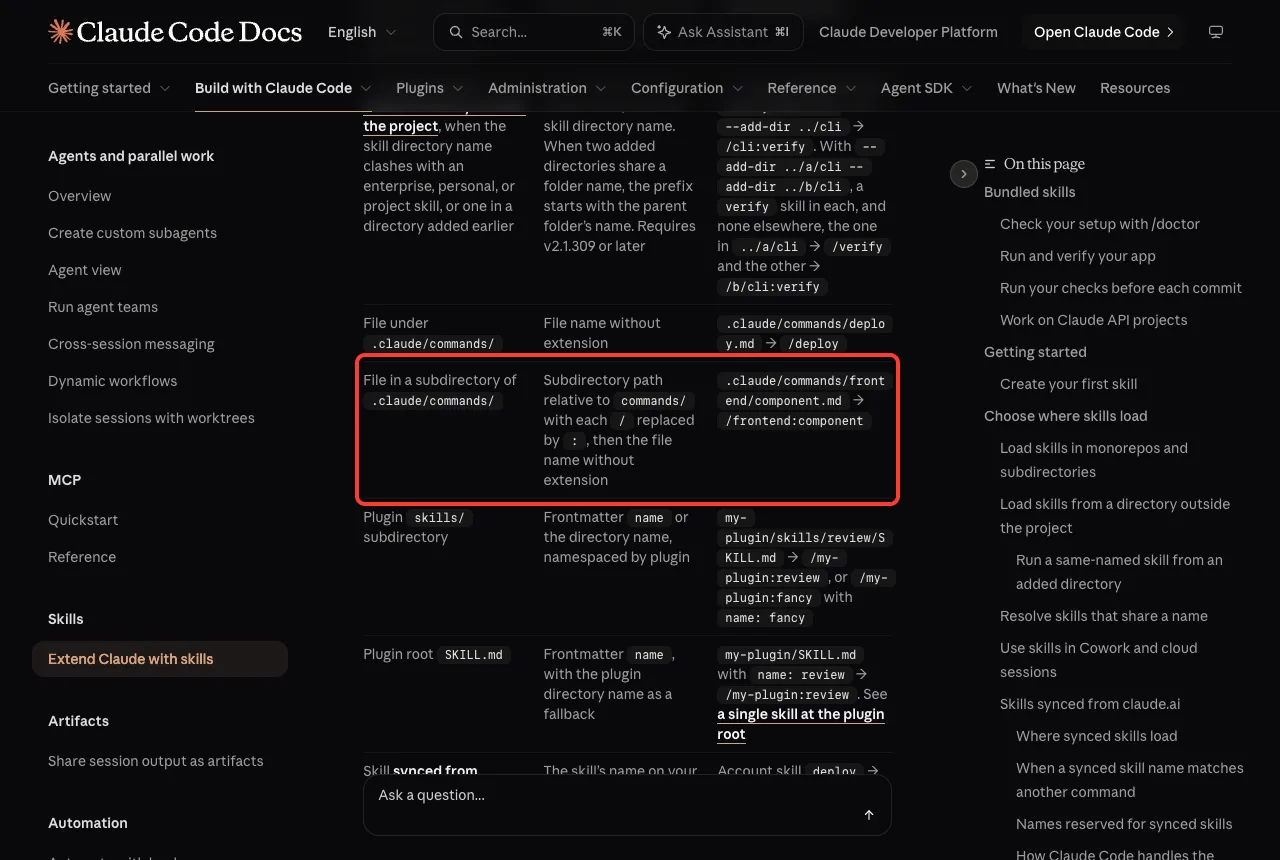
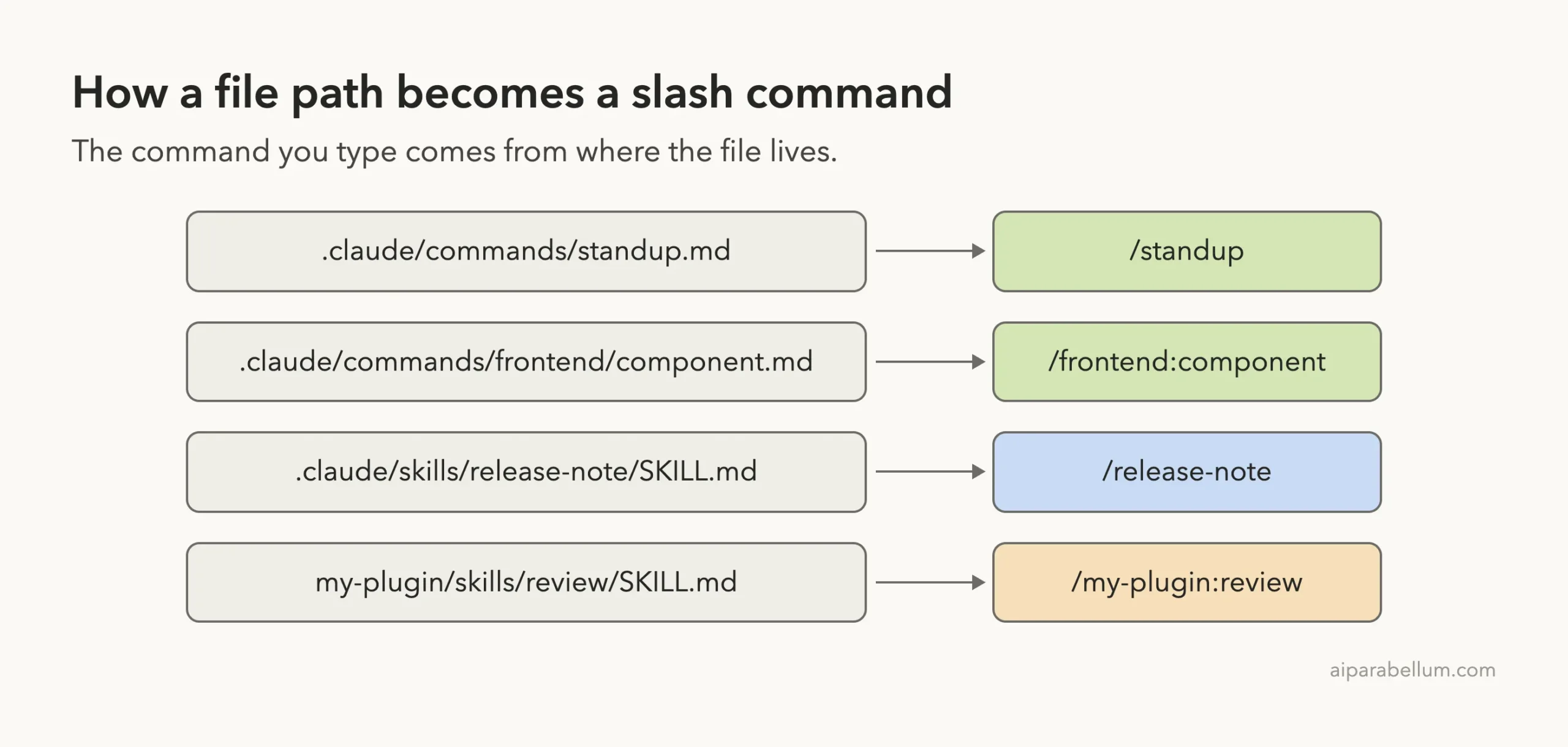
Command files can live in subfolders. The docs say a file in a subfolder gets the folder path with each slash replaced by a colon, so .claude/commands/frontend/component.md becomes /frontend:component.
We checked it in the menu, and the command appeared under exactly that name with its description.
Skills and plugin skills follow their own rules, which the docs sum up in one table.
Custom Slash Commands vs Skills: Which Should You Write?
For new work, write a skill. The docs recommend it, it costs you nothing extra, and it leaves room to grow.
Keep an old command file if it already does its job. You do not need to migrate it, because existing files keep working.
Control Who Can Run It
Two frontmatter fields decide who can start a skill. Per the docs, disable-model-invocation: true stops Claude from loading it on its own, which suits workflows with side effects like /commit or /deploy.
The other field, user-invocable: false, hides the skill from the menu so only Claude can use it. That is useful for background knowledge, not for actions.
Our ship-check skill used the first one, so Claude would never run it unprompted. Our skill troubleshooting guide shows what to do when the opposite problem shows up.
Bigger Skills Can Run in a Subagent
Skills accept context: fork to run in a forked subagent, with an agent field to choose the type. We did not test that here, because it belongs to a different comparison, which we cover in Part 4. Our subagents tutorial goes deeper on the helper side.
Moving an Old Command File Into a Skill
Migration is a small job, and you can do it one file at a time. Say you have .claude/commands/standup.md and want it to carry a template.
- Create the folder
.claude/skills/standup/. - Move the file inside and rename it
SKILL.md. The frontmatter can stay exactly as it was. - Add any helper files, such as a template, next to it.
- Restart Claude Code and type
/standupto confirm it still runs.
The command name stays the same because the folder name takes over from the file name. The docs add that the frontmatter name field can set a different command name, which command files cannot do.
One caution from our own test: do the move and delete the old file in the same sitting. If both remain, the skill wins, and you may forget the old file exists.
Try It Yourself
You can reproduce our demo in about ten minutes. Make a new folder, start Claude Code there and paste this prompt:
Create .claude/commands/hello.md that says hello to $ARGUMENTS in one sentence. Then create .claude/skills/hello/SKILL.md that says hello in French. Tell me which file you expect /hello to run.Restart the session, type /hello Sam and see which one answers. Based on our test, the skill should win. Then delete one of the two files so your setup stays tidy.
Common Mistakes
- Leaving two files with the same name, then wondering why the old one never runs.
- Putting
nameorpathsin a command file. The docs say command files accept the same fields except those two. - Forgetting to restart after renaming a file, since a rename does not always reload.
- Using characters such as
<or odd spaces in a name. Claude Code refuses those names, andclaude --debuglets you search the log for[names]. - Writing a command file for something that needs a template or script, when a skill folder would hold it.
Pro Tips
- Add a clear
argument-hintso the menu shows what to type after the command. - Put the key use case first in the description, because the docs say the listing text is cut off at 1,536 characters.
- Use
${CLAUDE_SKILL_DIR}instead of hard-coded paths for files inside a skill. - Keep one purpose per skill, so the description stays easy to match.
- Read our notes on skills that trigger before you ship one to a team.
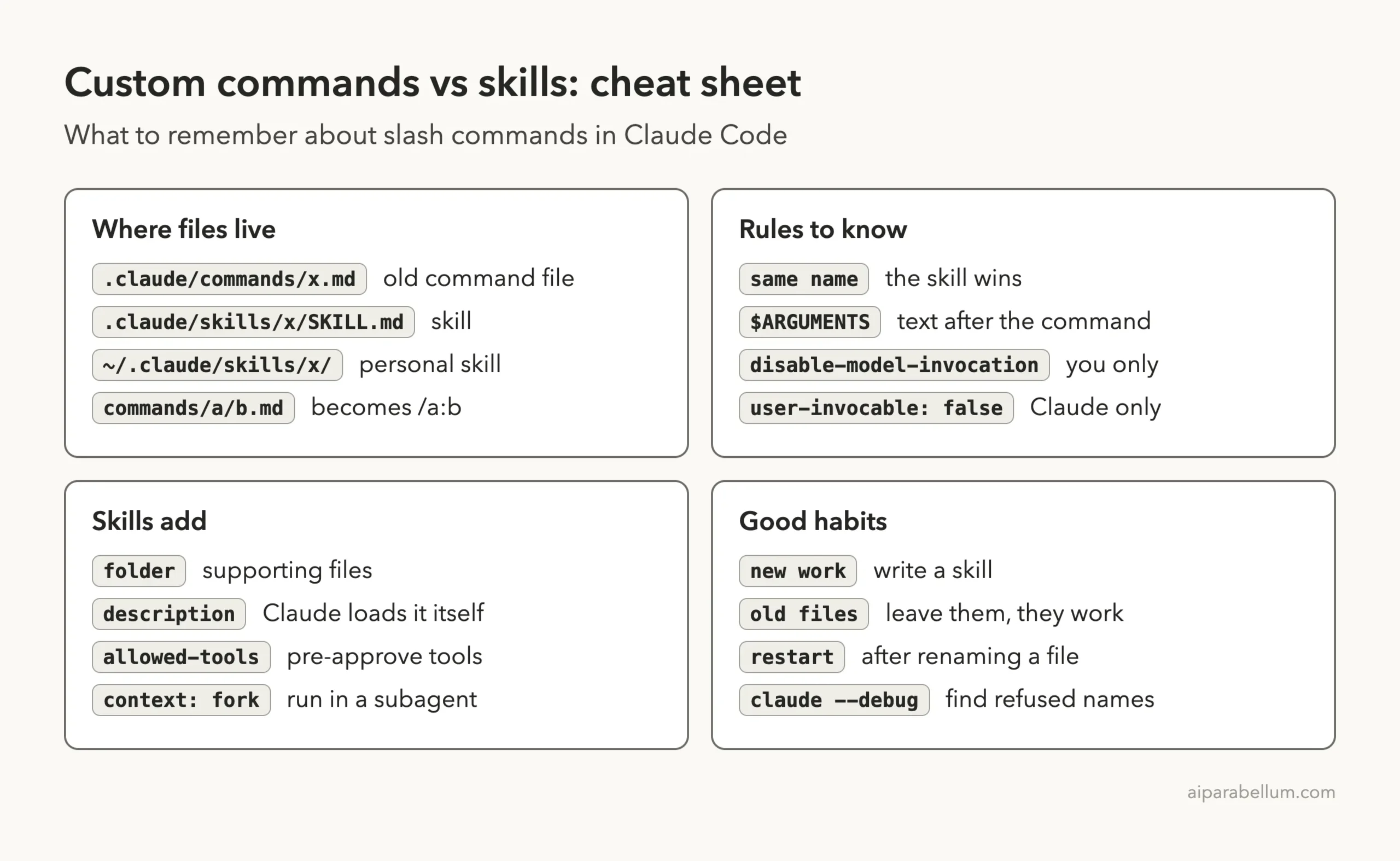
Cheat Sheet
Frequently Asked Questions
Are custom slash commands deprecated in Claude Code?
The docs do not use that word. They say custom commands have been merged into skills, that existing command files keep working, and that you should prefer a skill for new work.
Do I need to convert my old command files?
No. Our /standup command file ran fine in version 2.1.318. Convert one only when you want supporting files or control over who can invoke it.
How do I convert a command file into a skill?
Create a folder named after the command under .claude/skills/, move the file in as SKILL.md, and keep the frontmatter. Then delete the old file, so it does not shadow anything, and restart the session.
Which one wins if both have the same name?
The skill. We saw this in a real session, and the docs state the same rule.
Can a command file take arguments?
Yes. Our /standup file used $ARGUMENTS, and the word we typed after the command appeared in the answer.
Conclusion
Claude Code custom slash commands and skills are no longer two separate systems. A command file is the simple form, a skill is the same idea with a folder and more control, and when both share a name the skill runs. Keep your old files if they work, write skills for anything new, and use the skills guide when you are ready to go deeper.
Previous in the series: Part 4: Claude Code Skills vs Subagents vs Plugins: Which One to Use
Next in the series: Part 6: Claude Code Workflow vs Skill: When to Use Each.