If you search for a Claude Code Figma plugin, you will find a whole shelf of design and media add-ons in Anthropic’s official marketplace. Figma, Canva and Adobe sit next to Runway, Cloudinary, Superdesign, Postiz, Carbone and two from Spotify.
They sound alike, but they do very different jobs.
We loaded ten of them in one real Claude Code session and checked what each one adds. This guide shows what we ran, what needs an account, and which plugin fits which job.
This guide is part of our Claude Code tutorials. Find more add-ons in our Skills Directory.
Tested with Claude Code v2.1.319 on 2026-11-09 (macOS). We used the official marketplace at commit 0412be7, plus these plugin repos at the commits we cloned: Figma 19be8d5 (v2.2.174), Adobe for Creativity (v3.4.0), Canva 972e8ce (v1.0.0), Cloudinary 86be534 (v1.2.0), Superdesign f9f05cd (v0.6.0), Runway Dev (v4.0.1), Carbone c760886 (v2.1.0), Postiz 01ab1fe (v2.0.27), Save to Spotify d09b36f (v0.2.1) and Spotify Ads 65d6776 (v1.9.0).
What We Ran and What Came From the Docs
Almost every one of these plugins talks to an outside service, so it needs an account, a sign-in or a key. We never created accounts, signed in or entered a key. That makes this a roundup, not a full hands-on test of every feature.
We cloned each plugin into a throwaway sandbox and read its manifest, its MCP settings and its hooks before loading anything. Only the Spotify Ads plugin ships a hook, and it only fires on commands that call the Spotify Ads API (it refreshes expired sign-in tokens). Then we loaded all ten with --plugin-dir, so your own ~/.claude folder stays untouched.
| Plugin | Maker | What it does | Account needed | We ran it |
|---|---|---|---|---|
| Figma | Figma | Read designs, build designs, turn designs into code | Yes (Figma sign-in) | Loaded, 16 skills listed |
| Canva | Canva | Create, edit, resize and brand-check designs | Yes (Canva sign-in) | Loaded, skills listed |
| Adobe for Creativity | Adobe | Edit images, PDFs, video and design files | Yes (Adobe sign-in) | Loaded, 26 skills listed |
| Runway Dev | Runway | Guidance for the Runway video, image and audio API | Yes (Developer Portal) | Loaded, 7 skills in repo |
| Cloudinary | Cloudinary | Manage media, build transformation URLs | Yes for the servers; skill works without | Skill used for real |
| Superdesign | Superdesign | Design drafts on an infinite canvas | Yes (Superdesign) | Loaded, skill listed |
| Save to Spotify | Spotify | Make audio episodes and save them to Spotify | Yes (Spotify) | Loaded, skills listed |
| Spotify Ads API | Spotify | Manage ad campaigns and reports | Yes (OAuth app) | Loaded, skills listed |
| Postiz | Postiz | Schedule social posts on 28+ platforms | Yes (Postiz sign-in or key) | Loaded, skill listed |
| Carbone | Carbone | Generate PDF, Word and Excel files from templates | Yes for the server; skill works without | Skill used for real |
The install pattern is the same for all of them: /plugin install figma@claude-plugins-official, and the same with canva, adobe-for-creativity, runway-api, cloudinary, superdesign, save-to-spotify, spotify-ads-api, postiz and carbone-skill. We did not run these installs, because that would change a real setup.
Two Parts in Every Plugin: Skills and MCP
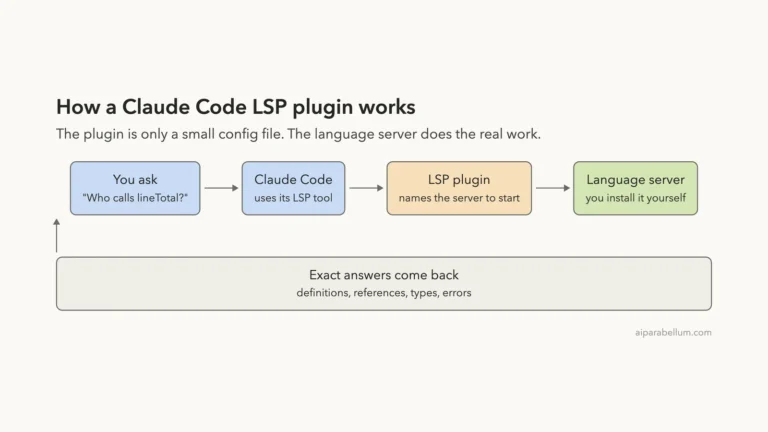
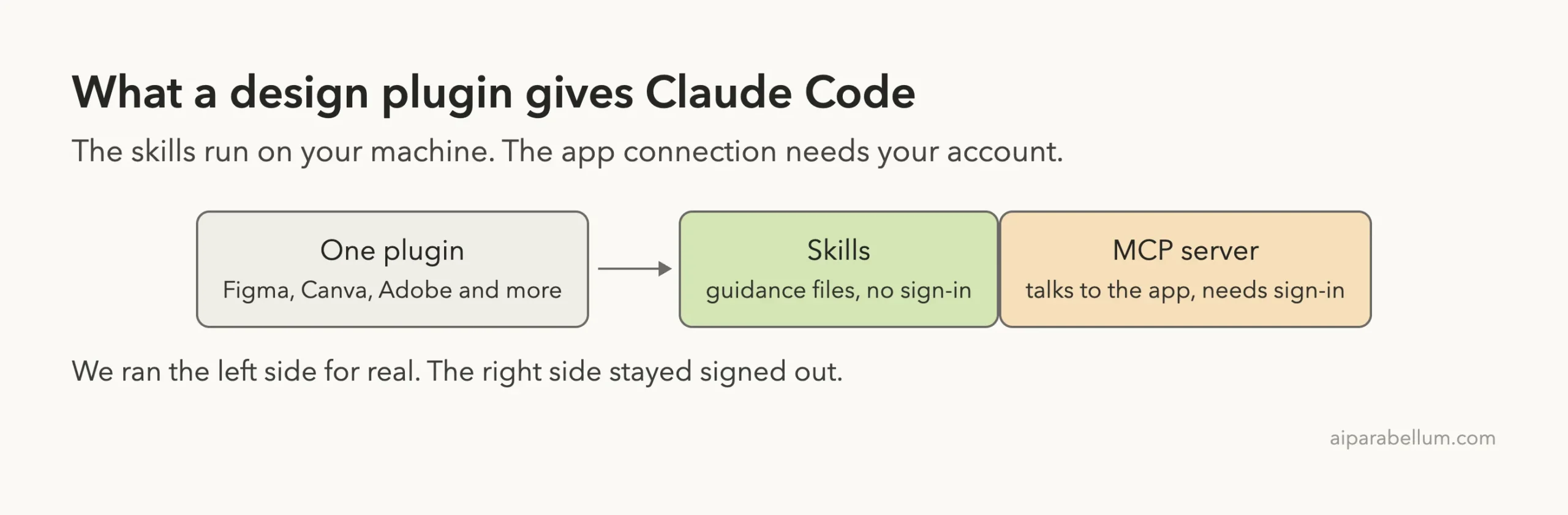
Most of these plugins are two things packed together. The first part is skills: plain instruction files that teach Claude how to do a job well. They live on your computer and need no sign-in.
The second part is an MCP server, which is how Claude reaches the actual app. That part needs your account. If MCP is new to you, read our MCP guide first.
This split explains what you will see after loading a plugin. The skills show up right away, and the servers wait for you to sign in.
Loading Ten Plugins Safely
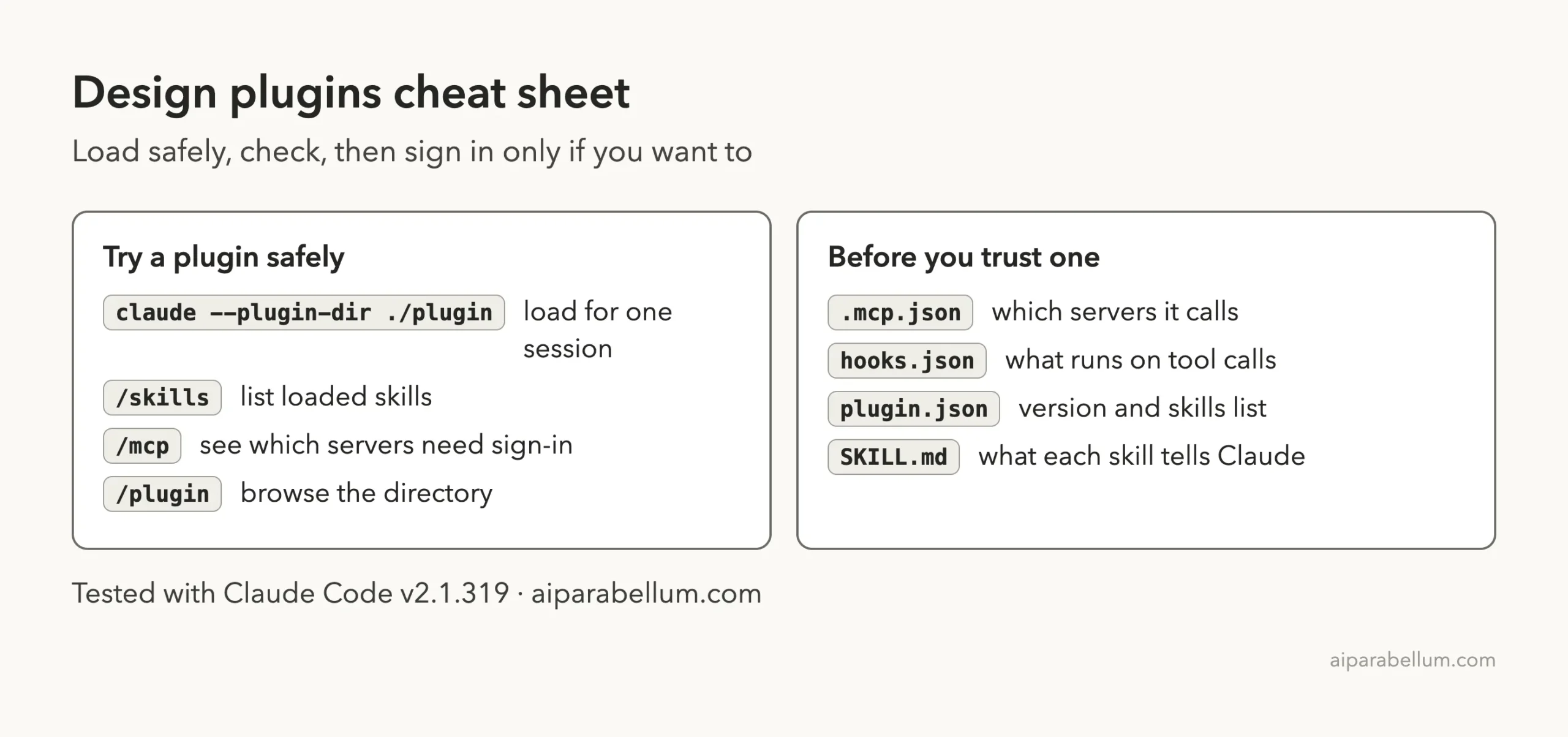
You do not have to install a plugin to look at it. The --plugin-dir flag loads a plugin folder for one session only, and you can repeat it for several plugins.
claude --plugin-dir ./figma --plugin-dir ./canva --plugin-dir ./cloudinaryOur test used that flag ten times, plus --setting-sources project, inside a demo folder. Inside the session, /plugin opens the directory where you can browse what is available. In our run it showed 3,698 entries across the directory and the official marketplace.
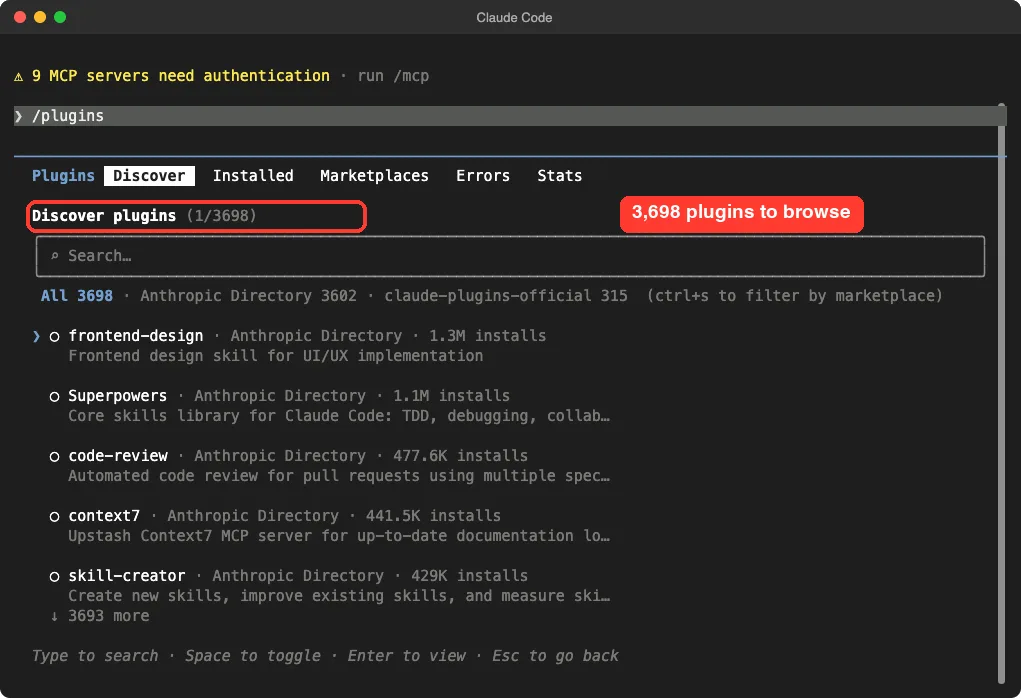
/plugin screen is where you browse and install.Then /skills showed everything our plugins added. The count came to 84 skills, each marked as locked by its plugin, with a rough token cost next to it.
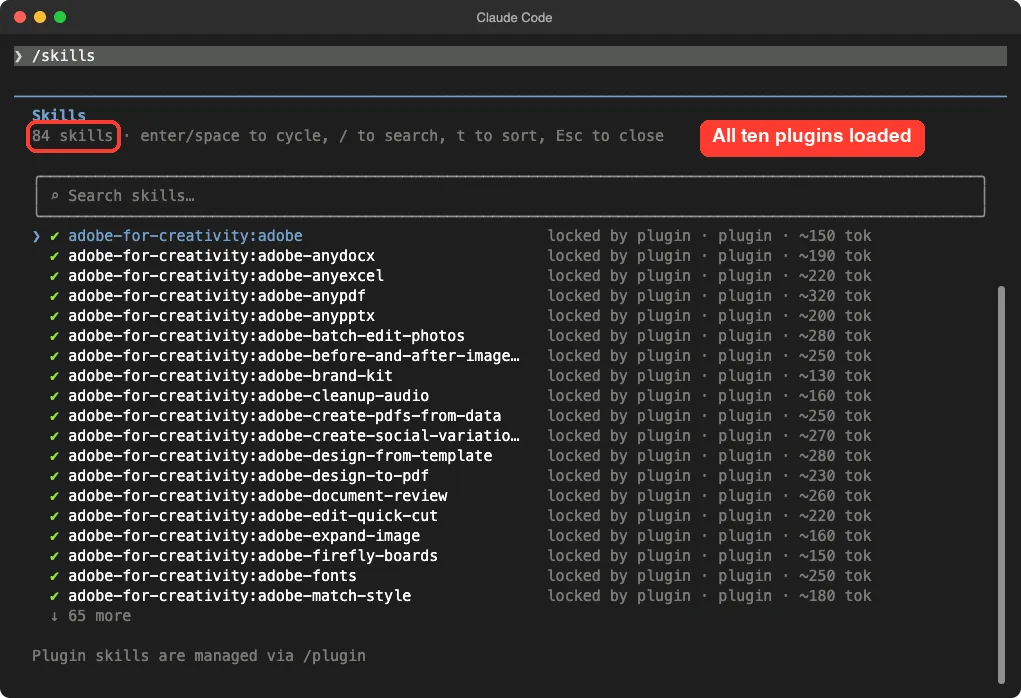
That token number matters. Per the plugins docs, the name and description of each skill sit in Claude’s context on every turn. So a big plugin has a small running cost even when you never use it.
Claude Code Figma Plugin: Designs Into Code
The Figma plugin is two things in one: a server that reads and writes designs, and 16 skills that tell Claude how.
The Figma plugin comes from Figma itself. Its manifest describes it as the Figma MCP server plus skills for common workflows, and it points at Figma’s hosted server at mcp.figma.com.
The skills are where it gets interesting. We counted 16 of them in the session, covering things like figma-design-to-code, figma-generate-design, figma-generate-diagram, figma-generate-library, figma-code-connect, figma-use-figjam and figma-use-slides.
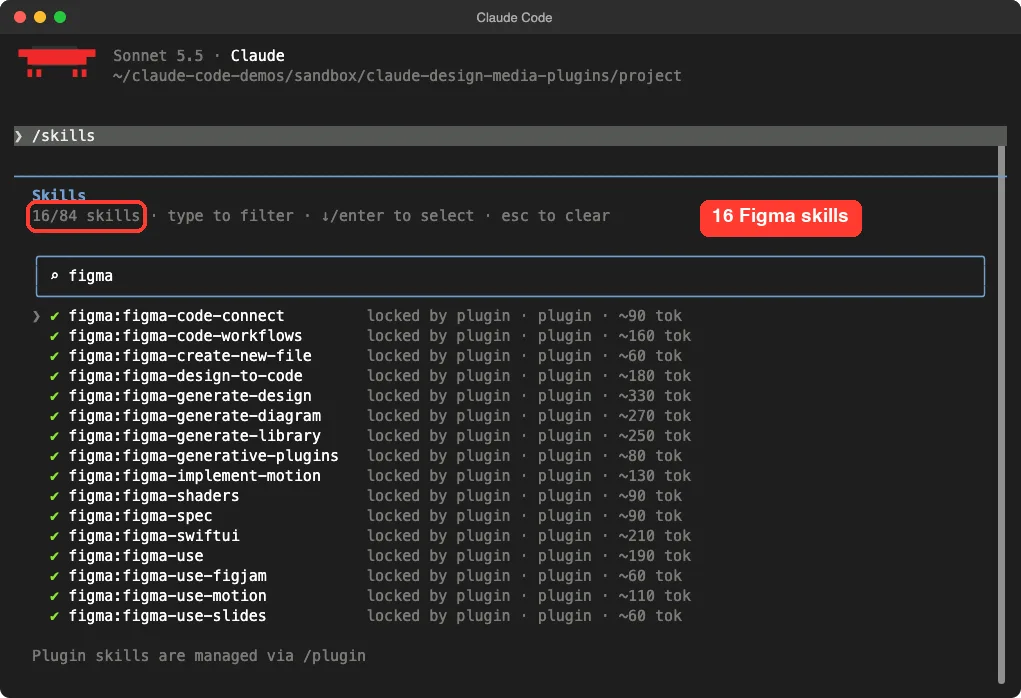
The server’s tool names, taken from the plugin’s own config, include reading design context, getting screenshots, reading variables, searching a design system, generating diagrams and creating new files. In plain words, Claude can read your design and also write one.
What we did not test: opening a real Figma file. That needs a Figma sign-in, and we did not create one. The first design-to-code run is the one we would try with a small test file.
Canva Plugin: Edit, Resize and Brand-Check
The Canva plugin points at Canva’s hosted server at mcp.canva.com. Its manifest lists six active skills: edit-design, resize-for-social-media, bulk-create, brand-check, get-design-feedback and implement-feedback.
Those names tell you the plan. This plugin is about reviewing and reshaping designs you already have, more than starting from a blank page. Resizing one design for several social networks is the kind of boring job it is built for.
The repo also holds a few extra skills in an inactive-skills folder, such as a deck generator. The manifest does not turn them on, so they did not load in our session.
What we did not test: any Canva design. Again, that needs a sign-in.
Adobe for Creativity: The Biggest Skill Set
Adobe’s plugin is the largest of the group. Its manifest describes tools for images, vectors, design and video, and it connects to an Adobe server at adobe-creativity.adobe.io.
In the session it added 26 skills. They range from adobe-retouch-portraits and adobe-expand-image to adobe-batch-edit-photos, adobe-brand-kit, adobe-fonts, adobe-edit-quick-cut, adobe-cleanup-audio and several for PDFs and Office files such as adobe-anypdf, adobe-anyexcel and adobe-anypptx.
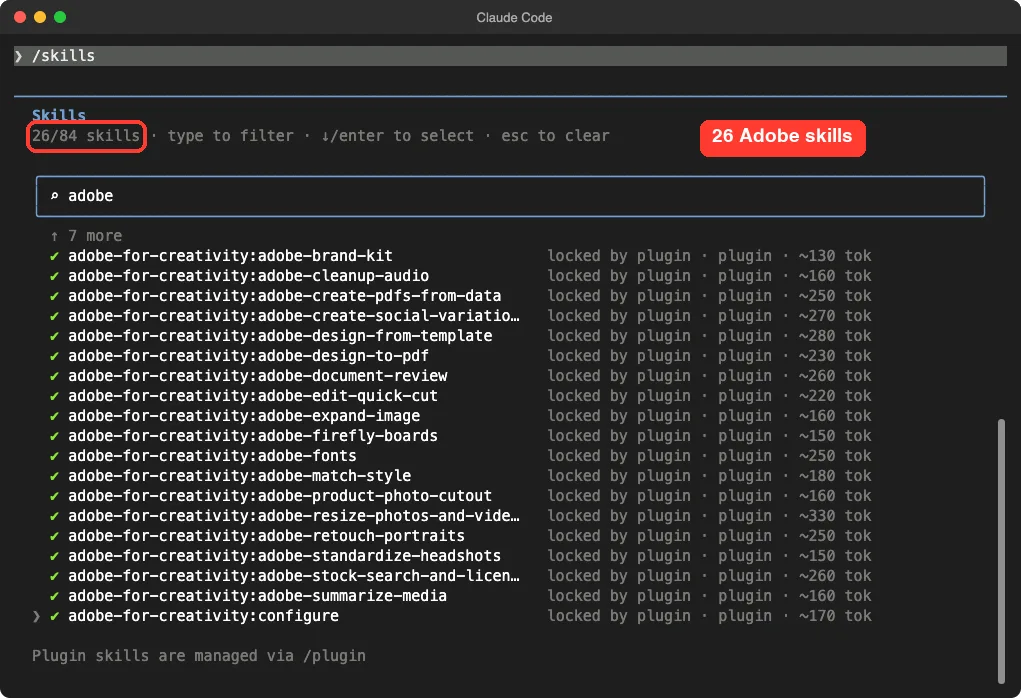
The skill list is wide, so the tokens add up too. Each Adobe skill carried an estimate between about 130 and 330 tokens in our list. If you only need two of them, a smaller plugin may suit you better.
Runway, Superdesign and Cloudinary
Runway Dev
Runway’s plugin is for developers. Its manifest says it gives guidance for adding video, image and audio generation to your own app with the Runway API and official SDKs. It also connects to a Runway Dev account to inspect models and task errors.
It ships seven skills, including a setup skill that walks you through signing in to the Developer Portal. We saw the setup and main skills in the list, and the server asked for authentication.
Superdesign
Superdesign is about drafts on an infinite canvas. Its skill says it can analyze your codebase for design context, generate and iterate design drafts, and make visual assets with image and video generation.
It runs through a command-line tool, so Claude needs shell access for it. We loaded the skill but did not sign in or create any drafts.
Cloudinary
Cloudinary gives you three skills and five MCP servers (asset management, environment config, structured metadata, analysis and Mediaflows). The servers need an account, and the Mediaflows one expects your cloud name, key and secret, so it showed an error in our list.
The skill called cloudinary-transformations is different: it is a rulebook, so it works without any account. We tested exactly that.
Our Real Test: The Cloudinary Skill
We asked Claude to use the skill to write a delivery URL for a 400 pixel wide thumbnail with a face-aware crop, in text only, with no tools.
Using the cloudinary-transformations skill, write the Cloudinary delivery URL path for a 400px wide thumbnail with face-aware crop. Answer in text only.The answer came back in about five seconds with a working transformation path.
c_thumb,g_face,h_400,w_400/f_auto/q_autoClaude explained that a thumbnail crop needs a height as well as a width, so it used a 400 by 400 square. It also put f_auto/q_auto last, which is what the skill recommends for format and quality.
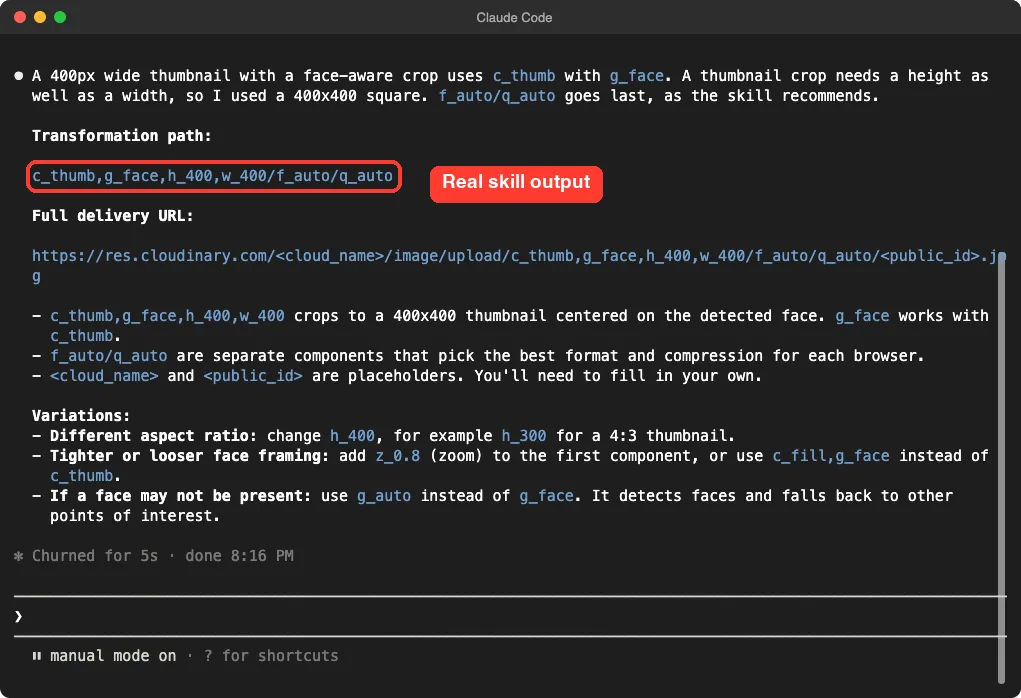
This is the honest value of the skills half. We did not check the URL against a live Cloudinary account, so we cannot say how the image looks. But the syntax matches what the skill says, and the placeholders for the cloud name and image ID were clearly marked.
Carbone: Documents From Templates
Carbone fills Word, Excel, PowerPoint and PDF files with your JSON data. The plugin carries a server at mcp.carbone.io and one big skill that teaches the template language.
We made a tiny invoice.json with a customer and two line items, then asked for the template tags for a Word invoice.
Using the carbone skill, show the template tags for a DOCX invoice that loops over d.items from invoice.json and prints each line total. Answer in text only.Claude returned a four-column table layout with tags like {d.items[i].name} and a line total of {d.items[i].qty:mul(.price):formatN(2)}. It added a second row with [i+1] to mark the end of the loop, and warned that Word’s smart quotes break tags.
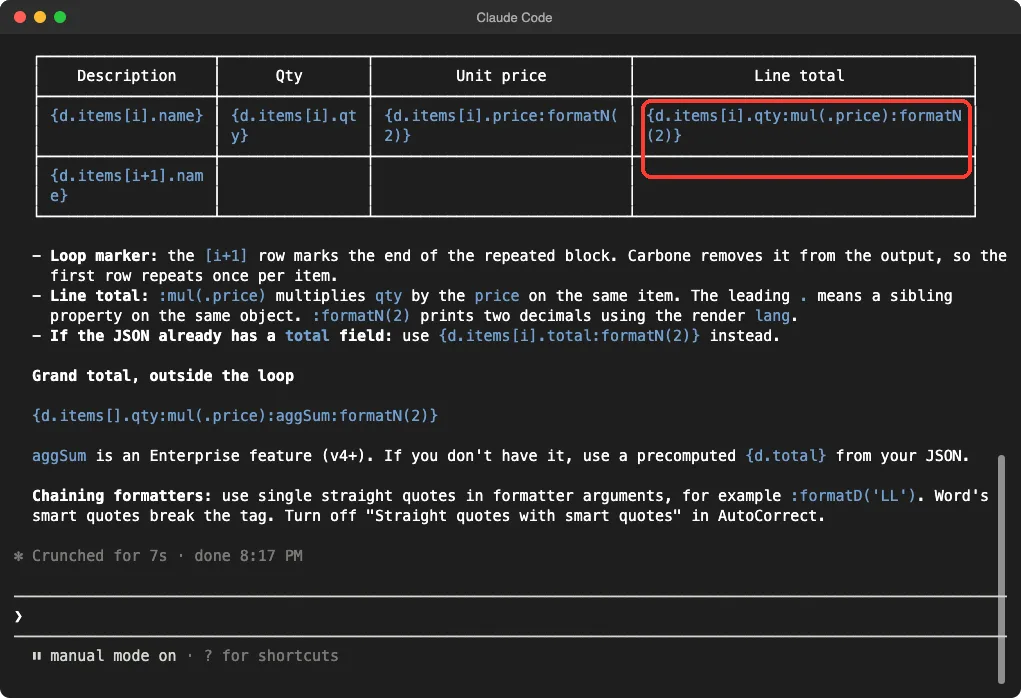
We did not render the document, because that uses the Carbone server. The same goes for the grand total tag Claude offered, which it said needs a feature of the paid engine. Treat that part as the skill’s claim, not ours.
If you work with files like this, our guide on whether read PDFs covers the reading side.
Spotify, Postiz and the Account-Only Plugins
Save to Spotify
This plugin makes audio episodes with text-to-speech narration, a timeline and cover images, then saves them to Spotify through a command-line tool. Its README says the tool is installed with a script from Spotify’s site.
We did not run that installer. We loaded the two skills (save-to-spotify and configure-chapter-skip) and stopped there.
Spotify Ads API
This one manages ad campaigns, audiences, assets and reports in plain language. It ships 20 skills and the hook we mentioned. The setup skill says it uses OAuth with PKCE and that the client ID belongs to your own team, so you need your own Spotify Ads app.
We read the hook script before loading it. It checks the command text, does nothing unless the command touches the Spotify Ads API, and otherwise refreshes tokens. We still did not sign in.
Postiz
Postiz schedules posts and tracks analytics across more than 28 platforms, per its manifest. The skill says you log in with postiz auth:login or set an API key.
We loaded the skill and did not log in, since posting is an outward action we avoid in tests.
The Sign-In Wall: What /mcp Showed
After loading, /mcp listed the plugin servers. Adobe, Canva, Carbone, Figma, Runway and four of the Cloudinary servers all said needs authentication. The Cloudinary Mediaflows one showed a red error because it expects keys.
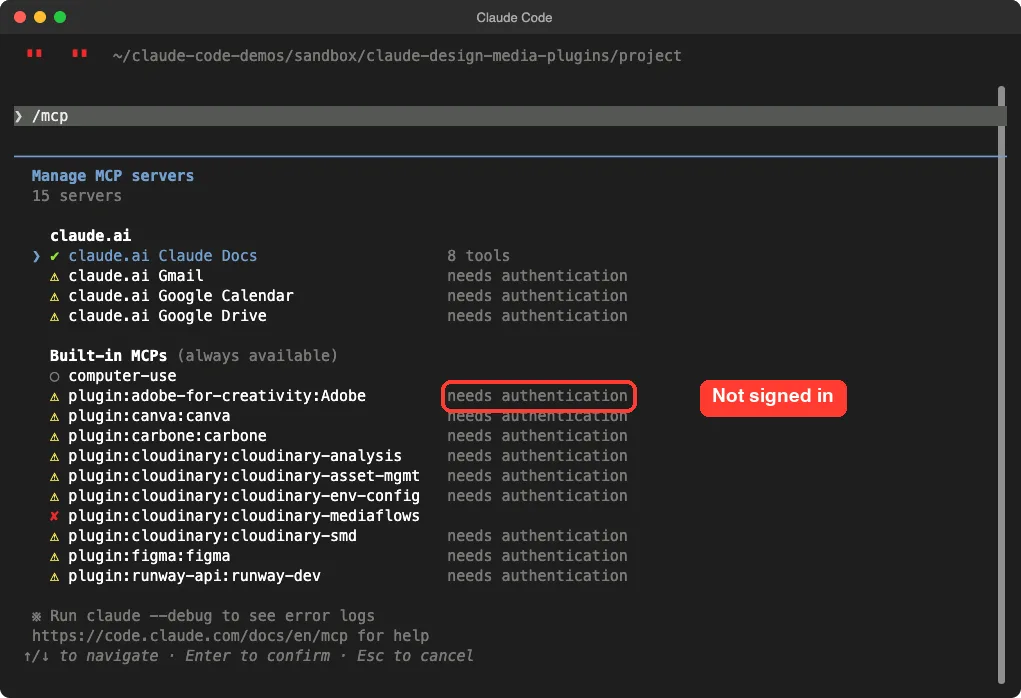
That is the safe default. A plugin cannot reach your Figma files or Canva account until you approve the sign-in yourself.
Claude Code Figma Plugin or Another One: Which to Try First?
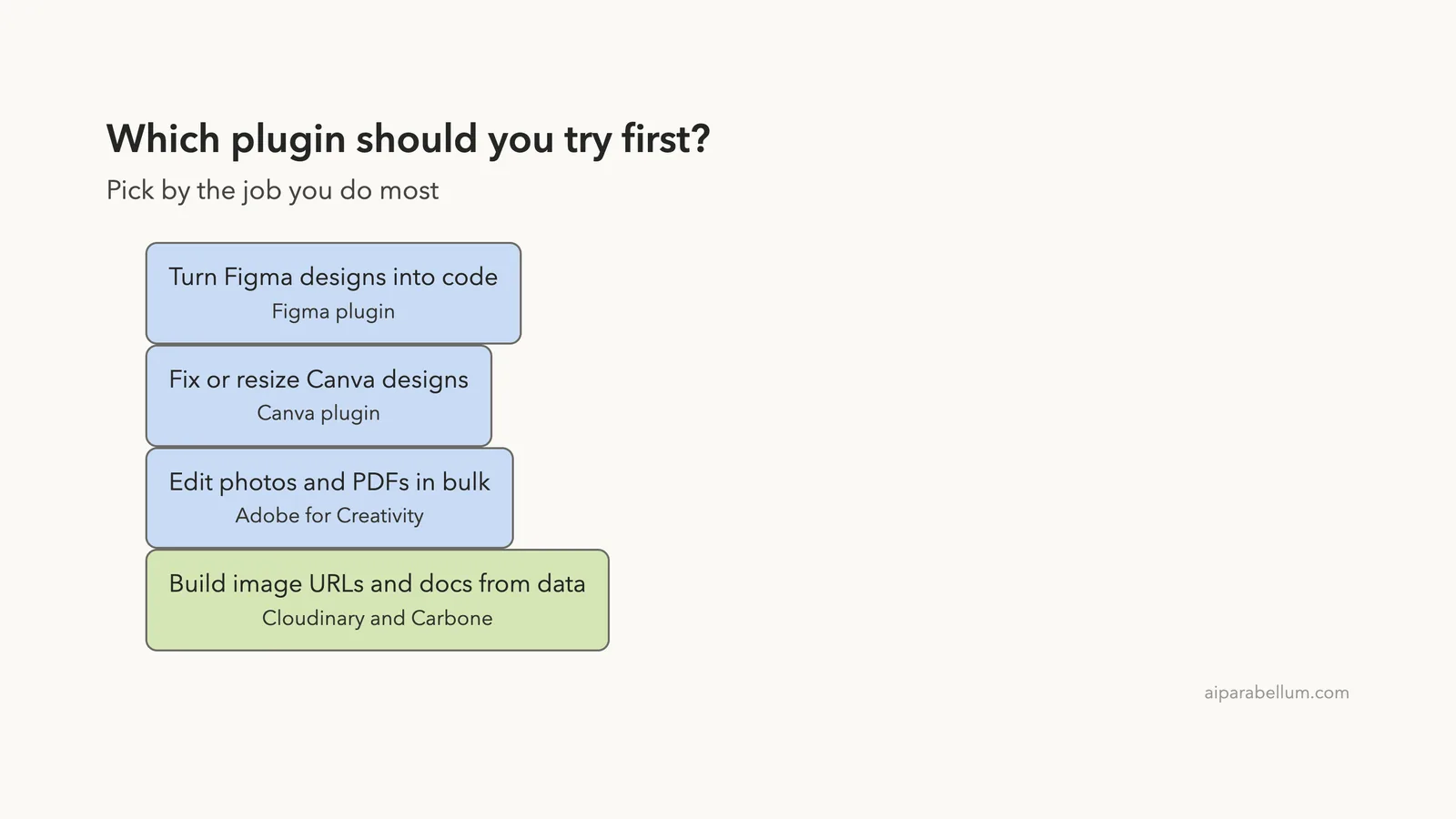
Pick by the job you do most, not by brand name.
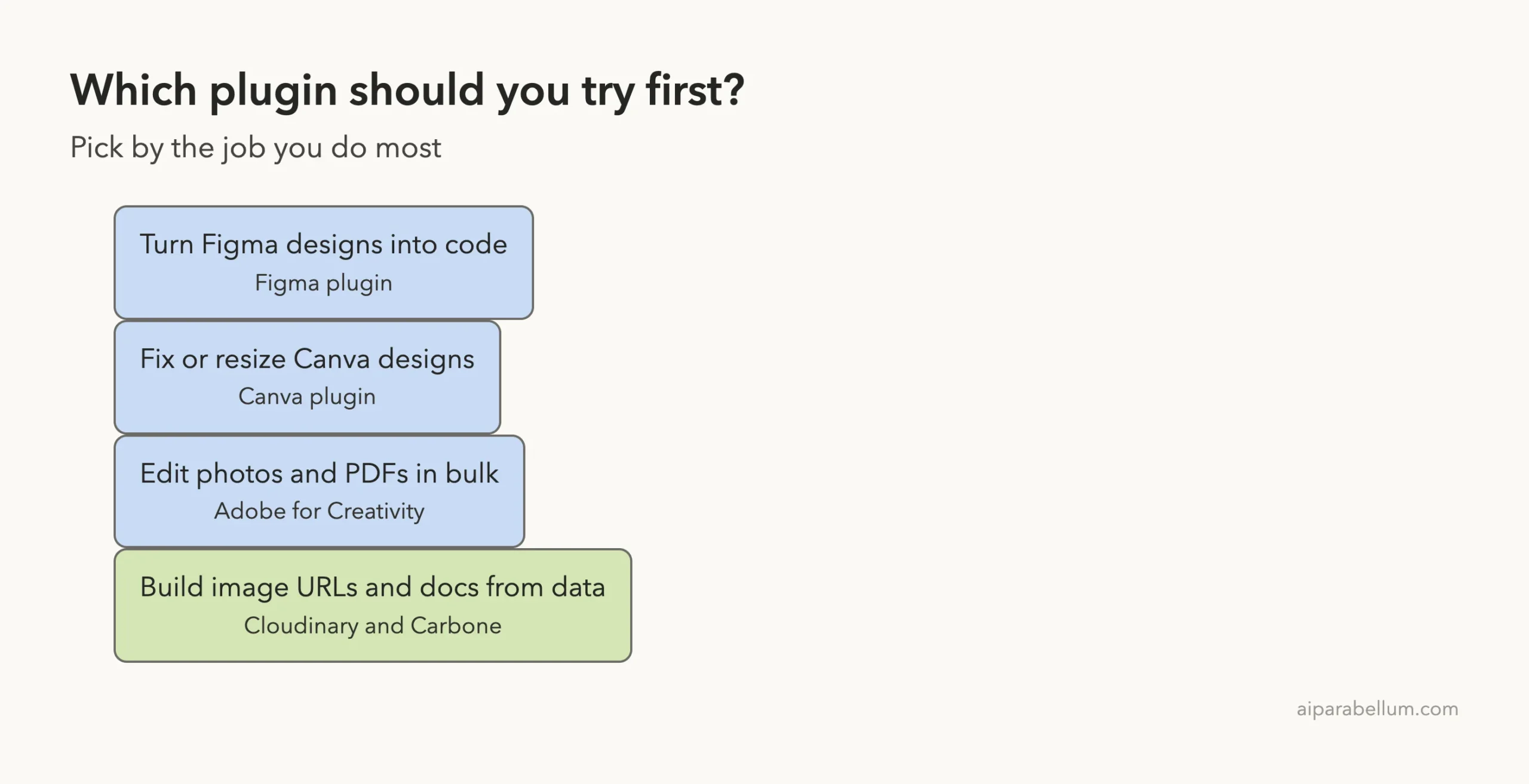
- You build front ends from designs: start with Figma.
- You reshape marketing designs: start with Canva.
- You edit photos, PDFs and video: start with Adobe for Creativity.
- You serve images from a website: use the Cloudinary skill, which helped us with no account.
- You make invoices and reports from data: use the Carbone skill.
- You build video features into an app: Runway Dev is aimed at you.
If you want a visual result without any of these, see our test of the demo video skill or our guide to a business landing page.
Check Before You Trust a Plugin
These four files told us everything we needed to know before loading anything.
.mcp.jsonshows which servers the plugin will call.hooks.jsonshows what runs automatically on tool calls.plugin.jsonshows the version and which skills load.SKILL.mdshows what each skill tells Claude to do.
Our plugins guide explains installing and managing them, and the discover plugins page covers the install steps and scopes.
Common Mistakes
- Installing all ten at once. Each skill adds a little context cost on every turn.
- Expecting a plugin to work right after install. The server half still needs a sign-in.
- Skipping the files. A hook or server address is easy to check in a minute.
- Sending private designs before you read the maker’s privacy page.
Pro Tips
- Try one plugin at a time with
--plugin-dirbefore you install it. - Run
/skillsto see the token cost of each skill. - Run
/mcpto see exactly what is waiting for a sign-in. - Use a small test file or test account for your first real run.
Try It Yourself
Here is a practice task that needs no account. Load the Cloudinary plugin from a cloned folder and ask for a URL.
claude --plugin-dir ./cloudinary-plugin

Using the cloudinary-transformations skill, write a URL path that makes a 600px wide banner, converts the format automatically and adds a blur effect.
Compare the answer with the skill’s own file so you learn how to read a skill.
Cheat Sheet
Frequently Asked Questions
Is there an official Claude Code Figma plugin?
Yes. The official marketplace lists a Figma plugin, and its repo is published by Figma. It bundles the Figma server and 16 skills in our session.
Do I need a paid account for these plugins?
The plugins themselves are free to load, but the apps behind them need their own accounts. Plans and prices differ by app, so check each maker’s page.
Can I use a skill without signing in?
Yes. Skills are local files. Our Cloudinary and Carbone tests worked with no sign-in.
Will loading a plugin with --plugin-dir change my setup?
No. The flag loads it for that session only. Installing with /plugin install does add it to your setup.
Which plugin is best for a beginner?
Try the Cloudinary or Carbone skill first, because they work without an account. Then pick the app plugin you already use. You can also ask our Claude AI page for background on the models behind these tools.
Conclusion
Claude Code’s design and media plugins come in two halves: skills that run on your machine, and servers that need your account. We loaded Figma, Canva, Adobe, Runway, Cloudinary, Superdesign, Postiz, Carbone and two Spotify plugins in one sandboxed session, saw 84 skills, and used the Cloudinary and Carbone skills for real. Everything that needed a sign-in stayed signed out, so live design edits are described from each plugin’s own files. Start with the skill that matches your daily job, check its files, and only then connect the account.