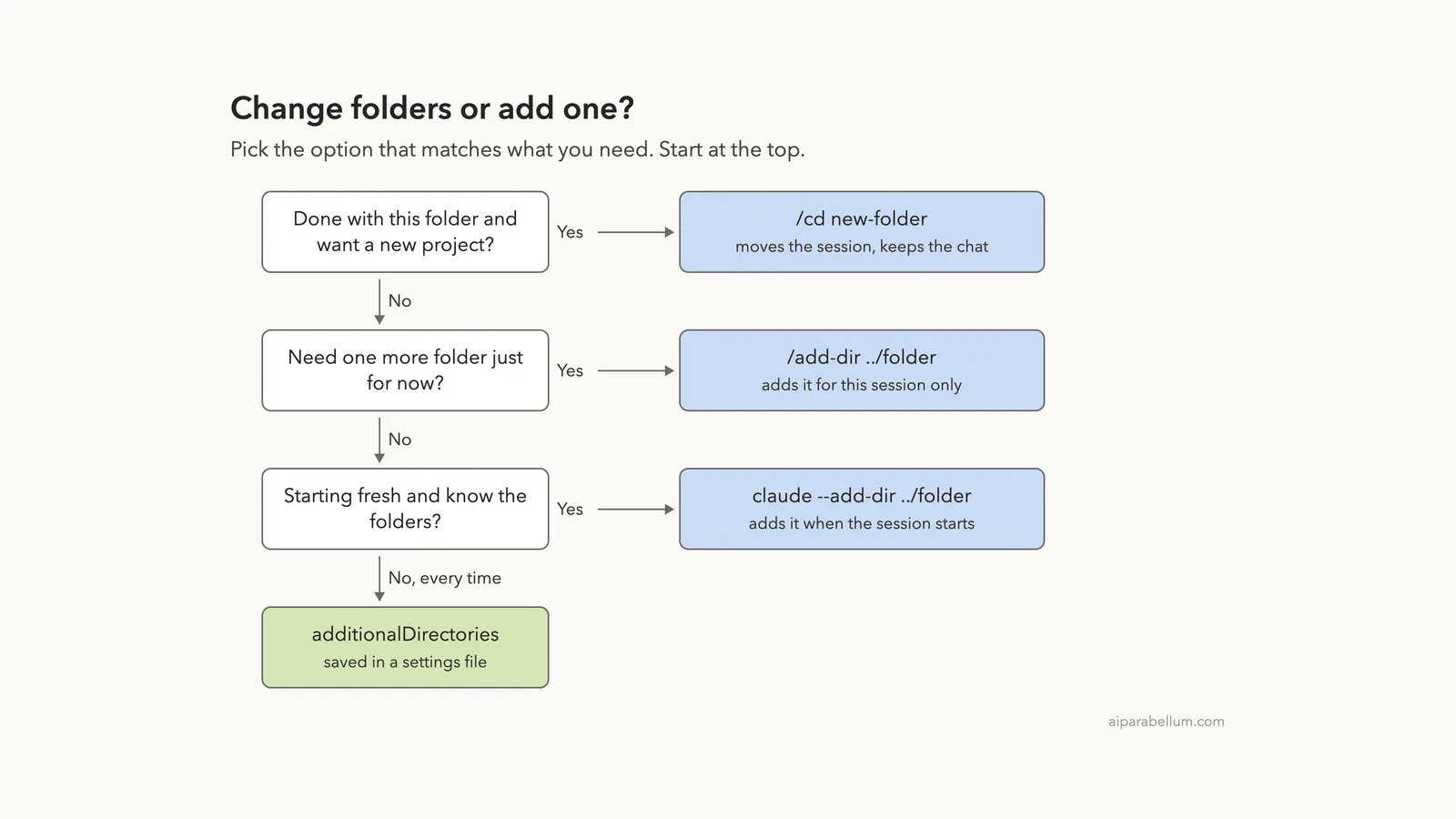
Need a Claude Code change working directory fix? You have two quick options inside a running session. Type /cd ../other-folder to move the whole session to a new folder while keeping your conversation, or type /add-dir ../other-folder to keep your current folder and give Claude access to a second one.
Outside a session, you can quit with /exit, cd into the folder you want, and run claude again. To add folders at launch, use claude --add-dir ../lib ../docs, and to make an extra folder stick for every session, list it under permissions.additionalDirectories in a settings file.
Below we try every method in a small demo project, show the real prompts you’ll see, and explain what each option loads and what it leaves out.
Browse all our Claude Code tutorials for more fixes and how-tos.
Tested with Claude Code v2.1.332 on macOS on November 26, 2026. Every test ran in throwaway demo folders. We tested on macOS; the Windows and Linux notes follow Anthropic’s official documentation.
Quick Summary
| What you want | What to use | How long it lasts |
|---|---|---|
| Switch the session to a different project | /cd <path> | Until you move again; the chat comes with you |
| Start over in another folder | /exit, then cd <path> and claude | A brand new session |
| Work on two folders at once, right now | /add-dir <path> | This session only |
| Open Claude Code with extra folders from the start | claude --add-dir <path> <path> | This session only |
| Always include an extra folder | permissions.additionalDirectories in settings | Every session that reads that settings file |
What Is the Claude Code Working Directory?
The working directory is the folder you were in when you typed claude. Anthropic’s docs call it the session’s primary working directory. Claude can read files there without asking, and edits follow your current permission mode.
It also decides which project setup loads. Claude Code reads that folder’s CLAUDE.md, its .claude/settings.json, its hooks and its .mcp.json servers. Your session history is filed under that folder’s path too, which is why claude -c picks up the latest chat for the folder you’re standing in.
Anything outside that folder is off limits by default. Claude can still try to read a file there, but you’ll get a permission prompt first, as our demo shows below.
The symptom: a prompt every time Claude looks next door
Our demo project has three sibling folders: web-app, shared-styles and api-server. We started Claude Code in web-app and asked it to read ../shared-styles/theme.css.
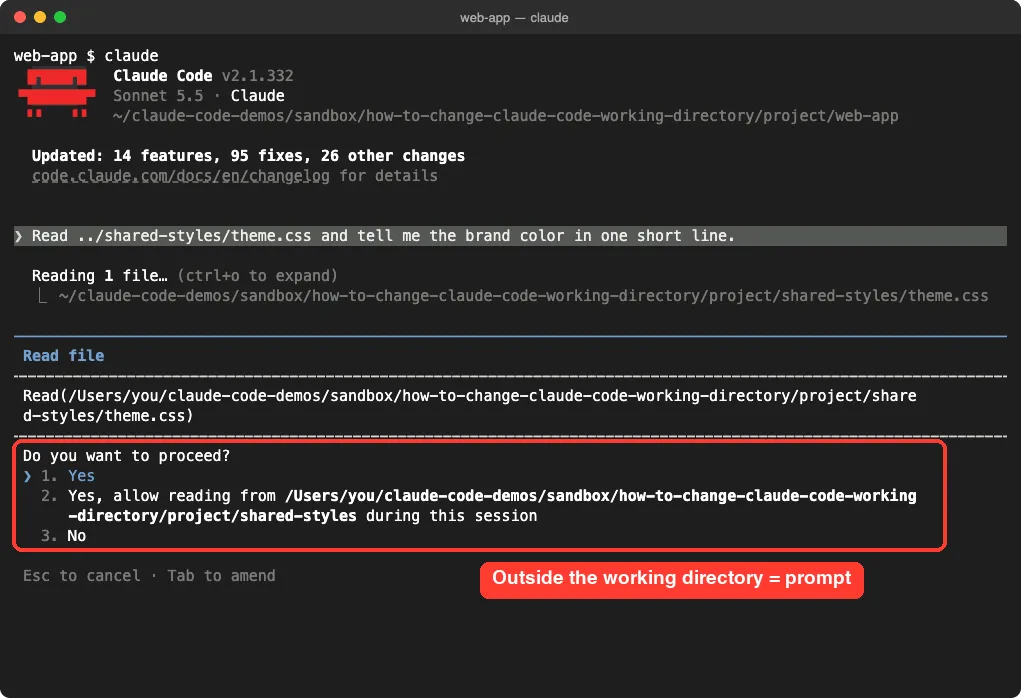
The prompt offers a one-time Yes, or a session-wide pass for reading from that folder. That’s fine once, but if you’ll be working across both folders, adding the folder properly saves you from clicking through prompts all day.
Method 1: Add Another Folder With /add-dir
Use /add-dir when you want to keep your current project and also work on files in another folder. It’s the most common answer to “Claude Code can’t see my other folder.”
- In the Claude Code prompt, type
/add-dirfollowed by a space and the path, such as/add-dir ../shared-styles. - As you type a partial path, Claude Code suggests matching folders. Press
Tabto accept one. - Press
Enter. If you haven’t trusted that folder before, a trust check appears. - Move down to Yes, add it and press
Enter.
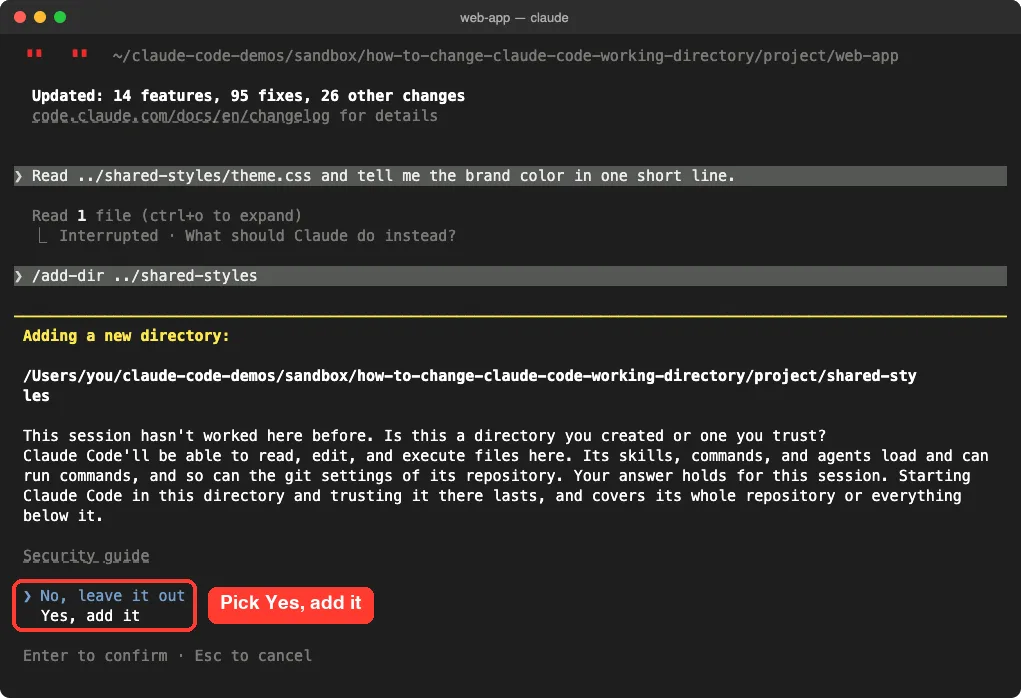
The dialog explains why it asks. Skills, commands and agents in that folder will load, and they can run commands. According to the docs, this trust check for /add-dir and --add-dir needs Claude Code v2.1.326 or later.
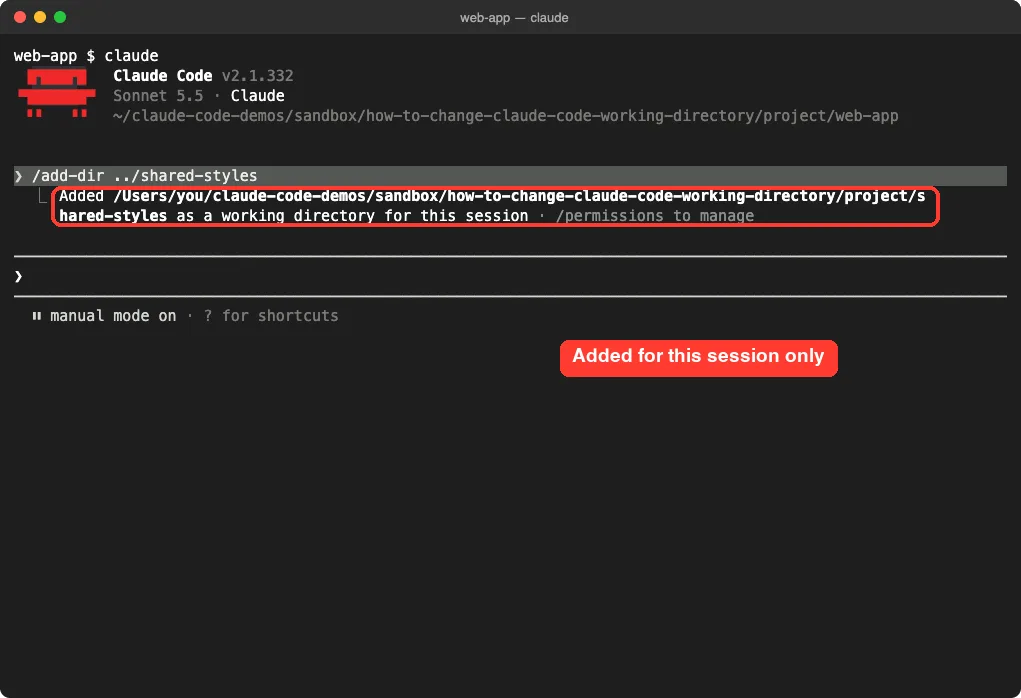
Note the words “for this session.” When you quit, the extra folder is gone. Run it again next time, or use one of the lasting options further down.
Think of /add-dir as a guest pass: full access to the files, but only until the session ends.
What /add-dir loads from the added folder
An added folder is mainly about files. Claude can read them without prompts and edit them under your normal permission mode. It does not become a second full project, though.
| Item in the added folder | Loaded with /add-dir or –add-dir? |
|---|---|
| Files | Yes, read and edit |
Skills in .claude/skills/ | Yes, with live reload |
Commands in .claude/commands/ and agents in .claude/agents/ | Yes, without live reload |
.claude/settings.json | Only the enabledPlugins and extraKnownMarketplaces keys |
CLAUDE.md and .claude/rules/ | Only when CLAUDE_CODE_ADDITIONAL_DIRECTORIES_CLAUDE_MD=1 is set |
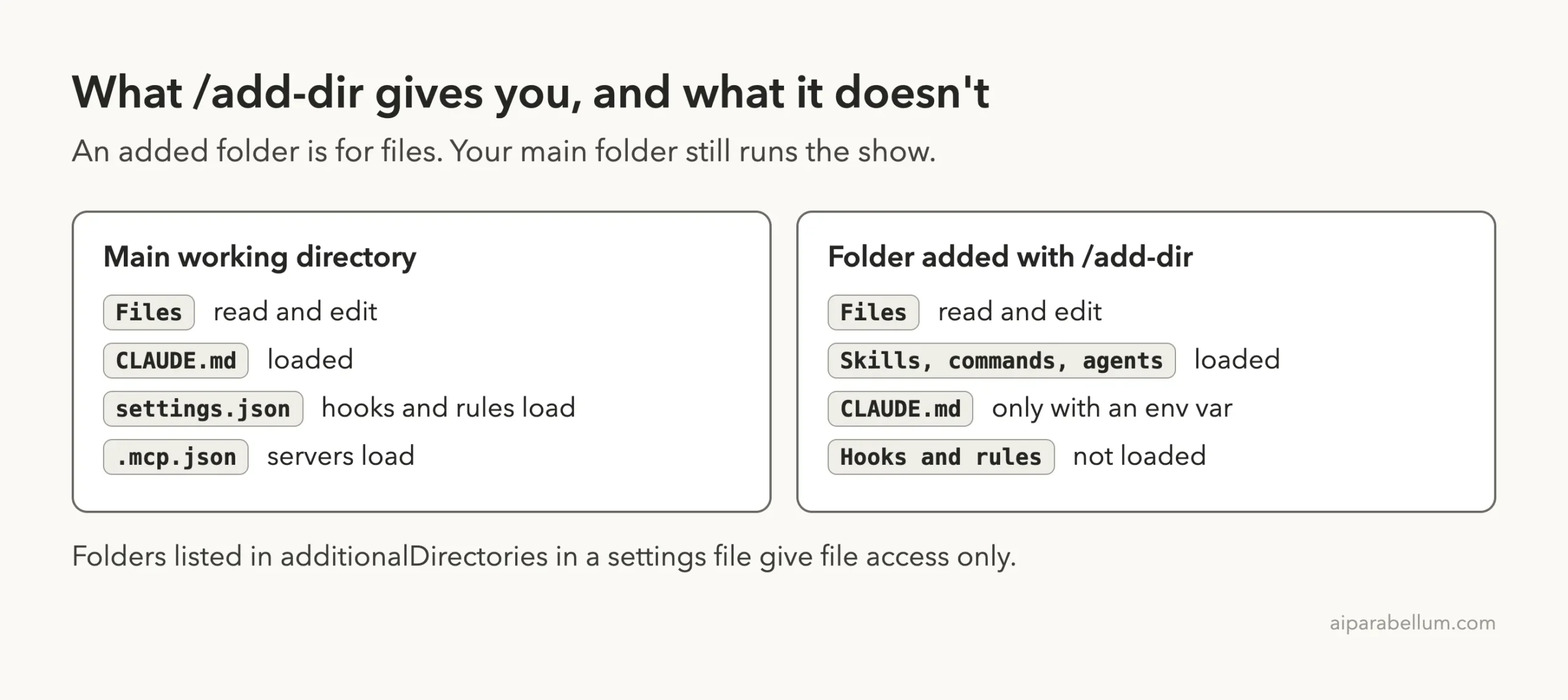
If you want the added folder’s CLAUDE.md too, start Claude Code like this:
CLAUDE_CODE_ADDITIONAL_DIRECTORIES_CLAUDE_MD=1 claude --add-dir ../shared-stylesOne more trick from the docs: running /add-dir on a subfolder of your current project loads that subfolder’s skills, commands and agents right away, without adding a new working directory. That needs v2.1.257 or later.
Method 2: Add Folders at Launch With –add-dir
If you already know which folders you need, pass them when you start. The --add-dir flag takes one or more paths, and the docs say it checks that each one exists as a directory.
cd ~/projects/web-app
claude --add-dir ../shared-styles ../api-server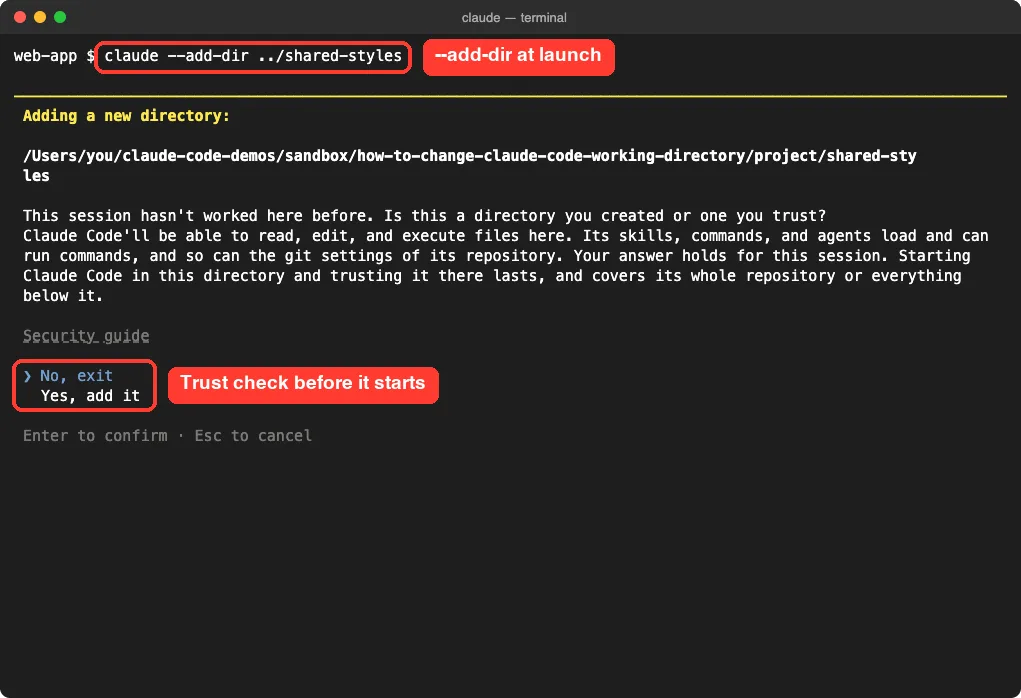
The flag behaves just like /add-dir: same trust check, same file access, same rules about what loads. It’s handy in a shell alias or a script you run every morning.
Method 3: Move the Session With /cd
Use /cd when you’re done with one folder and want Claude to work in a different one, without losing the conversation. This is the true “change working directory” command.
- Type
/cdand the new path, such as/cd ../api-server.Tabcompletes folder names here too. - Press
Enter. If you haven’t worked in that folder before, Claude Code asks you to trust it. - Pick Yes, move here. If you pick No, stay put, the session stays where it was.
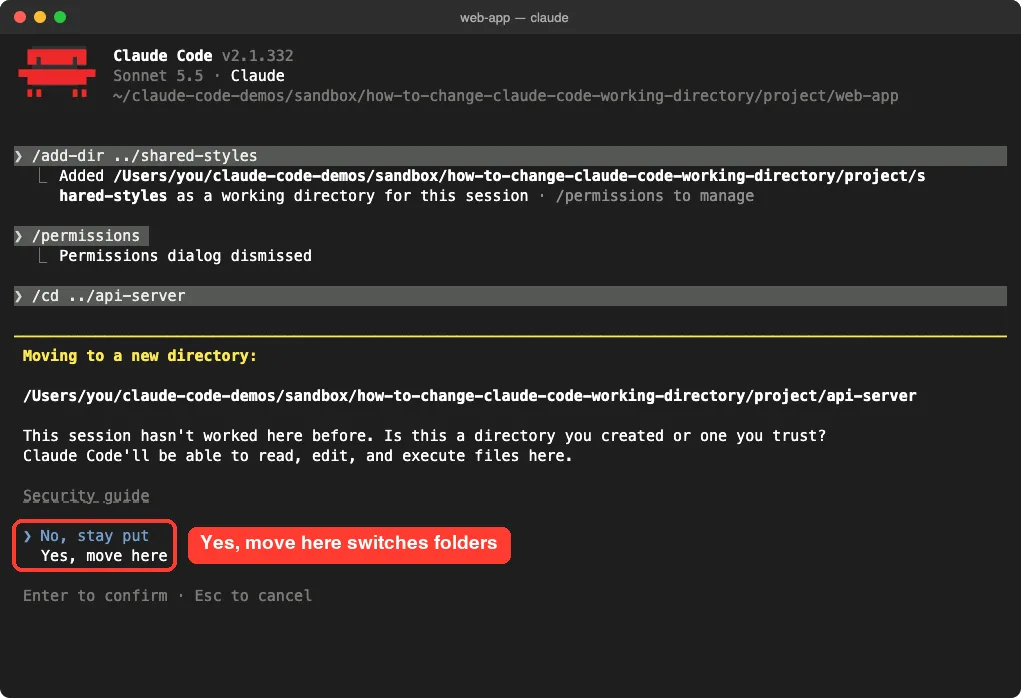
After the move, we asked Claude which project it was in. It answered from the new folder’s CLAUDE.md, describing the small Node server in api-server, so the new project instructions were live straight away.
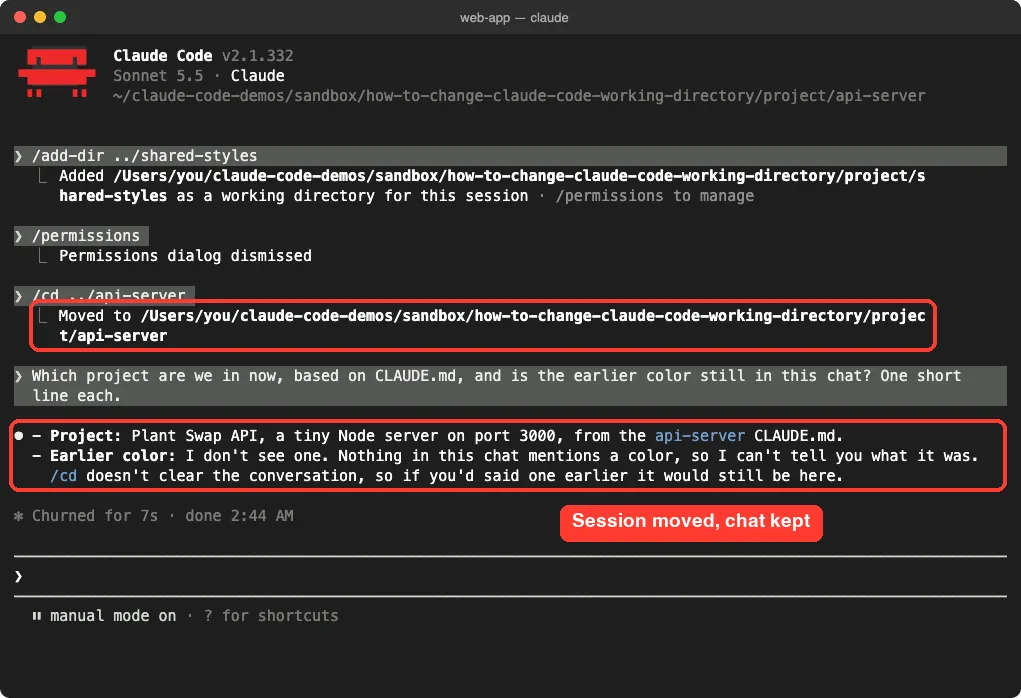
What changes when you run /cd
According to Anthropic’s docs, /cd applies the new folder’s project setup as soon as you move:
- Its project settings, including permission rules and hooks.
- Its
.mcp.jsonservers and the local-scope MCP servers you registered there. The old folder’s project servers disconnect. - The plugins its settings enable, plus its skills and subagents.
- Its
envvalues, layered on top of the previous folder’s values, which stay in effect. - Its
additionalDirectorieslist replaces the old folder’s list, but folders you added with--add-diror/add-dirstay.
Afterward, claude --resume run from the new folder finds the moved session. Before v2.1.246, /cd didn’t apply the new folder’s settings, hooks or MCP servers until you resumed, so run claude update if yours is older.
Or just restart in the new folder
If you’d rather start clean, quit and relaunch. A fresh session loads the new folder’s setup from scratch and doesn’t carry the old chat.
/exit
cd ../api-server
claude
Want the old chat later? Go back to the old folder and run claude -c for its most recent session, or claude --resume to pick one. Our guide to resuming sessions covers the picker in detail.
Method 4: Save Extra Folders With additionalDirectories
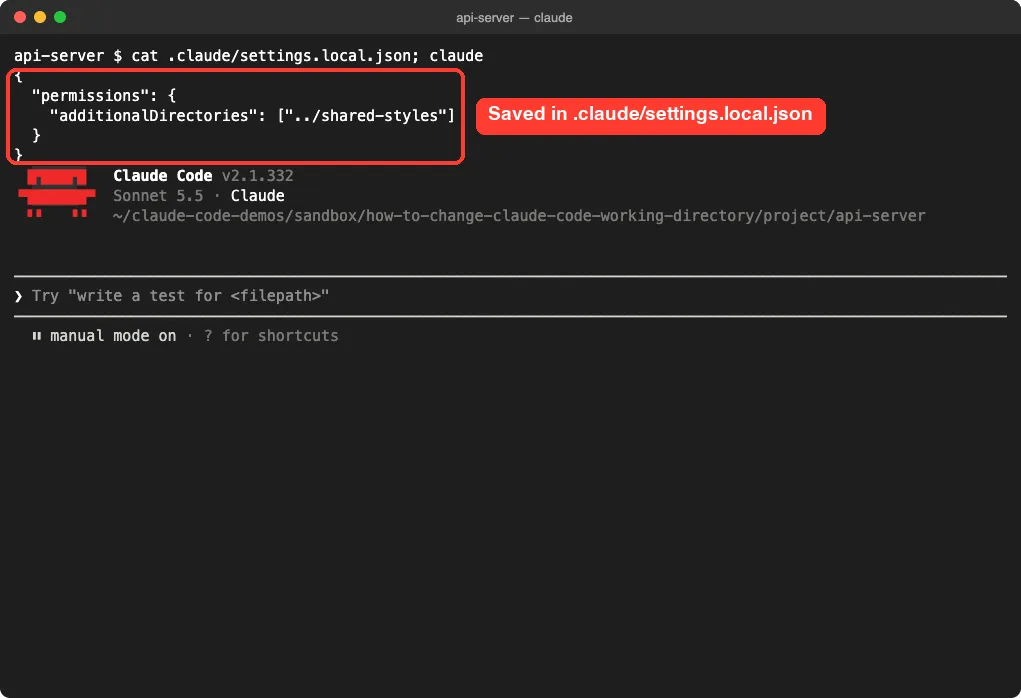
If you add the same folder every day, save it in settings. The key is permissions.additionalDirectories, an array of folder paths.
{
  "permissions": {
    "additionalDirectories": ["../shared-styles"]
  }
}
Where you put it decides who gets it:
| File | Who it applies to | Note |
|---|---|---|
.claude/settings.local.json | Just you, in this project | Applies without the trust step, unless git tracks the file |
.claude/settings.json | Everyone who opens the project | Waits until each person accepts the workspace trust dialog |
~/.claude/settings.json | You, in every project | Best for a folder you use everywhere |
One catch: folders listed in this setting give file access only. Unlike --add-dir, they don’t load that folder’s skills, commands, agents or plugin settings. Our guide to settings files explains how these scopes stack.
Which Option Should You Use?
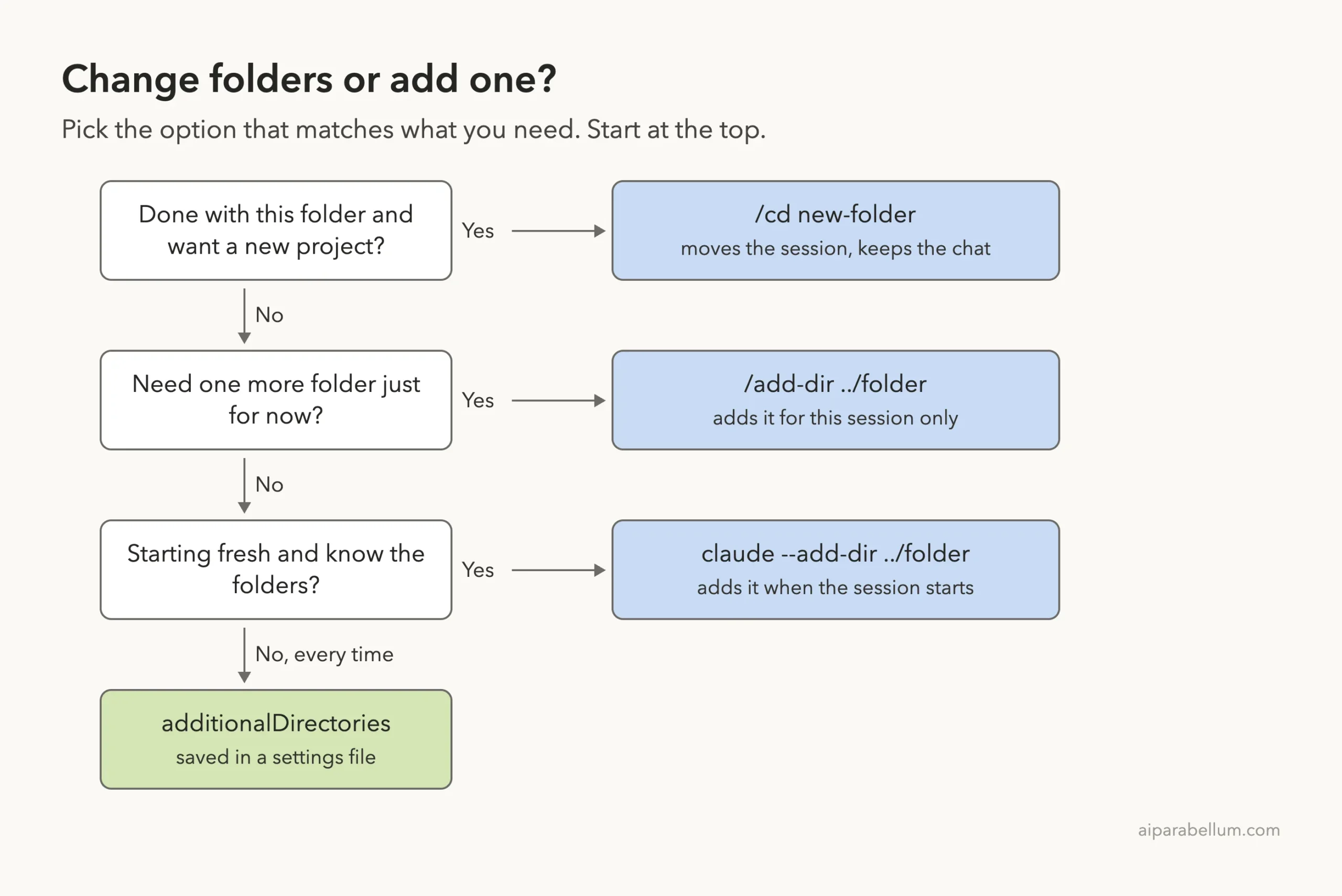
A simple rule of thumb: one project at a time means /cd or a restart, and two projects at once means adding a directory. If you work in a monorepo, starting at the repository root often beats adding folders; see our guide to large monorepos.
Real Examples
A front end that shares a style folder
This was our demo. The web app’s index.html links to ../shared-styles/theme.css. Starting in web-app and running /add-dir ../shared-styles lets Claude read and change both sides of that link.
Switching from the app to the API mid-chat
After finishing front-end work, /cd ../api-server moved the session, loaded the API’s CLAUDE.md, and kept the whole conversation. That’s useful when the next task builds on what you just discussed.
A shared docs or config folder you always need
Put "additionalDirectories": ["../docs/"] in your local settings and stop typing /add-dir every morning.
A network share on Windows
You can’t add most network paths, such as \\server\share, because looking one up can contact that host. The docs say to map the share to a drive letter and pass it at launch, for example claude --add-dir Z:\ in PowerShell. On macOS and Linux, mount the share at a local path such as one under /Volumes or /mnt instead.
Try It Yourself
Make two sibling folders, put a small file in one, and start Claude Code in the other. Then paste this prompt:
Read ../notes/todo.txt and list the three items in it. Then tell me which folder you are working in.Watch the permission prompt, press Esc, run /add-dir ../notes, and ask again. Finally, run /cd ../notes and ask the second half of the question one more time.
Common Mistakes
- Typing
claude --add-dir ...inside the Claude prompt. That’s a shell command; inside a session, use/add-dir. In our test, Claude pointed this out and suggested/add-dirinstead. - Expecting an added folder’s hooks or
CLAUDE.mdto load. They don’t by default; switch with/cdif you need that folder’s full setup. - Forgetting that
/add-diris per session. Save it inadditionalDirectoriesif you need it every time. - Putting
additionalDirectoriesin a shared.claude/settings.jsonand wondering why it does nothing. It waits until the folder is trusted. - Adding your whole home folder. Give Claude the folders it needs, nothing more.
Pro Tips
- Run
/permissionsto manage folders added in this session; the/add-dirconfirmation points you there. - Want Claude locked inside its folders? Set
permissions.blockReadsOutsideWorkingDirectoriesorpermissions.blockWritesOutsideWorkingDirectoriestotrue, then add the folders it may use. Our post on permission rules covers the wider permission system. - You or your admin can limit where
/cdmay go withCdpermission rules. A bareCddeny rule turns/cdoff entirely, and anyCdallow rule switches it to allowlist mode. - If your history seems to vanish after renaming a project, that’s a different problem; see our fix for lost session history.
- Trust prompts that keep returning are covered in our guide to the trust this folder dialog.
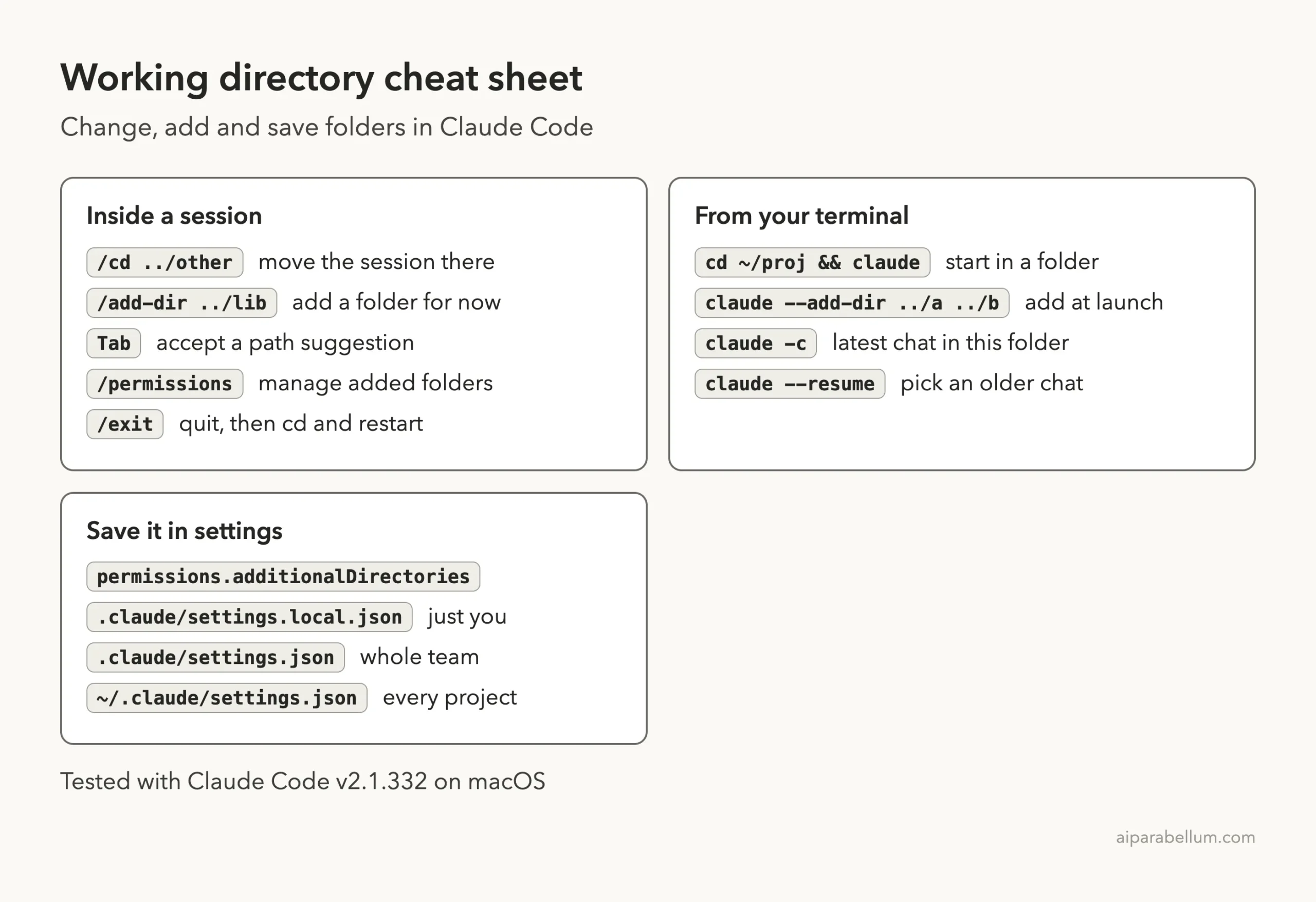
Claude Code Working Directory Cheat Sheet
Frequently Asked Questions
How do I change the directory in Claude Code without restarting?
Type /cd followed by the path. The session moves, keeps the conversation and loads the new folder’s CLAUDE.md and project settings.
Does /add-dir stay after I close Claude Code?
No. In our test, Claude Code confirmed the folder was added “for this session.” To keep it, add the path to permissions.additionalDirectories in a settings file.
Can I add more than one folder?
Yes. Run /add-dir once per folder, or pass several paths at launch, like claude --add-dir ../lib ../docs. The settings key also takes a list.
Why doesn’t Claude follow the CLAUDE.md in my added folder?
Added folders give file access, not full configuration. Set CLAUDE_CODE_ADDITIONAL_DIRECTORIES_CLAUDE_MD=1 before launching, or move into that folder with /cd.
What’s the difference between /cd and /add-dir?
/cd replaces your main folder and its setup. /add-dir keeps your main folder and adds file access to another one alongside it.
Conclusion
Changing the Claude Code working directory takes one command once you know which job you’re doing: /cd moves the session and keeps the chat, a quick /exit and relaunch starts fresh in a new folder, /add-dir or claude --add-dir brings a second folder into the current session, and permissions.additionalDirectories makes that extra folder permanent. For the full rules, read Anthropic’s permissions guide, the CLI reference and the commands list, and visit our Claude AI page for more on Claude.