Kimi K3.1 Pro is one of the most talked-about coding models this week, now that Moonshot AI has released its open weights. You can also run Claude Code on it, because Kimi offers endpoints that speak the same API format as Claude.
The catch is that Kimi’s two official Claude Code guides don’t agree. They use different URLs, different keys and different model names, and one of them still sets up the older Kimi K3.
We checked both guides against Claude Code’s own docs and confirmed that both endpoints respond. Here’s which setup to use, a safer way to run it without touching your main Claude Code setup, and what you give up.
Can You Use Kimi K3.1 Pro in Claude Code?
Yes. Claude Code sends its requests to whatever address is in the ANTHROPIC_BASE_URL variable. As Claude Code’s docs put it, the variable “changes where requests are sent, not which model answers them.”
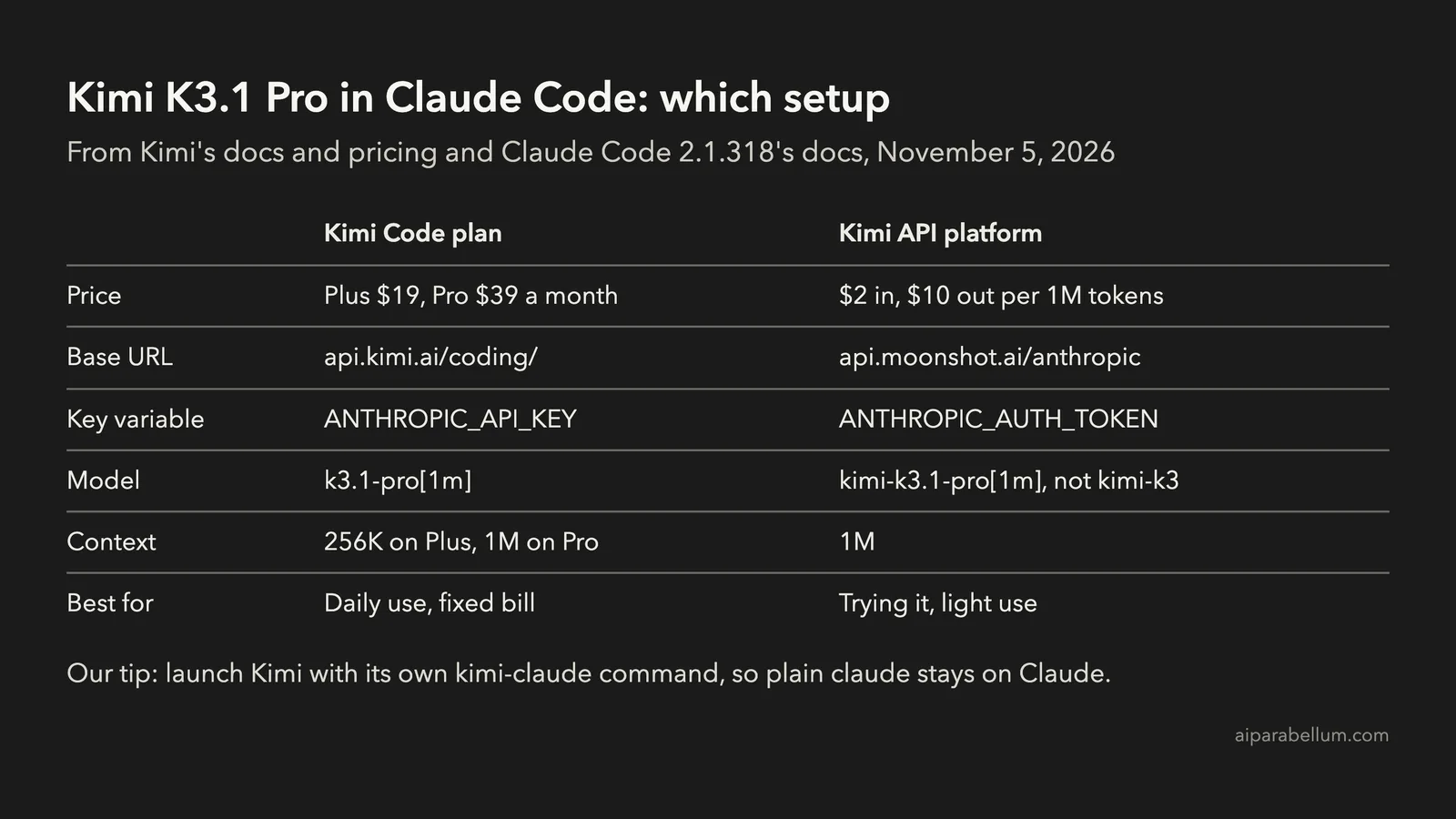
So you point Claude Code at Kimi, give it a Kimi key and tell it which Kimi model to ask for. There are two official ways to do that:
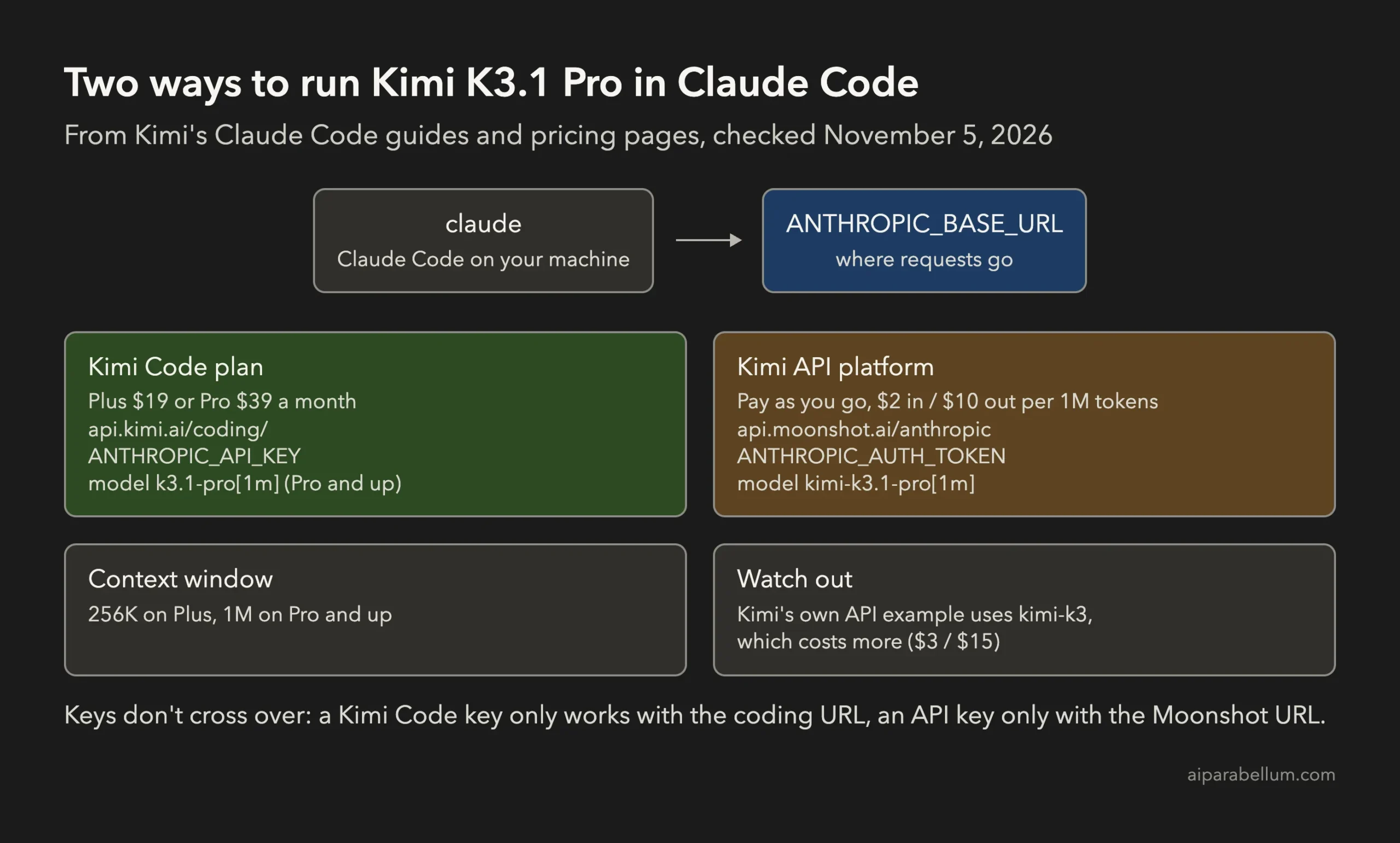
| Setting | Kimi Code plan | Kimi API platform |
|---|---|---|
| Price | Plus $19 a month, Pro $39 a month | Pay as you go, $1 minimum top-up |
| Base URL | https://api.kimi.ai/coding/ | https://api.moonshot.ai/anthropic |
| Key variable | ANTHROPIC_API_KEY | ANTHROPIC_AUTH_TOKEN |
| Model name | k3.1-pro[1m], or k3.1-pro on Plus | kimi-k3.1-pro |
| Context window | 256K on Plus, 1M on Pro and up | 1M |
The keys don’t work across routes. A Kimi Code key goes with the coding URL, and a key from the Kimi API platform goes with the Moonshot URL.
We sent a request with no key to each address. Both answered with a 401 error in the same format Claude’s API uses, so both endpoints are live and waiting for a key.
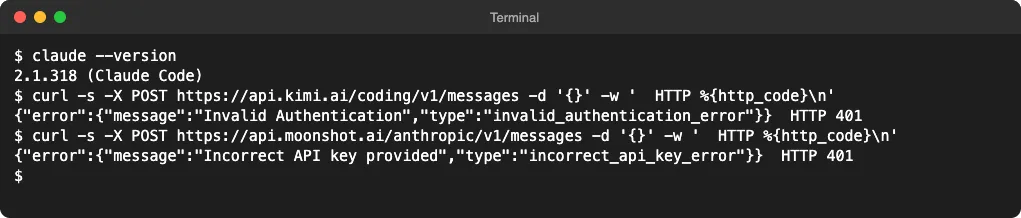
This guide covers setup. We didn’t run a paid Kimi session, so it doesn’t measure how well K3.1 Pro codes inside Claude Code.
The Kimi API Guide Still Sets Up Kimi K3
If you follow Kimi’s API platform guide word for word, you won’t get K3.1 Pro. Its Claude Code example sets every model to kimi-k3[1m] and the background model to kimi-k2.7-code.
That costs you more, not less. Here are the prices from Kimi’s API pricing page, per million tokens:
| Model | Input | Output | Cached input |
|---|---|---|---|
kimi-k3.1-pro | $2.00 | $10.00 | $0.20 |
kimi-k3.1-pro-highspeed | $4.00 | $20.00 | $0.20 |
kimi-k3 | $3.00 | $15.00 | $0.30 |
kimi-k2.7-code | $0.95 | $4.00 | $0.19 |
The K2.7 Code model in that example has another problem. Kimi stopped offering K2 models to new accounts on October 31, 2026, and plans to retire them by the end of December, so a new key can’t use it.
The same guide’s own curl test uses kimi-k3.1-pro, which is the model ID you want. The setups below use it everywhere.
How to Set Up Kimi K3.1 Pro in Claude Code With a Kimi Code Plan
Use this route if you already pay for Kimi, or plan to use Kimi every day. Kimi Code comes with the Plus plan and up, not with the cheaper Go plan.
- Subscribe to Kimi Plus or Pro and turn on Kimi Code.
- Create a key in the Kimi Code Console and save it right away. Kimi only shows the full key once.
- Set these variables in your terminal, then start Claude Code. If you haven’t installed it yet, see how to install Claude Code.
export ANTHROPIC_BASE_URL=https://api.kimi.ai/coding/
export ANTHROPIC_API_KEY=your-kimi-code-key
export ANTHROPIC_MODEL="k3.1-pro[1m]"
export ANTHROPIC_DEFAULT_FABLE_MODEL=$ANTHROPIC_MODEL
export ANTHROPIC_DEFAULT_OPUS_MODEL=$ANTHROPIC_MODEL
export ANTHROPIC_DEFAULT_SONNET_MODEL=$ANTHROPIC_MODEL
export ANTHROPIC_DEFAULT_HAIKU_MODEL=$ANTHROPIC_MODEL
export CLAUDE_CODE_SUBAGENT_MODEL=$ANTHROPIC_MODEL
export CLAUDE_CODE_EFFORT_LEVEL=high
export CLAUDE_CODE_AUTO_COMPACT_WINDOW=1000000
claude
On the Plus plan, K3.1 Pro is capped at 256K tokens. Use k3.1-pro without the suffix, and set both CLAUDE_CODE_AUTO_COMPACT_WINDOW and CLAUDE_CODE_MAX_CONTEXT_TOKENS to 262144.
We changed one value from Kimi’s guide. Kimi sets the compact window to 1,048,576, but Claude Code only accepts 100,000 to 1,000,000 and shows a warning for anything larger, so 1000000 does the same job quietly.
Because this route uses ANTHROPIC_API_KEY, Claude Code asks you once whether to use the key instead of your Claude login. Say yes, and you can change it later with the “Use custom API key” switch in /config.
How to Set Up Kimi K3.1 Pro in Claude Code With the Kimi API
Use this route to try K3.1 Pro without a subscription. You pay only for the tokens you use, at $2 per million input tokens and $10 per million output tokens.
- Create a key on the Kimi API platform.
- Add at least $1 of credit. Kimi unlocks K3.1 Pro only after a successful top-up.
- Use the Moonshot base URL, put your key in
ANTHROPIC_AUTH_TOKEN, and set every model tokimi-k3.1-pro[1m].
The [1m] part isn’t sent to Kimi. Claude Code’s docs say it “strips the suffix before sending the model ID to your provider,” and uses it to know the model has a 1M context window.
Without it, Claude Code doesn’t recognize the model name and assumes a 200K window, so it compacts your chat far too early. To see how compaction works, read our guide to the Claude Code context window.
Check Your Key Before You Start
Kimi’s guide suggests a one-token test request. It’s a quick way to catch a wrong key before Claude Code shows a confusing error:
curl https://api.moonshot.ai/anthropic/v1/messages \
  --header "Authorization: Bearer your-kimi-api-key" \
  --header "Content-Type: application/json" \
  --data '{"model": "kimi-k3.1-pro", "max_tokens": 1, "messages": [{"role": "user", "content": "hi"}]}'
A normal JSON reply means the key and address work. A 401 means the key is wrong or belongs to the other route.
A Safer Way to Run Claude Code on Kimi
Kimi’s API guide tells you to put these values in the env block of ~/.claude/settings.json, and the Kimi Code guide suggests it to make them stick. That works, but it switches every Claude Code session in every project to Kimi, and it stores your key as plain text.
Kimi’s API guide also notes that the env block overrides the same variables in your terminal. So once they’re in that file, plain claude keeps going to Kimi until you take them out. If you’re not sure which file that is, see where Claude Code’s settings.json lives.
We prefer a separate command. Plain claude keeps using your Claude plan, and kimi-claude runs on Kimi with a key kept in the macOS Keychain.
- Save your Kimi API key in the Keychain. The
-wat the end makes macOS ask for the key, so it doesn’t land in your shell history:
security add-generic-password -a "$USER" -s kimi-api -w- Add this function to your
~/.zshrc, then open a new terminal:
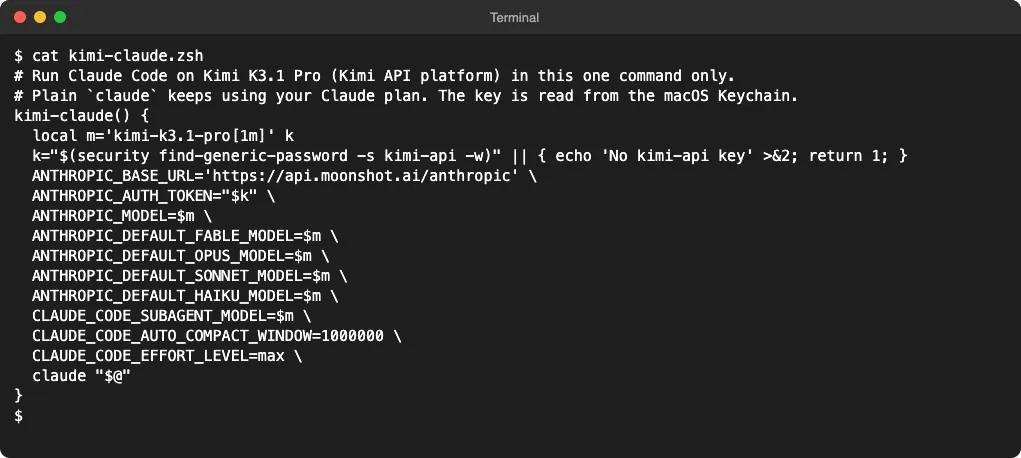
kimi-claude() {
  local m='kimi-k3.1-pro[1m]' k
  k="$(security find-generic-password -s kimi-api -w)" || { echo 'No kimi-api key' >&2; return 1; }
  ANTHROPIC_BASE_URL='https://api.moonshot.ai/anthropic' \
  ANTHROPIC_AUTH_TOKEN="$k" \
  ANTHROPIC_MODEL=$m \
  ANTHROPIC_DEFAULT_FABLE_MODEL=$m \
  ANTHROPIC_DEFAULT_OPUS_MODEL=$m \
  ANTHROPIC_DEFAULT_SONNET_MODEL=$m \
  ANTHROPIC_DEFAULT_HAIKU_MODEL=$m \
  CLAUDE_CODE_SUBAGENT_MODEL=$m \
  CLAUDE_CODE_AUTO_COMPACT_WINDOW=1000000 \
  CLAUDE_CODE_EFFORT_LEVEL=max \
  claude "$@"
}- Run
kimi-claudein your project, then type/status. The base URL should readhttps://api.moonshot.ai/anthropicbefore you send your first prompt.
We tested the function with stand-ins for claude and security, so no request went out. Claude Code got every Kimi variable, the shell kept none of them afterward, and with no key in the Keychain it stopped before starting Claude Code.
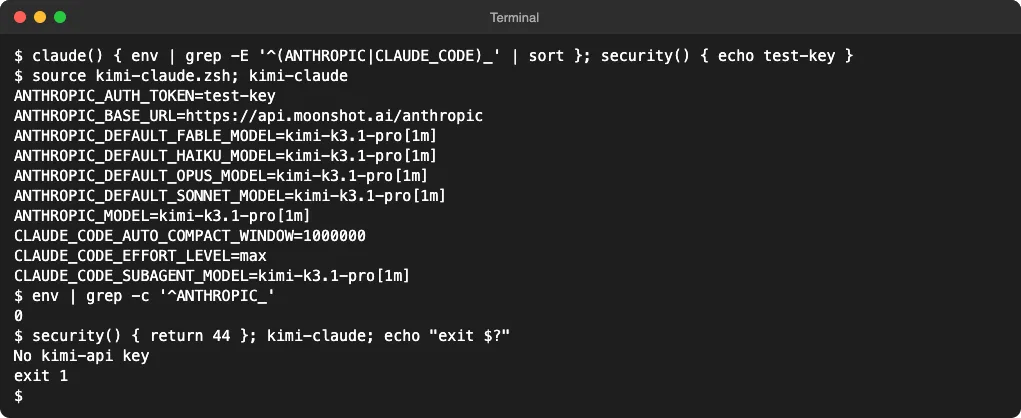
That last check matters. Claude Code picks the first credential it finds, and your Claude login is further down that list, so a session started with no Kimi key could fall back to your Claude account.
What Changes When Claude Code Runs on Kimi
Claude Code’s tools, skills and slash commands still run on your machine. What changes is the model that reads your code and decides what to do.
- Remote Control turns off. Claude Code disables it when
ANTHROPIC_BASE_URLpoints anywhere other than Anthropic’s API. - The model name can look wrong. Kimi’s docs say
/statusmay still show a Claude model name, so trust the base URL line instead. - Background work costs more. With every model slot on K3.1 Pro, small background jobs Claude Code normally gives to a lighter model are billed at the K3.1 Pro rate. The Claude Code costs guide explains where those tokens go.
- Your code goes to Moonshot AI, not Anthropic. Read Kimi’s terms before you use it on work code, and see our guide to Claude Code privacy and security for what normally applies.
- Effort works differently. Kimi’s API accepts low, high and max, with max as its default, so we kept Kimi’s own suggestion. Our guide to effort levels in Claude Code covers what each level does.
As for quality, Moonshot’s own model card puts K3.1 Pro at 65.7 on Terminal-Bench 4.0, next to 66.4 for Claude Opus 5.5. Those are Moonshot’s numbers, not ours, so treat them as a reason to try it rather than a result.
Which Kimi Setup Should You Pick?
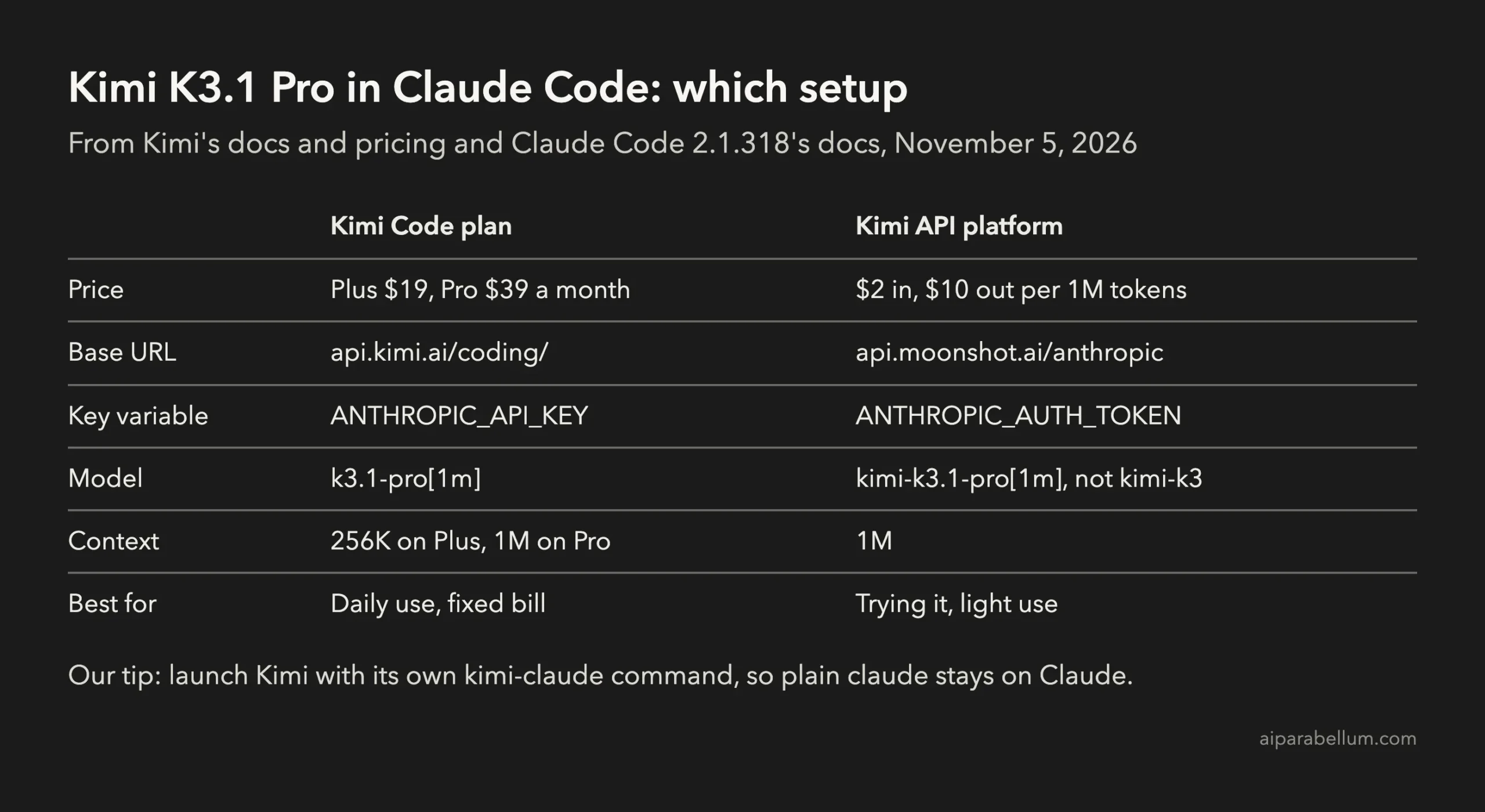
To try it out or use it now and then, take the API route with the kimi-claude function. A few dollars of credit goes a long way at $2 per million input tokens, and your normal Claude Code setup stays as it is.
If you’d use Kimi every day, the Kimi Code Pro plan at $39 a month gives you the full 1M window with a fixed bill. Skip Plus if you work in large codebases, since its 256K cap is close to the 200K Claude Code assumes anyway.
If you only want to switch models inside Claude, our guide on how to choose a model in Claude Code is the simpler place to start.
FAQ
Is Kimi K3.1 Pro free to use in Claude Code?
No. You need either a paid Kimi plan with Kimi Code, from $19 a month, or credit on the Kimi API platform, with a $1 minimum top-up.
Do I need a Claude subscription to run Claude Code on Kimi?
No. When ANTHROPIC_AUTH_TOKEN or an approved ANTHROPIC_API_KEY is set, Claude Code uses that key instead of your Claude login.
Why does Claude Code compact so early on Kimi?
It doesn’t recognize Kimi’s model name, so it assumes a 200K window. Add [1m] to the model name on a 1M plan, or set CLAUDE_CODE_MAX_CONTEXT_TOKENS to your real limit.
Which base URL is right, api.kimi.ai or api.moonshot.ai?
Both are right for their own key. Use https://api.kimi.ai/coding/ with a Kimi Code plan key, and https://api.moonshot.ai/anthropic with a Kimi API platform key.
Conclusion
To use Kimi K3.1 Pro in Claude Code, point ANTHROPIC_BASE_URL at Kimi, add the matching key and set every model variable to K3.1 Pro: the Kimi Code plan uses api.kimi.ai/coding/, ANTHROPIC_API_KEY and k3.1-pro[1m], while the pay-as-you-go API uses api.moonshot.ai/anthropic, ANTHROPIC_AUTH_TOKEN and kimi-k3.1-pro[1m]. Don’t copy the API guide’s kimi-k3 example, which costs more for an older model, and keep Kimi in its own kimi-claude command so plain claude stays on your Claude plan. Kimi’s Claude Code guide for the Kimi API and Anthropic’s notes on Claude Code model configuration are the two pages to check if anything changes.