Google now publishes more than a dozen add-ons that let Claude Code work with its cloud services, from storage buckets to BigQuery to Firebase. The names look alike and the setup steps are scattered across many repositories, so this guide sorts out every Claude Code Google Cloud plugin in plain English. We also loaded four of them in a safe sandbox and show exactly what happened.
This guide is part of our Claude Code tutorials. Find more add-ons in our Skills Directory.
Tested with Claude Code v2.1.318 on November 6, 2026.
This is a roundup, so we are clear about what we ran and what we did not.
We read the files of nine GitHub repositories, plus five more plugins at the versions pinned by Anthropic’s marketplace, before loading anything. We loaded google-cloud-storage, alloydb-omni, bigquery-data-analytics and firestore-native with --plugin-dir. We never created a Google Cloud account, never signed in, never entered a key and never installed anything into the normal Claude Code setup.
Everything about the plugins we did not load comes from each plugin’s own README and files.
Quick Summary
| Question | Answer |
|---|---|
| How many Google Cloud plugins are there? | Fourteen cards in the Skills Directory, plus the separate firebase plugin |
| Where do I install them from? | Anthropic’s official marketplace, claude-plugins-official, using /plugin install name@claude-plugins-official |
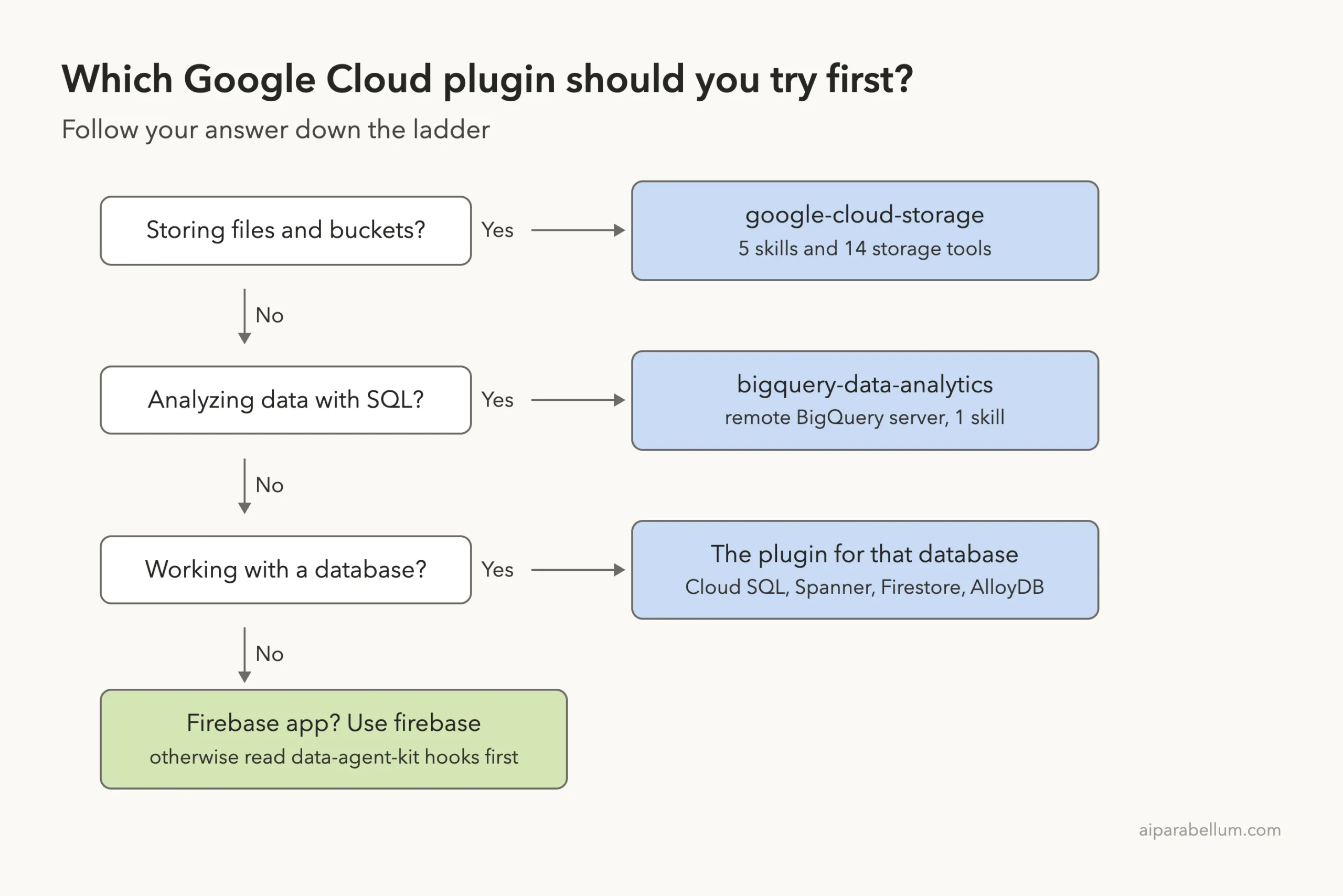
| Which one should I try first? | google-cloud-storage for files, bigquery-data-analytics for SQL, or the plugin that matches your database |
| What do I need on my computer? | Node.js, because most of these plugins start their tool server with npx |
| Do I need a Google Cloud account? | For real work, yes: a project, Application Default Credentials and the right IAM roles |
| What we did not run | Anything that talks to a real Google Cloud project, plus data-agent-kit, which ships usage tracking (more below) |
Pick the narrowest Google Cloud plugin for your job, read its hooks, and use a limited IAM role for your first live test.
What Are the Google Cloud Plugins for Claude Code?
A Claude Code plugin is a bundle that can hold skills, hooks and MCP servers, and Claude Code loads it as one unit. Our plugin install guide covers the basics, and the official plugins page lists what a plugin can contain.
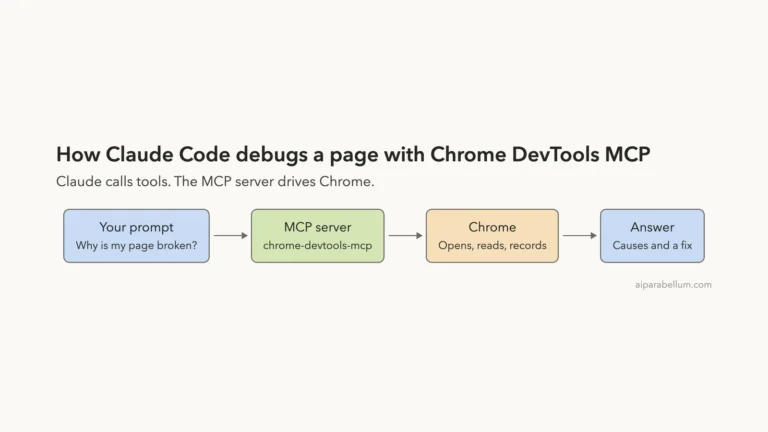
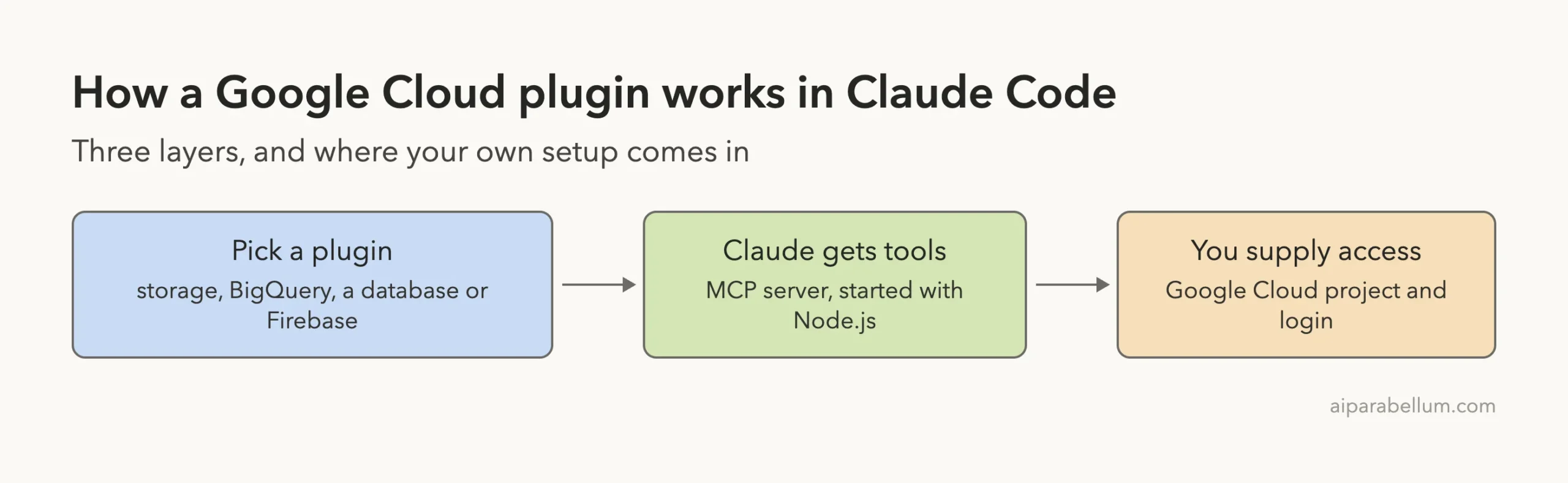
The Google Cloud plugins do their work in two ways. Some ship skills, which are short written guides Claude reads when your request matches. Most also start an MCP server, which gives Claude real tools such as listing buckets or running a query.
If MCP is new to you, our MCP servers guide explains the idea. The diagram below shows how the pieces fit together.
The Google Cloud Plugins in Four Groups
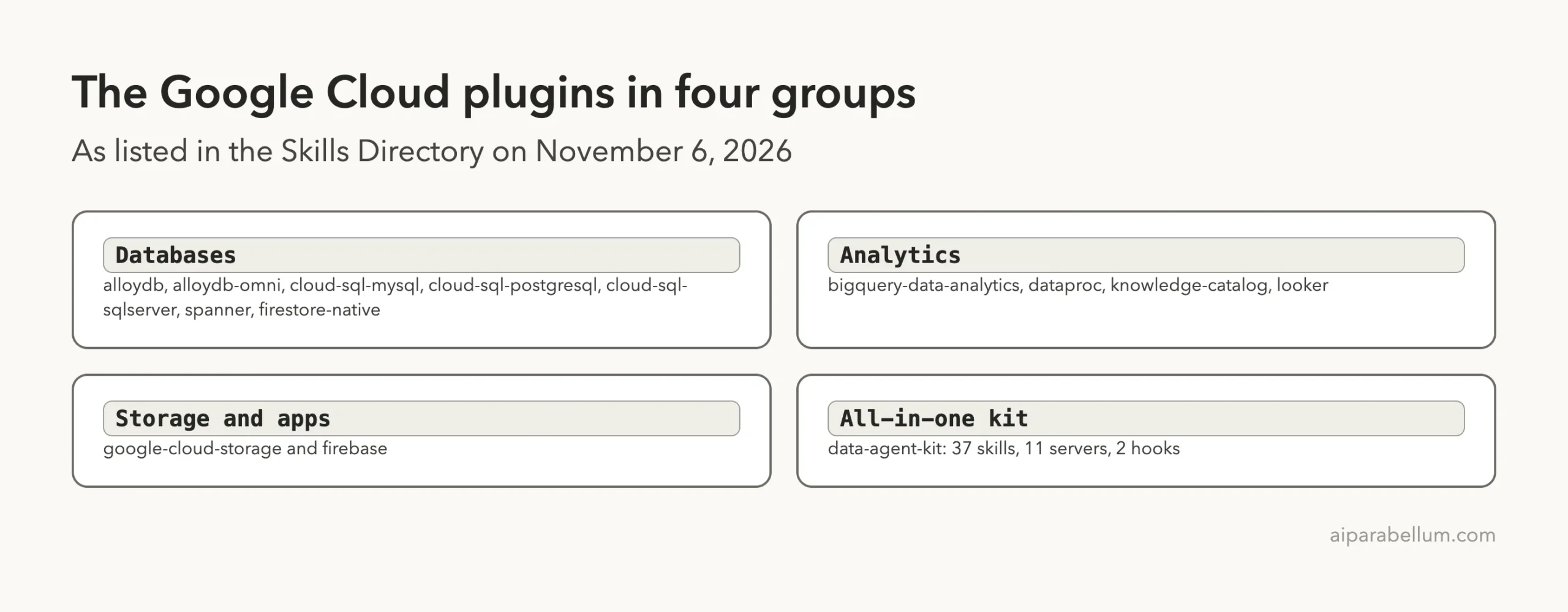
Most of the plugins come from Google’s data cloud team and share the same design. Sorting them into groups makes the list much easier to read.
Databases
This is the biggest group. It holds alloydb, alloydb-omni, cloud-sql-mysql, cloud-sql-postgresql, cloud-sql-sqlserver, spanner and firestore-native. Each one connects Claude to one database product so you can explore schemas and run queries in plain English.
Analytics
Here you find bigquery-data-analytics, dataproc, knowledge-catalog and looker. They cover data warehouse queries, Spark clusters, a data catalog and Looker models.
Storage and apps
The google-cloud-storage plugin handles buckets and files. The firebase plugin is separate and lives inside Anthropic’s own marketplace repository.
The all-in-one kit
The data-agent-kit plugin is the largest. Its files list 37 skills and 11 MCP servers, and it is aimed at data engineers who build pipelines on Google Cloud.
All the Google Cloud Plugins at a Glance
Here is every plugin with what it does, according to its own files. Versions and dates come from the plugin files and the commits we read.
| Plugin | Maker | What it does | Skills | Needs |
|---|---|---|---|---|
google-cloud-storage | Buckets, objects, access rules, FUSE mounts and security checks | 5 | Google Cloud project | |
bigquery-data-analytics | Query BigQuery and use its AI functions | 1 | Google Cloud project and the gcloud tool | |
cloud-sql-mysql | Manage and query Cloud SQL for MySQL | None | Google Cloud project | |
cloud-sql-postgresql | Manage and query Cloud SQL for PostgreSQL | None | Google Cloud project | |
cloud-sql-sqlserver | Connect to Cloud SQL for SQL Server | None | Google Cloud project | |
alloydb | Create and use AlloyDB for PostgreSQL databases | None | Google Cloud project | |
alloydb-omni | Run and query AlloyDB Omni in a container or on Kubernetes | 2 | Your own AlloyDB Omni instance | |
spanner | Query Spanner data in natural language | None | Google Cloud project | |
firestore-native | Work with Firestore collections and documents | None | Google Cloud project | |
dataproc | Manage Dataproc clusters and jobs | None | Google Cloud project | |
knowledge-catalog | Discover and govern data assets with the Dataplex catalog | None | Google Cloud project | |
looker | Explore Looker models and write LookML | None | A Looker instance and API credentials | |
data-agent-kit | Data pipelines, dbt, Spark and BigQuery notebooks | 37 | Google Cloud project and the gcloud tool | |
firebase | Firestore, authentication, functions, hosting and storage | None | A Firebase project |
The Skills column counts the skill folders we found in each plugin. “None” means the plugin ships tools only, so Claude gets no written guidance with it. The note about the gcloud tool comes from the bigquery-data-analytics helper script, which asks gcloud for an access token, and from the setup skill inside data-agent-kit.
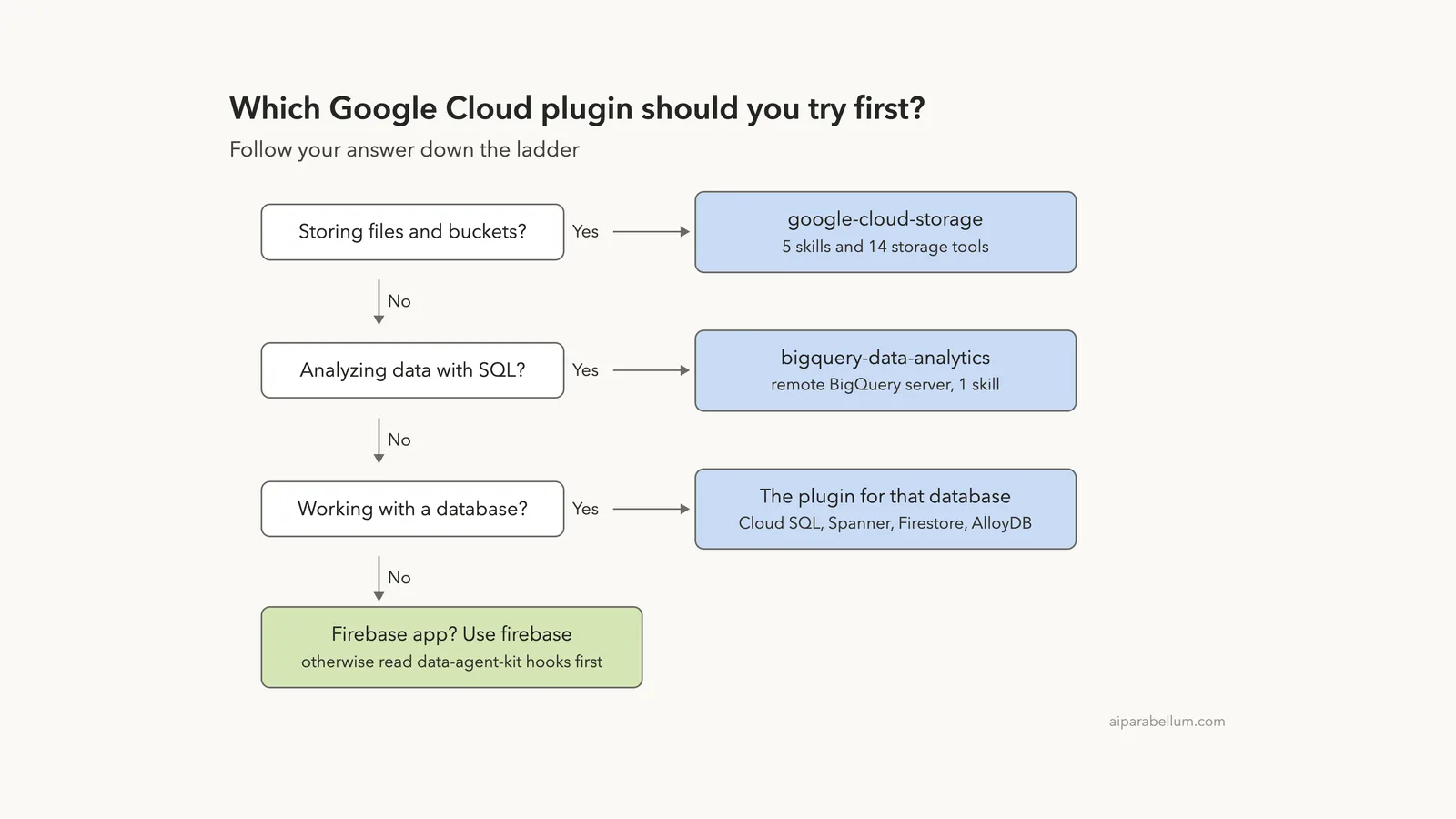
Which Google Cloud Plugin Should You Try First?
Start with the narrowest plugin that matches your job. Anthropic’s docs say a plugin adds its names and descriptions to Claude’s context, and those tokens count toward your usage even when the plugin does nothing. Installing all fourteen would waste space.
How to Install the Google Cloud Plugins
From the official marketplace
The README of the firestore-native repository shows the pattern, and the other plugin READMEs follow it. You set a few environment variables in your terminal, start claude, and then install by name from claude-plugins-official, which Claude Code adds by default.
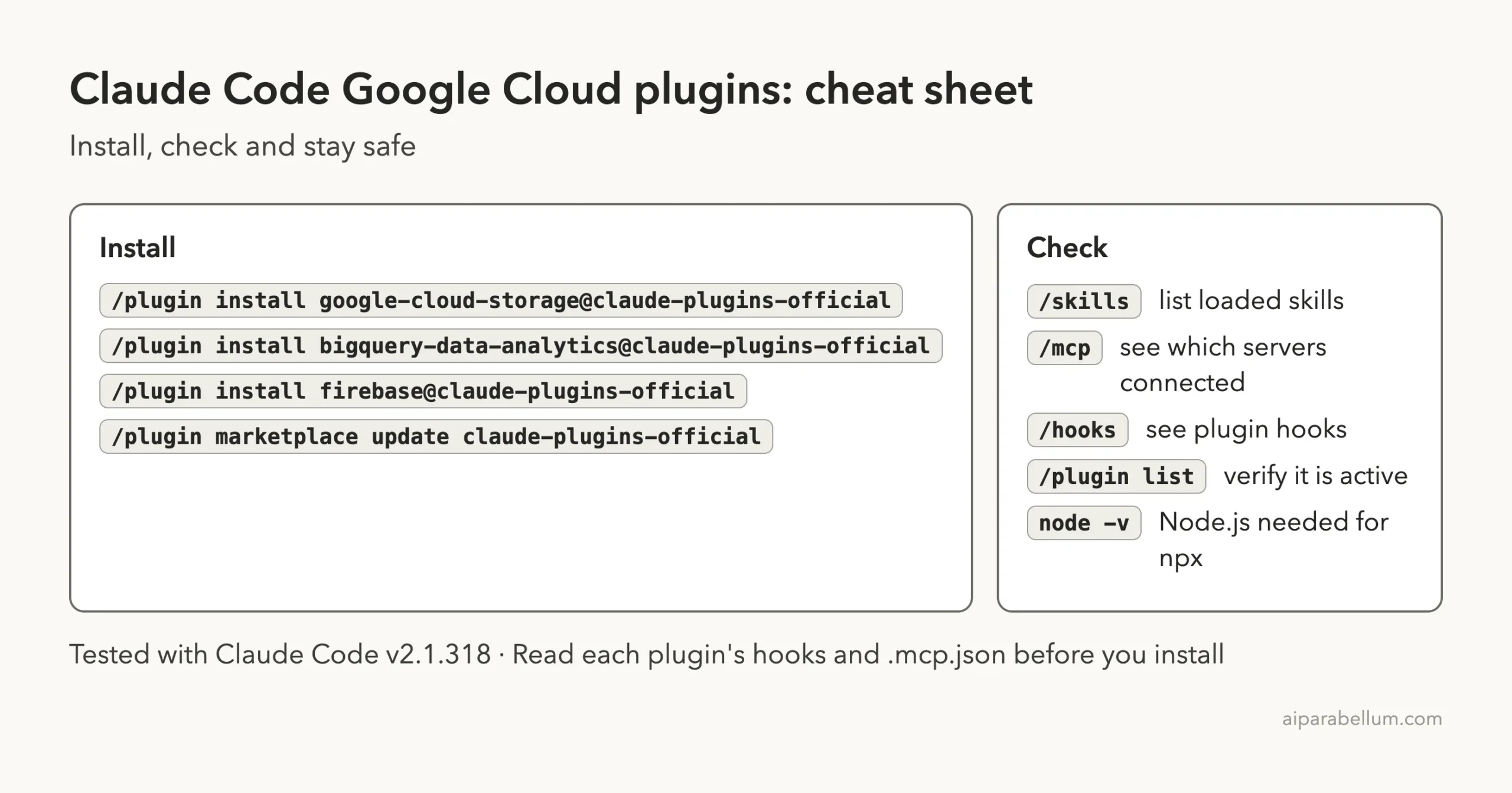
/plugin install google-cloud-storage@claude-plugins-official
/plugin install bigquery-data-analytics@claude-plugins-official
/plugin install firebase@claude-plugins-official
The README also gives a tip: run /plugin list to check that the plugin is active, or /reload-plugins right after installing. If a plugin is not found, refresh the index first.
/plugin marketplace update claude-plugins-official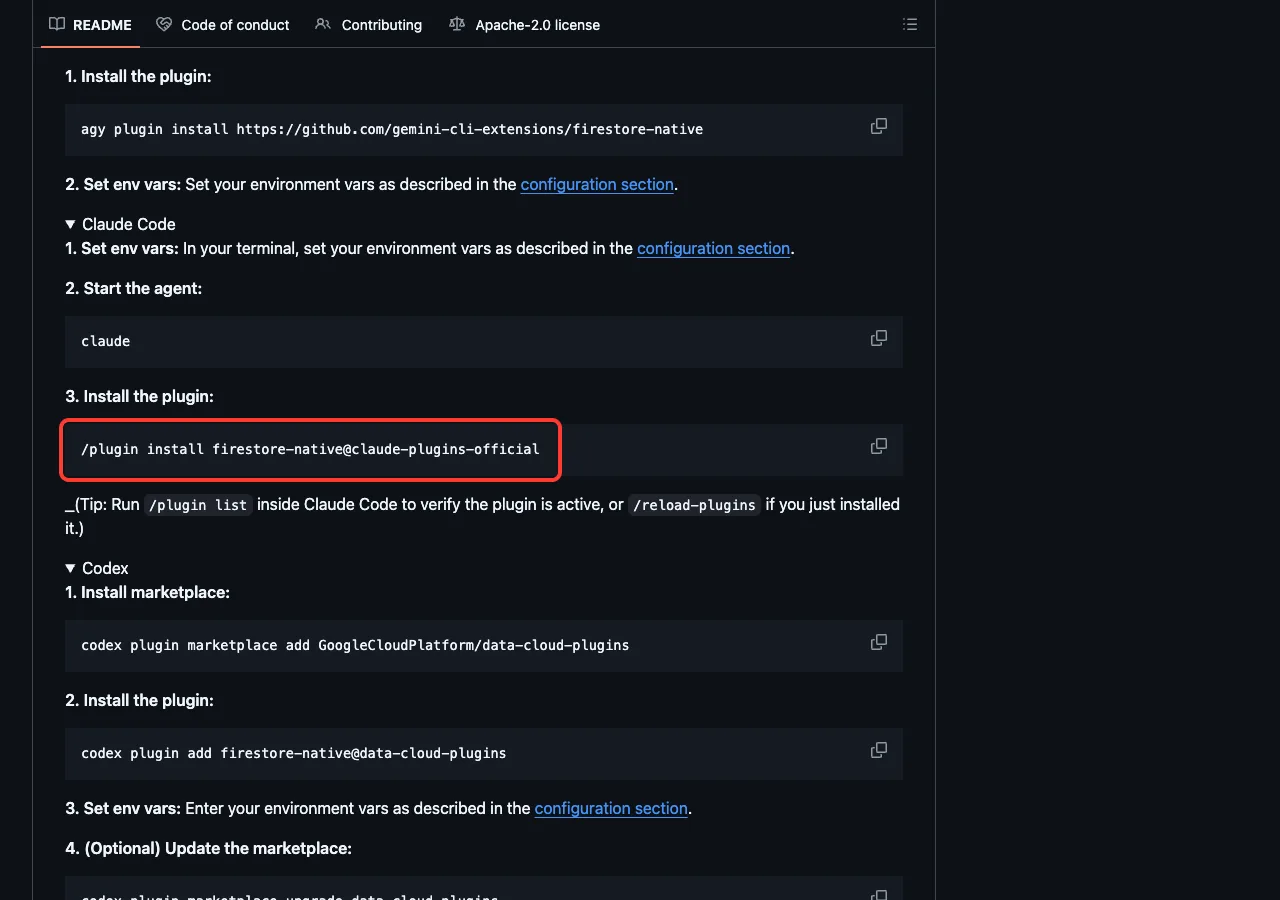
We did not run these commands, because we kept the normal setup untouched. Our marketplace explainer walks through the install screens, and the discover plugins page is the official source for the commands.
Your settings and credentials
Most plugins ask for a project ID, a region or an instance name. Each plugin file declares these as settings, and the README lists the matching environment variable, such as FIRESTORE_PROJECT, SPANNER_INSTANCE or DATAPROC_REGION.
Be careful with the secrets. In the files we read, even the Looker client secret and the database password settings are marked sensitive: false, so do not count on the plugin to hide them.
The READMEs also say to have Application Default Credentials available, which you create with the gcloud tool. The exact IAM roles differ by plugin. For example, spanner lists roles/spanner.databaseReader and roles/spanner.databaseUser, and dataproc lists roles/dataproc.viewer or roles/dataproc.editor.
What you need on your computer
Eight of the nine repositories we read start their server with npx and a pinned package, @toolbox-sdk/[email protected]. That means Node.js must be installed. The alloydb-omni plugin additionally needs a running AlloyDB Omni instance, and looker needs a Looker instance with API credentials.
The Spanner README mentions a server binary that must download correctly, so allow for a short wait the first time.
What We Ran: Loading Four Plugins in a Sandbox
We cloned the repositories into a throwaway folder and started Claude Code with four plugin folders passed to --plugin-dir and with --setting-sources project. Before loading them, we read every manifest, hook file and helper script. The command looked like this, with paths shortened.
claude --setting-sources project \
  --plugin-dir ./google-cloud-storage \
  --plugin-dir ./alloydb-omni \
  --plugin-dir ./bigquery-data-analytics \
  --plugin-dir ./firestore-native
One choice is important. We started Claude Code with a search path that had no Node.js in it. That way no npx command could download or run a server package on our Mac, and the result matches what a new user without Node.js would see.
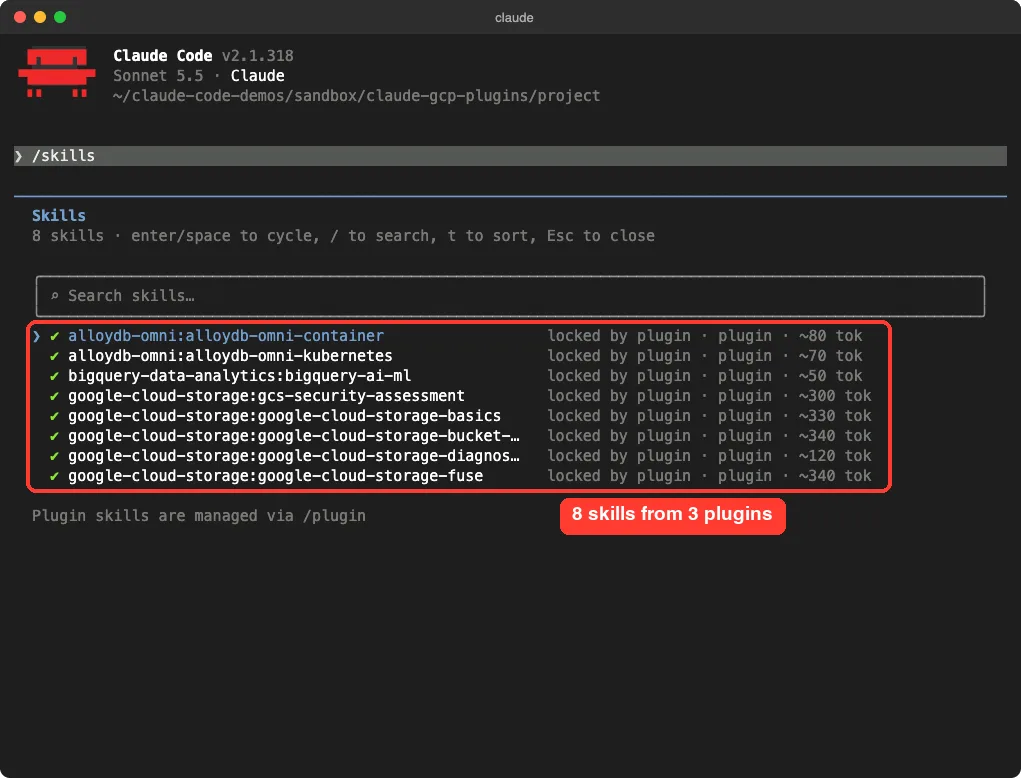
The skills loaded: 8 of them
Typing /skills showed eight skills. Five came from google-cloud-storage, two from alloydb-omni and one from bigquery-data-analytics.
That matches the folders we counted. The firestore-native plugin adds none, which also matches the files.
Each skill was marked as locked by its plugin, with an estimated cost of about 50 to 340 tokens for the name and description. That is small per skill, but a large kit adds up, so load only what you need.
The tool servers: all four failed, on purpose
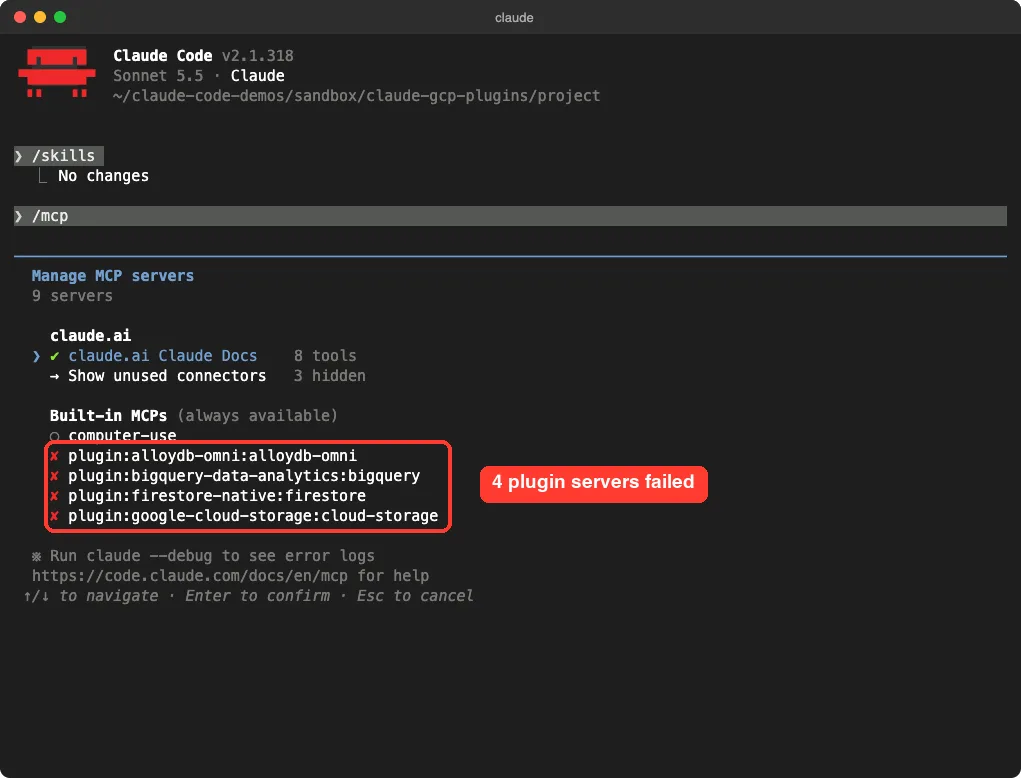
The /mcp screen showed a red cross next to all four plugin servers. This is the expected result, and it is a useful lesson. Three of them are launched with npx, and we had removed Node.js from the path.
The fourth, the BigQuery server, is a remote web server that needs a token from gcloud. The gcloud tool is not installed on our test Mac, and we never signed in, so it could not connect either.
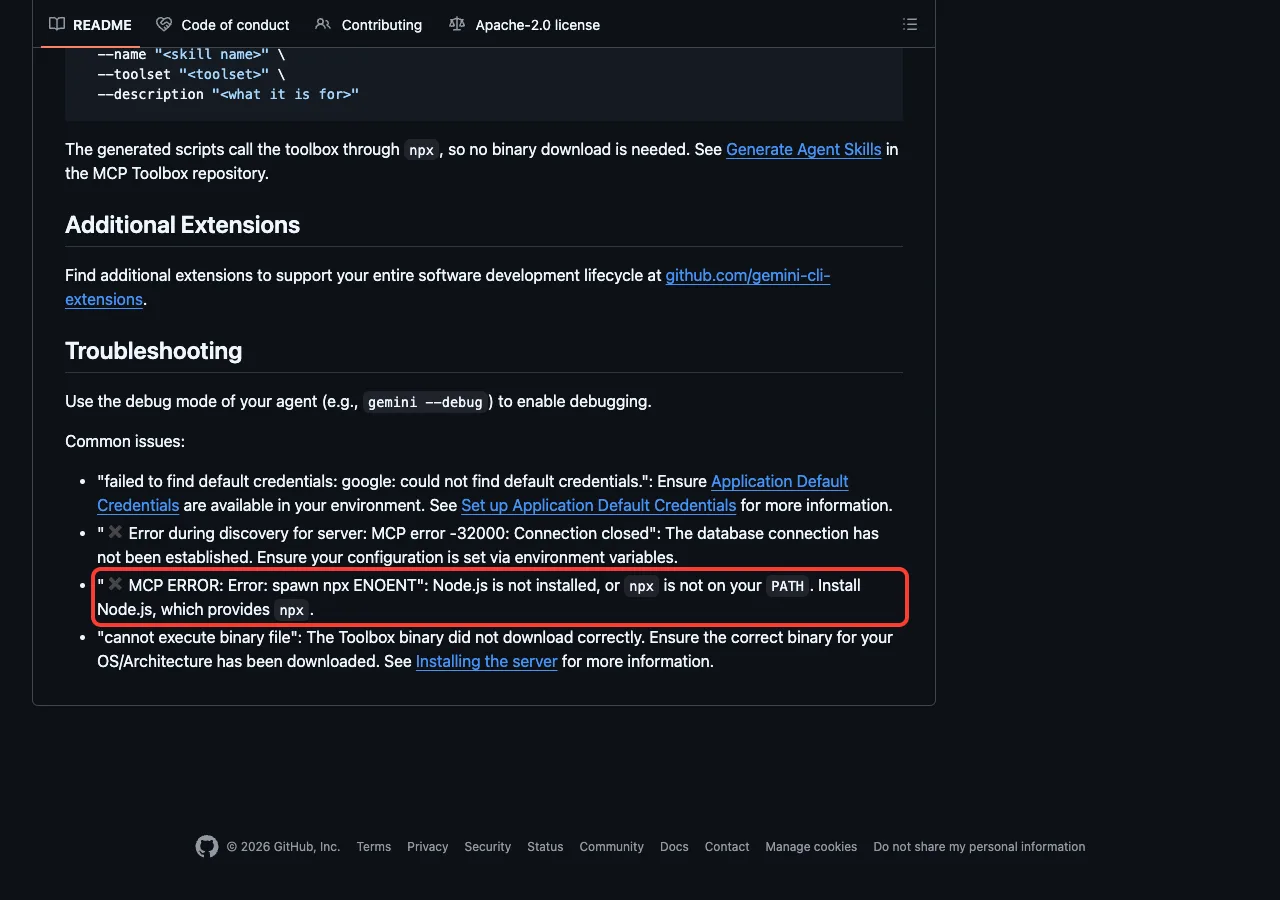
The Spanner README even lists this exact message in its troubleshooting section: “MCP ERROR: Error: spawn npx ENOENT”. Its fix is to install Node.js, which provides npx.
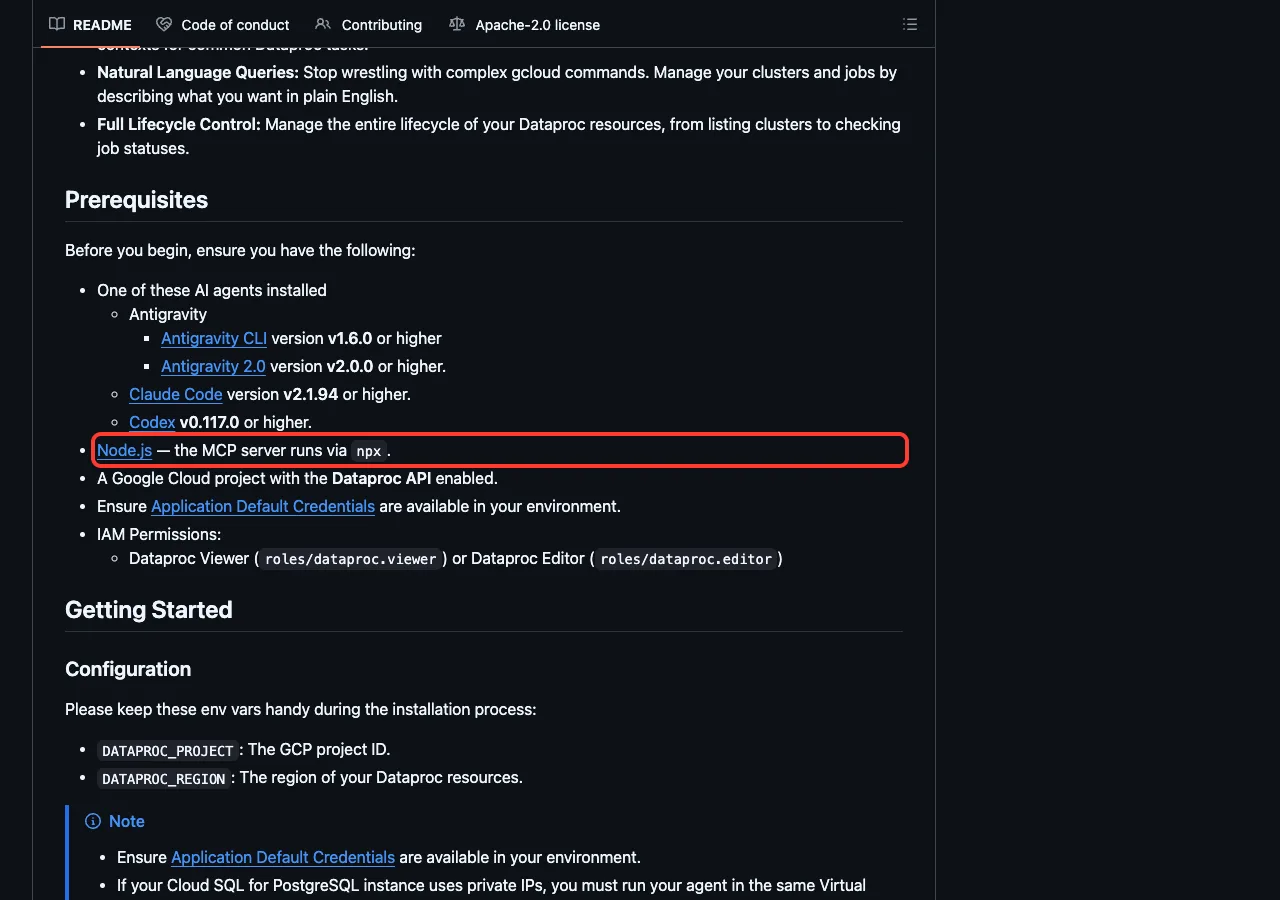
The README of dataproc lists Node.js as a prerequisite too.
The hooks: none in these four
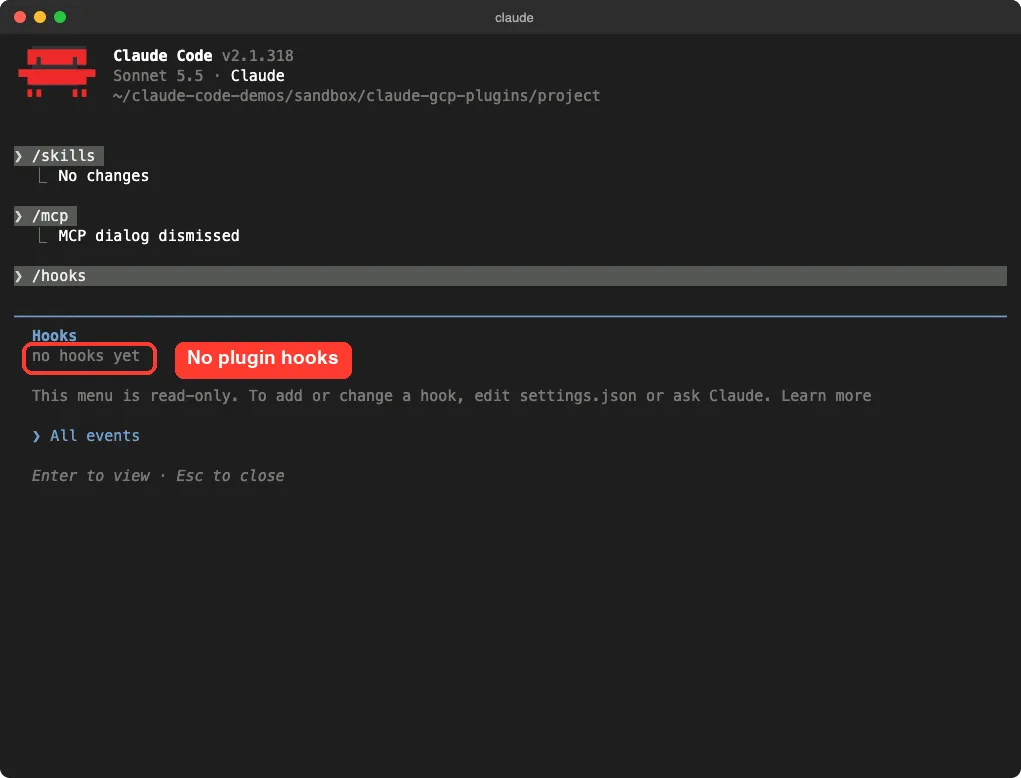
A hook is a command Claude Code runs at a set moment. The /hooks screen said “no hooks yet” for our four plugins, and the plugin files agree, because none of them contains a hooks file. That is a good sign for plain tool plugins.
A quick test of the storage skills
We asked Claude to use only its Google Cloud Storage skill guidance, with no tool calls and no gcloud commands, and to suggest settings for a bucket of public product photos for a small shop. It answered in five bullets. It suggested Standard storage in one region near customers, uniform bucket-level access with IAM only, the object viewer role for public reading, a CDN in front, and the default soft delete plus a lifecycle rule for incomplete uploads.
Be careful with what this proves. Claude said at the start that it was working from the skill descriptions in its context, because it had not loaded the full skill text. So this shows the plugin loads and that Claude gives sensible advice, but we cannot say the full skill guided every line.
It also did not touch a real bucket, since we gave it no account.
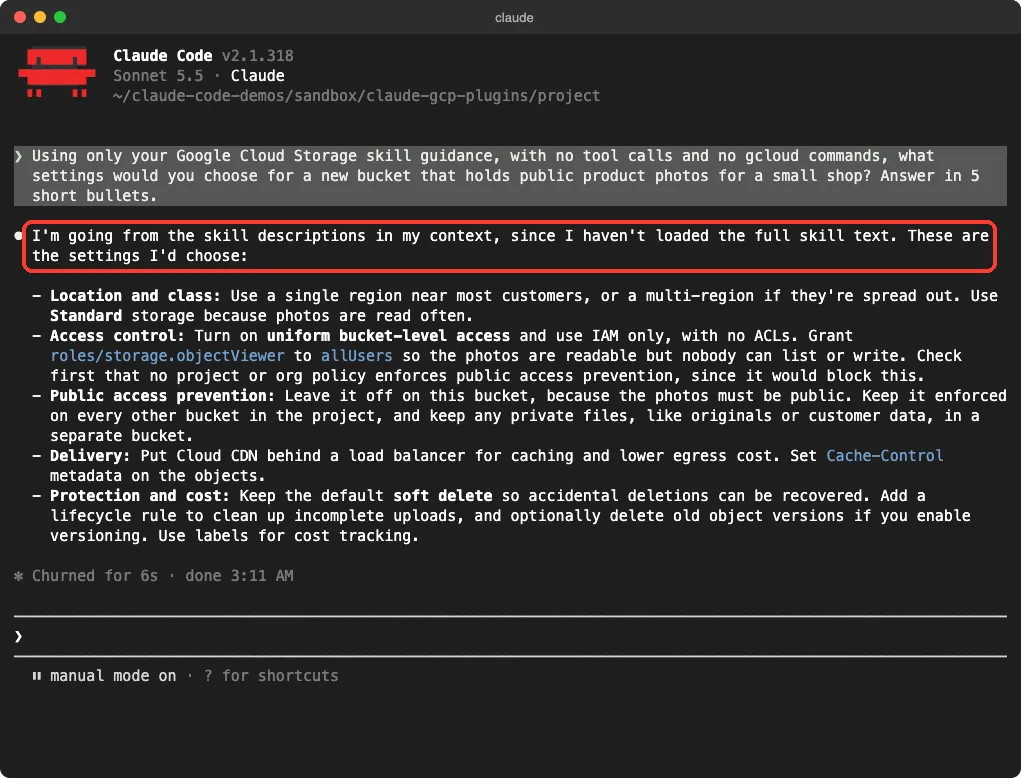
This is one small demo. It does not show how the plugins handle a real Google Cloud project.
What Each Plugin Is Good For
google-cloud-storage
This is the most complete plugin we saw. It ships five skills for bucket basics, bucket design, security assessment, permission errors and FUSE mounts. It also starts a storage server with 14 tools for listing, reading, writing, copying and deleting.
The README warns that five of those tools destroy or overwrite data: delete_bucket, delete_object, move_object, write_object and upload_object. It says your agent must ask for explicit permission first, so keep Claude Code’s approvals on.
bigquery-data-analytics
This plugin connects to Google’s remote BigQuery server at bigquery.googleapis.com/mcp. It has one skill for BigQuery AI and machine learning queries written in standard SQL. Its helper script runs gcloud auth application-default print-access-token, so your login token is sent as a header to that server.
That is normal for this kind of connection. Still, it is worth knowing what the script does before you install it.
The database plugins
The cloud-sql-mysql, cloud-sql-postgresql, cloud-sql-sqlserver, alloydb, spanner and firestore-native plugins all follow one template. The same Google package powers each of them, and each needs a project ID, a region or instance, and a database user. The Cloud SQL READMEs describe tool groups for admin work, such as creating instances and users, so use a read-only role first.
The firestore-native README marks the plugin as beta, with possible breaking changes before version 1.0. If you want database practice first, our REST API tutorial works with no cloud account.
alloydb-omni
This one is different, because AlloyDB Omni runs on your own machine or cluster. It ships two skills, one for containers and one for Kubernetes, and its server connects to a host and port you choose. That makes it the easiest of the database plugins to try without a Google Cloud bill, if you already run an Omni instance.
dataproc, knowledge-catalog and looker
The dataproc plugin manages clusters and jobs, so it needs the Dataproc API and a viewer or editor role. The knowledge-catalog plugin talks to the Dataplex catalog. The looker plugin starts two servers, looker and looker-dev, and needs a Looker URL plus a client ID and secret.
firebase
The firebase plugin sits in Anthropic’s official marketplace repository. Its description says it manages Firestore, authentication, cloud functions, hosting and storage. The folder holds only a plugin file and a server file, with no skills.
The server is started with npx -y firebase-tools@latest mcp. The word latest means the package version can change without you doing anything, which is a reason to review it now and then.
data-agent-kit
This plugin is aimed at data engineers. It ships 37 skills for pipelines, dbt, Spark, BigQuery and Airflow, and 11 servers that reach services such as BigQuery, Spanner and Cloud Storage. Its setup skill asks for gcloud, your credentials, a project ID and a region.
It also has two hooks. One runs a setup sync at session start. The other runs a telemetry script before every tool call.
The README says the kit collects usage statistics, with no code, file contents or data values, and that you can opt out by setting DO_NOT_TRACK=1. Because of those hooks, we did not load it. Read them yourself before you install it.
Safety Notes Before You Install
These plugins can reach cloud accounts that hold real data and real bills, so a little care goes a long way.
- Read each plugin’s manifest and any hooks file before installing. They are short.
- Give your first test a limited IAM role, not an owner role, and a throwaway project.
- Keep approvals on, especially for the delete and write tools.
- Remember that
firebaseuses alatestpackage, while the others pin one version. - Never paste real keys or passwords into a chat.
- Our skills versus plugins guide explains why plugins deserve more scrutiny than single skills.
Our guide to AWS plugins covers the same questions for Amazon’s add-ons.
Try It Yourself
You can practice with no Google Cloud account at all. Make an empty folder, load one plugin in a throwaway session with --plugin-dir, and ask for advice from its skills. Here is a prompt to copy.
Using only your Google Cloud Storage skill guidance, with no tool calls and no gcloud commands, what settings would you choose for a new bucket that holds public product photos for a small shop? Answer in 5 short bullets.Common Mistakes
- Installing every Google Cloud plugin at once, which fills your context for no benefit.
- Forgetting to install Node.js and then wondering why the servers show a red cross.
- Using an owner or admin role for experiments.
- Skipping the Application Default Credentials step, which leads to a “could not find default credentials” error.
- Assuming a plugin with no skills still gives Claude written guidance. Most of the database plugins have tools only.
Pro Tips
- Run
/skills,/mcpand/hooksright after loading a plugin to see exactly what it added. - Try a plugin with
--plugin-dirin a sandbox before installing it for good. - Pick by job: files, SQL, a database, then the bigger kits.
- If a plugin is not found, run
/plugin marketplace update claude-plugins-official. - Check each repository’s last update. Most of the ones we read changed in September, and the BigQuery plugin changed the day before we looked.
Cheat Sheet
Frequently Asked Questions
Is there an official Google Cloud plugin for Claude Code?
Yes. Google publishes many of them, and each one is listed on Anthropic’s official marketplace. The READMEs we read show the install command for Claude Code.
Do the Google Cloud plugins cost anything?
The repositories we read use the Apache 2.0 license, so the plugins are free to install. Using Google Cloud services through them can cost money on your Google Cloud bill, and the plugin skills also use some of your Claude Code usage.
Do I need a Google Cloud account to use them?
You can load them and read their skills without one, as we did. Anything that acts on your cloud project needs a project, credentials and IAM roles. The alloydb-omni plugin needs your own AlloyDB Omni instance instead.
Why do the plugin servers show a red cross?
Usually Node.js is missing, so npx cannot start the server, or your login is not set up. We removed Node.js from the path on purpose, and all four servers failed as expected.
Is there a Firebase plugin for Claude Code?
Yes. The firebase plugin is in Anthropic’s official marketplace repository. Its server starts with npx -y firebase-tools@latest mcp, so Node.js is needed there too.
Conclusion
The Google Cloud plugins for Claude Code are real, current and built on a clear template, but most of them are tool servers that need Node.js, a Google Cloud project and the right IAM roles before they do anything useful. In our sandbox, four plugins loaded eight skills, no hooks, and four servers that failed exactly as the READMEs predict without Node.js or a login. We did not test live Google Cloud actions, Firebase or the data agent kit, so treat those parts as what the files say, not as our results.
Start with google-cloud-storage, bigquery-data-analytics or the plugin for your database, read the hooks first, and browse the Claude tool page and our other Claude Code tutorials for more add-ons.