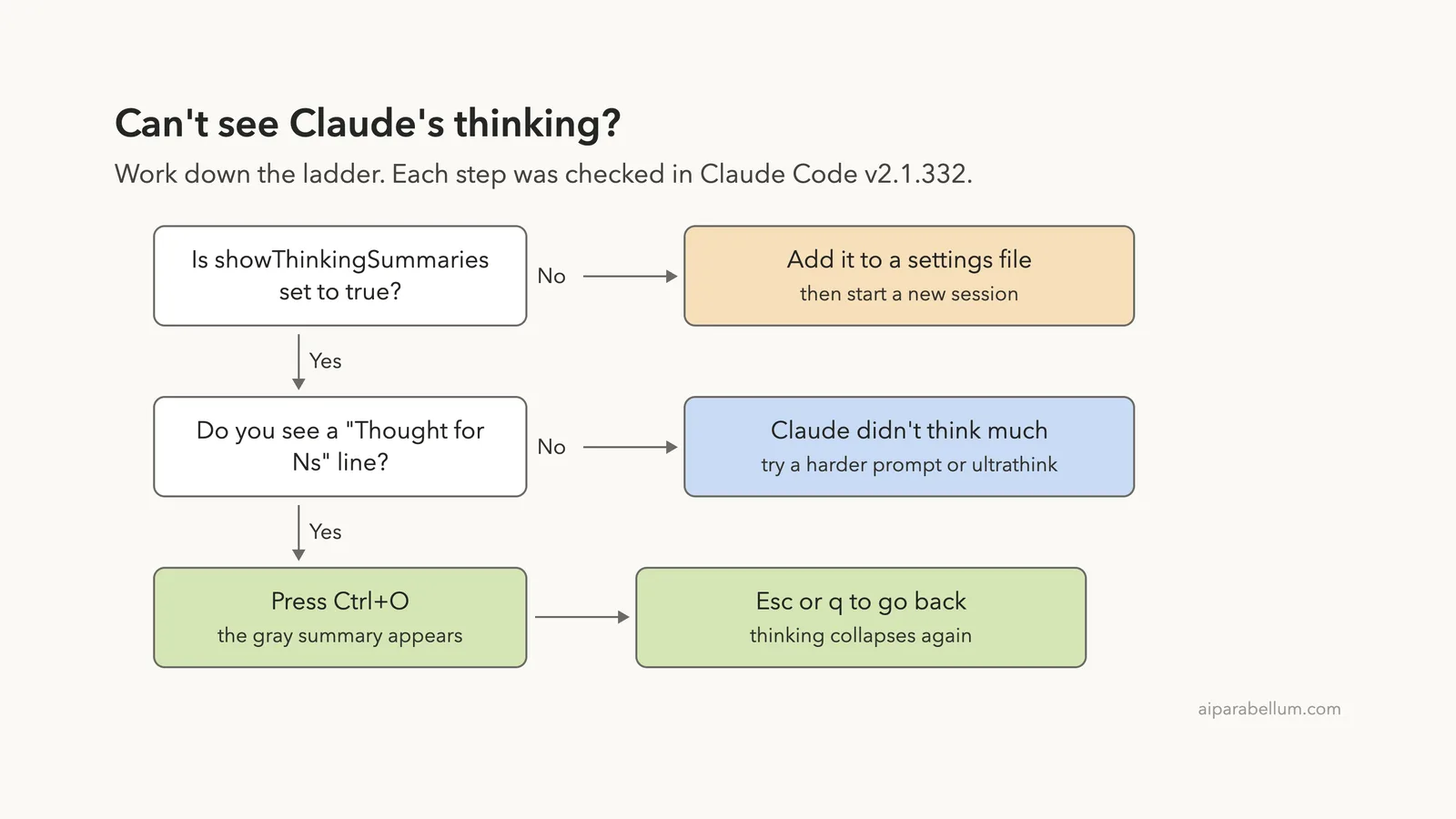
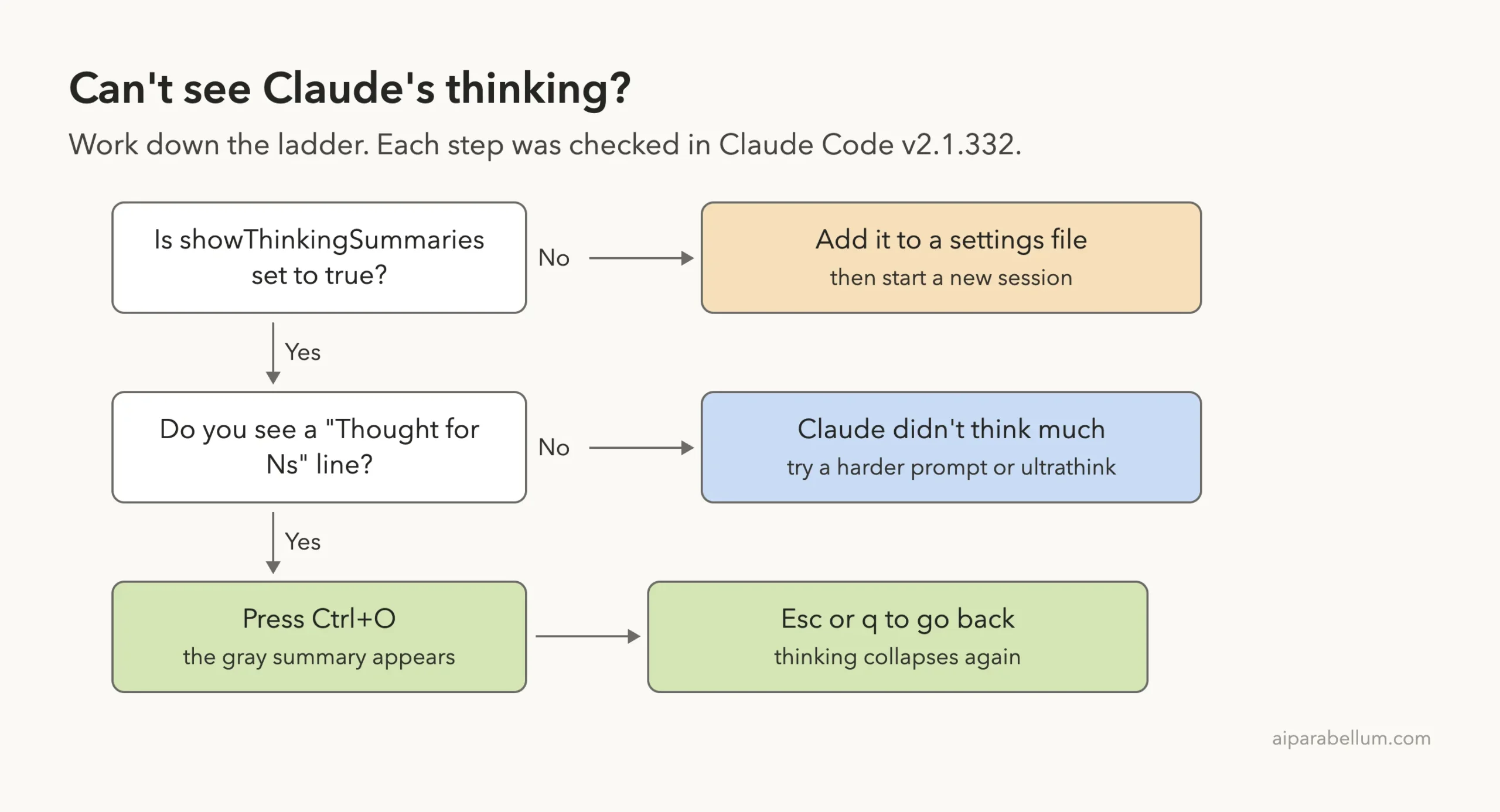
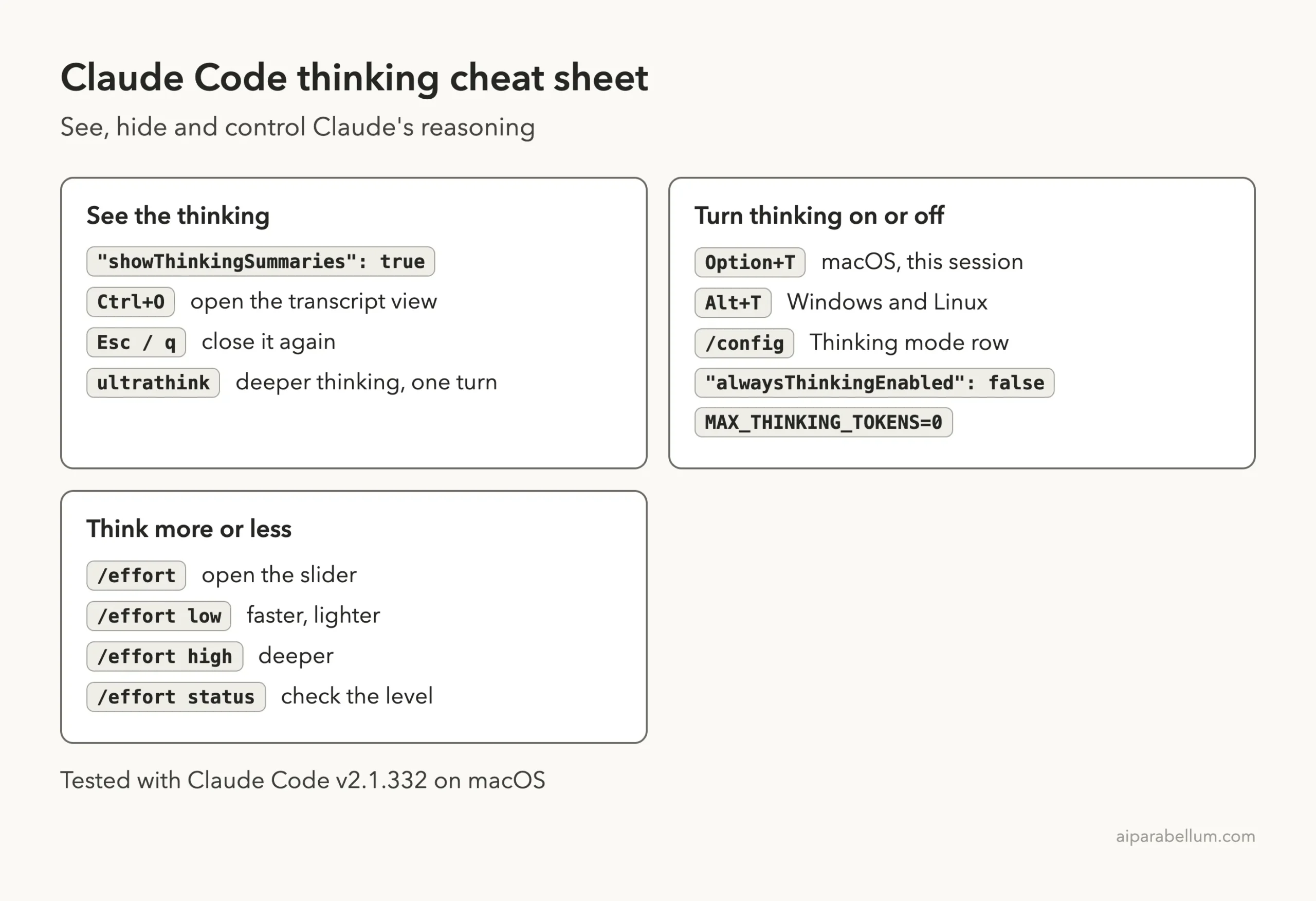
Want Claude Code to show thinking again? Add "showThinkingSummaries": true to a Claude Code settings file, start a new session, and press Ctrl+O after Claude answers. The thinking appears as gray text in the transcript view, and Esc folds it away again.
Without that setting, interactive sessions get redacted thinking from the Anthropic API, so there’s nothing to expand. In our test, the “Thought for 11s” line and the reasoning text only showed up after we turned the setting on.
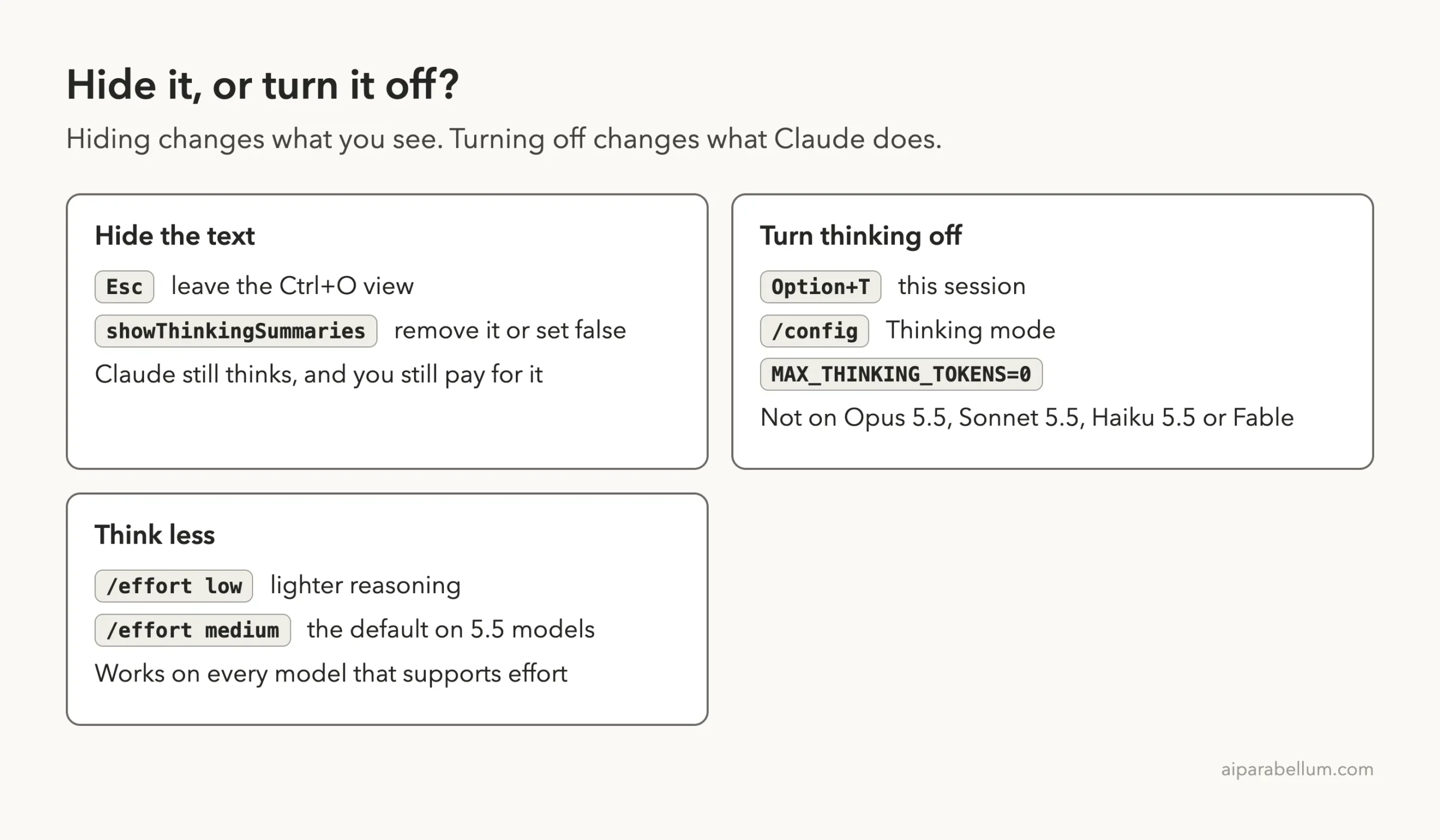
To hide thinking, you have two very different options. You can hide the text (close the view or remove the setting), or turn thinking off with Option+T, /config or MAX_THINKING_TOKENS=0. Turning it off doesn’t work on Opus 5.5, Sonnet 5.5, Haiku 5.5 or the Fable models, which always think.
Browse all our Claude Code tutorials for more fixes and how-tos.
Tested with Claude Code v2.1.332 on macOS on November 26, 2026, using Sonnet 5.5 in a throwaway demo folder. We tested on macOS; the Windows and Linux shortcut follows Anthropic’s official documentation.
Quick Summary
| What you want | What to do | Works on every model? |
|---|---|---|
| See Claude’s thinking | Set showThinkingSummaries to true, then press Ctrl+O | Yes, on the Anthropic API |
| Close the thinking view | Press Esc, q or Ctrl+C in the transcript view | Yes |
| Stop seeing thinking for good | Remove the setting or set it to false | Yes |
| Turn thinking off for this session | Option+T (macOS) or Alt+T (Windows, Linux) | No, not the 5.5 or Fable models |
| Turn thinking off by default | /config thinking mode, or "alwaysThinkingEnabled": false | No, not the 5.5 or Fable models |
| Make Claude think less | /effort low | Any model that supports effort |
Why Claude Code Stopped Showing Thinking
Extended thinking is the reasoning Claude works through before it answers. Claude Code still uses it all the time, but the display has two layers that both hide it by default.
First, Claude Code collapses thinking into a single gray line, so your screen shows the answer and not the scratch work. Second, Anthropic’s settings reference says interactive sessions on the Anthropic API receive redacted thinking blocks unless showThinkingSummaries is on. Redacted means the text never reaches your terminal, so Ctrl+O has nothing to reveal.
That second layer is the usual reason people search “Claude Code not showing thinking anymore.” The shortcut still works; there’s simply no thinking text to show until you opt in.
The symptom in a real session
We made a demo folder called party-planner with a small seating puzzle in puzzle5.txt. Then we asked Sonnet 5.5 to solve it with ultrathink in the prompt, so we knew it would reason hard. The settings file was switched off for this first run.
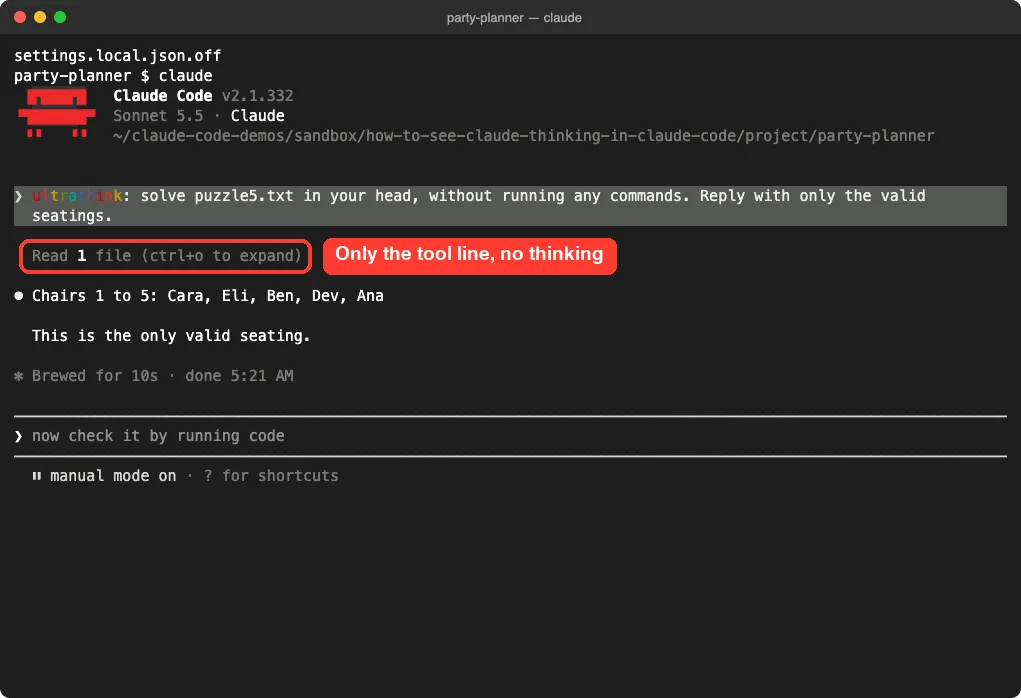
Claude answered correctly in about 10 seconds. The collapsed line said only “Read 1 file (ctrl+o to expand),” with no hint that any thinking happened.
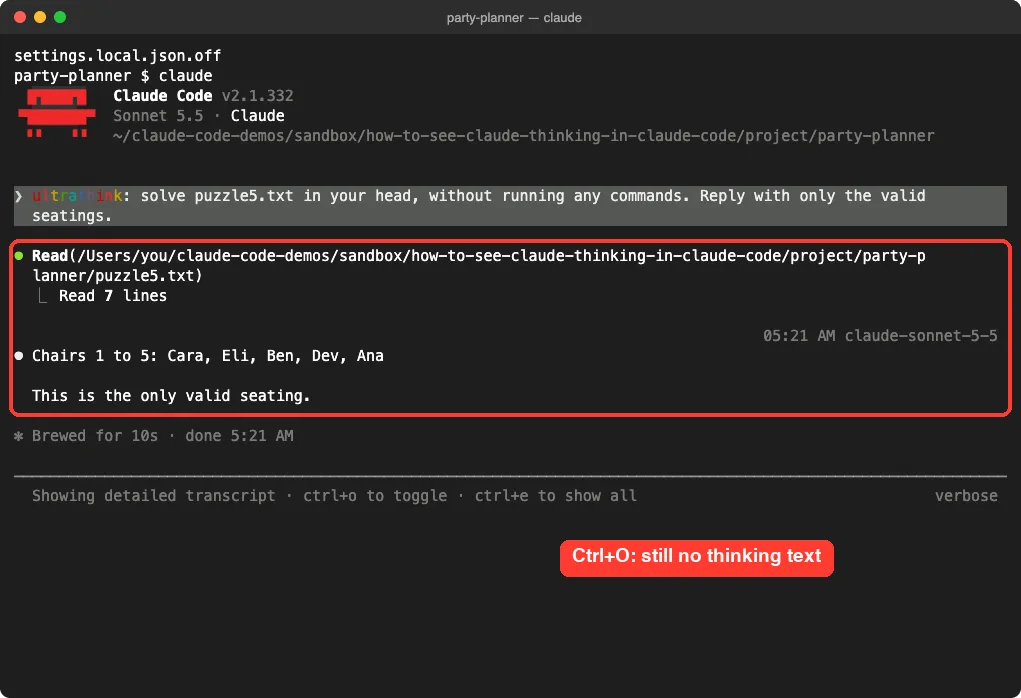
Pressing Ctrl+O opened the detailed transcript. It showed the file path, line count, time and model name, claude-sonnet-5-5, but not a single line of thinking.
Anthropic’s docs describe a collapsed stub here; in our session on v2.1.332 there was no stub at all.
If Ctrl+O shows tool details but no reasoning, the shortcut isn’t broken. The thinking text just never arrived.
How to See Claude’s Thinking in Claude Code
The fix takes one setting and one shortcut. Here are the steps we used.
- Pick a settings file. Use
~/.claude/settings.jsonfor every project,.claude/settings.jsonto share with your team, or.claude/settings.local.jsonfor just you in one project. - Add the key
showThinkingSummarieswith the valuetrue, as shown below. - Save the file and start a new session with
claude. - Ask something that needs real reasoning. Simple prompts may get little or no thinking.
- When the answer arrives, look for a “Thought for” line, then press
Ctrl+O.
{
  "showThinkingSummaries": true
}
If the file already has other settings, add the key inside the same braces with a comma after the line before it. Our guide to finding settings.json shows where each file lives, and our settings examples show how keys sit together.
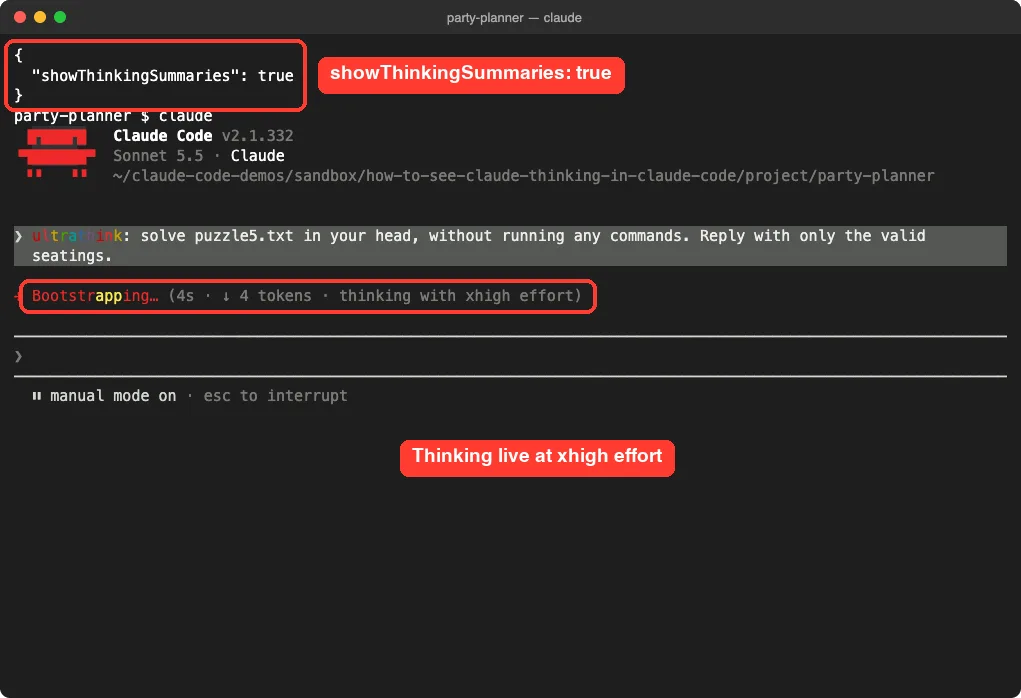
While Claude worked, the spinner line read “thinking with xhigh effort.” That came from the ultrathink keyword, which asks for deeper reasoning on one turn. Our ultrathink effort guide covers that keyword in detail.
What the collapsed view looks like now
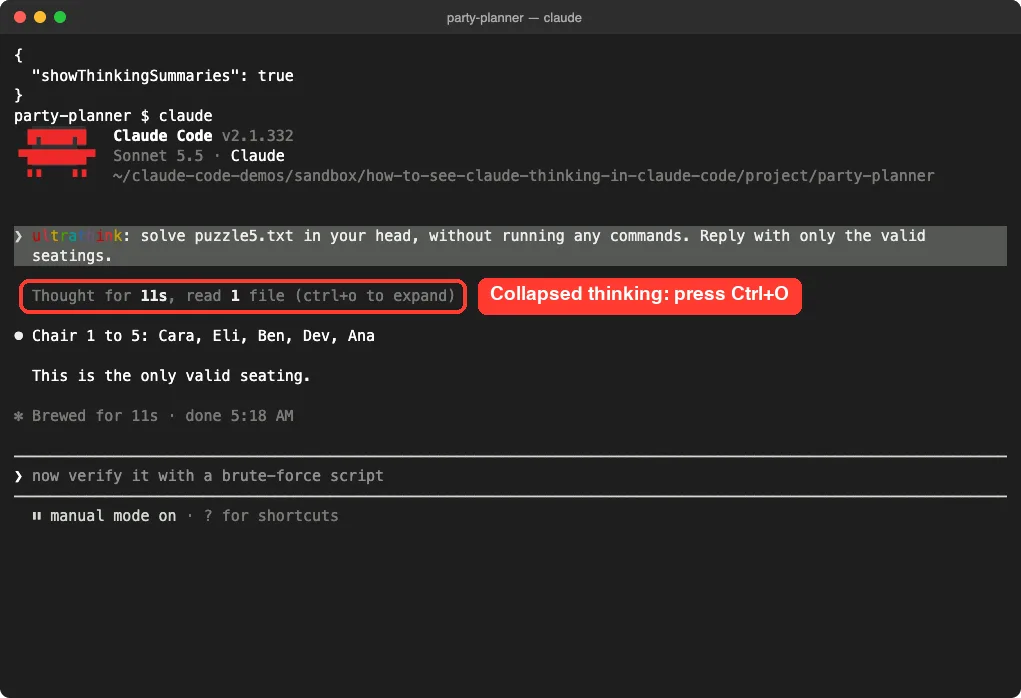
Same puzzle, same model, same effort. This time the collapsed line said “Thought for 11s, read 1 file (ctrl+o to expand).” That “Thought for” text is your quick sign that summaries are on and ready.
Open the thinking with Ctrl+O
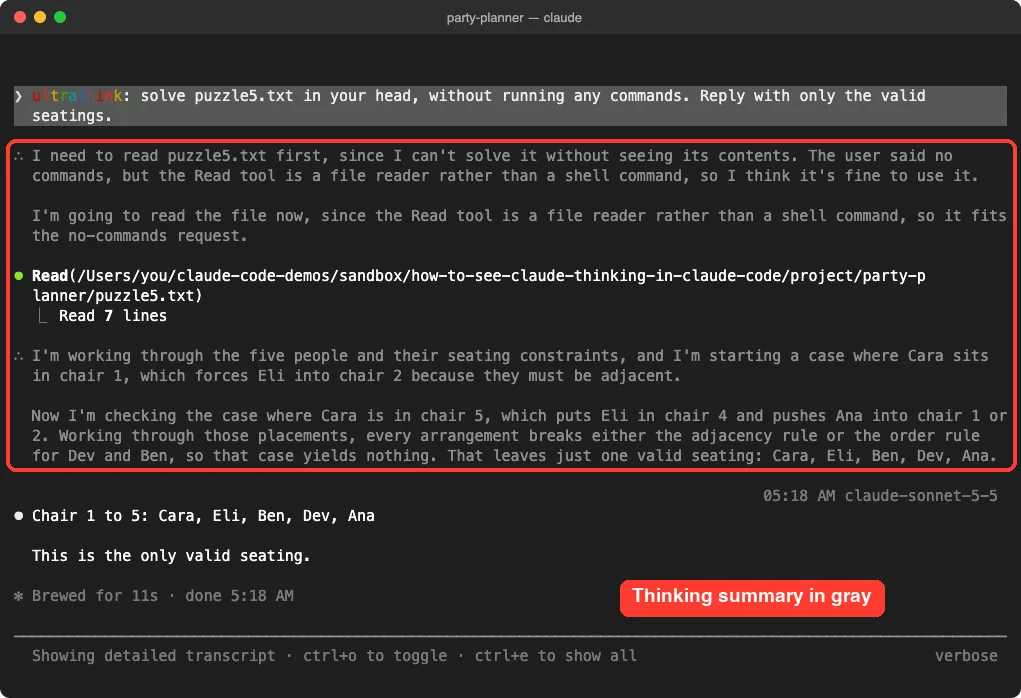
Now the transcript view showed two blocks of gray text, each marked with a small three-dot symbol. The first explained why Claude read the file even though we said “no commands.” The second walked through the cases: Cara in chair 1, then Cara in chair 5, until one seating was left.
That’s exactly what makes thinking useful. You can see why Claude chose an action, not just what it did. Press Esc, q or Ctrl+C to leave the view.
Summaries, not raw thoughts
The setting’s name is accurate: you get summaries of Claude’s thinking. The text reads like a short narration (“I’m working through the five people…”), not a full raw dump. It’s enough to follow the logic and spot where Claude went wrong.
How to Hide Claude’s Thinking
“Hide it” can mean two things, and mixing them up costs people time and money. One changes what you see; the other changes what Claude does.
Hide the text but keep the thinking
Thinking is already collapsed by default, so most of the time it’s out of your way. To close the transcript view, press Esc. To stop receiving summaries at all, delete the showThinkingSummaries line or set it to false, then start a new session.
Anthropic’s settings reference is clear that redaction changes only what you see, not what the model generates. The model-config page adds that you’re charged for all thinking tokens, even when they’re collapsed or redacted. Hiding the text saves screen space, not money.
Turn thinking off for this session with Option+T
Press Option+T on macOS or Alt+T on Windows and Linux to toggle extended thinking. The docs note it works on macOS without setting Option as Meta in your terminal.
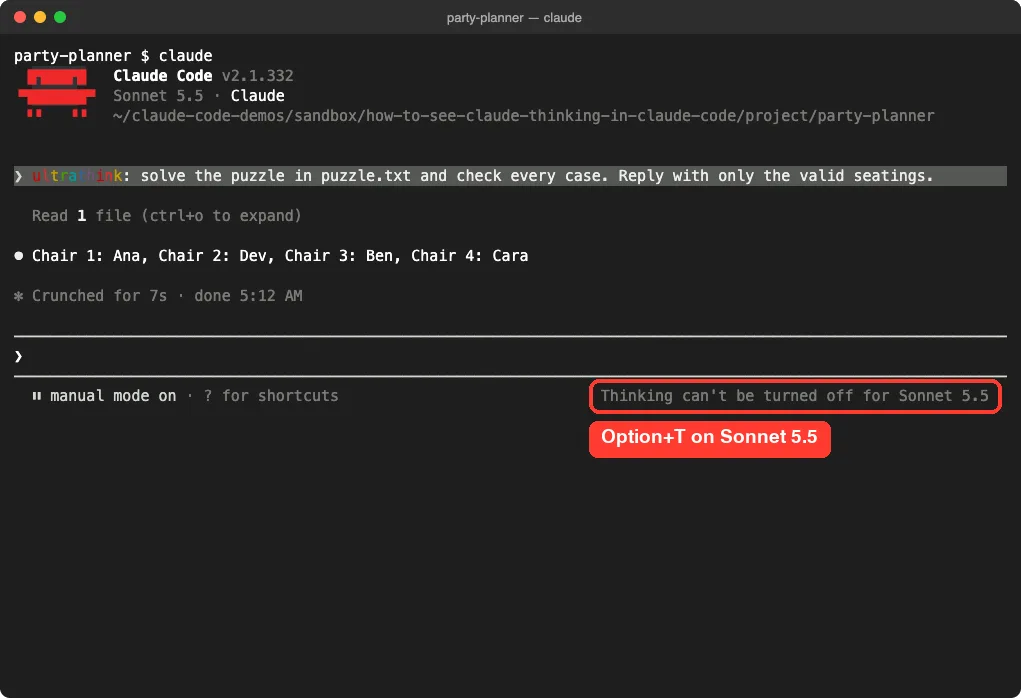
On our Sonnet 5.5 session, the toggle answered with “Thinking can’t be turned off for Sonnet 5.5” in the footer. That matches the docs: Opus 5.5, Sonnet 5.5, Haiku 5.5 and the Fable models always use extended thinking.
Turn thinking off by default with /config
Run /config, type thinking to filter the list, and toggle Thinking mode. Claude Code saves your choice as alwaysThinkingEnabled in ~/.claude/settings.json.
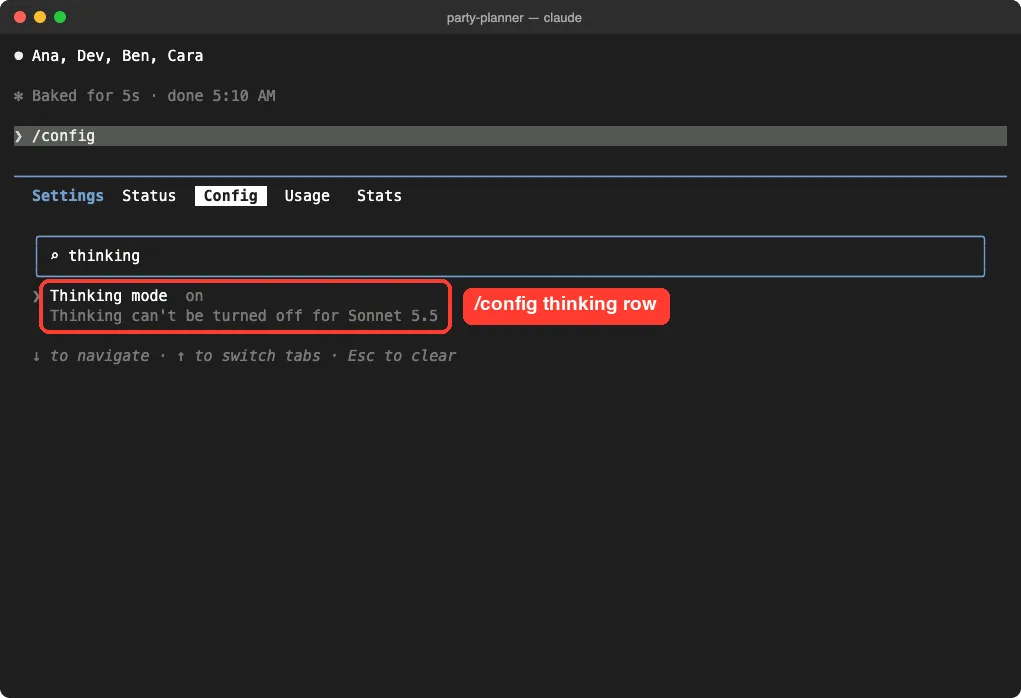
You can also write the key yourself:
{
  "alwaysThinkingEnabled": false
}
For a single session, the environment variable MAX_THINKING_TOKENS takes priority over that key. Setting it to 0 turns thinking off on the Anthropic API, with the same model limits:
MAX_THINKING_TOKENS=0 claudeWhen you really want no thinking
Anthropic’s docs say you can turn thinking off on models such as claude-opus-5, claude-sonnet-5 and claude-haiku-4-5. Aliases like sonnet pick models where you can’t, so set the model by its full ID, such as claude-sonnet-5. Your saved off setting applies again whenever you switch to a model that accepts it.
On third-party providers such as Amazon Bedrock and Microsoft Foundry, the docs say adaptive models may still think with thinking off. There, lower the effort level instead.
Make Claude think less instead
On newer models, effort is the main dial for how much thinking happens. Run /effort to open the slider, /effort low for quick tasks, or /effort status to check the current level. Fable 5.2, Opus 5.5, Sonnet 5.5 and Haiku 5.5 default to medium.
Ctrl+O, Verbose Mode and Other Settings That Get Confused
Several settings sound like they control thinking but don’t. This table sorts them out, based on Anthropic’s docs and our session.
| Setting or key | What it really does | Shows thinking? |
|---|---|---|
Ctrl+O | Opens the transcript viewer with tool details, timestamps and model names | Only if summaries are on |
showThinkingSummaries | Asks for thinking summaries instead of redacted blocks | Yes, inside Ctrl+O |
verbose or --verbose | Shows full tool input and output instead of short summaries | No, it’s about tool output |
viewMode | Starts sessions in default, verbose or focus view | No |
Ctrl+E | Shows all content in the transcript view (classic renderer) | No new thinking in our test |
alwaysThinkingEnabled | Turns thinking off when set to false, on models that allow it | No |
In our session, Ctrl+E switched its label from “show all” to “collapse” but added no extra reasoning. Summaries were the only thing that made thinking appear.
Real Examples of Reading Claude’s Thinking
Here’s where seeing the reasoning actually helps in daily work.
- Odd tool choices: our demo thinking explained why Claude read a file after we said “no commands.” It decided the Read tool wasn’t a shell command.
- Wrong answers: if Claude misses a rule, the summary often shows which case it skipped, so your follow-up prompt can point right at it.
- Slow turns: if a session sits on a spinner, the thinking tells you whether Claude is stuck or just working through a hard problem. Our guide for when Claude is stuck on thinking covers the stuck case.
- Effort tuning: if summaries for easy tasks are long and wandering, try
/effort lowand compare.
Try It Yourself
Make a throwaway folder, add a puzzle file and a local settings file, and compare a run with summaries off and on. Here’s a puzzle file you can paste:
Seating puzzle (5 chairs in a row, numbered 1 to 5):
- Ana won't sit next to Ben or Eli.
- Cara sits in an end chair (1 or 5).
- Dev sits somewhere to the right of Ben.
- Eli is not in chair 3, and Eli sits next to Cara.
- Ben is not in chair 1.
Find every valid seating.
Save it as puzzle5.txt, then send this prompt in Claude Code:
ultrathink: solve puzzle5.txt in your head, without running any commands. Reply with only the valid seatings.Press Ctrl+O after each run. With summaries off you’ll see only the tool call; with them on you’ll see the case-by-case reasoning. The only valid answer is Cara, Eli, Ben, Dev, Ana.
Common Mistakes
- Editing settings mid-session and expecting the change right away. We started a fresh session after each change, and that’s the safe habit.
- Putting the key in the wrong file. A key in a project’s
.claude/settings.local.jsononly applies in that project. - Breaking the JSON. A missing comma between keys stops the file from loading.
- Expecting
--verboseto show thinking. It expands tool output, not reasoning. - Thinking hidden means free. You pay for thinking tokens whether you read them or not.
- Pressing
Option+Ton a 5.5 or Fable model and assuming thinking stopped. Check the footer message.
Pro Tips
- Use the “Thought for” line as a quick health check: if it’s missing on a hard prompt, your setting isn’t loading.
- Put
showThinkingSummariesin~/.claude/settings.jsonif you always want it, or in a local project file if you only need it while debugging. - The transcript view also shows the model name on each answer, which is handy after a model switch.
- Pair summaries with
/effort statusto see how the effort level changes Claude’s reasoning. - Our Claude Code shortcuts list covers more keys like
Ctrl+O. - If you see a thinking-related API error rather than missing text, check our thinking block fix and the list of common Claude errors.
Claude Code Thinking Cheat Sheet
Frequently Asked Questions
Why doesn’t Ctrl+O show Claude’s thinking anymore?
Without showThinkingSummaries set to true, interactive sessions on the Anthropic API receive redacted thinking, so there’s nothing to expand. Add the setting and start a new session.
Does hiding thinking make Claude Code cheaper?
No. Anthropic says you’re charged for all thinking tokens, even when collapsed or redacted. To spend less, lower the effort or turn thinking off on a model that allows it.
Why won’t Option+T turn thinking off?
Opus 5.5, Sonnet 5.5, Haiku 5.5 and the Fable models always think. Claude Code shows “Thinking can’t be turned off” for them, as it did in our Sonnet 5.5 test.
Is the thinking I see the full raw reasoning?
No. The setting gives you summaries of Claude’s thinking. They’re detailed enough to follow each step, but they read as short narration.
Does this work on Windows and Linux?
Yes. The setting and Ctrl+O are the same, and the thinking toggle is Alt+T instead of Option+T. We tested on macOS.
Conclusion
If you want Claude Code to show thinking again, add "showThinkingSummaries": true to a settings file, start a new session, look for the “Thought for” line and press Ctrl+O to read the gray summaries; to hide them, close the view or drop the setting, and remember that turning thinking off with Option+T, /config or MAX_THINKING_TOKENS=0 is a separate step that the 5.5 and Fable models ignore. For the full details, read Anthropic’s model configuration guide, the settings reference and the interactive mode shortcuts, and visit our Claude AI page for more on Claude.